|
Audio Asylum Thread Printer Get a view of an entire thread on one page |
For Sale Ads |
|
|
Audio Asylum Thread Printer Get a view of an entire thread on one page |
For Sale Ads |
198.54.202.234
cMP The open source high-end Memory Player December 2007 Music delivery is perfected. cMP (cics Memory Player) delivers memory playback (without RAMDisk or other utilities) thereby eliminating disk interference during playback.
In creating cMP, its critical objective was the implementation of fundamental designs that:
- Remove disk traffic interference during playback without having the inconvenience of manually loading files into a virtual RAM drive, etc..
- Ensure time critical sample delivery to the external DAC. Streaming of samples from precision upsampled (to 24/96) sound buffers to the soundcard must be fast, lean and mean! There's no room for any bottlenecks or overheads here, otherwise we risk increasing jitter and compromise Bit Transparency.
- Provide better power supply and remove the need for a ferrite core on the mouse connection.
- Provide flexibility to choose any player (Foobar2000, Winamp etc.).
- Further minimize the Windows footprint to that more optimal than XP's Embedded SP2 operating system as used in large scale commercial applications. This provides the foundation for the 2nd design goal.
- Offer a CD/DVD-ROM drive without impacting sound quality.
- Offer proper remote usability as locating that mouse cursor from a distance is cumbersome.
- Contain costs but also allow for a complete elegant one box solution.
Such designs in theory should render a stunning sonic experience. Its implementation however was a massive challenge. Did this theory meet the sonic expectations? Yes as evidenced in cMP's bit perfect performance and ultra low jitter.
How does it sound? The most descriptive word that comes to mind is emotional. cMP's sonic purity is truly profound. It grips those musical lines across any genre with remarkable precision. Soundstage improves, there's better layering and even more ambient information. Bass is tighter, with natural vocals & instruments.
FRONT
BACK
More pictures and screenshots are available from the cMP documentation link provided below.
FEEDBACK
Pre-release testing by music lovers located all over the world yielded further insight and perfection of cMP.
- A music lover based in the US with limited or no computer training:
This has been a great way to learn about computers in addition to making something very useful for enjoying music.
Compared to my ###### (read expensive high-end traditional CD transport), even with some tweaking and learning left to do, this sounds much better. Dynamic, yet relaxed (effortless?).
I started listening last night at 7:00 and had to force myself to go to bed at twelve. Amazing spaciousness. It is truly getting close to GREAT analog and is much better than average analog already. It is simply amazing.
I found your instructions easy to follow ONCE I understood what I was being told to do. To repeat, I have never done anything like this before, so your instructions were clear without resorting to "hand holding". I think the process was easier than you warned. I kept saying to myself, "that wasn't so bad!"
After cMP:
My only audio friends are very analogue-centric. Sometime in January I am going to have them over to audition the cMP. I think they are going to be amazed. Of course, I am confident that JULI@ is going to be the icing on the cake. If this takes the whole thing another step closer I think they will be grateful that one can enjoy listening to CD's as much as LP's. Of course, in many ways your approach does things even LP's cannot do. It is becoming a toss-up, but the best kind; one can enjoy either one equally well!
- A music lover based in Europe with more than 2000 CDs:
the quality of sound reproduction is quite amazing. My motivation for building was that I am not wealthy and could never dream of, let alone buy, a high-end CD player. Even this project was considerably more than I could properly afford and I began it with some trepidation. But it's been well worth it.
After cMP:
I spent several hours last night testing the latest cMP. I did several A/B runs with cMP on the one hand and Foobar launched via old batch files and reading direct from disk on the other. There is no doubt in my mind that the sound using cMP is a significant improvement even with my modest setup.
The quality is quite stunning, significantly better than previous. (My partner agrees with this - she's no audio junkie but she is an informed music lover.)
- A music lover based in Australia:
I have been wanting to relay to you my own experience with your methods and give you some feedback . So far, I have found your approach produces very good results so I must convey to you my thanks and appreciation. At some point soon I will formalise my thoughts and send them to you or post them. I believe what you have done has become an excellent resource/asset to people interested in PC Audio.
FEATURES
- Disk traffic interference during playback is eliminated. Advanced RAM playback is based on available physical RAM (as reported by Task Manager or Process Explorer). This means up to 4GB (XP's limit) can be used allowing for 24/192 RAM playback. Recommendation is to use 1GB RAM (which yields available physical RAM of ~830MB - enough for any CD at 16/44.1). cMP achieves memory playback via the system cache and not through a simulated virtual drive. This approach removes Windows disk I/O overheads (irrespective of whether disk is physical or virtual) hence, it's more optimal.
- Extensive Windows & Player (Foobar2000 or other) optimizations yielding much lower jitter and bit perfect delivery. System level optimizations are done at runtime (which cannot be achieved using .bat files and utilities like Process Explorer). cMP is designed to work with 32 CPU cores!
- Open architecture. cMP allows for any player to be used: Foobar2000, XXHighEnd, Winamp etc. (player just needs to handle .cue files like foobar2000 otherwise play entire .wav). Any ripper software can be used (as long as it conforms to .cue single file standard like those created by EAC). Additional flexibility is provided, for example use cMP to drive your HTPC playing any movie from any genre (a .cue file for each .iso file is needed).
- All .cue files are processed by cMP which means the player focuses only on playing the CD. In Foobar2000, the album list control component is not needed. In techno speak this is called separation of concerns.
- Power delivery to the mobo is improved by further reducing interference. The need for a ferrite core is removed.
- Full function remote control using a wireless mouse is achieved. Your entire library can be navigated: play any CD, eject it, jump to any track or change volume. This is achieved using just ONE mouse button: the Wheel! Use the mouse as a normal one (left-click) or hold it in your hand (like a remote control) and wheel away using your thumb. Of course other buttons are used for more convenience. There's no need to find that tiny mouse cursor and left click! (You can still do this if needed).
- Your entire library that you so diligently ripped is fully compatible with cMP. No proprietary / lock-in stuff here which forces you to re-rip. Just point cMP to your music folders containing .cue and .wav files (or flac or other). cMP supports any content file as long as cue files are defined for them. For flac content files, the known EAC bug of adding an additional .flac suffix to the content file's name must be removed (otherwise your cue's content file directive will not be found).
- CD/DVD-ROM drive is implemented without compromising playback quality. For the purist, this can be unplugged without opening computer or rebooting.
Bottom line: cMP is a (one box) highly advanced memory player that's easy to setup and use. cMP's core strength lies in newly developed operating system software components (built in c/c++) that uses XP SP 2 as a foundation. Windows Explorer is done away with while cMP takes over and more. Bit perfect delivery is achieved yielding an ultra high resolution of more than 23.5 bits (a limitation in measuring instruments prevents measuring cMP's perfect resolution). DAC's have yet to achieve this resolution (as a minimum of 141db SNR is needed)! For cMP's bit perfect measurements, see (Bit Perfect Measurement & Analysis ).
GETTING STARTEDVisit cicsMemoryPlayer.com where you'll find detailed easy to follow instructions and much more.
Ensuring clean AC power delivery to equipment is very important. For DAC, pre-amp and amplifiers, use a dedicated AC circuit. For source equipment, use another AC circuit as this is where cMP's main PSU should be powered from. Use another less important AC circuit for powering cMP's 2nd dirty power inlet. Use of quality power cords and line conditioners is recommended.
Special thanks to those that provided such brilliant feedback and suggestions during pre-release testing. cMP's software is at version 1.0b as more feedback is desired. Your input, insights, criticisms, experiences and suggestions all help.Thank you.
Edits: 03/20/10Follow Ups:
Just got back a bit into audio and i fortunately have a cmp2 box that i assembled years ago and it works!
Though it gets hung up in cmp mode. It wont revert to xp at all. I select that option, reboot and it hangs. Then after 10 min of a white screen i cut power and it auto boots to cmp mode.
Any thoughts? Also should i set cmp memory load to NO??
Anyhow big hats off to cics and his hard work and keeping his site up and running.
Thanks man!!!
Cutting razor sounding violins
Hello,
Is there anyone who has all the cics MP2 Memory player information available?
I have printed everything years ago and built one, but lost the copies and I can not find the information on line anymore , like the manual(s).
My player has been stored for a while and I like to get it up and running again, for me, or for a friend.
The website seems to have replaced and that site does not have the manual available.
I am playing from a normal laptop right now, which sounds a great deal better than the CD player I had and I want to hear the difference and then give it top another audio lover.
Any help will be greatly appreciated!!
Sincerely,
Gaston
I can be contacted by email: dcd_gaston@hotmail.com
Try this link:
http://cicsmemoryplayer.com/index.php?n=Main.HomePage
Cut to razor sounding violins
If you havent try the email on the website.
Cutting razor sounding violins
I solved it. I had a 2nd drive and it was farter along i guess in the cmp2 build and disnt suffer any of those issues. It also had Lynx drivers so i switched to the lynx! Sojnds much better than my m-audio card feeding the Birdland odeon ag dac. Probslably more a comment on the m-audio card than anything
Cics if you want to update things with current mobos and chips that would rock but i bet you are just listening to music!
Anyhow thanks again and this cmp2 box rocks!
Cutting razor sounding violins
Sorry I wasn't around to help you at the time. Glad to see you around.I still use cMP2 as the base for my PC music playback. Had to drop cPlay when I went to DSD but cMP is doing wonders for the improved Foobar 2k, and even JRiver.
It still pains me that you left and never took the MMGs to where they could because you were on the right path. My sibling pair, bi-amped and using Parasound MOSFET power amps with a class-A DAC, would have kept feeling the kinship strongly if your MMG's and two Halo A21 had stayed.
But, cMP2 and your new cans will also do great. Enjoy!
Edits: 12/11/17
Does cplay cMP’s software run on win 8.1?
I cannot run my cMP’s on my win 8.1 laptop. error message:"Process:
Explorer exe terminated. ERROR: unable to get access priviledge.
How to get through this? Please help. Thanks.
Night Fung
Dave,
oh I see. thanks!
I cannot run my cMP's on my win 8.1 laptop . . .
cMP.exe is a replacement for Win XP's shell and, as such, won't run on later versions of Windows : <( though AFAIK cPlay.exe does.
HTH
Dave
Actually, it runs just fine on Win 7, been using it for some time. Wondered about Win 8/8.1, not surprised it doesn't work there.
I have a "classical" cMP BIOS + software setting.
Now I am having trouble adding a second SATA hard drive. The slimmed Windows version does not seem to recognize it.
Hope I do not have to rebuild the whole system...
Any suggestions ?
Hope I do not have to rebuild the whole system...Any suggestions ?Phew. This thread is still active (just) even though it's now seven years old - is that something of a record?
You shouldn't have to rebuild. First, I'd try temporarily re-enabling relevant services such as Logical Disk Manager.
Second, I successfully added a third network drive to an ultra-slim XP system by manually editing the Registry after a bit of searching for this and that. I also managed to replace the system drive by installing the new drive on a different computer and exporting its Registry entry. That gave me the correct syntax for editing the relevant entry on the cMP2 machine.
IOW, you need to footle around a bit but my experience suggests that you'll get there before long. Needless to say, you MUST make an imagefile of your cMP2's system partition before touching anything - but I'm sure you knew that.
HTH
Dave
Edits: 10/20/14
Hi Dave,
Thanks a lot for the ideas ! I did not think about exporting the registry entry.
7 yrs,,,, Yes, it might well be a record.
And, SURE, I have plenty of imagefiles :))

Hello guys (and girls of course)
i'll introduce myself shortly... i'm matthieu, student and new in this world. we'll i'm now here as i got (thankfully) persuaded by a friend to turn an old (slightly less compatible) system into an music player.
so i started: and beside some minor hick-ups things work fine.
my system:
mainboard: ASRock P4-dual GL915
CPU: intel celeron 2.80 GHZ (single core, single thread)
mem: 2 GB RAM DDR (PC3200-400mhz)
onboard vga: GL910 / 915
soundcard internal PCI: soundblaster live, value
unfortunately does my mainboard doesn't allow me to make much changes (couldn't even lower my cpu multiplier or make mem modifications) besides some real minor ones.I used a old (thought high quality psu) that i took apart, took all the additional antenna wires not needed out an have it running like that uncooled.
as i couldn't get my cpu multipliers down i couldn't take the cpu fan of, so that is still spinning but i did find a nice ssd of 120 GB, enough for now. it is all sitting (unprotected) on an 18mm MDF board and will soon be encapsulated by a aluminium perforated sheet box, and all parts in separate compartments.
i used this system none the less to get started, as budget is REALLY tight i can't go around and by stuff needed so i have to search 2e hand which is not always readily available
anyway, non the less i got things working.
that is besides cMP, it well starts up, but as soon as i tell it to start playing it crashed with the notification. 'player excited' cPLAY works fine on its own.
i tried all (first the more logic, than the less) setting, but nothing worked.
is my issue mainboard settings related or is there something else i'm over looking. we'll i hope someone can help.
none the less i'm really happy, as i finally got some proper sound in my room. Although i can only listen through a headset :(, but i hope to get my hands on a t-amp or equivalent pretty soon. and than hopefully some nice speakers.
it will be a slow proces... but at least i got started.. which took me about 2 years i think.
thanks in advance...
Matthieu
ps: hope this site will be back up soon... grrh why hack a site like this :(
Hi,
A few hints here and there to troubleshoot.
You said cPlay is working, so I suppose it works in Windows Mode (before entering cMP), therefore you're 100% cPlay is using ASIO.
From your Diagnostics it seems that your card is not even initialized.
In cMP Settings have you tried "Critical" under Optimize? You seem to have it on "Player".
In Suspend try different settings.
Is RAM Load on "No"?
Control your settings in C:\Program Files\cics Memory Player\cicsMemoryPlayer.pth that they actually point to real directories on your disk. Sometimes using foreign versions of XP this matter is overlooked.
Good luck!
We have and Italian cMP2 site on nexthardware.com if it may interest you.
thanks Bibo01(A),
this last point did it, for some silly reason, things went wrong during installation and my windows drive ended up being the d/: instead of c/: so when i read your comment i immediately thought, ah that has got to be it, just got a chance to check it and indeed..
works fine now :D
well at least cMP starts cPlay.. if everything is stable.. that will be to check another time.. but at least i got to that point.
thank you very much, saying this slightly ashamed as i should have thought about it myself :(
kind greatings,
Matthieu
next job:... get the bios of my mainboard unlocked or find a new mainboard /cpu/mem setup..
Try http://www.tasteuk1.webspace.virginmedia.com/cicsmemoryplayer/cMP2_Index.htm#cPlay
Thanks,
I had those pages printed out on paper, handed over to me by that friend.
read through them but never read anything about trouble shooting or this issue. thanks thought!!
kind regards
Matthieu
it crashed with the notification. 'player excited' cPLAY works fine on its own.
1. Have you enabled Diagnostics? (Click on the icon, bottom LH corner of the cMP window.) Mostly they tell you what you already know but not always. Maybe worth a shot.
2. What "level" of cPlay are you using? The more "advanced" versions use instructions that are not available on older CPUs and behave as you describe. Try an sse2-compatible version and see what happens.
HTH
Dave
I used cMP_1_2final_setup.exe and cPlay_2_0b39_sse3, and tried now the sse2 version. but cPLAY works fine and cMP work stable to untill i want to play music, anyway, it didn't have any succes.
and yes I use diagnostics, see the image i added in the thread.
i've just posted a post on bios-mods.com to see if i can get more adaptation out of my current mainboard.
se if that might help.. not sure if i can, and not sure if it will help but i can at least try.
thanks for the support, really much appreciated.
kind regards.
matthieu
Help-What do you use to rip and/or create cue files
especially for your cmp/cplay machine
Thx
Lance
as recommended by cics!
Thanks...any particular settings to ensure success with cplay
Thx so much for your help…between your comments and at the suggestion of the DB poweramp programmer to upgrade/reinstall the program I am now up and running…..I believe the dbpoweramp version/install was the main culprit…but bottom line I up and running
Thx again for your time and help
error only works for flac total_samples count in streaminfo
this is the error I get when I try to play a album ripped in dbpower amp with cue files created via RCC....the cue files look the same as albums that do play ...can someone assist
Thx in advance
Any enterprising cplayers out there that can add dsd file capability in cplay? That would make cplay that much better.
Edits: 06/22/13
JBen can you pls share the CMP pth file you used to run J River? For some reason my attempt did not work. I used
CUE_PLAYER #N "c:\program files\J River\Media Center 19\Media Center 19.exe" %C
Appreciate a response.
In posting about it, I may have mislead unintentionally. I did not use the "path" to call execution in via "full cMP". I should have said that I called Foobar2k and JRiver from their desktop icons......in the [cMP-controlled] WinXP environment. The reason is that cMP optimizations begin even before the full force of the cMP "shell" is activated. No matter which of its 2 modes this altered Windows install boots into, cMP is always calling the shots to some extent. cMP is really always on. To the naked eye, a normal boot & desktop may look ordinary yet cMP (plus other changes) is already in effect.
Since I had the Schiit Loki for just 3 days, I went for installing & running these programs and the drivers this way:
-- a fully cMP hardware/OS optimized per Cics instructions (normally used for cPlay only)
-- booting into this cMP/WinXP install (but not into the full cMP wrap or shell, where cPlay is the only one used)
-- running each (Foobar2K and JRiver) as separate programs "off desktop icons"I should have made this clear. My apologies. I am adding other details in the reply to your email. (Edit: In doing so, I just realized that it is well worth keeping a good backup of the whole system. My cPlay install became somewhat corrupted when I added Foobar & JRiver but I left it as is... planning to restore the backup.)
Edits: 07/10/14
I gave Steppe cPlay source code. Perhaps he can conjure something up with his programmer friend. I do not know if DSD is among his priorities...and I have not heard from him in a while.
Furthermore, do you have in mind DSD through DoP or ASIO direct?
I sent Serge several emails on other topics... I have not heard from him either.
The situation was to test a Schiit Loki USB DSD DAC that I only had for 4 days. This forced me to install Foobar & JRiver for the first time ever on the audio PC which was built to run cMP/cPlay...nothing else. It felt like I was violating somethin'! The tests did not last long enough for me to be "sure" about all this below, but this may indicate how badly I'd prefer to have cPlay do DSD playback, lest I be dragged down the dark path, LOL!
I must say that the Loki did a superb job (for its price) under Foobar with DSD material.
OTOH, with PCM material, it DID NOT as good as my non-DSD USB DAC and cPlay. Still, under Foobar upsampling (SOX) and converting to DSD, I suspect that I can live with it after it fully breaks in (and after "tweaks").
The cMP wrap does help and I wonder what the Loki could do if cPlay could see it in DoP mode or even PCM to DSD (which Foobar & JRiver facilitate).
Surprisingly, this cMP'd PC accepted the install of both Foobar & JRiver (v19) without major fuzz. JRiver lightens up in terms of loaded code, forced by how slimmed down the WinXP has been made. Mainly, by dumping much of its visual eye candy. As a result, it was the best sounding JRiver install I've ever heard....which still does not make it dear to me.
In any event, Foobar is lighter still in terms of code. As a result, this latest version of Foobar got damn close to the best that cPlay has had to offer. So close, in fact, that for the first time I am wondering...
...ahhh, the dark forces of convenience!
Hello,
I purchased the ASUS Xonar Essence One DAC and wanted resample with 192khz via USB. Unfortunately I've got Problems with the ASIO drivers as they are fixed in 16 bit, but Cplay and CMP just allow 32bit drivers.
I've read that foobar could solve the problem, as you can adjust the bit settings in the foobar options. But after the Installation I can't run foobar on my CMP² pc!
The fault message is as follows: The programm couldn't be started, because DSOUND.dll could not be found.
So I downloaded this dll file and pasted it into the foobar folder. Then the message disappeared. But then I get a new fault message:
Der Prozedureinsprungpunkt (in engl. procedure starting point?) "OpenVxHandle" couldn't be found in the DLL "KERNEL32.dll"
I use Windows XP. Could anyone help me?
Thank you very much.
Best regards,
Sebastian
Hi sebnest
I'm using an excellent Asus ONE (and ST and STX too)from his launch on 2011 with a full cMP2 PC and I find this DAC really astoundig, specially if you fit 7 Burson opamp inside!
I cannot understand which kind of installation of XP pro you have done, if is a regular installation with cics' optimizations only,a nlite slimmed type, a Mihaylov or a steppe slimmed type, if is a SP2 ( I prefer it) or a SP3.
I think that it's very important to install the soundcard drivers and every program you need on a pure cMP2 and only after this step you'll can go towards other optimizations.
About ONE driver, you'll install not the last ones but the previous version in a regular cMP2 so, after the foobar installation, you'll search the ASIO options to set ASIO at 32 bit and 10ms. At this point you must have a perfect cMP2. Tell me if you'll have further problems
Daniele of Italian Forum of cMP2
http://www.nexthardware.com/forum/cmp2-cmp-cplay/
Hi Daniele,
thank you for the post. I have sold the asus DAC in the meanwhile. I think I have installed XP SP3 Professional. I also use NLite and minlogon.
The problem was that I can't install foobar to adjust the Bit of the driver. I just got fault messages when I trief to install foobar.
Actually I use the "Kabelpeitsche" with the coaxial cabel, to use the 192khz.
Best regards,
Sebastian
I use Windows XP.I built a setup for a friend who has a Asus Xonar Esssence PCI card. It wouldn't work with cPlay either as its drivers have the same bit-depth problem as yours but it has worked fine with F2K for over two years.
DSOUND.dll is normally found in C:\Windows\system32. Copying it there will probably uncover a new problem rather than fix the old one but it's a start . . .
I'm sure you know this already but, just in case, remember to edit the line in cicsMemoryPlayer.pth starting with CUE_PLAYER #N so it points to your F2K folder.
Dave
Edits: 05/01/13
Dear Dave,
thank you very much. What do you mean with F2K? Are these drivers? I don't know them.
And what do you mean with:
"edit the line in cicsMemoryPlayer.pth starting with CUE_PLAYER #N so it points to
your F2K folder. " ?
Much appreciate,
Sebastian
What do you mean with F2K?
Sorry about that. Being a bit lazy, I used "F2K" as an abbreviation for foobar (foobar2000), no more.
In C:\Program Files\cicsmemory_player (or wherever cMP is located) you'll find a file called cicsMemoryPlayer.pth. It points to various programs used by cMP.exe, one of them being, for obvious reasons, the music player.
By default, it points to cPlay.exe but, in your case, needs to point to foobar. It thus needs to be something like C:\Program Files\foobar2000\foobar2000.exe.
HTH
Dave
I have a file with name: C:\Programme\cics Memory Player
There i find the pth data. Should I now add the foobar Part into this folder, or should I Overdrive the Cplay part?
I would write:
CUE_PLAYER #N "C:\Programme\foobar2000\foobar2000.exe" %C
Tranks for your help :-)
I have a file with name: C:\Programme\cics Memory Player
There i find the pth data. Should I now add the foobar Part into this folder, or should I Overdrive the Cplay part?
I would write:
CUE_PLAYER #N "C:\Programme\foobar2000\foobar2000.exe" %C
Tranks for your help :-)
CUE_PLAYER #N "C:\Programme\foobar2000\foobar2000.exe" %C
Change the line that points to cPlay.exe to the above (assuming that's where you have installed foobar) so cMP launches foobar instead of cPlay.
Obviously, foobar has to be correctly installed beforehand. I suggest you ensure it works with your ASUS device in "XP Mode" (i.e. using the normal windows shell) before you configure cMP.
HTH
D
Thank you. The prob. is that also in the normal XP "mode" I can't run foobar. I get the fault messages written in my first thread.
Maybe I abbort my try to connect the DAC via USB. I use the Juli@ via Coax Straight Wire Infolink cable and can run 192 kHz.
Or is USB really that much better?
The prob. is that also in the normal XP "mode" I can't run foobar.
I'm not competent to comment on ASUS/USB v juli@/SPDIF. However, the latter device would allow you to use cPlay which many feel sounds better than foobar and open you to getting help from the many inmates who have built cMP2 systems using it.
Is there any reason why you can't start again with your XP installation? That's what I'd do.
HTH
D
CMP and CPlay are working fine together. I just wanted to use foobar to can adjust the ASIO driver from 16 to 32bit to can use the asus DAC via USB.
On the CMP of CPlay "level" I am not able to adjust the driver bitrate.
Thank you very much for your support. Maybe another user has the same konfiguration and can help?
Regards,
Sebastian
I just wanted to use foobar to adjust the ASIO driver from 16 to 32bit
1. cPlay works with 32-bit data only;
2. The ASUS driver does not support 32-bit data;
3. Therefore cPlay does not work with the ASUS driver.
4. Foobar supports bit depths of 16 & 24 (& 32);
5. The ASUS driver supports bit depths of 16 & 24;
6. Therefore foobar works with the ASUS driver.
D
What I mean is that there are obviously detrimental effects to pretty much anything - and that includes video adapter. Classic cMP recipe favors video, with control via KB/mouse/remote - with everything pertaining to networking disabled.It seems logical to check whether the opposite approach does less harm. Of course, we're not talking about enabling WiFi, either onboard or via adapter - that would unacceptably degrade the sound quality, in my experience.
Instead, music PC is either hardwired to the router, or connected to wireless AP - with video adapter disabled in BIOS. Control is performed by a tablet with remote app specific to the media player.
Of course, disabled video can be major invonvenience, including inability to perform some functions on startup, that can't be automated via scripting - for instance, setting PCI latency with configuration tool.
Thoughts?
Edits: 01/18/13
1. Classic cMP - no network, monitor attached, control via KB with touchpadversus
2. No monitor, no KB, video adapter is either disabled (in BIOS or in Windows - whatever doesn't prevent XP from loading), or its impact is reduced by butchering Registry. PC hardwired to router, control via laptop for the lack of a tablet.
In preparation for cMP build, I'm doing some tests on AMD-based Windows 7 laptop, more or less optimized using cMP recipe, connected via Wyred4Sound uLink async USB-SPDIF converter. There, comparing sound quality with all networking hardware disabled, I clearly hear large negative impact of simply enabling 4 services required for wired networking - without even enabling hardware. The sound becomes duller, with reduced dimensions of the soundstage.
So, I guess my results are different from what's reported in this thread, and they don't look promising for networked solution. The only question is whether defeating video to some extent (if I'm successful at it on real cMP build) will outweight the negative impact of the network.
Edits: 01/22/13
Hi Carcass93,
I could never hear any sound quality degradation when using the wired network on my cMP setup. I also don’t see much more latency when using wired network.
But I did hear a sound quality improvement when reducing the USB-polling frequency as suggested by Ryelands. And I also could see much more latency when moving the PS2 or USB mouse around. So I thought it would be nice if USB would not be needed at all and could be disabled in the BIOS.
When I started too power the ESI Juli@ digital part with separate clean power I also thought about polluted ground connections (I don’t mean the safety earth) so in the end I followed Cics recommendation to use a high quality optical connection between cMP and DAC for galvanic isolation. For this reason I also did not like my Sony Bravia LCD TV (which I use as PC monitor) being hardwired too my cMP via the VGA-connection.
But when disabling USB and disconnecting the VGA to my Sony TV, I have too look for some methode of remote control.
Using the wired network and the VNC server software on my cMP setup did not lower sound quality in my setup. Also there’s hardly any rise in latency.
I liked remote controlling my cMP setup with VNC very much. There are lots of VNC clients available for tablets and smartphones.
When inmates started slimming the XP OS software and reported very nice sound quality improvements, I tried too follow that recipe, but I hated how that crippled my cMP machine. Since other inmates reported very good results with running Music Player Deamon on a slimmed Linux OS (Puppy Linux), I switched too MPDPUP. Which has also lots of vey nice MPD-clients available for tablet and smartphones. I like the MPD-clients even better, than the VNC-remote controlling.
So in short:
I could not hear any sound quality degradation from using wired network. But I could hear sound quality degradation from using USB.
Not using a hardwired VGA connection to a (TV/PC)-monitor, did not give me any sound quality improvement, but I want it for ease of mind when thinking about clean power and clean grounds.
Mark
cMP2 PC > ESI Juli@ > Van den Hul Optocoupler MkII > Lavry Black DA10 > XLR Vovox Direct S > Klein & Hummel O300
LOL! Mark, your post comes as I was about to mention something that runs - seemingly - contrary to what you just said about USB. In fact, contrary to what I had expected, given other people's comments in the past. So, this is just reporting in process, not "saying". I'll post more details later as I dig deeper. For now, I am just curious if someone has seen this before.To put it in some context, I am tweaking this new cMP/cPlay box. Previously, I used cPlay in my HTCP box. The phenomena I'll describe ALSO happened in the HTPC with cPlay, albeit too subtle for me to be sure. (I now suspect it was being masked by it not being a dedicated box like the cMP box.)
Here we go. In recent days, I've had my "test music selection" in the internal hard drive only. Yesterday, for the first time, I plugged my music USB drive to the new cMP box. I was bracing for a drop in SQ. It never happened. Just the opposite.
The USB drive beat the internal one. I spent last night and today confirming and trying various config variations. No dice. USB is beating internal.
Like I said, this is not new. It was happening before. The difference in the HTPC is so faint (but repeatable) that years ago I chalked it up to "astral strangeness"...not worth mentioning here. Yet, on the cMP box the contrast is remarkable.
It is interesting that the ONLY difference between the USB drive and the internal one is the degree of glare. The internal drive has more. The USB drive barely any. The violins give it away very quickly but it really is pervasive as one listens. Nothing else changes. This "glare" difference is easily heard in speakers and headphones.
In the new cMP box, the USB card is a USB-3. In the HTPC box, the USB card is USB-2. The external drive is USB-2 (WD MyBook). The internal drives are SATA. All drive or partitions where the music is located are NTFS. However, I just realized the main partition (of 2) on the cMP box is FAT32 (I now have to try placing music in there to see if it makes a diff). The cMP box has no Windows cache in disc (it is all memory)After many tests, one nagging suspicion is that the phenomena "could" be caused by the AMD chipset on both mobos (same chipset but different motherboard brands & AMD CPU types, though). The HTPC runs Win 7 Pro. The cMP box is XP Pro.
On a related subject, I just found something surprising. If one leaves a USB cable unhooked from the computer but hooked to the USB drive, the cable projects a major electromagnetic field (detectable 1 foot+ away). When close to other audio equipment, it can affect SQ. However, once the cable is connected at the other end also (the PC), the field collapses.
This came about yesterday. The equipment started sounding funny at one point. I ran my trusty electric field detector around. Amazingly, it was from the music USB drive that I had unhooked from the HTPC an hour before (planning to connect it to the cMP box later). The drive box had a strong field but the USB cable itself carried it all over! More by instinct than by design, I plugged it into the cMP box. The field collapsed instantly.
Edits: 01/20/13
I don't think it is contrary
------------------------------
Hi JBen,
I don’t think what you are hearing is contrary with mine or other peoples
comments.
I suppose your internal SATA drive is a HDD-sata drive, not an SSD-sata
drive?
In my opinion you compare the electrical noise injected by the HDD-sata
drive with the electrical noise injected by the (self powered?) USB-HDD
drive.
Removing HDD’s from your cMP-setup and using a little internal SSD-sata
instead, will give you a sound quality improvement ‘bordering on the
absurd’. As one inmate here on the PC-asylum nicely described the sound
quality improvement he got, when he removed the HDD(s) from his cMP setup
and mounted a little SSD inside.
A side note: do you hear a sound quality improvement when you lower the
USB-polling frequency? You do not mention this.
Also I would preferably use a NAS too store my music-library on (NOT an
external USB-HDD). If your MoBo has a modern 1Gb/s Ethernet port and also
your NAS has a modern 1Gb/s Ethernet port, you can connect your NAS
directly too the ethernet port on your MoBo. No home-network or special UTP
crossover cable needed.
Chipsets and processors all do have their own sonic finger-print. But I do
not know if one chipset is more sensitive ‘sound quality wise’ too injected
electrical noise than an other. So I do not dare too speculate if it has
something too do with the chipset and processor you use.
“the cable projects a major electromagnetic field, when close to other
audio equipment, it can affect SQ.”
That’s why I completely switched too pro-audio-gear. When using pro-audio
gear you can use shielded, balanced XLR connections system-wide. (although
my XLR VoVox direct-S interconnect wires between pre-amp and active
speakers are not shielded. But VoVox explicitly stats this on the package.
Since I use shielded mains cable everywhere and no other major
electromagnetic field sources are around (at least not any that I can think
off that would cause distortion), I dare too use these unshielded VoVox
direct S XLR-interconnects between pre-amp and active speaker.
Back to topic: I think you should first remove your HDD’s from your cMP
setups and change too a little SSD for OS only. Than check again what
impact the external USB-HDD has on sound quality.
Also start with bringing injected noise from the ATX-PSU further down
through simple filtering on the P4 and P24 (extra caps as describe by
Ryelands) or if funds allow use SOtM-filter sets. I have not tried SOtM
filters myself, but their concept is clear too me and people on the net in
audio-forum report these filters do work.
Mark
Thanks, Mark. Yes, an SSD is in plans.
For now, I am going step by step into this; to gain a better feel for "what does what". Since, at its worse, the new cMP box is still better that the previous setup, I can live with a few weeks of incremental steps.
This USB external vs SATA internal is one curious thing...just one of more to come, I suspect. I should add that the USB drive that I tested with does have its own walwart switching power supply. These are nasty little fellows, as you know. Thus, it is intriguing that the darn drive still manages to out-smooth the SATA internal. Or, maybe that's just it! Maybe the fact that the SATA drive is inside the box, closer to the PS, is the cause. I'll be looking into it later (easy to place that drive "outside the box") LOL!
BTW, pending more strict testing, having the ethernet on vs off is not making an audible difference so far. However, I have not tried listening to files drawn from the network yet. I left testing this for last.
On the electromagnetic fields, I do have to be careful here. I have a very crowded setup and no XLR capability for now. Thus, all power cables are shielded and I also place much emphasis on cable management & routing. It is challenging but it works. However, the new cMP box is not yet inside this environment. I placed it far away enough such that once I maximize its capabilities, I'll know if something gets screwed up once it is in "its final place".
It seems logical to check whether the opposite approach does less harm.
It's a fair question. It's difficult to say whether it does more or less "harm" as it's hard meaningfully to compare the two setups. Eschewing "classical" cMP2 pretty well from the off, I've been running a "headless" cMP2-type system without KVM for several years. (There's a description of an early setup of mine on the cMP2 website.)
I can see no reason why using KVM and a PCI-based soundcard is inherently better than a headless setup that, say, pulls data over a LAN and outputs it via USB. Sure, there's a LAN overhead but, especially with a "super-slim" XP setup, it's pretty small.
Obviously, there's an overhead with video as well. Some users report sound improvements from unplugging the monitor, separately powering the mouse and keyboard and so on. That suggests there's something to be gained by not having them in the first place. So who's to say which is better?
I chose to go "headless" because it suits the way I use my system; I set it up as best I could (there's not much left to tinker with) and got on with, well, using it. The difference between a more-or-less "unslimmed" XP config and a full hair-shirt version is, I suspect, far more substantial than worrying about whether there's keyboard connected or not.
I forget who reported some trials on this (tests would be too strong a word) but he came to much the same conclusion. Ditto enthusiastic reports from folk who've gone from cMP2 to an mpdpup setup.
I'm not sure that XP (unless perhaps XP embedded) can even load if the video is disabled in BIOS but I have deleted a heap of video-related stuff in the Registry. If I connect a monitor to my audio PC, I get a blank screen - I can only access the PC via the LAN. There's certainly no Registry entries left for keyboard or mouse, unused USB ports, etc. Many entries associated with the one USB port that XP knows about have also been deleted. A good asynch USB-to-I2S is a big step up from a what's it called (adaptive?) but even that responds well to OS slimming. No doubt some will say (once a week for several years) that in an ideal world a DAC shouldn't be affected by the source but for now they are.
All this faffing about does make for great for clarity of sound but it won't win any prizes for its flexibile interface. Then again, my record deck can't run spreadsheets either.
HTH
A few months ago a friend and I gave up on attempts to mod minixp into accepting USB the way I needed. I had been counting on this before jumping to cMP. (cPlay however, has been in use for years in a "compromised" HTPC box. It did very well if I ran some scripts and turned things off).
I then looked at "mpdpup" and salivated a little...but it will have to wait for the next upgrade cycle (no drivers for my current USB sound device).
So, recently, I put together the basic cMP box. I am still in the process of tweaking things.
Relative to the video, which I have at its most base setting, EVERY step on getting closer to remove it has brought added benefits.
However, I am mystified by an unexpected result. For now, to turn off the monitor, I use UltraVNC. I can then access the screen from a tablet or another PC.
The expectation was that using VNC (and its CPU load) would STILL damage the sound. Yet, even with the dual core CPU basically using one core and at 900Mhz, using UVNC still fails to change the sound character. It stays great! At this CPU speed, I can force minor dropout if I move the screen elements too suddenly...which the "remote" function makes easy to avoid.
OTOH, just turning the monitor on is enough for me to notice a slight degradation...which BTW does dot even register as a change in the Task Manager, if it is on. Yet, the same Task Manager yells out if UVNC is on. Nevertheless, the sound is virtually the same in all respects; tonally, dynamically and image-wise, etc.
The mystery got to me so bad that I've had to try different audio systems and various headphones instead of speakers to make sure, to the extent that I can. A neighbor even blind-tested me and I him...none of us could cath a difference repeteadly.
Has anyone seen anything like this before? BTW, UVNC is arriving via ethernet. The wireless access is elsewhere.
BTW, UVNC is arriving via ethernet.
Thanks for an interesting note. If you're not already using UVNC's "mirror driver", it's well worth loading it onto the cMP2 box. Much like you, I don't find it makes for a difference in sound but do find it makes the system more responsive.

Hi All,
Is there someone who already heard the new ESI juli@ XTe?
Can't find it on sale here in the Netherlands yet.
I'm specially interrested in the new digital section.
Looking at the product pictures I see changes at the voltage regulation section on the digital part right next too the X1 clock.
Mark
There's a thread up on the Tweaks Asylum where a guy is asking Q's about the PCI-e version of the Juli@ and posting some useful info (and I'm also communicating with him privately).
Key things so far:
1. Both the digital and analog sections are functionally very similar to the PCI version.
2. They do some filtering of the motherboard voltages. They also make the -12v from the +12v using a switching inverting regulator.
3. They have a PCI-e to PCI bridge on the card which is what allows them to basically use a very similar processing circuit to the PCI version Juli@.
IMHO, based on all of this, I don't see how the PCI-e version would be an upgrade over the PCI version on a motherboard with a PCI-e to PCI bridge. Plus it has an onboard switching regulator.
Maybe usage will prove me wrong. But I see no driving reason to try one as an alternative.
Greg in Mississippi
Everything matters!
The only question here is "Why?":
- coax SPDIF via breakout cables - the same as before
- no separate power connector - the same as before
Whereas commonly available ASUS Essence STX has both of those done right - and comes with proper 32-bit ASIO driver (lack of which was ASUS' downfall).
Frankly, this affection for Juli@ was puzzling to me 4 years ago - and it still is.
And, answering the obvious question whether I listened to the card myself - yes, I did, to unmodified PCI version, long time ago, right at the time it was recommended by cics. It was - in every way possible - sonically inferior to EMU 1212 and ASUS D2X, except for the ability to work with cPlay, which required 32-bit ASIO driver.
Hi carcass93
I never bought/ heard the ASUS Essence because it initiately had no asio drivers available.
But I also had the EMU 1212 card, side by side with the Esi Juli@.
However I did never used the ESI Juli@ with the crummy coax SPDIF via breakout cables.
Right from the beginning I used the ESI Juli@ card as Cics recommends in his cMP-project: through the S/Pdif optical-out with a HIGH QUALITY optical glassfiber cable.
I frist tried the Juli@ digital part with the ‘plastic’ optical cable that came with my RME HDSP 9652 card. This sounded just okay.
After that I decided too buy an Lynx EAS16 digital interface card. The Lynx EAS16 too me sounded the best from what I had tried so far in 2008.
After 2008 I started too experiment with better power supply and I found that Cics recommendation always delivered as promised.
I also separately powered the ESI Juli@ with +5 and + 3.3 V (cutting the PCI-fingers and removing the onboard 3,3 V regulator).
I’m firmly route in the ‘Bits-is-Bits Camp, but finally I decided too follow the last recommendation from Cics cMP-project that I had not implemented so far: using a high quality glasfiber toslink cable.
I decided too buy the cheapest high quality optical cable: Van Den Hull opto coupler MKII. As I still was very sceptical.
I also wanted too have a 100% perfect galvanic-isolation between my cMP-pc and the Layry DAC / Klein & Hummel O300 active speakers.
But whow…. I now could hear what Cics meant. Some sort of home-coming. After this I sold of all my cards and settled on the separately powered ESI Juli@ with high quality Toslink.
Was it the galvanic-isolation? Was it the high quality glass-fiber toslink? Or Both?
I will never now, but it sounded WAY BETTER and every sound card I used for digital interfacing until than. So I sold them all.
Keeping the moded Juli@ digital part and the high quality glassfiber toslink.
In 2010 and 2011 a friend if mine was looking for better sound quality and invited me many times too join him on listening sessions. He also came by with demo machines he got too audition at his home, but he also took them too my home, too hook them up too my Klein & Hummels O300 active Speakers. This way I heard about every good (AD-)DA converter between $ 1.500 and $ 5.500. Mostly Pro-audio converters but also some DAC’s from HiFi origin (Perfect Wave, Ayre, NAD, and some others I forgot) My friend really took the time too work through his LONG ‘short-list’ :-)
Mostly I heard these converters through my friends MAC-book, using Pro-Logic as software player (I-tunes really sucks) and USB-out or Firewire-out) into my Klein & Hummels O300.
It was only than I started too realise how good Cics cMP Project was. A tweaked (separately powered) Juli@ digital part used with a high quality glasfiber toslink cable is a very high quality digital sound card interface. Even though you need an relative expensive high quality glasfiber optical cable, it’s is an very cost-effective high quality solution too transfer your music bits and timing bits from the PC too an external converter.
I now don’t use the cMP/cPlay software any longer but I still run the cMP-hardware.
On the cMP-hardware, I now run Music Player Demon (MPD) on a slimmed Linux version (Puppy Linux).
Put together: better known as the MPDPUP-project.
It outperforms the cMP/cPlay setup by a fair margin.
Especially on: micro-details, music texture and imaging.
But I still use ALL (!) lessons learned from Cics cMP-project.
- importance of clean power and galvanic isolation
- Don’t use more hardware and more software processes than strictly necessary.
So also:
- slimmed OS-es: slimmed XP / slimmed Linux (Puppy Linux)
- slimmed hardware: no keyboard, no mouse, no HDD or SSD, no VGA screen attached, etc.
I now try too figure out how I can boot puppy linux over my LAN with help of PXE booting.
This way it is no longer needed too boot MPDPUP from an USB-stick, which would allow for disabling USB in the bios.
From Cics project I learned and heard (!) how USB has a negative impact on sound quality.
(I don’t hear any negative impact on sound quality when using LAN)
Why this looooong story?
Too share through the Audioasylum that I found (out the hard way) that ALL (!) Cics recommendations do really work.
Including Cics firm recommendation too use the ESI Juli@ dgital part with a high quality glasfiber optical toslink cable.
Mark
I took a quick look at the PCI-E specs and see that it only provides +3.3v & +12v. So they are going to have to do some switching regulator & converter tricks to provide +5v (if it's still needed) -12v (for the analog Opamps), and a nicely-filtered +3.3v.
Curious to see what they do. But I suspect this version will not respond to separate-power mods as well as the PCI version.
Greg in Mississippi
Everything matters!
Hi Mark,
From the ESI forum:
We expect that Juli@ XTe will ship some time in late May or early June.
Toni
I would like to give it a try, too.
I have a "regular" one on order that I have not received. I am going to try to change my order to this if it is really available.
After my experience with the H61 board and finding that what used to be "true" is not necessarily so it could well be that PCI-e might not have as many problems NOW as it might once have.
Thanks for the notice.
> > > After my experience with the H61 board and finding that what used to be "true" is not necessarily so < < < <
I had change from H55M UD2H to a H61M S2P B3 + G440 combo and I would say that it is worse than the H55 + i540 combo in sonic quality, though Jack had reported otherwise. I wonder if it is due to the converter chip.
What is your experiences with the H61 against the H55 board?
Regards
I found it superior.
I removed the stuff JW recommended. He is using the CELERON version of the cpu, I am not.
I had removed the same stuff from my H55 board so it was a fair comparison, if such a thing is possible with audio assessments!
What is the converter chip you mention? I do not know what you mean. Are you referring to the PCI bridge? If so that is what I was referring to - I think we might have overstated the importance of a dedicated PCI link.
But, who knows? AS with all in this crazy obsession what works for one system could very well not be so good for another.
Thanks for the reply.
Yes, I was referring to the PCI bridge.
Maybe for my case it could be that I am too acclimatized to the sound of upsampling to 192kHz via SRC 145dB which is now not possible with the Celeron processor.
regards
are we missing each other's points?
Well, with the help and EXTREME assistance of Grant, I've joined the Super-Slimmed cMP/cPlay world. That plus his foray into memory timings have made for some significant improvements in my unit's sound… dare I say a 'breakthough' level of improvement?Given that and also given that I've not gotten any further on MoBo Mods with the older G31 boards both Grant and I have, I've decided to move up to the H61M-S2H series Mobo (which will force me to do some MoBo Mods).
But both of these have left me with some questions... And a few musings...
1. For a die-hard Juli@ user, the GA-H61M-S2H board is the right one, correct? And according to JackWong, I want the 1.2 revision, not the 1.3?
2. Rick, I know you had commented about the trials of getting an adapter to use your old processor cooler on the new socket. Did you ever find one or did you resort to buying a new cooler?
3. I know several of you have DOMs now... And more than a few have SSDs. And I bet even more than a few have both DOMs & SSDs. My question is what configuration has turned out to be the best optimization of the tradeoffs for a super-slimmed system with no networking? Small DOM, midsized SSD, larger HDD? Small DOM, larger HDD? I'm leaning towards the first of these, but that means that I have to turn on both sets SATA inputs in the BIOS & will mean a slightly larger driver & Windows footprint. I wish I could buy a sufficiently large SSD to hold my music, but those are still, sadly, out of my budget! What I can afford is a small DOM for the OpSys, a medium SSD (128Gb - 256Gb) for my favorite music, and a 1TB or more 2.5" HDD for the rest of my music. I'd power all from a separate 5v supply initially and split it into multiple supplies later.
Then on the musings side... First I was not fully prepared on how disabled the Windows setup is with a 'Super-Slimmed' system. I had been looking for a wireless mouse that I could use with a PS/2 port... But without the CICSREMOTE, it is just a mouse. So I'm currently using a PS/2 keyboard, separately-powered of course, and using the keyboard commands. I've been looking at ways to do a better command input with remote capability using the keyboard... I was going down the path of hacking a keyboard and using a remote board with relay outputs to select the different keys. Key combos would require a little circuitry to enable, but was all doable. But talking with the owner of one of the companies that made the relay-output remote boards, he turned out to be an audio buff who did a lot of work setting up fancy HT systems. He had a better suggestion... Get an older IR-connected wireless keyboard, use a learning remote to learn the signals for each of the command keysets, make sure it's a sophisticated-enough remote that you can program multiple key outputs into a single remote key press, and voila', you have a remote-control for a cMP! Brilliant idea! And much cheaper & easier than the path I was taking.
I have some IR-connected wireless keyboards on the way to try out.
2nd musing... I can recommend the daily thought-posts on various aspects of Audio and the Audio Business by Paul McGowen of PS Audio. You can see them here: http://www.pstracks.com/category/pauls-posts/ and there's a somewhere on that page link to subscribe to them as I do. In one interesting post a few weeks ago (http://www.pstracks.com/pauls-posts/software-jitter/6180/) Paul was talking about 'software-induced jitter'. Hmmm... Where have I heard of that before? And the interesting thing was that from a hardware manufacturer's perspective, their solution was to increase the power supply count and reduce the potential for interaction between various sections of their transport's & DAC's circuits. Hmmmm... That suggests some JackWong-ish additional MoBo mods based on his separate-powering of the memory!
Finally, I have been very remiss in reporting the current status of my extreme Juli@ mods... And will stay that way for a bit, need to leave the house for awhile, but will try to get that update posted later today or tomorrow!
Thanks for all the work, all the answers, and all the fellowship!
Greg in Mississippi
Everything matters!
Edits: 05/27/12
This is possibly a stupid question, but in cmp can you use keyboard shortcuts to shutdown the PC? Does Alt+F4 work? I don't have one currently connected to try it out.
Everyone, thanks for your responses.Update on the IR-wireless keyboard / learning remote experience...
First, for a slimmed-down system, I now consider a remote keyboard a minimum for controlling the beast... If for nothing else, if you use the cPlay volume control like I do, it provides listening position volume (and balance) changes. I went with IR-wireless keyboards because of trying to control them with learning remotes, but you can go with an RF-wireless keyboard if you want. But a side-benefit of the IR-wireless is a little less RF pollution floating around in your listening room.
So that part is to me, an unqualified success. I've tried two different types of keyboards and the one I am using going forward is this one:
http://www.dsi-keyboards.com/solidtek-ir-wireless-keyboard-with-built-in-trackball-ack-571.aspx
The 573 model appears to be the same thing. DSI keyboards does not list it, but I've seen them on Ebay.
I also picked up a 2nd, used one from this manufacturer from Ebay that had a trackball instead of a pointer. Both will work with both receivers, so they haven't changed the protocol.
Two pluses to this one... First, you CAN get it from a retail source (IR-wireless keyboards are pretty rare nowadays). And second, it actually sounded better, even being separately powered, than the other I tried (also used from Ebay, a Sejin Earthwalk... Listing here:
http://www.ebay.com/itm/370584786218?ssPageName=STRK:MEWNX:IT&_trksid=p3984.m1497.l2649
I did not expect this at all... I had received the Sejin keyboard first and compared it to my wired keyboard. I couldn't hear an obvious difference, but over time, the system didn't excite me like it had before adding it. Still, I persisted, thinking it was something like weather or my moods (I was freshly recovering from knee surgery then). A few days later, both of the Solidtek ones arrived. I could immediately hear an improvement... In fact, I felt they sounded better than the wired keyboard! Weird. I'd guess it has something to do with digital noise fed back into the Mobo by the dongle, but in any case, I'm happy with the sound and not gonna spend much time fussing with it.
OTOH, success with the learning remote has been illusive, but not impossible. So far I've tried two brands of currently-available learning remotes that support macros (also known as 'Activities'), one from RCA and another from Logitech. The RCA one has learned two commands out of perhaps 30 tries and I can't get it to learn them consistently. The Logitech one did not learn any commands.
I've also tried a couple of software packages that emulate remotes on older handheld computers. One was TotalRemote by Griffin Software (who currently makes remote software for the Iphone, along with other handy toys for your smartphones) and it included a hardware dongle that fit into the handheld computer's headphone out jack. They provide this because even tho most of the older handhelds of the early-to-middle 2000's had IR ports, those ports were generally not suitable for consumer remote use.
I tried this software along with the dongle with Compaq IPAQ 3730 and 3740 handhelds, and also with an HP IPAQ 2210. It would memorize the keyboard commands, but the keyboard's dongle never recognized them or even saw them (the 'activity' LED did not flicker). Then the 2210 also had a consumer-level IR port and that was an option for outputting the commands from TotalRemote. This too did not work.
But the 2210 also included a piece of SW pre-installed call Nevo, from Unversal Electronics. That SW DOES both memorize the commands from the IR keyboard AND controlled the system through the dongle. SUCCESS!!! But at several prices... Not least of which is that to duplicate this, a person would need to purchase one of these HP IPAQ 2210's or a similar model with the Nevo SW (making sure that it ACTUALLY had the Nevo software on it before laying money down... I've seen reports that some firmware updates to these devices erased the Nevo SW). I've looked for and found a number of then IPAQ 2210's on US Ebay for $25-$90 USD. Some other IPAQ models also included this software... You can find more info on this Wikipedia page:
http://en.wikipedia.org/wiki/IPAQ
Do note that the one I have has the 2.0 version of the software. Some of other listed came with the older version and I can't guarantee that they'll work. Actually, I can't really guarantee that any ones but the 2100 will work... But the other models with Nevo 2.0 are probably worth a try.
The other cost is in command delivery speed. The Nevo SW is slow, at least on the 2210. This is not an issue with many commands, but where you need to transmit several-to-many sequential commands, it can feel very slow. Nevo transmits multiple commands at a rate just under one a second when you tap the command button on the screen multiple times. Macros, where you've recorded a sequence of multiple commands that are transmitted via one button tap are almost 2X slower. In comparison, the same commands from the keyboard are transmitted about as fast as you can key them... And I suspect that a hardware remote, if one can be found, will at least be faster than the SW solution.
So there IS currently a path to a fully-remote cMP via a learning remote and an IR-wireless keyboard. It is limited by the models of keyboard (for good sound) and models of remote (for ones that work). Both are a little pricer than I'd like... For example, the Solidtek keyboard new from DSI Keyboards is $40, while various other used IR wireless keyboards on Ebay can be 1/2 that. Then the handhelds with the Nevo SW will likely be at least $40 or more, once you get a new battery for the unit (any LiPo pack that came with one of these handhelds will be dead by now). Learning, macro/activity-capable hardware remotes can be had for under $20, the Logitech one I tried was a model 600 and just under $50. Then the current solution is also not as usable due to the limited command transmission rate. But it does work and is pretty darned cool!!!
I'm reaching out to the guy who told me about this technique to see if he knows of any other HW remotes that may work with the IR keyboards. Hopefully he will know or will be willing to let me send my spare keyboard to him so he can try any remotes he has on-hand (he's been doing HT installations for some time, he might have a variety of ones in his junk box). If anyone out there has a learning remote and wants to try it with the IR keyboard, but you don't want to buy one, I'm willing to send my spare out to people in North America to try.
And if anyone can locate any other brands of IR wireless keyboards, they'd be worth trying. But I'm staying away from the Sejin myself, based on my SQ results with it.
Gack, another ultra-long post. Gonna quit for the night!
Later!
Greg in Mississippi
Everything matters!
Edits: 06/09/12
Hey Greg very interesting. Is the software on the remote? Is the keyboard also replaced? I get that it can be externally powered but don't understand how it works and it works with a JW slimmed done system wow....gotta get me one of those. Do you just replace existing remote/keyboard or do you have to start JW from the beginning so that its part of the system?
Edits: 06/10/12
Short answers... yes, the software is on the remote, the keyboard needs to be replaced with a IR-wireless one, and because it is a standard PS/2 keyboard, it doesn't require any changes to a JW slimmed down system. No need to redo the slimming... just replace the keyboard.
Now, for the gory details...
First, cPlay (and Windows) can be entirely controlled by keystroke commands. The cPlay keystroke commands (except 'k' & 'l' for balance, which were documented in the cPlay release that added these keystrokes) are documented online on the cPlay Guide page ( http://www.cicsmemoryplayer.com/index.php?n=CPlay.Guide ). And I am sure that the stock windows keystroke commands are documented somewhere, but I've known the ones I needed for a long time, so I never tried to hunt the entire list down.
But to make it easy and put them all in one place, here are the keystroke commands you need to know:
Navigation in a list (of Genres, Performers, Recordings, or Tracks, depending on where you are):
Up Arrow = up one line
Down Arrow = down one line
Page Up = up to the top of the current or previous page
Page Down = down to the bottom of the current or next page
Home = up to the top of the list
End = down to the bottom of the list
Enter = open/play highlighted list item
Playback control:
p = toggle play / pause
. = stop
[ = Jump to Previous Track
] = Jump to Next Track
- = Skip Backwards
= = Skip Forwards
Esc = Exit playback (this works only when the cPlay window is not
minimized)
Alt - F4 = Exit playback (this works in all situations)
Alt+Space, then N = minimize window
Alt+Space, then R = restore (maximize) window
Volume/Balance/Phase:
Shift+Home = volume up (I hit these keys at the same time on the keyboard
Shift+End = volume down
; = toggle phase 0 / 180
k = balance right
l = balance left (These may be reversed, I'm not sure)
All of these are built into Windows, cMP, and cPlay and need no special programs to enable. They are there now. You don't need to redo the slimming process for this to work. All of these options work with the any PS/2 keyboard and standard PS/2 keyboard driver that is enabled on all super-slimmed cMP/cPlay machines. No additional software or drivers needed.
For us super-slimmed users with no USB, at the minimum you want to get a PS/2-connected wired keyboard. Although I've not checked, I believe these are still available new and definitely available in New-Old Stock and used. Also, many USB keyboards will work through a USB-PS/2 adapter.
But the bonus is setting up for remote command of your cMP/cPlay machine.
One way is just to get a wireless keyboard. If you just want to control it by entering keyboard commands, either an IR or RF (typically 900Mhz or 2.4Ghz) keyboard will work. The trick here is to find a PS/2-connected wireless keyboard. USB keyboards should work through a USB-PS/2 adapter, but I have not tried this. But IMHO, if you have a choice between IR or RF, you'll likely have a better chance at no SQ hit with IR. The only drawback to IR is that it is line-of-sight (where RF can be transmitted from the next room in most cases)
And since these are still PS/2-connected keyboards, they work with the driver already in your super-slimmed cMP/cPlay system.
Then the gold is in using a remote device to send the keyboard commands to the PS/2-connected, IR wireless keyboard's dongle. This provides you with a smaller, more convenient remote device AND keys that correspond to what you want to do, so you don't have to remember that you enter Shift+Home for Volume Up. You just hit the 'Volume Up' key on the remote! KEWL, huh?
And this is where I'm a little stuck so far. To do this, you need a learning, macro/activity-capable remote that will learn AND transmit the keyboard commands. With the keyboard that I've used, I've only found one remote that works... An HP IPAQ 2210 with the Nevo remote software. Other remotes MIGHT work with other keyboards... But since I only have two types and one sounds better in my system, I'm sticking with better sounding one. Other IPAQs with the Nevo 2.0 software will likely also work... See the link to the IPAQ Wiki in my previous where it lists those models. And the guy who turned me onto this trick said that it was something he had commonly done, but did suggest that he generally used higher-end learning remotes in these setups (which can range from $50-$500).
My suggestion for those who want to do this today is to get one of the keyboards I recommended in my previous post, setup a separate power PS/2 extension using batteries (I'd suggest disposable D-cells to start), and get one of the HP IPAQs that is listed as coming with the Nevo 2.0 software in the IPAQ Wiki. The IPAQ 2210 definitely works, but I strongly expect that any of the other models with the Nevo 2.0 software will work ok. If someone tries this, I'm happy to work with you to get your remote working right.
Then, if you want to help in the search for alternate remote, try other learning remotes to see if they can learn and then transmit the commands to these keyboards (I typically try the Skip Back '[' and Skip Forward ']' keys as my test cases as they are easy to program and hear the results if they work). Try any learning remotes you have around the house, any your friends might have, any you can purchase and easily return if they don't work. Again, I've tried both RCA (RCRN06GR) and Logitech (Harmony 600) remotes, along with the old Griffin Techologies Total Remote (which you won't find anyway). And there are other smartphone options today, such as Griffin Technologies' Iphone / Android phone remote devices.
Here's the pix of my remote screen:


Theob, I know this was a long answer to your questions, but I hope I've given the basic info that I left out in the beginning.
Later!
Greg in Mississippi
Everything matters!
Hey Greg,
Nice post along with your earlier one!!
Crazy question. Why a keyboard over a mouse? Assuming that one can find an wireless IR mouse, is there a benefit of a keyboard vs the mouse, or a keyboard is just easier to find in IR??
Afterwards we discovered faith; it's all you need

Several reasons I've moved towards keyboards instead of a mouse...1. As you suggested, IR mice seem to be rarer. One thing I pointed out that is worth repeating... All three of the keyboards I've gotten so far have built-in pointers... Two have trackballs, the other (the one I got new from DSI-Keyboards instead of used on Ebay) has an oversized pointing button. I don't plug them in and use them most of the time, but it is nice to have them in the same physical package. To use, insert the PS/2 mouse plug into the Mobo & reboot. In the super-slimmed setup I'm using, the mouse is needed for updating the settings in both cMP & cPlay... But all playback activities can be performed by a keyboard, as I laid out in the post above. Do note that the pointing devices in these keyboards are only 2-button ones, but that doesn't matter as much without cicsremote.
2. In a super-slimmed setup where you have removed cicsremote and disabled the ability to use it, a mouse is just a mouse and no longer provides shortcut commands that cicsremote facilitated (basically what cicsremote does is translate specific mouse button pushes & movement commands into keystokes to drive the cMP, cPlay, & Windows keyboard shortcuts). So while a mouse can be used remotely if it is an IR or RF wireless one, it doesn't transmit specific commands... You select list items and press buttons to make the system do what you want. That means that you have to leave the command buttons in the cPlay display... And the super-slim setup I have from Grant does not have these. It also puts a higher premium on being able to see the pointer and where it is on the screen relative to the list items or command buttons... Less of an issue with a keyboard, in many cases I can transmit most or all of the commands I want without having to see the screen. For example, I don't need to see the screen to minimize or maximize, start or end playback, raise or lower volume, or swap phase. With a mouse, I need to put the pointer on the right buttons or area on the screen to do any of these.
3. Related to the previous point, while you can use a learning remote (within limits) to send the discrete keyboard commands, that doesn't work for a mouse, since what it sends are not absolute discrete commands, but largely directions except when the mouse buttons are pressed. So the mouse is the only remote option... With the drawbacks above.
4. In my setup and with the mice and keyboards I tested, I got a SQ hit with all of the PS/2 mice I tried relative to any of the PS/2 keyboards I tried. I don't know why, but the newest mouse was the worse sounding, the older mouse was better, the PS/2-connected trackpad was best, but all were worse than any of the keyboards. When testing, each was used alone and each was separately powered.
The main thing that drove me to work through this was that the super-slimmed setup I'm using does not retain the playback control buttons on cPlay, so I had no way to change volume with just a mouse. I have a fairly 'hair-shirt', super transparent 5 step shunt attenuator using a Daven silver-contact switch with a nude Vishay in each channel as the series element. But five steps does not provide a lot of volume-setting finesse AND it sounds best with the volume all the way up anyway. So I generally listen with it set to the max volume & adjust the volume level with cPlay's volume control. When I started using this super-slimmed setup, I couldn't do that with only a mouse... Hence searching for & starting to use the keyboard commands and then searching for a way to do that both remotely AND easier than picking up a keyboard & keying the various keystrokes needed.
Later!
Greg in Mississippi
Everything matters!
Edits: 06/10/12
Outstanding answer thanks!
Don't remember when JW mentioned which revision of the board was recommended. I suspect when he bought the board he got what was available.
Getting an adapter is not a problem if your heatsink has hole spacing that will fit the new footprint of the socket. If it doesn't I doubt you will be able to use an adapter anyway. If it does look at the mfg's website.
I had been using SATA DOM (128mb) with my previous FAT32 JW install. Over the weekend I converted to NTFS, and YES the micro-shell will work with NTFS just as Serge said it would BUT for some reason the same install I had made with an OCZ SSD will not work when copied onto the DOM. Same procedure I have used for several installs that were all FAT32 - but now with the NTFS install it says there is a disk problem. I deleted and created the partition a few times, used different sizes of partitions, can't remember the name of the thing with the numbers but I tried DEFAULT and 4096 and it made no difference. I can find nothing on the web that hints at a problem using NTFS and DOM SATA but I am having a problem.
I used the DOM just for the sake of eliminating clutter. I do not hear any difference. With the FAT32 installs I used a 50mB partition for both the OCZ and the DOM. But, if you are to use FAT32 you should not have any problem at all.
I went to NTFS after Serge mentioned how much memory FAT32 uses for the HDD. I have no idea what this means but I thought why not try it? I do not hear any difference and if there is one it is so minor that my ears have forgot what the old one "did". I still have a music HDD in FAT32 so I will eventually try them both but at this point I am not motivated to do it. The NTFS version sounds very good.
Taking the components off is actually pretty easy once you resign yourself to do it. One thing I did that gave me confidence is to makes some heatsink/shields with copper sheeting to guard components you do not want to remove. I used a MAKITA heatgun that had an 0.5 inch accessory nozzle made focusing the hear easier.
There is no question the H61 is superior. And it will make life much easier on your power supply.
Are you going with the single or dual core processor? That is the big decision. Also, update the BIOS. They recently added a new update.
Does your SATA DOM (128mb) take power from SATA plug?
Is anyone using a SATA DOM which take power from SATA and with what mobo?
I would rather power it myself than have it powered by the MB.
and how do you power a ps/2 mouse separately?
Afterwards we discovered faith; it's all you need
Hey Greg what's a DOM? Glad to see you have done the jw system...really great sounding.
Although after some tweaking I got mine really sounding good then I went to see a Detroit Symphony concert sitting 2nd row center. The dynamics were so frightening I could not believe. Had to stop listening to my system for a few days to decompress. I am fully decompressed now loving my system once again.
For both Theob & Dawnrazor...
A DOM (Disk On Module) is a small solid-state harddrive in a form-factor designed to fit directly on either the SATA plug or the IDE plug on a motherboard. The IDE ones are powered via the 5v IDE pins. The SATA ones supposedly have 2 flavors... Ones that are powered via a separate connection & ones that are powered via pin 7 on the SATA port. I don't understand the latter... As best I can find, there is no power on the SATA port. However, they sell them, so I must be missing something.
Several people have considered or gone to them... rickmcinnis@dogwoodfabrics.com, jackwong96, Mihaylov, and Douwe01nl. From the little info I can glean, using a small DOM (128Mb or so) for the boot volume of a slimmed-XP cMP setup can yield sonic improvements. Some useful reading on the topic are in the following:
http://www.audioasylum.com/forums/pcaudio/messages/10/109063.html
http://www.audioasylum.com/cgi/t.mpl?f=pcaudio&m=98676
http://www.audioasylum.com/cgi/t.mpl?f=pcaudio&m=101320
And the main source mentioned is:
http://www.memorydepot.com/ssd/listcat.asp?catid=satadomD150SV
Then for separate-powering a mouse or keyboard, the PS/2 connector provides +5v. Easiest way to separate-power them is:
1. Get a PS/2 extension cable.
2. Carefully strip back a couple of inches of the cable's outer insulation about 1" or so from the plug that goes into the motherboard.
3. Plug the cable into a powered motherboard.
4. Using a meter on DC voltage, carefully measure the red wire to ground on the PC (back of the case) to confirm it is the 5v wire. If it is not, measure the other color wires until you find the 5v wire. (Note that this is important... I used a PS/2-to-PS/2 power takeoff adapter I had from an old peripheral and it had the color code reversed!)
5. Also carefully measure the black wire to ground to confirm there is no voltage on it, then use the meter to confirm continuity between the black wire and ground on the PC.
6. Once you have the 5v wire and ground wire, cut the 5v wire and connect a 5v source to the side that will go to the mouse or keyboard. Easiest is a battery-holder for 4 D-cell batteries... Typically keyboards & mice are pretty low-power devices and while I've not tried them, 4 D-cells should last awhile... And likely be a pretty good sounding power source. Connect the ground of the 5v source to the ground wire, but do not cut it. Just carefully strip back some insulation. (I use the DIY 5v DC power supply that used to power my USB ports for the wireless mouse & screen's touchpad.)
7. Insulate your connections. These are low-voltage, so good electrical tape works as does heatshrink.
Note that generally the keyboard or mouse has to be plugged in and powered when you boot the PC for it to recognize the device.
I've found small SQ improvements by separate-powering either or both my mouse or keyboard. But I got larger improvements selecting mice... for me none was best, any mouse was worse than none, separate-powered or not.
I tried three mice, a new-ish PS/2 with a bright blue LED, an old USB via a USB-PS/2 adapter, and an old PS/2-connected trackpad. The new mouse sounded the worse, the trackpad was best... But still better was to just use the keyboard and leave the mouse disconnected
Note that I did NOT try various keyboards for SQ impact, but suspect the simpler, older ones will work better here too.
More later!
Greg in Mississippi
P.S. Theob, yah, listening to live music will ruin your stereo for you for awhile UNLESS you have a MUCH better stereo than most of us have (or can afford!)
Everything matters!
Thanks Greg
Thanks Greg,
DUH that all makes sense. I thought you were doing it at the mobo not at a cable.
One thing just to check my reading, is that the ground is still connected to the computer, you are just tapping in from the new psu right??
Afterwards we discovered faith; it's all you need
Dawnrazor,
Yes, you need to keep a ground connection between the mouse/keyboard and the motherboard AND also connect the 5v supply to that ground connection. The only connection you are cutting is between the motherboard 5v connection to the mouse/keyboard in the extension cable and connecting the mouse/keyboard side to the 5v supply.
Of course, if you wanted to get REAL fancy, you could setup an optical or GMR isolator on the data lines and break the ground. But I REALLY don't think that would be worthwhile. (Don't think I haven't considered it, tho!)
Later!
Greg in Mississippi
Everything matters!
Hi all, some time ago i posted about an Atom-based Asrock-mobo which sounds very good, i thought mainly because of simplicity combined with good power handling (6 chokes, which is very nice for Atom boards).
For what it's worth (not many Asrock users), this AD525PV3 has a few nice bios features i explored just lately.
One is rComp-settings which took me some time to understand. Some time ago i asked the Asrock-guys about rComp, but they directed me to the seller (which i didn't try yet).
With rComp setting you can change the way the memory controller handles traffic between CPU and RAM. What i understand of it is that the memory controller compensates fluctuations in board temperature, CPU-load, and measures every n milisec (i don't know what is the standard interval). By changing the settings from auto to 00h the interval is longest (or maybe switch off the measurements) resulting in less traffic and subtle better SQ.
Other bios settings are about the sata SSD (i use 1GB Disk on Module, fed by LiFePo4 battery).
Bios allows to change PIO-setting (0,1,2,3,4).Its about bandwidth and speed of data transfer. Modern disks have PIO 4, which means they can transfer data at high speeds, at cost of CPU-activity.
When setting PIO to 0 CPU gets more rest, which should be beneficial to SQ, and it is (in my setup).
Third is UDMA-setting of harddisk. Asrock bios allows me to change UDMA6 (high transfer speeds) to MWDMA0 (Multi Word DMA). This changes the data transfer cycle time from 15 nano sec (UDMA 6) to 480 nano sec (MWDMA 0).
Result of the PIO and DMA tweaks is better SQ, subtle, but definitely there, enough for a satisfied smile.
Douwe
(CMP setup: Junaids iso, awe, maxmem, pmtimer, minint)
I looked in the archives but everytime there is a rec, the board is unavailable.
What does one look for outside of a pci slot these days?
I am looking to buy from Newegg.com or amazon.com so ideally they would be available there.
Also my 55/ I3 cmp2 box didnt quite work out. It could never upsample past 192k where the 31/e7400 had no problems, and ideally I would be able to upsample with the new board/ cpu combo.
Thanks!!
Afterwards we discovered faith; it's all you need
Thank you Bilbo01,
only one more qustion on this ( italian )url
it is for h67m but is it for h61m good as well
Zoran
Right there is a thread on a Gigabyte h61m-d2-b3
It seems that sometimes the H61 models have a bios with less options.
However, procedures are the same.
Yes.
:-)
Hi Dawnrazor,
As reported earlier, the 61´ chipset is really "formidable" !
It supports the i3 -2100T or -2120T CPU´s on the 1155 socket.
These CPU´s have integrated graphics and have extremely low power consumpsion...and this benefits the PSU and traffic on the board.
These two should be avaliable in the US :
GA-H61M-S2H or
GA-H61M-DS2H
The BIOs settings are slightly different, since many of the voltage controls are simplified.
I can provide the settings if you go ahead.
greetz L.
cMP2 Computer w/digital crossovers & FIR filters > Lynx Aurora 8 FireWire /192kHz all channels. 2x AcousticReality Ref. 202 & 2x AcousticReality Ref. 601´s ICEpower. Magnepan MG3.3R beechwood frames & custom stands. Miller chokes
As I want to upgrade my previous GIGABYTE mobo (cant remember model ) + E7400 to
GA-H61M-DS2H + i3 -2100T can you please provide BIO`s
settings
Thanks in advance
Zoran
The following link should be helpful to you. It comes from cMP2 Italian site.
Hey L,
Thanks I found the s2h and ordered it. What blind faith I have :)
I'll e-mail if I have any questions on the bios.
THANKS!
Afterwards we discovered faith; it's all you need
Hi Dawnrazor,
Well, I tried with a wav file with SoX/HQ. No way. (Also I looked at the CPU % using flac & 145 dB, resampling from 44 to 48 : 4%)
Is there anything to do educate the culprit ? I was thinking of disabling HDMI (I was suspecting on my side that it would see the upsampled stream as some illegal content ie did not allow it to pass by).
About the DPC latency results, does this depend of the settings implemented ?(I mean would CMP settings improve it or is the mobo simply the wrong choice ?) Will a dedicated soundcard improve this ?
(By the way, why is this latency poor for a CMP set up ? Is this explained in Cics web pages ?)
Core I3 hyperthreading: Any good/bad influence ?
The funny thing is that, this happened only twice, I had Cplay to play @ 96kHz, but it was only glitches, and on the folowing start, again the same issue).
See the pictures below. What do you think of the sampling rates mentionned on both cases ? (for the ASIO4all pic, In some circumstances it is shown 8x 192kHz instead of 8x48kHz, but It does not work either; the 2nd pic is obtained using ASIOCaps software).


One thing also, using the Hardware Buffer in ASIO4All is not good, (results in ASIOCaps then states only 44 and 48 kHZ are supported ! the above pic was obtained without hardware buffer), whereas on my previous mobo/cpu, if I remember correctly, Hardware Buffer was a key setting to get 192 kHZ).
Laurent
Hi,
I just bought this card 3 weeks ago, in view of a future Cmp² set up .
I just can't upsample with Cplay! (I beg yout pardon, yes, I can upsample from 44. 1 to 48kHz ! or sometimes by chance (it happened twice), Cplay accepts to play a song at 96kHz but this only this uniterrupted glitches).
Or maybe I'm doing something wrong ?? Should I play with the BIOS settings ?
Perhaps worth to be mentioned; there is an HDMI output onboard.
I installed a I3 2105 inside.
I've been looking around an ASIO issue : I could can have foobar running with ASIO2KS @ 192 kHZ but ASIO2KS is only 16 bits so not ok for Cplay. Foobar at 192kHz with "KS & soundcard" output also works.
Using ASIOSigGen, I have been able to produce a sin signal with ASIO4All at to 96kHz sampling rate, ... only when the ASIO4AALL buffer is at max or so.
Don't know what else should I try.
Laurent.
L,
Sorry to hear of your troubles.
Have you done the cmp2 tweaks or are not. It sounds like you havent. All that disabling will help improve things. Check IRQ if you can and make sure your soundcard (sounds like the onboard audio) has its own IRQ and it is not shared.
You might be better off with an asio soundcard like the Juli@ if you are using onboard.
And run the dpc latency checker that should tell you a bit of what is happening.
Also I think you might be running into problems with the onboard audio resampling. So cplay is doing 96k and the mobo is downsampling to 48k. I had that on an old asus mobo and it caused all types if issues.
I think though it might be the I3 processor. All I know is that the old hardware with the e7400 processor had no issues with 192k, but the best I could ever get was 176k with the I3. And that took many many builds to get that.
Afterwards we discovered faith; it's all you need
Hi D.,Thanks a lot for your help.
I ran DPC latency checker. Results seems good, see image below. What do you think ?

Regarding the soundcard, at the moment it is effectively onboard audio. I will buy the soundcard and make the dedicated CMP² PC later on (but in the meantime I want to play with settings and then to be able to make IIR or FIR filtering for multiamp). I know onboard ship will give poorer results (however the onboard one is supposed not to be the worst one (SNR claimed to be 108 or 110dB)).
IRQ : I see the audio has got IRQ no 22, it is not shared with another device. I understand this is OK.
Regarding settings, I am using the settings I had put in place when I was using the previous mobo/processor (Asus & Pentium D 915). I just changed mobo & processor and kept the HDD as is. The HDD had Two Windows boot: A first one almost fully optimized for CMP² and a second one for internet, pictures, etc. It happens that the second boot is fully operational (appart from this little audio problem...) while the first boot (which opens automacially with the CMp screen) is completely locked and then unusable now.
... Maybe I need to start the a complete reinstallation of Windows of redo the settings (at least for the boot dedicated to CMp)??
I 'll try that next WE if I have some time to spare.
You also mention : "So cplay is doing 96k and the mobo is downsampling to 48k" However, I can reach 192kHz with foobar but not with ASIO, so ...?
Laurent
Edits: 05/10/12
Hi Laurent.
Thanks for sharing the dpc latency numbers. In the context of a cmp2 box those are really bad. Though I agree that is not bad for audio in general.
I really think the culprit is the onboard mobo. It isnt that it doesnt sound good, but that it is resampling. So the system is upsampling and downsampling simultaneously and that is causing the issue. Too much stuff going on.
The reason you can do it with Foobar is that the built in src is not as good a that in cplay but it is more processor "light". Back in the day I could do higher rates with the default foobar src with my under powered via machine. But the better src plugins wouldnt work.
You can test this theory a bit. If you are using the 145db setting in cplay try the 121db setting. If you are having trouble with the 121db setting then try sox. Sox is more light weight in its processing.
Also are you using flac? Flac is more problematic with upsampling IME. Try a wav file.
Here is a video that I made of the same file as .wav and the same file as flac and the flac stutters like crazy but the wav plays great. This was in Foobar and a lot of resampling and stuff was going on. This was with onboard and I seem to recall that it indeed was resampling to 48k from the 176k I was getting from Foobar.
I would start over myself. Those latency numbers are high. Though it might not be the installation.
Afterwards we discovered faith; it's all you need
Hi Dawnrazor,
I tried the wav file & SoX/HQ : No way.
I also looked at CPU % while running Cplay @ 145dB src, "upampling" from 44.1 to 48kHz : 4%.
Is there any way to educate this culprit ? (I mean, is there something to do do with the settings, or was the mobo's choice the wrong choice ?).
Will the future dedicated soundcard get around the issue ?
I am wondering if HDMI on the mobo is the issue (ie it would downsample the upsampled stream that would be seen as a kind illegal stream therefore down sample it ?)=> Is there a way to disable HDMI (I've looked around on google, did not find how to yet).
Regarding the issue of latency, can this be due to the above mentioned issue ? Again will the future dedicated sound card resolve the issue ?
(Regarding the future sound card, I am thinking of Auzentech Meridan 7.1 2g, Juli@ is only stereo, and at the end of the day I want to make a FIR crossover on the PC for multiamp... I am wondering if this will further complicate things?).
See also the pics below and the statement about supported/not supported sampling rate.
(On the first pic, sometimes (rarely) ASIO4all displays 8x192kHz instead of 8x48kHz (but I can't tell you why it happens "sometimes", and anyway, when this happens, I still get the issue).
(The 2nd & 3rd pic are obtained with ASIO Caps soft).
Note that with the hardware buffer on in ASI4ALL, Asio Caps removes 96 & 192 kHz from the supported sampling rates (See the 3rd pic). Whereas if I remenber correctly on the previous mobo/CPU (Asus& Pentium D 915) Hardware buffer was a key setting to get 192 kHz (145db SRC without any problems). Can this gives indication on the issue ?


Laurent
From those picts it does look like there is downsampling to 48k going on. IIRC this is what happened to me too with onboard. The specs said 192k and you could play a file, but the output was always 48k.
A soundcard that supports higher rates would solve that issue. If you are biamping then make certain that the card you are looking at has ASIO drivers. It is pretty impossible to use FIR filters without that.
FWIW all the inmates I know who do multiamping are using the Lynx cards last I heard, including myself.
If the auzentech has an asio driver you should be OK.
Good luck
Afterwards we discovered faith; it's all you need
Hi again,
I had some progress with disabling hyper-threading and removing the "SRS sound premium driver that came along the VIA driver (SRS makes some sound processing ... that sounds odd!).
These settings allowed me to to run Cplay at 96kHZ, and 192 kHz with some glitches.(Strange thing is that I had to make several Cplay trails before it worked).
Then I enabled back the input channels in ASIO4ALL just to try ... and then surprisingly (to me) I can have Cplay to run at 192 kHz without glitches!
What still worries me is what you mention: downsampling by the mobo. maybe this happens after CPlay ? So would you know a way to monitor this?
Otherwise I went to see Serge's site. I saw his DPC latency of 1µS ... Far from th 50µS I have on my set up!
The next issue I am facing is that I have tried this morning to resintall XP pro, but now I get the blue screen when reading the installation CD!
Another few hours to spend I presume to solve the issue.
For the Auzentech soundcard, I found that review of Presto (link at the bootm), which is more or less what I want to do and Presto seems satisfied with ASIO & Crossover. So I'll probably go for it soon.
Many Thanks for your comments and help Dawnrazor, that helped me keeping trying to go ahead.
I'll see also Serge's site in depth, probably a lot to learn there.
Laurent
Hi Laurent,
See I told you the 50ms was high!
The only way I know to know for certain what your system is outputting is to connect the spdif out and see what a sample rate a dac says. You probably arent in that position.
Anyhow glad you are making progress. That is interesting about the SRS and the asio4all settings. There clearly is some process going on that was mucking things up.
IMHO this is a great thing. It is causing you to move to a soundcard and ditch asio4all which will only help your sound quality.
Afterwards we discovered faith; it's all you need
If I do believe my ears, it looks like 192kHz is really going through. Comparing 192 over to 44.1, it's easier to follow the different instruments, and overall music is more pleasant.
What's also to be remembered is that settings are'nt the same from one mobo to the other, it seems also to me that settings can be dependent of others.
Ok, now i'll try the Auzentech Meridian. Also have some work to do with reisntalling XP...
Laurent.
Hi all,
My HDD dropped 2m and died. Before buying new, here's my question.
What would be better SQ-wise:
A. 2,5 inch hdd, as recommended
pro: small, takes less juice
con: takes 5v for both electronics and motor, so motor noise trashes electronics power line
or
B: 3,5 inch hdd
pro: separate 12v line for spinning motor, doesn't trash electronics when using 2 dedicated psu's for both 5v and 12v (although they share ground)
con: heavier platters, more juice needed
i use it as usb-connected hdd (later on mount it in a NAS).
What would you think?
TIA
Douwe
so motor noise trashes electronics power line
Do you have any evidence that it's any worse than a 12-volt line esp as a 3.5" drive is so much noisier in any case?
Always provided it's big enough, I'd go for a 2.5" spinner with its own PSU. Ideally, build yourself a little linear supply but, if you can't, there are many "good-enough" devices (linear or SM) to be had. A 5-volt only PSU is (obviously) cheaper to buy and/or easier to make than a 12- and 5-volt one.
That said, I'm not clear on your setup. Assuming your old HDD was a 3.5" drive in a self-powered, USB-interfaced case, there's every chance that its PSU is fine even if the drive has died. At least as a temporary fix, you should be able to fit a 2.5" drive into the box and use the old PSU. That the small drive doesn't use the 12-volt line shouldn't matter.
HTH
Thanks for your advice. I bought a 2,5 inch hdd for all music and a 120GB SSD for only the well recorded and produced albums. Connected to pc via usb-sata hub. I feed them with 12v sla battery and low-drop reg to 5v.
Now also combined with a usb-isolator (see my post on WaveIO-forum).
Thanks again!
Douwe
Someone has warned me about offering pirated software over this forum. He is right, I will cut off file sharing in eight hours.
Moreover, I have amended the first post to reflect the limitation of the ISO and the difficulties involved in the implementation. Sorry to have caused such confusions.
Edit: I have under estimate the complexity of this project and the difficulties this would present to beginners, In order not to give any false hope to inmates, I have amended this post to such effect. Sorry for the inconvenience caused."After switching to XP Home few months ago, I've started creating my own XP installation, not NLITE though. After some learning process, I have successfully incorporated registry slimming and tweaks into an XP HOME ISO. The ISO offers a big jump in reduction of registry size upon first boot. After implementation of tweaks, I am extremely satisfied with the sound quality produced by the current installation.
During my lone journey, I have invited a couple of experienced inmates to try the installation. After they did they unequivocally agreed to the supreme sound quality offered by the ISO and have parted with their beloved NLITE XP PRO.
Sadly, the current ISO is custom built for exclusive use with Juli@ and possibly LYNX L22 & AES16 series sound cards, there is no NETWORK or USB function either. The Windows does not Plug and Play in a traditional manner because too many functions have been removed. As such, it may not work for non-Juli@ sound card.
Due to complex nature of the current project, it is considered that only those who have good experience in computing can successfully achieve the desired results. As such, I am only inviting interested inmates who have sufficient knowledge in computer to join the trial, preferably Juli@ users. Upon request, I will send him an invitation to join "Dropbox".
Please bear with me that I cannot walk one through or spoon-feed beginners to do such complicated task. This ISO is not for everyone, in particular beginners.
Although I have tried my best to make things clear, the installation was produced during my leisure and is by no means professional. As such, the ISO is offered as is without any guarantee that one will successfully install or implement.
To safeguard my interest while offering the download, I will only make it available for a limited period of time and shut off accounts to access my Share Folder."
Edits: 03/20/12 03/20/12 03/20/12 03/20/12 03/23/12
Just installed the ISO. For fellow inmates:
* installation has to be started with PS2 mouse and keyboard present!
* Remember to put drivers and programs that you need to install on the harddisk in a seperate partition as you have no USB or network to install things from!
A quick question to Jack: does a wireless PS2 mouse work in your ISO?
I haven't got one and before I buy one I would like to know.
A USB keyboard will also work during installation but lost its function on boot up.
I am not aware of "PS2 wireless mouse", although I know about its USB sibling. I would think that if the device conforms to PS2 specifications, then it should work, but I have not tried.
I mixed the forum and posted incorrectly. May be a good idea to consolidate all posts in the cPlay forum where software is used to be discussed.
I have found that some USB-> PS/2 adapters will allow a USB wireless mouse to operate as a PS/2 mouse. I have about 8-10 adapters here and 3-4 actually worked this way.
I'll see if I can find a little time to check & determine what's different between the ones that work and the ones that don't.
Jack, thanks for this magnificant gift! You've brought us a huge step towards the 'ultimate' minimized WinXP, whatever that will be. And thinks to ALL of the other slimming-Windows pioneers. Ya'll are GREAT!
Greg in Mississippi
Everything matters!
Hello inmates,
Sorry for my late turn up and my mistakes made during preparation of the ISO! I tried without success reviving USB when I found that the Intel Chipset driver was not properly installed and that I've put some over-hacked font into the ISO.
Both issues have been fixed. I've uploaded an update version of the ISO, named "JW_HOME_SP1_2 (Jack Wong 2012-03-21).iso", and put two original fonts into a folder named "XP Original Fonts". Please don’t hesitate to download the update version.
I must apologize to Richard (riboge) for give him false hope about the installation, as I didn't make it clear in my post that there will be USB function (I only mentioned that in the Installation Notes). I did start with a Musiland 01US USB converter but gave up as it needed SP 2 to work with. As such, I switched to Juli@ and chopped off all USB, leaving such function available for use only during setup.
Thanks Ted for responding to the questions of Dawnrazor. I would like to add that, USB will be functional only during the installation period and it was my personal choice to remove the function because I want to remove all unnecessary things including devices and registry.
Yes, if one decide to start the installation, be prepared to switch back and forth. How many time? It must have been well over a thousand times for Serge, Rick, Ted and myself, can't remember. I have over 130 successful hive backups, some are accumulative and the unsuccessful rate is much higher! Fortunately, the current installation will ease the efforts. One can slim Default hive entirely in one single step and Software in 3-5 steps to 12kb. When one starts with the system hive and first deleted ControlSet002, the hive will become less than 250KB, a value once some pioneers cannot achieve even after months of work.
One can use any Windows as the Work OS, but there are benefits installing the Work OS on the same HDD as the cMP Windows and on the same mobo. Firstly, no jumping up and down. Secondly, it’s a must to look into the Device Manager in order to identify devices that are useful for retention and those unnecessary that should be deleted. One must be able to read the cMP hive when he compares the details(long list of number!) in the Device Manager! Do one really want to plug another HDD onto the mobo to do that? One may partition the first partition into 2 viable ones, e.g.1st partition 300 mb for cMP and the second take up the rest of the spaces.
Hi JackWong96, can you please give me a copy of theJW_HOME_SP1_2 (Jack Wong 2012-03-21).iso.
thank you
Hi JackWong96
AFAIK, Jack Wong hasn't participated on this list for many a year and so is unlikely to respond to your request. That's the bad news.
The good news is that I see that my cMP2 'archive' includes a folder called Jack Wong which in turn includes a file called JW_HOME_SP1_2.VCD. As I never used it, I've no idea why I kept a copy but there you go.
Obviously, I can't guarantee it's the file you're after (I couldn't even remember what a .vcd file was . . .) but, if you think it might be of help, PM me and I'll arrange to upload it somewhere. Size about 75MB.
HTH
Dave
Hey Ryelands! Good to see you and Dawnrazor around, if months ago!You still using the cMP setup? I am, though not having had time for much music listening in about a year. That should change soon thanks to the Covid-19 pandemic. I'll be forced to stay in town...and at home.
Edits: 03/19/20 03/23/20
Yo Jben. Naw ditched the cmp2 box because of the heat. Long story.Using a DANTE solution now to feed a dac. And Hysolid is the player. Awesome sound.
THis is a dante box that is feeding my dac an AES signal from ethernet:
https://www.audinate.com/products/devices/dante-avio#aes3
Actually before the dac the signal runs into a used Apogee Big Ben reclocker I got at guitar center for $400 which sends AES out to the dac:
https://apogeedigital.com/shop/big-ben-refurbished
Here is the player and they seem to use some cmp2 principles shifting the cataloging away from the computer to an app on a phone or tablet:
https://www.hysolid.com/
I had the cmp2 box in different systems and I can't conclude that this new paradigm is better but I can say that I don't miss the cmp2 box at this point. And I totally enjoy the control and sound with Hysolid. Do note though that hysold IIRC only really works with 32bit hardware. There is a small list on their site. I could be wrong since my 4 dac options all support 32bit.
Also there are some great sounding affordable dante products that could do wonders for some systems and fwiw you can add all kind of ins and outs if you want to. I have another box like this but it also has 2 mic inputs:
https://www.amazon.com/Focusrite-REDNET-AM2-Headphone-Power-over-Ethernet/dp/B01DNU8Z14/ref=sr_1_2?dchild=1&keywords=focusrite+am2&qid=1584828911&sr=8-2#customerReviews
Listening today, omg this system sounds amazing! So smooth and detailed yet not sterile at all. Music man music.
Cut to razor sounding violins
Edits: 03/21/20
Happy to see you, D!As I mentioned earlier, I've been away from it all for almost a year. In fact, this is probably only my 2nd post in the asylum this week, after the long hiatus. I do have a few audio projects lined up for as soon as I recover from my trips and stuff.
One of these planned projects is, in fact, Hysolid. When I was still in France several weeks ago, OG42 texted me to inquire about it. LOL, he accused YOU of making him curious about it, if I recall well. I decided to explore it when I got back. I actually downloaded it several days ago.
After reading their website thoroughly, I figured it still needs much more of the Windows 10 subsystems than cMP does of Windows XP's(with a severely reduced code). So, I harbor no illusions. Then again, I was/am not looking for a cMP replacement.
Where I DO have great hopes is actually with Win10 on other folks' PCs. Those who are not able, crazy or deluded enough to gut an entire OS just for improved SQ, the way some of us are.
For example, OG42's audio PC is audio-optimized to some extent under Windows 10 but I silently lamented not being able to bring his PC to cMP's SQ level. Now, however, and partly thanks to your typical explorations and sharing thereof, this may much closely be achieved. He got really good at making solid PC backups...experimenting with new setups should make him happy as a kid...which he is :)
I'll take another look at the other items you mentioned later. Right now I am due to smoke my cheap cigar of the week...before my wife wakes up. Have fun!
Edits: 03/21/20
FWIW I did the Focusrite usb recs to tune the computer. And of course its dedicated with no anitvirus.
https://support.focusrite.com/hc/en-gb/articles/207355205-Optimising-your-PC-for-Audio-on-Windows-10
This does make a difference. I replaced a computer and man the same dac etc sounded horrible.. Horrible. Did the steps and viola it was like before. Ironically I went the way I did with internet instead of USB because I thought the impact of the computer would be minimized. Lol I was wrong.
Glad to see you around!!!
All I can tell you is that I have left cMP2 behind me.
Cut to razor sounding violins
Thanks for the pointer. Their recs do sound very appropriate. I will try them when the time comes.
Years ago I struck gold with the cMP + FB2k setup. This only happened after FB2k got a very decent update in those days. (You had already taken your "sabbatical", so I don't think I ever mentioned it to you.) Suddenly, I could get just as good SQ as with cPlay but with the extra abilities of FB2k, including DSD playback. Only the Oppo player while on "pure direct" -- and not always -- can improve a little over cMP/FB2k.
Not that I've heard much of this recently. All this above was with the PLLXO'd bi-amp on the highly modded MMGs until the start of 2019. Their resolution was incredible and long-term listening sessions were always enjoyable (often 10hr+). I did begin to worry about their age. Yours and mine were built before 2000.
That January I found a good pair of used 1.6's and decided to shift them in for long term evaluation and modding. Haltingly, I finished testing the "external" tweaks (they came with Razoring on, BTW). They improved very much but never to the modded MMGs' level.
Soon after, many things got in the way of further tweaking; health, work and stuff. Gotta PLLXO biamp these 1.6s, perhaps even reinforce the frame like I did with the MMGs. They do have the pedigree to exceed the modded MMGs, which can still do a quite bit of relative shock & awe if allowed to...though now they're on "mothballs".
Hey J,
Nice report. Lol they came with razoring. I thought it was just me and you. FWIW my planar headphones are razored and well it works there too.
Interesting about foobar and I get it if you are doing DSD. Hysolid supports all that stuff too up to 384k IIRC. My dac does as well but poor dawnrazor is stuck at 44.1 and in the 1980s. No music he likes is on dsd. Though I think my dac will convert or something. Did I mention it just sounds amazing. Things are just soo clear and smooth. Its like a different recording. Lots of things going on but I think the Big Ben and its clocking is giving that last 10%.
Do you have a big room? The 1.6s may just be too big for the space. FWIW my mmgs are in storage these days.
Do take care of yourself. Health is the most important thing IMHO.
Cut to razor sounding violins
Hey D, it was not JUST you and me. LOL, you know better than that! In fact, your Razoring tweak was far more adopted than we learn via the forum alone. People come in and read, try, adopt yet never tell.
Anyway, I first heard these 1.6 in a decidedly unfair room. Yet, they STILL performed clearly better than any 1.6 I had ever heard. After listening for a couple of hours, I walked over to them and explored around. Feeling them on the back confirmed what I had only suspected..and I started laughing. They are now in the very same spot the MMGs were, in a 12x25 room.
Hmm, "poor" at 44.1 ain't so if other things are good enough. Not that I need to tell you. However, seeing what you mentioned in the post to Dave, here is an anecdote. Before leaving on a trip, last December I bought a Raspberry Pi4 as a gift for a friend. My thought was to help him build a hi-res audio system just for the fun of it (I wanted to try DietPi with it.). Bummer, when I returned he had re-gifted it.
The point is that it cost me just a few bucks and, if your DAC has drivers available for it (Linux, I think) you may be able to beat even the cMP/WinXP combo. Better yet, I see that this Computer Audio Asylum already has experienced users to guide you at first. I think I even saw Neolith around!
However, if you still prefer cMP, I believe that I saved most of the cMP/cPlay website and its files long ago. If Dave does not have it, which I doubt because I think he once helped me complete something, I'll dig in to find it.
Likewise...and no monkeying around that Covid-19 stuff, you hear. (I believe that Dave lives well away from it, hopefully.)
Hey J,
Very nice to see you and DR sharing!!!!
Keep up the good work, for it is nice to see two gents like yourselves on AA!!!!
Hey Old Guy.
Glad to see you are still kicking! Hopefully you are enjoying life and the system is rocking.
Audio these days can be ridiculously good for little dough. Hope you are partaking.
Listening to planar headphones these days that are razored and yes, connected with thin thin magwire...some things never change.
Cut to razor sounding violins
Hey DR,
Sure happy to read you are enjoying your system, and good to see your posts on AA!!! You and J. are two very knowledgeable and sharing GENTS.
About 5 years ago, I switched to a computer based headphone system, albeit, a very modest one. Simply put, if not for J., I would not be listening and enjoying this system now.
Keep up the good work, and please continue to share your experiences...
And yes, skinny wire rocks!!!......Stay safe...
Back at it fellas
Cut to razor sounding violins
Hey DR,
Rock on with the cans!!!!!!
FYI, just ordered the BBE 282iR...ETA..4/15---4/20......
STAY SAFE!!!!!!!
Awesome dude. Hope it works for you! Sadly I had to trade in my audiophile card for that thing.
Occasionally I test the BBE and ALWAYS conclude it needs to stay in the mix. Even adjusting the volume does not make it sound as good as when the BBE is active.
Its definitely more than an eq IME.
Do let me know how it works out!
Cut to razor sounding violins
Hey DR,
I never had an audiophile card, just a music lover card....
Back in the mid '80s, I owned 2 DBX devices...a 3BX and the Boom Box...
Will let you know how the Max works out....
Wow. Me too. Headphones rock. Hated them for years but now i dont know if speakers will be a big part of my audiophilia.
What are you running?
Cut to razor sounding violins
Wow. Me too. Headphones rock. Hated them for years but now i dont know if speakers will be a big part of my audiophilia.
What are you running?
Cut to razor sounding violins
Hey DR,
Running a very modest system, as I said...Without J., I would not be enjoying this system!!!
I added a cheap Furman PL-8C and changed out a usb cable of late.
See link (I hope)...
Hey There is a close out of the Schitt wyred usb decrapafier. Its $45. And the have 3, or rather 2 after I place my order for my 2nd one.
Bet it would help.
https://darko.audio/2015/09/schiit-wyrd-usb-decrapifier-review/
Cut to razor sounding violins
Hey DR,
Tried to post yesterday AM but AA was down for me.
I do have a de-crapafier of sorts. The Ifi-I3.0 silencer but I did want to purchase the Schiit model for my younger son. I waited to long, and they sold out.
I do own an after market headphone cable that I purchased almost 5 years ago that is stranded and so, I did think about diy'in a solid core headphone cable but I thought it would be a no-no given all the movement of the cable. Now you have me think'in bout mess'in with 26 gauge magnet wire!!!..LOL
Thanks for the suggestions...Appreciate it...Stay safe!!!
Cool man cool. That ifi stuff looks good! Keep checking out the Schiit site. They run out and they sometimes come back. They are b stock so not always a stream of inventory.
I have had the homebrew headphone cables for months with no issues. Though I am just at my desk with no walking around. The key IMHO is to use something to jacket the cables like techflex and then clamp really good and for good measure put some glue on the outside of the techflex before clamping.
Also I cheat. No Y junctions on my cables. Amp has 2 outputs and I doctored the cables to just tap into the left or right output depending on which is left and right. So one end plugs into the right cup and goes to the 1st out on the amp. 2nd one goes to left and plugs into the 2nd out.
That said you could do a single connection to the amp by either getting a cable boot, but IMHO a better way would be to do 2 separate runs and just attach it all at the amp end. So 2 cables coming into the 1/8" connector or even better if your amp uses a 1/4" connection (more room).
Also, its heresy but a big shout out to the BBE sonic Maximizer. It works and man I won't live without it. Its like the band is playing on a stage with the lights dimmed. Then you put in the BBE and viola its like the house lights come on. Well worth the dough. So nice to be able to adjust the sound and improve it while doing so.
I have the XLR version but here is the Rca version
Cut to razor sounding violins
Yo don't for get cables:
https://www.head-fi.org/threads/homebrew-balanced-cables.903677/
Cut to razor sounding violins
Modest? Thats like the best value product in every category. You would have to spend a ton more to get better I imagine.
Bet it rocks!
Cut to razor sounding violins
D, I wouldn't like you any less if you stayed just on cans. :) That said, and more so if you had kept the A21s, it seems to me that you get even more creative when speakers challenge you. And then you share this. Of course, the Razoring for headphones continues the tradition.
But yes, cans truly can! Who knows when but I may have to get there eventually...and your tweaks may come in handy.
LOl. The A21s I still have and until I moved to Florida (yes but man I am at the exact oppostite part of the state as Jben), was running my headphones off of the A21s. The heat became an issue and I had to get a headphone amp.
It was cmp2 box into the A21s then a resistor network to the cans. Was awesome till it was too hot. One advantage of a planar can is they can usually take 5 watts...
Went with battery headphone amps for a bit then finally bought the Hafler Ha-75. Its got a "focus" feature which basically overcomes the main issue I have with headphones which is lack of center image. This mimics monitors and you can adjust the center image. All the vst plug ins I tried sucked but this is the real deal.
The awesome planar is now $218 and reacts well to mods:
https://www.head-fi.org/threads/m1060c-open-soundstage-mod.918483/
Cut to razor sounding violins
Florida, huh, you came to join our Gator crowd? Perhaps there will be a time when we can get together for dinner at your local Denny's. :) Before this C19 virus thing came along, my wife and I were planning to visit friends in TN. The drive over to them would likely take us close enough to where you are.
Ahhh! The beautifully sound colors of the 12AX7 tube, mostly via my Dyanacos of their time, hold a very dear place in my eardrums. I can still salivate as I remember passages of music they played for me. I hope you retained these tubes in the Hafler.
Now, if you really preferred the A21's sound but not its heat, here is a wild thought. It is probably not really advisable but...
The A21's bias could conceivably be tuned down just enough to only deliver class-A into 4-5 watts. If I recall well, they now do about 11 watts into 8 ohms. The downturn in heat production would likely be very significant judging by my own experiments with my Parasounds.
Then again, like you, I never even got to "good enough" SQ from VST filters on cPlay, if you would need them with the A21. Like I said, it is a bit wild; just like us ladies here like it. LOL
Hey Jben,
Thats a great idea in regards to the bias. Sadly I ended up with the hafler after the A21 because of the heat. And now I am sold on the focus feature and the tubes, and truth be told the vox control which adds a bass boost.
I have just kept the stock tube and don't plan to mess about. The Hafler has some preouts which perhaps will let me get the focus and vox and use the A21, but I don't find myself missing the A21 soundwise. True my system was very differnt back then and I hadn't modded the headphones I don't think but maybe one day it will be an interesting test.
But man I have to tell you things are sounding the best they every have. Sooooo smooth but yet detailed.
You sir are fancy. Waffle house man.
Cut to razor sounding violins
LOL, that was merely to try and impress you. Waffle House guy myself, too. Steak & eggs + hash brown all mixed up then the waffles...all of which stress the meds to the hilt.
Hey JBen,
That was a cool story about the 1.6s.. Glad people are doing it. It makes such a difference.
I thought about linux. Its a non starter IMHO. 1st off I have gone the pro audio route and ALSA is last on their list. 2nd I could use usb (do you even need drivers for LInux with usb?) but not a big fan of that and well I couldn't use my reclocker....it would be a money trap I think in terms of needing a better reclocker....
And things sound really really good and I have some things I can do on the PC end yet.
Cut to razor sounding violins
Years ago I struck gold with the cMP + FB2k setup
Yes, I'm still using cMP2 though in a server/endpoint setup with lots of 'slimming' on both boxes. The slimming makes for a very marked difference.
About ten years ago(!), I made up a cMP2 system for a friend that, at his request, used F2K instead of cPlay. It sounded good. What version of F2K are you using?
Dave
Nice to see your are still around, Dave.
The current FB2k version is 1.3.16, though 1.5+ is available. I don't upgrade unless there is a promising SQ improvement. And I never try so without first making a full backup, in case I don't like what I hear.
Curious, what do you mean by server/endpoint in this context? And what player?
While I prefer to run the slimmed down PC in isolation from the network (self-contained except for USB DAC), I can re-enable networking to the other machines...with a minor SQ penalty. I can switch from FB2k to JRiver (not latest versions though, they're XP unfriendly) but I very rarely do so.
I have moved to a networked system and one day may try cmp again, though all my builds are with no networking and Cics site is down.
Do you have any info on how to do it with networking? Is there an easy way to just add networking or is it a no go?
Also can any of the cmp2 magic be done on windows 10. Pretty sure my dac needs windows 10 or 7 at the earliest.
Glad you are well man. Sorry to be a DOWNrazor but there is something to be said for more plug and play and cover art...
Cut to razor sounding violins
Thank you Dave, can you some how upload for me a copy please.
thank you
In a GA-G31M/E7400 system with passive cooling and tweaked according to cMP, what are normal temperatures?
My CPU runs at 45 C under load.
I am a bit worried though about the chipset cooling (the 1 next to the CPU with a Gigabyte coolsink: it runs so hot I can hardly touch it.
Is that normal?
My previous G31M S2L board also runs at max. 45 C even on 24/7 using Thermalright AXP140 as passive cooling.
Not sure about the chipset heatsink though. Never curious enough to want to touch it.
Regards
I use the balanced-out of the analog board of the Juli@. I am thinking of moving the analog board out of the pc-case and powering it externally.
* does anyone have the pin-outs of the connectors between the
digital and analog part?
* did anyone do this and does it improve the SQ?
First, I have powered the Juli@ analog section separately, but it was still mounted on the digital section.The sound quality improvement was stunning... one of the four top improvements I've had while tweaking out my cMP. Most striking was the increased senses of clarity, purity, sweetness, and dynamics.
I posted about this and also listed some of the connector pinouts in this sub-thread:
http://www.audioasylum.com/cgi/t.mpl?f=pcaudio&m=48851
Sorry, I didn't list all of the data and control pinouts on J3. If you are using the just the analog out of the Juli@ and don't intend to use the A-D portion, you won't need most of the non-listed J3 pins, likely just a few that control the signal mixers.
Separate power to the analog card is well worth it. You'll need at least a +5v and a +-12 supply.
And the AK4358, while not the most modern DAC, sounds very nice in this implementation. I've considered re-doing a Juli@ analog portion while bypassing the mixing and op-amp output stages to see how good I can make it.
One caution in doing what you plan, though... the connections from the Juli@ digital section to the analog section are in I2S format. This is not a format designed for long runs... anything longer than a few inches will cause signal integrity degradation. While it will work, it won't work as well as short connections. BUT, there are a couple of devices that can help you in this regard...
First, and available now, is the K&K I2S interface. It uses the same protocol and process as on the latest PS Audio Transport & DAC to support a long I2S interface using an HDMI cable. You can see it here:
http://www.kandkaudio.com/digitalaudio.html
One benefit is that they already have a version designed to pick up the output I2S signals from a Juli@ & pass them to a remote DAC, so there's less work to do to parse the J3 pinout. Of course, you still need to determine if you need any of the other pins (like the mixer ones I mention above).
Then there's a soon-to-be-released Bit-Teleporter from Twisted Pear Audio. It uses similar devices to the K&K / PS Audio interface to perform a similar function for I2S signals, but is intended for use with a network cable instead of an HDMI cable. You can see it here:
http://www.twistedpearaudio.com/digital/teleporter.aspx
and find a bit more information on it here:
http://www.diyaudio.com/forums/twisted-pear/201106-introducing-bit-teleporter-2.htm
Both of these provide some isolation from the noise generated in the computer as they use non-ground-referenced differential signals. Not quite as isolated as opto-couplers or GMR's, but they do provide the ability to drive pretty long cables.
There's further discussion of I2S isolation here:
http://hifiduino.wordpress.com/2011/11/24/which-digital-isolators-for-i2s-or-not/
I'm currently using alternative DAC cards mounted on the Juli@ digital and opting for keeping my I2S connections very short in an attempt to minimize degradation. My intention is to try isolation using both the TP Bit-Teleporter and the IL715 GMR, both of which seem to be pretty easy to implement.
You can read more about what I'm currently up to here:
http://www.audioasylum.com/cgi/t.mpl?f=pcaudio&m=96880
Greg in Mississippi
P.S. The other three top improvements in my cMP?
First, implementing the Linear-Hybrid ATX power supply. It was a large step from even a modified computer SMPS. While a fully-linear supply is even better and almost as large of a difference, the Linear-Hybrid difference is a leap to another dimension while the move to a fully-linear is a huge refinement, but within the same sonic context as the Linear-Hybrid.
Second, performing the initial Windows-slimmings that were pioneered by Steppe. I'm only up through Steppe 5 or 6, but that progression was an eye-opener. I'm eager to find the spare time to go the rest of the way.
Third, performing the Juli@ digital section mods that I hint at in the last link above. While I've got a lot more I need to try (under-volting, alternate clocks, and I2S isolation being the main ones remaining), the sonic upgrades wrought by these somewhat hard-to-perform tweaks to the digital section are in the same class as the ones above.
Everything matters!
Edits: 02/27/12
For testing I want to build a linear psu that can deliver 12V/5A.
On the cMP site there is a link to a full linear psu. I would like to use the schematic as in figure 6 of that linear setup but need help with the partlist.
I hope someone can help me?
Easier to buy this board: http://www.ebay.com/itm/Low-noise-High-Current-dual-power-supply-LT1083CP-kit-/160664659893?pt=LH_DefaultDomain_0&hash=item25685c27b5#ht_5818wt_1180 and transformer with secondary voltage 12V from here: http://www.ebay.com/sch/i.html?_nkw=toroidal+transformer+12V&_sacat=0&_odkw=toroidal+transformer&_osacat=0&_from=R40. So you will have ready good quality linear psu.
Serge.
http://cmp2-mihaylov.narod.ru/
My cMP2: Windows XP SP2 Ru, GA-H55M-UD2H, i3-530, Corsair CM3X160C9DHX 1GB, system drive - Transcend IDE FLASH MODULE TS2GDOM40V-S FAT32, ESI Juli@, full linear PSU, NAS - WD My Book Live
Thanks Mihaylov for your Ebay link!
I haven't seen this modification posted so I thought I would share something back after being a long time lurker and benefiting from the huge amount of time and effort that some folks have invested in this project.A CLC type filter can be set up on the voltage output of the Juli@ 3.3V regulator for the digital supply that gives additional filtering compared to using only smoothing capacitors. YMMV of course.
To implement, the VR 3.3v output connections (there are two) have to be lifted from the board. Then a small toroidal inductor installed between the VR and the board. Add smoothing capacitors on each lead of the inductor to ground. The inductor can be attached to the end of the board in a convenient place with a little hot glue. I found these inductors (Bourns part no. 2112-RS, 100uH, 2.4 IDC, 0.13 DCR) at Digikey for less than $3 each. I used a Nichicon Muse 100uF cap on the VR side of the inductor and a Blackgate 220 uF cap on the board side, although I don't think the size is as significant as the quality of cap, especially the second cap.
I have had this mod on my board for some time, but I did some AB testing by shorting across the inductor to really get a feel for the upgrade before making this post. In my system the sound has a quieter noise floor with more midrange detail apparent using the inductor. Care should be taken not to make the inductor too large or it can have some detrimental effects to SQ.
My Audiophile 2496 soundcard also has a similar filter arrangement on both the analog and digital voltage regs. as well as my DAC's on all the voltage regs. I also have put toroidal inductors on the supply out of a CCS (without using caps) to block the solid state sounding crud. Works well, a lot of bang for the buck.
Edits: 03/02/12
Would like to see a picture if you would so oblige.
Hi Orediger,I can confirm your statement: “Works well, a lot bang for the buck”.
Smoothing, decoupling and filtering the power supply works has major impact on Sound Quality.You (and other inmates) might find this Linear Technology application note 101: ‘Minimizing Switching Regulator Residue in Linear Regulator Outputs’ an interesting read.
The application note shows that only adding caps, has only some little positive effect. VERY MUCH (!!) more effect can be had, when caps are combined with ferrite beads or inductors too create a filter. Adding ferrite beads or inductors (combined with caps) has a spectacular effect on the effectiveness, as can be seen on the scope pictures in the application note.
For some time I tried too give filtering some more attention on the PC audioasylum.
(clamping ferrite beads onto the power supplies (as much as possibly fit) and/or insert (ferrite based) inductors in the power lines.
But there was not much response from inmates.
That’s a pitty because as the Linear Technology Application Note 101 (again) shows, it is very effective too filter psu lines with caps and ferrite beads or inductors.
Your results show again how effective filtering can be.
The application Note is a very interesting read because it describes a case situation which is similar too the situation in a cMP + ESI juli@ digital part setup.Situation application Note:
* switching PSU -> (filtering) input -> linear regulator -> (filtering) outputSituation cMP + Juli@ digital part:
* Switching PSU -> transport through MoBo too Juli@ input at PCI slot-> Julia linear voltage regulator -> output to the logic on the Juli@ digital part PCB.Similar as described in the application note, you also apply filtering too the regulator- input and too the regulator-output in a very elegant way. The removal of the Juli@ stock voltage regulator is not needed that way. Although one must master ‘micro-soldering’ skills
Another very interesting thing too read in the application note is that the application note takes into account that capacitors and regulators in a real world situation, have an imperfect response too very high frequencies. The application note describes ways on how too compensate for this in a real world situation.
Here the application note differs very much from the ‘standard audiophile DIY approach’. The ‘standard audiophile DIY approach’ always propagates the use of boutique and ‘near perfect’ electronic parts (like Blackgates caps ect.). That way hoping too avoid the need for compensating measures because of the imperfectness of the used parts.For convenience I put the Linear Technology application note 101 here for download:
http://www.mediafire.com/?7ur9k0puyrz9t3iThe application note is also interesting for inmates who consider too build an all linear PSU based on a standard linear bench PSU. Starting with a standard linear bench PSU one only has to concentrate on creating 3,3 volt DC , 5 Volt DC and 12V Volt DC from the standard linear bench PSU low voltage DC output through use of linear regulators with input and output filters.
Hope your results encourage other inmates too start experimenting with caps + ferrite beads or caps inductors or all three.
Mark
Edits: 02/24/12
Interesting post Orediger,
Inmate hfavandepas did a lot of research and reports on PI-filtering, i think it was around june 2011.
He did the same on juli@ and other power lines.
If you're gonna try these Pi-filters, please report.
tia
Douwe
Anyone ever encountered this problem on a H55M UD2H mobo with i540 CPU?
The 4 Phase LED lights(Yellow, Yellow, Amber, & Red) lit up and then goes
off, and the flash on & off and system would not boot.
I am using linear supply + PicoPSU for the mobo and direct linear supply for the CPU.
Any feedback is deeply appreciated.
the cause of malfunction - PS or mobo. I have this happening very often when I did something wrong. In your case, more likely to be multiple source PS.
Thanks for the suggestion Jack.
Tried with an Antec 500W and it did works. Thought the transformer for the pICO is under sized so I change that too. Everything is fine for the moment now.
BTW, the micro shell32.dll file I received doesn't work on my system.
to accommodate the micro-shell32.dll.
Worth installing XP Home SP1
I couldn't get the "micro-shell" to work on XP Home installed on a (headless) FAT-formatted partition . . . What is its provenance?
Thanks
Dave
To test whether it will work, I installed a network CMP and put all the substitution files in and it won't boot.This is normal, as there are many registry entries referring to shell32. And the micro-shell32 was put in at a very last stage of registry slimming.
I went on to reduced the registry and deleted some entries referring to shell32 with numbers. It will boot into CMP,load the network drive, read the song names, but Cplay couldn't play. I think I've delete the relevant registry entry.
As the file substution was done in non-network environment, I do not expect it will work in a network. After the test, I know that it should work but will need some fine tuning.
Note, I don't think substituting one or two files will work. The whole set of file should be put in.
Edits: 02/19/12
My Juli@ (digital part only) now functions @3,3v
I posted it under Greg's Further Juli@ Follies:
Need to buy new ram for my GA-G31M-S2L combo and can choose between Kingston HyperX and Valuram. Going for Valuram gives me option for 533/C4/C5
or 667/C5/C6. HyperX is 800/C5 version "blu" or HyperX KHX6400D2.
Which would be the better option?
Edits: 02/04/12 02/04/12
4 cycles@533MHz = 0,00750 microsecond (Value)
5 cycles@667MHz = 0,00749 microsecond (value)
5 cycles@800MHz = 0,00625 microsecond (HyperX)So one would guess HyperX is best choice. Downside is it needs more current than Valueram. I tried both and found Valueram more tweakable, more stable and better sounding, maybe due to lower power consumption.
I think you could order both Valuerams, and try which one provides lowest cycle-time and/or best SQ
Edits: 02/08/12
Windows 7 _64 working but get
Process: System, ERROR: OpenProcess on All Access ID = 0x00000004(4), Priority Class Base = 8, Threads = 113
and a missing logout (black screen). Help please
Hi, I wonder if anyone has a list of software optimizations for Windows 7?
Does it sound as good as XP?
I am running CMP2 on a windows 7 PC with optimisations that include disabling the services that give individual user logons etc. I think there are other benefits to be had with the better music handling capabilities of Vista/7 that go someway to negating the benefits of minilogon with xp but I cant back that up with any direct listening tests. If you want me to list the processes I have running on startup let me know. Most other optimisations are along similar lines to those used on xp but for my money the big changes were the power related mods rather than individual software changesie Linear power supplies and disabling USB in the Bios. Having said that my dedicated i3/h66 PC sounds better than my i5/h77 non optimised PC when both use ordinary SMPS power supplies
Hey domgoh,
There is no doubt that certain parts of the cMP recipe can work on Win7 too, but it has been mentioned several times that XP is the prefered OS because it is leaner and has not so many chique features that consumes resources.
On top of that, the recommended hardware will give you a lot af security at maximum tuning, because it´s been testet by so many.
One of the most significant (sound wise)tweaks is the implementation of minlogon which cannot be performed on anything but XP.
Grab yourself the opportunity to buy or lend a XP Professional installation disc and do the right thing.
kind regards
NB. after yo have implemented Minlogon, the Windows security key code (for verifying original Microsoft software), will have disapeared.
This hint is not to be mistaken for recommending illegal piracy.
cMP2 Computer w/digital crossovers & FIR filters > Lynx Aurora 8 FireWire /192kHz all channels. 2x AcousticReality Ref. 202 & 2x AcousticReality Ref. 601´s ICEpower. Magnepan MG3.3R beechwood frames & custom stands. Miller chokes
Hello,
I have to build a new computer because my audio PC that supports firewire is flaking out. Are there any current recommended CMP motherboards that support firewire?
Thanks,
Alan
Hi Alan,
One feature to considder is that the board has the TexasInstruments T.I. TSB43AB23 EEE1394 controller chip onboard.
This chip is said to be the prefered for FireWire audio.
This claim was drawn to my attention as I went FW by the pro-studio guy I bought my Lynx from.
- and this was backed by a number of voices on the www.
-just a hint....
kind regards
cMP2 Computer w/digital crossovers & FIR filters > Lynx Aurora 8 FireWire /192kHz all channels. 2x AcousticReality Ref. 202 & 2x AcousticReality Ref. 601´s ICEpower. Magnepan MG3.3R beechwood frames & custom stands. Miller chokes
Are there any current recommended CMP motherboards that support firewire?
If I remember right, you are, like me, partial to small form factor motherboards. I'd venture to suggest that you consider the likes of the Intel D945GSEJT Atom-based board with a Firewire adapter card using either its PCI slot or (more expensive) its PCIe mini-slot.
(Though I assume you'd be using Linux, I'm happy to report that I'm no longer the only cMP^2 user on the planet to plump for the Atom. Others are now reporting good results with it.)
There are of course other suitable Intel Atom boards but I like the D945GSEJT because it's easy to provide with a linear power supply. If OTOH you're into upsampling, it might just struggle though two-core Atom boards would be fine.
HTH
Dave
I managed to get my player working last night and installed win xp on my system. The next step is to install all the relevant software and perform the optimizations.
Can I confirm the sequence of installing the software is as follows:
- Windows XP Pro
- install all necessary drivers, utilities and software listed on page 2 of your pdf checklist
- perform Windows optimisations
- perform BIOS optimisations
- install cMP
- remove Windows Welcome screen and explorer
- run cMP shell
My cMP:
Zalman HD160XT Plus
GA-H55M-D2H
i3-530
2GB RAM
Cooler Master Gemin II M4 CPU cooler
Zalman 500W Heatpipe PS
2x Granite digital PS
Samsung DVD ROM
1TB Western Digital 2.5 HDD
ASUS Xonar Essence STX Soundcard
HiIn addition too Ryelands advice:
If you know how to create partitions on your disk:
* create 4 partitions on your 1 TB disk.
- Three (3) small partitions (say 20 Gb) for installing 3 different XP installs.
- One (1) big partition (960 Gb) for your music files.On these 3 small partitions you can have:
- one (1) partition for: a standard XP installation for doing backups, maintenance, ect on the other 2 partitions.
- one (1) partition for: an optimized cMP XP setup as per Cics website
- one (1) partition too mess around with and for testing purposes. For instance: testing how good Mini-XP sounds or testing Steppe tweaks ect, ect. All this without wrecking your optimized cMP setup because you can always boot into your standard XP or boot into the standard cMP setup when you messed up XP install number 3 while testing and experimenting.Also you can easily compare SQ between these XP installs and suggested tweaks.
Order / create the partitions this way: first you create the three small ones. The last partition should be the big one.
Mark
Edits: 01/18/12 01/18/12
Can I confirm the sequence of installing the software . . .
Disabling any devices in BIOS that you do not need before installing the OS saves you having to delete their drivers at a later date as the XP installer does not load them. That includes on-board audio, LAN (unless you're using a LAN), serial and parallel ports, the power-saving stuff, etc etc.
My advice FWIW would be to disable devices in BIOS, install the OS, load the chipset drivers, fit your soundcard and install its drivers (IIRC, you can tell the ASUS Xonar installer to load the basic driver only, not the bloatware that comes with) and then start "tweaking".
And to make backups as you go along.
HTH
Dave
The LCD screen for the Zalman HD160XT Plus appears to have a different power connection from the XT model. The LCD power is drawn from the main 24-pin ATX cable using 4 wires coloured yellow(+12V), blue(-12V), black(gnd), red(+5V).
I'm wondering if I can pull these wires and power them with either a separate Granite Digital PS or through a second ATX power supply. If the Granite, then can I connect the blue (from the LCD) into one of the blacks on the Molex? If the second ATX, which connector should I use?
Thanks
> > > > 4 wires coloured yellow(+12V), blue(-12V), black(gnd), red(+5V). < < <
I believe the the blue mentioned by you is the purple colour wire the +5VSB.
My HD 160XT Plus is powered by a linear supply and I don't remember having a -12V supply to it.
Thank you.
Can you describe how you connected the LCD leads to your linear power supply? Did you use a Molex 4-pin connector
No I don't use a Molex connector. I just cut-off the supplied connector from the 24-Pin ATX connector and use that to connect to my linear PSU.
What is the power rating, voltage and output of your PSU? Where can I get one?
I am using DIY PSUs similar to Daniele's from Italy. See the link below.
Edits: 01/19/12
Thanks, I just implemented the 2nd ATX PSU approach and it works fine
Great! But for best result, the 2nd ATX PSU should be powered from a separate line.
In the meantime just enjoy the music from your new machine.
Hi
I've tried to purchase the Thermalright SI128SE cooler (as recommended in the components list), but I'm told it only fits AMD 775 CPUs. How do I get it to fit a socket 1156 CPU?
Thanks
You can try to get it from Gary at
http://www.niceday.com.sg/thermalright.html
Mine was sent from Taiwan. PC Themes @ Sim Lim Square does have stock @SGD20 wheras mine was bought for only SGD12
I've been reading the assembly instructions on how to reroute power for the touchscreen, CD ROM and spare USB hub, but it's not clear to me where the power supply for these 3 components will come from. Is it from one granite PS or several?
Also, if the CD is to be powered through the spare USB hub, drawing power from a granite digital PS, wouldn't that also overload the PS?
Would appreciate some clearer instructions pls. Thanks
Hello, again! Using G55 m Ud2H and other mobos with esata makes granite digital psu almost obsolete, it seems, as they were supposed to primarily give power to hdds. You can easily use a thermaltake silver river II (single hdd version) esata-usb combo external hdd box and get an absolutely empty case. My zalman heatpipe only powers mobo, processor memory and the soundcard. It's best to use a separate soundcard, not the one built on the mobo. This way You can get real ASIO, not ASIO4ALL. Folks on this thread know a lot about these things. I am sure You will get lots of good advice.
1. My advice is - use esata combo for hdd (with separate power supply)
2. Use a separate simplistic monitor.
3. When getting a cooler for processor, calculate its height, or if too big, it may not fit inside the case.
Serge
Everything IMHO.
Thanks again for your tips.
Re power supply, I am thinking of using a second ATX box to power the CPU and other "dirty" units. Does that work?
For the cooler, which brand and model are you using? I saw the Cooler Masters Gemini 4, which is 44mm high, but I'm wondering if there is sufficient cooling capacity if used in Fanless mode for our purposes?
a flat cooler from scythe, can't remember its name. It's on their site. square, if you look from top, with petals perpendicular to tha flat plane of processor. sorry for typing like this. don't go for the granite digital stuff, unless you already have them. just get yourself an external esata/usb box for hdd. it's an ideal variant for our mobos. on this thread inmates mostly discuss technical-hardware aspects. software - cplay player for cmp is on another thread. both hardware and cmp-cplay software are one project. click on my monicer and send me an e-mail and i will send you what pdfs i have.
serge.
Hi
Just wondering if the Zalman HD160XT Plus can be used with XP Pro? The product description says that the touchscreen program supplied with the Zalman is optimised for Vista. My question is whether this program can also be used with XP Pro?
Thanks
recommend to first visit cicsmemoryplayer.com and read there EVERYTHING. That is a lot of information, also download cics' pdfs describing the building process a-z. If You cannot find these documents online, e-mail me and I will send them to You. I use this case, but I don't use the touchscreen feature and even don't use the in-built screen as a monitor at all. It's a long story... The display is too small for many activities while tweaking and more...
Just try to read. People are not very quick to answer and though it's a shame, it's understandable, as we have gone a long long way ahead. BUT INITIAL PRINCIPLES still remain relevant.
Serge.
If You want to ask me any question, I am more frequently on the cplay thread. I will try to answer as best I can.
http://www.audioasylum.com/forums/pcaudio/bbs20080613.html
Thanks for your response.
I have read everything on the build process, but could not find any pdfs. Could you send them to me?
I've already started my build, and am having some fun. Will follow the instructions for now (ie with Granite Digital PSU) and tweak as I learn more.
Hi
I'm completely new to this, so pardon what might be a very basic question. Is it possible to use a Gigabyte GA-H55M-D2H motherboard instead of the UD2H recommended in the guide?
Also, is it necessary to install a soundcard to get a digital output of 24/192 resolution? Is it possible to obtain this resolution through the motherboard's SPDIF output? (I'm planning to use my existing outboard DAC)
Thanks very much
The hardware presented in the CPLAY site has not been updated for some time. H55 mobo is out of production and difficult to get. Better pick Atom or H61/67 mobo for better sound quality, lower noise and heat dissipation. Please search the posts.
A good quality sound card is mandatory if you want good sound. On board SPDIF is no comparison with a good sound card. Apart from ESI Juli@, MAYA44 PCI sounds very closed in the digital part and is cheaper.
I tried cMP shell on Vista SP2 32-bit and it hangs at the Welcome Screen.
I followed what everyone calls "disabling the Welcome Screen in Vista", which is to use only one account, and to untick the checkbox to ask for a password logon. But even when you do that, there is a screen in the boot process in Vista with the word "Welcome" and it hangs at that point when you try to startup in cMP mode.
Has anyone managed to fix this in Vista ?
Thanks !
They say there are difficulties with the start of this system board. Who can say about this?
Serge.
http://cmp2-mihaylov.narod.ru/
My cMP2: Windows XP SP2 Ru, GA-H55M-UD2H, i3-530, Corsair CM3X160C9DHX 1GB, system drive - Transcend IDE FLASH MODULE TS2GDOM40V-S FAT32, ESI Juli@, full linear PSU, NAS - WD My Book Live
As I plan on using a linear supply for P24.
Will let you know on this one.
-
Serge.
http://cmp2-mihaylov.narod.ru/
My cMP2: Windows XP SP2 Ru, GA-H55M-UD2H, i3-530, Corsair CM3X160C9DHX 1GB, system drive - Transcend IDE FLASH MODULE TS2GDOM40V-S FAT32, ESI Juli@, full linear PSU, NAS - WD My Book Live
Have you come up with any conclusions on how best to use these boards?
There are so many different designations; I do not understand what they do and how they would compare to the H55 BIOS.
Some of the entries are the same but many are unknown to me.
Any direction you would give would be appreciated.
Got the chips off and WINDOWS installed. Almost done with tweaking the installation.
Sounded good from the start. No question native PCI support is no longer as important as we thought.
Thanks,
Please see my BIOS settings.
My Kingston 1G DDR3 1333 can run at 1.1V, another older 512mb can only start at 1.3V.
Try to limit the Turbo values to 30.
It's a G440 CPU, so the BIOS was indicating ALL core.
I've not test the lowest voltage limit of this CPU, which should be around 0.8V. My i3-2120T running on an H67 mobo can run at 0.805V, but still haven't tested its lowest limit.


Quick Boot should be "Enabled"


I am using a KINGSTON 512mB memory and it will not go below 1.26.
Might have to try that same memory you are using. 1.1 volts - impressive!
Have you not tried Serge/STEPPES memory settings?
I am using them (thought there are a few differences so I have only implemented the ones with the same name).
What is interesting is with these settings the H55 board would not boot. One had to have a intermediate step. With the H61 board - boots right up.
I have been experimenting with how low the voltages can go.
I will report where I am. Cannot remember.
Glad you are back. We need you.
It's a KINGSTON 1GB 1333 Value Ram, better sounding than the HyperX I have got. Lowest is 1.08V when powered by NiMh batteries. 2D size will last more than 5 hours.
On H55M_UD2H, I could set my memory latency values slightly lower than that. It's because the default ram power circuit was by-passed.
The same memory setting will boot on H61 mobo because it has got a more responsive power supply than H55! The integrated Driver MOSFETs make provision for a low noise environment and speedy PS. This is a decent mobo, you won't go back.
I had previous to your post disabled the TURBO BOOST stuff.
Since you are using it I had to try it.
It took quite a few cycles to get close to the values you are using and I think this is causing some usage problems - not actual sonic problems even though I do get the occasional loud crackle which I cold live with and a few episodes of a sudden blue screen with a consequent squeal coming from the loudspeakers.
Please tell me what you think the advantages of this thing is.
It seems like a current limiter as opposed to a regulator which makes me think back to your original posting on the H61 boards where you noticed the occasional spike in current. Was this with or without the TURBO B engaged? One wonders if my problems are caused by the MB needing extra current but the demand is "blacked" by TURBO BOOST?
I am able to use even lower (not much) values for the memory that Serge's suggestions. And the board will boot every time.
I gave you the wrong voltage for memory - I am able to use 1.22 volta.
Can't go as low with the CPU voltages as you - if I go too low the board cannot load the JULI@ ASIO drivers - very strange - never had that problem with the H55 board - it either worked fine or died well before the cMP screen.
I use the 512mB memory since that was what cics recommended and he recommended it for the low power it required versus larger sizes. It is a KINGSTON VALUE RAM also. I should try the 1M and see what happens.
Thanks again for your help,
stopping any turbo boost.
I have the S2H and S2P-B3 mobo and a G440 processor. Haven't find the time for installation yet.
Your post would be useful to me, and thanks to Jack for the recommendation.
bought it in September and had no luck finding a good board to use it with.
When Jack Wong made his post I was glad that I could put the thing to use.
I like the combo very much.
I think my H55 board has been permanently replaced.
Hi Rick!
What system board you are using on the chipset H61? Gigabyte H61M-S2H? Did you guess how to reduce the CPU and GPU voltages in bios?
Serge.
http://cmp2-mihaylov.narod.ru/
My cMP2: Windows XP SP2 Ru, GA-H55M-UD2H, i3-530, Corsair CM3X160C9DHX 1GB, system drive - Transcend IDE FLASH MODULE TS2GDOM40V-S FAT32, ESI Juli@, full linear PSU, NAS - WD My Book Live
I was confused by the TURBO BOOST stuff and then saw (it was plain as day) that you can turn it off.
Does have the ability to disable SPREAD SPECTRUM.
Set the memory to the settings given by the other Serge. Set memory voltage to 1.3 volts.
I could see how to reduce the voltages just was not sure how far to go. I guess the best thing is just see what happens. I did notice this morning when looking at the CPUZ screen posted by Mr. Wong that he has his processor voltage at 0.88.
Can't seem to get the Vcore very low but then I am not sure what the control I am using does. There are many things labelled the same as the H55 board but a few with a new nomenklature that I am not sure about. Here you reduce the voltage in predetermined amounts - you do not get to pick a set voltage. So far it says I am at 0.84 volts in the BIOS. Forgot to install CPUZ and now it is too late.
I will try to make a list of the entries tonight
This board does sound good. Different from the H55 board. The presentation is more forward at the moment but I have not minimized the system hive yet. That will probably recess the stage a bit.
The board is very quiet. Much quieter than H55 and I thought that board was quiet. Comparing two boards with audio and video chips removed along with fan mosfets, the H61 is obviously quieter. I was not expecting that at all.
As I said before I hear no shortcomings of the PCI bridge as if I would know what to listen for ... (!)
I will optimize this board's installation and get used to it and replace the h55 back in a couple of weeks from now.
Any suggestions of how best to use the BIOS would be appreciated.
Thanks,
Hi All,
After 3 years, I want to re-new my Gibabyte G41 Mobo for a newer design with newer chipset and newer processor technology.
The classic cMP upgrade would be:
- socket 1155 + Intel I3
But I read reports from inmates (Ryelands, Jackwong, Douwe, ect) that exelent sound quality is also coming from alternative chipset / processor combos like:
- Intel NM10 Express (Intel Atom)
- socket 155 + Celeron G440 (1MB cache) or may be G530 (2 Mb cache)
Are there any other inmates who compared some of these alternatives directly head on, too the classic cMP (socket 1155 + Intel I-3) solution?
As we all know also chipsets have a profound impact on sound quality, I would like too here from other inmates who compared alternative chipset / processor combos with the classic cMP (1155 + I-3) solution.
I plan too drive the new MoBo again with XP
I will not use USB (USB disabled in Bios)
Instead I will use a headless VNC server setup, remote controlled with VNC client on andriod smartphone/tablet through LAN.
I will re-use the small Kingstone 8 Gb SSD with music files stored on a Buffalow NAS.
I also will re-used my PCI ESI Juli@ digital part.
With the 5V and 3,3V separately powered through heavily filtered linear PSU’s, the Juli@ digital part sounds gorgeous ! (Thank you Mihaylov, Gstew and others for inspiration and guidance)
Comments, suggestions on new alternative chipset / processor combo’s are very much welcomed.
(don’t forget too also give some hint about your setup: dac, amp, speakers with which you compaired)
Mark
Hi Mark,
Next board i want to try is Alix 1D (don't know when i'll have the time). AMD Geode @500MHz, onboard 256 MB RAM, CF-slot for OS, can handle XP-Home. I think the smaller the better. Downside could be small cache. No upsampling i guess.
http://pcengines.ch/alix1d.htm
My CD-player (digital out to Benchmark DAC1) still wins over cmp on sound quality. It just has less stuff than a computer. The more we approach a box with data, a bufferchip and good clock, the better for SQ.
SSD
Right now a 1GB Sata Disk on Module is plugged into my Atom-Asrock AD525PV3. Sounds slightly better than my 30GB OCZ-SSD.
http://www.ebay.nl/itm/FLASH-DOM-Disk-On-Module-1GB-7PIN-SATA-SSD-Hard-Drive-/300529538792?pt=LH_DefaultDomain_0&hash=item45f8f4d6e8
Good luck with your new CMP!!
Please report!
Douwe
> > Next board i want to try is Alix 1D (don't know when i'll have the time).
AMD Geode @500MHz, onboard 256 MB RAM, CF-slot for OS
The Bryston BDP-1 uses this board together with the Juli@ sound card. It is really an excellent sounding machine.
But it does not support the SSE instruction set so I am wondering if cPlay would be functional on this board.
I had used a CF on my cMP machine and it is slightly better sounding than the 30Gb Kingston SSD.
Let's know if you get to try out the Alix 1d.
Regards
so you're probably right: not suitable for cPlay.
Thanks Smicyta, i didn't think about SSE. I used to have a AMD-based CMP (Socket-A Athlon Thunderbird) on which cPlay could not function. So a choice for Alix will be a choice for 'back to Foobar'.
Or may be migrate to Voyage-MPD (though as a linux-noob i'm a bit reluctant to).
I read about the Bryston, also read it has a Voyage-MPD-based OS.
Did you have the opportunity to compare the Bryston with cmp2 or cd-player? If so, could you post some comments?
I'll be very busy with work the next months, so i will not build a Alix-CMP before march/april. When i do, of course i will report.
Douwe
I had heard the Bryston BDP-1 briefly at the dealer showroom. The only thing I remember was the pin point accuracy of the images, with excellent depth. Maybe that's the characteristic of the PMC speakers used.
Great! My speakers ar the PMC OB-1 :)))
for what its worth, I have made the switch to VoyageMPD on ALIX. I think the sound is amazing. The Linux learning curve is frustrating and steep. Lots of help out there but you have to search for entry level info that lays it out.
What you said about the Bryston describes Voyage. Very full/detailed/pinpoint but relaxed and 3d. CMP soundstage (with ultra slim registry) deep behind the speakers. Voyage sound stage is wide and goes from in front of speaker to well behind. I think CMP has better air and dark quiet background (using SOX). Then again I have not yet tried SOX on Voyage. It may be the same.
This is very interesting news!!
I ordered a Wave/IO board a few weeks ago, and already purchased an Alix.
nLited XP-Home (running on 4 parallel SLA-batteries) and Foobar on Alix gives lower SQ than Atom-cMP2-combination. cPlay is a great player (priority-, core-, buffer-settings).
When the Waveboard arrives i'll try first mpdPup (easier for linux-noobs) and later on Voyage. mpdPup could be interesting for even smaller platforms like RaspberryPi.If you do not use SOX in cmp, how would you describe the difference between Intel-XP and Alix-Voyage?
What kind of PSU do you use on the Alix?
Please keep us informed!!Douwe
Edits: 05/05/12
Douwe
OK, I spent an hour or so in an A/B comparison where the only thing I changed was the CAS -- First VoyageMPD/ALIX, then CMP2/XP Home with slim hives. Both are set to use Best sync Secret Rabbit Code.I must say I'm glad you asked for this compare, because it caused me to sit and really listen to both which was a treat.
I sampled a few cuts - Dianna Krall, Dave Brubeck, Dick Hyman, Patricia Barber, Mdm Butterfly & Yo Yo Ma, all on 44.1. Then a sample of 192kHz sample tracks. All classical.
The two systems are wonderful but quite different.
The CMP/XP HOME has a sweetness that is missing in the ALIX. In some ways there is the sense of more air and low noise floor black background. It is very special and could easily be a winner for many listeners.
The ALIX took a while because I did not want stop listening to each cut. It just has more. Sound stage wider and deeper and fuller. Much more detail and I want to say more sound. It is as if the CMP machine had filtered out a bunch of sound. By comparison as if you are getting the high points but missing the details. Kind of the Coles Notes version.
ALIX is a bit analytical. Not hard or fatiguing. I could listen all day. Quite liquid, but some might find it punishing with detail. As I write this, the ALIX is back in the system. I'm once again hearing my collection for the first time.
I miss the Cplay interface. Simple but so effective. The MPD clients do not like uncompressed WAV files so at this point I just have a long list of files.
A caveat. The CMP system is not fully baked. I am running it on a laptop with a Celeron processor. XP Home/fat32. I found this better than another laptop with dual core and XP Pro. It is nlite minimum with all the file deletions to Steppe 20. Registry slimming not complete. All hives at minimum but system hive still quite fat at 124k. Also on this test machine I have not weeded out all the folders. All CMP optimizations done. And all the dll hacks done. Because I need USB and a WaveIO driver, I can't just put in Jack's ISO and get nirvanna and I ran out of patience with all the work to cut it fully to the bone. WaveIO can really get messed up on a slimmed CMP machine. You will find that you'll need to re-power the WaveIO card just to switch CDs if you go full bore on registry slimming. I am sure this can be sorted out, but not by me. I'm sticking with WaveIO but moving on to Linux which simply has better supported drivers for this card on a slim Linux then the theyscon stuff on a slim windows.
Enjoy the WaveIO .. its worth the long wait. Build it a great power supply and be prepared to smile :)
Edits: 05/05/12
Hi Douwe
I have run the ALIX with 3 different power supplies. First a 19V laptop PS to test it. Worked ok. Then found an old 9v 3A PS from an old SMC access point. This I used for most of my learning time. Last evening I tapped into the linear ps I use for the WaveIO so the same supply is powering both. I figured the ALIX could potentially introduce some unwanted noise into the WaveIO so I tapped into the PS for the Alix well before the end of the filtering chain. I know this may be unconventional but seems to work well. I also cut the +5v line on the USB cable to further isolate the WaveIO from the Alix. My power supply is a 8A 12 toroid (a little overkill) into a 1.5a rectifier. Filter is CLCLC into a 5V reg then LC to WaveIO. I pick up 15V right after the first CLC filter. I figure if there is any noise coming from ALIX it will get filtered out before the WaveIO sees it. I'm really just playing around but this seems to be working really well. WaveIO needs full 500ma to run. It really does well on good power. The sound improves/changes with Cap choices. Currently have rectifier then small Panna FC then big choke/then large Sangamo can/then choke then BG F. There is a BG N right on the pins of WaveIO. I tend to roll different caps until I get the sound I like. This is pretty sweet. i bet it loves batteries.
I think the Alix on the other hand pretty much runs on anything. Slightly better SQ with the linear supply.
I'll do an AB test of CMP2 SRC vs ALIX SRC tonight and post results.
I had used a CF on my cMP machine and it is slightly better sounding than the 30Gb Kingston SSD.
What make & model of CF and what adapter did you use to get XP to boot from CF? I tried but I couldn't even get the wretched card to format, let alone load XP.
TIA
Dave
Hi Dave
I am using an adapter similar to this one: http://www.ebay.com.sg/itm/CF-Compact-Flash-Type-I-II-Serial-SATA-Adapter-New-/110784138767?pt=LH_DefaultDomain_0&hash=item19cb3fce0f#ht_2674wt_1012.
As for the CF I am using an 8GB Kingston CompactFlash – Elite Pro 133x.
Software used for migration is Paragon.
HTH
You said
'My CD-player (digital out to Benchmark DAC1) still wins over cmp on sound quality.'
I am shocked @ this. Are you using digital out to the benchmark or analog out from juli@?
both connected to modded Benchmark DAC1 by SPDIF:
** CMP - Juli@ optical out (removerd analogue part of the card) - vdHull optical cable - BM dac1
** Marantz CD63 coaxial out - coaxial 75Ohm cable - BM dac1
OS is very small nLite-XPproSP2-install, awe, mem=256-tweak. No steppe's or BitchBatches yet.
The old (but famous) Marantz wins. Not easily, but it wins. It's designed very neat, has separated power lines for analogue and digital and cd-mechanic, but not a very good clock (like juli@).
I was shocked too. I got rid of the Marantz a few years ago, because cmp won at that time. Two years ago i changed amp (Arcam A90 to Hexateq UcD400 with greeaat PSU). I forgot, until Junaid lately asked me to compare cmp and cdp. I'm unpacking my cd's now.
I still have to try Junaids batches and XP-Home.
Besides that i'm thinking of trying Voyage MPD as OS, but I'm not really at home @ linux.
I think cdp's only task is buffering data and clocking it right before passing to spdif-chip.
cmp-boards have a lot more functions and chips to feed.
That's why i'm thinking about Alix 1D + Juli@.
How about your cdplayers?
Has anyone tried Voyage MPD as OS?
Douwe
I have tried optimising cMp to its utmost, but still the CD player excels in Musicality & overall enjoyment. The cMp sure sounds extended in the Mids/Highs but sounds Analytical when compared to a CD player. It was a big disappointment when i connected my Cd player after a real long time of working on the cMp. Inspite of tweaking & improving the cMp, both hardware & software-wise, it still does not stand upto a Mediocre Cd player as a transport. I own an ElectroCompaniet EMC-1 cd player, as well as an Arcam Alpha 9, & a Denon dvd-2930. Let alone the first two players (they sound far far superior), even when hooked up to the Dvd player as a transport, it beats the cMp easily. There sure may be more detail & air when optimising the cMp, but the overall enjoyment is somehow defeated. The bass & Mids sound way FULL in a cd player, as compared to the cMp.
Since i have spent so much time & work in improving the cMp machine, i felt its not fair to give up on it immediately. Instead i opt to try optimising it further for a while more, & inspite of that, if it still has a downside, i guess its wise to change over to traditional cd playback....
Just My opinion..
Junaid
I owned maggies for a long time, I believe you do too. I remember when I bi-amped or otherwise tried stuff that tightened the bass I got the same reaction as apparently you are getting now.
As in..??
Junaid
Thinner bass. A lack of fullness.
hi D,
Interesting result!
Are you using the recommended mobo or some other one? Which processor, etc.
Did you have both the cdp and cmp2 box running and connected during this test? If so can you just do one at a time disconnecting the other?
And why toslink vs. coaxial? Why not coax vs. coax?
2 things really. it is not clear this is actually a cmp2 box you are comparing, and even then I think you can only conclude that coax sounds better than toslink given what you posted.
Also were you upsampling or not?
No one here remembers the bending of our minds

Mobo is Atom-based Asroch AD525PV3. I tried this, because GA-H55M-USB3 was not satisfying SQ-wise.
See my post The Singing Atom:
http://www.audioasylum.com/forums/pcaudio/messages/10/100814.html
Coax/optical
- when testing, only one item is connected (cdp or cmp2)
- on both cdp and cmp2 optical sounds better
- i connect cdp via coax for convenience: optical cable is very tight, not easy to disconnetc; coax (BNC) easy to disconnect.
OS/box
The cmp2 is a cmp2 machine (cmp + cplay).
OS is small nLite-install as per Junaid/Rick. Networking possible (but in bios disabled, yet). AWE, mem=256, minlogon. Slimming beyond nLite not yet done. Later i'll try this and report.
Maybe if i try this, and the other reg-slimming and mermaids, the cmp2 will win (i hope so). Next weeks i'll be too busy with other things (work). If i can find the time i also want to try Alix 1D, i think we must try to slim OS ánd hardware.
A cd-player has very little hardware... and a tiny OS...
Upsampling
The Benchmark DAC1 upsamples to 176.4 KHz. The sound is best when CMP2 upsamples to 88.2 and then the dac upsamples to 176.4
I tried CMP in a Vista machine and evidently what I thought was "disable Welcome Screen" according to a dozen web sites, is not sufficient for CMP.So, when I did a startCMP restart, it hangs at the Welcome screen, even though "disabling the Welcome screen" is equivalent to "not having to login at the logon screen" for everyone except "cics" the programmer.
cics wrote: "The Welcome screen requires Explorer (and causes a lock with cMP that needs a safe-mode restart to fix). Control Panel > User Accounts > Change the way users log on or off. Deselect Use the Welcome screen and restart"
That control panel does not exist in Vista, hence I did it as specified in many web sites.
So, how do I undo CMP mode in safe mode with command prompt (the only safe mode that works) ? What was done that I need to undo ?
Thanks for your help.
Edits: 01/04/12
Aha - I figured it out.
And I will leave this thread here for any future inmate who has the same problem.
When it booted into Safe Mode - Command Prompt, I typed explorer.exe which gave me an Explorer GUI, and I went to Desktop and clicked on CMP and then in settings, selected StartXP, saved and clicked on the X, which restarted the PC and back into Vista normally. Whew !
But I still need to figure out why a barren Welcome screen still causes a hang... any help would be appreciated.
just wondering why on the old mobo one had to slowly work down to low voltages and clocking, yet on the current i3 hardware it just seems to work off the bat.
Said another way is there something that could be done on the old systems to improve their performance in this regard.
Yes I just did another cmos reset. Things were great at 990hz and I went down a bit and voltage and set it to 960hz. worked fine, but after turning it off it wouldnt boot. Back at 990hz and all is fine.
No one here remembers the bending of our minds
Hey Dr leave it on all the time. Only reboot when you have to.
I could never get the "new board" to get "lower" but when you follow his idea of lowering it in stages and saving a midpoint I bet you can get it much lower than you thought possible.
Of course, before you shutdown you will need to return to the "start" values so there is a measure of inconvenience.
Hi all,
this weekend the Atom based Asrock AD525PV3 arrived: AND IT ROCKS!!
Boy, this board is SINGING AND SWINGING! Great detail, soundstage etc...MUSIC!!No deletions done yet!! Only:
- small nLite install (as per Junaid / Rick)
- minlogon
- awe
- mem=256 boot.ini-tweak
I am VERY VERY happy!!My current Gigabyte GA-H55M-USB3 will move to desktop and take care of office-work. I purchased the h55m a year ago, for its well-designed cpu power phases. Unfortunately sq was disappointing: too much needles chips (sound, hdmi, dvi, sata2/IDE, USB-3) which made it difficult to get good sound and real music.
Then Ryelands set me on the Atom-trail (thanks Dave!). For me upsampling to 88.2 is enough, so i don't need sse4-capable CPU.
see http://www.audioasylum.com/forums/pcaudio/messages/9/98866.htmlWhy the Asrock ROCKS:
- simple design, no needles functions
- detailed bios
- fanless (i removed the fan and extended the heatsink, by putting an old heatsink up-side-down on top - for the moment, later more elegant solution - it keeps temp below 50 max is 100)The Bios
- cpu: i clocked it to 1,5GHz. By changing system/'FSB'-clock. This means underclocking memory as well.
- memory is clocked @333MHz - DDR3-667
- most steep dram latency settings:
tCL 5
tRCD 4
tRP 3
tRAS 11
tRFC 30
tWR 4
tWTR 2
tRRD 2
tRTP 2
- besides latency this bios offers "DRAM Rcomp control". This is a set of 6 variable settings which controls the datatraffic between RAM and CPU. I didn't find anything on it, have to ask Asrock.
Some settings give more detail, others more laid back.
Any ideas how to set Rcomp?
- cpu voltage set to 1,0v (lowest setting)
- dram voltage set to 1,3v (lowest setting)
- disabled spread-spectrum, usb, lan, pci-ide-busmaster, parrallel port, com-port
- fixed graphics memoryOnly strange thing is xp (and cpu-Z) only sees two cores, not the hyperthreads / 4 cores.
I installed xp in MPS-multicore (non-acpi). Maybe that's why xp only sees 2 cores. But i did this on the h55m and this worked ok (4 'cores').
Any ideas?In the mean time, i'll play some music and enjoy all the new details!!
Cheers!
Douwe
Edits: 12/21/11
Hi all,
i saw this very interesting post on undervolting by HW-tweaking the mobo.
http://www.overclock.net/t/1075300/asrock-525-undervolting-and-other-atom-platforms
Could be a nice tweak for atom-users, but it mainly is important because it contributes to our hardware-knowlegde.
under the same Windows and hardware conditions?
Hi JackWong, yes, the AD525PV3 is sounding much better!
I'm very happy, and even more happy when i think about implementing your hw-tweaks on bypassing caps and dedicated DRAM-psu!!!Same setup for both AD525PV3 and GA-H55M-USB3 boards:
- minimal nLite install, MPS-Multiprocessor
- AWE
- minlogon
- boot.ini tweaked as per steppes mem=256
No hardware tweaks (only Juli@ has dedicated psu)
Edit: yes 1 difference in HW setup: AD525 runs on 30GB-SSD (40 cd's stored), h55m has 120GB-SSD (80 cd's stored). I'll check effect on sq in next weeks.
Edit 2: after comparing 30GB and 120GB SSD's in AD525PV3: subtle difference in favour of 30GB SSD. Conclusion: AD525PV3 beats H55M-USB3 with ease.AD525PV3 provides more detail, more musical. I really heared some new details. In multi-voice songs the location of the singers is better, more subtle.
And it needs less power: h55m could run 6 hours on SLA-batteries, AD525pv3 sings 10 hours.Nice thing is, there is only one cpu power phase. Simple design, less switching, more constant power-draw (i think but not sure - i'm sure about the SQ though). Easy to tweak/bypass with sikorel-Wima combo's.
Other nice thing is the Rcomp control in bios. Playing with these settings can provide different optimum-settings for instrumental / sing-a-song / classical. Three different bios settings can be stored in bios (like the h55m).
So if one could do with 88.2/96 upsampling or less, one should definitely try the ad525pv3. I'll keep the h55m for future use in a roomcorrection setup.
Of course i'm still very interested in your h55m-usb3 development. We have a shared reference now (untweaked h55m-usb3). During the next weeks, after burning in, i'll do another A-B test (ad525-h55m) and report.
Question: Could you have a look at the 2nd picture in
http://www.audioasylum.com/forums/pcaudio/messages/9/98866.html
Top left corner: between sound-chip and pci-slot, you can see a tiny black smd-souldered 'thing'. There is another right next to it (in the picture it's hidden behind the pci-slot). Could this be the choke for powering sound-chip? So if i remove it i disable the sound-chip?
Is it the same thing as you described in http://www.audioasylum.com/forums/pcaudio/messages/9/98886.html ?Besides that i can't wait until your next post on DRAM-psu!!
Cheers!
Douwe
Edits: 12/21/11 12/21/11
Yes. Removing the choke will disable the sound chip, although partially. I checked the data, the chip needs 3.3V and 5V supply. You will disable either of them.
Based on your experience, I re-test my GA-D510UD (1.66Ghz, 1M cache), underclocked to 1.0Ghz, 0.95V, ram 1.8V(no lower setting), Julia@, similar CMP as yours. I must say I was disappointed, when compared to others. There are only 3 chokes on this mobo, 6 on yours. I believe this is the reason.
Yes i guess chipset and GPU of the Asrock get cleaner power.
Thanks for the advice on audiochip. i'll remove the chip by (de)soldering.
Since in bios cpu and memory frequency are directly related, i willtry the asrock AD525PV, which has DDR2. I'll try to runit on slowest possible memory, but with CL3. I think i can get cpu to 900MHz, while running DDR2 memory on 100MHz. A 100Mhz CL3 gives closely the same action-time as 166Mhz with CL5 memory. to be continued...
Douwe
It would be very difficult to remove the chip by solder iron, because the iron tip cannot transfer heat to all the pins at the same time. You may try but a heat gun is preferable.
Doesn't this Mobo use DDR3? The manual says so.
The AD525PV3 uses DDR3, the AD525PV uses DDR2. It will arrive in a few days. Later on i will try to remove the sound-chip.
Happy Christmas!
Douwe

Working on my MB last night.
I removed all of the unnecessary video ports and USB ports.
I can easily see the two video chips that need to be removed and the mosfets for the two fans but after that I lose my confidence.
I am almost sure that the chip towards the back to the left of the audio jacks should be removed but I need assurance.
The same with that chip on the left side, almost to the back near an on-board audio jack - I think this one should be removed but ....
There were a few other items you mentioned in your original post and I thought I had it figured out but it is no surprise that when you pick up the hot air gun much confidence can disappear.
Would you mind looking at the picture and tell me what I am missing?
Sorry my white circles are hard to see. I have to use a magnifier to see them.
THANKS very much,
Rick McInnis

Your assessment is correct. Use a forceps.
1. Sound chip (easily blow off)
2. Network (bottom is soldered to the mobo, require more heating)
3. IDE controller (cut off legs by a cutter, it's easy. And then remove the residue by a paste of tin solder)
4. Regulator for 3 above(fear you might remove side components, so don't remove this one. But you may lift the legs on both sides of the reg.)
5. HDMI Video converter (bottom is soldered to the mobo, require more heating)
6. DVI Video converter (bottom is soldered to the mobo, require more heating)
Do not remove the mosfets for fans. It's unnecessary. Just cut off their legs.
Try 1 first. When you've done 1 and 2, you can do the rest. The only issue with removal of video chips is insufficient space to work it out. I've removed the block of connector for Spdif etc. in order to make space for work.
Again, good luck.
I feel much more confident and will follow your instructions.
Thanks, again, and a few more times after that!
or more properly HEAR, if I destroyed the thing.
Luckily it was a second board so it won't ne tragic.
Will let you know.
Wondered if you think it is worth the trouble.
They seem benign without the chips.
I know you got rid of them but wondered if you have had second thoughts as to how worthwhile this is.
(yes, it is obvious I am being lazy ... or am I trying to delay the moment of truth of actually trying to USE the board?)
Thanks,
and USE the board to hear it!
I have no excuses to delay!!!
THANKS!!!!!
so I have to do YET another install.
Don't mind since each time I think I do it a little better.
At least I did not ruin the board.
Thanks for all of the help (again X pick any large number)
Hardware changed, devices missing and your ultimate Windows failed to recognize, which is good.
though I am not yet comparing equivalent installations I can hear a subtle improvement.
Not night and day (don't we all hope for the giant breakthrough?).
Still registry slimming work to do. By the end of the day I should have a good idea.
If for no other reason than this makes it easier to implement linear power for the board. Unfortunate that it does not help the five volts rails.
I think I have done the installs so often that I find them relaxing. With the additional pleasure of seeing how fast I can do them. That does seem contradictory but for me it is not. A steady methodical pace with the occassional break for a restart!
I am glad I have done this. It takes "it" off of your mind knowing that you have brought the system one step closer to the ideal. Once you know there is a way to improve the system one can not quite settle down to listen without that nagging voice telling you it would be better if ....
Thanks, yet, again for your help, encouragement and inspiration!
.
Hi all,I happend to plug an ordinary Win7 Laptop with foobar and no optimizations at all into my chain in front of the DAC (an Audio-gd NFB-2, connected through Audio-gd's Digital Interface). And I found it to sound surprisingly good in comparison with my fully optimized cMP²-system according to cics' recommendations - actually, a difference was hard to find...
That rose my curiosity, so now I've ordered a little Nettop, a small SSD and a USB-HDD with external power supply. I'll put a fully stripped XP on the Nettop, and then we'll see...
It seems to me that tweaking the software comprehensively is far more important than the hardware, except one little detail: connecting the DAC trough asychronous USB connection (NOT synchronous) is absolutely crucial.
Example: I'm listening through earphones (Bayer DT880) on my workstation-PC without any tweaks. I'm using a TeraDak 3.1D "luxury version" for it with the earphones connected directly to its line out. That one, too, sounds surprizingly clean and nice, whereas it sounds absolutely horrible and totally unlistenable if I connect a DAC (e. g. Audio-gd FUN) through its simple synchronous USB.
The TeraDak 3.1D provides asyncronous USB connection, plus it is said to reclock the signal (whatever that means for that cheapish little unit). However, the difference to a regular synchronous USB-DAC is striking.
By the way: Audio-gd's Digital Interface provides asynchronous USB as well. The fact that it is bus powered (external PSU available) doesn't make a relevant difference to me (the power seems to be refined significantly inside).
Just in case anybody wants a comprehensive explanation Play_Mate is a "powerful" source...To cut a long story short: just for the curiosity, for learning effects and maybe to pull newbies on the cMP²-side does anyone want to share his/her experience in using Nettops/Laptops as a more convenient to handle replacement for a classical cMP²-computer?
Cheers,
Eunegis
Edits: 12/11/11 12/11/11
Hi Eunegis,
About 1,5 year ago i tried cmp on an acer Aspire One ZG5 (Atom N270 and 16GB SSD inside). This was the chain:
nettop - hiface (small clock batch / LifePo4-psu) - Benchmark DAC1 (modded tentlabs clock) - Hexateq class D amp - PMC OB1 speaker
It sounded surprisingly good, but not as good as my 'classical' cmp2 setup.
Problem is (amogst others) the fan inside the nettop. There are ways to stop the fan, but it runs too hot then. Don't know about the current available nettops.
In my current CMP-machine i run Win7 in a dualboot. Win7 has great drivers, i can imagine it sounds almost as good on a nettop/laptop as cmp2.
I ordered an Atom mini-itx board (asrock ad525pv3), just to try. This board has detailed bios, and cpu can run @900MHz. I will report the results.
I think newbies could try cmp (as a dualboot together with Win7), and then decide: go cmp2 the 'classical' way (best sq, spend loads of time on tweaking), or stick to Win7 on nettop or htpc (best convenience).
Douwe
Hi Douwe,
thanks for your reply!
The nettop question is an interesting topic in general, I believe. And most likely relevant to many. Your statement proves that in my eyes and is exactly related ro what I'm thinking about.
I also figuered out that the fan must be the crucial part in a nettop. Besides the BIOS probably, but since nettops already run in powersaving mode by nature tweaking on that side might not be too effective, eventually.
I was wondering about several things:
- cics claims cPlay's resampling to be a very intensive calculating process. But since the Core i3 is strangled to the maximum it should work with almost any nettop CPU, shouldn't it?
- will a nettop's CPU really become too hot? I'll try it with the Lenovo S205 (equipped with an AMD E350) I'll receive soon. I hope I'll find some software to switch of the fan. I'll report on that.
- in case of effective fan control and using an SSD plus an external USB-HDD that itself is powered externally a nettop seems to be very close by nature to a desirable cMP²-system according to cics' principles, it seems to me. Some notebooks and nettops almost never spin uo the fan, so a fairly cool, fanless design seems to be generally possible. It will depend very much on the calculating power needed by cPlay's resampler since the rest of the system is suffocated anyway. WIN7 might need a lot more calculating power by itself...
More opinions please! Thanks in advance.
Eunegis
Laptop/notebook will never get higher than second best, SQ-wise. The Lenovo S205 is a laptop, and very difficult to tweak hardware wise (fan control by software is bad for sq and cause vibrations, hdmi-port is noisy like JackWong stated). Sorry about my remark on nettop-cpu running hot: i meant netbook-cpu. I think nettops
CMP and best SQ is all about tweaking software AND hardware AND BIOS and lots of time (and brings lots of fun, imo).
Allmost all, if not all, nettops have very unflexible bios (maybe except for FitPC?), so you should choose very carefully, read manuals etc.
otoh some inmates have very good resultswith atom or FitPC, like Ryelands:
http://www.audioasylum.com/forums/pcaudio/messages/9/97956.html
Like cics states in the guide atoms can upsample to 96, but you need core i3 SSE4 to upsample to 192KHz.
So wait for the Lenovo, try cmp, try tweaking software. If you have fun in tweaking and want more, do the next step to core i3 (or wait for my reports on Atom@900MHz, hopefully somwhere in january). Take time to listen and enjoy music.
cheers!
Douwe
Hi Douwe,
I hear what you are saying! Nevertheless: I'll try it.
I was wondering what role a netbooks batteries are playing in that game. If I leave the netbook plugged into the electric outlet while its battery remains installed, will the battery behave like a kind of power filter? It should in my imagination, since it is charged even while using the netbook, so electric power will not bypass the battery. Right?
Eunegis
Hi Eunegis,
Like to share my experience relating to netbook's various power supply configurations.
I have been using Acer Aspire One + Devilsound USB dac/cable for over a year, and have been through the following configs.- in the time sequence of implementation:
1. Aspire One's native switching PS
2. Aspire One's battery unit
3. Workbench linear PS
4. Linear PS + USB isolator + external USB battery PS
5. Aspire One battery + USB isolator + external USB battery
6. Linear PS + Aspire One battery + USB isolator + external USB battery
2. was totally not workable, the battery pack did not have enough juice to power the USB dac. 3, 4, and 5 all had BIG SQ improvement, with 5 the biggest-really one of a different magnitude. What was most unexpected was the bass, with much better definition and body. What was previously a bit digitally thin was no more and the sound sings with analog glory. Though 5. was a bit dark sounding with some recordings. But the darkness was gone with 6.
To cut to the chase, battery power is essential for a good sound in netbook, and yes, net + battery gives you the best of both worlds.
KC
Hi KC,
great! That's useful experience.
-> What linear PS and USB-Isolator did you use? I've always had trouble with finding a linear PS with an acceptable WAF - usualy the are not living room compatible. And I have no experience with USB-isolators at all.
-> Does the Devilsound DAC provide asynchronous operation?
Eunegis
Hi Eunegis,
My linear PS is a Chinese made regular workbench PS I got in Beijing. Looks OK to me as a technical equipment. You can always hide it if you want. I just put it on the floor behind the speakers so it is mainly out of sight.
You can find info on the USB isolator on the cMP site here, under optimizing USB Dacs:
http://www.cicsmemoryplayer.com/index.php?n=CMP.10Soundcard
I got mine (exactly the one shown in the photo) in Taobao, a Chinese ecommerce site. I must emphasis that IMO the isolator is a must if you are using a USB Dac.
No, Devilsoubnd is not asyn. I use it because of cost and convenience (no need to think about cables on both end and USB powered). But this little guy just surprise me to no end. Big sound and no matter whatever optimization I'd done over the year, and you know that there are a lot, esp. recently by steppe and all, I have never out grow this guy, i.e. the effects of various optimizations are quite noticeable through it.
KC
I found this little thing here... (see link below)
Looks very handy and clean, no fiddling.
I only don't understand how it can isolate if it still transmits power...???
You guys, comment, please!
There are many similar adaptors on the market, probably employing the same ADU chip.
It only works up to 48 kHz. It is compatible with USB 2.0 but up to Full Speed, NOT High Speed required for higher sample rates.
Just a short update:
the USB2ISO works generally at least up to 96kHz - I tested it myself with Audio-gd's Digital Interface hanging behind it (which utilizes a Tenor TE7022 receiver chip).
Generally I think I'll keep my netbook. I found for myself that a good ASIO driver contributes more to sound quality than the type of computer or DAC. Saying that, I'm talking about precision, transparency and extension of sound, not so much about brighter/darker - the latter can be tuned by the choosing a certain DAC or Amp.
[The ADuM4160] only works up to 48 kHz.
I reported on this list that I could get the device to 48 KHz only. Soundchekk (who first suggested I try it) reported that it works up to 96 KHz. I concluded that the issue was something to do with the driver I was using. Someone who bought one on my recommendation also runs it at 96 KHz.
HTH
Dave
Thanks for pointing that out.
The limitation is then only for newer 192kHz drivers...
Hi KC,nice hints! I've ordered an ADuM4160 USB-isolator in the meantime after having read your post. I've even found out through cics' hint that it is availible right here at home in Europe. What a small world... I'm curious to find out about its sonic properties!
At the moment I'm listening to the new netbook. Even though it's through Vista (moderately tweaked) with the latest foobar and a Musiland Monitor 02US used as an asynchronous USB-> SPDIF-converter (very latest drivers 2.2.0) plus a new amplifier with inbuilt DAC (Onkyo A-5VL) results are already very pleasant. A comparison to my fully optimized cMP²-system (no Juli@ though, but Audio-gd's Digital Interface and NFB-2 DAC) plus a nice KT-88 tubeamp is yet to come.
And at the moment the netbook's fully tweaked XP-system including minlogon doesn't recognize the Digital Interface, the Musiland Monitor or an USB-HDD. There's some more fiddling ahead of me, I guess... (though so far no bug has remained unsolved ;-D)I'll let anyone who's interested know about my comparisons, but it will take a week or two at least to be serious. Until then I'm (and maybe others are) curious about all other experience and suggestions related to the netbook-way-to-do-it!
Eunegis
Edits: 12/17/11
Hi,
Nice to hear that you are moving from a 'full' setup to a laptop; while I'm trying to do the opposite. Not that I am unhappy with the current sound, in fact I am absolutely delighted with what I'm hearing now, what with the recent tweaks by steppe and all, I am getting the sound of my previous full analog gear. (Infinity RS1, Sota Diamond, Decca cartridge etc.)
Please note that if you want to externally power your USB isolator, you'll have to do a couple of soldering jobs. However, because your dac is self-powered, the benefit you could derived from the ADuM4160 might not be as great as mine.
When you said 'fully tweaked XP' do you mean the full spectrum of the steppe tweaks (22+ I think)? If yes, then your USB doesn't work is a given because the full steppe tweaks are not taking the USB into account. You would need to find out what files are needed to enable the USB to be functional and restore them.
KC
Hi KC,
fully tweaked XP is meant only according to cics' recommendations.
I tried to find out about steppes tweaks in the Asylum. Information seems to be scattered all over, and tweaks look extremely aggressive. So its difficult to find a point to start at - would the post linked below make sense???
Have you cross-tested all of steppes tweaks already?
Eunegis
Hi Eunegis,
(This really belongs to the cPlay thread.)
I understand the confusion and I think many inmates would agree. I am confused too. But (steppe and others) tweaks are important.
I am currently at steppe 4 +Jilida 2 + some of steppe's later tweaks (lets call them watchdog, shell32 trim, and 3 mermaids). All these tweaks in totality makes a huge difference. I had went beyond steppe 4 (to steppe 8, I think) but then had to retract because I didn't liked the sound, way too thin. I will venture forth with further tweaks after I setup my multi-partition, multi-boot hard drive. The only way to do these later dangerous tweaks is to have a multi-boot/partition drive and a good backup/restore procedure. But then early tweaks are quite safe.
My suggestion:
1. Go to steppe's earliest tweak post and then start from there:
http://www.audioasylum.com/forums/pcaudio/messages/9/91415.html
read everyone's comment and then decide whether you want to go forward with it.
2. email Julida and ask for his Bitches Batch (a series of batch files to do the tweaks so that you don't have to remove each file/dll manually)
3. set up a mutli-boot/partition hard drive with a backup/restore procedure so that you can go back to a saved backup if something goes wrong.
KC
...by the way:
my DAC is self-powered - but the Digital Interface (SPDIF-> USB-converter) is not! So maybe at this signal's crucial turning point the power isolator may help.
And not recognizing DI, Musiland and HDD is strange since USB-sticks are recognized normally. It may have something to do with the power level on the USBs and those three devices demanding more power than USB-sticks, but I don't know yet, and I haven't heard of any ways to adjust that so far. I believe that's done automatically and can be seen in the properties dialog of each hub.
E
Hi!
If the power supply of Lynx 2b is organised also as at Lynx 22 namely: analogue power for the two chips CS4396 (+5 V) and for the two chips AK5394 (+5 V) is coming from the regulator LM340S that gets a feed from system board’s power bus + 12 V, the necessary current consumption makes: 20х2=40 mA (for the two CS4396, see datasheet) + 165х2=330 mA (for the two AK5394, see datasheet) = 370 мА, i.e. 500 mA should be enough.
Serge.
http://cmp2-mihaylov.narod.ru/
My cMP2: Windows XP SP2 Ru, Gigabyte GA-H55M-UD2H, Intel Core i3-530, Corsair CM3X160C9DHX 1GB, system drive - Transcend IDE FLASH MODULE TS2GDOM40V-S, ESI Juli@, full linear PSU, NAS - WD My Book Liv
Thanks for following up here.
I think this might be the BEST way for me to upgrade to a lynx Aurora! :)
Who knows when I'll get around to it though. Busy busy busy.
Thanks again for your help!
No one here remembers the bending of our minds
I've tried searching this unweildy thread without luck. I need a PC mostly as a music server but plan to occasionally use it to watch music DVDs or just plain DVD movies (no HD such as purple-ray). Can a fully configured (fanless) cMP do that?
Otherwise it is not cMP2 ;)
Serge.
http://cmp2-mihaylov.narod.ru/
My cMP2: Windows XP SP2 Ru, Gigabyte GA-H55M-UD2H, Intel Core i3-530, Corsair CM3X160C9DHX 1GB, system drive - Transcend IDE FLASH MODULE TS2GDOM40V-S, ESI Juli@, full linear PSU, NAS - WD My Book Liv
Reading thru various posts about implementing minlogon I still do not understand why/if minlogon should be applied after all registry and other changes? Does it make a difference when I apply minlogon first and then do all the changes?
sometimes I will install chipset drivers first.
Do it early on since some of the optimizations will have to be repeated if you implement MINLOGON after doing the optimizations.
Be sure to make that registry change before re-starting! I have forgot to do it a few times.
Does it make a difference when I apply minlogon first and then do all the changes?
Don't see why - I use an imagefile of a "vanilla" cMP2 install when building a new system to save doing the same old c**p every time. All the basic "optimisations" have been done including the minlogon and AWE changes but no drivers are loaded. For a new box, I copy the imagefile to the boot partition, boot up and load the chipset, LAN and DAC drivers. It works fine.
HTH
Hi,
I have recently purchased a pack of LiFePo4 battery which provides 3.3V*4=13.2V. What should be the ohm (R) and watt (w) of the resistor connected in series with the line feeding the CPU (P4) at 12V?
Regards,
Peter
Small cap!? You are right as core audio technology also say so: http://www.coreaudiotechnology.com/blog/?p=24.
I should use Oscon cap. What value (voltage and farads) would you suggest?
Hi,
I have recently purchased a pack of LiFePo4 battery which provides 3.3V*4=13.2V. What should be the ohm (R) and watt (w) of the resistor connected in series with the line feeding the CPU (P4) at 12V?
Regards,
Peter
Hi,What ohm (R) of the resistor depend on what mobo you're using and whether you're powering the P24 12V or P4 12V. For typical 500ma on P4 12V, a 2 ohm 5W resistor will do the job. Or you may plug the battery in directly to the P4 12V and leave it there. Yes, the P4 12V is shut off when the Mobo is powered off, hence no current running and no need for a switch for power on.
Or may be a good idea to use low dropout 3-terminal regulator to stabilize voltage at 11.5V(within 5% Tolerence of 12V).
Edits: 11/27/11
Hi Jack,
I am planning my next music server, and am also a believer in battery power supply. Would like to get your input on something I found in Taobao:
http://item.taobao.com/item.htm?id=4472332925&ali_refid=a3_420435_1006:1102524038:6:%B5%E7%C4%D4%B5%E7%D4%B4:c31f8980be71f171b0dcf92593006536&ali_trackid=1_c31f8980be71f171b0dcf92593006536
Would something like this be able to simplify the power supply issue?
Thanks for your input, as always,
KC
And, jack,
Is it possible for you to sent me an email.
Thanks
KC
Hi KC,
The product highlighted is very good value for SQ performance. Just slightly more expensive than an ATX PS, you can get a battery switching PS. The good thing is that you will certainly get rid of all power-line noise. The bad is that it's still a switching PS, but at this price I don't think one should ask for more. My comments are that you cannot possible buy a better PS at this price and it can possibly outperform some linear PS.
The choice is very personal. This product offers ease of installation but is not a choice for ultimate performance. If you want better performance, look somewhere else.
The LiFePo4 options are preferred. SQ will benefit from adding some good bypass capacitors and ferrite chokes. Of note, even with this PS, a separate 12V is still needed for the P4 for noise isolation.
Hi Jack,
Is it possible for you to sent me an email?
Thanks
KC
Hi Jack,
Thanks for your input. My intention is to use my existing work bench linear PS for the charging supply.
KC
KC any english translation available? What is jist of article?
Hi Theob,
This board accepts:
1. Battery input (24V/21V/19V)
2. Charging input (220V/12V-car lighter/12&24V-car battery)
and output 12V, 5V and 3.3V for the MO and display card
You don't really need the Chinese, just look at the diagram and my description above
KC
Thanks
Any 3-pin LDO regulator suggested?
I also want to use a capacitor bank (http://www.ebay.com.hk/itm/220899802413?ssPageName=STRK:MEWAX:IT&_trksid=p3984.m1423.l2649#ht_1522wt_901) and the diodes will be replaced by 2 wires.
Therefore:-
LiFePo4 battery 13.2V --> capacitor bank --> LDO regulator (Belleson?) --> CPU (P4)
LiFePo4 battery 13.2V --> capacitor bank --> LDO regulator (Belleson?) --> pico-PSU --> MoBo (P24)
I will report whether SQ will improve as compared to Linear PSU.
P.S. my LiFePo4 battery is bought in China.
LiFePo4 has very low internal resistance, in mohm, so only very high speed small cap can help them further. The caps on the ebay link do not appear to be high grade ones, I don't think they'll help. LiFePo4 is alread the best choice.
If you want to improve SQ, invest on the 5V rail which is in the audio chain and thus most critical. P4 12V powers the CPU core and graphic etc and has a secondary role. The CPU core is somewhat like the engine of a car but the ram and I/O circut are like a ECU (the brain) which programs and direct how the engine will run.
LDO ICs with 3A or more current delivery capability, such as LT1084, 1085 & 1086 can do the job. You may try using high quality regulators, but I don't know whether they will improve SQ. Please give it a try, as I want to know the result.
Hi Jack,
I also live in Hong Kong and also a civil servant!!! What a coincidence!!!
May I e-mail you asking more questions about Computer Audio?
Yes. No problem. For general questions about CPLAY/CMP/Computer do share in this forum so that everyone will benefit. We can go out for tea and have a discussion, you might have seen me before!
Small cap!? You are right as core audio also suggests so: http://www.coreaudiotechnology.com/blog/?p=24.
Therefore, I should use Oscon. What value (Voltage and Farads) should I use?
Is this one OK: http://www.ebay.com.hk/itm/68Pcs-220uF-63V-korea-cap-Power-supply-board-kit-sc-/200619648046?pt=LH_DefaultDomain_0&hash=item2eb5dce42e#ht_2354wt_901? I can replace all cap with Oscon!!!
Oscon is not good enough, I recommend Siemens Sikorel. 100-220uf 16V will do the job, bypassed by 0.1uf MKP cap.I recommend buying from Taobao.com rather than Ebay, cheaper.
The source.
http://search.taobao.com/search?q=sikorel&searcy_type=item&s_from=newHeader&source=store&ssid=s5-e&search=y
Edits: 11/27/11
Thank you, Jack.
I understand that the cap should be connected in parallel. How many pieces do I need?
How should I connect the bypass cap? Should I also connect it in parallel but closest to the load?
Regards
Battery supply is quite pure and has no ripple. Hence big caps are not necessary. They have noise however. The small caps are for absorbing battery noise and enhancing high frequency response. Therefore, quality rather than quantity matters. 100-220uf + 0.1uf will be fine. I used 22uf 63V Sikorel, just happen to have such value and they work fine.
One suggestion is to connect the caps to the bottom of the Mobo, and in this, beneath the P4 12V socket.
See link.
http://www.audioasylum.com/forums/pcaudio/messages/7/75904.html
Thank you, Jack.
I now decide to connect in the following way:
LiFePo4 (13.2V) --> 1.5R, 5W resistor in series (later change to Caddock) --> 220uF 16V cap (later change to Simens SIKOREL125) in parallel --> 0.1uF cap (later change to MCap) in parallel --> CPU (P4)
I try to avoid using any IC in the circuit as far as possible.
I have seen your mod on the mobo. Wow, great great work!!! I also wish to have my mobo mod like yours!!! I now use gigabyte 890GPA-UDH3 which is a AMD system as AMD has a lower SMI latency value.
Thank you for the advice again.
There have been a few comments about alternative HW in recent cMP/cPlay threads. So of course, I have some questions:
1. PS/2 mice. I really like this idea, especially if I can get entirely away from any USB processing in my system. But I really like the remote-ability of the wireless mice. Does anyone know of or has used a wireless PS/2 mouse or an adapter that will allow the use of a USB wireless mouse via a PS/2 adapter? I have USB-PS/2 adapters which will allow a wired USB mouse to work into a PS/2 port, but they don't seem to work with my wireless mice.
2. Transcend IDE Flash Module 1GB and similar. Mihaylov, I saw you mentioned this as a better alternative to the standard SATA SSD. What makes it better? I would have thought sticking with only SATA would have been better than a mix of IDE & SATA. Perhaps relatedly, FMAK posted about an IDE DOM (Disk on Module) drive for a small music server he put together here: http://www.audioasylum.com/cgi/t.mpl?f=pcaudio&m=98415 . Anyone know anything about these?
3. Non-Native PCI Mobos. Ok, as Rick McInnis, Jack Wong & others have pointed out, the latest SandyBridge chipset appropriate to our purposes does not support PCI natively. Some of the boards using this chipset do appear to have non-native PCI slots. Also, Bibo01 wrote 'Q67 (also Q65) chipset microATX motherboards do have native PCI'. Has anyone used a Mobo without native PCI support with a PCI soundcard for their interface and can report on the sound? As Jack Wong said, these boards may be significant steps up from today's boards... maybe the suboptimal PCI processing will be swamped by the inherent SQ improvement? Or has anyone seen and/or used any of these Q67/Q65 boards that support PCI natively?
4. SSD Under-volting. Douwe01nl wrote a wonderfully intrigueing post with several HW tweak opportunities. One was undervolting his SSD. Anyone else tried this? Except for being focused on Juli@ mods right now, this would be an easy one for me to try as I have linear supplies with variable regulators on my SSD & HDD. But hopefully others have tried it, but just haven't reported.
More on Douwe01nl's thread.
TIA!
Greg in Mississippi
Everything matters!
Hi all
I think I've been first in use of 2100T + H67MA UD2H B3 (now the same mobo is product with newer Z68 chipset)
http://db.audioasylum.com/mhtml/m.html?forum=pcaudio&n=89089&highlight=audiodan@tiscali.it&r=&search_url=%2Fcgi%2Fsearch.mpl%3Fsearchtext%3D%26b%3DAND%26topic%3D%26topics_only%3DN%26author%3Dig%26date1%3D%26date2%3D%26slowmessage%3D%26sort%3Dscore%26sortOrder%3DDESC%26forum%3Dhug
and I can confirm his wide sonic superiority respect to my previous H55. I'm thinking that linear PSU couldn't be necessary now.
We all must approach the new HW problems in the future developement of cMP2 because PCI is dead forever but mainly XP will be no further supported in brief by new components. I suppose that new asincronous USB sound card, if supplied by good ASIO driver, could solves many problems about good and easier future cMP2 systems, but which OS will can use?
First, I had mentioned the EXA-U21 USB interface in my "Further Juli@ Follies" thread as what is likely THE hot USB-> I2S interface for computer audio for a DIY'er. But there's another available that looks to also be very good and less expensive:
http://www.diyaudio.com/forums/digital-source/188902-xmos-based-asynchronous-usb-i2s-interface.html
and another that might also be a good bet:
http://www.diyaudio.com/forums/digital-source/185761-open-source-usb-interface-audio-widget.html
Then there is the K&K I2S interface I mentioned that uses PS Audio's HDMI-cable-based standard. Again, the coolest thing about it is that they make a sender that is designed to mount on the Juli@ digital section. Well there's now another option:
http://www.diyaudio.com/forums/twisted-pear/201106-introducing-bit-teleporter.html
It does provide some level of isolation between the source and receiver and there is no ground connection between them. This means it might work better than K&K's when used with a DAC other than K&K's RAKK DAC.
And the Twisted Pear people mention in that thread that they are also working on a USB-> I2S interface that will likely compete in quality with the EXA-U21, so that will be another option in the near future.
Finally, a couple of questions...
Mihaylov, you have info on Juli@ clock upgrades on your website. It looks like you've done at least two upgrades, both of them changing just one of the clocks on the Juli@. Were the Juli@ cards still able to work for all of the standard sampling rates( 44/48/88/96/176/192) after the clock upgrade?
And for Rick McInnis, I remember you have a RAKK DAC. Did you upgrade to the latest MkIII version? If so, I have a couple of other questions for you.
Later!
Greg in Mississippi
Everything matters!
Greg,
Just want to let you know that stock Musiland 01USD sound slightly better than stock Julia@, when both were powered by the Mobo. If you like the SQ of Julia@, I think you would like Musiland 01USD too, and it has many rooms for modification. You have not considered Musiland probably because it has no I2S output, but I can tell you that I2S can be taken from the chip but it would involve very careful soldering work. I've done it on a Musiland 01US.
Stock Musiland may not sound best, but the chip it uses is similar to Hiface. Mine sounds very good after modification but I have nothing to compare to apart from Juila@ which remains unmodified. I bought it in China @USD55. It is a good choice for modification.
=Were the Juli@ cards still able to work for all of the standard sampling rates( 44/48/88/96/176/192) after the clock upgrade?=
- Yes, Greg. But the sampling rates 44.1/88.2/196.4 use internal stock clock resonator on the board of Juli and sampling rates 48/96/192 use external clock (I use LCAudio clock as world clock for Juli and CA DAC Magic due to that LCAudio clock have two outputs). My CA DAC Magic upsample any input signal to 96 KHz so I use only 96 output sampling in cPlay because I think that SoX in cPlay do upsampling better than DAC Magic.
Serge.
http://cmp2-mihaylov.narod.ru/
My cMP2: Windows XP SP2 Ru, Gigabyte GA-H55M-UD2H, Intel Core i3-530, Corsair CM3X160C9DHX 1GB, system drive - Transcend IDE FLASH MODULE TS2GDOM40V-S, ESI Juli@, full linear PSU, NAS - WD My Book Liv
and I am pleased with it though I have never compared it to anything else for reasons given numerous times. It makes different recordings sound different which is how I figure a component is working well. No glaze of unwanted continuity spread over every thing you listen to.
I think the I2S adapter that Dave made for the music server company is not for me. He even said I was better off with what I have. My main concern is the power supply. I think we can do better on our own.
I remain completely unconvinced by USB. I am sure it has got better than when I first began using it but it was such a revelation moving to JUL@ and that has not stood still either with what we have all learned.
Not that I would mind of it turns out to be the killer format. But I will wait for the ole preponderance of eveidence before making that change.
Have you had a chance to insert one into your system or are you where I am - next to impossible to insert; which im my case there is an addition to that: I could, but the set-up would be so different as to make the comparison worthless?
Glad to hear you found a solution.
My experience with the remote mice seemed to involve instability. Maybe it was the USB connection and the PS/2 will be more stable but ever since I quit using a remote mouse I have never had the machine do anything strange.
With the remote mouse there were times the machine would stop and require clearing the BIOS. Who knows why? I figured I could use the exercise of getting off of the couch and having to go to the screen to use the mouse in the front of the room. I did like being able to switch polarity from my seat, though. I was using the keyboard for this before we found that cMP sounds better without the keyboard.
To use an PS/2 keyboard would require a new build and one wonders if Serge found the keyboard driver to be more troublesome than the mouse drivers? One of these days ...
The idea of the IDE "hard drive" is intriguing but unless someone says it sounds MUCH better than the SATA SSD I think we might lose as much as we gain. I like being able to easily switch SSDs back and forth between my music computer and my main computer for making changes. I guess this could be useful once all of this OS tweaking is done. I assume we could copy our final configuration to the IDE FLASH mounted in another machine?
I found my collection of various USB-> PS/2 adapters. I had remembered them all being the same type... WRONG! Only two were the same... and two others DID allow a USB mouse dongle to work into the PS/2 port. Not sure why some work and some don't, maybe one pin is not connected in some, but I got two now!
That explains why I did see some USB/PS/2 wireless mice sold.
Greg in Mississippi
Everything matters!
If you must change your MB, it seems your choice is very limited and the H61 MB should be a good choice. It advantages are non-presence of unnecessary/unwanted peripheral (only 2 SATA and 2 USB controllers), hence less current consumption. I will listen to Julia@ on the H61-S2h and H55-UD2H respectively and compare with my USB converter to confirm if there is any degrade of SQ.The H55M-UD2H is a fine MB. I had no intention to change it until I tried the H61 MB, but I'm looking at H67MA-UD2H-B3, a discontinued top-of-the-line product with an 8 phase (12 chokes) CPU power circuitry. It should sound much much better than its elementary counterparts.
I like the latest Sandy Bridge chipset/CPU because the current consumption is reasonable, hence quality power supply is made more affordable.
Regarding the H55M MB and i3 530/540, I just found some second-hand H55M-USB3 in China, which was a top model with low Rds(on) mosfets, similar to the H61/67 series. Since the power circuit is superior to UD2H, it may sound better. The MB is being shipped. I'll try it when I get it.I guess our CMP machines are moving on as new CPUs/Chipsets roll out and products discontinue. I'm looking forward to the 22mn CPU technology coming next year. I guess we may be able to power the 5V rail with 500ma of current.
Edits: 11/22/11

Hi Jack, great to read your very interesting posts on MB's!I changed to H55M-USB3 about a year ago, and chose this MB because of the cpu-power circuit. I must say i was a bit disappointed in SQ. At that time i moved from a medieval Asus-AMD-K7 (Athlon thunderbird) which runned @800 MHz. This board had a few interesting features, like no onboard sound, no onboard lan, adjustable VGA signal strength, very detailed BIOS. I bypassed all caps with Sikorel/Wima combo's (see photo, as per your directions, thanks a lot!), which had great influence on SQ. Of course this board couldn't do CPlay and i did SoX-upsampling by hand. This was all aimed on learning and trying to squeeze everything possible out of this 1999-MB. As a preparation for building my "real" CMP2.
The change to H55M-USB3 gave a lot nice improvements (RAMspeed, headless-opportunity, Cplay, upsampling, lower powerconsumption / battery-opportunity).
But i had expected more in terms of SQ. SQ was only a little better than the Asus/K7 board.
Other experience:
- changing CPU-speed on the h55m makes a lot of difference (900 lots better than 1200),
- playing with two cores it seems to sound tiny better than 1 core; just a little more depth and headroom. How could that be possible? larger L2 cache?I think the H55M-USB3 has good potential, but quiet a few needless noisy & powerconsuming chips have to be removed: IDE-chip, usb3-NEC, hdmi, dvi, sound, fan regulators. I think these chips overrule other improvements i did, for example on Juli@: just subtle improvements when linear psu-ing 5v and LifePo-ing 3,3v. Not the 'quantum leap' that other inmates describe. (MB has hybrid psu: linear+pico)
Since chip-removal is out of my league, and i don't need 192 KHz upsampling (88.2 is enough; my modded Benchmark-DAC1 upsamles to 176) i have a few questions:
1.
For going headless / 88.2 upsampling would it be possible / better to move to Atom?
Possible advantages:
- Asrock Atom D525 board, underclockable to 900 Mhz; fanless when underclocked
- simple design and few features (elegant)
- power consumption and -regulation is easier to control
- battery-power would be more simple
- removal of the two big regulators near CPU and battery-feeding (or replace the 78xx regs by lowdrop regulators)??
- not so many caps to bypass with Sikorel-Wima-combo
Possible disadvantage could be the small L2+L3 (1M+0M)

2.
Or should i stick to the h55m and try to cut the power-pins of the mentioned chips (and leave them on the board)?Thanks in advance!
Douwe
Edits: 11/23/11
Hi Douwe,I’m pleased that my posts on MB’s are of some use to you guys.
On the choices of MB, I strongly recommend you stay away from Atoms CPU/MB. Please see the posts below.
http://www.audioasylum.com/forums/pcaudio/messages/7/74567.html
http://www.audioasylum.com/forums/pcaudio/messages/7/74547.html
The 1st photo you posted is an Asus MB, not Gigabyte. I’m not sure the bypass caps are soldered to the right place as I couldn’t see the top of MB. Just a hint, all chokes, in particular those around the CPU and Ram need bypass caps.If you wish to change your CPU/MB, I recommend GA-H61M-S2P-B3 and Celeron G440, a low cost solution.
This MB doesn’t have many unnecessary devices, no DVI and HDMI chips, just sound and lan chips, 2 fan connectors. The bios is tweakable just like the S2V.
http://download.gigabyte.asia/FileList/Manual/mb_manual_ga-h61m-s2p-b3_e.pdf

One more good thing about the Gigabyte H61M MB is that, unlike H55M series there are SMD chokes filtering the powerline before the lan and sound. As such, disabling the chip is easy, just desolder the chokes. You can cut off the legs of the mosfets next to the fan connectors.I will collect my 2nd hand H55M-USB3 after work today. May be worthwhile to wait for my report on this MB.
Edits: 11/24/11
On the choices of MB, I strongly recommend you stay away from Atoms CPU/MB. Please see the posts below.
I cannot comment on the GA-H61M-S2P-B3 but neither of the "tests" you cite strongly to recommend staying away from Atom MoBos is meaningful as the test conditions are not described. Atom boards have known limitations in our scenario; it is easy to get them to perform badly, not so easy to get them to perform well.
The D510MO would in any case not be the Atom board of choice (though I've used one a dual-boot setup).
Dave
Not the one Mr. Wong mentioned though.
The one's I tried I could not get JULI@ to install. Something would be weird so I put the MB back in the box and back to NEWEGG. Tried three fo them.
Under-volting the SSD? That just makes no sense to me at all. Certainly would not want to give it any more than the median 5 volts but I think I refuse to believe that could make a sonic difference. I do love being proved wrong, though!
I hope that board Mr. Wong has tried will work 'cause I do not know what to do with that processor!!! Thinking about getting one as an excuse to do find the minimal nLite install that will allow AWE.
You need to do another picture of the JULI@ board with some explanation of what is what. That is more stuff attached to JULI@ than I would have thought possible!
and there was no degrade in SQ when compared to USB.
Note that this board has Rev. 1.2 and 1.3. The 1.3 version has one choke and some components removed around the CPU, don't buy.
My suggestion for selecting a MB, apart from other requirements, is to look at the CPU power circuit. 6 or more chokes around the CPU is preferred.
Thank you, Jack! Good news.
Serge.
http://cmp2-mihaylov.narod.ru/
My cMP2: Windows XP SP2 Ru, Gigabyte GA-H55M-UD2H, Intel Core i3-530, Corsair CM3X160C9DHX 1GB, system drive - Transcend IDE FLASH MODULE TS2GDOM40V-S, ESI Juli@, full linear PSU, NAS - WD My Book Liv
Agree, very good news.
Also interested in what you find with the 2nd-hand board.
Just to be clear, do the H61M-S2H have native PCI via the chipset or a bridge?
TIA!
Greg in Mississippi
Everything matters!
Collected a 2nd hand H55M-USB3 in the evening. Couldn't wait to listen to it. I also borrowed an unmodified H55M-UD2H from a friend for comparison.
An Antec Earth Watt ATX PS, i3/530, SSD and USB DAC were used. First of all, listened to unmodified UD2H MB to get an idea how it would sound with stand ATX PS. Bios setting was optimized. Without a linear PS and MB modifications, UD2H was a bit dull and boring, things were hidden a bit in the background. Background noise was a bit high.
Bios setting for the USB3 was similar to UD2H, but since I'm not familiar with this MB I set the CPU and Graphic voltage 0.03V higher. When the USB3 fired up, things were a bit different. I must say that with the same PS, this MB has better rejection to poor quality of switching PS, probably due better power circuit. Everything is just better and it was more enjoyable listening to it than the UD2H MB. After a brief comparison, my initial impression was that the USB3 MB was better sounding than the UD2H MB. The major difference between the two MB seems like a better PS was used on the USB3.
H61M-S2H don't have native PCI.
Serge.
http://cmp2-mihaylov.narod.ru/
My cMP2: Windows XP SP2 Ru, Gigabyte GA-H55M-UD2H, Intel Core i3-530, Corsair CM3X160C9DHX 1GB, system drive - Transcend IDE FLASH MODULE TS2GDOM40V-S, ESI Juli@, full linear PSU, NAS - WD My Book Liv
DOM is better because it's volume is smaller. The more volume SSD has more powerful processor. I want to use 256 or even 128 MB DOM.
Serge.
http://cmp2-mihaylov.narod.ru/
My cMP2: Windows XP SP2 Ru, Gigabyte GA-H55M-UD2H, Intel Core i3-530, Corsair CM3X160C9DHX 1GB, system drive - Transcend IDE FLASH MODULE TS2GDOM40V-S, ESI Juli@, full linear PSU, NAS - WD My Book Liv
What about the Q67 chipset boards. Gigabyte currently lists one:
http://www.gigabyte.com/products/product-page.aspx?pid=3824#sp
Not sure if it's available yet, Newegg doesn't list it.
Any thoughts on it? Are other Q67/Q65 boards with native PCI coming soon?
Greg in Mississippi
Everything matters!
Therefore the BIOS settings might be very simplified w/o downclocking and downvoltage features. See for example the GA-Q67M-D2H-B3 manual. But there are the systemboards with suitable BIOS settings from other manufacturers for example Asus P8Q67-M DO.
Serge.
http://cmp2-mihaylov.narod.ru/
My cMP2: Windows XP SP2 Ru, Gigabyte GA-H55M-UD2H, Intel Core i3-530, Corsair CM3X160C9DHX 1GB, system drive - Transcend IDE FLASH MODULE TS2GDOM40V-S, ESI Juli@, full linear PSU, NAS - WD My Book Liv
Bummer.
Thanks for the info!
Greg in Mississippi
Everything matters!
Hello fellow members,I’ve been otherwise engaged and have not turn up for some time. I am building 2 new CMP machines for friends and would like to share the following experience.
Since the i3 530/540 CPU and H55 MB were no longer available, I had to buy the Gigabyte H61 boards and newer CPUs. I picked H61MA-S2V-B3(no PCI slot), H61MA-S2H(1 PCI slot), Celeron G440 and i3 2120T for construction.
To my surprise, the cheap MB/G440 combo sounded very good even with any modification. Although I no longer have an unmodified H55M UD2H MB for comparison, I can tell that the H61MA-Sxx/G440 is superior to the H55M UD2H/i3 530 combo, by a fair margin.
The G440 (1 core, 1M cache) works at 1600Mhz by default whereas the i3 2120T (2 core 4 threads) can be underclocked to the same speed(16x100). Upon further tweaking, both work at 1530Mhz (16x95.6Mhz lowest possible). Both CPUs sound the same. It is worth to note that the G440 single core @1530 can do up-sampling @192K 121db(tested with Julia@). @145 db the mouse pointer became slow. See below:

I went on to test the current consumption of the S2V MB and I was shocked! The following pictures tell a thousand stories:
P24 Current Consumption, CMP@48Khz (G440@1530 Bios optimized, HDD powered by another supply but USB to SPDIF converter was powered by the MB)

P24 Current Consumption after Chips removal, CMP@48Khz (G440@1530 CMP & Bios optimized, HDD powered by another supply but USB to SPDIF converter was powered by the MB)


With refined method, chips removal are more easy now. I can post if you are interested.
The P4 12V consumption

Occasionally burst up in current (don't know why)

P24 Current Consumption after USB to SPDIF converter unplugged

I believe the SQ improvement of the H61M MB/CPU is due to new power circuit and use of low resistance driver Mosfets, and perhaps new CPU structure. Note that the H55/61/67 chips have similar consumption, but the H61 with some device cut off. The reduced current consumption and high-speed power circuit provide more stable and cleaner DC supply to the CPU and graphic chip etc and ensure better response.The low current consumption, in particular in the 5V rail, allows easier direct battery replacement. The board will boot up with 4 D size Nimh batteries attached to the 5V rail and it sang wonderfully. It is much more superior to my 5V PS powered by 6V PB batteries + LT1084 regulator. For the first time, I heard the longest lasting and cleanest piano notes from my system (running time not yet tested but will try later).
I also used 2 D size Nimh batteries in parallel to power the 1GB Kingston Ram and the board sang for almost 6 hours. When stopped, the battery voltage was 1.078V(The Ram can run at 1.1V which is the lowest setting of the MB). Of course, this further improved SQ.
I'm not biased towards batteries, I just want to use the best solution for my gear. Use of battery will eliminate most if not all of the RFI from the power source which is the main culprit polluting music, if the battery you use is low on noise and internal resistance. You have to try it in order to believe - good batteries are not noisy at all.
I can highly recommend the H61M motherboards and Celeron G440 as they are exceptionally good value for money and out perform previous H55/i3 series motherboard/CPU in terms of SQ and current consumption. For those who needs upsampling @192K, the G620T or 2100T/2120T are a good choices.
Of note, in order to boot up the S2H MB needed a higher CPU core voltage than the S2V MB. The main difference between the 2 MBs are that S2h has got 1 PCI slot and 2 video converters for HDMI and DVI, whereas the S2v has no PCI slot and has only one video converter for DVI, hence cheaper(only 67USD).
Hope the above information would be useful to members.
Edits: 11/12/11
Now to get practicing large scale SMD removal!
Also, when you have the chance please explain how you power the memory with batteries. Is there a general place where the power enters?
Now with deleting files coming to a close the next chapter: deleting components from the MB - of course, this is much more dangerous which makes it MUCH more exciting!
jackwong96 always in the vanguard!
Thanks,

The choke highlighted in red circle should be removed. After removal, the Ram circuit will no longer be powered.
After removal there will be two small holes. The positive of the linear reg or batteries should be connected to the the hole closest to the last ram slot.
The negative of the PS should be connected any black wire on the back of the P24 socket.
The 2 capacitors on both side of the ram slots are connected in parallel and to the output pin of the choke, i.e. the hole closest to the last ram slot.
Check for accuracy of connection using ohm meter : check and confirm that the positive terminal of the battery or supply is connected to the + of the Caps (+ is not shown on the Caps, rather - is highlighted in blue)
Powering up: Connect batteries first and than power on computer. The Ram on the H55 board needs about 1.28-1.3V to work, so batteries will not last long, not because they run out of energy, but rather due to voltage dropping below minimum running voltage of ram.
Alternatively, a relay can be used to switch on the batteries, powered by the 5V or 12V of the P24 connector.
My implementation shown below is different. I used a switch to switch between batteries and choke.
Try it and enjoy. The implementation is safe so long as polarity is correct.


I keep going in circles trying to find the best battery for this.
I will start with a battery and then segue into a regulator when Brian Lowe finishes work on his low voltage regulator.
Mr. Wong, can you give me a recommendation? I figure the most capacity I can find - I have seen low discharge batteries of 10,000 mAH - is that what to use?
Thanks,
Hi Rick,
I recommend Powerex D Size NiMh battery. Once, I did a HiMh batteries comparison for use in my DAC. Sanyo(poor self discharge rate) and GP sounded poor. Energizer and Uniross were good sounding. Powerex was the best during my tests, with the lowest internal resistance hence good frequency response & overall SQ, very low self discharge rate.
http://www.mahaenergy.com/store/viewItem.asp?idProduct=432
http://www.mahaenergy.com/store/viewItem.asp?idProduct=342
I have not tried the IMEDION and don’t know whether it would be better than the other.
For h55m-ud2h running battery powered memory, 2 batteries in parallel will offer longer listening time, use a ram that will boot up at the lowest voltage.
When dealing with the battery holder and wiring, try to make the wire in direct contact with the battery terminals. Used good quality wires, preferably AWG 16# -14# (1.3mm or more in diameter). If you can’t or don’t want to stick the battery holder onto the mb, put it in front of the P24 socket.
Wish you a successful trial and nice weekend.
Did not get to do it this weekend but there is always the next!
Just for fun whilst playing around with the H61 MB. The ram was powered by a linear Reg. LT1083, and the power taken from the 3.3V rail of the motherboard.
The MB is H61M-S2V. Its front end is short, therefore, the reg. can be soldered directly to the board (the choke powering the ram needs to be removed). Output pin to the output of choke, Adj pin to Gnd of Cap and Input soldered by a wire to P24 3.3V. Yes, the ram is drawing more than 2.1A of current, the heat sink in the photo is minimum size.
To improve quality of the power source, a choke (those found around the CPU) can be added in series to both the input and output of the reg. respectively. In addition, quality caps should be added in parallel to the both input and output pins. This would greatly reduce switching noise of the 3.3V rail and moderately reduce dissipation of the reg.
Under this config, the reg. output 1.25V which is sufficient for most ram to be used in H61 boards (my Kingston ValueRam will start up at 1.1V). For H55M-UD2H, 2 resistors should be added to adjust the voltage of reg. to 1.3V.
The 3.3V rail has a low usage. Most ATX PS can supply the additional 2.1A for the ram w/o problem. Just try it out as an experiment to hear the difference.

As an aside, have you ever think of a hybrid ATX to linear reg. config. i.e. The ATX 12V powering a 5V reg.(e.g. LT series) for the MB P24, the ATX 5V powering the 3.3V rail of the P24. And more, the P24 3.3V powering a 1.3V reg. for the ram! Then add supplies for the P4 12V and the HDD. With this, you are done with linear Power supply with a bonus of linear PS for the ram. Of course, filtering chokes and caps should be added as mentioned above. This config should be easier to build than conventional linear supply and is cheaper too. You only need to deal with PCBs, probably 2, 4 regulators with heat sink, 8 resistors, some caps and chokes. Just cut off the red, orange and yellow wires, leaving all wire on the P24 plug intact. The multiple Gnd wires need not be cut, just connect the Gnd of regulators to the Gnd of P24 in the MB. No issue of powering sequence or any start up problem whatsoever.
If anyone is interested in building this Hybrid Reg., I can explain in details.
Hi Jack!
As you think whether it is necessary to install such linear regulator for memory if the full linear PSU for P24 and P4 is used? In other words the linear power supply for memory gives a SQ enhancement in this case (with full linear psu)? And how to make it for H55M-UD2H?
Serge.
http://cmp2-mihaylov.narod.ru/
My cMP2: Windows XP SP2 Ru, Gigabyte GA-H55M-UD2H, Intel Core i3-530, Corsair CM3X160C9DHX 1GB, system drive - Transcend IDE FLASH MODULE TS2GDOM40V-S, ESI Juli@, full linear PSU, NAS - WD My Book Liv
Hi Serge and fellow members of this forum,When we start to tamper with the PWM circuit on the MB, we begin to scratch its heart and soul. We are fully aware of the improvement brought about by implementation of full linear PS in place of the switching PS in ATX format.
Would a linear power supply for memory give a SQ enhancement, even if a full linear PSU for P24 and P4 is used? Perhaps I should rephrase the question in technical terms: "Would replacement of the on-board single phase switching power supply by a linear power supply enhance SQ?" I would say most definitely. Our full linear PS implementation has proven this. Nevertheless, improvement in SQ will largely depend on the quality of the linear power supply used. My experience is that whilst powering the MB with SLA batteries + 3-terminal reg., I then powered the memory with batteries resulting in good SQ improvement. Replaced by a LT1083 also improved SQ but not to the extent of battery. When powering the 5V rail with batteries I was in heaven. As Greg said, "Everything matters!" All minor improvement work add up. Don't know how it will sound when powering both 5V rail and memory by batteries at the same time.
With regard to implementation of memory power supply on H55/H61 series MB, as well as others, I have the following options in mind, in order of superiority:1. NiMh battery (suitable for H61 MB)
2. Shunt regulator buffered by NiMh battery (suitable for H55/57/61/67 MB)
3. Shunt regulator alone (suitable for all MB)
4. Series regulator made of discrete components (suitable for all MB)
5. 3 terminal series regulator (suitable for all MB)
6. Onboard switching regulator buffered by NiMh battery (suitable for H55/57/61/67 MB)So far, I have tried options 1, 5 and 6 on MBs. I have also tried 2, 3, 4 and 5 on other audio circuits. Hence I can tell the difference.
Application of the above options will largely depend on how desperate you wish to improve SQ, the ease of construction and MB model/electrical characteristics.For H61 series MB, memory can run as low as 1.1V. Therefore, I will definitely go for NiMh battery(1.25V). However, there are some variations, e.g. whether to use 2-3 D size Nimh batteries or 1 Nimh battery backup by a large LifePo battery (2 more variations here in terms of backup battery connection - whether to use resistor or shunt regulator for voltage drop, the latter would be a combination of option 1 & 2 and may be a balanced approach in terms of maintaining purity of power supply and stability of voltage).
For H55M-UD2H, pure battery is not feasible, as memory won't work below 1.3V or so. Therefore, other options should be used. For G31 MB, the DDR2 memory runs at 1.8V and is therefore not suitable for battery operation.
It will be a long story. Hence, I will divide my writing into parts and start with the easiest options.
Option 6 - NiMh battery buffer for H55/57/61/67 MB
You only need a relay e.g. 12V, a diode, four wires and a C or D size Nimh battery in a holder with connecting terminals.
(a) No need to remove the choke powering memory
(b) Fix the battery/holder and relay somewhere on the MB near to the memory using double side adhesive tap.
(c)Connect the coil of relay to 12V and ground of P24 on MB, a diode 1N4001-4007 or similar in parallel to the coil(cathode towards P24 12V).
(d) Connect the negative of battery holder to P24 ground of MB.
(e) Connect positive of battery holder to the moving arm (COM) of the relay.
(f) Connect NO pin of relay to the output point of the choke

Upon MB startup, the battery will be connected, by the relay, in parallel to the on-board memory power supply. It is simple work which can be done in half an hour. The modification is safe, will improve SQ but won't hurt the MB, just be cautious about polarity. In addition, Ram voltage should not be set to 1.45V or above, use the lowest voltage possible to run the ram. The battery acts like a capacitor under this config. and I found this buffer better sounding than bypass caps. Of course, quality caps should also be added.
Option 1 - NiMh batteries for H61/67 MB
The connection is similar to option 6 above but the choke should be removed. More batteries connected in parallel are needed for longer playing time.
A stock battery charger can be put/stick inside the case. Negative terminal of charger to Gnd of MB, Positive connected to the NC pin of relay. When MB is power off, it will charge the batteries provided that it is always connected to the AC mains.
Option 5 - 3 Terminal Linear Regulator for all MBI'll take some photos to illustrate the construction. Please feel free to ask any question. See you in part 2.
Edits: 11/23/11 11/23/11
How to make a 3-Terminal Regulator for H55M-UD21. Remove the choke as per photo.
2. Cut a small piece of PCB that will fill the gap.

3. File with a filing tool to ensure good fitting.


4. Prepare two resistors with strong leads that will pass through the two holes of the choke. One of the leads is for support purpose and there is no actual connection to the circuit.

5. Put the heatsink on the PCB to mark position. Do not put it too close to the P24 socket.

6. Drill holes for LT1083 and chokes

7. Place component on PCB. (I forgot to put resistor to adjust the regulator to 1.3V). Anyway, you will see the placement of components and connections more clearly in the next part.

8. Soldering. The resistor lead near the middle of the PCB is only soldered to the Mobo to provide support. There is no connection to the circuit in the PCB.

9. Connect In to 3.3V and Ground to P24.

Please see Part 2.2 for the circuit diagram. In part 2.2, an external supply will be built.
Edits: 11/26/11
None of your pictures came through on my pc. Hope its not a problem on my side.
Rectified.
Thanks Jack...looks fine now. Remember I have the G31-E2sl mobo. I remember a aseries of posts between you and Gene wherein you helped Gene do this but I had a difficult time following Gene's pictures/markups...didn't appear clear on my pc. But after I figure out what I have to do ... I would like to do this mod.
.
In Part 2.1, I built a regulator board attached to H55M-UD2H to power the memory, but I never listened to it singing because I used batteries.In this Part, an external regulator board is built for general use with all Mobos. A GA-G31M-ES2C Mobo is used for the test. For your interest about the listening test, it is at the bottom of this page and I recommend you read about the results first.
Construction
1. Prepare components, mark position/holes with a pencil and dill holes.

2. Circuit diagram and components layout

0.1uf cap should be added to all caps. You can also add the cap that I crossed out for even better filtering effects.


3. Remove the choke from the Mobo. May need to use solder iron to press out the choke from the solder side.

4. Connect wires from P24 3.3V and Ground, as well as from the choke output.


5. To power the DDR2 ram, tune the VR to maximum resistance, i.e. 50 ohm combined.
6. Connect the wire to the regulator board. If you're not sure whether the regulator will work, connect it to a power source e.g. a 6V battery or other power supply and check the output.

Listening test.SSD powered by batteries, Antec Earthwatt 430, battery powering USB isolator and stock Musiland 01USD, battery driven AD1865 DAC, 45-tube power amp. CPU running at 960Mhz, forgot what CPU was used, must be a low-end one. Bios optimized.
The Mobo with DDR2 Ram booted up when the regulator was about 1.53V, with power taken from P24 3.3V. I miscalculated the resistor values(this set of resistors, i.e. 200/50 ohm, will output 1.53V not 1.8V), but never mind, it booted without problem.Few day ago, I listened to this Mobo while doing some tests and I wasn't pleased with its SQ at all. Last time I assessed some Mobos, I graded this Mobo slighting above my Atom Mobo and the H55-UD2H was much better sounding.
With the implementation of linear regulator for memory, it sounded so much better than I could image, it is way out of expectation. Running the ram at lower voltage (1.5V) has some bearing on SQ(standard is 1.8V).

I further reduced the voltage to 1.3V whilst CMP was running. Power off
and then power on again. It booted up without problem at 1.3V. Current was about 2.3A.

At 1.3V, I was getting better music. Some noticeable improvement, minor details was clearer and background noise was lower. Under this set up with standard switching PS, no separate P24 12V and stock USB converter, I would rate the Mobo (modified with bypass caps) sounding very close to stock H55M-UD2H or perhaps better in some aspects.
I strongly recommend building a linear regulator for the memory of your Mobos. Theob, you should try. It is not complicated at all but it really makes a difference and you will be paid off. I believe the memory power circuit is more important than the rest in the mobo e.g. CPU core and graphic, it is because wave files are loaded to the memory for playing and it is the source of what we will be hearing. Therefore, a noise free environment is paramount.
Boards like H67M-UD2H-B3 also has a single phase switching power circuit, albeit using low RDS(on) Mosfet, hence will sound better. Nevertheless, it is still a switching regulator with that particular sound signature. The 2 chokes before and after the regulator help filter out much of the switching noise and listening was enjoyable, even when no linear regulator was used in the front end. Powering the regulator by P24 3.3V is convenient but not mandatory.
In Part 3, I will skip Option 4-"Series regulator made of discrete components" as I never have liked it. Instead, I'll go to Option 3 to build a sub-voltage shunt regulator(my favour), to power the memory. The design goal is an adjustable shunt regulator capable of delivering voltage as low as 0.6V to 1.3V and with more than 2A of current delivery capability. I've sourced the necessary components and is waiting for its arrival.
Edits: 11/26/11 11/26/11 11/26/11 11/26/11
Jack a quick question. If I'm running my memory on battery power and the battery runs too low will I crash my cmp pc or will it simply shut off? This is a big operational factor.
Not an issue at all. I can't recall, those were either BSOD or totally black screens, BSOD most probably. But not a single problem rebooting.You shouldn't worry about it and experience the battery memory sound. 3.3.V 10AH will last 1 hours, probably. If you like it, there are many ways to extend battery life.
I should remind you to use a 1GB Ram for the first test, as I have not measured the current of smaller RAMs. Try my setting first. If your mobo will not boot with the given setting, the memory is drawing large surge current at start up, thereby causing excessive voltage drop across the resistor.
Should this happen, you should decrease the 0.75Ohm resistor to 0.72 or 0.68.
Should this fail too, you will need to add a fully charged 1.25V NiMh battery(at least 5AH). So, LifePo> resistor> NiMh> RAM, but powering on is a bit tricky because the 2 batteries should only be connected through the resistor when powered on.
This is a simple but rewarding experiment that can be worked out easily.
Edits: 12/23/11 12/23/11 12/23/11
Ok Jack I just may take a crack at this. I'm thinking of taking a 3.3v feed from a 2nd antec I use to run my cpu. I assume there would not be a problem with ground loops but prefer to hear your opinion on this. Also would wire length from circuit to the G31 mobo be critical? I have run out of realestate in my pc. Also to remove the g31 choke should I also use a heat gun?I have a couple of spare mobo's and another cpu so this would be a nice project wherein I can take my time do it right and have my current mobo/cpu as a backup.
One thing regarding the heat sink do I need one that big or is that just a piece you had handy?
Also what size chokes in terms of millhenries and power? What wattage on resistors? I take it that in to the regulator is lead from left of 2RO in your picture and out to the board is the the lead (or hole) on the right of 2RO? If you are booting at lower than 1.8v (1.3-1.5v) does this make a battery feasible?
Edits: 12/08/11 12/10/11
Hi Theob,For heatsink, the one I used in Part 2.1 is the minumum requirement. The regulator will disspate more than 4W of heat. You could use one third the size of heatsink that I used in Part 2.2.
Use an iron solder to remove the choke. Heat up the soldering point and press down the pins one after another. No need to find a choke, use the one that you will desolder from the mobo. Put one choke on the output of the reg. If you have more chokes, put another on the input side of reg.
1/2 or 1/4w resisitors wil do.
No problem with ground loop if you use a seperate PS. Don't worry about the wire length, it will work. It's not a permenant setup afterall.
"I take it that in to the regulator is lead from left of 2RO in your picture and out to the board is the the lead (or hole) on the right of 2RO"
That's not correct.r
Only the hole close to the ram slot will be used. The output terminal of the Reg. goes to this hole, with a choke in between.

The input to the reg. and 0V shouild be taken from the P24 connector. 3.3V (input to reg) and 0V both taken benneath the P24 socket. Plug in the P24 and you will see the colour of wires. The 3.3V is organge and 0V is black. One set of these wires just happen to be located on the edge of the socket near the choke, connect (solder) benneath the organge wire. This wire will be connected to the input of reg.(if you have more chokes, put one in between) Do the same for the 0V black wire which will connect to the Ground of the reg.
A new idea
I am going to power the RAM by using 3.3V Lifepo battery. Since you have the same, so you may want try this before I do. It should work better than NiMh batteries.You need:
a 3.3V => 10AH battery(small ones parellel them), 10W 0.75 ohm and 10W 0.82 ohm resistors, 16V 4700uf cap.
Simplily connect + of battery to one end of 0.75ohm, the other end of the 0.75ohm to the hole nearest to the RAM slot. Connect - of battery to any ground of mobo(black wire). You may need a switch for start up or may twist the wires for connection. You also need to solder a 4700uf Cap, - to Ov of Mobo, + to the only hole on the mobo, i.e. the 0.75ohm R and + of cap go to this hole, and - to the ground.
Make connection and measure the voltage on the other end of the 0.75V R, which should be around 1.5V, then power up the mobo.
And then enjoy music and the improvements which will be more significant than any of the tweaks you've tried or even their accummlated effects.
You may change to 0.82ohm to see if it will boot at lower volatge.
Edits: 12/14/11
Using a bunch of 3.3 lifepo4 batteries is a great idea and simple to implement! What is purpose of twisting the wires?
Edits: 12/14/11 12/14/11
Thanks Jack .. just what I needed. I will order the parts now.
For temporary connection without soldering - joint the ends of two wires together by twisting them. In this case, one wire from the choke hole and the other from the 0.75 ohm resistor.
Let me know the good news! I haven't tried LIFEPO yet.
Further to my tests with 1.3V, the DDR2 800 1G Ram will boot up at 1.25V. The sound is mellow at this voltage and the Mobo sound like a tube amp.I also tested the regulator board on the H61 Mobo and there was good improvement, but not as drastic as the G31 Mobo. The stock H61 Mobo sounded thinner than the G31 but is more analytical. After the regulator is used, H61 Mobo sounded thicker and more balanced.
Edits: 11/27/11
This is very very interesting and useful. Continue please.
Serge.
http://cmp2-mihaylov.narod.ru/
My cMP2: Windows XP SP2 Ru, Gigabyte GA-H55M-UD2H, Intel Core i3-530, Corsair CM3X160C9DHX 1GB, system drive - Transcend IDE FLASH MODULE TS2GDOM40V-S, ESI Juli@, full linear PSU, NAS - WD My Book Liv
Thanks Jack for the detailed answer. It is very interesting. We wait for continuation.
Serge.
http://cmp2-mihaylov.narod.ru/
My cMP2: Windows XP SP2 Ru, Gigabyte GA-H55M-UD2H, Intel Core i3-530, Corsair CM3X160C9DHX 1GB, system drive - Transcend IDE FLASH MODULE TS2GDOM40V-S, ESI Juli@, full linear PSU, NAS - WD My Book Liv
I never worked with relays so I am unfamiliar with them. I assume you get a 12 v relay is that correct? What current capacity? Is it obvious what terminals are NO, COM and NC? Where is coil output? What value of voltage should batteries be? Is it critical? I think the onboard voltage regulator is still operating so battery voltage is not too critical, correct? How do you remove the choke cut or desolder? Which component is the choke on G31-e2sl?
Hi Theob,
Unfortunately G31-es2l uses DDR2 ram which runs at about 1.8V, at present no battery can deliver such voltage. To enjoy listening to battery-powered memory, you will have to wait until you change to H61/67 chipset MB or newer 22nm CPU next year. My apology for my unclear presentation. I've made relevant amendment.
In your case, a 3-terminal linear regulator set to about 1.8V is the way to go. I've built an attachment board with 3-terminal regulator on H55-UD2H. I also have a G31 MB and will built a general board for use in all MB including yours. Will present tomorrow.
Thanks Jack...take your time I appreciate it.
Is this easily adaptable to a G31-es2l type mobo? I think this is very cool.
Yes.
Now to see if Brian Lowe can make a 1.3 volts regulator!
I have lost my love of batteries. Too much trouble. I should be ashamed. But if there is no other way I will give them a try.
Sorry for my barrage of posts.
THANKS,
Thank you for your appreciation!
In order to power the memory with batteries, one choke need to be removed, so it is not the P24 power input points.
I will post pictures to illustrate the modification. What motherboard are you using? Should be better if I can take photo of the same board.
I had tried unsuccessfully to use the new chips (1155) sockets. I tried three boards, though not the ones you have suggested, with not good results.
I have the CPU so I would like to give it a try.
Looks like the BIOS on the seventy dollars board is not as detailed as my current board but undoubtedly you have not found that to be a problem.
I love those power consumptions numbers you are getting!
I have hesitated installing a fully linear P24 supply due to fear that the five volts rail will overwhelm the BELLESON reg I want to use. That is no longer a problem with your new set-up.
Maybe removing unneeded components on the H55 board will give me a little more confidence that I am not stressing the regulator.
Would you mind letting us know how "good" a butane soldering iron you use for the chip removal? There is much out there in all price ranges. Would rather spend a little extra (if needed) than ruin the MB> Also, on the heat gun - just a regular hear gun? Seems like one with a tightly focused nozzle would be best but this is something I have never tried before.
Good thing I kept all of those "useless" old MB's. I will practice before trying it on my MAIN board!
Very exciting!

Removing unneeded components on the H55 board will reduce small amount of current from the 3.3V and 12V rails, but not the 5V one. If your BELLESON reg. is capable of delivering more than 2.5A(need some reserve during boot up), I think it will power the 5V.I use ordinary tools, a Taiwan made butane soldering iron and cheap hot air gun of unknown origin(China?). Quality and price of these tools are not major issues as long as they can delivery sufficient heat, and most of them do unless they are too small in size or power. If you really want to try, I suggest you buy cheaper ones if you will not using them frequently.
I recommend a heat gun with a regular nozzle. Focused ones will require good attention or you might end up heating up other components. Too hot at a certain spot will cause small components to float or fell off too! You should focus on desoldering the chip with the gas iron. The heat gun is for background heating and support, I would say providing 65 to 70% of heat energy. If it is not used in support of a gas iron, heat will be draw away by the board and you can near remove a single chip.
If you're not an electronic hobbyist, you should try removing components from unused boards a dozen of times or more, until you really feel confident.
Your board need more heating up than regular ones because of the 1 Oz copper therein. With an unused board, you should try heating up the back of the board with heat gun, time it, until small resistors can be removed by a paper strip. This is a negative test to determine the maximum timing you can heat up the board without the small components falling off and you should avoid such prolonged heating.
When you are ready,try remove the sound chip first easy one as its back is not soldered to the board (the one at the corner) and then the network chip (directly above the word "ATI", more heat required as the back is soldered). Most difficult ones would be the two video chips - not sufficient space. I suggest you call me then.
Good luck!
Edits: 11/15/11
Must say I am a littel disappointed about not getting the benefit of lowering the 5 volts rail's current requirement. Oh, well ... you did say there was the more important benefit of better sound quality.
I am a relatively experienced hobbyist so I think, with your instruction, I can do this without making too much of a mess. I sincerely appreciate your recommendations and guidance.
I will post when I have actually done it!
I am assuming the chips to remove are obvious? I will extrapolate from your pictures of the H55 variant from a year ago.
Thanks very much,
but risky!Elimination of video interference makes a difference, I've tested it thoroughly on several boards.
Reduction in current consumption will ease the power supply, improvement would largely depend on the ability of PS.
If you want to test how it sound like when the video chips are removed, read the link and implement the "display off".
I've tried the "display off" with the new S2V board where the VGA to DVI converter was removed and it made a difference. However, you can achieve much better improvement with the 2 video chips removed.
Edits: 11/16/11
You have given me an inexpensive way to get into the new intel hw. Thanks.
I still am interested ih hearing the full story of the .01 ohm resistor.
Try this: connect a 0.01 ohm resistor to the tweeters of your speakers and try to determine which setting is better. I bet they sound differently but they are no better than the other.OK. Try it if you have time or read the below story.
I’ll try to cut it short.Many years ago whilst in the course of seeking musical fidelity, I met a guy who built amps and speakers for living. He looked like ET as he has got a big head and skinny body. Here and after I called him X. X was a graduate from an electronic institution who has more than ten years of experience in the field of HiFi. He was willing to share his knowledge with me. At that time, I had some knowledge on audio DIY and refrained from buying commercial audio gears, because I could built something good with much less cost. I also built speakers and that‘s what X interested me.
He told me how to accurately adjust the tweeter/mid-range & tweeter level of a pair of speakers so that they would sound really good. The bass unit was connected directly whilst the tweeter level attenuated using resistor ladder network. That sound usual to me, what surprised me was that he was tuning the tweeter level using some 0.01 ohm resistors(and some others bigger in value) in a passive two way speaker system.
He explained that there was a perfect matching point when the tweeters were attenuated to reach the exact same level as the woofer, and that sweet spot could be missed so easily. He tuned the resistance of the network up and down (with solder) and listened to the changes. I wasn’t sure whether he was exaggerating or trying to fool me, but everything he told me was useful, true and confirmed in textbook. I however had no opportunity to witness the successful tuning and audition the sonic results.
I was not sure about X’s 0.01 ohm setting methodology. And I told myself should that be true then all commercial speakers would be inaccurate in attenuation setting and thus far from good sounding, because they all used 5-10% tolerance resistors. No, I told myself that can’t be the case.
However, X’s methodology kept popping up as I was not satisfied with the speakers I built. About 2 years later, I decided to give it a try when setting a pair of 2-way speakers.
At first, I had no success at all despite my attempts for two months. At some points sub-sonic emerged and I remembered X had told me that it was near but not close to the spot. I went on varying the value of the resistor network using a chain of 0.0.1 and 0.03 ohm resistors(of course there were others with bigger values), moving up and down and at the same time maintaining an overall resistance of 8 ohm. It was annoying because each and every time I had to solder both legs of the ladder, and for both speakers.
My ears were fatigue after listening for 2 or more hours almost everyday for more than two month, because I need to compare the sonic difference each and every time I changed the values. Nevertheless, faith had driven me to keep on trying despite so many unsuccessful attempts.
I attempted further for almost three months, and eventually I hit the spot. It was so distinguishably good at that exact spot that moving 0.01 ohm upward or downward would totally ruin the balance. It’s just that sweet spot and nowhere else. And I had to agree with X.
I demonstrated to some audio friends the difference between the exact tuning spot and off 0.01 ohm or further, all of them could tell where the right point was. The differences were so significant that friends who had no interest in HiFi could judge.
During the rest of DIY life, I attested X’s speaking setting methodology on five more occasions when building speakers for myself and friends. Once I spent more than one years tuning a pair of 12" 3-way Dynaudio speakers. That was really difficult because the mid and tweeter had to be matched first and then bundled to move up and down the resistor network. Matching the mid and high alone was not easy when they were nowhere match to others in level and there were a lot of resistor soldering works(4 sets)to do. The last attempt was done about three years ago with a pair of Morel 6” 2-way speakers. The owner auditioned the changes in SQ (and unsuccessful attempts) during the two month tuning period, and he finally got a pair of sweet sounding speakers.
One interesting thing about this setting method is that you can’t possibly use other standard value resistors in place of the original chain of resistor and in order to maintain accuracy the connecting wires of the tweeter will also have to moved intact into the cabinet.
I’m not expecting anyone to believe in what I said. I myself didn't believe it either when first heard about it. It is just my experience.
Edits: 11/17/11 11/17/11
I wonder if I have the patience to do this ... but i have no doubt that is absolutely true.
What order of crossover were you tuning? One could see the higher the order the more importance this tuning would have. My guess is that the first order would be less critical but would still need a critical balance for best performance.
All is compromised with our humble hobby - with this critical tuning requiring all of those resistors and requisite solder joints there is a concern that something ELSE is lost. Different ears have different sensitivities; we can't have it all ...
I am now thinking: how to use this method?
Thanks,
Not only patience. In order to succeed, apart from basic knowledge you will also need a keen interest in DIY and most importantly faith.
I used a mixed combination from 1st order to 3rd order in different projects.
".....My guess is that the first order would be less critical but would still need a critical balance for best performance."
The latter half is right. My experience was that the tuning was irrespective of whatever order/combination of crossover network used, the order determine the steepness of the slope at crossover points, but it has nothing to do with leveling the speaker units. They all need critical balance.
".....tuning requiring all of those resistors and requisite solder joints there is a concern that something ELSE is lost."
I think I gained everything I wanted to hear. Whether the solder joints and resistors will cause a lost in sonic quality, you can easily determine that by replacing any resistor in your audio gear (which is in the signal path) by ten resistors of one tenth the value.
The way I see it, music we hear has in fact gone through many resistors, capacitor and transistors/tubes, they are present in the circuit as they are required to do a job. I do not see more resistors a devil. Good soldering skills and use of quality components will ensure good sound.
If you're interested. I can dig out my stuff.
there is no question it is a miracle that what we hear can sound as good as it does when you consider what it has gone through to get to us.
I think there is a ready audience here to hear anything you have to offer Mr. Wong. You are an inspirational tickerer and experimenter (my favorite kind of person) and your work is of forward thinking.
So, the answer is, PLEASE -
We used to have a tv commercial a few years ago about a certain brokerage house that traded securities. The commercial went something like '...when E F Hutton speaks everyone listens...' and here in AA Pc audio when Jack Wong speaks everyone listens ... and tries to learn. At least I do.
Rick and Theob, I do hope the skills will not be forgotten and be useful to someone who needs to diying speakers. I'll dig out my hardware(I kept 30 years of electronic waste material and reuse them as necessary) and refresh myself on the procedure. Need to do some calculation, make a simple set up for demonstration and photo taking. Wait one week for the necessary works to be done, and in the meantime I am still playing around with the new H61 MBs.
Edits: 11/22/11
We will wait patiently.
I am in the midst of trying to find good balance between the drivers of my system. I am using one of Dave Slagle's autoformers for attenuation but can see no reason I cannot do fine tuning after that with your method to find the critical balance.
Thanks, again!
Thank you very much ...very interesting...as always.
You had posted this quite a while ago:
http://www.audioasylum.com/forums/pcaudio/messages/7/75553.html
When you did I thought you were WAY out there but now with the passage of time I am ready to give it a try.
Would you by chance have any other pictures or would be willing to offer more specifics for those who are not quite sure what we are seeing?
This may be quite inelegant but on an old board I found one can start the process by cutting the fingers off of the large IC's. The ones with the attachment to the ground plane will require HEAT to remove but this can eliminate some heating of the board. Just enough to clean off the remainder. No one is going to reuse the chips!
it is a different board!
Any chance of being able to tell what to do with the H55m-ud2h?
Hope I am not becoming a pest!
Thanks,
You are more than welcome to ask for my opinion. That's what this forum is meant for.
Hi Jack!
May be better to use the motherboard GA-H61N-USB3 if the USB to SPDIF converter is all the same used? Unfortunately the chipset H61 has not support PCI natively.
Serge.
http://cmp2-mihaylov.narod.ru/
My cMP2: Windows XP SP2, Gigabyte GA-H55M-UD2H, Intel Core i3-530, Corsair CM3X160C9DHX 1GB, system drive - Transcend IDE FLASH MODULE TS2GDOM40V-S, ESI Juli@, full linear PSU, NAS - WD My Book Live, iPad
Hi Serge,
The H61N-USB3 is a good choice too. It has got the same number of power phase, so I guess the sonic quality would be the same as S2v. Since it is very compact, removal of chips will be more difficult. I believe it is more expensive too. If I'm going for a smaller case I would use it.
Jack
You consider that removal of chips is necessary?
Tell please about your refined method of chips removal. It's interesting.
Serge.
http://cmp2-mihaylov.narod.ru/
My cMP2: Windows XP SP2, Gigabyte GA-H55M-UD2H, Intel Core i3-530, Corsair CM3X160C9DHX 1GB, system drive - Transcend IDE FLASH MODULE TS2GDOM40V-S, ESI Juli@, full linear PSU, NAS - WD My Book Live, iPad
The video converter chip is bad for music, it pollutes the music source when being played and removal makes a difference. The pollution is more obvious in H55 UD2H board. Removal of other unnecessary chip will reduce current consumption.
Tools:
- 1 hot air gun,1200-1500W
- 1 butane soldering iron with hot air blow, medium to big size
- 1 name card or similar, cut into a long strip to about the size of the chip. This is for removal of chips. The handle can be bigger for ease of holding. Alternatively,cutting one tip of the card to the size of the chip, you can hold the card and use the tip for removal.
- 1 insulating glove, e.g. cotton, for the hand holding the above paper during removal
- 1 sharp nose pliers
- 1 soldering iron
Method:
Preparation
- Removal bigger components that is likely to obstruct removal of chips, e.g capacitors and connecting pins.
- The motherboard is placed up side down on a table, preferably with a big heat sink mounted so that the board can sit on the table. A clearance between the table and the board is required.
- Using the hot air gun, heat up the soldering points of the big component AT CLOSE DISTANCE. Most components including connecting pins can be removed by the hot air gun. Use a pliers to pull out the big components.
- a soldering iron may be needed for removal of capacitors.
Removal of Chips
1. Ignite the gas soldering iron for standby.
2. Put the board on the edge of a work table, top facing upward, with the area at the back of the chip outside the table. Put something heavy on top of the board to hold it in place
3. Using the hot air gun and turn to maximum power, heat up the back of the motherboard from underneath, pointing directly at the chip location. Heat up the board for about 1 minute or more.
4. With the hot air gun still heating up the back of the board from below, with your hand blow the gas soldering iron directly at the chip. If you're on your own, you will need to hold the hot air gun in place with your thighs.
5. Blow the gas soldering iron at the chip at close distance for about 20 to 30 seconds(timing varies depending on the power)
6. Use the other hand to hold the name card or strip of paper. Push the chip away or towards a safe direction
7. After removal, stop using the hot air gun and continue to blow the gas solder iron towards the resistors and small components for removal, if necessary.
8. Gain confidence by practicing removal works using an unused motherboard.
Jack
-
Serge.
http://cmp2-mihaylov.narod.ru/
My cMP2: Windows XP SP2, Gigabyte GA-H55M-UD2H, Intel Core i3-530, Corsair CM3X160C9DHX 1GB, system drive - Transcend IDE FLASH MODULE TS2GDOM40V-S, ESI Juli@, full linear PSU, NAS - WD My Book Live, iPad
LiFePo4 batteries are very good. One LiFePo4 battery has about 20 milohm output impedance. I use 5 in parallel for my dac and 5 in parallel for my juli@ sound card. I highly recommend them.
You've made the right choice. Can you try powering the 3.3V rail of P24 and let us know the results? Bigger batteries may be required for longer playing time but smaller ones can boot up without problem. I have ordered some big LiFePo4 battery packs(15AH)and have to wait to try powering the MB directly with batteries without any regulator.Thanks.
Edits: 11/12/11
BTW nice to see you post again.
Not convenient to try in my system. However I plan to do something with my 5v input to juli@. I tried once before with lead acid 12v battery regulated down to 5 volts and it was very good but something else precluded me from continuing this hookup method. Very good while it lasted. To try again I need another juli@ then I'll have cut 5 v traces from mobo. Long term project.
My CMP of 3 years (running off a dell board from circa 2005)finally bit the dust. I don't think cics has updated the cmp website in a while, so is GA-H55M-UD2H and I3 processor still the consensus for a new XPsp2 based system? Is anything newer and better or cheaper but still allows me to follow each step in the bios setup form the website (serious newbie to hardcore bios changes)?
Another requirement: I also watch hd movies (mkv, .ts, etc..) off the hard drive using cmp to launch zoom player.
I had been using a fanless video card but found that using standard overlay as the renderer sounded best. Does the new MB mean I won't need a video card or only if I want to use VMR9? I know that's off topic, but someone must know.
Please recommend your motherboard, case, cpu model#, fanless heat sink for processor (do i have to buy a fan cooler for processer just get inital setup?).
I still have:
kingston SS drive for the OS, larger 3.5" drives for storage.
Antec Earthwatts 430W PSU (and 2nd PSU for drives), Kingston KHX6400D2LL/1G RAM,
Thanks,
Mike
My CMP of 3 years (running off a dell board from circa 2005)finally bit the dust. I don't think cics has updated the cmp website in a while, so is GA-H55M-UD2H and I3 processor still the consensus for a new XPsp2 based system? Is anything newer and better or cheaper but still allows me to follow each step in the bios setup form the website (serious newbie to hardcore bios changes)?
Another requirement: I also watch hd movies (mkv, .ts, etc..) off the hard drive using cmp to launch zoom player.
I had been using a fanless video card but found that using standard overlay as the renderer sounded best. Does the new MB mean I won't need a video card or only if I want to use VMR9? I know that's off topic, but someone must know.
Please recommend your motherboard, case, cpu model#, fanless heat sink for processor (do i have to buy a fan cooler for processer just get inital setup?).
I still have:
kingston SS drive for the OS, larger 3.5" drives for storage.
Antec Earthwatts 430W PSU (and 2nd PSU for drives), Kingston KHX6400D2LL/1G RAM,
Thanks,
Mike
My CMP of 3 years (running off a dell board from circa 2005)finally bit the dust. I don't think cics has updated the cmp website in a while, so is GA-H55M-UD2H and I3 processor still the consensus for a new XPsp2 based system? Is anything newer and better or cheaper but still allows me to follow each step in the bios setup form the website (serious newbie to hardcore bios changes)?
Another requirement: I also watch hd movies (mkv, .ts, etc..) off the hard drive using cmp to launch zoom player.
I had been using a fanless video card but found that using standard overlay as the renderer sounded best. Does the new MB mean I won't need a video card or only if I want to use VMR9? I know that's off topic, but someone must know.
Please recommend your motherboard, case, cpu model#, fanless heat sink for processor (do i have to buy a fan cooler for processer just get inital setup?).
I still have:
kingston SS drive for the OS, larger 3.5" drives for storage.
Antec Earthwatts 430W PSU (and 2nd PSU for drives), Kingston KHX6400D2LL/1G RAM,
Thanks,
Mike
Not a good idea to use cMP2 for video too.
=Please recommend your motherboard, case, cpu model#, fanless heat sink for processor=
- You can see my site. Although it is in Russian but you can use the translation Google (there is the button English on my site).
Serge.
http://cmp2-mihaylov.narod.ru/
My cMP2: Windows XP SP2, Gigabyte GA-H55M-UD2H, Intel Core i3-530, Corsair CM3X160C9DHX 1GB, system drive - Transcend IDE FLASH MODULE TS2GDOM40V-S, ESI Juli@, full linear PSU, NAS - WD My Book Live, iPad
I recognize I'll have to make sacrifices to play music and movies with one system as I have before.
Are there specific bios options that I should not change?
I've already bought a i3-530 but will a fanless cpu heat sink be okay for video without configuring the voltage or clock speed with the bios and cpu-z? IS it an issue of temperature, or just that the processor without a video card isn't sufficient to handle HD video. Intel's site talks about this Intel® HD Graphics 3000 for the processor, but I'd hate to be mislead by the term "HD" if it really can't put out 1080 without dropping frames without a video card too.
I had Pentium D Processor 820 2.8GHz and used a fanless video card & rme digi96. The dell bios wouldn't let me change too much, so no voltage or clock speed mods..just the multitude of xp/minlogon/registry..etc tweaks and some power supply tweaks. The processor fan was real loud, but the cmp sounded wonderful so other than the processor doing everything, so I'm sure there are certain settings I just wouldn't want to touch..right?
If not to step down voltage on the processor below approximately 0.9V that it is necessary to use a cooler with the fan (otherwise the processor will be superheated).
Intel® HD Graphics 3000 is enough for playback full hd video without dropping frames.
The fans of coolers which are recommended on my site are silent, it is necessary to connect connectors of the fans to a connector on a system board and manually to set turns of fan in BIOS to min constant value that the max CPU temperature would not so high (not above 60-65 degrees).
Also do not downclocking a GPU in BIOS.
Do not downclocking a CPU in BIOS below 1600 MHZ.
Do not turn off second CPU core in BIOS.
Serge.
http://cmp2-mihaylov.narod.ru/
My cMP2: Windows XP SP2, Gigabyte GA-H55M-UD2H, Intel Core i3-530, Corsair CM3X160C9DHX 1GB, system drive - Transcend IDE FLASH MODULE TS2GDOM40V-S, ESI Juli@, full linear PSU, NAS - WD My Book Live, iPad
Edits: 11/12/11
Mihaylov ,
I'm looking on your site for a case and cpu heat sink heat that will let the cpu heat sink dissipate heat to the case. i also own a new thermalright x-silent 140 fan, which I can use to provide airflow through the chasis if need be, but I would seriously prefer to go completely fanless.
I'd even will consider leaving the top of the case off as a last resort if I didn't have to use any fans.
Do any of your cases work like this:
http://www.silentpcreview.com/hdplex-h10
It looks like an amp with the fins, but it is not tall enough for a sound card unless you use a riser card adapter that I think turns the card 90 degrees in the case. Plus it might be a bit pricey just for the case.
I'd like something cheaper. In the review, this company appears to sell the GA-H55M-UD2H and i3 cpu anyway, which gives me hope. I just want to buy a case and cpu heat sink to build it all myself.
Do any of your recommended cases allow for a totally fanless system like this?
The improvement just by removing the power supply and hard drives from my last system was very significant, so I want the most rigid, vibration resistant and hopefully fanless case i can find for a reasonable price. The i3 I bought has the fan, so i can use that for startup until i can set the bios not to complain when it's not plugged in.
Which product from your list would work best?
Thanks,
Mike
Hi Mike! I really like the HDPLEX H10. I want it! This is the best case. It's better than those cases that are on my website. Thanks for fine link!
(Those cases that are on my web site focused on markets of Russia and Ukraine. Therefore there are collected the cases that actually buy into Russia and Ukraine. Unfortunately the choice is limited.)
Serge.
http://cmp2-mihaylov.narod.ru/
My cMP2: Windows XP SP2 Ru, Gigabyte GA-H55M-UD2H, Intel Core i3-530, Corsair CM3X160C9DHX 1GB, system drive - Transcend IDE FLASH MODULE TS2GDOM40V-S, ESI Juli@, full linear PSU, NAS - WD My Book Liv
Edits: 11/14/11
Serge,
I think I want one too, but I don't yet that all the details will work out. It's only 2.36 inches tall, so I think you have to use this to install the sound card:
http://www.hd-plex.com/pci.flexible.riser.html
I still want to use my digi96 card (optical out), but how will this riser adapter affect the sound? Might it act as an antennae for noise or just increase the length of the signal path? Is it a big deal or should I not be concerned? If I buy the juli@ card, is the digital part of the card that separates off a good fit instead and won't require the riser adapter? Then you can just run the optical cable out the back? If I kept my card and didn't use the riser adapter, I'd have to keep the top off and put some sort of taller slotted cover on for dust. it would just look funny.
The H10 is for micro-ATX, and they have two other models for mini-ATX. Would you say future htpcs will move toward micro-atx because the boards are smaller without the need to remove board components (like jackwong96)? Or will micro-ATX still be the sweet spot for what we are trying to achieve here? I'd like to buy a case knowing I can use it for years and not just a few years, and I think the height is only an issue with expansion cards or if you actually want to put a tall power supply inside.
Thanks,
Mike
Hi Mike! I think that H10.ODD FANLESS CHASSIS or H5.S FANLESS CHASSIS are good choice. Both cases are compatible with mini-ITX and mATX. If the flexible riser card will not work (which is not necessarily otherwise such a decision would have not been used and not offer by manufacturer), you simply buy Juli - it 's digital part must fit in the case.
Serge.
http://cmp2-mihaylov.narod.ru/
My cMP2: Windows XP SP2 Ru, Gigabyte GA-H55M-UD2H, Intel Core i3-530, Corsair CM3X160C9DHX 1GB, system drive - Transcend IDE FLASH MODULE TS2GDOM40V-S, ESI Juli@, full linear PSU, NAS - WD My Book Liv
H3 is the only model in stock. I asked them to notify me when they are in stock of the H10 and H5, be. There is only a $10 difference in price between those two models, but I guess I'd lean towards the larger one because I might fit more inside and it has an optical drive slot which I could use to rip discs with in the future. The extra footprint isn't ideal, but it should be okay. Pity because not having a case will set me back or I'll be forced to buy something else in the interim.
Just realized I have to buy DDR3 ram because DDR2 apparently isn't compatible. and now a Juli@ card too. The cost is adding up...
=I asked them to notify me when they are in stock of the H10 and H5, be.=
- I did as well. I like a small case because it's perfect for my network configuration of cMP2 but need a place inside case for a linear power supply (the case itself will serve as an excellent heat sink).
Serge.
http://cmp2-mihaylov.narod.ru/
My cMP2: Windows XP SP2 Ru, Gigabyte GA-H55M-UD2H, Intel Core i3-530, Corsair CM3X160C9DHX 1GB, system drive - Transcend IDE FLASH MODULE TS2GDOM40V-S, ESI Juli@, full linear PSU, NAS - WD My Book Liv
But one might be able to make-do with some of the DIY amplifier cases available nowadays.
Instead of heatpipes, has anyone played with smaller, amplifier-styled custom-cut heatsinks like the ones Peter Daniel has shown occasionally on his threads on DIYAudio.com?
With an under-clocked, under-voltaged system something like this might work ok?
Greg in Mississippi


Everything matters!
but also this massive thick aluminum case can serve as a heat sink for power components (rectifiers, diodes) of linear PS.
Serge.
http://cmp2-mihaylov.narod.ru/
My cMP2: Windows XP SP2 Ru, Gigabyte GA-H55M-UD2H, Intel Core i3-530, Corsair CM3X160C9DHX 1GB, system drive - Transcend IDE FLASH MODULE TS2GDOM40V-S, ESI Juli@, full linear PSU, NAS - WD My Book Liv
I like the heat sink idea, however, I ordered an Antec NSK2480 case so I would have something to work in for now.
I need to buy RAM next, and assume I want to shoot for the lowest latencies as it appears was done here with kingston hyperx, and not valueram:
5-5-5-11
http://www.audioasylum.com/forums/pcaudio/messages/7/72016.html
another looks lower here:
5-3-3-9-24-1T
http://www.audioasylum.com/forums/pcaudio/messages/7/74155.html
I could not find:Corsair CM3X160C9DHX using an internet search.
Since I'm doing video also, I figure I'll have to keep using another 1GB stick as before,even after loading xp. I don't see hyperx in 1GB sizes but I'm assume getting 2GB would sound worse since people seem to like 512KB, which I don't see at all in DDR3.
Is this what I should get?
Kingston KVR1333D3N9/1G 1GB 1333MHz DDR3 Non-ECC CL9 DIMM?
=Is this what I should get?
Kingston KVR1333D3N9/1G 1GB 1333MHz DDR3 Non-ECC CL9 DIMM?=
Kingston ValueRAM KVR1066D3N7/1G DDR-III CL7 is better because it have lower timings (CL7): 7-7-7 and it should be work with timings 5-5-5-11 (9 or even 7) in 800 MHz.
Serge.
http://cmp2-mihaylov.narod.ru/
My cMP2: Windows XP SP2 Ru, Gigabyte GA-H55M-UD2H, Intel Core i3-530, Corsair CM3X160C9DHX 1GB, system drive - Transcend IDE FLASH MODULE TS2GDOM40V-S, ESI Juli@, full linear PSU, NAS - WD My Book Liv
I have tried to use a flexible riser in my setup with a Juli@ but that did not work reliable. Every now and then the soundcard was not recognised properly after booting, I had to restart again to make it work.
That doesn't give me much confidence. Sounds like a risk. I'm still in search of a case I guess. Thanks for the input.
My CMP of 3 years (running off a dell board from circa 2005)finally bit the dust. I don't think cics has updated the cmp website in a while, so is GA-H55M-UD2H and I3 processor still the consensus for a new XPsp2 based system? Is anything newer and better or cheaper but still allows me to follow each step in the bios setup form the website (serious newbie to hardcore bios changes)?
Another requirement: I also watch hd movies (mkv, .ts, etc..) off the hard drive using cmp to launch zoom player.
I had been using a fanless video card but found that using standard overlay as the renderer sounded best. Does the new MB mean I won't need a video card or only if I want to use VMR9? I know that's off topic, but someone must know.
Please recommend your motherboard, case, cpu model#, fanless heat sink for processor (do i have to buy a fan cooler for processer just get inital setup?).
I still have:
kingston SS drive for the OS, larger 3.5" drives for storage.
Antec Earthwatts 430W PSU (and 2nd PSU for drives), Kingston KHX6400D2LL/1G RAM,
Thanks,
Mike
Right now i'm looking at 2 boards to go atom-headless: Asrock AD245PV3 and GA-D425TUD; both single core, and maybe even underclocking/undervolting possible. The Gigabyte features IDE, Asrock is SATA-only.What would be the difference, sq-wise, for connecting small SSD (transcend)? Both IDE and Sata drives have internal controller (http://computer.howstuffworks.com/ide2.htm) i think.
Any thoughts?-EDIT-
Thanks to Ryelands now i'm looking at Intel D410PT. Very simple, single core 1.66GHz, P24 in the centre of the board, for me upsampling to 88.2 is enough.Douwe
Edits: 11/06/11 11/07/11
It is my sound card (please see: http://www.yystation.net/show.asp?id=213). It uses VT1723 I/O chipset and the datasheet is here (http://www.datasheets.org.uk/VT1724*-datasheet.html). It uses 3.3v@150mA. In the SQ210A+ sound card, VT1723's power is fed by a MT1117 which regulate the PCI 5v to 3.3v.
SQ210A+ uses the same chipset VT1723 as Juli@ sound card. The experts here desolder the 1117 regulator: http://www.audioasylum.com/forums/pcaudio/messages/4/49122.html).
I do the same to my SQ210A+ sound card. When I turn on the 3.3v power supply before turning on the computer, the red light on the sound card light up, which suggests that the chipset VT1723 is working. However, after I turn on the computer, the red light on the sound card goes away.
Any idea?
P.S.
1. someone in other forums suggests that the ground should not be interfered. What does that mean?
2. I intend to feed the 3.3v by superteddyreg with input 12v and output 3.3v. The multi-meter reads 3.3v when I turn on the power supply for superteddyreg and the light on the sound card glows. The light disappears immediately after I turn on the PC.
Hopefully you have resolved you issue in the time it took for someone to respond to you here.
But if not, here's some thoughts...
1. You say the red light on the sound card goes off when you turn on the computer. Does the voltage provided by the SuperTeddyReg stay at 3.3v when this happens?
2. I’m not sure what others are saying about 'the ground should not be interfered', but I assume you have connected both the 3.3v & the ground from the SuperTeddyReg to the appropriate pads where you removed the 1117 regulator, correct. The ground must be connected for the circuit to operate.
3. Post pix, especially one with an overall closeup of your sound card and another of the mod area. That will help understand what's happening.
Greg in Mississippi
Everything matters!
Thank you very much, Greg!!! Here comes my pic:-

Tentlab clock + flea clock power supply and transformer

Superteddyreg and transformer

My sound card: SQ210A+

Close up to show how the SUperteddyreg is connected to SQ210A+
In the last pic, you can see the twisted wires (red and black) at the bottom right corner of the sound card. The connection is:-
Red wire, i.e. +3.3v from superteddyreg --> output pad of 1117 reg (desoldered) on the sound card PCB
Black wire, i.e. ground from superteddy --> ground pad of 1117 reg (desoldered) on the sound card PCB

Someone suggests that because the ground of the superteddyreg is not connected to the ground of my sound card (i.e. pin 50 or 51 of the gold finger, see: http://en.wikipedia.org/wiki/Conventional_PCI), the circuit does not work.
Therefore, I plan to add the connection between the black wire (already soldered to the ground pad of 1117 on the sound card PCB to pin 50. Any idea?
Thank you very much!!! (again ^.^)
P.S. I use I2S output by desoldering the DAC chip (AK4936 or something like that).
Dear Greg,
The addition connection is as follows:-

Does it work?
Thank you!!!
I know the cause now. It is because the 1117 regulator is 1117-ADJ, instead of 1117-3.3. In case of 1117-ADJ, how should I connect the external 3.3v to the sound card PCB?
Ok, that makes more sense now.
This drawing from the MT1117 datasheet showw the different circuits for the fixed versus the adjustable.

You need to find the voltage-setting resistors (R1 & R2 on this drawing) on your soundcard board. They should be very close to where the MT1117 was. Remove the resistor on the soundcard that corresponds to R2 on the drawing. Then attach the ground wire from the SuperTeddyReg to the ground pad where that resistor was.
It won't hurt to leave the resistor that corresponds to R1 on the soundcard. And where you connected the 3.3v wire from the SuperTeddyReg should still be ok.
You should not need the connection you made to the PCI finger.
Try this and let us know how it works.
Greg in Mississippi
P.S. I'm glad you caught this. I was scratching my head trying to see what you did wrong and couldn't find anything!
Everything matters!
Hi Greg,
Thank you for your tips. The independent 3.3v power supply has been successfully installed as follows:-

R1 and R2 must be removed!!!
And the pics are as follows:-


The modification I have made:-
1. Remove the ak4396 DAC and tap I2S signals therefrom
2. Remove all the unused cap., opamp on the upper part of my sound card, which are for DAC only.
3. Change all the cap. on the lower part of my sound card to Black Gate
4. Remove the 49.152MHz clock and install flea + tentlab combo (see http://cynicalaudio.blogspot.com/2011/05/shigaclone-clock.html)
5. Install Superteddyreg
I would say that the modifications bring huge improvement to the sound quality. The sense of presence and depth of the sound stage is better than a CD transport for sure.
Thank you again, Greg!!!
Hi all.
This is my first post here, so i start with a small introduction. I'm experimenting with AOB/CMP/CMP2 since end of 2006, and learned a lot from your directions and tweaks. Specialy the JackWong tweaks gave me the courage to tweak my amp also. So thanks a lot!My system at the moment: GA-H55M-USB3/Juli@ -> vdHull toslink -> Benchmark DAC1 heavily modded -> prototype Hexateq classD amp -> PMC-OB1
No LAN, no USB, no mouse, only ps/2 keyboardPSU a bit weird: i use 11 SLA-batteries, with inverters (yes, 12v to 220v and then back to 12v/5v/3,3v; plan is to take inverters out when electronic skills are ready):
- for P4, SSD, and 5v Juli@: 3x parallel sla's -> inverterter to 220v -> 3channel VellemanlinePSU to 12/5/2,6v (Juli@ 3,3v by LifePo4)
- for P24: 4x sla's parallel -> inverter to 220v -> philips lab-psu -> picopsu
- for DAC: 3x sla -> inverter to 220v -> DAC
- monitor: 1x sla -> inverter to 220v -> monitor
I know, a bit strange, but sounds better than wallsocket.
Only amp gets juice from the net, and has it's own group.
Since i've been following a lot of your tweaks and tips, i'm glad i can finally add something to the mix. Here they are:
SSD @2,6v
The SSD i have (OCZ vertex) wants 5v, the 3,3vpins aren't even internally connected. so i tried 3,3v on teh 5vpins. This gave a subtle SQ-pop; I think the ssd has an internal zener which causes a lot of noise. My ssd is now running at 2,6v. Nice little improvement in my setup.Discouvered that when a song is loaded to ram i can switch off the ssd, wich gives a very nice SQ-pop. But SSd has to be switched on at the end of eachh song, to load the next one. I do the swicthing by hand now, but plan to do it by remote controlled relay (worked well in my old HDD-setup). Cics, would it be possible to make a CPlay-setting with which one (like in former versions) could load the whole cd into ram in stead of 1 song? Would be great, especially since small ram is hard to find nowadays.
dirty monitor backlight psu
My setup has a 15" monitor, i need this to be able to read the screen from my listening-position.
Last week i removed the internal inverter/psu for the (CCFL)backlight. Link http://www.lcdparts.net/howto/Instruction/InstructionDetail.aspx?InstructionID=10
the backlight is now seperately fed by a small CCFL-inverter i bought for EU6,-.
SQ-improvement was very good.
If you use a CCFLbacklit monitor: do this tweak. very low cost, just 30 minutes of work (if you know your way).
Maybe it could also improve LED-backlit displays.Douwe
Edits: 11/02/11
Douwe,
Sorry for not responding earlier. Great post! Thanks for letting us know some of the tricks you've learned... and also the results of some of the tests you've done. Do you have any more comparisons of various configurations you'd be willing to share?
Also post pictures. They are, as people say, worth at least 1000 words each!
Now some questions...
1st - on undervolting the SSD, did you open the SSD to determine that the 3.3v pins are not connected? It sounds like you currently just feed 2.6v to the 5v pins. Is this correct? Have you tried it at any other voltages... does it sound better as you go lower and it won't work any lower than 2.6v or something else?
2nd - on changing out the CCFL inverter on your monitor... why would that make a difference in the sound? Did you go from a wall-voltage (assume 240v) inverter to a battery-powered one? Also, is the inverter just a higher-voltage supply or does it have 'startup' logic? Could it be replaced with an appropriate linear supply? Also, have you tried any of the LED supplies as shown on the website you referenced?
3rd - Why does using a battery-sourced set of inverters improve the sound over just plugging the power supplies you have into the wall? Just curious... I've been resisting going battery for awhile, but your experience (along with JackWong's) are causing me to weaken.
TIA!
Greg in Mississippi
Everything matters!


Hi Greg,
First the SSD: i fried it. by too often pulling it out an putting back in while mobo is running. Rick's warning came too late. So forget this "nice soundpop-no-ssd-trick". Indeed there's no ssd anymore...
1. Undervolting SSD
This is how i worked. I solderd wires to the 3,3v pins of a spare plug. SSD didn't work. So i connected the 5v line and just lowered voltage until it stops working: at 2,6v it could start. LifePo's can deliver nice clean 3,3v. it works. The lower the better sq.
Cut the 12v line. This will be regulated down to 5v, as you can see on the foto (backside ssd) (link to site at bottom of post). On front- and backside foto's i think i see 3,3v is not connected to rest of the board. I think the clock needs the 2,6v. Controller, cache and ram could do with 1,3 - 1,5v i think (but do not know).
Compared to Mihaylovs setup: a lot more ram-chips and a cache chip to feed and control. I will try 1-2GB ssd in future.
2. CCFL inverter
Why does it affect sq? This inverter takes 12v from the monitor, takes it up to 800v and then throws the garbage on the shared ground. Very dirty. Monitor-ground is connected to CMP-ground.
On the pictures you can see i just pulled the inverter-plug. Be sure before you do this, to set all colours to 100%. This minimizes regulation-noise.
One of the two ccfl's is connected to a "dedicated" inverter (€6,-). The other is not connected at all, one is enough. Brightness and contrast regulation not possible anymore (same for colours). It helped in my setup. There is no 'start-up'logic, just 12vto 800v. I don't know if you could replace it with a linear supply, i wouldn't (too dangerous for me).
Monitor-psu is now: 13,5v SLA -> inverter to 220v -> Dell smps 12v. I'm planning to go headless. If not i'll try the 13,5v sla directly to monitor. Hope this will work and not kill monitor. What would you think?
I didn't try the leds: more expensive and less result.
3. Battery-sourced inverters
At one time i ran into a cheap 2nd hand set of sla's and sinus-inverters. So i just gave it a try. It turned out well. Of course the inverters produce some ripple, but fridge-washingmachine-computers-etc-ripple is eliminated. BTW: i also tried cheap Aldi/Lidl blockwave-inverters. They produced better sq for the digital parts (mobo, cpu, ssd), due to lack of sinus-filter. Analogue parts (DAC) need of course sinus-inverter.
Note that i'm a battery-freak, and i like the thought of running CMP2 on solar-power...
If you aren't, wait another 1-2 years, and run the whole setup on LifePo's.
please send some feedback if you tried the ssd and/or ccfl mods.
Douwe
Hey Douwe,
Interesting post.
Have you ever thought about going ‘headless’?
I’m suggesting this because you wrote:
“i need this to be able to read the screen from my listening-position.”
When using a smart-phone or a tablet with a VNC-client, this would not be necessary.
You than could read and control everything from your smart-phone and/or tablet.
Going headless would also mean you can disconnect the PS2-mouse and the monitor.
But you would need too enable LAN and a VNC server.
So it comes down to using: PS2 keyboard + Monitor, or using: LAN + VNC server software
(+ a VNC client on your smart phone or tablet)
May be it’s worth too give it try and see if you like a headless setup this way.
Mark
Yes Mark!
It should also try to use little Transcend IDE Flash Module 1GB (or even 128 MB for a such system cMP2 as mine) as the system disk and NAS instead of a "noisy" large ssd with internal controller.
Serge.
http://cmp2-mihaylov.narod.ru/
My cMP2: Windows XP SP2, Gigabyte GA-H55M-UD2H, Intel Core i3-530, Corsair CM3X160C9DHX 1GB, system drive - Transcend IDE FLASH MODULE TS2GDOM40V-S, ESI Juli@, full linear PSU, NAS - WD My Book Live, iPad
Yes Mark and Serge, have been thinking a lot about headless, but with more simple mobo like FitPC. Maybe new generation can handle upsampling @ low CPU-frequency. Since PCI is almost 'legacy' it would also mean change to usb-dac or usb-I2S/SPDIF interface.
I did experiment a bit with headless in my current setup: multiboot Win7 (for convenience and webradio),cplay original, Steppe5. i tried headless on W7, was most easy to set up.
In Win7 i compared:
1: monitor + ps2 keyboard + serial mouse via COM-port + no LAN + playing from SSD
2: headless + playing from NAS
1 sounded better. Maybe because of not-dedicated noisy NAS and router. I noticed the LAN-chip is quite noisy too. Any ideas? Did i miss anything?
So this is why i currently stick to monitor and keyboard when playing CMP2. Mouse only needed when changing settings (normally switched off in bios).
Douwe
[I] have been thinking a lot about headless, but with more simple mobo like FitPC. Maybe new generation can handle upsampling @ low CPU-frequency. Since PCI is almost 'legacy' it would also mean change to usb-dac or usb-I2S/SPDIF interface.
cPlay uses the SSE4 instruction set when upsampling to 192KHz but Intel Atom processors do not support SSE4.
A 1.6 GHz dual-core Atom is plenty powerful enough to upsample to 192 KHz but you need to use the likes of Foobar to do it. Even a one GHz, single-core Atom can upsample to 96 KHz using cPlay. The restriction is not one of speed.
There are several Intel-designed, mini-ITX format motherboards with a PCI slot, including one (more expensive) version that uses a 12-volt supply only that is particularly easy to run off a linear PSU.
Dave
Thanks Dave, important information for me! My modded Benchmark DAC-1 upsamples to 176KHz (Tentlabs clock), and i let CPlay sample up to 88.2. So i understand now Atom can do this.
I did understand from previous posts that cpu-frequency is not important, it's about the juice the cpu needs, am i right?
Right now i'm looking at Asrock AD245PV3 and GA-D425TUD; both single core, and mybe even underclocking/undervolting possible.
What do you think?
Douwe
cpu-frequency is not important, it's about the juice the cpu needs, am I right?
I'm no expert but I suspect the SQ of a mobo is affected by many things on top of power draw - quality of layout & components, how well bits conform to spec and so on. Power draw matters - but so do lots of things.
I'm looking at Asrock AD245PV3 and GA-D425TUD
You might consider boards such as Intel's D945GSEJT and D510MO or, if the budget is up to it, a Fit-PC. Unlike the Asrock, none of them need cooling fans. In my case, I assumed that Intel's boards would be reasonably well laid out but I've got no proof. They sound good. My Fit-PC sounds excellent though it's a modest spec.
maybe even underclocking/undervolting possible
Underclocking is relevant if your board has to support SSE4 instructions (i.e. can do 24/192 with cPlay) as boards that do are generally far more powerful than our application requires. Underclocking tames them - but it's a bit of a trick.
If you can live without cPlay-24/192, why not pick a low-power board that doesn't need taming and stop worrying about under-clocking? Such boards have, of course, fewer bits you can turn off - because they are not there to turn on in the first place.
Dave
In the Netherlands they sell a product called : "klik aan klik uit" a simple remote controlled 220V on/off device that sits between the powercable and the wallsocket. I've plugged the monitor in one of these and after I've selected my music I simply switch off the power to my monitor and "hey presto"!
BTW, I also use this to switch my cmp pc on/off remotely, after listening I do not shut down properly but simply kill the power. Works like a charm!
Yes, i used to use this too for a long time (still do for the ccfl backlight), until i just gave it a try to isolate ccfl. Was great improvement.
To be sure i just did an A-B test with the same type monitor, untweaked. Conclusion: still very happy with the tweak! For only EU6 and 30min work a nobrainer.
Other point is that these remote devices are single switchers so the display will not be totally disconnected from the net. I used these devices to switch a 5V adaptor, which in turn feeds (or not) a double relay. in my setup this gave a little better sq. Other thing was i discovered that if cmp2 starts up with monitor connected, and monitor is switched off, this had (in my setup) a slghtly negative influence on sq.
To switch off the computer with such a 'remote wallsocket' is for me no option, with the batteries, inverters and all.
Did You try to compare the two modes:
1. monitor + ps2 keyboard + serial mouse via COM-port + no LAN + playing from SSD
2. monitor + ps2 keyboard + serial mouse via COM-port + LAN + playing from SSD
to see how LAN worsens sound? (LAN is turned off in BIOS).
Serge.
http://cmp2-mihaylov.narod.ru/
My cMP2: Windows XP SP2, Gigabyte GA-H55M-UD2H, Intel Core i3-530, Corsair CM3X160C9DHX 1GB, system drive - Transcend IDE FLASH MODULE TS2GDOM40V-S, ESI Juli@, full linear PSU, NAS - WD My Book Live, iPad
I did two tests:
A: in cMP-Steppe5 i tried different combinations, playing from ssd + monitor + ps/2keyboard (in my xp-cMP2 LAN is disabled / removed).
B: same LAN-combinations in the WIN7 setup + ps/2keyboard + serieal COM-mouse + monitor.
Same results in both setups.
In SQ-order (a=best):
a. LAN disabled in bios
b. LAN enabled (but not approached by xp in the cMP2 setup)
c. LAN disabled lancable connected
d. LAN enabled lancable connected
Differences between LAN enabled/disabled are subtle; between cable yes/no connected a little bit less subtle.
So what does this mean? LANcable brings in noise? Lancable makes chip (more) active? Noise from the led in the lansocket? Noisy NAS (because not dedicated and standard adapter-psu)? Noisy router? Noisy router-psu? Maybe noisy wlan-accespoint (powered by it's own lancable)?
other question: i don't think its very safe to allow headless stripped xp on the local network, do you? how do you guys take care of this?
Douwe
Thank you Douwe for your tests. Tell me please what kind of lancable (patch cord) you are used: screened and shielded or not?
Serge.
http://cmp2-mihaylov.narod.ru/
My cMP2: Windows XP SP2, Gigabyte GA-H55M-UD2H, Intel Core i3-530, Corsair CM3X160C9DHX 1GB, system drive - Transcend IDE FLASH MODULE TS2GDOM40V-S, ESI Juli@, full linear PSU, NAS - WD My Book Live, iPad
turning on and off the HDD (in my case)while the computer was running eventually ruined my MB.
Hope you do not experience the same thing but there is the possibility.
ok thanks Rick, i will be more carefull (H55M hard to find).
Douwe
I want to buy new ram, 2gb DDR2 Kingston HyperX for my GA31M. I see several versions: a "low latency" version, a "blue" and some versions with CL4 and CL5 ratings.
Which one should I choose for my cmp setup?
You realize cics recommends 256mb ram due to low power draw. I have tested 256mb / 1 gb ram and prefer 256 by a wide margin. Just sayin'.
Edits: 10/25/11 10/25/11
Reply to "theob": I realise that 256mb memory might be better than 1gb or 2gb due to lower power draw but 256mb is not enough to load an entire WAV file into memory.
Hi-rez is even larger and to be able to play Hi-rez my idea would be to go for 2gb.
Which HyperX version of DDR2 would draw lower power, CL4, CL5 or the standard HyperX called "Blue"?
AF,
No need for large memory. Cplay at some point was changed to read not whole songs but portions. You will notice that one long tracks for redbook it adds a number in parenthesis (usually 2) to show the number of reads to memory it does.
Look at the specs, it only supports a max of 1g anyhow. FWIW I used 512mb because that was the smallest I could find.
No one here remembers the bending of our minds
Hi Mihaylov, Gstew and Theob.Thank you guys for encouraging me and giving information and feedback on how too power the Juli@ digital part externaly with 5 Volt and 3,3 volt.
Realy very, very worth doing.
Just as reported by other inmates: SQ made a quantum leap.
Thank you guys fore the encouragment.I’m planning too also feed the 3,3 V intoo the J1 connector.
And both wire pairs too the J1 connector will have P4 sockets.
This will allow me too easily swap in and out filters, post-regulators, etc.

Van on filtering, de-coupling, demping, ect Constructing the LT 1086 DIY post voltage regulator for the 3,3 volt turmed out too be surprisingly easy. I’m now thinkig of how too build an all linear PSU ‘the easy way’ through building 3 post-regulators.
IMHO biggest chalance for an all linear PSU for most tweakers is the 230 AC -> 15 Volt DC stage. Constructing this stage involves working with letal 230 AC voltage, ect ect.
So starting with an off the shelf linear PSU and than using post-regulation too create an all linear PSU, might be better doable for tweakers with lesser electrical skills DIY. Playing arround with low voltage needs no special safety measures related too personal safety.So coming months I will be busy trying too go all linear through this route.
Mark
Edits: 10/24/11 10/24/11
Hi Mark
Thanks for posting the picture.
Are the blue wires connected to Pin 4 and the yellow one to Pin 2 of J1?
Didn't know that the 5V is still required for the Juli@ digital section.
Hi smicyta
Please look in this post from Mihaylov.
http://www.audioasylum.com/forums/pcaudio/messages/9/97170.html
At the end Mihaylov provides a link too a PDF on his website.
All details are in there.
Good look
Mark
Hi Mark
Thanks.
My current power supply for the Juli@ Digital is as per Mihaylov recommendation using a Belleson regulator.
U1 remains in my case.
Does the removal of U1 and using a direct feed of 3.3V linear supply improves the SQ further?
Best Regards
Hi Smicyta,
I didn’t test that situation. I did not by-pass it,
I removed/desoldered the original voltage regulator.
I saw no point in by-passing and keeping the original regulator when it spoils sound quality
In my opion the original regulator is best removed.
And not bypassed or using extra caps too clean up the mess from that original regulator
So I don’t know the sound quality in a by pass situation
(with the orginal regulator in place)
Mark
Hi Mark
I was thinking of removing U1 like you did. I thought that by applying a 3.3V direct feed, the 5V would not be necessary. It seems that you are feeding both the 3.3V and 5V to the Juli@.
So I believe the 5V is also necessary.
Have to order the 3.3V regulator to try out what you did though.
Best Regards
;)
Serge.
http://cmp2-mihaylov.narod.ru/
My cMP2: Windows XP SP2, Gigabyte GA-H55M-UD2H, Intel Core i3-530, Corsair CM3X160C9DHX 1GB, system drive - Transcend IDE FLASH MODULE TS2GDOM40V-S, ESI Juli@, full linear PSU, NAS - WD My Book Live, iPad
I wonder if anyone can tell me what their DPC Latency Checker measurements were, using the UD2H, Intel i-540 and XP? I’m using this board and chip with Win 7 and the lowest readings I’m seeing from DPC are 9-10 (after tweaking the OS and BIOS). I’m trying to determine if the problem is purely the OS? Anyone who’s using the same board and chip with XP, please let me know what kind of readings you saw before or after tweaking.
Also, I don’t have a sound card installed at this point (using USB), so I’m not sure if that’s the primary reason for the high readings. Has anyone compared the latency readings with and without a Sound Card?
Exactly the same value in Windows XP (see configuration below).I believe this is the normal value.
Serge.
http://cmp2-mihaylov.narod.ru/
My cMP2: Windows XP SP2, Gigabyte GA-H55M-UD2H, Intel Core i3-530, Corsair CM3X160C9DHX 1GB, system drive - Transcend IDE FLASH MODULE TS2GDOM40V-S, ESI Juli@, full linear PSU, NAS - WD My Book Live, iPad
Hello Mihaylov,
I think you may have misread the figure I mentioned. My readings are 10µs and your DPC screenshot shows 1µs, which is 10 times lower. Here's a quote from the page:
"An ideal setup would show DPC latency of less than 5 µs (the case below shows consistent performance of 1-2 µs)."
Am I missing something? Thanks for your time.
Darin
Hi!
"An ideal setup would show DPC latency of less than 5 µs" - yes of course but not always the ideal is achievable. If value does not exceed 500 (a green line) you can be quiet - "The machine should be able to handle real-time streaming of audio data without drop-outs" - This main thing!
Anyway in my experience the value nearby 10 are quite valid.
Serge.
http://cmp2-mihaylov.narod.ru/
My cMP2: Windows XP SP2, Gigabyte GA-H55M-UD2H, Intel Core i3-530, Corsair CM3X160C9DHX 1GB, system drive - Transcend IDE FLASH MODULE TS2GDOM40V-S, ESI Juli@, full linear PSU, NAS - WD My Book Live, iPad
The Juli@ has jackplugs for balanced out and my preamp has XLR. At this moment I am using a standard interlink: the 2 cores of the wire go to +/- and the screen goes to ground.
I want to use an Audioquest King Cobra cable with 3 cores. Normally this cable is wired as follows: 3 cores to +/-/ground and the screen is connected only to the metal housing of the XLR connectors on both sides.What would your suggestions be when 1 XLR connector is replaced by a jackplug:
1) connect screen only at the XLR connector and cut-off at the jackplug side
or
2) connect screen at both sides (jackplug: screen and ground together)
Edits: 10/18/11
Ok, it's time to go back into an analysis and implementation of further mods to the ESI Juli@.Why? Isn't it at end-of-life with the newest motherboards either not having PCI slots or using PCI-E-> PCI bridges (sure to be bad for sound quality)?
Well, I have a few Juli@'s socked away. I'm not planning to go beyond the H55 series motherboards anytime soon (and for that matter, still need to buy one of those). And I've gotten pretty good at modifying the Juli@ for better sound... And I think I can take them much farther.
Then the other question is, "Why now?". My current focus on this is driven by the availability and rave reviews of the new EXAU21 USB-> I2S interface card. Available from www.exadevices.com for $430 CDN, it seems to be the SOTA device for getting I2S out of your PC. And at least two of the converts who have raved about it replaced modified Juli@'s (although more on that later). And I, of course, want to get the best sound out of my system, so to avoid having to buy an EXAU21, I want to first look at further improvements to the Juli@.
Let's start with my context. I have a very tweaked cMP with all of the standard optimizations plus I've performed the latest minimizing WinXP tweaks up through Steppe 4 and Jolida 1 & 2. My setup has 14 different high-quality linear supplies from 11 different power transformers. And I get my music out via a modified Juli@ digital section with an I2S-connected DAC roughly replacing the Juli@ analog section. Currently I use either one of two DIY cards, one AK4399-based and the other ES9022-based. Sometime later this year, I plan to FINALLY get an ES9018-based Buffalo DAC running.
First, why I2S? Because it is a parallel-clocked datastream that is directly accepted by most DACs, reducing inherent jitter and the jitter caused by the I2S-> SPDIF conversion at the transport and the SPDIF-> I2S at the DAC. One caution here though... I2S was always intended as a method for communicating between different chips over a short distance. My impression is that anything over 2"-3" starts degrading the signal integrity, which is why I mount my DAC cards right on the Juli@ with an I2S signal path that is generally shorter than that on the stock JulI@. Another caution is that the ES9018 DAC has in some implementations exhibited difficulties with locking onto a high-sample-rate(352 or similar) I2S signal. Luckily, there are workarounds and fixes that seem to be effective at resolving this.
Because of the need to keep the I2S lines short for best results and that you will likely be connecting to a DIY DAC (even if it's a Buffalo DAC or similar), this interface is best used by the DIY tweaker. But that is also true of the EXAU21 and of the mods to the Juli@.
A quick aside... There is an interface, patterned on PS Audio's HDMI-based standard of their latest transport and DAC, available from www.kandkaudio.com/, that enables remote I2S with likely less degradation than just extending the I2S lines longer. I haven't used this interface myself, but I do have a lot of respect for this company's work and if you need to do a remotely-located I2S connection and don't want to go the EXAU21 or other USB-connected interface, the K&K setup is said to work well with the Juli@ (they have a specially-setup interface card JUST for the Juli@. It isn't on their website, but there are posts about it on their Audio Asylum board).
Back to the EXAU21, it, as a device, has some impressive advantages over the Juli@:
1. It is a single-purpose device (USB-> I2S) with a one-way signal flow, from the computer out. As such, both it's physical design/construction and it's logical firmware/driver software are simpler and likely more straightforward than the Juli@'s. And as we cMP tweakers know from the Steppe optimizations, simpler can make significant improvements in sound quality.
2. It's I2S output is galvanically isolated from the computer, strongly reducing the probability of computer-generated noise being impressed on the output datastream.
3. While it's powered from the computer's USB 5v, it can be easily setup to use a separate supply to reduce the impact of noise from the computer on its processing.
4. Because it mounts at the end of a USB cable, it has the inherent ability to bring the I2S to a remote DAC.
But there is one key attribute of the Juli@ that make it worth continued consideration... At $130-$160 new, you can get roughly three Juli@ for the price of one EXAU21. And at that price, you can afford to modify it with the comfort that a error won't wipe out almost $500 USD.So how do we help the aged (2003 or 2004-vintage) JulI@ compete with the new and greatest EXAU21? First we start with a comparison. After getting further details about the two raves on the EXAU21 improvement over modified Juli@, it was clear that the two Juli@, while both modified to a level above a stock card, were not at the same level as my current base modification. Both DID have non-motherboard 3.3v power supplied, replacing the stock LDO (Low Drop-Out) regulator which reduces the impact of computer noise on its processing. One used a shunt regulator, the other LiFePO4 batteries, both good choices. But both still used the 5v computer power from the PCI connector.
What have I done in the past that improves on this? First by providing cleaner 5v to the Juli@ digital section in addition to providing clean 3.3v. This is important as there are several devices on the Juli@ digital section that use the 5v directly instead of the 3.3v from the regulator.
Then I also do a a mod which I saw referenced on either the cPlay or cMP thread. It was originally posted by a guy named 'Marcello' here: http://forum.rightmark.org/topic.cgi?id=4:504-5 . Basically, he recommended adding a couple of local reservoir caps across the power to the main digital input/output chip (AK4114). He also recommended replacing the crystals, something I haven't done yet (my hat's off to you, Mihaylov, for having done the crystal replacement!)
My base Juli@ mod starts with:
1. Cutting the 5v power fingers on the Juli@ digital section PCI connector & feeding it with 5v from a good linear supply with a quality (Dexa) regulator
2. Replacing the 3.3v LDO regulator on the card with another quality (Dexa) regulator
3. Replace the filter caps around that regulator with larger & higher quality units
4. Put on the caps recommended by Marcello on the AK4114
This is all well and good, Back in the day, when I did all of these things along with similar mods to the analog section of the Juli@, I got HUGE improvements. It was one of the big three upgrades that I've experienced while playing with cMPs (the other two were installing hybrid/linear or fully linear supplies for the MoBo & performing the Steppe upgrades through Steppe 4). Of course, cleaning up the power to the analog side was a large part of this improvement.But now I want to take my Juli@s up a notch. So I spent some time understanding the Juli@ better, first by identifying all the active devices on the Juli@ digital section. Here's the list:
VT1721 ENVY 24 HT-S (3.3v) PCI Audio Interface... It takes the signal off the PCI buss and converts it to I2S along with other conversions and signal routing
XILINX XC9536XL (3.3v) Programmable logic chip that appears to be the main controller of how the card operates
AK4114VQ (3.3v) Digital signal interface that provides SPDIF in and out along with additional signal routing
HC125AG (5V) CMOS Buffer/Line Driver that appears to enable the switching of the SPDIF input and output signal
24LC02B SN0542 (3.3v) EEPROM 2K 256 X 8 SER EE 2.5V IND 1/2 ARAY WP - I think this is related to the control of the card, but it might be used to buffer music data
PLT133/T10 (5v) TOSLINK output
PC900V (3.3v) photocoupler SPDIF input
AV73-01L (5V) I cannot find any info on this chip, but it sits between the VT1721 & the XILINX and as such, likely plays a very key role
What to do with all this new knowledge? Looking at what devices we have there and how they relate to each other, while the separate power is good, the basic 'Marcello' mod does not really address the big power consumers/RF polluters. Also, it focuses on addressing the SPDIF, which I don't use.
The key chips that need additional power supply filters & noise suppression are the XILINX & the ENVY VT1721.
And given how I use I2S only and not SPDIF, I can just remove the AK4114, HC125AG, and PC900V as they are SPDIF-only.
Continuing to look closely at the card, the designers of the Juli@ look like they knew what they were doing (as far as I, who doesn't, can tell). There is a bypass capacitor at each power input to each device... These are the 'BCnn' chips on the back of the card. This is a good practice and provides a place to hang additional bypassing/filtering caps. Of course, the ENVY VT1721 has 12 power inputs! The XILINX is a bit more modest with only 3! But additional caps across each power input will help a good bit.
I'm looking at several options for this:
1. Large-value (100uf-1000uf) ceramic caps
2. Good digital filtering caps like Oscons
3. Good film caps, either SMD or small polypropylene.
4. Small Black Gate caps (I have enough around to do 1 or 2 cards)
Each option has its benefits and drawbacks. The Oscons would be the easiest to do, some of those bypass caps are very close to other components and it would be "very hard" to get a larger ceramic or film SMD cap mounted on top without shorts (and only just "hard" to solder in the leads from an Oscon!).
For more some more info on these options, see these threads:
http://www.diyaudio.com/forums/digital-source/190033-upgrading-modding-new-oppos-bdp-93-bdp-95-a.html
http://www.diyaudio.com/forums/pc-based/197116-xonar-st-stx-mods.html
http://www.diyaudio.com/forums/digital-line-level/196474-ess9018-try-new-try-more.html
http://www.diyaudio.com/forums/digital-line-level/151846-anybody-using-new-ess-vout-dac-es9022-4.html
http://www.diyaudio.com/forums/audio-sector/187748-pushing-limits-tda1543-nos-dac.html
Then there's the crystals. There are two, 22.5792MHz (for inputs/outputs at 44.1/88.2/176.4) and 24.576MHz (for inputs/outputs at 48/96/192). Upgrading these crystals will make a difference, but I strongly suspect that a large improvement will come just from the process of powering them separately.
Also, there's a good bit of processing happening, especially (again) at the XILINX & the ENVY VT1721 (and the AK4114 if you're using SPDIF) and it's got to be radiating a lot of RF. If you follow audio reviews, you'll have seen mention of the 'Mask of Silence' used by Arcam in their fairly recent highly-reviewed gear (the IAR suggests that the Arcam AVR600 may be the best preamp-amp combo available at the time of their review bar NONE... with a surround-sound processor just basically thrown in for free! See here: www.iar-80.com ) Reading this and other reviews of Arcam gear, both in the IAR & elsewhere, strongly suggests that this is done with a stick-on ferrite sheet... Good thing to try here (I got some from Mouser or Digikey).
So these are the additional hardware mods I plan to do on the Juli@:
1. Better power bypassing/filtering of the active components
2. Clock upgrades
3. Additional RF surpression on the noisy chips
4. Removing the chips I don't need
I post this to get comments and suggestions on these and other techniques to improve the Juli@.And as this progresses, I'll update my original 'Juli@ Follies' sub-thread on the cMP thread: http://www.audioasylum.com/cgi/t.mpl?f=pcaudio&m=48851 to provide a single place to capture the reference data about the Juli@.
Greg in Mississippi
Everything matters!
Edits: 10/13/11 10/13/11
Today i accidentally put 3,3v on the 5v-point of the Juli@ and it worked. I use only the digital part.
The 5v 'fingers' of the card are broken to disconnect the mobo-5v. 5v is suplplied by a linear psu. The regulator is capped before and after (capped 5v-grnd and 3,3v-grnd).
Today i used this psu to charge a LiFePo4, so it was set to 3,6v to do so. Later on i reconnected the Juli@, and forgot to set the psu back to 5v. Juli@ worked! Then i connected the LifePo4 to the 5v-point of the Juli@ and it sounded better than with psu.
I checked the datasheets of the digital chips, and they all work within the range of 3,0 - 5,5v.
Next step will be desoldering the regulator and feed 3,3v to both 5v and 3,3v holes on the Juli@-board.
Still, could somebody try this tweak and report, because i'm not shure i did right. If it works right, we could save one supply on the digital part of Juli@.
Douwe
Hi Douwe,
I can confirm it.
I could easily check it.
I have 2 power lines running from a 5 volt linear PSU.
One power line runs too a 5 V -> 3,3 V regulator and from here too the 3.3 volt input on the
Juli@ card (I unsoldered the stock regulator).
The other power line runs too the 5 Volt header on top of the Juli@ digital part.
(I use optical out too my Lavry DAC)
I hooked up this second 5 Volt line too my TTI PL330TP linear PSU and regulated it down from 5 V too 3,3 volt.
The juli@ digital part keeps working on 3,3 Volt.
On 3,3 volt the current is 0.13 A.
On 5 Volt the current is 0.18 A.
On 2.2 Volt the Juli@ digital part stops working.
So you are right.
Only 3,3 Volt will do.
I hear no sound quality differences between 5 Volt and 3,3 Volt.
Nice find.
Mark
Yes there is...right at the bottom of where you post a response you will see E-mail replies...just check the box.
That sounds real promising. I am not able to check this because I need to buy another juli@ to experiment with. I once used a 12 v lead acid battery (regulated down to 5v) to power the 5 volt rails but I ended up frying the juli@ card and was reluctant to go back. But If I could LiFePo4 (which I use for the 3.3v feed) that woud be real convenient. I have extra LiFePo4's and the requisite chargers. So let me understand you ran 3.3 v to the 5 v hole-through input on the card? Does the LiFePo4 feed go through regulators or did you bypass?
Wow, that's fast theob! is there a setting whith which you are told there are new posts? If so, please tel me know.
Yes, i cut the 5v-fingers, and put the LiFePo4 into the 5v-hole on the card (DVCC1). I did not bypass the regulator, did not feed the P3V3D1 hole.
I googeled on regulators and understand they only regulate if the difference in/out voltage is higher than 1,5v. If not, no regulation (and so passing through the 3,3v i guess). So there would be more to gain by removing the U1 regulator.
BACKGROUND...I've spent much time over the last few weeks planning and executing some of the extreme JulI@ digital modifications I began outlining above. My direction has gained focus and changed somewhat from above:
1. Improve the power fed to the key processing chips.
2. Reduce EMI & RF interference produced on the card & fed into it from the computer.
3. Improve the signal processing.
SIMPLIFIED DAC...Before starting this inquiry, I first simplified my downstream processing by replacing my fairly complicated AK4399-based DAC (6 regulators, dual-mono output stages) with a fairly simple one based on the ESS ES9022. This is a very fine, low-cost ($2!) DAC from the same people who created the ES9018 chip used in Twisted Pear's Buffalo DACs and the latest Oppo Blue-Ray players(among others). It is an I2S-input only chip (like the AK4399 and many other modern DACs, but unlike the ES9018) with an onboard output stage. Only a single power supply of +3.3v is used for both the digital processing and the output stage. It uses an onboard charge-pump to create -3.3v to allow its output stage to provide a full 2v level.
With only one voltage feed (most high-end DACs such as the ES9018 and AK4399 have at least one for the digital processing and one for the analog processing, if not more) and very minimal options that can be selected, I thought this was a good way to minimize the variables so I could better hear the impact of the Juli@ mods.
Here are a couple of pictures of my initial implementation of the ES9022 DAC card (provided by EUVL on DIYAudio) mounted on a baseline-modified Juli@ digital section. The Dexa regulators are used as pre-regulators here:


Here is the same card with the Dexas bypassing the on-card monolithic regulators:

BTW, some have suggested that a very good implementation of the ES9022 (and its replacement, the ES9023) will better a merely-good implementation of the ES9018, so I do not feel I am limiting myself by going with this $2 chip. (see the last few posts in this thread: http://www.diyaudio.com/forums/digital-line-level/151846-anybody-using-new-ess-vout-dac-es9022-5.html). It certainly competes with my AK4399-based DAC and with the Dexa regulators bypassing the on-board ones, I'd rank it as slightly better.
THE MODS SO FAR...
Before going on to what I've done so far, you might want to go back to my first post in this thread and revisit what I've done in the past to improve the Juli@ digital sections.
So far on this round, I have worked mostly with my first area of focus, improving the power feeds:
1. Replace my traditional input filtering using 2 1000uf Black Gate Standard capactors with a combination of conductive polymer capactors and high-value ceramic capactors. These capacitors are both designed to work effectively to higher frequencies than the BGs. Also, I installed them in a manner to minimize lead length inductance to preserve their high-frequency capabilities. I did this by installing them at the bypass caps at the input to the 3.3v regulator on the back of the Juli@ digital card. These bypass caps (labeled "BCxxx") are helpfully positioned as close as possible to where they are needed, so they are better mounting points for these add-on caps, especially coupled with very short lead:


2. Move the Dexa regulator I have traditionally mounted on a heatsink about 6"-8" from the Juli@ and mount it directly on top of the 3.3v Dexa on the JulI@ card. This again reduces inductive high-frequency loses, both for the 5v chips on the Juli@ and at the input to the 3.3v Dexa.

3. Feed both the 5v & 3.3v Dexa regulators separately from my 11.5v raw DC source instead of having the 5v Dexa feed the 3.3v one. This provided greater voltage headroom to the 3.3v Dexa, but eliminated the advantage of feeding it from a well-regulated 5v source AND the advantage of the short connection from that source provided in #2 above. To gain some of this back, I added more conductive polymer caps at the input of the 3.3v Dexa.
Pictures coming later!
4. Install additional bypass capacitors at the power input to each of the key chips. While the stock Juli@ is well-designed in that it has the small bypass "BCxxx" capacitor on the back of the Juli@ cards at each of these locations, recent chatter on DIYAudio suggests further gains with higher values.

While I haven't measured the BCxxx caps, I suspect they are between .1uf & 1uf. The caps I added are 100uf. *** Update *** The BCxxx capacitors already on the Juli@ are about .5-.6uf each. ***Note that I haven't yet installed additional bypasses across BC10, BC11, and BC12. Since they have other components directly next to them, it is much harder to install the caps here and not cause a short. I have practiced on an old Juli@, but plan to wait until I get through most of the other mods to do these just in case I damage the card when I do them
SONICS?Step 1, replacing the add-on power supply filtering caps provided a very nice improvement in detailing, dynamics, & bass power & definition. Also instrument solidity and texture was improved.
Step 2, provided more of the same, but with the addition of greater instrument separation & layering.
Step 3 was originally disappointing as I did not add more power supply filtering at the input of the 3.3v Dexa. I could hear greater precision, but dynamics and bass took a step backward. Redoing it with the added caps at the 3.3v Dexa input brought back the dynamics & bass and made it an acceptable alternative. Since step 2 & 3 are alternatives, not a direct linear upgrade, I need to go back an forth a couple of times to see if I can identify the differences between them and decide which I prefer. I suspect long-term I will like 3, but I may try an additional Dexa (probably set to 7.5v or so) before the 3.3v one to see if I can get the best of both worlds.
Step 4 added more detailing & separation, but was a smaller improvement than the others so far.
CERAMIC CAPACITORS?
One caution I have on all of these mods so far is my heavy use of ceramic capacitors. I remember Marsh & Jung's Picking Capacitors and how ceramic caps were some of the worse measuring & sounding caps at the time. But I see that several things are different today:
- Back then, audio circuits did not involve much if any digital processing. Today, digital sources are the standard. And building a good digital circuit is different than traditional analog circuits (and this drove the creation of surface mount components, among other techniques). Digital circuits have to be well-behaved in the megahertz to gigahertz ranges. And large, long-leaded teflon, polyprop and polystyrene capacitors just don't work well in these ranges. Making a good digital circuit means doing things a LOT differently than making a good analog circuit.
- Ceramic (and for that matter, electrolytic) capacitors have gotten MUCH better over time. While I wouldn't use the same components in both digital and analog circuits, the small, short or no-leaded ceramic and high-frequency electrolytic caps I'm using here are now good choices and the same components you see in other high-end digital circuits. Also, they are the same type of components already on the Juli@... Just more and better of them.
I did detect a bit of harshness when I first put in any of the ceramic caps... And that has diminished as they have broken-in. With a couple of weeks of time on steps 1 & 2 by the beginning of this previous weekend, the sound was very smooth and not harsh at all. Adding the components I used in steps 3 and especially 4 brought some harshness back, but now a day or two later, smoothness is returning.
WHERE TO NEXT?
My next steps are to continue with improving the power feeds and reducing EMI & RF interference produced by the card. These will include:
5. Remove chips not needed for I2S connectivity... The TOSLINK output, the digital input optocoupler, the SPDIF input/output AK4114, and the SPDIF buffer/selector. I only have a concern about the AK4114 and whether the card will continue to operate with it disabled, so I will try disabling it first on an old, sporatically-functioning Juli@ (one of the first I modified).
6. Reduce RFI & EMI pollution by shield the chips using a stick-on ferrite material and installing ferrites on the power supply lines (Thanks hfavandepas!). I also plan to try conductive foam as a absorber of RFI/EMI, as championed by Elizabeth on the Tweak Asylum.
Then I want to improve the signal processing:
7. Upgrade the on-board clocks using the Fidelity Audio Micro Clock which can be purchased with the two clock frequencies needed for the Juli@. While I don't expect these clocks to equal the higher-priced upscale clocks, I do expect to hear a strong hint of what they can do for the sound.
And finally, complete step 4 by going back & install the additional bypass caps I deferred.
AND BEYOND?By the time I have gotten to this point, I hope to have information on devices I can use to provide galvanic isolation at the I2S interface.
Then my question will be: Will I be stuck using the Juli@ at the GA-H55M-UD2H level or will the H61 motherboards with the non-native PCI slots work ok for an audio setup using the Juli@?
Greg in Mississippi
Everything matters!
Edits: 11/14/11 11/15/11 11/15/11 12/02/11

Hi,
Great job! You are going as crazy as me!
Regarding remove of chips the 74HC125 need not be removed. Alternatively, just lift pin 14 Vcc (the pin above the "D" of DGND1). Check its connection to the reg.
http://www.datasheetcatalog.org/datasheet/SGSThomsonMicroelectronics/mXrytxt.pdf
74HC125 is driving the Dig trans and optical output. Without power supply, the trans will no longer work, hence no need to remove. The optical output will not be working too, but it will still draw a small amount of current.
Edits: 11/20/11
Jack,
In any case I did just what you suggested for the 74HC125. BTW, the comments made (partly by you) in the thread about a year ago on a tube SPDIF buffer thread here helped me understand how that part of the Juli@ card works... thanks!
I also removed the TOSLINK connector (by un-soldering it) and the digital input optocoupler (by just twisting it off with pliers, since it is an easily-obtained part if I wanted to undo the change).
Immediate results (no break-in time for something like this!) seemed like a slight increase in HF clarity, but was not large. I have higher hopes that un-powering the AK4114 will produce a larger improvement, but I still need to confirm that it's removal won't stop the card from functioning in I2S mode. I have an older, somewhat sproratic Juli@ that I'm setting up to test this and I hope to do that test sometime this week.
I am still getting a little of what I identify as the ceramic cap signature. They've been running in for about a week (maybe 150 hours total on-time)... If it persists over the next several days, I'll try disconnecting them. If that removes what I'm hearing, I'll try different caps there (small organic polymers next). Got any suggestions for a good low-inductance local digital circuit bypass?
A related question here... back when you first posted here about your extreme mobo mods, you'd suggested that you were looking at simplifying the process by just cutting or disconnecting power pins instead of doing full chip removals. Now in your latest posts on removing chips, cutting power pins is not mentioned. Is this is a bad option for eliminating chips on a motherboard? Not that I am afraid of pulling chips, just lazy!
TIA!
Greg in Mississippi
Everything matters!
Greg,
I don't think AK4114 can be removed, it should be responsible for I2S output. See p.29.
http://www.asahi-kasei.co.jp/akm/en/product/ak4114/ak4114_f04e.pdf
Ceramic cap never sound good to me. Oscon caps do a better job than ceramic, Siemens Sikorel is even better. I also like Philips or BC but they are no longer available. Panasonic caps (those 105 *C, series M or FM, body in blue and word in gold colour)do a decent job although they aren't as good as the above or Black Gate.
For GA-H55M-UD2H, the following can be removed by cutting of their legs off and removing legs by solder,those smaller ones like video chips are too small to be cut off (I've tried):
- IDE controller next to the P24 connectors. However, the regulator below the roll of 3 SATA connector must be removed by desoldering.
- the sound chip at the corner
Better SQ improvement can only be done by removing the video chips however.
I just found it more neat and tidy using hot air gun to remove chips. Now I can heat up the chip directly with a temperature controlled hot air gun (just bought) and pick up a chip with a sharp nose plier. Tried on small chips like the video one on unused boards with full success without tamper with any other components.
Good luck
Jack
Comes from the AK4114 in this case. Envy 1724 also has I2S output (sorry, I don't have a link for the datasheet, not sure it's available openly on the net, but if you send me an email I can send it).My notes from my original Juli@ follies on the sources of the I2S lines are as follows:
J3 Pin 1 -> 1724 PSDOUT[0] ( I2S data out) -> AK4358 SDTI1 (I2S data in)
J3 Pin 5 -> 1724 PSYNC ( I2S Word Clock ) -> AK4358 LRCK (I2S Left/Right Word clock)
J3 Pin 7 -> 1724 PBCLK ( I2S bit clock out ) -> AK4358 BICK ( I2S bit clock in )
J3 Pin 9 - > Xilinx on the digital board -> AK4358 MCLK ( I2S Master Clock in )
J3 Pin 11 - > Xilinx & AK4114 on the digital board - > AK4358 PCN (Reset)
I suspect the AK4114 provides I2S from a SPDIF input to the 1724 which then passes it onto the AK4358 DAC. But as I'm killing the SPDIF input for my purposes, I'm hoping that doesn't matter.
That doesn't mean that the AK4114 doesn't provide the I2S to the Envy 1724, but with the clocks directly connected to the 1724, I suspect it is the one that provides the I2S.
But I2S out still may not work without the AK4114 available. We'll see!
On the caps, I hope to try Oscons there a little later in the week UNLESS the ceramics mellow out a bit more. I'll let you know on that too. Still, even with the ceramics, the sonics are quite nice... just not as sweet in the highs as I'd like under all conditions.
And thanks on the GA-H55M-UD2H chip removal info. See my questions about the Q67-based board in another thread... maybe the last native PCI option?
Thanks again!
Greg in Mississippi
Everything matters!
Edits: 11/21/11
I tried un-powering the AK4114 digital audio interface chip on the Juli@ last weekend by lifting the power pins. After this was done, that Juli@ no longer functioned correctly. It caused a requested resource error.
I guess it doesn't matter where the I2S originates... Juli@ needs the AK4114.
OTOH, the rest of the findings last weekend were VERY positive. Will post an update later this weekend.
Greg in Mississippi
Everything matters!
Can I find a PCI card similar but better than Juila@?
Or even if there is one... especially if you are willing to modify the card.
My opinion... Few if any sound cards are designed to provide a high-quality SPDIF & I2S feed for use in a dedicated, high-end, tweaky music like ours. The Juli@ uses older, but still good chips. No other card I know of provides such easy access to the I2S feeds and removal of 90% of the stuff we don't need by just lifting off the analog portion. And it takes well to modification... and is inexpensive enough to do so with impunity.
I'm interested in hearing of alternatives. But I think that most of the development today is around USB-connected interfaces... and the EXAU21, the Luckit.biz XMOS-based unit, and the upcoming Twisted Pear unit are the best bets at this time in this realm... but it will change at time marches.
Greg in Mississippi
P.S. Listening to the Juli@ digital section with mostly Oscon additional filtering caps instead of large-value ceramics. Interesting contrast... Both are good and each has it's strong points. I'm going to delay my next report a few days to give this card (it was unused) and it's mods time to break in a bit and also swap back in the ceramic-bypassed card with a couple of tweaks to try and reduce it's negatives while keeping it's strong points. Couple of teaser photos attached...


Everything matters!
Jack,
So I've run the Juli@ digital card with the additional ceramic cap bypasses in for a couple of weeks... and while it's improved, I'm still not thrilled by it. There's a bit of 'confusion' to it and a very slight sense of 'harshness' in the highs on some recordings.
Very curious about this as these are all deep-digital processing chips... the controlling CPU, the PCI/Audio controller, and some helper chips. Looking at a lot of the commercial, even high-end commercial DACs & digital playback units (SACD/DVD/CD/SD players, etc.) out there, they generally had some number of ceramic caps as PS bypasses. And the Juli@ already has all of those ceramic 'BCxxx' caps.
Darned... it makes a LOT of sense to me to use very low-inductance caps mounted in a way to keep that inductance low around these deep-digital processing chips. And the ceramics seemed to fit the bill AND be the industry standard.
So my next experiment will be to do another Juli@ digital that's identical to this one except these bypasses will use some small Oscons... I have some 33uf/16v that will work well here and are small enough to fit without a lot of hassle.
Continuing my research, I went looking for situations where people used caps other than ceramics for digital chip bypasses... and found these:
http://www.diyaudio.com/forums/digital-source/186245-dac-2496-ak4393-dac-kit-cs8416-ak4393-5532-a-5.html#post2622112 ("PPS film (again if you can get them) bypassing on the digital electrolytic's and those massive power filter caps")
http://www.diyaudio.com/forums/digital-source/142562-microsd-memory-card-transport-project-post2594576.html?highlight=pps+capacitor#post2594576 (for putting non-SMD PPS caps on the regulator outputs on their SD Card Player)
http://www.diyaudio.com/forums/digital-line-level/79452-building-ultimate-nos-dac-using-tda1541a-81.html (he also has some interesting regulators that filter both the rail and the ground... very curious about these!)
And looking closer at the AckoDAC & the RAKKDAC, I now suspect they both also use some SMD poly caps around their digital circuits, at least on the digital side of the DAC.
Of course, a number of them also use some tantalum caps there too (as does the Jul@ around the AK4114 digital input-output transceiver and the ADC & DAC & output stages on the analog card). I'm not ready to go there yet, but I don't have a problem with PPS SMD caps.
Now I'll also take the one with the ceramics, pull them off, and put on 1uf PPS caps (which I just happen to have a small supply of here).
I also found some people who swear by using BG NX caps as local bypasses, at least around DACs. I agree that's a good bet, but most people won't be able to duplicate that and I'm trying to come up with mods that can be duplicated with easily-available components, so I'm not planning to try my limited supply of those no-unobtainable caps on my Juli@ digital section.
I still owe some replies on this thread to Uncle Leon on his latest capacitor work and to fork. I hope to get to them this week.
Later!
Greg in Mississippi
P.S. Another interesting poly cap trick is discussed in this thread: http://www.diyaudio.com/forums/digital-line-level/196474-ess9018-try-new-try-more-3.html where Bunpei replaces the exotic TP shunt regulators for the Buffalo-II's AVCC with simpler & more pedestrian LT1763s (Actually a Toshiba TAR5SB which is a near equivalent) & a 100uf/800 polyprop cap from CDE on the output & likes it a LOT in comparison!
Everything matters!
To remove chips, would it be posssible to only cut the power-pins of the chip? Maybe more easy to do than removing the whole chip. I'm asking because i'm thinking of removing chips from mobo.
Douwe
Douwe,
That should work ok in almost all cases... and if you plan ahead and do it carefully, you can reattach it if things don't work as you expected.
I will be doing that when I test disabling the SPDIF-related chips from the Juli! I'm pretty comfortable I can remove the opto-coupler, the output connector, the TOSLINK connector, and the buffer, but not as sure on the AK4114. I plan to carefully lift the PS pins on that chip using a fine soldering iron and a needle to make sure my I2S outputs still function with that chip disabled. If it does, then I can remove it completely.
Let us know what you do AND POST PICTURES!!!
Greg in Mississippi
Everything matters!
Thanks Greg, for me it will take some time (job, family) i hope to work on it during christmas holidays. Will post pictures then.
Good luck with the Juli@!
Douwe
Rick McInnis, Dawnrazor, & Mihaylov, thanks for the discussions about the Lynx recently in the cMP & cPlay threads. This prompted me to go to Mihaylov's site (which is a treasure trove... thanks Mihaylov!). There I found a link to the Fidelity Audio website where they have a small, dual output clock module (their Micro Clock) that looks like it would be a GREAT upgrade for the clocks on the Juli@. It comes stock with what on paper appears to be a good regulator & voltage reference right onboard plus it features two seperate clocks and can be had in the 22.5792 & 24.576 values needed for the Juli@! And at it's pretty affordable for two high-quality clocks with on-board power!
Yah, one building block found!
Everything matters!
Hey GStew,
I wish I could compare the lynx and the Juli@ for you guys, but I dont have the Juli@ and well I use the analog outs anyhow. But I think the Lynx can be everybit as good as the juli@ if not better in terms of the digital out. I say this because of Gordon Rankin:
http://db.audioasylum.com/mhtml/m.html?forum=pcaudio&n=15599&highlight=stellar+Gordon+Rankin&r=&search_url=%2Fcgi%2Fsearch.mpl%3Fforum%3Dcables%26searchtext%3Ddcca
High praise indeed considering the source.
The Juli@ though can do rates past 96k while the Lynx is limited to 96k. Looks like the Lynx has a smaller driver footprint.
Anyhow your post about a clock echos my own thoughts in a general sense. I have been looking at the antelope clock and wondering if that would be a good thing to add to the lynx. Though I cant quite figure out if it would work with the Lynx. I bet it does. Any thoughts??
No one here remembers the bending of our minds
is it almost too good a price?
Looks like it still uses crystals but maybe they all do. One wonders if you are going to go to the trouble if it would not be better to get two of the good ones? The good one is using a crystal too but looks like there is all kinds of other stuff on the board to "correct" it. Of course, there are those, namely Peter Daniel, who think these things sound worse than the crystals they replace. I have never experimented with any of this stuff but I tend to think Peter is right. I am sure the sound is different! Simplicity has much going for it and I tend to think the lowly crystal might be the best compromise.
I have seen somewhere someone selling calibrated crystals, or I suspect, more precisely, selected crystals to get as close as possible to the needed frequency. This seems the best way to me. I will try to find those again and let you know. I am nervous about removing components from the board.
I am intrigued with your improvement ideas but can tell you I would be really nervous removing those big IC's from the JULI@ board. It is fragile; bad enough using those SMD pads for "regular" caps, can't imagine what would happen from the heat required to remove something with forty pins! Micro dikes would be safer if there is such a thing.
Please tell me more about NOT using JULI@ CONTROLLER. Have you removed those drivers and does JULI@ still work? Sounds like a great idea if it will work!
Take care,
AFAIK. So that's not a problem.
My read of the additional circuits on their clocks are that both of them include significant power supply regulation and referencing... better on the premium, but not bad on the micro. Then the premium also has a buffered output (to drive longer cables from the clock) and divided outputs (1/2X, 1/4X) needed in some equipment, but not needed for the Juli@.
But since one of their premium clocks costs about 2x their micro clock with two clock outputs, you'd spend 4x as much to use two of them. And they look to use the exact same crystal module... just better power and optional outputs on the premium module.
I don't doubt their premium clock would be better, but I also have seen Peter D's comments and am looking for a way to try a better clock without breaking the bank in case I decide (like Peter) that I prefer the original clocks.
I also like the size. I'm planning to hang a lot of stuff off the Juli@ for this round of mods... their micro clock should still fit right on the board and give a very short clock signal path. And if I like it, I can do some power supply upgrades that will move it towards the premium clock's level.
And I think the main benefit of going with add-on clocks for the Juli@ is because you'd be powering them with separate power supplies which would be MUCH cleaner than motherboard power and even cleaner than the power on a Juli@ that has separate supplies (due to all the processing that's going on in the Juli@ itself polluting the voltage rails). Providing the clocks with their own cleaner supplies would improve their accuracy, stability, & jitter level. And probably sound better.
As far as selected clocks, my understanding is that clock stability & lack of jitter are more important than the absolute frequency. You don't want them to be far off, but I understand that high-quality crystals are pretty darned close. Someone please correct me if I'm wrong.
Then as for un-soldering chips, I agree that could be a real pain. The devices I want to experiment with removing are the ones associated with the SPDIF output... U6 & U8, PC1 & PC2, J4, and OPT1. The harder ones are U6 with 44 pins & U8 with 14. When I experiment, I will use a 'junker' card & carefully pry up only the power supply pins. That way I can reverse it if there's a problem.
BUT if it works out ok, I'd just plan to cut them out with an X-Acto knife or similar, which shouldn't be too hard. The other devices are all much simpler to remove with most of them being through-hole devices.
Really, the hard part will be soldering on the additional filtering caps.
Later!
Greg in Mississippi
Everything matters!
Hi everyone. First of all I'd like to thank Cics for such a huge job done. I've assembled my cmp2 system only a few days ago but already impressed with a sound quality it provides!Anyway, I'm experiencing some problems with the touch-screen of Zalman-160XT case. After I replaced winlogon with minlogon, everything works great, except the touch-screen. A've got an error message "Init device failed 0x050000" right after windows boots. I've tried to reinstall touch-screen driver however it doesn't help. If I uninstall the driver then everything boots flawlessly, without any errors, but then I can't use touch-screen at all.
OS is Windows XP SP3
Have anyone experienced this problem before? Is there any way to make it work?
(using wireless mouse instead of a touch-screen is not a viable option for me)
Thanks in advance!
Edits: 10/10/11
Has anyone found discrepancies between the suggested settings from the cMP2 website and the actual menus when using the recommended hardware w XP sp3??
What can I expect and are there work-arounds?
Much Thanks
Julien
Julien
"There's someone in my head, but it's not me"
I go to my local battery store to get Coco a new battery for his electronic fence collar...one of those things that keeps him from wandering away. Anyway while in the store I ask the guy if he has any LiFePo4 batteries (so I dont have to send away for them) and especially A123's. He says no but he can get them but do I want some used A123 LiFePo4's for free. Well yes!!! I say. So I get home, put a unit on my juli@ (which already has 5 units in parallel) and the sound changed but not necessarily for the better. So I added it to my Buf32s ps (where I had 3 in parallel) and wow what a nice change. Everything got better.
I know I will some how pay for this good fortune...karma and all that. But this week with Steppes 8-16 and added LiFePo4's life is good.
Hi, as i wrote in subject - why not ? ( on a full , fresh and not cmp/cplay optimized system with all drivers ,cmp/cplay software ) i`m thinking about it because i received BSOD after implementing minlogon on optimized system
(for some reasons there was no Juli@ card and drivers on "system" account with minlogon - i`ve got BSOD after installation Juli@ drivers and Juli@WDM.sys caused this) ??? am i idiot or not ? and sorry for my english.
Start with an nLite install disk. You eliminate WFP from the start. Take as much stuff out as you dare. I do not have my list with me if you are interested I will post it tomorrow.
Install chipset drivers (only)
Do the MMC operation to get AWE.
Place soundcard in the slot
Install soundcard drivers
Install cPLAY and cMP
Do the AUTORUNS deletions
Place MINLOGON and the registry changing file on the DESKTOP
Implement MINLOGON and continue with optimizations.
Worked great.
Hey Rick... I am just starting out after a long hiatus.
Could you tell me what "WFP" is and where to get and how to install the chipset drivers. I would be interested in seeing you whole list!!
Thanks!
Julien
"There's someone in my head, but it's not me"
Which you have to do before you can use MINLOGON.
If you use XPLite you can get it to disable it. Much easier if you plan on following STEPPE/Serge's recomendations.
Yes, you have been away a LONG time.
I rarely look at the cMP fourm since the excitement has been at cPLAY.
Sorry, had to post again, because I forgot to include the Subject and couldn't edit or delete.
Hello, I'm cross-posting from the cPlay forum, since I wasn't sure if that was the right location. I wonder if anyone can help and offer feedback about the poor latency performance I'm seeing with my recent build?
This machine uses the 35W i3 2100t CPU. The motherboard is the GA-H61M-S2H (H61 R). This was the only board I could find with a PCI slot, 1155 socket, Ultra Durable 2 and it's one of the least populated micro-ATX boards I've seen. Also, the machine uses Win 7 32-bit, SSD for the OS, external powered SATA drive for the music library and the SOTA PCI USB card.
After optimizing all of the voltages and other settings in the BIOS, I'm impressed by the voltage readings (DRAM running at 1.18 and CPU measuring 6.2 watts). However, the DPC Latency test readings suck with everything at idle it hovers between 5-7 and with music files playing in Foobar or cPlay it goes down as low as 5, but often spikes up to 40. My other machine, which used a full ATX board from Supermicro and a dual-core CPU was pretty consistent, reading about 7 with music playing.
Can anyone offer a suggestion about what might be the problem? Maybe I'll just have to follow Greg's build step by step, but I was hoping to at least get the same performance from the 35 watt i3, for a scaled down linear PS.
Here's a list of ideas I've had about what could be standing in the way of the latency performance:
* The MB uses a PCI to PCIe bridge.
* The i3 2100T has some quirks that inhibit low-latency performance. The clock ratio can only be reduced to 16, which means the CPU freq can't go below 1.6ghz.
* The S2H MB doesn't have good latency performance. This board does not have a graphics chip, it uses the CPU graphics engine.
* I could not disable HW Acceleration in the OS. I received an error about the registry, but I'm not sure HW Acceleration is even running.
Your help is appreciated.
Didn't see your post. Please download PCI Lantency Tool. Set soundcard latency to 128.
Hello, I'm cross-posting from the cPlay forum, since I wasn't sure if that was the right location. I wonder if anyone can help and offer feedback about the poor latency performance I'm seeing with my recent build?
This machine uses the 35W i3 2100t CPU. The motherboard is the GA-H61M-S2H (H61 R). This was the only board I could find with a PCI slot, 1155 socket, Ultra Durable 2 and it's one of the least populated micro-ATX boards I've seen. Also, the machine uses Win 7 32-bit, SSD for the OS, external powered SATA drive for the music library and the SOTA PCI USB card.
After optimizing all of the voltages and other settings in the BIOS, I'm impressed by the voltage readings (DRAM running at 1.18 and CPU measuring 6.2 watts). However, the DPC Latency test readings suck with everything at idle it hovers between 5-7 and with music files playing in Foobar or cPlay it goes down as low as 5, but often spikes up to 40. My other machine, which used a full ATX board from Supermicro and a dual-core CPU was pretty consistent, reading about 7 with music playing.
Can anyone offer a suggestion about what might be the problem? Maybe I'll just have to follow Greg's build step by step, but I was hoping to at least get the same performance from the 35 watt i3, for a scaled down linear PS.
Here's a list of ideas I've had about what could be standing in the way of the latency performance:
* The MB uses a PCI to PCIe bridge.
* The i3 2100T has some quirks that inhibit low-latency performance. The clock ratio can only be reduced to 16, which means the CPU freq can't go below 1.6ghz.
* The S2H MB doesn't have good latency performance. This board does not have a graphics chip, it uses the CPU graphics engine.
* I could not disable HW Acceleration in the OS. I received an error about the registry, but I'm not sure HW Acceleration is even running.
Your help is appreciated.
My Juli@ was connected via SPDIF to an older DAC. Every now and then after starting up my audio-pc I would hear just a loud hissing sound, restarting the audio-pc solved the problem. I thought it was the older DAC having trouble locking the SPDIF. Last week I switched to the balanced output of my Juli@, feeding it directly to my pre-amp and guess what: same problem?!
Does anyone recognize this?
Also, can someone give me a list of the dll's/drivers the Juli@ really uses, maybe the problem lies in my Windows XP missing them and/or assigning them correctly?
I think I have found the problem though NOT a proper solution. On both my pc's I cannot get ASIO to work so I use Kernel Streaming, sound is wonderfull.
After restarting XP the Juli@ defaults to ASIO and produces the horrible hissing sounds, if I start to play music (Foobar set for Kernel Streaming) the Juli@ switches over and all is OK.
1) Is there a way to get the Juli@ to start in Kernel Streaming automatically?
2) Do I need to use the "direct wire" thing to get ASIO working or should it work "out of the box"?
Why dont you just update your drivers or change them?
I am using driver 1.23 and on 2 pc's (1 VIA chipset and 1 INTEL chipset) this problem occurs. Reinstalled and used different PCI slots to try and solve the problem but no luck.
Both pc's have a modified NLITE install of XP which worked perfectly with an M-Audio Audiophile 24/96. I am now trying a full install of XP to see if that solves the problem, maybe something is not installed while the Juli@ relies on it.
I will keep you updated.
hi all - is there any way to get past the 160 max tracts/splits cue sheet limitation in cPlay? Many thanks in advance.
jorge
I had installed XP using 2GB of ram, as it was the least available at that time. Lately, i managed to get hold of a 1GB module. Tried to swap but a small issue arises. Windows boots normally, but Juli@ does not load. By saying that, i mean the Juli@ icon in the system tray unloads itself the moment i take the mouse cursor there. Its quite strange, but Juli@ shows up in Device Manager, without a conflict, but fails to play (No Output). This issue resolves itself when i change over to the original 2GB Ram..
I was lucky enough to get a pair of these before they became completely unavailable.
I installed WINDOWS with these in place with no problems even though cics made it sound like you could not.
Of course, if you can get cPLAY to work JULI@ has to be working doesn't it? And with the LUCY latency program is the JULI@ control panel necessary?
Sorry to hear you are having a probl3em.
All of us are anxiously awaiting your next round of file deletions.
Bye,
sorry about that
What is the Lucy Latency program?
I have trouble remembering the details but somehow latency was not adjustable on the "next" (and I suspect subsequent MB's) so cics recommended LUCY which allows to you to do this.
I think it is called LUCY, I could be wrong.
All of that stuff is at home. I will check this evening. It might still be useful for your application.
Since I need a new psu I am getting a pico 160. Does anybody use the battery back up sys? My thought was that while listening one could just pull the mains supply to the pre-pico battery regulator circuit (via the wall plug or a simple switch) and listen purely off the battery. Are there any issues associated with this approach?
The pico website indicates one could run SLa or LiFePo4's as a battery source. The pico circuit takes care of all the concerns about battery charging and the pico seems to be a favorite among many cmp-er's so the pico battery backup sys seems to be natural. This would also be a simple battery source for p24 and p4 while in my case I could run all hdd's off aan Antec.
First, based on a comment (from Mark as I remember, but I may be wrong about that) the PicoPSU 160-XT is supposed to be better sounding than the formerly more popular 120. So there, a good choice.But then on your question about using the battery backup system... I assume you mean the PicoUPS. If I read this right, it is designed to switch between two DC sources of 13-18 volts. So far so good. And it also says it has a built-in charger for the battery side. Also so good.
But the 160-XT is mean for regulated 12v source. I didn't see a specific voltage range in the specs, but it does say it tops out at 13.5v... and I doubt it goes any more than 1.5v lower than 12v. And as I also remember, Rick McI fried a standard PicoPSU 120 running it from a 12v battery. So I doubt that a direct battery input is the best source for the 160-XT. It MIGHT work... and it MIGHT fry.
There are wide-input Pico's that work ok with batteries, but I also remember that someone who used one said it didn't offer any improvement over their standard computer supply where the standard Pico's did.
One possible solution is to use a stout 12v regulator after the PicoUPS and run it with a good 16v linear supply and on the battery side use a 5-cell LiFePo4 pack. But the PicoUPS won't charge this correctly, so you'd have to charge it separately (and figure out how to disconnect the PicoUPS charger). Or you could find an 8-cell SLA pack that would provide 16v into your regulator... but the PicoUPS wouldn't charge this either.
In summary...
1. The PicoPSU 160-XT is not good for use with a direct battery input.
2. You could use the 160-XT with the PicoUPS if you used a 16v source and a 16v battery with a regulator to drop it to 12v afterwards, but the built-in charger in the PicoUPS won't charge a 16v battery so you'd have to charge it seperately.
3. You could use the PicoUPS with a 12v source and a 12v battery and one of the wide-input PicoPSUs, but it has been reported that the wide-input Pico's are reported to offer little or no SQ improvement compared to the standard PicoPSU.
I don't see a good path to what you're trying to achieve with these components, but it gets you close... there might be a good compromise solution if we can get creative.
Later!
Greg in Mississippi
Everything matters!
Edits: 09/07/11
Great feedback thats exactly what I was looking for. I will not pursue this. Any approach that easily presents a high risk of frying another component is something I personally wish to avoid. Thanks again Greg.
Improving Hybrid Power Supply through filtering. Part 2.Hi All,
Building an all linear power supply unit for my cMP-setup is beyond my DIY capabilities. So for a quite a while I’ve been looking for ways too improve the Hybrid Power Supply situation in ways that are in reach of my DIY capabilities. (A Hybrid Power Supply is: a Linear PSU -> P4 & linear PSU -> Pico PSU (160 XT) -> P24 ).
A linear PSU may not produce switching noise, but the rectifiers diodes and regulators used inside linear PSU’s still produce noise. That’s is why guys who build there own high quality DIY linear PSU stress the importance of using high quality low noise rectifiers diodes and high quality low noise regulators (Noise that isn’t produced, doesn’t need to be filtered out). Also they use circuit designs in which much attention is given too smoothing ripple and noise filtering through use of: large chokes, large capacitance, capacitors with (very) good ((V)HF qualities, gyrators, or whatever means.
In my cMP setup I use mass fabricated linear bench PSU’s (Velleman, Peaktech, TTi) for powering the P4 and Pico on the P24. Although mass fabricated Linear PSU’s are a big improvement over using a standard (noisy swithing) ATX computer PSU, I tried too see if some extra filtering on the output of these standard linear PSU’s, would improve sound quality.
Some results where nothing less but astonishing. This is what I tried:
1. Ferrites
I first tried the most simple way of filtering I could think of. Clamping ferrites on the output. Ferrites simply can be clamped on the power lines feeding the P24 (coming from the Pico) and the P4 (coming from a linear PSU). When done correctly (!!) ferrites on the P4 and P24 effectively filter frequency’s from 100 mHz to 500 mHz. The positive effect on sound quality can be easily heard.2. Cap - ferrits – cap (pi-filter).
When reading papers on suppressing conducted EMI I red in the murata paper (C39E) that when ferrites are combined with caps, the filter band can be lowered down too 1 mHz. See paper.
So I tried to combine ferrites with caps (with good VHF qualities) to create a pi-filter.
Some creativity and ingenuity is needed when applying a pi-filter from ferrites and caps on the P24. All (!!) P24 wires which are connected too the Mobo need filtering.
But when done correctly, a pi-filter from ferrites + caps on the P4 and P24, greatly (!!) improves sound quality.3. Messing around with pi-filters from ferrite based coils/chokes + caps.
Since the pi-filter improved sound quality significantly, I decided too see if there would also be an simple way too filter the 300 kHz switching frequency of the Pico (Which is well beyond 1 mHz)
I tried too see if using a simple ferrite based choke had any effect.
I had some mains filters lying around with 40 mH ferrite based chokes inside.
http://www.schurter.com/var/schurter/storage/ilcatalogue/files/document/datasheet/en/pdf/typ_FPP-01.pdfI also had such a data transmissionline filter from TDK lying around.
http://www.tdk.co.jp/tefe02/e971_zjys.pdf
These little ferrite based chokes are used for noise removal on data transmission lines.I first tried them on the P4 as this is most easy and simple too do and also just too see if there is any effect on sound quality at all.
Too my surprise these ferrite based chokes have equal effect (!!) on sound quality as the pi-filter made of ferrite+caps. However I find implementing much more easy. It only takes about 15 minutes too solder such a filter onto a P4 extension cable. Just cut a P4 extension cable in half and solder the ferrite based chokes onto the P4 extension cable.
Since it is so easy, I constructed all kinds of variety’s. See pictures

Van on filtering, de-coupling, demping, ect All varieties roughly had the same (big) effect on sound quality.
Really amazing !!
It is also much less work than constructing a pi-filter from ferrites + caps4. Creating a filter through coupled inductors.
Techguy on DIYaudio pointed at a very special use of coupled inductors.
http://www.hamill.co.uk/pdfs/ciabfbb_.pdf. (see link at bottom)
In this paper a filter is presented which works through cancellation.
AC ripple and noise is passed through 2 coupled coils, in such a way that the AC ripple and noise will cancel out each other.
See picture

Van on filtering, de-coupling, demping, ect The ferrite cokes in these pre-fabricated filters are also coupled.
So it was easy too try and see what effect they would have on sound quality if used this way.
Since construction was again very easy, I constructed several variaties. See picture.

Van on filtering, de-coupling, demping, ect These coupled inductor filters sound best !! Not by a mile. But these coupled inductor filters noticeably sound better than the filter techniques used under 1, 2 and 3.
Filter method 4 (coupled inductors) sounds best on the P4 !
It's also very easy too construct.So I ordered 8 of these little TDK data transmission line filters too try them on the P24.
It's very easy too solder them on the P24 lines.
These little filters have a DC resistance of only 0,12 Ohm so there will be hardly any voltage drop.Probably by the end of the week I will have constructed a P24 extension cable with on each line a filter working through coupled inductors.
As always any thoughts, suggestions, remarks and comments are very much welcomed.
Especially what ready made coupled inductors there are on the market which are easy too use for such filters.Too be continued.
Mark
Edits: 09/05/11 09/05/11 09/05/11 09/05/11 09/05/11
Very lucid description of your journey, part of which is mine on ferrite/caps so I am very interested. Are you using smt's or others? How costly are these? Let us know how they work on p24 but how do you pair the + and - leads for each voltage supply?
Hi Theo,“Are you using smt’s or others?”
If smt’s stands for: Surface-Mount Technology, than I think the answer is: yes.
The ferrite based coils I use are inside commode mode filters which are designed for being mounted on a PCB.
Their physical appearance, physical size, circuit designs and specs can be fond in these brochures.
For the 230 AC mains filter block see:
http://www.schurter.com/var/schurter/storage/ilcatalogue/files/document/datasheet/en/pdf/typ_FPP-01.pdf
For the TDK data transmission line filter see:
http://www.tdk.co.jp/tefe02/e971_zjys.pdfThere is no real ration or special thought on my side in using these common mode filters.
The only reason I used these filters is: inside them there are (ferrite based) chokes/coils.
Also I had them lying around, thus at hand.These filters are relatively cheap.
The Shurter AC mains filter (with 40 mH choke inside) cost: 4,02 euro.
See link: http://www2.conrad.nl/goto.php?artikel=534625
The TDK common mode data line filters are: 3,07 euro.
See link: http://www2.conrad.nl/goto.php?artikel=443410I don’t advocate use of these filters. I just noticed that the (ferrite based) chokes/coils inside these filters are coupled inductors.
May be, or even probably, there are better coupled inductors available for use in filter with coupled inductors.May be more knowledgeable inmates should comment and point at better suited coupled inductors for this purpose. But unfortunately most knowledgeable inmates around here on the PCaudio asylum are not interested (or don’t see the potential) of some extra filtering on the output of a linear PSU and or some extra filtering of the output of a Pico.
Pitty, because as you experienced yourself: IF DONE CORRECTLY, the sound quality greatly benefits from these filters.The effect of these filters can be heard very clearly when applied ontoo the 3,3 DC volt psu line that is powering the digital part of the Juli@.
Minute changes in these filters on the 3,3 psu line, can be heard immediately in sound quality.I now have applied coupled inductor based filters together with the ferrite+ caps based filters (which where already installed) on the lines that power the: SSD, the digital part of the Juli@ and the P4.
The effect is no less than breath taking. I think I now have some glimp at the ultimate sound quality which guys with an all linear PSU are enjoying.I will let you know the SQ results when I also finished the P24 with coupled inductors filters.
Pairing the + and – wires are not important ihmo.
There is no saturation effect through DC-bias on the ferrites in this situation.
I just will just bundle all ‘-‘ wires and than simply ground all Lac coupled inductor-sides too it.More to come.
Mark
Edits: 09/05/11
Hi Mark
I noticed that in one of the photo the U1 on the Juli@ had been removed. Have you got around to replacing the LT1117 on th Juli@?
Best Regards
Hi smicyta
I wanted too replace it with a shunt regulator from makes like: Newclassd (the dexa regulator) or from my country fellow man Guido Tent (a Tentlabs Shunt regulator).
Since shipping from Denmark (only 750 kilometers from Rotterdam) would cost 27 euro’s and shipping from Eindhoven (75 kilometers) would cost € 4,70. I choose the Tentlabs Shunt regulator.

Van on filtering, de-coupling, demping, ect
But I could not get it too work. The Julia digital part however works when I power it with my TTi linear PSU. Than I saw that the Juli@ digital part uses 113 mA in my setup.
But being an amateur, I did not check the specs very well before I ordered the Tentlab shunt regulator.
When I connected the shunt regulator too the Juli@ digital part, the shunt regulator did not produce more than 2.3 volts. No matter how I tried. When not connected too the Juli@ digital part, it nicely produces 3.3 volt.
Only after I did read again the specs, I discovered that the Tentlab Shunt regulator can only provide 100mA. So I guess that is might be the reason that the regulator will not output 3.3 V but 2.3 volt.
So right now the bulky and monstrous TTi is still powering the Juli@. But too keep the peace at home, I have too come up with a solution very fast.
So I ordered an IC LT 1086 CT3,3 3,3V POS VR 1,5A T regulator.
My soldering skills are improving. And I also have less fear messing things up. I’m planning too construct my own DIY regulator. I want too feed it with filtered 5 volt DC from the Pico and than feed the resulting 3.3 V too the Juli@ digital part. Everything filtered as much as possible. See how that will sound.
Mark
Hi Mark
I am currently feeding the Juli@ with a 5V Belleson regulated supply to Pin 2 & 4 of J1. There is some improvement over an off the shelf linear supply.
I am thinking of bypassing U1 and use a Belleson 3.3V 0.5A regulator for a direct 3.3V feed similar to what you are doing. Just wondering if this is worth doing?
Warm Regards
Hi Smicyta,As also reported by other inmates removing the LT1117 regulator and directly powering the digital part of the Juli@ with 3,3 Volt DC low noise power, it is one of the tweaks/modifications with biggest positive effect on sound quality.
Also in my cMP setup this is the one with biggest impact SQ, compared too al previous power supply changes/modification/tweaks I did.
- ‘smoothing’ caps on the P4 coming from an ATX PSU
- a linear on the P4
- a Pico 160 XT on the P24
- replacing the HDD for an SSD
- various filters on P4 & P24
- various filters on in- & outputs of the linear PSU’s and in- & outputs of the Pico 160 XT.Yesterday I did my first electronic construction and soldering project ever! I constructed a simple voltage regulator based on the LT 1086 CT3,3 3,3V POS VR 1,5A T regulator. It turned out too be not being so hard at all.
Since I like too experiment with filters before and after I again used P4 connectors, so that I can easily swap filters in and out before and after the regulator. Don’t be fooled by the yellow colour of the wires. There is only 5 Volt DC on the input too the regulator. The regulator needs 5 Volt DC input and gives 3,3 Volt output.

Van on filtering, de-coupling, demping, ect I’m not completely surprised that there only was 'some' sound quality improvement in your setup. The noisy elemets in the power supply are still present. You also need too remove the noise sources that produce noise so that noise levels drop as much as possible.
Right now I’min the process of evaluating various home made filters before and after my home made LT 1086 CT3,3 regulator and also what PSU I need for powering the input.
Van on filtering, de-coupling, demping, ect With adequate filtering is it perfectly possible too power the regulator with 5 Volt DC coming from the Pico 160 XT.
Best results so far I get with:
* regulator input: filtering the 5 Volt Pico output with the filter shown in the left lower corner
(a 230 AC filter with 40 mH ferrite cokes inside + caps added)
* regulator output: the simple TDK common mode filter for data transmission lines at the right corner.So do try too clean the power of the Juli@ digital part by providing low noise power but also by removing noisy power sources. Mixing low noise power sources with high noise power sources is obviously giving less noise reduction, thus less sound quality improvement.
Mark
Edits: 09/08/11
Hi Mark
I do agree with you that a clean power supply is imperative for excellent SQ with a computer based transport.
I really admire your enthusiasm in all those filtering works to clean up the power supply.
Let me digest what you had done so far and see if I replicate what you are doing.
BTW, what wire size do you used from the Juli@ Output & GND of the removed U1?
Warm Regards
Mark: in your comment '...regulator output: the simple TDK common mode filter for data transmission lines at the right corner...' what is the part number of the tdk filter you use?
Hi Theo
The part number for the TDK common mode filters for data transmission lines = ZJYS51R5-2PT-01
But probably there are better solutions out there.
I didn’t do any research yet on if there are alternative common mode filters that better suite the purpose for which I use them (coupled inductors in a filter).
I’m almost sure there are better coupled inductors for this purpose.
I didn’t yet spend some time on research
Until now I just did some experiments with various types of filters too get some first impressions on what effect filtering would have on sound quality in a cMP setup with hybrid PSU situation.
But from these first impressions I conclude filtering definitely should be done in a hybrid PSU situation.
(linear on P4 & Pico 160 XT on P24 & SSD).
It gives a very nice step up in sound quality.
Since I now know that filtering the output of mass produced linear bench PSU’s filtering the input & output of the Pico 160 XT is very rewarding, the next thing too find out is: which filter types have best combination of: ease of construction, costs and effect on SQ. And also too find the construction parts that best fit the job.
Mark
Thanks Mark
What´s the specification TDK data transmission filter as you request and from where?
I already included this link in the original text
Please read.
http://www.tdk.co.jp/tefe02/e971_zjys.pdf
Hi Mihaylov,
I tried to e-mail but you dont accept them.
I have a couple of questions regarding your awesome mod that werent clear from the picts.
Its best if we e-mail I think. Just click the "a" by my moniker.
Thanks.
No one here remembers the bending of our minds
so I reply here.
Hi!
1. It is necessary to eliminate all analog part after a DAC chip cs4396. Most easier to make it soldering an output to the chip's legs. See p.11 and p.14 from datasheet cs4396. Your sound card has three chips cs4396. If you want to use it in a two-channel stereo mode you should define somehow what of three chips works in a two-channel mode and to solder output wires to its pins as is specified in my document.
2. Yes. That diagram is right for xlrs as it is written. Pins 2 and 3 are used for rca output (pin 1 isn't used).
3. The picts 8, 9, 10 ,11 show 8 connections (red arrows).
"Is A5 and B5 (which I think is one side of the card and the other side of the card) connected? So a connection to A5 is all that is necessary?" - Yes, yes, yes! Do not worry, there all is specified correctly.
4. Sharp knife.
5. I think the Lynx 2 b is powered the same as Lynx 22.
6. Sorry I don't understand you.
7. First filtering cap is installed between +5V and the ground, second cap is installed between +12В and the ground.
Regards. Serge.
http://cmp2-mihaylov.narod.ru/
THANKS!!
Number 6: I was asking if a store bought linear psu could be used and if you have any recommendation for a good one. I assume it can but wasnt sure if yours diy one was more than just a good psu.
No one here remembers the bending of our minds

The high-quality power supply unit is desirable.Therefore it is necessary to do it yourself or to buy, for example, two pieces Ultra PSU - on +5В and +12В (but it is expensive).
Serge.
http://cmp2-mihaylov.narod.ru/
d
No one here remembers the bending of our minds
Hi!
I replied to you by e-mail. If you read this message and received mail write here please.
http://cmp2-mihaylov.narod.ru/
Edits: 09/07/11
ok.
http://cmp2-mihaylov.narod.ru/
Where do you get oscon caps or other high performance components? I did a search and most sources are in the China area or Europe area. There are some on ebay but these are usually in China too.
f
No one here remembers the bending of our minds
Mouser has them... thanks DR
Ok, I did the SSD thing back in Feb-Mar of this year, getting 16Gb Kingston SSD & using it for my operating system and selected music files.My findings paralleled others... my cMP setup sounded best with just the SSD in the system, no HDD. A very close second was with both the SSD & the HDD connected, but the music file being played on the SSD. And a still very good close third was with the SSD & HDD both connected, but with the music file being played from the HDD.
All of these were significant steps-up from just having an HDD in the system with both the Op Sys and music files on it.
I didn't want to go through the hassle of dynamically moving files from my HDD to my SDD ala 'the Ryeland method'. So I purchased a 128Gb SSD, also Kingston. I copied my Op Sys & 'most-played favorite music' onto it, and put it in the system. After getting the SSD setup, it stopped working. I sent it back and after receiving a replacement, I configured it in the same manner & put it in the system.
But it may be causing a problem, so I may need to replace it. To save those of you who may not want to read all the sordid details about the problem I've been chasing, I've described it in the "PS" to this note.
Since I've already had one 128Gb Kingston go bad and a 2nd that may be causing this problem, I'm looking for feedback on other brands and models of SSDs.
Ryelands posted a note on the main Computer Music Asylum with a link to an article about a guy with tinnitus having problems with an Intel SSD (http://www.silentpcreview.com/article1107-page2.html). Even though I don't have tinnitus, I'll cross them off the list.
The other brands listed on Newegg with an affordable 128Gb SSD are:
ADATA
Corsair
Crucial
GSkill
Mushkin
OCZ
Patriot
Plextor
Samsung
Wintec
ZalmanAnyone have experience with any of these and have positive or negative comments?
TIA!
Greg in Mississippi
P.S. The problem I have has to do with my system locking-up and making a squealing sound. From cold, it'll run anywhere from 6-30 hours or so before locking up. After it's warmed up, it may lockup in as little as 2-3 hours, but typically it'll go another 6-10 hours. That it seems to happen more quickly after it warmed up (and that it's pretty warm with all those linear supplies) have me suspecting it's related to heat.
OTOH, it did run ok with the fully linear motherboard supplies over the last 9-10 months, so I don't suspect them.
I had the same symptoms about 1 1/2 years or so ago after implementing my add-on AK4399-based DAC on a Juli@ digital section. Then, the issue appeared to be related to how the Juli@ card was inserted into the PCI slot. Re-seating the Juli@ would normally correct the problem until I changed things again and had to take the Juli@ out and put it back in.
Of course, the interior of the case was not as warm back then, as I hadn't implemented the full linear supply yet... and the problem didn't start happening until after I put in the larger SSD & about the same time, did a couple of other upgrades/experiments on my cMP. These included:
1. Trying a different add-on DAC card based on the ESS9022 DAC as used in the NuForce Icon. I had mounted it to it's own modified Juli@ digital section... but the problem occurs with both the AK4399/Juli@ and this DAC.
2. Restructuring the linear supply for the drives so the SSD & the HDD each have their own separate regulator mounted right on the power plug at the drive.
I looked at a number of potential sources of the problem and tried a number of things to fix it, including these to see if it had to do with something overheating:
1. Ran the system with the top off
2. Put a larger heatsink on the SSD power regulator
3. Swapped power regulators between the HDD & SSD
4. Remounted the SDD for better airflow around it
5. Removed the damping material I added on the Juli@ digital section's chips just in case they were causing the chips to overheat. Since this didn't fix the problem, I put the damping back on as it sounded slightly better with the damping.
6. Examined the motherboard & saw that I had knocked the larger heatsink mounted on the motherboard chips loose, so I re-mounted it securely.
7. To see if having the heatsink not secure to the chip in the motherboard had damaged it, I tried a different motherboard.
8. Used an infrared thermometer to check for hot spots, especially on chips or heatsinks. Most chips/heatsinks were under 120F, a couple of the linear supply chips are around 130F, and the rectifiers for the 5v supply are the hotspots at about 150F. Still, all are fairly cool for electronics, all within specs, and none are hotter than they were before.To see if it was related to a specific Juli@ digital section, I modified another Juli@ digital section and mounted my AK4399-based DAC card on it. The problem still occurred with either that Juli@/DAC combo or the one with the ES9022 DAC.
None of these steps resolved the problem or even pointed to a possible solution.
Next I'll try going back to my original smaller SSD. If that stops it from locking up, then I'll try a different 128Gb SSD... hence the main part of this post!
Everything matters!
Edits: 08/13/11
Does the screen go crazy? Reason I ask is that when I ran a low core voltage the pc would ultimately go unstable...lock up and make a high pitch max volume sound. Upping V core to .95 (at 135 speed) prevents it for me.
Hi theob
starting from the assemblage of my new HW setting I'vn't had any problem, with a superior SQ.
i3 2100T, and mobo maybe more, is a better unit, more stable and powerful respect to my previous one i3 530.
Hi Greg
I've build my two cMP2 with a SSD right from the start, 18 months ago,for OS only.
My two SSD are an OCZ agility 2 (64G) and a Corsair Nova (64G).
My Linear PSU causes a lot of heat inside the case so (I'm not so purist and I've noted no difference in SQ) I've applied three fans in the case
(Noctua at low r.p.m.) feeded by my "Service PSU", the same that feeds SSD,HDD (external and connected by USB or E-Sata!)and USB.
One fan blows on mobo regulators and CPU , one blows on the linears PSU inside an old ATX PSU Case and last blows on the two services PSU (5 and 12V).
If the SSD doesn't give any problemat all, the external HDD it seems to me just a bit slower (but it's slow itself) and sometime it can't charge the cue file on. So I must open Task Manager ( in the cMP2 shell), suspend cplay and all to get back.
I'm thinking about the goodness of a linearPSU for HDD, but in this way I can try to filter the HDD electric rumors (it's a dirty device) furthermore no adding the dirty power of a switching PSU too.
I'm shure that an internal linear PSU without fans is dangerous for electronic component life and not only shorts it but it could cause problems like yours.
Try fans,obviously feeded separately by mobo!
regards
Daniele
Here my linears PSU
http://www.audioasylum.com/forums/pcaudio/messages/9/90560.html
Hi all
after a discussion with Mark (hfavandenpas) about to try the use of ferrite rings ( and caps) on a picoPSU, and his apparently good idea about positioning ferrite after the picopsu but not on the cable that feeds it, today I've performed this test.
Using a P24 extension cable I've isolated each positive cable for 12V, 5V and 3,3V so I've joined each cable of same voltage togheter with some ground cable. At the end I've had three ferrite rings, one for each voltage, put on the extension cable. No caps at this stage.
In brief: a disaster!
Sound quality was died, music lifeless, no more dynamic, no more transparency, a dull, muddy sound. Impossible to believe!
So I've removed extension cable and sound return gorgeous and transparent, full of dynamic. My usual sound quality, indeed.
My conclusion:
- ferrite after the picoPSU is harmful on sound quality
- P 24 feeding is very important for SQ, and picoPSU is a good solution if feeded by a linear PSU
- I can't understand why so disastrous effect. Could It be an alterate function of switching regulators of pico caused by interference of near ferrite magnetic field?
Hi Audiodan,I read your post and I’m also puzzled by the disastrous effect on Sound Quality you got in your setup.
In my setup only 3 ferrites on the P24 had no effect at all on SQ.
The effect in your setup is puzzling because most ferrites are only effective in aVHF region.
Depending on type of ferrite material used, most ferrites are effective in suppression noise in the 5 mHz too 500 Mhz region. See graphs.

Van on filtering, demping, ect

Van on filtering, demping, ect The effect in your setup is even more puzzling since you used only 3 ferrites (with no caps added).
So there should only be very little suppression of noise in the 5 mHz too 500 Mhz region.* Filtering the 12 Volt input of the Pico 160-XT.
As suggested by you, I made some progress in filtering the 12 V DC (from a Linear PSU) that powers the Pico.
Yesterday I already mentioned too Theo at the end of this post, the remarkable effect on filtering the 12V DC. power line too the Pico.
http://www.audioasylum.com/forums/pcaudio/messages/9/93301.html
I would never have expected that this would have improved sound quality remarkably.
The simple bench linear PSU I use to power the Pico, probably produces noise in the HF and VHF region.- 8 Ferrits on the 12V DC line. (combined with a ferrite/cap π-filter on the P24)
I placed 8 ferrits on the 12V dc power cable coming from a linear PSU too the Pico. This had no audible effect. (I haven’t experimented yet with adding caps too create a π-filter)- 2x 6 mH ferrite based chokes. (combined with a ferrite/cap π-filter on the P24)
2x 6 mH ferrite based chokes (with caps added) on the 12V DC power line to the Pico had profound effect on SQ. I would never have expected this. Thankx too your suggestion I tried.
But I’m not ready yet testing various ways of filtering the 12 V DC line too the Pico. So I will give a complete report in a few weeks on this.But thank you for the tip! Filtering the 12V DC line too the Pico combined with filtering the P24 with 7 flat ferrite clamps for ribbon cable with caps added, gave a really big (!) SQ improvement in my setup.
Thinking of the opposite effect you and I experienced through using Ferrite based filters.
It might also have some relation with your DAC being inside the computer on a soundcard. Your situation is extremely difficult and demands a superb quality of power supply. The performance of the DAC will suffer if not powered with superb high quality power.
May be my situation is less critical than yours, because I use an external DAC which is completely galvanicly isolated from the PC through use of a glass-toslink cable.Mark
Edits: 08/11/11
Hi Mark
I must report this new experience.
This morning I was working on the Essence of my "little cMP2", a portable unit that I've build to allow my friends to listen a cMP2 in their systems.
It was intriguin also for the PSU challenge, using the discrete Switching unit of Silverstone SUGO SG 5 coupled to a picoPSU (150 XT) through a run of Silmic (4000 mF) (also feeding the 12V of Xonar). Another run of Silmic was in the 5V line to the Xonar and 2000mF was put on the P4 line.
The "Sughetto" was build around an Intel 13 530 CPU (COOLER THERMALTAKE Ventirad Slim X3), a Gigabyte H55NUSB3 miniITX , a SSN Corsair for OS and one RAM Kingston 1GB 1333MHz DDR3 Non-ECC CL9 DIMM. It works well, it's a good Ambassador for cMP2 and, sincerely, it sounds really great-
On the table, this morning I've found the P24 extension with ferrites, the Sugo case was open and so, I put it on the P 24.
FANTASTIC RESULT!!!!
More air, more harmonic richesse, more silence in the background.
At this point I've added another ferrite on the P4 cable. Even better.
Now I must suppose that:
- This is a different mobo, with very different regulators
- In every line where I've put ferrites it exists a run of capacitors
- The phenomenon I've observed yesterday in the other my system is not due by picoPSU or Soundboard, in this case closer to ferrites then in other system
Here you are my nude "Sughetto"

The Essence side

The Ferrites and capacitors side

PS: here there are fans inside: impossible to avoid them.
After few hours of listening I've tried to remove extension and ferrites of P24.
It's better without, for me.
A lot more dynamic and slightly more transparent.
I'm perplexed. the effect is not surely the same I've noted in my principal( and linear) PC but without ferrites is better for me also in this one, period.
Daniele
Hey Danielle when I put ferrites on p4, p24 I got a darker sound (more like less bright) but more transparent to real upper mid musical cues. I heard more real info, got a deeper bigger soundstage.. I also got a bit more dynamics. Both Mark and I run 44 sr not 192 sr like I believe you use. That may be part of the reason for different perceptions. If you like your tonal balance before ferrites you may not like it with ferrites. My only perplexing reaction is that I don't get the huge sq pop that Mark gets at least not with my current mobo. Even though I dont get the big sq improvement I still prefer my system with ferites than without them.
Edits: 08/11/11
Hi theob
it's possible that upsampling I always use ( 24/192) reacts in this strange way to ferrites but It's the first time that I apply a reccomended upgrade with negative results, so this it seems strange to me, especially 'cause I can't find a valid explanation. I've found some positive effect putting ferrite on the line coming from linear PSU, bad one on the line "after" the picoPSU (the extension cable).
I must underline that my Sandy Bridge setting adds both dynamic and transparency to SQ so, maybe, ferrites action could be useless with this setting, also for the very different local regulators quality in the new mobo.
Anyway my "ferrite's story" stops here, but I'm curious about further developement, so I'll wait next Mark's report.
Thx to all
Daniele


Hi,
I am using E-MU 1212M PCI sound card on my full TransportPC.
I have Juli@ sound card now and I want to use this card replace 1212M. I am planing to use only Juli@'s digital part and to modding BNC connector or Direct RCA.
I am beginner for this mod. I have some questions. Please help.
1. Which option is best: BNC connector or Direct RCA?
Is there any negative or pisitive technical difference as result?
2. If I use BNC connector with soldering, which type cable required for Juli@-to-DAC? BNCtoRCA?
3. Can I use Direct RCA option? If yes; its too easy for me.


sorry I posted this in the cplay forum ...
question re memory ....and I use more than 1 GB of RAM ?
I have 2 / 2GB modules that will fit in the mobo
seems like more is better is it not ??
thanks
ok I'm going public...I goofed up modding my mobo and now need another. Don't ask me what I did...it's embarrasing, But for any of you who have gone to new i3 hardware and now want to sell your old GA-G31M-S2L gigabyte mobo pls contact me via email.
Hi theob
Sorry to hear about your "accident". Being stuck on the G31M platform myself, I'm curious to know "what not to do" with it. Would you care to share so that others might live ?
Cheers,
Grant
That's not a Toy... IT'S A TOOL !!
Don't try to push a cap into the p24 slot while the unit is turned on. It worked 2 times but not the 3rd.Got a spare you can sell me?
Edits: 07/31/11
Sorry I can't help you there theob... I'm living on the edge of disaster with only ONE sample of the G31M - the one I listen to !
Cheers,
Grant
That's not a Toy... IT'S A TOOL !!
I was worried!
You bring up a good point. It feels like cics may have abandoned us & this site. I hope not. But he hasn't posted in a while.
Maybe this makes it official.
This exercise is over.
Fun while it lasted and it is still fun.
Would be good to hear a last hurrah.
What´s going on?
d
No one here remembers the bending of our minds
Hi all,
Clean power is key too get best possible sound quality from a cMP setup. I probably hesitated much too long, but I finally gathered enough courage now too dare trying too un-solder voltage regulator on the Juli@ digital part and replace it for a better one.
Since my solder skills are only very basic (level = baking & frying), I welcome all tips and suggestions from inmates who already did this modification themselves.
However my main question is: what regulator is best too replace the stock MT1117 Juli@ voltage regulator?
Unstill now I only found 2 suggestions for a better regulator:
- ANALOG DEVICES ADP3338AKCZ-3.3RL7.
- Classd/dexa DX7803 3.3V UWB regulator
Any other suggestions for a beter voltage regulator?
Mark
Mr.Stew. Instead of cutting the 5v rails on the Julia & feeding it via a 5v linear supply & then installing the Dexa 3.3v on the Julia in the place of the stock regulator, is it not much better to make a 3.3v linear itself with the Dexa instead of the 5v & just desoldering the onboard regulator ??? Also I am in the process of making a 12v linear supply for my P4. Will the Dexa 12v regulator be a good choice for it? I'm asking coz it's able to handle only 630ma. Will there be any downside in terms of Bass or dynamics???
Jolida,
First, apologies for not seeing your posts earlier this week... my work has been generally crazy the last couple of years and this was an exceptional week.
I'll catch up on this thread and put in my thoughts where I think I might be able to contribute.
Second, to your question about continuing to feed the motherboard PCI 5v into the Juli@ via the PCI connection and only feed it 3.3v from a linear regulator, there are consumers of 5v on the Juli@ digital board. It APPEARS that the 3.3v is the critical voltage for the Juli@ digital processing, but I don't know of anyone who has first fed just the 3.3v from a linear with a good regulator and then later added the 5v feed. I've only spent time with it after having feed it with both the 5v & 3.3v from a linear with good regulators. So my take on the relative importance is only an educated guess.
But, given that noise from the motherboard will be fed via the 5v connections into the Juli@, I do recommend doing both for the best results.
As for the Dexa for the P4 12v, that depends on your motherboard & setup... and ability to keep it running at that setup. I know my setup generally only requires 500Ma on the P4... but if it reverts to a 'safe' BIOS during bootup, it will pull much more... and if I don't notice that it is doing that, it will pull enough to damage the Dexa. And depending on whether a damaged Dexa fails open (good) or shorted (bad), it might also damage your motherboard & processor).
I'd recommend a LT1083-based solution here at a minimum and an AMB Sigma or a Twisted Pear Placid HD as a step up, and either a Belleson HV or a Paul Hynes as an ultimate solution. When I moved from an LT01083-based P4 to a Belleson, I got a very nice SQ lift.
Greg in Mississippi
Everything matters!
Hi. Thanks for replying. I am using only the digital section of the Julia via optical out to a Wadia dac. That's exactly why I dint want to bother with the 5v. Since the digital section I believe relies only on 3.3v, what I did was de-soldered the onboard regulator on the Julia & fed the Julia on its pin 8 & 10 with a 3.3v linear psu which I made using your recipe but using the Dexa. And also installed filter caps on the C1,C2 & C3 as per Ur suggestion. Big step up. Overall very liquid & free flowing. No strain or grunge in the mids.
Also fed the P4 via a Linear made as per Ur recipe but using the 12v Dexa. Again added to the overall improvement. Though it's rated only at 630ma, I see no bottle-necks in Dynamics or stage. Very nice. The only thing that sucked big time was when I had kept both these psu's inside the cMp cabinet side by side. It messed up the flavour totally. Bass became dominant & delicacy was heavily compromised. So I now have the linear for the Julia inside the cMp & for the P4 out of the cabinet. I'm surprised that placing both close to one another or even moving a few inches apart in the same cabinet too made such a big change....
Hi,
I have already made a 3.3v Linear psu to feed the digital part of my Julia by de-soldering the onboard regulator & going straight to the 3.3v input. Sounds a big step ahead. Though the caps need a lot of burn-in before they show their true potential. Thereafter i made a 12v linear psu to power the P4. Another big step ahead. My only concern was with the regulator i have used in them. I have used the 3.3v Dexa UWB series for the psu feeding the Julia & the Dexa 12v UWB series for the one feeding the P4. Both these have a maximum current rating of 630ma.
GStew uses the LT1083CP for his P4 which is rated at 7 amps, & LT1085 for the Julia which is rated as 5 amps. That is way ahead in current handling compared to the Dexa. Though the Dexa have a very good Ripple rejection & Noise levels, i am still dicey if their current rating would suffice for those purposes. As per Gstew, the P4 draws less than 0.5 amps, but he has used a 7 amp regulator. Julia draws around 170ma in Play mode but he has used a 5 amp regulator. This was the only part i need clarification about. Will the Dexa have any downside in terms of Dynamics or other aspects vs the LT regulators is what i want to know...
I intend to move on to the ferrite filtering after i snap out of this...
Just to clarify, I am using a Belleson high-current regulator on the P4 nowadays and it was a significant step up from the LT1083 regulator.
Then on my Juli@, I use Dexa regulators both for the 5v and the 3.3v. I do have a setup that I am slowly preparing that will allow me to quickly exchange and compare Dexa to Belleson to Paul Hynes to Lithium batteries for the 3.3v on the Juli@, but I don't expect to have that running until later this fall.
And finally I suspect ferrite/capacitive filtering may also have benefits with a linear setup, but it will be worthwhile giving it a try and critically listening before deciding. I have found situations (typically around analog circuits) where ferrites did not make an improvement.
Greg in Mississippi
Everything matters!
I wanted to go the battery way, but backed off due to the hassles of charging them. Though I heard it's worth the trouble. I recently implemented the linear psu for both the P4 & the Julia using Elna Silmic 2, & it changes the way I listen to music. I still have a few things left to do. Like playing around with ferrites & most of all with implementing a Pi-filter on the Julia, P4 & P24 as well as for the ssd.
But at the moment, I made software based changes suggested by Serge, & the result was stunning. It was almost Or more than any tweak ever done on the cMp.
Hi Jolida,Like you, I’m also in the process of providing the Julia (digital part) with a better power quality. I’ve red that the digital part only needs 3.3 V.
As suggested by other inmates I de-soldered the stock regulator and ordered a Tentlab shunt regulator..
http://www.tentlabs.com/Components/cdupgrade/shunt/index.html
http://www.tentlabs.com/Components/cdupgrade/shunt/assets/ShuntAppNoteAN04V02.pdf
Van on filtering, demping, ect

Van on filtering, demping, ect
Unfortunately I didn’t study the specs of this regulator very good before i bought it. After hooking up the Tentlab shunt regulator too the 12V P4 output of my Pico PSU, the Tentlab shunt only came up with 2.2 Volts.
I first thought I had somehow made a mistake with the grounding arrangement or so. But no matter what I tried, not in any situation it produced more than 2.2 Volts. :-( . After reading the specs more carefully, I realized that I probably bought the wrong regulator. The specs show that the Tentlabs shuts regulator only can deliver a max of 100m Amps at 3,3 Volts.
As I could not find anywhere, how much current the ESI Juli@ digital actually needs, I decided too slide in my Thurlby Thandar: TTi PL330TP triple linear PSU and diretly feed the digital part with 3.3 volts.
This was a very time consuming operation as I have too take my cMP setup out of a very small wall mounted cabinet which is hanging at the wall just beneath the Flat Screen TV.

Van on filtering, demping, ect
On the display I could read that the Juli@ digital part consumes 113 mA at 3.3 Volts.But I am glad I ‘unmounted’ the cMP setup from the insides of the hanging cabinet, because I was struck by the sound quality improvement. The sound stage now is HUGHE ! For the first time I use this cMP setup the music is now completely free from the speakers (3D like). Also the level of micro details exploded. For the first time lots of audible information about the venue or stage where the music is recorded can be clearly heard (echo in the venue, breathing of the artist, coughing audience, plectrums touching guitar strings, screeching music stools, ect, etc.)
Of course, I also tried filtering these power supply lines with ferrites and caps. And yes, again also this time, the sound quality improved. Despite the fact that the power is coming from a linear PSU filtering still gives a worthwhile SQ improvement. Tomorrow I will also try too ad some extra filtering through adding ferrite based coils (40 mH) onto the power lines coming from the TTi.I think I will settle on a simple small 3.3 Volt linear bench PSU or so. There is just enough space left inside the cabinet too fit an extra small linear bench PSU. It will also cost around 50 euro’s. However a shunt regulator is much smaller and will not require any space outside your HTPC case.
About the feeding the P4.
I boot my cMP setup with a bus speed of 110 mHz, core speed of 660 mHz and cpu volted at 0,95 Volt. When my cMP setup boots I can see shorts spikes of around 1,3 amps. When starting up XP these spikes reduce too 0,35 amps. When at rest XP in my cMP setup consumes 0,19 amps on the P4. When playing music (through LAN) this rises too 0,22 – 0,23 amps at the P4. (GA G41-ES2L MoBo (Intel G41/Inch7), Core 2 duo E7300) The new I3 core mobo’s will probably use 20% less energy and also sound better.Because I can hide an extra linear PSU in the same cabinet as my cMP setup is in (so looks, outside design and aesthetics play no part, I think I will settle on an extra small linear bench PSU instead of buying another small regulator
This is my experience so far in powering the digital part of the ESI Juli@. I'm sure Gstew will/can provide you with much more detailed information as he is very skilled in building his own PSU’s
Mark
NB On some forums inmates say: if improving the power on the P24 or the P4 improves sound quality, than there must be something wrong in other parts of the setup.
In their view improving the quality of power supply too a MoBo is futile, because also on the MoBo itself are lots of switching power supplies installed and also the logic on the MoBo is heavily spoiling the power and ground.
This statement could be true. But I can’t see how in my situation the power supply situation too my MoBo can influence my DAC, pre-amp and active speakers. Both setups are completely separated
There is a glas toslink between cMP and DAC. And on the 230 AC Volt side things are also separated as much as possible in any way. Not only both groups are on a separated spur, both groups are also on a different 230 AC Fase. In a home environment one can do no more too isolate two 230 AC groups of equipment from one and another.
See this drawing for information how my setup is layedout ((inter-)connected, powered, wired, etc)

Van on filtering, demping, ect
Edits: 08/23/11
From the picture it seems you are trying to power the P4 via tentlabs regulator. But from the Spec sheet you posted, they do not make the 12v version. How did you attempt to power the P4 then? And also their maximum current rating is just about 100ma. Seems way insufficient i suppose... I am using the Dexa with 630ma, & i myself am debating if that rating would be sufficient. Also please provide a link from where you procured the Ferrites. I wish to install them as well..
My measurements on the current requirements of the various voltage rails on the Juli@...
On the digital section (I only have a measurement for the +5v which is also feeding the 3.3v regulator and all of the 3.3v-consuming chips... sorry!):
+5v PCI 147.8 Ma idle, 189.2 Ma playing
+3.3v ?? Ma ide;, ?? Ma playing
On the analog section (+-9v measured after the regulators):
+5v DAC 11.0 Ma idle, 84.6 Ma playing
-9v analog in/out 55.8 Ma idle, 69.8 Ma playing
+9v analog in/out 89.7 Ma idle, 51.6 Ma playing
Greg in Mississippi
Everything matters!
Hi Jolida,
I think don’t quite understand your question. This thread subject is about: how too power the digital part of the ESI Juli@. I was not able too power the Juli@ digital part with the 3.3 V Tentlabs shunt regulator. Probably because of it’s max current is limited too 100 mA. When I tried too power the digital part with a linear PSU al works fine. On the meters of the linear PSU I could read that the digital part needs 113 mAmp at the 3.3 V entrée point.
I’m puzzled what makes you think I want too power the P4 with the Tentlabs 3.3 V shunt regulator.
In an optimized cMP-setup the power at the P4 varies from 1,3 Amp (spikes) during boot up and is still 0,19 amps when XP is at rest. So it’s impossible too power the P4 with it. The capacity to deliver current is (much) too low and also the voltage is wrong (3.3 Volt DC). The P4 needs 12 V DC . So what makes you think I want to power the P4 with it ???
The ferrites I use you can buy anywhere. I buy them at www.conrad.nl.
But these ferrites are nothing special. Any online shop arround the globe for DIY electronics sells them.
Please keep in mind that in this situation only using ferrites (without caps), has very little effect. You need too combine the ferrites with caps to create a filter. See graph from a Murata white paper on using ferrites for noise suppression and decoupling.

Van on filtering, demping, ect
Mark
I'm sorry I must have been mistaken. From the picture u posted, I thought the tentlabs was connected to a p4 plug. I dint realise it was for the Julia.
As I have mentioned, I have made a linear psu for my p4 as well using the 12v Dexa regulator which is rated max at 630ma. Then how is it powering the p4 without any issues. It's been more than 10 days since I'm running my cMp using this newly made linear, & it's doing a fabulous job. If the current consumption of the P4 is more than an amp, then how am I able to get it to work??? I have had no issues with it, my only doubt being if it will not cause any dynamic restriction as opposed to using a higher rated regulator...
Edit :- And as for the ferrites with caps, are u pointing out at a Pi-filter???
Edits: 08/25/11
Hi Jolida,Ow I now see the mis-understanding. :-)
I make use of P4 extension cables for their connectors. I buy a whole lot of P4 extensioncables and than I cut them in half and solder their connectors too the filters I’m experimention with on the P4, P24 and on the power line too the 3.3 V input at the Julia.
See picture.

Van on filtering, de-coupling, demping, ect This way I can easily swap the filters in and out. It’s very easy this way too listen too the effects on sound quality with or without the filter in place in the power line.
I think the DExa can handle a very short spike of 1.3 mAmp. That’s why the short 1,3 spike causes no problem.
I red your doubts on the possible effect on dynamics, bass, ect. But these thoughts and effects are from the analogue audio domian. I think these effect and laws do not apply too the digital domain. Here it is about the effect of noise (high frequency ripple) on the power and on the Zero Volt (GND) and what effect this has on the proper function of: clocks, timers, logic, ect, ect. Which in the end all will result in some sort of jitter. Modern computers with proper drivers and proper software, don’t lose bits anymore. With the right drivers and right software audio can also be ‘bit perfect’. Just like your photo’s, documents and other files also are ‘bit perfect'. But in a modern PC the timing of the bits is mostly not optimized in the way it is important for high quality audio reproduction . Of course timing in a PC is very important for proper technical function. But unfortunately audio reproduction not always necessarily benefits from this in a PC. But sometimes it does. The new I core processors and chipsets do sound much better.
Mark
Edits: 08/25/11 08/25/11 08/25/11
I am using the i3 core 540 processor for my cMp. Linear psu for Julia & P4. Last evening I bought a few ferrite beads to start with & used just one where the P4 plugs into the motherboard. Same with a p4 extension cable so that I can test with & without it. Sounds slightly better with the ferrite though. You were saying something about adding caps along with the ferrite ???
When I made both the linears, I had kept the one powering the Julia inside the cMp & the one for the P4 outside. Two days ago, I wanted to manage both of them inside the cMp for aesthetic reasons. So I kept both inside the cMp side by side. To my surprise, the sound changed quite a bit for the worse. The liquidity in music deteriorated & the bass became less tight & uncontrolled. I'm still wondering what caused this to happen. Any ideas??
Hi Jolida,
I’m not an expert in this matter.
I would guess you have your home made linears not boxed.
So they are not magnetically shielded
So the (powerfull) magnetic fields of these transformer coils will induce currents (distortions) in there immediate surroundings.
Other than that I have no idea.
Mark
The linears are kept side by side next to each other inside the cMp cabinet which houses the motherboard as well. The cabinet is grounded though. Does each linear psu need to be individually boxed & grounded ??
Does each linear psu need to be individually boxed & grounded ??It's a bit of a myth that linear PSUs are necessarily a noise-free panacea for the ills of the switcher. Quite the opposite. Way back in 1989, an article in Hi-Fi News on power supply design for pre-amplifiers put it well and, as I happened to build part of the design (I've still got it), I kept a copy. The author has a weakness for purple prose but this extract might be useful:
. . . the standard PSU circuit is a devil. It pollutes the supply by drawing current in swift packets as the voltage peaks. A sideways look reveals a multi-resonant network, snapped on and off by switches (disguised as rectifier diodes) and damped by a load which happens to be an audio circuit in series with a pair of regulators. Each diode commutates (switches) current at least twice in every cycle, producing a pattern of back-EMF spikes with a PRF of (say) 200Hz. Sags and surges in the mains voltage only add to the poly-rhythm. If the spike’s own (oscillatory) frequency is high enough, there’s no guarantee it’ll be spotted with anything short of a VHF lab’s sampling oscilloscope. Still, it won’t have any trouble making itself manifest once it’s inter-modulated with another signal containing components harmonically related to 200Hz - such as music. If this is so, the most likely symptom is modulation noise, noise which follows legitimate audio signals.For a local but equally helpful discussion, see link. It doesn’t give you a recipe but it does explain things really rather well.The bi-phase capacitor ‘smoothed’ supply’s output ripple has high harmonic content. Thanks to brute-force filtering, AC filtration is typically zero at 100Hz, becomes slightly effective (eg -5 to - lOdB) in the audio midband, only to return to nil above the reservoir capacitor’s resonant frequency, between 1 and 10kHz.
Small wonder dedicated audiophiles have taken to the hills, powering their pre-amplifiers and CD players from batteries. . . .
The mundane approach to building audio supplies crumbles further once we acknowledge that all conventional voltage regulators (whether discrete or IC) rely on NFB. It makes them rugged, predictable workers at low frequencies but their ability to ‘filter out’ incoming garbage is progressively impaired with ascending frequency and decreasing periodicity. Conventional regulators (whether IC or custom) are especially hapless in the face of VHF voltage spikes. They need protection as much as the op-amps they serve. Summing up, it seems likely that, if universal AC/DC power conversion techniques influence sonic quality, then they do so by offering cross-rhythms of their own making, as well as introducing others from down the line. Up to now, most ‘good sounding’ PSU’s have relied on empirical turning. That small changes to values, to component makes or mere layout has led to dramatic sonic differences is neatly explained by the exaggerated sensitivity of multi-resonant networks. It’s small wonder high resolution sound systems often sound radically different from day to day.
In short, I wonder if you’re not asking more of your kit than it is able at this point to give you. That’s not a very helpful answer of course.
Why not start by putting the units back where they were and making sure that that restores your earlier ‘inner peace’? Then take it from there. I have little experience in this area but I'm not convinced that just playing about with the grounds is going to be a fruitful approach. On the bright side, there's plenty folk round here who should be able to help.
Edits: 08/26/11
Awesome. I shall try to implement one soon. If the psu for the P4 & the Julia need to be kept outside the cMp cabinet, is it ok to run a twisted wire with a length of about 12 to 16 inches from the psu to the P4 and/or Julia ?? Does this cause any harm in any way? Or is it mandatory to keep the psu close to the load using short lengths of wire. The problem with the latter is that the transformers (AC power) will radiate inside the cabinet. Which of the two would be a wise choice??
Jolida,
Provide or point us to more details on and post some pictures of your linear supplies & how they fit into your cMP case... That will help a lot in understanding what happened when you located your linears inside of the case.
But before I go into a few ideas, let me amplify something Dave suggested... If you want to learn a lot about practical power supply design, read up on what John Swenson has written. In addition to the thread Dave referenced, I suggest the following one on DIYHIFI.ORG: http://www.diyhifi.org/forums/viewtopic.php?f=15&t=1957 and also doing a search for posts by John on low-Z power supplies, mostly in the Tube DIY forum a few years back.
To reduce noise induced in your linear supplies, I can think of several things to try:
1. Use 'transformer-ringing snubbers' as John mentioned in the computer PS article Dave cited or the one I listed above from DIYHIFI.ORG.
2. If you aren't using good soft-recovery diodes (like MSR860's), change to them.
And of course, John Swenson's supply is a great solution. BTW, I believe it is his raw DC supply section (transformer -> snubber -> small cap -> choke -> larger cap) that does the supply noise reduction trick. I suspect that any good regulator will work well after this portion.
Then, I can think of a number of other causes for the sound differnces you hear with your linears inside of your cMP case:
1. How your wires are configured and dressed. For the least amount of radiated field, all wires should be twisted or braided with their opposite... Positive against related ground wire, the three wires coming out of a center-tapped transformer braided, etc. Also, route the wires so they are suspended in free-air as far away from other wires, surfaces, and components as possible. If they must come near other wires, try to cross them at 90-degrees. If they have to touch a surface, use a small block of wood to hold them away from the metal. And take your AC inputs to the transformers out of the case as quickly as possible and especially minimize what they touch and come near.
2. If you haven't sexed your transformers (or don't even know what that is), let me know & I'll post references. But if you haven't and if your transformer's cores are electrically connected to the case of the cMP, circulation currents from your transformer's cores may be polluting your grounds.
3. If your cMP case is steel, then it is a good idea to leave the linear supplies outside... And eventually move all of your cMP out of the case. Magnetic steel cases and hardware (non-magnetic is a little better) tends to add a thinness & harshness to the sound.
4. How you have your linear's parts, especially the transformers mounted, will impact the sound. See the pictures of a couple of my supplies... Note that I've removed the steel cap around the laminations and mount the transformers to a wooden (in this case, bamboo) base using brass hardware & nylon standoffs. The brass screws/bolts go all the way through the wood base & are fastened with brass acorn nuts which act as small 'tiptoes' to better control vibration from the transformers. When I have some noticable vibration on a transformer I use compliant footers (typically from Herbie's Audio Products) to isolate them and their bases from the case.


5. Vibration damping of the case, bases, transformers, and supply components like the diodes, capacitors, and heatsinks will make a difference. I use a combination of Dynamat Xtreme (very good for resonant surfaces, but tends to emphasize & muddy bass a bit) and EAR SD40AL (more neutral than Dynamat).
While I do agree that the radiated field from your transformers can cause a problem too, IMHO these factors will generally make a larger difference in the SQ.
All of this does not detract from Dave's post or the information imparted there. But these are all pretty simple things you can easily do and try.
As for how to run wires from your supply into your P4 or Juli@, of course shortest is the best. You are better to have the regulator as close to the power consumer as you can manage. And if you do need to run wires, use a good conductor and insulation and twist/braid them as suggested above. 12-16 inches is not too bad.
Greg in Mississippi
P.S. Also read John Swenson's comments in these threads to better understand some of the complexities of the mechanisms that impact the sound quality of our cMPs and also help explain why things that seem like they shouldn't make a difference in SQ do:
http://www.audioasylum.com/cgi/t.mpl?f=pcaudio&m=90268
http://www.audioasylum.com/cgi/t.mpl?f=pcaudio&m=87759
http://www.audioasylum.com/cgi/t.mpl?f=pcaudio&m=89544
Everything matters!
Great Work. I have made my linears following your instructions. The parts i used are the MUR 860 diodes ( only two diodes doing a full-wave rectification, as the transformer i used has a center-tap),ELNA Silmic II Caps,& a Dexa Regulator. It looks quite different from the pictures u posted above though. I will post some pictures once i go home this evening. I have no complaints with the linear supplies. They have improved the cMP a lot. The only issue i faced was when i kept them side by side inside the cMP cabinet ( Alumimium), which is grounded. Before i put them inside, i had just the linear for the Julia inside the cabinet & the one for the P4 outside. This was very fluid & clean. The moment i brought the one for the P4 inside, it messed up the whole spectrum to a very great degree. Last evening i wanted to do another trial so i moved both the linears about 3 inches apart (inside the cMP itself)& surprisingly it performed a lot better. Im not able to figure out what is going on technically. But by now its quite evident that both the fellows dont like to share the same place. I intend to revert them back to where they were originally, one in & the other out of the cabinet to see if it solves the problem...
Hi,
I have already made a 3.3v Linear psu to feed the digital part of my Julia by de-soldering the onboard regulator & going straight to the 3.3v input. Sounds a big step ahead. Though the caps need a lot of burn-in before they show their true potential. Thereafter i made a 12v linear psu to power the P4. Another big step ahead. My only concern was with the regulator i have used in them. I have used the 3.3v Dexa UWB series for the psu feeding the Julia & the Dexa 12v UWB series for the one feeding the P4. Both these have a maximum current rating of 630ma.
GStew uses the LT1083CP for his P4 which is rated at 7 amps, & LT1085 for the Julia which is rated as 5 amps. That is way ahead in current handling compared to the Dexa. Though the Dexa have a very good Ripple rejection & Noise levels, i am still dicey if their current rating would suffice for those purposes. As per Gstew, the P4 draws less than 0.5 amps, but he has used a 7 amp regulator. Julia draws around 170ma in Play mode but he has used a 5 amp regulator. This was the only part i need clarification about. Will the Dexa have any downside in terms of Dynamics or other aspects vs the LT regulators is what i want to know...
I intend to move on to the ferrite filtering after i snap out of this...
Mark,
A quick note here and I'll try to get a longer one out later this week.
I haven't verified this experientally, but my current thought is that powering the Juli@ 3.3v from a source other than the motherboard is more important than upgrading the regulator type. I suspect that a good separate source with the stock regulator will outperform a great regulator with MoBo power.
The LiFePO4 cell setup is the easiest way to do this, with the drawback of regular recharging. And I think that a good AC-powered setup will yield comparible results, but again I've not compared & verified.
It is a bit of a pain to provide separate 5v power to the Juli@ digital section... You have to cut the appropriate PCI connector contacts. But providing separate input to the 3.3v at the regulator is pretty easy and a very good initial step.
On regulator types, I'd agree with AudioDan that the Belleson is a step above the Dexa... Which is likely a step above most anything else available commercially. I suspect that Paul Hynes' regs will be right up there with the Belleson, but again haven't compared them yet (Yet... I am setting up a Buffalo-II/Juli@ combo for myself that will have a socket for that regulator so I can compare different types along with batteries and also power it from a separate source than the already-separate-from-the-motherboard 5v supply I normally use. I have Dexa, Belleson, Hynes, LiFePO4 batteries, and some Salas-like shunts to try. May have some results on this in early fall. I am very curious how this comparison will shake out and might get an AMB Sigma to add to the mix.)
An interesting set of threads with some good info on regulator setup, associated grounding, and use of batteries are in the Paul Hynes section in Audiocircle... See them here:
http://www.audiocircle.com/index.php?topic=96691.msg969288#msg969288
http://www.audiocircle.com/index.php?topic=89251.msg915659#msg915659
http://www.audiocircle.com/index.php?topic=77455.0
Based on his comments, a battery setup with a regulator might be the ultimate here.
Later!
Greg in Mississippi
Everything matters!
This post is a master class on Juli@ digital power. Thanks Gregg.
In my Asus Essence I've tried NewclassD and Belleson regulators
Belleson are widely better, IMHO.
I dislike battery , unpredictable beahviour and no certeinty about state of charge too.
I dislike battery , unpredictable beahviour and no certeinty about state of charge too.
Unpredictable behavior? Not here I use 5 3.3v lifepo4 amp-hour cell s in parallel and they perform very good. When the music stops you need a recharge. I go about a week and a half on a charge. I got the charger from my battery source. Its aspecial charger which takes
it to 3.56 v if unchecked. If I monitor it takes 1 hour per battery to get it to 3.4 volts (max for Juli@).
--------------------------------------------------------------------------------
use lifepo4 batteries with a cap bank. PITA to charge but sounds great.
Theob: where you get lifep04 battery?
Hobbypartz (sp?)
Dear All,
I have an issue with CMp on the new computer I got from my company.
I installed CMp as I did on other computers, but when I start it, it shows :
"Process: explorer.exe
Terminated.
ERROR: Unable to get Acess priviledges.
optimiseProcesses: Cannot Set Access priviledges. Play CD failed."
I can access to the main page, but when I try to play a cue file, it sates the same problem.
The new PC runs with Windows 7 professional.
Coul anyone tell me what 's wrong and what should I do to make It work ?
Many thanks,
Laurent.
If you are referring to cMP shell, you need to disable Welcome screen first, otherwise cMP will not work.
http://www.cicsmemoryplayer.com/index.php?n=CMP.07Optimisations
Paragraph 5.13
Removing the welcome screen under windows 7 is not as easy as under XP, specially on my laptop.
First of all, for an obscure reason, I cannot select the option "Ouverture de session sécurisée - les utilisateurs doivent appuyer sur Ctrl Alt Suppr" ("Secure Login (?)- users have to press Ctrl Alt Del" I understand this will remove the welcome screen)
Going to :
HKLM\SOFTWARE\Microsoft\Windows NT\CurrentVersion\Winlogon\DisableCAD
the value is already set to 0, which I understand means that users have to press Ctrl Alt Del to login ... which is not the case when I swich on the computer.
I do not know wether or not this is linked to the fact that the computer is normally linked to the network of my company ??
Laurent
Dear Forum & dear RME-cMP Users,
We thought the problem was gone, but it has resurfaced :
Our installed RME 9632 plays great on cMP for about two hours. After then it often comes up with plops in a frequency of 2-4 seconds. These plops are not volume dependent and are masked when volume is up.
I think the explanation Bibo01 gives further down makes sense, but RME Support denies there are any Updates going on in the behind, so can I trigger some more thoughts on this ?
We have tried to engage the mentioned Services with no result....
Kind regards
cMP2 Computer: i3-540 Core cPlay039 >FIR filter w/ convolver> Lynx Aurora 8 FireWire /192kHz throughout. 2x AcousticReality Ref. 202 & 2x AcousticReality Ref. 601´s ICEpower. Magnepan MG3.3R beechwood frames & custom stands. Miller chokes
Hi all,Since going all linear on the P24 is beyond my construction capabilities, I kept searching for some other way too improve the power supply too the P24 beyond the hybrid PSU solution I currently use (linear PSU + Pico on the P24).
* What is the next best option too a full linear cMP setup?
I noticed that amongst inmates it is communis opinio too consider PSU’s designs which are best for analog audio are also considered to be best for digital audio systems. But when reading about power supply noise suppression & decoupling for digital equipment, it appears that also much comes down too carefull and professional PCB design which addresses these issues on the PCB. Actually much of these issues can only be addressed locally on the MoBo. But how much of this is already done with sound quality in mind on a MoBo costing 45 euro’s? Clearly not much because when power supply to the MoBo is improved SQ greatly improves. But does this mean that analog audio and a cMP MoBo have same demands on the quality of power supplied?
Since the MoBo itself also generates lot of noise, delivering exceptional high power quality to the MoBo also might look like an attempt too make sewage water drinkable through mixing it with bottles best spring mineral water available. May be also less extreme PS improvements can still bring some further SQ improvements.* Why did I try ferrites + caps?
Since constructing an all linear PSU is beyond my DIY skills, the only option left I could think of was some sort of filtering on the power that is supplied by the Pico or the Antec ATX. Articles on power supply noise suppression & decoupling all use some sort of LC filter constructions on the PCB. Mostly through of a combination of ferrite beads and caps. So why not try and see if this also can be applied on the output of the Pico or Antec?
Since I only can solder some kind of filter for use on the P24 line, the filter region can only be in the lower HF area’s. Filtering VHF and UHF can only be realized on the MoBo itself close too the IC’s through special design and using highly specialized parts.I’m also not capable of doing any calculations on the use of wired coils/chokes (much too difficult) in filters. Especially the calculations on how too prevent ringing of coils/chokes are very complicated. So I was extremely happy that I stumbled upon articles in which ferrites where used in LC filters for noise suppression. Of course I already knew that clamp-on ferrites are being used on all sorts of signal cables and PS cables, but it never sprang too mind trying them on the P24 combined with caps too create an LC filter.
And lastly: ferrites are relatively cheap and it’s very easy too experiment with them on the P24 line.
* What I learned so far from 2 months messing around with ferrites.
1. Just 2 or 3 will have no audible effect.
When using ferrites (without the caps added) a ‘brute force’ approach is needed. At least some 5 to 7 ferrites in series on the P24 are needed too let you hear any subtle SQ improvement.
Although in a completely different situation, this ‘threshold effect’ is described in several articles and power points presentations on the http://www.audiosystemsgroup.com/publish.htm webpages.
The author suggests too clamp on at least 500 to 1000 ohms too get past this ‘threshold effect’.
‘Everything you always wanted too know about clamping ferrites on a wire’ is on these audiosystemsgroup webpages. Also much on proper grounding of your gear. VERY RECOMMENDED reading !
Also other authors report: ‘More is better’.
So put on the maximum amount of ferrits that will possibly fit in some way on your P24. Be creative in how too clamp a maximum amount. The longer the string of ferrites, the better. The impedance is proportional to length. This means that for a certain volume (and weight) of ferrite, best performance will be obtained if the inside diameter fits the cable sheath snugly, and if the sleeve is made as long as possible. A string of sleeves is perfectly acceptable and will increase the impedance pro rata.
See: http://www.elmac.co.uk/pdfs/ferrite.pdf2. The effect on SQ is no less than ‘jaw dropping’ when creating a filter through adding caps.
The effect of caps used together with ferrites is shown in figure 5-13.
(see also page 38-39 http://www.murata.com/products/catalog/pdf/c39e.pdf )
Van on filtering, demping, ect
3. Use good quality low ESR caps.
The use of good quality, low ESR caps is important. See graph.

Van on filtering, demping, ect I used Oscons
4. Filter all (!) lines/wires on the P24.
Noise might also creep onto the MoBo through the ‘STD-BY’-line, the ‘PWR-OK’-line and the -12V-line. So just to be sure I also put filter-caps onto these lines too.
However these lines don’t need bulk-capacitors which serve as a ‘current reservoir’. Extra bulk capacitors are only needed on the 3.3, 5 and 12 volt lines too suppress voltage fluctuation through extra current supply.5. What values too use.
* Ferrites
I first used clamp-on ferrites with the highest possible resistance www.conrad.nl would sell. 172 ohms at 100 mHz. I managed too clamp on 15 ferrites on the P24. But this way I also ended up with ‘a huge pile off charcoal’ on the P24 connector. Leaving no space for caps after the ferrites too create an π-section filter.
So I ordered flat ferrite clamps for ribbon cables (132 ohms at 100 mHz) and an extra P24 extension cable. See picture.

Van on filtering, demping, ect Carefully check if all off the combined P24 extension cable wires will fit into the flat ferrite clamp. I had too buy an P24 extension cable with extra thin 22 AWG wires too completely fit all P24 wires into the flat ferrite clamp. A P24 extension cable with 18 AWG wires (which are thicker than 22AWG wires) would not allow for fitting all wires into the flat ferrite clamp!
So carefully select the inner dimensions of the flat ferrite clamp for ribbon cable so it can accommodate all of the P24 wires.Avoid DC bias / saturation
At saturation the attenuation effect of the ferrite core disappears.
To avoid this make sure that both go- and return- currents are of equal strength and both flow through the same core. Used this way the ferrite is not subjected to a net magnetic flux and will not saturate.
See page 109-110 http://www.steward.com/pdfs/emi/technical/Use%20of%20Ferrites%20in%20EMI.pdf* Caps.
Since I’m not able too make any complicated calculations on what caps value’s too use in the π-section filter I had too find these values by looking at what values I saw being used in articles and papers ect.
The Murata paper recommends using value’s in a 10:1 rating but that still doesn’t provide any absolute value’s. By looking at what values also are being used in other articles and papers and looking at what Oscon value’s I could buy at Conrad I choose: 330 uF + 47uf Oscon’s (I liked 470:47 better, but couldn’t buy 470 uF Oscons at Conrad)* L-section filter
Since this is project is still 'work in progress' and I’m still experimenting, I did not yet solder any of the caps onto the P24 wires yet. I just pushed the legs of the cap into the inside of the plastic P24 connectors. This way the caps legs can connect too the metal cable connecters inside the plastic P24 connector.
Too construct an L section filter I simply put a triplet of a Panasonic FC 4700 uF + Oscon 47 uF+ 0,47 uF polymer cap on the 3.3V, 5V and 12V section between the Antec and the ferrites. See Picture.

Van on filtering, demping, ect
The effect is no less than amazing !
Hearing is believing.
Much more micro details, imaging, soundstage, etc, etc.
So the usual SQ improvements one gets when improving the power supply but only this time in some nice amounts ! :-)
* π-section filter.
In the past I hardly noticed any SQ improvement when I placed (good quality) caps on the P24 lines.
Putting on the above mentioned triplets didn’t do much, if anything at all when placed them on the P24.
So I was really amazed that putting little 47uF oscon after the ferrites (thus creating π-section filter) now resulted in a clearly audible SQ improvement. See picture.

Van on filtering, demping, ect
Too put in perspective somehow: the 47uF Oscon caps after the ferrites improved SQ again by 15 % of the improvement that the tripplet caps placed before the ferrites (L-section filter) already had brought.I wrote this interim report too encourage other inmates too experiment with π-section filters on the P24. In my setup an π-section filter made of ferrites + caps brought the usual SQ improvements but this time in GENEROUS AMOUNTS ! Highly recommended.
This is it for now. Do try this at home.
As always: any positive suggestions, comments, ideas, ect, which will improve the above suggested supply noise suppression on the P24 are very much welcomed
Mark
Edits: 07/07/11 07/07/11
Is the pi-filter connected after the linear psu to the Julia & P4??
So that said, the connection should be something like this :-
12v Linear psu => 4700uf cap +47uf+0.47uf => two ferrites=> 47uf=> P4
Is that correct???
Hi Jolida,Yes. If you want too filter the output too the Juli@ and/or the P4 than filter has too be between the PSU and the Juli@ / P4.
Following the Muratta Paper on the use of ferrites or the Altera AN 583 paper, I just copied the values they where using in their experiments.
The values I copied from these papers too create a pi filter are: 470 uF before and 47uF behind
If these are appropriate values for what I’m trying too do, I don’t know. I just copied.
Never the less, the effects on SQ in my setup are remarkable.=> P4
* 12v linear psu => 470uF => 2 ferrites with each 3 or 4 turns (!) => 47uF => P4=> P24
* Pico => P24 extension cable => 470 uF => 7 flat bead ferrites for flat ribon cable => 47 uF => P24
Too avoid a DC bias, all P24 wire must go through the ferrite. Also on all wires must be caps (except for the ON/OFF wire).

Van on filtering, de-coupling, demping, ect => SSD
* 12v power line => 470uF => 1 ferrite with 5 tot 6 turns (!) => 47uF => SSD
* 5v power line => 470uF => 1 ferrite with 5 tot 6 turns (!) => 47uF => SSD

Van on filtering, de-coupling, demping, ect Note:
- use as much ferrites as you can.
The intention is to create an impedance of 500 - 1000 ohm at the targeted frequencies.
This means you need 5 to 7 ferrites in series.
Or you need to make use of turns around the ferrites too reach this.- As the Muratta paper stresses it is important to use caps with good HF qualities.
Van on filtering, de-coupling, demping, ect Right now I’m also experimenting with other filter methods.
Like filtering with ferrite based chokes/coils.
My first impression is: these work equally well.
More on this too come.Mark
Edits: 08/26/11
Hey Mark I got another p24 extension, put some oscons on it and inserted it in series with my other cap/ferrite infested p24 extension and wow...another step forward. While I loved what Steppe's Cplay 42 stuff does this is way better. Depth, inner detail to die for, dynamics to snap your head off...I love it. Other inmates should consider this simple but effective tweak.
Hi Theo,
:-) Love too hear this.
If done right, ferrites + caps will indeed give a very nice sound quality improvement.
As the Murrata paper stressed: caps with good HF properties/qualities should be used.
Since you now use two P24 extension cables in series, you can ad extra ferrites.
More ferrites is better.
Did you also ad extra ferrites?
Mark
Did not haev any extra ferrites to add but I will this weekend.
Ok to form a pi filter you need a cap ---ferrite----cap. If you can
count the caps in the atx power supply all you need are the ferrites
over the 5 v and ground lines etc and then the cap in the p24
connector on the mobo. Or you can use a p24 extension to push caps in
the extension connector, ferrites on the extension line and caps
pushed into the connector into the mobo. Which way did you do it?
Before I blew a mobo I pushed a .01 mfd cap into the 5 volt portion of
the p24 connector on the mobo. I thought the sonics were
great...better dynamics, very fast. Now on my new mobo I have caps
into the p24 connector for the 5 and 12 volt lines, ferrites on the
wires...very little improvement. Maybe my memory of what my old mobo
sounded like is not right or maybe I don't have a real pi filter,
maybe its only an L. Anyway I would appreciate your comments.More info: right now I have 47mf caps pushed into the 5v and 12 lines on the p24 connector into the mobo. Also I have an E2sl mobo (no spread spectrum bios setting) vs my old s2l mobo.
Edits: 08/08/11
Hi Theo,Good too hear you found a new mobo and have it up and running again.
I’m not sure if I correctly understand your questions (and thoughts behind the questions) too provide a useful answer. Some things puzzle me.
> If you can count the caps in the atx power supply all you need are the ferrites over the 5 v and ground lines etc and then the cap in the p24 connector on the mobo. <
* I don’t know if you can assume that the caps inside the ATX PSU will act as being a part of the 3 order filter on the P24 line. May be it works this way, may be it doesn’t. I just don’t know.
So just too be sure, I don’t consider the caps inside the ATX too be a part of the 3 order filter. So I use xxtra caps with the right values too create a 3 order filter. Since we are targeting (V)HF, caps with low ESR and excellent VHF characteristics are important.> all you need are the ferrites over the 5 v and ground lines etc <
Why do you think this? I see 2 problems with this.* (V)HF AC pollution travels from the ATX onto the MoBo on all DC plus voltage P24 lines.
You may prevent (V)HF AC pollution travelling on the +5 voltage onto the MoBo, but (V)HF polution than will simply travel onto the MoBo through the other positive DC voltage lines (+ 12, -12, +3,3, 5V stand-by, Power-OK) and return through the combined ground too the ATX.
A clean and steady ground is equally important. ‘Zero’ and ‘Ones’ are recognized as a voltage difference compared too ground. So both supply voltage and ground have too be ripple free. Both are of equal importance. Also the clocks on MoBo and Soundcard are very sensitive too (V)HF polution on supply and ground.
It is even important too prevent (V)HF traveling through the SSD ontoo the MoBo.
I also use a 3 order filter on the power lines too the SSD. And also this give a little SQ improvement.
See photo.
Van on filtering, demping, ect * How do you avoid DC bias in the ferrites (saturation of the ferrites)? The magnetic flux produced by DC plus and DC minus currents through the ferrite have too be equal too avoid saturation of the ferrites through a DC bias.
It’s not clear too me how you know that the magnetic flux produced by the % volt DC + and DC - minus return currents on the black wires will cancel out each other in the ferrite. The ferrites will saturate and loose there effect if no attention is paid too DC bias. Currents on the P24 are high. See my P24 measurements. Almost 1 amp for the combined +5 volt lines. Most ferrites saturate when there is more than 0.4 amps applied on them. I think one can easily go wrong when just grabbing the 5 volt lines and a some black ones.> Or you can use a p24 extension to push caps in the extension connector, ferrites on the extension line and caps pushed into the connector into the mobo. Which way did you do it? <
Back in may 2011 I just pushed caps into the connectors of the MoBo and/or connectors on the P24 extension cable. I did that too quickly verify if a 2nd or 3thrd order with ferrites + caps would have some effect.
By now I have soldered the caps onto the P24 extension cable connector. I cut away the plastic on the side of the P24 connector on each side, this way it's easily solder the caps onto the small metal parts inside the plastic connector. See photo.

Van on filtering, demping, ect > Now on my new mobo I have caps into the p24 connector for the 5 and 12 volt lines, ferrites on the wires...very little improvement <
With only a few ferrites clamped on the P24 In my situation there also was very, very little improvement. As I posted before at least 6 or 7 ferrites on ALL P24 wires are needed to make SQ improvement that is worth the trouble. But one only gets a real nice significant (!) sound quality improvement when creating a 3 order filter through adding caps in front and after the ferrites. I used 7 ferrites which clamp around ALL P24 wires (thus no DC bias) See picture.
Van on filtering, demping, ect
I tried this cap-ferrite-cap filter on the Antec Earthwatts ATX and on the 2 Pico’s I use. In all 3 situations I got the same sound quality improvement. Attention: same amount means: the pico 160-xt with P24 filter still sounds better with the filter than the Antec with the filter.So my experience with using ferrites so far is:
* ALL power lines coming from a switching PSU need filtering
probably all lines coming from a switching PSU are polluted with (V)HF noise. All these lines need filtering to prevent (V)HF travelling ontoo the MoBo and back through the ground too the switchting PSU.* As the author on the www.audiosystemsgroup.com pointed in his white papers on the use of ferrites : just a few ferrites will have no effect. You need at least 7 too 8 too create enough impedance too get past the threshold effect (see the white papers)
* A very nice sound quality improvement is realised when also caps are used too create a 2nd or 3thrd order filter
But a 3thrd order filter with ferrites is only effective from 1mHz and up. I also want too filter the 300 kHz switching noise (and it’s harmonics.) So I also need something too filter these frequencies.
So right now I’m experimenting with 10mH ferrite chokes + caps on the P4 lines and the 12V power line too the Pico 160-XT. And whow (!) this also makes a very nice SQ improvement. I simply use the ferrite chokes which are inside these little noise filters. See picture. They are very cheap 3,50 euro’s. And I can easily solder P4 connectors and caps too them.

Van on filtering, demping, ect It sounds really good. Thankx too audiodan I got this idea. More too come on these extra filters. I need more time for experiments and listening.
Edits: 08/10/11
Mark I am interested is seeing a better picture(if its not too much trouble) of where you cut some plastic off the P24 extension connector to solder caps. I've gotten my extension cables and I need to solder some caps onto it.I've got some caps stuffed into it and so now I have a true pi filter which does do a better job of filtering but the stuffing is getting crowded.
Sonics so far: less bright and a lot less edgy on some music files...better dynamics but a bit of a lower mid upper bass suckout (which I easily fixed with my crossover points/volume settings). Net/net better sonics after all the adjustments.
Edits: 08/13/11 08/13/11
Hi Theo,
Here’s a picture.

Van on filtering, demping, ect
Although since I’m using a very small SilverStone SST-ML03B HTPC-case for already 4 months now, I still have still plenty of room inside the case for the P24 with 7 ferrites for ribbon cables clamped onto the P24 extension cable.
I use another P24 extension cable (with 3 extra black square ferrites on it. More is always better :-) ) too reach the P24 connector on the MoBo again. This way the P24 with flat-ferrites can be laid on the bottom of the case in parallel with the MoBo. Using this extra P24 extension cable allows me too efficiently use the space that is in front of the mobo. See picture.
Van on filtering, demping, ect
Mark
It looks like you got a real clean cut on the plastic which I have not been able to do. Hate to keep bugging you but what kind of tool did you use?
Hi Theo,I used such a knife. I think in the US they are also called ‘Stanley knife’

Van on filtering, demping, ect The trick is: first cut in at all 4 corners.

Van on filtering, demping, ect You than make a cut on the inside along the sides like this.
This way you separate the plastic outside from the inner plastic deviding sections.

Van on filtering, demping, ect
After that, you can cut off the plastic strip on both sides. Take it easy. You may need a few strokes too finally cut all the way through the plastic on the side. See picture.

Van on filtering, demping, ect Mark
Edits: 08/13/11
Ok Stanley did the trick. I had bought 2 p24 extensions one was in cmp^2 with caps stuffed here and there and ferrites galore. As reported it sounded good. So in the process of operating on the other p24 cable to have access to the metal .. for soldering I shut the system off and pulled a few of the caps off the p24 in the sys (to solder them on the other p24). When I turned the system back on it sounded dull and grainy and closed down. I missed the caps...even though it was only temporary. Anyway once I fitted the spare p24 with soldered caps and ferrites and put it back in the system I was not prepared for the sq pop. Wow very, very nice! I finally see what you were saying Mark. Sound space bigger, deeper highs quick but integrated with the mids (hard to accomplish imo). And the bass was so much richer,deeper and tuneful. Its one of those things where everything sounds great. I played all my favorites and they never sounded better.A smashing success...thanks again Mark!!!
Edits: 08/14/11
Hi Theo,
Good too hear you finally got results!
Did you also put a filter on the P4?
Cleaning the power too the P4 will also result in better sound quality.
Cleaning the power of the P4 with this type of filter is very easy.
- Take a P4 extension cable and 1 or 2 ferrites.
- make 4 or 5 turns around the ferrites (as many turns as the length of the P4 extension cable allows)
- put caps before and after the ferrites.
And again you will have a very nice sound quality improvement!!
Mark
Yep I did it already...it is a nice improvement. Thanks again.
I'm starting to think that my implementation of the stuffed capacitors into p24 connectors was seriously handicapped from sounding right. There is so much better sound from the soldering that I believe my pushing of the caps into the p24 slots was not making proper contact or intermittent contact at best. Anyway for those who want to try this my recommendation is don't stuff, solder right from the beginning.
Again a big shout out to Mark for this excellent tweak!!
perfect...thanks again!
thanks
Hi Mark and welcome back from holiday.
'.....(V)HF AC pollution travels from the ATX onto the MoBo on all DC plus voltage P24 lines.
You may prevent (V)HF AC pollution travelling on the +5 voltage onto the MoBo, but (V)HF polution than will simply travel onto the MoBo through the other positive DC voltage lines (+ 12, -12, +3,3, 5V stand-by, Power-OK) and return through the combined ground too the ATX.
A clean and steady ground is equally important. ‘Zero' and ‘Ones' are recognized as a voltage difference compared too ground. So both supply voltage and ground have too be ripple free. Both are of equal importance. Also the clocks on MoBo and Soundcard are very sensitive too (V)HF polution on supply and ground.
It is even important too prevent (V)HF traveling through the SSD ontoo the MoBo.
I also use a 3 order filter on the power lines too the SSD. And also this give a little SQ improvement.
See photo...'
I realize I have to do all the voltages I was just surprised I did not get a bigger sq improvement on the 5v line, thats all.
'...How do you avoid DC bias in the ferrites (saturation of the ferrites)? The magnetic flux produced by DC plus and DC minus currents through the ferrite have too be equal too avoid saturation of the ferrites through a DC bias.
It's not clear too me how you know that the magnetic flux produced by the % volt DC + and DC - minus return currents on the black wires will cancel out each other in the ferrite. The ferrites will saturate and loose there effect if no attention is paid too DC bias. Currents on the P24 are high. See my P24 measurements. Almost 1 amp for the combined +5 volt lines. Most ferrites saturate when there is more than 0.4 amps applied on them. I think one can easily go wrong when just grabbing the 5 volt lines and a some black ones...'
I don't know if I am avoiding dc bias...as I posted before I use brute force (I now have approximately 10 ferrites on my p24 line...trying to include a black with another color line within a ferrite).
'...By now I have soldered the caps onto the P24 extension cable connector. I cut away the plastic on the side of the P24 connector on each side, this way it's easily solder the caps onto the small metal parts inside the plastic connector. See photo...'
I plan to solder also once I believe I have the right combo of ferrites/caps in the right places. Do you still use 440 uf before the ferrites and 47 uf after (roughly a 10:1 ratio)?
'...So right now I'm experimenting with 10mH ferrite chokes + caps on the P4 lines and the 12V power line too the Pico 160-XT. And whow (!) this also makes a very nice SQ improvement. I simply use the ferrite chokes which are inside these little noise filters. See picture. They are very cheap 3,50 euro's. And I can easily solder P4 connectors and caps too them...'
I would like to see a link to these devices to understand them better. What really baffles me is that with my old mobo I got a significant sq pop but not on my new mobo. Maybe it needs more breakin time, maybe its the difference between an ES2L and an S2L Ga-G31m mobo.
Please hang with me on this. I believe you are getting good sq pops but I alas am not...yet.
Hi Theo,
Yes I still use this 10:1 ratio. But there is no real calculation or knowledge behind this ratio. I just copied values that I red in 2 documents on decoupling (the Murata paper and the Altera paper).
> I would like to see a link to these devices to understand them better. <
Nothing special about these filters. They all have the same schematics and they are widely used. You will find them everywhere. Since they are cheap, it’s an easy way too combine 2 chokes in a handy enclosure onto one can easily solder the PSU wires. I don’t connect them too a real earth. It’s just the chokes I’m interested in. It’s easy too create a 3 order filter with them. I place caps before and after chokes so I can experiment with much higher capacitance values.
Ontstoringsfilter 0,6 A (Conrad Electronic)
http://www.produktinfo.conrad.com/datenblaetter/525000-549999/534625-da-01-en-Printfilter_0_6_A_5500_2000.pdf
On the 12 V DC power line which powers the Pico, I use one which can handle 1,6 amps. On the P4 12 V DC power line I use one which can handle 0,6 amps. I chose hight mH values. The Voltage drop across these filters is about 0,3 – 0,4 Volts. But this is easily corrected through raising the output voltage of the linear PSU’s a little. I’m really amazed that these filters give a profoud positive SQ effect on the 12 V DC power line which powers the Pico. Not in my wildest dreams I would have expected this. It was audiodan who suggested trying this.
7 or 8 ferriets on the 12 V DC power line to the Pico have no effect. I expected this. But I didn’t expect 2 x 6mH chokes + caps placed BEFORE the Pico too have such an effect.
So the last stop, before the top (an all linear PSU) is no longer a hybrid PSU solution (P24: Linear PSU + Pico and a Linear on the P4)
The last stop before the top is: a hybrid PSU solution with heavy filtering. What filters and what way is the most easiest DIY solution, still has too crystallize from experiments. So far I found:
- caps + (much)ferrites + caps give a nice sound quality improvement and is easy to do. But It only effective in the mega Hertz regions.
- The Pico uses the LM2642 chip from National Semiconducter which has switching frequency of 300 kHz. This frequency (and harmonics) should also be filtered. So chokes have too be brought in.
Using ferrite based coupled chokes which can be found in these ready made line filters is an easy way the experiment with chokes in the P4 12 V dc power line.
Too my (big) surprise these filters also had big effect on SQ when placed on the 12 DC power lines that power the Pico on the P24. So cheap linear bench PSU’s (50 – 90 euro’s) may give a nice SQ pop, but the output of cheap linears appears to be very noisy somehow. I see no other explanation for the very significant SQ improvement when ferrites, caps and/or chokes are used on the outputs of a linear.
My overall conclusion is:
A hybrid PSU solution is no longer the last stop before the top (an all linear PSU).
The last stop before the top is: a hybrid PSU with heavy filtering.
I hope other inmates with more skills and knowledge will join these filter experiments.
When done right: ferrits + caps give a real significant SQ improvement, but will not deal with the 300 Khz swithing frequency from the Pico.
> What really baffles me is that with my old mobo I got a significant sq pop but not on my new mobo. Maybe it needs more breakin time, maybe its the difference between an ES2L and an S2L Ga-G31m mobo. <
I’m not a member of the ‘breakin school’. I don’t ‘believe’ in it the way audiophiles handle the subject.
I also don’t think it’s the difference between mobo’s types. I used several brands and types and the difference are very little too none.
I really have absolutely no clou on what is wrong and what might be the cause, as all details about your setup and connections matter very much.
Mark
Hey Mark ....thanks for the info.
I have several P24 extension cables on order to experiment with. Also I thought about the caps in the antec and there is no reason why they can't be part of 3 order pi filter. But putting in a cap ferrite cap filter on the extension 1st connector/extension wires and extension connector to mobo will be another pi filter in series with the caps (in Antec), ferrites, caps in extension connector. So this combo is probably very effectiver in rfi rejection/dissapation, Anyway I'll continue to work on this.
But in my system its very difficult to do (i.e., limited space). But where there is a will there is a way. So I added a cap (440 mfd) across the 12v and ground pins of Juli@. I already have a cap across the 5v pins on juli@ so I figured the 12v feed line was the 2nd highest current draw after the 5v feed. Anyway....yes yes you were right very nice sq pop along with the ferrites. I still only have L filters I can't yet figure how to do pi filters. So thanks again Mark.But now some interesting stuff. You know I have some ferrites on my spdif feed out to my dac. I know many experts believe I might be throwing away some baby with the bathwater, but I tried anyway. I thought it cleaned up the sound a bit. Then I added a .0015 mfd cap too and it made the sound darn near perfect. Remember your curves for caps and ferrites? Ferrites basically handle suppresion above 10 mhz. I use 44 sample rate which IIRC is under 5Mhz so no problem. And my listening confirms this. So if a very small cap is good why not put a large cap in...440 mfd. I did and it suppressed the whole signal. This confirms the reference data which shows a significant increase in suppression for a cap this size especially under 10mhz. I tried this cap in several different places and got the same result. This whole thing got me to thinking that maybe the best remedy to emi suppresion is through these caps. The ferrites help but the caps are the optimum solution in suppresion. And I believe I am right at the razors edge for throwing away bits on the spdif line. But my listening tells me I'm throwing away bathwater and not the baby. When I added a large cap whoa I deepsixed the baby too. Why did I try these values? It was not via calculations it was because I had them at hand and just decided to try. Looking at your refenced docs seem to confirm this and my experimentation seems to support.
Yes thanks again Mark. Others are really encouraged to try this especially the caps. Now if I can figure out how to do pi filters I'll try that next.
Edits: 07/09/11
Hi Theo,
Thank you for feedback.
* About the caps on the Juli@.
I don’t know what you mean and how you do that: “across the 12v and ground pins of Juli@” and an L-filter (ferrites + caps) on the Juli@ ?
My Juli@ digital part only has some litte pins on the top of it. See picture.

Van on filtering, demping, ect
How do you manage too fit an L-section filter on there? Is there a thread or picture where I can read/see what you mean and how you are doing that?
* On electrical S/Pdif and noise traveling on these lines.
I agree you are definitely at risk of throwing the baby away with the bathwater.
From your experiments I would conclude there is unwanted noise traveling along with the S/Pdif square wave signals onto your DAC. And your DAC doesn’t like it.
Also some nice clean thinking approach on intercepting the highest noise frequency’s by cutting it off through use of little caps, without cutting (too much) into the S/Pdif frequencies.
But one thing is clear: if placing ferrites and/or caps on the S/Pdif-line is filtering unwanted noise, than there is noise on these S/Pdif lines traveling from your computer to your DAC.
What too do about it?
0. Just let it travel there. Who cares.
1. Use another DAC that has better ‘cleaning capabilities’ or is more immune.
2. Try sending the noise on a D-tour too the ground, before it reaches the DAC (filtering)
3. prevent the noise from traveling across to your DAC (galvanic isolation)
4. kill the source which produces the noise.
May be also other electronic parts on the mobo will like this and might function better as a result.
5. anything else I didn’t think of to stop the noise from traveling too the DAC.
Whether ‘caps only’ (adding capacitance) or ferrites (Resistance/inductance) or a ‘combination of caps + ferrites’ (L-filter, л–filter, ect) are best, depends on which HF noise frequencies you are targeting and how steep you want your filter slopes.
In my situation, placing only caps on the P24 did almost nothing for sound quality. Also placing only a few ferrites improved SQ only somewhat. But putting enough ferrites on the P24 (I tried too realize a 1000 ohms) combined with caps before and after the ferrites, brought generous amounts of sound quality improvement.
One last question. I have received 2 reply’s, yours and JBPZ’s. Both reply’s are about the Juli@ card on adjusting/filtering the power regulation and signaling. But I posted about filtering the power on the P24 and P4 lines with L-section and/or л-filters based on combining ferrites and caps. How does these two relate too one and another?
All I meant was I already have ferrites all over p24 and caps across Juli@ pins for 5 volt feed and now I have added caps on the 12 v feed. I know that eliminating noise on the power lines are the optimum solution for killing emi but I don't have any room on p24 to be able to get at installing caps so I take what I can get. Thats all. I am not willing to add more stuff to P24, already no room.
Hi Mark
I've read your thread with great interest.
Effect of a pgreek filter is reasonable but your realization is just a bit complex for me, my PC is plentiful of cables yet so I've some difficult to put in an extension P24 cable with a lot of Ferrite rings plus capacitors.
So I ask you this question:
have you tried a pgreek filter only on the couple of cable that feeds the pico psu? Following the "garbage in/garbage out" philosophy it could be a simpler solution? Can you try this one against your solution and report the results?
I'm very curious about it, maybe could be not the best solution at all but I'm sure that could be a simpler solution, if effective.
Thanks a lot for your interesting work
Daniele
Hi Daniele,
What is a ‘pgreek filter’? I never heard of it.
Also google-ing came up with no results.
What is it?
* About the Pico and the switching noise it (probably) produces.
I’ve red that a Pico is also a switching PSU and thus ‘chops’ 12V DC into 5V DC and 3.3V DC.
So being also a switching PSU, the Pico probably also produces unwanted switching noise.
( I’m not completely sure about this. But I guess it must be)
I can understand your view and philosophy on the "garbage in/garbage out" principle.
I agree with: what you clean before the Pico, you don’t have too clean after the Pico.
But since the Pico probably is adding a lot of noisy garbage by itself, filtering AFTER the Pico can’t be left out.
Most likely this is why replacing the Antec Earthwatt ATX -> P24 with a Linear PSU -> Pico -> P24 in my setup, only gave very little and subtle sound quality improvement.
(Again: I’m not sure about this. But I guess this must be the cause)
Constructing and building a high quality linear PSU myself too power the P24 is far beyond my DIY skills. But constructing a L-section filter or an π-section filter through use of ferrites + caps is within reach of my DIY skills. Actually it is rather easy. Anyone can do it. No special skills needed.
And (very!) much to my surprise, the results are nothing less than truly spectacular.
Especially when compared too all previous PSU improvements I’ve already done in my setup.
Studying the picture of the inside of your Zahlman cMP setup I’m very curious what the schematic is of the DC filters I see being used before the Pico and also on the right side of the case.
Mark
π filter=pgreek filter . It's my trivial translaction, I cannot find the right symbol :-).
About picoPSU is it a switching or not? It could be possible, or better probably, but in my system I've noticed a great difference in SQ changing from Seasonic to Peaktech to my diy linear PSU, being last one the better.
So i think it could be possible that the disturbance of picoPSU could be amplified by a "dirty" 12V current so if you ameliorate the current quality before pico could ameliorate his 5V and 3.3V currents.This was true in my system.
Beyond the regular capacitor in each PSU of my linear PSU proposal, I've saved only the Silmic run (6000 mF) in the P4 line of my previous setting.
My "noble" Belleson superregulator based PSU units (2 for the soundboard, 1 for pico and last one for P4) are assembled on a single board inside an old ATX PSU case.
The others board you can see on the picture are the 12V and 5V PSU feeding SSD, HDD,Fans, USB and CD-ROM.
No filters on picoPSU line at all.
Hi Daniele,
Sorry I mistakenly studied the picture posted by nagual192 as being your setup. On nagual192’s picture I see a big wired choke on the 12V DC power line that powers the Pico (mounted on a yellow board which is resting on the cpu cooler). I guess that choke is there too filter power too the Pico. So I was curious which frequencies nagual192 targets and how he does the math on preventing the choke from ringing.
This time I studied your pictures.
Do you use your Asus Xonar card as a DAC or as a digital interface too an external DAC?
I guess optimizing power for when the Xonar is used as a DAC, will be extremely challenging and difficult. Slightest micro levels of ripple & noise in power and/or in ground (0 Volt) produced by the MoBo will impact in the DA conversion process. Optimizing this situation is much too difficult for my level of knowledge and skills.
Until some years ago I used a Lynx L22 soundcard but I finally settled on an external DAC.
And only recently I decided too follow Cic’s advice too 100% isolate the external DAC from the computer through use of an (good quality) optical connection.
This way my power supply modifications now only impact the digital processing on the mobo and on the digital inferface. I don’t have too worry any longer on how these modifications will also impact the digital too analog conversion process.
In both situations (Xonar used as a DAC or used as a digital interface) it is important too know if a Pico produces noise on the 12, 5 and 3.3 output. If the Pico is producing noise, than the clean, high quality power coming from the exquise Bellesons, is spoiled by the Pico. Too direct filter actions where they are most effective, it’s important too know if the Pico spoils your carefully generated clean power.
On the other hand it is quite simple too try out your suggestion.
Here’s what springs too mind on what I can do.
* For the experiment I will use the pico PW-200-M.
It is said that this pico regulates all 3 DC lines. (12, 5 and 3.3)
* Use of ferrites
I will put ferrites beads on the 12 DC power line (coming from a linear) too the pico pw-200-M
I will try too realize at least 1000 ohms
I think I can do this through putting 3 or 4 ferrites in series with each a decreasing numbers of turns.
See http://www.audiosystemsgroup.com/publish.htm why.
* Use of Caps
I will put Oscon caps in front and after the ferrites to create a л filter. 47 uf after and some 300 uF before the ferrites.
* Results.
Give some 2 weeks too come up with first impressions, as I don’t know how much time I will want to spend on critical listening sessions indoor.
Besides a very nice spring, until now we had lousy summer weather in The Netherlands. But when weather changes, I will be out with friends in the park in the evening. Enjoying BBQ and drinks. When living in the northern part of Europe, one has too grab all chances too enjoy the summer when weather is good. ;-)
Mark
Hi Mark
first I agree with you about BBQ in summer time. I live in Sardinia, I'm bored by sun and summer, and just now I were dreaming some cold: here we have 40°C! So good BBQ in the north country!
I use only the analog output of the Essence and after my last upgrade ( sandy bridge CPU+MoBo and Belleson PSU) I think that picoPsu (150 and 160XT, I've on my 2 cMP2) or wears only simple regulators for 5V and 3,3V or is really the best Switching PSU in the world, IMHO!
SQ of my system is now astounding, background silence is incredible, each instrument rises from nothing, with music cue ( and decay too) so natural and dynamic that seems impossible to me they could come from a digital source. Sandy Bridge is a very effective upgrade in the war against electric rumor and picoPSU is a fantastic ally.
All this is too difficult to acheive from a switching PSU, and I must repeat that, in my experience, linear PSU are'nt all the same: my peaktech sounds worse than the Belleson, surely when feeds the PicoPSU. So Is it the pico sensible to the current quaity? My response is yes.
I'm starting to use ferrite rings. So I'll wait to yours next "cold" tests, in the meantime I carry on with mine.
Buon appetito e salute! Enjoy
Daniele
Hi Daniele,
Last 2 weeks the lousy summer weather even got worse in The Netherlands. In some places it rained for 20 hours on a row. According our national weather forecast service (KNMI) this hasn’t happened since 1954. : -(
Despite this weather, I did not spend much time on the project on filtering the power supply (filtering the 12V DC power input) too the Pico PW-200-M.
Although I made some progress. I did choose and order the parts needed for a variety of filter setups. I not only want to do some experiments on filtering the input side (as you requested), but I also want too do filter experiments on the output side of the Pico. As it is cleaning the output of the Pico, that I’m most interested in.
Last week I did some research on the WWW too see if I could discover what switching frequency is used by the Pico. I discovered that both Pico’s in my setup (the PW-200-M and the 160-XT) use the LM2642 Two-Phase Synchronous Step-Down Switching Controller (with a magnifying glass one can see the part number on the controller). This controller is manufactured by National Semiconducter.
See: http://www.national.com/ds/LM/LM2642.pdf
This LM2642 chip consists of two current mode synchronous buck regulator controllers with a switching frequency of 300kHz. This 300Khz switching frequency will probably result in widely scattered band of noise on the Pico outputs. As I don’t have a scope, I don’t know how well this noise is filtered, but putting an π-section filter made of ferrites + caps on the pico output, resulted in a very nice sound quality improvement. So I think the output of the Pico is not filtered much. Probably only so much filtering is done as is needed too comply with EMI regulations. Since an π-section filter from ferrites + caps only ‘bites off’ noise effectively in the upper regions (1 mHz - 300 mHz) of the widely scattered hash of 300 kHz switching noise, I’m also looking for ways too filter the HF noise from 100 kHz too 1 mHz.
Since ferrites are not effective in this region, I will need too use filters made of inductors + caps. So I probably will end up with some sort of 2-stage filter. First stage for filtering the 100 kHz too 1 mHz region with a combination of inductors + caps. The second stage (1 mHz - 300 mHz) with a combination of ferrites + caps.
So Right now I’m searching the web for idea’s on how to filter SMPS noise with a combination of chokes/coils + caps and what value’s too use for L and C.
I also want too experiment with such a filter design on the input and output of the Pico.
See: http://www.hamill.co.uk/pdfs/azrtatad.pdf
Some inmate on the diyaudio forum pointed too this.
* on the P4, a standard 230 V AC power line filter, combined with a π-section filter from ferrites + caps gave a very nice pop sound quality!
Just out of curiosity, I threw a standard EMC- 230 V AC Power Line Filter for 1-Phase Systems (2 x 10mH + 2x 0.015 uF + 1x 2.2 nF) into the 12 V DC power line too the P4. See: Ontstoringsfilter 1 A (Conrad Electronic) .
I already use an π-section filter (2x 100uF + 2 ferrites (with 4 turns) + 2x 47uF) on the P4 12 V DC power line coming from the Velleman Lineair PSU.
I put the standard 230V AC power line filter before the π-section filter.
It made a real nice SQ improvement !
Every time I’m still surprised on what a little noise –cleaning can do for sound quality in a cMP setup. So I can’t wait too start experimenting with various combinations L + C filters. I expect the ordered parts too arrive at the end of this week.
So coming weeks/months I will be busy experimenting with various concepts and various combinations of L + C filters on the input and output of the Pico’s in my setup.
I will start on the input side of the pico.
As soon I have have results I let you know, but this surely will take another few weeks.
Mark
Hi Mark
Great job and very good questions to ask.
I'll wait for your experiences, you are a prodigy of learning!
Daniele
Are you updated regulators?
Hi JPBZ,
I'm sorry but your question is too cryptic for me. What regulators do you mean?
I only experimented with L-section filters and π-section filters on the P24 line from the Earthwatts ATX created through a combination of (many) ferrites and conductive polymer capacitors (Sanyo os-con).
As suggested by the Murata paper (and other papers as well) this combination of ferrites and capacitors VERY EFFECTIVELY filters power supply noise on the P24.
Very much too my surprise the sound quality ‘quantum leaped’ through use of π-section filters on ALL (!) wires of the P24 coming from the Antec Earthwatts ATX.
No kidding! I wasn’t expecting such spectacular sound quality improvement at all. I only expected some subtle improvements over the PSU combination I normally use on the P24: linear PSU -> Pico 160 XT -> P24 connector.
In no part of this amazing PSU noise filter project I touched or changed any regulators.
What regulators do you mean?
Mark
The Juli@ card regulator, as some guys has used (Gstew and others). Thankx
Hi All,As you may know from previous posts, I am not so dramatic at all about using a LAN connection on a dedicated PC for audiophile music reproduction. Why should transportation of the same amounts of bits through LAN, use so much more PC resources or be much less efficient or whatever more bad in some way. Mind you, i’m willing too accept that transporting bits through a LAN connection is somehow less efficient than through other means of transportation like: IDE, SATA, E-SATA, USB, Firewire, ect. But I would like too read a clear in dept explanation on why this is. Because it is the wide spread communis opinio amongst audiophiles, that isn’t worth anything too me. On the contrary.
So now that I just made a lot of 'friends' amongst audiophiles, I would like too suggest an experiment too cMP users.
What do yo need:
* your need a cMP setup as well as an Android phone with touch-screen that both have access too your home LAN-network.
* preferably a cMP setup on a partition which you can freely experiment with.
I have 3 partitions of 2,4 Gb each on my 8Gb kingstone SSD.
One partition is exactly fine tuned as per Cics recommendations. This is my ‘reference’ cMP setup.
Both other 2 partitions also contain a cMP setups. On one of these cMP partitions I have LAN enabled through running one extra service: ‘workstation’. If you are not familiar with assigning an IP-address manually, you might also want too enable the ‘DHCP service’
* an andriod smartphone with the app ‘RemoteDroid’ installed (free version is okay)
* a home LAN-network with WiFi access.
If your cMP and android both don’t have access too your home LAN-network, the Remotedroid-server app on your cMP setup and the remotedriod app on your smartphone will not be able too communicate with each other trough LAN.Once botch your cMP as wel as your smart phone have LAN access you can do the following experiment.
Proceedings:
* download the ‘RemoteDriod’ server application from http://remotedroid.net/
* download Java.
* download DCP latency checker (you should have that app already if you have setup a cMP)
* enable ‘windows installer’ service
* install java
* stop ‘windows installer’ service
* start Remotedroid server by clicking on the Remoteserver.jar-file
The RemoteDriod-server will now show you the IP-address of the LAN connection of your cMP setup.
* install the ‘Remotedroid’-app on your android phone
* start the Remotedroid’-app on your android phone
* The Remotedroid’-app will ask you for an IP-address. This IP-address is displayed by the server app on your cMP-setup
* when the Remotedroid’-app on your android phone is working, the touch screen display on your smart phone will display an mouse pad that looks the same as you know this from your laptop.NOW ONTO THE EXPERIMENT.
Move your USB-mouse around and look what latency values are displayed by DCP latency checker.
Now move the cursor around through use of your smart phone and look what values are displayed DCP latency checker.It turns out that instructions given through USB cause much more latency than when same instructions are given through LAN.
Food for thought:
This makes me think about the efficiency of USB versus LAN. Too me it shows LAN is not so bad at all as a means of transporting bits onto your PC.
I also perfectly understand why inmate Ryelands can have superb sound quality through use of a headless PC.Do try if you have a android phone.
It’s a very simple experiment.Mark
Edits: 06/27/11 06/27/11
Very Interesting post, like every time are yours!
I'm thinking about NAS integration on cMP2 and your description seems to me easy and reliable. But I'm more interested to a wifi NAS.
I can't imagine how cMP shell can see a wifi NAS, I don't know really if someone use a wifi NAS, which kind of NAS is better and and if it's possible to use an USB pen receiver to connect cMP to home network.
I can't use an android phone, ( I'vnt one) but I could use another PC or, easier, to continue the regular way.
I'll appreciate much any help
Daniele
Edits: 07/04/11
Hi Daniele,
I don’t use a NAS through WiFi LAN via an USB dongle
(I use a NAS which is connected through wired LAN with my cMP setup)
Since I don’t use WiFi LAN through USB myself, I can’t guide you through the details of setting setup such a WiFi LAN USB configuration in your cMP setup.
But viewed upon from a conceptual level, I don’t see why a cMP should not be able too use WiFi LAN through USB.
On sound quality: WiFi LAN trough USB might be less efficient and might use more overhead and PC resources than when connecting your cMP trough 'old fashion' wired LAN.
But as always: just try and carefully listen too what your ears are telling you.
Mark
Dear Forum,It´s been a long joyful (also frustrating at times) ride between the Planar -, Digital - and cMP Forums to finally announce the result of Dawnrazor´s recommendation of the cicsmemoryplayer including digital crossovers and FIR filtering (Room Correction).
Thank you all for your help and support !So here is the poor mans DIY DEQX alternative :
In the center of the setup is the cMP2 system (cicsmemoryplayer.com) which is a State-of-the-Art Computer featuring advanced upsampling and RAM memory playback. Since the implementation of the VST plug-in into cPlay it also allows integrating FIR filters that can correct frequency response, phase behavior and time alignment between drivers in a way that no electronic or passive crossover can ever do !
The important stage in working with FIR filters is to allow sufficient control of the parameters with which these filters are calculated. The pioneering TacT and Lyngdorf equipment are nowadays flawed with too little processing power, too fixated proprietary software & hardware and the general lack of programmable flexibility. The revolutionary DEQX DHP-3 does certainly take FIR filtering a significant step up the quality ladder and is indeed a highly recommendable piece of gear, but does come with a equally significant price tag.Previously I´ve used Allocator as a more traditional crossover software (IIR filtering), but about 3 month ago the german "Acourate" FIR filter software was released with the new ability to operate within an active (bi- tri- & quad-amping) setup.
The only software that previous could do that, is the norwegian "Audiolense", but personally I regard the Acourate as the superior one, as the crossover filter characteristic can be determined upfront, and Acourate´s fine tuning of the so called "excess phase" can get the feared pre-ringing out of the calculation.
This is a very important feature within this technology.To setup FIR filters one will need following :
A PC computer of newish specifications with Windows OS + soundcard with 6 channel analog output (for a 3 way system). RME FireFace 400, Lynx Two-B, Lynx Aurora, Apogee Roestta 800 or any equally 2-in/6-out interface + measurement microphone (calibrated is best) +Acourate software (about $500 U.S.) +convolver software (free)
Connect the interface to the amplifiers & respective drivers, and to the microphone (positioned at your listening chair). Select samplerate and the desired crossover filter parameters. Linkwitz-Reilly 8th order for example. When running the Logsweep Recorder of Acourate the program generates a series of advanced pulse and frequency sweeps on each driver, and records the results. These sweeps contain 130.000 samples (!) of information from each driver and the reflections in your room. The generated Pulse files are now run through a series of parameters that ensure you´re not stressing the loudspeaker more than necessary and that you get the desired behavior from the system. Once that´s done you can finally calculate a "reverse" or "mirrored" filter that can be read in the playback software (cPlay & convolver) and allocate the outputs to the D/A converters and pass them on to the amplifiers.
Since Acourate can calculate different scenarios and has a very flexible approach, you´re never stuck to only one result. Just run a new calculation with a different set of parameters and listen to the result.
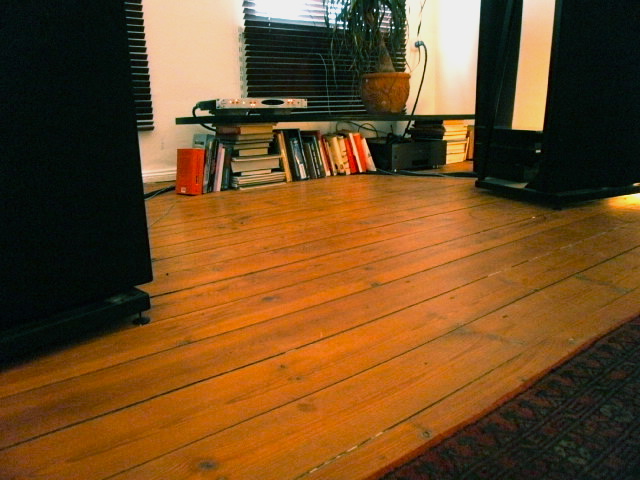
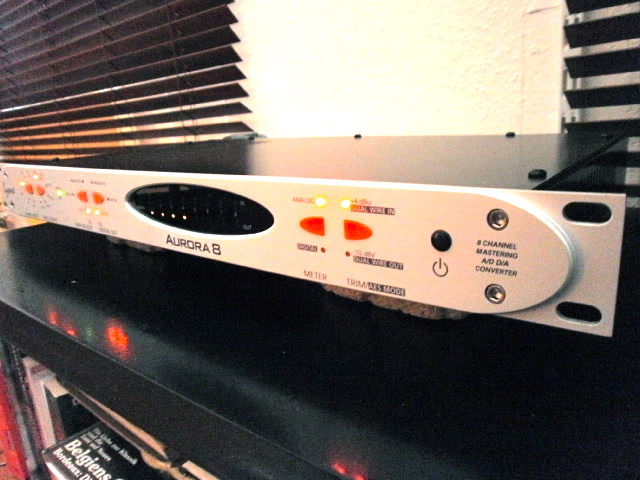
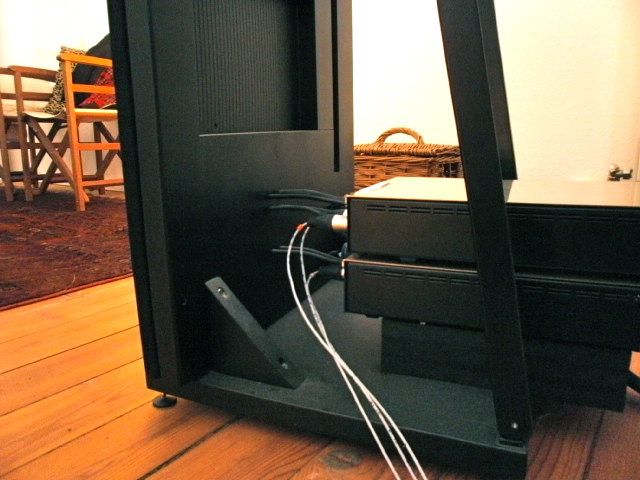
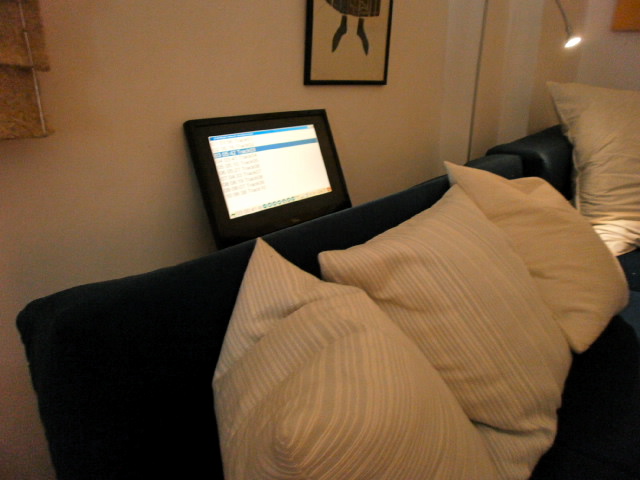
cMP2 Computer: i3-540 Core cPlay039 >FIR filter w/ convolver> Lynx Aurora 8 FireWire /192kHz throughout. 2x AcousticReality Ref. 202 & 2x AcousticReality Ref. 601´s ICEpower. Magnepan MG3.3R beechwood frames & custom stands. Miller chokes
Edits: 06/26/11 06/26/11
I love your equipment stand...books et al. :)
You bring up a good point about clock differences in an Exa set up in your other post.
Yeah, the "book-shelf" was a quick impromptu as the Aurora arrived....previous I used an internal Lynx card.
External DAC is so much superior though !
kind regards
cMP2 Computer: i3-540 Core cPlay039 >FIR filter w/ convolver> Lynx Aurora 8 FireWire /192kHz throughout. 2x AcousticReality Ref. 202 & 2x AcousticReality Ref. 601´s ICEpower. Magnepan MG3.3R beechwood frames & custom stands. Miller chokes
This is a device that takes usb input and outputs I2S for up to 4(maybe more) channels. Several folks on the Exa website (see below) that had Juli@ I2S out to a Buf32s or dac that takes I2S say that the sonics are way superior. There is lots of stuff about this product on DIYAudio and the ExaU21 web site. Yes it is a bit pricey but it provides galvanic isolation between pc and dac and allows one to use a digital x-over (within a vst on cplay) which Juli@ does not on its digital output.
If anybody here has done it I would like to hear some feedback. In my setup currently I kludge I2S out from Juli@ use a beefed up power supply to power Juli@ and this results in a messy hardware arrangement. The ExaU21 could be mounted on the Buf32s board and take input from the pc usb output. Very neat potentially for me. Yes it is expensive... $430Canadian.
Gstew I would think you may be interested in this.
Hey theob,
Indeed a very interesting piece of gear you´ve found.
If the device really operates asynchronous ( in my understanding using USB directly on the BUS level) it could be an alternative to certain I2S setups requiring/accepting 384kHz samplingrate.
-on the other hand, every PCI or PCIe device grab´s signal processing on BUS level.
I´m not sure about the digital crossover ability you´re mentioning.
Of course you can split the frequency bands and route them to two different DACs, but then you need to clock-sync these.
With two regular DACs and a clocking device it´s gonna be an expensive solution, yet compromised one.
-and a multi-channel D/A converter interface will most unlikely accept I2S.
In my view there is no quality alternative to digital crossovers with cMP than the route I´ve followed for some time.
I´ll repost my tread on this.
kind regards
cMP2 Computer: i3-540 Core cPlay039 >FIR filter w/ convolver> Lynx Aurora 8 FireWire /192kHz throughout. 2x AcousticReality Ref. 202 & 2x AcousticReality Ref. 601´s ICEpower. Magnepan MG3.3R beechwood frames & custom stands. Miller chokes
I greatly appreciate what you have accomplished...my only problem is I'd have to buy a new soundcard with 6 outs to do it. I'd sure like to know more about your setup though.
Dear theob,
for anyone that plays around doing something similar, the best entry level is a RME FireFace 400.
-it has FireWire connection; it´s external; it has a decent quality; it can be powered from an external power supply and can be found 2nd hand....
In the recommended Gigabyte boards, FireWire can be slotted straight into the motherboard, as these have the "must-have" Texas Instruments EEE1394 chipset.
If you´re considering an internal soundcard to begin with, make sure it doesn´t conflict with cMP optimized BIOS and PSU requirements....
kind regards
kind regards
cMP2 Computer: i3-540 Core cPlay039 >FIR filter w/ convolver> Lynx Aurora 8 FireWire /192kHz throughout. 2x AcousticReality Ref. 202 & 2x AcousticReality Ref. 601´s ICEpower. Magnepan MG3.3R beechwood frames & custom stands. Miller chokes
I really wanted to get away from another soundcard but you given me something to think about.
Hey theob,
hehe...that was un-intentional ;-)
When cics launched the cMP project, there were hardly any FireWire DAC options and no asynchronous USB devices either, but once cPlay is connected directly with a FireFace or an Aurora via ASIO, you´re circumventing a lot of what cMP is about : Jitter !
With FireWire and the appropriate driver the entire clock-stability becomes business of the external device.
kind regards
cMP2 Computer: i3-540 Core cPlay039 >FIR filter w/ convolver> Lynx Aurora 8 FireWire /192kHz throughout. 2x AcousticReality Ref. 202 & 2x AcousticReality Ref. 601´s ICEpower. Magnepan MG3.3R beechwood frames & custom stands. Miller chokes
Thanks Play-mate
Hi all
when I've checked the very low current of my new sandy bridge setup, I've got to think about a linear PSU based on Belleson superpower regulators.
My idea was to build a very simple scheme but with excellent components, one PSU for each services the transport needs, in a picopsu based system.
Picopsu was my choice for a lot of reasons, formerly for ripple non existent, for his management of pwr.on and of 3,3 V current.
So I've identified these services, each of them needs a single PSU:
1) picopsu current estimate 1,2 A
2) CPU (P4) current estimate 300 mA
3) Xonar 12 V current estimate 300 mA
4) Xonar 5 V current estimate 900 mA
5) general service 12 V ( high current up to 6 A)
6) general service 5 V ( high current up to 3 A)
As you can see first four PSU are "noble", last two the dirty ones.
Here we are the schemes:
high current ( 5 and 6)

the "noble" ones

the six PSU will be feeded by three trafo.
a) 230-15 V 80 VA two secondaries: one for pico, one for the others three "noble"
b) 230-15 V 50 VA two secondaries (in parallel) for services 12V
c) 230-9-0-9 V 150 VA for services 5V
The "nobles" were build using these components:
- Mundorf M-Lytic 4700 mF
- VISHAY-RODERSTEIN MKP-1837 Metalized Polypropylene Film Capacitor 0,1 mF
- Belleson Superpower high current
- ELNA Cerafine 100 mF
- Schottky diodes ultrafast
the dirty ones were build with regular components
My Zalman 501 case was so large to host all components of CPU with no problems, but the four "nobles" were assembled using an old ATX PSU case ( see pictures) just a bit difficult but neater.
I've decided for using a fan ( yes a fan!) in the ATX case because temperature of heatskin rise up 75-80 °C so to avoid large, heavy and too hot heatskin in the case, I've decided for this heretic approach.
Cabling was a little difficult, my choice of a so great number of single PSU means a great number of cables in the case.
I've Grounded each PSU from the negative pole of levelling capacitors, all convergent to the original screw of ATX case.


Results are astounding, I've never listen my system with a so beautiful sound , this is an hard work that worths every efforts.
Thanks to Theob for learn to me the existence of Belleson, they are really fantastic regulators. Just a bit expansive too......
And thx to all the guys that have give me a lot of ideas with theirs posts
Now I'm very happy
Daniele
Hi Daniele,
Are you using an external DAC with your Xonar, or analog outs from your Xonar?
Thanks,
Tim
Hi Tim
I use both, formerly the Xonar ONE with some difference:
- Full Burson opamp ( 7 'cause I use only RCA out)
- no output capacitors
- some little ceramic bypass caopacitors on the electrolytic on PSU
ONE is a great DAC, with a very good PSU, good ASIO driver and a gorgeous sound ( with Bursons opamp)
regards
Daniele from Nexthardware forum, cMP2 forum
Hi Tim
I'm using only analog output of my fully modded Xonar Essence STX.
My transport was thought in this way, I hate digital cable and more digital connections of cable! Xonar is a fantastic soundcard only if you change the original opamp with three Burson discrete dual opamp. It's easy ( use only the model with solid termination, not cable!) but very effective.
If you want another two simple step for a better SQ : bypass the output capacitors and feed the soundboard with a linear PSU.
Fantastic SQ!!
Daniele

Daniele, I am also impressed by your work! In my experience with cMP and audio reproduction as a "whole", it sometimes really comes down to using the best parts (Mundorf AG+) and best design (Belleson).
I find it very interesting, that Mundorf has chosen a similar technology as ELNA Silmic for its newest AG+ electrolytic caps (Manila hemp dielectric paper) as stated here on page 3:
http://www.partsconnexion.com/prod_pdf/mund_ag.pdf
This for damping the whole structure of the cap etc. In a sufficiently resolving system, minimizing vibration leads always to better sound IME, so try to use Herbies stuff, brass PCB standoffs etc.
I am using the Mundorf caps in my AD1852 DAC for rectifier smoothing and they sound remarkably better than Panasonic FC.
As for the belleson, after studying this thread over at diyaudio
http://www.diyaudio.com/forums/power-supplies/185763-belleson-superpower-ultimate-voltage-regulator.html
Its developer, Mr. Lowe has some interesting comments about measuring Superpower's noise, transient response etc... It seems this is really the best monolithic regulator available :-)
Btw, do you find the Cerafine at the belleson output better than Silmic, if you have tried? If you have some, try Oscon or similar solid polymer caps.
To quote GStew, "everything matters" ;-)
Picture: this is my current setup. I use Felix AC filters for both the dirty and clean PSUs... I plan to use a high current belleson for powering the pico, at the moment I have the peaktech 6080.
HI nagual19
I'm very happy for your comment about my "mad work".
Mine is an old audiophile story and the use of "good components" (on a good project, obviously) adds to music a little bit of magic that it's well worthwile.
After two weeks I can tell you the system is absolutely stable, no high temperature nor any problems at all and the sound quality.........is fantastic, better than using the Peaktech. Belleson are fantastic, they are expansive but transparency and dynamic are enhanced like never I've previous listened in my system.
About Cerafine , in my experience, they are less smooth and just a bit faster then Silmic, in a PSU building. I don't like too much OsCon, Elna ( Cerafine or Silmic) are superior, IMHO.
So I've build PSU with Cerafine and modded the ASUS Xonar Essence STX in a "all Silmic" fashion. I'm totally satisfied now, I'm listening for many hours every day without any fatigue but with a fantastic pleasure.
Thanks again to each guy that help me to reach this great result
Daniele
I apologize for this but my memory is going away!
Greg in mississippi (GStew)was the first that speaks about Belleson, I'm sorry.
Anyway my acknowledgements are for all forumers. This is a true community where knowledge is really available for everyone.
I'm proud to stay here
Daniele
I don't think it was me but thanks for thinking that. But, but this is fantastic work! I really admire you for your intellect, industry and results. Way to go. Wish I could hear this set up.
Dear Forum,
I wonder if anyone knows how to configure the system, so that cicsRemote does not start as service ?
Since I´m not using a touchscreen, it seems un-necessary, but how do I un-install it ?
Thanks for your help (again)
cMP2 Computer: i3-540 Core cPlay039 >FIR filter w/ convolver> Lynx Aurora 8 FireWire /192kHz throughout. 2x AcousticReality Ref. 202 & 2x AcousticReality Ref. 601´s ICEpower. Magnepan MG3.3R beechwood frames & custom stands. Miller chokes
I wonder if anyone knows how to configure the system, so that cicsRemote does not start as service ?
Change the two relevant lines in
C:\Program Files\cics Memory Player\cicsMemoryPlayer.pth to read:
OSK " "
TOUCH_SCREEN " "
Save and reboot.
Dave
Hey Ryelands,
I´ve tried your suggestion but "cicsRemote.exe" still appears in the taskmanager....
any further ideas ?
L.
cMP2 Computer: i3-540 Core cPlay039 >FIR filter w/ convolver> Lynx Aurora 8 FireWire /192kHz throughout. 2x AcousticReality Ref. 202 & 2x AcousticReality Ref. 601´s ICEpower. Magnepan MG3.3R beechwood frames & custom stands. Miller chokes
any further ideas ?
Try deleting the cicsremote.exe file (and the touchscreen one as well) from the cMP folder in "Program Files".
It's been a while since I did this and memories fade but I definitely have neither the remote or touchscreen utilities showing up in TM and, on checking, see that I deleted the two files as well as made changes to the .pth file as per instructions (found either somewhere here or on the web site).
HTH
Dave
..
cMP2 Computer: i3-540 Core cPlay039 >FIR filter w/ convolver> Lynx Aurora 8 FireWire /192kHz throughout. 2x AcousticReality Ref. 202 & 2x AcousticReality Ref. 601´s ICEpower. Magnepan MG3.3R beechwood frames & custom stands. Miller chokes
did it make a sonic difference?
Dear Forum,
I´ve run out of ideas to fix this.
I disk imaged my own (relative standard) cMP2 OS onto an identical friends computer.
now his system boots fine with this imaged copy, but we cannot get the system to recognize any hardware....his RME 9632 Hammerfall card.
nothing to be found.
we installed intel chipset drivers....nada.
we´ve searched the interrupt registry...nada
run the hardware install manager 25 times...nada
searched the device manager...nada
how come that an entire computer cannot recognize ANYTHING ?
what driver / module could be missing ?
the RME 9632 is brand new...the GA-H55M-UD2H and the i3-540 Core Intel also brand new.
any ideas are greatly appreciated
kind regards
cMP2 Computer: i3-540 Core cPlay039 >FIR filter w/ convolver> Lynx Aurora 8 FireWire /192kHz throughout. 2x AcousticReality Ref. 202 & 2x AcousticReality Ref. 601´s ICEpower. Magnepan MG3.3R beechwood frames & custom stands. Miller chokes
Thanks for your replies guys.
....as so often, one just need to know or get a hint of what to turn back on :-)
flipped some of the suggested services on again, and the thing went through installation in a bliss.
kind regards
L.
cMP2 Computer: i3-540 Core cPlay039 >FIR filter w/ convolver> Lynx Aurora 8 FireWire /192kHz throughout. 2x AcousticReality Ref. 202 & 2x AcousticReality Ref. 601´s ICEpower. Magnepan MG3.3R beechwood frames & custom stands. Miller chokes
"Services needed for most other functions are the Event Log, WMI, COM+ Event System, COM+ System Application and DCOM Server Process Launcher. To update a sound card driver, set Event Log, Cryptographic Services, Windows Audio and WMI to Automatic and start them. Once the update is installed and stable, reset them to Manual."
"An issue with RME soundcards
A workround is needed when using the latest RME soundcards with cMP and there is no sound output even though setup seems correct. They require firmware initialisation which is done with configuration routines launched by Windows Explorer. cMP disables this.
Switch cMP to XP mode and restart the system to initialise the RME firmware;
Play a CD using Foobar2000 to check that the soundcard is working;
Start cMP, switch to cMP mode and restart – do not shut down as power to the soundcard will be lost and the firmware will need to be re-initialised;
The system can be re-started as often as necessary but this cycle must be repeated if it is powered down. "
Thanks a lot for your swift replies.
My dear new cMP friend (wonder if it may last...) is located 400 miles from here, so it´s a bit of a hazzle to direct him through the phone :-(
-bummer.
I´ve talked him into an easy "let me do a disk image for you" -affair.
Have a feeling that we can resolve at least the driver issue somehow, but that RME is depending so much on the windows thing worries me....
-how confirmed is this ?
Does it mean that the computer has to stay on at all times ?
If that´s true, we should issue a clear warning against RME on our forum here !
kind regards
cMP2 Computer: i3-540 Core cPlay039 >FIR filter w/ convolver> Lynx Aurora 8 FireWire /192kHz throughout. 2x AcousticReality Ref. 202 & 2x AcousticReality Ref. 601´s ICEpower. Magnepan MG3.3R beechwood frames & custom stands. Miller chokes
I think that perhaps the original warning on RME cards issued by cics is not valid anymore.
This is a link from this forum:
Hi Playmate,
Just a wild guess and quick shot from the hip:
If it is a cMP setup according to Cic’s recipe: than you have most services disabled.
For recognizing new hardware and enabling that new hardware etc, some services are needed.
Once the hardware is properly installed and working, these services can be disabled.
I don’t know by heart exactly which services. From memory I think I can remember Cics wrote down which services are needed for this. But I’m not sure where I red it. If Cics wrote that down on his website or in his earlier documents ‘The art off building computer transports’.
Also: if you did apply the minlogon, I'm not sure it is possible too enable and disable these services.
Forinstance: autoruns only works before min-logon. After min-logon it will not startup.
So it even might be caused by multiple causes: min-logon + services.
Have a good scan in Cics older documents and/or website. It’s somewhere down there.
Mark
if you did apply the minlogon, I'm not sure it is possible too enable and disable these services
Yes, it is. All Services can be started and stopped no trouble under minlogon.
I'd start with the Windows Installer and Cryptographic services - note that, though cics wrote lots of things, what fixes the problem can be system specific. You might also need to re-enable some System Devices.
And who knows what else?
Also, you're right about Autoruns not running after the minlogon tweak.
Fun, fun, fun . . .
Dave

Dear cMP-philes,
Following is a description of a project that I embarked upon concerning the building of a bespoke Linear Power Supply (LPS) to power my G31M+E7200 cMP2 rig.
Back in the good old days of cMP, the recommendation was to power the motherboard (mobo) by a quality ATX Switch Mode Power Supply (SMPS) and the HDDs by a cheaper (Granite) SMPS. This seemed to work quite well. However, it was not long before some cMP-philes began to experiment with other strategies to improve performance. Some of these strategies are documented on the cMP web site ( Appendix B – Advanced Optimisations ). Anyway, my configuration prior to this project was: (i) An ATX SMPS powering the P20-24 on the motherboard; (ii) A cheap 12V Linear Power Supply (LPS) powering the CPU (P4); (iii) A Granite SMPS powering the HDDs.
Some time ago there was a post on the Asylum by John Swenson who proposed a 9V LPS incorporating a Hammond Choke. John reported that this improved the sound quality of his fit-PC. This, I believe, encouraged some cMP-philes to think about developing a LPS for a detuned cMP. I don’t know who amongst the fraternity was the first but I recall seeing a post and photos of Mihaylov’s LPS. By my reckoning, Mihaylov had gone to great effort to build a LPS that handled the three voltages necessary to power the mobo (12V, 5V, 3.3V). I remember looking at those photos and thinking that it was an “all out” attempt to build a quality computer power supply for audio. Yes, a great attempt but too large a step for me.
I began to think about the idea of up-scaling John Swenson’s design to power my mobo through a PICO PS. I thought the advantages of this solution were: i) The PICO could handle the drop-down voltages of the 5V and 3.3V lines, and ii) The PICO could handle the start-up “power-on” sequence on the P20-24 required to bring a mobo to “life”. I thought a 12V LPS+PICO would be a step in the right direction and would cost considerably less than a LPS similar to Mihaylov’s. In summary, I figured the alternatives were:
1. Build three LPSs; one for each of the required voltages (12V, 5V, 3.3V)
2. Build a 12V LPS+PICO (hybrid solution)
3. Build something else..?
Option 1 seemed to me to be too extravagant – as one who is trying to keep this hobby within bounds. Option 2 seemed a good one for reason of its more modest cost and relative simplicity but perhaps a compromise for the reason that the PICO used switch mode regulators to achieve the drop-down 5V & 3.3V required by the P20-24.
Option 3 was considerably open in possibility: Given that I am not a fan of up sampling – preferring instead to playback at the native rate; Given that I was not using a soundcard – instead outputting via USB to DAC (see below System for details). I began, at first, to consider the approach championed by Ryelands to use a “headless” fit-PC2. I think what Ryelands has done is very neat and elegant indeed: the fit-PC2 has modest power requirements and its on-board regulation meant that a single good quality 9V LPS would suffice. In the end, however, I settled upon the idea of building a “dual” 12V and 5V+3.3V LPS for my existing board with two transformers and two chokes – in an effort to keep the cost down. As I was not able to attempt the skilled “grunt work” myself, I contacted a friend (by the name of Elson) who was adept. Soon after, I took delivery of the “Elson” LPS. Total cost was ~US$450. (incl. parts & labour. And, before anyone asks: Elson will not build another!) I connected the Elson to the P24 of my G31M mobo using a schema suggested by GStew and powered it up according to his instructions. My rig came to life on the very first attempt. Thank you GStew!
Description:
The design is based on John Swenson’s offering but with some modification. (See John’s post here .) It uses two toroidal transformers and two Hammond chokes (159ZJ) – one for the 12V supply and another for the 5&3.3V supply. Caps: Jamicon (15000uF 25V). Resistors: Takman metal film. Diodes: Motorola bridge rectifier type. Max average current: 2A for 12V line, 4A for 5V line, 1A for 3.3V line. Dimensions: 9”/225mm(w) 3”/75mm(h) 11”/275mm(d).
(Please don’t ask me for a schematic of the Elson. The “source” was John Swenson’s design and Elson took it from there – keeping it as close as possible to John’s spec but also taking into consideration parts cost and availability.)

One unusual aspect of the design is the use of voltage trim-pots. By adjustment of three screws, the voltages can be varied up or down with a consequent effect on sound quality. I experimented with voltages on the 12V and 5V line. Unfortunately, the way things were implemented I was unable to lower the voltage on the 3.3V line; only increase it which didn’t seem to make for improvement – so I left it at 3.3V.
Following is an excerpt of a communication to another cMP-phile at the time I was fiddling with this stuff. It tells the story reasonably well, I think:
“I have been experimenting with Voltages in the 4.5-4.7 to 11.5-11.7 range. The first thing to say is that there appears to be a noticeable change in sound for such small changes in voltage. I was listening to three tracks in particular yesterday: Eva Cassidy’s Songbird Tk 3; & Dave Brubeck’s Time Out Tracks 2 and 3. With Cassidy, I want to hear a voice to die for (as female voice is “my thing”.) Also, Brubeck’s tracks are a good check of how things are going in the sense that I want to hear a realistic piano; sax that has a little “bite”; realistic bass strings; dramatic and percussive drums (particularly Tk3).
At the lower end of the voltage range (4.5 & 11.5) things get very clean and liquid: Cassidy’s voice is gorgeous and dynamic but I seem to notice that some of the low-level stuff melts a little too much into the background such that they become a little indistinct. Whereas, at the top end of the voltage range (4.7 & 11.7), the background stuff (strings and other instruments) begin to take over a bit to the extent that I lose the focus on that yummy voice.
…………..
After more listening, I am of the opinion that 3.3, 4.6, 11.8 is the “go” with the current mobo.. The performance "hit" is definitely on the 5V line while the 12V line only gives subtle changes in SQ. Whereas, the difference between 4.5, 4.6, 4.7, 4.8 is not subtle, IMO.”
Note that these experiments were done on my trusty G31M board. I would not necessarily expect the same results on a H55 or H67 board.
Outcome:
Does the Elson make for an improvement in sound quality? Most definitely! I have, on several occasions reverted to my old ATX Corsair SWPS to perform an AB. The Corsair sounds “grungy” by comparison. The Elson offers better clarity and is far more revealing. Blacker blacks. More micro-detail; instruments and voices have a much more natural sound.
Is the Elson as good as a (full) 12V 5V 3.3V LPS solution? I don’t know as I have not had the opportunity to compare but would say it is unlikely. I suspect a “full implementation” would yield the best performance. However, the upside of the Elson is that it would not be as expensive.
Is the Elson better than a 12V LPS+PICO solution? Again, without the opportunity to A-B, I don’t know. It may be but then again it may not. What the PICO has in its favour is simplicity and lower cost.
Is the Elson an elegant solution? At this time, I have the Elson powering the P24 on the mobo. A cheap 12V LPS powering the CPU P4 (cost US$30). A Granite SMPS powering the HDD. In all, a lot of wires going everywhere! I crave something neater.
Components
As far as a bespoke LPS is concerned, I believe there is improvement to be obtained by selecting the “right” components: regulators, caps and so on, as these are all going to make a difference to the sound. My selection of components is one of many. There are other contributors to this thread who have tried other designs and components with success. If you have a mind to attempt a similar project then I suggest you review their component list and leverage upon their trials and outcome as well as mine. Cost and availability were considerations for me.
Thanks:
Many thanks to GStew (Greg), Ryelands (Dave) and John Swenson who have been helpful in this project. I would also like to thank Mihaylov, jackwong and hfavandepas who have been so generous with their discoveries. Please forgive me if I have omitted to mention others who have also contributed.
System:
cMP2> Empirical Audio Freeway2 (USBtoS/PDIF)> Audio-GD DAC-19DSP> Supratek Sauvignon> Blue Circle BC26> Thiel CS3.6
AB.
Hi Audio Bling,
Thank you for posting. Very nice indeed. It’s always nice too read about other inmates thoughts, considerations, actions and projects.
I find it very helpful for inspiration and as food for thought.
Thank you for taking the time and effort too write this post.
I’m curious why did you choose too let yourself build this DIY linear PSU design over buying two commercially available linear PSU’s?
I’m still hesitating if I also should embark on such DIY linear PSU journey myself.
Especially since it is not very clear too me what exact performance is needed from a PSU too get best possible sound from a cMP setup.
May be only some optimizations in certain area’s are needed too meet the demands for best possible sound quality from a cMP setup.
(I very much hesitate too apply: ‘what is good for analog audio is also good for digital audio’)
When I study DIY linear PSU designs, they almost all have in common that these designs are very straight forward.
(rectifier bridge, regulator, some sort of smoothing and noise filtering)
Contrary too the designs of commercial available linear PSU’s which have very complex designs.
This makes me think that these simple straight forward DIY designs heavily rely on near ideal behavior of the applied parts (“right” components).
So inevitably only very expensive parts can be used.
I can understand that the large 10mH Hammond choke is intended to be a massive wall for high frequency noise.
(although I’m not sure until what high frequencies that massive choke is still effective.)
Where there any other considerations why you especially choose this DIY linear PSU design?
Mark
Hello Mark,
You are right to say that it is not known what performance from a PSU is required to get the best from cMP. We have still to work that one out!
My case is that I wanted to experiment with a choke PSU. If you read John Swenson’s post – this was his strong recommendation. So, partly, I was guided by his advice but not entirely. I have, for example, heard amplifiers and even DACs with choke power supplies and believe that they are characteristically “smooth”. However, whether or not this experience necessarily translates to a PC power supply is a fair question. I am not certain. You also make a point about commercial designs being “complex”. It strikes me that this so because they are designed with other uses in mind, whereas the Swenson design has one use in mind – digital audio.
If you are asking me: How did I know for sure that something bespoke was the best way to go? The truth is I didn’t – I simply had the opinion that something built to a proven design with quality parts by someone who I trust would give me a better result than the alternative. However, if someone whom I trusted had made a strong recommendation for something commercially available that worked for digital audio, my decision would have been different. But that hasn’t happened.
Regards,
Just to make the point that, aside from the choke, John's design doesn't actually use exotic components. None of the selected capacitors, rectifiers, resistors, etc are boutique and even the choke is a stock item. They can all be purchased from Mouser.The design aims not so much to provide the cleanest of ultra-clean supplies to the powered device but to prevent noise from the powered device feeding back into the mains supply and thus into other devices in the system. As noted in John's original post:
. . . the design has been tuned for these parts, if you substitute other parts it may not work as well. Don't skip the choke, it is what makes this design work. The resistors can be 1/4W or 1/2W carbon or metal film. Cheap ones work fine here, they don't have to be super expensive audiophile types. C1 should be a film type, I use the Sprauge orange drop, but others will work as well.See link.The design is a bit unusual, it uses a choke in a low voltage design. This has some interesting properties. Primary among them is the use of a fairly small first cap which radically cuts down on the peak currents through the diodes. With low peak currents and Schottky diodes there is essentially no RF noise in this design. And on top of that I added a secondary snubber (C1 and R1) which prevents the transformer from resonating as well. The upshot is that this is one of the cleanest power supplies you will ever find, it has no RF and has one of the lowest impacts on the main AC line as it's possible to get with a PS.
I built one to power my Fit-PC2 and another to power a three-tower DDDAC. For the latter, I used a larger transformer (80VA, split bobbin as specified) and slightly more elaborate voltage regulator circuits, one for each tower. Though they're passing about 1.2 amps, neither the transformer nor the choke get warm let alone hot.
Both PSUs made for big SQ improvements.
I'm delighted for Audio Bling that his investment of time and money has worked so well - many thanks for a useful report.
Edits: 06/09/11
Isn't it interesting how many of us have our personal journeys with cmp^2. We are only limited by our capacity to learn, courage to try new stuff and hearing ability. I think the way you thank those who have influenced you is just great. I think we all have a debt to those you mentioned. My personal debt is especially in the red to Ryelands, Jackwong and Hfavandepas.
Well done Bling!
Hi all,After reading this thread: 'Pro or con: Are ferrite beads at the end of usb and/or spdif cables really necessary?'
(see: http://www.audioasylum.com/cgi/vt.mpl?f=pcaudio&m=89660 ),
I did some google-ing too find a more specifc answer too this question than the genereal wiki-pages on ferriet beads could provide too me.While doing so I stumbled upon this article ‘The Use Of Ferrites In EMI Suppression’ from ferrite bead manufacturer 'Steward’.
http://www.steward.com/pdfs/emi/technical/Use%20of%20Ferrites%20in%20EMI.pdf (also see link below)On page 111 to 116 the article covers the use of decoupling capacitors together with ferrite beads too suppress PC board generated EMI that originates from the periodic switching of digital circuits. (see figures 19 to 23)
Seeing ferrite breads also being clamped on DC output lines on cheap AC-to-DC power supply’s, made me think:
* could ferrite beads placed on the P24 and the P4 power lines, improve sound quality?
(Just as smoothing caps are placed on the P4 line too improve sound quality.)It also sprang to mind that placing ferrite beads on the 12 V volt AC power supple lines coming from a linear PSU that feeds a Pico PSU and/or the P4, also might further improve sound quality.
Are there any inmates using a cMP setup, who already tried this?
Since ferrite beads are cheap (1 – 3 euro’s depending on type/model) and ferrite beads are very easy too clamp onto the P24 and P4 DC power supply lines and/or too the 12 volt DC power supply lines coming from a linear PSU, I already ordered a few too find out myself if there are any audible effects. But it will take a few days for the ferrite beads to be delivered.
So meanwhile I’m curious if any other inmates already have tried too clamp ferrite beads onto the P24 / P4 DC power supple lines too suppress HF noise on these DC power supply lines. Or, already have clamped ferrite beads onto the 12 volt dc power lines coming from the linear PSU that feed a Pico and/or the P4.
If yes, my question is: did the ferrite beads have any impact on sound quality in a cMP setup?
Mark
Edits: 05/27/11 05/28/11
Mark here is an interesting/easy way to test ferrites (for those that haven't tried ferrites)and a nice way to use those unused granite digital power supplies. Take one of these gd's solder in some fast caps (small value oscons for example) into the pata conector (2 inners are grounds 2 outers are + 5v and 12 volt supplies). Now put some Radio Shack ferrites before and after the caps (to get a pi filter). Then put some ferrites on the ac feed to the gd. Now try the gd on a hdd in your cmp...real nice sq pop.
I replaced one of my antec fed hdd's with this setup and it is better. The antec is fully pi filtered.
I am joining in on the part. Just getting started. No listening impressions yet.
Ferrites placed on CPU fan power leads, P4 CPU power plug, P24 motherboard power plug. I used the P4 and P24 extension cord method to facilitate installing the ferrite clamps.


Based on some dissatisfaction with I2S and the Jkeny's post in Diyaudio on spdif vs I2s I decided to switch back to spdif as an experiment. I preferred spdif immediately and am trying for my 3rd day just to see (hear) if I respond favorably over time. I have so far. Anyway I went out and got more ferrites and placed them over my spdif cable (I should try over I2S cables now that I think about it). Yes same impact. At 1st I was worried that I may be throwing out some bits with the noise but after browsing some of your references it seems as if ferrites take care of 50-500 mhz and I believe spdif (esp with 16/44 signa) is much lower than that. I don't know if it works on glass toslink but maybe you could try it. Ferrites ... the gift that keeps on giving.
Hi Theo,
I have no experience myself with I2S, but I can understand the attractiveness of the concept to separate the clock signal from the audio-bit stream. But that is from a conceptual point of view. From a practical, real world point of view I doubt if I’m able too execute it properly myself. Especially knowing how VERY DIFFICULT (!!) it even is for professionals too accurately send, transport, receive and process clock signals. I don’t think I can technically execute that properly myself in such a way that it will outperform a proper executed S/Pdif connection. But these are just my thoughts on this matter. I have no real world practical experience with it.
Also, even on the best studio DAC’s money can buy (Prism, Lavry, Weiss, etc) I don’t see an I2S input. If this where a better way of doing things, it would certainly be fitted by these and other companies.
So I concentrate on more simple things which I can execute properly myself given the limited set of tools I have (lack of knowledge, skills and proper equipment).
In frequency/impedance graphs provided by the ferrite manufacturers I see that ferrites have a bell shaped resistance curve that peaks somewhere between 100 – 300 mHz. The official S/Pif specs say that the frequency can be between 100kHz and 6Mhz. A CD player uses 3mHz.
But still I don’t put ferrites on un-shielded S/Pdif cables. Given the theory what an electrical digital signal is (square block pulses) I fear malformation of the block shapes (misshaped eye patterns)
Of course ferrites can reduce HF noise traveling on the shield of an S/Pdif cable, but that HF noise shouldn’t be there at the shield in first place. It would be my strategy too battle that (possible) noise at some other place.
Ferrites on a glass toslink ???? :-)
I know you said you didn’t feel for trying too ad some caps before (and some smaller behind) the ferrites because your P24 line was already fully occupied with ferrites.
On the risk of being ‘pushy’, I again will give the advice too try and place some caps.
Especially with use of an P24 extension cable it’s very easy too do.
You don’t even have too so solder !! Just use a set of needle-nose pliers too push the metal legs of the caps in place between the plastic outside of the P24 connector and the metal wire snap on inside the plastic connector. (click on pictures below too enlarge and too see how easy this can be done) No soldering needed ! I just check with my multi-meter too see if the metal legs make good contact. That’s all.

Van on filtering, demping, ect

Van on filtering, demping, ect
Tomorrow a variety of some 30 oscon caps will arrive. Caps have such a profound and positive effect on sound quality difference in my setup when placed before and after the ferrites, that I will start searching for the best combinations before and after the ferrites. And than eventually, when I found the right combination, I will solder the caps onto the P24 before and after the ferrites.
By the way: I now know why I can cold boot into 110 mHz busspeed. These days I experimented a lot with caps on and off the P24 before and after the ferrites and I discovered that it is the caps on the P24 mobo socket.
For quite some time already I used as much extra caps on the P24 as the Pico or Antec ATX would tolerate on the 3.3 and 5 volt line. The Pico doesn’t tolerate much. Only some 330 uF per voltage. But the Antec ATX tolerates very large values of 4700 uF per voltage. But I never did try how low I could go. I just put them there as extra current-reservoir and noise shunt. Although I didn’t hear any SO improvement at all (which I had expected because on the P4 extra caps will give some SQ improvement). But I just left the caps on the P24, because I also did not hear any sound quality degradation also.
Only when I started realizing that the lower the swithing-speeds of logic on the MoBo, the lower the HF noise production there will be on the MoBo, I tried how low I could go with busspeeds.
But I never realized that it was due too those caps on the P24, which I already have on the P24 for over 1,5 years now.
Mark
I guess you are saying ferrites on spdif cable are not recommended but what is the speed of a 16/44 propagating through spdif? If it is < 10mhz ( & I think it is < 10) I tried it anyway and it seems to work.With respect to caps on p24 right now I have zero room but since you so politely encourage me to try I may get a p24 extension and try.
:)
Edits: 06/30/11
Hi Theo,
‘not recommended’ Well, I don’t dare too do any recommendations.
I’m no expert nor educated or work in digital audio electronics, I was more of thinking out loud.
But if it works, than it works.
I trust your equipment and ears.
I only wonder where that noise is coming from.
That is why I thought about fighting that noise at some other place.
Although I don’t have any clue where too look else.
For the S/Pdif specs I just googled and I found them quickly.
This was what google presented too me as first link.
http://www.epanorama.net/documents/audio/spdif.html
Mark
Based on your comments I took out the spdif ferrites and listened and I prefer them in by a wide margin. Interestingly I tried listening @ 192 sample rate and with ferrites it seems dull and missing info but not @ 44 sr.
Anyway these ferrites are something special in audio pc's. What I don't understand is the original thread from AA that you referenced in your original post on ferrites. Most posters there said it was not recommended to use ferrites period. I guess not knowing any better in these eletrical pc things I just have to try everything.
Hi Theo,
That thread was about putting them on digital lines that transport usb and/or spdif signals.
So I fully agree not putting them on these digital lines unless there is a very very dirty component on either side that might throw extra additional HF dirt into the data line.
But that thread made me aware of that i also see them sometimes power lines (my dell switching loader, some wallwarts, ect) I suddenly realized that may be ferrites might possibly also work on the power lines comming from the ATX.
Mark
Hey Mark,
I think that is why power cords can make a big difference depending on how they handle emi.
Some manufactures agree i think and when I was fitting my dirty supply for ferrites I noticed that there was already a big one built into the psu. Here is a link to the review and on the sixth picture down you can see the ferite. There is as much sticking out as there is inside the case. Might be why I liked this psu.
No one here remembers the bending of our minds
Hi Dawnrazor,
Thank you for this.
I already was interested for quite a while in ways too filter the output of a switching ATX PSU for my cMP setup. But using a classic filter concept containing a combination of chokes and caps is very hard too calculate. Big chance one will end up with a filter that rings/resonates.
Fortunately I red that the chance of ringing is much less when a combination of ferrites and caps is used. However there still is a chance of ringing/resonance, it is much less and much easier too control.
As ferrites are lossy components the needed calculations are also somewhat lossy. A rough approximation is enough. At least: this is what I roughly understand from articles on the net from TI, Alterra, Analog Devices, EMAC and others.
I see it is an Enermax PSU.
RME used too recommend Enermax PSU’s on there website until some years ago.
When RME changed their website these recommendations didn’t re-appear on their new website.
So I think its not a bad choice at all.
Mark
N.B. Also XP optimizations tips did not re-appear on the new RME website.
I still use one of RME’s XP registry tips too disable CD-rom ‘polling’/ autostart in registry.
I can't get below 145 stably. How do you do it? I know you mentioned that you thought that running ssd os and a NAS allowed you to get there. I was running 143 and I kept going wobbly on stability and I've got the same Kingston ssd as you. What do you run V core at? I run .875 volts but it reads .83 on cpu-z. Maybe you could just list all your settings cause I'm curious why I cant get below 145. Yes I have 120 volt ac and it usually runs 117 or so in the summer. I set my dirty psu at 11.95 volts and that powers my cpu and all my disks. My other clean psu (yes a switcher) is also set at 11.95 volts and runs only my p24 input.
Hi Theo,
I made a lot of changes too my setup and gear before I noticed I could go that low.
Here’s a report on what I changed over some period of time before I discovered it.
Too make a long story (below) short, I think it is because the Audyn caps (bipolar elko glatt) I put on the 3.3 and 5 volt headers of the ESI Juli@ digital part.
But hereafter a complete report on things that I all changed before I noticed I could go this low.
* caps on Juli@ digital part
I had nothing else lying around when I wanted too try some caps on these power pins. The only thing I had lying around than was:
- 1 polymer cap (the red one) 1uF
- 1 Oscon 47 uF
- 1 bipolar Audyn cap 47 uF (intended for use in speaker crossovers)
- 1 bipolar Audyn cap 100 uF (intended for use in speaker crossovers)
I bundled the 1 uF + 47 uF Oscon + 47 uF Audyn and put that on the 3.3 V
And the 100 uF Audyn on 5 Volt. See picture.

Van on filtering, demping, ect
Looks very messy because I taped the sides of the Audyn caps and the Audyn connection wires, as I was afraid for a short circuit somehow when dropping them in place. I noticed I nice little pop in sound quality. And that’s it and just left the caps there.
* new HTPC casing
Only a few months ago I switched over from the Zahlman case too a SilverStone SST-ML03B case. Launched in feb 2011. Perfect timing from Silverstone as we where about too switch over too an new AV cabinet. This new AV cabinet would no longer rest on the floor, but would be hanging from the walls. That new AV cabinet is mounted against the wall just beneath the flat screen TV, which is also mounted against the wall.
However these free hanging AV cabinets are not so spacious and also much less deep than the an AV cabinet that rests on the floor. So I had to look for a much less bulky HTPC case. I found the SilverStone SST-ML03B too be ideal for this. It has enough space inside and also in exactly all the right places where you need that space. It has standard audio gear size. And best of all it only 69,- euro !! It’s a steel. Don’t know why it took the PC casing industry so long to come up with this format.
This time I not only put bituminous felt pads on the outside bottom and inside lit of the HTPC case. But I also but a slap of bituminous felt pad inside the casing underneath the mobo. So this case is, also like I had the Zahlman case, heavily dampened with bituminous felt pads.
* shielding all 230 AC cables (complete re-wiring)
I also think it has nothing too do with a complete re-wiring of all (!) 230 AC wiring. When I moved all gear into this new wall mounted AV cabinet, all wires involved where very close to each other. It was a messy, bulky spaghetti of wires running criss cross everywhere inside and on the back of the cabinet.
Nice cable dressing was particularly very hard too achieve in the small 20 mm space between the back of the cabinet and the wall. All wires strictly have too reside in the narrow space behind the cabinet and the wall, because it is a really ugly and messy sight too see them hanging down the wall from behind the AV cabinet. So because of the limited possibilities for good cable dressing, I decided too make a bold move and too replace all regular 230 wires with shielded 230 AC cable for every apparatus that is in need of 230 AC.
(Flat screen TV, HD TV decoder, linear PSU’s, Klein & Hummel, Lavry DAC s, ATX PSU, ect)
It took al lot time too finish this operation. Luckily al most all components had such ‘strain relief through puts’ (see picture).

Van on filtering, demping, ect
So is was not all too difficult too remove the regular 230 AC wires from the inside, and too re-use the ‘strain relief through put connector’. As the shielded 230 AC cables has a bigger diameter, the shield has too end here at the outside of the casing. However the wires inside the shielded cable can pass trough, which allow for the original ‘strain relief through put’ too be re-used.
* strict separation of dirty and clean real earths
All shields on the new 230 AC shielded cables are grounded at the plug-side too a real earth. Also this shielding is strictly divided in two groups of apparatus: a ‘dirty real earth’ for dirty components and a ‘clean real earth’.
The whole operation took almost a month before I had complete finished the transition too this new wall mounted AV cabinet (process time off course was much shorter).
I also looked at the LAN connections of the cMP setup and the powering of the 3COM switch I use. In this article ‘The trouble with wallwarts’ http://www.elmac.co.uk/pdfs/Trouble_with_wallwarts.pdf , I red that even this can be important. So the wallwart (in the meter board down the hall) also got an extra ferrite on the DC output too the 3COM switch. However I didn’t notice a sound quality change.
It’s only after all these changes that I noticed that I could go so low all of a sudden. My guess is, that it’s the caps on the juli@.
However in short time I expect too know. With the ferrites for flat ribbon cables, I also ordered some new oscon caps. Next week (or so) I want to remove the Audyn speaker crossover caps and put these oscon caps on the Juli@ digital part. Then I will know if these Audyn speaker crossover caps caused it.
I don’t think my under volting settings will matter much. I pay no special attention too it.
I have the CPU undervolted at 1 volt V core. Just preventing the CPU too get hot. Sometimes I run it at 0,95 V. But this makes little difference in power consumption (current) or produced heat. I don’t hear any SQ differences.
All DC power from both linears too both pico’s is at 12 volt DC. Same for 12 V DC from Antec ATX.
Mark
Thanks Mark. I have external power to at least the Juli@ 3.3 volt supply. I also have more caps on the 5 volt supply but I use .875 volts V core. Maybe I'll try 1 volt and see how low I can go for core speed.
I've got the G31 mobo but I doubt its that. Right now I am trying .95 volts and 140 core speed. I'll run this for afew days then try 135.
Hi Theo,
* caps on the Juli@ digital part
Today I removed the bulky Audyn elco bipolar speaker crossover caps and replaced them with two Oscon 330 uF caps that arrived yesterday (along with the flat ferrites for ribbon cables).
I still can warm boot into 100 and cold boot into 110 – 115 (I don’t know why this isn’t always the same value). So the Audyn caps on the digital part play no role in it.
These Oscon caps again brought a clear noticeable improvement in SQ. Hearing what SQ improvement is achieved only trough changing caps, I think i’m going too closely study how I can power the digital part by battery like you do. I expect some significant SQ improvement.
* About the ferrites on the P24: use them with decoupling caps.
I feel I have a clear picture now on how ferrites on the P24 best can be used. It is just as one can read in several articles: ferrites are best used together with decoupling caps.
So I placed caps on the 3.3 , 5 and 12 volt lines (between the Antec PSU and the ferrites).
This results in a very significant SQ improvement!
Without the caps in place, ferrites on the P24 give a nice little subtle improvement.
But with the caps added it’s a bigger improvement than adding a SSD. So not small!
What is even more astonishing, I do these experiments with the Antec ATX. Because the Pico can’t handle big caps (4700 uF + 47uF + 0,47 uF) on the P24 because pico’s can’t deliver the big rush in currents too the 4700 cap when switched on.
* After 4 weeks of tweaking with ferrites the preliminary conclusion is:
With a lot of ferrites + decoupling caps on the Antec ATX the SQ is very good.
I don’t feel any need too swap the Pico back in place.
The Antex + (a lot of) ferrites + decoupling caps sounds very good too me.
Mark
I added another by pass polystyrene cap across the 5 volt section of Juli@. Yes it added to the sq improvement provided by the ferrites. Thanks Mark!
Hi Theo,
Whow, same thoughts were coming up on the other side of ‘the pound’.
This afternoon I did exactly the same.
And…. with exactly the same results.
I still had some glare. This bothered and irritated me. I thought: may be some extra HF frequency filtering is needed. So I place two extra caps (Oscon 47 uF + 1uF polymer) on the 3.3 V of the Juli@ digital part. See Picture. And … with exactly the same results !
Van on filtering, demping, ect
I like this.
To me it shows these improvements are not random.
If we both independently achieve the same results.
I also did some further experiments with the flat ferrites for ribbon cables.
See picture.

Van on filtering, demping, ect
A ‘pile of charcoal’ works. But also these flat ferrites for ribbon cable work.
However crucial in both situations is: adding decoupling caps too the 3.3, 5 and 12 volt lines before the ferrites (this way a 2nd order HF filter is created (I think))
The effect of ferrites is 4 times bigger, when ferrites are combined with caps.
If one does that, than ferrites really bring a major SQ improvement
More to come.
I got glare or what I call excess highs so I took the cap out. All this stuff(i.e., tweaking etc) IMO is simply finding a combo that sounds real then stop and listen to music. Then after a few days when you get bored with your sound try something else. Isn't this exactly what a diy audiophile does? Its definitely what I do.
I know that sounds a bit anti science. Let me restate my tweaking philosophy. I believe in the theory of constraints. I learned some of this while working in manufacturing for a while but I think it applies to audio as well. As an example (applied to pc audio tweaking) when one adds a cap to the 5 volt supply on Juli@ like I did) and while it should sound better it doesn't, that means something else is constraining or limiting the output (in this case the output is excellent sound). Anyway when I reach a constraint like this I look elsewhere for what may be holding back a breakthrough to better output. Is my foundation for Juli@ ps as good as it can be in terms of acoustic isolation, is my Buf32s in need of tweaking, etc etc I think you get the idea. But in the end its all about getting good music. Oh by the way while accompanying my wife to Bed Bath and Beyond (a US store for stuff for bedroom, bath, kitchen) I picked up a half inch butcher block which I used to replace my quarter inch plywood base on which I place roller bearings for my Juli@ LiFePo4 battery based ps. And so it goes.
Hi Theo
It doesn’t sound ‘anti science’ too me at all. Sometimes also preconditions first must be met too make something work or too make the effect noticeable.
If you like searching for ways too better sound quality than I have some new not so controversial but also some controversial tweaks too try out if you like.
From reports in the past, I know you have a revealing system that lets you hear minute little changes in sound. Like playing a music file from an USB drive or reducing USB polling frequency. All these are very little improvements in sound quality but your system is able too let them hear too you.
I have 3 new to try.
* First tweak: caps in front and after the ferrites.
This one is not controversial at all. It can be red in almost al articles on using ferrites for suppressing conducted EMI. It is about the using caps together with ferrites
Do some googling on ferrites and capacitor and you will find articles about ferrite based filter networks from Texas Instruments, analog devices, altera, ect.
In there articles can be red that there should be a capacitor in front and a cap after the ferrites.
In front of the ferrites the cap functions as a bypass capacitor to provide a very low-impedance path too ground and thus allow HF noise to pass through to ground. The second function can be to help compensate for voltage droop when the mobo demands large currents peaks.
Also a smal(ler) capacitor is needed after the ferrites too suppress possible resonance.
I don’t have enough knowledge too exactly calculate the values of the the caps needed in front and after the ferrites. So I just tried some caps I had at hand.
I do know that the caps used must have good HF qualities. So I used a standard triplet of caps which I also use on the P4 as smoothing caps. The tripplet is a combination of a Panasonic FC 4700 uF + Oscon 47 uF+ 0,47 uF. I hope the large Panasonic will provide a nice current reservoir and I hope the 37 uF Oscon + 0.47 uF polymer combo will provide good HF shunting.
I placed one such triplets on a 3.3 volt line and an other triplets on a 5 volt line of the P24 (before the ferrites) Too my ears it greatly enhanced the effect of the ferrites (doubled / tripled it).
With these 2 capacitor triplets in place on the 3.3 and 5 volt line in front of the ferrites, I also placed such a triplet after the ferrites. This also brought a noticeable change in sound. But I don’t know if I like what I hear.
So today I ordered some new smal 47 uF Oscons to put behind the ferrites. In litterature I read the caps after the ferrites can be 100 to 200 times smaller than the caps before. See if some smaller Oscons after the ferrites will do the trick.
So if you like tweaking, try and listen how caps enhance the effect of ferrits in your setup.
* 2nd tweak.
This is a controversial one. While just playing with my android phone too move the cursor around through LAN with use of the RemoteDroid server program, I noticed that moving around the cursor added less (EXTRA !) latency than moving the cursor around trough use of the USB mouse. Note: the java server app also ads a bunch of latency. But moving the cursor only ads little extra latency on top of this. Somewhat baffled by this I searched for my old PS2 mouse.
I enabled the PS2 mouse settings in hardware restarted and noticed that moving the cursor around through use of the old fashion PS2 mouse added hardly any extra latency!
-> Now here comes the tweak.
From Reylands I learned that reducing the USB polling frequency removed some glare and ‘relaxed’ the overall sound quality. Reducing USB polling also brought slightly more micro details.
Since moving the cursor around trough use of the USB mouse causes highest (EXTRA) latency off all methods, I thought: why not completely remove the USB mouse? No USB mouse means: no USB polling frequency at all, since all USB ports can be completely disabled in bios and software. No extra separate power needed too power the USB bracket. No matter how clean this extra power too the USB bracket might be, the cleanest power is using no power at all. There is also no possibility that HF noise from the dirty Pico will somehow travel through the USB bracket onto the MoBo via the USB socket.
So I decided too disable all USB root ports in the hardware manager and enabled ‘PS2 mouse’ in the hardware manager. I unplugged the USB mouse connection from the MoBo socket and dirty Pico and disabled all USB in the BIOS.
From memory I can remember that in a standard cMP setup the PS2 mouse sounded a little less.
But now after 1,5 years of power supply improvements and with all USB activity disabled, using a good old fashion PS2 mouse sounds better too me. This can easily be heard.
I know, this almost sounds like blasphemy: telling a cMP user too disable all USB activity unplug it from the mobo socket and unplug it from the dirty PSU and instead reconnect the old fashion ‘dirty’ PS2 mouse and old fashion keyboard.
But never the less: would you like too try and let me know what the effect on SQ is in your cMP setup?
* 3thrd tweak
With the USB bracket removed from duty, the dirty Pico in my setup now only powers the little Kingstone 8 Gb SSD. Since the Pico is also a switcher it also throws HF noise around. May this HF noise can travel through the SSD via the sata–cable onto the MoBo.
So I decided too also place ferrites on the 12 and 5 volt lines that feed the SSD. Because the power lines of the molex connector too the SSD are short I only managed too place 2 ferrites on these lines. I ‘coiled’ the lines around a little paper pellet too make sure that the power wires are tightly pressed against the inside walls of the ferrite when closing the ferrite clamp.
May be ‘the placebo effect’ could fool me, but I think a notice a very slight SQ improvement. Same amount as reducing ‘USB polling frequency’ or playing from USB stick. So very small but noticable.
Let me know if you are going too try some of these tweaks.
Mark
Hey Mark. I dont have any room on my p24 line for caps or more ferrites so I cant try that. But I do use an old ps/2 mouse and I have put ferrites around the ssd ps. So I already did 2 out of 3.
Excellent follow up, reporting and feedback as always Mark. I'm still good at 140 core speed and .95 v core. I like the sound better than .875 v core and 145 speed...a lot. After a day or so I'll lower speed but feel no need to right now.
Hi Theo,
I forgot. I use a G41M-ES2L.
May be it's the mobo.
But I don't think that's the reason
Also with this mobo type I never could go lover than 135
Hi all,
After one day of clamping, these are my experiences untill now.
It is a long copy text because I want too give a detailed description of my setup and what I did so far on power supply improvement.
But unfortunately I am not educated in electrics and (digital) electronics. Just a hobbyist. So it’s likely that i’m not aware of ‘white spots’ in my knowledge.
A white spot is an area of knowlegde that I don’t have, but also I don’t know that there is something I should know. If I knew that I didn’t knew, than it would be a black spot and I could start looking for the knowledge needed.
So I welcome all comments, corrections, ect etc.
So in the text below, I will give some background on what I did and why I did it. So anyone can correct or comment on my approach and can correct false assumptions and lack of knowlegde and give tips for other better approaches.
* Why I wanted to try ferrite clamp on beads
I wanted too experiment with filtering HF noise on the power supply lines too the mobo. Why?
Using a linear PSU too power the MoBo has a significant positive effect on sound quality. It is said that this is because of less noise and ripple.
Putting decoupling caps (smoothing caps) on the P4 power lines has a positive effect on SQ because these caps probably smooth the ripple and may also shunt some HF noise. But using large capacitance too create a current reservoir too smooth ripple, will not shunt very high HF frequencies. Putting litlle by-pass caps on the bigger caps helps somewhat. But still is not very effective on the very high frequency’s I want to filter.
I thought about filtering with 2 nd order L/C filters or R/C filters. But calculations too see if the these 2nd order filters will not start too ring, are much, much too difficult for me.
A more simple approach would be a combination of ferrites and capacitance. As suggested in the article from ferrite manufacturer Steward. Also google on” The Use Of Ferrites In EMI Suppression’ and one will find many more articles on this.
Ferrites provide a high resistance too HF frequency’s with much less chanche on ringing . Ferrite’s provide a high resistance for frequencies in the range from 50 mHz too 500 mHz. For exact data see the data sheet of the specific clamp on ferrite bead that you want to use.
Things too keep in mind when using Ferrite’s
When reading article on 'The Use Of Ferrites In EMI Suppression', it is pointed out that feeding DC current through a ferrite, will degrade the effect that a ferrite bead has on HF frequency’s. When too much DC current flows through ferrite, it becomes saturated and the filtering effect on HF frequency’s is lost or is much less. See articles that discuss the effects of ‘DC & Low Frequency AC Bias Effects And Saturation’. Also inmate Bibo01 was probably pointing at this.
So here’s what I tried so far.
(with some background info, as too ‘why’ and ‘how’)
* Starting with the electrical 230 source in my house.
In The Netherlands every home gets 3 times 230 Volt AC delivered. These three 230 AC voltages are delivered with a fase-shift of 120 degree’s. One can recognize these three fase groups, through the grouping of the spurs in the meterboard. On the meterboard one can see that the spurs are arranged in three groups of spurs. Every group of spurs lurks from one of those three 230 AC voltages.
When installing a dedicated spur, it’s wise too place the dedicated spur on the most clean 230 AC voltage fase. In my case I toke it from the 230 AC voltage fase that only feeds the laundry dryer and the washing machine. Nothing else lurks of that fase. So it’s the most clean 230 AC volt fase too put the dedicated audio spur on. Provided that the washing machine and laundry dryer are not running this is the most clean fase in my house. How much HF pollution already is delivered at my doorstep through the electrical net, I can only guess, But putting 2 big ferrite beads on this dedicated 230 AC voltage line coming from the dedicated spur, makes no audible difference at all.
* 230 connections too the used gear.
All cableling of the dedicated audio spur and also all power cords are shielded. The shields are only grounded at one end of the cable too a real earth.
Only the active Klein & Hummel speakers and my Lavry Black DAC are on this dedicated audio spur. The Lavry DAC has an Epcos line filter in the power cord. This way I try too prevent the Lavry spoiling the dedicated audio spur. The lavry has a switching PSU inside, so one never knows. Putting the lavry on another spur makes makes no sound quality difference. So probably the Lavry is not pollution so much back inside the dedicated audio spur.
* I use two linear PSU’s and 2 pico’s
They are arranged in 2 groups. A dirty group and a clean group. Just a Cics suggests doing with 2 ATX PSU’s. I use that same concept (dirty and clean), but through using 2 pico’s
- clean section: linear PSU -> Pico 160 XT on the P24
- dirty section: linear PSU -> Pico 200 which powers the SSD and USB
(the P4 PSU line is taken directly from the 'dirty' linear PSU and bypasses the Pico 200).
Both linear PSU’s are on the same 230 AC outlet and on the same 230 AC spur with a real earth. So the two linear supplies both can see each other through the 230 Volt AC connection and also through the safety earth connection.
I don’t know if the 2 linear PSU’s also can see each other on the DC side through the mobo somehow.
Putting the 2 linear PSU’s on 2 different spurs with real earth connections, has no positive effect on sound quality.
Putting the 2 linear PSU’s on a clean kitchen spur (with only the dishwasher on it) makes no difference in SQ.
* other sphericals connected with might inject HF noise.
- NAS
I use a NAS which might inject noise onto the MoBo.
Connecting the LAN cable makes no difference in sound quality.
This might be prevented, because LAN sockets are transformer decoupled by design. May be this feature prevents HF noise. But being AC, the HF noise should be able too get trough these decoupling transformers.
So I’m a little puzzled here.
Too my utmost surprise: connecting my Sony TV too the VGA port, also makes no difference in sound quality. I had expected the TV too inject much HF noise into the MoBo.
However the TV is earthed trough a real earth connection via the coax cable. The coax cable has a real earth connection in the meterboard when entering the house. May this helps draining HF noise?
* HIGH QUALITY optical out to Lavry DAC made a real improvement.
As suggested by Cics using an optical connection which provides galvanic isolation between DAC and MoBo yields a significant SQ improvement. But only when HIGH QUALITY (!) toslink cables are used.
Using the standard toslink optical cables that came with my RME sound cards makes no difference at all. Standard quality toslink cable sounds the same as balanced AES/EBU from my Lynx AES16 PCI card.
Surprisingly by far the best is: optical out by means of a HIGH QUALITY optical toslink.
Just as Cics recommends in his cMP recipe.
* Why I tried ferrites in this setup.
So I still had the nagging feeling that there still must be al lot of HF noise around or a ground loop somehow. Otherwise: why would using a high quality toslink connection make such a significant SQ improvement? Right ?
This is why I wanted too see if blocking HF noise traveling around, would yield any sound quality improvement.
So I just started (more or less without any rational strategy) placing ferrites on DC power supply cords too the MoBo.
* Ferrite clamp on P4.
To my surprise placing a large ferrite clamp on the psu line feeding the P4 coming from a linear PSU (!!), made a significant SQ improvement.
More improvement than placing smoothing caps on the P4. So definitely worth taking the trouble.
So is it a lousy linear PSU? I don’t think so as it already had made a sound quality improvement when not using the swithing ATX psu to the P4.
Placing ferrites just makes a second significant SQ improvement. In my setup: equal too not using the P4 from a Aerth watts ATX switching PSU but using a linear PSU.
* many ferrite clamps on individual P24 voltage lines.
Just one big ferrite clamp on the P24 has hardly any effect on SQ.
But clamping many each on individual + 3.3, +5, + 12 volt wires (each combined with 1 black 0 Volt line) also makes a nice SQ improvement.
The P24 extension cable has now 9 ferrite clamps on it. 5 clamps on each individual red 5 volt DC lines, 3 on each orange 3,3 line and 1 on the combined yellow +12volt lines.
* DC bias.
I probably make a lot DC bias faults by clamping ferrites with out knowing the currents through each wire. so I want to start measuring the current in all lines of the P24.
Knowing all currents in each wire from the P24 extension cable, I might be able too make better +/- combinations which cause less DC bias.
* Is there really much more HF noise in my setup than others?
So I really don’t know if my setup has lots of HF noise traveling around, compared too other cMP setups. So if anybody sees any basic flaws in my setup, please let me know what you think.
As I can’t think of any basic flaws which would create a lot of HF noise in my cMP setup or setup flaws that create unwanted ground loops.
* optimizing the use of Ferrites
Until now I just clamped around with no real strategy. If anybody has tips on where and when ferrites are more effective, let me know. Any suggestions welcome.
* adding caps on both sides of the ferrite?
What about placing extra caps on both sides of the ferrites, to shunt HF frequency’s that see the high resistance of the ferrite ahead and thus will prefer traveling through the caps? Any suggestions here?
I found it encouraging that TheoB also found the same SQ improvements in his setup. Especially because I know his Martin Logans are extremely revealing but neutral, electrostatic speakers which will let Theo hear every minute change in ambiance, micro details, etc.
So everybody start clamping!
Ferrites only cost 1 to 3 euro each.
Just try them and report back.
Mark
Hey Mark,
I looked into buying some of these and there is a range of impedance and frequencies.
Did your ferrites vary, or were they all the same. And if so what were the impedance and frequencies?
No one here remembers the bending of our minds
Hi Dawnrazor,
I first ordered some of these 3 types + some little ferrite bars.
I chose the ferrites on highest resistance possible but at the same time looking at hole diameter.
250 and 240 ohms at 100mhz
Types: RKCF0-10-A5 and RCKF-13-A5
See: http://www.produktinfo.conrad.com/datenblaetter/500000-524999/502137-da-01-en-GETEILTER_FERRITRINGKERN_RKCF_13_A5.pdf
After I red http://www.elmac.co.uk/pdfs/ferrite.pdf : “Using ferrites for interference suppression”. See link below.
I bought much more ferrits. Because chapter 5 (page 4) reads:
Chapter 5. Choosing and using.
Size and shape
There are two rules of thumb in selecting a ferrite for highest impedance:
• where you have a choice of shape, longer is better than fatter;
• get the maximum amount of material into your chosen volume that you can afford.
So I placed a second order. Now only the RKCF-13-A5 and some of these ferrite bars
Ferrietstaaf (Conrad Electronic)
And also just a few minutes ago as a third order UPC also dropped these flat ones at the doorstep:
Lintkabel met ferrrietkern RFP1-26-28-A5 (Conrad Electronic)
I ordered flat split core ferrites for ribbon cable because I red about the use of them on page 7 chapter 6 ‘secondary effects’ it says:
If the ferrite is placed next to a grounded metal surface, such as the chassis, an L-C filter is formed which uses the ferrite both as an inductor and as a distributed capacitor. This will improve the filtering properties compared to using the ferrite in free space. For best effect the cable should be against the ferrite inner surface and the ferrite itself should be flat against the chassis so that no air gaps exist; this can work well with ribbon or flexi cable assemblies.
This look very interesting because my silverstone SST-ML03B case is made of iron (not aluminum) and the individual wires of the P24 can be spread out too make a flat ribbon style cable. :-)
I possibly try too test these flat ones this weekend already.
See what it will bring.
Mark
Mark say more about individual elements of p24. How did you know which wires to pair? Did you strip off the sheathing around p24 to get @ individual pairs?
Hi Theo,
I was wondering if you did some more experimenting with clamping extra ferrite beads onto the P24 lines?
I now have also very good results on the P24. Same results as on the P4. My cMP setup never sounded so good !
More micro details, background is ‘blacker than black’, broad and deep soundstage, highs are very detailed but at the same time smooth and ‘creamy’. It’s the same type of sound quality improvement as I when installing an SSD.
It is somewhat amazing and puzzeling that nobody else than you reported a sound quality improvement
I think they did not clamp enough ferrite beads on to the P24.
The P4 only needs 1 or 2.
But the P24 needs ‘heavy clamping’.
I have now 11 ferrite beads clamped onto the P24 lines.
* What I tried to optimize the effect of the ferrites clamps on the P24.
- To prevent DC biases as much as possible, ideally the + and – currents through a ferrite clamp should be equal. So when clamping individual voltage lines, I make sure that at least one black wire runs trough every ferrite bead when clamping individual voltage lines.
- a ferrite bead should be snugly around a wire to make sure that the magnetic field of the wire is closest too the ferrite.
But there is a lot of air around the 2 mm wires inside a ferrite beads hole of 12 mm. So mostly the wires are not really close too the ferrite. To push the wires against the ferrite wall, I also clamp some little paper of plastic object inside the ferrite clamp. This little object pushes the wires against the ferrite when I close the clamp.
- I also thought of using a 6 mm iron bolt inside the ferrite to push the wires against the ferrite. But since iron is magnetic I’m not sure if it will enhance the working of the ferrite bead or if the irion bold will degrade the working of the ferrite bead.
- Today I also ordered little round ferrite bars (8mm diameter 50 mm long costing 0,89 euro cents) too put inside the ferrite clamp. Also too push the ‘+’ wire and the black ‘0 volt’ wire against the ferrite inside walls. My be this even has a better effect than using a paper of plastic object inside.
With these ‘optimizations’ and with the use of 11 ferrite beads on the P24, the effect is really amazing !
It’s definitely not subtle and a rather big sound quality improvement.
Which easily equals the transfer from an ATX to an Linear PSU on the P4
Or equals the transfer from a HDD to a SSD.
I’m a little surprised that there are no other enthusiastic reports from other inmates.
I painstakingly checked and measured my system for setup faults (ground loups, possible extra noise sources, etc, etc) but I can’t really find anything wrong with it.
So I hope you did (or are going to do) some more experiments with ferrites on the P24.
Results so far:
Clamping the P4 works and is easy.
Clamping the P4 gives good results, both when using a linear PSU but also when using a standard ATX PSU. I tried both.
Clamping the P24 also gives very good results, but needs ‘massive clamping’.
At least in my system it needs 8 to 11 properly and carefully (!) clamped ferrites
Mark
After a day or so of listening I have to tell you I have had several days of what I call 'religious experiences' while playing back many of my music files. The sense of depth and large space is extremely good...better than I have experienced ims before. But what is most rewarding is the unraveling of detail in densely orchestrated pieces where I have been hearing instruments in new more lifelike ways. Lots of air. Lots of definition ... not hyper detail but natural robust lower midrange/bass timbre and better highs. At 1st the tweak can almost be offputting like some information has been deleted/lost but after a few hours its like ...where did that come from.
So bottom line I love this tweak. If you try it just give it some time.
Hi Theo,Thankx you for reporting these results.
I hope other inmates will start too experiment too with ferrite beads too as I find the results in my setup truly amazing. And best of all: ferrite beads are relatively easy too apply. Especially applying them on the P4 power line is a no-brainer.
Clamping the P24 I find more complicated as I still haven’t made up my mind op on which ‘clamping strategy’ is most simple and/or most effective.
When applying ferrites on individual wire pairs on the P24 special attention is needed is too make sure the ferrite “sees” equal and opposite DC currents so that there will be zero net magnetic flux density inside the ferrite bead. This way avoiding the ferrite too be less effective or even without any effect (saturated) through DC effects.
I think the paper from:
Tim Williams, Elmac Services, ‘Using ferrites for interference suppression’
http://www.elmac.co.uk/pdfs/ferrite.pdf
and/or the paper from
manufacterer Steward on ‘The Use Of Ferrites In EMI Suppression’
http://www.steward.com/pdfs/emi/technical/Use%20of%20Ferrites%20in%20EMI.pdf
are both very clear on these pitfalls.In what way or in what arrangement did you use the ferrite beads on the P24?
I would very much like too hear from other inmates on how they solved ‘clamping the P24’ problem.Roughly I see three methods:
1. Brut force
Clamping 6 to 8 Ferrite beads (hole diameter 12 mm) in a row on the P24.
Downside: some individual wires deep inside the P24 bundle of wires, will never be in close contact with the ferrite. Although twisting the P24 bundle of wires helps some what to bring individual wire too the surface of the wire bundle.2. clamping individual wires pairs or groups of wires on the P24.
Downside: how to prevent mismatching the wires that will result in a non-zero sum of magnetic flux density which will make the ferrite less effective or may be even saturated.3. Using a flat bead ferrite for ribbon cables with use of a P24 extension or so.
See: http://www2.conrad.nl/goto.php?artikel=501962
All individual wires of a P24 (extension) cable can be flattened out side by side and than put through a a flat bead ferrite for ribbon cables.
This way all individual P24 wires will be in close contact with the ferrite. And also the brut force method could be applied by using 2 or more flat bead ferrites for ribbon cable in a row on too the P24.
Downside: May be: bulky. But clamping the P24 is a bulky mess anyhow. No matter what method is going too be used. A lot off ferrite is needed.
All ideas welcome.
Mark(suffering from a bad case of ‘Ferritus Clampingditus’)
Edits: 06/11/11
All I can say is that I'm looking for optimum clamping too. Using my random strategy has yielded good results so I'll stay here a while and then try moving them around.
Hi Theo,
I had planned too do some current measurements, So here are the results from my GB G41M ES2L mobo.
Yesterday I cut a P24 extension cable in half, tinned the naked wire ends and screwed all the 24 wires back together with help off little screw-on terminal blocks. This way I can insert my multi meter in each wire individually and measure current in that specific P24 wire. Pff the whole operation toke almost 4 hours. Too put the multi meter on a next wire, the computer has too be shut down. Once the multi meter is moved too the next wire, than the computer can be started up again. Ect. So it toke 24 shut down/start ups.
Especially since the first round of measurements where puzzling to me. So I decided too do a second set of current measurements.
Which again needed 24 shut downs and startups. :-(
But the current measurements stayed the same and somewhat puzzling.
The current is not evenly distributed amongst the wires of one voltage group.
Hmmm I find this somewhat strange.
Or could it be that I created ‘artificial facts‘ due too a faulty measurement setup or faulty measurement proceeding?
Anyhow, since I twice did fry a Gigabite G31 MoBo I now use a Gibagyte G41M-ESL2L
My last P24 measurements originate from the G31M mobo.
On that MoBo the 5 volt rails had the most current running.
But with this G41M MoBo the most current runs through the 3,3 V group!
So one just can not assume that every MoBo will have most current on the 5 volt group.
With this MoBo both the 3,3 V group and the 5 V group drawn much current.
So which voltage is ‘the power house’ in a cMP setup, depends on the MoBo used..
P24
pin
01 3,3V 0,23A
02 3,3V 0,19A
12 3,3V 0,18A
13 3,3V 0,17A
0,77A total
04 5 V 0,12A
06 5 V 0,12A
21 5 V 0,15A
22 5 V 0,11A
23 5 V 0,15A
0,65A total
10 12 V 0,02A
11 12 V 0,02A
The black GND wires have current almost equally distributed amongst them.
Information about PSU setup for this P24 current measurement session:
Linear PSU -> P4
Linear PSU -> pico PW-200-M -> SSD + USB bracket
Aerthwatts ATX -> extension cable -> P24
The measurements where done with a fully Optimized cMP setup according too cicsmemoryplayer website. So with LAN disabled in BIOS and Device manager. Additionally I also disable serial ATA channel 1 (in bios and device manager). And I also disable PCIe root ports in the device manager.
Although these current measurements give information on voltage and currents, thus making possible better decisions on which wires too group when clamping ferrites, I think all P24 wires need clamping because EMI noise is likely too travel around on all P24 wires.
Mark
Well I am surprised that there is such a big difference between the 41 and 31 mobo's. I guess if you move many of your ferrites onto the 3.3v lines and get better sonics that would somewhat corroborate. I saw you initial measurement on the 31 mobo (which I have) but I did not see that current measurement distributed per each pin. Do you have that? I put one more ferrite on (current count now 7) and am not sure I can fit any more so unless I re-distribute I'm done.
Edits: 06/14/11
Hi Theo,
Back than for the G31 mobo I did it like this. With wires combined per voltage group.

Van P24 current measurements
Now for the G41M MoBo I did it like this:

Van P24 current measurements
So only for this G41M MoBo I have the currents per individual wire.
As I don’t dismiss Bibo01 remarks about ferrite that may loss their effective after a few weeks, how are you sonics after a few day’s now ? Do you think the ferrites in your setup are still effective?
I did a lot of surching and reading on the net, too find out if the effect of ferrites will wear out after some time. But the only thing I came across is, that it is important too prevent saturation as much as possible when (too much) ‘one way’ DC is applied on them. I also came across that ferrites are widely used on PCB boards in all kind of digital electronics too suppress HF noise. The web is literally littered with articles on this subsect. But I didn’t come across one article where there was a warning about wear out of ferrites in applications after a period of time. So lets cross our fingers.
Coming week I will start moving around the ferrite clamps. Since ferrites are very cheap is fun too mess around with them and I again ordered some 8 ferrite clamps with a hole diameter of 12 mm. And also bunch of round little ferrite bars with a diameter of 8 mm. I want to experiment with 3 or 4 winds around these little ferrite bars and than clamp this little coil into the ferrite clamp with 1,2 diameter.
Right now the individual P24 wires still have a lot space/air around them while being inside the ferrite clamp. There should be ferrite all around them. Not air all around them. So may be wrapping them around these little ferrite bars and than clamping the whole inside a ferrite might give better results. This way their will be hardly any air left inside the ferrite clamp and also the wire will be in very close contact with ferrite inside the ferrite clamp. But this I just me messing around with ferrite’s, I don’t dare to predict if it will be more effective. But I let you know in a few days.
Mark
I have not lost the sq improvement...its still there. In fact I notice my system appears to be less sensitive to daily variations in noise on the powerline (unless its been very good last couple of days which is unlikely in my ac feed). So I will continue to monitor also.
Thank you for your response.
...and it keeps getting better. Highs get less bright but more detailed. Depth increases and space between instrument especially on densely recorded pieces become more textured. I'm really loving it.
...and it keeps getting better. Highs get less bright but more detailed. Depth increases and space between instrument especially on densely recorded pieces become more textured. I'm really loving it.
Hi Theo,
Nice improvements huh ?
I also like it very much.
Hopefully there wil be no possible ‘deleterious effect’ as BiBo01 pointed at.
What is your ‘clamping strategy’ too keep DC & Low Frequency AC Bias Effects lowest possible?
Do you just clamp all ferrite clamps in a row (one after the other) on the P24?
Or
do you clamp individual combinations of + and – wires?
Also: if you use Ferrite clamps with large hole diameters (8 – 12 mm) , how do push the 2 mm + and – wires ontoo the ferrite inside the bead? The wires need too be in immidate and close contact with ferrite.
Mark
Don't know what you mean about low frequency bias perhaps you can elaborate a bit more. I'm just putting more clamps on as many groups of wires as possible. I try to keep black and red wires (at least 2 or more) in each ferrite.I try to space the ferrites but they are close. I put the clamps where I can easily access p24 wires. But it seems to work. I get more of an impact when the clamp is tight on the wires.
Hi Theo,See page 109 and 110 and figures: 14, 15, 16 and 17.
In particular: “the ferrite “sees” equal and opposite DC currents and thus zero net magnetic flux density. The ferrite will be able to provide maximum series impedance for high frequency common mode currents and remain unaffected by the DC operation of the encircled conductors”
So when not bundlling all 24 wires into one ferrite, one has too make a combination of wires that (at best) also will result in a ‘zero net magnetic flux density’.
So I’m curious what comibination of wires you bundle too achieve a ‘zero net magnetic flux density’.
Or, 2nd best (when it is not possible to make any combination of wires which results in zero-DC magnetic flux) what combination of wires do you bundle into one ferrite bead to achieve the lowest possible non-zero DC?
I’m especially interested in how to bundle the bleu -12 volt wire, the grey PWR-OK wire, the green PS-On/Of wire and the purple STD-BY wire. As I also expect HF-noise too spread through these wires, so I want too clamp these wires too.
Mark
Edits: 06/10/11 06/10/11
I do try my best to keep a + and - wire in a ferrite. am I combining the right ones? I'm not sure. Unless there is a way to know I just guess.
"More micro details, background is ‘blacker than black’, broad and deep soundstage, highs are very detailed but at the same time smooth and ‘creamy’"
Well said, hfavandepas, I couldn't agree more. I didn't responded sooner because: I didn't have the opportunity to listen to my system carefully until now; and I am still using a netbook as my primary source (having such a good time with it that there is no hurry on my part to upgrade to the 'real thing') and thought that my system is not typical enough.
Anyway, I now have 4 ferrite chokes in my system, 2 on the power cable from the linear power supply to the netbook, and 2 on the power line feeding the switching PS of the hard drive which is connecting to the netbook through USB. Apart from the improvements as stated by you, I also notice that recording that I found sounding thin (Bonnie Raitt's 'Give It Up') previously now really blossom into full body sonic. All recordings now have very good to fantastic sound stage, not just the well-recorded ones.
Good listening.
This is spooky weird because 5 minutes before your post I stripped the nylon sheathing off my p24 bundle and put 3 massive ferrites around at least 2 black and 2 red wires (plus other wiress) each and letting my system warm up. I'll let you know sq results in a while.
In the us they say homerun!! or touchdown!!! I guess you guys in Europe say goaaaaaaaaaaallllll!! Nice positive impact on sq.
You wrote in this post:http://www.AudioAsylum.com/forums/pcaudio/messages/9/90804.html
Posted by theob
RE: Still rocking. And even better with caps in place !
------------------------------
If others don't try it does not bother me....its their loss. Wow 15
ferrites. I only have 7 I think. I'll have to try more.
------------------------------Hi Theo,
Here’s a picture of the ‘charcoal pile’ of ferrites in my cMP setup.
Don’t know if you can count them all (click on picture too enlarge)
but there 15 ferrites.
I devided the wires into 3 groups. 3.3V + 5V + rest,

Van on filtering, demping, ect
- First on the P24 extension cable you see 2 (or 3) tight fitting ferrites in the beginning on the 3.3V + 5V + rest (the rest has 3 on)- More over too the middle of the P24 extension cable.
I tried too split the wires into more parallel wires trying this too reduce current through each ferrite
This is the second group of ferrites I bought.
Those square ferrites have bigger hole diameter of 12 mm
In these ferrites I put a little bar of ferrite diameter 8 mm
(same little ferrite bars you can see more too the left of the picture)
With the wires wrapped around this little ferrite bar, this little coil tightly fits into the clamp
This way pushing the wires tightly onto the outside of the ferrite clamp.
3 to 4 centimeter wire length is tightly push against the ferrite clamp.- Finaly at the end of the P24 I managed to sqeeuze in some of the same clamps as in the front.
This makes a total of 15.
As I bought enought ferrites, I’m also experimenting with clamps on the power wires comming from the Pico 200 that feeds the SSD and the USB bracket.
On the P4 are 2 ferrite clamps with hole diameter of 12mm with again 2 little ferrite bars inside it where the wire is wrapped arround a few times too press it fermly against the ferrite on the inside of the clamp.
I also added some smoothing caps + little by-pass caps.
I think those caps should be best added on both sides of the ferrite bunk.
But this still has too come, because I ran out of little oscon caps.
I expect them too arrive soon together with flat ferrites for ribbon cables.
I hope too get rit of 'the charcoal pile' of ferrites with these flat ferrites for ribbon cables.
Lintkabel met ferrrietkern RFP1-26-28-A5 (Conrad Electronic)
I want too stack them in a pile and than weave the extension cable from one into the other.
So the flat P24 extension cable will make an S=shaped route trough this stack of ferrites for ribbon.
It will look much better and I think it is also much easier too apply.When they arrive I will post a picture of the stack with the P24 extension cable running through that pile of ferrite for ribbon cable.
Mark
Edits: 06/23/11

Hi TheoI use a p24 extension cable.
That makes paring and clamping ferrites on very easy.
See photo.Since the guys who build there own fully linear cMP PSU’s, bundle all black wires together, I assume that each of the 8 black 0 volt wires carries 1/8 of the current back.
So through 'rule of thumb' I pair one black wire with one red 5 volt.
But I should measure the current in every p24 line.
Than I know it exactlyMark
Edits: 06/02/11
A few years ago I put in home runs to my audio equipment to "isolate" them from the rest of the AC appliances in the house. Being such, I wonder if placing Ferrite Beads on appliance power cords would have an noticeable impact in such a configuration.Also, I am using a PICO PS which does not have a P24 line, but it does have a P4 line. I am experimenting with the P4 lines, HD power lines, SC power lines and the 12V/ground lines between the PS and PICO, but am not noticing a big difference. The switching PS brick already has a choke on its cord and all of gear is plugged into a filtered balanced power unit.
I will try braiding/twisting the PC power lines next and a linear PS.
Maybe the Ferrite Beads are more noticeable if other precautions are not already in place ???
Thanks,
TimP.S.
Just twisted the power cables. It makes for a nice cleanup and easier routing. Now for a listen with the twists and extra chokes.
Edits: 06/01/11
Hi Emial Tim,
These are my experiences after one day of clamping ferrites. It will be al long copy text and I write this also for others too because I am not educated in electrics and (digital) electronics. So it’s likely that i’m not aware of ‘white spots’ in my knowledge on this. (a white spot is an area of knowlegde that I don’t have, but also I don’t know that there is something I don’t know. If I knew I don’t know, than it’s a black spot. And I can start looking for the knowledge)
So too anyone who reads this, feel free too comment, too correct, and too improve.
So in the text below, I will give some background on what I did and why I did it. So anyone can correct or comment on my approach and can correct false assumptions and lack of knowlegde and give tips for other better approaches.
* Why wanted to try ferrite camp on beads
I wanted too experiment with filtering HF noise on the power supply lines too the mobo. Why?
Using a linear PSU too power the MoBo has a significant positive effect on sound quality. It is said that this is because less noise and ripple.
Putting decoupling caps (smoothing caps) on the P4 power lines has a positive effect on SQ because these caps probably smooth the ripple and may also shunt some HF noise. But using large capacitance too create a current reservoir too smooth ripple, large capacitance will not shunt HF frequencies. Putting litlle by-pass caps on the bigger caps helps somewhat. But still is not very effect on the very high frequency’s I want to filter.
I thought about filtering with 2 nd order L/C filters or R/C filters. But calculations too see if the these 2nd order filters will not start too ring, are much, much too difficult for me.
A more simple approach would be a combination of ferrites and capacitance. As suggested in the article from ferrite manufacturer Steward. Also google on” The Use Of Ferrites In EMI Suppression’ and one will find many more articles on this.
Ferrites provide a high resistance too HF frequency’s with much less chanche on ringing . Ferrite’s provide a high resistance for frequencies in the range from 50 mHz too 500 mHz. For exact data see the data sheet of the specific clamp of the ferrite bead that is chosen.
Things too keep in mind when using Ferrite’s
When reading article on The Use Of Ferrites In EMI Suppression it is pointed out that feeding DC current through a ferrite, will degrade the effect that a ferrite bead has on HF frequency’s. When too much DC current flows through ferrite, it becomes saturated and the filtering effect on HF frequency’s is lost or much less. See articles that discuss the effects of ‘DC & Low Frequency AC Bias Effects And Saturation’. Also inmate Bibo01 was probably pointing at this.
So here’s what I tried so far.
(with some background info, as too ‘why’and ‘how’)
* Starting with the electrical 230 source in my house.
In The Netherlands every home gets 3 times 230 Volt AC delivered. These three 230 AC voltages are delivered with a fase-shift of 120 degree’s. One can recognize these three fase groups, through the grouping of the spurs in the meterboard. In the meterboard one can see that the spurs are arranged in three groups of spurs. Every group of spurs lurks from one of those three 230 AC voltages.
When installing a dedicated spur, it’s wise too take the dedicated spur from the most clean 230 AC voltage fase. In my case I toke it from the 230 AC voltage fase that only feeds the laundry dryer and the washing machine. Nothing else lurks of that fase. So it’s the most clean 230 AC volt fase too put the dedicated audio spur on. Provided that the washing machine and laundry dryer are not running this is the most clean fase in my house. How much HF pollution already is delivered at my doorstep through the electrical net, I can only guess, But putting 2 big ferrite beads on this dedicated 230 AC voltage line coming from the dedicated spur, makes no audible difference at all.
* 230 connections too the used gear.
All cableling of the dedicated audio spur and also all power cords are shielded. The shields are only grounded at one end of the cable too a real earth.
Only the active Klein & Hummel speakers and my Lavry Black DAC are on this dedicated audio spur. The Lavry DAC has Epcos line filter in the power cord. This way I try too prevent the Lavry spoiling the dedicated audio spur. The lavry has a switching PSU inside, so one never knows. Putting the lavry on another spur makes makes no sound quality difference. So probably the Lavry is not pollution so much back inside the dedicated audio spur.
* I use two linear PSU’s and 2 pico’s
They are arranged in 2 groups. A dirty group and a clean group. Just a Cics suggests doing with 2 ATX PSU’s. I use that same concept (dirty and clean), but using 2 pico’s
- clean section: linear PSU -> Pico 160 XT on the P24
- dirty section: linear PSU -> Pico 200 which powers the SSD and USB
(the P4 PSU line is taken directly from the linear PSU and bypasses the Pico).
Both linear PSU’s are on the same 230 AC outlet and on the same 230 AC spur with a real earth. So the two linear supplies both can see each other through the 230 Volt AC connection and also through the safety earth connection.
I don’t know if the 2 linear PSU’s also can see each other trough the DC side through the mobo somehow.
Putting the 2 linear PSU’s on 2 different spurs with real earth connections, has no positive effect on sound quality.
Putting the 2 linear PSU’s on a clean kitchen spur (with only the dishwasher on it) makes no difference in SQ.
* other sphericals connected with might inject HF noise.
- NAS
I use a NAS with might inject noise onto the MoBo.
Connecting the LAN cable makes no difference in sound quality.
This might be prevented, because LAN sockets are transformer decoupled by design. May be this feature prevents HF noise. But being AC, the HF noise should be able too get trough this transformer.
So I’m a little puzzled here.
Too my utmost surprise: connecting my Sony TV too the VGA port, also makes no difference in sound quality. I had expected the TV too inject much HF noise into the MoBo.
However the TV is earthed trough a real earth connection via the coax cable. The coax cable has a real earth connection in the meterboard when entering the house.
* HIGH QUALITY optical out to Lavry DAC made a real improvement
As suggested by Cics using an optical connection which provides galvanic isolation between DAC and MoBo yields a significant SQ improvement. But only when high quality toslink cables are used.
Using the standard toslink optical cables that came with my RME sound cards makes no difference at all. Standard quality toslink cable sound the same as balanced AES/EBU from my Lynx AES16 PCI card.
Surprisingly by far the best is: optical out by means of a HIGH QUALITY optical toslink.
Just as Cics recommends in his cMP recipe.
* Why I tried ferrites in this setup.
So I still had the nagging feeling that there still must be al lot of HF noise around or a ground loop somehow. Otherwise: why would using a high quality toslink connecting make such a significant SQ improvement. Right ?
This is why I wanted too see if blocking HF noise traveling around, would yield any sound quality improvement.
So I just started (more or less without any rational strategy) placing ferrites on power cords.
* Ferrite clamp on P4
To my surprise placing a large ferrite clamp on the P4 psu line coming from a linear PSU (!!), made a significant SQ improvement.
More improvement than placing smoothing caps on the P4. So definitely worth taking the trouble.
So is it a lousy linear PSU? I don’t think so as it already had made a sound quality improvement when not using the ATX P4.
Placing ferrites just makes a second significant SQstep. In my setup: equal too the one not feeding the P4 from a Aerth watts ATX switching PSU.
* many ferrite clamps on individual P24 voltage lines.
Just one big ferrite clamp on the P24 has hardly any effect on SQ.
But clamping many each on individual + 3.3, +5, + 12 volt wires (each combined with 1 black 0 Volt line) also makes a nice SQ improvement.
The P24 extension cable has now 9 ferrite clamps on it. 5 clamps on each individual red 5 volt DC lines, 3 on each orange 3,3 line and 1 on the combined yellow +12volt lines.
* DC bias.
I probably make a lot DC bias faults by clamping ferrites with out knowing the currents through each wire. so I want to start measuring the current in all lines of the P24.
Knowing all currents in each wire from the P24 extension cable, I might be able too make better +/- combinations which cause less DC bias.
* Is there really much more HF noise in my setup than others?
So I really don’t know if my setup has lots of HF noise traveling around, compared too other cMP setups. So if anybody sees any basic flaws in my setup, please let me know what you think.
As I can’t think of any basic flaws which would create a lot of HF noise in my cMP setup or setup flaws that create unwanted ground loops.
* optimizing the use of Ferrites
Until now I just clamped around with no real strategy. If anybody has tips on where and when ferrites are more effective, let me know. Any suggestions welcome.
* adding caps on both side?
What about placing extra caps on both side of the ferrites, to shunt HF frequency’s that see the high resistance of the ferrite ahead and thus will prefer traveling through the caps?
I found it encouraging that TheoB also found the same SQ improvements in his setup.
Especially because I know his Martin Logans are extremely revealing but neutral, electrostatic speakers which will let Theo hear every minute change in ambiance, micro details, etc.
So everybody start clamping!
Ferrites only cost 1 to 3 euro each.
Just try them and report back.
Mark
Mark & Theob,Thanks for the topic, articles/posts, and experiences using ferrites. Very helpful.
I had done an experiment this week that I'd hoped to post about this weekend... And this is a good prod for me to do that!
One thing I did a couple of months ago was implement an SSD for my Op System & my musical favorites (Thanks Mark, Rick, and others who pioneered this!). The rest of my library still resides on an HDD. When I did that, I grafted a 2nd SATA power connector onto the cable coming from the linear regulator on my 'dirty' supply. But I thought that there might be some additional benefit available by adding a separate regulator for each drive... And mounting each close to the drive right at the SATA power connector.
Last weekend, I built these modules/power connectors up using LT3080's as regulator chips & implemented them. They provided a useful SQ increase... Mostly audible to me as a slight lowering of the noise floor and increase in the noticable details. I had not expected it to be a huge change and it was not... Useful, well worth the cost in parts and time, but not something that should be on anyone's top-ten mods list.
But I've also been pondering the use of ferrite chokes on the power side of a computer music setup. This all started after I read Inmate Maxamillion's post (http://www.audioasylum.com/cgi/t.mpl?f=tweaks&m=174374) about the impact of using these chokes on the power cords of all the other pieces of equipment in your home that generate electrical noise... Mostly where there are motors, SMPS's, and/or microprocessors in computers and their power supplies, cell phone chargers, appliances, etc. I had a few chokes I'd gotten back in the late '80s & the 90's that I'd tried on audio equipment power cords & interconnects with at best mixed results... Generally everywhere I tried them back then, they didn't do much if any net good.
But putting them on all of the power cords of the items in my house that I listed above made a very significant difference in my system... Again, lowering the perceived noise. This made the highs much more defined, refined, and 'analog-like'. A nice un-expected result was a lowering of the 'mud' in the bass regions and increase in definition there too. I've yet to try the ones recommended in that thread from DigiKey... Need to get an order into them and see if I hear the same improvements Maxamillion observed.
But in a complex cMP setup (like mine with 11 different linear supplies), there are a number of 'dirty' supplies that might benefit from chokes. This is different than what I tried back in the '80s/'90s because most of my equipment then didn't have separate supplies for the 'dirty' vs the 'clean'... And the 'dirty' supplies then were just not as 'dirty' (think turntable motor or early CDP microprocessor control system versus a full PC for a cMP).
So I tried them on the raw DC power feeds to the HDD/SSD regulators/connectors and got a nice SQ pop there, subjectively larger in magnitude than originally installing the regulator/connectors (although I strongly suspect that without the local regulators separate for each drive, the difference would have been much smaller). Adding one to the 12v DC feed to the Zalman screen increased the effect.
I suspect the mechanism here is that the ferrites are reducing the noise feed back both into the power line and into other equipment (from HDD to SSD, from Zalman screen to the USB power as they share the same raw DC supply).
After that experience, I was thinking along the same lines as what you tried, Theob and you suggested Mark... Putting ferrite chokes on both the DC feeds to the rest of the 'dirty' components (USB power & P4) and also on each of these supplies' AC lines. I'm also planning to try them on the 3.3v, 5v, and 12v lines from my ATX linear supply to the motherboard and also my Juli@ & DAC supplies. All of these are linear supplies in my system and I'm not sure what the impact (if any) will be... But it's an easy & cheap experiment. I suspect the impact will vary based on where noise is being generated & what paths it can take. For example, I don't expect the same result that Theob had putting one on my P4 connection since I have a fairly-quiet linear supply powering it. But it still might be useful... Or not.
Another comment on the use of chokes in power supplies that I found interesting was here http://hifiduino.wordpress.com/2011/05/13/update-to-the-musiland-power-mod/#more-1507.
So again, thanks Mark for starting this thread & posting links to a lot of good reference material... And Theob for contributing the first listening comments and data points.
I do think there's a lot more that we can do regarding noise elimination in our systems. In other posts, Inmate Elizabeth discusses using conductive foam to absorb RFI noise in her equipment. And then there's the 'Mask of Silence' & 'Stealth Mat' being used by Arcam to great reviews in their recent equipment. Search the web for references to these terms & you'll find info that suggests the 'Mask of Silence' is ferrite sheet applied to noisy IC chips and that the 'Stealth Mat' is something similar to (or maybe identical to) ERS cloth. All of these are readily available, the conductive foam and ferrite sheet from suppliers like Digikey & Mouser (but VERY expensive) and the ERS cloth from specialty audio component suppliers like Michael Percy & the Parts Connexion. I am sure there are some great applications of all three of these materials in our cMP machines.
Then there's grounding. I think I've done a pretty good job grounding my linear ATX/P4 supply, with all grounds coming back seperately to the motherboard ground. But I know there are improvements I can make to my 'dirty' supplies where my USB power is actually grounding through the power supply connection for the Zalman screen (as they share the same raw DC supply... Thanks to Rick McI for pointing this out!). A few comments on grounding & power supplies by Paul Hynes towards the end of this thread are worth noting & pondering :http://www.audiocircle.com/index.php?topic=89251.0.
And finally, here's another use for ferrites chokes that I haven't tried yet, but looks to be worth checking out, is on the Bud Purvine-inspired ground-thingies... Either the commercial versions or the homebuilt variants. Inmate Elizabeth posted about that in these two posts (among others):
http://www.audioasylum.com/cgi/t.mpl?f=tweaks&m=177504
And
http://www.audioasylum.com/cgi/t.mpl?f=mug&m=173649
Edit... Theob, I went back & re-read all of these two threads & see that you were already in the thick of them. Have you tried the ferrite-varation ground-thingees yet?
Greg in Mississippi
P.S. Another ground-thingie-related tweak is the use of capacitors across them as discussed by Inmate Unclestu here: http://www.audioasylum.com/cgi/t.mpl?f=tweaks&m=177294.
P.P.S. My next things to try are trying the high-current Belleson regulators in my linear ATX/P4 supply (hopefully this weekend... And again, thanks to Rick McI for pointing these out) and implementing a couple of different DACs to try... the Buffalo II DAC that's been sitting here for over a year & a new tiny DAC card using the ES9022 from DIYAudio poster EUVL (see here http://www.diyaudio.com/forums/digital-line-level/151846-anybody-using-new-ess-vout-dac-es9022-3.html).
The EUVL DAC may be especially promising for mounting on a modified Juli@ with an I2S connection... It is easy to implement as it only needs 9v & 6v power (easily supplied by batteries if that's your power of choice), it has it's own reclocking circuit (although EUVL's latest findings are that there are better ways to implement the clocking than how he did it here... Which is very similar to what Twisted Pear does in their ESS-based DACs), and it is very small & self-contained... And best yet, not terribly expensive.
Everything matters!
Edits: 05/28/11
Hi Greg,
Thank you for your informatieve response.
I have no experience with placing ferrite beads on power lines and interconnects in analogue audio systems. Only after reading ‘Digital Hardware Design’ by Ivor Catt, David Walton, Malcolm Davidson, (thanks to a tip from inmate Ryelands) I got interested in the effect of (ground) noise in my cMP setup and lowering/filtering it.
see http://www.ivorcatt.org/digital-hardware-design.htm
But most important of all I learned that effects on sound quality and avoiding & reducing noise in analogue audio have hardly any resemblance with those in digital (audio) systems.
Just a wild guess, but my feeling tells me that Inmate Maxamillioy’s ground tweaks (and others) are toying around with the more subtle symptoms of ‘the pin1 problem’, where the circuit boards common trace in someway is connected too the chassis, (cables-)shields, power safety ground, ect. and thus therefore (unwanted) currents are allowed to flow in the signal reference ground. In analogue systems this can lead too a broad variety of all kinds of symptoms (not only too the well know classic hum).
In my view this in the only resemblance analogue audio systems and digital systems both have in common: they both need a clean and stable 0 volt. The cleaner and the more stable O volt: the better.
With this in mind I agree proper grounding is very, very important. But I also find most the most complicated. Especially in digital systems.
From reading the article ‘Example of Noise Suppression in DVD Players’
http://www.murata.com/products/emc/case/household/pdf/d_4.pdf
I now realize what a noisy mess it must be on a PC MoBo.
I want too concentrate on conducted noise in my cMP setup. I think that radiated noise is of great importants in an analogue audio setup, but of lesser importants in my cMP setup.
I use 2 Pico’s. One for ‘clean’ components and one for ‘dirty’ components. I use Pico’s because I think Pico’s are less noisy than standard ATX because they only have too switch from 12V -> 5 and 3.3 volt, while an standard ATX had too switch from 230 -> 12,5 and 3.3 volts. But I don’t know if that is really true.
Because Pico’s are still switchers I want too try is ferrite beads used after the pico (place on an P24 extension cable) have impact on sound quality.
I also want to try the effect on the power lines feeding feeding the Pico’s.
I’ll report back when the ferrite beads have arrived.
Mark
Hey Guys,
FOr some reason I have it in my head that ferrites arent the best things.
Has anyone thought about twists or braids for this? Ie, making connections with twisted pairs or braids to P24 conections?
There was a report of an improvement in sound by an inmate (i forget who) where thicker wire was used for these connections. The improvement in sound was claimed to come from the thicker wire but I found it interesting that twisted pairs were used too. IMHO the twisted pairs were more to blame than the thicker wire.
Just my 2 cents but it would be nice to see an experiment that compared a simple twist with a ferrite. I dont mind doing this myself, but my system is down and probably will be for a long while, so testing is not much of an option for me.
No one here remembers the bending of our minds
Hi Greg,
I think that was me.
I did that twisting because than I used 2 solid core wires.
Twisted together they made one compact power supple cable.
I used that braided solid core wire between my linear PSU and the Pico.
At this moment I again use a twisted pair between my lineair PSU and the Pico. However now I use 2 wires of 2 mm stranded copper wire twisted together.
Why do you think a twisted pair will work better against conducted noise dan clamp on ferrite breads?
As far as I think I understand the purpose of twisting a pair of wires in a cable: it is to minimize the effects radiated noise onto that cable. (electromagnetic induction in that cable caused by electromagnetic fields).
A straight wire will work as an antenna. In a twisted pair the wires will also works as antennas, but in a twisted pair each wire loop will (more or less) cancel the signal picked up by the opposite wire in the next loop and vica versa. (If I'm correct, this is the theory behind the use of a twisted pair)
So I think a twisted pair will do a better job on radiated noise.
But too my knowledge a twisted wire pair has no advantage over a straight wire pair when it is about conducted noise.
May be other inmates can shed some light into this matter.
Mark
Ok Mark here is just a preliminary reaction/comment on this suggested tweak. I confess at being a high frequency freak in that I really enjoy listening to that portion of the spectrum in well recorded music. Anyway I initially misread the paper in that I put a ferrite bead over just the + cables of P4....didn't like it. It just sounded wrong. So I gave up. Then I re-read the article because its interesting and I discovered my hook up mistake. So hooked it up over the + and - portions of P4 correctly and there was a nice difference. BTW I hooked it around p4 just before the cap bank. On well recorded stuff (Morton Gould playing Billy the Kid, Ballet Rodeo and Grand Canyon Suite) the ferrite tweak added much depth and a bit of width to the soundstage and a bit more dynamics with a slight increase in air around instruments. On poorly recorded stuff (like the Ballet Rodeo above) it was just ok but on Grand Canyon Suite it was magnificient. So I need to run to Radio Shack to get more of these things for P24.
Nice tweak...you are becoming THE source of good tweaks for Cmp^2 on Audio Asylum! Well done.
Hi Theo,
I searched the house and found the missing ferrite bead.
I’m happy too report back too you that I got the same sonic improvement as you described!
I clamped it around the P4 power supply line coming from a (cheap: 60 euro’s) linear power supply.
And although coming from a linear PSU, the sonic improvement is exactly as you described it !
I can’t wait the 16 clamp on ferrite beads (with various wire diameters ) too arrive, too start various experiments.
Did you experiment already with 1 or more windings?
(I can’t do this yet with the lost ferrite bead I found back, because the centre hole of that bead is too narrow)
Mark
I tried a rather large ferrite core around the entire bundle of p24 and hardly noticed a difference. I did put other cores around power cords of my crossover/dac and juli@ 3.3 volt feeds and got a small bit of a sq change. Biggest change is still the p4 core. Don't understand why.
Edits: 05/31/11
Went to an Electrical Parts store (RS Electronics in the US) and got some real huge ferite cores put 2 of them around p24 and another around p4 and that is more like it. Sounds less bright but yet more detailed and more space around all instruments.
Very smooth.
Hi Theo
I can’t wait until mine will be delivered.
According the track & trace service they will be delivered tomorrow
So I can start clamping.
Good too hear that you now have obtained better results on the P24.
The effect of clamping a ferrite bead on the linear (!) 12 V DC P4 line in my setup was rather big.
It was a real significant improvement.
I could hear the improvement immediately.
No long listening sessions needed for that.
As you also already wrote: I have no explanation either for the significant SQ improvement.
I know that ferrite beads ‘filter’(present high resistance for) high frequency’s.
And I also expected that lowering HF noise levels would increase SQ
But what is exactly happening here, I don’t know.
Is the ferrite bead blocking HF noise coming from the MoBo onto the P4 line?
Or vice versa? Is my linear psu producing HF noise which is blocked by the ferrite?
What is exactly happing here that is causing the SQ improvement?
Anyway, it works very well !!
Untill now at least.
The total DC current in the P24 is high. Around 3.5 – 3.8 amps
Reading the ‘Steward’ article, that is much current to apply ferrites on.
Steward proudly presents in that article, that some of there ferrites can handle 4500 mili amps (4.5 amps) and still keep functioning without saturation or so.
So I will follow Bibo’s advice and remove them after 3 weeks, too check if the ferrites are still effective.
Can you provide a link or name or partnumber or model of which type of the ferrite beads that you are using?
Mark
No part number. The ferrite is about an inch long and a half inch square at the end (this includes the white clamp). It all but fits the p24 bundle so I taped it it to be secure. Place from which I bought it only offers this one brand/style so I'll go back and buy the rest and find out their source.
Hope that helps.
Its 28A2029-0A0 2 pc ferrite bead w/nylon case mfg by Stewart.
Please try to remove the ferrite bead after a couple of weeks.
And see if you get the same improvement again.
Ferrites lose their effect when DC goes through them.
Actually, Charles Hansen (of Ayre Acoustics) claims that an extended period of DC creates a deleterious effect, with demagnetization needed.
Hi Bibo01,
It just sprang to mind that Charles Hansen might be pointing at saturation of the ferrite by a large DC magnetizing force. As described on page 109 and 110 in the article from ferrite manufacturer ‘Steward’ (see link below)
According the article this can be prevented by always feeding only a pair (or group) of wires through the same ferrite bread, that carry equal and opposite direct currents. This too ensure that there are always equal but opposite DC currents, which will result in a zero net magnetic flux density, this way preventing saturation of the ferrite.
It is good that you brought this too attention.
The P24 supply cable on which I also want too try the ferrite breads, consists of eight black ground wires, five red 5 Volt wires, 4 orange 3,3 Volt wires and two yellow 12 Volt wires.
In a cMP setup these wires carry approximately:
- 3,5 amp on the five 5 volt red wires,
- 0,3 amp on the four orange 3,3 Volt wires
- 0,12 amp on the two 12 Volt wires.
So careful cable-dressing amongst the black and the colored wires might be necessary, so too try too distribute all opposite fluxes evenly throughout the inside of that cable bundle.
May be it might also be a good thing, once that cable is dressed up, too twist that dressed up cable bundle a few times, so to make all wires in that cable bundle too come too the surface over some distance, in order too bring all wires close too the ferrite for some length inside the ferrite bread.
Anyway, thank you for pointing on the possible saturation of the ferrite bread. As I think this is what Charles Hansen probably ment.
Mark
Hi Bibo01,
Thank you for the tip.
Not because of that I think that ‘ferrites lose their effect when DC goes through them’ but because I find your tip very useful for testing the ‘placebo’ effect. Every tweaker is always at high risk to be fooled by the ‘placebo’ effect.
I never red or heard anything about such fenomenon untill now. Ofcourse that doesn’t mean that Charles Hansen claim is not correct. I try and see what comes up through the net after some google-ing. But if I can not find any serieues articles on that effect, than I will consider it not too be true.
Mark
The article mentions 5 items when selecting ferrite beads.
1) increasing the length of the portion of the conductor surrounded by the ferrite
2) increasing the cross sectional area of the ferrite (especially for power applications)
3) selecting a ferrite with an inner diameter most closely matching the outer diameter of the wire or wire bundle to be filtered
4) Ferrite core material for band width and frequency
5) Using 1 or 2 winds (but not more than 2).
I have some RatShack beads from another project, but the are way too big for #3's requirement and I have no idea what material they are made of.
What type and size of beads did you use for your P24 ???
Thanks,
Tim
Hi Tim,
I think for clamp on ferrite beads it is not that critical. Most clamp on ferrite beads that my favourite supplier Concrad has available range from 100 – 280 Ohms with a variety of hole diameters too facilitate for the type of wire you which too clamp it on. From 4.5 mm too 9.5 mm. See pictures in the links below.
I choose the ones with highest impedance 250 – 280 Ohm but ordered a bunch with a wide variety of hole diameters, because I want to be able too experiment with the numbers of winds.
RINGKERN RKCF-05-A5 (Conrad Electronic)
RINGKERN RRC12-07-15-M (Conrad Electronic)
Mark
Thank you. You might find these articles interesting too
Hi Theo,
Nice too hear it indeed has positive effects on SQ. Can’t wait to try it myself.
I got the idea through reading several articles on the use of ferrite beads. Which made me think: why not try ferrite beads too suppress conducted noise as it is suggested in many articles written by professionals
It also made me wonder why audiophiles make such a fuss about radiated noise but hardly pay any attention too conducted noise.
I only have only one ferrite bead lying around somewhere in da house. But I can’t find it anymore. So I didn’t had the chance too try it myself yet. I’ll will have too wait until the ordered ferrite breads arrive at my doorstep.
If you red the article and you found it interesting, than you might also like too read this article on noise suppression in DVD player. Very interesting and with much lessons for PC users too.
http://www.murata.com/products/emc/case/household/pdf/d_4.pdf
Also you might find this article interesting. It’s about IC’s performance degradation ( reduction in noise margin and increase in clock jitter) caused by ripple and noise on the power supply pins. And what can be done too improve the power supply too these IC’s through applying decoupling capacitors and ferrite beads.
http://www.analog.com/static/imported-files/tutorials/MT-101.pdf
Thankx for trying. I hope that other inmates start trying and experimenting too.
I’m specially interested in the combination of capacitors and ferrite beads.
I’ll get back too you when the ferrite beads have arrived and was able too experiment myself
Mark
Just to be clear my cmp system uses 2 computer switching power supplies(ala cics recommendation). So maybe I had more efi/emi than those with a linear supply for p4/p24. But after my last post I went thru a frenzy of listening to all my favorites. Most fun I have had in a while. Thanks again.
Edits: 05/28/11


Hi all
I've simply forgot to set ACPI suspend type to S1, so it was impossible downclock the CPU without an immediate CMOS reset.
Now it's possible and new pictures showns the lower value that this MoBo permit. Obviously I send a big "grazie" to Bibo 01 that has identified immediately the problem.
I've settled my PCI-E soundcard on X1 slot.
Resuming the current absorption of this new system:
P24: 1,25- 1,30 A
P4: n.a. ( my old combo i3 540 + H55MA-USB3 was only 300 mA)
Asus Xonar Essence STX molex at 12V: 300 mA
Asus Xonar Essence STX molex at 5 V: 700 mA
I confirm that migration from H55-H57 is immediate, no need to reinstall XP and/or cMP, only install the chipset driver.
Unfortunately my Conrad Johnson decided to die after an hour of beautiful listening session! Now, waiting for it, I must listen with transport that feed straight on the Graaf. Combo sounds very well but I cannot judge on difference between this new setting and the old one.
Last but not least, I've got the impression of a greater stability of this MoBo, every BIOS change was sure, without any problem. No fake start, no reset of CMOSand I repeat that the settings showns in these pictures are the lower possible.
Daniele
A little follow up about dual core utilization.
Like the previous i3 530 and 540 I've used, with the ASUS Essence is mandatory activate both core of CPU. With this last i3 is the same. Both core are needed!
With one core is impossible to listen for music, there are a lot of drop-out.
I've found GA H67MA UD2H-3B a good MoBo, with a BIOS well settable and stable and an excellent Sound Quality.
It's ok but the current consumption of P4 is still very interesting...
http://cmp2-mihaylov.narod.ru/
Hi cics,
Your cPlay/cMP combo is very exciting. I have spent hours for several nights at browsing it and, of course, I'm very tempted to give it a go.
But first I have a few questions starting with the most important one: how should I post my questions? I've found that it's very difficult to go through the forum as nearly all the thread are titled 'RE: cMP - the open source high-end Memory Player' which doesn't give anyo clue on what it is about. As I've got questions which might also be of some interest to others should I create as many new threads as topics?
Thanks and 'Bravo'
Golo
cPlay/cMP:
- 24bit/32bit?
cPlay specs: Media Format.........................Stereo only
WAV (16, 24, 32 PCM; 32 float)
FLAC (16, 24, 32 PCM)
cMP: Ensure bit-perfect delivery of precision-upsampled (24/192) data via a soundcard to an external DAC with no compromise in jitter performance.
Therefore what can the cPlay/cMP combo play 24 or 32-bit audio files?
As a commercial audio CDs/files listener it doesn’t bother me as, to my knowledge, no 32-bit audio files are available on the market (for now). But as a recording engineer who processes his audio files at 32-bit it would be a plus to be able to listen to them at their native resolution ie 32-bit.
On top of it nowadays are available several new 32-bit DACs.
- Digital volume: Offers high quality 64 bit double precision digital volume control (in 0.5db steps). What that’s mean within a 32-bit computer?
are we still in the ‘-6dB attenuation equals a 1-bit loss’ scheme?
- RAM: the lowest (256Mb) the better BUT 4Gb the better for 24/192 playback!!!
But if everything is being upsampled to 24/192 what does it mean?
- ‘plug-in’ is processed AFTER resampling. Does it mean that DRC correction filters are to be in 24/192?
Softwares:
- I intend to use DRC > use of the VST plug-in at 24 or 32-bit?
- I intend to use a DVD optical drive to be able to quickly listen to whoever’s calling in with CDs/DVDs. Might I be able to listen to a CD ‘live’ thru the cPlay/cMP?
- I intend to use DC7 to capture vinyl into computer, process the RIAA correction in the computer domain and then play it thru cPlay/cMP; is it possible?
- for all of the above can’t the processes being implemented BEFORE resampling?
Hardware:
- is there any advantages in using ‘fan-less’ internal PSUs or ‘fan-less’ external PSUs instead of the recommended ones, which are ‘fan-with’ and internal PSUs?
- a lot is said about powering the soundcard on its own. But mine is a ESI Juli@ and, to my knowledge, is powered from the mobo with no other option. How to do it?
Hi Golo and welcome.
I'll try to answer what I can for you, and hopefully some one will chime in where I misstep.
Therefore what can the cPlay/cMP combo play 24 or 32-bit audio files?
Both shouldnt be a problem. And IIRC cplay needs a card that supports 32 bit. I think it pads everything to 32bit. Do a search on the xonar card and the issues with cplay as the xonar only supports 24 bit.
- Digital volume: Offers high quality 64 bit double precision digital volume control (in 0.5db steps). What that’s mean within a 32-bit computer?
are we still in the ‘-6dB attenuation equals a 1-bit loss’ scheme?
Well since cmp2 is predicated on a 32 bit xp, it means it will work :). I think the vc is why things are padded to 32bit. Kind of like Wadia does with their volume control where one throws away bits that dont matter. Anyhow cics had a post on the volume control and if you search for posts from him then it might explain it. FWIW I DO use the vc and run from the computer to amps. The vc is pretty transparent IME.
RAM: the lowest (256Mb) the better BUT 4Gb the better for 24/192 playback!!!
But if everything is being upsampled to 24/192 what does it mean?
I think that is an old line. This project has evolved and at one time the WHOLE song was read into memory in one chunk, so 24/192 FILES not 16/44 realtime upsampled needed that memory. Though now things are different and files are read in chunks. 1gb is fine and probably the lowest you can find anyhow.
- ‘plug-in’ is processed AFTER resampling. Does it mean that DRC correction filters are to be in 24/192?
I think so. Playmate is an inmate who has a ton of experience with room correction and maybe he can correct me if I am off. But you dont HAVE to upsample at all and if your vst is limited to something like 24/96 then just do that. One thing that isnt in the docs AFAIK that is tricky is that cplay will ALWAYS sample if the frequency is different than file. For instance you set cplay to sample to 96k. If the file is 96k then no resampling is done. But if it is 44 or say 176, then it up or down samples to 96k. The latest version will show this in the top left so you know.
- I intend to use DRC > use of the VST plug-in at 24 or 32-bit?
Not a problem.
- I intend to use a DVD optical drive to be able to quickly listen to whoever’s calling in with CDs/DVDs. Might I be able to listen to a CD ‘live’ thru the cPlay/cMP?
Problem. Cplay only plays .wav and flac. You might know this but the .wav files are hidden on a cd and referenced by .cda files which cplay wont play...and you are missing the whole point. The cd drive mucks up the sound just by being installed, and the benefits of cmp2 are lost playing from a disk anyhow.
- I intend to use DC7 to capture vinyl into computer, process the RIAA correction in the computer domain and then play it thru cPlay/cMP; is it possible?
Not sure what DC 7 is. It might work though. See a proper cmp2 box will have the windows audio service stopped and some programs just dont tolerate that. you may be able to get it to work by starting some services. Or you might want to have a normal windows partition so you can use dc7 and then switch to cmp2. Though try xp mode and see what happens.
- for all of the above can’t the processes being implemented BEFORE resampling?
Not quite certain but you dont HAVE to resample at all.
- is there any advantages in using ‘fan-less’ internal PSUs or ‘fan-less’ external PSUs instead of the recommended ones, which are ‘fan-with’ and internal PSUs?
The advance section talks about REMOVING those fans once everything is underclocked and undervolted and stable. There is no problem running fanwith psus without their fans in this build using the recommended hardware. Though my last build I did buy a seasonic fanless psu that I love, especially because you can remove unneeded cables.
- a lot is said about powering the soundcard on its own. But mine is a ESI Juli@ and, to my knowledge, is powered from the mobo with no other option. How to do it?
I run a Lynx card which it seems IS problematic to power separately. But the Juli@ is different. Look in the advanced section #7 for the Juli@ and #3 for the psu question above in the following link:
No one here remembers the bending of our minds
Thanks Dawnrazor,
It took me 2 full reading of your post to 'digest' the info. I'm still struggling with the 'expert' jargon. Could you translate in layman language what the following means:
- 'IIRC' as in "And IIRC cplay needs a card that supports 32 bit."
- 'to pad' as in "I think it pads everything to 32bit"
- 'FWIW' as in "FWIW I DO use the vc and run from the computer to amps"
- I assume that 'vc' stands for 'volume control'?
Cplay only plays .wav and flac. Does it mean that Cplay only plays already stored audio files either in .wav and flac? Therefore CD live playback has to be done outside cmp2 as cmp2 doesn't read .cda files. Correct?
But let's say that I'm working on a piece of music on Adobe Audition which works at 32-bit with either .wav or flac files can I output the current file through Cmp?
Same with DC7 (http://www.diamondcut.com/store/index.php?main_page=product_info&cPath=1&products_id=1), can I output the current file through Cmp?
The alternative PSU for the sound card looks far too complex for my skills.
I'm afraid I'll have to pass on this upgrade unless I can find someone in Australia who can do it for me.
Thanks again Dawnrazor for your willingness to help
Golo
Hi Golo,
It took me 2 full reading of your post to 'digest' the info. I'm still struggling with the 'expert' jargon. Could you translate in layman language what the following means:
LOL. :) Sorry for the jargon. Though most of the questions are not about jargon just lazy speech. Sorry for that.
- 'IIRC' as in "And IIRC cplay needs a card that supports 32 bit."
IIRC= If I recall correctly
- 'to pad' as in "I think it pads everything to 32bit"
Whatever the bit rate you feed it, cplay adds extra bits and it outputs 32bit. Well at least that is what the specs say and there have been problems with cards or drivers that dont support 32 bit.
I THINK it is similar to what wadia does in a general sense:
http://www.wadia.com/technology/technicalpapers/Digital_Volume_Control_2.pdf
'FWIW' as in "FWIW I DO use the vc and run from the computer to amps"
FWIW= For what it's worth. Yes, vc is Volume Control.
Cplay only plays .wav and flac. Does it mean that Cplay only plays already stored audio files either in .wav and flac? Therefore CD live playback has to be done outside cmp2 as cmp2 doesn't read .cda files. Correct?
But let's say that I'm working on a piece of music on Adobe Audition which works at 32-bit with either .wav or flac files can I output the current file through Cmp?
Correct in that cplay will not read from disk. YOu have to rip that disk and then it will read the resultant .wav or flac files.
If you have that file from audition saved then yes it should read it no problem if it is flac or .wav.
Same with DC7 (http://www.diamondcut.com/store/index.php?main_page=product_info&cPath=1&products_id=1), can I output the current file through Cmp?
If by "output", you mean save it to disk and have cplay read it, then YES provided the program works without the windows audio service. I would test that and if it needs the windows audio service then just keep that running. It is possible to do most of the operating system tweeks but not have to do them all!
The alternative PSU for the sound card looks far too complex for my skills.
I'm afraid I'll have to pass on this upgrade unless I can find someone in Australia who can do it for me.
Yeah, same here! Do what you are comfortable with and no more. I certainly am using store bought psus, and will be doing the advanced one where the granite psu is replaced with an additional psu that will power the cpu too.
Thanks again Dawnrazor for your willingness to help
Golo. I dont have a choice! It is part of the cmp2 license to help :) Though if you compress the dynamic range of ANY of the files you create I will come and hunt you down!!!!! :) Why studios and artist think everything has to be LOUD is amazing to me.
As an aside here is a response I got from a band I complained to:
Unfortunately I can't offer you any additional choices as far as the mastering is concerned. We went through a number of different options when we had it done, and chose the balance between loud and dynamic that made sense to us.
Here is the wave form I was complaining about...see any dynamics in there??

Also cmp2 has a cmp mode and an xp mode. You will probably be best off doing your audition stuff in xp mode and then switch to cmp mode when you want to listen. In xp mode you get a desktop and it functions like a normal though minimal computer as many services are stopped. In cmp mode there is no desktop, just a playback gui. Or you could use the EXPLORE option in cmp. It will make sense when get the programs installed.
And by cmp2, I mean cmp+ cplay.
D
No one here remembers the bending of our minds

Thanks Dawnrazor,
Here is a link to the last CD I've produced http://www.siobhanowen.com/album_lilium.htm
Hope you'll be happy with the dynamics. Look at the 'picture' of the title track Lilium.
But of course I don't usually produce heavy metal!
Wow Golo,
That looks great! I wish the groups I dig would get a clue!
I think though that even the Heavy metal fans have had enough of this stuff based on the reaction to Metalicas latest.
Good luck on your cmp2 box!
No one here remembers the bending of our minds
Just one little correction -
Asus Xonar latest drivers do work with cPlay.
Hi Bibo01,
Thanks for the correction. Good for asus. That seems like a great card.
No one here remembers the bending of our minds
Hi all
Surfing the net, some days ago, I've bump into this incredible CPU: 32W only, half the power consumption of i3 530!
So, with no news about a similar existing cMP2 setting, I've search for a Mobo. Just some hours of of study and I've ordered a 1155 socket mobo, the Gigabyte GA-H67-MA-UD2H-B3, rev.1.1. plus a CPU cooler Thermaltake Slim X3
This is my "old" HW:
- OCZ Agility SSD 3,5 64 Gb
- Kingston KVR 1333D3N9/1G DDR3 10600 ram ( 1 ONLY)
- Seasonic X 650, the dirty PSU feeding CPU P4 (through a run of 4000 mF of Elna Silmic II, )USB, SSD and external HDD
- picoPsu 150 XT
- 1 Peaktech (12 V for pico and Asus Xonar Essence)
- 1 Peaktech( 5 V for Xonar Asus Essence)
Et Voilà the Sandy Bridge cMP2!
First good new: the SSD with XP and cMP works plug and play!!! Just install the drivers for the chipset ( no Realtek, no video enhancer etc...). Migration from H55-H57 chipset is easy and safe: excellent!
Second good new: the improvement of power consumption of Mobo is astounding: with my old system ( i3 540+ GA H55-MA-USB3) peakteck (12V) shows 2,2-2,3 A. now 1,56 A. Also during the start operations current is never higher. Pwr consumption of Asus is 300 mA so new setting is spending only 1,3 A for the entire MoBo ( no P4).Now is easier to build a linear PSU!
Third good new: SQ improve in every parameter. I cannot believe it. Now must spend a while for burn in new components but every aspect of music reproduction is better: transparency, dynamic, resolution of low level signal, ambience, timbre.
First bad new: Mobo doesn't support PCI. Only the regular ATX form H67 has one or two PCI slot, but chipset has a direct connection with PCI-E only.
This is a problem but this seems the trend for the future. PCI is in exhaustion!
Second bad new ( or not?): BIOS is not so manegeable like the previous. The Underklocking is not possible and the undervolting is limited.
But it' difficult to think an heavy undervolting in a so "spare power" CPU
Here my setting. Lower than these the mobo doesn't start.
Last, I've applied all little upgrades of gjw audio: they works very well


Not sure if you had used GIGABYTE MB's in the past.
Thanks for your report.
One would think with lower inherent power consumption that some of the de-tuning steps might not have the same importance?
BIOS of h55/57 and h67 Giga mobo doesn't got ctrl+F1 function.
You'll enter straight on in the advanced setting only pressing end button.
BIOS setting of h67 is flexible like the previous model but the difference of power consumption and CPU efficiency make difference on the setting.
These characteristics are today the best available, IMHO, for a cMP2 project and the SQ of this new HW system is better than the older one.
Obviously this is my "audiophile" opinion, now I can only wait for some follow up about it
I did notice the ADVANCE CPU CORE FEATURES which allows you to use only one core, along with other things that will correspond to earlier MB's recommendations.
I am inringued by the CORE CURRENT LIMIT and the other power limiting things. Whether they allow you lower limits is not explained in the manual.
For me, PCI is a requirement since I am using a modded JULI@ that I have no desire to replace.
For your Juli@ you may be interested in Gigabyte GA-Q67M-D2H-B3 motherboard. GB is probably about to release a whole series of Q67 chip based motherboards.
Gigabyte GA-Q67M-D2H-B3 is not interested for cMP2 system as it's bios is very lite w/o underclocking and other advanced settings (see manual http://download.gigabyte.us/FileList/Manual/mb_manual_ga-q67m-d2h-b3_e.pdf).
In this sense it is much more interesting ASUS P8Q67-M DO http://www.asus.com/Motherboards/Intel_Socket_1155/P8Q67M_DO/
http://cmp2-mihaylov.narod.ru/
One more thing to do!
maybe the owners manual is REAL early and not accurate.
If this is true, very disappointing.
Much simpler board, only two memory slots.
BIOS looks like what we expect from GIGABYTE.
Now, when will these be available?
Hi! Whether it is possible to install CPU Clock Ratio below x25 for i3 2100T?
http://cmp2-mihaylov.narod.ru/
Hi Daniele,well done! Less power consumption is good news for cMP!
A few questions -
1) Did you migrate from old official Gigabyte MB to this one without reinstalling?
2) Did you leave ACPI on S3 for a reason? Is it related to no CPU underclock?
3) What's the exact consumption on P24? Please specify what you have on it that draws power.As I told you in a different conversation, the just released Q67 (also Q65) chipset microATX motherboards do have native PCI support. That is the one I am waiting for...
Furthermore, are you saying that your H67 motherboard supports PCIe 1x for your Asus Xonar Essence STX sound card?! In the past cics gave his concerns for coupling sound card and CPU on PCIe 16x...
Edits: 05/08/11 05/08/11
Funny to see btw I have the same MB/Chip currently with a Seasonic X650 PS..
Sorry
I forget to write that I get a Xonar Asus Essence STX fully modded
( Burson discrete opamp, Silmic II and Rel cap capacitors, newclassD regulators) for an "all-in-one" transport. It's a PCI-E Soundboard
I dislike separate digital devices
Where did you get your tricked out Xonar Essence STX ???Also, are any of the component upgrades for the SPDIF digital outs, or just the analog output paths?
Thanks,
TimP.S.
I pulled mine apart. There are 3 8-pin sockets under the RFI shield.One I can't read, but the other 2 are JRC 2114D op-amps.
From the circuit board layout, these appear to be dedicated to the stereo analog outs (not the digital SPDIF out).
Edits: 05/18/11 05/18/11
Hi Tim
I don't use digital output so my modding was only for the analog part.
Maybe in future I'll post a short manual of ST/STX Modding in english, for a cMP2 analog use and not only like the original digital transport.
I've found this use astounding, it worth the effort. And you'll can forget any problem about cable, connectors, external DAC ( ultimately they grows up like mushrooms after the rain.....)
Daniele
Here you'll find the original italian threads
http://www.nexthardware.com/forum/cmp-cmp-cplay/72759-asus-xonar-essence-st-stx-parte-seconda-lupgrade-estremo.html
http://www.nexthardware.com/forum/cmp-cmp-cplay/72414-asus-xonar-essence-st-stx-parte-prima.html
[2011-05-24: added link to identity of sample files]Well... not content with just improving playback on the cMP machine, I wondered if the /TimeRes and /UsePMTimer switches could affect my DAW computer in a similar (positive) way.
This is machine optimized for pro-audio work (mixing, mastering, transfer & recovery from analogue) and is built on an Intel DP55WG/i7-860-2.80 GHz/4 GB RAM/Asus EN9600GT SILENT (video) platform running Win XP-SP3. ESI Juli@ and M-Audio Delta 1010 soundcards co-exist happily, with Juli@ serving as digital I/O between Benchmark ADC1 & DAC1 units.
Naturally, the OS is nowhere near as slimmed-down as in a cMP build, and so the question was "will it make a difference in such a busy environment ?". The short answer: YES !
Test Case 1: I opened up a recent mixdown project (Nuendo v4.x @ 44.1K_24-bit) and listened carefully to the live playback from the session. Yes, just as I remembered it.
Next, I applied the boot.ini tweaks, rebooted and listened again. Ya-HOO, the mix sounded "better". Perhaps not quite as dramatic a change as on the cMP machine, but any improvement in my production machine is a big deal for me.
In the past I made a disturbing discovery: a file rendered from an audio app does not necessarily sound "the same" as the live playback from that app. Yikes... think about the implication - when finessing tiny details in a complicated mix your choices can be smoothed over in the rendering. I hate when that happens. (another discussion for another thread)
Test Case 2: With this in mind I wondered if the "better" I heard with the kernel optimizations would survive the mix-n-render step. Well, instead of telling the whole story, here's a chance to play along... download these two samples from Dropbox and hear for yourself:
Sample1 -> http://db.tt/dB8A7op
Sample2 -> http://db.tt/62gTGKsThe tune is a single I recorded/mixed with some friends, which attempts to balance SQ against the need to compete with modern production trends. The only difference in the two files is one was rendered with kernel-tweaks, one without. Which one do you find is "better" ?
The Secret of their origin is revealed in the accompanying PDF document. (better not to spoil the fun by telling you here !)
Secret Identity revealed -> http://db.tt/77AlWR6
Conclusion: It seems to me the benefits of higher precision timing can be had in any Windows XP environment, with just a little editing of the boot.ini file. Whether the improvement is useful to your situation can only be answered individually, but it's nice to know the option is there.
I know my DAW output will now sound better, all other things being equal.
Cheers,
Grantps : Keep in mind that SP3 includes the hotfix from KB896256, and as such XP will run using the "new" ACPI processor performance states policy. I did not change this behaviour for any of the tests on my DAW machine. For a lengthy read on this, see -> http://www.audioasylum.com/forums/pcaudio/messages/8/88288.html
That's not a Toy... IT'S A TOOL !!
Edits: 05/24/11
sample 1 sounds slightly better than sample 2, but this is replaying 24 bit data with 16 bit dac so may not be a good way to compare them.
One might expect the Kernel Tweak to have influenced the data in the time domain (jitter), but running Waveform Statistics in Cooledit on the samples they are clearly not identical in the amplitude domain. To find out whether the Kernel tweak is affecting jitter one would need to use a low jitter sine wave test file.
Chevron
Hi Chevron
I'm happy you were able to D/L the files and listen for yourself. That's an interesting observation on the Waveform Statistics results.
Can you describe what makes the Sample 1 file sound better to you ? Try subtracting one file from the other and listen to what the "difference" is between them.
BTW, I've added a PDF to the Dropbox download links in the first post. It reveals the origin of each sample file.
Thanks for playing...
Grant
That's not a Toy... IT'S A TOOL !!
Could not download files.
Sample 1 said url not found
Sample 2 found http://dl.dropbox.com/u/1783609/Little%20Hearse%20(sample2).wav but nothing happened just got blank page
Chevron
Hi Chevron
Thanks for taking an interest in the little listening test.
This is most curious. As a test, tonight I downloaded both files from another computer at a friend's house. No problem at all.
Perhaps it is a browser-related issue. I've had another friend complain about Dropbox downloads, and it's turned out to be the particular settings for his copy of Internet Explorer.
I use Firefox (as does my friend where I downloaded files tonight). These browsers are set up to ask where one wants to save files being downloaded. It may be that your browser defaults to a different behaviour when a .WAV file is downloaded (could have been trying to launch a player within the browser).
Maybe someone else has dealt with the same problem and can offer some insight.
Keep trying Chevron - I've confirmed the files are available, and can be downloaded to your HDD with appropriate browser behaviour.
Hope this helps...
Grant
That's not a Toy... IT'S A TOOL !!
Have now downloaded files & will report later after a listen.
In Firefox I had to change action for .wav to SAVE FILE using TOOLS/OPTIONS
Chevron
Interesting post.
I'm getting ready to reload/re-configure my cMP this weekend. I've been using Juli@ driver 1.04 ever since I first loaded it up a few years back.
Any sonic improvement going to 1.05 or 1.23 (or any other version).
Greg in Mississippi
P.S. Sorry I've been scarce around here, been very busy since the beginning of the year or so. I've been doing a little work on my cMP over the past couple of months and will try to share some observations soon!
Everything matters!
I no longer remember much about comparing it to the others.
I do think it loads much quicker than the original (.979) - effortless in comparison to having to hold your mouth just right with the one on the install disk.
1.05 sounds identical to 1.04 to these ears.
Thinking further, anyone done any comparisons on the possible sonic consequences of FAT versus FAT-32 versus NTFS file systems and XP SP1 versus SP2?
Greg in Mississippi
Everything matters!
Dear cMP Forum,
I´m not getting superstitious, but with my spare efforts, I´ve tried to spread the genious of the cMP Project.
-and only hailed....well, a lot of raised brows.
How come ?
I know it take a little effort to understand cics approach and the website is not terrible inviting either, but even with the promise of stunning audiophile results it just seem that most people think it´s another bogus product....
Where is the right angle to describe this phenomenal project ?
Any thoughts ?
kind regards
cMP2 Computer: i3-540 Core cPlay039 >FIR filter w/ convolver> Lynx Aurora 8 FireWire /192kHz throughout. 2x AcousticReality Ref. 202 & 2x AcousticReality Ref. 601´s ICEpower. Magnepan MG3.3R beechwood frames & custom stands. Miller chokes
Hi Play-mate,
I'm new to this forum and I've been kindly answered by Dawnrazor after my first post. Dawnrazor wrote me that you are a 'DRC' specialist and he invited me to contact you on this topic.
As apparently you might already use DRC (FIR filter w/ convolver in your chain)I wonder if I could bother you with some questions?
Cheers,
Golo
Hi golo,
also I´m happy to help where I can.
what´s the problem ?
L.
cMP2 Computer: i3-540 Core cPlay039 >FIR filter w/ convolver> Lynx Aurora 8 FireWire /192kHz throughout. 2x AcousticReality Ref. 202 & 2x AcousticReality Ref. 601´s ICEpower. Magnepan MG3.3R beechwood frames & custom stands. Miller chokes
Hi play-mate,
Thanks for answering.
My problem is that I haven't found out yet clear answers to my questions regarding cPlay in general and with the use of DRC within it.
1)cPlay:
only work with an ASIO 2 compliant soundcard: does it mean that it won't work with an external usb DAC directly connected to the mobo's usb port ie it needs an ASIO 2 compliant soundcard in between?
b) resampling:
- does cPlay resample either through SRC or Sox or is there a way to 'unable' resampling?
- what 'resampling' means in cPlay: changing the sample rate or changing the sample rate AND the resolution (ie 16-bit> 32-bit)?
c) cPlay offers 2 channel output mapping only: but it's said elsewhere that "6.Supports up to 3 ASIO soundcards with each having up to 100 output channels" !!! As most of DRC softwares allow for digital Xovers I'd like to know if cPlay can output more than 2 channels
d)cPlay with Juli@: in the cPlay Diagnostics window of the guide one can see that the Juli@ soundcard, which is 24-bit capable, has got ASIO Driver starting at 32-bit. What does it mean? Is cPlay 'upbitting' at 32-bit and then has 8 bits truncated when going through Juli@?
2) DRC
Further on in the Guide it is said that "cPlay supports use of a single VST plugin (up to version 2.4.2, 2-in/max 8-out) in 32 bit float precision. ASIO performance is maintained for 2-in/2-out plugins (stereo output). For multi-channel output, best ASIO performance is achieved when latency is 64 samples or less."
a) 32 bit float precision: does it mean that if I want to use DRC my filters are to be done at 32-bit?
b) 2-in/max 8-out: what "8-out" means if cPlay can output 2-channel only?
On a more general matter, when I'm working on a project on Adobe Audition at 32-bit, can I listen to it directly through cPlay OR do I have to save it, exit Adobe Audition and then open the saved file into cPlay?
That will be all for now!
Cheers,
golo
Hi Golo,Point for point answers :
1. (cMP & cPlay = ) cMP2 can run with an USB DAC via MoBo and asio4all, but asio4all and USB is limited in several regards. For multi channel editing FireWire is the better option.
b. the entire idea of cPlay is to upsample !
it´s interpolation technique is an integral part of it´s significant performance.
when input and output samplerate is the same, cPlay leaves the signal untouched.c. when run with a (say) 6 channels ASIO soundcard, cPlay offers output to those 6 channels.
You obviously cannot squeeze more channels through your system than the amount of channels the hardware is designed for.
In the VST section of cPlay´s manual this is described and exemplified with the "allocator" crossover software.d. the question about 24bit versus 32bit is only theoretical computer language, and has no practical sound relevance. even on a 64bit computer and a 32bit capable converter chip…..just scrub it !
2. ASIO is a protocol (a digital handshake or agreement) that is best understood as the player (cPlay) is becoming an integral software within the ASIO device.
VST is always single-client, whereby the VST software then becomes an integral software extention to the player.a. no !
-floating means that for example a 24bit signal is treated as a 32 bit signal and mathematical "adapted" to 32bit precision.b. read the VST section of the manual.
the number of channels is determined by the soundcard.
when I first started with this I used a 6 channel Lynx PCI soundcard and cPlay and its VST software recognizes this immediately.
Nowadays I use an external Lynx 8 channel DAC via Firewire and cPlay recognizes the external converter in the same manner : as an ASIO device.You cannot use cPlay as a mixing tool or in connection with Adobe Audition.
In short you need a professional D/A A/D Converter to operate multiple channels. Go and talk to a Proaudio Store about your requirements. cMP2 is not the right platform for audio editing.
Hope this helps.
cMP2 Computer: i3-540 Core cPlay039 >FIR filter w/ convolver> Lynx Aurora 8 FireWire /192kHz throughout. 2x AcousticReality Ref. 202 & 2x AcousticReality Ref. 601´s ICEpower. Magnepan MG3.3R beechwood frames & custom stands. Miller chokes
Edits: 05/12/11
Thanks a lot play-mate,
You have answered a lot and it helped me to understand better what cMP2 does and doesn't.
I think I will stick with 2-channel (stereo) output for now just to get used to cmp2. One step at a time!
I saw you're using 'FIR filter w/ convolver' yourself. Is it for DRC purpose? If so could you develop: which DRC engine are you using to create your filters, resolution and sample rate of your filters etc?
Hey Golo,
Digital room correction (DRC) is becoming much more interesting as real computers are gaining access into high-end playback.
-the early turnkey attempts got mocked quite a bit....
While such a system cannot turn a bathroom into a brilliant listening environment, it certainly can do a significant tribute for stereo imaging and "polish" some important acoustical issues.
I regard the "acourate" software to be the most versatile and the one with the most tune-able features, so that room and speaker integrate most optimal.
There is no idea in trying to turn a mid-fi speaker into a high-end one.
I wrote about it here :
http://www.audioasylum.com/forums/MUG/messages/17/171469.html
Kind regards
cMP2 Computer: i3-540 Core cPlay039 >FIR filter w/ convolver> Lynx Aurora 8 FireWire /192kHz throughout. 2x AcousticReality Ref. 202 & 2x AcousticReality Ref. 601´s ICEpower. Magnepan MG3.3R beechwood frames & custom stands. Miller chokes
cMP2 can run with an USB DAC via MoBo and asio4all . . .
Interesting post - thanks.
Just for the record, while cMP^2 runs with pretty well any USB DAC that has its own ASIO drivers, for those that don't, the AQVOX generic driver gives much better sound quality than ASIO4ALL.
Also, several cMP^2 users do not use upsampling: I even know of one who sometimes does and sometimes doesn't as, it seems, the mood takes him.
Dave
Hello,
Going from a multi use laptop with Ayre UDB DAC, to a Cmp2 player, I found I have no sound. Probably due to the use of a Juli@soundcard and the internal configurations, meaning I may have to take that card out and play through the on board sound-card again (the Ayre DAC turns that into the slave). But before trying things out and losing the way with consequence that I have to configure the Cmp2Player for the 4th time, I would like to ask for advice.
Would you know of a way to do this right? The Cmp2Player has not been in use yet, so I have no experience there.
Thank you very much for your much appreciated help!
Gaston
If you are now doing digital out either make sure you have configured the juli@ control panel to map through outputs 1 and 2 (or maybe 3 and 4). Its one or the other try both. Dont need to reboot. One set is for digital out. One is for analog out.
as was said before, they want to be able to plug it in and it works. It does not seem to matter that it works well or that it is set up to perform at its best ...
Most "audiophile" systems sound terrible, no matter how much money has been spent. If not terrible (I know that in many cases this is an exaggeration) then you have the phenomenon of expensive components sounding about as good as those big boxes you can get at the stores. (some of which sound very good considering what they are).
This hobby started out as a DIY activity since there were few options for those wanting to get something better in the marketplaced. Sure, the super expensive stuff can sound good it is just that most of time it doesn't due to the owner's inability or laziness, and not knowing what good sound "is".
So, why be surprised?
We are a lucky little fraternity that cics has shared the knowledge he has gained through his avocation.
Just like a low budget movie that is superior to the multi-billion embarrassments; we are lucky that we do not have money to throw at our systems and have to work at it to get what we want and in so doing we often end up enjoying superior sound to those who simply spend money versus working at getting good sound from every aspect of their system.
In my case, I could not afford any of the highly regarded transports when cics fist published THE ART OF COMPUTER TRANSPORTS and that is what made me want to try it We have certainly come a long way since then and I am very glad I followed cics in his endeavor. My system has become so intertwined I could not insert something else to use as a transport for comparison but from what I have heard I think it is obvious that one can get as good a result from following cics's recipe as any of the absurd transports.
Those of us interested in DIY enjoy learning. I have learned more about computers than I ever would have otherwise and this information has come in handy for other purposes.
Like most things if the person is not interested without prompting nothing any of us will do will get them to try it.
I agree with Bibo01 for the most part.
Audiophiles IME are more into looks than sound these days. You see that on the Planar asylum. Sad but it seems to be true. And they tend to want to throw money at the project. Cmp2 doesnt offer any of that...no bling, no easy gratification. Add to that the fact that some of its ideas are so advanced that the mainstream audio and computer people dont get some of its concepts that it easy for an audiophile to be daunted and just buy a lappy and a usb device and think it is the cats meow. And pretty picts too.
In addition it is easy to reach bad conclusions with the cmp2 website. Many people download cplay and it ends there because they hate the gui. They miss the part about cmp being the gui, and that cplay is not supposed to be stand alone. (Audio Pharaoh comes to mind)
And some buy the juli@ card and make conclusions with doing none of the cmp2 tweaks and using all the wrong hardware (Barondalla comes to mind).
IMHO the best way to get converts (which honestly Leif I dont know why you would care) is to just bring one over and let them listen with their dac. Or invite a local club to come by and listen. Or if you know some audiophiles get some of their cds and rip them into your cmp2 box and bring it over. Once they HEAR the benefits and see how easy it is to use then they will find a way to get past the diy stuff.
And here is a conspiratorial thought. With minlog wouldnt it be totally possible to just have a site with an image file of a cmp2 build? People could download and viola instant cmp2 box. If the hardware is right shouldnt that work....sure it is totally illegal and I wouldnt do anything like that (you know first hand I am a goody goody) but I can THINK it right?
Arent there some countries where this kind of thing could be hosted legally??
Or couldnt there be a way to make the changes on an existing OS. Isnt there such a thing for Windows 7...the Fidelizer or something. You download it and run it and it tweaks things. Cics might be able to create a program that does most of the heavy lifting.
No one here remembers the bending of our minds
People could download and viola instant cmp2 box.Without commenting on Win OS licencing issues (they were covered in this case), it is quite feasible to do what you say. A month or two back, I sent another AA inmate a CD containing an imagefile of an XP-SP2, cMP^2 build with minlogon, AWE etc pre-configured but, because his motherboard and soundcard were different from mine, no bespoke drivers loaded.
The recipient copied the imagefile onto his boot partition, loaded the chipset and soundcard drivers, performed the Autoruns thingies and, after testing, disabled one or two inessential services. It all went pretty smoothly.
He did of course have to buy a copy of my imaging utility but I believe there are freeware equivalents. In any case, attempting a cMP^2 build without a decent imaging utility (and preferably a docking station as well) is asking for trouble.
No, I'm not planning to offer this as a service.
Edits: 05/03/11
Hi,I think that a lot depends on your "adience".
Most audiophile people are NOT very good with computers. Those who are not against liquid music often prefer sort of plug'n'play solutions - a Mac Mini or a notebook. They may be confident with switching various cables, but not addressing the technicalities of a cMP2 system.Even if one can follow the cMP instructions almost blindly, I believe a certain experimentalist attitude is required in a typical cMP user.
Furhermore, do not forget that in general this type of "digital" knowledge - master clock, latency, ASIO...- is not so spread out.As I am "spreading" cMP2's word in Italy, in my experience I can say that I am having more followers and recognition in a forum with PC-based roots rather than "old fashion" audiophile-based forums.
Definetly, in order to acquire credibility "spreading" is required at various levels: PC/Multimedia forums, Audio forums, Audio magazines, Electronic DIY magazines, end users, audio shop demonstrations (I have to do one in the next few days)...
On top of this, I believe that a typical audiophile user is a bit of a loner, whereas the cMP2 project is a sort of workgroup...not many people have this "community" approach.
Edits: 05/02/11
Hello cMP-ersIn poking around the Boot.ini innards, I've had occasion to (re)consider the "/timeres" switch. There's a great resource describing the all switches at -> http://smallvoid.com/article/winnt-boot-ini.html.
In this list, "/timeres" parameter is described thus:
/TIMERES=number - Specifies the resolution of the system timer in a multiprocessor environment. The number is 100s of nanoseconds, the supported values are 9766, 19532, 39063, 78125.Hmmmmmm... looking at the Kernel Optimization page on cicsmemoryplayer.com, the suggested value is "9800".
So I thought I'd "just try it".
Hmmmmmm # 2 - "9766" seems to improve upon the "9800" value. As a benchmark, I removed the /TIMERES completely and yeccccch - THAT definitely alters SQ !
Can somebody else please just try it, and report back ? In the meantime I'm going to do some flip-flop listening and see if I can determine whether it's me (a trick of "expectation") - or the SQ that's changing.
Thanks for playing...
Grant
That's not a Toy... IT'S A TOOL !!
Edits: 04/22/11 05/07/11
Hi gjw
can you explain me better how SQ change erasing at all TIMERES in the boot.ini?
Is it better for you or not?
Which kind of difference?
THX a lot
Daniele

I have been trying to compose the best manner of describing what I am hearing.I am listening to an iMusici 24/96 download from Linn.com but also tried this with Duke Ellington's Blues in Orbit and Zinman w/ The Tonhalle's Beethoven's 3rd with the cplay resamplers to 96khz.
The thing I am trying to describe is a sense of better defined and sustained features in the sonic shape the sense that the sound vibrations have much greater definition,separation and sustained longevity where their full expression can be discerned.
The music appears far more real with a truer sense of form and cohesion.
I have preserved a few items not used in the full cMp2 set up but had the BIOS settings for CPU and Memory down just kept the USB enabled as I'm using a monitor on that machine but its a virtually brand new Gigabyte H55 usb3 mb with Corsair XMS 1333 RAM (2GB becasue I forgot to yank one stick), Intel i3 540 and a Seasonic X650 PS. XP Pro SP3 ..
cmp enabled; startup=none,AWE and all other OS minimizations set with one usb root hub and controller disabled for the pcilock switch. Used "/UsePMTimer
Its playing into the Resolution Audio Opus 21 DAC over SPDIF over a Canare terminated Belden Digital cable.
I think its a definite Score! Thanks a million.
Edits: 04/22/11 04/22/11 04/22/11 04/22/11 04/22/11
I could not agree more. I wonder if the change varies based on system. In my case its almost transformational. It is like the computer just sync'd up to the DAC. A digital hash I did not know I had dropped away. Relaxed, and real are words that come to mind. At first symbols, bells etc just jump out and shimmer. Then it was clear that piano and strings have a whole new sense of relaxed reality. Drums and base as well. Liquid. A sense of being there.
I've been perfecting my tube output tda1541a dac. Its like it just got set free. Thanks for a great find.
I also changed timeres to 9766 (which I did together with "/UsePMTimer"). Interestingly, I found changing cPlay's DSP buffer to "Tiny" gave best results (more organic/natural sound).
Will test this setup for a while. Thanks.
I've been using pmtimer for a while and prefer it. Changing timeres to 9766 from 9800 and using tiny buffer improves it yet again.
I can confirm the improvement of pmtimer+9766 in my two systems too. Now I'm testing the effects of kb 896256
Thx a lot
Daniele
PS: I'll try in few days (I hope) a new Sandy Bridge setting with an astounding cpu i3 2100T of 32W only joint with a MoBo Gigabyte GA-H67MA-D2H-B3(rev. 1.1)! Has anyone some experience about it yet?
I have made a 12v linear psu to power up the 12v p4 line on my cMP. The unit is about 2 feet away from the load (p4 pin). I have used 10,000uF caps for the filter capacitor & 1000uF for the output capacitor after the 7812 regulator. Since the wire from the output cap to the p4 pin is roughly about 2 feet long (and twisted), do i need to place a small cap close to the load????
No.
http://cmp2-mihaylov.narod.ru/
2011-05-23: ATTENTION New Readers - this initial post is more confusing than it is informative. Please skip to subsequent posts in this thread.Hi Everybody
Please help sort out the confusing/ conflicting advice regarding WinXP and alternatives to using the default TSC timer. Having sifted through the original thread ( http://www.audioasylum.com/cgi/t.mpl?f=pcaudio&m=86432 ), I'm at a loss to decide "what's best".
Are we really discussing two different mechanisms for "improving" the sound of a cMP2 ? Can they be used together ? Should they be ?
(BTW, my cMP2 is built on the GA-G31M-S2L/ E7200 platform, running WinXP-SP2).
The Microsoft KB articles I've found don't offer enough detail to form a definitive answer. While there's evidence the Intel Core 2 Duo processors can be affected by using the PM Timer (not just AMD CPUs), it's not clear if SP3 has this fix rolled in or not.
Microsoft describes using the "/UsePMTimer" switch by itself to cure TSC drift here -> ( http://support.microsoft.com/kb/895980 ).
However, in this article ( http://support.microsoft.com/kb/835730 ) the Status section states "This problem was first corrected in Microsoft Windows XP Service Pack 2." Furthermore, this Hotfix does not specify manual intervention to Boot.ini or the Registry (for WinXP). Just install and enjoy.
From that you might conclude that SP2 and above would not suffer a problem (when running on the affected CPUs) and the "/UsePMTimer" switch should have no effect. How then do we interpret the very real improvements reported by hfavandepas and theob ?
Can anyone summarize the points pertinent to running a cMP2 (on Core 2 Duo, under XP-SP2), and offer an opinion on "what's best". That would be much appreciated.
Thanks,
Grant
That's not a Toy... IT'S A TOOL !!
Edits: 04/16/11 05/23/11
Hi Grant,Thank you for studying this subject thoroughly.
I also did read these articles. But these articles do not address problems that are directly related too audio quality imho.
I also don’t know if these mentioned problems and there fixes, have any impact on audio quality in our cMP setups.But from reading on the net, I understand that:
- In XP one can chose between 2 timer sources.
XP choses by default the TSC timer. But by adding the /usePMtimer swith too the boot.ini XP uses the HPET.
- I also know that the High Precision Event Timer was developed some years ago because better timing was needed for audio en video purposes. Win2000 and WinXP don’t use it by default as both OS-es where developed before the HPET was developed.
- I also know that Vista, Win7 and modern Linux distro’s use the PMtimer by default.
- I also know that in the MoBo-BIOS the use of the High Precision Event Timer MUST NOT BE DISABLED, otherwise the OS can’t use it.So I didn't research if these fixes have any relation too audio quality.
Too me the question is:
* is there any difference in audio quality when using the HPET or when using the TSC (Time Stamp Counter) as timer source in XP?So it essentially comes down too Theo’s approach: try it, and see if you like it.
Throttling the speed of the processor and enabling this feature in the OS is an other subject imho.
I can see how throttling the speed of the processor effects sound quality.
But I don’t want too use this throttling feature.
My topic only concentrated on if there was any sound quality difference when using different timer sources: HPET <-> TSC in or cMP setups with XP sp2.My findings on sound quality where the same as Theo’s findings.
MarkEdit:
May be this remark is needless but I'll make it anyway:
- in a correct cMP setup the HPET is disabled in the BIOS.
So don’t forget too enable HPET in the BIOS, when testing differences in sound quality between TSC and HPET.
Edits: 04/18/11
Hi Mark (...and other Lurkers)
Thanks for the "Thanks"... research is such a solitary activity, it's nice to share with an appreciative audience. Based on your post above (especially the HPET item), I was prodded into more digging and wish to offer some clarification to what's been said previously. Now, to business...
As I stated before, I'm discussing two different mechanisms which will change SQ under Windows XP:
1) choosing between TSC timer (default) or the ACPI timer
2) Enable/ Disable the effect of KB896256 patch
First
Let's talk about Windows XP and the timers in a modern PC. There is the PIT, the RTC, the APIC timer, the ACPI timer and most recently the HPET was added. Whew.
See the MSDN article "Guidelines For Providing Multimedia Timer Support" for an excellent summary of these timers and their limitations. [last updated: September 20, 2002, http://msdn.microsoft.com/en-us/windows/hardware/gg463347.aspx]
This (the HPET) would seem to be good news for cMP2 users, were it not for this assertion [from https://secure.wikimedia.org/wikipedia/en/wiki/High_Precision_Event_Timer]:
Operating systems designed before HPET existed cannot use HPET... The following operating systems are known NOT to be able to use HPET: Windows XP,[note 2] Windows Server 2003, and earlier Windows versions.
[note 2]: Windows XP, SP2 knows the HPET timer (as a device with PNP0103 identifier). When detected (for example, on Intel DQ45CB motherboard), Device Manager (START / SETTINGS / CONTROL_PANEL / SYSTEM / DEVICE_MANAGER) shows "High Precision Event Timer" device in "System devices" branch. But this device has no driver and is not used at all.
OK, just to be crystal clear: Windows XP CANNOT use the HPET. No doubt this is why the cMP BIOS optimization page says to disable HPET support.
So the best clock reference we can get under XP is the ACPI timer (also known as the PM clock). It is invoked with the "/usePMtimer" switch in the boot.ini file. In my setup, it makes an obvious change to SQ compared with using the default TSC - and for me - it sounds "better".
The choice is between TSC <-> ACPI timer (a.k.a PM Timer).
Second
Mark said: "Throttling the speed of the processor and enabling this feature in the OS is an other subject imho."
Well Mark, sorry for the confusion. This actually is not changing the speed of the CPU - although the names of the regkeys could easily give that impression. It refers to a Hotfix issued December 19, 2006 by MS in KB896256 (under the excruciating title: Computers that are running Windows XP Service Pack 2 and that are equipped with multiple processors that support processor power management features may experience decreased performance ). In some forums it's referred to as "the Multiprocessor Hotfix in XP-SP2".
A careful reading of the article [http://support.microsoft.com/kb/896256] shows there is a new Performance State policy behaviour. It further shows how to add a registry key to disable the behaviour. This is the "Throttle" key and "PerfEnablePackageIdle" DWORD I mentioned earlier.
It is a second, independent way to change SQ under XP-SP2. I'm still evaluating whether I like (and will keep...) the Throttle Effect . It's easy enough to enable/ disable with a pair of .REG files and a re-boot, so extended listening time will tell.
I hope this clarifies the issues, and the two independent tweaks we can use to change the SQ of our cMP2 rigs. "Better" can only be judged in the context of your individual setup, but here's two ways you might get there !
Cheers,
Grant
That's not a Toy... IT'S A TOOL !!
Hi Grant,
Sorry for the delayed response.
I red those articles too, but I was under the false impression that the HPET wasn't working in XP because of: at the time when those articles were written (2002 – 2003), there were no drivers available for the HPET hardware. But that impression of drivers not being available than: was false.
As your research correctly shows HPET under XP isn't working. (although HPET shows up in the device list)
I found a thread on the Slysoft forum where some guys are checking the actual clock speeds with a program called 'Reclock'.
When they check the clockspeeds with the 'Reclock' program, it shows that XP (sp2 and sp3) can not use the HPET timer.
See: http://forum.slysoft.com/archive/index.php/t-22236.html
The reported 'raw speed' frequency by the 'Reclock' program under XP is: 3,5MHz. That indicates the PM timer is used.
If the HPETimer was working under XP, than 'Reclock' should have to report a raw speed of 15MHz.
So these guys on the Slysoft forum thread also show, that your research is correct. No HPET support in XP :-(
I didn't had the time too test the MS hotfix as described in KB896256 on the impact on sound quality. But I'll get back on that one.
Mark
Just try it and see if you like it. If you don't go back.
Edits: 04/14/11
[2011-05-26: updated for clarity]Hi theob
Thanks for the quick - and encouraging - reply. No other WiseOwls have chimed in, so I took another stab at understanding the variables, before "just trying it".
(Actually, I did add the switch by itself to my boot.ini weeks ago, and like the change it makes... BUT I want to understand more of what's going on).
OK... today's Search-n-Read-n-Ponder expedition suggests there are two different mechanisms at work:
a) greater timing accuracy using the ACPI Power Management timer ("/UsePMTimer" switch)
b) toggling the effect of the ACPI Processor Performance States policy (KB896256 patch)
MS KB Articles
1) MS Article ID: 835730 - Last Review: August 29, 2007 - Revision: 4.3 [ > > please ignore < < < ]
This article talks about "On a Microsoft Windows XP- or Microsoft Windows 2000-based computer that uses Intel® HyperThreading Technology or Enhanced SpeedStep® Technology, blah blah blah..." / "This problem is caused by the incorrect interpretation of the timing values that are returned by the system when hyperthreading is enabled, and the computer power state changes."
The instructions for Windows 2000 require manual intervention (add registry key and "/UsePMTimer" switch boot.ini) , but make no such requirement for WinXP. Later the article states "This problem was first corrected in Microsoft Windows XP Service Pack 2". Curiously, XP-SP2 does not add the switch as part of the upgrade.
> > KB835730 is a red herring as regards cMP^2 under XP, and the Core 2 Duo (and beyond) CPUs - please ignore < <
=======================================================
2) Article ID: 895980 - Last Review: December 5, 2010 - Revision: 10.0 [tell XP to use ACPI Power Management timer]
This article mentions a possible issue saying " A program that uses the QueryPerformanceCounter function to query system time may perform poorly... / Multi core or multiprocessor systems may encounter Time Stamp Counter (TSC) drift when the time between different cores is not synchronized. The operating systems which use TSC as a timekeeping resource may experience the issue. Newer operating systems typically do not use the TSC by default if other timers are available in the system which can be used as a timekeeping source. Other available timers include the PM_Timer and the High Precision Event Timer (HPET). "
For greater precision in your cMP rig, tell XP to use the PM_Timer. The Workaround section describes how to add the "/UsePMTimer" switch to the boot.ini file. BTW, there is no mention of SP2/SP3 being required for this change to take effect.
=======================================================
3) MS Article ID: 896256 - Last Review: February 22, 2011 - Revision: 7.0 [toggle ACPI processor performance states policy]
This hotfix was written prior to SP3, and applies only to XP-SP2 installations. If you have SP2, you should download and execute the patch "WindowsXP-KB896256-v4-x86-ENU.exe".
The 896256 hotfix was rolled into XP-SP3 (see full list here http://support.microsoft.com/kb/946480), so if you have XP-SP3 - do not apply this patch - the "new" Performance States policy is already in effect.
Once you're sure the hotfix is resident in your system, you may want to disable the policy and evaluate the change - just to be sure your SQ is being maximized. See the end of the KB article for how to do this.
But wait... for a deeper understanding (and a little mystery) - There's More !
What's in SP2 already:
According to the article, " Because Windows XP was not originally designed to support performance states on multiprocessor configurations, changes are required to correctly realize this support on multiprocessor systems. Windows XP Service Pack 2 includes the required changes to the kernel power manager. These changes make sure that Windows XP correctly functions on multiprocessor systems with processor performance states ".To SP2 code we now add the Hotfix:
" This hotfix (896256) also addresses the following issues on computers that have multiple processors that support processor performance states:- A possible decrease in performance on single-threaded workloads when processor performance states are using demand-based switching.
- The synchronization of the processor Time Stamp Counter (TSC) registers across processors when you use the ACPI Power Management timer on multiprocessor systems.
- ACPI C-state promotion and demotion issues in the kernel power manager. "Due to the point in bold above, you should apply the patch if you are still at SP2, and ensure the TSC registers are coordinated in your system.
Whether or not you have applied the XP-SP3 update, you still have to add the "/UsePMTimer" switch to boot.ini manually.
[BTW, this so-called "multiprocessor hotfix in XP-SP2" has been much discussed in other forums - see -> http://duc.avid.com/showthread.php?t=222685]
=======================================================
Soooo... today I added the Throttle key, enabled it (value = 1), and was greeted by an immediate change to the sound. Then I disabled it (value = 0), and the sound returned to it's previous qualities. No drivers updated, no Hotfix applied, just the regkey to switch the policy behaviour of the OS (with the requisite reboots, of course).
Most peculiar results, if we believe MS that KB896256 ADDS to what is already working in SP2. The question becomes what was my regkey controlling if the kernel changes were not made for the "new" policy ?
I checked the file versions (hal.dll, Ntkrnlpa.exe, Ntoskrnl.exe), which show I don't have the updated components - yet the SQ change is obvious.
Hmmm - more "undocumented features" ? I need to install this patch !
=======================================================
Summary:
Go nuts tinkering.The "/UsePMTimer" switch has an effect on it's own, and will change SQ independently of the Throttle regkey setting.
Keep in mind, to experience KB896256 properly, you should have added "/UsePMTimer" to your boot.ini file.
My first impression of the "Throttle Effect" ( despite not having applied the KB896256 patch ! ):
it creates a more immediate presentation... "the stage" comes a little forward and fine details/ textures are revealed to a greater degree.On first acquaintance I like it, but extended listening is needed to judge if it's better - or just different. And once my system has the patch properly applied, it could be a whole new world. Or maybe not.
Try it and report what you hear !
Cheers,
Grant
That's not a Toy... IT'S A TOOL !!
Edits: 05/23/11 05/26/11
very impressive research. so do you like it better with revisioms to the boot.ini file or through the throttle effect key? btw I had to go back/forth several times before I settled with usepmtimer. at best its very dynamic, detailed at worst its edgy.
After reading so much about the crystal experimentation on the AA TWEAKS forum I decided to give it a try.
One place that seemed (to my ears/psyche) to make a noticeable difference was to sprinkle some small crystals on the MB. Mine allows this since it is in a horizontal position. Those with vertical oriented boards will not have as easy a time with this!
Used rose quartz & tourmaline. I know it sounds crazy but there is something happening here and if one can believe what is said the MB is a great place for these things.
See what you think.
Bye,
Rick McInnis
Hi. Me again.
Don't want to clutter the Asylum, but I need to know briefly:
Is the RME cards' workaround still mandatory?
----- citation -----
cics:
An issue with RME soundcards
A workround is needed when using the latest RME soundcards with cMP and there is no sound output even though setup seems correct. They require firmware initialisation which is done with configuration routines launched by Windows Explorer. cMP disables this.
Switch cMP to XP mode and restart the system to initialise the RME firmware;
Play a CD using Foobar2000 to check that the soundcard is working;
Start cMP, switch to cMP mode and restart – do not shut down as power to the soundcard will be lost and the firmware will need to be re-initialised;
The system can be re-started as often as necessary but this cycle must be repeated if it is powered down.
----- end -----
Well, that's ridiculous to a certain extent! I don't want to fiddle around that way with a soundcard like that. So the following popped up in my mind:
what if not cMP mode is used but XP mode instead with cMP in XP's autostart folder?
Wouldn't that initialize an RME card on every startup and then start the cMP shell to strangle explorer down again (same result as native cMP mode but with initialisation)?
Were there any side effects on sound performance to be expected?
(I guess if my suggestion were so smart it would have been made by cics already... ;-P )
TX
OK, the question semms to be rather uninteresting for most inmates. No Problem.
But for those who plan to use a modern RME soundcard I can say meanwhile: its a total nobrainer!
I couldn't resist trying out the one that was lying around at my home (which I didn't use so far because I had plans for some other solution). And after all the struggling with the inferior Cantatis and the unavoidable ASIO4ALL driver I found out that installation of the RME 9632 was a breeze. It was shocking how fast I got the first tone out of it.
cPlay configures automatically with this card. It appears to be totally stable. It has quite a few adjustment options, but they are nicely presented, so digging inside the drivers guts is unnecessary.
And the RME workaround mentioned by cics is unnecessary, too - at least in my system (which is built exactly as per cics' present recommendations).
I don't know yet if I'll keep the card. But for anyone who is interested in it and doesn't know how reliable it might be I would answer by now that he/she could safely and comfortably grab it and listen. I'm a beginner, too, but this was really easy going.
Cheers
Do I need a keyboard to install the operating system? If so do you use a PS/2 wired interface or a USB wireless device for this?
I see that the sound card must support ASIO drivers. I was wondering if the highly regarded Lynx AES16 sound supports these ASIO drivers? I could not find this information on the Lynx website.
Does the recommended ESI Juli@ have advantages over the Lynx AES soundcard in this project?
What about the ASIO drivers make them so desirable for this project?
Lynx created ASIO, the AES16 is an excellent card full 24/192. The juli has more support for power supply mods in the forum. If you are going to do level 3 power supply mods consider the juli. T.
No worries!
Thanks for the replies!
I guess I will go with the Julie@ due to better support on the forum.
Hi specialists and experienced users,I can't get my cMP to work at all! I. e. it starts typically with confis made according to the rules, but when it comes to playing a music file the player exits with various diagnostic messages, the latest saying:
Player started
Task=N# "c:\program files\cics Play\cicsPlay.exe" %C
Player Process Affinity: system 0x00000003 before 0x00000001 after 0x00000003
Player optimized for critical==> Player exited
cicsRemote was stopped by player, reinstating...
cicsRemote startedPlay action completed
That's it. I'm using a PC mostly according to the latest recommendations (GA-H55M-UD2H, Core i530, 1x2GB KVR, Corsair 60GB SSD, Samsung 1TB HDD), prominent exception is the soundcard: a Cantatis Overture 192.
Software is XP-SP2, ASIO4ALL, whole system completely tweaked according to recommendations except not switching AFD driver off (otherwise bluescreen) and not switching legacy USB off in BIOS (otherwise no mouse/keyboard).
System generally works very nicely.Tried ripping with EAC and all different CUE sheet otions, nothing helped. Tried ripping with dbPoweramp and cueMaker freeware, didn't help. Foobar via ASIO4ALL is playing nicely.
Where am I going wrong???
Edits: 04/01/11 04/01/11
Hi Eunegis
your problem, IMHO, is the very very poor driver support By Cantatis' manifacture.
Asio4all is not bit-perfect too, so I think it will be impossible for you to reach a good result ( good SQ) with Cantatis. This is an interesting soundcard but I discharged it just for the driver: Asus itself was nearly 1 year working around driver of the Essence! Driver for audio are not so easy to make and his integration with a cMP2 is not so direct.
Asus Xonar Essence ( ST better than STX)could be great in a cMP2 system. If you can use a translator from Italian to english you can find some informations about this system here
http://www.nexthardware.com/forum/cmp-cmp-cplay/72414-asus-xonar-essence-st-stx-parte-prima.html
and here
http://www.nexthardware.com/forum/cmp-cmp-cplay/72759-asus-xonar-essence-st-stx-parte-seconda-lupgrade-estremo.html
It could be, in the future, I'll can translate it to english
Daniele
Hi Eunegis
I'm not shure about the bit-perfect fashion of ASIO4ALL but I've noted a huge difference in SQ when compared to the official ASIO driver 1792 and 1793, both true bit-perfect. The effect of ASIO4ALL was very similar to the older ( and not bit-perfect)Asus driver.
The Essence "outofthebox" in a cMP2 setting is a very good Soundcard, but I've searched for the limit of it, with an heavy modding.
Result of the modding is astounding but the advanced modding is difficult and dangerous.
Only with a simple add of three Burson Audio discrete Dual op-amp and a decent dual linear power supply ( 5V and 12V, two Peaktech 6080 laboratory PSU i.e.) will rise the SQ to the 75% of the maximum possible improvement.
With these two very easy changes you'll have a true hiend integrated transport, with analog unbalanced output only, I'm sorry.
If you are looking for a digital transpor I think Juli@ is the best choice.
The Cantatis Overture seems to me a potential good piece of Hardware without any support at all by the software side. My experience with Asus learned to me that SW is important as many the HW, if not more.
Daniele
Hi Daniele,
thanks for your help!
ASIO4ALL not bit-perfect? I've never read about that... (even cics is recommending ASIO4ALL if there are no native ASIOs)
How would the Overture compare to the Xonar concerning the hardware?
Cantatis claims to have such a good hardware - can you confirm that, esp. in relation to the Xonar? You're a brave modder, as far as I can depict from the links you provided, so I guess you can provide some insights about the hardware of both cards...
I couldn't find a suitable translation program for the italian links you provided, and Google translatior is ridiculous. So I can only roughly estimate the content of the posts. What do you regard as a mid-range CDP (comparison to the Essence ST)?
I'm using JRiver with its inbuilt kernel streaming and complete memory loading at the moment, and I start it through cMP, just as I would with cPlay. Its the only kmixer-bypassing option that works with the Overure. But I guess it should be Bit-perfect, too - or what?! At least JRiver is well appreciated for its sound quality, so I suppose in that setup (kernel streaming, memory play, via cMP) it could be a worthwhile replacement for cPlay.
I'm waiting for Dawnrazor's comment on my settings of the cMP-system to find out if I've missed something. If he (or some other friendly guy having insights) can't find anything weird I'll go with the JRiver option at first and see if I'll switch to another soundcard (probably +DAC - I'm thinking of a Beresford TC-7520SE, but I don't know which soundcard with it) later on.
I'm having the RME 9632 lying around at home un-unpacked. I find it difficult to decide if it justifies the money. Without an external DAC its probably only midrange at best, but with a DAC its probably overkill since then most likely the DAC would make the sound (maybe something like a cheap EMU 0404 or so would be a wiser choice together with a DAC, but on the other hand: the RME 9632 has a zero-CPU-load design and is supposed to be on low pro level already. A fine Lynx is expensive, so getting a better DAC instead would probably be the better choice, right? No??)
Hi E,
I'm waiting for Dawnrazor's comment on my settings of the cMP-system to find out if I've missed something
Well I found the german hard to get past :).
Though I thought it was weird that windows showed a soundcard present at all. I suppose it is because the windows audio service is running. On the lynx you can stop the windows audio service and use the native asio driver. One of the things I took from the cmp2 project is that the sofware side of things is just as important as the hardware and well you might be better off soundwise with a card that doesnt need the windows audio service even if that cards hardware might not be as good as the card you have now.
Is there a pict of the canturis setup screen???
Otherwise, nothing jumped out at me. Looks like that card is just a non starter with cmp2. Though if you can get it to work with Jriver it should work with asio4all which is just doing kernal streaming. Maybe jriver is the compromise you need.
If you are set on getting an external dac, I would say go with the Juli@. We know it works with cmp2 and is affordable and will make a great card for your external dac. FWIW I do recall an inmate who used the juli@s analog outs and was happy.
Sorry I cant be of more help. Now about that Lynx :)
No one here remembers the bending of our minds
Thanks Dawnrazor!
You were a great help in that EXcluding ways and possibilities is just as important as INcluding them!
By the way: I've had a state somewhen during the struggle with no soundcard mentioned in the windows settings. I rolled that back to what it is now because I thought that must have been wrong. But ASIO4ALL did't work in that state without a soundcarddriver present either.
Meanwhile Daniele from Italy reported similar problems with the Overture. He dropped it and modded a Xonar quite heavily instead and seems to be happy. Leif from Berlin tought me that kernel streaming is not bit perfect and that the upsampling done by cPlay is much more sophisticated than Sox and alike in foobar/JRiver, and I think Daniele mentioned that ASIO4ALL isn't bit perfect either. So the Overture is ready to be kicked out... Thanks a lot again for your help.
So far nobody really seems to be willing to tell me that there is a good analog out soundcard for PCI out there. Hmmm... Seems to be true then, or what?! But: that forces me, if I want or not, to consider an external DAC more severely. What are nowadays recommendations on DACs ready to be used in a living room (i.e. no studio design, rack mount, or so)? I was thinking about a Beresford TC-7520SE (~€300/$400). I'd be willing to spend ~€500/$650. Or even better: a complete external USB-soundcard including a DAC (one box) to have power supply for both components completely external...
These shall be my final questions in this thread to lead it to a useful end (since throwing the Overture out alone is not really satisfying).
My take on your dilemma is that you could get the lynx. I think the analog outs ARE good and know of at least one external dac that is double the price and doesnt sound as good.
It is all relative of course but you will need something to get spdif to a dac (usb can work but it isnt exactly meant for the cmp2 build though the usb section does help alot). The Lynx has a great sounding analog output for the money, and the digital out is stellar according to Gordon Rankin. So if you want to, you can later add an external dac.
Also you have been trying to fit a square piece into a round hole with the cantoris, and I know the lynx works and works well with what you are trying to do. You have already wasted time and caused yourself frustration by going down a less traveled path, maybe it is time to take one that works??
No one here remembers the bending of our minds
Your point of view sounds reasonable indeed.
But before before shooting too fast again I'll try to collect some information now.
Your statement about Lynx' l22 analog outs sounds promising.
Are RME9632's multiple clock operation modi helpful in any way?
At the moment I'm in a discussion about asynchronous USB. But I don't really oversee that area so far. Have to find out about cMP's pitfalls concerning that first, then see if there are suitable soundcards at all (haven't seen USB on a soundcard yet, only Firewire). At least RME and Lynx both provide AES/EBU for clock synchro in the future, but AES/EBU-connected DACs are pricy, I believe.
I didn't expect it to become so complex at THAT point...
Maybe we shouldn't go too far right here and now. I think I'll start another thread for that when time is right.
Thanks a lot so far!
I hope I am not confusing you further, but your choices for an int. sound card are:
1) Lynx L22
2) RME 9632
3) E-MU 1212M PCIe
4) Asus Essence ST
5) ESI Juli@
3, 4 and 5 are not expensive. You can even buy 2nd hand.
So you can try and eventually change them in the future. 5 is inferior for analog.
Both 3 and 4 have solved the driver problems they had in the past.
If you choose 1616M, you have 3) with analog part outside.
Hi Bibo,
thanks for your clear statement.
That ist basically the ranking that seems to crystallize from the whole discussion I've had here and elswhere meanwhile.
Dawnrazor is strongly in favour of the expensive Lynx l22, and he's most likely right if I consider what I've heard so far and that he has tested it extensively himself.
At the moment I'm trying to decide if the RME 9632 (which is lying at my home unused) is really auditibly worse than the Lynx via analog out or if it might only have a different sonic personality. Spec-wise they are both pretty similar. Especially do both offer an AES/EBU connection for later perfect external clock synchro (if I've got it right) in case a DAC should ever come into my mind...
And from what I've heard RME's drivers should be okay. The RME obviously hasn't been used/tested as extensively as the Lynx, though.
YOu keep saying you have the rme just lying around.
why not give it a try??
And FWIW bibo01, Play-mate and myself have all used the lynx 2b which is a multichannel version of the l22 with a cmp2 setup. You can do better than the Lynx but if you think the Lynx is expensive, then wait till you see what better costs...
No one here remembers the bending of our minds
My list was not necessarily a ranking.I had both RME and Lynx. I preferred the second.
However, you pay a premium for 1 and 2 for added flexibility. 3 or 4 are also very good. You can also add an external DAC at a later date and use them digitally at maximum frequency.
PS: Leif (play-mate) was wrong, KS can be bit perfect in XP.
Edits: 04/10/11
Aha, all insiders over here... ;-)
WHAT did you like better (from your very personal, subjective point of view) in the Lynx than in the RME?
How do you realize bitperfekt kernelstreaming under XP? Is there anything specific to adjust?
Just a guess but it looks like that card is only 24bit and cplay outputs 32bit only so it doesnt work with some cards like the xonar.
There might be some workaround I missed, but you COULD try another player or ditch the card.
No one here remembers the bending of our minds
Thanks Dawnrazor.
Doesn't sound too promising though...
The Cantatis must be a pretty good thing from a plain hardware point of view, I believe. Especially since I don't want to use an external DAC (that's why I exclude Juli@).Aren't there at least a fiew other Cantatis users here in the forum, also using cMP²? What's your experience?
Can anyone decipher cMPs diagnostic message mentioned in my basic post any further?
Edits: 04/02/11
Well, it looks like a lynx l22 is in your future :)
No one here remembers the bending of our minds
Well, one step further again, but still a little confused:
cPlay now plays if I switch the soundcard's driver and ASIO4ALL to 44,1kHz, but if I switch both to 192kHz no sound comes out from cPlay while Foobar plays (though stating "44,1kHz" in its bottom status bar).
Cues only work flawless if I let EAC rip whole diskimages.
What's wrong? Does anybody know where the connection between the soundcard's driver and ASIO4ALL fails at 192kHz (while working at 44,1kHz)?
If everything is witched to 192kHz the balloon popup in ASIO4ALL's options window if I hover the mouspointer over "Cantatis Overture 192 Audio Controller WDM" says:
DEVICE
Vendor: Cantatis Ltd. (Envy24HFS)
Location: PCI-Bus=1, Device 2, Function 0
Output: 2x8-192kHz, 32Bits
State: unexplainable
-> deactivate system sounds ( --- done, of course!)
-> deactivate unused inputs/outputs ( --- tried all options, didn't help)
-> audiodriver too old or too new? ( --- ...???)
-> computers are stupid! ( --- ...?????? (not kidding))
Strange comments, from my beginner's point of view (everything translated litterally from German)!
Any ideas???
Why don't you try reinstalling the sound card driver?
Remember to do this under Step 6 of Optimisation: To update a sound card driver, set Event Log, Cryptographic Services, Windows Audio and WMI to Automatic and start them. Once the update is installed and stable, reset them to Manual.
Good Luck!
Hmmm..., o.k., I'll try that. But I don't expect it to make a difference since testing the soundcard's driver itself (i.e. opening its control panel and sending a testtone via provided software buttons at different sample rates) yields correct sound all the time. That must be through the WDM drivers without utilizing ASIO.
In my imagination it could be a bug or inconsistency or misadjustment on the way from the soundcard to ASIO4ALL with ASIO4ALL not picking up the 192kHz-signal (or > 44,1kHz signal, i.e. any upsampled signal) correctly, probably because some other device or driver or service prohibits that. But WHAT can it be?
Uninstalled and reinstalled soundcard driver and ASIO4ALL - nothing. Still only sound when both set to 44,1kHz.:-(((((
What are they both doing? Is the soundcard driver telling the soundcard to upsample? If yes, what is ASIO4ALL doing then? Bypassing the kernelmixer, okay. But there's a 44,1kHz-type-of-signal from the ripped audio CDs, right? Does it matter if the kernelmixer is bypassed by a 44,1- or a 192kHz stream? Is ASIO4ALL upsampling while bypassing? What is the soundcard's driver doing then?
You can see: I'm not an expert at all! But there's a number of options in the soundcard'd driver options and in the ASIO4ALL options. And none of the switches seems to help. Mostly everything else in the system is strangled and suffocated. Where's the mistake?
Edits: 04/04/11
E,
A couple of suggestions.
SOme screen shots of the asio 4 all panel and the soundcard driver screen and windows soundcard options (control panel/sounds or something like that) might help us spot something.
And from the earlier posts I dont think you SET anything in the soundcard driver or asio 4 all.
At least with the m-audio card I just tested things with CPLAY would automatically change the asio4all settings.
I just installed it and both it and cplay and the m-audio screen said 44. I switched cplay to 176 and both asio 4all and the m-audio screen changed automatically.
Also while cplay is good about notifying you ASIO is kind of weird in that often it wont adjust on the fly. You have to make changes and then exit cplay and then reopen for the changes to take.
Everyone is at a different place in life but IMHO it might be better ditching your card and getting something like a Lynx that is known to work with cmp2. You talk about the card you have and while it does look like a good sounding card, Asio4all is not good sounding and you might be better off with real asio and a juli@. The Lynx is IMHO worth the investment regardless and if it saves you time in figuring this all out, it is IMHO money well spent!!
No one here remembers the bending of our minds
Agree with DR but either the lynx or juli@ (much cheaper in cost)are known soundcards that work fine.
At least I would add an E-MU 1212M, better performance than a Juli@
Hi B,
Even with the bloated creative drivers in the context of a cmp2 build???
No one here remembers the bending of our minds
ASIO is stable, just the Control Panil is slightly confusing. It's a much cleaner card than Juli@.
OK, how about compared to the lynx?
No one here remembers the bending of our minds
Hi Theob, Bibo and Dawnrazor,I've somehow missed this branch of the discussion so far... (wonder why)
But thanks for your suggestions.
I have a 9632 lying at home at the moment, but it's still un-unpacked (30 days money back). Don't know if its a good choice for the money. Comments here on the forum are so-so. There have even been statements like "Juli@ cleans the floor with 9632". On the other hand someone said that the 9632 is " open- and forward-sounding" in the mids (kind of a sonic personality of RME cards), which I like very much. Probably the differences are so subtle that a big investment won't pay off...
EMUs are supposed to be a little complicated in handling (integrating into the system) - no?! But I'm ready to beconme convinced...
I don't want to use an external DAC, which is why Juli@ isn't first choice. Most any Juli@ user here on the forum seems to drive an external DAC with it. But maybe I'm wrong and the analog output sound of the Juli@ is not so bad. Even cics has been cited that the Juli@ were on par with an AES16 (though I don't know if he referred to digital or analog out - but I believe cics is using an external DAC, too).
I'd really like to get my Overture going, but the way is narrowing visibly meanwhile... Will try other free ASIO wrappers the next days.
But I'm still open for hardware suggestions. I don't like my sound too analytic, I rather prefer a live-like sound that jumps at me.EDIT: the status, now that I've unticked "do not map through this device", is that the ASIO4ALL control panel doesn't show its weird misfunction messages any more. BUT: when I use ASIO there is still no assigning of the stereo channels to the driver. That means the information bars in foobar2000 and cPlay still and always show "channel not connected" for right/left channel. I believe that's the crucial point of my soundlessness. I have no idea why it is so and where to change that. In the sounds tab of XP's control panel there's nothing to set in that regard.
Any ideas?
Edits: 04/07/11 04/07/11
E,
The one thing that comes to mind is that we know cplay is 32 bit. Foobar is selectable. I ditched foobar long long ago but take a look at the settings and see if you can set the output to 24 bits. If you can save the settings, exit and see if you can get foobar to play.
Also if you followed the instructions in the cmp2 directions you should have no options in the xp soundcard settings. IIRC there should be no device available since the windows audio service, kmixer, etc are disabled. I didnt see this on the site but I do recall killing the kmixer and I think that was with autoruns.
My documentation was from a time before the cmp2 website existed so maybe things have changed???
No one here remembers the bending of our minds
Hi Dawnrazor, thanks for efforts and your experimental M-Audio installation! The linked switching is interesting - I'm far from that comfort.
After all my testing without the slightest countable results I'm mentally already on my way towards another soundcard (and throw the Overture in some "Bay"...). I only like the idea of this "poor man's approach" that the cMP² project seems to be from a superficial point of view, and I enjoy to build my eqipment myself (did it with the speakers, too - tremendous result sonically!), so I'm trying to avoid costly equipmet. But those who save too much at first pay double in the end...
By a German musicians equipment store (professional guys) a RME 9632 has been recommended to me. Reviews on the net describe it as really, really good sounding, even outperforming DACs below $1k. And it has truly pro driver support. It costs ~$500 in GER (the l22 is ~$1k). But we'll see, maybe I'll even switch to Lynx...
But nevertheless, I'll keep on working on the Overture/ASIO4ALL combo for a little more time and try to send you some screenshots (in case the stripped down XP still makes it).
E,
Ask your store if the RME will work with a cmp2 box :)
If you are looking at the rme do post on the cmp2 thread and see if any inmates can confirm that it works with the recipe.
Your problem is not your soundcard, it is that your soundcard doesnt work well with the cmp2 recipe.
No one here remembers the bending of our minds
Hi Dawnrazor,I totally agree!
Thats why I'm partly trying to roll back the most radical parts of my XP-stripping right now. But since I'm no expert I'm tumbling in the fog a little...Still its hard to accept that despite fairly defined interfaces (WDM <-> ASIO) and explicit claims of compatibility (Cantatis) a flawless talk between the stripped XP, the soundcard + its drivers and ASIO4ALL should not be possible (especially since the soundcard is supposed to be exclusively designed for high level audio reproduction without any of the spare weight of recording capabilities). A sad thing that is... (though: if it doesn't get any worse in life I'll be relaxed ;-))))
Edits: 04/07/11 04/07/11
I fortunately never had to mess with asio 4 all though I do recall it could do 192.
As for the eac cue thing, I think you are right that it just does one big file and then the cue works.
A different approach is to rip to multiple .wav files and use the recursive cue creator to create the cue sheets.
No time to find it, but do a search on this asylum and you will find a link to Alan Jordan's program. That approach will also allow for playlists within cmp2.
No one here remembers the bending of our minds
Thanks Dawnrazor, I'll try that.
Still ASIO4ALL works only at 44,1 kHz, not at sample rates above. I've tried to exclude all possible and impossible drivers via autoruns to prevent the soundcard getting blocked by other devices from ASIO4ALL's point of view, allthough these efforts seem unlikely to help to me because the whole system is stripped to the bone anyway - and indeed it didn't help so far. Next step would be to uninstall MIDI drivers in the soundcards menu (which I didn't do so far since I don't know how to reinstall them), but if I block any MIDI driver I can find via autoruns it should be just the same thing, shouldn't it!?
What the heck can block ASIO4ALL at > 44,1 kHz, but not at exactly 44,1 kHz??? I would expect it to be blocked all the time or never, but not depending on utilization of an upsamplig mode.


Are you having the above messages in cPlay Diagnostic?
Probably, the on board audio device is not disable in BIOS:
Integrated Peripherals
Disable Azalia codec
Good Luck!
Hi smicyta, thank you for your attentionBut unfortunately that is not the problem. EVERYTHING has been disabled all the time just as per cics' recommendations. And messages I get don't match yours.
Current status is this:
cPlay and foobar2000 both play at 44,1kHz through ASIO4ALL. Anything above yields no sound through both players while I can see both players working (i.e. counting the song's time or graphically doodling the equalizer).
If I open cPlay's preferences dialog I can see that left and right channel say "not connected" at > 44,1kHz while correctly connected at 44,1kHz. Same is valid for foobar2000.
At > 44,1kHz the ASIO4ALL preferences dialog says "device status unexplainable" no matter if launched through cPlay or foobar2000, while at 44,1kHz ASIO4ALL gives no hint of malfunction (=properly connected).My conclusion ist that somewhere in the XP-system things are set in a way that only a 44,1kHz signal is allowed to pass through to the soundcard while > 44,1kHz is blocked. Where can I find that switch?
Is it on the way from the soundfile/player to ASIO4ALL (bypassing kmixer), on the way from ASIO4ALL to the WDM-driver or from WDM to the soundcard (expressed in an amateurs words). I don't know exactly which way the audio stream goes, especially since ASIO4ALL is a socalled "wrapper" (and I don't really know about that), but my description might probably have at least some relation to reality.Does anybody know anything about a possible switch in XP (i.e. a driver or a service, or so) to look at to cure the blocking of signals > 44,1kHz?
Or should it be the soundcard's WDM-driver? I must admit that this would sound very unlikely to me since Cantatis on their website explicitly claim the Overure 192 to be fully ASIO- (and ASIOv2-) capable (even though they don't provide native drivers).
Edits: 04/05/11 04/05/11
Try this: Deselect Do not map through this device!

It works for playback in foobar2000 @ 176.4kHz, SoX resampler.
Good Luck!

Hi Smicyta,thanks for your hint. Did it and experienced a partial improvement - but still no sound > 44,1kHz.
Partial improvement insofar as the "device status unexplainable"-balloon-popup in the ASIO4ALL control panel is now gone, as well as the yellow "female-sign" associated with it! So the ASIO4ALL control panel seems to regard settings as adequate now for itself, as far as I can depict it.The remaining problem - and that turns out more and more to be the crucial point - is that the options dialog for ASIO4ALL (in cPlay and foobar the step before the ASIO control panel) constantly says "channel 1 left + channel 2 right not connected" when sample rate in the soundcard's options is switched > 44,1kHz. And I have no options anywhere to adjust that or pick something else.
I also tried to leave it at 44,1 in the soundcard's options and turn only cPlay to 192 (who knows...), but that didn't help either - no connection to the channels all the time.
Continue trying...
Edits: 04/07/11

Did you mapped the channel to something like this? For some cards, may have to mapped the correct device channel for the left and right. And also for some, if all device channels mapping are set to none, foobar2000 might continue playing but with no sound.
Exactly THAT is the problem!!!Mapping right at this point doesn't work. The device channels are not automatically mapped at > 44,1kHz, and I can't map them manually with ASIO4ALL (a channel list pops up upon clicking, but picking an option has simply no effect, eventually everything stays as before).
For some strange reason mapping works automatically and is correct at precicely 44,1kHz.
I can't find some - lets say - preparing step or switch in XP to achieve mapping capability at > 44,1kHz.
And the soundcard's driver is held overly simple, so there are no options to choose from either other than the sample rate and headphones/speakers on/off (which I've tried as well, of course).
Edits: 04/09/11 04/09/11
HI e,
Is your cplay set up like this:

And can you post shots of asio4all and your windows panel and your soundcards asio screen? If screen capture doesnt work then try just a pict of the screen.
There has to be something that we are missing. With asio you dont map the sample rate. You do map channels and sometimes if the mapping of the channels is wrong you might have issues. Cplay is nice because unlike foobar it just gets the mapping right and offers a simple dropdown.
The player should determine the sample rate.
No one here remembers the bending of our minds
O.K., here it is: go tohttp://eunegis.imgur.com/
and select the (only) album "Audio Asylum".
There are the screenshots I've taken.
If you need anything more just let me know, Sherlock...
I'm curious to hear if you can see anything more than I could!
Edits: 04/09/11
Hi Dawnrazor,
thanks for your efforts and your patience.
I'll try to create screenshots of all important panels and post them here. I hope I can make it this weekend.
Funny thing is: at the moment I'm using JRiver with its inbuilt kernel streaming (ASIO doesn't work here either) through cMP (as one would normally do it with cPlay) - and it works! Sample rate in the soundcard driver is set to 192kHz, and in JRiver I'm upsampling to 192kHz plus I use complete memory loading. So I have practically the same constellation with JRiver as I would have it with cPlay if it worked. The difference is basically only JRiver's more bloated interface and the fact that it doesn't assign decoding and upsampling to one core and the rest to the other, afaik (and to recognize anything in JRiver I have to switch XP to 16Bit color depth).
At least something - right? Maybe its not the worst workaround anyway, and JRiver offers advanced remote control capabilities, afaik.
But I'll try the screenshot thing nevertheless... (that's a question of pride and battle motivation meanwhile - and a sign of respect to those who contribute!)
just a wag (wild a guess) but I believe asio4all only works to 96 Khz.
Hi theob, thanks for your participation.
Unfortunately: no, ASIO4ALL works with sample rates that are a straight multiplier of 44,1 or 48 as long as the soundcard makes it (ASIO4ALL forum, M. Tippach himself commented).
Tried all other options mentioned in the how-to of ASIO4ALL, especially blocking MIDI-devices (not mentioned in cics' advice, or at least I've never found it), but only 44,1kHz works.
Strange, since all other information points to flawless work at 192kHz.
The ASIO4ALL driver states the device as "unexplainable", which is practically the same es "blocked by some other device" (according to ASIO4ALL manual). But there is nothing around in the system other than things allowed by cics' advice. Even MIDI is blocked, only "standard devices" are allowed, which means plain soundcard stereo output, no system sounds.
I'd really like to try these advanced upsample algorithms provided by cPlay, so I guess I'll need 192kHz for that...
Hmmm... - Lynx l22 = €620,- in Europe - looks like a VERY DISTANT future...
I've fiddled things to the point where my cue sheets work, even though cues for single files need manual correction for each flac/wav mentioned in the sheet, and EAC-cues need less correction than CPlayListEditor's cues.
If I create an image of the whole disc with EAC the cues work out of the box (surprising to me - thought, single files should have been the way to go).
BUT: no sound from cPlay yet! Test of the soundcard through its driver's test tone seperate for each channel yields sound, foobar via ASIO plays flawless as well.
Don't know if ASIO4ALL might cause the trouble, but the logs say ASIO's initialization is ok. And there isn't so much to adjust. Must be the interaction between ASIO and cPlay (which should have already been tested excessively, though). Can buffer values cause complete seizure of sound, or do they only affect quality? I've left everything at defaults in this regard so far.
Anybody?
Checked driver descriptions of a few other soundcards in the meantime: none says anything about 32bit processing, only 24bit can be found.
Tried tweaking .pth-files of cMP and cicsPlay according to my system - cPlay starts now and ASIO4ALL initializes w/o problems, but cue-processing fails.
Continue trying...
Hi everyone, very interesting project here...
Just a couple of suggestions:
1. It would be great a collaboration with π-Amp project: http://www.pi-amp.com/
2. It would be great to have an automatic tweak tool to configure Windows settings/registers (something like Fidelizer: http://www.windowsxlive.net/fidelizer): check out SF.net for open source tweakers > http://sourceforge.net/search/?q=windows+tweak
3. Keep in serious consideration to port the project under Haiku, the open source multimedia oriented OS: http://www.haiku-os.org/
Hope that inspire !
--
Forward Agency
In progress we (always) trust.
I actually am curious what cMP'ers think of fidelizer. I realize that most of you are running the cMP recipe, and thus an XP machine, but there has to be more than a few of us (read: other than me) who are running some sort of hybrid cMP platform with Windows 7 or Vista as a base. Fidelizer 1.4, at the very least, has not *degraded performance for me while running cMP +cPlay/cMP + foobar, so it's compatible. Strangely, it spikes my DPC Latency up from 5-7us to around 25-30us, though, and the coder seems awfully evasive/defensive, which is complicated by the language barrier, in terms of answering any questions on his project. Still, just another tool in the arsenal, I suppose.
Another weird thing I just noticed about Windows 7 and the cMP recipe is that I can disable "LanmanWorkstation" in the "Disable Network Providers" step 3 of the cMP website's AutoRuns section using AutoRuns, and I get no critical error upon reboot that cics claims happens in XP if that option is disabled. In fact, I noticed no difference whatsoever in terms of system stability once I disabled that option. Not sure what if any significance that has.
I have been reading to cMP pages on the website. This looks very interesting. I may want to build one of these.
I do not see the type of digital output listed that this project is using. Is there more than one option for the digital output? Is the digital output coming from the phono plugs on the Juli@ soundcard?
Best Regards,
Tom
Hi Tom,
The cMP2 project is "suggesting" the use of the digital output of the ESI Juli@ soundcard.
this device outputs S/PDIF or Toslink in the digital domain.
however, the cMP2 computer can/could also output via USB or FireWire as you wish.
with the right soundcard you may also output AES/EBU.
-with a few soldering tricks some enthusiasts have even made an external link via I2S.....
cMP2 is a digital transport that allows numerous options.
the ability to support real ASIO (not kernel streaming like asio4all) is a core feature of the project, but not all interfaces/ DACs do offer this !
hope this clears your question.
kind regards
cMP2 Computer (XP minlogon) i3-540 Core cPlay039 >Allocator> Lynx Aurora 8 FireWire /192kHz throughout. 2x AcousticReality Ref. 202 & 2x AcousticReality Ref. 601´s ICEpower. Magnepan MG3.3R beechwood frames & custom stands. Miller chokes
Also I am wondering which currently available laptop 2.5" hard drive would be a good choice to use.It seems like 500GB 3.0GB/Second is the most common size currently available. They are available in either 5400 or 7200RPM. Is there a better choice among these for any reason. Any brand or model that would perform better in this application?
Here is the Newegg link with their currently available 500GB drives.
http://www.newegg.com/Product/ProductList.aspx?Submit=ENE&N=100007605+600030594&IsNodeId=1&name=500GB&Page=2
Here is a link to their currently available 1TB drives.
http://www.newegg.com/Product/ProductList.aspx?Submit=ENE&N=100007605%20600030600&IsNodeId=1&name=1TB
Thanks in advance,
Tom
Edits: 03/15/11
Just get a 5400 rpm drive from a reputable manufacturer. I have used seagate and samsung in my cmp2 rig with no issues, but I have never had a hard drive crash (I guess I will now :) )
The 5400 rpm is usually quieter draws less power than the faster drives and well cplay reads into memory before playing so speed is wasted in this app.
For .wav files a 500gb hdd would hold about 1,000 typical cds. 2,000 for a terrabyte so buy accordingly. You could get more if you went with flac. That is a can of worms in general but in this project stick with .wav.
Also on the advance portion of the build, there are was to mod the Juli@ for bnc and even I2s output:
No one here remembers the bending of our minds
Will I be able to use the player itself to "Rip" my cd's onto the internal hard drive?
Or is it better to do the rip using a separate computer?
If this is the case
Is it necessary to use special hardware and software on that computer to get the best possible sound?
Hey T,
YOu CAN set things up to be able to rip from your cmp2 box if you want.
The standard build using the granite psu for the drives probably wont allow for this, but you could use a 2nd granite or use another atx psu. Cics had a link on his site under advanced for doing such a thing but it seems to have disappeared.
For a long time I just used a 2nd computer using eac. The nice thing is that you can get the accurate rip feature on eac if you have a collection that lends itself to that. And then just use a 2gb or larger thumb drive to transfer to your cmp2 box. If you also rip to that 2nd computer you will have an automatic copy which is smart IMHO.
Now I just use my cmp2 box with an external usb drive for the ripping. This means I dont have to use an extra psu since the drive is externally powered. I got the idea from Vincent Sanders whose opinion I really trust on this stuff, and he said that for some reason the external drives produced better rips. I also like the idea of a nice computer environment while ripping that you get from a cmp2 box. You can embed the Freedb database so internet is not needed. The downside is that the Accurate rip feature is not available, but in my case most of my music isnt there anyhow so it doesnt matter.
The nice thing about the 2nd computer approach is that you can be ripping while you listen, and that can come in handy when an audio buddy brings a cd instead of ripped files.
On the 2nd computer just make sure that you have the software configured for the drive. Eac is what I use, but there are others like DBpoweramp which is probably the easiest to use.
No one here remembers the bending of our minds
Hi Dawnrazor,
Thanks for the reply! You are going to have to forgive my ignorance while I ask some questions to help me understand your response.
"For a long time I just used a 2nd computer using eac"
What is eac?
"The nice thing is that you can get the accurate rip feature on eac if you have a collection that lends itself to that."
What is the accurate rip feature? What would lend your collection to make the accurate rip feature beneficial or useful?
If I would choose to use this method can the hardware used in the 2nd computer be critical to the quality of the ripped copies?
"You can embed the Freedb database so internet is not needed."
Does this mean that Freedb is the ripping program and I can install it onto the external hard drive and it will somehow handle the transfer from my original to the hard drive and then to the CMP2 box?
Thanks for your help in understanding how this works!
Tom
Hi Tom,
Sorry for the jargon.
Eac is short for Exact Audio Copy which is a great free ripping program found at www.exactaudiocopy.de.
Accurate rip basically allows your rip to be weighed against an online database. IIRC this can speed up the ripping process while guaranteeing accurate results.
http://www.exactaudiocopy.de/en/index.php/overview/basic-technology/accurate-rip/
I dont know the criterion for being in the database but i am assuming that popularity has alot to do with it. None of what I like is popular and most is not in the database so for me it is not a big deal. Though if you have the kind of collection that IS in the database, then it is great and worth the effort for time savings and piece of mind.
In THEORY the computer hardware shouldnt have an impact on rips if the drive is set up right in the ripper program. In THEORY alot of things shouldnt affect the sound, but often they do. IMHO when ripping the software and what windows is most important after a correctly configured drive. So I try to rip with as many programs not running including antivirus.
Freedb is a free database that has the metadata for cds...you put in your disk and your ripping program like EAC looks at a database to figure out what the disk is. All I was saying is that if you follow the cmp2 recipe, networking will be disabled and to rip and get track names, you will need to put the Freedb database in the cmp2 box's hardrive.
In the 2 computer method you can use a thumb drive or an external usb drive to transfer files from the ripper to the cmp2 box. In that case, the internet will be enabled on the ripping computer and Freedb will be accessed through the internet.
Also here is a nice post to help you with setting up EAC for ripping
No one here remembers the bending of our minds
Dawnrazor,
Thanks for taking the time to answer my NOOB questions. I am sure I will come up with more as my build progresses.
Thanks for your reply. I am going to go ahead and order the parts and begin construction. This sounds like great project.
Best Regards,
Tom
The other day I cranked up my cmp and started playing a track. I then noticed the bit rate wasn't what i wanted and tried to switch on the fly within Juli@ control panel which it did not accept. I exited out changed bit rate and reloaded the album from its folder. Upon trying to play a track the song got stuck in like super fast forward. Closed cmp then then got error when tried to open it back up, I think no asio drivers. Upon futher inspection Juli@ control panel and drivers dissappeared (version Juli@-x2v-v1_05).
Hoping I just need to reload the drivers but could use some assistance in my checklist.
"To change soundcard drivers you have to be out of minlogon, and these services have to be put on automatic and started: Event Log, Cryptographic Services, Windows Audio and WMI."
reference:
http://www.audioasylum.com/forums/pcaudio/messages/3/37661.html
I have one confusion.
CMP website under advance section 2 Replacing winlogon with minlogon says in step 3 section 7.
To reverse the change, rename winlogon.exe to winlogon.min and winlogon.bak to winlogon.exe and reboot
http://www.cicsmemoryplayer.com/index.php?n=CMP.ApdxBAdvanced
This conflicts with seger here
http://www.audioasylum.com/forums/pcaudio/messages/3/37665.html
1. Start button > Run - type regedit and click ok. Navigate to this location:
HKEY_LOCAL_MACHINE\SOFTWARE\Microsoft\Windows NT\CurrentVersion\Winlogon
2. Delete “Config” line for minlogon: (Right-click on Config and delete)
3. Rename winlogon.exe in system32 folder to minlogon.exe
4. Rename winlogon.exe.bak to winlogon.exe
5. Restart.
Could use some clarification since if I mess this up ya'll know what that means.
Do I rename winlogon.exe to winlogon.min or rename winlogon.exe to minlogon.exe
Do I rename winlogon.bak to winlogon.exe or rename winlogon.exe.bak to winlogon.exe
Also cmp website doesn't address removing config line
Brad
Do I rename winlogon.bak to winlogon.exe or rename winlogon.exe.bak to winlogon.exe
It depends what you renamed to what in the first place. The original (stock) winlogon.exe was renamed to something or other and minlogon.exe was copied to the folder and renamed winlogon.exe in its place. You need to reverse that.
That said, you may well be able to reload the driver without doing the above. I don't use the Jui@ card but this works for me:
Boot into XP Mode, re-enable the Windows Installer Service and try re-installing the driver. Turn the service off again when done.
Whether it works or not, you are most unlikely to damage anything and it won't take five minutes to try.
Now, if you'd made an imagefile of your OS partition, you'd have been up and running in the ten minutes it takes to restore the original.
Ah well. Next time, perhaps.
HTH
Ryelands, will give that a try tonight. ThanksNever did the image file to partition before except on my office pc with Windows 7. Windows 7 has this built into it's OS. What software would you recommend to image file a partition for XP?
Brad
Edits: 03/15/11
What software would you recommend to image file a partition for XP?
I've used something called snapshot.exe for years now but it's not one of the stalwarts. Theob tried it recently on my say-so and seemed to like it - he might be the better person to comment.
Many seem to like Acronis and I believe there's decent freeware around. I tried Norton Ghost many years ago and could not get on with it. It might be better now. Or it might not.
If you have a docking station, the whole exercise takes moments. Keep your imagefiles on a desktop PC, pop cMP^2's OS drive into the docking station and do the restore. I can't tell you how many complete rebuilds that setup has saved me.
Dave
I love snapshot...easiest to use and very effective. Highly recommended.
Edits: 03/16/11
It looks like I have a project for the weekend. Tried just Window Installer service with no luck so proceeded in removing other services and returning minlogon to winlogon. Upon reboot I found the reason I installed minlogon in the first place. Forgot about Window actitivation which of course now expired so couldn't get past the logon screen. I could get on in safe mode but couldn't install drivers from there.
Can't complain since it has been troble free now for well over a year. Just hope nothing is wrong with the sound card other than it's drivers. Anyone ever have a Juli@ card die, only mod to card is BNC out.
Lesson learned, Activate windows as soon as fresh OS is installed and make a image file of partion when done. Guys is this the right snapshop in the link below?
Brad
edit: after typing this I didn't think to try add new hardware in control panel in safe mode. Will give it a try tonight with fingers crossed.
there is a way to install new hardware from minlogon. do a search on cics authored posts on same subject. I think it is 'about' 2 years ago.
Edits: 03/16/11
Found reference see link
Don't recall seeing new device in device manager but will check again.
Brad
look again I think it shows a ? next to device.
whew!!! what a merry go around, hope I get this right. Short verision Is I'm back up and runnnig.Where I stopped I was not able to get past windows activation after changing minlogon to winlogon, except when using safe mode.
In safe mode device manager did not show Juli@. Installed drivers version 1.05 from jump drive manually from control panel-add hardware. Reboot into safe mode still no Juli@ in device manager and only partial file of drivers were in system32.
Decided to put winlogon back to minlogon, reboot. Windows loaded them got blue screen of death, oh oh. Searched error on net and determined hardware or drivers not being installed correctly may be the problem. Booted into safe mode and removed all Juli@ files from system32. Reboot, this got me back to where I had started. In xp with minlogon working and no Juli@ drivers.
Checked device manager, no Juli@(!). Decided to put new drivers on jump drive from Juli@ website.
http://download.esi-audio.com/?w=esi&p=6&g=1&l=en
Here's a kicker, I was using Juli@ version 1.05 with no problems. Website now says this driver is for windows vista, hmmm. It's been well over a year when installed that driver so don't recall how I originally used them.
Replaced version 1.05 on jump drive and downloaded latest Xp version 1.23 to jump drive. Tried to install 1.05 from control panel-add hadware and it would not recognize them. Tried 1.23 reboot and they installed correctly when checked system32. Device manager still does not show Juli@.
note: There are two files shown when trying to install drivers manually from control panel-add hardware, Juli@ control must be installed first.
I am now thinking Juli@ card or pci slot is bad. Deleted Juli@ files from system32 then moved card to other pci slot 2. Reinstalled 1.23, installed fine but still no Juli@ in device manager.
Now am convinced Juli@ card is bad. Put it back in slot 1 of pci then tried one last time installing version 1.23. Reboot, loaded fine but still no Juli@ in device manager. About to quit and look at buying another Juli@, removed drivers from system32 so it would be clean and ready for a new card.
Checked one last time device manager, whatta you know Juli@(!) is there. Installed drivers from device manager, Juli@ control panel popped up, opened cmp and started playing music. Played a couple of albums and realize why all of that trouble was worth it.
Slept on it, then rememberd services that were enabled at the start of this will have be be returned to disable. Then will double check all other setting so I am still not out of the woods yet. Will keep fingers crossed till I pull the SD card I use for the OS and fiqure out snapshot.exe, lessoned learned.
Problem is I don't know why The Juli@ drivers disappeared or how the card finally decided to be recognized. Thinking maybe a bad connection over time devolped on card to pci slot caused this.
Brad
Edits: 03/17/11
Thank you for this piece of software. Congrats for a really excellent piece of audio player.
Has anyone considered (synchronous) upsampling to 132.3 or 144 Khz? IMHO it provides the best upsampling ratio. It might sound audacious, but perhaps the software author could test for upsampling to 132.3 or 144 Khz? It does sound the best compromise between 192 Khz (where the bass suffers, the stereo imaging is too wide) or 96 Khz (where it sounds a little too compressed, though bass is excellent).
BTW the Rabbit Secret Code upsampling code is really excellent.
Although this specific rate is not available as an option under settings, just change it in cicsPlay.ini (found in cPlay's installation folder). Here's an example of 132.3k:
RATE= 132300.000
This is possible for all cPlay versions. My original thinking was for 384k output and therefore allowed this to be set freely. Only thing needed is an ASIO driver that would accept such rates. Here's diagnostics output for trying to use 132.3k:

Let us know if you find such a driver / soundcard.
Mostly.
I can do 192k with a buffer of 32. Sure there are the slightest ticks when moving the scroll wheel crazily, but it is stable. Though the old hardware never had that issue.
Though I am having trouble with Allocator and 192k. With SRC it is just not working. I can get 176 with a buffer of 512 and it seems to be stable though I dare not open the allocator while I am playing.
It seems that any kind of display causes problems.
So looks like I settle for 176 or less.
I might not even stress but Playmate told me he had 192k with a buffer of 256 and cpu speed of 900hz. So that begs the question of what is wrong with my setup.
I believe my earlier troubles were mostly my fault in that I either failed to load the mobo drivers or uninstalled them using the control panel and getting rid of the intel management software. And I was using an old print out of the instructions. This time I used cics site and I think there were some differences.
Finally on this build I couldnt get the internet to work. The driver was there with no errors but I couldnt seem to get an ip address. (Weird. never had that issue in all these years....typical of my recent cmp2 build. It was like all my good luck got magnified and reversed at the same time.) So I never authenticated windows. Usually minlog gets rid of that RIGHT???? Well I suppose I will know in about 26 days :)
Thanks for all those who helped here or sent me e-mails. It was much appreciated.
No one here remembers the bending of our minds
hey dawnrazor,
GREAT that it is working ! (finally)
You´re right in my trouble free operation of allocator with 256 buffer/192kHz/900MHz settings...with the old E7400 45nm hardware, but it really seems that the new 32nm technology is much more sensitive to finding the right balance between things.
I have the feeling we all need more time and trials got get it to optimum performance.
the BIOS settings taken straight 1:1 do indeed work on the "standard" setup, but with the lynx Two-B card you´re not standard anymore !
I should guess there are voltage parameters that need to be modified slightly, but only trial & error can tell.
since I´ve gone FireWire my buffer sizes need to be higher than before....which I find odd.
therefore I assume there are issues with the 32nm technology that need time to be understood fully....
I have temporarily increased the CPU clocking to 1.2GHz in order to get crackling/pops/RAM loading errors out of the system.....
before my FIR filters are fully adjusted and trimmed, it will take a little while before I start dropping the BIOS settings....
hope this may comfort a little....:-)
cMP2 Computer (XP minlogon) i3-540 Core cPlay039 >Allocator> Lynx Aurora 8 FireWire /192kHz throughout. 2x AcousticReality Ref. 202 & 2x AcousticReality Ref. 601´s ICEpower. Magnepan MG3.3R beechwood frames & custom stands. Miller chokes
HI Leif,
Well I have had more time to fiddle with things and I found out that the issue was with allocator or my understanding of it :)
For some reason I cant understand there was a whole bunch of stuff chosen on the arbitrator tab. I found this because while things were stable I was getting crackles on bass heavy material. I looked at the allocator site and sure enough there was a link between arbitrator and bass and pops.
I turned it all off and check this out with the bios settings cics recommends, I get glitch free operation with Allocator and 176k 145db upsampling and 32 for the lynx buffer!! 900hz for processor speed and .725 v for cpu voltage. Everything else is per cmp2 specs.
It seems very stable so far and no pops or clicks when opening cplay settings or allocators window.
Here is what I discovered. Cplay has an idiosyncrasy that can lead to some confusion and down right bad conclusions. For instance I THOUGHT I was getting 192k at a buffer setting of 32. Well no I wasnt. See cplay doesnt save anything when you make an asio buffer change. For example I go and set the buffer to 32, end up in the cplay settings and then set the sample rate from 176 to 192. Restart and wow no pops. Hours later I look in the settings and it is at 176. Once you change the asio it doesnt take any of the other changes. Sure it calls this out by giving you a CANCEL option only to exit, but i need something a bit more Dawnrazor proof :).
Now the quandary is not Allocator but Arbitrator. IMHO that is the best part of Allocator but seems to add all the latency. It will be interesting to see if I can get it working, but it seems to be worth it. Also Jan talks about settings of 8000 but lynx only goes to 1024. What is he talking about?
I guessed that any kind of external connection would only have to increase latency. Though I thought that firewire was supposed to take some of the processing away from the computer. Though I can see where there would be more latency with an external connection.
Can you e-mail me about the fir filters you are using?
Thanks
PS, here is a post I found that you might have seen, but just in case I think you might appreciate it
No one here remembers the bending of our minds
So I've attempted the most out of all the tweaks/BIOS changes/optimizations as I could as outlined on cicsmemoryplayer.com, given that I am running a Windows 7 system I have mostly built for light gaming. I've certainly made some objective progress - DPC Latency.exe went from something like 250-300us pre-tweaks to 4-17us afterwards, and Foobar2000 is stable at 50ms buffer without any audible dropouts/pops/clicks, which I wasn't able to achieve before.
Anyway, my questions pertain mostly to cMP mode versus XP mode - is it even possible to launch cMP in cMP mode in Windows 7? It appears not, to me, as I've looked through a variety of ways to forgo the Welcome screen/disable it in Windows 7, and not have succeeded in starting cMP in cMP mode after reboot, unless I'm missing something. The closest I've come is getting Windows 7 to require CTRL+ALT+DEL to enter a login, which I stopped by disabling the need for a login. Someone else, via a Google search, mentioned doing a "No GUI" boot in msconfig to completely forgo the Welcome screen in Windows 7, but that requires a reboot directly from msconfig, and I don't see how I can get that to coincide with cMP's rebooting for cMP mode.
Secondly, I've noticed a weird, likely placebo-borne "improvement" in SQ just from launching Foobar2000 via the "Explore" button in cMP (in XP mode, so it's, assumingly, using Windows Explorer) versus launching Foobar2000 normally outside of cMP. I've done A/B comparisons many times over to confirm this, and am going pretty batty trying to reconcile with myself why this could be happening. Am I incorrect in assuming that there is no difference between launching Foobar2000 in XP mode with "Explore" and launching Foobar2000 outside of cMP (so in normal Windows desktop/explorer/etc.)? If not, what exactly could account for my perceived difference in SQ? I understand that, even without loading files to RAM via a cue sheet, cMP disables explorer.exe and much of its other "footprint" - is this correct? If so, am I not reversing this by pressing the "Explore" button and thus re-launching explorer.exe?
Thanks for the help.
Forgot to mention my questions about the Circuits@Home ADuM4160-based USB isolator board mentioned on the website under "Optimizing USB DACs" - how much soldering know-how would I need to have if I bought the "Populated" board sold at the link provided on the site? (http://www.circuitsathome.com/products-page/usb-interfaces) It seems that it's advisable to bypass the onboard voltage regulator with a 5v battery supply, and I'm assuming I'd have to at least know something about circuit boards and soldering in order to do that, which I really don't, but I suppose I can learn. If I opted to skip providing it with a separate battery supply, would the board work as-is if I bought it populated, or would it need more modifications? Does it need an enclosure, for instance?
Sorry for the plethora of questions, guys - any help is very much appreciated.
if I bought the "Populated" board . . .You have setup options but you will need some DIY skills.
1 Basic. Get the right barrel connector, connect the board to a wall wart or similar in the range nine to twelve volts DC (absolute max, 25v). The 5-volt supply for the ADuM4160 is generated from that by an on-board LT1376 switching regulator. You need about 20 mAmps max (i.e. negligible) to drive the circuit; the +ve line must connect to the centre pin of the barrel connector. This is pretty easy to do and a good place to start;
2 Better. As above but use a 5-volt DC wall wart or similar DC supply and by-pass the on-board switching regulator. Provided you can use a soldering iron, this is easy to do as it only involves a couple of links;
3 Best. As #2 but use a good-quality 5-volt supply. This is IMHO well worth the trouble and is in any case recommended by the board’s designer for audio use.
4 Slickest. By-pass the barrel connector and solder the 5-volt supply direct to the board. It makes no sonic difference but it’s neater.
Would the board work as-is if I bought it populated ?
It has to be powered but, otherwise, yes.
I don’t use batteries so I can’t comment on them except that, unless you use one to drive the chip directly and thus by-pass the LT1376 (i.e. it’s a five-volt battery), I strongly suspect you’d be better off using a linear PSU. There's battery gurus galore on this list.
Does it need an enclosure ?
I don’t have one but I don’t have children crawling over my system either. Your shout.
Would it need more modifications ?
I took a shot of my board while testing setup 3 - the red wire by-passes the LT1376 and another, small link connects the ground lines (hard to see it in this pic):-

HTHDave
Edits: 03/10/11 03/10/11
Hi Ryelands,
I have just got the same isolator as shown in your photo. I would also like to use option 3 and have purchased a linear 5V power supply. I would just like to confirm that to bypass the on-board regulator, I need to :
1. Connect pins Vin to Vbus (as shown in the red wire in the photo), and
2. Connect pins AGND to Shdn (as not at all clear in the photo)
Your help is deeply appreciated.
I've arrowed the jumper in the attached pic. Hope that's clearer.

You can also solder the power lines to the underside of the barrel socket - easier than finding the right barrel plug.
HTH
Dave
Thanks for the speedy reply. You do connect AGND to Shdn with a jumper.
However I have another question. According to the USB Isolator web page, the designer only mentioned that the first connection ( Vin to Vbus) and hadn't mentioned the second connection, as in this paragraph here:
"Now, let’s discuss building the circuit. First of all, you need to understand one thing. This circuit is an isolator and consequently has two power rails and two grounds, marked GND and AGND. Don’t connect these two grounds together. Uplink side of ADuM4160 is powered from host USB bus, downlink power has to be provided form separate supply, usually wall wart. If you have 5V wall-wart capable of providing enough power to the USB device connected to the downlink port plus 10ma for isolator itself, you don’t need to build a regulator. Simply connect pad marked “Vin” to a pad marked “Vbus”. If your device is self-powered and have 3.3-5V supply, it can also be used to power downlink side of ADuM4160 by connecting it to “Vbus” pad."
And looking at the wiring diagram, AGND is connected to the input return. Why is it needed to connect to Shdn?
Thanks again for your help.
. . . looking at the wiring diagram, AGND is connected to the input return. Why is it needed to connect to Shdn?
What follows are extracts from the e-mails I exchanged with Oleg Mazurov back in April last year.If possible, use DACs power supply to power B-side of isolator instead of the supply on isolator board. Also, if USB cable on DAC side is of any length, find out if cable shield is grounded on DAC connector and, if not, ground it on the isolator board ( it is not grounded by default ).
By that, do you mean connecting a clean 5-volt supply to the V-bus pad and its Gnd to the AGnd pad? Currently, I'm using a12v supply via the barrel connector but by-passing the switching regulator with 5v makes sense to me.
Yes, that's why Vbus pad is there. Ground to agnd is optional - you'll get ground return via USB ground wire anyway. There is also Vin pad close to barrel connector which can also be used if you want to use your own power supply - wire Vin to Vbus, Shdn to Agnd (this will switch off the power supply ) and supply 5V via barrel connector.
There are also ways to power B-side from 3.3V - you will need to supply it directly to pin 14.
Hope that's clearer,
Dave
Just plugged it in. It works as advertized and no problem of any kind.
Without burning in, the sound is already fuller and more liquid than before. Thanks for your help.
Oh, "wire Vin to Vbus, Shdn to Agnd (this will switch off the power supply )", to switch off the power supply. Got it.
Thanks. Will give it a go.
by editing the cicsMemoryPlayer.pth file replacing
"cics Play\cicsPlay.exe" in the CUE_PLAYER #N "c:\program files\cics Play\cicsPlay.exe" %C line with \foobar2000\foobar2000.exe this way you have cMP running and don't need to launch it separatly. just clikc on the selection to play normally and cmp launches Foobar.
Edits: 03/09/11
Yeah, actually, after fiddling around with cMP last night and creating some more cue sheets w/ RecursiveCueCreator, I got foobar to launch through cMP, even to play mp3's or other lossy codecs. I really wish I could get foobar to stay more stable with svchost and isass suspended, though - I could get it to load and do playback through an entire album, but the moment I tried to manipulate anything in the player GUI (skip track, go back, pause, play, even close the window), the player would hang. This leaves me with no choice but to play the whole album through after launching in cMP if I want svchost and isass suspended, which I do, because the SQ boost, in my opinion, was amazing.
Just reading Dr. Bill Gaw's review of a BD of La Traviata that can be bought for a little less than ten dollars from AMAZON that he says is an excellent performance which put this idea into my head.
I know one need a disk drive that will read the disk but will cMP be able to use the file? Can one even copy what is on a BD?
Any and all help is apprecaited.
Bye,
Rick McInnis
Based on my minimal research one can rip dvd and bd but its a complicated process afaik. (I'll let those who can do it easily tell us how). That guy at computer audiophile has uncovered a slick technique for some bd's but not all bd's have this feature.
Hi All,
Is anybody using the ‘PM timer’ as timer source for WinXP (instead of the default TSC timer source) on a cMP PC ?
If so, are there any audible differences between using the ‘PM Timer’ and using the ‘TSC timer’?
Mark
Some background on this question:
Newer Windows operating systems such as Vista and WIN7 typically do not use the TSC by default if other (better) timers, such as HPET are available. From what I understand Linux uses the PM Timer as default timer.
As an older OS, WinXP can’t make use the HPET and uses the TSC (Time Stamp Counter) as default timer. However WinXP can be instructed too the PM timer as its default timer source by adding /usepmtimer in the boot.ini file
The PM timer (ACPI Power Management Timer) is a oscillator with a register being updated at 3.579545MHz. The TSC (Time Stamp Counter) is a register on the processor, being updated at the frequency of the processor.
As audiophile computer users already know, a computer is a not so great device when it’s comes too timing the audio bits. The timing processes on the computer is negatively affected by other CPU processes.
Also the performance of the timers is not the same. Some suggest that the PM timer is a better timer because the TSC accuracy is influenced by the processor speed and it’s workload.
It appears usepmtimer requires a entry to the registry
http://support.microsoft.com/kb/835730
It appears that usepmtimer is fix for amd processors.
There is also a hotfix for intel multi processors here
http://support.microsoft.com/kb/896256
Can anyone that tries this report back results, PLEASE
my cmp sounds so good right now, Dont want to do any testing
Youre right my bad this appears to apply to intel hyper threading and enhanced step cpus,
However in addition to usepmtimer command, a registry change is required
HEY IM AT WORK BORED AND HALF ASLEEP, TAKE IT EASY, JUST TRYING TO CONTRIBUTE, I HAVE TAKEN SO MUCH FROM THIS PLACE
My 1st attempt was laden with doubt and a "I really don't want to try this" attitude. But after 2-3 days of listening I'm staying at pm timer. I thought it made some stuff edgy and it does if the stuff is borderline edgy but after listening to a lot of stuff I believe this is more transparent. What I thought was way too edgy now becomes less so (sounds contradictory). Overall you were right Mark...more space,air but also better imaging, dynamics, more of a solid feel to singers definitely tighter all around. It almost made 192 sound competitive again but I am firmly in the 44 camp.
I'm gonna try it one more time. I hear more of a difference today (for the positive). I'll give it a day or so. Initially louder/more dynamic, bigger space.
ok here is what I hear: the bartok file I played seemed to be zippier (faster, better transients but bordering on edgy). It was very close, (maybe better on some stuff not so much on other stuff) but I don't feel the need to go pmtimer. But I could see going this way too. What do you hear?
Hi Theo,
Like I wrote earlier: "I hear more space and somewhat better highs".
Reading your post it looks like you are hearing the same type of changes in sound quality.
It indeed borders on being edgy.
This gets worse with the hotfix in place.
So I chose only too keep the PM timer swith.
Since the use of the PM timer and the use of the hotfix is discussed together on the slysoft forum is tried both in combination.
But it get’s too edgy when using both.
nb there is no way of uninstalling or reversing the hotfix.
You need an image backup too restore your tweaked XP install
ok thanks, are you going to stay at pmtimer? I switched back because it was a either/or for me not a compelling case either way.
hi Theo,
If it makes my favourite (live) Jazz albums sound better, I will keep PM timer.
But, I don't know yet, since that will take a relaxed evening to some relaxed listening.
I mostly listen you modern dance and trance.
But 75% of that music style is not criticial on sound quality.
Mark
Did you try it?
Hi Theo,
Yes, sure I tried it. Together with this fix for WinXP sp2 for computers running multiple processors. http://support.microsoft.com/kb/896256/en-us
But it is the same as with the /nopae kernel switch: It sounds slightly different but I’m not sure if it is also better. I THINK (mind the placebo effect), I hear more space and somewhat better highs.
So as always, I’ll ask other inmates what they hear in there systems.
Mark
The hotfix you reference seems to be a fix for tsc timer. DDid you test that separately? Was it better with fix?
Man am I having a hell of a time with the new hardware. Previous builds went like clockwork and were always stable.
This one sucks. i am on the 2nd attempt with the new mobo and processor and while it was awesome that right off the bat I could under clock and under volt, the rest is not good. I think right now I am just at the point just past the autoruns optimizations.
So if you have the new hardware and lynx can you have cplay playing at 192k and still access the lynx mixer with no pops, slowing sound or hangs? I cant and this was always something I could do on the old hardware. On this new hardware I have had to clock up to 1ghz to be able to access the mixer and even then with allocator going there are clicks and hangs when I try to play with the allocator settings...
Also what latency numbers are you getting in the dpclatency checker. In the past I could get 1-2us but now it is 7.
And does your "pci simple controller" actually disable? Windows is joyous every time it loads to announce that it found some new device...every other device I disabled doesnt do this.
What about the SMBus controller? Can you still restart when it is disabled?? On the old software you couldnt but on the new one you can restart. Is this normal?
Also what did you load by way of drivers for the mobo?
Any tips would be appreciated.
No one here remembers the bending of our minds
Sorry work got in the way! I am running the L22 with new hardware no problems tiny 192 minlogon. Today I ran the mixer through minlogon XP start then started Cmp no problems. From CMP start not XP/ explore program file lynx it indicated ?service needed to be restarted. I believe you tri amp hence the need for mixer. I have been running the new board for several months. SSD is not xp compatible SP2 currently trying to figure out a work around for wipe etc. Hope this helps, T. All BIOS settings as per cics, running dual xp boot graphics voltage settings need to be increased for unmodified xp start. Allows for system maintenance! New L 2 driver as of yesterday.
No worries!
Edits: 03/01/11
Hi Tsearay,
So it looks like it IS my system.
I suppose I not quite done with all the optimizations.
A couple of questions for you.
What lynx driver are you using??
And what buffer settings do you have on the lynx? Are there some bonehead settings I could be missing in the lynx setup? Like the double buffer or syncrostart...I have disabled all that stuff.
What voltage and processor speed do you have set in the bios??
THANKS!!!!
No one here remembers the bending of our minds
All voltage and BIOS settings as per cics. Buffer 32, 18n software upgrade. Set, double buffer deselect, other two setting selected, set to 2 channels only.
Had considerable luck with the SSD drive for the OS XP2. Downloaded a hotfix
ran stable as a sata would not run as usb. Looking forward to optimization and minlogin. Ran cristal disk info SSD was O degrees ultra low voltage. The speed of the disk is 300mbs, 96% good. I am hoping it reduces CPU use even further. T.
No worries!
Thanks.
You solved another issue I was having with the allocator!
If ssd is in the future would I be better off with sp3?
And in the lynx mixer under advanced what do you have selected?
Any ideas why mine is finicky??
It works if I dont look at anything like the vst plugin or the lynx mixer. Then things start to go wrong. ALso when a song begins there are pops and clicks that happen say 2 seconds in. This is constant and mirrors other reports.
What bios version do you have.
I'll try the latest driver and see what happens.
Thanks for all the help.
No one here remembers the bending of our minds
I am using the OCZ agility 2 ssd. There is a hotfix for xp SP2 no need to go to SP3.
Bios is F10.
There is also a wipe utility and one or two other downloads, paragon worked well from the sata connectors.
The H55M has external sata but the TNN300 has lots of room with the 2.5 storage drive and the ssd. I am using a 5400 rpm Seagate green drive for storage.
Listening for the first time, I will get back to you on the advanced setting in mixer. All settings as per Cics/minlogon
Anita Baker/Rapture/24/192/L22/Mogami aes/analog out/C41/MC2505/SHL5/25th
T.
No worries!
Thanks.
I plan to start over I think.
What drivers did you load from the pict below. I am thinking just the chipset ones are needed but what about the others??

No one here remembers the bending of our minds
Just rebuilt a couple of TT still like the sound of vinyl;). I had a quick look at advanced settings. Also I have no drop outs and very little, less than a few seconds of lazy mouse. I know that I only installed the drivers I thought I would need no ethernet etc. Then removed as per optimization of the XP platform. My advanced settings are as follows for the L22;
Selected auto conf. recalibrate
Analog in 1+2 HPF
Sync Start
LS2 sync adapt in
memory read multiple
Stereo
Hope this helps, other than cold start from hard boot the system is very stable no drop outs etc. Currently listening to SOX not SRC but no problem in either 192 tiny.
I was wondering if anyone has had any luck with a USB thumb drive? I have ghosted my OS 2.7 gig but keep getting the blue screen of death after XP start up screen. Using f12 to select thumb drive at boot up. Thomas
No worries!
Thanks a bunch for the report.
This whole thing is just getting stranger and stranger. I did the 4th rebuild I think and had tons of issues until I did a slipstream disk with sp2. It was some bios setting as I DIDNT have the bios settings this time and sp1 was a no go. Before I had done the settings per cics and sp1 was ok.
So I get past that and am able to load the mobo drivers with no issues. Weird thing is that the PCI Simple Communications Controller that I had on other builds was now gone (cics said he didnt remember it) so I assume that the mobo chipset drivers are now correct.
All happy except the latency is super high and in the 60s. Then I try to install the latest Lynx driver and the installer says it is successful but nope windows gives me error 39 in the device manager.
Uninstall and install a couple of times and have the same issue. What is strange is that the Lynx has always been pretty good at installing and working.
I thought I had tracked the main issue down. In the mobo manual it says that if you are installing only ONE stick of memory to put it in slot 1 or 3. But the slots are reversed and slot one is really the 2nd slot from the processor. I thought that might be the issue but since I cant get the lynx driver to install I cant tell. Also I seem to not be alone with not being able to get 192 to work without pops and clicks.
The lynx driver was version K, so I can try an older one and see if that works. I think changes past c were only for the aes 16 or aurora anyhow so maybe it is not a big deal.
Thanks again for the help.
Sorry I cant help you with the usb thumbdrive. I forgot mine was connected and when I was installing xp I saw the space that magically appeared and formatted it losing all the data on it. LOL.
No one here remembers the bending of our minds
Still have the same mouse and mixer issue with the sound getting slow as I move the mouse around.
This is with ZERO of the os optimizations applied so maybe things will get better?
I DID get the latest lynx driver to work. I just loaded in version c and THEN did version N and it worked.
The good news I think is that the old cmp2 box which is now a general computer with w7 is doing similar things when I try 192k. so perhaps with the optimizations it will work.
No one here remembers the bending of our minds
hi all
I'vnt got a Lynx, I own the Xonar Essence but I cannot use SRC 145 db with low BIOS setting 'cause I can hear a lot of dropouts, formerly on start of each track.
Maybe new Hardware needs to be set in a different way, balancing the sound quality with various steps of downclocking and downvolting.
On the other hand SoX in my system is better sounding than SRC, so I've forgot it and his problems.
To try, to retry and to retray again......
Thanks! That is what is going on.
The beginnings of tracks is where things start to go wrong.
I have increased cpu speed and that helped...I could move the mouse and all that with no issues, but things would stutter when switching tracks.
I was hoping it was on my end, but looks like it might be the hardware. perhaps the numbers need to be made a bit higher.
Maybe I just switch to sox or something. We'll see.
I had sought to see if it was just a messed up build of xp but it seems like that is OK and what I am experiencing is kind of endemic of the new hardware.
Thanks.
No one here remembers the bending of our minds
hey dawnrazor,
all though not a complete answer to your trouble, I´ve experienced the same strange "found new hardware" thing. at every boot the bloody thing won´t shut up !
I also experienced that the windows installer had to be manually started from "services" and did not stay in "started" mode.....
I did a new "windows installer" and the trouble went away.
http://www.microsoft.com/downloads/en/details.aspx?familyid=889482fc-5f56-4a38-b838-de776fd4138c&displaylang=en
I think it can very well be that some of the recommended voltage and clock settings on the 32nM technology has a slight problem with a power hungry PCI device like the TWO-B.
-do remember that the sound improvement by lowering these settings decreases in expotential fashion, i.e. the first few steps downwards do have the lions share of the improvement. the further steps down in voltage and clock you´re in for diminishing returns.
it´s more important that the system is stable at slightly higher settings than forcing it down to the 900MHz it can do with the JULI@ card.
one little hint : when I did the BIOS straight to the recommendations, I forgot one section and harvested a bluescreen crash.
all settings done in one go, and everything was fine.
I have let the SMBus untouched. I have a strange feeling that exactly this device caused trouble & crashes with my previous PSU....(it´s a guess).
I installed all the drivers from the Gigabyte CD-Rom except the obvious Video & Network ones.
hope it helps a little and that you succeed soon !
cMP2 Computer (XP minlogon) i3-540 Core cPlay039 >Allocator> Lynx Aurora 8 FireWire /192kHz throughout. 2x AcousticReality Ref. 202 & 2x AcousticReality Ref. 601´s ICEpower. Magnepan MG3.3R beechwood frames & custom stands. Miller chokes
Hi Leif,
Thanks for chiming in. I tried the link and maybe I am doing something wrong but it didnt fix the issue. Well it DID take longer to announce that it found new software.
Perhaps I dont get how psus work but isnt the undervoltage just for the cpu and memory...that shouldnt affect the psu right?? Or the soundcard??
When you say you installed the stuff on the mobo disk do they show up in the control panel under add and remove software??
i recall mine doing that but I uninstalled them all. Are you saying yours are there??
THANKS, I know this blows and you would rather be with your new Aurora!
No one here remembers the bending of our minds
I have the L22 everything should be as per cics recommendations, do CPU and graphics last. CPU I was not able to go quite as low,75 I believe. Definitely do graphics last. Just changing over to internal SSD, Paragon Migrate OS was simple to use. T.I should add for my system, lots of cold starts.
No worries!
Edits: 02/27/11
Can you use the lynx mixer while running cplay at 192k with src set to 145db??
Weird that I dont get cold starts and I dont think I ever did with the new hardware though the psu is different from last time.
Just checked and I was at .8v for the cpu...just reset to .75, and it worked fine.
Thanks t.
No one here remembers the bending of our minds
whether they must to modified or not, other than JULI@?
I came across an article at
http://www.pctips3000.com/migrate-your-os-to-a-ssd-drive-for-free/
which provides a link to get a download of promotional software(usually $19.95) from Paragon. It works on windows OS starting with XP. I haven't yet used it to migrate my cMP2 setup to SSD myself, but will soon. Meanwhile others of you may wish to give it a try. It could be a real time and aggravation saver.
Now I have migrated my cMP2 system to 16GB Kingston s100 ssd. It was a very simple no-hitch process using the Paragon free migration program. The result was a very nice improvement in sound.
dear forum,
also I swopped from regular HDD yesterday by transfering the minlogon/optimized partition to a small separate SSD.
I´ve used Bart PE (also free download) to manage, restore and write images on harddisks.
just download and write as a bootable CD-Rom. Start your computer from this disk and manage your partitions.
the SSD certainly gives more transparency, liquidity and improved holographic sense.
definitely a MUST !
cMP2 Computer (XP minlogon) i3-540 Core cPlay039 >Allocator> Lynx Aurora 8 FireWire /192kHz throughout. 2x AcousticReality Ref. 202 & 2x AcousticReality Ref. 601´s ICEpower. Magnepan MG3.3R beechwood frames & custom stands. Miller chokes
Another approach is a hybrid SSD/HDD. I just popped one in. It has 500gb total capacity, and 4gb solid state read buffer. Seagate Momentus.
It appears to use the solid state for frequently used stuff. I got a good improvement in sound quality, and no hasstle.
before I optimized the system for CMP, I used it briefly as a web surfing machine. This hybrid drive was blazing fast.
On CMP is seems to boot pretty quickly. After that its the sound quality that counts.
I ust say I recommend it. At $120 cdn, it was a nice add in speed if you are using a laptop for CMP.
...and it keeps getting better. I, per Mark's and Dave's suggestion, tried 44Khz sr @ small buffer and it is very very good. I use the Ryeland's routine to load the music files onto the Kingston 8gb ssd for playback and that brings the sq to yet another level. Best sq pop I have done since being a chartered member of cmp^2 user group (I just made that name up). I heartilly recommend this to all.
A BSO download of a Mahler Symphony #6 and found that it was better than from the HDD (by the way the HDD was un-powered during the audition) but the difference was not such I am ready to spend five hundred dollars on a large SSD.
In my case, nowhere near the same increase in listening pleasure as using the SSD for OS and software. Not to say I do not look forward to being able to afford a large SSD for my music files but it is not like you can't go back and still enjoy the system.
I wish I could understand Ryeland's approach to using the smaller SSD. Does one need a second computer to do this?
One man's opinion ...
Bye,
You don't need a 2nd computer. You simply configure a new path file in cmp, restrict yourself to choosing files via the Explore button on the cmp screen (versus the cmp file browsr), set up a couple of file shortcuts, restrict your cmp disc drivess to just C file rather than all your music drives, establish a new bat file called reset and you are there.Take a look at the original thread authored by Ryelands several weeks ago.
Edits: 03/02/11
and my eyes glazed over.
I just sis not understand it.
You have exceeded my level of computer skill if you did that!
I will try again!
Thanks,
The reset bat file simply deletes your music file and creates another one...essentially empties it out...so you only have one file and cue at any timeThe change to your cmp path file simply runs the reset bat file eveytime you open cmp.
Changing your cmp browser drives to just the c drive will assure that cmp only looks there and not all your other drives.
For the shortcuts and such you can simply skip this stuff(for now) and when you open Explore from your cmp screen you search your files and when you find what you want to listen to ...you use the send to command to send the cue and music file to the c drive (rt click on the files). Then you close that screen (upper right x) and now you will find only that file showing on your cmp screen. Choose it to run and you are in business.
Sound reasonable?
Edits: 03/03/11
Is there a way to add a choice to send to?
Is there a way to add a choice to send to?
1. Create a "target" folder to which you will always send your music and call it, say, C:\00 (nice and short). Create a shortcut to it.
2. Launch Explorer and go to Tools > Folder Options > View, check "Show hidden files and folders" and uncheck "Hide protected operating system files".
2. You can now see files and folders that are normally hidden including every user's "Send To" folder and the normally hidden .default user. Go to C:\Documents and Settings and select the current user (under minlogon, that's .default).
4. You can see the SendTo folder - open it. Delete or mark as hidden any crap you'd rather not normally see. Move in the shortcut you made earlier, restore Explorer's "View" settings and you're done. See screenshot.

In use, it's like this:

HTH
Dave
I feel like the Sorcerer's Apprentice. Thanks Dave
THANKS to you both!!!
One of the great things about the cMP adventure is you get to learn things about computers.
I would have never figured that out without the tutoring.
Thanks, again, to you both for taking the time.
Of course, there are many others out there who will, also, benefit from the lesson.
Bye,
Rick McInnis
I see that Ryelands and Theo are right - this is a very worthwhile improvement.
Akin to changing an LP with its added complexity. Nothing wrong with getting out of the chair to make a change.
NOW, to arrange my music in folders as Ryelands has. It IS a pain looing though all of ones choices within EXPLORER, but one will get used to it.
One wonders how much might be gained with being able to turn off the HDD?
Thanks again for the help.
Rick McInnis
Maybe that is why Dave created the "c:\ music" thing.
Try
Third step: make a directory in C:\ and call it “Music”; right-click on it in Explorer (RH pane) and select “Create Shortcut”. Make hidden and system files visible in Explorer and move the short cut to C:\Documents and settings\Username\SendTo. For now, you can either leave the other crud in the folder or (recommended) delete it. Rename the shortcut to, say, "Music". Restore Explorer's "View" settings
Thanks, Theo.
I will see if I can do that tonight.
Bye,
Rick McInnis
I really wish that I could acquire an 8 GB SSD but it is not available over here.
I had to settle for a Kingston 30GB, the smallest available. This comes with Acronis Disk cloning software, but, sadly it doesn't work on XP(SP2), only on SP3. Fortunately, was able to clone the SSD from the existing HDD using Vista on a working computer. Everything works the way it was before, except that now I will have to decide on the method of streaming the music files.
Think I would do that via eSATA, now that the spare HDD had a SATA to eSATA enclosure. Now I have only a thumb drive streaming the music on cPlay.
Improvement is very noticeable. Should had gone this way earlier.
Kudos to Mark, Dave, Rick, Theo and others who had shown the way.
the rest of us followed and are as grateful as you. Speaking of using the SSD for OS and software; cics went whole hog, an approach most of us would love to try, but ... Mark let it be known that this approach has much to offer. At least, he is the one that got me to try it.
I guess I need to load a few albums onto the SSD, turn off the HDD and hear what happens, but I have not done it yet.
With 30gb you could put good number of absolute favorites on there.
Are you using a linear supply for the SDD?
Hi Rick
Yes, I am using an off-the shelves linear supply for the SSD.
Might be able to load about 30+ albums onto the SSD, but that would have to wait till tomorrow.
Oh! Yes, Mark led the way. I was thinking that with a large SSD and when capacities run out in the next few years, an upgrade would still be costly, which is why I decided on a small one.
Regards
Just recently I have been curious about the sq opportunities from the postings by Mark, Dave and Rick. So I started to move on it. The opportunity was for an ssd for os and music file playback. I really liked Mark’s network approach for storing music files but it is a bit pricey. So I became interested in Dave’s (what I call) Ryelands Algorythm (RA). This is not a complicated routine it simply configures your system to load music files off a hdd onto a ssd and then proceeds to playback same from the os on the ssd. Sounds like the best of all worlds … complete ssd playback with the low cost of file storage on hdd’s and it absolutely is. Nothing is completely simple to implement though. I have learned a lot from my several years of cmp^2 but I have much much more to learn. Dave has gone a long way in helping me bridge this gap.
Getting the Kingston ssd (8gb) was a great 1st step. Immediately a sq pop. Everything was simply better. Migrating to the RA was a bit more challenging for me in terms of implementation but with Dave’s assistance I got there in the process of a weekend. My biggest issue in this task was loading cmp mode from the cmp screen. (this is the confession) . I don’t know when it happened but when I 1st started with cmp I launched cmp mode all the time but eventually equated cmp mode with simply launching the cmp screen from the cmp logo on the desktop…either because it was easier to do it this way or whatever. But I became so used to doing it this way I thought it was ok. Was I wrong…very wrong!!! Why all the fuss about this…if you are in cmp mode you can’t use the Explore button on the cmp screen for file browsing which is a key for the RA. Anyway I am embarrassed about this monumental mistake for sure but doing it correctly (in cmp mode) is a large sq pop. The change was so drastic I had to rebalance my bass crossovers. I am confessing this so others may benefit from my mistake (and to avoid paying Dave $10k ransom :) ).
So bottom line the RA with ssd was a complete sq improvement success. For those wanting to try it see the cmp thread about 2 weeks ago on the same subject. Dave explains his RA very lucidly. So Dave thanks for the gift.
Ok the above was certainly a revelation but Dave and Mark both are 44khz sr aficionados while I have been an unabashed fan of 192 khz for several years. But upon Daves suggestion I tried 44 for a few days. Initially I still preferred 192 but after a few days ( ssd breakin or Theob breakin) I started liking 44. But it was still close. I adjusted buffer from tiny to small and then it was 44khz winning all the comparisons. I always believed 192 provides tremendous air and depth but that 44 was better from the midrange down . Now with this new configuration I still get a difference between the 2 sr’s but 44khz has more body (vocalists move forward) is a more ‘they are here’ focus (jazz and pop) while 192 is a more ‘you are there’ focus. And 192 sr is still very very good but I find it is also more sensitive to environmental changes than 44Khz. On one day when those conditions very varying rather quickly 192 started to sound grainy while 44 was still very good (maybe not as good as on the best sounding days but good). Then glory be I had one of those perfect days for listening (the environmental gods were all aligned) and when I listened to 44khz it was so good I was surprised. I switched to 192 and the sound was airy but sounded a bit diffused in a subtle way as if it was an impressionistic view of the music. When I switched back to 44 it was ‘this is the music!’... french horns, cellos, double basses all sounded much closer to reality! But the real surprise were the woodwinds and strings now sounding fantastic. Soundstage now had more depth but the whole stage was closer as if I moved up several rows in the hall. After a few more days of listening 44 khz just got better but also cleaned up the sonics on many of what I considered to be ‘border line hard’ sounding music files. So 44khz/small buffer is a keeper for me.
One issue that has come up for me (this is my request to Cics) is that when I load files from the hdd to ssd from Explore (in cmp mode) and then reenter the cmp screen and try to play the file I sometimes (about 30% of the time) get a cplay error which cplay diagnostics describes as ‘not enough ram’ error. When I close cplay and try again to run the very same file it plays ok. It is not a big issue for me but it was unexpected by myself and Dave. Otherwise cmp^ plays beautifully.
So bottom line thank you Dave, thanks Mark and thanks Cics for making all this possible.
Any inputs deeply appreciated. Or have to create the drive image outside minilogon?
I just created my third C: image after implementing minlogon.
I use Acronis TrueImage on a USB flash drive. No prolems.
After implementing minlogon, can we still create an image of our drive C:?
Yes. My preferred disk imaging utility, Snapshot, certainly works fine after the minlogon change. I see no reason to suspect that the more common ones would not work as well as they usually do.
Thanks Dave. Appreciate your input.
Hi,
I wanted to install XP(SP1) on the new hardware recommended by cics. Later I wanted to install SP2 and SP3. But I am unable to install xp. During windows installation it stops with a critical error and discontinues the installation. If I repeat the procedure, it stops at the same point. Is there a workaround known or is it impossible to install xp(sp1) on that new harware? I don´t have xp(sp2)
Well, I seem to have run into your issue. Very strange. This new hardware has really kicked my ass. One the 3rd build I was trying to install some drivers and it said I needed to be an admin...there is only one account and it IS and admin account.
On my 4th build now, and I kept having windows install issues. BSOD that was something like IRQl not equal to or less than.
So I research that and it could be alot of things from hardware (memory) to drivers, to os. Try a bunch of stuff and after 5 attempts of it stopping in the same place I make an sp2 slipstream disk, and viola it works.
So the only thing I can think of to explain why I COULD do an sp 1 install for 3 times but not for 4 is that on the last attempt I reset to default bios settings. The first 3 attempts had the cmp2 bios settings so maybe some disabled components made it work with sp1.
Lessen learned I suppose.
No one here remembers the bending of our minds
Hey Sigi,
I can be lazy and while I know about slipstreaming this is an area where it just seems easier to load sp1 and then 2...by the time I make a slipstream disk I can have a windows install almost done.
So YES I have successfully loaded xp sp1 twice on the new hardware and then put in the sp2 disk.
No problems that I can tell.
Now I DO have issues. This hardware sucks for me. For some reason the Lynx card that I have had for years just isnt happy on this platform. FOr instance, with the 45mm hardware I could easily upsample to 192k with no pops no crackles, no drama at a buffer of 32.
On the new builds (both of them) I can upsample to 192 but any kind of cursor movement causes pops and clicks even at a buffer of 256. I have tried everything I can think of and also what cics has mentioned, but still have the issue.
The new hardware though is awesome at undervolting and underclocking. I was able to get it very low on the first try with no bios drama. That is a huge plus.
OH, and I dont recall any BSODs on the old hardware, but have had several on the new stuff....
No one here remembers the bending of our minds
hey Sigi,
I´ve just experienced the same thing.
there seems to be a problem with certain power supplies and new gigabyte mainboards.
first I thought it was my new SSD, but putting a different PSU onto the system cleared the problem.
the installation switches off the system without a warning at the "remains 34min" point when windows is installing hardware drivers....
just strange, but not unknown if you google it....
kind regards
cMP2 Computer (XP minlogon) i3-540 Core cPlay039 >Allocator> Lynx Aurora 8 FireWire /192kHz throughout. 2x AcousticReality Ref. 202 & 2x AcousticReality Ref. 601´s ICEpower. Magnepan MG3.3R beechwood frames & custom stands. Miller chokes
is it impossible to install xp(sp1) on that new hardware?Whether it's impossible, I can't say but it's inadvisable. SP1 is over eight years old now and issues with new hardware have been reported from time to time. SPs 2 and 3 are readily available on the MS web site; the link below describes how to "slipstream" them with a vanilla or SP1 XP installation disc. IMO, well worth the effort - at least you can eliminate SP level as possible cause.
Also, after a recent report of a similar issue on (I think) the cMP thread, someone provided detailed notes on a workround that I meant to copy and keep but forgot. It'd worth looking out for them if the above doesn't help.
HTH
Edit: Link typo corrected
Edits: 02/17/11
Thank you very much for the link Ryelands!
I made a slypstreaming of XP(SP1) with SP3 and burned a CD according to that link and now XP installs perfectly. Thank you very much for the hint
Regards
Sigi
A question about cPlay. I see three digit numbers in the left column, when albums are listed in ALL mode. I wonder what happens when the 1000th album is added to the library... Has anyone already done this?
Thanks !
It indexes to 1000 just as you would expect.
Thanks! I admit I was a little bit worried... :)
dear forum,
I´ve scrapped my PCI soundcard to go external via FireWire ( Lynx Aurora, yeah !).
Now, my new gigabyte mainboard comes with TexasInstruments chip onboard, so a PCIe card for the FW connection should (!) not be an issue, but since I´ve discovered that the mainboard features "header" connectors (USB,FW, S/PDIF etc.) far away from the connections on the back panel, I wonder if there could be any difference/advantage using these instead.
anyone a clue ?
kind regards
cMP2 Computer (XP minlogon) i3-540 Core cPlay039 >Allocator> Lynx Aurora 8 FireWire /192kHz throughout. 2x AcousticReality Ref. 202 & 2x AcousticReality Ref. 601´s ICEpower. Magnepan MG3.3R beechwood frames & custom stands. Miller chokes
Dear Cics a number of months back you outlined an alternative approach to disable crypto services but I think it was for the new cpu/mobo (i3-530 (or i3-540) cpu). It was a batch file linked to rip on the cmp screen(I don't need the details of it) . Question: can the same batch file be used for the prior generation cpu/mobo?
hey theob,
I have missed picking up such information from cics, but it sounds intriguing.
according to the regular manual, "cryptographic" services are done away with autoruns....isn´t it ?
much eager to hear more about it.
kind regards
cMP2 Computer (XP minlogon) i3-540 Core cPlay039 >Allocator> Lynx Aurora 8 FireWire /192kHz throughout. 2x AcousticReality Ref. 202 & 2x AcousticReality Ref. 601´s ICEpower. Magnepan MG3.3R beechwood frames & custom stands. Miller chokes
No you stop it by going into control panel/admin tools/ then local services. Once you see it in this mode you simply stop it.
dear cics
I´m still not sure how to interpret your following statement :
"The only time you should do this is if you plan to store your music on external drives (via eSATA). With eSATA HDD, you can power HDDs separately. Otherwise SSD+HDD gives no benefit.
Simplest (but most expensive) is to use SSD only. Depending on storage needs, using a single SSD is ideal."
If I put my Operating System on SSD, and all my music files on a regular HDD (powered separately) or an external eSATA HDD, that should yield the same quality as putting OS & music files on one SSD, right ?
the clou must be to power any haddisk on a separate power rail.
whether musicfiles are read from a HDD or SSD should not make any difference when loaded into cPlay´s RAM anyway.
or am I mixing things up ?
kind regards
cMP2 Computer (XP minlogon) Intel E7400 cPlay039>Allocator>Lynx Two B. /192kHz throughout. 2x AcousticReality Ref. 202 & 2x AcousticReality Ref. 601´s ICEpower. Magnepan MG3.3R beechwood frames & custom stands. Miller chokes on Ribbons.
has anyone considered which of these is best for cMP?
Grant mentioned a long awhile ago that he was using FAT.
I read somewhere that there are advantages for using this with SSD and those same advantages would probably be best for a cMP system.
I accidentally un-installed my keyboard driver and will probably have to reinstall WINDOWS (cics says repair is not so good) and am thinking I might try this.
Any advice or experience to offer?
Thanks,
Rick McInnis
I read all of the stuff about security issues and thought for a computer that will never be attached to the internet, who cares?
What intrigued me was the simplicity of the system, that it does not fragment the files like NTFS and since you are not supposed to defragment the SSD, this seemed like an advantage.
I am sure it is inefficient which is why it became useless for serious storage but in my case I am using a 16gb SSD for only OS and software. Another who cares? scenario.
The only glitch I had was WINDOWS wanted to check the SSD for consistency two times on restarting but seems to not care about that now.
I do think the sound is slightly different. I think it is slightly brighter now. I have left the computer on playing and maybe with "burn in" this may go away. Not that it sounded wrong, just different.
There seems to be slightly greater spaciousness and layering of the images but ...
I did find where I was using SOX I might prefer SRC with this installation.
I will live with it until I screw something up again. (It is amazing how fast you can do cMP install when you have done another one recently)
Thanks for all comments.
Bye,
Rick McInnis
Any advice or experience to offer?
First, ensure you always have an up-to-date image file of the system partition so you can quickly restore it in the event of some trivial error changing it (as here) from OS to US. These things happen to everyone - allow for them.
Second, I see no reason ever to use FAT except on thumbdrives and the like. MS doesn't IMO do many things well but developing NTFS has to be one of them, perhaps because it bought in skills from DEC to do it. It rendered FAT obsolete about 20 years ago.
I use the default 4K sector size for the system OS but the maximum (64K) for storing music data as they consist mainly of large files in a Write Once Read Many (WORM) scenario. Before someone bites my head off, I'm NOT suggesting any sonic improvements, just a possible and marginal (but free) improvement in efficiency. Even 4K sectors support 16TB drives so capacity is not an issue either way.
DR's tip to use a PS/2-to-USB adapter as a temp fix is neat under the circs but imagefile backups are neater still in the longer term.
Hey Rick,
I just used ntsf.
Anyhow you probably know this, but if your keyboard is hooked into the ps-2 connector you can try getting a usb keyboard, or vice versa. YOu might not have to reinstall windows.
And I am a bit out of the loop but I remember some ps2-usb or vice versa adaptors that might work out for you.
No one here remembers the bending of our minds
which type of keyboard you are using.
I was "thinking" I was disabling the PS2 port and found out the hard way. Ports are not drivers. I have much to learn!
Hi Rick,
Looks like you moved on from this issue, and fwiw, Ryelands kill joy advice is best though do I REALLY have to look before crossing the street?
Anyhow, I never did understand your issue I guess. You still had the mouse working, so why not just re-load the driver?
FWIW, I had it happen the other way and disable the MOUSE when I was disabling usb ports (why cant they actually match them up with the actual port, and those "your device could function faster" messages is so "windows" and are just not helpful. Why not say "you have a problem but we will never be able to help you fix it"???) and was able to re-enable using the keyboard.
No one here remembers the bending of our minds
I uninstalled it.
I figured the only way to get it back was to do a WINDOWS repair and long ago cics said this is not a good idea.
I figured, one way or the other, with repair or fresh WINDOWS installation I would still have to do the optimizations again.
Hoped I could find the driver somewhere, copy it and install it one hte music computer which has never been connected to the internet and is not near my internet connection.
Seems like the driver, if available, was impossible for me to find.
Gave me a chance to give FAT a try.
While no expert I believe ntfs has better security, more flexibility than fat. Try the google search below. I'd go ntfs
Hello,
My version of cPlay : 2.0b7 (because I have a SSE1 CPU).
My version of cMP : 1.2 Final.
I have : Windows XP SP3, a sound card E-MU 0404 USB.
My problem :
When I use cPlay alone, everything works, but when I use it with cMP, the music is normal, but I have crackling in the sound when the player changes from one track to another, from one song to another, from one .WAV file to another, I have small crackles in the sound at this precise moment.
What can I change to prevent these cracks ?
My options for cPlay : 44.1KHz, Buffer auto, Resampler 121db, AWE No, cMP No.
My options for cMP : RAM Load Yes, Suspend svchost No - Isass No, Optimize RealTime.
Thank you.
Hello,
I solved my problem of cracks at each song change with cMP.
The problem was the Buffer size of the ASIO driver of my E-MU 0404 USB. By
default it was set to 10 ms, I changed it to 20 ms to have no more crackles.
The problem did not really come of cMP, or cPlay, but from the configuration
of the Buffer size of the ASIO driver of the E-MU 0404 USB.
Thank you very much for your help.
NB : Do you go to put the version 2.0b7 (last SSE1 version) of cPlay in
download on your site ? It can not be found elsewhere on the internet, that would be a good idea.
Hello,
I add a precision to my answer. To have no more crackles at all, I had to increase the Buffer size of the ASIO driver of my E-MU 0404 USB.
To have no more crackles at all, I set the Buffer size to 80 ms.
Thank you.
Hi, I am a newbie with regard to CMP-Player. I made an audio player with the parts recommended and have 2 questions ( for the beginning):
1. I read that " SSD‟s do have a limited lifespan with respect to the number of times each cell can be written to, so do not use it for Windows paging memory and do not defragment it often. They can be read an almost infinite number of times, but writing deteriorates the drive relatively quickly". Is this true?? If so, it cant be used for long as a music player. What about hybrid HDD´S ? they have an integrated 4GB of solid-state SLC NAND storage. This means that up to 100 of favourite tracks could be stored in solid-state memory for playback.
2. When I rip with the CD/DVD player installed in my audio player I get many cd´s read errrors and sync. errors. The same CD´s on my macbook pro ( in bootcamp) can be ripped with the same EAC-software without any errors. Is this due to the CD/DVD hardware?? Any recommendations for a good CD/DVD for ripping??
Thanks a lot for your help
Sigi
SSDs work very well with cMP setups as disk writes are almost done away with. Only issue with SSD is cost and size. OCZ 3.5" SSDs offers lower cost and better capacity.
It could very well be the ROM drive. Try ripping on a normal PC to compare.
O.K, I will check ripping with a normal PC.
With regard to the SSD as a newbie I don´t know if I understand it well.
Is the SSD only used for storing the operating system? So one uses a small SSD for the OS and a large HDD for music data and playing?
Is the SSD only used for storing the operating system? So one uses a small SSD for the OS and a large HDD for music data and playing?
The only time you should do this is if you plan to store your music on external drives (via eSATA). With eSATA HDD, you can power HDDs separately. Otherwise SSD+HDD gives no benefit.
Simplest (but most expensive) is to use SSD only. Depending on storage needs, using a single SSD is ideal.
dear forum,
well, I thought it was my new SSD harddisk that caused the installation procedure to halt, but the phenomena also occurs on a regular harddrive.
since my new motherboard (GA-H55M-UD2H) and the intel i3-540 seems proven by cics and others, my last concern is, that XP (SP2) does not operate with the Kingston Hyper-X DDR3 RAM @ 1600 MHz (CL9) ....
does this make sense ??
just a last try, before I carry the lot down to the computer service shop.....
PLS help !
cMP2 Computer (XP minlogon) Intel E7400 cPlay039>Allocator>Lynx Two B. /192kHz throughout. 2x AcousticReality Ref. 202 & 2x AcousticReality Ref. 601´s ICEpower. Magnepan MG3.3R beechwood frames & custom stands. Miller chokes on Ribbons.
I just installed an ssd and ran into several halts during install. asms erro searching for sp2 cd. well the problem is i was buring the slipstream sp2 disc with nero. I downloaded another iso burner placed the cd in instant install and faster too. btw ssd is the way to go for cmp
correction I had to use sp3 to install my ssd. DO NOT BURN THAT ISO WITH NERO. I have several coasters. download load one of the free iso burners nero has issues with that iso.
.
using the 1156 board.
Not a glitch.
Thanks for your reply,Although not solved yet, my research seem to point in the direction of a power fault.
The BeQuiet PSU that I´m using seem to have a bug error with certain Gigabyte boards.Quite a thing if one considers the formidable price I paid for it....I doubt they will accept a warranty claim with the cap modification on the P4 though....
I´ll report back when I´ve tried an alternative PSU.
cMP2 Computer (XP minlogon) Intel E7400 cPlay039>Allocator>Lynx Two B. /192kHz throughout. 2x AcousticReality Ref. 202 & 2x AcousticReality Ref. 601´s ICEpower. Magnepan MG3.3R beechwood frames & custom stands. Miller chokes on Ribbons.
Edits: 02/08/11
handy gadget for prepping ssd or any other hd
http://www.amazon.com/gp/product/B000J01I1G/ref=oss_product
this may help in the future with ssd install
http://www.ocztechnologyforum.com/forum/showthread.php?48309-Partition-alignment-importance-under-Windows-XP-%2832-bit-and-64-bit%29..why-it-helps-with-stuttering-and-increases-drive-working-life.
and as much as I find it hard to believe, just like hfavandepas, it does make a difference.
Seems more dynamic and transparent.
I got the 16gB since it was only a few dollars more. I did not partition it. I figure if SSD does tend to get "full" it will take a good long time with 16gB!
Could it be just the difference of a fresh WINDOWS install, though, which always seems to make a difference?
I read that one should diable WRITE CACHING for the SSD (right click on drive in MY COMPUTER, PROPERTIES/HARDWARE/select the SSD/PROPERTIES/POLICIES/uncheck WRITE CACHING.
In addition the following command: COMMAND PROMPT (within ACCESSORIES)
fsutil behavior set disablelastaccess 1 /ENTER/EXIT
this disables a setting which keeps track of the last time a file was accessed.
Another command, as above, then
fsutil.exe behavior set disable8dot3 1 /ENTER/EXIT
this disables the 8.3 name creation all NTFS partitions
I have no idea what much of this means.
If someone does, please comment. If someone thinks this is wrong comment quickly, please. I have had no problems after performing these, though.
Bye,
Rick McInnis
Installed and ssd originally had and ied difference is evening and night. did comparisons on hook the ied hook up the ssd. its not subtle a veil is lifted. +1 ssd cmp
sometimes I worry my desire for improvement can influence my perception.
I continue to be amazed and VERY pleased.
After a few days I am convinced this thing makes so much difference as to border on the absurd.
One can only assume the OS is very busy even in cMP and whatever it does to the SSD/HDD and the lags the latter must impose and this imposition REALLY gets in the way of music reproduction.
Just when you think that the system sounds pretty good something like this makes you re-assess just what is possible.
If (finally) assembling and installing the linear supply makes a difference like this I think I could remain satisfied for quite awhile.
I must thank hfavandepas for instigating/motivating me to make this change. I sit in my chair and laugh to myself I am so pleased with what I am hearing.
Yes, a WINDOWS re-install is a pain but this is worth it.
I do wonder how much affect a linear supply powering the SSD is making?
Sorry,
Rick McInnis
Hi Rick,
"..as to border on the absurd."
:-))
Same here.
At first I couldn't believe what I heard.
What type/brand of SSD are you using?
I read a lot of messages where inmates have trouble installing/using a SSD.
Mark
I did reinstall WINDOWS to the new drive.
You hear talk of instrumental "color" when talking about how good a component is. I usually think it is the need for verbosity.
BUT, with this thing installed that is what keeps going through my head.
Spatial cues as I have never heard them before. When listening to orchestral music their is a beauty to the sound I have never experienced in my system. (it is the only system I listen to so nothing to compare it to)
I want to be able to DEMAND that all cMP users get one of these things today and hear what the system is truly capable of.
Every night when I sit down to listen to music I figure the magic will be gone and reality will rear its ugly head, but it has not happened yet.
Thanks again for your recommendation. You could only be faulted for not being adamant about it!!!
Bye,
Rick McInnis
Hi Rick,Well let's spread the word than: MOUNT AN SSD IN YOUR cMP !!!
:-)However unfortunately my price/performace ratio question was unanswered in this thread:
http://www.audioasylum.com/forums/pcaudio/messages/8/84277.htmlI wanted too now what is the most costs-effective solution for sound quality:
- a small capacity SSD with big external HDD (eSATA/USB/firwire/NAS)
or
- a large capacity SSD?After a while two respectable inmates responded: Ryelands and Gstew.
But the thread didn't give me any clues about what is the most cost-effective route to go.In my setup I don't hear any sound quality differences when I use the LAN too connect too a NAS.
But I only own (fairly good) mid level quality gear.
So I had hoped for responses from inmates with real top noth high quality gear,
which would be able too tell from there own experience, what sounds better.But Ryelands has not responded yet about what his experiences are with a small SSD he recently purchased. I hope he will report soon.
Mark
Edits: 02/10/11
Ryelands has not responded yet about what his experiences are with a small SSD he recently purchased.
That's because, for the last few days, Ryelands has been listening to another system, one he's building for a friend. The SSD, which was very easy to install, had only been auditioned for a few hours though I did finally switch over for (hopefully) good last night.
Yes, I think it sounds better though it's not one of those the-scales-fell-off-my-eyes differences that others report. Even so, for the modest £35 cost for an 8GB device, I think it was worth doing.
BTW, the PSU I'm using to drive both the HDD and the SSD is a pretty good linear design, not one of those "Granite Digital" switchers (Yuck). Whether that matters, I can't say.
I'll see how things go and, if there's anything worth mentioning, I will.
Hi Ryelands,
Thank you for your feedback.
Pitty that it didn’t bring a major improvement in your setup but only was worth doing because of the modest cost.
I read that you still have an HDD connected too the MoBo.
Did you also try the SSD without any HDD being connected too the MoBo?
Mark
Some background about the power supply in my setup:
I never used the ‘Granite digital’ switchers in my system.
My current power supply situation is:
* ‘Dirty’ linear: PSU HQ-Power PS1503 SB powers:
- P4
- picoPSU PW-200-M which powers the USB bracket (wireless mouse/keyboard) + SSD
* Linear PSU: EA PS2012-05 powers:
- picoPSU 160-XT which powers the P24
Did you also try the SSD without any HDD being connected too the MoBo?
If using the SSD, I don't have an HDD connected to the mobo. My setup is basically the same as yours - music server > LAN > Audio PC - the differences being that I copy data from the server to the PC before, not while, playing and that the (headless) Audio PC is controlled from the server.
Before making a categorical judgement, I'd need to compare the same OS running on an HDD and an SSD in relatively quick succession and must in any case get used to the AQVOX driver, which certainly did make a significant difference.
To do all that properly means listening to the same limited selection of music over and over. That's something I'm not always very motivated to do . . . though perhaps I "bloody well ought" to be. :> )
Dave
You guys (you and Rick) are making me crazy. I have some hardware and software coming that will make re-loading windows very easy. My 1st step is to get familiar with same in an effort to implement the Ryelands algorythm (i.e., loading the music file onto a flash drive in real time running cplay). I have been experimenting with offline upsampling and 'manual load' fd playback for the last few days and these items while not an ssd gives me some idea of what is possible beyond where I was. And now I see that the potential of cmp^2 playback is perhaps way beyond where I had been. I have been upsampling 6-7 of my favorite music files with sox learning how to trim, upsample, reduce gain, compare various sox parameters so feverishly the last few days (-v versus -s as an example) that my wife keeps asking what I'm doing. When I expain she says '...yea right!...' Anyway comparing cpu usage with task mgr shows that running off a fd with offload upsampling reduces cpu usage down to zero (or very small but zero as shown in task mgr) and only peaks to 15% or so when swapping data from fd -> memory. I assume running off an ssd probably reduces this even further. So after I try fiddling with my new sw/hw I may very well buy that kingston 8 g ssd. After all it is so cheap (which is what I will tell my wife) that I cannot pass up the opportunity.
You guys plus Dave are bad influences!
maybe the fact that I am using the internal CPU in real-time to do the upsampling, etc. is why I am hearing such a difference?
At the same time I wonder if those who were not enamored of SOX and SRC might have a better impression with the SSD installed?
It could well be that if you do the processing before, and your CPU usage becomes minimal there might not be the same difference as I am hearing.
If it turns out to be an either/or thing - one can say it is much easier to just have the music on the HDD and play it instead of all of that work.
Now, the logistics of getting two, otherwise similar, cMP setups in the same room with SSD and real time upsampling and regular HDD and offline upsampling.
Being basically a lazy man who just wants to listen to music while sipping rye whiskey, I hope the SSD/real time approach is, at least, almost as good!
I do look forward to hearing your impressions with your new implementation, Theo.
Bye,
Rick McInnis
Interesting questions...now Mark listens 44k-> 44k no upsampling on the ssd and his cpu usage runs 0-1%. When I run offline upsampling off a fd I get 0-15% cpu usage (I only get the spikes at transfer from fd-> memory but there are 4 times as many transfers because of the higher native resolution). But If I run no upsampling off a fd I get 0-4% cpu usage agian with spikes @ transfer points (but far fewer transfers). Maybe that is the secret. Did you try no upsampling?
I'm starting to believe that whenever you lower power demands and burst current draw you get better sonics. I guess I gotta try an ssd.This is really facinating.
I just tried 44-> 44 off a fd and it is very close to offline up sampling off a fd sonically. I think I like upsampling better by a smidge though.
listening to it now would not tell me much,
I think the "power" aspect is important but it cannot explain everything.
When the disk drives are powered by their own supplies that argument seems tenuous to me, anyway. I can see the power argument being persuasive when it comes to power to the MB.
One would assume the more activity of the processor would, in turn, require more activity from the drive containing the OS and the software. The faster the drive can respond to requests it only makes sense this would greatly effect the function of the system. At least to my way of attempting to understand what goes on in the computer.
We have learned that speed is not important for the CPU or the memory but maybe where speed makes a decisive difference is with the drive containing the OS, the cMP/cPLAY software, or both?
It seems to me, going back to cics's idea of jitter, - this could be a source of a form of jitter if there is a lag in instructions required by the system?
Bye,
Rick McInnis
Even though the drives are powered from the outside they still generate emi/rfi on the mobo perhaps when called upon to work. Hey I'm just speculating.
Hi Theo,
Okay, here some good influence than:
It looks like you have been behind your computer too long and too much last few day’s.
Next Monday it’s 14 February: Valentines day.
Surprise (!) your wife with a romantic diner for two and a nice bouquet of red roses.
1 for every year you know her.
So far for my bad influence.
May be I’m doing something wrong or my setup is not revealing enough, but in my setup there is hardly any gain in sound quality through up-sampling. It just sounds very, very slightly, somewhat different. I would not even dear to call it ‘better’.
Please first be seated than (with your seatbelts on) and your feet firmly on the ground, when you listen too your cMP with a SSD inside for the first time. Compared to up-sampling in my setup, it was a massive improvement in sound quality. Bigger than all previous PSU improvements. “Bordering on the absurd” as Rick put it so nicely.
Listening ( I listen only 44.1 -> 44.1) indeed hardly does use any cpu capacity.
Typically only between 0% and 1%.
Even with use of the network function, it only rises too 2% very briefly when cPlay loads a (part of a) wav-file through the network in too memory.
I will do some more listening: comparing using an USB flash drive against using a network connection.
Using the LAN is very easy for me compared too the Ryelands algoritm. At least: that how it looks too me.
Let us know how you progress.
(and if she liked your Valentine surprise)
Mark
Sorry to hear Ryelands of your travails.
The more I think about it I wonder if cics had us do the same things in regedit?
At this point I am becoming more sure that this is the only way to go - I may be presumptious (not the first time!) and say that SSD for OS and software should be part of the cMP canon.
Been running the system all afternnon (with numerous on and off's) and I am becoming assured that this is no less than amazing what this does for the system. I had mentioned dynamics and transparency but now I am becoming aware of much better layering of the depth of image.
Recordings I did not realize even had layering of "depth" are now revealing details not detected before. I am amazed and very pleased.
I am using the same 5 volts linear supply I had made for the USB for the SSD. How much this is affecting is left to speculation.
Best fifty dollars I have spent on the system since the "ground things" from tweakaudio.com (does that assure my kook status?).
One thing that has not changed from my previous set-up is that I cannot get my MB to start with 0.65 CPU voltage. I can change it to that after running awhile but when I turn the machine off I have to re-set BIOS and start with 0.70 volt. Anyone else have this problem?
Bye,
Rick McInnis
I have had no problems after performing these, though.
Lucky old you. I too was getting good results from an SSD, in this case one of those 8GB Kingston devices currently being sold off cheap. I cloned over the OS from the rust box and all was working a dream.
Then I got smart and did what you outline above (same web site presumably). The system hasn't run properly since - it dies after about five minutes.
I'll soon have it fixed as (just this once) I did as I preach and made an imagefile before trying anything. But it's clearly a case of caveat fiddler.
Really wonderful player all my music sounds terrific and the imaging is the icing on the cake.
Now if someone could recommend some power filtering my room is nine by twelve. the amp is plugged in on the front wall the dac is plugged in on the left wall and the cmp2 is plugged in on the back wall. i dont like results when the equipment is even remotely close together.
do i need a power conditoner for each piece or can i just do it for the dac with good results?
Hi Rhin,
Hope you received my e-mail, though it looks like you sorted things out.
Your question is tough in that filtering is probably system dependent and will always achieve the same results. So do try some different devices.
I tend to prefer and use active filtering on source components, and passive filtering on amps. Also good power cords can make a good improvement on all items.
FWIW, my cmp2 main supply is fed from an isolation transformer/ conditioner using the jps labs Digital IC, and the dirty supply and monitor get fed into a Counterpoint pac 5 using jps labs gpa-2.
The amps get the PS audio Ultimate outlets using the Jps labs Power AC cables.
All components (2 amps and the cmp2 box) are fed off dedicated outlets and the dirty gets plugged into a normal outlet.
Unfortunately the devices I use on the cmp2 rig are not available anymore.
I am sure there are many other units but one that seems to get some praise and is cheap is the Belkin PF30. You could start there and see how you like it and do buy from a place with a return option.
No one here remembers the bending of our minds
dear forum,
so here we are again....with severe probs.
after build in a new GA H55M-UD2H board with the i3-540 CPU and a Intel X25 SSD, I´ve experienced an abrupt shut-down in the middle of the installation of XP. sort of at the time when windows installs the hardware devices...that never happened before when installing previous from same CD-ROM.
I´ve allocated 12GB for the partition so that should be plenty...
any idea of what may cause this ?
thanks so much for your help again.
cMP2 Computer (XP minlogon) Intel E7400 cPlay039>Allocator>Lynx Two B. /192kHz throughout. 2x AcousticReality Ref. 202 & 2x AcousticReality Ref. 601´s ICEpower. Magnepan MG3.3R beechwood frames & custom stands. Miller chokes on Ribbons.
I read of problems with XP and the Gigabyte boards if the XP disc didn't have at least XP 2 built in.
After several stops during xp install. I used nlite to install xp from the usb with wintoflash
The good thing about nlite is you can add sp3 and the drivers your xp installation will look for your chipset and other drivers.
then use winintoflash to make bootable iso of your xp install
the only thing funky about it was it changed my product key so i had to open up the file called unattend to find it and it was not the same as my original now windows wont authenticate.
Not concerned I have the install and optimisations down to three hours. I have done it about 6 times.
yes, Ive tried two different XP discs, both SP2
cMP2 Computer (XP minlogon) Intel E7400 cPlay039>Allocator>Lynx Two B. /192kHz throughout. 2x AcousticReality Ref. 202 & 2x AcousticReality Ref. 601´s ICEpower. Magnepan MG3.3R beechwood frames & custom stands. Miller chokes on Ribbons.
Dear Forum,
with my latest disaster of trying to run my Lynx Two-B multichannel soundcard on a PCI slot and attaching the Pico 150TX via linear supply, the whole thing went up in smoke...
-the Lynx is just a bit more power-hungry than the digital section of ESI Juli.
Bummer !
So time it is to "upgrade" the Two-B (internal PCI) to external Lynx Aurora with either Fire-Wire or optical MADI interface.
Does anyone have a slight idea of the advantages between these two interconnects ?
yes, the MADI is optical, so the galvanic insulation is granted, but any other thoughts before I order ?
ideas very welcome !
kind regards
cMP2 Computer (XP minlogon) Intel E7400 cPlay039>Allocator>Lynx Two B. /192kHz throughout. 2x AcousticReality Ref. 202 & 2x AcousticReality Ref. 601´s ICEpower. Magnepan MG3.3R beechwood frames & custom stands. Miller chokes on Ribbons.
Sorry to hear that.
Did you actually burnt it? Is the Lynx2B dead or the whole system?
I have tried Aurora, Rosetta and Orpheus. I can assure you that Orpheus is a better DAC, although more expensive. That's why I suggested looking for a used one.
I cannot tell you between FW and MADI, but you can employ Gigabyte firewire too.
All the best
hey bibo01,
.....what do you mean with "applying gigabyte too" ?
it seems that the FireWire components of mainboards are usually not that superior, and that a separate one is recommended.
my pro-studio dealer says it´s advisable to look for a TexasInstruments chipset for the device.
have not figured out if PCIe is better than PCI, but I guess I´ll have a few days to find out....
BTW the MADI option is off the consideration. the MADI slot for the aurora is a thousand bucks, so...a lottery ticket is my hope.
have you swooped your lynx Two-B for a Prism ?
kind regards
cMP2 Computer (XP minlogon) Intel E7400 cPlay039>Allocator>Lynx Two B. /192kHz throughout. 2x AcousticReality Ref. 202 & 2x AcousticReality Ref. 601´s ICEpower. Magnepan MG3.3R beechwood frames & custom stands. Miller chokes on Ribbons.
I wrote "employ Gigabyte too" - I meant that you can use Gigabyte motherboard for firewire because it uses a TI chipset which is on the PCI bus.
It can work quite well. I am not sure you need an extra card for it. You may save some money.
I will be using Prism as primary DAC (I need 8 channels - 4 for Main, 2 for Surr. and 2 for Subs) and Lynx as secondary for testing.
Happens to a lot of us. It's good you are not giving up.
http://www.mini-box.com/picoPSU-150-XT-102-power-kit
Could I use this as a power supply? for the mother board?
hi rhinOz15,
you could use it.....but why ?
the reason to implement a PICO in the context of a cMP computer is to UPGRADE the quality from a normal ATX switching PSU.
-not to downgrade it with a lousy "run-of-the-mill" camcorder adapter !
if you want to experiment with the PICO to gain more quality, it´s advisable to check the power requirements of your board and the attached periferals first.
when the PICO can handle that, you should get a quality linear 12V supply or maybe a battery to hook up to the PICO.
before all that, the separation of power-rails is important.
detach harddisk, USB and drive system first, and smooth the P4 with recommended capacitors.
first then consider the PICO supply.
hope it helps and good luck !
cMP2 Computer (XP minlogon) Intel E7400 cPlay039>Allocator>Lynx Two B. /192kHz throughout. 2x AcousticReality Ref. 202 & 2x AcousticReality Ref. 601´s ICEpower. Magnepan MG3.3R beechwood frames & custom stands. Miller chokes on Ribbons.
dear forum,I think I´ve mentioned this before, but would you please have a look at this battery powered ATX module, and tell us what you think.
http://www.ocean-server.com/smallbattery.html
how viable would it be, to feed a cMP2 system this way ?
looking forward to explore this further.
kind regards
cMP2 Computer (XP minlogon) Intel E7400 cPlay039>Allocator>Lynx Two B. /192kHz throughout. 2x AcousticReality Ref. 202 & 2x AcousticReality Ref. 601´s ICEpower. Magnepan MG3.3R beechwood frames & custom stands. Miller chokes on Ribbons.
Edits: 01/25/11
Hi Playmate,Reading Gstew’s (and others) reply on your post I asked myself:
Why stick too your Lynx Two B?
Clearly the Lynx Two B is the best available internal soundcard with multichannel analog outputs. I owned the 2 channel anolog out version L22 for a year or so. But your love for this card will put you on high costs when going ‘full linear’. Even ‘only’ going linear/hybride will give you much trouble and costs.
When you add up all the costs (money, time, energy) you need too invest for going ‘full linear’ with the Lynx Two B: is that really worth the trouble and costs?
But why not consider an high quality external 8 channel analog out soundcard like the Lynx Aurora?
The Aurora uses the samen converters as used with the Two B / L22). The Lynx Aurora external soundcard can be connected too your cMP, with use of an firewire - or USB card. (the LT-FW card or LT-USB) too be installed in the Aurora.This way you can go full Linear and/or linear/hybrid without any trouble/hassle and without (much?) extra costs.
The Aurora + FW card will cost: € 2.155,- (ex VAT). The Aurora + USB cards costs 241 euro’s les = € 1.914,- (ex VAT). See link below for pricelist Dutch Lynx distributer. Don't know the German distributor.
I’m still a fan of good old fashion Firewire. Provided you install a Firewire card with an Texas Intrument chipset (!) in your cMP setup. I’m (still not) a big fan of USB connections. But this might come some day.
I know this is al lot more money than your current Lynx Two B.
But I also red, you where considering spending 700 on an extra PSU.
So than it sprang too my mind: if you are willing too spend that much extra (and you than still will have a lot of extra trouble implementing this psu), you better sell your Two B
And buy an Aurora with FW or USB.Looking at the trouble ahead on your road for powering your cMP/TwoB-setup all linear (or even ‘only’ linear/hybrid), the external Aurora option may turn out too be the less costly manouvre in the end.
Just a thought (and calculation exercise) too consider.
Kind regards
Mark
Edits: 01/27/11
H,
But why not consider an high quality external 8 channel analog out soundcard like the Lynx Aurora?
The Aurora uses the samen converters as used with the Two B / L22). The Lynx Aurora external soundcard can be connected too your cMP, with use of an firewire - or USB card. (the LT-FW card or LT-USB) too be installed in the Aurora.
This way you can go full Linear and/or linear/hybrid without any trouble/hassle and without (much?) extra costs.
I cant quite get my head around this. How can one go full linear with the Aurora? Are you saying that the internal psu IS linear? Otherwise I see no way outside of modding things how to get full linear.
No one here remembers the bending of our minds
Hi Downrazor,
I don't know what type of PSU is inside the Aurora-box.
I ment full linear for the cMP PC.
Mark
d
No one here remembers the bending of our minds
Playmate,I must agree with Mark.
I would prefer a Prism Sound Orpheus in place of the Aurora though. If you're lucky, you can find it 2nd hand.
By using a firewire DAC, it will be easier to make a linear PSU for your cMP.
Edits: 01/27/11
thanks for you direct words, guys !
that´s by now a decided strategy.
I´m not sure if the financial situation will give away a prism or metric halo yet.
if in that price range, I would go straight for the DEQX, but I guess the aurora or the good old rosetta 800 from apogee could do the trick with a firewire interface.
my "acourate" FIR filter software program has not come to any results yet, as I´m waiting for the up-coming multi-channel ability of this.
new mainboard, processor, new SSD, two new linear power supplies, interface slots and firewire PCIe does all add up....:-)
how easy the world was, when you just had vinyl.....:-)
-anyone up for buying a lynx two-B card ???
cMP2 Computer (XP minlogon) Intel E7400 cPlay039>Allocator>Lynx Two B. /192kHz throughout. 2x AcousticReality Ref. 202 & 2x AcousticReality Ref. 601´s ICEpower. Magnepan MG3.3R beechwood frames & custom stands. Miller chokes on Ribbons.
The second most-important thing I've learned playing with my cMP over the last 2 years is how important the power supplies are in making a good-sounding piece of audio gear. Even on something like a cMP's computer. Even on seemingly un-important pieces like the harddrive, USB port, and monitor power.And the third-most important thing I've learned is that most power supplies for computers and other consumer-grade and business-grade electronics are very poor-sounding supplies indeed. They are just not designed with sound-quality in mind.
I think we should consider ourselves lucky that a PicoPSU with a decent 12v raw supply is a considerable sonic upgrade over a consumer-grade computer power supply. Given what I know now, I would not have expected that.
The sound quality provided by a well-implemented PicoPSU strongly suggests to me that a DC-to-DC converter of the type they use does not pollute the outputs and inputs with as much noise as a normal SMPS does starting from a 120v/240v AC input. So there's hope for the Ocean Server solution. But do remember that people have reported that only the non-WI versions of the PicoPSU result in a sonic improvement, so it's only a limited subset of this type of supply... and no guarantee that this is one of them.
I say all this because while I have no direct evidence that would say the Ocean Server DC123SR is a poor-sounding supply, my experience would suggest that it is likely not a good-sounding one. Might be worth a try, but at about $700 for a starter setup (and I suspect you'll want a larger battery), it's an expensive gamble.
Then on the discussion of battery versus AC powered supplies, I am definitely in the camp of those who feel that while a battery supply can sidestep some of the problems inherent in an AC-powered supply, the battery brings it own set of problems and adds a set of constraints on usability. And in my experience, good design can at least largely if not completely mitigate the AC-powered supply problems. So I don't see battery power as a slam-dunk to a superior-sounding power supply. (And the Swenson supply scheme that Ryelands mentioned is one of the most-reasoned and best solutions to overcoming the deficiencies of an AC-powered supply compared to batteries. But for a fully-linear cMP supply with multiple raw supplies, it will be large, heavy, and expensive. I'd also corresponded with the fellow in Australia who had a Swenson-design-based linear supply built for him and it was somewhat of a compromise with just two raw-DC supplies, one powering the 12v P4 and the other the 12v/5v/3.3v ATX-20/24... and it was about as large and heavy as my setup with five seperate raw-DC supplies for the same solution. But I suspect it was very good... and someday I intend to go to that too! But as Ryelands pointed out, I WILL stick with standard EI-core transformers, preferredly split-bobbin to minimize noise transmission. Toroidal transformers are just not as good in this type of application.)
Raymond in Australia's Swenson-based-design linear supply:

My linear supply:

In any case, bottom line is that there's no guarantee that the Ocean Server ATX-20/24 solution will sound good and having it battery-powered won't necessarily make it sound better.On types of batteries, low output impedance and low noise are important factors in how good any supply sounds, battery or AC sourced. I've heard of others listening tests that strongly agree with Theob's and suggest that LiFePo4 cells sound better than lead-acid or any of the nickel-based cells. See this info from battery-power proponent, Red Wine Audio: http://www.redwineaudio.com/products/lfpv-edition .
I do want to point out that LiFePo4 are a distinctly different cell type from a LiPo battery, which is the soft-packaged cell that most of us have in our cell phones (and that I also use in my high-powered model airplanes). I'm not sure if one of these two types of lithium-based cells are better-sounding than the other... in model airplane use, LiPos are used where the greatest power-to-weight is needed, LiFePo4s where a more economical, sturdier, and safer cell is needed. None of these factors have any bearing on how they sound. Still, the LiFePo4 are a much safer cell type and I'd recommend them to most people over LiPo, even if I saw evidence that the LiPo sounded better (LiPo can violently burst into flame under a lot of conditions, something LiFePo4 don't do as readily). Li-Ion cells (as used in many laptop power supplies) are much lower current cells than either of these two other Lithium types which means a higher output impedance and generally poorer sound.
But this is all in answering your asked question. Your unasked question is 'what's the best bang-for-the-buck real-world solution for powering my cMP setup and getting the best sound I can'. Is this a good summary of your un-asked question?
The two largest improvements I ever heard during my cMP hardware upgrades were 1) upgrading from my modified computer SMPS to the linear P4 supply and the linear/hybrid PicoPSU ATX-20/24 and 2) implementing separate power supplies for my sound card. Even going from the linear-linear/hybrid to a fully linear supply did not produce as large of a sonic improvement (although the fully linear IS a strong improvement over the linear/hybrid, the difference from the modified computer SMPS to the linear/hybrid was greater!)
With this in mind and with your setup where you have a digital crossover and need to use a 'serious' soundcard like the Lynx, I suspect a hybrid-solution might be best. Use a pair of linear supplies with a PicoPSU for the motherboard. And power the Lynx with separate linear supplies, either by using a modified riser-card or modifying the Lynx. The supplies for the Lynx will be pretty simple supplies and can be built-up using a number of available boards and/or kits, such as the Peter Daniel universal power supply board Rick McI mentioned. The key thing is finding a nearby electronics expert to assemble it, modify the riser card or the Lynx, and get it running.
This would not be a 'cheap' solution... but I expect you could do it for no more than and likely less than the Ocean Server solution... and I suspect it would sound much, much better. And if you want to power it via batteries, look at the generic Red Wine Audio supplies... good-sounding batteries plus effective battery management built-in. But this would make it more expensive, of course.
Another alternative would be to use the linear P4 / linear/hybrid PicoPSU ATX-20/24 as above, but add a separate -12v supply to feed the ATX-20/24 that will handle the Lynx current draw. To do this you'd have to bypass the -12v coming out of the PicoPSU and you still might need a local electronics expert, just less of him. Still, you'd be getting your 5v, 12v, and -12v for the Lynx from the motherboard and that's a BAAADDDD source for good sound. It would work, but definitely not sound as good as the separate supplies for the Lynx.
Oh, finally, the most important thing I've learned in the past 2 years? That I honestly know almost nothing about designing good-sounding power supplies and that any sonic improvements I've gotten from all of my power upgrades have been more luck than intent.
My 2 cents!
Greg in Mississippi
P.S. The main driving force for the development and commercialization of LiFePo4 cells is their use in cordless power tools... and for many hobbyists like myself, the least-expensive way to obtain them is to buy an appropriate power-tool spare pack when it's on sale and take it apart!
Everything matters!
Edits: 01/27/11
Hi Greg,
I couldn’t agree more with Theo: a wonderful summation on cMP power supply.
Thank you for taking the time too write that down !
It’s also very informative and useful for me, as it very nicely paints the big picture on PSU improvements.
I was especially happy reading this in your post:
“The two largest improvements I ever heard during my cMP hardware upgrades were:
1) implementing the linear P4 supply and the linear/hybrid PicoPSU ATX-20/24 and
2) implementing separate power supplies for my sound card. Even going to a fully linear supply did not produce as large of a sonic improvement”.
For me this is very informative in 2 ways !
* First.
It describes the diminishing returns on sound quality improvement with each PS-improvement. Which makes me re-consider my aspirations for going fully linear, as I already have implemented:
- the P4 linear;
- the P24 linear/hybrid PicoPSU solution;
- the ‘clean’ and ‘dirty’ PSU concept, through using 2 PicoPSU-150-XT’s. Each driven by there own linear PSU.
- ‘smoothing’ caps on the 3.3v and 5 volt pins on the digital part of the Esi Juli@.
* Second.
Through your post, it’s now possible too (roughly) scale the sound quality improvement, gained by installing a small Kingstone SSD 8 Gb (with the PSU-improvements meantioned above already implemented).
Two weeks ago, I installed a small Kingstone SSD 8 Gb. It made a really big sound quality improvement. Almost as much as the combined P4 / P24 PSU improvements. I’m not making a hyperbole here. The SQ improvement was really far bigger than I ever expected from reading other inmates posts.
Combining the information in your post on sound quality improvements, with the sound quality improvements brought by thiss little 8Gb Kingstone SSD in my setup (music files on a NAS), it (might be) save to say:
- before going fully linear: first implement a (small ?) SSD.
Do you use a SSD in your setup? May be you could comment on this.
Mark
Thinking more about what I wrote, I realized that one thing I did not highlight was the context of my cMP at the time of the two changes I mentioned... and as you'll see, the context is likely crucial to judging whether the changes will cause a similar impact with your setup.
At the time I implemented the Linear/Hybrid supply (Linear P4, Linear -> modified PicoPSU ATX-20/24), the state of my cMP was:- cMP's Zalman case on compliant footers & some case-top weights & minimal motherboard damping
- HDD, USB, Zalman touchscreen powered via 2 Granite Digital SMPSs
- HDD mounted in the Zalman cage with minimal isolation
- Analog out via an un-modified Juli@Initially:

After linear HDD/USB/Zalman monitor PSUs & some HDD isolation:

When I implemented separate power for my Juli@, the system state had changed significantly:
- cMP's Zalman case on compliant footers w/ some case-top weights & surface damping & slightly increased motherboard damping
- MoBo power via Linear P4, Linear -> modified PicoPSU ATX-20/24
- HDD, USB, Zalman touchscreen powered via hi-test linear supplies
- HDD resting on wooden slab with damping weight
- Analog out via a Juli@ modified with upgraded signal & power supply reservoir caps & 4 key regulators

And when I implemented the fully linear supply, the system state had changed even more:
- cMP's Zalman case on compliant footers w/ some case-top weights & surface damping on the top and sides & much greater increased motherboard damping
- HDD, USB, Zalman touchscreen powered via hi-test linear supplies
- HDD mounted to wooden slab with damping/stray-field-limited weight, ERS paper shielding, & compliant footers with carefully dressed connecting wires
- Analog out via a Juli@ digital w/add-on I2S connected AK4399-based DAC card & separate power

Until I implemented the separate power for the Juli@, any motherboard-connected power supply improvements likely made a larger impact on my cMP's sound quality than they would for a cMP with a separate DAC. This was confirmed when I powered the Juli@ from entirely separate supplies... The change made by upgrading the regulators, but still powered via the motherboard was noticable, but honestly disappointing in magnitude. But adding the separate power made the machine a whole new source (and this was probably magnified by the presence of the 'good' regulators).
How is this relevent to this discussion?
First, Playmate also uses a soundcard for his analog output. So he'll probably get results similar in magnitude to what I experienced if he does something similar. But not everyone will get similar results!
Second, to Mark's comments about HDD's & SSD's, first I have to ask Mark what is the current state of his cMP (sorry, I just don't remember or know all of it). I really can't comment with any authority until I know more (and likely not absolutely until I try an SSD), but I suspect that if Mark does not have as sophisticated a level of vibration control & power for his HDD/SSD, he may have gotten a greater improvement than I'll hear if I implement the same drive. Again, my trying it is the only way to know... And I may just have to do that. But an important data point is that the HDD isolation I've done makes a subtle, but very important difference in my system's SQ... if the HDD is touching a nearby structure or if the cables are not dressed correctly, the system will sound very dead, digital-ish, and not very tuneful.
***EDIT***
Mark, I see that you do describe a great deal about your system and how its powered in your SSD-question subthread. So the main thing I'm interested in knowing is how was your HDD and now how is your SSD mounted? Did you do anything to reduce the impact of vibrations from the HDD?
Third, I REALLY have to do a better job of detailing the context as I discuss changes I make to my cMP and their sonic impact... And ask that others do that too. I am pretty sure that someone using a separate DAC, especially one with galvanic isolation, would hear smaller differences if they implemented a linear/hybrid or fully linear supply than I experienced.Finally, regarding the smaller difference I experienced when I implemented my fully-linear supply than when I implemented the linear/hybrid one... By the time I put in the fully linear, I had tweaked many other aspects of my system that would have been affected by that supply... Separate sound card power with very directly-powered DAC primarily, but not exclusively. If I took my system back to the state where it was when I first implemented the linear/hybrid supply & compared the two supplies then, I suspect I might hear greater or lesser differences in sound quality... Honestly, I am not sure which way it would go, but I'm pretty confident it would be different.
So where I end up is with greater clarity about how much less clarity we have in comparing sound quality impacts across our variously-different cMP systems. GACK, not what I expected to learn going down this path!
Greg in Mississippi
P.S. First, I won't be trying that experiment to take my system back to an earlier level and compare the two types of supplies... Sorry, just not enough time for that, at least not now. I will try to compare my modified Antec (additional filter caps, fan and extraneous cables removed) to the fully-linear and my system's current state as I'm getting ready to lend it out to a fellow inmate... I'm hoping that will be instructive.
Everything matters!
Edits: 01/27/11 01/27/11
Hi Greg,Thank you for yet another very informative post. I think it's very helpful and informative too read about how other inmates did there tweaks and optimizations. I learned a lot from that.
So here’s how my cMP setup evolved overtime when climbing the sound quality improvement stepladder.
Right from the beginning I used my cMP setup with these hardware tweaks:
* step 1.
- bituminous felt pads on case.
I put adhesive bituminous felt pads on the bottom plate and the lid of the zahlman case. You can buy them at DIY speaker shops or at DIY car stores.
I placed these bituminous felt pads because I don’t liked the cheap tin-can-like rattling sounds that comes from metal computer cases when you open them. Also without the damping of these bituminous felt pads, one can hear how the HDD makes the metal computer case resonate and humm.
Only afterwards I red on this forum that this is also good for sound quality of the cMP.

Van on filtering, demping, ect - HDD loosely placed on layers of foam / cardboard paper.

Van on filtering, demping, ect - PSU: ATX on P4 + P24
- Fan in Antec ATX PSU and fan on PSU disconnected.
- using outboard switching PSU to power: HDD + USB bracket.
I didn’t like the idea of two 230 volt powered Granite’s inside my case so much, so I used an outboard desktop switching PSU to power HDD + USB bracket (and dvd. dvd only connected for installing the OS, or making / restoring image backups with UBCD for Windows).- sound card: ESI Juli@ -> RCA coax -> Lavry Black DA10
* Step 2:
- smooting caps on ATX 12v line to P4.
- smooting caps on ATX P24 lines.
* Step 3:
- Linear PSU on P4 (whow this taste like more !)
- implemented: Epcos mains filters and started using two separate 230 V AC spurs.
In this stage I also experimented a lot with different sound cards used as digital interfaces only. Too name a few: Emu 1212M, EMU 0404 USB, Lynx L22, RME 9632.
* Step 4:
- PicoPSU 150 XT on P24.
- implementation of ‘dirty’ and ‘clean’ PSU–concept (with smoothings caps.
Because I first bought the wrong PicoPSU model, I now had 2 Pico’s.
So I also implemented the ‘dirty’ and ‘clean’ PSU–concept (like Cics suggests) with these 2 pico’s.
On both ‘dirty’ and ‘clean’ pico’s I placed good quality Panasonic 4700 smoothing caps (paralelled with 4,7 + 0,047 high quality polymer caps) on the 5 DC volt rails.
Just too be sure, I also placed smoothing caps on the 12V DC outlets of both linear PSU’s., Because linear PSU also may have some HF pollution on there 12V DC out.I finally settled on the: Lynx AES16 card -> XLR AES/EBU -> Lavry Black DA10
* Step 5. Going all linear (failed)
Trying too implement an all linear setup with help of a bulky TTi Linear PSU which can output 3 voltages. It failed and I also fried my GA-G31M-ES2L MoBo. I also found so much linear PSU’s casings around my cMP case very annoying.* Step 6.
- ‘total galvanic’ isolation with use of a good quality toslink.
Looking for more improvements: I started too read about filtering HF pollution ect, coming from PSU’s, the effect of HF pollution on DAC’s etc.
This led too going back to the ESI Juli@ but now with a good quality toslink: ESI Juli@ -> Van den Hul Optocoupler MkII-> Lavry Black DA10.
This was really rewarding!
I already had used an optical cable before: the one that came with the RME 9632.
When using that (cheap) toslink cable, I had (falsely) concluded that there wasn’t any SQ too gain. But the sound quality improvement coming from using a good quality toslink cable was a real significant one! Something like the fourth step: going from the ATX P24 too the picoPSU 150 XT on the P24.* Step 7.
Cleaning power ESI Juli@ soundcard like Promethk suggests.
I first put some heatshrink tubing on the pins which are not going to be used. This way one nicely prevents short circuit too the neighbour pins, that are quite close.
Once the heat-shrink tubing is in place, it’s very easy too fit the caps with use of metal screw-in type power connectors. Just as Promethk shows on the photo in his post.
It’s a very easy tweak which can be done in 30 minutes. Provided you isolate the un-used pins with heat-shrink-tube. Otherwise one will almost surely fry the ESI Juli@ through short-circuit.
It gave a small but nice Q improvement. Like one of the best improvements we sometimes got through upgrading cPlay or when upgrading the firmware/drivers of the Lynx EAS16.* Step 8.
- Removing the 500 Gb Samsung HDD and installing a small 8 Gb Kingstone SSD.
A totally unexpected and a real big improvement in sound quality !
Much (!) more than the third step: adding the linear PSU on the P4.
A whole new layer of mico-details ‘emerged from the deep’.
Also the sound-stage and stereo-imaging improved very much.
The whole sound character also changed.
At first I wasn’t sure if I really liked it.
But I really like it now.
For only 38 euro’s, I never expected such a big SQ improvement.So I don’t know at which point on the improvement stepladder implementing a SSD best should be done. Should it be done already at an early stage? Or better later on when other improvements are already done?
Since it's is only 38 euro’s, I would suggest: one should do it anyhow. No matter at what step one is at the improvement stepladder.
Now something on the use of a Networked Attached Storage. I use a NAS too store my music files on (instead of an external USB or Firewire HDD). I read some other inmates use networked storage too. But I also read that they use a very complicated approach too get the network running, while running in cMP mode.* How I use a NAS in my cMP setup.
Since the SSD I installed is only 8 gb, the music files must be stored somewhere else. I store them on a NAS.
Too access the music files I must have the network function enabled.
Only one extra service is needed for that: the 'workstation' service.
So I use a total of 3 services: ‘PnP’, ‘Remote Procedure Call’ and ‘workstation’.
The LAN-functionality also works in cMP-mode under Minlogon.The use of a wired LAN connection has too be planned in advance when optimizing/tweaking the Win XP sp2 operation system. Before one starts disabling the windows services, a few network configuration steps have to be done first, which can’t be done afterwards when the windows services are already disabled.
Before you start with disabling services, you have too do these two steps:
1. make your cMP computer part of the same workgroup as too which the NAS also belongs.
2. Don’t use DHCP. Instead: manually assign a fixed IP address too the network card.
That’s it.Applying Minlogon later on, doesn’t reverse the fixed IP address nor does it reverse the workgroup assignment. Both stay intact when applying Minlogon.
The last 2 years I did a lot of intensive listening if wired-LAN enabled would degrade SQ. I can’t hear any loss in sound quality when using a wired LAN connection.
Probably the water will still be muddy after this post, but at least now it’s clear which steps I made when trying too improve sound quality and at which point on the improvement stepladder, I installed the small Kingstone 8 Gb SSD.
As always: any suggestions, tips, comments, ideas are welcomed very much.
Mark
Edits: 01/30/11 01/30/11
Wonderful summation of the state of the art on PS. Nice not only on what's out there but on what matters for sound.
I'm glad it was useful.
BTW, I just made some edits to clarify and add some info.
Later!
Greg in Mississippi
P.S. BTW, my next iteration of a modified Juli@ will have a plug-in for the 3.3v so I can compare several different regulators and a LiFePo4 battery setup. Curious which will win... that or the Paul Hynes reg.
Just need some time to finish it!
Everything matters!
One big battery powering a bunch of dc-dc converters would make sense when one wants to maximize the between charges times of the battery but next to useless for a truly upgraded power supply for a music computer.
No question, good linear regulators for each voltage rail is the only true improvement available.
If the switching supply is the problem going from an AC input to a CD input is not going to make a difference, you will end up right where you began, at best.
AS with any audio component, the more isolation, through separate power supplies, you can effect to the systems within the total circuit the better one's result. Of course, there is the point of diminishing returns but that is up to each set of ears.
Batteries are not a panacea - I wished as hard as anyone out there they were the answer to power supply problems. I have used them in many applications. But experience has taught me they offer no advantage over a good AC power supply and a whole lot of trouble.
They are not the simple answer we would all wish to exist. And DC-DC converters are not the answer at ALL.
Bye,
Rick McInnis
thanks for your straight words, rick
I do acknowledge that the "Ocean" solution is similar to a PICO in design and ultimately a compromise.
maybe it´s just the dispointment that the TX150 PICO module cannot run my cMP computer, but it´s of course significant that I get a solution. -especially because my 6 channel DAC´s are integrated in the computer PSU.
we still have to find a linear supply for the ATX...and as I can read between the lines, it seems simply not done with a battery based supply.
okay, back to square one....
kind regards
cMP2 Computer (XP minlogon) Intel E7400 cPlay039>Allocator>Lynx Two B. /192kHz throughout. 2x AcousticReality Ref. 202 & 2x AcousticReality Ref. 601´s ICEpower. Magnepan MG3.3R beechwood frames & custom stands. Miller chokes on Ribbons.
It is VERY interesting, but without measuring it is hard to say how ripple and tension stability are through battery.
Battery power can even be worse. Just to give you an example, I recently measured a Fit-PC2 on its USB port, which would be the bus for a possible DAC.
This is tension stability with supplied AC-12V and battery respectively:


This is ripple, again with supplied AC-12V and battery respectively:


Edits: 01/25/11
While getting off ac mains is always desireable I believe LiFePo4 batteries are better...much lower output impedance. I have listened to Li ion batteries, lead acid, and LiFepo4 batteries and LiPo's beat them all, lead acid is 2nd then Li ion.
While getting off ac mains is always desireable . . .
Designs such as John Swenson's choke-based PSUs (there are others) should give batteries a pretty good run for their money without the hassle. I forget who it was who said he was planning to try them on a cMP^2 rig.
I did hear from an inmate from, IIRC, Australia who built some and was delighted with them but, sadly, I don't think he's still on the list.
Batteries aren't necessarily as quiet as some think (though I can't speak about LiPo's - whatever they are). See e.g. link and also:
http://www.diyaudio.com/forums/chip-amps/13121-battery-powered-supplies-21.html#post187556
I'm sure the Swenson PSU is a very good one. My whole point was that there are better batteries than Lithion Ion. The LiFePo4 (lithium iron phosphate) batteries are a relative new discovery coming out of MIT in Boston. Variations of them are used in some hybrid vehicles now a days. My whole thing about batteries is that when used in critical digital circuits they protect the rest of the ac mains (not dumping digital noise into it) and are protected from noise on the mains best of both worlds. Yes they are a pita but Lipo's I use last 5-7 days on Juli@ and 7-9 days on the Buf32s before needing a charge. I run 3 3.3v 2.0amp rated batteries in parallel to get below 10 millohm output resistance (very fast response).
I'm sure there are excellent alternate solutions but if one is going to use batteries Lipo's are the ones.
Thanks for your responses guys,
My recent implementation did unfortunately cost the life of my motherboard (and maybe the lynx two-B card too. not confirmed yet).
the pico XT150 can certainly not be used in conjunction with a power hungry PCI card like the lynx. it seems that the lynx requires a -12V 150mA supply which the Pico does not provide....
so that´s my main issue here : can this battery system be a serious alternative ?
more comments welcome !
cMP2 Computer (XP minlogon) Intel E7400 cPlay039>Allocator>Lynx Two B. /192kHz throughout. 2x AcousticReality Ref. 202 & 2x AcousticReality Ref. 601´s ICEpower. Magnepan MG3.3R beechwood frames & custom stands. Miller chokes on Ribbons.
I don't know the Lynx card but as you may know many of us here use the Juli@. The originator of the LiFePo4 battery idea (also used a TP Buffalo dac like I do) experimented with batteries on the digital circuit and the analogue circuit of both and said there was much more bang for the buck on using these batteries for the digital circuits. Its like the Linn philosophy: get it right at the source and pay less attention downstream. My experience has been exactly that with these LiFePo4 batteries. I would not use Lithium ion batteries though.
dear theob,
before we continue the discussion about which battery type is the better one (I take your statements on LiFePo4 for granted), could you explain how these batteries have been implemented into the power regime of the computer in question ?
I think we are a bunch of cMP fans who would like to explore all the ways of making high quality power supply possible.
apart form the few tweaks, the pico way and mikhailov´s linear supply it´s very much it....
since the lynx two-B card I use is a 6 analog-out DAC, it´s obviously requiring not only ripplefree power, but also quite a lot of it ....:-)
(sadly more than the PICO can handle)
I think the device that Ocean Server is offering could be a solution to a lot of us....sort of a step up from the PICO, and I would like we could discuss this offering and it´s eventual advantages and drawbacks.
the question is : does it seem a viable solution for cMP?
cMP2 Computer (XP minlogon) Intel E7400 cPlay039>Allocator>Lynx Two B. /192kHz throughout. 2x AcousticReality Ref. 202 & 2x AcousticReality Ref. 601´s ICEpower. Magnepan MG3.3R beechwood frames & custom stands. Miller chokes on Ribbons.
I'm just telling you my experience with Lithium ion batteries there is no obligation to listen to me. Try it and let us know how it worked out. Mikhailov´s linear supply is not a trivial tweak it is a serious attempt.The way I use these batteries are only for the 3.3v digital section of the juli@ soundcard period. I also use batteries on the 3.3 v digital section of my Buf32s DAC.
In my cmp I use 2 ATX power supplies for my pc (one for p24 and one for all else). I tried a linear supply for p4 and that was a pretty good mod but I don't feel the need to go back there after the 2 ATX supplies. I use the Ryelands p4 capacitor bank mod plus the juli@ 5v cap mod of Promethk.
Edits: 01/26/11
Hi all,I finaly installed an SSD (Kingstone SSD 100 now 8Gb) in my cMP setup.
And, whow, what a jump in sound quality (SQ) !!.
On this forum I’ve red before that using a SSD would bring better SQ.
But I didn’t expect this much.
In my setup installing an SSD, equals all previously done power optimizations.
So, not just a little tiny improvement!I deliberately chose an small SSD.
Because small = less.
And less = less power consumption.
Just like choosing less ram, improves SQ.I created 3 little primary 2.5 Gb partitions on this little 8 Gb Kingstone SSD.
Because a regular XP installation only uses 1.2 Gb.
This grows too 1.6 Gb, after applying minlogon.
(because of the automatically created extra user account by applying minlogon)
So 2.5 Gb is more than enough space.
With 3 partitions I can easily experiment with different software (tweaks) and hear there SQ differences.
I use DriveImage XML on the UBCD for Windows CD to backup images from these 2.5 Gb partitions, too a temporarily connected HDD SATA drive. If excessive tweaking (with autoruns or registry) makes the system unstable, I can easily put back a copy of the last know good situation. (provided one regularly makes some image backups while tweaking).I preferred an 8 Gb SSD because of : ‘less = loss power consumption = better SQ’
But…… its not enough too store music files.
So, what is the best way forward now?- Ditch the 8 Gb SSD and install a 300 Gb SSD (separately powered by PSU which powers the dirty sphericals)
- install an extra SSD (separately powered by PSU which powers the dirty sphericals)
- install an extra external eSATA/USB/Firewire SSD (separately powered by PSU which powers the dirty sphericals)
- install an extra external eSATA/USB/Firewire HDD (separately powered by PSU which powers the dirty sphericals)
- use an network attached storage through LAN.Any suggestions on where the music files should be stored best?
( purely based with SQ in mind)Mark
Some background info on my current cMP setup:
* MoBo: Gigabyte GA-G41M-ESL2 (because I fried my GA-G31M with my TTi linear PSU)
* 1 Gb HyperX ram
* SSD: 8 Gb Kingstone SSD 100 now
* linear PSU -> Pico XT 150 -> P24 (with smoothing caps on 5 volt rail)
* linear PSU -> P4 (with smoothing caps)
* linear PSU -> ‘dirty’ Pico XT 150 (with smootings caps on 5 Volt) -> USB bracket: wireless mouse/ keyb. + Kingstone SSD.
* Esi Juli@ with smooting caps on 3.3 and 5 Volt ( on ‘upper bridging pins’)
Optical connection used to Lavry DAC with high quality (van den Hull) optic toslink cable.
When using the optical output, it’s very important too also use high quality optic cable.
5 euro / 7 dollar plastic toslink cables, sound really bad (and I mean: really bad !).
At first I found it hard too believe that toslink would excel coax.
But Cics is right!
When done correctly, toslink excels coax S/Pdif or even ground free transformer coupled aes/ebu (by a mile) in a computer based setup.
* Linear PSU’s are powered from separate 230 AC spur with Epcos mains filter
(preventing the linear PSU’s too spoil the 230 AC separate spur)* Klein & Hummel O300 + Lavry Black DA 10, on a separate 230 AC spur.
(both with Epcos mains filters installed. 'Load' side facing the net)
Edits: 01/23/11
Ok Mark I want o understand your ssd system a little more. Do you use e7200 series cpu with the gigabyte g31... mobo? As to answer your original question leave everything as is the small ssd. I may try one too.
Hi Theo,Here’s some info on my current setup.
* computer parts.
Mobo: Gigabyty G41M-ES2LProcessor: intel core 2duo E7300
Runs on: 1 volt. (so not lowest possible)SSD: Kingstone 8Gb
Ram: 1Gb Kingstone HyperX
CAS Latency Time: 3
Command Rate(CMD): 1
Rest of timings: auto
Runs on: 2 volts (so: + .2 volt)
* DC Power supply.
According too Cics idea, I divided the power supply into a ‘dirty’ section and a ‘clean’ section.
But I DON’T do that by using two standard Antex Earthwatts ATX. I do this through using 2 linear driven pico’s.
- ‘Dirty’ pico
Velleman linear PSU : > P4 + pico PW-200-M > USB bracket + SSD (+ dvd only when needed)
smoothing caps are on linear 12V lines too pico and P4.
smoothing caps are on the 5v lines coming from the pico.
- ‘Clean’ pico
EA linear PS 12V/5A: > pico 160-xt > P24 (I think the 160-xt sounds better than the 150-xt)
- smoothing caps.
smoothing caps on there 12V lines too the pico.* Sound Card.
- ESI juli@ digital part only.
Smooting/cleaning caps placed on 3,3V and 5 volt connections pins too (not used) analog part
- optical out used with quality toslink cable: van den Hul Optocoupler MkII
Cics is oh so right: optical out can sound very, very good!
But only when a high quality toslink cable is used (I first refused too pay 20 times more than for an average plastic one, but the difference is beyond compare)* AC supply 230 volts.
- The linear PSU’s to the computer are on a separate 230 spur.
The Linear PSU’s are behind an Epcos mains filter too prevent them spoiling the mains or vice versa.
- The Lavry has an switcher inside.
So the Lavry is also behind an Epcos mains filter.
- The active Klein & Hummel speakers are also behind two Epcos mains filters.
For them I use 16 amp Epcos mains filter.
Because each O300 has three dedicated power amps inside which consume a hefty total of 435 watt per speaker.* Grounding.
Al cases (linear PSU’s and computer case) are star-grounded to a real earth connection.* Use of LAN.
Use of 1 Gb LAN connection for accessing files on a NAS, doesn’t degrade sound quality in my setup.* under clocking.
For some reasons this setup can run on the lowest possible bus speed of 100 mHz.
I never could go any lover than 135 mHz.
But this setup runs on 100 mHz bus speed !* No upsampling or decoding used.
- I don’t use any up-sampling.
Neither real-time nor off-line.
I don’t hear any real quality improvement.
I also don’t understand why and how real-time computer up-sampling from 44.1 to 96 and than feeding this (real-time) up-sampled material to my Lavry DAC, will make it sound any better.
It still stay’s the same recording.
- I don’t use FLAC
I decode FLAC off-line back to WAV and than store the wav-files.
HDD space is very, very cheap these days.
I see no reason anymore too use compressed formats.
Up-sampling or decoding FLAC’s will take processor capacity.
I rather use this capacity to drive my LAN connection.* USB EMU 0404
I never loved my EMU 0404 very much.
It didn’t sound very good 2 years ago in a non cMP optimized PC using a RCA coax connection. So almost 2 years ago I lent it too a friend of mine.
1 week ago, I got I back.
When using the EMU 0404 now as digital interface only and using the optical out with van den Hull Opto coupler and the 04040 is connected too the separately powered USB bracket, this time the EMU USB 0404 also sounds really perfect (!) through AES pro optical in my setup.
But now it sounds as good as the Juli@. Although the EMU uses 20 % (!!) of the CPU resources, while ESI Juli@ is only using 2% max.* XP tuning
I do all XP tuning as per cics recommendations.
Even though I have no CDROM connected (only temporarily when needed), I still do this one extra, as RME recommends it on their website:
Disable CDROM Autoplay
Hkey_local_machine> system> currentcontrolset> services> cdrom. Set autorun to 0.
If you have any question, do ask.
Mark
Edits: 02/17/11
This is great detail... thank you! I have a Kingston ssd on order. I have a gigabyte G31... mobo ... what is the 41?s it a variation of the 31?
Hi Theo
The Intel G41 chipset is the successor of the Intel G31 chipset.
The G31 supports 4 GB ram
The G41 supports 8 GB ram
So when I couldn't buy the G31 anymore,
there was only it's successor left.
Soundwise there no difference (I think).
The Mobo's also look physically the same.
Only the G41 Mobo costs $ 12,- more.
See also:
http://en.wikipedia.org/wiki/List_of_Intel_chipsets
Mark
thanks. why did you run high voltage but a real low bus speed? I'm not criticizing I'm trying to understand your logic.
Hi Theo,
Don’t worry I don’t feel offended so easily.
Discussing things also provides me with new insights.
Keep in kind that I do the following reasoning without any real in-depth knowledge of how things really work.
But here are my considerations:
I just look at the currency meters of my Velleman and TTi linear PSU.
I try too get best of both worlds: stable power and accurate processing/timing.
- Stable power (with no spiky ups and downs) is imho not equal to: lowest power consumption.
- Although low power consumption certainly helps too get stable power from a PSU.
- Also internal clocks like a steady and stable power.
- A steady voltage level, also increases accuracy while identifying the threshold value’s for when something is a ‘one’ or when something is a ‘zero’.
- Reducing speed reduces power consumption but also reduces errors (increases accuracy)
- Stable power is also maintained when there is a steady and stable workload.
* Low and steady workload.
There is less workload when there is no up-sampling needed and/or no decoding needed.
Although these are very steady workloads, not using it, is the most simple and straight forward way too reduce workload.
* reducing speed.
I think this is also very straight forward.
In modern computers high speeds are not needed for simple tasks like processing a stream of audio bits too an external DAC.
So reducing speed for audio stream processing can be done without immediate trade offs, because one easily stays far above the minimum needed speed levels. Reducing speed however significantly saves power. Look at the currency meter!
I also think it improves accuracy
* reducing voltage.
To me reducing voltage is a less straight forward thing. I have a feeling (no real knowledge!) that one should not let a system work on the edge of a breakdown.
I like too stay well above the absolute minimum needed voltage levels too keep it working properly and accurate. May be this comparison isn’t valid, but overclockers raze voltages too get more accuracy at higher speeds.
Also look at the currency meter, there isn’t so much more too win on power, by going al the way down and letting the system work on the edge of breakdown.
So I consider voltage reducing, too be more of a balancing act. While reducing speed and reducing workload are more straight forward.
None of this is based on any real in-depth knowledge.
It’s just me guessing, speculating and conceptualising.
Mark
Hi,
I am about to build in an SSD in my cmp too, therefore this thread is very interesting for me too.Mark, you write that you have built in a "Kingston SSD 100 now 8Gb" SSD. According to a review I found, this SSD has a write speed of 74MB/s and 90MB/s read speed (according to a test I found online). Newer versions of the Kingston SSDNow V+ Drive (64GB) have already double the speed, the OCZ SSD2-2VTXE60G has triple that speed.
So the question is: What is better - a (very) small 8GB SSD as you describe, or a medium size drive (60GB) of very high speed? SSDs smaller than 60GB are hard to find, and mostly those are older models with slower speed than current models.
Another question: I currently power my internal conventional 2,5" HD (carrying both the OS and data) via a separate power supply - if I will have 2 HDs, one SSD for the OS and one conventional for the music data, how would I power the SSD?
Thank you,
Bernie
Edits: 01/31/11
Hi Bernie,
I don’t know if there is any relation between the read/write speed of a SSD and sound quality (SQ).
Why do you think there is a relation between SQ and read/write speed?
I simply don’t know if there is such a relation.
I think that in my cMP^2-setup read/write speeds are of not much relevance.
While playing music with a cMP setup, I don’t see any read and/or write activity too the disk (I have my disk LED connected).
There is only disk activity when XP is started or shut down, a program is started or closed or when a music file is loaded from disk.
When music files are loaded through LAN, than I also see no disk activity.
I don’t know why a SSD sounds better and/or why a HDD sounds worse in my cMP^2.
- is it because of less power consumption?
- is it because there is no motor in a SSD?
- is it because a HDD pollutes the PSU lines, which than spread trough PSU lines too other area’s?
- Is there pollution from the PSU (that powers the HDD) leaking trough the HDD via the sata cable onto the MoBo?
- is it because the HDD-concept ‘pollutes’ the MoBo through the sata cable?
- is because the SSD-concept is less ‘polluting’ through the sata cable?
I don’t know.
I also can’t find much about it on the WWW why SSD’s sound better. But I do know:
- a HDD with the motor off (not running when in energy saving mode) sounds equally worse, than when a HDD has it’s motor running.
So not knowing exactly how and why a HDD sounds worse, I would not keep an extra HDD in my cMP^2 setup attached too the MoBo.
My two cents.
Mark
Hi Mark,
I do not know the answer to your - good and necessary - questions, but with some common sense I would answer them as follows:
"- is it because of less power consumption?"
Probably not much, maybe to a small degree: My WD scorpio blue 2,5" HD that I use now inside my cmp has a power consumption of 2,5W (read and write) versus 2,25W for the Kingston you have. BTW even bigger SSDs like a OCZ Vertex 2 60GB have roughly the same power consumption: Around 2W, which is even a bit lower than the older Kingston SSD now 8GB. So this partly answers my own question "is smaller necessarily better than bigger?" Answer: No, if the newer technology is inherently better (lower power consumption, higher speed) than the older one.
- is it because there is no motor in a SSD?
seems more plausible! Vibration is never good.
- is it because a HDD pollutes the PSU lines, which than spread trough PSU lines too other area’s?
Why should it pollute them more than a SSD - also I have a separate small PSU only for my 2,5" HD.
- Is there pollution from the PSU (that powers the HDD) leaking trough the HDD via the sata cable onto the MoBo?
Seems a bit esoteric to me, like your other 2 points, but what do I know....?
My take would be that a much (!) more important parameter relevant for the critical micro (or better: nano) timing of music reproduction is the seek time of the HDD or SSD: There lies - next to the transfer speed - the biggest difference between HDD and SSD. A typical SSD has around 0,1ms, a typical HDD around 10ms (the better ones), which is a factor of 100x slower.
For the OS being on a fast or slow SSD my idea was that during playback the OS may have to access data on the SSD - both seek time and transfer rates should ideally be as low as possible in order to not compromise the audio reproduction.
Well those are my thought, but I will probably simply try out a newer SSD like the OCZ Vertex 2 60GB and I will see how it goes. Will report back later once I have installed it. Maybe till next week- end.
Cheers
Bernie
I believe you but I want to know how you load your files onto the SSD before you listen. Ryelands has a brilliant way to do it but my level of Windows (corrupted somewhat I think) precludes me from using. One of these days when Windows either gives up entirely or I feel brave I'll reload Windows and implement.
So how do you load files?
Hi Theo,Nice to hear from you.
When files are stored on a NAS, files are loaded exactly the same way as they are loaded when the files are store on a HDD which is connected too the MoBo.
Ofcourse this only works when you have the LAN function enabled and both your cMP and your NAS are part of the same ‘workgroup’.
In the cMP Settings Window, you have too point cMP too the files on your NAS.
You do this by adding folders in the cMP Setting window: ‘Folders’
If you click the ‘ad’ button you can brows too your NAS and point at the directory where the music files are stored.
The cMP ‘Folders’ windows will than show a path too the files on your NAS.
In my cMP folder window the path looks like this:
//NAS_home/share/mijn muziek/EAC
//NAS_home/share/mijn muziek/FLACThe name of my NAS is: NAS_home
(the NAS and the cMP PC must be part of the same workgroup, otherwise they won't 'see' each other)
On the NAS is a shared directory with the name ‘share’
In the ‘share’-directory is sub-directory named: ‘mijn muziek’
Which again has sub-directories: ‘EAC’ and ‘FLAC’In your situation there will be other names.
Your NAS may be given a(ny) different name and you also may have chosen different names for the directories used.So with the LAN function enabled it works the same way as it works on a local HDD in your PC case.
I also have the same experience as Reylands has with flac files.
A few flac files won’t load in too cPlay and cause cPlay too crash/hang.
However I only have this with 2 or 3 FLAC files.
Which is less than 1% of my flac files.
I don’t know what causes this.Because these flac-files are of unknown origin, may be I should covert these ‘bad’ flac-files back too wav-files.
And than re-convert them back again into flac-files with the original FLAC frontend.
But I preferably play wav-files.
This is less work for the processor, because there is no real-time decoding needed when playing wav-files.
Also (NAS-)storage space is very cheap these day’s.
So I see no need for using compressed file formats.In this post I described how I setup my LAN
(http://www.audioasylum.com/forums/pcaudio/messages/8/84578.html)* How I use a NAS in my cMP setup.
Since the SSD I installed is only 8 gb, the music files must be stored somewhere else.
I store them on a NAS.
Too access the music files on a NAS, I must have the network function enabled.
Only one extra service is needed for that: the 'workstation' service.
So I use a total of 3 services: ‘PnP’, ‘Remote Procedure Call’ and ‘workstation’.
The LAN-functionality also works in cMP-mode under Minlogon.
The use of a wired LAN connection has too be planned in advance when optimizing/tweaking the Win XP sp2 operation system. Before one starts disabling the windows services, a few network configuration steps have to be done first, which can’t be done afterwards when the windows services are already disabled.Before you start with disabling services, you have too do these two steps:
1. make your cMP computer part of the same workgroup as too which the NAS also belongs.
2. Don’t use DHCP. Instead: manually assign a fixed IP address too the network card.
That’s it.Applying Minlogon later on, doesn’t reverse the fixed IP address nor does it reverse the workgroup assignment. Both stay intact when applying Minlogon.
The last 2 years I did a lot of intensive listening if wired-LAN enabled would degrade SQ. I can’t hear any loss in sound quality when using a wired LAN connection.
Tip: If you decide too do a fresh XP install on your cMP, make 2 smaller partitions on the drive (and may be a third big(ger) one for install-files, driver-cabs, music files, and image backups) Install XP twice (dual boot system) onto these small partitions. With one of these un-tweaked XP installs, you can than do maintenance on the XP cMP installment. Like: defrag and disk error-checking, etc.Also let a computer wiz-kid burn an ‘UBCD for windows’ cd for you. And let him learn you too make image copy’s/backups (with DriveImage XML) of your cMP XP partition. If you have a corrupt cMP setup. It’s only 5 minutes work too re-install a backup of your carefully tuned and highly tweaked XP install. It will save you hours (if not days) re-installing and re-tweaking a fresh windows XP install.
Good Luck.
Mark
Edits: 01/31/11 01/31/11
So the files are loaded through the cmp screen and not through the Explore button on top of the Cmp screen? If so that is Brilliant and maybe I have a shot at that.
Hi Theo,
Yes, through the cMP screen.
Just like you are used to do.
There is no difference.
cMP only needs too know the pathway too the music files.
You do this in the cMP Settings window.
It doesn’t matter where the music files are stored.
However: since the music files are on a NAS, the network-function has too be enabled and working.
Both when configuring the file path in cMP settings and while playing music.
(but that’s obvious)
Mark.
N.B.
Ow.. and there's nothing brilliant about this.
This is just very basic, novice level, windows networking.
Even I can do it.
You only need too know some network basics.
(That wiz-kid for your UBCD for windows, will surely know them !)
Manually chose:
- an appropriate (!) fixed IP-address
- the correct default gateway (mostly this is your router IP address)
Also don’t use: assign automatically an DNS server)
(All these services are disabled in your cMP setup)
So also specify the IP-address of your preferred DNS server.
This is mostly also your router IP address.
Thanks Mark ... now I will spend rest of the day figuring out what a NAS is.
Some interesting points are being raised here. Here's some more for the mix.* Following a tip from Theo, I experimented yesterday with playing from data stored not on a "watched" folder on the 2.5" HDD attached to my cMP^2 box but on a folder on a USB flash drive.
The data are identical, the HDD is still spinning and, obviously, a USB port had to be re-enabled. In spite of all that, there was [is] a marked improvement in SQ.
* If I set the HDD to spin down after three minutes of inactivity, it does just that, suggesting that there is no disc-related R/W activity during replay. The disc has in any case a good dedicated PSU, is carefully mounted outside the CPU box, its SATA lead is fairly well shielded from the motherboard and its platters spin at a sedate 4,500 rpm.
* For all practical purposes, system power consumption can reasonably be assumed to be the same. I haven't measured it but it is unlikely to be any lower.
* Given the disparity in data rates between an SSD, an HDD and a flash drive, they are unlikely to be the cause - it takes roughly ten times longer to copy an album to the flash drive than to the HDD whereas an SSD is faster than an HDD. But the HDD seems to score worse than either for SQ.
* The only difference I can spot is that music data are being read from flash memory via USB rather than a disc via SATA.
That a similiar effect is reported if the HDD is replaced with an SSD suggests - though it certainly doesn't prove - that it's not to do with bus topology. It seems to be a case of flash memory v rust.
This should not be and, no doubt, some will tell me in no uncertain terms that it isn't.
Whatever, those little 8GB Kingston SSDs are also being sold off cheap in the UK so I've ordered one. With a bit of luck, I should be able fairly soon to repeat hfavandepas's experiment of putting the OS on one.
Watch this space.
++++
* I see that hfavandepas encountered the same issue as I did when pulling flac-format data over a LAN to a cMP^2 box. It's a bit of a relief that the problem has been replicated even if he seems to get it less often than I did. (I managed to "repair" some files by re-ripping the CD but it wasn't foolproof and in the end I had to work out a different playing routine.)
Edits: 01/31/11
Hi Ryelands,
* Just too be sure I understand everything correctly (I’m not a native English speaker):
In your cMP^2 setup you use a 2,5” HDD with dedicated PSU with the OS + music files stored on it.
You than plugin a USB flash drive, you copy some music files onto that USB flash drive and you play the music files from that USB flash drive.
The result is: the files played from the USB drive sound better than when the same files are played from the HDD.
Hmm well yes…. That’s remarkable.
I haven’t tried that, but I still have the Samsung HDD lying around too plug it back in and see if I can replicate the phenomenon.
* On sound quality and spinning HDD.
If after 3 minutes the HDD spins down, I don’t hear any sound quality differences in my cMP setup.
Do you hear sound quality differences?
In my setup, I just swap the HDD out and the SSD in place.
So: same power supply situation, same sata port, same sata cable.
Just the fact that there is a HDD connected (with dedicated power supply through a ‘dirty’ picoPSU 150 XT) results in sound quality degradation (compared too a SSD).
It doesn’t matter if the HDD is spinning or not.
* On strange behaviour from FLAC files in cPlay.
I noticed some more strange behaviour when cPlay handles flac-files.
Sometimes cPlay also doesn’t list all the individual tracks in a flac-file.
Though when using Foobar on the same flac file, Foobar is listing these individual tracks.
I haven’t looked closely into these differences between foobar and cPlay because I convert flac files back too wav-files.
But it seems Foobar does a better job handling flac files.
Soo may be cPlay needs ‘a closer look under the hood’ too see if it’s handles flac files correctly.
* I’m looking forward too hear from your experience with implementing that little SSD in your setup.
Mark
the files played from the USB drive sound better than when the same files are played from the HDD.
Yes and it's not a small difference. Blame Theob. I do - it was his idea.
Note that re-enabling the USB port and inserting the stick are the only changes I made. It's weird; if you can repeat the trial, I'd be delighted.
If after 3 minutes the HDD spins down . . . Do you hear sound quality differences?
No but I didn't try very hard, to be honest. (I don't normally set the disc to spin down as it would be stopping and starting almost every track.)
. . . may be cPlay needs ‘a closer look under the hood’ too see if it’s handling flac files correctly.
The only time I get trouble with cPlay and flac data is with some tracks when pulling them over a network under a hair-shirt cMP setup with issas disabled. In every other situation it works absolutely fine. (I've not tried the same setup with Foobar for SQ reasons.)
That has to be, by any reckoning, an obscure bug and I don't even know if it's a cPlay one. It could equally well be a flac bug or an OS bug or . . .
As I'm asking cMP^2 to do something its author never intended, I devised a work round that works fine for me. You did much the same, I think.
Here is my experience/take on the ssd or flash drive sq phenomena. I noticed 18 months ago or so that my then 'noise problem' with cplay was positively affected by playing music off a flash drive. So I tried (unsuccessfully) to devise an algorythm to automatically load a flash drive from which cplay could play music files. Any way at that time I read just about all of the cmp thread to understand what was going on. I remember cics posts showing current spikes when using different power supplies for hdd's. Extending this to hdd's and flash drives it seemed logical that yes although the hdd's in my and Ryelands system are still spinning when running off a flash drive and therefore using the same rotational energy the little arm that moves across the hdd is not moving. And this starting/stopping/reading mechanism is no longer in play when reading off a flash drive. Hence less energy/power draw and better sonics. Running an OS off a ssd takes this to another level and perhaps explains Mark's wonderful sonic results. I think cics also mentioned that use of an ssd was a sonic opprtunity. When you say blame theob I turn it around and say blame Mark for resurrecting this idea for me to attempt the Ryelands work around. Dave when you get your ssd and load your os and it moves the needle further on sq I think I may go this way as well and try the Ryelands work around 1st and perhaps then the NAS approach.
Hi Theo,I can replicate your USB flash drive experience.
Playing a wave file in cPlay (44.1 -> 44.1, buffers: tiny, AWE allocated) of an USB Flash drive improves sound quality.
However, improvements are very subtle.
I had too do some careful A/B comparisons,
but sound quality improvements are also audible in my setup.
More space, more dept, more micro details, etc.It gives the same type of sonic improvements as an SSD gives.
It gives a glance at what a small 8 Gb SSD did for sound quality in my setup.
Although using an SSD gave 20 times this type of sonic improvements.Mark.
Some setup info:
- core speed: 600, Bus speed: 100, FSB: 400.
:-)) lowest possible bus speed setting in bios !
- Cruzer 2Gb USB flash drive
- 500 Gb Samsung spinpoint sata HDD
- USB flash drive in same separately powered USB bracket as wireless mouse/keyboard
- pico 160-xt on p24
- linear psu on p4
- USB bracket and Samsung HDD separately powered by pico PW-200-M
Edits: 02/08/11
Guess I have to get an ssd
Hi Theo,Your suggestion works flawlessly.
It only took me 5 minutes too (re-)connect my Buffalow NAS directly too my cMP setup.I didn’t have to change any network settings.
I just disconnected my NAS from the switch in my home network,
and re-connected it (directly) too my cMP setup.* use of fixed IP-addresses (than a DHCP service is not needed to assign them)
I already had assigned (manually) a fixed IP address too the NAS (192.168.1.3).
I also already had assigned a fixed IP address too the network card on the cMP-mobo (192.168.1.100)
So I didn’t had too change these already manually assigned IP addresses .
I could use the same fixed IP addressed as I already had assigned for use in my home network LAN.* Workgroup membership.
Both the NAS and the cMP where already members of workgroup: “vandepas”.
So I didn’t had to assign the same names to both devices again.
They already where member of the same workgroup.
* default gateway settings seem too be irrelevant in a direct connection.
I also didn’t had too change the default gateway settings (192.168.1.1.) which are necessary too function in a home LAN network setup.* no special network (cross over) cable needed.
I also didn’t have to use a special pathed network cable to make this direct network connection work.
This means both network sockets: in the Buffalow NAS as well as on the Gibabyte mobo, are auto cross sensing.
So because of this auto cross sensing, it’s not necessary too use a special pathed (cross-over) network cable.
If network sockets are not auto cross sensing, than a special patched (cross-over) network cable has too be used too make direct connections.
( I used the 4 meter network cable that already came with the Buffalow NAS in the box).Except for funding and budget, their seems little in your way too start using a NAS (directly coupled too your cMP) and a small SSD.
:-)
The 8Gb Kingstone will set you back: $ 45,-.
A Buffalo LinkStation V-Series NAS: 1 Terra bite, will set you back: $ 189,99.Enjoy !
Mark
** edit **
I read on this wiki-page:
http://en.wikipedia.org/wiki/Ethernet_crossover_cable
“in practice Auto-MDIX (auto crossover sensing) is implemented on all 1000BASE-TX interfaces”.So indeed (as I already experienced this afternoon) no special crossover network cable is needed when connecting 2 modern network devices directly together.
Edits: 02/08/11 02/08/11 02/08/11
Hi Theo,
I think your idea too connect a NAS directly too a cMP setup is good idea. Better than connecting a USB- or Firewire HDD
This way, the SSD for OS can be a very small one.
A small one, used less power, etc, ect.
Also using a network connection, will not degrade sound quality.
At least, in my setup it does not degrade sound quality.
But this is also reported by others.
An additional nice thing about a NAS is: it already uses a separate power supply by design.
And the LAN network socket on the mobo is transformer de-coupled.
I couldn't stand, not knowing exactly the answer to your question if a NAS could be connected directly too the cMP mobo network socket.
I only vaguely know, it should be possible somehow.
So I will do some google-ing and see if I can fill the gaps in my network knowledge and see if I can get such a configuration work with my own NAS and own cMP.
I'll get back too you in this one.
As I think your idea too use a NAS instead of a USB/Firewire HDD, is a better approach.
It could be very useful for other inmates too.
Mark
I remember cics posts showing current spikes when using different power supplies for hdd's.Fair point except that with memory loading (AWE) enabled, the R/W heads are moving for only a small period during each track. The SQ lift is apparent even while that activity is taking place (assuming that the disk activity lights give a fair indication of when it's happening).
Running an OS off a ssd takes this to another level
There is little if any disk activity during play other than the reading of data at the start of each track (tracks #1 and #2 at the start of #1, #3 at the start of #2 and so on except for long tracks that need to be split).
I am baffled as to possible cause though the effect is palpable. It may be that it's that different motherboard devices are involved in reading from USB or SATA. That would at least explain why the effect is noticed even though the HDD is still present. That an SSD sounds better than an HDD may not be the same issue.
I need to look something or other up somewhere or someplace but I don't know where to start right now.
Whatever, what I have here is a cumbersome but effective "tweak" and v-e-r-y cheap.
Can we twist arms to get someone else to try it? It'd take about 10 minutes.
++++
I may . . . try the Ryelands work around 1st and perhaps then the NAS approach
As far as the cMP^2 box is concerned, there is little if any difference between the two. The OS sees a shared folder on the LAN but can't tell if it's on NAS or (as mine) a drive attached to another XP box.
In any case, if you use wav-format data, you won't hit the flac bug, making my trick of copying the data before playing superfluous. H's way is then probably easier.
* I just tried for old times' sake pulling flac data over the network. I can't get it to work at all now. Aaaaaaargh! Well, I can live without it . . .
Edits: 02/01/11
One other thing Mark (and yes its great to read your posts they really teach me and I'm sure others as well) I know what NAS stands for but what is it in this context ... another pc with your music hard drives on it, is it your hard drives clustered in a hardware environment along with special software, is it connected to your home network...is the network connected to the Webb? I just need to fully understand Nas.When I read your comments about how good your system sounded with this new setup it really piqued my interest. At first I tried to do the Ryelands routine but when I failed at that and maybe need to re-load Windows ... I thought maybe I should replicate the Mark routine.
Edits: 01/31/11

Hi Theo,
Sorry I left you yesterday with only a few words on NAS-es, but I had too leave home in a hurry, trying too hit the road before the afternoon rush.
On short notice I was invited too an extended listening session with the new Apogee Symphony I/O AD/DA converter in a studio on Quested V3110 active monitors.
Which I didn’t want too miss by being stuck in the daily evening traffic jam.
I use a simple Buffalow HS-DH500GL Linkstation Live NAS. In essence it’s a little box with one 500 Gb HDD inside + network connection.
It runs on Linux.
It is also packed with all kinds extra services which I don’t use.
Like: ftp-server, printer-server, remote NAS access through internet, auto-backup too an USB-attached external HDD, all kinds of uPnP/DNLA multi media services for both MAC as well as for Windows, etc, etc.
I use the NAS in my home network like this: see picture above that I found on the www.
Although in my home LAN, the modem and router are joined together in one box and both desktop PC’s are connected too the switch.
There is not much more I could think off telling you about the use of a NAS in a wired home LAN.
But feel free too ask if forgot something too clarify.
Mark
Mark very cool just a couple of more queries. Did you have to recopy your music files onto your nas or did you just plug your music hdd's into the nas? Given that everything is plugged into your 8 gig switch and router does that mean your htpc (is this your cmp^2) is connected to the webb? Is it possible to just run an ethernet cable from your nas to the cmp^2? Either way what hardware did you use to equipt your cmp to connect to the nas or router?
Hi Theo,
* The Buffalow NAS, I bought 3 years ago, already had a 500Gb HDD inside.
The only thing I had too do was configuring the NAS through it’s build in browser-interface:
- assigning a fixed IP address
(this way ensuring it always keeps the same IP-address in my home LAN)
- Making the NAS a member of my home workgroup
(assigning a workgroup name too the NAS)
- creating users, passwords and user rights.
When the NAS is up and running and other computers can ‘see’ it in the home LAN as an extra drive, you can use it as any other HDD.
So I than copied my music-files too the NAS.
* My cMP^2 PC (aka HTPC) can connect too the internet (when the workstation service is enabled) through the router.
This I listen too internet radio with Foobar.
This is also the reason why I create 3 small partitions.
On each partition I installed XP which tweaked in various way’s.
- an ‘XP audio lan’ partition: almost 100% according too Cics recommendations
- an ‘XP cplay’ partition: for cMP^2 and 100% according too Cics recommendations
- an ‘XP audio’ partition: only light way fine tuned XP.
When I still used the Samsung HDD there also was a fourth partition: ‘My Documents’.
On this partition I stored: music files, driver cabs, program installs and image backups.
* direct LAN connection between NAS and cMP.
I vaguely know that it is possible too connect 2 PC’s together without the use of switch or hub. There have too be special preparations done, too make that work.
So MAY BE (!), it’s also possible too connect a NAS and a cMP directly together.
But I don’t know how. And also I don’t know if a NAS has the possibilities too configure it in a way that it will function in such a special direct connection.
Inmates with real indebt network knowledge may know ‘if ‘ and ‘how’ this may possible.
* Hardware needed too connection cMP to NAS or router.
Since the cMP is a PC only an UTP cable is needed too connect it too a local area network (LAN)
But ….. on a network there is network traffic. And this network traffic has too be controlled by a traffic controller: the router.
The router controls the traffic on the local network and also handles the traffic from the internet onto your LAN and vice versa.
Look at the router as the ‘post office’ and ‘the postman’. The post office assigns post box numbers (local IP addresses) too all LAN participants.
If a LAN participant wants to communicate on the LAN, it does so by sending a message too the router (too the default gateway) asking the router too deliver that specific message at IP address so-and-so. This IP-adress can be on your LAN but also can be on the internet. So without this ‘Postoffice’ and ‘Postmen’ function a LAN will not function. Without a router there is no traffic control, no post delivery, no post box number (IP-adress) management, ect.
So between your cMP and a NAS needs to be a traffic controller.
But……. The good news is: you already have a traffic controller (a router).
Otherwise you could not be connected too the internet and you could not be reading this message I send you through the internet and your router onto your PC.
Most modern routers for home use already have a 4 port switch build in.
(check at your router)
So chances are very high that you only need a UTP cable between (the build in 4 port switch on) your router and your NAS.
If (the build in switch on) your router doesn’t have enough LAN commutation ports left, you can ad extra LAN communication ports, by adding an extra switch. See figure in my previous post.
* What hardware do I use to connect the NAS?
I still have a very odd ball, old fashion (but fast!) 20 Mb/s ADSL modem + router in one box from 2004.
Because it’s old, it only has 1 LAN communication port. It has no build in switch.
So I had too buy an extra switch.
That switch has 16 LAN communications ports.
So I can connect up to 16 LAN ‘participants’.
My old modem + router (in one box) controls the traffic on the LAN between those LAN participants.
I only bought the NAS.
It already came with a short 4 meter UTP network cable in the box.
The NAS is stored down the corridor inside the meter-cupboard.
The meter-cupboard down the corridor also houses the modem+router, the switch and the wireless LAN connection point.
Piew…. Long post. I hope it’s helpful and clear.
Mark
Whenever I get close to buying one of these I start reading about those who have used them with XP Pro; they write about these conflicts that I am not qualified to talk about but something like these things need to be maintained by the OS and XP does not do the required maintenance and soon it becomes full of useless instructions or something to that effect. It becomes "full". I understand that one needs to leave a large margin of empty space on these, also. Maybe to leave room for the above.
All starts off well and then after a few months it goes wrong.
I am sure this is not insurmountable but I have yet to read just what one needs to do.
Are you doing anything differently now with your OS on the SSD?
One would hope the memory playback would minimize the need for an SSD for music storage but maybe this is not so. I will continue to wish. No way I can afford one of those BIG ones.
All illumination will be appreciated.
Bye,
Rick McInnis
Hi Rick,
I just plug it in and use it like any other sata drive.
Nothing special needed.
Just like any other sata HDD, also the Kingstone SSD comes without any drivers.
It uses the native win XP sp2 drivers.
If I’m correct, the operation system doesn’t even know that there is a SSD installed, because it only sees the driver and cannot 'see' what is behind the driver.
Mark
though being connected to the PCIe headers might not be as good for a music computer based on cics's recommendation against this for soundcards.
But this thing is blazing fast. If speed is key, and I have no idea where the point of diminishing returns begins ....
http://www.angelbird.co.uk/crest
Mark,
I'm sure I can't answer your questions right now, but this is a good place to make a request for an upgrade to cMP.
I think it would be great to have an option where:
1. cMP continues to point to the music libraries as it does today.
2. When you select a recording, it copies the file(s) specified in the .cue file to a specified folder that can be on a separate drive letter.
3. (And I don't know if this can be done) it powers-down the physical drive where the music library is located after the copy is complete.
4. It plays the copy of the selection.
5. When playback is stopped, it powers-up the physical drive where the music library is located AND deletes the temporary copy of the music file.
This would allow use of a small SSD for the system (as you are doing) and music playback while getting the benefit of having only the SSD powered during music playback.
cics, Possible?
Greg in Mississippi
P.S. Yah, I know this will slow down playback! But I bet it would be worthwhile!
Everything matters!
This would allow use of a small SSD for the system (as you are doing) and music playback while getting the benefit of having only the SSD powered during music playback.
This is exctly what I do on my cMP^2 rig except that I copy to an old 2.5", 4,500 rpm HDD (not an SSD) and do so over a network, not locally. It takes about 15 seconds to copy an hour's worth of flac-format music data. An SSD might be faster.
I use Explorer to browse the music server and copy data to a folder called E:\Music. Copying complete, I quit Explorer to find cMP displaying the copied album or albums (and only them) as normal. It's cMP that launches the player, not Explorer: there are no sonic penalties.
The system was set up using a few batch files, shortcuts and the like and, in practice, has worked reliably for over a year. I don't see any need to alter cMP at least to try the method. It took a while to get it just right but I have notes on what I did. If anyone is interested, shout.
With an SSD, there is of course the issue of wear levelling. However, as a guesstimate, an 80-GB disc should hold an OS partition and about 200 flac-format albums. Thus, even if it wears out completely after 5,000 write cycles, that's 10 hours of playing every day for 250 years. With wav files, you'd have to head for the shops after a mere 80 years.
In short, in this application at least, I don't see it as much of an issue though I should stress that I have no experience with the devices.
I'M SHOUTING. Or more politely yes I am interested.
I wrote some notes a while back for a user interested in a headless cMP^2 setup. I think (hope) that with the slight editing I've just done they'll answer your point and by and large make sense. Screenshots at the end; whisper quietly if you have queries.Dave
++++
* If you want to store data on a separate server, you obviously need to move the data over the network. However, a stripped-down XP system (especially the ‘minlogon’ change) inevitably means that some networking facilities are restricted. It is necessary e.g. to use the ‘Net Use’ command to map to a network volume; it seems it is not possible to access more than one network share from the target; a folder on the target can only be shared by re-enabling a bundle of stuff better left off. And so on. These restrictions are not unduly difficult to work round but it helps to be aware of them.
More serious, cMP's UI can be unreliable when pulling data from a network share and can crash, especially, for whatever obscure reason, if using flac-format files. I can get over this if I use wav format only or I leave Isass on but wavs have other issues and I feel that the loss of sound quality from enabling Isass is too high a price to pay. A workround for this snag was thereore needed.
* However a music library is organised, it works best in this context if it is all stored on one ‘shared’ volume on the server. The cMP^2 box logs onto this after booting up. I connect to it when booting the target in cMP mode by hitting the ‘RIP’ button to launch a BAT file. I then browse for music using a ‘tweaked’ Explorer setup and copying the selection(s) into a folder on the target that is ‘watched’ by cMP.
The result is that there is no network activity during playback. I hear no difference between playing off the network or off a local drive.
* As there is no security software on the cMP^2 box but the server will typically be connected to the 'net, I link the target to the server using a dedicated NIC and two fixed IPs not in the main network’s address range and use a strong router password.
How secure all this is I can't say but I've had no issues for the best part of a year and, for general networking, for the best part of the ten years I've used the router. Security aside, the main benefit for a CMP setup is that, esp with a 1,000 MBits/sec link, it's fast. The cost of a Gigabit NIC nowadays is trivial. I set the link to use ‘Jumbo Frames’ and think it makes a difference though it's been a while since I timed it.
Setting up Explorer as cMP's UI
Note that the ‘Explorer’ button in the cMP window works by design in ‘cMP Mode’ only. (I seem to recall it's a compatibility issue.) This routine therefore works only in that mode. It’s not an issue in practice as the SQ in ‘XP Mode’ is noticeably poorer.
The idea is to create a couple of batch files and a few shortcuts to folders on the music server and use them to automate simple routines. The configuration is done with the target running in ‘XP Mode’ and controlled from the server using VNC.
Step 1: Create batch files.
First, edit
C:\Program Files\cics Memory Player\cics Memory Player.pth as follows:
RIPPER #H ‘c:\Logon.bat’
CUE_PLAYER #N ‘c:\program files\cics Play\cicsPlay.exe’ %C
LIBRARY_MANAGER ‘C:\reset.bat’
OSK “ ”
PROCESS_EXPLORER ‘c:\program files\process explorer\procexp.exe’ /p:n
EXPLORER_KILL ‘c:\windows\system32\taskkill.exe’ /F /IM explorer.exe
TOUCH_SCREEN “ ”
PREP_PLAYERSecond, create C:\logon.bat file:
Net use M: \\MusicServer\Music /user:MusicServer\User password:
where M:\ is the assigned drive letter, \MusicServer is (go on, take a guess) the network name of the music server, Music is the network name of the shared volume on the server and ‘User’ is a user authorised to access it (i.e. on the server, not on the target). The password is blank. No doubt a password would work but I've not tried.
E:\ is a partition on the target set up as the default user's ‘My Documents’ folder. (Under minlogon, only the default user can access things as there is no logging on. It works fine in practice.)
Third, create C:\Reset.bat file.
@echo off
E:
RD E:\Music /s /q
MD E:\Music
c:\windows\explorer.exeThis empties the E:\Music folder by removing and re-creating it and then launches Explorer.
* Two batch files are used as logging on takes a moment or two and is unnecessary after boot up - the second batch file saves a short but unnecessary wait.
Step 2: Edit the ‘Send To’ menu:
The default user's ‘Send To’ menu is hidden: make hidden and system files visible, create a short cut to E:\Music, copy it into:
C:\Documents and Settings\Default User\SendTo
and rename it "Music". Other items in the folder should either be set to ‘Hidden’ or deleted. See screenshot.
Step 3: Tidy up Explorer:
Using TweakUI, hide superfluous drives such as C:\ or D:\. Using Registry edits, hide ‘My Network’ and any other whimsical crap that gets up your nose. (I usually hide ‘Control Panel’ as well but it's still there for now.) None of this matters, it just makes for a neater UI.
Step 4: Create shortcuts:
Using Explorer, create shortcuts (Favorites) to various folders on the music volume and copy them to E:\ by dragging them from Favorites > Organize Favorites. Create a folder in E:\ called Music.
Step 5: Configure cMP
Launch cMP and go into ‘Settings’. Add E:\Music to the library. You can safely remove everything else.
+++++
You're done. Set to ‘cMPMode’ and restart. Click on ‘RIP’ and then either play what cMP recognises or click on Explorer to launch the second batch file.
Browse to the album you want to play, right-click on the folder and use ‘Send to’ to copy it to E:\Music.
Quit Explorer. cMP now displays the album you copied over. Double-click or hit Return to play it.
When play finishes, quit cPlay as normal and hit Explorer. This runs Reset.bat and, well, resets things. Back in the navigation window, proceed as before.
++++

Pic 1: Setup the "Send to" facility.

Pic 2: Use shortcuts to navigate the server quickly. Note that I called the target in this screenshot "Current" not "Music". Best kept short so "Music" it now is.

Pic 3: Copy selected data to the "Music" folder.
Edits: 01/28/11
ok Dave I want to try this but there are a lot of things for which I need more understanding.
First edit of cmp is easy I think. I create a new file in Notepad and replace my original cmp file in Program Files with this new one.
2nd: Second, create C:\logon.bat file:
Net use M: \\MusicServer\Music /user:MusicServer\User password:
where M:\ is the assigned drive letter, \MusicServer is (go on, take a guess) the network name of the music server, Music is the network name of the shared volume on the server and ‘User’ is a user authorised to access it (i.e. on the server, not on the target). The password is blank. No doubt a password would work but I've not tried.
E:\ is a partition on the target set up as the default user's ‘My Documents’ folder. (Under minlogon, only the default user can access things as there is no logging on. It works fine in practice.)
How do I do this? I can create a new file on Notepad but where do I put it? Do I have to name it? I have never 'knowingly' set up a bat file so I am unclear here.
3rd:Third, create C:\Reset.bat file.
@echo off
E:
RD E:\Music /s /q
MD E:\Music
c:\windows\explorer.exe
Again same question as above...how do I set this up?
I think I can struggle through the other steps but this is what I need to get started for now.
If I have this right, you are looking for a setup in which you have a small SSD holding an OS and a larger, conventional drive holding a music library. Each album to be played is to be copied from the library drive to the SSD so the former can be spun down during replay.
Let’s assume you’ve put three partitions on the SSD. The first (Drive C:) is, say, 8192 MB and holds the main OS, the second (Drive D:) is also 8192 MB and holds (or can hold) a second OS install and the third (Drive E:) comprises the rest of the drive. We shall move music files from the separate library drive (called, say, M:) over to Drive E: on the SSD to play them.
I do something very similar except that the library drive is on a network, not another SATA port. Why I do that doesn’t matter for now - what does matter is that the scheme is realised with a couple of tiny programs called “batch files” that are so easy to write that even a programming illiterate like me can do it.
You’ll find them described in a hundred places on the net - they work in all versions of DOS and Windows. Any text file with a .bat extension (rather than the usual .txt) will, if you double-click on it in Explorer, invoke it from the command line or launch it from another batch file, perform as a .BAT file. Getting it to perform properly can be, of course, more interesting.
As you’ll only be copying data locally, you only need “Reset.bat”; forget about “Logon.bat”.
++++
First step: Open Notepad, copy and paste in this text:
@echo off
C:
RD C:\Music /s /q
MD C:\Music
c:\windows\explorer.exe
and save the file as “Reset.bat”: go to File > Save As and set “Save as type” to “Any Files” and type “C:\Reset.bat” in the filename box.
Though still a text file, as it has the .bat extension, it will be recognised by the OS as a batch file. By putting C:\ at the front, you’ve told the OS to save it in the root directory of drive C.
In this case, Reset.bat deletes the folder called E:\Music and its contents, creates a new, empty folder of the same name and then, but only then, launches Explorer. As for the code:
@echo off means “Please don’t fuss”;
E: means “go to Drive E:” (edit to suit your setup);
RD E:\Music means “delete the directory and its files”; /s /q means “just do it”;
MD E:\Music means “make a new copy of the directory”;
C:\Windows\Explorer.exe means “Launch explorer”.
++++
Second step: edit cMP’s .pth file. Simply change the “Library Manager” line to read:
LIBRARY_MANAGER "c:\Reset.bat".
This tells cMP that, when you click on the “Explorer” button in the cMP window, it shouldn’t launch Explorer.exe as it normally does but should run “C:\Reset.bat” instead.
++++
Third step: make a directory in E:\ and call it “Music”; right-click on it in Explorer (RH pane) and select “Create Shortcut”. Make hidden and system files visible in Explorer and move the short cut to C:\Documents and settings\Username\SendTo. For now, you can either leave the other crud in the folder or (recommended) delete it. Rename the shortcut to, say, "Music". Restore Explorer's "View" settings.
++++
Fourth step: In cMP’s “Settings” window, set “Default View” to “All”, add E:\Music to the “Folders” list and (optional but recommended) remove all others.
++++
Fifth step: Set your power scheme to power down unused drives to whatever you want. If you're using a "green" drive, it may just power down regardless.
++++
That’s it. To select an album in cMP, click on the Explorer button and navigate to your choice, right click on its folder name and click on “Send to” > Music.
The album is copied from the spinning rust drive to the E:\Music folder on the SSD. That done, close Explorer and you’ll see that cMP is waiting to play your file. Start it as normal.
All the above should take less time to do than it did me to write it up. The screenshots you've already had.
The world awaits your report . . .
Dave
Ok Dave very clear thanks but one more question what if I have just a 4 gig thumb drive plugged into a usb port, will this still work? I know that if I had a true ssd with an os partition and all it would be better yet but running music files off a thumb drive still sounds better than running from any of my 2.5" lap top drives. As a result I would like to do this then migrate to a true ssd drive.
If I have just a 4 gig thumb drive plugged into a usb port, will this still work?
I can't think why not though IME writing to a thumb drive tends to be on the slow side. (That said, mine are both about five years old.)
Whatever, they should be fine for a trial. Obviously, you'll need to alter the batch file slightly.
HTH
Also where do you set your Power schemes to minimize drive power consumption? This a biggie because as Cics has taught us the less power consumption the more efficient that cmp^2 becomes.
I know Cics told us to set power schemes to always on.
Cics told us to set power schemes to always on.
His setup is different.
If you want to turn the conventional HDD off, you can do so in Display Properties > ScreenSaver > Power and set your drives to turn off in, say, 3 minutes.
If OTOH you don't want to turn the drives off, I'd have thought that that might make the exercise a tiny bit pointless.
As I saw it, the idea was to try using an SS storage medium only during playback. The snag, of course, is that these are typically too small for most music libraries. What I'm suggesting is a way round that problem, not a perfect solution but a solution nonetheless. Why not just try both options and let us know?
Whatever, I've just tried using a USB Memory Stick to hold the target data on the lines you suggest. I think you could well be right - it does seem to sound rather better. As feared, it's as slow as old boots at writing data though it reads fine.
Well worth persevering with for a bit longer though I fear an SSD is still a bit pricey for me at the moment.
Couple of strikeouts setting power options to shut down drives after 3 minutes hangs up the pc when I try to go to another drive. So I reset to Always On. When I tried the (lets call Dave way) and I click on Explore I get no data. Do I need to initialize Settings to include Process Explorer for Start up?
I reset to Always On.
Fair enough. The setting seems to work OK here - perhaps a BIOS/ACPI thing??
I click on Explore [and] get no data.
Remember this works only when using the cMP shell. You never get any data if you launch Explorer from cMP in XP Mode. If you haven't already done so, go to cMP Settings > select Start CMP > Restart and try again. See link.
If you have done that, restore the original .pth setting and confirm that Explorer works OK by itself. If not (unlikely), you need to fix that first. Easiest way would be to reinstall cMP.
If Explorer is OK, go back into XP Mode, copy any old data into the E:\Music (or whatever you called it) folder then test the Reset.bat file:
Start > Run > type Reset.bat & hit OK.
The data you copied should disappear and Explorer should start up. If not, you need to fix the batch file.
Do I need to initialize Settings to include Process Explorer for Start up?
No - Process Explorer is something else altogether.
Explorer was not ok : I got hung up in a different way...had to reboot. So I just uninstall old cmp and download cmp from cmp site and reinstall...just like a new cplay version?
Explorer was not ok
It really does sound from here as if you are running in XP Mode. Can you quickly double check that you're in cMP Mode and confirm??
just like a new cplay version?
Yes.
Feel free to use PM if you prefer - this might take a while . . .
I have to say that playing from a USB memory stick is sounding very good indeed - most grateful for the tip. The trouble is that it takes two minutes or more to copy over a CD but even then it's worth it for serious listening.
It's definitely worth your persisting and getting to try it.
I am definitely in cmp mode. This will take a while on my side too. I can't pm you from my side since I use gmail now (theobetley@gmail.com) and AA launches the windows email.
I reloaded cmp and I still cant open explore on top of the cmp screen. It justs dumps me out of cmp and I end up at what looks like my desktop but everything is hung up to the extent I have to reboot.
This is a great idea. Will try today and let you know how it works. Its still the wee hours of the morning here and
I have to wait until the better have wakes.
Edits: 01/30/11
This is fantastic thanks. I now have to figure out how to just swap files onto a ssd from regular drives (don't have a NAS).Mark this is what you need too.
Edits: 01/28/11
I now have to figure out how to just swap files onto a ssd from regular drives
That's what the setup here is doing. Music data are stored on a standard 1TB, 3.5" HDD located on a desktop box and shared on a network. To play an album, I copy the data from it onto the target drive - in my case a 2.5" rust spinner, in yours (I presume) an SSD - which is attached to the music player.
The networking part is incidental. You can as easily move the data from, say, a storage drive attached to one SATA port on your cMP^2 box to an SSD attached to another.
My main point is that Explorer and a few batch files can readily make a good music browser if, for whatever reason, cMP's GUI isn't suitable. It would IMHO integrate an SSD rather well. BTW, here's how my cMP settings menu looks - I haven't changed it in months.

(don't have a NAS).
Me neither.
Always kind, Dave, thanks!
I like the idea. So one may have to wait a bit for music to start but yes it would be worth it.
Edits: 01/28/11 01/28/11
dear forum,
it´s also become my turn to jump into the cold water of fiddling with the power supply of my cMP2 computer even without any electric engineering exam.
first step was just to pull of the supply from the main PSU and implement a cheap 12V supply for the harddisk.
sonics improved significant.
next step was the christmas gift of a PICO XT150 to which I have now ordered a linear 12V (3 ampere) audio-customized supply.
so, before I slot in the PICO and connect it to the new PSU my concerns are following :
with already reduced voltage and CPU frequency settings on my GA-EG45M-UD2H motherboard, do I risk anything when swapping onto the new power supply ?
or should I load defaults and redo the entire BIOS power scheme after successful reboot ?
are there any grounding issues on the transition ?
thanks for all your continuous support !
cMP2 Computer (XP minlogon) Intel E7400 cPlay039>Allocator>Lynx Two B. /192kHz throughout. 2x AcousticReality Ref. 202 & 2x AcousticReality Ref. 601´s ICEpower. Magnepan MG3.3R beechwood frames & custom stands. Miller chokes on Ribbons.


Play-mate,
First, congrats on your Christmas gift! That's a fine gift... I wish I could convince my wife I needed something like that... maybe a new SSD?
Also, thanks for your report on implementing a separate supply for the HDD. That's part of the standard cMP setup, but I don't recall anyone reporting a sonic improvement from doing that... glad to have more evidence.
On your questions, first about what you risk when you swap in a new PSU... As long as you can confirm that your supply is working as it should, you are good.
But how do you do that? Here's what I do:
1st - validate the +12v out of the raw supply using a meter... doesn't have to be anything fancy.
2nd - hook up the PicoPSU to the +12v & validate it's operation with a computer power supply checker. I've attached pictures of the two I've used... the simpler one was the first I had and it just lights an LED to show that the supply is operating. The fancier one validates all the voltages and checks the delay time between initiation of power-up by pulling the PS_ON# pin (#14 on an ATX-20, #16 on an ATX-24) to ground and the supply signaling it is up and ready by putting +5v on the POWER_OK pin (#8) (see attached pin-out too).
BTW, the simpler one is branded Antec and cost me about $10 5-6 years ago, the fancy one cost about $25 early last year... I'll try to find where I got it from and post it later. If you are planning to ever do a DIY fully-linear supply, then I recommend the fancy type... otherwise the simpler type is ok.
Once you get a good result using one of these, you should be ready to power-up. BUT, I would make sure you have backed-up your settings using the BIOs facility for doing so and I would recommend backing off on the under-volting for the first test... say taking it up a 1/2 volt or so.
As for grounding, there shouldn't be any issues. Your 12v supply to the PicoPSU is grounded to the motherboard through the Pico and if you have a separate supply for the P4 +12v, it is also grounded via two of the P4 pins.
Finally, I also saw your question via email earlier today and thought I'd answer it here too...
Your separate computer SMPS for the P4 was getting it's turnon signal from the motherboard via the PS_ON# pin being pulled to ground. You can fake this by running a jumper between the PS_ON# pin (#14 on an ATX-20, #16 on an ATX-24) and one of the ground pins next to it on the ATX-20/24 connector... this is how the simpler power supply checker I have does it.
This should solve your issue with that supply.
You also mentioned the PWR pins on the motherboard. On most motherboards I've seen, there are two sets of power pins... one for the power switch, one for the power LED. You do need to have a momentary-contact SPST switch connected to the power switch pins, such as the power switch on your case. (BTW, polarity is not important, when testing power supplies with motherboards, I generally have them laying out on my workbench & just bridge these with a screwdriver or pair of needle-nose pliers).
The power LED is only an indicator and does not affect the turn-on sequencing.
Take care!
Greg in Mississippi
Everything matters!
I got the fancy tester from www.mwave.com.
They list them for $10-$15 USD nowadays!
That's the one to get!
Greg in Mississippi
Everything matters!
Hi Play-mate
your PSU system is similar to mine.
At the present time my system get:
1 Peaktech 6080 (the same of Velleman) for 12V that feed my soundboard (Asus Xonar Essence ST) and the picoPsu 150xt . The current flow is 2,1 2,2 A (2,5 during the start)
1 Peaktech 6080 for 5V that feed the soundboard too and 4 USB. It drain 1,5 A
1 Seasonic x 650 that feed SSD, external HDD and P4 running through 6000mF of Silmic II capacitors.
As you can see I don't use the pico to feed anything but the mobo.
I've modded the Linear PSU with better capacitors and I'm waiting for Belleson regulators to change the 7812 of two Peaktech.
Sound is really great, so now I'm just a bit doubtful about a full linear PSU project. Don't worry about your choice: it will works!
Daniele
I have had this board a few days tried every thing i know to get it to post moved ram to different slots, tried two power supplies. all it does is come on for a second and turn off. before I rma thought I would ask around here since this board is recommended.
intel i530, cosair 2gig, cosair 650 watt, antec 380 watt.
are there any other recommended boards from asus never had one of them to arrive doa. I have never used a gigabyte board before.
hey rhin0z15,
if you can´t get your mainboard starting you may experience a RAM fault.
I´ve had some instancies where even a new CMOS load did not work. the bloody thing just kept on trying, but could not boot.
changing the RAM bar helped.
make sure you use a DDR3 RAM one for this motherboard !
fingers crossed.
cMP2 Computer (XP minlogon) Intel E7400 cPlay039>Allocator>Lynx Two B. /192kHz throughout. 2x AcousticReality Ref. 202 & 2x AcousticReality Ref. 601´s ICEpower. Magnepan MG3.3R beechwood frames & custom stands. Miller chokes on Ribbons.
Precision Tweaker
- vCore: Adjustable CPU voltage at 0.00625V increment
- vIMC: Adjustable IMC voltage at 0.05V increment
- vDRAM Bus: Adjustable DRAM voltage at 0.1V increment
- vPCH: Adjustable PCH voltage at 0.05V increment
- vCPU_PLL: Adjustable CPU_PLL voltage at 0.05V increment
- iGPU: Adjustable iGPU voltage at 0.0125V increment
SFS (Stepless Frequency Selection)
- PCI Express frequency tuning from 100MHz up to 200MHz at 100MHz increment
- Internal Base Clock tuning from 80MHz up to 500MHz at 1MHz increment
Overclocking Protection
- ASUS C.P.R.(CPU Parameter Recall)

Hi guys, I going to replace switched regulators on MoBo . First done, with good result.
Strangely for me, current on 1.85 volt line is 2.1 A , but memory KVR400D2N3/512
should take only 0.8Amp.!
MoBo +5 volt line, has a current draw now 3.7Amp., 1 Amp. more . LT1083 turn to heat about 6 WA ( 2.1A * 3,15V ) ,so I install heat sink outside, on bottom extension,.
to my low-profile computer case. Temporaly use Intell CPU sink.
Oscilloscope show excelent result, will send picture.
Many Thanks to JackWong for his pioneering!
Gene.
PS. Picture showing my old MoBo .
The L should be removed as it may create a current loop via the MOSFETS.

Jack , I did remove " L" , same consumption on +5.0 v MoBo.
Could you please take look on picture and comment on purpose of ( ? K3918 ) , for
me, look like, it connected in opposite direction.
Thanks, Gene.

Hi Gene,
The PWM controller (the small IC on the downside of 2R0 ) does not provide enough current, so a set of MOSFET driver (K3918s on your MB) is required. Each power phase uses a driver IC, two MOSFETs and one choke (2R0 in this case).
You are pretty much done by cutting both the legs of the K3918s and desoldering 2R0. The current consumption should be a liitle bit more than before, as linear regulators are less efficient than swtiching ones. Note that it may need to supply current to the RAM and other components.
I believe the problem you've got may lies with (a) improper grounding connection for LT1083, and/or (b) inappropriate input point taken from the MB.
(a) You have two ground connections, one would suffice, better still the ground of the LT1083 should be connected to the main ground of the ATX port of the MB.
(b) I'm not sure the input of the LT1083 is correctly connected on the circuit you provided. For me, I would connect the input to the ATX 5V (or 3.3V for less heat disspation), or use a seperate linear power supply for better isolation.
You may try to lower the supply voltage to 1.8V or below for better SQ.
Good luck with your attempts.
Jack
Hi Jack,
Thanks for yours schematic and explanation .
Total power consumption on 5 volt MoBo line , did increase actually on power
dissipation on LT1083 - 6 WA , 3 volt between in -out needed for LT1083 for good
performance . In my cMP 3.3 volt line feeded by small battery , so I need feed
from 5 volt.
Will try take from MoBo 5 volt , and reduce to 1.75 v .
Still waiting for delivery rest of LT1083 !
Gene.
Jack I appreciate that you are probably busy and can't post here all the time and you probably get a lot of queries on pc stuff but I really learn a lot when I read your posts. Are there any other forums on which you post so one can follow your various projects?
we missed you!
I never thought 15 words could make me so happy!
Jack, very nice to see you back here. I hope whatever has kept you away has abated and we'll get to share more of your wisdom and daring.
Anything you've done that's worth sharing?
Greg in Mississippi
Everything matters!
Thanks Jack, tomorrow will post some schema for this circut, as I trace it , comment will be usefull.
Could you please tell me your view on using same approach for CPU ?
Tnanks, Gene.
Most excellent sir!
Thanks for sharing. Send completed pix when you can.
Greg in Mississippi
Everything matters!
Greg, Thanks, but do not expect nice pix . I lost count of my revision on this chassis !
Gene.

First, I just unsoldered only one K3918 , upper on picture and it work , oscilloscope showed only linear ( no digital spike) .Maybe posible even without unsoldering , just a feed 1.85v and K3918 will be stoped ?
Gene.
Hi Gene! This is very interesting. But what about sound changing.
http://cmp2-mihaylov.narod.ru/

Hi Mihaylov,
I think bass better , more controlled at least that is what on my mind , after first 10 second listening , clearer. I am very happy with improvement , did ordered 6 more
LT1083 after listening, now I realise , there no need so many. Did find one more " dirty"
spot on MoBo plus for CPU , but it will be chalenge. Still not figured out about CPU , help will be usefull.
Picture show as it was before.
Gene.

This picture show what I got now. It is in fact, mostly internal noise of my Oscilloscope
on this range with some impedance, reading show 1-2mv , limit of my PICO.
Gene.
I've uploaded the document. Sound tests probably will later.
http://cmp2-mihaylov.narod.ru/
Hi,
nice project. I also have a Lynx L22.
Where do you connect the "grounds" of your linear psus, on the soundcard?
Thanks

Hi! I did not specify it in the document because considered it obvious. The grounds of psus and soundcard are connected through the brackets grounded on the case.
http://cmp2-mihaylov.narod.ru/
Mihaylov,
Thanks for sharing. It looks like you did a very good job modifying this card. From my experiences doing similar mods to the ESI Juli@, I bet it will sound very good.
I do think this is a good option for an all-in-one cMP machine. I was and am still amazed at how good the lowly Juli@'s analog out sounded with separate power and upgraded regulators & caps. Someday I'll do one where I bypass the output mixers & their op amps... I bet it'll be very good.
You're doing some interesting mods/upgrades. Keep doing your show & tells!
Greg in Mississippi
Everything matters!
It would be interesting to hear from Mihaylov how this mod has influenced the sound.
My friend replaced "Sound card ESI Juli (the digital part is used only, analogue part is disconnected) with external precision clock LClock XO 3 on frequency 24,5760 MHz, BNC socket (spdif out) and additional filtering capacitors Elna Cerafine" (http://www.audioasylum.com/forums/pcaudio/messages/7/72756.html) and "DAC: Musical Fidelity A3.24 (output capacitors are replaced with BG NX)" (http://www.audioasylum.com/forums/pcaudio/messages/7/72919.html) by Lynx Studio L22 (stock) with analog outputs. He could not listen his system after that :). The sound became noticeably worse. After the mod the sound became better than with Juli and MF. Now my friend simply enjoys music.
http://cmp2-mihaylov.narod.ru/
????
upload what ?
-can we get a bit more info on what this is about ?
cMP2 Computer (XP minlogon) Intel E7400 cPlay039>Allocator>Lynx Two B. /192kHz throughout. 2x AcousticReality Ref. 202 & 2x AcousticReality Ref. 601´s ICEpower. Magnepan MG3.3R beechwood frames & custom stands. Miller chokes on Ribbons.
It's a documentation on implementing transformer analog output and external power supply for the Lynx L22 sound card.
.
dear cMP experts
one thing has bugged my system for a long while (from the start almost) and now it´s just driving me nuts....
when I ask the cMP to re-boot XP and the "normal" minlogon´ed XP comes up, I have to wait an eternety to let the explorer settle before I can access any files....or very often the explorer window just freezes.
can´t figure out what I need to re-install to make this working half-way decent.
-any ideas ?
kind regards
cMP2 Computer (XP minlogon) Intel E7400 cPlay039>Allocator>Lynx Two B. /192kHz throughout. 2x AcousticReality Ref. 202 & 2x AcousticReality Ref. 601´s ICEpower. Magnepan MG3.3R beechwood frames & custom stands. Miller chokes on Ribbons.
Can you try to disinstall and reinstall cMP shell only? It's a strange behaviour. But XP, without cMP2, is it working properly? Otherwise I think it will be better to reinstall the whole system (a very boring affair.....)
I'm sorry
Hi Play-mate
Just checking:
Did you disable the Windows logon welcome screen?
" start cMP switches to cMP mode. Windows registry is changed. This is the purist way of running cMP. This mode only works if the Welcome screen is NOT used, otherwise Windows locks."
( see http://www.cicsmemoryplayer.com/index.php?n=CMP.11CMPShell )
Mark
Just a suggestion but can't you avoid explorer altogether and do your file search with cmp?
My first purpose built music PC is based off of a AT5IONT-I MoBo with the following stuffing options:
- Win7 Ultimate 64-bit (trimmed down, disabled services, disabled drivers and disabled accessories)
- Pico 150 power supply (P24 connection to Mobo, no P4 connection on the MoBo, power to hard drive and power to sound card)
- Asus Xonar Essence STX (digital and USB outs to external DAC(s))
- Laptop hard drive
- No optical drive (external USB drive when needed)
- No fans (passive cooling)
I have just ordered 2 Granite Digital power supplies to experiment with (1 for the sound card's 4-pin molex connector (clean) and 1 for the hard drive (dirty)).
Do I need to do any special grounding when adding these 2 extra power supplies?
Should they be somehow grounded to the chassis or a star-ground configuration?
Should the hard drive's mounting screws to the case chassis be kept or lifted?
Also, I have read threads about Pico/Linear power supply upgrades. Is this upgrade accomplished by just replacing the Pico's switching brick with a linear test-bench power supply? I understand you need a Pico power supply that leaves the 12 volt lines regulated.
After I learn with this one, I will be building a new i3 or i5 version, maybe a Sandy Bridge version it they come out soon for my 2 channel room.
Thanks for your help.
Sincerely,
Tim
Hi Tim,
You are going to build a Music PC inspired by the cMP-project. Some part of the project-concept you apply, as at other points you decided too take a different approach.
Can you give some background information on why you partly chose too take a (very) different approach? For instance: a different OS, very different MoBo with very different socket and thus very different chipset and processor. A Pico 150 driven by a switching (!) PSU, a Granite Digital (switching !) PSU to power the soundcard, ect.
These choices have big impact on the sound quality. However I’m not so sure for the better of it.
Therefore some more background information on why you made these choices would be helpfull, as I think that you first should deal with some bigger sound quality related issues than grounding (although important).
Mark
fully optimized cMP2 PC -> ESI Juli@ -> Van den Hul Optocoupler MkII-> Lavry Black DA10 -> XLR Mogami Gold -> Klein & Hummel O300
Hi Mark,Here are some of my considerations. I tried to follow a bit from the parts lists and threads as well as explore areas of interest that I had (e.g. SFF CarPuter, HDMI audio to use existing DACs and room correction, avoid discontinued software, etc.)
The CICS MemoryPlayer Components List identifies the following. I do not believe I strayed too far except for the MoBo.
1) OS - XP, Vista or Win7 with XP having the most teaking options.
I picked Win7 because it was in the list of recommended OSes and XP is no longer supported by Microsoft. I have moved all of my machines to Win7 for common support (except for my Linux boxes). I have also had better luck with 64 bit performance with my other machines so thought I would try it for audio. Either way, I can switch OS's by simply swapping the boot drive. I am not locked into the OS.
5) Motherboard - Gigabyte variants
I picked the Asus AT5IONT all in one because I wanted to experiment with a multiple things cheaply. Unfortunately, the Deluxe version did not appear. The Deluxe had a mini-PCIe port used for WiFi. I was going to see if I could use the mini-PCIe to house a low power flash/boot drive and use the SATA ports for the library drive(s). It also has HDMI audio out for my HT room which would allow me to use the DACs in my Pre/Pro (including room correction) and my TV for the display using one HDMI cable. It was small enough of a footprint to also be used as a CarPuter and had a PCIe slot to try a sound card if the onboard was not good enough. So basically it was small form factor experiment to try different options between the home and car. If it did not work, I can convert it to a low power file server for the office.
7) PSU - Antec's EarthWatts and Zallman Heatpipe models.
I picked a PICO because because I wanted a quiet, fanless PS that would work in both the home and car during prototypes. I also see others on this forum using PICO supplies with good reviews or PICO hybrids so a PICO supply did not seem out of the question. The PICO is fanless and has been tweaked by adding a linear supplies to it.
10) Soundcard - ASIO Compatible, PCI, PCIe or USB
I started with the onboard sound card and then experimented with a higher speced Xonar Essence STX. The Xonar fits all of the requirements listed in the components list and offers 24/192K. I am not married to it and may try a Lynx or RME. Have already using an EMU in the past.
11) Alternate PSU - Granite Digital PS
I see that there has been work done by isolating dirty components by offloading them onto their own isolated Granite Digital PS, so I was going to try that next. Again it is in the threads and the components list. My sound card takes a 4-pin molex connector and was considering trying to give it its own power clean dedicated supply.
I have not done anything with the USB power yet, just disabling all of the unused USB ports and only use 1 for a mouse/keyboard.
Sincerely,
Tim
Edits: 01/05/11
Hi Tim,Okay, now your choices are more clear too me.
1) I tried al kind of OS-es XP, win7, Linux, OS-X SL (hackintoch) on the cMP hardware.
I found that Windows and OS-X have exactly the same sound quality. There is no difference between those OS-es, the difference is in the audio-software/drivers/player that are used on Windows or OS-X.
I expect the same for Linux. Although when I tried linux Mint10 lately with some of the standard audioplayers that come with that distro, but I found that all the players sound somewhat ‘dark’ / ‘brown’. Not being my taste. But may be there are also better sounding linux players outthere, that fit my taste.
5) Since you want too do a small form factor experiment, have you considered an socket 1156 mITX MoBo from Gigabyte? Chipsets, sockets and processortypes, all do have their own specific sonic fingerprint and sonic quality. I don’t know the sound od the Intel NM10 chipset and Intel Atom D525 processor, but I know that the new I-core format definitely sounds better than the old core-2-duo / socket 775 format.However, Cics doesn’t recommend the use of mITX MoBo’s because they only just have one PCI(e) slot that is directly coupled too the processor (or something …). You better ask Cics for some background info on this.
7) PSU.
Power supply, power consumption and keeping the power as clean as possible, are main topics in the cMP project.
I stopped using 230 Volt AC ATX PSU altogether. Almost all ATX PSU throw back lots of pollution and distortion into the 230 V AC power lines that feed them, and thus spoiling the power for your amps, DAC and other auxiliaries. Also at the other DC end, ATX PSU’s also throw lots of pollution and distortion into the 3.3, 5 and 12 volt DC lines and ground lines.I followed the concept of a ‘clean’ and a ‘dirty’ PSU by using 2 Pico PSU’s.
I know Pico’s are also ‘switching’ PSU’s, but the switching technique is only used for making 3.3 V DC and 5 volt DC out of the (linear) supplied 12 V DC.
My hope is that the switching-technique used to get 3.3 V DC and 5 V DC out of 12 V DC results in less pollution and distortion than the switching-technique used to get 3.3, 5, 12 V DC from 230 AC.
Just a thought. I don’t know if this is true.With maximum sound quality in mind I would avoid feeding a Pico PSU with a SMTP brick. Instead I would use a linear PSU to feed it. This way you already avoid 1 noisy and polluting 230 AC switching PSU in your audio-setup.
I follow the concept using two PSU’s. One for dirty components and one for ‘clean’ components. The idea is in preventing that dirty components spoil the power for clean components.
So I use two Pico PSU’s with each have their own dedicated linear PSU that feeds the Pico PSU’s 12 V DC.
One Pico feeds all the ‘dirty’ components: USB, HDD/SSD, DVD and the P4.
One Pico feeds the P24.* Does the concept of separating ‘clean’ and ‘dirty’ work?
I don’t know. I have no scope. But I do know that pollution and distortion can freely travel around on all wires, cables, parts and cards that somehow are connected too the MoBo.
Also in a proper circuit design the real earth is not connected and/or used as a ground. But I think in PC’s the real earth and the ground ( 0 volt) are connected.So probably ‘the dirt’ of ‘the dirty parts’ will somehow reach the clean section and spoil it.
So my main strategy is to avoid dirty components everywhere as much as possible (if no dirt is generated, it can’t spread). Or use a less dirty one (less dirt). Dirty components that easily can be avoided are: 230 AC ATX switching PSU’s and the use of motors in fans and HDD’s.Two months ago I did an experiment. I put 3.3 Volt DC on a 5 Volt pin in the P24 connector. This 3.3 Volt DC showed up everywhere on the MoBo, HDD, cards, casing, ect. No matter where I put my Multimeter the 3.3 Volt DC was found everywhere.
So know I see some relevance in RME stressing in their product specs that their soundcards use ground free transformer coupled digital output connectors. And also in Cics recommendation too preferably use a high quality toslink connection (and an interface + DAC with a high quality optical sending and receiving units)
* Grounding
So to answer your grounding questions and taking in account the above, that’s a really though one. There are so many unknown grounding routes and unkown real earth connections.
For me it’s impossible too give a specific tip or advice.
After ready this post, I hope some other more knowledgeable inmates have some more thoughts about grounding.
But i can tell you what I do on grounding in my setup.
1) I connect the casings of both linear PSU’s together with an wire.2) I try to sink ‘dirt’ on the DC lines and on the 0 Volt lines (gnd). I do this by placing capacitors, which (hopefully) shunt high frequency AC too a real earth connection. (as they also do in mains filter circuit designs)
I place this capacitance before Pico PSU’s on the 12 + 0 Volt DC lines, and after the Pico PSU’s on the 3.3, 5 Volt and 0 Volt DC lines.3) Since dirty AC high frequency also can travel trough a transformer, I decided too start using a high quality toslink connection. This way too be sure too have a real good galvanic isolation.
Hope this helped somehow.
Mark
Edits: 01/05/11 01/06/11
Hi Mark,
How do you judge/pick a linear power supply?
I have found these Acopian PS but don't know what a good ripple specs are.
Their High Performance A model ripple numbers, are 0.25 mV RMS with a regulation of +/-0.005%.
Thanks,
Tim
Hi Tim,
I’m far from an expert on this matter. So i’m not the right person too answer your question with some real and in depht knowledge.
I know from comparison that only just 0.25mV is a very good spec! and 0.005% is also very good. But than again, these are so good, that I suspect them only too be applicable for some optimized and limited working range/situation.
I also understand that ripple and regulation are important specs, but also that they unfortunately only show just small part of the bigger picture.
From what I understand it’s also very important that the DC output is free from AC noise (50-60 Hz power hum + there harmonics and also free from (very) high frequency noise + there harmonics).
But unfortunately no manufacturer or vendor gives any useful information on this. Even very respectable manufacturers like TTi (Thurlby Thandar Instruments). I bought a second hand TTi PL330TP as a reference. But I also bought 3 other linear PSU’s ranging from 34 euro’s till 85 euro’s. I think (!!) the cheapest one, sounds just a little less. But I can’t hear any differences between the 85 euro one and the 670 euro’s TTi.
So I chose them on reputation (from what I read from other inmates). But that is also a not so reliable source. Many just repeat what they have heard from others. And also every inmate has his own acquired taste on what sounds good. Many inmates like an ‘airy’, ‘creamy’, ‘silky’, ‘tube-like’ sound character. Which I don’t like. IMHO it has little too do with accurate reproduction. But I must admit, it sounds very enjoyable.
I think the Velleman PS1503SB, at which Cics pointed a while ago, is a good choice.
The specs are not spectaculair, but to me it sounds the same as the TTi.
Mark
hi mark,
thank you for this very informative posting.
also I have now got the XT150 PICO PSU that I hope to install very soon, but I wonder why you use two PICO´s ?
my impression was that USB is powered via the motherboard.
the way I plan to implement my new PICO is to power the P4 from a linear 12V supply; feed the harddisk from a regular external unit like the granite; and another linear supply for the PICO in the P24 slot.
I use only USB for the wireless mouse.
does this sound sensible ?
kind regards
cMP2 Computer (XP minlogon) Intel E7400 cPlay039>Allocator>Lynx Two B. /192kHz throughout. 2x AcousticReality Ref. 202 & 2x AcousticReality Ref. 601´s ICEpower. Magnepan MG3.3R beechwood frames & custom stands. Miller chokes on Ribbons.
Hi Playmate,“Does this sound sensible ?”
Well, it’s not 100% by the cMP-concept. The cMP concept recommends too use an extra USB-bracket. By doing so the USB-ports on the bracket can be powered separately.
See item # 13 here: http://www.cicsmemoryplayer.com/index.php?n=CMP.05Components#mobo.
( On the software side of things: I also disable all not used Universal USB Host Controllers)
Using 2 linear PSU sounds sensible too me.
I also used too power my MoBo that way.
But a don’t like the 90-260 Volt AC powered Granite’s digital PSU inside my PC case.
I really cannot see why some one would want 90-260 Volt (unshielded) AC wires running inside their PC alongside with delicate 3.3, 5 and 12 Volt DC power lines.So that is why I started to use the extra Pico.
But using this extra Pico, also allowed me too follow Cics concept of putting all ‘dirty’ components on a separate PSU and using another dedicated PSU (the so called ‘clean’ PSU) too exclusively power the P24.Cics describes this concept by using two conventional 230 V AC ATX PSU’s.
But since ATX PSU’s have a notorious reputation of throwing a lot of ‘dirt’ around. Into the 3.3, 5 and 12 Volt DC lines, as well as back into the 230 AC lines that feed them, I try too avoid the use of these ATX PSU’s.
Instead, I implement this scenario with the use of two PICO PSU’s. The PICO’s still are also switchers, but I hope they don’t throw so much ‘dirt’ around, as there bigger standard 230 AC ATX PC PSU cousins do.But please keep in mind I have no education or degree in electronics ( I’m just a passionate hobbyist). I just ‘creatively’ follow this recipe and share it at this forum. Hoping that more knowledgeable inmates comment on it and/ or give useful suggestions.
This way I end up with two linear powered XT150 PICO PSU.
These XT150 leave the 12 v DC line untouched and just pass it on. One can check this easily by varying the 12 V DC input. The 12 V DC output varies exactly in the same way.* the power supply chain for ‘dirty’ components than looks like this:
Linear PSU -> XT150 PICO PSU -> HDD or SSD
......................................................-> DVD
......................................................-> USB Bracket
......................................................-> P4 (but I prefer too tap the 12 V DC tap directly from the linear PSU)* the power supply chain for ‘clean’ components (P24) than looks like this:
Linear PSU -> XT150 PICO PSU -> P24About ‘smooting’ & ‘filtering/ sinking’ dirt.
On both supply power lines I use smoothing caps like they are used with regular ATX PSU.
But the XT150 PICO PSU’s don’t tolerate high value’s.
I also try to ‘sink’ High Frequencies on 3.3, 5 and 12 Volt DC lines and 0 Volt lines too a real earth. (for instance like this is done in mains filters)Right now I study how too use LC style filters that can be used on the 3.3, 5 and 12 Volt DC lines and 0 Volt lines. But lacking advanced knowledge about electronics , this is extremely complicated for me. I cannot find much information on how too keep the LC filter resistance (R) extremely low and also on how too effectively prevent the filter from resonating.
Using Google I haven’t found any circuit examples on how too use such LC style filters when powering the P24 socket (so on the 3.3, 5 and 12 Volt DC lines, 0 Volt lines).
Also on this forum there not much response too this approach. Most knowledgeable and skillful inmates, (understandably) all go for the ‘full linear route / approach”.
But for less skilled inmates it should be not too hard too build an LC filter and use that between the PSU and the MoBo.
The only thing I need is a well designed LC circuit for this purpose.Your approach sounds sensible too me.
Accept for not using the recommended separately powered USB bracket.
I also would not like a 230 AC volts powered Granite inside my PC case
(although it is recommended in the cMP concept).Mark
Edits: 01/07/11
Hi Mark,
Thanks for your feedback.
I have been considered trying a 1156 mobo next after experimenting with this one. I see the SandyBridges will be using a 1155 socket and is supposed to support higher bandwidth on the PCIe bus than the 1156 which could reduce some contention. Time will tell.
The Granite Power Supplies should be arriving tomorrow so I will be testing them next.
I have 120 power here and use Equi=Tech balanced power conditioners on my audio equipment. If I find suitable 3-prong 12V linear power supplies to subsititue for the PICO brick(s), the combination may prove fruitful.
Sincerely,
Tim
hi tim,
congratulations to your bold step into the cMP community.
one little remark before you jump : DO consider the XP operating system instead of the win7 one.
while there may (!) be an advantage of a 64bit system, one of the major benefits of XP is the ability to shut down a LOT of the irrelevant stuff. especially the implementation of minlogon is making it the superior system to build cMP2 upon.
these modifications may seem minor and may be disrupting some of your thoughts within other features you want in your audio chain, but in terms of audio quality, win 7 will not standup to a proper reduced XP....
-but we´re of course not living in a dictatorship :-)
kind regards & good luck !
cMP2 Computer (XP minlogon) Intel E7400 cPlay039>Allocator>Lynx Two B. /192kHz throughout. 2x AcousticReality Ref. 202 & 2x AcousticReality Ref. 601´s ICEpower. Magnepan MG3.3R beechwood frames & custom stands. Miller chokes on Ribbons.
i LOVE you. i am listening to files i thought basically unplayable in digital thanks to your gorgeous bit of software and they are sending tingles up my spine.
i have a thoroughly cheap and cheerful system - a crappy compaq laptop feeds offboard soundcard feeds constantine dac feeds modded t amps feeds some really ropey self-built/self-destroyed speakers and i am in HEAVEN!!
you have inspired me to make the mineral-oil immersed audio pc of my dreams and have confirmed my long-held suspicion that hi end needn't mean hi cost.
THANK you =)

I am working on getting my rig with the new hardware going.
For some reason the options above dont show up. Are they absent with the new hardware, or did I miss some setting?
Is there a bios setting guide somewhere.
I saw Mihaylovs settings; are they all correct?
What about the Ahci or something prompt about the hdds? Bibo01 had some post about this. Do I set the hdds to this or not?
tia
No one here remembers the bending of our minds
d
No one here remembers the bending of our minds
http://www.audioasylum.com/forums/pcaudio/messages/7/76249.html
http://www.audioasylum.com/cgi/t.mpl?f=pcaudio&m=78310
control+f1 apparently reveals hidden bios settings.
http://www.audioasylum.com/cgi/t.mpl?f=pcaudio&m=80791
this may answer your question
Finally got this installed, my first step, and must admit it made a much bigger difference than I expected.
Been listening to it for a week and the biggest impression is a lower noise floor. Not that I was detecting noise before, but little details seem to be there. Takes much less effort to hear all that is there.
In addition, I do think there is a general improvement in tone.
The strange thing is: before I was using an old ATX supply to to power P4 and the USB. I made a new LT1086-5 based supply for the USB but I know longer have a mouse. I turned off all of the USB ports on the "back" so I cannot use those.
I am going to get a non-modified cable to see if the mouse returns when using the onboard power. I had clipped the power wires at the connector so no way to reconnect. Sure wish I hadn't.
Just wondered what can one do when this happens if the unmodified USB/MB cable does not bring the mouse back? I am thinking I have no choice but to reload WINDOWS?
I have the final BELLESON regulator on the way for my stab at an all linear supply. It is rated for 2 amps but the maker assures me that if I use a large heatsink (I am using one large enough for a one channel 40 watts amplifier) and minimal input voltage (I am shooting for seven volts which he says will be enough) I can get away with it. Using the BELLESON for the 12 volts but for the moment an LT1086-3.3 for the 3.3. I am assuming that is suffiecient and much cheaper than another BELLESON. They do make a 3.3 but I thought I could save some money and get by.
I am using the largest bolt on heatsink I could find for the P4 regulator. No need for more heatsink than that. I am assuming only the 5 volts rail will require a serious heatsink. The P4 sink is barely warm though in the summer it might be different. I use a low speed fan during the summer to keep the air flowing.
Worried that the SALAS regulator would be a slight problem since it does allow the voltages to float. I know there is the theoretical advantage of having a supply that can sink current which might be good with the spikiness of what is likely made with the interaction of all these switching devices and their power supplies. I went with easy, but the BELLESONs are certainly more effective than the usual three pin. I do not pretend they are perfect or even close to that.
Something that has aided in making these supplies are the power supply boards made by Peter Daniel. I highly recommend them. Nicely made, as everything made by Peter Daniel. See here: http://www.diyaudio.com/forums/audio-sector/149672-universal-power-supply-pcb.html.
Seeing that the GRANITE POWER supply has only a 5 and 12 volts rails indicates that is all that is needed for for powering the HDD. I plan on using the USB 5 volt and assembling a 12 volt supply, using the LT1086-12 for that.
The five volts supply will be the most elaborate since all seem to agree that this is the most important. I will be using a huge choke between two electrolytics after the rectifiers and then to the DANIEL board.
Peter Daniel reminded me that the rectifiers for the 5 volts supply will need to be sinked. I am using his recommended aluminum channel for this purpose.
For the other supplies, unless I find otherwise, will be in the air and the ones, so far, are not heating at all, or not much.
I hope all of this will be worth it!
Any help on mouse retrieval will be appreciated. Wish there were more commands for the keyboard.
Bye,
Rick McInnis
Rick,
Very much congratulations. Glad to hear it made such a significant improvement for you.
I'll write more on the power stuff later, but on the mouse, it should come back ok when you use the un-modified cable. If it does not, of course you can try turning one of the rear-panel ones again to confirm that it's not a mouse or motherboard USB header issue. I regularly pull my mouse when I have a new version of cPlay or just a recording or two to transfer and plug a USB stick there. I do have to boot with the stick in or it's not recognized... and when I'm done, I just put the mouse dongle back in & reboot & it's there. Also, you don't have the USB Mouse support disabled in the BIOS, do you?
Again, congrats!
Greg in Mississippi
there is also a setting f
Everything matters!
I went to FRYS and got an "unmolested" USB/MB connector - but only the standard mouse works, not the "remote" mouse.
Last time this happened I had to leave MINLOGON to get it to work. Once it worked I returned to MINLOGON.
What is weird is that my supply is definitely putting out the required 5 volts. I checked with a mouse plugged is (out of the computer circut completely)and there is no change in voltage (supply is up to the task). I had the same problem with the GRANITE supply - never could get it to work but when I went to the second ATX supply I had no problem using a 5 volts rail to power the MB/USB connector.
Does one need to have the ground from the supply/USB adaptor connected to one of the grounds of the MB? I have not tried this yet but it is the only thing I can imagine that would be the difference. I think I am the only one to have this problem. It is not confined to this MB, I could not get the GRANITE to work with the previous recommended MB.
I really am surprised how much better the linear supply sounds with P4. Of course, that is easy to implement. It will be far more exciting if I can the thing to turn on with the linear P24!.
Have you figured out what the mysterious (since he has disappeared) Jack Wong was doing with the memory supply? Was he powering the memory outside of the MB? I could never quite figure it out. And his post was not exactly clear about that. Just curious.
Thanks for the advice.
Bye,
Rick McInnis
I assume you are powering the mouse with a linear supply (I assume in conjunction with the HDD) - did you have to do something to ground it to the MB?
Interesting what's happening on your mouse. I had to go look how I'd done it... heck, I'd set that up almost 2 years ago! I did mine just as described in the cMP documentation for using the Granite Digital SMPS's to power the USB header... cut the black & red wires, tie-in a 4-pin Molex plug to those wires going to USB recepticles, and plug the power supply, GD or my linear, into that. The black & red wires that go to the plug that fits on the motherboard header are not connected. But now that I type this, I realized that I didn't check if it was tied to ground... I checked, I hadn't done it on purpose, but I did tie the shield on the cable to the ground from the Molex plug and that gets tied to ground through the USB recepticle mounting screws (Hmmmm there's probably some opportunity for better grounding paths there).
To answer your question, yes, the ground on my 5v linear supply for the USB is tied to the motherboard ground. So it wouldn't hurt for you to do this & might fix your USB mouse problem.
Oh, and of course, the likely reason it worked with the spare ATX supply is that it was grounded through the P4 connector.
BTW, a quick experiment to try... plug your spare ATX into the AC without it being plugged into the P4 & the USB header... I'm curious if you'll hear a difference just due to having it plugged into your AC.
On the missing, lamented JackWong & memory power, yes, he was supplying the 1.35v/160ma for the memory from a single, large-capacity (11000 mAh) NiMH battery. He also supplied the 0.65v/120ma for the graphic core this way with a variable resistor to drop the voltage from the battery. I figure the memory supply is worth doing someday (since he said it made the larger impact), but likely pretty far down the road... and I'd like to do it with a linear supply, not a battery to avoid the battery housekeeping issues.
I hope this helps with your mouse issues!
Later!
Greg in Minneapolis
Everything matters!
I have not, as yet, tied the supply to the MB's ground, but that has to be the answer.
I will let it be known when I get it to work.
One funny thing though about using the ATX ground for the USB - while this was what I was using my BIOS was very unstable. All would be fine for days and then the default BIOS would return. When one attempted to re-set the BIOS you were given the RED SCREEN saying that I was doing something the BIOS did not like. Usually a simple shorting of the pins would not do the trick. The battery had to be removed for a couple of hours.
Does indicate that grounding (no surprise) is very important for stability. Wish we could get Dave Davenport interested in this but I have tried and he thinks we are all insane to use computers. Well, maybe not insane, he does not think it a good direction. YET, he loves the PS AUDIO Perfect Wave CD system which is very much like one of those dreaded computers!
He is an expert on grounding. Wish he was interested.
You are correct that there is probably much to be gained by some kind of grounding "tricks".
Thanks again for the advice.
Bye,
Rick McInnis
Keep working on Davenport... it'd be great to have his insight.
BTW, are you using his I2S-interface? Very curious how that works for people.
Greg in Mississippi
Everything matters!
That was really driving me crazy.
Of course, it is/was obvious.
Before I was using a separate GRANITE supply for the HDD and I guess that explains why I was never able to get this to work then.
It will be interesting to see if this eliminates the BIOS instability.
Thanks, again,
Welcome... and same to you!
Your BIOS instability does not surprise me. I noticed something similar on stability when I went to the fully-linear supply from the Pico-PSU-based linear-hybrid one... I could run a step or two lower in voltage.
Also on the grounding, when I was tracing out the USB power connection last night, I noticed that the ground pin on the USB cable side of the Molex plug had pulled out (I HATE those connectors... I bet there's a good sonic upgrade available in replacing them!) and was not making contact. I pushed it back in and made sure my wire dressing and component placement (especially HDD) was right... and when I re-booted the system, the sonic 'robustness' through the lower midrange & sense of dynamics & 'bounciness' that had been missing for a couple of weeks and that I assumed was due to Alan Maher CBT's & AC filter chokes breaking in came back. They were (and still are) breaking in... but it was not just that.
I definitely need to setup better ground routing on my 'dirty' connections... I did it very haphazardly back then.
Very glad that the grounding fixed your USB mouse issue.
Later!
Greg in Mississippi
Everything matters!
I have configured my pc to use cMP as per the recommendations on the site. Implied Minlogon as well. But since last evening, none of the USB ports work. If I connect my USB hdd, it gets powered but does not appear in "My Computer", nor does the wireless mouse work. What has gone wrong???
Read, please, more attentively "Step 4 – disable unused USB hubs & controllers" here http://www.cicsmemoryplayer.com/index.php?n=CMP.07Optimisations. Probably you disabled the necessary usb ports.
http://cmp2-mihaylov.narod.ru/
No. All USB ports are enabled. When I connect my USB hard disk it powers up, but it does not get recognised in windows. So does the wireless mouse. They worked fine just a day earlier...
When I connect my USB hard disk, it powers up but it does not get recognised in windows.
If all the USB ports are definitely enabled, you could try re-enabling the Logical Disk Management service (assuming of course you have disabled it) and taking a look at what it reports. If LDM sees the drive but Windows in general doesn't, it's a known Windows bug (that will certainly, definitely be fixed in SP106).
Change the drive letter [Action > All Tasks > Change Drive Letters] and try again. I get this all the time when hooking backup drives in and out of various boxes.
If that doesn't work (and to help retrieve your mouse), go into Device Manager and see if the devices are recognised there. At least until you retrieve the thing, I'd be minded to use a wired mouse.
You should see the drive under Disk drives , the mouse under Mice and other pointing devices and both under Universal Serial Bus controllers .
They worked fine just a day earlier...
That's probably why you didn't post a day earlier . . . :)
BTW, have you checked that the HDD works fine on a different computer?? Especially as it's bus-powered, I'd be minded to check. Bus-powered drives can be moody.
HTH
Dave
Yes the hdd works perfectly fine on my other computers. I will do as u said & post back...
Just connected a USB pendrive to the port ( flash drive). It performs normally, but the USB hdd does not. The USB root hub has reserved only 200ma for each port. Seems too low I guess. Can this be the cause??
Sounds like you're providing several new wrinkles that will benefit us all.First, thanks for sharing the info on the new Belleson 2A regulators. I hadn't seen them yet. They look to be THE current contender for DIY supply regulators... I'd even look at their 2A regulator if I were doing another linear/hybrid supply for the main 12v rail. I strongly suspect they are a better choice than the AMB Sigma... and based on your comment about the high-current 5v Salas, it may not be suitable (BTW, can you point to any web references or discussions on this aspect of the Salas? I'd like to see what can be done to make the voltage level more consistent).
You know, as I ponder it more, I think I need to put an order in for a couple of 12v & a 5v 2A regulator from them.
On voltages, earlier this summer, I had been in communication with a lurking-inmate from Oz who had a fully linear supply built. He had pots to adjust the voltages and found (similar to other postings here) that a slightly lower voltage was best sonically. He didn't get around to reporting on the 3.3v rail, but found the sweet voltages for his setup were 4.6v & 11.8v for the ATX connection.
BTW, he used the John Swenson choke-filtered supply for his basic raw DC supplies and was very happy with the results. Very interested in what you're doing for the choke-filtering for your 5v raw supply if you're willing to share it.
Those are the voltages I settled on based on his suggestions.
And I'd agree that using an LT1086-3.3v is likely your best bang-for-the-bux for the 3.3v rail. Sorry, tho, I haven't taken the time to put in my LT3080-based regulator on that rail, so I don't have a definitive opinion on that.
As for heatsinks on the rectifiers for the 5v raw supply, I totally agree with that. Those devices are the hot-spots of my fully-linear supply and putting heatsinks on them was one of the first things I did when trying to resolve my early issues that I thought were related to overheating (but were not). I'd also suggest heatsinks for the other regulators too, especially if you have a fairly high input-to-output voltage differential on them. All of my regulators (all LT1083 or LT3080 based at this time) run from moderately-warm to hot, but I do have fairly high differentials on all of them.
On powering the HDD, if you have a 2.5" SATA drive, they only need the 5v rail. I believe that 3.5" drives need both the 5v & 12v, but I cannot confirm that... it may have changed with the newer 'Green' drives. But I strongly suspect that the best sound quality will be had by using an entirely separate supply (or pair of them) for the HDD instead of sharing it with the USB 5v supply.... the drive(s) seem to be electrical-noise hot-spot(s) in our cMPs.
Finally, my experience with the sonic benefits parallel yours. 'Dense' is the adjective that comes to mind... lot of details, lot of textures, all presented in an easy-to-listen-to, but musical fashion. But I bet your Belleson-based supplies with the choke-filtering on the 5v raw supply might be the best sounding implementation out there currently.
Thanks... And Happy New Year too!
Greg in Mississippi
P.S. I have a few tweak comments too... will put them into the EVS Ground Enhancer tweak sub-thread you, Theob, & Playmate discussed awhile back.
Everything matters!
Edits: 12/31/10 12/31/10
Using the HAMMOND 100mH 5A (195T5)choke between two caps - nothing clever.
Then on to the DANIELs PCB. I am able to use the PCB on the heatsink I had laying around which is absurdly oversized but better safe than sorry.
I am stealing Swenson's rectifier filter and using his recommended rectifiers for the P24 supplies. For the other supplies I used FAIRCHILD "Stealth" rectifiers.
BELLESON has led me to believe that the 2A reg will be able to do the job with a large heatsink. I am using the latest recommended MB which I hope will allow me to get away with this regulator. I can always plug in the ATX for outside of cMP duty like adding music files.
I am using heatsinks for the others, just not big ones. This is what I am using: http://www.mouser.com/ProductDetail/Ohmite/RA-T2X-64E/?qs=sGAEpiMZZMttgyDkZ5WiumlCfl50RTwzl4D6wMWH1QQ%3d.
For the JULI@ and the P4 (what I have done so far) they are warm. No need for any more. To make them more efficient I am not using anything between the heatsink and the transistor. I am using that trick thermal compond the computer gamers use for their CPUs. One does need to make sure there is no way the heatsink comes in contact with anything else, though. You can touch them without getting shocked as long as you are not grounded! From what has been said about the P24 12 & 3.3V requirements I cannot imagine these not being sufficient. Nice thing about these sinks one can mount the regulator at the connector - the one for the JULI@ is on the board, for the P4 I am using about two inches of wire before the connector. The JULI@ regulator is not using the DANIELs PCB.
For P24 this will not be possible, obviously!
One can certainly make a shunt reg have a constant voltage - you have to add some kind of feedback and an error amplifier of some kind. This is what Allen Wright does and I feel certain Hynes does this also. Hynes uses lots of SMD devices so it hard to see what is actually happening. It has been awhile since I had the ones I have in front of me to look. Nonetheless, there is no other way.
For audio circuits the SALAS type reg is probably superior. There really is no need (that I can see) for voltages being absolute, though it is a nice bonus. One can worry about just what mischief an error amp and feedback loop can do - they still lag behind the actual event so you get the see-sawing. I would think a slow variation is better than the quick (but never quite quick enough) reactions of an error amplifier.
Not to say I hear anything wrong with the Hynes, and plenty of other people are keeping the man very busy, so it must not be much of a problem. (Excuse my going in circles)
My HDD is not a 2.5" so I guess I need to have both rails. I think you are right about separate supplies for USB and HDD. It is so easy with the DANIEL's PCB and fixed voltage versions of the LT1086. No need to push the limits of the regulator.
Now, if you could just tell me where I am going wrong with the "mouse" supply!
Thanks,
Rick McInnis
Thanks for the info on your choke setup. What size caps? How'd it look in the sim?
On the rectifier heatsinks, I am using very oversized rectifiers... IXYS DSEP30-06A, a 30A 600v FRED. My heatsinks on them are pretty small in size... but do make a diff. The other difference is that I've setup all my supplies as 2 diodes full-waves instead of a 4 diode full-wave bridges. I've also used the MSR860 diodes that Peter Daniel uses in his NOS DAC, but prefer the IXYS ones.
I need to try the Swenson filters. See his comments here that suggest it'll work on just about any PSU setup:
http://www.diyhifi.org/forums/viewtopic.php?f=15&t=1957&start=15
I'm running about 2.2A on the GA-G31M-S2L motherboard. I need to check with Belleson if their 2A reg will work with that much current with a substantial heatsink. My P4 is at just under .5A & I use a smaller heatsink than what you referenced. All of my supplies have about 5V-6V of input-to-output differential.
I checked the Hynes shunt I have here for a Juli@ upgrade & it does appear to have an error amp.
I'll have to build up the high-current Salas & see how tight they can be set. I was assuming the 2 LED reference would keep the output pretty stable.
Again, thanks for all.
Greg in Mississippi
Everything matters!
fluctuations in line voltage.
If yours is super stable it will not make much a difference.
I'll readily admit I did not feel like fooling around with the SALAS - as usual, I bought the parts and then thought that the BELLESON's make it easy! I will do that!!!
I might eventually use a SALAS on JULI@, I do not think super stable (divorced from the line) voltage is all that important there.
I am using the i3 board so I am hoping that it does indeed use less power.
(You need to make this upgrade, it really makes a difference) Board is on sale at NEWEGG, who I despise at the moment.
Can't remember if I said, that the reason I am using the choke with the % volts supply is that I am going to have to minimize the in/out voltage differential and figured I should give the regulator as little work as possible to do.
On the other regulators I have used more dropout voltage, I suspect similat to your choices.
I am still enjoying what the EVS version of the Purvine idea does for my speakers, I have only used them on the TAD drivers, the 4001 especially known for aggressiveness, and found they made them sound much more refined.
Theo is far more adventurous than me with his DIY efforts. I tried the battery on my woofers but did not hear much of anything but it might take time to hear the difference below 500 hz (?). I have not tried the battery in place of the EVS devices. I will.
I have not tried Mr. Maher's devices. I am intrigued. They strike me as even more mysterious than loops of wire and batteries hanging off of drivers!
If the battery works as well as Theo reports, and as you know I think Theo has very perceptive hearing, Mr. Schultz might be back to modifications soon. The battery is easy to implement. What Ric was/is doing is time-consuming. I know I would not want to make one in the same fashion as his. I was glad to send him the money. They are well made.
I have been involved in a very silly thread about the battery at AA TWEAKS - a guy who makes cables is going on and on about how the "pool of electrons" idea is preposterous and CANNOT work. A guy making cables saying this. Says: where's the proof? A guy making cables wants proof? I asked him about cables being PROVED to work. He says they have not (duh!) but that doesn't stop him. He has not tried the tweak. I think he has been on an extended NEW YEAR'S "imbibement" or maybe he is lacking some other form of diversion, who knows?
Bye,
Nice work and congrats on your new ps.
just hope the rest of it is as easily implemented!
Wish I could figure out where the mouse went!
...but only for Vista/Seven system. XP is not supported.
LatencyMon checks if a system running Windows is suitable for processing real time audio by measuring DPC and ISR excecution times as well as hard pagefaults. It will provide a comprehensible report and find the kernel modules and processes responsible for causing audio latencies which result in drop outs. It also provides the functionality of an ISR monitor, DPC monitor and a hard pagefault monitor.
LatencyMon will display the execution time of each ISR, DPC routine and hard pagefault and will resolve them to the drivers and processes responsible for executing them. It will create a comprehensible report but it will also represent all sampled data in a detailed manner allowing you to perform in-depth analysis.
Looking to purchase either one of these. Which would be the better option-16 or 16e? Or no differences?
Any input deeply appreciated.
hey smicyta,
have been looking forward to any relevant response to your question, but it seems it´s one of those tricky ones that hardly can be answered.
who would have compared them 1:1 ?
I´m sure that lynx support can answer why both of these cards are in their portfolio.
the PCIexpress bus is definitely the faster connection compared to the regular PCI, so in a multiple channel mixing scenario it should allow less latency, jitter and distortion....and a better signal-to-noise ratio.
I doubt it will have any relevance in a domestic stereo or 4 channel mode.
the lynx soundcards are all blessed by superior driver maintenance and continuous upgrades from the manufacturer, and that, I believe is the main reason for their success among professional studios.
it is my observation that the ongoing development of drivers is a vital key to staying on top of the game in digital audio, and
find it remarkable that some of lynx products, despite their age, are so highly reputed.
I can only be astonished how much quality has improved with every new version of their drivers !
cMP2 Computer (XP minlogon) Intel E7400 cPlay039>Allocator>Lynx Two B. /192kHz throughout. 2x AcousticReality Ref. 202 & 2x AcousticReality Ref. 601´s ICEpower. Magnepan MG3.3R beechwood frames & custom stands. Miller chokes on Ribbons.
Yes its that time again.
There's a new range of 32nm Core ix-xxxx CPUs using a new socket (1155 from previous 1156). The exciting thing about this 2nd generation 32nm CPU is lower power consumption and improved performance - everything is integrated into a single 32nm die. If my memory serves me correctly, 1156 based Core ix CPUs & mobos required more 5V load (for QPI interface component). This is done away with. New as well is Intel's AVX instruction set allowing for 256 bit processing which is NOT supported in XP. For the enthusiasts, more information on Intel's Sandybridge can be found here .
Gigabyte's H67 chipset based mobos will support these CPUs: GA-H67MA-UD2H which offers no PCI slots! H65/7 based mobos that do provide PCI support does so using a separate PCI/PCIe chip which is not ideal. Intel will offer PCI support for Q61/5/7 chipsets - problem is finding a mobo that uses these.
What is not clear is chipset support for Intel's 22nm CPUs (Ivy-bridge) which will use the 1155 socket. This 22nm shrink of Sandybridge would yield even greater efficiencies but ideally we don't want to get another mobo.
I want to get the Lynx AES16e to try with this new hw. Will it improve on current hw specs (Core i3-530 + GB-H55M-UD2H) is the big question? I would recommend avoid using the PCIEx16 slot (which runs off the CPU). PCIEx16 is very fast indeed but I suspect for audio it will not be a good choice as the CPU is powered using multiple power phases (previous mobo uses 4 whilst new one goes to 8). Instead use other PCIe slots (running off H67 chipset). This is why I'm not keen on mini-ITX mobos as they only offer a single "noisy" PCIEx16 slot.
CPU option would be lowest spec Core i3-2100 @ 3.1GHz (K spec) - avoid S & T spec CPUs. BIOS would be very similar to current setup.
Hi cics! You already tried a new Sandybridge platform?
http://cmp2-mihaylov.narod.ru/
It will be very interesting.Price And Release Day Of Intel Sandy Bridge Processor Confirmed

http://cmp2-mihaylov.narod.ru/
Edits: 12/21/10
I see that many of these chips are rated at 65watt TDP.
Would chips with more Cores and/or more Cache work better for audio ???
Thanks,
Tim
Got one since I thought my recommended Gigabyte board had died.
This one is much simpler.
Only two memory slots/No IDE connector/No Floppy connector.
Seems like it could be interesting for cMP.
Does not have the 3 ounces copper plating on the PCB. Looks like it has the same brand and type of capacitors.
When I looked at the owner's manual it shows the same choices for BIOS. Not sure if SPREAD SPECTRUM disabling is available. Will have to set it up to find that out.
http://www.gigabyte.us/products/product-page.aspx?pid=3568#ov
I have purchase many GIGABYTE boards but this is the first that will not allow LOWERING the voltage.
In every other way it seemed to be a contender. Did have the ability to disable SPREAD SPECTRUM.
One wonders why this choice was not given?
Sening back to NEWEGG. Useless for cMP.
Bye,
Rick McInnis
Hi all
thx a lot to all but yesterday I've spent evening and part of the night with two mobo that doesn't start.
My system now in use, an i3 540+ GB H57M USB£, was downvolted two days ago to 0.650V and was playng very well.
Yesterday, at the start, I was thinking that voltage was too low for a cold start and a shortcut of cmos pins could be enough.
No, from this moment mobo only blinks all leds and turnoff contonuosly, like when you don't current to CPU.
So I've tried a miniITX GB H55NUSB3 and, when I undervolting it ( to 0.775) same fenomenon occours.
So I get two mobo dead.
Could someone give me an explanations?
Could undervoltig damages mobo or/and CPU?
It seems strange to me..........
and I suspect all will be fine.
For all of their virtues these GIGABYTE boards are sensitive.
I find mine will revert to default BIOS with clumsy MOUSE commands.
Usually shorting the pins is enough but occasionally one has to remove the battery. To be safe wait an hour if not more.
I just received the latest GIGABYTE board - H55M-S2V - hoping it will be more stable. It would not hurt if it sounds a little better, too.
Bye,
Hi Rick
I've recovered the miniITX mobo (H55NUSB3) following your advice, so thanks a lot.
The other one instead was dead. I can explain me this failure by my complicated system of turn on/turn off of PSU: too much!
Maybe I've turn off the linear PSU of PicoPSU but no the ATX one feeding P24, so when I've done the clear cmos mobo was gone away.
Mobo now doesn't start, blink all leds for a while so it stop and try to restart endless.
Hi
after a complex semilinear approach now I'm planning to assemble a full linear PSU system.
My project was thinked around the AMB lab Sigma 11 power supply (http://www.amb.org/audio/sigma11/) in a Miahylov fashion.
Studying about problems, I need some help:
1)The PSU will be external so I need a long run of cable. How can I try to reject various interferences: Shielded cable? Twisted?How twisted?
2) In the Miahylov project ground star seems to me formed by each negative cable coming from each different power supply. From the star, or better to the star, arrive all the ground cables departing from P 24. In the Miahylov PSU I can see one large cable that near to the connector go to join with all cables coming from the P 24 connector. Is this another "floating ground star"? Or It could be better to arrive to the ground star inside the external PSU with each single cable?
3)Where (if i must) I'll connect the PWR_Ok grey cable?
4)where (if I must)I'll connect the PS_ON# geen cable?
5)+5VSB PSU must be always turn on or could start with the others PSU together?
6) always In the Miahylov project, I can see a relais near a little printed board. How is the sequence of turn on each PSU? How is connected the relais?
It could be possible that these arguments was explained yet but my research was ineffective
THX a lot to everyone could help me
THX a lot to bibo01 for Italian cMP2 site and forum: great job, Bravo!
Daniele
PS: my actual system ( GB H55MUSB3+i3 540) is feeded by:
A) Seasonic x650 ATX PSU: P 4( via a run of 6000 mF of Silmic II)+ SSD+CD/DVD/BR+ external HDD
B) Picopsu 150 XT: P24 only
C) Peaktech 6080 +12V: picopsu + sound board Asus Xonar ( 2,45A in music playback. If you connect P4 too, consumption rise to 2,7-2,8A)
D) Peaktech 6080 +5V: Sound board Asus Xonar + USB (1,5A in music playback)
Four switch to turn on and the Peaktech +12 become very hot after an hour, but sound is gorgeous

Hi guys,
Today, just hours ago i made huge step forward in my cMP set up.
Ones again -power supply ! I use low profile computer case and have not enough
space for everething i want to put in , so in time my MoBo died, i change design. Cut off some bottom part of a case to provide access to back side of MoBo.
First, i follow JackWrong way , but just install small electrolit cap on open part of MoBo and move some of my caps on back of moBo . It was posible use short wire 30-35 mm longfor big caps.
Difficalt to say about improvment , becouse I start to use Buffalo DAC and tube Buffer, belived it was also on part of cMP.
Access to back of Mobo ,give me ability to mesure by my basic PC Oscilloscope what
i got . I find difference 2-3 fold in mvolt on deferent end of 35mm wire.
So , using strip of PCB board as a wire (should be square size or so, but not narrow)
I connect my caps to Mobo.
Result- excellent. Sound more clean, bass more controlled,mach better resolution on low level. I still not mesured what I got by Oscilloscope, planned make same approch
for CPU +12volt and added small NOS cap all around, will see what happen.
Gene.
Hi Gene!
It's interesting but photo is small and dark :(
http://cmp2-mihaylov.narod.ru/

will be sent tommorow better, this ones just scaled.

Hi guys,
I starting use PIO caps for fitering with great result. Two 2mf PIO caps reduce
noise on 10 db from 10 khz upward , on 5 volt MoBo line, but still some spike.
Sound has changed , more space , cleaner,more impact ,distant instruments and low level signal sound more smooth ,refined.
More experiment on a way , will report.
Gene.

Hi guys,
Continue install PIO caps for filtration on P24 connected by PCB . Again , success .
Noise level drop on 7-9 db according to oscilloscope reading ( +12 MoBo).For +3v MoBo and +5v MoBo added small caps 0.001mf -improvment on 3-4 db,( it is giong to measurement limit of my oscilloscope -90- 95db.).
Sound cleaner, more space. More caps on a way.
I think this is a way forward. Salas shunt regulator splited on two units, last one should
be installed closely to board. Buffalo DAC use also smallest shunt reg., whith connectors
pin just a 1/2 inch long.
Picture show last addition.
Gene.
BTW. How post bigger picture?
"BTW. How post bigger picture?" - In no way unfortunately :( ("All images over 640x480 resolution will be scaled accordingly to reduce bandwidth and storage space."). It is possible to upload here http://imageshack.us/ (for example)
http://cmp2-mihaylov.narod.ru/

Hi guys,
I installed PIO caps on +12 volt CPU line, ( two 6mf caps) but no any good result this time , even added another 47 mf non-polarised cap , not make improvement. Just for experiment I connected my 45 Amp lead battery by short, 150 mm 8 AWG wire to 60 mm long strip of PCB wich is soldered to MoBo- nothing changed. Only option I see now -replace switching regulators. First I am going to try with memory, as JackWrong
did, but will use LT1083 regulator, feeding from original 5 volt spot.
Memory 1.85 volt spot, I find on MoBo ( maybe it is not memory spot ?) very noisy -same as CPU , you can see on picture .
For 3.3 volt MoBo I added two 6mf PIO caps , this give me litlle bit improvement .
Level of a noise same by analyzer , but reading in mv better ( 1.6 mv vs. 3.0mv).
Adding 47 mf non-polarised cap reduced noise just on -2db. Sound- wise I cant see any difference.
Gene.
Jack is not Wrong but Wong ;)
http://cmp2-mihaylov.narod.ru/
Thanks Mihaylov, sorry Jack !
Hi!
1. "The PSU will be external" - It's the correct approach.
"How can I try to reject various interferences" - I think that no interferences will exist and will enough apply a qualitative power (acoustic) cable, for example, the such http://www.soundstringcable.com/audio_cables_cords/In-Wall%20Cables/tricormaxial_UL-bulk_speaker-cable.html together with Neutrik connectors http://www.neutrik.com/fl/en/audio/204_42012003/XX_Series_productlist.aspx and http://www.neutrik.com/fl/en/audio/204_293581/DL_Series_productlist.aspx.


2. Download the document added with two schemes once again. There can be you receive answers to some questions.
3. PSU -12V it not to be necessary for your system board most likely.
http://cmp2-mihaylov.narod.ru/
Hi Mihaylov,
Would this document replace the current one available for download on cMP² site?
Is there a way to manufacture these linear supplies in limited quantities? How much seed capital would be needed? Paul Heynes seems to offer something but at very high cost.
cics,
Please let us know when Mihalov's new document is on your cMP website... I'm not interested in signing up to Rapidshare and giving them my email address to get this.
THANKS!
Greg in Mississippi
Everything matters!
I normally have the same problem with Rapidshare, but if you use a program like JDownloader it's fine - no signing up.
...
Everything matters!
Hi cics!
"Would this document replace the current one available for download on cMP² site?" - Yes, make it please.
I have not possibility to make this psu even in the limited quantities unfortunately. I'm not the manufacturer, audiophilia is my hobby :).
Paul Hynes's PSU (http://www.hifizine.com/2010/06/paul-hynes-design/) is very qualitative device, but it is necessary to consider that this device was made by request of my compatriot Murat for power supply of Adnaco (http://www.adnaco.com/products/s1/) and consequently has only +3.3V, +5V, +12V and -12V (pwr_ok and 5VSB are absent).
http://cmp2-mihaylov.narod.ru/
.
OK.
http://cmp2-mihaylov.narod.ru/
IMHO, a cleaner solution for any ATX case would be:
- an external box with the 3 PSUs
- 3 ext. cables
- a metal plate with connectors, for PC back in place of ATX PS
- 3 internal cables for P24, P4 and Peripherals.
This is how I am building it!
Good Bibo!
"3 internal cables for P24, P4 and Peripherals." - I would make so: first cable (6 wires) for P24 (+3.3, +5, +12, 5VSB, ground - separate low-power psu for 5VSB and pwr_ok, delay board for pwr_ok is in the PC case, for example near the P24 socket), second cable (same, 6 wires) for P4 (+12, ground) and Peripherals (+3.3, +12, ground) and third cable for Juli/Lynx AES16/lynx Two (22) w/o analog (+5, ground).
Connectors are Neutrik.
http://cmp2-mihaylov.narod.ru/
Edits: 12/12/10 12/12/10
Mihaylov,
I am not sure I can agree with your suggestion.
I do not have a Juli@ and my Lynx card would require triple voltage (+5V, +12V, -12V), so I am not going to power for it separetly but through the board.
My idea was to have:
Cable no.3 - (+5V, +12V, ground) for HD, USB, int. LCD + extra device
Cable no.2 - (+12V, ground) for CPU/P4
Cable no.1 - (+3.3V, +5V, +12V, -12V, 5VSB, ground) for mainboard/P24
You suggest to have "separate low-power psu for 5VSB and pwr_ok, delay board for pwr_ok is in the PC case, for example near the P24 socket", any particular reason?
I was thinking to keep everything together, inside the power box.
You also suggest Neutrik connectors. I think I am going to use different power connectors with screw rings which are often used for double frame high-end audio geare.
All transformers are custom made.
OK. But I think it would be acceptable to unite cables no.3 and no.2.
Delay circuit for pwr_ok works from system board's PS_ON input signal and so it's useful to place it near P24 socket.
http://cmp2-mihaylov.narod.ru/
Mihaylov,
You suggested "separate low-power psu for 5VSB and pwr_ok".
Do you mean, "separate from your main +5V linear supply?
Did you mention this in your PDF design plan?
Could you please tell why and what kind of low-power psu?
I would need your info to implement it.
Thanks
-Do you mean, "separate from your main +5V linear supply?- Yes.
-Did you mention this in your PDF design plan?- No. It's a new option offered Greg and improving a sound.
I use such linear psu for 5VSB and pwr_ok in my alternative cMP2's linear PSU (see Photos from my site).

http://cmp2-mihaylov.narod.ru/
Using your delay circuit does Pin 16 PS_ON (Green) get connected on P24?
Thanks
Yes, certainly. Pin 1 DD1 is connected to pin 16 socket P24 of the system board. The system board is started by pressing the button on Zalman's front panel.
http://cmp2-mihaylov.narod.ru/
Thanks.
I wanted to be sure becaus in your PDF design plan, on the last page, Pin 16 is set to No Connection.
"...in your PDF design plan, on the last page, Pin 16 is set to No Connection." - It's correct because delay circuit isn't use in initial variant of linear PSU for GA-G31M-ES2L system board.
http://cmp2-mihaylov.narod.ru/
Thanks a lot.
I will upgrade "my" plan :)
When you say ""separate low-power psu for 5VSB and pwr_ok", was this in your PDF design plan?
What kind of low-power psu?
Thanks
Hi BiBo01,
I’m considering such solution too.
If you have finished them, could you please post some pics here on the forum or on Picasa for some inspiration too others who also consider a separate enclosure for there PSU’s?
Mark
fully AOB optimized cMP2 PC -> ESI Juli@ -> Van den Hul Optocoupler MkII-> Lavry Black DA10 -> XLR Mogami Gold -> Klein & Hummel O300
Of course I will as soon as it is finished.
No need to ask :)
This is a community, isn't it?!
Your suggested design is what I had in mind. Its also very important to have 2 AC inlets (one for P24 and the other for P4 & peripherals).
How do we get this manufactured?
cics,
I was actually planning to have three power cords, but to make a simpler design I am going to have only two.
dear forum,
getting a linear power supply into manufacture is not the problem...
there are numerous specialist companies here in germany doing all sorts of customized PSUs.
-even in small numbers.
the big question is how many confirmed orders we can get together.
I would be happy to forward a request on a one-box solution, but we seriously need to fix a specific design on such a project.
if the experts can formulate and write the "receipt", and we can do an estimate on the numbers, I shall be very happy to request a price from different manufacturers.
kind regards
cMP2 Computer (XP minlogon) Intel E7400 cPlay039>Allocator>Lynx Two B. /192kHz throughout. 2x AcousticReality Ref. 202 & 2x AcousticReality Ref. 601´s ICEpower. Magnepan MG3.3R beechwood frames & custom stands. Miller chokes on Ribbons.
Hi Playmate,
That would be great idea.
But do we know what too order? What is needed? I think it is a pitfall when telling a PSU manufacturer how too put together a PSU in terms of: how to build it and what too put in.
May be is it better too only identify what parameters accurately describe the quality of the power that is needed for an cMP setup.
I came too this approach after reading this article from mr Rob Reeder (senior converter applications engineer at Analog Devices). He argues: “ Engineers commonly feel that a switching power supply can degrade the performance of an A/D converter, leading them to choose a low dropout (LDO) linear regulator over a switcher, but this percep¬tion isn’t entirely true.”
See: http://www.analog.com/static/imported-files/rarely_asked_questions/RAQ_tamingADC.pdf
So, do we absolutely need an all linear PSU? May be a mixed-mode PSU with Linear Final Regulation is also sufficient for a cMP setup. Who knows?
What specs should a PSU for a cMP setup have?
fully AOB optimized cMP2 PC -> ESI Juli@ -> Van den Hul Optocoupler MkII-> Lavry Black DA10 -> XLR Mogami Gold -> Klein & Hummel O300
Hi all
finally I've found the thread with the responses to my questions
http://www.audioasylum.com/cgi/t.mpl?f=pcaudio&m=65451.
Research an argument in this fantastic forum sometimes is not so fantastic, very slow and demanding. Here is present near everything, but to find it...... it's another story!
First, I think AMB's Sigma regulated PSU looks like a very good choice as the main building block of a home-built cMP power supply. I think that it will be an upgrade over the garden variety LM317-type regulators (I use the better & higher current LT1085 in some places and the better LT3080 in others) and may approach a good shunt supply like the Salas high-current shunts and possibly even Paul Hynes regs.
That brings up a question... You said you'd be doing "an external box with the 3 PSUs... 3 ext. cables... 3 internal cables for P24, P4 and Peripherals."
There are at a minimum 6 different voltages for a cMP using the Zalman case:
- ATX-20/24 (P24) 3.3v/5v (both power and control voltages)/12v
- P4 12v
- peripherals HDD & USB 5v / screen 12v
Are you planning to use a separate transformer for each voltage, or combine some using transformers with multiple secondaries? Also are you planning to use a Sigma for each voltage or use lesser regulators for the less-critical voltages?
My setup uses separate power supplies with separate transformers for each voltage, only sharing one between the 12v screen and the 5v USB. If I were trying to minimize the number of tranformers while maximizing the sonic quality & benefits, from my experience, I'd suggest the following combination of PSU's & regulators:
8v-11v PSU -> 5v Sigma regulator -> ATX-20/24 (P24) 5v (both power & control voltages)
14v-19v PSU -> 12v LT1085 regulator -> ATX-20/24 (P24) 12v -> 3.3v LT1085 regulator -> ATX-20/24 (P24) 3.3v (large voltage drop here, need a significant heatsink)
14v-19v PSU -> 12v Sigma regulator -> P4 12v
8v-11v PSU -> 5v LT1085 regulator -> HDD
14v-19v PSU -> 12v LT1085 regulator -> Zalman screen 12v -> 5v LT1085 regulator -> USB header power (for mouse & touchscreen)
If you wanted to use multiple-secondary transformers for the supplies, the minimum number I'd suggest you consider is three... one for the ATX-20/24 (P24), one for the P4, and another for the peripherals. But I believe that using 5 transformers as I suggested above will sound better (and using 7 as I currently do will be even better!).
Then to your questions about grounding and wiring, each PSU will have a ground point and that should be taken to the output connector for that power line so that the motherboard becomes the star ground point for everything. (I did just realized that I deviated from that in my 5v HDD supply... It reaches ground through the data connection for the HDD. I'll have to try grounding it to the motherboard & seeing if that makes a sonic difference!)
That also provides a method to help 'reject various interferences'. One common way to do this is by pairing a voltage connection with it's corresponding ground in a twisted pair or a braid. I did this as follows with my power supplies (note that I only used the 20-pin version of the ATX-20/24 connector and don't see any reason or recommend connecting up the other 4 pins):

ATX-20 5v - One set of 5v lines from the regulator to pins 19 & 20 in a 4-cross braid with ground line pins 16 & 17, another set of 5v lines from the regulator to pins 4 & 6 in a separate 4-cross braid with ground line pins 5 & 15
ATX-20 12v - 12v line from the regulator to pin 10 in a twisted pair with ground line pin 7
ATX-20 3.3v - 3.3v line from the regulator to pins 1, 2, & 11 (tied together at the plug) in a twisted pair with ground line pin 3
ATX-20 5vSB & PWR_OK - 5vSB directly from the 5v regulator, PWR_OK from a switch in a 3-braid with ground pin 13
Note that on the ATX-20, I did not connect pins 12 (-12v) 14 (5v PWR_ON#), and 18 (-5v)

P4 - 4-cross braid using the two 12v lines from the regulator and the two ground lines
On the 5v HDD, 12v screen, and 5v USB, I just used a twisted pair on each.
This will increase the number of connecting wires you have to use, but provide for better suppression and rejection of interference
Another thing to do to reduce interference transmission is to add bypass capacitors at each plug. I have them currently at the ATX-20 & the P4 and need to add them to the 5v HDD, 12v screen, and 5v USB plugs... see the picture of my supply above.
Then see here for additional suggestions for wire and connectors: http://www.altavistaaudio.com/Umbilical.html . While you wouldn't have to use the wires he recommends, these are two examples of wire that would be better than the garden-variety copper in vinyl insulation. Also, the Hirose connectors he uses look very good and are readily available at both Digikey and Mouser in a number of pin configurations. His comments also echo those of some others on this thread who have found sound quality improvements by using good connecting wires. I haven't done this in mine yet, but plan to with my next big-rebuild.
Then to your questions about the 5v PWR_OK, 5v PS_ON#, 5vSB, turn on sequencing & relays. As I said above, you can connect the 5vSB to the output of your 5v regulator and the 5v PWR_OK to the same place through an on-off toggle switch. You don't need to connect the PS_ON# at all. And you didn't ask this, but to make it all work, you do need a power-on switch connected to the power header on the motherboard. This is nothing fancy, I just use a momentary-on switch for this.
Then to turn on the computer, do the following:
1st - plug-in or turn-on the dirty supplies (P4 12v, HDD 5v, Screen 12v, USB 5v)
2nd - plug-in or turn-on the remaining supplies (ATX-20/24/P24 3.3v, 5v, 12v, & 5vSB)
3rd - press the momentary-contact power-on switch connected to the power header on the motherboard
4th - flip the switch to provide 5v to the PWR_OK connection
This will work for the GA-G31M-S2L motherboard.
If you have a GA-G31M-ES2L board, you also need to provide -12v at startup. This can be done with a 9v battery and can be turned off after the motherboard starts booting.
If you have a GA-EG45M-UD2H board, you have to wait 8-12 seconds after flipping the switch for the PWR_OK, then switch off the PWR_OK for 1-2 seconds, then switch it back on.
I am not sure what works for the GA-EG55M-UD2H board as I don't have one yet, but based on other's comments, I suspect that the sequence for the GA-G31M-S2L will work ok on it.
As you can see from this, no relays are needed at all.
Finally, a few more comments...
First, I use a separate 5v supply with a small transformer to provide power to the 5vSB & PWR_ON connections. This was a small, but noticable improvement over taking it from the main 5v connection.
Second, I'd strongly recommend using John Swenson's raw DC supply for computers as mentioned here: http://www.audioasylum.com/cgi/t.mpl?f=pcaudio&m=82140
He uses a choke filter, a snubber, and careful design to reduce the amount of noise generated in the supply and also fed back to the power line. I have not done this on my supply yet as I don't have room because it's designed to fit inside of the Zalman case, but when I re-do it in a larger enclosure, I will do it then.
Finally, cics had repeated his advice to use separate AC cords & circuits for the base ATX-20/24 (P24) supplies and the dirty supplys... P4, HDD, USB, and screen. This does make a difference and I strongly echo his advice.
All I can think to add for now!
Greg in Mississippi
Everything matters!
Greg,
When you say "I use a separate 5v supply with a small transformer to provide power to the 5vSB & PWR_ON connections.", what kind of supply and tranformer are required?
Bibo,
It was a nothing-too-special quick & dirty supply I did when I realized that the reason my system was cutting off at random with the linear supply was due to my use of a 9v battery to supply the 5vSB & PWR_ON voltages and turning them off after the motherboard had booted. It would run for awhile without these voltages, but would always cut out at some point, sometimes even days later.
It was an afternoon project using a transformer (with a center-tapped secondary) scrounged from an old linear wall-wart, a couple of MSR860 diodes, an LM340-5 regulator chip, and a couple of caps (pretty good quality ones... this proved to be audible, to my surprise!).
The 5v output is fed directly to the 5vSB & via a switch to the PWR_ON for the turn-on exercises. I did a 3-wire braid with these two wires and the ground from the supply, which went to pin 13 on the ATX-20 plug.
I hope this helps.
Greg in Mississippi
Everything matters!
WOW!!
This is'nt a response, this is a treatise!
Thx a lot Greg.
I need to study it with care, but my intention is to do a similar thing.
And yes, I think to use a toroidal to each different board.
Now I get 5 sigma but i must to decide how many single voltage I must use and for what.
But I'vnt clear another point, it could be trivial but not so clear for me:
from each board go out a couple of positive/ negative wire.
For P 24 connector where I'll connect the negative ones? With your order? all togheter?
Daniele
Daniele
Welcome. I hope it helps.
With 5 Sigma regulators, I'd suggest using them for the following voltages:
ATX-20 3.3v, 5v, 12v (3 Sigmas)
P4 12v (1 Sigma)
HDD/USB 5v (1 Sigma)
My reason for picking these voltages is that these are ones that will have a high amount of noise fed back to the regulator and the Sigma should do a pretty good job of dealing with this noise.
If you use separate supplies for the 5vSB & PWR_ON and for the 5v USB, no reason to use Sigmas, just go with LT1085/LT1083/LT317/LM317-type regulators.
I suspect, but do not have evidence, that it will sound better to have a separate power supply feeding the 5V USB than to use the same one for both the HDD and USB. But it's easier to start with just one and add another later.
As for where to connect the negative wires from each Sigma, this would be to the ground wire of the corresponding power connector. Let me revise what I said above to try and make it clearer:
ATX-20 5v - Two sets of 4 wires coming from the 5v regulator. One set is made up of a pair of wires taking the 5v positive to ATX-20 connector pins 19 & 20 and these are braided 4-cross with a pair of wires taking the 5v ground/negative to the ATX-20 connector pins 16 & 17. The other set is made up of a pair of wires taking the 5v positive to ATX-20 connector pins 4 & 6 and these are braided 4-cross with a pair of wires taking the 5v ground/negative to the ATX-20 connector pins 5 & 15. While both of these sets connect to the specified various pins on the ATX-20 connector at the motherboard, they all come together and are connected in parallel at the 5v regulator output at either the 5v positive or negative connections.
ATX-20 12v - One twisted pair of wires coming from the 12v regulator, made up of a 12v positive wire from the regulator to ATX-20 connector pin 10 twisted with a ground/negative wire from the regulator to ATX-20 connector pin 7.
ATX-20 3.3v - One twisted pair of wires coming from the 3.3v regulator, made up of a 3.3v positive wire from the regulator to ATX-20 connector pins 1, 2, & 11 (all tied together at the connector) twisted with a ground/negative wire from the regulator to ATX-20 connector pin 3
P4 12v - One set of 4 wires coming from the 12v regulator, made up of a pair of wires taking the 5v regulator's positive to the P4 positive (yellow) wires and these are braided 4-cross with a pair of wires taking the 5v regulator's ground/negative to the P4 ground (black) wires.
I really need to draw a picture... Sorry, I'm generally very bad about that. I'll see what I can do and post this week. I can also post instructions for making the 4-cross braids, if you need that.
Everything matters!
I just would like you to know that there is a new Italian site/forum for cMP² with added pictures and links.
We will try to enlarge our community.
Thanks again to cics for this wonderful project!
Congratulations! Well done!
http://cmp2-mihaylov.narod.ru/
Edits: 12/04/10
Thanks.
Congratulations to you too!
Hi all,
where I can find the source code of CMP?
I would like to make some improvements regarding Library view.
Regards
Sidesk
As their are changes for a new motherborad with PCIe only I sent a mail to ESI and the reply is a PCIe Juli@ will be released in the futur.
Available now from Bryston is the BDP-1, a high resolution digital music player.
Looking at these descriptions:
* Linux operating system optimized to provide the highest quality audio
performance.
* Industrial quality motherboard uses only a small fraction of its
computing power to optimize sonic performance.
* Utilizes Bryston-modified top quality soundcard.
it appears that this player has a similarity to our very own cMP player.
Anyone got a chance to listen to this player? Am wondering how this would compare to a cMP rig.
I know this, at this moment, does not directly relate to cMP and computers but I think these things are worth a mention.
I got four of them yesterday and attached them to the two (each side) compression drivers in my speaker system and was very impressed what do for them. The TAD's are renowned for being agressive so one is always looking for ways to "smooth" them, which I thought I had made some strides. These things added yet another level of goodness to these things. No loss of detail but an added level of refinement.
There has been much said about these and the earliest adopter I know is Theo B.. I gave him a hard time about not bringing these things up. I decided after hearing them (got them yesterday) to say something.
They are attached to the ground side of your seakers or your electronics on the signal side.
I am going to get some more and see if there is a place for them on JULI@ and my DAC.
As with all tweaks: they may seem insane but what they give cannot be got any other way.
http://tweakaudio.com/EVS-2/EVS_Ground_Enhancers.html - for the seller
http://www.diyaudio.com/forums/parts/102180-groundside-electrons.html -
this is the thread that started it all. Read Bud Purvine's posts. He is the one who discovered the phenomenon.
Bye,
Rick McInnis
FWIW Rick many of the guys on Diyaudio say do not use these in digital circuits. But if you do try let us know how they work there.
Rick & Theob,
Now that you've had a month or so with the EVS Ground Enhancer tweaks, how are you using them and how do they sound?
I have a TON of respect for Ric & his work. I've had two of his modified DVD players in my system (still have them both around) plus use his tweaked Ice-Power-based amps. Pity he's not doing mods with the success of these devices, but I hope it's working well for him.
So I guess I need to go order some!
The other tweak that I've experimenting with are Alan Maher's CBT's... basically small boxes filled with gemstones. Yah, I was very skeptical when I heard about them, but the testimonial from John Swenson (another person I have a lot of respect for) had me try them. Now I have them in my circuit breaker box and on many of my AC plugs & power supply AC lines & transformers. I've been a bit in 'break-in' hell over the last couple of weeks, but things are beginning to settle in well. Benefits are decreased hash & increased clarity. I'm getting the most analog-like treble I've ever gotten from my cMP setup, surprisingly realistic vocals, and a large increase in bass definition. Well worth it and very cost-effective!
BTW, there have been some interesting (and often skeptical & acrinonious) threads on both of these tweaks on the 'Tweak Asylum', if you haven't noticed. Good application info on both, if you can wade through the flames.
Greg in Mississippi
Everything matters!
I'm still experimenting. I started with 20" of kk 4tc hanging off of my mid bass and e-panel negative terminals and it was a revelation...just as BudP said (check out the thread in DIY audio). I have been experimenting with 18 gage stranded cable and/or 30 gage teflon coated cable off my Buf32s dac balanced out grounds but I haven't decided which is better yet. I tried the 'hang on' a 9 volt battery to the mid-bass and sub woofer grounds and they are very good here. When I tried the battery on my e-panels it partially discharged them (thought I broke them). But after removing the battery and letting them charge for an hour or so they came back ok. So pls do not try on electrostatic panels. The battery though does take the sonic effects of the groundside tweaks I use to another level. But the battery on my dac output may be too much of a good thing (as BudP warns against). But this tweak (the groundsides) are very useful in tuning one's system. Sonic effects: increased clarity in entire spectrum, more dynamics, lower noise floor, better imaging. Even BudP admits his explanation as to why they work may be wrong but to me it sounds as if they are acting as a rfi/emi (esp wifi) traps. The best way to describe the sonic effect is that everything gets tighter but in 'over application' situations it gets strident. Key is to find how much your system needs/can tolerate. Maybe I need to get the commercial ones but so far I continue to use my diy's.
Hope that helps. Check out DIY audio...there are many diy tips as well as where to use.
Very helpful.
I'll have to get some of the EVS ones... plus try the battery tweak.
Strange about the battery tweak discharging your speaker's bias voltage... but on reflection, it makes sense. Most E-stats have a positive bias referenced to the ground connection... and since electrons are negative, that means that the positively-biased panel has a lack of electrons. You fed them into the panel faster than the bias supply could take them out.
OTOH, I wonder what it'd be like to rebuild the bias to do a negatively-biased panel? Can you say bilt-in electron supply!
Later!
Greg in Mississippi (who may just have to break those Acoustat 1+1's out of storage!)
Everything matters!
fellow inmates,
I was having a little lecture of a very respectable amplifier designer the other day, and he told me that a common grounding is absolutely essential for ultimate performance.
-not only common ground, he emphasized, but the very same point of grounding !
now, when I think about it, that seem to add to the theory of why separate power circuits in the cMP mashine are so convincing.
it could also explain in part, why some power phasing can be heard and others can´t.
can someone fill in on this ?
(stay grounded however :-))
kind regards
cMP2 Computer (XP minlogon) Intel E7400 cPlay039>Allocator>Lynx Two B. 2x AcousticReality Ref.202 & 2x 601´s ICEpower. Magnepan 3.3 beechwood frames & custom stands. Miller chokes.
Does someone already try one the last MSB dac IV with Cmp Cplay ?
We often talk about DCS dac and I'm happy with my delius. But reading on Internet make me think that MSB product are more than serious and have made a lot of progress since their linkdac III AND it's could be one of the most serious company about dac.
Have a look at their incredible dac IV (costing up to 30.000 $!). Would be curious to heard it with the right amplifier (Soulution 700 ?) and speaker (Magico ?) with CICS comuter.
MSB has a good paper on jiter
http://www.msbtech.com/support/JitterPaper.pdf
Nicolas
It's refreshing to see MSB doing good work on jitter. They're the first manufacturer I've seen that understands how to measure jitter distortion. MSB's jitter paper is a good read however, their 2ps jitter level is very optimistic:

Based on my calculations, periodic jitter (on 11.025kHz input) will yield side band distortion levels of ~-149db and not the -137dbrms (-134db actual) shown in their plots. At this indicated level, jitter is ~12ps. Overall jitter measurement requires measuring all jitter spectra (at many different levels) and express the overall jitter as RSS (Root Sum of Squares) . Periodic jitter doesn't occur at a given jitter frequency but over a wide spectrum. Hence, its always good to have a PLL based XO design to remove jitter at high frequencies.
In my experience, transports have far larger impact on jitter distortion at DAC outputs. The DAC is "tethered" to the transport. So you better off upgrading your cMP² power supplies (to linear) instead of a new DAC. My reason for switching to dCS was for 192k input (as my AA Prestige SE only does 96k). They are both excellent DACs.
Anyway, I'm looking to upgrading my speakers... any recommendations?
Have a listen to the Harbeth's. I have the 25Anniversary SHL5. The anniversary editions have slightly better matching and other internal upgrades. If your room size is up to it the 40.1 is phenomenal sounding though I have never heard them in my own setup. I power mine with an 18 w PP 300b, a 30 watt PP KT88 and a 50watt 2505 depending on my mood. I no longer use a dac I use the L22 cardas breakout analog out. That way I don't have any issues with hi rez. I never really go much louder than 12:00 very refined detail with excellent imaging. FWIW T.
No worries!
On the speaker question I can only suggest Quad ESL of any flavour.
Mine are One Thing Audio reconditioned/modified ESL63, mounted off the floor on sand boxes, driven by a Quad 909. They are VERY transparent and your reductions in PC jitter come through very clearly but most importantly (to my ears) they are true to the music...
They are also robust enough to survive my Labrador !!!
best wishes and keep up the good work
I agree that really good electrostatic speakers are very revealing of subtleties in front end changes. I have Martin Logan Monolith III's which I recommend but I also wholeheartedly agree that Quads will not disappoint.
Estats are very good at revealing transient performance.
About the "network" input of MSB dac : I'm questionning myself about the msbnetwork as they are able to upgrade many dvd drive with this, I'm thinking about the upgrade of this on a sound card, I'm quite sure they are able to do that. This would permit to output up to 392 khz from computer to the dac in a very good way.
About speaker, I'm a big fan of monitor speaker, I have Proac response 1 Sc. For me if would change I would try the response D2 and if more money the mini magico.
Have you ever hear of the new amplier Devialet D-premier, I would dream to try it with a cmp/cplay computer. They are a lot of very good talk and review. It accept direct digital connection as it's a combination of class D and class A, but in review I have read, they feeding it with what I will say bad digital link. On review is done with the LINN DS accurate and the result is wonderfull.
Nicolas
Hi Cics,
Thank you for putting the ‘not so white’ paper from MSB into perspective.
* On power supply.
I’m glad you mention use of linear PSU’s.
Improving the power supply (in my setup and my situation) yielded the most sound quality improvement.
May be on your website, you should encourage people somewhat more, to improve the power supply of a cMP setup.
For instance: you encourage the use of 2 ATX PSU’s.
But what about encouraging people too use 2 linear driven Pico’s?
I know: Pico’s are also ‘switchers’. But it’s my feeling that 2 switching Pico’s give better sound quality, than using 2 (switching) ATX PSU’s. I don’t know why that is. It’s just my impression from listening.
* Suggestion for new speakers.
It will not come as a big surprise: I would recommend too have a good listen too active speakers. I think the whole concept of active speakers is a much better approach. Technically as well as economically. Have a good look at manufacturers like: ATC, PMC, Quested, Geithain, ect
Mark
fully AOB optimized cMP2 PC -> Lynx AES16 -> XLR AES/EBU -> Lavry Black DA10 -> XLR Mogami Gold -> Klein & Hummel O300
Mark,
May be on your website, you should encourage people somewhat more, to improve the power supply of a cMP setup.
I agree totally. Though truth be told i really want to do this on my cmp2 rig. But I certainly havent seen anything like a cmp2 type project for this. I mean anykind of step by step instructions.
Just fabulous picts of diy efforts and mentions of a vellman supply, which I dont get how that would power everything.
And why the need for the pico at all? Why cant one just wire up a 12 v supply?
See, I need some kind of brainless how to.
Anyone know of one or want to write one??
No one here remembers the bending of our minds
That full ATX Linear PS remains a challenge for many. Any ideas on how to get this manufactured in small quantities? At the right price, it would be popular.
Many thanks to all of you for the speaker recommendations. Its been 5+ years with my Nova Utopia Be speakers.
I agree with powered speakers - they're great value and deliver excellent results. My mini setup (now disconnected) is based on JMLab's Solo 6 - it's the only version that uses analogue inputs directly - all others convert to digital... Electrostatic speakers (QUAD, ML) is something I should look into in future.
After some back and forth with a few dealers, I finally settled on Sonus Faber's Stradivari. My first choice was Magico's new Q5 but the deal made poor economic sense (i.e. I refuse to overpay). Anyway I'm very glad it turned out this way as the Strads are showing magnificent potential. Overall balance is very very good. Still its early days (only a few hours break-in)... Also, SF is under new ownership and their new direction ( Fenice ) is not to my taste at all. I auditioned Wilson Audio's Alexandria just to get a reference of sorts. The Strads certainly delivers (just not at the very bottom which is not a priority for me). I think the Strads are Franco Serblin's finest creation (Franco is no longer at SF). Oh that glorious midrange performance is revealing and very addictive!
Hi Cics,
Congratulations on your SF Stradivarius purchase. Very beautiful design and very well crafted. Also with very good driver units. Coincidence: before I switched too Klein & Hummel O300 I used their Grand Piano’s. I like the SF sound very much. They matched very well with my NAIM NAP 250 / NAC82 setup.
I never heard of Magico and there Q5’s before. But studying their website I like their innovative approach and designs. But at $ 89.000,- . Omphh.. I have to work for that one whole year. :-S
Enjoy your new SF Stradivarius !
Mark
fully AOB optimized cMP2 PC -> ESI Juli@ -> Van den Hul Optocoupler MkII-> Lavry Black DA10 -> XLR Mogami Gold -> Klein & Hummel O300
I never heard of Magico and there Q5’s before. But studying their website I like their innovative approach and designs. But at $ 89.000,- . Omphh..
Its a poor pricing decision given that Strads are ~$45k. The same can be said of Pioneer's TAD-R1 ($60k+) which was on my list as well. I haven't heard a speaker that brings it all together as well as the Strads - this includes Wilson's Alexandria at ~$150k. Strads are that good (after a few days break-in), they're easy to drive (a pleasant surprise) and thoroughly engaging!
Its amazing how SF achieved this level of performance without using Be drivers. Those silk ring-radiating tweeters are stunning and easily surpasses what I experienced on my previous JMLab's Be version.
Congratulation on your newly acquired speakers. I like SF for their built and sonic quality. Had read about the Fernice. Did you manage to have a listen to this speaker?
I would like to take this opportunity to wish you and all Christian inmates a Merry Christmas and a Happy New Year.
No chance of any audition of Fenice. Given the small quantity I doubt many will get to hear them. Its a big departure from SF's "small" speaker approach.
Congrats on your new speakers! I'm sure you made the right choice. Harking back to my many years attending CES I never heard a Sonus Faber I didn't like and like a lot!
Hi,
the cics web page http://www.cicsmemoryplayer.com seems not be be available anymore. Any news / changes that I did miss?
Thanks.
Yesterday the site received a hacker's attack so probably it is under review.
Thanks a lot :)
Entire hosting server (which was recently upgraded to new hw) was affected.
Hi,
If you have purchased and are using the Gigabyte GA-H55M-UD2H, can you let me know if the board worked well out of the box or if you have had problems? I was about to purchase one but the reviews on New Egg seem to suggest its a fairly low quality board.
Thanks,
Alan
After getting through the install the PCI bus crapped out. Board was RMA,ed under warranty listening to it right now. Excellent playback! My CPU and Video voltages are a little higher than recommended. My thought do those two changes last. T.
No worries!
I was confused by the board asking me which HDD "system" (I really have no idea what it does) I wanted - I inadvertently chose AHCI and could not get it to work which is no surprise (no) but it was quite confusing to me.
I think I had to re-install WINDOWS, it was awhile ago, and all was fine after that.
I find my set-up, which is to cics's specification and is only used for music purposes, will only allow a CPU voltage of .7 volt. Anything less and it freezes up and requires BIOS battery removal to start again.
I do find that little things will cause boot failure and it returns to a bit over 1 volt which then requires BIOS battery removal. But the neat thing is the first screen I see after restart gives me the default choice of PREVIOUS GOOD VERSION, or something like that and when it comes up to cPLAY and I check CPUZ the voltage is correct. All of the BIOS settings are set to cics specification. So, it is a bit of a pain but one does not have to re-do all of the BIOS setting.
Luckily my box is homemade and allows quick access to the battery.
Other than that the board performs very well and DOES sound better than the previous generation MB and CPU.
As far as quality, the things looks very high quality. I have read the NEWEGG reviews also which are certainly not ALL negative.
If you like cics's approach you should take your chances and get one. I think it far more likely you will NOT have MB failure.
Bye.
This is just my own experience.
I had Gigabyte GA-H55M-UD2H v1.3 which apart from a different LAN chipset I suppose it's newer than v1.0.
Out of the box MB worked really well for a week. I then had to reinstall to partition differently. After the reinstall I realized I had slightly higher DPC latency figures and strangely no Power Saving. After the 4th reinstall the mobo went dead and I had to RMA it. I am now waiting for replacement with the same MB.
Hi guys,
I'm trying to prepare minimised XP installation using nLite - I managed to achieve final size of 160MB, but I overdid it and it won't install. Sth about ~250MB should be fine, but I would like to make sure which components should be left untouched. Do you have any experience with nLite?
Kind regards,
Marcin
Do you have any experience with nLite?
I do. As far as cMP^2 was concerned, my experience was much like yours - it was a time-wasting disaster.
The goal with cMP is to minimise the memory footprint, not HDD space: nLite is of limited use in achieving that. Have you a special need for a minimal install?
HTH
Dave
It's not about hdd usage only AFAIK. I believe it brings improvements in system responsiveness and thus SQ as well.
Hi,
I need to build a new audio PC and I thought there was a new set of hardware recommendations for the i3 / i5 CPUs. I can't find it on the CMP site though. Does anyone have a link?
Thanks,
Alan
This a link for cics' message: http://www.audioasylum.com/forums/pcaudio/messages/7/76249.html
You can find details for its bios set-up here: http://www.audioasylum.com/forums/pcaudio/messages/7/79286.html
Cics also pointed out at some improvements with DDR3-1333 OCZ RAM @ 512MB (but it is difficult to find) here : http://www.audioasylum.com/forums/pcaudio/messages/7/77206.html
Hi cics!
Could you explain what this optimisation gives? Why 5 ms are selected?
Thanks theob and Ryelands!
Why 5 ms are selected?
Because, except for the default, that's the only available setting :> )
I faffed about for hours trying to make it longer but failed. For a discussion, see link (though I'm afraid the noise level on the thread was pretty high). If you do try it, please report back.
HTH
Dave
Far be it for me to act like an expert but I think this tweak increases the time between usb poling so that it happens less frequently. Happening less frequently reduces noise and lowers the frequency of that noise. I believe the 5ms is the only alternative to the stock timing.
Anyone tried higher values of IdleEnable parameter? It certainly makes a difference, although I believe it shouldn't as it suppose to be either 0 or 1. Try it at 3...
Was it better or worse?
Better, try it yourself, doesn't hurt :)
dear forum,
can anyone explain which parts of a motherboard uses which voltage(es) ?
PCI uses 3.3 V for example for the soundcard and certain other processors/chips do presumably use all individual voltages.
we are in process of putting together a linear PSU and would like to know which certain areas of the motherboard are consuming which part of the P24 ATX connection.
in michailov´s PSU project there is no direct advice of which "ground" connection is part of which power circuit.
or in other words : given we have three linear supplys (3,3V,5V &12V) do they all use the same "ground" ?
how to assemble the P24 ATX connector correctly -that´s the big question.
please help, if you can.
kind regards
The no-longer-active and lamented JackWong96 seemed to have the best grasp of how power is used on motherboards. He describes some of that in this post:
http://www.audioasylum.com/cgi/t.mpl?f=pcaudio&m=75904
But noone has yet performed and published a comprehensive survey of all of the voltage consumers on the recommended motherboard(s) AFAIK, sorry.
I do suspect that 3.3v is only being used to power some of the less-critical circuits in the MoBo, but I am not sure if you'll get a good boot without that voltage. Worth a try... Mihaylov, Bibo01, or others, have you tried booting one of these boards with the 3.3v not active? JackWong96's experiments with removing and/or un-powering various peripheral chips did strongly suggest that the board will not be upset if at least some of the non-core chips were not active, so you might get away with this. I do know that with the GA-G31M-S2L mobo, I am only supplying about .3ma on the 3.3v line, so it is lightly used at best. JackWong96's experiments suggested that a number of the uses were non-critical chips (like the DVI to HDMI converters) and removing them and similar chips nearly halved the power consumption on that line.
Then on grounds, as Mihaylov has indicated, all of the grounds connect together at the ATX-24 socket on the motherboard (at least on the Gigabyte boards we are using... I haven't looked at every board out there!). That is also true for each of the multiples of the same voltage rail... for example, all the 5v connections on the ATX-20/24 come together at the socket on the mobo.
One technique I've seen recommended is to pair each voltage line with a corresponding ground line to minimize the radiated noise and magnetic fields. On my supply, I used twisted pairs or braided triples or quads for this. I used a 20-pin plug (see attached picture for a good diagram)

I paired up the following:
- For +5v, I paired up the grounds on pins 16 & 17 with the +5v on pins 19 & 20 into a 4-cross braid. I also paired up the grounds on pins 5 & 15 with the +5v on pins 4 & 6 for a 2nd 4-cross braid.
- For +12v, I paired up the ground on pin 7 with the +12v line on pin 10 as a twisted pair.
- For +3.3v, I combined the +3.3v lines 1, 2, & 11 into one wire, then twisted that with the ground on pin 13.
- For the +5v PWR_OK & +5VSB on pins 8 & 9 respectively, I used the ground on pin 3 with them to make a 3-wire braid.


Of course, feel free to make your own choices for pairing wires up if you decide to do this.
Bibo01, thanks very much for the Molex part numbers. I used a scavenged ATX-20 connector for my 1st supply, but I'd like to do it with a virgin connector for my next. You've made that easier!
BTW, to confirm something I said in my monster Juli@ mod thread awhile back, that soundcard does not use the 3.3v from the motherboard. This doesn't appear to be useful for anyone involved in this sub-thread now, but might be useful to someone else making their own linear supply another time.
Best of luck to you on this. I think you'll find it very rewarding!
Greg in Mississippi
P.S. I've been corresponding separately with another inmate who has posted here very little. He worked up a linear supply for his cMP and it had easily adjustable voltages on the 5v and 12v lines. He played with them and found that lowering them by something in the range of .2v -.4v produced SQ benefits. I know he's been otherwise-occupied and I'll let him tell his story when he can, but based on his experiments and similar accounts others posted here in the past, I tried it and found it worthwhle too.
Everything matters!
Hi Greg!
I have checked up. The system board GA-H55M-UD2H does not start without +3.3V.
Tell me please why you attach foil slices on capacitors and SATA cable?
Edits: 10/30/10
Mihaylov,
Thanks for checking. Dang, it would have been a nice simplification to the linear supplies.
As for the foil-ish things, those are damping materials.
I'm very big on vibration control.
I can't say that I heard any diff from the material on the SATA cable.
And didn't try those caps with and without.
But other cap, case, and heatsink dampings have been very audible. Additional damping on my amps (on the clips that attach the devices to the the heatsinks) was what made B38 preferable to B37 in my system.
The foil-looking stuff is EAR material available from Michael Percy. I also use Dynamat. I generally prefer Dynamat on cases & the EAR mtl on components.
On my linear supply, all the caps, transformers, and rectifiers are damped. Also the structural materials were chosen for vibration control... bamboo mounting structures with brass hardware (no steel hardware anywhere in supply). Bamboo bases were also damped with combo of Dynamat Xtreme & regular.
My Zalman case is also extensively damped, as are my other supplies and the heatsinks on the motherboard. Also my amps, my volume control, and speaker crossovers & structure.
Much more to try, but this has been a fruitful excursion over time.
Must listen to the effect when doing... when I damped the caps in the linear supply, first used Dynamat Xtreme... great clarity and extended & strong bass, but tunefulness was impared. Replaced with EAR damping, very slightly less clarity & bass, but very tuneful by comparison. And I hadn't expected any changes with that damping as the caps are already mounted to the bamboo bases with a resiliant double-stick tape.
Later!
Greg in Mississippi
P.S. If you haven't tried these, I can strongly recommend these two tweaks to your linear supplies:
1. Add another supply for providing the control voltages instead of taking them off the ATX-20/24 +5v.
2. Seperate the AC input to the P4 & peripheral supplies and take them to a separate AC circuit in your listening room as per cics recommendations.
Everything matters!
Thank you Greg! About two tweaks. I see second tweak and I think that is very interesting to try. But I don't understand first tweak. What is "control voltages" and why it is necessary to use a separate power supply unit for them?
Mihaylov,
Very welcome.
On that 1st tweak, the control voltages are the +5v for the +5VSB & the PWR_ON signaling.
When I first setup my linear supply, I saw that the motherboard didn't appear to need those voltages (along with the -12v) after it had booted, so I supplied them with a battery and turned them off after boot.
When I was troubleshooting why my system would not stay running, I decided to try to make those voltages permanent. I put in small AC transformers along with diodes, filter caps, and regulators for both the +5v control voltages and the -12v. Doing this fixed the issue with it shutting off randomly... and after we realized that the -12v was not needed for anything but the GA-G31M-ES2L board, I pulled that supply out.
Later, I thought it might sound better to supply the +5VSB & PWR_ON from the main +5v ATX-20/24 supply due to a simpler setup and grounding. When I wired that up, I lost some clarity and individualization of sounds. So I've gone back to the separate supply for _5VSB & PWR_ON.
The difference, while not huge, was very definite & positive.
BTW, I didn't notice any difference between supplying the +5v control voltages from the small AC supply or a battery, but the battery was only a 9v battery, so a better battery might be a different matter.
This leaves me with 5 separate AC tranformers in my linear ATX-20/24 & P4 supplies! Gotta lotta iron!
Later!
Greg in Mississippi
P.S. On the motherboard, the control voltages are separate from the main +5v ATX-20/24 line. When I lowered my +5v down to +4.6v or so, it didn't cross over to the +5VSB & PWR_ON.
Everything matters!
Thanks! I see.
I am building an ATX linear supply following Mihaylov's project.Although I am sure Mihaylov can add to me, I believe that the P24 supplies all share the same ground.
One word of advice -
The latest Gigabyte MB reccomendation does not need -12V for startup. However, knowing that you employ a LynxTWO-B card like me, this card requires:
+5V 600mA
+12V 500mA
-12V 150mATherefore, no need of +3.3V for it, but all 4 linear supplies are required, including -12V. I am also evalueting the possibility of double consecutive stabilization on +12V circuit as well as +5V.
Re. P24 connector, it is possible to make such connector from scratch but you require the right tools to crimp. So, I went to my local computer repair shop that throws away dead ATX PSUs every other day and cannibalized one for P24 and P4 with cables. For device cables+SATA conenctors I had one left (actually a few) from my last PSU which had detachable cables.
Eventually, if needed, the P24 connector is MOLEX 39-01-2240; the P4 connector is MOLEX 39-01-2040. You can search for those numbers at, for ex., RS Online.
Any connector explanation can be found here: http://pinouts.ru/pin_Power.shtml
Edits: 10/29/10
"I believe that the P24 supplies all share the same ground" - it's true!
Pay attention on the page 6 from http://www.cicsmemoryplayer.com/index.php?n=CMP.ApdxBAdvanced?action=downloadman&upname=B_Linear_PSU.pdf:
"The terminal block (position 9 in the fig.1) is the center of the PSU’s «ground star». The ground buses from all three circuit boards (are soldered by a thick wire to filtering capacitors of rectifiers – see the position 8 in the fig.1) converge here and diverge to the power consumers."
Bibo, whence you have known that +3.3V is not required for power supply of Lynx Two?
I have known that +3.3V is not required for power supply of Lynx Two directly from Lynx support.
Also, even if one might use analog side of the card only, all three supplies are required.
http://www.lynxstudio.com/forum/forum_posts.asp?TID=3421
Edits: 10/29/10
Thanks!
I have recently switched to the "new" standard platform:
Gigabyte GA-H55M-UD2H (rev 1.3) + Intel Core i3 32nm + 1GB Kingston DDR3 Value RAM.
I run in a few problems with PCI Latency Tool.
I installed v2.7 and perhaps this was my 1st problem.
I followed Mihaylov's indications from his recent post - http://www.audioasylum.com/forums/pcaudio/messages/7/79286.html - which however are slightly different from cics's post at http://www.audioasylum.com/forums/pcaudio/messages/7/74331.html.
I managed to see my sound card and change (apparently) its latency. However, I never managed to have Latency Tool running under Services. Also, although the new value seemed to "stick" at each restart, my ASIO input latency stayed at 98 all the time.
What is the right installation procedure with BIOS F11?
Which PCI Latency Tool version to install?
As I now have minlogon installed, do I have to reverse it as described in http://www.audioasylum.com/forums/pcaudio/messages/7/74834.html ?
Thank you
After reversing minlogon, I managed to install PCI Latency Tool 3.1 and I have it appearing in Services. I followed cics' instruction in http://www.audioasylum.com/forums/pcaudio/messages/7/74331.html.However, with my LynxTWO-B card ASIO input latencies are NOT affected by latency changes at all, as reported by cPlay Diagnostics.
For a 32 sample buffer, I always get 98. Therefore, I have no chance to match ASIO input and output.
Is there anyone who has matched latencies with a LynxTWO-B card on this platform? Or on any other platform for this matter.Thanks
Edits: 10/25/10 10/25/10 10/25/10
Hi Bibo01,
I am in the process of making a cmp2 box with the new hardware.
My old box is what I am typing on, so I am going by memory a bit, but I do remember that I DID have matching latencies on the old box.
I thought I could use my old hdd with all the cmp2 changes, and while I CAN on the new hardware, I will be starting over and probably finish later this week.
I'll let you know what my latencies are when I am done.
No one here remembers the bending of our minds
I have recently switched to the "new" standard platform:
Gigabyte GA-H55M-UD2H (rev 1.3) + Intel Core i3 32nm + 1GB Kingston DDR3 Value RAM.
Previously, I had AHCI implemented and, going from XP to cMP shell, cMP was taking a while (roughly a minute) to read my 2000 CDs library from HD. On my new platform with IDE selected for SATA Mode in BIOS, such reading takes a lot longer. I therefore would like to switch from IDE to AHCI mode.
I have updated INTEL SATA driver to "sata_irst_32" in XP. After switching to AHCI Mode in bios, however, I still get a BSOD.
Is this happening because I have minlogon?!
If yes, what is the right procedure (reverse and son on)?
Thanks
After reversing minlogon, I managed to switch from IDE to AHCI mode on the new Gigabyte GA-H55M-UD2H platform. It was not as simple as I thought, but it is worth it because it makes access to a large Music Library (all its CUE files) a lot faster. On my 2000 CDs library it takes about a minute in AHCI mode, compared to over 5 min in IDE mode.
This is how to make the switch --
After looking on many forums and many BSOD, I found the solution at this link: http://www.neowin.net/forum/topic/457699-enable-ahci-on-intel-chipsets/page15588980114.
There is an AHCI WINDOWS XP PATCH to download. It is a few years old, but with a few changes it works.
Together with an old version of Intel Matrix Storage Manager, in Prepare directory there is a little "INSTALL.CMD" program with the following string:
rundll32.exe setupapi.dll,InstallHinfSection DefaultInstall 132 %~dp0imsm_pre.inf
It refers to "imsm_pre.inf" which one has to "mod" with the right Southbridge code. The new Intel H55 is not part of its list, but from the up-to-date driver I discovered that it is "3B22"
1) Make sure AHCI is not enabled in your BIOS.
2) Open \\PREPARE\IMSM_PRE.inf in Notepad.
3) Replace any instance of XXXX with "3B22".
4) Save the file and close Notepad.
5) Run INSTALL.CMD in PREPARE directory.
6) Exit Windows and reboot.
7) Enable AHCI in your BIOS and save.
8) Start Windows XP, The Found New Hardware wizard will start automatically.
9) Point to directory on your HD where you have previously d/l and unzipped the latest version of "intel_sata_irst_32" driver from Gigabyte site.
That's it! Enjoy.
Thanks! It works. But I have not noticed appreciable change of scan rate of library at start cMP while. I will check still.
BTW AHCI_WINDOWS_XP_PATCH.zip here http://rs180l33.rapidshare.com/#!download|180|68377915|AHCI_WINDOWS_XP_PATCH.zip|21447 and Intel SATA Preinstall driver (For AHCI Mode) here http://download.gigabyte.us/FileList/Driver/motherboard_driver_intel_sata_irst_32.exe
Thanks for trying.Actually, I discovered that the large difference between IDE and AHCI depends on the bios setting Integrated Peripherals/SATA Port0-3 Native Mode which it must be "Enabled".
Edits: 10/26/10 10/26/10
I have 286 albums with flac tracks on the 2.5" hdd (Hitachi 5K500.B) and scan time of music library during cMP start up is 25 sec. in IDE mode and AHCI mode with "Integrated Peripherals/SATA Port0-3 Native Mode" Enabled and Disabled - equally! The setting "Integrated Peripherals/SATA Port0-3 Native Mode" into "Enabled" in IDE mode lead to next:

...and into "Disabled":

...and "Enabled" or "Disabled" SATA Port0-3 Native Mode in AHCI mode lead to next:

From system board's manual:

About AHCI advantages (translation from russian):
"AHCI mode provides the greatest gain (some times) in cases when some applications simultaneously work with a hard disk. Increase by that more than is more distance between areas with which applications simultaneously work. By operation mainly one application with a hard disk the effect from operation NCQ will be minimum." (http://acerfans.ru/faq/358-tekhnologija-ncq.-stoit-li-vkljuchat-ahci.html)Thus it is recommended to leave following settings:

Edits: 10/26/10
Firstly, let me say that in terms of speed I have to revise my initial position. The scan time of my 2000 CDs music library during cMP start up is ~60 sec. in IDE mode and AHCI mode with "Integrated Peripherals/SATA Port0-3 Native Mode" Enabled and Disabled - equally! The initial difference that I reported was probably due to HD coming out of sleep mode.
Secondly, IRQs in IDE mode and AHCI modes are different from yours.
IDE with "Integrated Peripherals/SATA Port0-3 Native Mode" Disabled:

IDE with "Integrated Peripherals/SATA Port0-3 Native Mode" Enabled:

SATA with "Integrated Peripherals/SATA Port0-3 Native Mode" either Disabled or Enabled:

Therefore, given that I do not have IRQs conflicts like you (my non-onboard USB sockets are just for mouse/keyboard + seldom used service), my personal recommendation is to leave in SATA mode Enabled. :-)
OK! Your recommendation is for your settings, and my recommendation is for my settings (disable all ide channels except IDE Channel 0 Master, disable all usb ports except two (one to leave for the wireless mouse, another to leave for connection external hdd, flash usb etc. - F_USB2 header on the system board) and disable "2 port SATA storage controller" ) :)
You showed some very interesting DIY EQ & cMP mods.
Curious what you are up to now.
Also have some questions about MoBo power mods
Greg in Mississippi
Everything matters!
dear forum experts,
there has only in fragments been information/ discussion on cMP2 with latest hardware available on the current market...or so it seems.
if one where to build a cMP2 system from scratch nowadays, I could wonder where (if any) advantages are by using win7 with which motherboard and which processor.....and what about using SSD for at least the systemsoftware ?
if I have understood microsoft correctly, win7 does not feature a "minlogon" possibility, but can be ordered in different embedded versions.
have anyone tried these tailored win7 OS ?
could we start a little tread on these issues ??
kind regards
Hi Guys,
I'm about to switch to core-i3 and I'm curious which mobo would be better. I have a regular ATX case. GA-H55M-USB3 (ATX) seems to have better filtering, but I'm not 100% sure. I'd appreciate your help...
Best regards,
Marcin
What's the recommended setting for other than audio devices? I have my sound card set to 128, but I wonder what should I set for IDE, VGA or USB controller?
Any ideas?
Thanks,
Marcin
I have a Thermaltake DH102 case. It has a 7" internal LCD monitor and it is very similar to recommended Zalman HD160XT case.As recommended, I have removed all accessories except the monitor. Indeed, I would like to power only the LCD screen.
Like the Zalman case, the screen takes the power from USB socket on MB. It has also a 24 pin PWR extension cable for MB to internal PCB - on the Zalman it is called Stand-by cable - which I have tried to remove unsuccessfully. If I do, the LCD screen does not power on.If I'm not mistaken, my 4wire ext. cable carries: +12V, 5VSB, Ground, +5V.
Did you have any problem in doing without such extension cable on the Zalman case? How??
Thanks
Edits: 09/29/10

LOL.
Makes a lot more sense now, we were talking about two different cases... I figured it was something like that or variations across different production runs.
On my dirty supplies, I have one raw DC supply that feeds about 18v into an LT3080 that is set to provide 12v for the monitor and that also feeds another LT3080 set to 5v for the USB header for the touchscreen and remote mouse receiver.
Then I have another raw DC supply that feeds about 10v into an LT3080 set to 5v for the HDD.
I did find that component quality was audible on these supplies in my setup... Jensen 4-pole and Black Gates were better than Elna Silmec-II which were better than Panasonic FM/FCs. This still surprises me!
Next thing to try here are additional filtering caps at the screen and HDD power inputs... I guess I'll try it at the USB header too, but don't expect there's as much potential there.
Greg in Mississppi
P.S. In my setup, it made a difference to reduce spurious vibration in the case. I:
1. Removed all un-needed circuit boards and parts (such as the drop-down door in the front)
2. Applied Dynamat Xtreme to damp the case's panels.
3. Used damping rings off of Herbie's Audio Lab's original tube dampers on the motherboard mounting studs.
4. Set the case on Herbie's Iso-Cups on a low stand with a damped glass shelf.
5. Added more damping on the case top with Herbie's Supersonic Stabilizers.
6. Mounted the HDD to a small square of bamboo which rests on Herbie's Tenderfeet with a poor-man's VPI brick (old transformer core covered with heavy heatshrink) adding more mass on top of it.
7. Decoupled the dirty supplies on Herbie's Tenderfeet.
Everything matters!
On the Zalman case, the screen has two cables... the USB cable for the touchscreen layer and a standard 4-pin Molex peripheral cable (such as used to power an older non-SATA IDE harddrive).
The touchscreen layer needs 5v (and of course a ground) from the USB cable.
The screen uses the 12v and one of the grounds from the Molex peripheral cable.
The 4-pin cable pinout is 5v-ground-ground-12v and is described here:
http://pinouts.ru/Power/BigPower_pinout.shtml
I have a separate linear supply that generates unregulated 18v and provides regulated 12v and 5v on two separate Molex cables.
The Molex cable for 5v is used to provide power to the devices connected to the motherboard USB header (touchscreen layer & wireless mouse) as shown here:
http://www.cicsmemoryplayer.com/index.php?n=CMP.05Components
On this connector, I left the 12v pin out.
The Molex cable for 12v is used to provide power to the screen's Molex connector. On this connector, I left the 5v pin out.
Your screen likely needs 5v and 12v as above, but it sounds as though you have different feed points through the 24 pin extension cable and possibly the internal PCB. Does this sound right?
What are the connections like between the internal PCB and the screen?
Greg in Mississippi
Everything matters!
Thanks Greg.
You seem to contradict Mihaylov. He said - see below - that LCD monitor takes power from P24 Extension Cable. You're saying, from a standard 4-pin Molex peripheral cable.
Who is right?
Thermaltake's monitor takes power from P24 Extension cable with 4 wires (12V, 5VSB, G, 5V) and from USB cable (5V, for touchscreen layer).
I would need to find out if those 4 wire are all used by monitor and possibly its power consumption. For this last item it's probably similar to what you told me about Zalman's - ~700 mA.
Bibo,
I was talking about the cables coming directly out of the Zalman monitor... it only has a USB & a 4-pin Molex. The standard setup MAY use a takeoff from the ATX-24 extension to connect to the 4-pin Molex and provide 12v... I haven't used that extension cable at all, so can't answer there. But there are only those two cables and the 4-pin Molex only has the 12v and the two ground cables installed... the 5v pin is empty.
Sorry if I've confused things a bit here.
I can look at that ATX-24 extension cable when I get home tonight if Mihalov hasn't answered by then.
Greg in Mississippi
Everything matters!
Thanks Greg for your patience.
I am not sure that you are wrong, perhaps Mihaylov is and I am simply confused. :-)
From Zalman manual it seems that LCD is indeed powered through a Molex plug:

Furthermore, it seems that P24 Extension Cable is for PCB Standby control only:

If this is the "case", then compared to Zalman Thermaltake's design has centralized PCB AND monitor powering in its P25 Extension cable, including standby.
For further info and exact power consumption of Thermaltake's monitor, I sent an email to Thermaltake support.
The screen takes the power not from USB socket on MB but from the socket P24 on MB by "24 pin PWR extension cable"!
Thanks Mihaylov.I think the two cases get power for their LCD/PCB in slightly different ways. On Thermaltake DH102 I also have a cable getting power from USB socket, not for USB devices.
I am looking at Zalman case manual.
Could you please confirm that the extension cable powering LCD monitor from P24 has only two wires? +12V and Ground?
On Thermaltake it has 4 wires: +12V, 5VSB, Ground and +5V.
Thanks.
Edits: 09/29/10
I have Zalman HD160XT Plus.

Thanks Mihaylov.
This figures!
Now I can understand the differences with what Gstew was claiming.
The powering of my Thermaltake DH102 is more similar to your Zalman HD160XT Plus with the P24 EXtension Cable doing the powering.
From the pictures of your ATX Linear PSU it requires all 4 wires - 12V, 5VSB, G, 5V - doesn't it?!
Yes. See Picture Gallery 1.jpg-4.jpg.
Visit my Image Gallery
Thanks, it is very clear.
and not terribly complicated and, best of all, affordable.
Mr. Salas has been working with this shunt reg design for quite awhile, mainly for hig voltage circuits. He offered this one for something near and dear to our hearts, a five volts, just under three amps, design.
I have begged, and I am hoping for assistance, on how to make it just a little "bigger", we'll see if he responds.
Look at post #36 here: http://www.diyaudio.com/forums/power-supplies/168631-5v-high-current-low-noise-regulator-4.html
I have many of the parts laying about that were intended for a FIRST WATT F-5 build that I gave up on when the J-2 came out; got one of those instead, so I am definitely going to make one of these.
The only downside to this reg, and that is debatable, is that it cannot correct for line voltage variations, no feedback loop. If you live in an area with large fluctuations this might not work.
Hope it works better than the USB monitor.
Maybe if I wrote smaller posts, people would read all of them...
Rick, back when we were sparring about chokes in early August, I wrote this post:
http://www.audioasylum.com/forums/pcaudio/messages/7/77866.html
Where I said:
"But ultimately I plan to go to current-sourced shunt regulators. I have heard from one of my 'tweak mentors' that cascading series regulators does not sound good (in his humble opinion), so except in one position, I haven't done that. But CCS-sourced shunt regulators, such as the Burson, the Tent, the OPA, the Borberly, and the DIYAudio Salas (and other) ones are ok. This link I posted in an earlier conversation:
http://www.diyaudio.com/forums/power-supplies/168631-5v-high-current-low-noise-regulator.html
Is for a variant on the Salas design for high currents and what I intend to try after the LT3080 for the ATX-20 5v & P4 12v regulators. I expect the only thing that will be better are Paul Hynes' regs, which may be next after that."
Not trying to be snooty, but I've been trying to point this out for some time now... that wasn't even the first time I linked it.
I think it will be a VERY good option!
Greg in Mississippi (maybe my shortest post EVER!)
P.S. It's worth a question to Salas, but I suspect the diode pair/2SK170 bias string/reference will hold it to 5v pretty well.
Everything matters!
It is accepted that the shunt regulator is the way to go by most. The problem is that the shunt regulator is very inefficient and not easily procured. For the five volts line there is not much choice either - for the power needed you are stuck with the LT1083 or paralleled smaller power "three pins". None of the "super" series regs can handle the power, either, so the choices have been few and unexciting.
The point was, since I know I have no idea how to begin, how does one come up with one? I have looked for years for something that would work better than the ubiquitous three pin regulator and could not get myself too excited about building a supply with them
Hynes seems to be too busy, and, unfortunately, too expensive. I had asked him about this four years ago. He never came up with a proposal. And, to repeat, if he did it would cost more than I want to spend. His regulator, since it contains an error amplifier would be more accurate in keeping a steady voltage but I am not that sure that that, for my application (having a steady AC line) is as important as it may be for those who live in dense urban areas.
This circuit is elegant and simple, fourteen parts, scalable and has the benefit of many other hobbyists having built it in its HV form.
Just needs a LARGE heatsink more than anything else.
For the record I posted a reference to HYNES shunt regs before you even were involved with this forum. So maybe I am being snootier than you?
When I got my reg for the RAKK DAC we discussed this and he started buying parts for the first generation GIGABYTE set-up which he has never put into operation. He has not been able to get himself interested in doing this.
As usual, I do not doubt his reg is better than the SALAS, the question is how much better? If one has an unlimited budget, go for it - but, I think one can find better, and more productive uses for money in maximizing enjoyment of their music system. Of course, I wish I had an unlimited budget ...
Bye,
Rick McInnis
Sorry, I guess I was a bit snooty.
It was just that I've been trying to point out that high-current shunt regulator by Salas for awhile and noone seemed to notice.
On Hynes, I thank you for posting about him back in the early days of cMP. I hadn't heard of him before your mentions. I don't know if you saw the interview of him here:
http://www.hifizine.com/2010/06/paul-hynes-design/
He shows a picture of an ATX power supply that he'd done for a well-heeled computer audio enthusiast... When I inquired, he said "The SR2xr4 costs £1350, with silent transformers, fully built and tested." So that's one option.
So I guess that we're in violent agreement that the high-current Salas regulator will be a good option to try and likely the next-best thing to an all-singing/all-dancing Paul Hynes setup. I've got most of the parts for one here too, but it may be awhile before I put it together as I won't have sufficient space for the heatsinking required until I build a new case for my cMP.
And if you've followed some of John Curl's & Charles Hansen's comments about regulator circuit design and implementation, you might think that the Salas may have some chance of bettering a feedback regulator.
Later!
Greg in Mississippi
Everything matters!
I have followed to cics's advice.
My new configuration:
Intel Core i3-530
Scythe Kabuto CPU-Cooler w/o fan
Gigabyte GA-H55M-UD2H rev. 1.0 (rev. 1.0 differs from rev. 1.3 only chip LAN)
Corsair CM3X160C9DHX 1GB (memory remained from an upgrade of the desktop computer).
My BIOS settings:


It is received minimum downclocking of the processor, the graphics core and memory which allows stable cold start of system.
All devices on tab Integrated Peripherals except Onboard 1394 can be Disabled. PCI Latency Tools defines all devices.

To receive dedicated interrupt (IRQ) for esi@Juli it is necessary to install it into the far from the processor pci slot, and also to disable all usb ports except two (one to leave for the wireless mouse, another to leave for connection external hdd, flash usb etc. - F_USB2 header on the system board) and SATA controller as is shown in figures.(Excuse me but I have Russian Windows XP).


It is necessary to disable 1394 controller too.

It is possible to leave only three services.

And others screenshots:


The temperature after long listening (temperature in the room of 26 degrees of Celsius):

Also I confirm that the voltage -12V is not required for system board start.
The delay of Power OK is not required for system board start.
Thus it is necessary only three powers (+3.3V, +5V and +12V) for system board operation.
Edits: 09/12/10 09/15/10 09/19/10
I have Gigabyte GA-H55M-UD2H rev. 1.3.
From your screen shot I can see that you are using BIOS vers. F11.
The F11 version (20/08/2010) I D/L from Gigabyte site is slightly different for my revision motherboard.
It has no Spread Spectrum option, no Advanced Chipset Features, no Boot-Up Num Lock.
I hope such options will be implemented soon.There used to be a hidden menu in the bios, was there?!
ADDENDUM: although I cannot try it right now, the hidden menu is Ctrl + F1
I answered it myself! :-)
Edits: 10/22/10 10/22/10
Your post covers much of the optimizations. That will make it much easier for novices like myself. Your willingness to share is most appreciated!
My first build will be with the 32nm tech'. So I don't have the experience of building and optimizing a machine for CMP 2 at all.
Can you share any differences in implementing minlogon with the new platform that vary from the old platform procedures?
Thanks for your time and consideration
Julien
"There's someone in my head, but it's not me"
Hi Julien! There are no differences in implementing minlogon with the new platform. I use procedure described here http://www.audioasylum.com/forums/pcaudio/messages/4/40869.html.
Pay attention that there is no section PnP/PCI Configuration in BIOS settings of system board Gigabyte GA-H55M-UD2H and consequently there is no possibility to instal PCI Latency Timer (CLK) - [128] (as on an old platform). So it is necessary to install program PCI LatencyTool, to start it and to install value New Latency for an audiocard: 128 (as is shown in a figure):

All the others optimisations remained practically without changes (except those moments about which I wrote earlier).Good luck!
Edits: 10/17/10
Hi Mihaylov,
thanks for all your help.
Have you tried using 256mb of RAM? Did you see any difference in sound quality and/or power consumption? Why have recommended RAM changed from 256mb to 1gig?
I'm curious because I'm currently using a Peaktech linear psu (3A/15V) powering the P4 and the P24 (combined with a picoPSU).
Do you think 3A would be enough to power such a system?
From your power consumption details, 3A looks really borderline...
Thanks
Etienne
I think 256 MB too little. A minimum 512. I use that memory which remained with me from last upgrades of a desktop (1 GB). Unfortunately I did not try 512 MB (it is not easy to buy such memory).
"Do you think 3A would be enough to power such a system?" -
Yes I think that psu 3A/12V is quite enough: power consumption of my cMP2 (P4 and P24) now is 20W. So the margin of power will be 36W-20W=16W. It is quite good.
dear mihaylov,
thanks for all your outstanding contribution on this forum !
you have been keen on promoting the i3-530 CPU and the H55-3USB board several times, and made us understand that your experience is it´s superiority against previous XP based setups.
could you clarify if the XP version was completed with minlogon and all the recommended mods ?
is your current setup (win7 I guess) in any way software modified ?
how much does win7 allow to reduce and/or slim-down ?
windows does an embedded win7 version for industry applications....has that crossed your mind ?
we are eager to get some more information from you pioneers :-)
kind regards
Hi play-mate!
I used and I use now only Windows XP SP2 for my cMP2 Advanced (i.e. completely optimised)!
The current consumption of the CPU (P4, +12V):
standby - 25 mA
start up - 275 mA (max) (first jump - 400 mA)
idle and playback w/o upsampling - 210 mA
playback with upsampling (96 kHz, Tiny, SoX VHQ) - 220 mA
loading of files in memory before playback - 270 mA (max)
The current consumption of the socket P24:
+5V
start up - 2.9 A (max)
idle and playback (all modes) - 2.54 A
+3.3V
all modes - 0.70 A
+12V
start up - 0.26 A (max)
idle and playback (all modes) - 0.21 A
Thus the computer consumes about 20 watt in a playback mode (w/o hdd, lcd monitor and sound card).
Thanks. This is very usefull.
Could you please give me the power consumption of internal LCD screen.
I am following your ATX linear PSU design. I need to work out exactly +5V and +12V module consumption, powering a 1TB WD Caviar Green, a BD-ROM and internal LCD screen.
Bibo,
I may be able to help out here somewhat. When I was considering trying the LT3080 on these voltage rails, I wanted to make sure the chip (which is limited to 1.1A) could handle the current requirements.
I measured the draw of the +12v supply to the internal monitor and that of the +5v to the USB ports (for the monitor's touchscreen connection + my cordless mouse).
I am sorry that I don't remember the exact measurements, but both of these were under 750Ma. My recollection is that the +12v monitor was in the range of 500Ma-700Ma and that the +5v USB was in the range of 250Ma-500Ma.
If these work, great. If you need more precise measurements (and noone else comes up with it), I can measure again.
Greg in Mississippi
Everything matters!
Greg,
Thanks.
I will stick to the idea of internal powering HDD and USB devices only - no BD-ROM.
Unfortunately I do not remember a current consumption of the LCD monitor too. To measure anew it is difficult. Sorry. But I agree with GStew.
I nevertheless insistently recommend to change 1TB WD Caviar Green by 2.5 inch hdd. 3.5 inch hdd consume about 10 W against 1 W at 2.5 inch hdd.
I can easily understand isolating the HDD from the system/MB but once it is powered independently what difference could it possibly make whether it uses ten watts or one?
If one was to power with a battery I could understand this concern. Using AC makes it very hard to understand the motivation.
- 2.5 inch hdd allows to use less powerful PSU which to make qualitative easier, i.e. with smaller level of ripple, which is cheaper and which releases less heat.
- More powerful electric motor in 3.5 inch hdd emits stronger RF noise and an electrical noise into ground bus.
My fear was that you were saying you could hear a difference.
I am relieved!
Rick I was a late comer to the 2.5" hd's. I used 3 3.5" disks and because of the electrical reasons mentioned above by Mihaylov the 2.5" disks put a lower strain on any power supply and yes I heard more purity with 2.5" disks. Just think about the ssd's... they are a further reduced load on the power supply and they definitely sound different (but not necessarily better). They are too 'upper bass' shy sonically in my system. The 2.5" disks are just right for my system balance.
if one is powering the HDDs from the same supply as the computer I can easily see the advantage that would arise from the one requiring the least power BUT if the HDD has its own supply I cannot imagine it could possibly make a difference.
I used to use the originally recommended 2.5" HDD's (were they SAMSUNG? can't remember, when I changed to the WESTERN Caviar Black I heard no difference whatsoever, but that is simply my experience.
Maybe I am lucky but the WESTERN drive makes a little noise when starting but after that is silent. It is placed on a sorbothane pad within my think walled wooden box. Even if it did make noise it would not be heard from the listening sofa.
Just my experience.
Wish I was brave enough to try an SSD for software but I have read too many stories of difficulty with XP and SSD so I will wait.
I measured it to confirm I wasn't going over the current limits of the LT3080 I wanted to try a few weeks back.
As far as hearing a difference, I have here three HDD's (500Mb WD, 640Mb Samsung, 1Tb WD) and will be swapping among them to see if I can hear any differences between them... I also want to try home-made SATA data cables (Ala Peter Daniel... anyone got a source for SATA cables with snap-on ends? I know they are available... but I can't find them!), additional bypass caps at the HDD, screen, and USB connectors, and I now have copies of both XP SP1 & SP2 and need to setup a dual-boot setup so I can compare them.
So many things to try, so little time!
Greg in Mississippi
Later!
Everything matters!
Did you have to change anything in your linear PSU to adapt to the new motherboard?
Was it just a question of swapping new hardware and installing cMP2 again?
Thanks
Any changes in a power unit were not required and that is quite natural. This power unit has a sufficient margin of power on bus +3.3V and +12V, and the current consumption on the bus +5V of the new system board is less than of the previous.
Mihalov,
Are you still using the PicoPSU-based power supply or did you go to a fully-linear one like your associate's?
Has your associate with the fully-linear supply switched to the 32mn tech boards? If so, did he have to do anything special to get his supply to start the new board?
TIA!
Greg in Mississippi
Everything matters!
Greg, in the near future I am going to replace picoPSU with the linear power unit which is giving out voltages +3.3 V and +5 V (as I already wrote the voltage -12V is not required for the system board start and +12 V already is available). It will be the toroidal power transformer of 60 VA with two secondary windings with 6 V on everyone and the printed-circuit board with diodes, capacitors and regulators on heat sinks.
In particular the possibility concerning easy changeover picoPSU by a linear power unit has induced me on platform change.
My friend has not passed to a new platform yet but any changes in his linear power unit is not necessary as I already wrote .
I have replaced picoPSU with the linear PSU as I wanted. But the new system board is not started without delay of signal Power OK (grey wire) (with Pico PSU is OK!). Therefore it was necessary to use a delay circuit.

Thanks for the circuit.
Could you please tell me how you implemented the monitor on/off on the volume knob.
Excuse me but the circuit was not saved unfortunately, and it is difficult to restore it in accuracy since it was changed during customization.
Here is the circuit for monitor off/on by sequential push the volume knob on the front panel.

Edits: 11/01/10
Thanks but there is a problem with your image.
Now it's OK.
Mihalov,Thanks for the info. That sounds like it will be a great-sounding power supply. What regulators do you plan to use?
One thing I have been meaning to ask of someone who has the new motherboard... these new Gigabyte boards have the dual-bios setup like the GA-G31M-UD2H board I've tried. One thing that it did that made the startup a little more complicated was that it started up, then stopped, then started again after about 10 seconds (you could see it do this by the flashing on and off of the LED's on the board and on the PicoPSU).
Does the new H55M board do this too?
TIA!
Greg in Mississippi
Everything matters!
Edits: 09/18/10
I am going to use my favourite regulator LT10xx-adjustable version (LT1084CP) for +5V and LM1085IT-3.3 for +3.3V.
My new system board starts also as well as previous, i.e. pressing the button on the front panel, the pause about 4-5 seconds, LED lights up over the button (an accessing to a hard disk), approximately in 3-4 seconds the screen with POST turn on.
Just to be clear...
Your "revised" plan has:
P4 module:
(+12V) regulator LT1083CP
P24 module:
(+3.3V) - regulator LT1085IT-3.3
(+5V) - regulator LT1084CP
(+12V) - regulator LM1085IT-12
-12V not necessary
Toroidal power transformer 60 VA with ONLY two secondary windings at 6V for +3.3V and +5V.
(Originally you had toroidal power transformer 100 VA with four secondary windings at 5-6V for +3.3V, at 6-8V for +5V, at 12-15V for 12V and 12-15V for -12V.)
Peripherical module:
(+5V at 3A) - regulator LM1084IT-5.0
(+12V at 2A) - regulator LT1083CP
Could you please confirm it.
Eventually, as I am not so technical, let me know exactly where the differences are between the two.
Thanks
Look here http://www.audioasylum.com/forums/pcaudio/messages/7/72756.html and here http://www.audioasylum.com/forums/pcaudio/messages/7/79532.html please.
(I used now the alternative decision of PSU is the so-called hybrid supply, which basis PicoPSU 120, providing all necessary voltages for socket P24 (P20) from entrance voltage +12 V).
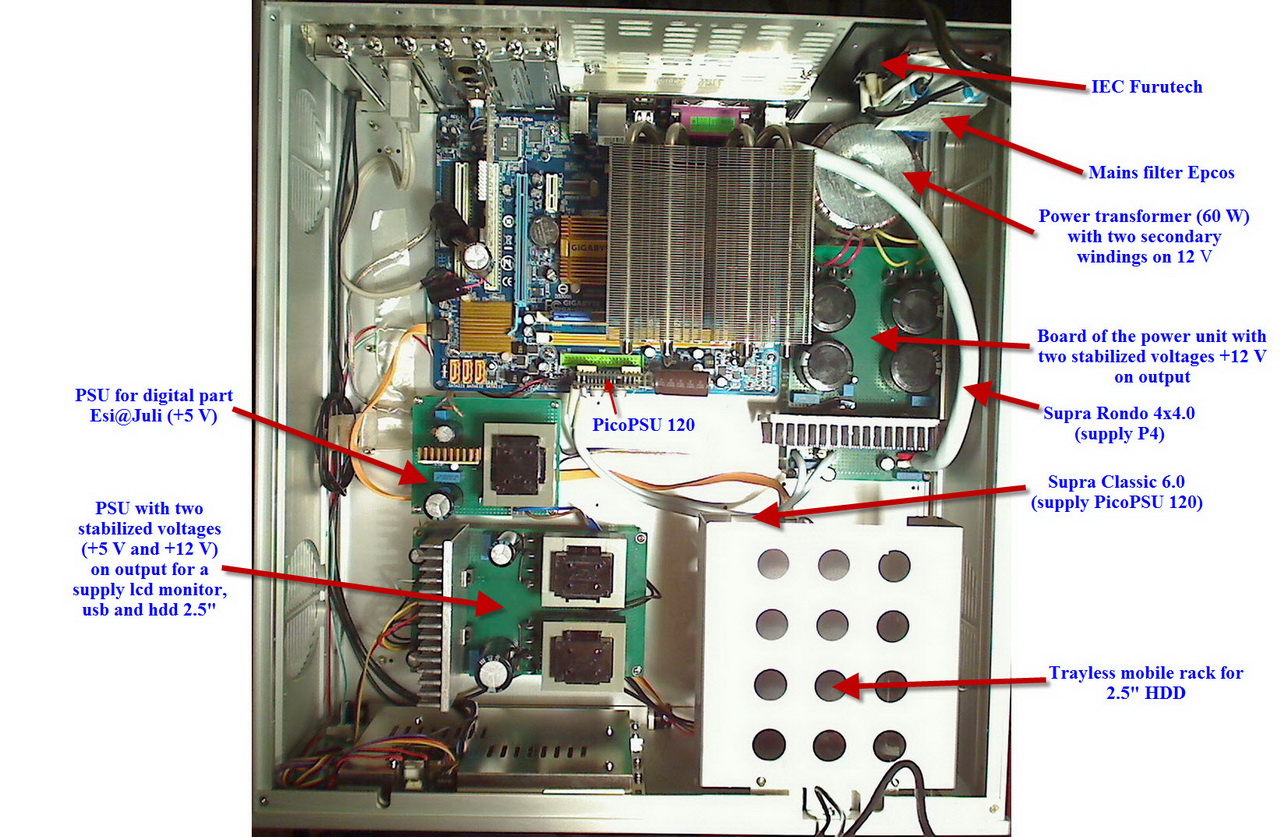
This is the photo of my old platform (but the psu remained the same so far).
Edits: 09/22/10 09/22/10
Thanks for your detailed reply.
Sorry I got confused between your system and your friend's uncompromising ATX linear supply.
This is the one I am interested in.
Does the PDF file of the full linear PS at cMP's site still stand or do you have any revision for it?
I do not know yet. It is possible to make the new revision without the voltage -12 V. Nevertheless it is desirable to have practical acknowledgement of working capacity of such version. Though I do not doubt it.
Has forgotten to add that the sound on the new platform much better than on the previous.
I had had my JULI@ in the slot nearest the CPU.
I had noticed the sharing of the interrupt request and had turned off the other devices that were "sharing".
Nonetheless, I moved it to where you said it should be (had to re-install the drivers) and I hope I am not imagining things but it seems to sound better. I was also able finally to get the INTERNAL GRAPHICS CLOCK to 400 without a BIOS failure. But, I cannot imagine that making that much difference, but how would I know?
More than a slight improvement.
Thanks, again,
Rick McInnis
Never got it to "install".
The monitor's drivers require the VGA drivers to be installed from the MB set-up disk and then those drivers want NET FRAMEWORK to be installed which for some reason I cannot get to install without attaching the machine to the internet and I do not want to do that.
As I think about it all of that extra stuff running in the background is not going to help anything.
I guess I will try fmak's disconnecting of the monitor when I want ultimate sound quality, though I have not tried this is awhile I cannot remember how much difference it makes.
The question would be: are the drivers disengaged by simply unplugging the monitor? Somehow I think they are not so whether the thing is plugged in or not they are still doing their share of the "damage". But I will give it a try to be sure.
Oh, well, one hundred dollars wasted. I have no idea what to do with this thing!
Bye,
Rick McInnis
Hi all,While surfing the internet, I stumbled upon this ‘naked’ linear PSU for industrial use.
What do the more knowledgeable inmates think of this ‘naked’industrial linear PSU. Model NMC 101 S from FG-Electronik?

Van FG-Electronik linear PSU NMC 101 s
http://www.produktinfo.conrad.com/datenblaetter/500000-524999/510259-da-01-en-LINEARE_STROMV_NMC_107.pdf
(see also link provided at the end of this post)And also: http://www.fg-elektronik.de/powersystems/standardgeraete/ac-dc/linearnetzteile.html (unfortunately german language only)
Price: 139 euro (incl VAT)
* Could this be an ‘ideal’ candidate for a linear PSU to power the MoBo 5 Volt and 12 Volt DC rail on the P24?
The product information says:
This linear regulated power supply family with smallest possible residual ripples has been developed for the power supply of measuring and testing systems and other sensitive terminal devices.
There are a maximum of 4 galvanically isolated output voltages available. Three isolated GNDs can be provided in order to minimise faults. As standard, these GNDs are connected (solder points). All outputs are shortcircuit
proof. The transformer is protected by a thermal switch (automatic reset). The maximum output current on the high current branch and the output current during short-circuit is precisely adjustable and thermally stable.
• all outputs are short-circuit proof and thermally protected
• with suppressor OVP protection diode in the 5 V branch
• series regulator system, thus no HF interference
• adjustable current limit characteristic, foldback characteristic for the
high current range
• connections via plug pins and screwless power supply terminal
• European format
• 3 isolated GND
• patented control circuit for the high current branch
• excellent control characteristics
• very small output rippleGeneral technical data:
- Mains input: 230 V + 6 / -14 %
- Load rating: approx. 60 Watts
- Output voltage: high current range ± 10 % adjustable. The short-circuit current is approx. 40 %. i.e. current fold back and thus permanent short-circuit proof guaranteed.
- Static regulating behaviour: for a change in mains voltage of + 6 / - 14%, the output voltage changes by max. 0.02 %, For a load change of 0-100 % by max. 0.02 %
- Dynamic regulating behaviour : for periodic load change between 10 and 90 %, the voltage jumps stays smaller than 200 mV.
- Residual ripple: residual ripple and noise are under 2 mVss from 0 - 1 MHz
- Temperature class: T 40 E
- C-type core transformer: SM 74
- Primary fuse: T 0.5 A
- Dimensions: European plug-in card 100 x 160 mm. Height approx. 85 mm
- Weight approx: 2.0 kg
Some background information on this question:I’m very keen on getting my (cMP) audio PC ALL linear powered (Processor, Mobo and sphericals).
And also every time I read Gstew’s enthousiastic reports on his progress in building his own DIY linear PSU’s, I want to take that jump.
(BTW: Gstew should be elected Audioasylum’s ‘Member of the year’ . Always enthusiast, always willing to share and always with a positive attitude).
But already for one year now, I hesitate for several reasons and I don’t dare too take ‘the jump’.* Obstacles getting there:
-> I’m not very confident in that using 3 or 4 ‘standard’ ‘off the shelve’ linear bench PSU’s will meet the high quality standards that are needed.
(the absence of HF-pollution, stable current supply with rapid changing loads, ect.)
The specs of these ‘standard’ ‘off the shelve’ linear bench PSU’s, simply don’t mention anything about these characteristics.-> If I would press myself really, really hard, I could build myself a linear PSU from recommended circuits like: Gstew, John Svenson, Mihaylov and others.
But somehow I have the feeling that these ‘almost (theoretically) perfect’ circuit designs, heavily depend on the use of also ‘almost (theoretically) perfect’ parts and are thus very costly (Black Gates, etc, ect)
Also: this would be my first time building such a linear PSU and I will probably learn a lot from it.
But….. ordering all the parts, investing all the time to learn to skills needed, ect etc.
It will probably not be a very ‘economical’ project.So may be this ‘industrial’ linear PSU might be a good candidate for my audio (cMP) PC setup.
It ‘only’ needs to be boxed and connected.So any thoughts on the suitability and DC quality output of this linear power supply form FG electronic series: NMC 101 S ?
All thoughts and responses are appreciated.
Mark
N..B. My current power supply situation is:
My audio (cMP) PC is still powered the ‘hybrid way’:
- ‘standard’ linear 12 V PSU on the P4 (processor)
- ‘standard’ 12 V linear PSU powers a picoPSU on the P24 (MoBo)
(this picoPSU model only leaves the 12 V untouched. 3,3 V and 5 V are still regulated)
- a second 12 V linear powered picoPSU powers: USB, HDD, DVD separately.
(this picoPSU regulates all 3 voltages)
fully AOB optimized cMP2 PC -> Lynx AES16 -> XLR AES/EBU -> Lavry Black DA10 -> XLR Mogami Gold -> Klein & Hummel O300
Edits: 09/04/10
But I'd put gene (first fully-linear supply), Mihalov (super linear supply show-and-tell) and JackWong96 (the most serious cMP ever seen!) ahead of me... and of course, the master cics!
Then of course, I have comments on the power supply...
- First of all, good find and it looks very interesting.
- I'm glad they include a schematic... one can make some informed judgements about it.
- It does use IC regulators for all but the main high-current output. Not a problem, just an observation.
- I am not a trained EE, so I don't quite understand the main h-c output circuit. It LOOKS like a negative rail feedback regulator connected as a positive rail regulator. I've seen this done with positive rail regulators connected as a negative before, but not this way. Not sure what benefits it brings.
- Other than that, the main h-c circuit does not look like anything special, but also not anything bad.
- Looking at the schematic and the different versions they offer, they MIGHT be able to configure one with +5v high-current and +-12v and +3.3v medium-to-low-current. It may take a different transformer wind, but is worth asking. Version NMC 103 looks close to this. From the schematic, it looks like the -5v in that version comes from the bottom-most regulator circuit AND that regulator looks as though it can be configured for either a positive or negative voltage output... so it may not be a significant change.
- It may be a very good platform for later upgrades or rebuilding. You could reuse the transformer and heatsink as long as you got the version with a transformer that provided the right voltages.
- The C-core transformer was mentioned by Thorsten as being the best-sounding option among the different types available... that's a definite plus for this unit.
- It'd be worthwhile seeing what rectifying diodes they use. If not soft-recovery ones, that's a fairly easy and very positive upgrade.
So my suggestion is ask them about a +5v, +-12v, and +3.3v version. Get that if they can do it and if they can't, do the NMC 103.
Then on special parts such as Black Gates, IMHO, there is no substitute for well-selected, good-sounding parts. Build up two supplies with identical circuits, one with well-selected parts and the other with a selection of garden-variety parts from Radio Shack or Farnell or whatever you're local electronic parts outlet and the one with the good parts will sound better. Look inside of a high-end amplifier, preamplifier, or disc-player from Ayre, Audio Research, or other respected high-end equipment manufacturer and you'll see many of those same high-test parts... and a few that you and I can't get because they are custom-made for them. I used these parts when I did my supplies partly because I've learned this lesson over the years and partly because I had some of these parts on-hand and knew where to get the rest. One thing to say here though... while the top tier of these parts are almost always pretty pricey, there is a middle tier where there is good performance available for much less cost, often about the same as the 'garden-variety' parts. Elna Silmec, Panasonic FM & FC, Nichicon Muse electrolytic capacitors and Vishay-Dale CNF55 resistors are all examples of these. But the trick on these is to find the ones that work well for your setup and hearing bias... I personally cannot stand those Panasonics and only rate the Elna Silmec as acceptable, but they have worked well for many others. Thorsten does not like Black Gates at all and they have worked well for me. No part is the best for everyone!
Then this is a good place to make mention of some other options for DIY Linear Supplies. I've not had much time I can devote to this right now, but have been on the lookout. I haven't found any single-unit building blocks such as this one, with the main issue being that many of them are single-voltage out and pretty expensive.
But I have seen some pieces that look very useful for the not-too-advanced DIY enthusiasts:
- AMB Labs has a single-board high-current regulated supply called the Sigma 11. It is all discrete components and with an appropriate heatsink should handle the ATX-20/24 5v high-current rail with no issues. It does not come as a kit, but they can supply the boards, semiconductors, and heatsinks, with you needing to add the transformer, resistors, and capacitors. I suspect it will sound better than an LT1085-based supply too! See it here: http://www.amb.org/audio/sigma11/ . One could also use it for the other voltages, but it would be overkill in current capability, but maybe in supply quality perspective.
- Twisted Pear Audio has a Low-Current Dual Power Supply kit. It uses LM317-type IC regulators. With at least larger heatsinks and possibly upgrades to LT1085 IC regulators, it can handle the ATX-20/24 3.3v & 12v and the P4 12v for an optimized cMP machine. You need only add an appropriate transformer to this kit... see it here: http://www.twistedpearaudio.com/power/lcdps.aspx .
- Peter Daniel at Audio Sector offers a set of bare boards for building up raw-DC supplies. They can be configured for just a raw supply or will also accept either fixed or adjustable IC regulators. These could be used to provide a higher-capacity/higher-current supply for either of the above or to do your entire supply using various IC regulator chips. You can see info on it here: http://www.diyaudio.com/forums/audio-sector/149672-universal-power-supply-pcb.html .
Anyway, I've rambled on enough today... need to go work on trying those LT3080's!
Later!
Greg in Mississippi
Everything matters!
Hi Greg,Thank you for your feed back.
I red the links and also did some more reading and thinking on building or on finishing pre-build linear PSU's and other pre-build power regulators. Like Teddy Pardo’s SuperTeddyReg’s
I also searched the costs for an enclosure / box, wires, terminals, etc etc for the ‘naked’ SMS 101 linear PSU. I also thought about all the hours work needed on putting it in a box ect, ect. I feel it will costs me too much time, effort and money.
So when I stumbled upon a (used) linear PSU this weekend from Thurbly Thandar Instruments (TTi) model: PL330QMT, I bought it (100,- euro’s). It has tree independent outputs. 2 outputs: 0 - 32V at 0 - 3A. Third output: 4 - 6V at 0.1 - 7A
TTi linear PSU’s are considered to be among the best linear PSU’s vailable. On Pinkfishmedia there are even guys who power there Naim NAC pre-amps with TTi linear PSU’s at very good results (they say).
However there is one downside: you need a cupboard or something, to hide these bulky monsters from the eye. They weigh a hefty 15.5 kilo’s (34 Lbs) and are very, very ugly.
If the raw TTi PL330QMT output isn’t good enough, I than consider too use the PL330QMT to feed Teddy Pardo SuperTeddyReg Ultra Low Noise Regulators with it.
But these SuperTeddyReg’s are also ‘naked’ and also have too be boxed. :-(But first: let’s now find out which 12 V, 5 V and 3.3 Volt wires/pin’s on the P24 have to / can be bundled and how to start-up my MoBo.
Thank you for your feedback. I’ll report back (in a few weeks) if I managed too get everything properly connected and if I got the mobo up and working.
Mark
fully AOB optimized cMP2 PC -> Lynx AES16 -> XLR AES/EBU -> Lavry Black DA10 -> XLR Mogami Gold -> Klein & Hummel O300
Edits: 09/13/10
> > What do the more knowledgeable inmates think of this ‘naked’industrial > > linear PSU. Model NMC 101 S from FG-Electronik?
Certainly better than the SOLA/HD that I am using.
short of going for a shunt style supply, this is probably as good as anything with a three pin regulator. At least, it appears to be a discrete regulator which should offer some performance advantage.
The price is quite reasonable. One could not assemble the same thing for much less if ANY less.
You are left coming up with a 3.3 volts rail which would not be difficult to implement.
The packaging appears to be quite compact would allow it to be close to the MB.
The ripple is not THAT low, but I am sure it is plenty low. Of course, the ripple in a dynamic situation is what counts. They claim this to be a notable quality of their patented circuit. One wonders what demands a de-tuned cMP computer has for the supply? One would think it not to vary very much other than (I am guessing) when requesting a new album and that would have little to do with sound quality since the operation is performed before playback.
One wonders if such a thing would make life almost simple. If one wanted to place some BLACK GATES at the P24 and P4 connectors it could not hurt!
I am going to see if the supply is available here. I am lazy and this would have to much better than any switching supply even if it might have a slight disadvantage to a supply built to phono amplifier standards!
Thanks for the notice.
Hi Rick,Thank you for your responce.
Indeed it would make the job more easy.
But the linear PSU model NMC 101 S from FG-ELECTRONIK also has my special interest because FG-ELECTRONIK not only stresses the absence of HF-pollution but they also stress the importance of (dynamic) load regulation.
I have no education or background in electronics, so I don’t know if it is really important, but I’m under the impression that a very good load regulation is also critical for sound quality coming from digital resource. I don’t see any in dept articles on the importance of (dynamic) load regulation for digital resources, but I do see more and more hints that point in this direction.
* Some producers of PSU’s for audiophile digital resources stress the importance of there PSU’s designs having a very low internal resistance.
* On this forum I think it was Bertel (if remember correctly) who stressed the importance of low resistance in order to maintain a stable voltage and steady current flow too the mobo.
* And also in this (sales talk!) article on upgrading the squeezebox PSU the importance of dynamic load regulation is mentioned.
http://www.squeeze-upgrade.com/philosophy-behind-sbooster-concept-pm-30.html#A%20linear%20regulated%20power%20supply%20improves%20the%20sound%20quality%20only%20for%20X%
(Although I seriously doubt if the series resistance of the DC power line is a real problem in that matter).I agree, it looks like if a de-tuned cMP PC is not a difficult load for a PSU. But on the other hand: some inmates on this forum do suggest that all the sound quality differences that can be heard on a cMP-setup through under-volting, under-clocking, using less RAM, an SSD, ect etc are because off less stress and demand on the PSU.
I’ll wait (ad hope) for some more response from other inmates, but since the PSU is only 139,- euro’s (so not super expensive) it might be worth to give it a try.
Mark
fully AOB optimized cMP2 PC -> Lynx AES16 -> XLR AES/EBU -> Lavry Black DA10 -> XLR Mogami Gold -> Klein & Hummel O300
Edits: 09/04/10
for these supplies. It is not listed and when it comes to regulators it is a bit of smoke and mirrors. One can get great static measurements but when the load changes, like in a class AB amplifier, it becomes hard to be sure what it is. It is an indicator of good dynamic performance and the only way for us to find out is to use it and even then a shroud of mystery surrounds since - what are we to compare it to other than the ANTEC switcher which it damn well BETTER be better than since it cost about five times as much! But better is better - the question remains - how much better?
How much better than the ANTEC and then how much better than the PICO?
What one needs to know is: is a MB more like a class A amp or a class AB/B amplifier? Does an MB in cMP mode, more specifically, mimic a class A amp? My instinct is that it does but who knows what that is worth (my instinct that is)?
If the MB is more like a class A amp then the power supplies duties become much less difficult since it is not being asked to respond to changes - the definition of class A implies a steady state.
The supply does not seem to be easily available in the US - one would have to import one since none of the majors seem to represent the company, which is a shame since it does appear to be a step up from the average over the counter linear supply. I like the fact that it uses a discreet regulator instead of the ubiquitous three pin chip. One would like to assume this assure much better high frequency performance, important with computers playing music. I cannot imagine the average switcher having good performance in the high frequencies but there is another guess.
The trick with MB and CPU generated noise is how to sink it? The big advantage of the shunt regulator is that is does just that as part of its mode of operation. How any series regulator can reduce noise, other that its own noise, is a bit of a mystery. One would expect the power supply to be "quiet" - how it handles the garbage being returned to it via the ground is another thing. Maybe these clever Germans have found a way. If they have we will be very lucky music listeners.
If we could get a triple output including the 3.3 volts it would be very desirable. I have not found an over the counter supply with 5, 12 and 3.3 volts. We are the odd ones wanting to power am MB with a linear supply! I still like the idea of powering P4 with a separate supply. I continue to wonder if it makes any difference what powers the HDD and the USB. I just can't see how it makes any difference to use anything but the GRANITE supply.
This does seem to be an above average over the counter supply.
Are you considering ordering one?
Bye,
Rick McInnis
Hi Rick,
To me it’s totally unclear what a digital audio circuit exactly ‘needs’ from a PSU. I also don’t know what kind of digital audio circuits designs are more sensitive than others, too the quality of the power that is feeding them.
As also mentioned by other forum members: swithing PSU’s can be used with great success in digital audio equipment. For instance: my Lavry Black DA10 DAC uses a switching PSU inside, but it’s considered to be among the best sounding mid-level-quality DAC’s. May the digital circuit designs of the Lavry are not so sensitive for the power quality that is feeding them. Or: the switching PSU design is optimized for feeding digital audio circuits in the Lavry. I don’t know. But I guess: probably both.
I also don’t know / have (strong) reservations on ‘just’ copying what is ‘good practice’ in the analogue audio domain too the digital audio domain, assuming that the same practice will also be ‘good practice’ in the digital domain. Some times it is, because essentially all ‘digital’ electronics work analogue too. But also a whole set of different rules apply when transporting and processing block pulses at mega Hertz speeds instead of processing ‘old fashion’ sine waves. Inmate Ryelands sometimes stresses this by pointing at Ivor Catt’s (a.o.) book Digital Hardware Design. http://www.ivorcatt.org/digital-hardware-design.htm#contents. I think Ryelands stresses a very good point here.
So that’s what do I do. I just wonder around in ‘the land of PSU improvements’ for my cMP setup while trying to avoid getting lost. I read how other inmates try too improve the sound of there cMP setup through optimizing the power supply. When it works (other inmates report sound quality improvements too) I try to copy that improvement. But only when it’s not too complicated or difficult because my knowledge and skills are (very) limited in this matter.
So the common sense around here on PSU improvements is to apply a combination of:
- Using a PSU that can deliver currents that vastly vary while keeping Voltage rock steady.
- avoid noisy PSU’s by using quit (mostly linear) ones and or battery’s
- avoid or remove noisy components
- ‘sink’ or ‘filter’ noise generated by noisy components on MoBo, processor, sphericals, etc, ect (too a REAL earth or to GND ?)
- using separate power supply’s in ‘dirty’ and ‘clean’ sections.
But I suspect that the ‘dirt’ from the dirty sections somehow travels around and still manage to reach the clean sections through various ways.
As a hobbyist with limited knowledge and skills I concentrate on the use of (pre-build) linear PSU’s and the sinking / filtering of ‘noise’.
Since using linear PSU’s is relatively easy, most inmates concentrate on using / building linear PSU’s. Unfortunately I don’t read so much on ‘sinking’ or ‘filtering’ noise that ‘dirty’ components are throwing into the power supply lines.
Although I sometimes post long posts (like this one) I’m not the kind of guy who likes lengthy exchanges on ‘philosophically’ or ‘scientifically’ arguments if something might work or not. My motto is: if you think (after good, sound and thoughtful consideration) something might work: than just try it.
So yes I’m considering too buy one. Gstew already provided me with a lots of information on the subject and also some guidance on which model too choose. But he also provided so much more other info and alternatives, that I first have too think and read about that.
Meanwhile I’m going too ask FMAK how he is doing his LF and HF filtering. It seems he belongs to the few inmates who not only concentrate on providing clean power but also on keeping it clean (filtering). I’m very interested in how he does it.
fully AOB optimized cMP2 PC -> Lynx AES16 -> XLR AES/EBU -> Lavry Black DA10 -> XLR Mogami Gold -> Klein & Hummel O300
as opposed to linear supplies which are pretty easy to get ninety percent right.
No one is interested, it seems, in building a LINN or NAGRA quality switcher for the computer so we are stuck doing it the old fashioned way.
The task is easier for a cMP machine versus a gaming computer since our demands on the machine are pretty steady. I cannot imagine there being large jumps in current demand while playing music.
I think fmak is using the PICO but I do not believe he has said what he uses to power that. He is using an ATOM board which probably makes the powering easier in exchange for not having as much control on the MB's BIOS. All is compromise.
It would be interesting for someone with the gear to test the PICO with a high quality 12 volts supply for ripple. It is probably unfair of me to compare the SILENT PC test results when they used the supplied power brick. It very well is almost as good as the Herculean approach. One can still power the P4 with a separate linear supply and get almost to where the fully linear supplies can get us.
Sorry for the surmising. I hope you do not feel I am waxing philosophically.
Embarrassed that I missed the three pin regulators on the German supply. Just looked down there too quickly and assumed it was just rectifiers. That does seem to make 2/3's of the supply rather pedestrian and something you could do for yourself. It is not that hard to assemble a three pin regulator supply.
Looking forward to hearing what you decide to do.
You are right in nominating GStew for member of the year!! He has help me tremendously.
RayBan
The other night while comparing 44.1 to 192 within cPLAY/SRC and finding something to like about either I wondered if it could be advantageous to set the computer to 96 and let the DAC do the remainder (to 192 - TI SRC4392). It is going to upsample anything but an existing 192 input, anyway)
Now I do know how careful one has to be since we can be so enamored of out own brilliance, especially when it comes to audio (earliest documented observation being BARANEK'S LAW for speakers) but for the time spent with it, so far,(two nights extended listening) I think there might be something good.
Of course, if one is using one of the NOS DAC chips this is not going to be the case but could there be some advantage with asynchronous sampling that it is better not to do it all at once? I know there are just as many logical arguments to be made that it would be better to do it all at one time so I have retained my skepticism, but ...
As time goes by it will become more obvious if it is better, worse, or (as is most often the case, simply) different.
If anyone else will give it a try and their assessment, I would be appreciative.
Bye,
Hi I'm interested in the cMP memory player but can't seem to access the HOW To build a cMP player website. When I try to access that site it says off limits - that it has been reported to have viruses - and blanks out the page with a red page , i have been trying to access that page for about a week - - - can anyone help? Thank You - dean
When I try to access that site it says off limits . . .
Obvious I know but are you using the correct address? See link - it's fine here.
HTH
Thank You, I kept getting a red page saying that Microsoft is reporting that the sight contains viruses, and do not continue to site, so on your advise that it was okay I turned off my virus program - went to the bottom of the pg and clicked on help and selected continue to page - SUCCESS !!! - I'm rather computer use - "challenged" thanks for the help - letting me know that you were having no problems with the page , i was affraid to go past the RED screen - KR-dean
Hi Everyone,
I'm about to build a cMP2-machine. I'm a beginner. So I dont't want to fiddle around too much. My plan:
Case: "ATX Silverstone SST-LC13B-E La Scala"
CPU: "AMD Athlon II X2 240e"
MoBo: mini-ITX "Jetway JNC84E" with PCIe OR microATX "Asrock A780LM-S with PCI"
Soundcard: "Asus Xonar Essence STX" (PCIe, provides a 12V-Molex plug) OR "Onkyo ST-90PCI" (PCI, no extra 12V plug)
Energy: an ATX device providing four 12V lines at 18Ampere+
Question:
is it better to to use a smaller, industry-style mini-ITX board together with an above average conosumer soundcard like the Asus Xonar Essence STX
OR
is it preferable to use a simple standard microATX board together with a top notch Onkyo soundcard like the ST-90PCI
OR
is all that nonsense since focussing on a second ATX power supply is much more important (by the way: do seperate 12V-lines make a difference?)??? The mini-ITX board would probably offer a chance to place a second ATX power supply inside the spacious case.
There are several questions hidden in my post. Sorry for that. But a complete set of answers arriving over time might be very useful for other novices as well...
Thanks. Cheers.
Jens
You folks are lightning fast!
Ok, I must admit that the gear choice is a little exotic.
Besides the gear mentiones my intention was to find out about mini-ITX, thinking that smaller and more industrial-like might be an improvement. But in the passed few hours I've found out that PCIe is a nogo for audio anyway, and since virtually all mini-ITXes nowadays provide PCIe only that plan is skipped.
I don't have an aversion against Juli@, but reading about it seems to reveal repeatedly that it must be very good, but not best. But if it should be the best affordable way to go I'll take it.
Since it'll be PCI anyway the Onkyo Soundcard is back in the race. The ST-90PCI is said to be extraordinay good soundwise. It is only moderately more expensive than the July@. And I would like to avoid tweaking the equipment since I'm lacking knowlege for that so far. But I'm not completely sure how much the soundcard really contributes to final sound quality, assumed I will NOT use an external DAC.
Mentally I went for AMD since their latest 45nm Desktop CPUs (the "e"-Versions) provide 45W TDP which is noticably less than the 65W TDP of the Core2Duos. That should make sense - no!?
I doubt many here will know much about the gear you are considering.
Do you have an aversion to the GIGABYTE boards or the JULI@ soundcard?
I guess Rick is right that many here do not know much about the gears being considered. I am one of the many.
However, I would strongly advise against the use of the Asus soundcard, having own the Xonar ST. This soundcard may have used excellent components in the build but it has got a horrible ASIO driver.
My initial built was using the ST and I thought the sound was wonderful. But having switched to Juli@(modded with recommendations from GStew, promethk, et al) a few months back, and recently having a listen to the ST, my feelings are that Juli@ @48 latencies gives the feel of a refined high-end system, whereas the ST gives you the run-of-the mill sound with the universal ASIO4ALL @64 latencies. Asus ASIO(beta) driver doesn't work well cMP + cPlay.
Morever, STX cost much more than the Juli@ over here.
Regards
PUT THE TEST AT THE WRONG PLACE FURTHER UP - SORRY!
SO I'M REPEATING IT HERE!
You folks are lightning fast!
Ok, I must admit that the gear choice is a little exotic.
Besides the gear mentiones my intention was to find out about mini-ITX, thinking that smaller and more industrial-like might be an improvement. But in the passed few hours I've found out that PCIe is a nogo for audio anyway, and since virtually all mini-ITXes nowadays provide PCIe only that plan is skipped.
I don't have an aversion against Juli@, but reading about it seems to reveal repeatedly that it must be very good, but not best. But if it should be the best affordable way to go I'll take it.
Since it'll be PCI anyway the Onkyo Soundcard is back in the race. The ST-90PCI is said to be extraordinay good soundwise. It is only moderately more expensive than the July@. And I would like to avoid tweaking the equipment since I'm lacking knowlege for that so far. But I'm not completely sure how much the soundcard really contributes to final sound quality, assumed I will NOT use an external DAC.
Mentally I went for AMD since their latest 45nm Desktop CPUs (the "e"-Versions) provide 45W TDP which is noticably less than the 65W TDP of the Core2Duos. That should make sense - no!?
And what difference between these versions of the motherboard.
Something to add on. VERY IMPORTANT.
The voltage should always lock at 90V or +/-5v, if otherwise it will defeat the purpose of buffering the spdif using a tube. However, a Voltage Regulator tube is highly recommended in the PS circuit.
When your voltage is locked at 90v or +/- 5v, u will know wat is it all about!!!!!
Finally if you are not able to do it as above, signal quality of SPDIF being buffered would not be benefited too much.
Thanks.
Looking at how to best implement an SSD with XP Pro I came across a site dedicated to this: http://www.ocztechnologyforum.com/forum/showthread.php?43460-Making-XP-pro-SSD-friendly - and this:
How to re-enable WinXP prefetcher
- manually edit registry keys
Windows Registry Editor Version 5.00
[HKEY_LOCAL_MACHINE\SYSTEM\CurrentControlSet\Contro l\Session Manager\Memory Management\PrefetchParameters]
"EnablePrefetcher"=dword:00000003
[HKEY_LOCAL_MACHINE\SYSTEM\CurrentControlSet\Servic es\Schedule]
"Start"=dword:00000002
[HKEY_LOCAL_MACHINE\SOFTWARE\Microsoft\Dfrg\BootOpt imizeFunction]
"Enable"="Y"
[HKEY_LOCAL_MACHINE\SOFTWARE\Microsoft\Windows\Curr entVersion\OptimalLayout]
"EnableAutoLayout"=dword:00000001
- or download 'Enable WinXP Prefetcher(http://mampan.org/prefetch/Enable_Prefetcher.reg)' and double click.
Could these additional changes be useful?
I will try them tonight and see if anything bad happens. I do not have an SSD.
Bye,
Could be of interest.
I implemented them and they did not make anything go wrong.
Just got my reinstall working last night, too late to do any serious listening. I will know more tonight.
Decided to do a WINDOWS re-install since I could not get my "radio" mouse to work but it got me thinking about what the optimizations are about.
I was looking at the monitor optimizations - specifically the idea of running the monitor at its native resolution to minimize work.
This got me to wonder if my large monitor (21 inches) and its rather high native resolution requires more work than the tiny monitor in the ZALMAN case as some are using.
So, I started looking around and found these USB monitors. One would think it best to power the monitor with a GRANITE or the "dirty" supply.
Would this make a difference? Lowering the native resolution from
1680 x 1050 to 800 x 480? These have their own video card which would require less work from the on-board stuff. Could the on-board stuff be turned off as a result of this?
With the new board there is no choice between USB 2.0 and USB, so that is not a consideration.
I have included a random link to one of many of these available.
Any thoughts?
any idea of what to do, other than starting over with a fresh WINDOWS install?
It keeps telling me to install OEM Graphics Drivers.
It keeps telling me to install OEM Graphics Drivers.
Have you re-enabled the Windows Installer service? If not, do so before running the installer for the drivers for your USB monitor. When done, disable the service again. Not all program installers use it (cPlay being a case in point) so there's no guarantee that starting it will fix your problem - but, who knows, it just might . . .
to start to install programs, I did this from the beginning and ...
nothing happens.
I get the feeling this experiment will require a fresh WINDOWS installation.
I do like the idea of the small monitor enough to go through with it.
My remaining question becomes: if one unplugs the monitor does the driver still keep on "driving" and doing the same amount of mischief?
I am thinking to balance it out I can disable the drivers involved in the regular monitors operation? We'll see.
Thanks for the suggestion nonetheless,
Rick McInnis
It occurred to me that one should be able to unplug and re-plug the USB monitor so it would be completely out of the system while playing music.
Of course, this would be bothersome but it might be worth it.
Of course, this would be bothersome but it might be worth it.A couple of suggestions.
1. A headless setup would probably have at least the same result and possibly a better one. :> ) It also has the merit of not costing anything to try and, if successful, of leaving you a KVM to the good.
2. I doubt if a USB monitor will help very much. IME, you can't disable the main display in BIOS though you can select its interface (e.g. embedded or PCIe). XP typically assigns it an interrupt whether or not it's actually driving anything. Meanwhile, XP will either assign an interrupt to your USB monitor or poll it so you end up with two devices, not one. (I'm not sure how interrupts versus polling pans out in XP.)
This got me to wonder if my large monitor (21 inches) and its rather high native resolution requires more work than the tiny monitor in the ZALMAN case .
Why not set the graphics chip to a low resolution (letting your monitor do the conversion for the purposes of the test) and see if the CPU load changes while you run e.g. one of those dreadful XP tutorials?
I'm no display expert (to put it mildly) but if graphics cards use vector graphic techniques to generate the raster image for a basic display of type (as e.g. laser printers do) then the difference in our scenario will probably be negligible. I'm ashamed to say that I don't know and can't find the answer but there must be some here who do.
BTW, if you Google "USB polling rate", you'll find discussions between nerdy gamers about altering the polling rate for a USB mouse. See link. (Seems they even do it on the Mac - now there's a thought . . . )
Edits: 08/30/10
have you tried it?
I can't wait to give it a try.
NEAT!
I wonder if one sets the "value" higher than one would it be worthwhile within the cics canon?
You know far more about all of this than I by seven orders of magnitude.
I have grown tired of my 22 inches monitor lighting up the room so I decided to give this a try anyway. I ordered the smallest one.
If it is a wash at least I will no longer have this giant display.
I have no idea how USB and the regular monitor port affect the assignments of tasks within the computer. I do not know what polling is but I will find out (somewhat) after I go to the link you supplied.
I guess I can disable the monitor based devices in DEVICE MANAGER since this monitor has its own "video card". Will be interesting if that makes any difference.
I hesitate to depend on the monitor to change resolution since cics said in the OPTIMIZATIONS that this requires additional power so he recommends using the native resolution of your monitor. I do not know what to make of any of this. Wish I had a better idea of what goes on within the motherboard. But only if the information could be injected into my brain!
In a week or so, I will know.
Are you using the "new" board?
Thanks, again,
Rick McInnis
an LED display like the Zalman. I've been running with 4 bit color,the lowest screen resolution and the AGP Video in the tower disabled. This seems like it would spare the CPU from doing whatever video processing is required for the basic display I'm using now. Sounds reasonable to surmise usb "noise" would have to be less than using the CPU for display though of course still not "headless".I already put a hole through a wall and stuck the PC in an adjoining room and just ran a VGA cable to a KVM swicth to share the CRT NEC monitor I use for my desktop PC. I just shut that off if I want to listen quietly in the main room so I'm not sure I'd benefit with this unless yanking the AGP card and disconnecting the VGA cable would gain in terms of further quieting of the MB. Thanks for the idea though I may grab one anyway. Do post up any impressions if you try it.
Edits: 08/23/10
since I have no real knowledge of how all of these things interact.
I read further that the LED monitor can be CPU intensive. But I figure with what it would have to do with cMP should not require much of any work from the CPU. I think many of these folks were using this device as a second monitor.
So I would love cics, lga775, or Mr. Wong, to give their opinion on what is worse, USB or the standard monitor jack and whatever supports it.
Do lower native resolutions make life easier for the CPU? Or does the native resolution aspect only come into play when one is asking for a conversion from the native resolution of your monitor?
I would gladly give it a try with some hope of success and if given such hope you can be assured I would report.
Rick,
Since the experts haven't weighed in, I thought I'd offer my opinion...
I looked at one of these USB monitors about this time last summer when I was starting to gather the parts for the super-case that I have yet to build.
I decided against them after thinking about how they must get their signal. They require a separate driver which has to intercept the video signal, likely after it has been processed by the mobo hardware (in the case of a cMP, the processor) AND then do a conversion into USB format AND route it through the USB connection. I just couldn't see any way this wouldn't add to the mobo processing burden.
So my advice is no to this. OTOH, I did pickup this small touchscreen monitor with regular VGA input:
http://www.short-circuit.com/product/VM70.html
I want to disable the AV chips before I use it, but it looks to be a pretty good alternative.
Later!
Greg in Mississippi
Everything matters!
that is the kind of thing I worried about
UNTIL
My second thought is that all of this is moot (I assume) when the device is unplugged.(?) Do you think there is a problem with all of this plugging and unplugging?
I had got used to turning off the monitor so dealing with the plug is not that big a deal.
Thanks for your input!
Rick McInnis
Should this be left alone or set to a lower value?
In my case, the best I have got was 700. Anything much lower and it will not proceed to WINDOWS after the change. I cannot really say there was any change of sonics from this and I wonder if the machine accepted the change, anyway.
I thought I saw someone say they were setting this to 400, though I could have misunderstood.
Unfortunately, even with being run for about a month I can get no lower than 0.675 volt on the CPU. Has anyone else had this problem?
Thanks,
Rick McInnis
Hi guys.
I apologize. I have read SOME of the posts and SOME of the manual, so maybe I just have not read far enough.
I have progressed from one computer to another and from XP to Vista 64 to Windows 7 64.
At one point I used cMP and would see it stop a number of windows services before it started. I now have cPlay 2.0b37 installed and functioning.
OK to the question. Does cPlay 2.0b37 obviate the need for cMP, or include some of its features?
Thanks for the response.
Bruce
No.The two things are quite different. cMP sets up the environment for which a music player (like cPlay or Foobar for that matter) operates. cPlay will operate without cMP (as cMP it is not mandatory) but I can say from my own experience that cPlay really benefits from cMP's addition. The problem will be that cMP will effectively neuter the machine for other uses. It is not a problem if you want the best audio playback.
HTH.
Edits: 08/16/10
HTH,
Thank you for the response. That makes it a bit clearer.
I do ONLY use the computer in question for audio playback, so cMp will be fine.
However, after I start cMp 1.2, I can't figure out how to get cPlay 2.0b37 to start. I do have cMp set to not load ram.
Any suggestions?
Thanks again to down under.
Bruce, LA, Calif.
Have you checked out this web site? It has details on how to configure cMP and cPlay:
http://www.cicsmemoryplayer.com/cMP will require .cue files to work. If you don’t know what .cue files are then read the doco here:
http://www.cicsmemoryplayer.com/index.php?n=CMP.11CMPShellRead the doco here to tell you how to get cMP to invoke cPlay:
http://www.cicsmemoryplayer.com/index.php?n=CMP.12UsingCPlayNow, if you don’t want to use .cue files then you will not be able to use cMP. You can, however, use cPlay as standalone player without cMP or .cue files. In "cPlay settings" you uncheck cMP which will enable windows explorer button (bottom left) on the cPlay screen. From here you can select the .wav or .flac file you want to play and off you go.
BTW. Your music files are in .wav or .flac format are they not?
Edits: 08/17/10
Thank you for the links.
I have used cmp and later cplay for about two years, but had not dug into the documentation.
Your links helped greatly.
I just printed out both guides in their entirety, and the forum indices.
I certainly have some reading to do. I have about 400 CD's ripped to my hard drive with as full bandwidth wav files, using EAC and I have a cue sheet for each. I did not rip as individual tracks. In retrospect, that might have been better.
Here is my virtual system at Audiogon
http://forum.audiogon.com/cgi-bin/fr.pl?vevol&1200440547&view
Bruce
If you do want to switch to individual tracks, try using EAC Tools > "Split WAV by CUE sheet". It's very quick. Then throw away the new cue sheets that EAC makes, and make a new ones with Al Jordan's RecursiveCueCreator - also very quick.
Seger,
Thanks for the bit of info. I have wanted to build a play list for cPlay that would contain 10 or more tracks from individual albums, but could not figure out how to do that with my full album waves.
When I am evaluating a tweak or change in my system I currently have to play a few tracks from one album then close that album and go back to the browser for the next album and cut I need.
The info you have given me, I think, will make it easy to make a single play list that will load all the tracks into one cPlay screen.
Thanks again.
Bruce
Re: “ ..as full bandwidth wav files.. ”
Well, that is what I do!
You could conduct an experiment of ripping both ways on a particular CD and then playback to see if you can hear a difference. I think I can and hence my preference.
Your system looks great!
Audio Bling
Thanks for the system comment, if you like the way it looks, you ought to hear it!
I never thought about there being any difference in the playback sound of the CD whether ripped as a single wav or individual wav's for each track.
When my internet surfing and reading got me on to black CD copies sounding better I downloaded a copy of EAC and ripped all my CD's as single waves, for archiving and to allow easy recreation of the CD on black blanks.
Further reading got me interested in computer playback. My thinking, if the Black CD sounded better then going back one more step and not using an optical interface (laser), but rather playing from the hard drive ought to be even better.
I am an inveterate tweaker, and have a number of track I use for evaluating a change in the system. In foobar 0.8.3 (the best sounding player I had, before stumbling across cMp/cPlay) it was easy to make a play list of just the tracks I wanted.
I, on occasion, wanted to burn a CD with just those tracks, but never got into the process deeply enough to figure out how to do that.
With the reply I received from seger I now know how to split my full wav's into tracks.
Alright.
I do have it working. Here is how I did it.
I opened cMp. I used the explorer button at the top to the left to get to the C: drive and then to the location where cPlay 2.0b37 is. I then open cPlay.
At first I had checked the box in cPlay to not allow the explorer to open because of the potential for a cMp lock up.
That obviously kept me from navigating to my music files. After I unchecked the "no explorer box" the "folder" was not grayed out, and I could navigate to all my music.
Have I done this correctly?
Is there a better, more efficient way to accomplish this?
Again thanks for your initial post that cleared up some of my confusion.
Bruce
Well, I guess it's better than being stuck in "XP mode"...
No matter how many times I click: "start XP" > OK > OK > X > "Yes" (to the "cMP restart?" prompt), the computer does a cMP refresh and returns to the main cMP screen.
Repeated clicking of the "X" does not break out of this loop. Setting diagnostics to "Yes" does not help (just more OK buttons to click through !).
Manually killing cicsMemoryPlayer.exe and starting explorer.exe restores the desktop, but again using the Shutdown/ Restart dialog has no effect... the desktop remains.
Reset button reboots the machine, which goes directly into cMP.
Does anybody know the secret of returning to XP mode ? Please point out the obvious thing I've missed.
I should mention this OS is XP Pro-SP1 (don't ask...), with all the prescribed optimizations (including minlogon). Earthwatts EA-430/ GA-G31M-S2L/ E7400/ 512 mb Hyper-X LL/ Juli@+BNC mod.
Cheers,
Grant
That's not a Toy... IT'S A TOOL !!
It wasn't mentioned and it was the first thing that occurred to me.
I have not had this happen, but the future is full of possibilities.
Hope all is well for you.
Bye,
Rick McInnis
...and have also used it for Process Explorer in the past.
==============================================
OK just relaunched cMP with Process Explorer checked. Then FILE > SHUTDOWN > "Do you really..."/YES... and nothing happens.
I can't help feel that getting back into XP mode will somehow enable normal Windows shutdown/ restart processing. It worked that way before I got it to go into cMP mode.
Thanks,
Grant
That's not a Toy... IT'S A TOOL !!
I've got the same problem again, now stuck in cMP mode and can't get out. I've also running Win XP SP1 and wonder if it is caused by differences in the registry between SP1 & SP2 (or SP3).
cics, what are the registry changes that set cMP mode or XP mode?
Grant, when this happened before, I'd gotten out by accident. What I did was to attach the harddrive to another computer and tried renaming Explorer.exe in the Windows directory to Explorer.sav, then copy in Explorer.exe from another PC. Because it was an XP Home machine, it didn't work, but afterwards I reattached the drive to another PC and renamed the Explorer.sav back and then started booting into XP mode again.
But I'd like to have a simpler way to do this in the future. Making a registry change (via a file) would be nice.
In the meantime, I've found that if I set cMP to bring up the task manager at startup, I can use it to close the cMP tasks and bring up the Windows Explorer by selecting "File-> Start New Task(Run)" and entereing "explorer.exe". From there, I can navigate to the "c:\Windows" and "c:\Windows\System32" directories and select various control panel items such as "services.msc" (to check services running), "sysdm.cpl" (control panel systems applet), and "appwiz.cpl" (control panel add-remove programs applet). This all works ok and isn't too cumbersome for me, but would be a pain for most people.
Greg in Mississippi
Everything matters!

"START UP"?
Edits: 08/16/10 08/16/10
Did two worthwhile experiments this weekend.
First was replacing the LT1083 regulators in my 'dirty' supplies (5v HDD, 5v USB, 12v Zalman screen) with LT3080 reg chips, mentioned as an upgrade to the standard 317-type regulators in K&K Audio's most recent upgrade to the power supply for their RAKK DAC (see here: http://www.kandkaudio.com/digitalaudio.html ). Initial indications are a slightly more detailed treble... I expected the impact to be small here and it was, but I didn't hear anything bad, so I'll move onto trying them in my linear ATX-20 & P4 supplies (4 chips paralleled for the higher-current 5v supply).
One thing to note with the LT3080 chips... the datasheet indicates a minimum load current of 1ma is needed to maintain regulation. None of the supplies I built with the LT3080 regulated without a load. If you are using them on a circuit where you may sometimes have no load, I suggest a ballast resistance (10K - 100K) on the output to keep them happy and regulating.
Second was use the P4 supply portion of my old Linear-Hybrid supply and connect it to my 'dirty' AC circuit, as recently recommended by cics. Initial indications are that this was more noticable, with blacker backgrounds and increased dynamic contrasts and impact, but my listening was cut short by a thunderstorm. Will check more on this in the near future... if it holds up to long-term scrutiny, I'll add a separate AC cord to my linear supply just for the P4 supply.
More to come...
Greg in Mississippi
Everything matters!
After living with the P4 powered from my 'dirty' AC line and liking it, I set out to modify my fully-linear supply this weekend to have two AC cords instead of using my old linear-hybrid supply to power my P4.Did that Saturday evening. Didn't sound good... flat, lifeless, a bit harsh. I let it warm up a bit, but it never came on-song.
I was puzzled on this one. I used the power cord and fuse-holder from my linear-hybrid and just added it onto the fully-linear. I did swap the AC cords between the P4 and the ATX-20. Even though the cords are different sections of an aftermarket cord I cut up, the plug on the one from the linear-hybrid might be better (it was the one that came on the aftermarket cord, the other was a Lowes-special), so I put it on the ATX-20 supplies and used the other for the P4.
Only other significant difference is that the linear-hybrid uses the MSR860 diodes and the fully-linear the DSEP30-06A's, which I had preferred when I was getting the fully-linear running (I did swap between the two at one point).
So this morning, I swapped the AC cords between the two supplies and took extra care to make sure all the solder joints were good. Put the fully-linear supply back in and I could tell immediately (no warmup) that the issue was solved.
I was prepared to swap out the diodes on the P4 supply too, but there's no need. Actually, the sound is a little better now than using the linear-hybrid's P4... a tiny bit more transparent and dynamic. I attribute that to the DSEP30-06A diodes in the P4 AND to having one less transformer powered up (I never disconnected the P4 power supply on the fully-linear supply when I was comparing, just swapped between the two P4s).
Dunno... might have been the AC plugs, might have been a bad solder joint (although none of them looked suspect).
In any case, I am very comfortable in saying that even with a high-test linear supply, the P4 is better powered from your 'dirty' AC line as recommended by cics.
Because of fiddling with this, I haven't had a chance to try the LT3080 regulators in more positions... likely later this week. I have the LT3080 regs made up and ready to install, but instead spent the rest of my 'audio' time this weekend working on a new set of raw DC supplies for another Juli@ & a not-yet-installed Buffalo-II DAC. Both will be using shunt-regulated supplies which like a couple of volts more headroom than I have in my current setup.
Later!
Greg in Mississippi
Everything matters!
Edits: 08/22/10
which took me by surprise.
The power supply he is using now is not regulated at all, just an RC network and lots of capacitance. Of course, what the thing is powering has regulators on board so I would not doubt it does all that needs to be done.
Installing the BELLESON regulator did sharpen up the images and lost a little of the dreaminess I was getting with the choke filetered supply, but on the whole I do think it is better.
One has to think that the LT3080 has to be so much better than what was "there" as to make going to custom supply almost foolish, especially if it is also a series regulator.
I think it is a good idea to have a bleed resistor anyway. It is good the thing forces this on us.
I hope this difference in the treble continues to be a good thing. I was thinking of just making life easy and using the LT1083 for the 5 volts rail and the 3080's for the others, even though I was ALSO thinking I would use the BELLESON on the P4. I can always make a chance to it later if that seems like a good idea.
What are you doing to power the HDD's? I cannot figure out if I have to power them with both 5 and 12 or one or the other. Again, your help, please? How are you doing this?
At this point I have been using the ANTEC for the P24 and the originally recommended from the ART OF COMPUTER TRANSPORTS supply (something Noisetaker?).
I have made so many changes and cannot ascribe what is making the MOST difference but I have been amazed at what this is able to do. It is more spacious than my turntable. (I am going to have to get to work on my phono stage) It is astonishing.
If this can be appreciably improved with the linear supplies I think I might be very happy for a good long while.
I have to think Dave Davenport's new DAC is a very good sounding device. With the large HYNES shunt reg and Dave's HDMI I2S I am hearing as neutral a tonal balance as I get from a good LP. Been a couple of weeks and I am still listening for hours on end.
Set latency to 98, from 128, and I think it is better. What setting are you using?
Thanks for the report.
Rick McInnis
P.P.S. Did he say why he dropped the LT3080?
Everything matters!
P.S. what you using for a phono stage?
Everything matters!
Always good to hear from you. Sorry for the slow response... busy week at work. I believe I still owe you some responses from posts you made a week or so ago too.
Interesting news about Davenport and the LT3080. I can see that tho... I've heard that cascaded regulators may not sound as good in most situations as single ones. And since he has local regs on the DAC board, the LT3080 isn't really needed. I do find the larger C curious... don't they say something about 'minimum reactance' in their PS designs?
And of course, that he isn't using it in his raw DC supply does not mean it's a bad reg... just that the choice of setup he's using now (no reg there since he has them downstream) sounds better.
Did you see Thorsten's description of his NOS TDA1541-based DAC in the Tube DIY Asylum here:
http://www.audioasylum.com/cgi/t.mpl?f=tubediy&m=186140
He's gone to some interesting PS configurations including a lot of RC or LC filtering... look at his LCR phono stage or the Cole phono he designed for DIY Audio (I have one of these to finish up someday as I get a phono setup running again). But of course, to prove that there's no absolute truth, it sounds like he has some cascaded regs in the DAC PS.
Very curious about the Belleson regs. Someday I need to try one and also compare it to the Dexa (which are less expensive). But I'm leaning towards either PH ones or no-feedback shunts like the Salas ones from DIYAudio... based on some comments from John Curl & Charles Hansen about not liking feedback regs. I do think either of these will handily beat the standard 317-LT1083-LT3080 regs... just as the Dexa beat them in my Juli@ mods.
Also curious about what you described as 'dreaminess' with the choke-filtered PS for the Juli@. Can you say more about that sound?
The treble difference of the LT3080s in my dirty supplies still seems mostly positive... maybe a bit dry tho. I did not 'sex' the poly filtering caps (Wimas) across the voltage-setting R's, so I'll likely do that this weekend and see if it makes a diff. They also may just need some break-in time. Or it could be something else.
I also plan to put LT3080's into all the single positions (ATX-24 3.3v & 12v, P4 12v) in my linear supplies this weekend and that should tell me a lot about how they sound.
But that slight sense of treble 'dryness' notwithstanding, I'm still very happy with the sound after the LT3080 regs in the dirty supples and the P4 powered from my dirty AC circuit. The 'transparent' range has been extended up and down in the spectrum quite a bit and dynamics are well-improved.
On the bleed resistor, I remember a long time ago reading that the 317/337 worked better when providing about 1/2 the max current and the way to do this was to add ballast R's at the load if it didn't draw enough. A lot of my DIY stuff using these regs from that era ('80s) use these R's, but I can't say I ever heard a diff from this. Worth checking out with this reg, tho.
The dirty supply for my HDD is a single transformer providing about 11v or so raw DC that I regulate down to 5v. These laptop drives only need the 5v line (I'm pretty sure that's true of all SATA drives) and I measured about 900MaH peaks with my drive, so the LT3080 works ok. I'm using a standard-rotation drive (5400 RPM instead of 7200 RPM) and this helps keep the current down.
Your setup sounds like it is really satisfying now. I suspect at least a good bit of it is your 'alternative' casing... and of course the K&K DAC, which is one that would be on my list if I were not sorta-scratching DACs. And IMHO, you will be even happier with the improvement made by linear supplies. And I have to finish getting a phono setup running again so I have a good point of comparison.
On PCI latency, I'd have to go and check, but I believe the GA-G31M-S2L board I'm using only offers 128 as an option, so I'm pretty sure that's what I'm using. Will let you know.
Later dude!
Greg in Mississippi
Everything matters!
I just thought it was interesting. CERTAINLY NOT a bad regulator. I think it is a big step up from the older generation.
The main reason he gave was the fact with his new DAC he needed more voltage rails and this was easier to do without all of those regulators.
It was not said, but implied, that he must have thought it sounded at lease as good without it.
I went with the BELLESON because it was small and easy to place right at JULI@. I am sure there are some better approaches but they are bigger(I am guessing!). The fellow at BELLESON told me the bad 'scope pictures were made using the regulator I had first intended to use. YIKES!
The dreaminess meant that the edges were softer, very euphonic. Like I said the images sharpened with the reg but there was a toll in that liquidity which was a distortion, though an attractive one. Not to imply the BELLESON adds no distortion of its own ...
I am going to use the LT3080 everywhere but the 5 volts rail. Only because I already have the 1083 and can't imagine it making a big difference there. My thinking (not saying experience) is that getting the noise out of the supplies to pure digital devices is worthwhile for our purposes but going to extremes might only result in the tiniest of improvements where more might be gained with efforts elsewhere. If I had an unlimited budget I would say, "what the hell", but I do not.
I thought you were using the "new" board, which is why I asked about the latency. I remember on the old board that was a BIOS choice. The new board gives you no choice, hence the PCI LATENCY tool.
My phono amp, which was a temporary solution while I build a John Broskie AIKIDO phono, is the ALTMANN. I used to think it sounded pretty good. It did sound really good compared to my old cMP set-up. Now the new digital system makes it sound really closed in and lifeless. That is how happy I am with this new set-up.
At least I can listen to music while I finish this absurdly long running project.
Thanks for the advice on powering the HDD's. I am using WD CAVIAR BLACK and I think they do spin at the higher speed. I am thinking I will use fixed voltage three pin regs for this. LAZY!
I worry that Thorsten is like Allen Wright (I greatly respect them both) I think what they show you is not enough to get the results they are speaking about so I do not pay too much attention. I am not going to try making a DAC. I do have a pair of those TDA1541 chips, though. Single crwons, when they were being made so I know they are not fakes.
I am completely satisfied with Dave Davenport's line stage and DAC. That is another area I am not going to delve into.
You can see the Dave's new schematic for the power supply at his website: raleighaudio.com. It is not ridiculous amounts of capacitance!
I wish I had thought to give him a hard time about the minimal reactance aspect of the new supply! That is funny.
I am jumping back and forth between your note and mine so forgive the disjointed nature of this.
By the way, have you figured out what jackwong was doing with his memory? I cannot for the life of me make any sense of it at all!
Work does get in the way of all of this, doesn't it?
Thanks for your help, as always,
Rick McInnis
Hi Rick,
Regarding distortion, can we presume the Belleson Superpower innocent until proven guilty? :-)
More seriously, thanks for your comments. Sometimes I'm upset at the engineer after I listen to a recording on a really good system. The other day my wife said "I think something is wrong with the stereo, it doesn't sound right." I checked everything out and it was playing as normal.
"What were you listening to?"
"Journey."
"That explains it. Great music, bad recordings."
Brian Lowe
Belleson
but, I figure I will try the cheaper route first, at least, to get things going and then substitute a superior device.
I am afraid I have no choice but to use the LT1083 for the 5 volts rail which seems to be the most important or the hardest working!
cics has suggested that the 12 volts P4 supply for the CPU is not quality critical. I am not, at this point, looking for minute improvements. I still have my doubts about how much of an improvement a fully linear supply will make but the challenge is too interesting to not give it a try.
I have not lost interest in your regulators.
I hesitate to take a chance of going overboard in praise of anything though some would say I have in my appreciation of cics's software. But, one can let their emotions fly when dealing with another's labor of love which they have decided to give away. Not to say I do not sincerely love what his work has allowed - for me, enjoying digital music. Not to imply I have heard much of what else is out there, not in my own system.
You should lead the way and come up with an easy to implement set of regulators for linear power supplies for the music computer!
Bye,
Rick McInnis
Hi Greg,
I remember reading somewhere that Paul Hynes made a "full set" of high performance power supplies for his client's HTPC. It may be quite pricey compared to DIY solutions, but I think it'll be worth the investment.
"We should no more let numbers define audio quality than we would let chemical analysis be the arbiter of fine wines." N.P.
Agreed.
You can see a picture of the PH ATX-supply here:
http://www.hifizine.com/2010/06/paul-hynes-design/
In separate communications with Paul, he said:
"The ATX supply is a custom four supply in one box product for experimenters to use with replacing the standard ATX power supplies.
It uses my best linear low noise series reg modules. It does not contain any start-up logic... The SR2xr4 costs £1350, with silent transformers, fully built and tested.
The regulator modules are available separately as PR3HD-12, PR3HD-05,
PR3-03v3 and NR3-12 (negative voltage regulator). The PR3HD (heavy
duty) regulators and NR3 negaitve reg cost £120 each. Insured carriage and packing is charged at cost depending on destination."
I suspect this will be the ultimate solution and likely give any battery-powered solution a run for it's money.
BTW, my testing has indicated that you can startup many of the cMP-recommended Gigabyte motherboards (GA-G31M-S2L, GA-G31M-ES2L, and GA-G45M-UD2H) without any controlling start-up logic, just a simple switch to control 5v to the PWR_OK and in the case of the dual-bios UD2H board, a simple manually-implemented timing sequence. Also, only the ES2L board has needed the -12v for startup, so unless you use that board (or need it for a peripheral, like using a Juli@ card and using it's analog side), you can delete that portion of the supply.
Having said all that, what I'm trying to do with testing the LT3080 is to develop a not-too-complex supply that can be built by a moderately-experienced scratch-builder who can't swing the > $2000 USD for the Paul Hynes solution. I can say that the Linear-Hybrid supply solution that I implemented about 1 1/3 years ago was a HUGE upgrade over a modified Antec 430 (extraneous cables & fan removed, added filtering capacitors at outputs) and the fully linear supply I implemented about a month ago was a worthwhile improvement over the Linear-Hybrid (although nowhere the upgrade over the Linear-Hybrid as that was over the standard computer supply), so if a cMP user is concerned with getting the best sound, computer power supply upgrades are a must.
Any my intention is to move to the PH-solution as funds allow.
A long-winded answer to say... 'Yup!'.
Greg in Mississippi
Everything matters!
Hey guys,
I've got a question regarding the mobo. I've updated my bios to f9 and f10 and can't find the setting for disabling spread spectrum?
In this post http://www.audioasylum.com/forums/pcaudio/messages/7/72016.html it's in the advanced frequency settings... but isn't there on mine. Is it the bios version?
I know this adds an extra menu option.
This could also add items within menus. I have never checked.
Ah hah, there it is. Excellent. Thanks.
Hi there!
I came up on this motherboard - http://www.msi.com/index.php?func=proddesc&maincat_no=1&prod_no=2064
Looks very interesting, at least 'on paper'. How would you compare it to lately recommended Gigabyte GA-H55-USB3?
Well I can't say to much for the H55M-UD2H. First I had to wait while I ordered the 1156 bracket. In the interim my warranty expired! Then after proceeding 1 through 9 the PCI bus crapped out. Yes I verified the board not my L22. Not impressed and out 100 or so. T.I guess the question is now that the passion has subsided, is it worth to invest in another UD2H or is there a better board. I wonder if anyone else has had this problem with this MOBo. T.
No worries!
Edits: 08/12/10
I bought one... had to wait on funds for the rest of the kit. Newegg's return policy ran out before the build. Gigabyte has one on the way as I type.
The machine posted to the Gigabyte welcome/prompt screen but I couldn't get into the bios or load an operation system
See my post below.
Julien
"There's someone in my head, but it's not me"
just in case of something like this.
I did when I got mine.
Sure enough, initially I did think there was something wrong but eventually found the problem was my fault. But, in the past I have received four GIGABYTE boards that were truly defective.
I love how when you get a bad board you end up being responsible for the freight both ways. I got mine from NEWEGG and I do not doubt their margins are slim but it seems GIGABYTE should step in.
Oh, well.
Compared to dedicated audio gear this stuff is CHEAP, the only consolation.
It is most assuredly worth going with the new board.
Still awaiting the board replacement from gygabyte. Cost me an additional 30 in shipping charges. Using my original P5B-vm 68xx. 192/tiny playback wish I could underclock this board to 900. T.
No worries!
it'd be nice to be able to know what they say and do subsequently. I have held off purchasing one due to all the continuing problems..
Already LC audio XO3 clock in my esi juli@, recently tapped out the WC from juli@ to my dac that supports WC input. Seemed to heard more and more micro details also more accurate music.Wondering if i using APOGEE BIG BEN as master clock for transport and DAC, will it gain a positive improvement instead of using lc XO3 with esi juli@ WC out SYNC?
Edits: 08/08/10
I don't seem to be able to locate the CMP 1.0 file anywhere. Finaly received the 1156 CPU bracket from Zalman, any help locating the file would be appreciated. T.
No worries!
Think it is now 1.2
No one here remembers the bending of our minds
so the RIP button can do both?
Must admit I am over my head here and would appreciate help in the best way to do this.
Thanks
Rick McInnis
the LATENCY TOOL will load the selected value for you.
So, RIP is only needed for stopping the CRYPTOGRAPHIC SERVICES - wish there an abbreviation for that!
Of course, one could say, TRY OTHER VALUES and see what happens but the untrepid (excuse the wordplay) part of me wonders which way to go with this especially since i do not really understand PCI latency does.
I have JULI@ set for lowest latency which I believe is 64.
Should these be the same?
Thanks,
Rick McInnis
and the result is astonishing.
I had not heard what the system could do until this.
All of the brightness is gone and the tonal balance after four hours of listening seems right. Very neutral. Unbelievably neutral. Did not think it was possible to eliminate that upward tilt but it has been.
cics, this is so much better than where I left I am staggered. Of course, there have been other changes made with the MB and DAC but I figure these have removed obstacles to your software.
Simply extraordinary.
For those who have not done the .bat file for stopping CRYPTO SERVICES and adjusted the latency you have not heard this, at least, with the new MB. I thought it was good before but now I know it is truly great.
Astonishing is the only word that explains what I experienced.
Excuse the unbridled enthusiasm but it is justified.
I could have returned to the turntable but had no motivation to do so.
Congratulations and thanks,
when using 192 up-sampling.
I will give this a try.
Would still appreciate comments.
Is there anything I can do to make my HDDs optimized for cMP2 like formatting, partitioning and loading XP PRO using another computer?
I'd like to move forward while I'm overcoming this little setback.
You guys Rock!!
Julien
"There's someone in my head, but it's not me"
in my opinion.
You could go ahead and go through the process of loading WINDOWS making a section of the drive for WINDOWS, assuming you are using the same drive for WINDOWS and other programs. No need to do any optimizations at this point, obviously.
I use about 10 percent of the HDD for WINDOWS and programs and the rest for the music files.
Then you could, at least, start putting music in.
When you get the board it would be best to re-load WINDOWS into its sector and start making the changes. Be sure to do you BIOS changes before you do anything. Don't even connect the HDD until you do this.
Connect the HDD, load WINDOWS and do the rest of it.
Hope it all goes easily this time.
(remember to put the memory in the slot next to the slot next to the CPU)
Bye,
Rick McInnis
I bought a SATA to USB cable w/power supply. It's on it's way ($12 w/shipping)
Going this route, I can format, partition and load music on the HDD (per your recommendations) through my laptop without going through a OS install.
I have Read cics post When you install Windows you have the option to create partitions - create a small partition of 2500MB (2.5GB) for system installation.
I also remember reading that it is a good idea to have 2 OS partitions for restoring and tweaking purposes.
Please let me know if you have any other thoughts or ideas
Julien
"There's someone in my head, but it's not me"
nt
Julien
"There's someone in my head, but it's not me"
Going this route, I can format, partition and load music on the HDD (per your recommendations) through my laptop without going through a OS install.
Yes - no problem at all. Use your laptop's Disk Manager and partition the target HDD into (say) two system partitions and a data partition.
I'd resist the temptation to make the system partitions too small. You'll probably get away with two or 2.5GB (I think it was me that suggested that in the first place so blame me, not cics) but you might be safer with 4 GB even if you end up not using most of it.
I'd use the default sector size for the system partitions but go for 64k sectors on the music drive (slightly more efficient). A "Quick format" is fine and, well, quicker.
You can then copy over all your music data. You could start the WinXP install on the laptop but, as you'll only save yourself an hour at most, I'd suggest you leave all that until you have the machine the drive is going to run on. Particularly if you're not used to installing XP, it's easier.
BTW, be sure to disable whatever you're going to disable in BIOS (LAN, audio, etc) before you install XP - it's simpler than installing them and then taking them out again.
But formatting, data copying and so on? Get stuck in. Also getting used to using an imagefile utility would be time well spent.
It'll keep you out the bars at least.
HTH
Dave
Thanks Dave.
As I mentioned in response to Rick's post, I plan to use EASEUS Partition Master to partition the HDDs. I haven't used a utility like this before but I think it will be good experience. I appreciate the advice on partition and sector size. I didn't have any idea that there might be an optimal sector size let alone what that might be.
Do you have a recommendation for a free disc image utility that offers the features I need without too steep of a learning curve.
I am sure relieved all you folks are here to lend a hand.
Julien
"There's someone in my head, but it's not me"
I plan to use EASEUS Partition Master to partition the HDDsAs you wish though I'm sure Win XP's disk manager is adequate.
I didn't have any idea that there might be an optimal sector size
Larger sectors make sense where you know that nearly all the files are going to be large but it's not a big thing.
Do you have a recommendation for a free disc image utility?
Sorry, no. I bought a copy of Snapshot several ears ago (after a bad experience with Norton's "Ghost") and haven't tried anything else since.
Edits: 08/05/10
I could not remember the word PARTITION.
As far as I know, which is not much, that is why you will have to go through the WINDOWS install, to get those partitions set up.
AND, when you get the new MB you will need to re-load WINDOWS onto that partition, the one you have made for WINDOWS and other programs, again.
The installed WINDOWS will work but I remember cocs advising when changing to a new MB to re-install WINDOWS.
When you do this there will be a screen that will seem confusing, I know it seemed confusing to me, where you can make these partitions. If you get it wrong, it is no big deal other than you have to start again.
I wish I could recollect just what it says but I can't. The best thing about making mistakes on your own is that you remember what to do much better. Do not be afraid to screw it up because you can always fix it.
Are you using JULI@? Let me know.
Bye,
Rick McInnis
Yes I am using the Juli@.
I planned on using a partitioning utility (EASEUS Partition Master 6.1.1 Best Free Magic Partition Manager) loaded on my laptop to partition the HDDs for the cMP.
Right now I’m a bit perturbed about having trouble on my first go around. Half of me thinks that I may have screwed something up. The main reason I want to go ahead, partition and load the HDDs, is so that I can actually get something accomplished.
Yes I will have some cheese and crackers with my whine :~)
Julien
"There's someone in my head, but it's not me"
is very slight.
Too many reports on NEWEGG about others having problems.
I did not realize there were other ways of making those partitions! I have learned much about computers through cMP.
JULI@ can drive you a bit crazy getting it installed. At least it did for me. If it all goes well be very pleased with yourself.
There is a new driver available at ESI's site that works best. It is not the newest one but the one before that. If you have not already got this I would be glad to take a look.
The last 2 drivers that were not betas for XP Juli@ are vers 1.23 and 1.21.
Are either one of those the one you are talking about?
Of course I can't even think about installing the Juli@ until I get a new MB installed and running properly. I would like to have all my ducks lined up though.
I really do appreciate you sharing your experience.
Julien
"There's someone in my head, but it's not me"
Julien,
I checked and I am using the latest, 1.07, who knows what I was thinking and I wish I had checked before I said anything.
Looked to try to find what anyone else has had to say and did not find anything my first time through,
I can tell you it must not be a problem because I am very pleased with what I am hearing.
Once you get through all of this you will be very pleased.
Cannot use UD2H with Zalman TNN 300. It appears Gygabyte has changed the spacing of the Fan holes. They are farther apart which does not allow the Zalman heat sink bracket too line up. Unless there is another bracket out there this would mean I have some items for sale. Bummer, ThomasEdit! Apparently there is a bracket one can order:) T.
No worries!
Edits: 07/31/10
those of you who have played with the power supplies I would appreciate your consideration and thoughts.
The more I think about all of this linear power supply stuff the more I wonder if we really need to go to that much trouble. What is it about the SMPS that makes it obnoxious?
All power supplies radiate (other than batteries) so that, alone cannot be ultimate "problem". One could see the high frequency switching garbage as a multiplex signal riding along the DC as a definite problem.
Reading the review of a NAGRA amplifier in 6MOONS today which uses an SMPS supply, along with the realization that LINN seems to successfully use them, also, makes me think we might be going to much trouble and not necessarily for good reason.
So my simple "solution" experiment is to see if a large high current choke on each voltage line. with the thought that the lesser the current needs the more HENRYS we can use (due to availability and size considerations)one would think these could filter away the offending garbage, or at least much of it.
I will try a 100mH 5 amp choke on the 5 volts line tomorrow just to see if the thing will still turn on. It will be interesting to see if the added series resistance (o.67 ohms) will cause a problem. At this point I just want to see if it will work.
Maybe I have missed this idea being discussed and if so my apologies for bringing up a settled discussion.
We'll see ...
So while we wait, I offer up some reading on SMPS's...
First, this thread about the sonic effects of SMPSs that burst into the PC Audio Asylum last night:
http://www.audioasylum.com/cgi/t.mpl?f=pcaudio&m=77788
Some snarking & sniping, but some good info too!
Second, this thread questioning replacing the SMPS in an Oppo CDP:
http://www.audioasylum.com/cgi/t.mpl?f=hirez&m=267546
I found the comments about Ed Meitner's use of SMPSs and some of what he does to make them sound good especially interesting.
Third this post by Charles Hansen of Ayre talking about what they do to make an Oppo CDP into an Ayre CDP:
http://www.avsforum.com/avs-vb/showthread.php?p=17402589#post17402589
If the link doesn't take you there, go see post #11.
Honestly, I suspect that an excellently-designed and executed SMPS may beat a standard linear supply. But there are few of them around... and that someone as smart and experienced in electronics as Charles Hansen still choses to use linear supplies tells me it REALLY takes something to do that excellently-designed and executed SMPS... or maybe, I'm wrong and a good linear is ALWAYS better!
Greg in Mississippi
Everything matters!
And then I saw many of those posts, too.
I think what made me reconsider is the problem with the switchers infecting the AC lines.
So, I am back to resigning myself to the noble task of AC powered linear supplies.
I have the stuff on had to make most of them and I intend to use chokes before (or maybe after?) the regulators to control some of the digital noises. There again I am not sure if the choke's filtering may result in ringing if used after. I like the idea of having some element that isolates the circuit in both directions. Wish I had an oscilloscope.
I am thinking of using a large choke in the ground line for this purpose.
Have you considered using a current regulator before the voltage regulator instead of cascaded voltage regulators? Not sure if you were using one or two. I am assuming one can use the LT regulators in this way. They say you can on the data sheet but unlike the LM317 data sheet they show no implementation.
Broke down and ordered one of the BURSON 5 volts shunt regulators yesterday for JULI@. Maybe these circuits have to be regulated electronically?
I will use the LT3080 for the the other rails since it has vastly superior ripple rejection to much higher frequencies. To use on the 5 volts rail would require paralleling and I am not sure I should attempt that.
Now to DO something.
Rick McInnis
Regarding choke-filtered power supplies...
In reading some of the posts by John Swensen, especially his posts on low-DCR in the Tube DIY Asylum, I believe there is a science to designing good choke-filtered supplies and John knows that science... and better yet, listens to what he does. I strongly recommend his choke-filtered 9v & 12v supply as shown here:
http://www.audioasylum.com/cgi/t.mpl?f=pcaudio&m=42853
He takes into account not only filtering noise in both directions, but also sizing & selecting components to minimize noise creation in the supply AND having the supply exhibit a critically-damped response, which he suggests is important to good sound.
My only caution with that supply is that in the few situations I've used the Panasonic FM & FC series caps, I've not liked their 'inherent' sound. I'd check with him for alternatives... Elna Silmec or Cerafine, Nichicon FG or FX, etc.
He can also likely provide alternative components for 5v & 3.3v versions.
My gut feel is that just adding chokes without some amount of design may be a crap-shoot on whether it improves the situation or not... and John has done the hard work here, so this is a good and safe bet.
This is the configuration I'm planning to go to when I put my cMP into a home-built case (with more room for PS stuffs).
Then on regulators, first, I think you're making the right move to add regulators for the sound-card power. While you can often get away with non-regulated supplies for analog tube and solid state circuits (and done right, some say it's better-sounding), logic circuits have a pretty small range of input voltages for proper operation. Hopefully you haven't damaged your Juli@ (a possibility).
On regulator types, my next thing to try is the LT3080 and see if it makes an audible improvement over the LT1083. I'll be trying it first in my 'dirty' supplies and on the 3.3v & ATX 12v regulator positions... These are the easiest for me to change out and easiest to put back if there isn't an improvement... but experience has shown that it will be audible (whether for the good or the bad) in those positions. I hope to be doing that in the next couple of weeks.
If it does, then I'll setup the paralleled regs for the 5v where I'll use 4 regulators. If that works well (and if you want to go that direction), if you are cautious about following in my footsteps, I'd be happy to wire one up for you.
But ultimately I plan to go to current-sourced shunt regulators. I have heard from one of my 'tweak mentors' that cascading series regulators does not sound good (in his humble opinion), so except in one position, I haven't done that. But CCS-sourced shunt regulators, such as the Burson, the Tent, the OPA, the Borberly, and the DIYAudio Salas (and other) ones are ok. This link I posted in an earlier conversation:
http://www.diyaudio.com/forums/power-supplies/168631-5v-high-current-low-noise-regulator.html
Is for a varient on the Salas design for high currents and what I intend to try after the LT3080 for the ATX-20 5v & P4 12v regulators. I expect the only thing that will be better are Paul Hynes' regs, which may be next after that.
I hope this all helps... and let us know what you do.
Later!
Greg in Mississippi
Everything matters!
I have done endless modeling with the DUNCAN PS simulator and, of course, one then has to hear what it sounds like.
I am familiar with Swenson's circuit. It follows very closely what is considered best practice.
I use Hyne's large 12 volts regulator for my DAC. Maybe he would change his mind now that the technology has allowed a 2 ampere 5 volts line but a couple of years ago when I asked him to consider the possibility he said it would require something VERY large. I do wonder if such a thing is necessary. It could be better but, I suspect, only a little bit better, not worth the trouble. In other words, there are other areas that would yield more improvement for far less money, or I hope so.
If the other lines are not as critical, then it seems foolish to go with shunt reg's. The soundcard is a different story to my way of thinking.
I am sure Hyne's design is better, but, I bet, not that much better. The Burson's strike me as being very good engineers.
With the onboard 3.3 volts regulator on JULI@ which is an LDO type, needing less than 1 volt for the current requirements of JULI@ so I cannot imagine any damage being done. I really don't see what you are getting at - maybe with voltage too high for the regulator but when it has been in the circuit it was around 4.5 volts under load.
There is no question that too many of these narrow bandwidth regulators in cascade is the equivalent of a high order low pass filter in a loudspeaker crossover, bad. Which is why I am settling on an LC filter after the rectifier, a current regulator and then the voltage regulator for the 5 volts line. For the others I will just use a single voltage regulator, LT3080's). A capacitor after the rectifier will be used to tune the output voltage, just as Swenson, since I think a "choke input" is not needed here since a current regulator will be used.
My thinking is the choke will still be "working" after the LT1083 is beyond its range. By the Nature of the currents involved the choke will be 100mH which is quite large but with low resistance.
Easy enough to take it out if it seems to be causing a problem, which I think is highly unlikely. This will not be my first LC filtered power supply.
The LT3080 may have enough bandwidth to make this unnecessary. Who knows? I am nervous about paralleling, it always seems to have its own set of drawbacks. Of course, none of us gets to win in audio it is always the compromise one finds least obnoxious.
Oy,ve.
Rick McInnis
I got confused by the menu at PARTS CONNEXION where they listed it as such. With thought it occurred to me there is no way shunt reg could be substituted for an LM317 and sure enough it is a series regulator.
In the meantime I came across this: http://www.belleson.com/index.php
This seems like the "latest" in series regulators and though I would still prefer a shunt regulator I am going to give this a try for JULI@.
The fellow making these is a very nice guy and his shop is about one hundred miles up the road. I have to give it a try!
Didn't know you were such an electronics expert.
But I am an obsessed cheap hobbyist who has no choice but to learn to do things for himself.
When I see something I cannot even DREAM of doing myself I readily defer to the likes of Nelson Pass, John Broskie, Paul Hynes and Dave Davenport, who, along with cics, are my audio gurus. And those magic fingered moving coil cartridge artisans ...
What excited me most of cics's work is that he was making it possible for folks without unlimited budgets to have something good for CD playback.
I have been playing with this since I was fifteen when I got a Dynaco PAT 5 kit. (Why did I not get a PAS 3?) You would think I should know more than I do when time spent is considered. (That was forty years ago. YIKES!)
Hoping I have a working C squared set-up this evening. Can't wait to hear what has happened with the software in the last couple of years and very excited about hearing what the balance control can do.
Bye,
Rick McInnis
You are only in your 50's? You are just a young-in! I remember when my parents let me hook up their old Philco tv speakers to my mono record player. It wasn't stero but it was 2 channel mono---just awesome!
Good luck on your new mobo/cpu set up.
It is funny how in your fifties you can still feel young yet you know you are getting old, for better and for worse ...
Not surprising you were a tinkerer from the beginning. That same desire to make it better obviously started at a young age.
I hope I can actually get music out of it! Just have to solder five wires from the DAC board to the line stage. Just could not make myself finish up last night.
Whether anything resembling music results ... At least, I can always play records while sorting this out.
After two years (or so) LP immersion I hope I can listen to it. At worst, it will be something to play while I work on house projects. You can tell I have a little trepidation.
Are you considering the I3 upgrade?
Bye,
Rick McInnis
Yes I am considering the upgrade probably in Q4 (still talk like I'm working). But I have been busy with other non-audio matters for 2 months. When I get started I'm just wondering if I should buy all new (iow keep the old system intact) or mod my old sys. What approach did you take?
nothing wrong with my HDD, or keyboard, or that kind of thing.
Of course, you have no choice but to replace your memory. so that's it - new CPU, memory "card", and MB an d you're off!
Still trying to get some kind of real reason to go with the SDD for WINDOWS and programs, but nothing definitive and I have no interest in experimenting there since I think it is kind of silly though I would love to be proved (or even persuaded) wrong!
I would think there is no need to rush since there are still a few questions about the new system. And the prices may come down.
I was anxious for a new project and that is why I got the new stuff.
I am concerned by Julien's problems and wonder if there are a bad batch of MB's out there. Might as well hear what happens with his project.
What is most important is that you keep your ears in top shape! You possess a very perceptive pair of those.
Bye,
Rick McInnis
Of course, I'll have an opinion on this... and it may not be the one you expect.
I've had several experiences with SMPS's in audio eq over the last 6 years or so, starting with a Panasonic S47 DVD player modified by one of the serious modifying houses. He did quite a bit to the SMPS in the unit... and having an un-modified unit to compare to, I could hear a significant improvement over the stock player and it competed very well against my fully-outfitted Njoe Tjoeb player with upsampler, beating it in some ways, equaling it in others, and doing so for 1/3 or so of the price (and the Tjoeb was fully linear-supplied).
Couple of years later, I read about the Sony Playstation PS-1 as CDP mini-craze and picked up a couple to play with. They were promising enough to dig into and mod... and because I was deep into my then-business and model airplanes, I didn't try to do custom linear supplies, but instead modified their standard SMPS's (see attached pix). My mods, inspired by the ones on the S-47 and information gleaned from other modifiers, included replacing the rectifiers with supposedly good-sounding soft-recovery diodes, the main cap with a Jensen 4-pole (first time I used one), and most of the other electrolytics with Rubycon's (I hadn't tried Black Gates then... they seemed really expensive to me back then). Very nice improvement, it preserved the liquidity and analog-ness of that game console when used as a CD player while improving the resolution and definition. While it didn't have the level of resolution of the S47, it was very fun and listenable and also a good platform for modifications.
Modified Sony Playstation PS-1 SMPS:


One year later, I get a real job again and celebrate by purchasing a pair of serious amplifiers, built-up by the same modifier who did the S-47. These were based on the B&O 1000ASP IcePower modules (over 500 WPC into 8 ohms, over 1000 WPC into 4 ohms), which of course had SERIOUS SMPS's. They worked very well in my system, surplanting an extremely-modified Counterpoint SA-12 and decisively beating it in every parameter... and worked very well with the S47, which became my main CDP again.
And another year or so later, I picked up a used Oppo 970 modified by the same guy who did the S47... another SMPS-powered piece of gear and it was a good step up from the S47.
So far, SMPS audio gear is holding up well.
Next step in my audio evolution was to build a Shigaclone and feed it into a Peter Daniel NOS DAC. That beat the Oppo 970 (altho it didn't play DVD movies like the Oppo and Panny) AND was all linear supplies. I don't think that was the key reason that setup beat the Oppo, but it contributed... and I got to see how people were making linear supplies nowadays (the last ones I built were back in the early nineties before people started using anything but garden-variety diodes).
Then enter the cMP. I put it together and liked it... sound quality in the same realm as the Shigaclone/PD NOS DAC combo with a bit of convenience thrown in (Remember, that PS-1 had NO screen, just a set of controls... and the Shigaclone was a step up with a screen, but just as rudimentary controls).
As I moved forward in implementing the standard tweaks to my cMP, I looked long and hard at the insides of the Antec SMPS when I was disconnecting the fan and un-needed wires... Hmmm, maybe I could do some mods in here. But then I saw the sub-threads about adding caps at the output of the Antec... and then I saw Peter Daniel's PicoPSU implementation... and started trying these tweaks to my cMP... and the rest is history (for me).
What did I learn from all of this (and also reading about SMPS-powered gear that reviewed and sounded good)?
1. SMPS's can be made to sound good (Heck, I knew that back in the late '80s when I got to hear several times a Berning TF-10 tube preamp with SMPS owned by a friend of mine!).
2. Most SMPS's are not designed and/or built for good sound.
3. You can improved the sound quality produced by those SMPS's with some mods.
4. But it's simpler in most cases just to build good linear supplies than modify a SMPS... and it likely will produce a better result.
IMHO, computer power supplies are EXTREME examples of SMPS's that are not designed and/or built for good sound. The ones in the B&O 1000ASPs are designed for and built for good sound. The ones in the Linn gear are too. The ones in the Nagra amps are too and likely better than either of these (although they seem to be more of a hybrid power supply with that large transformer before the power supply board than a classical SMPS setup). The ones in moderately-good-sounding-when-stock DVD players like the S47 and Oppo 970 (and some of the Toshiba models, one of which is playing a movie for my wife right now) are... somewhat. Ditto with the one in the PS-1... and the SMPS's in these game consoles and DVD players responded pretty well to mods designed to improve their sound quality. This was helped by their simplicity (at least compared to a computer SMPS). On the other hand though, the guy who had modified the S47 and Oppo is now offering a linear supply add-on to his latest DVD mod offering.
Given all of this, I believe that modifying the standard computer supplies, even the 'good' ones like the Antecs, are like putting lipstick on a pit bull. They are so far from what is needed to produce good sound that while you can make them better, you'll never make them good. And my experiences with minor changes to my cMP's power supplies, even the motherboard and 'dirty' (USB, screen, HDD) supplies, making a noticable-to-large difference, has told me that power supplies are critical to getting the best sound out of a cMP-type of source, even when the sound card (and DAC and output stages) has it's own power supply.
But of course, I'm very curious to hear what you report. I hope it'll make a significant improvement in your setup. I hope at least that it works ok... I'm not sure it will. If you removed your fan from your computer supply, you may want to add it back at first... I can see some ways where the chokes may cause the supply to work a lot harder and the fan may be what saves your supply until you can power it down.
Looking forward to your report!
Later!
Greg in Mississippi
P.S. Thanks for keeping this all so interesting!
P.P.S. I forgot to mention I used a Panasonic receiver with SMPS for awhile in the last couple of years as I moved into our house down here and it made a better account of itself than I expected.
Everything matters!
Greg,
I would tend to agree than SMPS is not for me when it comes to analog but one wonders if conversely, it is not perfectly good for digital, especially within the computer?
I guess I still have a hard time thinking about a computer as an audio device. I do consider the sound card an audio device but from there back it is a computer, though I do see the goodness in having as little extraneous anything circulating the MB.
I would love for this semi-simple "idea" to work but I can assure you I am not determined to like it. I have the stuff for linear supplies laying about and will have to make the comparison eventually for it to mean anything at all.
I must admit I had no intention of doing anything to the supply itself, just adding an LC filter to each of the outputs. I have got to say the idea of being able to hear a rectifier within an SMPS is almost frightening!
Of course, I will keep you and any others who might be interested informed since this is my favorite forum and I can lapse into chattiness!
My main idea is that if this is an improvement that could be implemented easily by those not interested in the complexities of making linear supplies though, no question, with three terminal regulators, it does become simple(r).
At this point it will be interesting to see if the supply will accept this extra inductance at all and allow the computer to turn on!
Thanks for your interest, help, and ...
I knew there had to be a new cPlay on the way since it has been so long since cics had SPOKEN and sure enough ...
Bye,
Rick McInnis
If I've learned anything over the past 6 years of getting back into audio tweaking, it's that my signature, 'Everything Matters', is more true than I ever imagined.
That I heard a clear difference between Panasonic FMs, a combination of Panasonic FM's & Elna Silmec, all Elna Silmec, and finally a combo of Jensen 4-poles and Black Gates in the linear power supplies that feed my HDD, Zalman screen, and USB port was a revelation to me. Guess which sounded better?
More recently, hearing the sonic signature of those Silmecs again (which isn't a bad one, just one I don't personally like) when they were used in my linear computer supplies, even when finally the only one in the supply was the one across the output of the -12v supply that I turned off after the system was started, had me concerned that either 'EVERYTHING REALLY MATTERS!' or that I was going batty.
Can I explain it? No, not really, I'm not that technical. But I'm very comfortable in reporting it and stating what I've learned, that if a SMPS isn't designed or modified to be good sounding, it is not good enough in my audio system, even for the digital circuits, even for the things that I can't imagine will make a difference like the Zalman's screen or the HDD!
Waiting expectently for your report!
Greg in Mississippi
Everything matters!
Hi Rick I use dual switching supplies (ala cics recommendations a bit back) and I am happy with them sonically. I also use LiFePo4 batteries for my 3.3 juli@ supply (never a problem) and I do the same for my 3.3 volts digital supply on my Buf32s and its not a problem. I went to these batteries per the European guys on AA (bertel and others who have since gone to non cmp solutions but still use LiFePo4's). I am very happy with the LifEpO4 WHICH ARE LESS HAZARDOUS THAN OTHER LITHIUM ION BATTERIES. So I think at least the way I use them are very safe. I use 3 in parallel and they last 5-7 days for my juli@ and longer for the Buffalo before I need to charge.
that the batteries are safe!
Takes away all of the excitement!!!!
I would like to use the batteries and to only use direct 3.3 volts but I am using Dave Davenports HDMI implementation of I2S (similar to the PS AUDIO approach) and need 5 volts to run the little send card.
I like using batteries for sensitive circuits though I would hope you are using a battery with as large an amp/hour rating as you can get. Little batteries have high series resistance which is not so good. Big batteries have vanishingly low series resistance and they can sound excellent.
Theo, hope all is well for you.
Bye,
Rick McInnis
I use 3.2 V 2.00 amp hour batteries (largest ah rating I could find) and with the small draw on juli@ and especially Buf32s it lasts a long time.
All is well.
The reason for the subject line it NOT to imply that there are inherit problems with this board.
These are keywords that should help anyone having a problem locate the information in this post by keywords.
I don't expect that most members will have any problem. This is mostly for novices like me who run into problems.
I have had a little problem with my setup and contacted Gigabyte Support.
If this can help anyone without having to go back and forth with GigaSupport it will serve it's purpose. I will update as information is made available.
My support request:
Question : Can't get board to post. Gigabyte screen does appear
-------------------------------------------------------------------------------
Model Name : GA-H55M-UD2H(rev. 1.0)
--------------------------
M/B Rev : 1.0
BIOS Ver : 7.0
Serial No. : 101840005812
Purchase Dealer : Newegg
-------------------------------------------------------------------------------
VGA Brand : Model :
CPU Brand : Intel Model : 13 Speed : 2.93 ghz
Operation System : SP :
Memory Brand : Kingston Type :
Memory Size : 1gb Speed :
Power Supply : 500 W
Gigabyte:
Answer : Dear customer,
Please provide more detail and provide components using on system, that we can help. If system can post, how it get Gigabyte screen appear ?
Me:
Question : I probably used the wrong terminology.
What happens is when I power up the system the Gigabyte screen comes up
.
If I do nothing it times out and the screen goes blank with a cursor.
At that point the keyboard is non responsive,
When I insert my XP Pro CD the drive spins up but nothing else.
The rest of the system follows:
SAMSUNG SH-S223B 22X DVD CD SATA BURNER OPTICAL DRIVE
Seagate 500GB ST9500325AS 5400rpm SATA2 laptop 2.5" HDD
Antec EarthWatts 430W ATX12V v2.2 Power Supply,
Fujitsu MJA2500BH-G2 500GB 5400 RPM 2.5" SATA 3.0Gb/s Internal Notebook Hard Drive
Gigabte:
Dear customer,
Please troubleshoot with procedure below:
First, make sure the 24 pin ATX and other 4 pin 12v power both are connected to mother board, then disconnect all drive cable and remove all memory from mother board, take onboard cell battery out for 5 sec clear CMOS , put in single stick memory on white color slot close to cpu, check if system can boot into bios setting, reset bios to load fail-safe defaults and load optimized defaults.
Note:
Mother board bios memory voltage setting is base on 1.5v ( default voltage ), please check current model memory voltage spec (check memory module label), if memory is higher than 1.5v spec, go in bios under M/B intelligent tweaker on memory voltage control item adjust memory voltage match.
For example: current memory is 1.7v, go in bios M/B intelligent tweaker on memory voltage control item change to 1.7v.
Swap out other stick memory on same slot test again, if board still not post, this can help to find out if one of the memory was not stable cause issue.
~~~~~~~~~~~~~~~~~~~~~~~~~~~~~~~~~~~~~~~~~~~~~~~~~~~~~~~~~~~~~~~~~~~~~~~~~~~~~~~
I have not been able to perform these steps yet, but will post all further developments
Julien
"There's someone in my head, but it's not me"
I performed the troubleshooting steps outlined above with the same results.
I do have one correction and have notated this in my last response to Gigabyte.
The screen that I thought was only blank with a cursor did have the text "Loading operating system..." at the very top of the LCD. The text was tiny and obscured by the upper lip of the Zalman case above the screen. I only noticed it when I reached down to pick something up off the floor.
I am still unable to access the BIOS. I am able to load the "Last known Good configuration" using F1 it seems all other keys do not function
Julien
"There's someone in my head, but it's not me"
After following all the troubleshooting procedures directed by Gigabyte US (and then some) Gigabyte US has issues a RMA.
I will send the MB out today.
If I have any problems with the new board I will post in this thread
Julien
"There's someone in my head, but it's not me"
One of those things that seems like a good idea.
Did not have room to mention the plus and minus 12 volts rails, too.
Seems like it would offer that much more isolation from the rest of the computer. Even with strictly linear supplies there are still the onboard regulators. I have no idea if they are switchers or not.
Any reason not to?
Sorry to call you by your last name on my last note.
Don't know what I was thinking.
Would you mind connecting a voltmeter to your JULI@'s power supply leads and measuring the voltage when you turn your machine off?
I have checked everything possible and am 99% sure I have no leakage from JULI@'s 5 volts tabs into the MB, yet when I turn off the machine my voltage will drop as if it is being sinked into the MB. I cannot imagine what would cause this.
Not having any problems with the machine coming up tonight. Running fine though I am still needing to install another (higher voltage)transformer to get the voltage right. I have no idea of how it sounds but it runs fine with 4.5 volts. Using my traditional choke input supply the voltage goes all over the place at start up but settles down to a solid reading.
With traditional supplied one must do some experimenting to get the voltages right. Next thing to try is a nine volts secondary. Hope that is the one.
Not sure if your regulated supply will eliminate what I observe at turn off but when the mood strikes I would appreciate you seeing what happens.
If there is not voltage change, maybe you could do a current measurement?
(I thought while I was asking ...)
Thanks,
Rick McInnis
Rick,
I had a memory (they are coming less often as I gain seniority) of doing this measurement about a year ago.
I found it.
Here's what I recorded:
Juli@ 5v PCI
73.7 mA computer off
147.8 mA on computer on in cMP mode
189.2 playing music
Again, I'll confirm these measurements this weekend, but this is what I got a year ago.
Greg in Mississippi
Everything matters!
LOL again.
Rick, calling me 'Stewart' is not a problem and works too... I'm not too picky about things like that.
I can make that measurement, likely this weekend, but might get to it Friday night. In my setup, since I have the 5v fed from a regulated supply, measuring the current will give you the best information, since the voltage will stay at 5v no matter what. But if the current rises with the motherboard off, that may shed some light on what you're seeing. It's easy to do on my setup, just unsolder two wires and insert a meter set to measure current.
Will let you know what I see.
Everything matters!
I am impressed with your note keeping and your files.
Your measurements do point to something going wrong.
I looked for problems extensively last night and could not find anywhere the "voltage" could be leaking out of the board into the MB. (as I said)
Very confusing.
Of course, I need to get it connected and hear it. If it sounds OK I guess it is fine (?).
No need to set all of that up again for measuring. I have confidence in your numbers. You are very kind to offer and this is appreciated.
I am of the opinion that when one takes copious notes this does lessen the importance of memory and the brain is at the ready to work a little less hard. So your good habits are what is to blame for what you think is a function of age. Of course, if we did not take notes we would not have got where we are, so as with everything with every gain there is a loss. One has to choose their compromises and consequences of those decisions . Just like designing an amplifier or speaker. One is either frustrated or satisfied.
I am fifty five though I prefer to think I have celebrated my thirty-eighth eighteenth birthday and when the memory seems to fail I figure it is the same as an HDD getting full and in need of de-fragmentation. Please humor me.
As close as you are I would like to take a drive to hear what you are up to. (how's that for inviting oneself?)
Thanks again for the help and your experiments!
Rick McInnis
Ah, Grasshopper... look very closely! The 3.3v PCI connections come already pre-cut on the Juli@!
Seriously, they aren't connected to the board, so there's nothing to cut. The digital side only uses the 5v and a single regulator to drop that down to 3.3v. Some chips on the digital side use the 5v, most use the regulated 3.3v. That regulator is a not-to-bad linear device, but SQ improves with a better regulator. I've used the Dexa one in the past and have a Paul Hynes one here for the one I'm working on slowly now. Others have had good luck with a battery for the 3.3v and I have one of them here to try also.
As for the +-12v lines, that's one where I think it won't make any difference... those lines are not used in the digital side and just get passed through to the analog card. But it wouldn't hurt to try... run it without cutting them at first, then do that and let us know if it makes a diff.
BTW, GA is not far from MS. You wanna try my linear-hybrid PSU out sometime? Shipping wouldn't be too bad. And as I report, it is actually surprisingly good compared to the fully linear supply, switchers or not!
Later!
Greg in Mississippi
Everything matters!
Stewart,
Thanks for the information.
That would have been much delicate work for nothing. I was looking at the list in Mihaylov's LINEAR COMPUTER SUPPLY article and not the board.
Thanks for the offer. I had used the PICO before, though I was using it with a giant battery instead of a AC based supply. I do remember that it sounded, to me, more different, than truly better. Of course, I was feeding a bit too much power to P4 with an unfettered battery.
I have not got the thing attached to the DAC or the line stage yet, anyway.
Powering JULI@ outside of the computer has been a rather interesting experience. I wonder if I have not completely cut the traces for the 5 volts. (?) Last night at turn on (after making some changes) I had BIOS failure. The system would not accept the recommended BIOS changes. I had to implement about half of them, and left CPU voltage at 0.75 volts to get it to turn on. I will make the rest of the changes in stages and see what happens.
Does any of that sound like a problem due to voltage leakage from the linear supply back into the MB to you?
Thanks again for the offer and all of the good advice.
Rick McInnis
Rick,
It does sound like you are feeding 5v back onto the MoBo... especially if the 5v that you are putting into the Juli@ is higher than that being fed to the MoBo by the SMPS (like 5.1v vs 4.95v).
What I do when I see an anomoly like you saw with the BIOS is to pull out the change (the modified Juli@), see if that causes it to go back to the original condition, and then if it does, troubleshoot the changed item (that darned JulI@).
Hopefully the MoBo is ok.
On cutting the fingers, I always cut them (funny that I've I've done this a number of times!) just where they get full width. I use a new hobby knife blade and put several layers of masking tape on either side of the finger I'm cutting to help keep from cutting the adjacent fingers. I do a single slice across the finger, but go over it several times to make sure it's cut all the way through. Then I test for lack of continuity with my meter.
Doing it as a single slice, I can (and have) done a solder bridge across the slice to restore the finger.
I will try to get pix later today, my regular camera doesn't do the tiny stuff well, but I've found that my cell phone does a pretty good job, so I may be able to capture them.
I'm sure you know that there are 8 +5v fingers to cut, four towards the front of the card and four towards the back.
You probably also have this diagram, but just in case, I use one from here:
http://pinouts.ru/Slots/PCI_pinout.shtml
And let's see if it comes through ok: (EDIT - It didn't, so I took it out. See it on the web link.
On the Pico, let me know if you'd like to try it. I hope to be done with it (except for use as a spare) after this weekend). I think the secret to it sounding good are:
1. Replacing the PicoPSU on-board caps with Black Gate N's (suggestion from Peter Daniel comments on DIYAudio).
2. Adding Black Gate N additional filtering across the 3.3v & 5v (this isn't shown in the pictures, I did it after that shot was snapped).
3. Using great components in the linear supply (oversized Hammond split-bobbin transformers, Jensen 4-pole main filtering caps, Black Gate Std output filters).
4. Using a separate raw DC & regulator for the 12v P4.
I need to try a battery setup too. JackWong suggested that LiPo sound better than Lead-Acid and I have some serious LiPo for my model airplane hobby. But I'd still regulate it to precisely 12v... those digital circuits on the MoBo (and on the Juli@ too, for that matter) don't tolerate large (> 1v) over or under-voltage situations.
Later!
Greg in Mississippi
Everything matters!
wish I had thought of that!
I feel sure your PICO set-up is exceedingly well thought out. I have never been one to have to try everything. I just get confused.
I feel confident the pure linear approach has to be better so I will slwoly creep along until I have it implemented. Nonetheless I do appreciate your generous offer.
Those exploding batteries seem to be intriguing. My philosophy has always been the more exotic and dangerous the device the better it has to sound. I am not trying to be funny. I am thinking of those mercury vapor rectifiers, the KEITH MONKS tonearm with the little mercury baths to eliminate the twisting of the lead wires, running gear without fuses (it does make a BIG difference), you get the idea.
Of course, batteries are controversial. I know you admire Peter Daniel's work as I do and he thinks they are a dead end, along with some other folks whose opinion I take very seriously. I think it all has to do with what the rest of your system is composed of, like everything else, since, as you say, everything matters, and everything matters individually and within the system.
Back to batteries, I do suspect that PD has not used BIG batteries and if you are not using high amp-hour one's you are wasting your time. But they are a pain because of the charging and these LiPo's require being placed in a bag to contain the possibility of an explosion. I do worry I would get tires of that. At least with lead/acid you can use one of those "tender" chargers and not have to worry. My phono stage of the moment uses the battery I bought for the PICO experiment ...
I wonder how much power the regulators require and how much quicker they would deplete the charge especially for the 5 volts rail. I will stick with AC.
Thanks again for the help and the offer,
Rick McInnis

I agree that the pure linear is better... and given the experience and SQ you had when you tried the PicoPSU, I understand you not wanting to try it again. Nottaprob!You are very, very welcome. I'm trying to pay back all the support, both directly and indiretly (through your posts in the various forums) that you gave me when I was setting my cMP up at first.
LOL on the exploding batteries. Yah, IMHO, better sound comes from living-on-the-edge... I've been considering both a DAC output stage and a phono stage that each uses mercury rectifiers... and agree on the cautions with LiPo batteries and the benefits of running without fuses (although I have on good authority that good (read that EXPENSIVE!) circuit breakers can sound about as good as no-fuse.
Another set of living-on-the-edge experiences are high-biased and/or class A circuits... a different DAC output stage I'm looking at is based on a Nelson Pass design and runs the I/V FETS at 50v or more and so hot that they take amplifier-sized heatsinks. Gotta love it!
But I was never convinced on the Keith Monks arm. OTOH, I never played with one...
As for the batteries, I already have LiPos, so it's easy to experiment with them... and having used them in my model airplanes and helicopters for 6-7 years, I have the equipment to safely charge them and am very aware of their dangers and how to use them pretty safely (no fires yet, knock on wood!).
I agree that it's how you do it that makes or breaks a battery versus an AC setup. My power supplies have been similar to PD's (with a couple of diffs that I doubt he'd condone) and that's worked well for me... and that's why I've put a lot of weight on his opinions on this.
But a battery setup is intriguing to me. My biggest caution is that it's a high-maint setup, especially for a fully-linear computer... just witness JackWong's setup! My 2nd biggest caution is that I suspect that it will work best if the entire system is battery... and my super-low-efficiency Eminent Tech speakers require a LOT of power and are not good candidates for battery powered amplification. I have several other cautions, but these are the two key ones.
Finally, on your regulator comment, if you are referring to the ones in the link I sent, yah, they idle high and hot and will suck a lot of power just sitting there. That's the nature of shunt regs. But I suspect that (like class A amps) is part of why they work well.
Later!
Greg in Mississippi
P.S. Picture attached of how I do my PCI finger cuts. Note that the finger that is second from the bottom on that top lobe of the PCI connector is one of the 3.3v ones that is not connected to the Juli@ board at all. There are many other ones like that, not all are the 3.3v ones.
Everything matters!
Edits: 07/29/10
I wish my cuts were as elegant.
On some of them I was able to remove the whole strip but on others, not!
I ran PD's amps on lead acid batteries when I was using them (above 80 hz) and liked the sound through my horns (edgar/tad).
I have since got one of Mr. Pass's J2's and I am very happy with what they do.
I did not mean to imply the Keith Monks sounded all that good, but in my early twenties mind it HAD to since it was using this somewhat dangerous element! I would never use one now though I respect the elegance of the solution the problem is it wasn't a solution!
Shunt reg's and batteries will not do!
I use one of Paul Hynes BIG reg's for my DAC!
I will wait patiently to hear the result of your battery experiments. I suspect, for the computer, I will stick with AC.
THANKS, again,
Rick McInnis
I have cleared the CMOS values and still get the same error. I thought I could stumble my way through this but I can't even get started.
Does anyone have a suggestion?
TIA!
Julien
"There's someone in my head, but it's not me"
I could tell that it reset because the LEDs on the board light for a couple of seconds. The machine still wont post. It tares the "Delete" command to go to the BIOS, any key press after that brings up a blank screen with a cursor. The keyboard is useless after that.
Do I need a RMA?
Julien
"There's someone in my head, but it's not me"
I found, when I was having the problem due to the IDE/AHCI confusion that after resetting the BIOS (I,too, removed the battery when nothing else seemed to work) and when I started it up I got the BIOS reset screen, not the one you get when you hit DELETE.
This screen came up before I even had a chance to ask for the main screen. It then asked me if I wanted to go to "last good setting" or something like that or "default" which is what I asked for.
Try it again and see if you get this.
Go ahead and ask for an RMA since they only give you so much time to do so. I had asked for one when I was having trouble but never sent it back since it started working.
Try it again, first, before sending it back.
Rick McInnis
when you reset the BIOS?
I just wanted to be sure. Is that what the power cord mention is about?
I'm going back and forth with Gigabyte TechSupport trying to figure out what is going on.
Julien
"There's someone in my head, but it's not me"
before you can't.
That does sound strange!
Sorry you are having so much trouble.
On the previous board, I went through THREE before getting one that worked so, I know, it does happen.
Bye,
Rick McInnis
nt
Julien
"There's someone in my head, but it's not me"
Hope the new one works for you.
In addition to ryeland's suggestion I pull my mains plug at the iec end for several minutes and that seems to work for me (if you use any mains power that is).
Does anyone have a suggestion?
If you have already done so, apologies for wasting your time but try removing the MoBo's battery, leaving it out for 10 minutes and then replacing it. (It's worked for me more than once. No, I don't know why . . . )
HTH
I have no idea what is going on! I can access the 1st page in BIOS set-up then it is like my keyboard locks up. then the screen times out and a blank screen with a cursor comes up.
HELP!
Julien
"There's someone in my head, but it's not me"
Remove CMOS battery for 1 hour!
Gene.
My excitement led to errors. My apologies.
ADVANCED CPU Core SETTINGS
CPU Cores enabled 1
CPU Multi-threading ENABLED
CPU Enhanced Halt DISABLED
c3/c6/c7 State Support DISABLED
CPU Thermal Monitor DISABLED
CPU EIST Function DISABLED
Bi-Directional PROCHOT DISABLED
ACPI Suspend Type S1(pos)
USB DEVICE Wake up from S3 ENABLED
Soft off by PWR BTTN INSTANT Off
PME Event Wake Up DISABLED
Power on by Ring DISABLED
Resume by Alarm DISABLED
HPET SUPPORT ENABLED
Power on by Mouse DISABLED
POWER on by Keyboard DISABLED
AC Back Function Soft off
EuP Support DISABLED
SATA AHCI Mode leave alone for now
SATA Port0-3 Native Mode ENABLED
USB Controllers ENABLED
USB Legacy Functions ENABLED
USB Storage Function ENABLED
AZALIA Codec DISABLED
Onboard H/W Lan DISABLED
Outboard IDE Controller DISABLED
Onboard Serial Port 1 DISABLED
Quick Boot DISABLED
HDD SMART DISABLED
Limit CPUID limit to 3 DISABLED
No Execute Memory Protect DISABLED
Dealt for HDD 0
Back Up BIOS image to HDD DISABLED
Onboard VGA Always Enable
INIT Display First Onboard
On Chip Frame Buffer Size` 32mB
Load Line Calibration DISABLED
CPU Score 0.65 V
QPI/VTT 1.05 V
Graphics Core 0.65 V
PCH Core 0.950 V
CPU PLL 1.60 V
DRAM Voltage 1.56 V
rest - as is
System Memory Multiplier 6.0
Performance Enhance Standard
DRAM Timing AUTO
CPU Clock Ratio 9
QPI Clock Ration 24
Spread Spectrum DISABLED
Base Clock Control ENABLED
BCLK Frequency 100
Extreme Memory Profile DISABLED
System Memory Multiplier 6
rest - as is
Got the 512mB KINGSTTON VALUE RAM and in CPUZ these are the numbers down the row:
5
4
4
11
26
2T
CPUZ identifies the memory as KINGSTON with the following part number:
9905402-003 A00LF - I find nothing (so far) on the web that tells me anything. it does work but I can give no indication of how it sounds since I have not got to that point yet.
Any comments?
Thanks,
Rick McInnis
PS I figure cics is either on vacation or about to release a new version of cPLAY!!!
Comments! H55M-UD2H/TNN 300/L22 BIOS F10. Several times I have had to remove the L22 to reset the BIOS FWIW. I did the voltage changes last. and saved after each set of changes thus allowing the BIOS to recover where I left off. Was able to change all voltages except CPU core and Graphic core had to leave them at auto As well, with F10 DRAM voltage is 1.5 not sure about increasing to 1.56. Shall listen for awhile and let it burn in. Was wondering about manual setting the channel A timing pro or con? T.
No worries!

(Note that I also posted this in the fully-linear supply sub-thread below).
I was putting my original Linear-Hybrid supply back together this weekend so I can make some comparisons to my fully linear supply and also try running the P4 from a supply that's plugged into my 'dirty' AC line.
When I was testing it, I saw that the -12v was not working... it only registered about -3v.
Then I remembered that early in my PSU experimentation, I'd damaged the -12v output on a PicoPSU when poking around to find the voltages in a Juli@. At the time I'd replaced that PicoPSU, but later put it back into the system when I went to separate power for my Juli@ & DAC.
Although I didn't remember this, my system has been starting up with a very low -voltage since about this time last year!
So I tried starting up the system with the fully linuear supply with the -12v (9v battery) not on... and it worked ok.
Gene, not sure why this didn't work for you, but it works very consistently for me.
Gene, Mihaylov, and Mark, can you retest this with the GA-G31M-ES2L boards?
JackWong, can you check with the GA-H55M-UD2H board?
If it works with these newer boards, it will simplify the setup of fully linear supplies by eliminating the need for one voltage!
I've unplugged my -9v battery!
Greg in Mississippi
Everything matters!
-12v is not needed for motherboard startup, but the Power OK is. -12V is required if you have a card which needs it, such as Julia.
And what about +12v (for motherboard startup)?
Interesting.
JackWong, your response reminded me that I forgot to check the GA-EG45M-UD2H board with no -12v... and of course, it worked ok.
So now we have the following data points:
Boards that can boot without -12v:
- GA-G31M-S2L
- GA-EG45M-UD2H
- GA-H55M-UD2H (JackWong, I assume that's the main board you've been using... let us know what your experience with other boards has been)
Boards that require -12v to boot:
- GA-G31M-ES2L
This just gets better & better!
And of course, the Juli@ only needs -12v if you are using the analog portion of the card. The digital only uses the 5v rail (and regulates that down to 3.3v internally for some chips).
Mihaylov, I haven't tried starting a Mobo without the +12v. I assumed it was needed, but looking at the power usage table JackWong published in this thread: http://www.audioasylum.com/cgi/t.mpl?f=pcaudio&m=75904 , it may not be. Next time I have a chance to try it, I'll see if I can boot a board without it.
Greg in Mississippi
Everything matters!
Great! I can confirm that GA-G31M-ES2L require -12v and +12v to boot :(
Oh well... thanks for trying!
Greg in Mississippi
P.S. I think the next direction for fun experimentation is in the extreme motherboard power supply bypassing & power feeds ala JackWong... That's why I'm sticking with the S2L boards for awhile, I have several spares and want to learn to do this on these older, less-valuable boards! I've let the magic smoke out a few times doing mods and even doing this cMP stuff... no need to do that with a bright, shiney new board!
Everything matters!
EDIT: Updated comments on sound of fully-linear supply below...Linear-Hybrid Supply:

I went through a series of experiments with my fully-linear and linear-hybrid supplies last night... Found out some very interesting stuff & made one breakthrough!1st, I did a quick swap of the supplies after the computer and system warmed up (I normally leave it on all the time, but we had a chance of thunderstorms during the day yesterday). Interesting to compare the two supplies. The linear-hybrid was closer than I remembered. It had a warmer balance than the fully-linear supply (With VERY similar parts!), but the fully-linear won on detailing and definition all across the spectrum AND I would judge it to be more neutrally-balanced... The linear-hybrid reminded me of a good, but not SOTA tube stage while the fully-linear was a SOTA tube stage.
A large portion of that more neutral balance on the fully-linear supply is a more-level treble. The linear-hybrid is a bit recessed in the treble... it's as if it slopes down slightly from the bass to the treble. The fully-linear does not sound as tho the treble is emphasized or too high in balance... if anything, it may still be a tiny bit lower in level than neutral (I'm very sensitive to treble anomolies, within the range of hearing of an audiophile in their mid-50's!).
I'd suggested originally that the fully-linear supply was not nearly as large of an upgrade over the linear-hybrid as that was over a modified Antec-430. Later I reported that that it was nearly so. This comparison last night confirmed my first impression. Again, based on what I heard, I'd suggest the linear-hybrid using very high-quality parts as a very good upgrade to a computer audio setup with less cost, bulk, and operational hassle than the simple fully-linear supply I implemented. But the fully-linear supply really is better... And worthwhile if you want the ultimate! And I expect it to be even better with better regulators... And also with battery power.
An aside, the two supplies are built with very similar parts... But there are a few differences that would favor the fully-linear. Most notably is that I used the very nice IXYS DSEP30-06A rectifiers in the fully-linear, but the still very good, but not as detailed-sounding Motorola MSR860 in the linear-hybrid supply. I know the sonic difference between these two diodes in this application as I'd swapped out the DSEP30-06A's for MSR860's while debugging the fully-linear supply, then changed back when I realized the diodes were not the problem AND that the DSEP30-06A's were more detailed (and less warm... Hmmmm?).
The other differences which I think will be less significant are that the fully-linear supply uses 47,000uf Jensen 4-pole caps while the linear-hybrid uses 15,000uf caps of the same type. Then the fully-linear uses adjustable LT1083 regulators all around while the linear-hybrid currently has a fixed LT1083 on the P4 supply. Back when I first built the linear-hybrid, it had 2 fixed LT1083's, but I upgraded them to the adjustable and that was a minor, but noticably upgrade. But that position's adjustable LT1083 got stolen while I was debugging the fully-linear and it was easier to put a fixed LT1083 back in this likely less-sonically important position when I put the linear-hybrid back together.
2nd, I tried to start up a GA-G31M-ES2L board with both the linear-hybrid supply with the damaged -12v and the fully-linear supplies with the -12v(-9v) deactivated. Yes I got the same results a Gene reported, in that the board required the -12v (-9v) to start, again different than the S2L board that will start with that voltage off.
3rd, I have been running the fully-linear supply with a small, separate 5v supply to provide the 5v control voltages for 5vSB and PWR_OK. I had previously upgraded the capacitors on that supply from Elna Silmec to Black Gate Standards and heard an difference (I'd rate it as an improvement as I prefer the BG sound to the Silmec sound, but not everyone would). Last night I cut that supply out and powered those lines from the main high-current 5v supply. It was not as good in that configuration as with the separate supply (which was clearly more detailed, more real), so I put that back in.
4th, the breakthrough. While I had the fully linear supply out of the cMP case, I re-tried to make it work with a GA-EG45M-UD2H board which has the newer Dual-BIOS setup. I expect that the startup sequence of this board, where it starts up the power supply, then turns it off for a moment, then turns it back on, will also be needed for newer GA-H55M-UD2H board. I tried several combinations of manually switching the PWR_ON off and back on during the startup... And found this sequence to work:
- Turn on main power supply (activates the ATX 3.3v, 5v, 12v, 5vSB, and -12v(-9v battery) and the P4 12v)
- Press the power button
- Switch on the PWR_OK
- Wait 8-12 seconds, then switch off the PWR_OK for 1-2 seconds, then switch it back on
Although I have not tested it with the GA-H55M-UD2H board, this gives me a lot of confidence that the simple 2-switch setup I'm using will work with that board too!
That's all for last night!
Greg in Mississippi
P.S. Next experiments are to try the system using the linear-hybrid's P4 supply plugged into my 'dirty' AC line... And to try the LT3080 regulators on the fully-linear supply.
Everything matters!
Edits: 07/27/10 07/28/10
Hi Greg,
Several time battery was dead ( 5-6 volt, I forget switchet off)
and computer refuse to start. I find solution ,using wall plug PSU
for -12volt, and happy with this. I am going to buy second, Auto Lead acid battery to be completely dicconected from AC.
Gene.
This would be very interesting, I will follow this thread to see what results you get. I am planning to go with the Pico in my audiopc and this info whill be very usefull.
I figure, at least, half of discoveries are due to this excellent mechanism.
I know I was glad to a 9 volts battery could be used and now this: better still!
I have made my first foray into linear supplies with a choke input supply for the JULI@. Followed by another LC section to get my five volts. I like the idea of the chokes blocking all of the high frequency noise going in either direction (or at least I think so!).
I love traditional supplied with tube amps and pre-amps so I thought WHY NOT?
One needs an eight volts, around 50 VA transformer to get it. Using low resistance chokes (8 ohms).
Another thing I would like to add is within the Mihaylov supply I would like to suggest a refinement. I think I will stick with the three terminal regulators here but instead of cascading voltage regulators I would think it better to have the first one wired as a constant current device and let the second unit do the voltage setting. I have seen this done so many times in the past I figure there must be something to it. I first came across this idea from Allen Wright's preamp cookbook.
Thanks for your report,
Rick McInnis
LOL!I'd never call any of my mistakes brilliant, but this one was at least fortuitous!
But then of course, JackWong already knew this for everything but the ES2L board! Oh well, so much for 'new' discoveries!
I'm curious how your choke-filtered supply will work. I've been looking at John Swenson's computer supply... I can find a link to it if you haven't seen it. I get the feeling he does a very good job of designing a power supply that has accounted for all the important factors PLUS I get the impression he listens carefully too... a great (and all too rare) combo.
I'm fully intending to move to choke-filtered supplies. But that will have to wait until I re-case my setup... I just can't fit them into my current setup.
I am also curious about a comment you made a few weeks back. I got the impression you'd be doing this supply without regulators. I saw in another thread that Thorsten is doing that in some places, so there must be merit to it.. but it sounds a bit dangerous given any significant AC line voltage variation. Let us know how that works out.
On the alternative regulator scheme you mentioned, I'm planning to try something similar to that too, but not using three-terminal regulators. I'm hearing some very good things about shunt regulators and one of the more favored ones for DIY use is the Salas Simple Shunt from this thread:
http://www.diyaudio.com/forums/power-supplies/143693-simplistic-salas-low-voltage-shunt-regulator.html
But even better, in this thread, Salas shows his shunt circuit that'll provide sufficient current to handle the 5v ATX line:
http://www.diyaudio.com/forums/power-supplies/168631-5v-high-current-low-noise-regulator.html
While I doubt these will beat PH's offerings, they should be pretty good, better than most, and pretty inexpensive.
Later!
Greg in Mississippi
Everything matters!
Edits: 07/28/10
and wondered if this could be useful within this project. I am copying the text from a customer review of an A-DATA SSD:
_
Other Thoughts: if u want to free up about 8gb on it after installing windows 7 64 bit do this. i googled how to free up hard drive space and they said to do this and it does work. so now i went from only having 4gb left after installing all my progams to 11.5 gb. here is how
I hope most of you will agree that you don’t use Hibernate option while shutting down your PC. Either you will turn off or restart. But unfortunately this Hibernate feature in Windows Seven and Windows Vista takes upto 8 Giga bites (GB) in your hard disk.
Click Start, and then click Run. Then in the open box, type ” cmd ” without quotes and then click OK.
From an administrative command prompt, type “powercfg -h off” to get that space back.
So this trick will help you to increase up to 8GB hard disk space.
i hope this helps out a lot. when u enter it in nothing happens but when u check ur space on ur hard drive then u will notice a big difference
___
I know we are not that interested in saving HDD disk space, even with the smallest SSD's, but wondered if this might make a difference in other ways. I thought it was interesting.
I did it on my office computer and it did not seem to affect the space on my HDD.
Still waiting for cics to comment but I went ahead and got these anyway.
They could be the way to go or they might be just two more items for the throw-away box.
http://cgi.ebay.com/kingston-1GB-2x512GB-DDR3-1333-KVR1333D3N8K2-1G-/120460193403?cmd=ViewItem&pt=LH_DefaultDomain_0&hash=item1c0bfcae7b
512 mb memory is very hard to find!
Hi, any news on this? I can see the 2x512MB DDR3 Kingston Valueram is still available from the same seller:
http://cgi.ebay.de/kingston-1GB-2x512GB-DDR3-1333-KVR1333D3N8K2-1G-/120460193403?pt=LH_DefaultDomain_0&hash=item1c0bfcae7b
"Sticker removed" does not sound that good to me but it should not matter. Can the OCZ 512RAM be bought somewhere ATM? :)
Finally on the sound quality gains from having 512 instead of 1024MB, does the lower size has also lower cache Latencies or is it solely because of less power consumption? Many thanks.
Hey Rick
Before I go ahead and by two, I thought I ask if you were looking to sell one stick.
I really don't have a need for two and I thought you might be in a similar situation.
Julien
"There's someone in my head, but it's not me"
It is true.
When I get them I will make sure I have two working pieces and I will let you know.
One part of me thought it might be a good idea to have a back up BUT who knows how long this will be "good"! OR if it is even good now?
Seems to be of the same spec as the recommended 1G RAM so I think this will be a good way to go.
I will send you an AA EMAIL when I get them.
I assume you have started putting the puzzle together?
Bye,
Rick McInnis
I assume you have started putting the puzzle together?
I have everything assembled minus the 2nd ATX, a keyboard and monitor. The puzzle part is yet to come. I won't get much done this weekend as I'm working 3-twelves. But at least I'm working!
Julien
"There's someone in my head, but it's not me"
How goes these RAM you acquired from ebay?
just put the jumper in the right spot on P24.
I did find that my "P4" supply wanted a DVD/CD drive hooked up before it would work, just as cics warned. No big beal. I do have the HDD connected to it so you can tell quickly if it is working - if you do not hear the HDD spinning up, you know. It is best, as Greg advised, to get rid of as much extraneous wire as you can with either of the supplies. Are you competent soldering? If so, just take the case off and de-solder the wires you do not need. Easy to do. At the same time, if you are using the ANTEC EA-430 disconnect the fan. You will not need it. Did you read the suggestion about turning the pot that controls output voltage on the ANTEC? Again, I am assuming you are using the ANTEC.
The optimizations are easy, just time consuming. I have done them dozens of times but there really are no short-cuts.
Once you get all settled it is simple to implement MINLOGON as long as you do it exactly. One misplaced letter or space and you re-load WINDOWS, again, not that big of a deal.
I put all of the stuff on a USB stick including making the NOTEPAD files for registry changes by copying cics's language instead of typing it in. Just to be sure it is right.
Do you have the MINLOGON .exe file? I wish I could email it to you. Not that it is difficult to extract, just a pain. I would not have minded someone sending it to me!
Are you using JULI@?
Glad you are glad you are working! No need to get in too big a hurry. Glad you got it started.
As I was about to order this board from Newegg I read a few recent and some older user reviews suggesting major problems with this board. Figured I'd ask . maybe a bad batch lax quality control/bad hair day at the Gigabyte factory? The manufacturer has acknowledged the complaints on the site but no explanation or clarifications have been offered as far as I can see. It definitely put the brakes on for the time being. Though Newegg does offer auto returns for an additional fee if there is a high number of defective units on the market it'd behoove me to hold off a bit. Any news?
as I posted below -
until I figured out my problem was due to selecting the wrong HDD option.
After that was settled it has worked fine.
Set at 0.65 CPU voltage and still burning in. Haven't "listened" to it yet, still working on a new DAC application with I2S by HDMI which required coming up with a 5 volts supply for both JULI@ and the HDMI send card.
Should have the PS finished this evening.
For those reading this post, who haven't read cic's post on this, here is a link.
cic's 2 ATX post
I believe I know the answer to the first two questions but, that is when I usually get in to trouble.
It there anything problematic with completing the optimizations using one power supply and then adding the second?
Once the optimizations are complete should I defeat the PSU's cooling fan? How do I accomplish that?
Can I snip off and insulate the rest of the wiring of the "Clean" PSU?
(leaving just P24)
What is the preferred method and sizes of implementing bypass caps on P24 and P4?
Your help is much appreciated!!
Julien
"There's someone in my head, but it's not me"
I will probably move to linear supplies eventually, when funds allow.
I thought that someone might be using bypass/de-coupling caps at the plugs to shunt high freq junk that could be picked up by wires in the pretty hostile environment inside a PC.
I did a couple of preliminary searches but didn't find anything. I do see how adding some more capacitance to each line would further reduce ripple current but wouldn't help remove junk picked up by the wires feeding the MoBo.
Do you have any thoughts on this matter??
Thanks again for responding!
Julien
"There's someone in my head, but it's not me"
Julian,
Sorry, I missed this post earlier.
This was discussed about 1 1/2 years ago in the cMP mega-thread... see here:
http://www.audioasylum.com/cgi/t.mpl?f=pcaudio&m=42455
I tried this with my Antec 430 computer power supply & found very useful sound quality improvements... but also found an 'edge' to the high frequencies that I guess was the signature sound of the Panansonic caps I was using. When it didn't go away with break-in, I then tried the linear-powered PicoPSU solution discussed here:
http://www.audioasylum.com/cgi/t.mpl?f=pcaudio&m=47156
and the linear supplies for my HDD, screen, and USB's discussed here:
http://www.audioasylum.com/cgi/t.mpl?f=pcaudio&m=48848
I realized that while adding bypass caps at the computer power supply power plug is a worthwhile upgrade, the added performance of linear-hybrid or fully-linear supplies is so MUCH higher that adding caps on the ATX-24 and P4 plugs only make sense if you are severely cost-limited or ability-limited. Or in other words, if you can solder well enough to add caps to the plugs, you can assemble the linear-hybrid supplies.
My 2 cents.
Greg in Mississippi
Everything matters!
Julian,No problem in doing the optimizations with one PS & then adding a 2nd. In fact, I suggest that... build up your cMP with the stock CPU heatsink & a nearly stock PS and then convert to fanless and do PS mods after you have a stable, low-voltage, under-clocked setup that is running well (and that you have backed-up!).
Another tip that might not be in the cMP doc is to do the basic BIOS optimizations (disabling un-needed devices, etc) when you first power up the board before installing WinXP... do everything EXCEPT disabling the overtemp protections and lowering the CPU voltage to the ultimate level (keep it at about 1.0v). If you do this, WinXP won't see any of the un-needed peripherals and you won't have to un-install them and related software and drivers later.
On disabling the fan on the PS, in the Antec it is just plugged into the main board, so disabling it is just a matter of un-plugging it.
On removing the excess wires, if you are going to clip them, it is best to do it very close to where they are soldered on the board... otherwise the stubs can still act as antenna. But best in my mind is to unsolder them... not too hard of a job if you have at least basic soldering skills.
Finally, 1,000uf-10,000uf of caps across each voltage (not voltage line... several of the voltages have multiple lines to increase the current capacity) should be safe. Much less doesn't provide much benefit... much more and you risk damaging the PS at startup. Others may have different opinions here.
Greg in Mississippi
Everything matters!
Edits: 07/18/10
Hi Julien
> > It there anything problematic with completing the optimizations using one
power supply and then adding the second?
No, there shouldn't be any problem. I did just that.
> > Once the optimizations are complete should I defeat the PSU's cooling
fan? How do I accomplish that?
Yes, and if you are using Antec, just unplug the two pins socket and remove the four screws to physically remove the fan as well.
> > Can I snip off and insulate the rest of the wiring of the "Clean" PSU?
You should get a modular PSU. In this case, it would be easier to remove the unwanted cables. For me I de-soldered those not required anymore.
I had switched to linear supply for the CPU and hybrid linear and PICO PSU for the mobo, and I can say that switching back to SMPS makes my system not listenable.
HTH
HTH
HTH,
You wrote:
> > > I had switched to linear supply for the CPU and hybrid linear and PICO PSU for the mobo...
Did you build up linear supplies or buy them? If you bought them, which ones?
THANKS!
Greg in Mississippi
Everything matters!
Hi Greg
I am using 2 numbers, off the shelves linear power supply from Mouser Electronics.
Sola/Hevi-Duty SLD-12-6034-05T(12V & 5V) for CPU and other devices.
Sola/Hevi-Duty SLS-12-034T powering the 150W Pico for the mobo.
These are run on separate lines. Power inlet are through Bulgin IEC BZH01/Z0000/01(with switch and fuse). Used of these power inlets with Hi-Fi tuning fuses yield a better sound than direct connection to wall socket , the most evident was the tactile sensation in the bass not previously encountered.
These might not be the best but have to make do for the moment pending a better build. But I had ran these continuously for 40 hours without any problem.
Hi Greg
I am using 2 numbers, off the shelves linear power supply from Mouser Electronics.
Sola/Hevi-Duty SLD-12-6034-05T(12V & 5V) for CPU and other devices.
Sola/Hevi-Duty SLS-12-034T powering the 150W Pico for the mobo.
These are run on separate lines. Power inlet are through Bulgin IEC BZH01/Z0000/01(with switch and fuse). Used of these power inlets with Hi-Fi tuning fuses yield a better sound than direct connection to wall socket , the most evident was the tactile sensation in the bass not previously encountered.
These might not be the best but have to make do for the moment pending a better build. But I had ran these continuously for 40 hours without any problem.
Thanks. I've been looking at commercial linear supplies to use as the basis for an easy fully linear setup... WOAH, these things are expensive!
While my home-built linears don't have much less cost in materials, I can use very premium parts (Jensen 4-pole capacitors, good soft-recovery diodes) in them... and my experiences so far strongly say that sound quality is related to the quality of the supply and it's parts.
I was surprised when I heard the sonic signature I associate with various capacitor types (Elna Silmec, Panasonic FM and FC) when they were used on either the computer supplies or the 'dirty' (harddrive, USB, and screen) supplies. I don't have an explanation for this, but the sonic results were clear.
Still, a commercial linear setup may useful.
Greg in Mississippi
Everything matters!
Instead of the 1GB option, I was able to get the smaller 512MB stick. With 512MB RAM I get about 300MB available RAM (graphics allocation is 128MB and cannot be lowered like G31 based mobos' 8MB option). This is the lowest possible RAM size that can be used for Core iX based mobos.
Not sure about general availability of this size RAM but its highly recommended! There's good improvement over Kingston's 1GB option.
Can you show me where to buy the 512MB DDR3?
or is it all you can find?
I see this from KINGSTON - though one ends up with an extra -
http://www.futurepowerpc.com/scripts/product.asp?PRDCODE=1058-KVR1333D3N8K2/1G&REFID=FR
Do you think this could be better?
(Julien, if this is recommended and I get it would you be interested in the other half? Let me know/)
Thanks, again!
Rick McInnis
I am using the IDE selection but would like to know if this makes any difference.
Thanks,
Rick McInnis
yesterday I was told I had to pay to post.
I know I should make a donation ...
After a lot of time I've spended following a check via another, I've found the solution of my minlogon failure!
It was all perfect but.......a space! On the string of minlogon.reg I wrote WindowsNT instead of Windows NT. It create a new folder on a different directory in the registry and doesn't work, obviously. To Play-mate: XPlite works very well to deactive WFP. I've checked the SFC_OS.dll (opened by Free Hex Editor) exactly as it must be . So it's a safe and useful tool, specially for dummies like me.
Another cmp2 is borning in Italy........
Only now I can start to appreciate the monstruous quantity of job made by Cics and by his guys.
Thanks a lot at everyone
I'm happy to talk with you
Daniele
lot of music, not only sounds

As you can add me to the list of successful minlogon implementations.
Edits: 07/11/10 07/11/10
I finally have been able to get all the hardware together, except for the cache-less dvd rom drive. The reason for that is I haven't been able to find a drive with no cache.
I went with the Zalman case, 2 EarthWatts supplies, Juli@ card and two 2.5" 500Gb HDDs.
Also the Intel Core i3-530, Gigabyte GA-H55M-UD2H, Kingston ValueRam DDR3-1333 @1GB as recommended by cics.
I have gathered the information in these posts (links provided by cics)
"BIOS details and more can be found Here , Here and Here
I don't have the experience of building a previous cMP so I thought it prudent to post a request for any information that will help me integrate the old build instructions with the new hardware recommendations.
Thanks for taking the time to read my post!!
Julien
"There's someone in my head, but it's not me"
what the difference is between IDE and SHCI is for the HDD.
I know I would like to know!
Here it is:
Dear customer,
F9d was beta version, has been replaced with oficial[sic] version F10, download able from this web:
http://www.gigabyte.com/products/product-page.aspx?pid=3309#dl
Julien
"There's someone in my head, but it's not me"
Well... I found F9d. GA-H55M-UD2H F9d BIOS I'm not sure if I trust it or not. Is there no SATA? I thought IDE was for backwards compatibility??? Could you recommend a good DVD drive as I'm not able to find one with no cache.
I haven't begun the build yet. How is your's coming?
Julien
"There's someone in my head, but it's not me"
the dbpoweramp folks recommend a TEAC USB drive that they sell. I bought one. I also use a garden variety drive I bought from NEWEGG for less than twenty dollars and I do not detect a difference. Of course, my comparisons are as likely useless as helpful.
I am using a SAMSUNG sh-s223b. EAC says it does not cache and does detect C2 errors, for what that is worth.
I just looked on the dbpoweramp site and it does not seem to contain any information on drives. Their software does not make image files which makes it not instantly compatible with cmP. There is that program that will make them but I have not tried it. EAC is hard to beat and it is free.
Thanks Rick. I must have left a character or two out when I did the cut and paste. (I thought I checked it before I posted)
It's great to hear you have gotten that far with the optimizations. I guess we can be the Guinea pigs.:~) I believe I'll follow your lead since I'm treading on unfamiliar ground. I was going to post in Jacks thread about removing chips from the new board but, I chickened out. I'll wait to see if I have to RMA the MB.
Since you got the machine to post, I don't know if your still interested in F9d. I'll leave a link with the user friendly option. That way I can't screw it up!
Julien
"There's someone in my head, but it's not me"
Julien,
Thanks again. I wonder where this version (f9d) came from? One wonders why it is not at GIGABYTE. Was this someone's labor of love like cmP?
I have not had any problems with changing BIOS. Since you can use the USB memory things these days to do this it makes it very simple. I have never had trouble with that
I am getting ready to install it so if I find something goes wrong I will let you know.
I, too, was intrigued by the removal of chips from the board but going from memory I got the feeling it did not really accomplish that much. De-soldering is much harder than soldering. I am fairly brave when it comes to modifying stuff but this is completely out of my league!
I did not think we were to be guinea pigs for this board. I trust cics's instincts and have followed him before when my instinct told me his instinct was correct with previous versions.
I have been a dedicated LP guy for the last couple of years after not having a turntable for the previous two years. In that time I greatly enjoyed the evolution of cmP and the generosity of cics. While I do not think any digital system will ever mimic the unique quality of the LP there are good qualities to digital, too. The most important being how much music I like that is not available otherwise.
After two years I started missing those recordings and am looking forward to hearing the progress made.
I do not think you will have any trouble getting the board to post. When the message appears asking you if you want to use the ACHI "system" either ignore it entirely (it will go away after an interval) or "hit any key" as the instructions say to not see the message again (which is true until you make a change to BIOS settings). You should have no problem unless the board is defective!
Remember, when in BIOS to hit hit "control/F1" to get all of the possible choices. I would let the board, with cmP running on repeat, burn-in for a few days before trying to get to the 0.65 volts for the CPU. I started out with all of the other settings but with voltage around 0.9. When you try to go low too quickly you likely will overstep and have to re-set BIOS (at those pins with a small length of wire) and start all over again. Not the end of the world but just wanted to let you know. If I am telling you stuff you already know please forgive me.
Bye,
Rick McInnis
I have the H55M UD2H back and I am having some difficulty with the bios changes. I am using F10 not F9 for Bios should I change the bios to F9. Also I am using the L22 with a TNN300 and external monitor has anyone a similar setup. Not as straight forward as the G31M. T.
No worries!
I do not see anything different as far as what you can do.I made a list of the suggested changes and will copy them here, these include cics's suggestions and I have them trump lga775's suggestions (yes, I do have a bias towards cics):
Breaks signify different screens. I made this to have something to print out and figured it would be convenient for you, also. (it all was in alignment BEFORE the FORUM removed my tabs!)
Thanks for your help!
CPU Cores enabled 1
CPU Multi-threading ENABLED
CPU Enhanced Halt DISABLED
c3/c6/c7 State Support DISABLED
Bi-Directional PROCHOT DISABLED
ACPI Suspend Type S1(pos)
USB DEVICE Wake up from S3 ENABLED
Soft off by PWR BTTN INSTANT Off
PME Event Wake Up DISABLED
Power on by Ring DISABLED
Resume by Alarm DISABLED
HPET SUPPORT DISABLED
Power on by Mouse DISABLED
POWER on by Keyboard DISABLED
AC Back Function Soft off
EuP Support DISABLED
SATA AHCI Mode (leave alone for now is my suggestion)
SATA Port0-3 Native Mode ENABLED
USB Controllers ENABLED
USB Legacy Functions ENABLED
USB Storage Function ENABLED
AZALIA Codec DISABLED
Onboard H/W Lan DISABLED
Outboard IDE Controller DISABLED
Onboard Serial Port 1 DISABLED
Quick Boot DISABLED
HDD SMART DISABLED
Limit CPUID limit to 3 DISABLED
No Execute Memory Protect DISABLED
Dealt for HDD 0
Back Up BIOS image to HDD DISABLED
Onboard VGA Always Enable
On Chip Frame Buffer Size` 32mB
Load Line Calibration DISABLED
CPU Score 0.65 V
CPU/VTT 1.05 V
Graphics Core 0.65 V
PCH Core 0.950 V
CPU PLL 1.60 V
DRAM Voltage 1.56 V
rest - as isSystem Memory Multiplier 6.0
Performance Enhance Standard
DRAM Timing AUTO
CPU Clock Ratio 9
QPI Clock Ration 24
Spread Spectrum DISABLED
Base Clock Control ENABLED
BCLK Frequency 100
Extreme Memory Profile DISABLED
System Memory Multiplier 6
rest - as is
Edits: 07/13/10
I found I needed to keep cpu core and graphics voltage at 1.5 volts during the initial optimization. H55M-UD2H/i3 T.
No worries!
It is I who should be thanking you for providing your settings in such an easy to follow format. I'm happy that I could help in some small way.
I believe I will start my build today(after I finish in the yard. I think I'll just go with one PSU until I get everything stable.
Hearing of your success and having an easy to follow BIOS setting format makes me feel more confident. Thanks again Rick! and please keep us posted as you move forward.
Julien
"There's someone in my head, but it's not me"
Julien,
If one is methodical and tempers themselves to not hurry you will not have any problem.
A four year old can do this! I am not exaggerating. You cannot break it!
(I, too, do yard work between playing with my audio obsession)
Just get on with it!
I used two supplies because I had them. I agree with you - get it all going and run-in before doing that kind of thing.
Another thing to put on your list is to add capacitance at the plugs - again after you get it going. Listen for a month or so and then do a modification. Makes it all new again.
Second, bypass the breakout cable on JULIA and wire a connector to the solder pads on the board. This makes a substantial improvement. Again, wait till the previous mod has grown old (!).
Bye,
Rick McInnis
I found my problem with CPUZ was that it was not installed properly.
I got the latest version installed and all is well. (just out 9th of July!)
I got the F9 BIOS from the GIGABYTE site but I saw no "d" version.
I am mystified by the SHCI thing since my (limited) understanding of all of this is that the HDD for music playback is somewhat unimportant.
I would like to try using an SSD for WINDOWS and programs but not sure if I want to spend the money, yet.
The board has been running in for a week as I lower the CPU voltage. I am at 0.675 volts and waiting a few more days to see if I can get to 0.65.
I see in the settings from lga775 (I guess he will have to change his moniker!) that he is using the SHCI for his HDD. I would be grateful if he might explain why, and if, this is useful.
I need to build a 5 volts power supply so I can implement Dave Davenports HDMI based version of I2S connection between JULI@ and his dac. This supply will power both JULI@ and the "send" card. I am going to make it a CRCR filter without the typical three terminal regulators just to make it a little more difficult. AND because I worry that too many of these regulators cascaded can have their own problems.
I am using the originally recommended (back in the ART OF COMPUTER TRANSPORTS day) THERMALTAKE power supply for P$ and HDD and continuing with the ANTEC EARTHWORKS 430 for everything else. Eventually I will try some linear supplies.
After the confusion due to the HDD and SHCI was resolved I have had no problems getting the new MB to run.
Have fun!
Bye,
Rick McInnis
I am very happy with cMP2 remote control . But me does not suffice for comfortable operation of a shortcut keys of the mouse which would allow to exit cMP without prompt thereby switching off the computer without necessity of a surface for the mouse.
Whether it is possible to make such shortcut keys for computer's turn off?
Hi
after a while I've installed an XP Pro SP 2 OS ( in dual boot with 7) and I began to follow step by step the cics guide.
All perfect but:
- cmp shell don't start cplay (thread null!) In 7 OS it works perfect!!
I cannot understand this. Cplay alone sounds great. I've installed and disinstalled both programs several times witouth results. Can someone help me? I've looking for this argument but I've found scarce news.
- the other problem I've found is the minlogon setting.
I've tried all method I've found in the guide, it seems all perfect but every boot is a blue screen!I've checked every passage, every file, every value in regedit and all seems with no problem but nothing works.
another help? Thanks a lot for your help
lot of music, not only sounds
hey audiodan,
is your XP version an italian one, you´ll need to change the .pth (open with editor) so the "\program files\" does match the eventual italian equivalent....otherwise they cannot communicate with each other. also make sure the cMP tick-box in cPlay is activated.
I´m not sure which method you´ve used for the implementation og minlogon, but the "windows file protection" which needs to be disabled when you apply minlogon, has to remain disabled !!
I did not think of this when using the XPlite program to disable WFP so the PC crashed everytime I re-applied it.
when this security feature of windows recognizes minlogon it will prompt a blue screen immediately.
hope it helps
Hi Play-Mate
thanks a lot for your post.
Yes, I thought today about the possibility that my italian version could be the problem.
My 7 OS is an english version indeed.
Just now I'm installing an english version of XP Pro SP2.
I think too that my minlogon problem is thebad work of XPlite .
It was a mine lazy attak, because the alternative procedure was a bit tricky.
So I restart with cics manual on one hand and a can of patiente on the other.......
Thx again
Daniele
lot of music, not only sounds
Has anyone tried any thing like these?
Do you have any thoughts on possible pros and cons?
Thanks!
Julien
"There's someone in my head, but it's not me"
Dear cics and others,
First off, what is the point of the hard drive options? I have mine running in IDE mode since I assumed that is what they were and when I selected the AHC1 mode they were not recognized. Of course, I am over my head here. Does this really make any difference?
Second, I cannot get CPUZ to give me much information. I am using version 1.54. It tells me nothing about my memory and does not agree with my BIOS settings for frequency. Does not give me any other information other that what type of chip it is. It does not recognize the MB either for that matter.
I have installed BIOS f9 but cannot find f9d. Where is this to be found?
I have not listened to it yet. Lots of DAC work to do before that.
Any other hints and instructions will be appreciated.
Thanks,
Rick McInnis
Sorry for all of the questions.
Curious is any consensus arrived on the goodness of the above?
Thanks,
Rick McInnis
I have had rather good playback results from using a USB flash drive storing WAV files (rather than FLAC) via CMP2 software.
I prepare a playlist of files sufficient for a few hours and copy them to the pen drive as an interim measure until SSD become affordable. The downside ia that the files take longer to be loaded into cPlay than from the HDD. There is no HDD activity during playback.
Rick, still a bit expensive for me (and a few others whose view I have canvassed). Don't know if this forms a “consensus”, though. You might be better off spending the money on one or two linear PSs (if you haven't already done so).
I cannot get this board to allow me to reload WINDOWS.
Using the old install on the HDD it would go directly into cPLAY since that is how I left it and I was able to "see" what was happening.
I try to do a WINDOWS re-install, as recommended with a new board, and as soon as it gets to the point where it says INSTALLING WINDOWS I get the blue screen telling me I have a virus or something. Of course, this HDD has never been exposed to the internet.
Does this sound like a defective MB?
As I read the reviews at NEWEGG there seem to be lots of defective boards.
I am not using a video card. Is that what is causing my problem? Do I need a video card even though my monitor has images?
Any help given is appreciated.
Thanks,
Rick McInnis
Got confused by comments at NEWEGG
I am/was using a very nice large THERMALRIGHT heatsink.
I do not want to buy a new heatsink to fit the new pattern for the 1156 socket.
Could someone point me towards a conversion kit?
I will be MOST appreciative!
Thanks,
Rick McInnis
I'm using the Coolermaster Hyper TX3 with my i3 540. It's a bit tall but smaller than many that you'd want to use fanless.
Very embarrassing,
I see I can put the bracket for the heatsink "hold down" perpendicular to the first orientation I tried and not have the problem.
Amazing how much one forgets after a year of not looking at this stuff.
So, on can use their old THERMALRIGHT giant heatsink with this board with the hardware kit.
There is not enough clearance with the new socket mounts and the capacitors on the new GIGABYTE board.
Now I have to buy a new heat sink.
Oh, well.
The fit was tight with the old board. This one tighter still; I was able to attach it, but something went wrong.
Could there be a need to isolate the bottom plate from the plate (with FOXCOMM etched into it) attached to the MB? I will try this tomorrow.
I set it back up with the INTEL heatsink/fan to let it continue to burn in.
Never heard of them before.
Also got a 24 pin ATX bare plug.
http://www.frozencpu.com/products/8281/ele-357/FrozenCPU_ConnectRight_204_Pin_Female_ATX_Power_Connector_-_Black.html?tl=g51c379s1179
Interesting little store.
dear community
that minlogon is a pain sometimes is well known, but the ID identification of my new "acourate" roomcorection software gives me following error msg.:
NTVDM-CPU has identified an unallowed instruction.
...any idea what may cause that.
I hate the idea to reverse all the configurations.
kind regards
Not sure if this is related to Minologon. Try running software on another PC. If you don't get the error only then try reversing Minlogon.
I've received my Gigabyte G31M-ES2L MB, E7500 CPU and the Zalman case prescribed in cics hardware list. (BTW, The Silver HD160XT is on sale at Newegg for $299 +shipping)
I have a 1Gb stick of Kingston’s HyperX DDR2 800Mhz RAM on the way. I haven't ordered any HDDs yet as I'm a little taped out and I want to try and get the best solution considering cost and SQ (SQ being the higher priority).
I understand that the less power consuming 2.5" lap top drive should perform better, but I don't know what else, besides capacity I should be looking for.
I have also held off on the PSs as I wanted to get some feedback concerning the different approaches of using the Granite supplies with an ATX or using 2 ATX supplies. I don't which one is the best choice or if there is even a consensus on this.
Oh yeah, There is the concern of using minlogon with XP Pro. I have read some post that make me want to turn and run but I do want to squeeze every last drop of performance out of all the hard work cics and you other loonies of this Ward have given to this commendable project.
I'm sure there are many other ares of implementing cMP that are as deserving of attention than just the few I mentioned.
Please give me any feedback you think will help me in my pursuit to fulfill the full potential of the cMP. I look forward to your responses.
I'm sure this is not the last time that I will be asking for help as my knowledge of computers is very limited.
Thanks for taking the time to read my post.
Julien
"There's someone in my head, but it's not me"
Improvement over previous 45nm technology is very significant and well worth the extra effort! I'll be changing the site to these new specifications:
- Intel Core i3-530 ($115)
- Gigabyte GA-H55M-UD2H ($97)
- Kingston ValueRam DDR3-1333 @1GB (30$)
Don't know if Newegg will allow for swapping. Also make sure your CPU cooler supports the new 1156 socket.
BIOS details and more can be found here , here and here .
I'n S00ooo.. glad I posted before I began the build. It would have been a shame to put up the cash and effort to find I had a sub par build.I've shipped the MB and processor back to Amazon and have the Core i3-530 , Gigabyte GA-H55M-UD2H and Kingston ValueRam DDR3-1333 ordered from NewEgg. I've also bought a Juli@ card. I have to hold off on the PSUs and HDDs until I can free up some more cash.
I have copied and pasted all the pertinent information from the posts that you linked. I am going to try and organize them into a procedure and see what I can come up with.
I know just enough about computers to be dangerous. I'll do the best I can and try keep the smoke inside ;~)
Thanks for all your hard work and help! I never thought I'd be able to better my Lambda II (with my budget) until I took notice of your cMP!!
Julien
"There's someone in my head, but it's not me"
Edits: 06/24/10
Antec EarthWatts for P24 and 1" PSU for the rest?
Would this make an appropriate cooling tower for the i3-530?
(embedded link)

I would really hate to burn up a brand new processor
Julien
"There's someone in my head, but it's not me"

that after you have the cooler installed, it won't stay in the way of the top cover of Zalman case. Mine, unfortunately, does, so I want another one, but only after I decide to build my next cmp with 32 nm processor.
The Ninja on the photo doesn't fit well, no matter how efficient.
Steppe.
I thought of just that same consideration after reading Mihaylov's post and recommended CPU coolers.
The one problem I'm having is that the sites where I can find those particular coolers don't list them for the 1156 socket.
I'll probably have to email the manufactures to find out if there are adapters for the 1156 application. In the mean time, if you happen to locate one please post and let me know. I'm not getting into too much of a hurry as I still need to obtain some HDDs and PSUs.
Thanks Again!!
Julien
"There's someone in my head, but it's not me"
The Noctua NH-C12P SE14 is the best built heatsink I've ever used, and goes on solidly and easily on 1156 or 775 or 1366 mobos (also good for AMD mobos, but I haven't tried it there). Vertical fins are good for passive cooling, especially if you cut a vent in the top of the case for airflow. Downside, it's a bit costly.
NH-C12P undoubtedly is the good cooler because of the silent, effective and expensive fan. But the fan is not required to you, therefore you simply overpay for a cooler approximately 20$.
It's a good heatsink because of its design, build quality and secure fitting which improves heat transfer - the fan isn't important and some Scythe and Nexus fans are probably better. Ninjas and other big heatsinks also come with nice fans that you won't use in cMP setup, but you can use them in other computers or sell on ebay. The OP had a problem finding heatsinks that would fit on 1156 mobo in an HTPC case, because there are only a few around at the moment. This one will cool as well as the big Ninja and fit into the case nicely.
Having used many different coolers with awkward and inefficient adapters and attachments, including the dreadful stock Intel pushpins, the Noctua is a pleasure to handle - like Snap-on (brand) tools, not really necessary for the amateur mechanic, but worth it just to feel in your hands!
I ordered a completely different cooler than any of those that have been recommended. Of course I'll remove the fan and bracket.

That's my story and I'm sticking to it! :~)
The unit I purchased is low profile "heattube" type design and the price was right. I believe it will perform fine once I have done all the optimizations.
Thanks for all of your responses. It's comforting to know that you all are here, ready to help.
Julien
"There's someone in my head, but it's not me"
The performance of NH-C12P is redundant for system cMP2 with the CPU's power consumtion less than 20 w.It is waste of money, there are cheaper solutions, sufficient for cMP2 (that I specified earlier).
It's a good heatsink because of its design, build quality and secure fitting which improves heat transfer . . .
Quarreling about a heartsink? A heatsink ?? Ah yes, of course - this is an audio-related forum . . .
Seriously, I'd endorse seger's comments on the Noctua models: they're big and they're expensive but they are also efficient, very well made and (OK, almost) a joy to fit. Check out e.g. reviews on SilentPC:The Noctua NH-U12P is possibly the best heatsink we've tested thus far, rivaling the Thermalright HR-01 Plus for the CPU cooling crown.Dave
Pssssssssssssst . . . anyone wanna buy a really, really good 12cm fan for just $20 ?
Thermalright HR-01 and, released few days ago HR-02, these are very good as well.


I think these coolers (Thermalright AXP-140RT, Thermaltake ISGC-400, Scythe Kabuto/Zipang 2) are more preferable to the case Zalman HD160XT.
nt
Julien
"There's someone in my head, but it's not me"
That cooler will do just fine when BIOS setup has low voltage and frequency. I recommend using default cooler with fan if you don't set BIOS initially otherwise with this cooler installed make sure BIOS has voltage of at least 0.85000 and set freq to 9x (133 = 1.2GHz).
Thanks cics...
That's not a problem at all. The only problem I see is waiting for, downloading, printing and reading the new manual a half dozen times, so that I can start to feel comfortable moving forward with the project. This will be, by far, the most expensive DIY project is have yet to attempt.
Do you have any idea when you will be able to update the documentation on the cMP2 website? I don't mean to rush you. I just don't want to try to search the forum for information about this build. The fact that you had all the documentation together was one of the reasons I decided to "Go For It"
I have very limited computer knowledge so I'm looking for anything that can give me a "leg up" on actual implementation of your masterpiece.
Thanks for your feedback. I already have the new hardware on the way. Are there any other thoughts you can share with me about the other concerns I mention in my initial post?
Thanks for your response and patience with novice like myself!
Julien
"There's someone in my head, but it's not me"
Proudly presents FIRST TUBE DIGITAL sound card in the world!
Highly appreciated to :
God of digital Mr. Lukasz Fikus (Dr. Lampizator)
Jackwong96
My guru


Edits: 06/15/10
Hi,
> Proudly presents FIRST TUBE DIGITAL sound card in the world!
If you count external soundcards I think I got you beat to the first:
http://www.diyhifisupply.com/node/749
http://www.diyhifisupply.com/node/794
BTW, for the doubters. As standard the Musiland uses multiple parallel Buffers as driver. Comparing the signal from that with the Tube Stage shows the tubestage has a much faster risetime and a very clear trace.
Certainly the signal is much better. How much that impacts on sound quality - who can say, who wants to say? Subjctively, using a DAC with a cirrus logic receiver the Tube stage plus musiland sounds cleaner and less edgy, compared to the already heavily modified unit which normally gives a quite clean trace already.
Ciao T
Sometimes I'd like to be the water
sometimes shallow, sometimes wild.
Born high in the mountains,
even the seas would be mine.
(Translated from the song "Aus der ferne" by City)
Quote:
Question: What makes the tubed usb to spdif converter better the non tubed version?
Answer:
The tubed output stage operates differently to the solid state logic one. The Tube stage operates as linear Class
Amplifier and does not "saturate". The normal logic IC based output buffer circuitry operates in "saturation" meaning
it is slower to react to signal changes. The Tube stage also has much less input capacitance than CMOS logic IC's, so
the rise-time of the signal is faster.
The technical result is a signal output that is cleaner and closer to the theoretically "ideal" SPDIF Signal.
As a result the DAC's SPDIF receiver can recover the signal and clock with less jitter, in technical terms. This in turn
generally produces a better, more natural and non-fatiguing sound.
Sreaming audio efficiently is a key design goal for cMP².
Hi,
Another factor is the current that the SPDIF output circuitry draws dynamically if it is used.
Driving a minimum capacitance short twisted pair and a cathode follower tube draws much less current than a resistive divider.
All in all SPDIF connections are not easy to get right, but they are what everyone seems to insist on using...
Ciao T
Sometimes I'd like to be the water
sometimes shallow, sometimes wild.
Born high in the mountains,
even the seas would be mine.
(Translated from the song "Aus der ferne" by City)
I'm tube inclined and using DHT in my DAC as well as the entire system. I like the idea of a tube SPDIF buffer, however, the tube buffer circuit in question fall short of a good design. This is simple electronics but no magic. I believe the true potential of a tube SPDIF buffer is yet to be unveiled, with improvement of circuitry, such as White's Cathode Follower.
Hi,
> I like the idea of a tube SPDIF buffer, however,
> the tube buffer circuit in question fall short of a good design.
How do you know? Did you see and analyse my schematic for the module diyhifisupply sells? They only came back from the factory.
> This is simple electronics but no magic.
Yup. We just need around 0.5V PP into 75 Ohm. That is 6.66mA Peak-Peak, so we need to have a bit more than halve that as quiescent current, not very hard to do.
> I believe the true potential of a tube SPDIF buffer is yet to
> be unveiled, with improvement of circuitry, such as White's
> Cathode Follower.
I tested my buffer as under 1pS Risetime including the the drive signal from the FPGA. How would you like to improve this?
Ciao T
Sometimes I'd like to be the water
sometimes shallow, sometimes wild.
Born high in the mountains,
even the seas would be mine.
(Translated from the song "Aus der ferne" by City)
Those are impressive risetimes at 1ps! Here's the digital waveform of a 1kHz tone (at 96000 Fs) done a few years ago:

Risetimes well into 10s of ns together with over- & under-shoot.
Due to commercial obligations you're unable to share your circuit design, however it would be interesting to see equivalent from your DAC's SPDIF output.
Hi,
Apologies for the delay in posting that, I just had to get around to measuring this and to taking a picture...
Here is a picture of a 48KHz signal from a commercial USB-> SPDIF converter which incorporates my design, the tube stage is fed directly from the FPGA output pin.

This picture is at a pretty extreme degree of zoom in, compared to most we see posted here. The whole picture covers around 1/3rd of a single period of a 3MHz signal (the base rate is 48KHz).
This trace is for the full system, that is USB-SPDIF converter, with tube stage, Canare "75R" RCA connectors (both ends) and 2m Cable. It tests the signal at the 75R terminated "far" end of the cable. I find this gives a far better representation of the actual performance than just testing the output.
Note that the loaded output voltage is just a touch over 0.8V Peak-Peak BTW.
Ciao T
Sometimes I'd like to be the water
sometimes shallow, sometimes wild.
Born high in the mountains,
even the seas would be mine.
(Translated from the song "Aus der ferne" by City)
Hi,I need to take a new trace when I get to test another unit. But the traces shown above are not that good at all.
I previously posted on my modifications for the Musiland Monitor 01 USD, which includes the traces from my mods without the tube section.
http://www.audioasylum.com/forums/pcaudio/messages/6/66884.html
The tubed output stage does better. The figure comes from the NEC Digiscope. I did a doubletake too, but the numbers came up like this.
I think it calculates the rise time from 30% to 70% around the zero crossing. Still, the output is very square, a lot better than the above.
Ciao T
Sometimes I'd like to be the water
sometimes shallow, sometimes wild.
Born high in the mountains,
even the seas would be mine.
(Translated from the song "Aus der ferne" by City)
Edits: 06/17/10
I used a cheap Creative soundcard (which outputs TTL and yes its crap) for that measurement (using ELAB-080 DSO). Your Musiland trace looks good and even better after mods.
A tube output stage makes a lot of sense. Given that BMC encoding is used for both S/PDIF & AES/EBU and they can be readily converted to/from, can the tube design be extended to AES/EBU?
Hi,
> can the tube design be extended to AES/EBU?
Sure, it just needs a different wiring up. This will all go into the Manual.
Ciao T
Sometimes I'd like to be the water
sometimes shallow, sometimes wild.
Born high in the mountains,
even the seas would be mine.
(Translated from the song "Aus der ferne" by City)
hey Bro, remember dr. fikusz had tried on using AES/EBU however the result is NEGATIVE..
What he said:
I am sure that a single ended connection is best for S/PDIF signal. I do not like toslink and I don't like AES/EBU either.
The "pro" looking AES/EBU connection is using XLR and it looks OH SO PROFESSIONAL WOWIE ZOWIE. We buy by the eyes. But the AES/EBU is not invented to be better. It is invented to be LONG DISTANCE.
The RS422 industrial data transmission from which AES/EBU derives can travel as long as 1,8 km (over one mile) on the twisted pair balanced cable. The S/PDIF in coax cable can travel up to few single meters. THAT IS THE DIFFERENCE. But the S/PDIF signal on both ends exists ONLY as simple single ended asymetrical signal. We must make it balanced artificially by means of adding a balancing transformer which badly distorts the signal. Then we use in our systems one metre cable (not one mile !) and we must use de-symmertization transformer on other end again. That's two unnecessary transformers, two too many for me.
In analog systems, the ballanced XLR has more meaning - as described HERE, but in digital - the signal itself is never trully ballanced, it is the sending media that is ballanced to make long distance possible.
so why is the AES/EBU sounding better on many transport/dac combos ?
Answer is easy. Because the S/PDIF on all transports that I have seen, and I have analyzed about 40 different ones - is made wrongly and it uses an ugly separation transformer as well. So in that scenario - S/PDIF can not beat AES/EBU because they both have the biggest limiting factor - the transformer."
Like my previous post, removing the pulse trans will help in sound revealing transparency.
Hi,
> hey Bro, remember dr. fikusz had tried on using AES/EBU
> however the result is NEGATIVE..
Yes. But that this mean it is universally applicable?
Generally when done to equal levels of implementation, AES/EBU usually sounds better.
> But the S/PDIF signal on both ends exists ONLY as simple
> single ended asymetrical signal.
Actually, wrong. Almost all receivers out there have balanced inputs.
> We must make it balanced artificially by means of adding a
> balancing transformer which badly distorts the signal.
Wrong again. AES/EBU can be made "transformerless", secondly, the traces shown from the Musiland (as well as the Tube Stages I designed) use transformers. Transformers only distort the signal if used wrongly.
The key to understanding is that all these interfaces are radio-frequency designs. We can make wireless routers that work reliable at 2.4GHz. The 25MHz needed for SPDIF and/or AES/EBU are actually quite easy, this merely Shortwave radio frequencies.
> Then we use in our systems one metre cable
Ouch. A 1 meter coax cable is precisely the worst length or an SPDIF cable.
> Like my previous post, removing the pulse trans will help
> in sound revealing transparency.
Actually, you may wish to read the blog posts over at www.diyhifisupply.com. You are right insofar - removing the original tranformers (which are basically inappropriate) improved sound quality.
HOWEVER, correctly implementing some higher quality transformers improved the sound quality even further.
Then getting rid of the two daisy chained inverters that drive the digital outputs on the Musiland and using instead a linear tube stage while retaining the transformer produced further improvements.
The bottom line - as I often say, it is not what you do (e.g. use transformers in SPDIF or AES/EBU interfaces) but how you do it that makes the difference.
Ciao T
Sometimes I'd like to be the water
sometimes shallow, sometimes wild.
Born high in the mountains,
even the seas would be mine.
(Translated from the song "Aus der ferne" by City)
Hi Thorsten
> HOWEVER, correctly implementing some higher quality transformers
improved the sound quality even further.
What output transformer would you recommend for the Juli@ to replace the Hanrun?
Regards
Hi,> What output transformer would you recommend for the Juli@
> to replace the Hanrun?First, I do not know the Juli@ first hand, I have no idea of circuit implementation etc. So it is impossible to make an informed suggestion.
Second, simple transformer swapping gets you nowhere fast.
You need to be able to find a transformer that is sufficiently consistent in production (harder than you think) and characterise it's parasitic (unwanted) behaviours and then design a circuit that gets the best out of this transformer.
For example people ask me "Which transformer do you use for your musiland mod's, I want to try them."
My answer is always:
"Knowing Brand and type will not help you, unless you know my exact application circuit, which is not for public dissemination. And to avoid negativity from people using the transformers wrong and then complaining they are not good and this reflecting back badly on my designs I'm not telling the first part either."
I hope you understand.
Ciao T
Ciao T
Sometimes I'd like to be the water
sometimes shallow, sometimes wild.
Born high in the mountains,
even the seas would be mine.
(Translated from the song "Aus der ferne" by City)
Edits: 06/18/10
hi there... mind to show your tube circuit of buffer stage?
Hi,
> hi there... mind to show your tube circuit of buffer stage?
The circuitry is applied to a commercial product, so I am not at liberty to disclose it, sorry.
Ciao T
Sometimes I'd like to be the water
sometimes shallow, sometimes wild.
Born high in the mountains,
even the seas would be mine.
(Translated from the song "Aus der ferne" by City)
Thorsten, Your tube buffer design is perfect! I believe it can drive a 75 ohm headphone too. In such case, not much I can contribute.
Edits: 06/16/10
Hi,
> I believe it can drive a 75 ohm headphone too.
It can. To 0.5V Peak-Peak. Or 4mW RMS. And I doubt the output transformers are capable to go down into the audio range...
Ciao T
Sometimes I'd like to be the water
sometimes shallow, sometimes wild.
Born high in the mountains,
even the seas would be mine.
(Translated from the song "Aus der ferne" by City)
there are a couple of questions (I presume you've copied the spdif tube buffer circuit from the Lampizator site):
1. a tube cathode follower (CF) cannot drive super low impedance satisfactorily, (75 ohm in your case), although a Whites CF with suitable tubes may drive as low as 100 ohm. A good tube circuit design requires that loading of a tube to be 3 to 5 times the Anode load, the same applies either to Anode follower or Cathode follower circuits. This CF circuit has a loading of 150 ohm, and the tube (looks like a Chinese 6N1 or Russian 6H1) has a Anode resistance of a 2-3 Kohms. The load line of this CF circuit is very steep, it has a low voltage swing and high current characteristic, low but not super low impedance. The tube will distort more than a traditional design due to in appropriate cathode loading.2. I presume the SPFIDF signal is taken from Tx Pin 16. Suppose the CF has a gain of 0.9, the 3.3V SPDIF signal will be reduced to 2.97V and than halfed by the resistor network=1.485V. This exceeds the SPDIF spec. requirement(0.5 to 0.6 V peak to peak voltage, i.e. 1.2V).
The tube buffer circuit is fun but far from ideal. You should conduct blind listening tests with and without the tube buffer, better ask someone to listen rather than yourself. Without tube buffer means taking signal from the Tx with the recommended resistor network on P.22 of the data sheet, with or without transformer. Let us know the result.
Edits: 06/16/10
1. i am not sure bout it. its abit technical however, one of my friend was using sony transport he find out the sony transport has this transistor buffered circuit. After that, he also follows digilampizator in his another philips CD Player just that with positive result!
2. Yes the output is higher, but it doesnt effect the sound. my journey of this was:-
i.) Signal out from the output trans. "Sound is normal"
ii.) Signal without the output trans. (impedence measure was 100ohm!) More revealing)
iii.) Signal with multiplexer bypass with 75ohm resistor to ground. "Very transparent!"
iv. )Signal from TUBE buffered circuit. "This is where magical inspiration take place, similar transparency as without multiplexer but with more liquid. perfectly defined highs, deep and powerful precice bass, huge stage, you can really pinpoint the instruments in a orchestra, different is night and day. Its not upgrade of the sound but like changes entire sound.
Great! Congratulations! Please construction's details, schematics and what about SQ ? You use an external clock for Juli ?
due to the resource limitation, i just do anything more than capturing using my cheap HandPhone. U don't listen to the recorded video quality.
Hmmm, however i am truly blive u can simply compares the flow of music without looking to in-depth details.
This is how a music flow should sound.
I don listen michael jackson in CD format b4 i tube the digital, this is bcos Michael Jackson sounds not it shoud be comparing to VINYL that i have listen.
BUT.! listen here, this tube stage brings back the life of music. Mentioned that it realigns the ingredients of MUSIC.
So... Yes i do enjoy listen to more music!
Good music flow! I'm with you, in Hong Kong.
Clock: Modded LCLOCK XO3 with dedicated power supply.
SQ
i.) Signal out from the output trans. "Sound is normal"
ii.) Signal without the output trans. (impedence measure was 100ohm!) More revealing)
iii.) Signal with multiplexer bypass with 75ohm resistor to ground. "Very transparent!"
iv. )Signal from TUBE buffered circuit. "This is where magical inspiration take place, similar transparency as without multiplexer but with more liquid. perfectly defined highs, deep and powerful precice bass, huge stage, you can really pinpoint the instruments in a orchestra, different is night and day. Its not upgrade of the sound but like changes entire sound. This is the way for a computer transport to inject musicality like CD transport!
in fact audio note does this.

You're sure you have connected LCLOCK XO3 correctly?
wow.. thanks for ur concern, hmmm i think it should be correct but without the 0.1uf coupling cap. Does that a matter?

OK. I nevertheless would mount the capacitor 0.1 µF.
Congratulations. Yet another step forward!
I'll put this on our site in Advanced section under Juli@ mods.
I hope you will like it and I am happy of contribute and bring us to a better enjoyment!Please let me know if there is any correction.
GOOD LUCK!
Edits: 06/19/10
I done some calculation of the circuit according the tube data and textbook reference:6n14P data: http://frank.pocnet.net/sheets/113/6/6N14P.pdf
mu=25 S=6.8 Ra = mu/S = 3.67K
Output impedance of a cathode followerRout = Ra / mu+1
= 3.67K / 26 = 141 ohm
Voltage gain of a cathode follower
Where Rk= (75+75)=150 ohm
V= (mu * Rk) / (Ra + (mu+1)*Rk) = 3750/7570 = 0.495
With a 3.3V input, this output will be about 0.4V PP.
I built the circuit to test its performance. Since I don't have any 6n14P, I used an equivalant tube, ECC84, instead.

Below pix showed the signal at the input (upper trace) and the tube output
(lower trace). The singal was drawn directly from the FPGA and hex inverter(74hcxx)was removed. No loading was applied to the tube output.

Below pix showed the signal at the input (upper trace) and the tube output
(lower trace) wuth a 75 ohm resistive load applied.

Great! This tube buffer can handle a 75 ohm load, albeit at a reduced output(about 0.32V PP). Not bad for such a simple buffer circuit.By the way, LGA 775, there are some mistakes on the power supply circuit.
The bridge rectifier was not correctly connected, and AC is applied directly to the caps.
I do not know the application of the voltage stablizer in your circuit as it was placed in series with the B+ rail. It is supposed to be connected in parellel with the PS so as to stabilize voltage. It acts like a shunt regulator and a resisitor needs to be put in series with it whereas the cap in parellel should suitably reduced. More, if it is intended to be used as a shunt reg. the rating of 75V does not seem sufficient for this circuit. 125V would be better. please clarify.
Finally, the filament needs a voltage reference. In this case, reference to the ground.
Edits: 06/21/10 06/21/10 06/21/10 06/21/10 06/21/10 06/21/10 06/21/10 06/21/10

Did tried with Resistor as CRCLC, very bad ripple filtering capability.
Sound is not good. when u use metal film will sound brighter and sharp.
Using carbon will sound not transparent.
although B+ has got 75V, but still better than previous circuit.
Higher capability of filtering ripple and more clean sound.
Edits: 06/23/10
.
hi there.. i was quite shocked when i look at ur measured scope that there is some fluctuating. hmmm just wanna report that yes the documentation has a mistake at the AC-DC rectification. After the 0C2 tube there is another shunt 0.1uf bypass capacitor.
Also i measured my B+ i got 115V nominal with +/-1% voltage ripple. Absolute max voltage swing was +/-2V. Inital startup B+ was about 131-132V.
The tests continue. The below pix shows a stock Musiland 01 USD with its BNC output connected to a 75 ohm (3-feet) cable, terminated at the other end with a two 150 ohm resistors in parellel. Not bad for this cheapee! Although noise is a bit high.

Next, a waveform test for symmetrical output. A saw wave is used. Upper trace 3.3V PP to the input of the tube buffer, the lower trace about 0.4V PP take at the output. See the voltage difference between the positive and negative swings of the lower trace.

The below pix shows the output swing at about 1V PP, the diffference is more profound. The negative swing is clipping. The buffer distorted. If you look carefully at the last pix on my previous post, you will notice the same.

What next? As a loading of 150 ohm is extremely low for the tube which has a RP of 3670 ohm, the cathode resistor value should be increased....
Edits: 06/22/10 06/22/10 06/22/10 06/22/10 06/22/10 06/22/10 06/22/10
> The negative swing is clipping.The buffer distorted. [What is the significance of this distortion? Will it manifest in incoherence in the music?]I havn't conducted a listen test on the distorted signal, but I guess I would not like it.
> What next? As a loading of 150 ohm is extremely low for the tube which has a RP of 3670 ohm, the cathode resistor value should be increased....
[Any suggestion to address this shortcoming?]
The tests continue. The ECC84 did not give a good voltage swing and its output impedance was high. Therefore, I switched to ECC88, a more popular tube with a lower Rp. Used as a cathode follower, it has an output impedance of 78 ohm (almost one half of 6n14P) under the given configuration and a better output swing. The ECC 88 is suitable for low voltage applications (in the old days I've built an ECC88 pre-preamp using 24V B+ for my mc cartridges), the value of cathode resistor is relatively low, therefore, 150R of cathode resistor is very suitable for the application and resulted in a better headroom.
Below two pix shows a ECC88 buffer @90V with a cathode resistor of 75R + 75R. The output was taken from the lower 75R where it was loaded with a 1.5M video cable terminated with a 75R resistive load on the other end. I've tried increasing the cathode resistor value using a negative supply rail which resulted in better voltage swing but not lower output impedance or improved waveform. I've also tried using a digital trans. but the result was not satisfatory.First one, SPDIF signal locked

Second one, SPDIF working with 1Khz sine wave signal. This one looks very much like the "AFTER" pix in the PDF posted by lga775, albeit more symetrical.

In my last post the output waveform of the ECC 84, with no load applied, was respectable in terms of square wave performance, but not its symetrical swing. This was improved by the use of ECC88. However, when loaded with a 1.5M cable and terminated with a 75R resistor on the other end, the output of ECC88 ran out of gas and the square wave was rounder than it should be. My attenpt to put a digital trans. at the O/P was not satisfactory too. The reason for this, I believe, was because the output impedance of the tube was not low enough to drive the load. Although the ECC88 cathode follower has a respectablely low output impedance, it was using its maximum strength to drive a 75 ohm cable terminated with 75R resistor (a capacitive load (of the cable) + resistive one of the R), not to mention adding an inductive load (digi-trans.). Consider this situation, would someone be satisfied with the performance of a set up with an amplifier of 8 ohm output impedance driving a 8 ohm speaker? No. I would not. A much lower output impedance would be required to drive a 8 ohm speaker to satisfaction.What next? I need a tube buffer with a super low output impedance. The White Cathode Follower (WCF) immediately comes to mind. See this link:
http://www.tubecad.com/2006/10/09/cathode%20followers.png
So I built a WCF circuit using an ECC88. It has a gain of 0.97 and an output impedance of around 10 ohm. You can Google for info on WCF. The inherent uses of WCF were video buffer in the old days and headphone amp. Since it has a much higher voltage swing, a resistive network was used to bring the signal down to SPDIF level. The resistor network was connected to a digital trans. before output to the 1.5m video cable(terminated with 75R resistor).Below pix : WCF o/p SPDIF signal loack @96K

Below pix : WCF o/p working with 1Khz of sine wave.

Not bad in terms of square wave perforance, although rise time is marginally slower than the original signal. There was slight undershoots which may be improved upon refinement of the circuit.After some burn in, I will talk about the sound quality of the three configurations, i.e. Two tube configs (CF & WCF) and the original 74HCxxx output.
Edits: 06/26/10 06/26/10 06/26/10 06/26/10 06/26/10 06/26/10 06/26/10 06/26/10 06/26/10 06/26/10 06/26/10 06/26/10 06/26/10 06/26/10 06/26/10 06/26/10 06/26/10 06/26/10 06/26/10 06/26/10 06/26/10
Hi,
Looking at your 'scope traces and noting your comment on the SPDIF transformer I cannot but conclude that you are doing a lot of things rather wrong.
Above I posted a trace from my implementation, with ECC88, follower and SPDIF transformer. That is what it looks like if it is implemented well:
Ciao T
Sometimes I'd like to be the water
sometimes shallow, sometimes wild.
Born high in the mountains,
even the seas would be mine.
(Translated from the song "Aus der ferne" by City)
hi bro, good to hear that u have done the comparison of using different tubes with different circuit, may b u can also try 6n14p it is relatively cheap to try out.
Hmmm. did you hear any improvement of sound when u switch from CF to WCF?
Hi Jack
Great follow-up on the design by lga775. Hope your input will result in a better design for the tube buffer.
> The negative swing is clipping.The buffer distorted.
What is the significance of this distortion? Will it manifest in incoherence in the music?
> What next? As a loading of 150 ohm is extremely low for the tube which has a RP of 3670 ohm, the cathode resistor value should be increased....
Any suggestion to address this shortcoming?
Best Regards
Hi Jack! Could you show the oscillogram of standard spdif output without the tube buffer (stock version of juli, musiland etc.) to see advantages of the tube buffer.
Download finnaly successful. Thank you for unselfishly sharing your hardwork.
The file is successfully downloaded. Thanks!
Me cannot download. Can anyone email the file instead at smicyta@singnet.com.sg?
tia
i am currently busy with my academy exams... i've been struggling with this project for a month plus.. until jackwong96 and Dr.Lamp told me that has to bypass the multiplexer.
So far I have tested the following mobos and wish to share my listening experience:
GA H55M-UD2H, GA H55M-D2H, GA H55M-S2H and Asrock H55M-LE.
Asrock is worse in terms of BIOS stablility. Its sound is acceptable but not as good when compared to the GA mobos. Sweet mid, bass is blur, Hi OK. I felt that the PS was not up to speed.
The D2H and S2H are the same mobo, albeit D2H uses all solid caps. They sound similar and are priced the same. The UD2H has 2 OZ copper but 1394 and 2 more ram slots are added. Upon head-to-head comparison, the UD2H is better refined, most probably due to copper sheilding and addition of bypass Caps on my UD2H(i.e. no bypass cap on the D2H).
Upon removal of chips etc from the D2H, its performance shoot up and was on par with the UD2H.
I personally prefer the UD2H because good ground sheilding is an important element to good sounding, plus its potential to do better after removal of chips.
A black horse I consider is the GA H55M USB3. Why? Because it has got an advanced power circuitry. It uses advanced integrated circuits instead of mosfets, which are more costy and implies lower power consumption as well as better frequency response. Had I not found the way to modifiy the mobo's PWM PS, I would have choosen the GA H55M USB3 due to better PS quality.
My personal opinion only, not recommendation.
Jack,
Re: GA H55M USB3
Yes, I have been considering this board, myself. Do you have any opinion of the GA H55N USB3? This is an m-ITX board which would allow a smaller case and presumably smaller power draw. BTW. I am running via USB to Musiland 01US.
Regards,
Hi, GA H55N USB3 (itx) lack flexibilty as it has no PCI slot. There are less capacitor onboard too. SQ-wise, it should be on par with its H55M USB3 counterpart and exceeding the UD2H due to better PS components. Regarding power consumption it will consume no less than the the H55M USB3 because the same no. of chip and PS components are present on both boards. Being smaller in size doesn't mean that it will draw less power, it is only in a more compact format.
I'm using the Musiland 01USD and have compared it with ESI Juli@. The Juli@ is a better choice because it is already very good in stock form (digital output only) when compared to my heavily modifed 01USD. I have a Musiland 01US too which I extracted its I2S output for use only, and I consider its SQ cannot match other other good DACs.
All I can say is that the Corei3 530 setup has got extremely high sound quality and a high quality digital receiver or sound card is needed to bring out its potential. The stock Musiland 01US or 01USD cannot match the SQ of the new H55M board and CPU. So I recommend MATX board for potential upgrade.
Thanks Jack, for your detailed reply.I take your point about the limitations of the Musiland and the flexibility offered by an m-ATX board like the UD2H - for example, upgrading to an on-board soundcard (like the juli@). Also, I can foresee that an m-ITX board will necessarily restrict the choice of coolers one can fit (due to space limitations). However, I really like the notion of making everything as compact and power efficient as possible and putting it in a smallish box. So, for now, I am pursuing the idea of an m-ITX board.
Just to be clear, I am using a Musiland 01USD and outputting via coax to a quality DAC. Overall SQ with GA-G31-S12L (my current mobo) is good but if I could go another 15-20% improvement with GA-H55N-USB3 + i3-530 then I would be more than happy. Famous last words! I will certainly report back my experience - good or bad.
As an aside, do you have any opinion of ION boards? I suspect their bias towards graphics would make them less than ideal for audio.
Regards,
Edits: 07/01/10
Apart from the one you've mentioned, other shortcomings of ION boards are:
- lack of flexibilty in BIOS setup. Limited CPU, DRAM voltage and DRAM timing adjustment,
- ATOM CPU is not powerful enough for heavy duty upsampling
- lacks SSE4.1 and small L2 cache.
- inferior onboard PWM power supply
I have a Gigabyte D510M which does not sound as good as my GA-G31M-S2C + E7500 combo.
The GA-H55N-USB3 is the best you can get. It has got a 6+2+1 phase PWM PS which is a standard requirement for 1156 CPUs. BIOS is very flexible, similar to other Gigabyte MATX mobo. Your choice is correct.
I have been asked to describe mobo modification. Please see my UD2H Mobo modification below.

The solid caps on the Mobo are good, but according to my earlier tests they were slow. So I added some Siemens Sikorel and small MKP caps, an old but very useful trick for diyers. After adding such caps, the Mobo sounds much better.
Siemens Sikorel Cap is chosen, as I found it excellent sounding in power circuit, just behind Blackgate. Others quality caps can of course do the job.
Further to the removal of unwanted chips from the GA H55M-D2H Mobo, I started investigating its PWM power supply circuit. The GA H55M series mobo is found to have the following PWM power circuit:
1 x 4 phase for the CPU Vcore, supplied by P4 12V, current not yet measured
1 x dual phase for the QPI/VTT (2.56A at 1.1V) supplied by P24 5V
1 x single phase for the graphic core (120 ma at 0.65V) supplied by P4 12V
1 x single phase for DDR Ram (160 ma at 1.35V) P24 5V
1 x 0.95V for PCH core supplied by the DDR Ram PS above
1 x 5V for the ITE I/O controller and voltage/fan etc monitor, supplied by P24 5V.
1 x 1.8V for the CPU PLLThis explain why the 5V line is the powerhouse.
I removed the chokes for the DDR Ram and graphic core supplies, then supplied the rams with a 11000mah NiMh battery direct and the graphic core with a similar battery with a variable resistor in between. See pix below:

During boot up, the ram circuit draw 1.5A of current.After the above substituition, music was so alive right in front of me. More air and clarity, better details, fullness, smoothness and feeling. Everything was better.
I believe the improvement was due to the music file loaded inside the ram and powered by the purist form of supply; when being read the music was noise free. The improvement brough about by the graphic core battery supply was good but not as good when compared to the ram battery supply.
I tried supplying the QPT/VTT with two batteries but in vain.The investigation is on-going.
Edits: 06/13/10 06/13/10 06/13/10 06/13/10 06/13/10 06/13/10 06/13/10 06/13/10 06/13/10
And showing us this! Computer Audio for the enthusiasts will never be the same again!
I was only expecting info on the motherboard bypasses... and now that's just a bonus for the real treat, motherboard PS mods!
Questions...
1st, what are the values (and in the case of the small blue cylindrical caps and the other non-Sikorel and non-Wima caps, the make) you used?
2nd, in many places you used a combo of Sikorel, blue cap, Wima (the red and green caps), in other places you used different bypass caps, and in some places you just used the bypass caps. Can you explain your philosphy of why which caps where?
3rd, which Black Gates would you use instead (if they were still available)?
4th, are there different types of Sikorels (like there are different types of Black Gates or Oscons)?
5th, got a good international source for the Sikorels?
6th, can you give us some direction on how to duplicate your sleuthing and identify the different PWM circuits? I'm moderately familar with doing this for linear audio circuits, but not at all around motherboards.
BTW, I am pretty sure now that I've resolved the issues with my fully-linear supply (which were not really resolved when I last posted about it). I'll post a tome about it on the "Linear Power Supplies for ATX & P4' sub-thread, but it basically boiled down to a problem with the way I was handling the control signals... Early-on I found out that you could turn off the 5VSB and the POWER_OK signal lines and the computer would still run. Great, so I set mine up to do that and eliminate another potential source of degradation.
But if those lines are not on, the GA-G31M-S2L motherboard will eventually shut down. It may take 2 hours, it may take 1/2 hour, it may run for 4 hours, but eventually it WILL shut down. With those lines on, it seems to run on ok... I've only had it running for up to 12 hours so far, but that's longer than any time with them shut off.The -12v can be shut off without any issues, however.
Now I've got a lot of tweaking to do with the supplies including trying un-doing some of what I did to try and fix it, but that's another story!
Later!
Greg in Mississippi
P.S. Which Black Gates would you use instead of the Sikorels if you could still get them?
Everything matters!
Edits: 06/13/10 06/13/10
Thank you! Greg, Answers...1st, what are the values (and in the case of the small blue cylindrical caps and the other non-Sikorel and non-Wima caps, the make) you used?
I only got 63V 22uf Sikorel, 16V 220uf will be better. The small blue cylindrical caps are 33n Philips MKP filter caps which you may find in filter circuits in some old machines. Old stock no longer under production. Red ones 0.22uf Wima, Green ones 0.01uf 1% Wima cap. I do not feel comfortable by just adding a 0.1 or 0.22uf cap to a E.Cap, so I added a 0.033uf to further improve hi-freq response. My normal practice is to add a 0.1-0.47 MKP cap, further bypassed by a 0.01-0.047 uf.
2nd, in many places you used a combo of Sikorel, blue cap, Wima (the red and green caps), in other places you used different bypass caps, and in some places you just used the bypass caps. Can you explain your philosphy of why which caps where?It depends on the importance of the PS, balanced by factor of cap size. Eg, I just added simple bypass cap for the ITE 5V and PCIE supply which are considered insignificant to SQ. For the PS around the CPU and ram, they are heavily stuffed with cap combo.
3rd, which Black Gates would you use instead (if they were still available)?
FK perhaps but non that I would use due to cost. Consider the number of caps I used (I have been diying many projects), the use of costy components is not the way to go. Instead, diy skill and knowledge can always bring about good results. Say for example, a battery ps is way better than many costy components. A British U52 or mesh plate 80 tube cannot beat my battery tube HT supply, not to mention costy HT transformers and lower cost of the battery PS. In the current case, if carefully chosen under listen tests, a combo cap can at least perform as good as a single Blackgate or some times better.
4th, are there different types of Sikorels (like there are different types of Black Gates or Oscons)?
As far as I known, Sikorel is an unique series of cap with diffenent ratings.
5th, got a good international source for the Sikorels?
They are widely available in China. The easy way is perhap ebay:
http://cgi.ebay.com/Siemens-Epcos-Sikorel-B41590-220uf-16v-capacitor-10-pcs-/270583478579?cmd=ViewItem&pt=Vintage_Electronics_R2&hash=item3f00083933
6th, can you give us some direction on how to duplicate your sleuthing and identify the different PWM circuits? I'm moderately familar with doing this for linear audio circuits, but not at all around motherboards.Will do but need more time to examine the CPU 4 phase PWM PS. I will report when the investigation is completed.
Edits: 06/15/10
,cMP says, when it starts. So, cMP can not play music.
My System: Win7 HomeP.32bits.
Current setting: EAC -> Recursive cue creator(Use two parents folders' in cue sheet name) -> cMP.
Someone, help please! --I'm a biginner on PC and English!
satosong
.
Thank you,Mr.riboge. I have been logging in as administrator. What's wrong?
P.S. cMP Diagnotics is
"Proccess:explore.exe Terminated.
ERROR:Unable to get Access Priviledges.
optimise Proccesses:Cannot Set Access Priviledges. Play CD failed."
satosong
Try this: Go to Program files\cics Memory player and right-click on cicsMemoryPlayer.exe, Click "Properties", Click "Compatibility" tab. At the bottom, under the title "Privilege Level" tick "Run this program as an administrator". Apply. OK. Now see if cMP works.
I have permanently avoided these problems in Win7 by always setting up the real Administrator account right after installing Windows 7. It's easy with Win7 Pro and above, using secpol.msc, but with Windows 7 Home you should be able to enable the Administrator account by opening command prompt (WindowsKey+R > cmd), and typing: net user administrator /active:yes Then press Enter. Close the command window. Log off and you should now have the option to log on to the Administrator account. Set up your system, with cMP, on this account and no more privileges problems!
There exists a real or net user administrator, doesn't it?
Because of your supports, now, cMP2 is playing music finely!
--See you
satosong
Is there anyone has JULI@ circuit for digital? I was think of doing digital tube buffer for digital SPDIF like what Lampizator does.. i tried it was failed by stealing the signal without the pulse trans.
recently i was trying to do digital tube buffer for juli@, but it was failed. The digital pulse trans brand named HANRUN was removed, but the sound was better that the digital signal without going through.
Just to clarify... did you physically remove the transformer or just remove it from the circuit by connecting at the input instead of the output...
TIA!
Greg in Mississippi
Everything matters!
Yes, i did remove the entire pulse trans physically. It really sounds more transparent.
I hope someone could assist in tube buffering the SPDIF signal!
There is a 74HC125 (the SMD 14 pin ic at the bottom near the PCI slot)driving the digital trans. The idea to add a tube buffer, in addition to the 74HC125, does not appear rational to me. To improve sound quality, I recommend the following two options:1. Replace the SMD 74HC125 with a regular size 54HCxxx, a ceramic version which sound much better than regular 74HCxxx, not to mention SMD version. You can further improve SQ/noise by using small batteries to drive this IC, 3-7V only 15 ma.
2. If a tube buffer is to be used - remove the SMC 74HC125. Trace the origin of the SPDIF signal which should originate from the AKM 4xxx next to it. Tx should be fed to the tube buffer. I recall that Pin 16 is the Tx, download data to confirm this.
With regard to the two options, it matters whether you can provide a clear HT and Filament PS as noise is always an issue associated with tube circuit. The distance between the buffer and the signal source is also a concern, two long will do away the of idea of a good buffer. Too short, the tube can't practically be placed near the sound card or inside the case.
As a diyer, I prefer option 1. In this scenario a tube buffer is not necessarily better. The cost for Option 2 is too high: noise, heat, placement issue. Such discrepancies may outweight improvement to SQ.
Edits: 06/14/10
Wow Jack you are super smart, straight forward and willing to share. You are a gem for this PCAudio thread. Between you and Cics I have hope for humanity. Keep thinking/posting. I just wish you were modding the GA-G31M-S2L.
Just wanna ask here.. I was failed in running digital tube buffer, is that caused the multiplexer? Hmmm... running tube buffer must bypass that chip?
There is a resistor network between the trans and 74HCxxx for impedance matching, about 75 ohm. I suppose you are taking signal from the trans input side. However, this is not an ideal position to take SPDIF signal from, although it should work with your tube. If it does not, there might be a problem with your connection.Download data from the link below. See pin layout at page 3, and SPDIF config at page 22. Find the corresponding pins on the 74HCxxx using a multi-meter. Ideally, Tx to grid of tube and DVSS (digital ground) to tube ground.
The AK4114 already has a digital buffer, the use of 74HCxxx is to buffer the SPDIF trans. and optical output. So if you retain the 74HC and add a tbe buffer after the 74HC, you will have three buffers in series. Too many buffers will result in poor square wave response.
By the way, if I were you I would first try direct output from Ak 4114, where SPDIF signal should be relatively pure and untouched. The 74HCxxx altogether with optical etc should be cut off.
Good luck.
Edits: 06/15/10
Hi Jack
Quote:
"Ideally, Tx to grid of tube and DVSS (digital ground) to tube
ground."
Can we use this direct connection out to the BNC socket? Or need to replace 74HCxxx with 54HCxxx and take the feed from there?
TIA
Hi TIA,
Of course you can. You may also disconnect the 74HCxxx by lifting the corresponding pin off the PCB (add solder, lift pin and suck off solder). In addition, lifting pin 14 (upper last pin near the back metal plate) will disconnect the power supply. As the Ak4xxx already has an internal buffer, adding one more after it may not improve the output waveform, although the property of signal may vary according to the second buffer used. You need to perform listen test to find out which option is better.
A suitable resistor network, such as the ones given on the datasheet, should be used. Thereafter a cap or trans before your BNC.
Good luck. Let us know the result.
Jack
i.) Signal out from the output trans. "Sound is normal"
ii.) Signal without the output trans. (impedence measure was 100ohm!) More revealing)
iii.) Signal with multiplexer bypass with 75ohm resistor to ground. "Very transparent!"
iv. )Signal from TUBE buffered circuit. "This is where magical inspiration take place, similar transparency as without multiplexer but with more liquid. perfectly defined highs, deep and powerful precice bass, huge stage, you can really pinpoint the instruments in a orchestra, different is night and day. Its not upgrade of the sound but like changes entire sound. This is the way for a computer transport to inject musicality like CD transport!
in fact audio note does this.
is this transformer involved here?
Could this explain the good reports of using I2S with JULI@?
I have heard good results of sound that using I2S compare to SPDIF, but it is not meant for a long length.. I will try I2S using CAT7 ethernet cable later and compare the performance.
if u are using the I2S output then, this has nothing to do with the transformer or SPDIF.
I use about 1.4 meters of i2s using 75 ohm teflon coaxial cable. The outer shield of all cables are grounded both ends....juli@ and buf32s. Sounds very transparent.
theob, Happen to see your config of I2S. I think you would benifit more by disconnecting all ground shields at the BUF32 and use a seperate wire for all ground connections. The reason for doing so is to remove capacitive loading of the cables - the inputs at the Buf32 will see much lower capacitance because the shields will not be actually loaded but still perform their shield function.
I think you would benifit more by disconnecting all ground shields at the BUF32 and use a seperate wire for all ground connections.
Hi Jack I understand disconnecting all grounds at buf32s but what does use a separate wire for all ground connections mean? Can you say a little more about this?
After disconnecting all grounds at buf32s, the input could no longer make reference to the ground signal and the card would not work at all. A seperate grounding connection is required, therefore, an indepenent wire is used to link the grounds at both cards(this provides physical connection for the three original ground connections, only one ground wire is required)
Like this.
......................========================================
75R cable = +++++++++++++++++++++++++++++++++++++++++++++(Hot)
......................========================================(Gnd)
Coxial cable grounded at output side. Input ground disconnected.
Coxial Cable
.............==================================================
I2SO/P+++++++++++++++++++++++++++++++++++++++++++++++++++++++BUF32in
I2SGnd====================================================Connect the digital grounds of both cards by another wire:
Ground Wire
I2SGnd--------------------------------------------------BUF32Gnd
Edits: 06/26/10 06/26/10 06/26/10 06/26/10 06/26/10 06/27/10
ok just to make sure I understand ... either disconnect I2S ground at buf32s or juli@ (but not both) then run a separate wire from juli@ ground to buf32s ground. Is that correct?Ok I just tried disconnecting the coax I2S grounds from the Buf32s end and I added a separate wire from juli@ ground to Buf32s ground. Sonically I can't tell yet....need an hour to warm up... but initially it works with a lot more output from Buf32s...sounds louder/stronger.
Edits: 06/27/10
[either disconnect I2S ground at buf32s or juli@ (but not both) then run a separate wire from juli@ ground to buf32s ground. Is that correct?]
No. The correct way is to disconnect I2S ground at buf32s only. If you do it the other way round, the ground shield (now starting at the buf32s) would need to run much longer way (i.e. through the added ground wire) before connecting to the julia@ ground. This is a one-way-only exercise.
[Ok I just tried disconnecting the coax I2S grounds from the Buf32s and I added a separate wire from juli@ ground to Buf32s ground.]
That's correct.
One more thing, the grounding wire/material may affect the speed of signal transfer. This is called "Skin effect" - tendency of an AC current to distribute itself within a conductor so that the current density near the surface of the conductor is greater than that at its core. That is, the electric current tends to flow at the "skin" of the conductor. The skin effect causes the effective resistance of the conductor to increase with the frequency of the current because much of the conductor carries little current. Therefore, a single strand Solid wire will have more resisitance to high frequency AC curent. Multi-strand wires, preferably, silver coated, will usually do better.
[Sonically I can't tell yet....need an hour to warm up... but initially it works with a lot more output from Buf32s...sounds louder/stronger.]
You have got three ground wires in your previous config., this may not create ground loops provided that all the ground shields are connected to the same grounding point on both boards. In your previous config. with three sheilds connected, this may present three times the capacitive loads of a single cable to the I2S inputs. Note that the I2S outputs at the juli@ are not bufferred. Also note that capacitive load would require current to discharge but the same is lacking in the juli@ I2S output.
A new ground wire needs some time to break-in. The sonical difference may be some refinement in accuracy and depth of music, in particular at low level. Hope the alternative gnd connection will improve the SQ.
You said...'A new ground wire needs some time to break-in. The sonical difference may be some refinement in accuracy and depth of music, in particular at low level. Hope the alternative gnd connection will improve the SQ...'
Ok Jack: right on all counts except even more in my system. What I get is better bass and as result more space around instruments, more air. Definitely more depth and a sonic 'rightness' to the sound. I get better integration between highs and mids as mids are tightened up significantly. I ended up rebalancing my crossover points...down .2 db in bass and mids... to further improve my overall balance.
Thanks again for your unsolicited help!!
.
Jack I can't believe the ease with which you diagnosed that I had an excessive capacitance issue then offered a super simple solution. Are you an audio electronics designer if not you should be. What do you do for a living?
hi theob, No. I'm not an audio electronics designer. I'm an amature who has an immensed interest in audio electronics. After more than 30 years of learning and diy, I can master the basics of audio electronics. As a hobby and second job, I once ran a shop where I built tube amps, did modifications for customers and sold vintage tubes. I treat audio electronics as an art and were not making good profits as would a business. Three years ago I closed the shop in order to focus on my first career, I now used it as a workshop cum listening room though.
I learned a lot from the contributions of cics and you guys, and in return, I will try to contribute if I could.
I notice you've rebalanced your crossover levels after implementing the alternative grounding solution. If you're interested and patient, I have an unimaginable story to tell about crossover leveling. A story about the beauty of a 0.01 ohm resisitor on a crossover.
Please do tell the story. For your info in my system I use passive crossover for my high frequencies (I think its a 12 db octave rolloff below 125 hz, it came with the speakers). For the bass I run part of my Buf32s output into a Behringer electronic crossover then from the Behringer directly to my mid bass and subwoofer amps.
Twenty odds years ago, I saw an audio electronics practitioner, who was my tutor, setting up a pair of speakers for a customer. At that time, I already have basic knowledge on setting up speakers and successfully built several pairs of speakers. I saw him using long chains of resistor to level the mid-range and tweeter. The chains of resistor consisted of various values, but strange enough, I found some values as small as 0.01 and 0.05 ohm.
I was curious as to why standard values couldn’t be used. He told me that standard values such as 0.1 ohm was far from ideal for setting up speakers; in order to achieve best accuracy 0.01 ohm was required. He also stressed that when perfect balance was achieved, either adding or removing a 0.01 ohm resistor would spoil the perfection and it would sound distinctly bad upon comparison.
Although he was a very experienced audio practitioner, I was very doubtful about his theory and had a lot of questions. Why I haven’t heard about that before? Why hi-end speakers weren’t built that way? Were human ears so sensitive to be able to distinguish the difference made by a 0.01 ohm resistor (equivalent to a piece of wire) on a tweeter or mid-range?
If what he said about cross-over leveling was true, all cross-over in commercial speakers would be inaccurate because only standard value resistors were used.
Guys, what do you think?
I don't know. What I do know is I want to hear part 2.
I don't know either. Hope there are only two parts so don't have to keep us in suspense!
Hi theob
Congratulation on the new improvement. Any diagram or photo to show your new implementation?
No diagram but I use 75 ohm teflon dielectric coax for each of the I2S lines. I combine the grounds of the coax @ juli@ then tie to one of the ground pins on Juli@. As Per Jack I float the ground ends of the coax at my Buf32s. Then I run a separate line from Juli@ ground to Buf32s ground. Thats it. Fairly simple but highly effective.
Key to using shielded coax is you can use longer I2S lines (mine are over 1.4 meters long). Those who use unshielded I2S lines are always emphatic to recommend very short lines to keep rfi at a minimum.
Thanks for the prompt reply. Yes, I understand the floating shield principle. Is your Buf32 an outboard DAC? How do you apply the 22ohm damping resistor?
Regards
The Twisted Pair Buffalo is a diy outboard dac using 8 ess sabre chips (4 a side in parrallel) to do the work. I soldered the 22 ohm resitors to the juli@ output pins then soldered my coax inner cable to the resistors.
Thanks again Jack. I have a stranded wire as my ground to ground connection. It never ocurred to me that this may require breakin. I'll report back in a few days on sonics.
You are 'the electronics man!...'

I was attempted to implement I2S connection from my Juli@ to my DAC, it was no sound.***J3 Pin 1 -> 1724 PSDOUT[0] ( I2S data out) -> AK4358 SDTI1 (I2S data in)
***J3 Pin 5 -> 1724 PSYNC ( I2S Word Clock ) -> AK4358 LRCK (I2S Left/Right Word clock)
***J3 Pin 7 -> 1724 PBCLK ( I2S bit clock out ) -> AK4358 BICK ( I2S bit clock in )
J3 Pin 9 - > Xilinx on the digital board -> AK4358 MCLK ( I2S Master Clock in )
J3 Pin 11 - > Xilinx & AK4114 on the digital board - > AK4358 PCN (Reset)
Those with asterisk were the signal i tapped and directly feed into my DAC's CS8420 at pin 16,17,18 and both juli@ and dac ground.
I am not sure what was wrong, do i need to connect the master clock and PDN reset as well?
The wordclock was tapped from the J3 P7. It means using the JulI@ as master and dac as slave.
So the connections still remains by using TUBE SPDIF but with external wordclock SYNC.
Wow. I heard some details i never listen before at the same tracks.
The musical effect was so much better and sound is more accurate in tone.
Hmmm, i have some clue that a good cable with I2S connection could make good sound.
Edits: 06/28/10 06/28/10 06/28/10
I'm not sure whether you need master clock. I don't on my Buf32s. I will tell you that I hooked up the signals several times wrong before I got it right. You may want to check if you want to try again. Also I use 22 ohm damping resistors (to match the juli@ impedance). I'm not an expert but it was the resistors that made the thing sonically a success.
i just directly solder the I2S including master clock from juli@ to my dac.. But still couldnt work. Quite a tough effort.
Now enjoying music using TUBE SPDIF + WORDCLOCK sync from juli@.
Much better.
Are these still recommended settings for KS player on a single core CPU?
"2. Realtime: use with non-ASIO players"
With single core & single thread, there's no difference in which option is used. Thread affinities are only effective with 2 or more cores or threads (i.e. hyper threading).
I would recommend using just 2 cores or 2 threads and no more. Best is a single core with hyper threading enabled. In this case, you should test which option is best - KS could work better with "Realtime".
Thanks for a reply cics, I appreciate it. My system based on AMD CPU, so HT is not available here, but I get the best results with a single active core.
Cheers,
Marcin
I try to isolate my sound card as much as possible from PC's noisy environment and came up with an idea to buy sth like this for my Cantatis Overture sound card:
- http://www.virtuavia.eu/shop/pci-express-to-pci-expansion-box-p29809.html
OR even better
- http://www.virtuavia.eu/shop/pcie-4-x-pci-expansion-atx-kit.html with Pico/linear PSU combo
What do you think about it?
Greets,
Marcin
I got a response from VirtuaVia. They say that the PCI-E to PCI expansion case isn´t powered anyhow by the pci
extension cable or motherboard's pci slot.
Would that mean that I can skip underclockin/undervolting if I had one of those adapters?
First - I output to a Digital crossover at 96k, cannot go highernext - I almost _never_ listen to CD's and the bulk of my collection is .m4a (apple lossless) with no cue sheets, and on a hard drive
I always generate playlists and drag and drop individual songs, and play from the hard drive.The thought of converting and creating cue sheets for several thousand CD's brings thoughts knowing I will never go there.
Since converting/upsampling is not an option for me - and I cannot readily use my large collection of digital files - is there some feasible workaround, or might you guys suggest what you think would improve my Digital crossover (using AES/EBU)feed?
Using a Lynx Two B sound card, Intel Quad core (I7, IIRC), Win7 and foobar currently - using a BSS FDS366T output DACS.
Edits: 06/05/10
TU,
As has been mentioned, you can convert to .wav or flac, and for creating cue sheets, use alan Jordans recursive cue sheet creator to do it quickly and painlessly.
You can also use his cplaylist creator that basically makes a cue sheet of your music that functions like a playlist...you can drag and drop songs to set it up.
In the link below under "Unrelated Items" on the bottom left
Hi Triodeuser
You can transcode your m4a collection to WAV or (better yet) FLAC files using the excellent (and free) xrecode II utility. Tagging will be preserved if going to FLAC.
See http://www.xrecode.com/ for details and download.
You'll retain the lossless quality of your music files, but be able to hear their full glory by playing them via cMP^2.
Hope this helps...
Grant
That's not a Toy... IT'S A TOOL !!
When CMP starts,it says
"ERROR:Unable to get Access priviledges". So,cMp can't play music.
What can I do?
(My setting is Win7 HomeP.32bits, EAC-> Recursive cue creator-> cMP.)
Please refer to the link at the bottom of this page for the background.
The following were removed from an experimental GA H55M-D2H MB:
2 x DVI to HDMI Video Convertors
1 x Network chip
1 x Sound chip
2 x MOSFET for CPU and system fans (two legs were cut off, not removed)
1 x Optical ouput
1 X OP amp and cap for optical ouput and
a couple of regulators and a number of transisitors together with all resistors and caps around these chips.


Current consumption on the 5V regulator measured 1.73A in CMP and 1.8A @96K. Removal of the above chips resulted in a decrease in current consumption of 0.5-0.6A.

Most important of all, removal of the two video chips brought about significant improvement in SQ, which sound somewhat like changing from ATX PS to Regulated PS. This is probably due to removal of two noisy video chips.
The experiment confirmed that although some chips remained unuse or are turned off in BIOS, they still draw current and can significantly impact on SQ.
Unfortunately, there is no easy way to remove these chips. A butane gas soldering iron (with hot air blow) or a hot air gun can be used for the desoldering job. Please note that the back of the video chips and network chip are soldered to the ground plane of the MB and their removal are much more difficult.The above modification is meant for some die-hard DIYER like me, and is not recommended for normal users. For fun and information only.
Edits: 06/05/10 06/05/10 06/05/10 06/05/10
A further report : the IDE controller, a regulator and 2 caps were removed from the MB. I was very cautious in taking such action because the BIOS chips are next to them. After checking they have no connection to the BIOS chips, I took them off one by one, firstly the IDE chip, then the caps and lastly the regulator.This time I remove the IDE chip without using any soldering tool. I used a cutter to cut off the small pins around the chip. It was not soldered to the ground plane and the job was easy. The regulator was removed using two soldering irons.

The computer is working fine after such removal.

The IDE chip needs two power sources, one directly from the 3.3V and the other from the regulator which is also powered by the same 3.3V, the two caps are for the input and output of the regulator.I measure the 3.3V current which is 556ma. I don't know whether the reduction is solely due the above removal or as a result of all removals because I didn't measured the 3.3V current during my last attempt.
Take a closer look at what can be removed from the H55M D2H MB.


Edits: 06/06/10 06/06/10 06/06/10 06/06/10 06/06/10 06/06/10 06/06/10 06/06/10 06/06/10 06/06/10 06/06/10 06/06/10
Firstly well done on this finding. Reducing load on 5V line will yield most SQ improvement. I would guess cutting 12V fan supplies would yield subtle improvements at best. But those nasty video chips run on 5V...
The wild idea is to disable those chips (and other unused stuff) by finding the 5V pins on P24 connector. I started with switching from P24 to P20 removing 4 pins. This leaves us with fewer 5V, 12V & 3.3V lines to mobo. Is there merit in trying to selectively disable remaining 5V pins (5 including standby on P20)? Also, we could do the same on 3.3V pins (3 on P20) and the sole remaining 12V pin.
You unplugged the 4 pin connector on the end of the p24 connection so you in effect have only a p20 connection on your mobo from your main pc power supply. Do I understand correctly? If that is correct that is a very elegant way of disabling more stuff on the mobo (less current/less emi/less power draw).Also do I understand correctly that you tried this, had no problems booting up, and got a resultant sq improvement? If so that is an easy one to implement.
One further thought rather than pulling pins on the mobo p24 connector how about covering un-needed pins with a plastic sleeve or electrical tape to eliminate?
Edits: 06/06/10 06/06/10
If that is correct, that is a very elegant way of disabling more stuff on the moboAh, but it's not correct, at least for every mobo I've looked at.
The various leads for each voltage are joined together on the board. It follows that the only effect of disconnecting some of (say) the 12-volt lines is to increase the load on the others.
The aim of going from P20 to P24 as the ATX standard was to increase the overall power capacity: you can still use a PSU with a P20 plug to power a P24 socketed mobo without disabling this or that. I wouldn't generally recommend it but IME it's possible.
As "proof", our neighbour is happily running her computer on a six-year-old P20 PSU I've lent her while I sort out a warranty claim on her P24 OCZ unit. Apart from the noisy fan, last I heard, it's fine.
HTH
Dave
Edits: 06/06/10
Ryelands is right. All leads of the same voltage are internally connected inside the MB, same for the ATX PS. Pin 1,2,12,13 for 3,3V, Pin 4,6,21,22,23 for 5V and Pin 10,11 for 12V. The multiple pins or wires are designed to share large current. Hence, the wild idea won't work. Connecting or disconneting the last 4 Pins in P24 will not make any difference to current consumption at all.
Sadly, I think you both right. Only exception would be pin 9 (5V standby) which would have separate traces. I know some (most?) mobos use this for USB ports and perhaps in other areas. Would be interesting to try.
Anyway of having a custom H55 mini-ITX mobo built? Depending on cost, there may be enough sponsors to get this going.
A Work Around to desoldering is to cut off the power supply lines next to the chips. I can check out where the voltage is supplied to the chips. A magnifier will be required for such work as the traces cannot be seen by naked eyes.
I want to avoid loading Intel's graphics driver and am wondering if those video chips power down when the display is off. Can you test for this?
Under Device Manager, make sure "show hidden devices" is checked. You can disable these 2 under "Non-Plug and Play Drivers":
- 1394... - this is the firewire device and should be disabled when not using it.
- gdrv
Disabling 1394 device yielded improvements:-)
Set gdrv off in device manager but there was no change in current consumption. 1394 was not present. Tried enabled in BIOS caused BSOD....I made a mistake in my previous current measurement, there was acutally no current reduction on the 5V line. I was trying to do two tests at the same time - I put a battery as buffer in the wrong position causing erronous reading.
The following pix help understand the actual current consumption from the ATX P24.
GA H55M-UD2H defalut BIOS (9x133) (device on, no chip was removed)

-
-
-
-
-
GA H55M-UD2H BIOS optimised (9x100)in CMP

-
-
-
-
GA H55M-UD2H BIOS optimised CMP@96K

-
-
-
-
-
GA H55M-(D)2H BIOS optimised CMP@96K (2 video, 1 sound, 1 network, 1 IDE chip, 2 regulators were removed)

Now it is clear that removal of the chips will reduce 12V and 3.3V current consumption.Further measurement confirmed that the 2 DVI-HDMI convertors are actually driven by the 3.3V directly from the ATX P24(I thought it would be easy to cut off the supply by desoldering the small chokes which turn out to be capacitors), the sound chip via a regulator from 12V direct and the network chip also by 3.3V by not directly from the ATX P24.
Edits: 06/13/10 06/13/10 06/13/10 06/13/10 06/13/10 06/13/10 06/13/10 06/13/10 06/13/10 06/13/10 06/13/10 06/13/10 06/13/10 06/13/10 06/13/10 06/13/10 06/13/10 06/13/10 06/13/10 06/13/10
Thanks, great to see how optimisations reduce power across different voltage lines. To summarise:
- default = (12v@0.32A, 5V@3.88A, 3.3V@0.860A) = 26.1 watts
- GA H55M-UD2H BIOS optimised (9x100)in CMP = (12v@0.28A, 5V@2.027A, 3.3V@0.698A) = 15.8 watts
- same as 2 at 96k = (12v@0.28A, 5V@2.241A, 3.3V@0.714A) = 16.9 watts
- same as 2 at 96k (mobo modified) = (12v@0.18A, 5V@2.226A, 3.3V@0.430A) = 14.7 watts
Interesting to see 5V drop is low compared to 12V & 3.3V lines when doing mobo mods. From your extreme mobo modification post, 5V line drives: RAM, H55 chipset, QPI Link, CPU PLL & ITE/Fan/etc.. Gcore and video chips take power from 12V & 3.3V lines. 5V line is most critical supply. Could a simpler mod be done that just provides clean 5V line from linear PSU or battery?
I was wanting to see if video chips on mobo are affected when the actual LCD display monitor is off. Disabling "gdrv" will not switch off display - its an unneeded device driver in Windows. I installed Windows with default BIOS hence I got to see "1394...". In your case enabling it after installation and in cMP mode will cause BSOD.
As far as possible linear supply in place of PWM PS is concerned, the 5V line is no longer critical. The concerns are large current supplies for the QPI (@1.1V) and possibly the CPU(@0.7V). At such low voltage, normal 3 terminal regulator circuit cannot work. A work around is to use a negative voltage to generate low voltage.
Heat disspation is also a concern which is assocaited with the raw DC voltage. A 6V battery supply or 5V power source would be to high as the regulator would dissipate 13W and 12W of heat respectively - a waste of energy and case temp wiould rise. A Low dropout regulator such as LT108X together with a low raw DC voltage, say 3V(or 3.3V Lithium Battery packs), would appear optimial.
I will build two low voltage regulators to test the QPI and CPU.
Your current approach is superior. I'm looking for an easier way to get say 80% of benefits. Critical chain is:
RAM > QPI link > H55 chipset > PCI or USB
These components all share 5V line. What I'm thinking of is a 5V replacement supply at P24 connector. Possible?
Please elaborate more on your idea of a 5V replacement supply at P24 connector. Do you mean replacing the ATX 5V with a linear regulated 5V supply?
I'm think of an idea to use the P24 3.3V to feed a QPI linear regulator, presuming that an ATX PS is to be used. The 3.3V line has very light current loading. By doing so, the P24 5V will be greatly relieved and the interference between the QPI load and Ram etc would be greatly reduced.
Edits: 06/14/10
Do you mean replacing the ATX 5V with a linear regulated 5V supply?
Yes. This would power the main audio streaming/signaling chain. Other components including CPU have a secondary role.
Using 3.3V line for QPI is very interesting and would reduce 5V load significantly.
Hi Jack!
What is the current consumption of the CPU (socket P4) at the last configuration (GA H55M-(D)2H BIOS optimised CMP@96K (2 video, 1 sound, 1 network, 1 IDE chip, 2 regulators were removed - I don't see the pci audio card ??? ))?
Hi, No P4 12V measurement was taken last time, but it should be 0.46A - 0.18A = 0.28A.
For 0.46A ref. http://www.audioasylum.com/forums/pcaudio/messages/7/74498.html The P4 and P24 12V lines were combined for measurement.
This time P24 12V alone measured 0.18A.
Thanks Jack! Continue the experiments.It is very useful.
Regarding the sound card, I was using a USB DAC.
OK. Will do. By the way, I have identified suitable locations to terminate the power source to the chips. Simple soldering will be required but only one SMD device will need to be desoldered per chip in order to shut down the power. I will post more details soon.
Another option would be to load graphics driver to see if there's an option to disable multiple outputs. It seems mobo outputs to all interfaces as default.
ok Jack and Dave thanks. I guess I won't try it then.
That is outstanding Jack!! Way to go!!!!!
I am just wondering if there are any similar opportunities on the GA-31M-S2 family of mobo's.
Also this really confirms in spades cics theory of minimizing/eliminating power draw on the mobo.
Since the GA-31M-S2 family of mobos do not appear to have any DVI or HDMI output there is no video convertor on the MB. The VGA is powered internally by the Intel GMA 3100 inside the North Bridge. The sound and network chips can be removed but the SQ improvement is slight.
Thank you again Jack.
Great, Jack! Keep on trucking!
What is the best power plan setting in Vista/Win7? I think that set to performance is edgy, sharp.
Secondly, what your experience with different priority settings for CMP. What gives the best results in Win7?
Greets,
Marcin
Hi
at the end I've tried to install cMP on windows 7 ultimate: it works very well, no problems at all whit a clearly improved sq.
The only problem is that my transport is now possessed by the evil! :-))
Great job cics!!!
Thx a lot
Daniele
lot of music, not only sounds
Sure it works, but not with that good effect as it gives on XP :)
I wanted to start a separate sub-thread pulling together the info on this upgrade path. I'd like to try and prevent having this info hidden across a number of other sub-threads with seemingly un-related topics.My goal is to have a single place to go and get the info on building and/or assembly a linear supply for your computer. As we have seen in the past, power supply improvements translate directly into sound quality improvements... whether chosing a 'good' standard computer supply, installing additional filtering on that supply, building a 'hybrid' supply with a linear supplying a PicoPSU, or now fully linear supplies.
There have been some very interesting developments regarding fully linear supplies over the last 6 months. The first I'm aware of was Gene's linear-supplied computer using off-the-shelf linear power supplies. He also demistified the ATX startup sequence, at least for some boards. That thread is here:
http://www.audioasylum.com/cgi/t.mpl?f=pcaudio&m=65198
Then there was Mihalov's truly herculean linear supply described in this thread:http://www.audioasylum.com/cgi/t.mpl?f=pcaudio&m=72756
Then Jackwong96's battery-powered linear supply that he described here:http://www.audioasylum.com/cgi/t.mpl?f=pcaudio&m=74498
Inspired by Gene's, I started pulling together the parts to build a linear ATX/P4 supply back in December. I liked his use of a 9v battery to supply the -12v needed for startup, but not needed afterwards if one is not using a Juli@'s analog stage powered from the motherboard.My first tries were unsuccessful. I initially tried it with a GA-EG45M-UD2H board and never got a successful startup... although I was lucky and never damaged the board.
Not wanting to risk one of my small supply of the 'magic' GA-G31M-S2L boards, I next tried an ES2L version... and varying the sequencing of how I powered up the -12v(-9v), the main supplies, and signaling POWER_OK, I did finally get successful bootups... sometimes.
It was not until Jack posted details of his supply and then I went back and re-read Gene's that I found the startup sequence that works ALMOST all the time for either an S2L or ES2L board:
1st - Apply power to the -12v (-9v) rails AND to the 5vSB (By flipping a switch that connects one 9v battery to the -12v and another 9v battery to a regulator chip for the 5v control voltages... 5vSB is energized at this time)
2nd - Apply power to the 12v P4 and the ATX 3.3v, 5v, 12v (By plugging in the main supply AC)
3rd - Press power button
4th - Apply 5v to the ATX PWR_OK (By flipping a switch that applies 5v to the POWER_OK line)
Note that this is done with just two switches on the power supply, no relays or anything like that.
After the board starts powering-up, I flip the two switches (-12v(-9v)/5vSB and POWER_OK) off to conserve battery life on the 9v's. This does not effect running and so far, I hear no sonic difference with these switches on or off.
Also note that on the S2L and ES2L boards, if going into the Bios for modifications, if you flip the switch that controls the POWER_OK off just before you exit the Bios, then after a second or two, flip it back on, the board will reboot ok. Otherwise, you have to power down the main supplies and do the power up sequence again.
This setup still does not work with the GA-G31M-UD2H board, with it's more sophisticated startup sequence. This may also be true for other more-recent Gigabyte motherboards... I am just guessing here, but I suspect the reason that Jack gets a good startup on these with his battery supply is due to using the PicoPSU to intiate and control the startup. This needs more investigation.
In any case, I've attached a few pictures of my supply. I'll give more details as I get it debugged... I'm currently testing it in my system and finding some significant sound quality gains, BUT I'm having issues with it overheating and a regulator shutting down... either the 5v or the ATX 12v (which was very close to the 5v on the heatsink). I've just restructured it a bit with the existing heatsink to try and keep the chips a bit cooler. If this doesn't work I can move the ATX 12v and 3.3v to their own heatsinks while sticking with the same physical package, which is designed to fit inside of my Zalman case. I have several other avenues to pursue before relenting and using a larger heatsink on the ATX 5v and P4 12v lines, the current-hogs. But when I do that, I'll likely need to move it outside of the Zalman, something I'm trying to avoid doing for now.
In any case, I'll continue adding info on my supply and pull some of the details of the other's into this thread as time goes on.
And if you have questions on these or want to share your experiences with fully linear computer supplies, please feel free to post here!
Greg in Mississippi


Everything matters!
Edits: 05/31/10
EDIT: Updated comments on sound of fully-linear supply below...Linear-Hybrid Supply:
I went through a series of experiments with my fully-linear and linear-hybrid supplies last night... Found out some very interesting stuff & made one breakthrough!1st, I did a quick swap of the supplies after the computer and system warmed up (I normally leave it on all the time, but we had a chance of thunderstorms during the day yesterday). Interesting to compare the two supplies. The linear-hybrid was closer than I remembered. It had a warmer balance than the fully-linear supply (With VERY similar parts!), but the fully-linear won on detailing and definition all across the spectrum AND I would judge it to be more neutrally-balanced... The linear-hybrid reminded me of a good, but not SOTA tube stage while the fully-linear was a SOTA tube stage.
A large portion of that more neutral balance on the fully-linear supply is a more-level treble. The linear-hybrid is a bit recessed in the treble... it's as if it slopes down slightly from the bass to the treble. The fully-linear though does not sound as if the treble is emphasized or too high in balance... if anything, it may still be a tiny bit lower in level than neutral (I'm very sensitive to treble anomolies, within the range of hearing of an audiophile in their mid-50's!).
I'd suggested originally that the fully-linear supply was not nearly as large of an upgrade over the linear-hybrid as that was over a modified Antec-430. Later I reported that that it was nearly so. This comparison last night confirmed my first impression. Again, based on what I heard, I'd suggest the linear-hybrid using very high-quality parts as a very good upgrade to a computer audio setup with less cost, bulk, and operational hassle than the simple fully-linear supply I implemented. But the fully-linear supply really is better... And worthwhile if you want the ultimate! And I expect it to be even better with better regulators... And also with battery power.
An aside, the two supplies are built with very similar parts... But there are a few differences that would favor the fully-linear. Most notably is that I used the very nice IXYS DSEP30-06A rectifiers in the fully-linear, but the still very good, but not as detailed-sounding Motorola MSR860 in the linear-hybrid supply. I know the sonic difference between these two diodes in this application as I'd swapped out the DSEP30-06A's for MSR860's while debugging the fully-linear supply, then changed back when I realized the diodes were not the problem AND that the DSEP30-06A's were more detailed (and less warm... Hmmmm?).
The other differences which I think will be less significant are that the fully-linear supply uses 47,000uf Jensen 4-pole caps while the linear-hybrid uses 15,000uf caps of the same type. Then the fully-linear uses adjustable LT1083 regulators all around while the linear-hybrid currently has a fixed LT1083 on the P4 supply. Back when I first built the linear-hybrid, it had 2 fixed LT1083's, but I upgraded them to the adjustable and that was a minor, but noticably upgrade. But that position's adjustable LT1083 got stolen while I was debugging the fully-linear and it was easier to put a fixed LT1083 back in this likely less-sonically important position when I put the linear-hybrid back together.
2nd, I tried to start up a GA-G31M-ES2L board with both the linear-hybrid supply with the damaged -12v and the fully-linear supplies with the -12v(-9v) deactivated. Yes I got the same results a Gene reported, in that the board required the -12v (-9v) to start, again different than the S2L board that will start with that voltage off.
3rd, I have been running the fully-linear supply with a small, separate 5v supply to provide the 5v control voltages for 5vSB and PWR_OK. I had previously upgraded the capacitors on that supply from Elna Silmec to Black Gate Standards and heard an difference (I'd rate it as an improvement as I prefer the BG sound to the Silmec sound, but not everyone would). Last night I cut that supply out and powered those lines from the main high-current 5v supply. It was not as good in that configuration as with the separate supply (which was clearly more detailed, more real), so I put that back in.
4th, the breakthrough. While I had the fully linear supply out of the cMP case, I re-tried to make it work with a GA-EG45M-UD2H board which has the newer Dual-BIOS setup. I expect that the startup sequence of this board, where it starts up the power supply, then turns it off for a moment, then turns it back on, will also be needed for newer GA-H55M-UD2H board. I tried several combinations of manually switching the PWR_ON off and back on during the startup... And found this sequence to work:
- Turn on main power supply (activates the ATX 3.3v, 5v, 12v, 5vSB, and -12v(-9v battery) and the P4 12v)
- Press the power button
- Switch on the PWR_OK
- Wait 8-12 seconds, then switch off the PWR_OK for 1-2 seconds, then switch it back on
Although I have not tested it with the GA-H55M-UD2H board, this gives me a lot of confidence that the simple 2-switch setup I'm using will work with that board too!
That's all for last night!
Greg in Mississippi
P.S. Next experiments are to try the system using the linear-hybrid's P4 supply plugged into my 'dirty' AC line... And to try the LT3080 regulators on the fully-linear supply.
Everything matters!
Edits: 07/27/10 07/27/10 07/28/10

(Note that I also posted this in the fully-linear supply sub-thread below).
I was putting my original Linear-Hybrid supply back together this weekend so I can make some comparisons to my fully linear supply and also try running the P4 from a supply that's plugged into my 'dirty' AC line.
When I was testing it, I saw that the -12v was not working... it only registered about -3v.
Then I remembered that early in my PSU experimentation, I'd damaged the -12v output on a PicoPSU when poking around to find the voltages in a Juli@. At the time I'd replaced that PicoPSU, but later put it back into the system when I went to separate power for my Juli@ & DAC.
My system has been starting up with a very low -voltage since about this time last year!
So I tried starting up the system with the fully linuear supply with the -12v (9v battery) not on... and it worked ok.
Gene, not sure why this didn't work for you, but it works very consistently for me.
Gene, Mihaylov, and Mark, can you retest this with the GA-G31M-ES2L boards?
JackWong, can you check with the GA-H55M-UD2H board?
If it works with these newer boards, it will simplify the setup of fully linear supplies by eliminating the need for one voltage!
I've unplugged my -9v battery!
Greg in Mississippi
Everything matters!
Hey Greg,
I third playmates request in one of those threads for a document or a post that has a "how to" step by step guide like the cmp2 project itself....buy this, do this, dont do this, step 37.....
Sorry, but those posts might mean alot to you as to how to proceed, but for inmates like me it is a bit daunting to figure out what to DO to get linear psus in a cmp2 box. Having looked for some I cant quite figure out which one(s) to buy. THere were some listed that were great if you lived in Europe, but I couldnt find any equivalents here that I was 100% about.
THough thank you for pulling all the info into one place. At least I know where to go to be confounded :)
In this thread:
http://www.audioasylum.com/cgi/t.mpl?f=pcaudio&m=75244
Jack Wong wrote:
"I just saw your thread and problem. The following may help:
1. Use a CRC filter to absorb unnecessary voltage. The first cap smaller than the second one, a resistor in between. This will reduce surge current, smooth ripples and reduce dissipation of the regulators. For 5V regulator @ 2.4A, using a LM317K (needs min. 3V to work), say a DC supply of 12V (after rectification), a 1.5 ohm 10W resistor will absorb 3.6V of voltage and 8.6W of heat. The LM317K will see a 8.4V supply and dissipate about 8.2W.
Other methods
2.Increase the size of your heat sink or use separate heat sinks for
different regs. Smaller one for the 12V andf 3.3V.
3. Use low dropout reg. as they can work with a min. of 1V potential difference.
4. Use optimal AC voltage for the reg. to reduce heat."
My response...
On the over-temp condition of my supply... First, I'm using LT1083 fixed-voltage regulators, which are fairly low dropout voltage devices at about 1.5v. In the past I'd heard that more voltage is sonically preferable, but I didn't go hog-wild on this... The 12v regulator is dropping a bit more than 6v, the 5v a bit more than 4v. But one option I'm considering is transformers that give a lower raw supply voltage.
Still, that's a fairly costly solution (about $100 for another pair of transformers), so my next try will be changing the regulator chips from the fixed-output versions of the LT1083's to the variable ones. I used these in the raw supply for my PicoPSU-based hybrid supply and they run heatsink temps of over 140F in that setup with no issue... The fixed-output ones are going into protection at about 130F, so this may solve the issue by itself. Also, I'll change the insulators from Silpad-types to mica which has a lower thermal resistance.
If that doesn't do it, next is to move the low-current regs (3.3v and ATX 12v) to their own heatsinks.
And it that doesn't do it, I've been slowly working on a new case layout that will give me more room for heatsinks. If I think I can finish that soon, then I'll go that direction. If not, I'll look at getting lower-voltage transformers to reduce the voltage drop.
The CRC filter is a good thought and one I hadn't considered... But it would be hard to implement in my current packaging and still be able to use it in the Zalman case.
Thanks!
Greg in Mississippi
Everything matters!
Jack,
Not 100% sure what the issue was and not 100% sure I've solved it, but it's running longer now than it has before.
I suspect the fixed-voltage LT1083's were having momentary cutouts. Not sure why... they were well within their temp and current ranges. If it keeps working ok, I won't spend the time to try and determine the ultimate reason... just not worth spending the time when I have a lot of other things I need to / want to do.
I went back and looked at the datasheets for both the fixed and variable 1083's and realized I'd made a units mistake... they list max temps in the 150-200C range, I was reading temps of 130F! Big difference here... none of the chips should have had issues with this. It's hot... hotter than I like, but not over-temp hot.
In any case, I changed out the 5v ATX and 12v P4 regs from the fixed to the variable last night... it went longer before it cut out, so I thought I might have a bad chip in at the 12v ATX position, which was my last fixed one. So I replaced it with the 12v LT1083 that had been in as the 12v P4 chip and again it went longer... long enough that I thought it was fixed, but after putting the cover back on, it cut out again. So I took off the cover, did what I was trying to avoid and drilled ventilation holes above the heatsink, and tried it again. When that didn't fix it, I replaced that chip with another LT1083CP and for the last couple of hours, it's been good.
Preliminary sonic diffs with the fully linear supply... Significant improvement over the linear-hybrid supply (modified PicoPSU)... not as large as the difference between a modified Antec with additional filtering and the linear-hybrid, but VERY nice and worthwhile. Greater silence between sounds, more definition across the board, instrument and vocal textures are more audible, greater coherence between fundimentals and overtones. Stage width is surprisingly wider, didn't expect that. Curious how breakin will affect it... with some Black Gates & Jensen caps, it will be at least a couple of weeks before it finally settles in.
One interesting thing to note is that the motherboard is now stable with an even slightly lower voltage... I'm down to .72500 now with no sign of glitchiness at 192 oversampling, was at .73750 before with some glitchiness. This might be slight differences in voltage levels... need to measure exactly what my PicoPSU was putting out and what this one does. But I suspect it is having lower noise on the supply. Also, my Q&D check of listening for the level of interference on a battery-powered FM radio held near the computer shows it being much quieter than before.
Drawbacks are the time it took to debug it and get it working right... and the more-involved startup process. But I generally leave my cMP on full-time except when working on it or when thunderstorms are predicted, so that won't be a big issue.
While not quite as hard-core as your fully battery-powered setup, it is still pretty trick, with fully separate highly-over-spec'd supplies for each voltage. I want to play around with with different regulators along with powering the P4 from my dirty AC line (easy to do, just use my old supply for the P4).
I've been thinking about how to do a how-to guide... will post more about that in the next few days. Many thoughts here... there's not an easy way to do this and make it totally universal.
And I'll post more pix soon... my wife has the camera while she's off visiting her mom (in Hawaii!) and my cell-phone camera pix are just not that good.
Again, thanks for all your help.
Greg in Mississippi
Everything matters!
Greg, You are welcome. Great to hear you've fixed the problem.
It ran ok all night, so changing out all the fixed-voltage LT1083's to the variable ones seems to have fixed the issue.
Everything matters!
Resolving the problem... FINALLY!
I was wrong. When I last posted, my issues with my linear supply were not fixed. The computer would always turn off after running awhile... It might cut out in as little as 30 minutes, it might run as long as 8-10 hours, but it would ALWAYS shut down at some point. Sometimes it would reboot... Mostly it would just turn off.
At first, I focused on the possibility of the regulators overheating and going into thermal protection shutdown (unlikely as the chips are rated for 125C and were only getting to 60C).
I tried the following:
1. Installed separate small heatsinks for the ATX 12v and 3.3v regulators to reduce their temps.
2. Changed the regulator biasing scheme. I configured my regulators based on this thread by John Bau, the designer of Spica speakers, where he worked to optimize the performance of 317/337 type regulators: http://www.diyaudio.com/forums/power-supplies/143539-another-look-lm317-lm337-regulators-5.html#post1891710 . When I setup my linear-hybrid power supply last year, I used the optimization scheme he published in the first few posts of the thread. When I configured this fully linear supply, I used his final optimization scheme, which seemed to set a higher current level for the internal amplifier of the regulator chip, possibly promoting thermal protection shutdown. So I went back to the earlier scheme.
3. Changed out all the regulator chips to ensure I didn't have any defective ones.
4. Change out all the rectifier diodes (a longshot, as failing rectifiers just fail in my experience, they don't go intermittent).
None of these prevented the eventual shutdown.
I then focused on the controlling voltages. When I first configured the supply, I found that the motherboard would run ok after booting if you turned off the 5vSB, PWR_OK, and -12 lines, so I used one 9v battery regulated down to 5v for the 5vSB & PWR_OK lines and two 9v batteries in series regulated down to provide the -12v. And after the motherboard was running, I turned them off to prevent running the batteries down. I later tried a single un-regulated 9v battery (Thanks Gene!) for the -12v and that worked just as well as the regulated -12v, so I left it that way. But all the while using this control voltages scheme, it still turned off eventually.
After playing around with this, I found that the 5vSB and PWR_OK being off were causing the turn-offs. As long as these voltages were provided, it would not turn-off. But cut them off and the board would run at first, but eventually shut down. So I've installed an additional small linear supply to provide 5v for the PWR_OK and 5vSB. I now only turn off the -12v (still provided by a 9v battery) after the motherboard is running.
Now it stays on all the time!
Sonics?
It is still in the midst of component break-in (especially with the Black Gates), but initial indications are that it is a nice upgrade from the Linear/Hybrid supply with a modified PicoPSU, most noticably with greater definition at both frequency extremes, greater extension in the highs, and an increase in apparent dynamics. Interestingly, it is not nearly as large of an upgrade over the Linear/Hybrid as that was over the stock or modified Antec. Based on this, I'd still recommend the Linear/Hybrid as a viable alterative for those who want a very significant sound quality improvement with less work, cost, and hassle than the fully linear supply. But if you want the ultimate, the fully linear supply is the entry point.
Next stages?
Of course I can't leave well-enough alone. I've already gone back to the final regulator configuration from John Bau's thread and changed out the voltage-setting resistor bypass capacitors from Elna Silmec to Black Gate standards. (BTW, there is an interesting aside here... The diffences in sound quality of the Silmecs the Black Gates came through very clearly in my system, even though this is a non-critical component position in the power supply of the computer, not the sound card, DAC, or ancilliaries! I personally prefer the Black Gates with an overall greater sense of flow, a more palpable midrange, and ultimately a smoother and more musical sound, but many would prefer the Silmecs with a more dynamic sounding bass and a bit more 'technocolor' outlining of the sound. I do need to try the Nichicon Muse and Fine Gold caps here along with Oscons, Mundorfs, Sikorels, and Jensens as the Black Gate supply is dwindling fast! But my question for those who understand this better than I is why can component selections be clearly heard even though this is not in the 'audio' path?).
In the search for further sonic upgrades and operational improvements, next things to try are:
1. Feed the 5v for the 5vSB & PWR_OK from the main 5v supply instead of a separate supply. Simplified grounding and reducing the transformer and rectifier count may make this worthwhile.
2. Various regulator upgrades. I have the Linear Tech LT3080's here to try (Thanks for pointing out the comment in the K&K Audio DAC info, Rick!). They are limited to 1.1A which will work for the ATX 3.3v/12v and P4 12v, but not for the ATX 5v... But the chips can be paralleled for greater current handling and I'll use four to supply the 2.2A for the ATX 5v, one connected to each pin on the ATX connector.
Beyond these monolithic regulators, I'd like to try the AMB Sigma 11 discreet regulators (http://www.amb.org/audio/sigma11/), the high-current version of the Salas Simple Shunt (http://www.diyaudio.com/forums/power-supplies/143693-simplistic-salas-low-voltage-shunt-regulator.html and http://www.diyaudio.com/forums/power-supplies/168631-5v-high-current-low-noise-regulator.html, and of course Paul Hynes highly-regarded regs.
3. Low-noise raw DC supplies ala' John Swenson's design published elsewhere in this forum. While I used good-quality soft-recovery diodes and filtering caps, I suspect John's choke-filtered design will do a better job of minimizing supply-produced noise. But implementing these will require re-packaging and my supply will then no longer fit in the Zalman case, so it's a bit down the road.
4. Powering the P4 supply from my 'dirty' AC circuit. This is easy, I can use the old Linear/Hybrid to power the P4 and keep the fully linear ATX powering the rest of the computer. I'm very curious what effect this will have.
5. Getting the supply to work with the Dual-Bios motherboards such as the newly recommended GA-H55M-UD2H. I've been unable to get this simple (single switch to activate PWR_OK, no relays, no PicoPSU) linear supply to work with the GA-G31M-UD2H board and figure it won't work with any of the newer dual-bios boards. JackWong, have you tried the simple scheme with one of these boards with any success?
I expect that using a PicoPSU connected to the 5vSB, PWR_OK, and PS_ON# connections and controlling a relay that turns on the AC connections for the linear ATX 3.3v, 5v, 12v, and P4 12v will provide the sequencing needed for the dual-bios boards. My gut feel is that it MAY take a slight delay on the PWR_OK signal (to allow the linear supplies to power-up), but that's a simple circuit to implement (555 timer and a relay on the PWR_OK line). I'll give that a try soon.
6. Batteries (someday!).
Enough for now, I'll post again soon with my thoughts on how-to's.
Greg in Mississippi
P.S. Current usage is getting down there due to the slightly lower voltage, with the ATX 5v @ 2.2A, 3.3v @ .3A, 12v @ .1A, and the P4 at .5A, giving just over 19w!
Everything matters!
I had a good thing happen on my cMP this afternoon!
I had not been totally happy with the sound after the last set of upgrades in the fully-linear supplies... while the extended and more detailed bass and treble were evident, the tonality was not right and it wasn't 'tuneful'. I first thought it was component break-in... the that it might be the Black Gates I put in, which were not a popular size (330uf/16v) and therefore might have been older stock... either needing longer than normal to break in and sound good or maybe just not as good of a capacitor as the others I've used.
So I planned to push forward on trying the LT3080 regs this weekend, which in addition to possibly being better than the LT1083's that I'm currently using, also replaces those caps with smaller film caps.
I had planned the following sequence of mods:
1st, rebuild my linear 'dirty' supplies (USB, screen, HDD) onto a smaller heatsink so I can use the 'overkill' heatsink on that supply to build up the new LT3080 regulator sections and make the switchover on the fully-linear supply easier and quicker. Also while I was doing this, I'd replace the fixed output (5v, 12v) LT1083's with some of the variable output ones I pulled out of the fully-linear supply while I was troubleshooting... I saw a comment from either Thorsten or FMAK this week suggesting the variable versions of regulators like this are better because you can use a bypass cap on the voltage-setting resistor, lowering the output noise level. On the fixed ones, this resistor is inside the chip... on the variable ones, you add this resistor to ground outside the chip. Made perfect sense and sounded well-worth implementing.
2nd, reassembly my hybrid-linear supply (I stole the LT1083 regulators out of this when I was troubleshooting the fully-linear supply) so I can use it's voltages to test the LT3080 regulator assembly as I build it up AND put it into the system so I can listen while I work.
3rd, build-up and test the LT3080 regulator assembly.
4th, install the LT3080 regulator assembly in the fully-linear supply.
But during the 1st step, I believe I found the issue causing the disappointing sonics... the solder connection of my power cord to the fuse-holder had broken loose and while it touched and still worked, it was not secure. So I fixed this while doing the dirty supply rebuild.
When I put it back in, the tonality was back to what I remembered (with the added bass and treble extension) and the tunefulness was back!
YAH!!!!
Now I can put the LT3080 upgrade to the side and work on DAC upgrades that I've been putting off while troubleshooting the fully-linear, especially getting a Buffalo-II DAC up and running!
And those Black Gates apparently are ok!
Listening to Dire Straits' Making Moves right now... The opening 15 seconds blew me away, then skipped to track three and WOAH!
Last time I listened to this, sometime last summer, probably before the separately-powered Juli@, it sounded muddled and not too dynamic. Tonight it is SEX! Percussion is exciting, it does not muddle up even when very complex (and very overdubbed), very intelligible with a very strong sense of musical flow and musical sense. Dang, this is what we do this sh*t for!
Before, I was listening to my favorite recordings and half-enjoying them.
Now, I am seeking out recordings of note and LOVING them. I'm not hearing much that I hadn't heard before (some small details), but the presentation is very inviting and level of musicality above any previous configuration... I WANT to listen to everything in my collection!
Gotta love when it works right!
A few thoughts from this:
1. This impairment and subsequent resolution involved my 'dirty' supplies. I still don't know why, but these seem almost as important as the 'key' motherboard, sound card, and DAC supplies. I'm not only using linear supplies here, but have found that using super-high quality parts is also important.
2. I'm finally hearing the full performance of the fully-linear supply on my cMP (while component breakin is not complete, it is more than 3/4 through).
Now I would say that it provides ALMOST as much improvement over the hybrid-linear as that supply provided over a modified Antec. Well worthwhile!
3. I'm still considering an extended how-too, but think that it will be hard to do too specific of an article due to the packaging. They need to be considered in context of a specific computer case implementation. My current supply just barely fits in my Zalman along with my linear 'dirty' supplies and DAC supplies. My next generation with choke-filtered supplies will take up more than 50% more volume!
And something like JackWong96's battery supplies take up even more volume!
I'm thinking of a how-to that covers several levels of implementation:
1. Basic using commercially-available linear supplies and regulators.
2. Mid-level using built-up linear supplies and higher-quality regulators.
3. Advanced using high-test parts and construction techniques.
4. Super-advanced using batteries.
All will require some decisions by the builder on packaging for their implementation.
Anyone interested in being the guinea pig for the basic supplies?
Greg in Mississippi
Everything matters!
Anyone interested in being the guinea pig for the basic supplies?
Depending on your time frame, count me in!
No one here remembers the bending of our minds
Hi Greg,
One more solution for - 12V , I use Wall Plug Adapter PSU ,even not bothered
swiched off any more .
Regards, Gene.


For those who are interested. Please see the photos.The tube analogue stage (using a direct heat tube) is part of a USB DAC(balanced AD1865) and it also serves as a pre-amp. There is sufficent amplification to drive the poweramp to full outpower.
Edits: 05/31/10 05/31/10 05/31/10 05/31/10 05/31/10 05/31/10 05/31/10
Jack,
Thanks for sharing. Like I said, you are REALLY HARD CORE!
I just started a thread for info on Linear Computer Supplies and hope that you'll be willing to post any other info on yours there... or if you'd like, I can excerpt what you said in other threads and copy your pictures over there.
I'd love it if you'd start a thread on motherboard modifications, again so we can keep all the information in easy-to-find single sub-threads.
And I guess we should start a thread on custom DACs. I'm running an AK4399-based DAC built onto a Juli@ digital card... and have built up a ESS9018-based Buffalo DAC from Twisted Pair Audio onto a Juli@ for another inmate.
Glad you're showing us what you're up to... very interesting stuff!
Greg in Mississippi
Everything matters!
Thanks! If you find it useful, please feel free to share any information I posted.
I fully support your move which will benifit the DIY community. I will post useful info on your thread.
I just saw your thread and problem. The following may help:
1. Use a CRC filter to absorb unnecessary voltage. The first cap smaller than the second one, a resistor in between. This will reduce surge current, smooth ripples and reduce dissipation of the regulators. For 5V regulator @ 2.4A, using a LM317K (needs min. 3V to work), say a DC supply of 12V (after rectification), a 1.5 ohm 10W resistor will absorb 3.6V of voltage and 8.6W of heat. The LM317K will see a 8.4V supply and dissipate about 8.2W.
Other methods
2.Increase the size of your heat sink or use separate heat sinks for different regs. Smaller one for the 12V andf 3.3V.
3. Use low dropout reg. as they can work with a min. of 1V potential difference.
4. Use optimal AC voltage for the reg. to reduce heat.
Dude!
That is seriously hard-core!!!!! I love it!
That battery pack is way-kewl, as is the serious volume control. You don't do anything half-way, do you?
So I think I see a battery-powered B+, AC-powered filaments, battery-bias on the tubes.
I don't see the DAC. Am I missing it or is that another box?
Also, what are the grey boxes next to the tubes and the board on the side of the case just next to the IEC inlet?
Greg in Mississippi
Everything matters!
The grey boxes are battery holders for the filaments. The semi-transparent ones inside the case are old ones for holding Lithium batteries. They died because I forgot to swtich off the amp a couple of times. Now I'm using three NiHm batteries per tube for the filament. External so that I can replace them when drain. Recharge by regular charger.The small board next to the IEC socket is the charger for the internal lithium batteries! The longer PCB with big caps and regulators are the charger board for HT and reserve low voltage charger. The pre-amp, when off, will self-charge, very easy to use.
The tubes are self-biased by resistors, they don't need a bypass cap because the loadings are battery biased current sources.
Other photos upcoming.
Edits: 05/31/10 05/31/10 05/31/10 05/31/10
Please see my DAC.


Edits: 05/31/10 05/31/10 05/31/10 05/31/10 05/31/10 05/31/10 05/31/10 05/31/10 05/31/10 05/31/10 05/31/10
I'm building a computer for a friend of mine using Core i3 530 + Asrock H55M-LE(I told him to buy this board because I want to try it with CMP^2). The board has one PCI E and two DRAM slot only, so it may be a good board for CMP^2.
I tried tampering with the BIOS setting and it can go down to 900Mhz with low voltage settings. Both CPU Core VID and GPU @ 0.843V, DRAM Volt @1.3V, others settings are similar to Gigabyte H55M-UD2H.
I tried CMP^2 on this computer (not yet fully optimized) with a pair of headphone (on board VIA sound chip was used). The sound quality is delightful. Not bad at all for this cheap MB.
Before handing over the computer to my friend, I will run the Asrock H55M-LE with my battery power supply, SSD HDD and USB DAC to see how it comnpare to my Gigabyte H55M-UD2H. I will report the findings in a couple of days.
http://www.gigabyte.com/press-center/news-page.aspx?nid=884
New Gigabyte MB - miniATX format, pretty minimalistic, but I don't know if PCI-Express-to-PCI adapters work fine, could anybody clear this up?
I've just found this MB. It has two ram slots only, all Oscon Cap, 2 OZ copper but no 1394 or ESATA ports. It is somewhere in between the H55M UD2H and S2H. BIOS is F1, it should be a new board. Have anyone try it. Please kindly report.
On the other hand, I've initially listened to the Asrock H55M-LE combo, powered by batteries + regulated supply, Kingston DDR3 1333 Value ram, same as my current setup with the Gigabyte GA H55M-UD2H.
Honestly, I cannot make a direct conparison between the two boards, because my UD2H borad has been heavily modified soon after purchase. Therefore, I can only rely on my listening impression when the board was unmodified.
The Good
The P4 can be powered separetely.
The Asrock H55M-LE board was very pleasant sounding. Very good bass extension, noticibaly more bass than the UD2H, smooth vocal, highs are well extended too. Overall, the sound is very attractive.
The bad
Drum kicks are not up to speed - I have not optimized the DRAM lantency yet and perhaps this is the cause. Will try tomorrow.
Focus, depth and stereo imaging are not as good as the UD2H. It appears to have a higher noise floor, background is not dark enough.
It produced more heat than the UD2H, probably due to higher CPU and GPU Core Voltage, no setting below 0.84375V is allowed
It shut off once for unknown reason. Have to reload BIOS. BIOS is not a strength for Asrock.
NOTE
My impression with this board and the untouched UD2H is that the two board have different tonal balance, the Asrock is mid-low inclined while the Gigabyte has more clarity in all fronts. Although bass extension is as good as the Asrock, the Asrock is a little bit more powerful in bass region whereas the Gigabyte has better control and speed.
I can't say which one is better but I preferred the modified UD2H for now.
Will burn in the Asrock board and relisten.
I think you'd have to burn in the new board for a bit to make it a fair comparison.
I just thought of a tweak - mounting the board to the case using rubber washers under the board. The standard screws should be long enough if using thin washers (a few mm). Anyone tried that?
I was wondering if anyone knows if the GA-G41MT-ES2L would be a suitable alternative to the GA-G31M-ES2L?
Both motherboards appear to be identical, except the G41 takes DDR3 RAM and seems to have a newer video chipset.
The GA-G41MT-ES2L is very cheap at the moment whereas the GA-G31M-ES2L is still around but becoming more expensive and difficult to find.
I would like to build a new computer. Should I buy the H55M-UD2H motherboard and an i3 processor. Or just go for the GA-G31M-ES2L or (GA-G41MT-ES2L) and an E7200 processor. Which combination is better? Any advice is welcome.
Thank you,
Erin
Jack also mentions the ASROCK mobo which is cheaper. With GB option you can power P4 separately - not sure of ASROCK.
I'm stil testing Kingston ValueRam - early testing shows this option is better than the more expensive HyperX option.
Better go for Core i3 530 + H55M MB because the performace of this combo is unmatched so far. I've compared similar combos and can say I will never go back to 45mn CPU.
Is there a possibility to get cMP to work with Vista? When I go to the music folder and want to add my folder there is just the Desktop-folder available and I can't go up to the root directory of my HDD or switch to my external HDD. Is there a work-around? With XP I have no problems! (No, I don't want to switch to XP!)
This is a known issue with Vista using win32 api. I don't have plans to do a work-around in cMP.
Other Vista users move/copy their music folders to the desktop and that way access the library. Another way is to save folder shortcuts to your desktop folder. I would suggest moving to XP with minlogon for better SQ.
Hi
has someone tried to install cmp shell on windows 7 os? Is it possible?
Which results?
I've found a very good setting using cplay with w 7 ultimate, on an assembled music server, but I'm curious about a better sq with cmp shell in this unorthodox use
Thanks for response
Daniele (Daniel out of the Italy! I'm a male :-)
lot of music, not only sounds
hey daniele,I wonder what your problem really is .....
when you download cMP your firewall will prompt a spyware -thats normal.
to get cPlay and cMP (when you use both it´s called cMP2 ) to work together on a foreign (italian) operating system you need to change the .pth in the cPlay and cMP folders.
find the folders in "programs" and locate the .pth files; open with "editor" and change the line :
"c:\programe\cicsmemoryplayer\......
-to it´s ITALIAN eqivalent !that should let the cMP find cPlay when you select an album in cMP. make sure you use cue-sheets !
good luck.
Edits: 05/29/10
Hi Playmate
thx for response but I'vnt any problems. I ask only if someone tried to install cmp on a 7 os.
I use an english version of seven, so I don't have problems to try cmp shell straight on.
My only perplexity is the waste of time if it cannot works.
Now I live happy with an hadrware assembled following cics instructions, with cplay as player on a very reduced windows seven.
It works wonderful. All my music is upsampled at 24/192.
thx again
Daniele
lot of music, not only sounds
CMP^2 is optimised for XP SP2/3. Please see threads:
"Lacking a search function for this thread... One question please.... for now ;) - Julien Therrien 23:31:42 05/06/10 (4)" and
"Go with XP SP2/3 and avoid 64 bit version (avoids extra address lines). For Search use Ctrl+F in Browser. nt - cics 12:43:52 05/07/10 (1)"
Hi jackwong96
I know that cmp shell is optimizated for XP.
I'm only curious if it can works also with a very different os like 7 with no crash or the needing to reinstall everything.
That's all
Daniele
lot of music, not only sounds
I was wondering if I can use a PCI riser cable to get the Juli@ away from the board and make it easier to take the I2S out and connect it as close as possible to the DAC. I am sure the two additional contacts are making things worse but what about the additional length of the cable - will it be as bad as I am afraid it is?TIA
I measured the current consumption of my "Core i3-530 32nm + GA-H55M-UD2H + Kingston DDR1333 Value Ram" combo and post them here for your reference. The current measurements were done by a Fluke digital meter and should be accurate. I used a USB DAC, not a PCI sould card.
BIOS Setting
VCORE =0.66875V
Graphic V =0.562V
DRAM=1.3V
DRAM Termination V=0.35V
Data VRef=0.54V
AddressV Ref=0.54V
The power for the MB are supplied by three linear regulators where the sources are three sets of lead acid batteries.
Current Consumption
12V
0.56A Surge during boot up
0.44A steady throughout CMP2 non-playing condition
0.46A playing @44K to 96K upsampling
5V
2.5A Surge during boot up
2.29A throughout CMP2 non-playing condition
2.34A playing @44K to 96K upsampling
3.3V
0.825A* Surge during boot up
0.825A* steady throughout CMP2 non-playing condition
0.827A* playing @44K to 96K upsampling
* The power source powered two regulators, 5V for a SSD HDD (rated at 0.35A) and 3.3V for the MB. Therefore, the current consumption of the 3.3V should be around 0.477A.
The total power consumption for the MB should be around 18.8W.
This MB combo sounds wonderful. This is the best music source I have ever heard.
thanks gentlemen for your great contribution on this battery issue. I´m sure there are several of us who would like to try this out on their own.
like me, we might not all be as electronically savy as you guys, but please share your findings in a comprehensive step by step "how to do" manual, so it can be interpreted by most DIY electro-technicians.
I may take the plunge to try it with a little help from a friend of mine, but I still need to have it all explained in a more hands on way !
I´m sure it will find an eager audience and a special section on cics website !
fingers crossed.
Now, that would be nice! I second that - a step by step DIY batteries powered cMP rig.
Hi Guys, Will give this a try, but need time to prepare for the neccessary write up. In the meantime, I will try to determine which part of the ATX PS (P4 12V, P24 12V, 5V or 3.3V etc) would be most benificial for battery implementation and start from there.
Hi Jack
Nice to hear that. Would be waiting patiently for your write up.
TIA
Jack,
I'm very interested in more details on your motherboard power supply setup. I'm working up a linear supply inspired by Gene & Mikhalov & have it working with the GA-G31M-S2L & ES2L boards, but not with the GA-EG45M-UD2H which seems to have a more sophisticated startup process. I'm happy that there's a technique for doing this with the earlier boards, but have been concerned that we won't be able to port this forward.
Now that I know it can be done, I'm very curious what you're doing to make it work with this board & if you have to do any sophisticated timing or communicating with the motherboard.
TIA!
Greg in Mississippi
Everything matters!
GStew,My PS Setup
I used a PICO ATX PS to turn on a 12V relay which in turn power up the regulators to the MB. Of course, 5V should be provided to Pin 8 (PWR_OK) and Pin 9 (5V SB) on the MB before powering up.
The PICO PS is supplied by a 12V regulator, which is always on when AC is applied, whereas the 12 V relay shares the same regulator.
Pin 16 (PWR_ON)(on ATX 2.x 24Pin) of the MB should be connected to the same pin of the PICO PS. When the power-on button is pressed, Pin 16 (PWR_ON) is pulled down by the MB and the PICO starts up and turns on a 4-points relay. The relay then connects the regulated supplies, i.e. 3.3V, 5V and 12V, to the MB. The 5V PS to Pin 8 (PWR_OK) and Pin 9 (5V SB) is provided by the PICO PS, as they do not affect SQ.
I don't use a PCI sound card and there is no need for a clear -12V, therefore, the -12V is also provide by the PICO PS. You may of course provide regulated PS to the 5V SB and -12V, but one more one relay will be needed.
Alternative Method
If you do not plan to use a PICO PS, the following method has been tested and found working. The same theory applies, i.e. the Pin 16 (PWR_ON) (on ATX 2.x 24Pin PS) should be pulled down to 0V in order to start up a MB.
- 5V supply should be provided to Pin 8 (PWR_OK) and Pin 9 (5V SB) on the MB. The MB is ready.
- either use a multi-points power switch or relay (controlled by 12V or 5V from your PS). Connect the MB 12V, 5V &3.3V PINs to NO of the relay also connect the respective regulated PS to the NC. (except Pin 8 (PWR_OK) and Pin 9 (5V SB) of the MB which should be connected to the PS direct and they should be turned on automatically when AC is applied to the power transformer).
- one set of connecting points of the multi-pointf power switch or relay should be used to connect Pin 16 (PWR_ON) on the MB to the COM (any black wire or 0V). They should stay disconnected as long as the power switch is not turned on.
- When the power switch or relay is turned on, Pin 16 (PWR_ON)is pulled down to 0V, simultaneously, all necessry voltages from the regulators are supplied to the MB. This will turn on the MB. The swtich remains on (connected).
Using Batteries
If you are using linear regulators for your PS, I highly recommend adding batteries to power them as the SQ improvement is significant. For lead acid batteries, simply added two small regulators for charging, one for 12 V (set to 13.6V and add a small resistor to control the charging current, say 0.22 - 0.33 ohm), and one for the 6V battery sets. You will need two sets of 6V batteries, a smaller set for 3.3V, and a larger set for 5V. They can be charged by the same regulator (6.8V, 3-4A). A relay should be used to connected the regulated PS to the MB. The battery should be connected to the moving pin of the the relay, the 12V, 5V and 3.3V wires from the MB should connected to the On_pin (which will be off unless is power is supplied to the relay. The Off-pin should be connected to the chargers so that they will charge the batteries when the computer is off. The relay configure varies slightly for the charging circuit -the batteries connect to the contact switch, NO is connected to the regulators which are connected to the MB, and NC to the chargers.
I have been using battery power supplies whenever practicable, in preamp, poweramp and DAC. I have tried different types of PS circuits, be it regulated or choke filters but nothing come close to batteries in performance. It is worth trying and I recommend to start with battery supplied DAC because the current demand is low.
Hope this help.
Edits: 05/27/10 05/27/10 05/27/10
Jack, thanks for all the great details above.
I'd had great results with a serious Pico-PSU-based Hybrid supply which provided SIGNIFICANT sonic gains for my cMP^2 setup, so I've been very excited about installing a fully linear supply... and frustrated that it hadn't worked consistently!
After reviewing what you shared and going back over the original thread where Gene discussed his linear supply, I've gotten mine working consistently now. What I missed was the need to put 5v on the PWR_OK AFTER pressing the power button... I'd been doing it the other way around, which worked some of the time on the ES2L board, but only occasionally on the S2L board.
Now that I'm using this sequence, I'm getting a very consistent startup:
1st - Apply power to the 12v P4 and the ATX 3.3v, 5v, 12v, and -12v rails AND to the 5vSB (no time delays needed)
2nd - Press power button
3rd - Apply 5v to the ATX PWR_OK
This does not work with the GA-G31M-UD2H board, however. It seems to have a startup sequence where it powers-down the PSU and starts it up again along the way... not sure why. I hope the new boards that you, cics, and others are trying don't do this.
But as the UD2H does not sonically equal the S2L boards in my setup, I have not spent much time debugging it.
I actually have a reverse-battery setup... The 12v P4 and the 3.3v, 5v, and 12v ATX voltages each have their own transformer. But inspired by Gene's setup. I'm using two 9v batteries in series with a 7912 chip to get my -12v and a single 9v battery with a 7805 for my 5vSB & PWR_OK. I've found that once the startup process has intiated, I can turn these off with no problem, hence no need to have a more constant source. Now that I have a consistent startup, I will try it tonight with a single 9v battery and no regulator on the -12v line... this worked for Gene and I suspect it will work ok for me now. I also don't need a constant -12v as my sound card setup has separate power rails.
Of course, this is all on a board on my bench. I've got a few days off around the US Memorial Day holiday, so I'll be able to install it into my cMP setup and listen... this will be the start of PSU Follies Strike Back!'.
Later!
Greg in Mississippi
P.S. I will give batteries a try. I have significant battery-charging infrastructure around as I am a model airplane flier too and most of my powered planes use electric power. I also have some serious Lithium-Polymer packs in various sizes that will be interesting alternatives to the Pb-acid setups... I've heard that different battery types produce different sonic results and have not heard anyone report on these.
I have been cautious about them partly because of the additional infrastructure and care required AND due to some of the comments by people I respect who have tried them and not liked them... but enough have said they are the best to at least give them a try.
Also, I am VERY curious about your battery-powered direct-heated tube amps. Got pix?
Everything matters!
Congratulations on your success!
I believe the 5v should be applied to the ATX PWR_OK before or simultaneously with the 12v P4 and the ATX 3.3v..... This will send an OK signal to the MB.
Sonically, lithium packs sound best, next is NiCd, HiMh and than Pb-acid. I have compared them carefully and used different types depending on applications. More clarity and focus with lithium. Pb-acid is noisy and needs bypass caps.
The sonical difference is contributed to internal resistance and noise of different types of battery. Lower the better.
I will post some photos of my DHT DAC analoge stage cum preamp later. The two stages have been condensed to one and it was a big step forward.
Jack,On the S2L board, it hasn't worked consistently for me to apply ATX PWR_OK before pressing the power button. This was also discussed in this thread and sub-thread:
http://www.audioasylum.com/cgi/t.mpl?f=pcaudio&m=65451
But it may be a difference across different boards.
I can play with this a bit, tho. I have the 5vSB & -12v on one switch and the PWR_OK on a second switch, so I can vary the sequencing.In any case, I am pretty pumped and excited about getting this working consistently. It has been a tease, powering on the test board sometimes, but not every time.
BTW, this is all with no relays or PicoPSU. I when I plug the beast in, it directly energizes the 3.3v, 5v, and 12v rails. The -12v and 5v control voltages are turned on and off by switches.
I'm happy that this is working with such a simple setup.
Also, very happy to hear your comments on the sound of different batteries. I personally wouldn't use NiMH or NiCD unless I had to... too much self-discharge when not being used. I have LiPo packs in various capacities and every cell-count combo from 2-5 cells and all are pretty high-current for their capacity (some packs I have list peak draws of over 100 amps... I use these on larger electric helicopters).
I'll report on sound with this supply after I have a chance to listen a bit. I also have plans to do some listening to various regulators and various power sources for the P24... I am skeptical of the current recommendation to go with a 2nd computer power supply for that, I found a significant improvement in SQ when I went to linear supplies for my 'dirty' connections... 12v screen, 5v USB, and 5v HDD. This surprised me, but even more surprising was that the quality of the caps I used around those regulators also made a difference... so I expect a good linear to be better than an SMPS for the P4 also.
Again, thanks!
Greg in Mississippi
Everything matters!
Edits: 05/27/10
Quick update... just as Gene said, using a 9v battery to provide the voltage for the-12v connection allows a good startup... at least with the S2L board.
That simplifies things quite a bit too, removing 1 9v battery and the associated regulator & caps.
So it's ended up as a very simple construct... 4 regulated supplies (3.3v, 5v, 12v, 12v), 2 9v batteries (one used as-is to provide -9v, the other regulated down to 5v), two switches (one SPST, the other DPST, and the associated wiring, connectors, fuse, and heatsink.
Left it on for awhile to allow it to warm up... I was worried a bit about possibly having a heatsink that was too small. Max reg temps a bit high at 130F, but not too bad. I can run with that.
I'll put it in for listening tomorrow... and start a new sub-thread then too! I hope it sounds as good as I'm expecting!
Greg in Mississippi
Everything matters!
Correction re: My PS Setup
Line 4: "When the power-on button is pressed, PWR_OK is pulled down.....",
PWR_OK should read PWR_ON.
Correction re Aternative Method
First line: i.e. PWR_OK should read i.e. Power_ON.
Jack,If you select and view a single post, you can edit it. That way you can correct your original post with details AND then delete the add-on's... Just a thought.
Greg in Mississippi
Everything matters!
Edits: 05/27/10
I have made amendment and some refinements.
Are you kidding? "Hope this helps"?
This is GREAT. Will digest and possibly come back with questions.
THANKS FOR SHARING!
Greg in Mississippi
Everything matters!
I've abandoned the alternate mobo option. It unfortunately requires both P4 and P24 to be sourced from same PSU. Also BIOS allows for voltage increase only. So that leaves us with 2 Gigabyte options: H55M-UD2H & H55M-S2H. There's a mini-itx version (GA-H55N-USB3) which unfortunately doesn't have a PCI slot.
I'd like more input on this new technology before changing recommended hardware and settings.
I did some search. Asrock and Foxcon H55M MBs appeared not suitable for the intended purpose as the voltage settings are insufficient or not low enough. MSI H55M P31 seems to be a good choice with all necessary voltage settings.
According to a MB review MSI H55M E33 performs better then its Gigabyte, Asus counterparts in overclocking. The result is indicative of the PS design and quality of the MBs.
I have asked MSI for the lowest voltage value of CPU VCore, DRAM and GPU.
Take a look at this Intel S3420GP mobo which supports Core i3-530/540. I like its simplicity and clean design. Its a bit large but there's less clutter like no onboard audio.
Sever boards are designed for high quality long running 7x24 performance. Not sure about BIOS. Intel tested this mobo with XP SP2 Pro.
For stability, Intel MBs do not usually provide low voltage setting in BIOS and may not be a good candidate for CMP^2.
With a view to improving current consumption and SQ, I tried and successfully removed the sound and network chips together with some regulators on board my GA-G31M-S2C and an older Intel MB. I found that despite the devices are being turned off in BIOS, the regulators are still running. The chips were removed by using a hot air gun and solder iron. The important thing is that after removal of the chips, the MBs boot up without any problem.
I believe the BIOS setting is crucial and I like the flexiblity and stability of the GA H55M UD2H. Next step, I will try to remove unnecessary chips from this MB.
...is it possible to take some pics and show us which chips you removed?
I support the request. It is very interesting.


See photos. Haven't got time yet to test the performace and current.
Edits: 05/31/10 05/31/10
You measured 2.34A on 5V which is surprisingly high. Would be keen to see new load after these changes?
I'm going to build a CMP machine for another friend so I bought him a H55M-S2H for my experiment. I removed everything around the sound and network Chip, including regulators and transistors. See photo.

Current Consumption decreased by about 0.1A after such removal. Capacitor leakage current should also be taken into account. The 5V is now drawing 2.25A @96K. Sound quality slightly improved.
I can go on to remove the Jmicron IDE controller but I'd better stop here as this MB belong to my friend.
Edits: 06/01/10
can you please point out where the chips are removed? hard to see.

Photo.
The optical output and an OP amp were removed.The CPU fan and System fan PS was cut off.


Edits: 06/01/10 06/01/10
Two more chips, the DVI to HDMI Convertor chips for the DVI and HMDI output, were removed from the MB, with much hardship.

Not sure about any reduction in current consumption, that's not the point. The importance lies with the good improvement in SQ brought about by the risky but worthwhile surgical operation. As you can image, two noisy video chips were severed.
The last thing left, I belive, are a regulator and the Jmicron368 IDE controller. See pix below.

Edits: 06/02/10 06/02/10 06/02/10
thank you
I find setting DRAM Vterm to 0.500 gives better results after testing 0.600 & 0.350 - you have it at 0.350.
Have you installed PCI Latency Tool? It will list USB controllers - default is 0 (not programmable). I'm not sure if USB latency can be adjusted but its worth trying.
Use following formula:
PCI Latency = ASIO latency (in samples) * 2 + 2
For example, if ASIO latency is 64 samples then PCI latency should be 130. For 32 its 66 and 48 its 98. I have mine at 66 and there's good improvement.
Have you tried PCI Latency Timer at 0? I have great results with it.
This flies in the face of cics recommendation to set it at max of 128. Do you have a fully optimized cmp^2 setup?
Yes I do.
Do you have a juli@ sound card? Where do you set your buffer in cplay settings? Do you run 192 with src? Just trying to see if your parameters are similar/different from mine.
No, I don't have juli@, I have Cantatis Overture 192. I've recently flashed it with JULI@'s firmware and tried native ESI drivers. I didn't like it at all - artificial, clinical whatever, it just didn't sound like music to me. Back to VIA 5.20 drivers and cantatis overture FW. If you have a minute, try those VIA drivers (5.20 version only). They're compatible with every Envy24HT-based sound card. I'm curious about your remarks...
Since I use I2S to my Buf32s I don't use drivers. But I do damp my I2S lines with 22 Ohm resistors. I do want to hear about your cplay parameters because if you are similar to mine (192/src 145/tiny buffer) I may try different pci latency levels.
Unfortunatelly I don't use cPlay, but XXHighEnd with Kernel Streaming adaptive mode and quad arc prediction upsamling to 176 or 192kHz
Then your system is not, by definition, a cmp^2 system. Cmp^2 implies a cmp shell fully optimized, and cplay playback. Nevertheless did you try 128 also for pci latency?
OK, my system is not cmp^2 by definition, you right, at least not on a hardware site. But I've done all system optms and underclocked/undervolted as much as possible. I've tried 128 pci latency, but it produces cracks in my setup. There is no rule for optimal PCI Latency value. Not for different PC setups.
Greets,
Marcin
Not trying to debate or argue with you just trying to understand your baseline.
Thanks, I set DRAM Vterm to 0.510 and it was better.
I installed PCI Latency Tool and adjusted the USB lantency. I could not make it work properly on my USB driver (Musiland 01USD) since its ASIO buffer was not defined by no. of sample and I have no way to determine the value. Instead, I installed ASIO4all. The ASIO buffer was set at 64 samples and I set the USB latency to 130, as per your advice. It worked fine with noticable good improvement.
I tried adjusting the DRAM timings which brought about small but noticable improvement too. my setting:
5
1
1
2
5
1
1
2
5
5
15
1
5
1
2
Please try and see if SQ improvement can be acheived.
I prefer Kingston ValueRAM to HyperX (both @1GB) and ValueRAM allows for more aggressive timings.
After some testing including suggested 5-1-1-2-... I still prefer Tcl = 5 and Tcmd = 1 (with all else remaining on Auto). Problem with other timings is CPU-Z does not confirm it and shows CL5 base timings (instead of 5-1-1-2). On 5-1-1-2 sound is more strident and fatiguing.
I have the same experience with the D2H mobo where bypass cap was not added, but not so with the modified UD2H. The difference in speed can be heard. This concerns the frequency response of PWM ps of the mobo, which is too slow responding to aggressive Dram timings.
Thanks for confirming PCI Latency and Vterm.
No need to use ASIO4ALL as cPlay reports buffer in samples (see diagnostics). For example:
ASIO Driver Initializing...
Name (ASIO4ALL v2)
Player ASIO version (2)
Driver ASIO version (2)
Message (No ASIO Driver Error)
Channels (inputs: 2, outputs: 8)
Buffer details (min: 64, max: 2048, preferred: 64 , granularity: 8)
Sample rate ( 96000.0)
Output Ready? Not supported
Preparing buffers... successful
Latencies (input: 64, output: 64)
ASIO Driver initialized.
Item is reported under "Buffer details" as "preferred: ?". This is the ASIO buffer size cPlay uses. Only issue for Musiland driver is how low ASIO buffer can be set (try its ASIO Control Panel via cPlay if this can be set lower). Maximum PCI Latency is 255.
Will test DRAM Timings.
Thanks. I tried the Musiland driver and Cplay reported min.: 256. With 256 samples and 255 PCI lantency, ASIO4all was preferred. I gave up and am using ASIO4all for now.
Hopefully Musiland can offer lower latencies in future. Be sure to setup ASIO4ALL to use hardware buffers and not have any latencies of its own.
Tried DRAM Timings on Kingston HyperX DDR3-1375 1GB and unfortunmately, RAM did not work. Will be testing Kingston ValueRam DDR3-1333 1GB soon which is cheaper and doesn't "validate" timings.
Try PCI Latency Tool 2.3 (you'll need to reverse Minlogon, and only then can 3.1 be uninstalled after restarting DCOM and Windows Installer services). With 2.3 there's no installation, simply extract software (by running LtcyCfg.exe) to folder and run it. It has less bloat and doesn't suffer from loosing PCI devices (unfortunately its a bit more difficult to identify PCI device as your soundcard will show something like "Multimedia device"). Also, we can safely disable unwanted stuff in BIOS. There's more improvement doing it this way.
Note for settings to take effect in cMP mode, you need to setup a .bat file and run it each time on reboot. I use the "RIP" to apply latencies on startup:
@echo off
"c:\...\LtcyCfg.exe" /a
exit
See example for doing something similar with Cryptographic Services.
Thanks! Will try. Can the same .bat file be used to start up LtcyCfg.exe and stop Crypt Srv at the same time?
Yes. It would look like this:
@echo off
"c:\...\LtcyCfg.exe" /a
sc stop cryptsvc
I'm puzzled by the high 5V current draw @2.34A - this would drop to 1.99A after removing SSD 5V supply. H55 is rated at ~5W, DDR3 should be no more than 2W and all esle should be disabled (i.e. no power draw from USB) - so there's something else causing higher consumption. Anyway of checking this?
CPU consumption at 5.5W is amazing!
My USB is self-powered and does not draw any current from the MB. The 2.34A is supplied to the MB alone, the 5V SSD is powered separately by another 5V regulator where it shares the same powered source with the 3.3V regulator.
I rechecked my setting. All unnecessary devices were turned off in the BIOS. I measured the 5V line of the MB again and the reading remained the same. I tried enabling the CPU Enhanced Halt (C1E) and C3/C6/C7 State Support which resulted in a decrease of 0.2A current. However, SQ deteriorated under such condition.
There are a lot of perierals on the MB, although many of them are switched off in the BIOS they may still draw current as I noticed the temperature of the MB. Perhap the 5V also powers the graphic chip(45mn). The 5 Volt line is indeed ‘the powerhouse’.
Having said that, 2.34A is still lower than reported in the "P24 current measurements. - hfavandepas" post(Playing music: 3,13 (peak: 3,14)).
Your quote....'This is the best music source I have ever heard....' is offtimes repeated by me to fellow audio travelers and they look at me with great skepticism. 'Yes but you no longer have a vinyl front end, and you forget'. I think to myself I do remember good vinyl off an ETII tonearm/Koetso cartidge driven by a 2 hp compressor on a VPI turntable and yes it was good but not as good as my Cmp^2 front end.
I'm glad someone else has said it.
I fully agree with you. Yet I still have my vinyl source with me, which is an old Technics turntable with a standard tonearm and a Shure V15 IV cartridge.
My CMP^2 source (battery drived) and AD 1865 DAC (balanced with direct-heat tube amplification, battery drived) sounds very analogue when compared to my vinyl, and it easily surpasses my vinyl in terms of clarity, low-level details, blackness, noise floor...... cPlay 2.0b36 is a big step forward, very natural and smooth compared to previous versions. Thanks CICS for his efforts and good work done, please keep it up.
This is a live comparison on what can be acheived with CMP^2. Of course, mitigation should be given to the difference in built quality between the two sources, as extreme efforts and resoucres have been put on the CMP^2 machine and the DAC, but not the vinly front end.
I have been saying to a couple of audiophile friends of mine who are also on the cMP^2 path, that the latest few versions of cPlay is better than my previous analogue setup (Sota + ET1 + Decca). This is great achievement considering that I am still using an interim server setup (netbook + Devilsound) and am looking forward to building the 'real' server, pending final words on i3 and the new motherboard.
Considering that my analogue setup is no longer there (most of my favorite LP, though, are still with me), I have cics to thank for bringing back recorded music fun into my life.
Thx to Hfavandenpas who recommended me to power the p4 with the Linear PSU as well the performace is truly stunning now, it was very good before using it on p24 with the pico psu but now...
All german cMP² users not beeing able to build a linear psu themselves like me have to buy the Peaktech 6080 and a Pico PSU 150 xt ! For 45,-€ the peaktech costs it was a stupidly good upgrade in my system !
I know I'm reopening an old subject here but I need some feedback.
I just bought the Velleman PSU (or Peaktech)and the ATX pico PSU to upgrade my cmp^2. I'm pretty excited about this easy upgrade but I have one question:
Should I power my other periphericals (ex: HDD and USB port) with my Antec Earthwatt PSU or with the GD psu's?
Does it really matter anyways? I'm planning on powering the P24 and P4 with the Velleman.
Thanks for your opinions!
Etienne
Hi Etienne,
I stumbled on your post and would like too suggest too take care in chosing the right picoPSU model.
Chosing the right picoPSU model (which leaves the 12v line untouched) is important.
Not al picoPSU’s are made by the same concept. Some picoPSU models leave the 12 V line untouched and pas the 12V line straight on too the MoBo. But there are other picoPSU models that don’t leave the 12 V line untouched and also regulate the 12 V line.
I first bought the wrong picoPSU model. A PW-200-M w/P4-ATX. This model also regulates the 12 V line which results in almost no sound quality improvement over a standard ATX switching PSU with ‘smoothing caps’ on the P4. It’s not worth the trouble to change a ‘smoothing capped’ ANTEC ATX PSU for an picoPSU PW-200-M w/P4-ATX IMHO.
I know of at least one picoPSU model ( 150-XT ) that leaves the 12 v line untouched. This model passes the 12 V line straight on too the MoBo. But there may be more picoPSU models that leave the 12V line untouched.
fully AOB optimized cMP2 PC -> Lynx AES16 -> XLR AES/EBU -> Lavry Black DA10 -> XLR Mogami Gold -> Klein & Hummel O300
It's done!!! Hurray! That upgrade was easyer than I though.
Sweet now my cMP^2 has 1 Velleman PSU which powers the P4 and the P24 and 1 GD that power the USB port and the HDD.
After just an hour of listening (not fully burned in yet) it's really stunning! I'm completely amazed!!
Can I leave the Velleman PSU running 24/7? Is that safe? I'm not 100% confident....
One other thing. Should I try to feed my PC exactly 12v or I should try to lower the voltage as low as I can?
Thanks for all your help!
Etienne
Hi Etienne,Indeed adding linear PSU’s to power the P4 and P24 pins on the cMP MoBo is really easy.
Keep in mind though that the 5 V and the 3.3 V line are still powered by switching circuitries on the picoPSU. Although I expect the switching distortion being lower in a 12v DC picoPSU than in a 230 AC Volt ATX. But I’m no expert in this matter.
The 5 volt seems to be the most critical power-rail, so that is why the real PSU diehards here on the forum, also power the 5 volt rail with a linear PSU. But as you can read on the forum, unfortunately that is not so easy at all. I still haven’t found an simple and easy way too do that.
I see no real logic in crippling your picoPSU / Mobo combo through lowering the voltage untill such a low level that it stops functioning. It’s designed to work with 12 V. Lowering the voltage will only make life harder for correcting and adjustment circuitries on the picoPSU and/or MoBo.
Like Gstew already suggested: do some experimenting what sounds best: the GD or the old ATX for USB & HDD.
Also do some experiments with your earthing arrangements. Since you have more boxes now earthing arrangements are also important to pay attention too.
First try too discover what the correct position is of your AC 230 Volt plug into the mains power socket. You should chose the position which results in the lowest possible ‘AC residue voltage’ on the outer housing of your Velleman. (put your multimeter on AC-position. And than check which plug position in the 230 AC socket, results in lowest possible ‘AC residue voltage’ on the outer housing and a REAL EARTH (!) connection.)
Also check your DAC, Amps, ect if they are also connected too the mains with the 230 V AC plug in a position that will result in lowest ‘AC residue voltage’ on the outer housing.
(grrr :-( Third Edit )
I forgot to mention: when you do these measurements, you first have to connect the equipment you want too measure, to a non-earthed AC socket and disconnect from other equipment. Make notes of which 230 AC V pin is the ‘hot’ / ‘live’ pin.
After you found out what the position is which results in the lowest ‘AC residue voltage’ on the housing, than re-connect to the aerthed 230 AC wall socket you normaly use. But… be sure too connect it again with the ‘hot’ / ‘live’ pin in the same position as you discovered while doing the measurements on the non-earthed AC socket. Hope this is a somehow a clear explanation :-)
Also like TheoB discovered (and Cics also suggested) earthing and earthing arrangements are also important. I discovered this too. When I wired together: the outer housing/ case of my DAC too the outer housing / Zahlman case of my cMP. The stereo-image became really much better. So do some experimenting by wiring together the outer housings of some / all of your ‘boxes’ and listen for improvement.
For safety reasons al outer cases must be aerthed inside the box. Thus al housings can already ‘see’ each other through these earth connections. Strangely enough though, sometimes there is still sound quality improvement when connection the outer casings together with an extra wire.
In my setup there is improvement when I connect the housing of the DAC and the PC-case together. Connecting other cases together makes no SQ difference in my setup.
Though when listening for improvements, beware of placebo-effects!!
I personally believe that much of the so called ‘break in improvements’ are placebo-effects and/or adjustment too the new sound.
(if there is any new sound or real sound quality improvement at all !)I switch off the Velleman, since it saves energy. I also always switch it of when leaving the house. Thus avoiding risk off overheating and fire when I’m away from home.
fully AOB optimized cMP2 PC -> Lynx AES16 -> XLR AES/EBU -> Lavry Black DA10 -> XLR Mogami Gold -> Klein & Hummel O300
Edits: 08/19/10 08/19/10 08/19/10 08/19/10
Hi
Thanks (again!) for the nice reply (and your multiple edits!!)
By the way, I live in Canada so i'm on 120V.Thanks for all the detailed explanation about earthing, I'll sure get into that someday. For now I'll enjoy my current improvement. Plus, I'm not 100% sure I understood what you meant about the "position" of my plug into my main...
(Edit #1)
Unfortunattely I won't be able to test the audio difference between the GD and the Antec. I did some cable management to the Antec and I only left the P24 the P4 connectors. :-(
(end of Edit #1)This might be a weird and stupid question but are we 100% sure that the Velleman is a linear PSU? I looked at the operating manual (which is super small) and it doesn't really mention it. I was really suprised to find a linear power supply that cheap. Every other linear PSU were over 2 or 3 times (or more) the money. The sales guy was also sceptical that the Velleman (Peaktek) was linear, he thought it was a switching mode power supply.
Anyways, it was still a major improvement on my system and I'm super happy I made the move! I was really excited to get back from work today! :-)
Thanks again for your help and to everybody who made this possible!
Etienne
Edits: 08/19/10

Hi Etienne,
A while ago Cics pointed me at the Velleman linear PSU. It’s indeed very cheap but with good specs. However I don’t know how trustworthy those specs are. Chinese do everything to sell there products. Which often means: also bending the truth a little. I hope that Velleman will live up too there reputation.
Too make you feel comfortable I shot a photo of the inside. You can see the transformer coil. So it’s a linear one.
Enjoy.
fully AOB optimized cMP2 PC -> Lynx AES16 -> XLR AES/EBU -> Lavry Black DA10 -> XLR Mogami Gold -> Klein & Hummel O300
Edits: 08/20/10
One again, hanks for the answer and for the picture!
So it is linear after all! Yay!
Good to know!
Etienne
My suggestion is to try powering the peripherals both ways (GD & Antec) and see what sonic diffs you hear. I suspect you will hear clear diffs... just not sure which will be better. My money's on the GD's, but the only way to tell is to try. Do give them time to warm up before making absolute judgements... probably about 2 hours each.
And yes, I suspect strongly it will matter. In my early experimentation on this, I was using a home-made linear on the HDD, USB, and Touchsreen and what brand of caps I used in the power supply made a clear audible difference... go figure!
My 2 cents.
Greg in Mississippi
Everything matters!
Hi,
I've read and reread your post (and follow ups) and I'm thinking of buying the Vellman (Peaktech) linear PS unit to provide power to my P4 connector (at least).
I have few questions though.
1 - Are you using 1 Vellman PS to power both P4 and P24 connector?
2 - The Vellman is connected directly to the P4 and connected to a PicoPSU for the P24?
Am I correct? I'm a bit confused about the P4/P24 and picoPSU setup.
Thanks
Etienne
Hi Etienne,I stumbled upon your post and saw you weren’t getting any reply’s, so here’s mine.
1. You can indeed use one (1) Velleman to power both the P4 and the P24 connector.
Note A:
the Velleman can deliver 3 Amps max. Sometimes (- don’t know why only ‘sometimes’- ), this is not enough too start the MoBo with BIOS settings: ‘Optimized defaults’. In case you need to run the MoBo with ‘Optimized’ BIOS settings, just temporarily connect your 230 volt Antec ATX PSU too the P24 pin.Note B.
Also: if you still have your 230 v (Antec) ATX PSU, you can now use it too power the ‘dirty components’ like USB, HDD ect instead of using the Grannite Digital (GD) PSU’s).Note C.
Experiment with connecting the 230 v (Antec) switching ATX PSU to another electrical 230 v circuit than your Velleman linear PSU. The (Antec) switching ATX PSU (- as any other switching PSU -) is heavily polluting the 230 v circuit where it takes the 230 V power from. When the Velleman is on the same 230 v circuit, this pollution is degrading the 12 volt output from the Velleman. In my setup it makes a big difference in sound quality when the (Antex) swithing ATX PSU is connected too an other 230 v circuit.
2. The Velleman is connected directly to the P4 and directly to a PicoPSU for the P24.
The Velleman can be easily connected too the P4 by using a P4 extension cable.Note: be sure to chose the right Pico model (!). A Pico PSU is also a switching PSU and as such, it will give no improvement in sound quality, over any other switching PSU.
However……….. there are some Pico models which leave the 12 volt line untouched, and pass the 12 volt line directly onto the MoBo. When these specific Pico models are fed with 12 volt from a linear PSU, than a sound quality improvement can be expected.
So choosing the right Pico model is important.
Enjoy.
Mark
fully AOB optimized cMP2 PC -> Lynx AES16 -> XLR AES/EBU -> Lavry Black DA10 -> XLR Mogami Gold -> Klein & Hummel O300
Edits: 06/14/10
Is that basically the same as this unit?http://www.frys.com/product/5095835?site=sr:SEARCH:MAIN_RSLT_PG
I saw this at Fry's today and was intrigued, but they were closing and had to get moving with my regular shopping. I saw nothing about it being linear, but are all lab style units like this one linear power supplies?
All the raves about linear PSUs has me very interested in trying it. If the above unit would work, how would I make it work with the P4 connector?
Dave
Edits: 05/25/10 05/25/10
how would I make it work with the P4 connector?
I would buy a Pico PSU150 and feed both, p4 and p24 with the linear psu though the pico psu. You can use normal 4mm banana plugs or buy a sort of cable like i did, see the other post for details http://www.audioasylum.com/forums/pcaudio/messages/7/75188.html
I'm also very interested in getting linear PSU for my system. Could you confirm the following:
1) How did you set and conncect the peaktech 6080 to P4 socket? (diy cable?)
2) Pico PSU is used to feed ATX (P24) socket?
3) What PSU did you use before the upgrade? (I use Antec CP-850 (removed fan, very low noise and ripple)
I am also thinking about getting kurouto shikou no-pci cards, do you have some experiences with them?
http://www.kuroutoshikou.com/products/etc/no-pci+fset.html
http://www.kuroutoshikou.com/products/etc/no-pci-express.html
http://www.kuroutoshikou.com/products/etc/no-pci.html
1) How did you set and conncect the peaktech 6080 to P4 socket? (diy cable?)
2) Pico PSU is used to feed ATX (P24) socket?
3) What PSU did you use before the upgrade? (I use Antec CP-850 (removed fan, very low noise and ripple)
I am also thinking about getting kurouto shikou no-pci cards, do you have some experiences with them?
1) I power the pico psu 150xt with the peaktech, i use this copper "measuring" banana plug cable http://www.reichelt.de/?ACTION=3;ARTICLE=12456;PROVID=2402
and connect through a luster terminal with a p4 extension cable wich is plugged to the pico psu p4 input connector.
2) Yes
3) I used the same Pico PSU with a DELL DA1 power brick connected to pico´s p4 input before, it was slightly better than with a seasonic 430w. wich i tried also. The seasonic is now powering usb and HDD´s. Fans removed of course.
It´s the first time i see the korouto cards, how would you use them, what´s it original purpose ?
It´s the first time i see the korouto cards, how would you use them, what´s it original purpose ?
--------
The purpose is filtering of power, some kind of motherboard's power filtering support. Objective is rather clear, isn't it? :) Cleaner power - better sound
I don't know if I could order, as far as I know ther're rather hard to get. Probably gonna have to order directly from Japan, if that's possible.
OK, now I'll write sth about my system. It's based on ASUS M4A78T-E and AMD X3 720 Black Edition CPU (with unlocked 4th core, underclocked to 1GHz, undervolted to 0.825V), ram is 2x2GB Goodram pro 2000 (at 800MHz, cl5, 1T, 1.5V - mobo can't get lower). Almost everything disabled in BIOS, lowest voltage and operating clocks available. The cooler is Thermalright Ultra 120 Extreme Copper Edition, no fans at all. Intel SSD G2 80GB for OS and 2x 1.5TB Samsung Eco drives for data. For powering 24 pin I use Antec CP-850 (removed fan) - http://www.jonnyguru.com/modules.php?name=NDReviews&op=Story2&reid=142 - very low ripple. For 4pin and drives I use Seasonic M12-430 also fanless - very nice improvement.
How would describe further changes. Is it worth replacing two good quality, fanless switching PSUs with linear PSU + Pico? Is there much to be gained? Power supply is very important for me, especially that I use Cantatis Overture sound card (analog) - simply amazing!!!
Best regards,
Marcin
How would describe further changes. Is it worth replacing two good quality, fanless switching PSUs with linear PSU + Pico? Is there much to be gained? Power supply is very important for me, especially that I use Cantatis Overture sound card (analog) - simply amazing!!!
-------------------------------------------------------------------------
Dunno the power consuption of your rig and if the little linear psu could handle a boot up if you power both with it, p4 and p24. The good is that as long you stick with the recommended hardware for cMP² you can be sure that it will work. But in your case trying out it´s worth it anyway i would say.
I just googled your soundcard, never heard of it before. Have you compared it to an edecent xternal dac or perhaps with juli@ analog board ?
In the past i had a onkyo se 200 soundcard wich was claimed to be one of the best non pro soundcards and it was fully loaded with capacitators and stuff, just looked like from another planet. It wasn´t bad, better than the xfi stuff i was used to back then.
Then i compared it with a used 100$ yamaha av receiver and the soundcard was outperformed clearly by the avr´s dac.
From my standpoint the manufacturers of those "audiophile" soundcards ( especially asus ) would do better in producing dedicated audio mainboards and / or linear atx psu´s etc.
Cantatis Overture is in other league. My friend says is close to Altmann Attraction DAC. It's definately the best sound card if you consider analog outs. I think that it could compete with ten times more expensive external DAC-s. Oh, and of course I don't have to worry about S/PDIF converter, cable etc I could focus on improving power supply of PC and other elements of my system.
I just googled the altman dac ( wich i didn´t knew ) and found out that the creator lives just 10min away from here..lmaoI was looking for a decent 192khz capable external dac anyway wich doesnt fiddles to much with the signal and couldn´t find one. Very curious that the solution could be so near :D
I possibly test his device @ home if he lents it to me ;)
thx for tip
Btw, have you proofed if you could power your soundcard by a linear supply like some members here power their juli@ cards ?
If you want just Pm me, it´s just a pain conversating in this mammut thread ;)
Edits: 05/31/10
Oh yes, based on the looks and specs the mentionend Velleman PSU is identical to the Peaktech 6080...
(well.. Peaktech does not have a "backlit" LC display.. dunno if this is really true for the Velleman)IIRC the Velleman is available in America, whereas the Peaktek is avail in Europe (where I reside).
I am really curious about the use of low resistance AWG6 wire like fellow member hfavandepas recommends (used between linear PSU and P24 and P4)
Edits: 05/25/10 05/25/10
With more break-in, I'm stunned at what I'm hearing for the price. This setup is absolutely high-end, for about $500 for board, 320GB WD 2.5" drive, 1GB RAM, basic case (but good power supply), stock Juli@. I'm normally using a Krakatoa power cable, but in switching to the stock cable + PS Audio Duet conditioner, there is almost no difference.I think some computer audiophiles at Intel were involved in designing this board.;)
Any new reports from anyone else using the D510MO?
The rest of my system:
D510MO -> Juli@ -> AZ Silver Ref -> Arcam A90 -> AZ Satori -> VS VR-1cics, try this board!
Dave
Edits: 05/14/10 05/14/10
In replay to your question if anyone else has tried the D510MO.
I tried the D510MO motherboard with some kingston value ram and the OS installed on a CF card. I use a USB to i2s converter to my DAC.
I ran this board for about 5 hours and listened a few times, I found that the sound quality using the USB to i2s converter was very poor. XP was optimised according to the instructions. I was disappointed with the USB sound quality.
My other CMP computer uses the GA-G31M-ES2L motherboard which provides excellent sonic results using the same USB to i2s converter.
Does anyone have an idea why the D510MO sounds so bad when using USB.
I would like to persist with this ITX board, but I dont think there is anywhere for me to go with it. I did turn off Hyperthreading in the bios which made some sonic improvement, but not enough for me to say this board is good when using USB. I'm sure AstroD is correct saying that it sounds good with the Juli@ card, but I dont use that card.
Should I try to "run in" the motherboard for longer. How long is enough?
Can anyone else try testing the USB sound quality on this board?
Thanks
Erin
Did you make sure the USB port used for the DAC has its own IRQ? It's cumbersome to find out, but when isolated, it really helps.
Hi, I did check the IRQ and I'm fairly sure that they had separate IRQ's but I will have to double check that and get back to you. But It will be a few days as I have to reinstall the OS.
I also did disconnect all other USB devices when listening and did not notice any improvement. Do I still need a separate IRQ even if not using any other devices? I also tried various BIOS settings as well as even turning of PCI devices in the BIOS.
I even tried running the D510MO off my big Seasonic S2 power supply. This did make a just noticeable improvement, but it was still no good.
Of course, I am not disputing anyone else's findings with this board and the Juli@, just reporting my observations with USB.
Thanks.
Your point on IRQ is important and will have impact on SQ.
Atom processors + NM10 chipset has large appeal for audio due to low power consumption and display interface is from CPU. But it lacks SSE4.1 and 2MB L2 cache. There are other limitations like "in-order execution" making computationally intensive tasks less efficient. This suggests Atom based solutions are best for non-upsampling. This leaves upsampling to the DAC which is not ideal. Atom processors using 32nm + DDR3 technology may improve this situation.
Core i3 + H55 is superior when upsampling and power consumption comes very close. NM10 uses 2.5 watts vs H55's 3.5 watts. Only downside on Core i3 based solutions is the display interface which is from the chipset.
Intel's D520MO mobo doesn't provide a P4 connector - you may want to try either ASUS or Gigabyte options which offers a P4. Annoying thing about Asus is its limited BIOS options, similarly, GB does a stupid thing by adding another SATA chip (to provide 4 SATA ports as Intel's NM10 chipset only does 2). Importance of P4 is dicussed here .
Overall these mobos will yield excellent results - you'll get better results with a P4 connector as this allows moving the CPU to the dirty side. For the Asus option you could use Crystal CPU ID to set lower freq and voltage.
Interesting. Could I safely just hook up another ATX PSU to the P4 on my UD2H?
That's how my power is configured using UD2H. You don't need a fancy secondary ATX supply - for me it just has to be silent. Sound would improve significantly. Also make sure your BIOS is setup correctly (follow discussion here ).
On F9d BIOS, I don't see anything new just GB's notes on changing CPU microcode which I consider very important.
I installed F9d last night. I can't be sure it's real, but it seemed to sound better after the new BIOS was installed.
I tried PCI Latency Tool 3.1 and it seems to be incompatible with Win7.
I've done all the tweaks to the UD2H BIOS with great results. Awhile ago I tried changing the QPI but it wouldn't boot so I left that alone. I'm running stable at VCore 0.675v, Graphics core 400mhz / 0.850v, 100 BCLK, 6.0 memory / standard, etc.
I recently changed the AC setup to be Krakatoa -> PS Audio Duet -> Krakatoa (borrowing it from the now-unused DAC) -> UD2H and it sounds really good, very dynamic, clean midrange, very live, and using the Duet doesn't seem to have any negative effects as it has previously with sources and amps. This is using the 1212m and analog outs, Mogami 1/4" to RCA cable (remarkable cable for the price). Without using the Duet, the DAC sounds slightly better, but giving the PC the cleanest possible power, it pulls ahead. I've never actually tried these two power cables with the Duet, very impressive combo.
On using a second ATX PSU, is it a must to hardwire the dirty P24 connector to be permanently on? If I don't do that, do I always turn on the second dirty PSU first? Is there any risk of damaging the CPU this way? Thanks.
I love the ability to save and restore entire BIOS configurations with this board.
Dave
On using a second ATX PSU, is it a must to hardwire the dirty P24 connector to be permanently on?
Yes. There isn't an easier way to turn on an ATX PSU. Power at P4 is not a problem as CPU startup is controlled via BIOS and P24. If you haven't moved P4 to the dirty side yet, do so and let us know of improvements.
PS - thanks for the tip on saving / loading BIOS. What a pleasure.
I hooked up an old Antec True Power 2.0 PSU to P4 after enabling "always on" as described, and it works great. The improvement is one of those small but welcome global improvements. Does the quality of the P4 power matter much if it's only powering the CPU? Let me know if you find out what the UD2H P4 actually powers.
After a lengthy evaluation of nearly 2 weeks, I've gone back to my 45nm setup (E7200 + Kingston HyperX DDR2 + GA-G31M-S2L) as per recommendation.
Seger summed it best here . My experience is the same (i.e. dull veiled sound) even with lower RAM voltages of 1.300V and Vreff/Vaddress/Vdata=0.550/0.540/0.540.
Temperatures are very low with 7x24 playing yielding temps of only 34°C doing 192k@145db. Although power consumption would be lower it seem this GB mobo (GA-H55M-UD2H) is a poor choice for audio (it's a gamers board with fantastic BIOS control). There's too much crammed into it and there's no "clean" PCI slot. Perhaps LGA775's *-S2H mobo is a better choice.
So I did a comparison tonight with both machines using power supplies with the fans removed, and the Core i3 using a separate ATX PSU for P4.
The Core i3 machine is BIOS optimized, and you can't do much with the Atom, but it's designed for low power.
The Core i3 wins - bigger soundstage, more air, a little more musical.
I've tried a couple of set ups too. Reference can be made to the results below for choosing MB and CPU.
Core i3 530(GA-H55M-UD2H) > E7500(GA-G31M-S2C) > GA-D510UD > an Asus Netbook
with Atom D450.
The same PS was used on the first three combos.
I believe the power supply circuit and BIOS flexibility on the MBs have significant impact on the SQ.
After switching back to 45nm technology, I was surprised with the sterile sound and fortunately found the culprit! These new test changes (especially gpedit) were the cause. Also, an important BIOS setting not available in the H55M-UD2H mobo, PCI Latency, had to be addressed.
I reinstalled my 32nm setup with following changes:

- Upgraded to latest BIOS - F9d
- Used recommended settings as per site
- Used PCI Latency Tool 3.1 to set soundcard latency to 128. This adds a new service and requires BIOS devices under "Integrated peripherals" to remain enabled except for IDE, Serial Port and Sata ports 0-3. Remaining unused devices are disabled in Windows. Disabling other "integrated peripheral" devices in BIOS causes PCI Latency Tool to not recognise PCI devices.
- Vcc = 0.72500 (900MHz), Vgcore = 0.650 (400MHz)
- Vdram = 1.400 (600MHz), Vref = 0.600, Vdata = 0.560, Vaddress = 0.560
- Dram Timing = CL5 & Command Rate = 1
Sound quality not only meets previous best 45nm setup but surpasses it beautifully! I'm going to leave this setup for a while and see if there's further improvement. There's also another mobo on its way which hopefully removes the PCI Latency Tool.
Zalman cooler (with fan removed) does a great job. Temps are steady at 36°C (previous 34°C was achieved using Vcc of 0.70000V or one step lower).
Is this something special?
Please advise.
THANKS,
Rick McInnis
.
pci latency tool makes the sound too analytical! somehow i did not like it..
its not music that i want..
ASIO latency setting is very important - set this to lowest possible. For PCI latency at 128, ASIO latency must less than 64. What is your ASIO latency?
For ASIO@64, test PCI latency at 136 or 144. For ASIO@96, test PCI latency at 200 or 208. Always keep PCI latency in multiples of 8.
I'm glad you've been able to find a solution.
Do you think a future Bios update will address this PCI devices problem?
Are you also implying that "Autoplay changes" through gpedit should not be performed in an old system?
Thanks
Can you give perhaps an overview on what new stuff is required besides the processor, ram and case (items plus general cost...approximate)? Also I know you say it is better but for the record...is it a lot better?
Trying to assess whether I should embark on this new path.
Cost is ~$300 for Core i3-530, H55M-UD2H mobo, Kingston DDR3-1375 1GB RAM and a 1156 adapter for mounting fanless heatsink.
I want to compare this mobo to an alternate cheaper option. This should remove the need for PCI Latency Tool and its simpler design (i.e. less mobo features) may improve SQ.
Is it a lot better? Lets put it this way, I'm never going back to 45nm technology! Whilst there's no new detail, the big improvement across the board is how well low-level detail is fleshed out. There's harmonic richness that's very pure and beautiful. Also a bit more air and lower noise floor. Sounds emerge from the deepest of blacks I've ever heard. Damn this sound is addictive.
I'm testing different cPlay buffer options as I expect Tiny option to offer best result with Core i3+192k SRC@145db - 3 cache layers where Tiny option reduces L2 cache footprint allowing for HT to work better.
This is great. I have been waiting for your final words to build a 'real' music server to replace my current Aspire One netbook + Devilsound dac. I must say that the netbook has been giving me immense musical pleasure for the past year.
Ok thanks I'll wait for your update on the cheaper mobo alternative.
.
I just added back my Juli@ with unbalanced analog outs to my UD2H system and I'm liking it. My experience says the stock Juli@ digital outs aren't that great with this board, but analog sounds quite good. Or maybe the stock breakout cables are the main problem with digital out. For a while I wanted to avoid a DAC to minimize jitter, and now with a good low voltage board, I'm back to that approach. Nice PRAT, detail, musicality.
I can't compare with the S2L board as I never had one.
Now I tried Juli@ analog in the Atom box and there's a nice improvement over the UD2H, particularly with symbols and acoustic guitar - HF sounds are much more evident in the mix.
I'm starting to prefer the least possible jitter-induced distortion compared to that produced by op-amps, etc. if I have to choose between an external DAC or lower quality sound card. I have a good silver coax cable and a good USB cable and the V-DAC/Pinkie is good, so at least to my ear (brain), there seems to be an inherent advantage to producing analog signals in a very low-power computer, one that's closer to the power needs of a DAC.
Still experimenting,
Dave
I'm very impressed with my Core i3 after fixing a few important things. Have you done a similar setup for it?
It would be interesting to compare Atom D510 vs Core i3. In both case power consumption is very low. Intel plans to release a 32nm version of the Atom.
I downloaded the F9 BIOS but haven't installed it yet. What's new with F9 that you can see? I'm on F8 still.
After cics reported dull veiled sound with his Core i3 combo, I performed some listen test (again) bewteen my "GA-H55M-UD2H+Core i3-530 32nm+Kingston Value Ram DDR3-1333 1GB" and "GA-G31M-S2C+E7500+ADATA Vitesta Extreme Edition1GB". I have learned and benifited a lot from cics' contribution as well as this forum, therefore I feel obliged to share my findings and experience here.
Test Conditions
Bypass capactors were added to almost each and every Cap. underneath both MBs(this offerred good SQ improvement). I am using a DIY USB DAC (battery drived) and there is no issue with PCI interface. The same HDD and PS (a 90W pico ATX ps and a pure battery + regulator power supply) were used for the listening tests. The rest of the system is all DIY. Bios setting on the MBs are similar to those used cics. The Windows XP Pro SP2 is fully optimized as per the instruction on this Homepage.
Results
After listening to the two MB combos for a few times, a couple of friends and myself unequivocally considered that the Core i3 530 combo sounded better all round. With the Core i3, the imaging is better and the sound stage is deeper and more three dimensional. The piano and vocal sounded more natural and real, highs are more detailed and lows are more clear and authoritative. There are more ambience Power consumtion appeared lower by a margin as reflected by the temperature of the power supplies.
I don't know what is the cause of the difference in SQ between my combo and that of cics, perhap I didn't use any PCI slot, but according I what I've heard in the tests, the Core i3 combo does sound better than the G31+E7500. The diffence is more than marginal, I feel like listen to two systems, one with good sound quality and the other very good.
One thing I experienced with the Core i3 combo is that it has better rejection to poor power supply quality, perhaps due its sophisticated onboard swithcihng supply circuit and a lots of Oscon capacitors on the MB. When I first fire it up, no bypass capacitors were added to the MB but it already out did the G31+E7500 combo. However, when battery power was suppled to the two MB combos, there is more improvement with the SQ of the G31+7500 than the Core i3, although the latter still won.
Hope someone can do more tests on the Core i3 and other MB.
When I say dull / veiled SQ, take this into context of my 45nm setup. Another way of describing this sound is analytical and uninvolving. Overall there's the same amount of detail but it lacks that finer resolution and impact.
The key issue is PCI slots which are wired differently (more complex) and perhaps the *-S2H option does not suffer from this problem. Your experience using USB will be different.
Anyway, I'm planning to try another mobo which may offer improvement. Core i3 + DDR3 is a big step forward especially ito power consumption (7x24 playing temps were 34°C vs 45nm setup at 45°C). The mobo choice remains a challenge for now...
I had J&W Boards in the past for oc and was really stunned about the build quality, especially their phase design and current stability when overclocking. The mini itx board of this brand called mini x was the best build itx board i´ve seen, unfortunately it is AMD only. But... they will release a Intel G45 mini itx board soon, this could be a killer mobo. Like DFI they offer lots of bios options for fine tuning in bios.
It looks pretty good. Atom 330 Minix is very well built and I definitely like the P4 connector - it's a must as most vendors drop this. Current Intel boards offer Atom 230 & 330 using the horrible 945 chipset.
I'll definitely try their Atom D510 option which is likely to be built (not yet available).
Hi cics
Afaik it´s a small company, the board designers were working for Abit before wch is legendary for its quality. I think that we may could take some influence to some bios options wich we need for cMP². I could ask the german guy who´s in charge of the distribution over here, he´s in tight contact with the asians and possibly can tell if it´s possible or not.
Would be in his interest beeing the exclusive seller over here for J&W, with the Klang & Ton cMP² series in mind this could create a win win situation.
I'd love to see 2 options: H55 (supporting core i3) and NM10 (for Intel's new Atom processors). In both cases all unused devices including onboard soundcard must be removed, we need flexibility on powering options (e.g. jumper to supply PCI slot with external 5V supply, etc.) and only 1 DRAM slot. I'm sure we can list more 'must haves'.
I'd pay 2-3 times the price of a OC capable mobo as long as quality and minimalism is maintained.
How about the existing 1156 itx boards? They (afaik) only come with one pcie slot, however, so the "mainstream" cmp cards can no longer be used.
"We should no more let numbers define audio quality than we would let chemical analysis be the arbiter of fine wines." N.P.
I hope you don't give up and have a chance to test on GA-H55M-S2H.
I believe lga775 has it.
Good listening!
is the problem only in dull veiled sound? or anything else?
if there is please state it.. so others will know.
See here for system - soundcard now used is Lynx AES16.
Hi Cics,
In Vangelis71’s thread I red about the MS Interrupt-Affinity Filter tool (See also: http://support.microsoft.com/kb/252867 ) to lock specific hardware too a specific cpu on a multi-processor platform.
The cMP-shell is locking the most critical audio thread to CPU1 on a software level. Would it be any good to use the Interrupt-Affinity Filter tool and lock al non audio critical hardware to CPU0 (so to free up CPU1) and lock the Lynx card (and possibly other audio critical hardware) to CPU1? (as Vangelis71 does in his Atom setup)
Mark
fully AOB optimized cMP2 PC -> Lynx AES16 -> XLR AES/EBU -> Lavry Black DA10 -> XLR Mogami Gold -> Klein & Hummel O300
hey mark,
this affinity tool is only for win2000, isn´t ?
I did change the core affinity manually acording to recommendation on my XP system (read lynx card & mixer one core 1).
cMP does set the affinity to it´s prefered setting per automatic, as you correctly point out.
but I think this apply to win2000 only.
kind regards
Hi Play-mate,
Vangelis71 is using it on Vista SP2, but some googling suggests that it also can be used in XP. Here ( http://tech.xptechsupport.com/61-free-tools-from-microsoft-to-support-windows-xp.html ) it says that the affinity tool used to be a part of the XP resource kit.
Yes I also red that cMP locks software to a specific CPU. But does cMP also locks specific hardware to a specific CPU? And if ‘no’, is it any good to do so in a cMP setup?
But since I don’t really know if cMP is also locking specific hardware to a specific CPU and I also don’t know if it is any good to do so on a cMP setup (and Cics didn’t comment on it in this threat: http://www.audioasylum.com/forums/pcaudio/messages/7/74114.html ) I thought: well lets make it specific question, so that others and/or Cics can comment on the use of the Interrupt Affinity Filter tool in a cMP setup.
fully AOB optimized cMP2 PC -> Lynx AES16 -> XLR AES/EBU -> Lavry Black DA10 -> XLR Mogami Gold -> Klein & Hummel O300
Had a brief look at this interesting tool. One needs to test and confirm results.
My preference is to eliminate as many devices from the system that way doing away with unwanted interrupts altogether. There's still a few (less than 10) remaining and this utility could help. When using 2 separate cores there's a good chance this will be of benefit - using a single core with HT will be less so as caches are shared.
I've been too busy trying to fix my 32nm setup...
Hi,
Anyone had a chance to test this tool? I'm running dual-core CPU and it has quite an impact on the sound, but I'm not sure I like it. What's your experience?
No hurry, it can wait.
Hi Cics,
Thankx for reply.
So it’s worth for inmates to put some time and energy in testing and listening if it betters sound quality. That’s all for now.
Thank you
fully AOB optimized cMP2 PC -> Lynx AES16 -> XLR AES/EBU -> Lavry Black DA10 -> XLR Mogami Gold -> Klein & Hummel O300
Which would be the better operation system for cMP
XP Pro SP3 or the x64 SP2?
I'm just getting started getting the pieces together
I searched and found about the XP Pro, I wasn't sure if the 64bit version might have a benefit.
Thanks for the search function info too cics
Julien
"There's someone in my head, but it's not me"
XP Pro SP3 or the x64 SP2?
Since no-one else seems to be rushing to answer your query, here's my take. If I'm wrong, hopefully someone will shout (politely).
1. cMP^2 is designed to run on WinXP Pro SP2 and most of us use that but, as you suggest, to get critical features such as the minlogon change and playback from RAM, it does need to be the Pro version;
2. I don't know of any issues arising from using SP3. I think it's fine;
3. I don't know of any benefits from using x64, it has not been as thoroughly tested as XP and you might be hard pressed for advice if you hit a problem.
HTH
Dave
.
In rebuilding my cMP² using 32nm technology I added 2 more advanced optimisations (assuming you have a fully optimised cMP²):
- Autoruns > Services TAB > uncheck:
- Browser (Maintains an updated list of...) - IF not using any network capability
- srservice (Performs system restore...)
Important:
- you must reverse minlogon as Autoruns requires winlogon
- remaining entries are those services left running - ideally you should only have 2: PlugPlay & RpcSs. DO NOT DISABLE OTHER SERVICES USING AUTORUNS! Instead do it normally through control panel > administrative tools.
- Start > Run > gpedit.msc > OK > Administrative Templates > System > double-click "Turn off Autoplay" > select "Enabled" & "All Drives" > OK > Exit.
This stops windows autoplay whenever a USB or disc is inserted. I use this on my normal PCs as Autoplay is slow and a nuisance.
Cics,
Just want to make sure that I understand you correctly. You are saying that Autoruns and gpedit require winlogon so for best sound, this tweak should be used instead on mini login- correct?
Thanks
Geoffrey
Ignore these changes.
The point on reversing minlogon is to get Autoruns to work. Thereafter minlogon is re-applied. Problem is with gpedit as its impact to SQ is significant and needs more understanding. For now avoid it altogether.
Using gpedit affects SQ. Problem is getting to a correct setup for which more time is needed.
I am finding that this group policy area is loading with settings that when modified make wonderful improvements to my system. For instance, there are many other settings called "turn off" or "prevent", etc.. that when enabled really make a substantial improvement. I hope others are playing around here and that this area has not been left unexplored.There are way too many to go through in a short amount of time, but I'm going to keep testing some things and I hope others are too.
Some of those settings are security related. Do you have Minlogon installed?
Let us know of the options you've had success with.
I have minlogoon installed with cmp and latest version of cplay 48/121/tiny.
I'm only starting with what I figured should be safe to change. Some don't make a big difference. I'm just going with my ears, and not trying to figure out what settings should reduce resources:
Computer Config - AdminTemp..
Netmeeting.. Disable remote Desktop sharing=Disabled
Internet Explorer...(starting from the bottom)
Pop-up allow list=enabled (you have to click "Show", then Add", enter any text and click OK before it will let you choose apply Enable).
Turn off pop-up mgmt=Enabled
Do not allow users to=Not COnfigured
Turn off crash detection=enabled
The rest are DISABLED.
Internet Explorer...Internet Control panel
I just set all these to disabled without testing them individually.
Advanced Page..these two set to disabled...
So there are a bunch more folders just in this section and beyond. Let me know if you concur with these and if you see any other low hanging fruit...
Mike
to continue..
Computer Components..Admin..Windows Components..
Disabled everything in:
Task Scheduler, windows messenger, media DRM, Movie Maker, Windows media player
On internet explorer (main folder) I changed everything to disable but "turn off crash detection".
Backing out into the Printers folder, I disabled everything there.
there are some folders like netorking or offline folders I might try next..although some of these folders start to sound dangerous to modify.
I am getting a much more realistic sound that is getting closer and closer to real instruments. my hardware will eventually be my limiting factor, but I'm sure some other of you would find this area of improvement to be really impressive.
on my regular machine.
Tell us more about your new configuration.
I am in the process of building a bunch of linear supplies for the music computer. Can't wait to hear what it does.
I will start with just P4, which I know from trying battery power does make a big difference. Though I do wonder as you have speculated that this has as much to do with being separate than the fact that it is linear. The battery does lack practicality and has too much voltage that I could not find a good way to "lose".
Once acclimated (again) I will add the other supplies. I should mention that I will power JULI@ and its accompanying i2s "sender card" from K&K AUDIO with a dedicated 5 volts supply. I would like to go direct with the 3.3 volts but the "sender card" has to be powered by the same supply for some reason and the K&K card needs 5 volts.
We'll see ...
Bye,
Rick McInnis
I tried using an extenal clock for cmp (Oppo dvd player)and found a nice little sq improvement. Most recently cics recommended another pc psu unit to drive all the so called 'dirty power consuming devices'. So I connected another pc psu unit to P4, all my drives and lo and behold got the sq pop cics talked about. When using an external clock to drive juli@ I got the same (but smaller) sq pop. The sq improvement makes sense to me because the juli@ clock is no longer drawing current from the p24 line. However there is an issue. When used in this fashion as soon as I shut off my battery feed (3.3volts) to Juli@ I lose control of the cursor via the mouse. It goes away upon reboot but even if I switch back to internal clock before shutting down the battery feed the cursor/mouse locks up so it always necessitates a reboot. Its enough of a nuisance that I have fallen back to only using the internal clock. But if there is a way to avoid the reboot the external clock would be a permanent tweak imo.
For Buf32s users I recommend damping the Sabre chip with a bit of gooey substance right in the top/middle of the chip (avoid touching any of the pins on the chip to prevent shorts). This improved sq very significantly in the upper mids and soundstage area. I used some black tacky goo I had on hand. Mortite did not work as well. Goo-ier the better.
Maybe a stupid question, but how did you determine the clock freq. to use?
RayBan
Just clicked on 192K and chose either INT or EXT on the juli@ panel. Is there another way?I use 192K upsampling for all files.
The trick to get the right clock with my oppo is to run a 24/192 disc in the dvd player then the clock will be set to 192K and as long as you run just this one clock rate you are set.
Edits: 05/02/10
By running a DVD to ensure 192k SPDIF output, you're adding to jitter rather than reducing it.
A better way to improve Juli@'s XO is using Mihaylov's approach of replacing it's XO entirely.
While I agree 100% that relacing the oscillator is optimum I just wanted to try the experiment. Also I don't really run the dvd while playing cmp^2. I run the dvd then stop it which tricks the dvd output to be set @ 192K. It doesn't really matter because of the 'locking of the mouse cursor' problem this is impractical for me. I was just hoping I could find a way to avoid the locking problem.
Finally got my installation going. Still burning in hw.
After 24 hours, Vcc is 0.69375V (CPU Z @0.704V). However, I have some differences to your setup :
- Disabled HPET Support
- Set QPI Clock Ratio to 24x (can't get anything lower) yours is at 2.2GHz (I have 1.2GHz) as per CPU Z
- Use Auto DRAM timings at 6x speed
- Adjust Graphics Core voltage - I can get to 0.650V you have it at Auto
Can you test on your side?
it did not work when i touched graphics core dont know why.. haha.
it troubles me lot to reset the bios when i disturb the graphics core. haha.
.
You cannot stop "Cryptographic Services" as on reboot service persists. Solution is to remap "Rip" button in cMP to disable it. You need to create a .bat file say "c:\cryptsvc.bat" with following:
@echo off
sc stop cryptsvc
Remap "Ripper" button in cicsMemoryPlayer.pth file to:
RIPPER #H "c:\cryptsvc.bat"
On boot, simply press "Rip" button to stop this nasty service (which impacts sound quality). Screen flashes and cMP does a refresh. Thereafter only 2 services should be running (PnP and RPC) - if using mobo soundcard then a 3rd service, "Windows Audio" is needed.
Update: still running stock CPU cooler with temps at 23°C doing 192k SRC@145db output. Tried disconnecting fan and this gives ~53°C using Intel's little heatsink! Impressive considering these CPUs can run to ~73°C.
On the subject of CPU temperatures:
I have had poor experiences of Intel processors running their thermal management algorithms at almost 50degC below rated temperatures - backing off clock cycles to reduce thermal stress on the chip and inducing (in my case video) playback issues.
My recommendation is always keep well away from rated temperatures, the internal chip temp sensors are crude, not calibrated and thermal algorithms are not published...
Not sure if you using Core ix CPU but this model is a first for matching RealTemp measures. On long runs I'm getting a stable 26°C.
PROCHOT condition causes degradation you experienced - this is very rare in low voltage & frequency setups.
Hi CICS, I'm also interested in similar setup. In due course, can you report the improvement in SQ and power consumption when comapred to other set up e.g. G31 + E7X00 combo?

I have build a CMP decidated computer and cannot get CMP to work i.e. to play the music. The error message is "ERROR Player thread handle is NULL". I have tried with different player optimizations, same result. Cplay on its own works fine, except that I noticed that the "ASIO 2.0-ESI Juli@ Settings" don't come up when selected.
I've reinstalled XP, and tried again, same result.
Mobo: Asus P5KPL-AM EPU (G31), Intel E7500, 2 GB DDR2 Kingston, Juli@ soundcard, XP Prof SP2, 320GB 2,5" S-ATA2 disc.
On my other computer based on a AMD dual core chip, I had all CMP, CPlay and Juli@ working just fine.
Any idea anyone? I am stuck, any help is appreciated.
Gerd
Looks like you're using the wrong cPlay version or it needs to be reinstalled. Problem is cPlay is exiting immediately on startup. Try deleting "cicsPlay.ini" file found in cPlay's installation folder.
Failing this, based on the diagnostic output you've posted Windows is not setup correctly or something is wrong at kernel level. Correct output for cPlay startup should be something like this:
Player started.
Task = #N "c:\program files\cics Play\cicsPlay.exe" %C
Player Process Affinity: system 0x00000003 before 0x00000001 after 0x00000003
Player optimised for Critical.
I suspect you've installed latest SP2 security patches from MS.
Juli@ does not offer an ASIO control panel - settings must be done in XP mode then switch to cMP mode.
thanks for your feedback. I've tried other cPlay versions, deleting the ini file also - no change. Leaves the XP SP2 security patches, I admit they are not up to date. Will try again after I updated them.
Also check your CUE_PLAYER setting in cicsMemoryPlayer.pth file. Default assumes cPlay is installed in the default folder (c:\program files\cics play).
Great, thank you :) This hint solved my problem my cPlay is in c:\programme\
Thanks again, will start optimizing now
Does your cmp^2 pc recognize juli@ with an esi logo in the bottom right corner upon reboot? If not dissassemble juli@, reassemble.
thanks for asking. Yes, I have that. Juli@ v 1.23. After launching cmp and getting the error message, then closing cmp again the icon is gone though.
its ok to lose the icon after (error in windows as I recall). sorry I did not help.
no problem. the next thing I could do is update the bios, but I am hesitating as it's a bit tricky for me. what do you think?
dear forum,
a bit curious about these SSD´s, and would like to know if it could be any advantage to run the cMP operating system on one of these ?
(-and keeping the music files on a conventional disk)
has anyone tried this ?
kind regards
Hi.Cics, please, are there some kind of limits in the lenght of the files?. I have problems with long files (more than 90 min): the time of the tracks is not show correctly and cPlay jump back to the first track.
It's happens whit files with cue sheet. If I play directly the flac or wav file, it plays fine -but, obviusly, I have no control over the tracks-.
Thank you.
Ignacio.
Regards.
Ignacio.
Edits: 04/12/10

Hi to all!
I and my friend have built audio transports cMP2 advanced. We are very happy with sound quality. My friend's cMP2 has turned out more uncompromising.
- OS - Windows XP SP2 Pro,
- Case Zalman HD160XT Plus
- Processor Intel E7400,
- Processor cooler Thermalright SI128SE (without the fan),
- System board Gigabyte GA-G31M-ЕS2L,
- Memory Kingston HyperX 1GB,
- PS completely linear with a separate supply (up to the toroidal transformer) for the processor (socket P4 +12 V), for system board (socket P24 - here a separate supply for each power bus: +3.3 V, +5 V, +12 V and -12 V up to a transformer winding), for a sound card +5 V, for a hdd and lcd screen
- HDD (OS and audiofiles) SSD 500 Gb SATA-II OCZ Colossus Series,
- Sound card ESI Juli (the digital part is used only, analogue part is disconnected) with external precision clock LClock XO 3 on frequency 24,5760 MHz, BNC socket (spdif out) and additional filtering capacitors Elna Cerafine,
-Turning off lcd screen by means of the big knob on the forward panel cases (button) and a small board in psu.I used the alternative decision of PSU is the so-called hybrid supply, which basis PicoPSU 120, providing all necessary voltages for socket P24 (P20) from entrance voltage +12 V.
All photos can be looked in My gallery.
Many thanks cics and to all participants of this forum for project development cMP2!
Edits: 04/06/10 04/06/10
Hi
Maybe someone can help me about my question.
Is it possible to change BOTH crystals with 2 (LClock XO 3 )??
Did anyone try this?
Hi Mihaylov
I understand that you or your friend are using the Zalman HD 160XT Plus. How
do you power up the LCD screen using separate linear power supply?
Currently I am still using the cable supplied by Zalman which is the 4 cables (red, yellow, purple, & black) connected to the P24 connector.
Do we need the 5VSB cable for the screen?
TIA
"Do we need the 5VSB cable for the screen?" - Yes.
"How do you power up the LCD screen using separate linear power supply?" - LCD screen supplied by fourth module of the linear PSU through four wires: red and purple are connected to +5 V fourth module's output, yellow - to +12 V, black - to the ground.
Hi Mihaylov
Thanks for the clear and prompt reply.
Hi Mihaylov!
Congratulation ,it is new achievement in development of cMP.
I build cMP with linear/battery PSU and thought about clock
improvement for Juli@, but it was difficult task for me.
It is greate news , that you with yours friend did it ,
showing a path for another.
Question:
1. Could you please show a picture or explain how you did it.
( I read on web , but not particularly about Juli@ )
2. About PSU- did you mesured noise level at P24 , 20mm from pin
or closely , using Oscilloscope?
Thanks, Gene.
Hi Gene!
Thanks for congratulation.
1.The picture will be later.
2.I do not have such possibility unfortunately because I do not have oscilloscope at home.
Thanks for respond , will wait for picture.
Gene.


Here photos. My friend used LClock XO3 24,5760 MHz (24,5760/512=0.048 MHz) because the mode output 96 KHz is used in cPlay.
Hi Mihaylov
Just to check if GND of LClock XO3 feed cable is soldered to Pin 2 of the 10 pins header.
Regards

Hi Mihaylov !
How do you think , can I use LClock XO3 45,158 Mhz and Juli@ will support it for 176.4 output, and if yes, will it improve shape of an impulse ? My oscilloscope show good impulse shape up to 96KHz .
Picture below 176.4KHz output. Thanks, Gene.

Hi Gene!
You should use LClock XO3 22,5792 MHz for the output frequencies multiple 44.1 KHz (44.1, 88.2, 176.4) and mount it on the Juli's board instead of the oscillator Х1.
I have not understood in what place you looked the oscillogram.
The oscillogram in output LClock XO3 looks so (I checked it).
If you are going to buy LClock XO3 pay attention to remarkable possibility of its usage (see the link).

It was taken from BNC Juli@ , this pictute show 41.1 KHz. As you can see, shape of an impulse in picture difrent. Any suggestion. Thanks, Gene.
Thanks Mihaylov, one of the best explanation i have seen.
Regards, Gene.
Obviously allot of hard work went into this, great implimentation. Look forward to hearing more.
Brad
Thank you very much, Brad!
Firstly, Mihaylov (and friend) congratulations on your magnificent implementations!
This is a very elegant linear PSU (4 toroidal transformers), 270º view:

Questions:
- Would this model be the "uncompromising" (i.e. better sound) then the silver one built using hybrid PS?
- How exactly did you connect P20/P24 using this setup? Another picture?
- How do you start the mobo?
- Can this be packaged into a normal ATX PSU frame (note length is very flexible)? I think there's a handsome market for such a high quality PSU offering at least 2 AC inputs (P24 & all else).
- Unrelated to PSU: can you elaborate more on the XO used for Juli@?
Thanks for congratulations, cics!
1. Unfortunately there was no possibility to compare these two cMP2 directly yet. (About testing cMP2 later)
2. Connector P24: pins 1,2,12,13: +3.3 V; pins 4,6,8,9,21,22,23: +5 V; pin 10,11: +12 V; pin 14: -12V; pins 3,5,7,15,17,18,19,24: ground. I have placed two more photos in My gallery.
3. Switch on the mains switch on the zalman's rear panel (see IMG_0628_ in My gallery), push the power button on the zalman's front panel, that's all!
4. No, imho. Because the linear psu has low efficiency in comparison with the switched-mode psu and produce a lot of heat, hence it requires adequate cooling.
5. Yes.
Edits: 04/10/10
Seen the additional pics and your writeup on comparisons & improvements is useful.
I see P24's purple wire is ignored - only power lines (3, 5, 12 & -12) are connected. -5V is ignored. Actually based on your pin descriptions, you have implemented a P20 connector which should work. ATX 2.x P24 layout:

There's 100% match after renumbering pins 13-24 to 11-20 in above diagram: pins 1,2,11: +3.3 V; pins 4,6,8,19,20: +5 V; pin 10: +12 V; pin 12: -12V; pins 3,5,7,13,15,16,17: ground. Here's P20 layout:

How is it that you don't need a power up sequence? Pin 8?
I think one has to settle with an external PSU - perhaps its better. I would prefer the unit with 2 AC inlets (1 for P20 another for the rest including P4). Can one have this design produced in limited numbers?
About pinout of connector P24 - I certainly was mistaken and have already corrected my previous message. Thanks, cics!
-5V is ignored - yes!
+5V Standby isn't ignored
"How is it that you don't need a power up sequence? Pin 8?" - I don't know, but it's OK! All voltages (pins 1,2,12,13: +3.3 V; pins 4,6,8,9,21,22,23: +5 V; pin 10,11: +12 V; pin 14:-12V; pins 3,5,7,15,17,18,19,24: ground) are supplied to the connector P24 SIMULTANEOUSLY by mains switch and THEN push the power button on the zalman's front panel.
"any way of producing that PSU for others?" - I am going to upload the documentation which will help to make such PSU.
"unit with 2 AC inlets (1 for P20 another for the rest including P4)" - Sorry, but I havn't understood that you meant: two ac inlets for two power cables ?
Would you please be so kind to give us the "shopping list" for your P24 and P4 PSUs?Also - I am not sure if cics was reffering to that in his question - there is a particular switching on sequence for motherboard and cpu. How did you deal with that?
Could you please let us know about your listening experience with this system, perhaps compared to another cMP2 system you may have had before.
Thanks a lot and congratulations again!
Edits: 04/08/10
Unfortunately now there is no time to answer all questions (I will try to make it during week-end).
About "particular switching on sequence for motherboard and cpu". All voltages on P24 and P4 are supplyed simultaneously by switching on the mains switch on the rear panel of the case (see previous my message, item 3).
It would be great if, together with the "shopping list", you could provide us with a diagram/layout of the elctronics. Of course, if you are willing to make it public, like cics has for his project.
Thanks.
I have uploaded the document. See link below.
Edits: 04/14/10 11/04/10
Many thanks to Mihaylov for sharing the design of the linear PSU. Excellent write-up, but on page 6 there are a sentence in Russian I presume. Can you please translate?
Took quite a few attempts before successfully downloading the file.
I second smicyta's request about Russian sentence on page 6 as it is about the fourth important psu for services like HD, monitor, usb...
Looking at the PDF I can only renew my congratulations and thanks.
I am sorry. I hurried up and has forgotten to remove the Russian text from the final version of the document. The Russian text can be ignored, because it is translated in the following sentence.
I want to add this to our cMP² site. Problem is its size at 24.8MB - compressing doesn't help. Only way would be to use smaller pics with lower res.
There will be 2 sections added under "Advanced":
1. Pure linear PSU (as per pdf)
2. Replacing Juli@'s XO
I have uploaded the compressed version of this document (3895 KB). The quality has not degraded almost.
Edits: 04/17/10 11/04/10
Tried pdf, html, but for some reason it has "errors converting document"
Anyone else not getting it or is it just me??
Thanks guys I got it. The LINK didnt work, but the addess did it that makes sense.
Click link, click free user then wait for timeout, click download, click save and save to file on PC worked for me on home and office PC.
Brad
.
Thank you for sharing this info. Haven't had a chance to go through it but will. Maybe cics will host it on his site.
Thanks to both of ya'll.
Brad

Here is the sound test of cMP2.(Excuse me for probably bad English)Сontrol sound section:
- A control source of a sound: cd transport CEC TL5100 (thoroughly upgraded in a power supply: two toroidal transformers, some voltage stabilizers are added, electrolytic capacitors are replaced with capacitors Black Gate of different series, established the copper screens separating psu, the mechanism, the display and the main board from each other)
- DAC: Musical Fidelity A3.24 (output capacitors are replaced with BG NX)
- Integrated push-pull tube amplifier ART AUDIO LAB m25 (Tula, Russia) (the absolute upgrade is made: external psu on two kenotrons, supplying input and output cascades from separate windings of the transformer; wiring of an anode supply and input circuits of the amplifier by silver wire Jensen; all sockets WBT; a regulator of loudness ALPS Blue Velvet; capacitors BG, Jensen, Elna Cerafine; resistors in grids of input tubes Riken Ohm; four-stage adjustment of feedback depth is made)
- Loudspeakers: Klipsch La Scala 2 (a small upgrade: all "automobile" demountable connections in internal wiring are replaced with solderings)
- Cables: power: self-made, made of an inexpensive acoustic cable; digital coaxial: Supra Trico 1.0m (BNC - BNC); interconnect: Ortofon Reference 8N-1m; acoustic: Nordost Blue Heaven - 2m.
- cMP2: "black case" configuration but with hdd 1000ГБ Western Digital Caviar Green1. Sounding сМР2 with computer psu (Antec EarthWatts EA 430W)
Sound is dry, etched that is called with the "sand", abounding with the false detailed elaboration distracting from perception of a musical material. A sound is superficial, as though deprived of density. On difficult fragments of products of classical music sounding frequently formal, laid-back. An involvement into listening is low, in a consequence of that listening classical music is simply uninteresting. As a whole the control source beat сМР2 though lost to the last on some parametres, such as the resolution and depth of a stage.2. Sounding сМР2 with completely linear psu.
The occurred changes in a sound can be characterised as critical: the sound from the cheap ("computer") has changed in the costly, close to an analogue source on character of sounding . Sounding became more dense, perceived, the "roughness" and "sand" have practically disappeared, was showed timbre saturation, "beauty" of music. The involvement into listening has considerably raised, the perception of a musical material was facilitated. At high levels of loudness fatigue from long listening is small.3. Sounding сМР2 with completely linear psu and a precision external clock.
The changes which have occurred in sounding in comparison with item 2 to describe difficult enough. On the one hand this changes seem small, with another - strongly enough change a picture of perception of music. Such audiophile characteristics as localization, resolution, dynamics have certainly improved, but it seemed, what not this main thing in the occurred change of a sound.
The sound became, if so it is possible to be expressed, crystal, but not in sense firm and cold, and even more transparent, harmonious, "tasty". In general it is much easier to hear all it in real sounding, than to describe in the standard terms. The impression was made, that other sound-reproducing path slightly limits source possibilities. It is necessary to notice, that cMP2 became very critical to quality of supply mains voltage. I attribute it to the increased resolution and a transparency of a source of a sound. Replacement of a power cable on good firm one (Cardas Audio Golden Reference) cardinally improves all picture of sounding. In this case it is possible to speak about a power cable as very important part of an sound section. The source transparency is that, that allows to test easily quality of mains switches,preventers, filters, plugs, sockets etc.Conclusion.
cMP2 (last update) beat the control source of a sound practically at all items. Some nuances of sound reproduction which are present at both sources and are undescribed in the given test, concern the category personal listener's preferences.to be continued...
Edits: 04/09/10
4. Sounding сМР2 with completely linear psu, precision external clock and SSD 500 Gb SATA-II OCZ Colossus Series.
The changes in a sound:
- The resolution at silent levels of a sound has increased. It seems that a bass became less, but the resolution of a bass and its quality has sharply increased, it became accurately delineated, the stereo effect in a bass is easily distinguished. The nuances of mastery are more clearly shown.
- The advantages of SSD (in comparison with HDD) are shown more considerably on more difficult musical material though are appreciable on anyone.
Edits: 04/09/10
Very awesome system and very articulate description!! Your english is superb, congratulations.
Thanks for warm words, theob!
did you make a comparison of pure linear psu with external clock vs CEC TL5100?
Which is better?
cMP2 with pure linear psu and external clock is better
your gallery does not seem to work.
I am looking forward seeing your pics on this interesting project.
Has corrected. Now should work.
Hi all,
I am trying if cMP² could beat my actual setup without building a new machine firstly. Actually I use an Acer laptop with Windows XP Professional, Intel Mobile Core 2 Duo T5800, 2 GB DDR2 RAM, AQVOX USB ASIO driver and AQVOX' USB low-noise-powersupply into a tweaked PS Audio DL III. Player is iTunes which I find very comfortable. In a shootout my setup has beaten a combination of Lindemann cd player and Weiss Minerva DAC.
First try of cMP² was promising, but I can't get on because of two problems:
- When I click on "Explorer" in the cMP shell nothing happens (pc goes to a waiting status and cannot be reanimated)
- In cMP mode clicking on an album cPlay does not open and pc goes to a waiting status and cannot be reanimated. In XP mode it works.
This is my .pth text:
RIPPER #M "c:\Programme\exact audio copy\EAC.exe"
CUE_PLAYER #N "c:\Programme\cics play\cicsplay.exe" %C
LIBRARY_MANAGER "c:\WINDOWS\explorer.exe"
OSK "c:\Programme\cics memory player\ahkosk.exe"
PROCESS_EXPLORER "c:\Programme\process explorer\procexp.exe" /p:n
EXPLORER_KILL "c:\windows\system32\taskkill.exe" /F /IM explorer.exe
TOUCH_SCREEN "c:\Programme\touchkit\touchkit.exe"
PREP_PLAYER
REFRESH #N "c:\Programme\CPU-Z\cpuz.exe"
Does anyone have a clou what to do?
Furthermore I have another question. I have a fanless Foxconn ITX board with Intel Atom 230 and a tiny hi-fi device like designed case, but no HDD yet. If I would be satisfied with cMP² would it be worth to go on with this mobo to get good results?
Regards
Tom
When I click on "Explorer" in the cMP shell nothing happens (pc goes to a waiting status and cannot be reanimated)
It's not clear if you are running in "cMP Mode" - your problem is a known issue when running in "XP Mode". See:
http://www.cicsmemoryplayer.com/index.php?n=CMP.11CMPShell
and note (scrolling down to "Chapter 11"):
http://www.cicsmemoryplayer.com/index.php?n=CMP.Headless
In short, if you haven't done so already, click on "cMP Mode" in cMP's Settings dialogue, step through the messages and re-boot. (To revert, repeat but click on "XPMode" instead.)
In "cMP Mode", (File) Explorer works just fine - I use it daily. If you are already using "cMP Mode", shout.
HTH
Dave
@Dave Thanks for your answer.
I did not try Explorer in cMP mode because it did not work in XP mode. I now tried it in cMP mode and it worked. After closing the explorer I clicked on an album and - surprise - cPlay started to play. I did not change anything and I have tried to fix that for two days.
It sounds good, but I can remark two or three little dropouts per track.
Tom
. . . two or three little dropouts per track.Glad it's working but you should not be getting any drop-outs.
However, cMP^2 was always intended for - and is undeniably at its best with - a dedicated computer or at least a dedicated OS install.
Have you done the optimisations described in Chapter 7 of the web site write-up (the one called, surprisingly, "Optimisations")? Have you disabled any firewall or AV software? And so on. Unless you have, I wouldn't worry about dropouts for now - they are unlikely to persist in a dedicated setup. Are you using cPlay to "upsample"? If so, try turning it off. Might tell you something.
Would it be worth to go on with [an Atom 230] mobo?
I use a single-core Atom mobo (Fit-PC2, 1.1 GHz), no upsampling. With a USB DAC, it sounds much better than the recommended Biostar and Gigabyte motherboards ever did.
As a test, I find I can downsample from 96 to 44.1 KHz but not from 192 KHz. That suggests that your Foxconn board would work fine with 44.1 KHz material provided you don't upsample it and that hi-res data should also be fine. If you upsample, YMMV.
Bear in mind that cPlay is optimised for the SSE4 instructions set while the Atom supports only SSSE3 instructions. Thus, it follows that I don't know what I'm missing but, I suspect, not that much.
Given the price of a 500 MB 2.5" HDD these days, I can confidently recommend trying your Foxconn board with cMP^2 provided you can live with the above limitations. I can.
HTH
Dave
Edits: 04/05/10
Hi Dave,
thank you for encouraging me to try the Foxconn mobo. I will buy a HDD this afternoon and start...
Regards
Tom
Hi all,
my new system is running, all optimisations are done eccept minlogon and it sounds good.
Dave, thanks again.
Regards
Tom
all optimisations are done except minlogon
I don't know why you're thanking me - I didn't do anything. Whatever, I'm glad you're pleased with it. (I assume your "dropouts" have vanished.)
The "minlogon" change will make quite a difference but be sure to make an imagefile of your system partition before implementing it. If you don't, it will definitely go wrong and you will then have to rebuild from scratch.
Just out of interest, what soundcard/DAC are you using?
Dave
I am a very polite German, so I was thanking you for telling me that it is worth to try the Intel Atom 230 board - and it is.
I use a PS Audio DL III tweaked by Dr. Moll.
Hi,
I have a new E-MU 1212M PCI sound card. I want to install its driver to my full modified cMP2 PC (with AOB). How can I install driver?
I was try to install but failed; I think, because of some stoped Windows Services.
How can I install drivers for 1212M.
How can I install drivers for 1212M.
I find that restarting the Windows Installer service is usually enough. (It can be turned off again later.)
HTH
Dave
I actived Windows Installer service, but I got this messege:
"Setup is unable to detect a supported product on your system.
Setup will exit."
I also set this services to Automatic:
- Event Log
- Cryptographic Services
- Windows Audio
- WMI
But setup is not completed again.
What can I do about this?
Help please...
EMU driver installation may require more services esp. DCOM server.
See this post for more details on using EMU cards.
Hi Cics,
Thank you for your answer. But The setup is failed again. I set all Windows services to Automatic. The system give same message. Setup can't complete.What can I do as solution this problem? I don't want to install new Windows and to do all AOB modification again. Its takes so much time for me.
Edits: 04/02/10 04/02/10
The only other thing that would cause this is Minlogon. If you have done so then you must reverse it, i.e. go back to Winlogon & undo registry entry.
Yes, I have done minlogon. I will reverse minlogon and I'll try again.
Thank you cics.
My transport PC project is here:
http://www.stereomecmuasi.com/forum/viewtopic.php?f=24&t=889
I didn't succeed to install 1212M's driver setup; so, I installed a new clean WinXP SP2. Now, there is no problem to install 1212M driver.
But, there is some note about 1212M sound card here:
http://www.cicsmemoryplayer.com/index.php?n=CPlay.Guide"This soundcard offers poor latency of 2ms (at any sample rate), preferred buffer latency doesn’t match output latency and no hardware optimization supported. Note that if you have an EMU card installed, do NOT disable it (in device manager) as this causes instability (as drivers remain operational)!"
What can I do about this?
When I listening music form unbalanced analog output, there is some crackling like "click, click" sound. What can I do about this?
Edits: 04/05/10 04/05/10 04/05/10
EMU drivers are difficult to work with. I found with my 1212M, I had to do a new build to remove the installation! I use it on my dev PC.
Unfortunately there's nothing one can do about its poor 2ms latency performance (quite possibly due to its excessive bloat). One thing you could try is something that carcass93 suggested (unfortunately I don't have a link). As I recall, you need to disable some of its hidden devices that are installed (device manager > show hidden devices > ... be prepared for a long list). Try this search .
As to crackling I too had that - try rebooting and/or using a larger buffer/latency.
Intel's Atom CPUs are very attractive due to their low power consumption. It has been successfully used via the Fit-PC2 (headless option) . There are however two significant downsides:
- Does not support SSE4.1 instruction set which is preferred.
- Has a maximum of 1MB L2 cache. This means SRC@145db SNR cannot be done.
Intel recently announced Atom D510 CPU which Gigabyte offers as the mini-ITX GA-D510UD mobo. This is significant in that the Atom D510 offers built-in graphics and therefore allows mobo vendors to utilise Intel's latest NM10 chipset (TDP of just 2.5W)! This mobo should consume ~15 watts but Gigabyte does offer options to lower voltage and frequency making this mobo/CPU the most power efficient one. Aside: previous Atom based mobos used power hungry chipsets (Intel 945GC + southbridge).
Should upsampling to 192k @145db not be a requirement this hardware may provide excellent results! There is a tradeoff in that SSE4 cannot be used. It nevertheless remains an excellent option worthy of further investigation...
ASUS AT5NM10-I seems truly fan less.
It also has one less chip (therefore only 2 sata ports) BUT lacks BIOS flexibility.
Thanks for the feedback on my question - when I ran the Intel D945GSEJT mobo the pwr consumption was ~12w while using cPlay upsampled to 96khz (I am using a SSD and no fans). I did not have a chance to thrift the bios or windows to lower the consumption even further.
I will be trying the gigabyte D510 with modifications shortly to see how it compares.
Thanks for all the info that is available.
Bruce
Hi all,
as I am a newbie to cMP² I have a problem I cannot solve:
I've installed cPlay as well as cMP, in the Pth file I've defined that cPlay should play Wav files, because I have a hdd with lots of cd's. After adding folders to cMP I get the message "No disc found, please rip or add new folders". Is it necessary to have cue sheets for Wav files, too? Could missing cue sheets be the reason for not finding the folders? I tried to rip a cd including cue sheets with EAC, it also did not work.
I hope someone could help me.
Regards from Berlin, Germany
Tom
Have you add the music folders to the library in cMP set up?
Yes, I've added it to the library in cMP setup and finished by clicking the OK button. Then in the cMP window the message "no disc..." is shown.
When I play .wav files in cPlay without cMP music is played.
I don't know whether it is missing cue sheets or another problem at that point. As written I tried EAC and it also didn't work.
Regards
Tom
cMP will only process .cue files. If you don't have these setup for your wav files, see here for a quick way to create them.
Thanks cics,
now it runs (and sounds good without any optimisation). I tried the cue sheet creators yesterday at the dedicated pc and they all did not run. Stupid beginner's mistake: Java was not installed on that machine, I was throwing it away some weeks ago when I started to remove not needed software.... ;-)
Now I could manage it and so I could enjoy the first two pieces of music.
It really sounds good without starting to optimize. Before building a cMP² machine I want to try to get as close as possible with a laptop to see if this could be a way to me. I use the very good Aqvox USB ASIO driver, a good USB cable and separate USB-low-noise-power-supply, also by Aqvox.
Regards
Tom
malware detected in download link cicsmemoryplayer??
http://www.cicsmemoryplayer.com/index.php?n=CMP.Download?action=downloadman&upname=cMP_1_2_final_setup.exe
malware detected in download link cicsmemoryplayer??
Relax - it's a known "false positive" that rears its head here at more or less regular intervals. There are no viruses in any of the cMP^2 modules.
HTH
Dave
it'd be nice if that could be fixed.. what exactly is triggering the malware detection? Some one of the installer.ese's?
Using i3 530 & GA-H55M-UD2H, destined to be a mainly video media pc for a friend, I've taken a side trip putting cMP on it temporarily. I started going for lowest clocks/lowest voltages, but until I started using low RAM latency to lead me, I was somewhat disappointed with the sound, making allowances for very little burn-in, and the 2GB RAM stick (probably veils the sound slightly compared to smaller ones).
At the moment the speeds are at lowest, RAM is at 5-3-3-9-24-1T, and I haven't lowered voltages at all this time, and sound is much improved. Unfortunately, I've run out of time, and won't learn if lowering voltage again will help or hinder. Temps are low 30s, same as they were when I had voltage barely booting the machine (around .68v).
Other settings are like yours (and cics). I didn't find any difference in temps or sound with 1 or 2 cores, with or without hyperthreading, but I'm not using any upsampling.
Thank you for sharing!
Have you tried disabling HT and using two physical cores instead? I think it *might* help with the crackling problem.
I'll be getting my i3 soon; can't wait to test it against the E7200+G45 combo!
"We should no more let numbers define audio quality than we would let chemical analysis be the arbiter of fine wines." N.P.
i guess the crackling problem is caused by the receiver of my dac which is CS8420 does not support 96khz sampling and above.. will mod to cs8416 when i free.
Why is your RAM set to operate at 800MHz - I see Base clock is 100MHz with RAM mulitplier at 8x. Does BIOS offer anything lower?
@DR - CPU temp shows "- 70°C" and system temp is at "52°C".
@lga775 - please use RealTenp for another measure. Also is the CPU heatsink cool to the touch? If so then you could just remove the fan entirely. I'm hoping this works so we don't have to buy a fancy heatsink. CPU temp can run hot (Intel spec there CPUs to run safely up to ~70°C - will check i3 530). What RAM size is used? What CPU load are you getting at 192k output?
Will be ordering my Core i3 in a few days (waiting for UD2 mobo).
yes. because dd3 cannot go any lower latencies like ddr2 does..
so i try out 800mhz with latencies overclocked yet, it sounds better.for temperature issue, through my monitoring, during normal playback with stock fan it is 30c but if i off the fan it is 70c, through my experience 70c is no harm for a cpu to operate for that temperature in a long period manner. tats all because i have no extra budget for a high performance fanless cpu heatsink cooler.
The most bottleneck is that i still cant figure out how to run 176 or 192 sampling with spdif without crackling sound..
i always prefers 88.2 and 96, my desire of sampling 176.4khz.
i had tried winxp x86, win7 x64, and winxp x64, my personal opinion winxp 64bit offers a better transparency of music. so i will stay at winxp 64bit.
win7 64bit sucked in music.
i hope someone could help me to solve that issue.Thanks alot as we are DIYer. haha
Edits: 03/28/10
.
Yes it is F5, Only F5 has ability of disabling spread spectrum.
Thanks for sharing. Looks like some interesting options can be selected in that bios.
Did I see that right though that the temps were 70c for the cpu and 50c overall?
That seems awfully high compared to the under 30c temps I get in my box (after hours of play at 192k)
What accounts for those high temps???
And IIRC one still had to enable ide if one has a sata drive, but in your shots ide is disabled. Are you using a sata drive and is that a difference with the new mobos?
In an effort to reduce onerous administration, a new dedicated website has been born. This means everything is consolidated into one easy site (from 4 separate sites). Also there's more flexibility and removes new limitations/conditions imposed by SourceForge.

www.cicsMemoryPlayer.com
Current sites (including SourceForge ones) will be shortly discontinued or alternatively re-directed to this new site that will receive all future updates. Special thanks to SourceForge in providing an excellent platform. I'm sure without SourceForge, cMP² would not have forged so far ahead.
when running 176.4khz, sound runs until half way sound cracks..
i have been trying many players like cplay, JRMC, foobar2000...
currently the best i can run is 88.2khz..
my setup is i3@900mhz, kingston value ram ddr3 1gb, juli@ soundcard.
do i have to change my ram kingston hyperx in order to run 176.4khz stable?
Also test with higher CPU frequency.
This may be a similar issue that Theo has with Juli@ cards.
it is not cpu frequency prolem. i guess it might be ram
it can run stable when the music file itself is 24/176, i m having this problem in realtime playback conversion. regardless of any software.
i just bought an i3 computer as cmp transport.
can i know whats the optimal setting for my computer?
i am using i3-530 CPU, gigabyte h55-s2h MB.
as well as cpu voltage and motherboard setting.
Planning to change to "LGA1156"?
You're ahead of me on this new hardware. From manuals, here's the advanced settings (all else as per current documentation - be sure to disable EIST).
MB Intelligent Twaker (MIT)
- Advanced Frequency Settings

- CPU Clock Ratio to 6
- Base Clock(BCLK) Control to Enable
- BCLK Frequency to 140 (this should give lowest CPU freq of 840MHz) - you may need to use higher numbers until hw beds-in.
- System Memory Multiplier to 2
- CPU Clock Drive to lowest possible (default is 800mV)
- CPU Clock Skew remains at 0ps (manual is silent but this seems to control Spread Spectrum)
- Advanced CPU Core Features

Test 2 scenarios:
Scenario 1 - uses both CPU cores but disables HT
- CPU Multi-Threading to Disable
- Disable:
- CPU Enhanced Halt (C1E)
- C3/C6/C7 State Support
- CPU Thermal Monitor
- CPU EIST Function
- Bi-Directional PROCHOT
Scenario 2 - this is preferred as we use only one core but enable HT (I was planning to do this via XP but GB was very kind to include it in BIOS). This is a big advantage as we only use one physical core!
- CPU Cores Enabled to 1
- CPU Multi-Threading to Enable
- Disable:
- CPU Enhanced Halt (C1E)
- C3/C6/C7 State Support
- CPU Thermal Monitor
- CPU EIST Function
- Bi-Directional PROCHOT
- Advanced Memory Settings

- System Memory Multiplier to 2 (or lowest allowed)
- Performance Enhance to Standard
- Advanced Voltage Settings

- CPU Vcore to lowest stable (as we do with current hw) - start with 0.85000V
- Dynamic Vcore (DVID) to Disable (if possible)
- QPI/Vtt Voltage to lowest possible
- PCH Core to lowest possible
- CPU PLL to lowest possible
- Miscellaneous Settings

- Isochronous Support to Enable (or Disable - test this)
- Virtualization Technology to Disable
This is an impressive range of BIOS options! GB have created something very special here and allows for maximising audio performance.
Let us know of the progress you making. Many thanks!
i m here to say that i3-530 is able to run 0.65v after turning on pc for a few minutes..
How have you setup your PSU?
hmmm..my psu for computer is HEC acepower 480w, i unplugged the internal fan. thats all. remember 0.65v wont boot you up, when its a cold start it best is 1.1v, so everytime i have to change during startup.
i have changed to 1156 for 2 weeks ago...
upgrade from s939 amd to this....
i did ask whether does it sound different whether upgrade my gear to i3.. yes.. it is much less noise and more musical..
***Gigabyte F5 bios allows you to turn off the clock spectrum***.. hehe
cics, i did try your suggested settings.. hmm yes it works fine..
but i know it can be bit more better. i m figuring it out.. hehe
I also am very interested in hearing about your experience with this new hardware set. Good luck!
Can someone please recommend a mouse for cMP2 operation.
I am not sure if optical or laser is better. Does the space between mouse and receiver need to be unobstructed in either case?
However, I would like to operate it as remote from 5-6m distance.
I was looking at Logitech M305 or M505...
Thanks
Designed for portability, it closes into a very small package... at which time it is off and not transmitting. But when unfolded, it is a nice shape that works either on a surface or held as a remote.
It does have three buttons plus a wheel, which provides the basic cMP & cPlay functionality.
And it does work from 15'-20' away.
Greg in Mississippi
Everything matters!
I have the microsoft arc mouse too !
nimble, well designed, reliable, ergonomic and works well even in my kitchen......7 metres away !
-and it was quite affordable too....
Microsoft Mouse really got excellent control. Had been using their Wireless optical mouse for years and it never disappoint.
I use a Logitech wireless at about 10 feet and it works fine.
RayBan
I changed out my home made power cord ( 10g braided solid core) for a store bought one that looks like it is 14g.
Weird thing is that my cmp2 rig was getting really good at booting at 840mhz. Actually once I set it there it has booted without a hitch (I always powerdown when not listening).
Until today. It was running great and I turned it off to replace the power cord. Then its bios reset to 1.6ghz. The only difference was the cord.
Is this coincidence? or the cord?
Happens all the time to me. Change a power cord, put in a power conditioner, bump the sound card...all these things precipitate a host clock control reset or an '...I don't recognize your sound card...' response. But not to worry just reset in bios (sometimes several times), pull out/reassemble the sc ...to be happy. I have learned to tolerate it for the great sonics it provides. Key is to not panic (took me awhile to attain this state of consciousness being the typical pc novice).
Hey Theob,
It has happened many times but always when I have done some bios changes. I finally got it to 840mhz and it was working like a champ. I have enough time with this rig to have a really good sense of when it is stable. Once it is, it is.
But I cant fathom why changing a pc could affect anything. Just dont get it.
I am lucky though as I havent received the "I dont recognize your soundcard" error.
Well when it doesn't recognize my soundcard cplay just won't play and even after reboot there is 'no-esi' icon in lower right of screen. When that happens I need to shut down, pull out the card and re-insert then reboot then I'm ok. I don't know why changing power cords, power conditioners and other stuff causes the pc to reset host clock control but it does. I'm afraid I also have a borderline stability problem in my setup because I can never get quite all the way down to 140 hcc. I had it for a long time @ 143 but I would occaionally get the system to go crazy (loss of screen and loud noise into my system) so I eventually migrated to 147 hcc at which I can run 192 with no issues. S o who knows. Right now I am stable (he says fingers crossed).
Edits: 03/05/10
I can get 140, but the GTLREF setting ALWAYS hoses things. I HAVE to leave that at the default. It is weird.
Because we're discussing it I'm trying 145 hcc right now. I hate that I can hear the improvement vs 147. I will try to migrate back to 140 while listening to only 44 khz.
I just posted this in cPlay, I was reset to 1.6. I find for me I have to leave the CPU VID at .85000 any lower and I have to do a Bios reset. I am using the ES2LT.
No worries!
Hey I have the ESL2 and have gotten it down to .75v but not at 840. Currently at .83 and 840mhz, though I have to see if it boots from cold.
I too have had things not sound right, only to find that it had reset to 1.6.
Well it happened to me too. The BIOS had reset twice from 900mHz to I think 1.2gHz since full optimization of system.
In my case I believe it is because my system is new and unstable which is the cause of the above phenomenon.
My alternate USB plugs had 5 cables, viz Red-White-Green-Black-Black.Can anyone enlighten me on which black on USB do I connect to the Molex black wire? Is the extra black the ground for the MB? If so do I just leave it and connect it to the MB?
TIA
cics,In your cMP guide at "Setting up Windows XP Professional (SP2)" you recommend to set the allocation unit to 64 kB for the music drive.
How?
In my SP2 formatting options go up to 4096 bytes only?!thanks
Edits: 03/02/10
In my SP2 formatting options go up to 4096 bytes only!
Launch "Disk Management" from Control Panel > Administrative Tools > Computer Management and you'll find the option becomes available.
Don't worry too much about it - the reason for the suggestion, which was IIRC mine (it's been a while) is that it makes sense to use a larger sector size when you know you'll be dealing almost entirely with large files. Is it going to transform your sound? Nope. Will it do any harm? Nope.
HTH
Launch "Disk Management" from Control Panel > Administrative Tools > Computer Management and you'll find the option becomes available.
On a full cMP system the above Disk Management is not possible - "The RPC server is unavaiable" - because so many services/options have been stopped.
Cics or anyone else, could you please tell me how to temporary reactivate it in order to set the allocation unit to 64 kB for the music drive?
Thanks
. . . how to temporary reactivate it [ RPC ] in order to set the allocation unit to 64 kB for the music drive?
IIRC, as well as enabling RPC, you also need to enable the two Logical Disk Management services. But I wouldn't worry too much if you've formatted the disk in a different way - it'll be fine.
A 64KB sector size makes sense for a music drive (where file sizes are large) but it also makes sense not to lose sleep over it.
HTH
D
Connect your hard disk as external (or internal) to any computer (a notebook, a desktop) and format the necessary hard disk partition with any allocation unit. (I use mobile racks both in cMP2 and in a desktop - it is very convenient).
Thanks.
I am just making a new cMP2 and I want to follow all possible guides.
hi there.. currently i am using an AMD939 athlon64 based computer as transport with 512mb of ram. running CMP + JRMC 14 using ASIO on ESI juli@ modded as master.
behringer src2496 lampized as slave playback
the clock is sync by using lclock xo3 22.5792mhz.
currently it sounds very good to me.
JRMC is used as upsampler to 88.2khz.
recently i was interested on the architecture design of new intel i3 flagship processor.
i don know will it sound better or not. if yes it will sound better, better in wat sense?
What buffer size and resampler gives you the best results?
For me, it's SRC and small buffer size.
Greets,
Marcin
Is there any playlist program available for cPlay (besides that java based cue generators)? If my album is in one file, that's great, otherwise It's very annoying to load single tracks. Could you help me out?
I am getting the following error when trying to play a cue file.
Request to play:
[ Various Artists - Burmester - Art For The Ear ]
File "F:\Music\_PlayList\F:\Music\Burmester.-.[Art.For.The.Ear] III\(01) [Melissa Walker] A time for Love.flac" not found.
Play action completed.
The file path is obviously incorrect. But what can I do so that cMP treat the file path in the cue file as absolute path, rather than relative path?
Here's the relevant section from cue file:
REM GENRE Playlist
PERFORMER "Various Artists"
TITLE "Burmester - Art For The Ear"
FILE "F:\Music\Burmester.-.[Art.For.The.Ear] III\(01) [Melissa Walker] A time for Love.flac" WAVE
TRACK 01 AUDIO
TITLE "(01) [Melissa Walker] A time for Love.flac"
PERFORMER "Various Artists"
INDEX 01 00:00:00
The flac file is under:
F:\Music\Burmester.-.[Art.For.The.Ear] III\(01) [Melissa Walker] A time for Love.flac
Thanks for the help!
Fred
With RAM load set to Yes, cMP sees your cue files in the folder where you keep them, with absolute paths, separate from your music files, and generates the path you see, but can't load them - this is not a problem if you use cPlay and keep RAM load set to No, but is a problem if you use other media players in cMP and want to use absolute path cuesheets. It would be nice if this could be fixed, but is apparently not on the agenda. Bad luck for non-cPlay users.
Works like a charm. Thank you!
I am trying to recall which of two things fixed this when it happened to me. It is either that you have to run the cuesheets from the [folder on]desktop or that you have to run cMP as administrator. Try doing both and if it works then try cue sheet where you have them now and run as administrator.
F: \Music\_PlayList\ F: \Music\Burmester.-.[Art.For.The.Ear] III\(01) [Melissa Walker] A time for Love.flac
I suspect the problem is the two colons in your path. Have you tried Al Jordan's 'Cue Creator' program? If not, do yourself a favour - see link. It takes a couple of moments to get the hang of it but, after that, it works every time.
HTH
Dave
The problem does not appear to be with the cue sheet itself. I can play the cue sheet in cPlay just fine, and the cue sheet is created using Cue Creator.
It seems that CMP is appending the path in the cue sheet to the path of the cue sheet itself. The problem is I don't know what is causing it to do so.
All of the advised mobos Gigabyte GA-G31M-S2L / GA-G31M-S2C / GA-G31M-ES2L / GA-EG45M-UD2H running out of stock and cant be reordered!?
Any advice?
THX
This one seems to be available
Follow discussion on 32nm Core i3 . I plan to test this hw some time soon. Maybe you could test as well - there's good potential for even better performance.
Under Chapter 08 of the cMP manual on Autorun: Step 4 – Delete Winsock Services, it was advised to create an image file of the system drive before deleting the entries.
Can anyone help on how to create the image file of the system drive and how to use it later if the system doesn't works?
TIA
Can anyone help on how to create the image file of the system drive and how to use it later if the system doesn't works?1. You need to get a suitable utility such as Norton's Ghost, Acronis' TrueImage or my favourite, Drive Snapshot. (You won't read many good reports of 'Ghost'; Acronis is a popular choice; there are others.)
2. Using it, you make an 'image file' of the target computer's system partition. Unlike a data backup, an image file includes boot sectors, MBRs and all the funny bits needed to boot up as well as the OS and program folders.
3. You keep a copy of this file on a separate computer, on a different partition on the target or, better, both.
4. If your system drive fails or, more commonly, you do something you can't recover from, you can restore the earlier state using the utility. You boot up the target by setting the boot device in BIOS to a CD-ROM, a floppy drive or external HDD (typically, you receive or can write a bootable CD using the imaging utility) and run its 'Restore' function. I find it easier to move the drive to a second machine and do the restore there but, whatever route you choose, the end result is the same - you're back where you started in a matter of minutes rather than hours. Reset BIOS and away you go.
5. Best to do a trial run before you need the routine in earnest.
HTH
Dave
Edits: 02/20/10
Thanks Dave for the prompt and useful reply.
Hi Everyone!
I'll add some of my thoughts regarding CMP2 (CMP+cPlay). I've been testing/listening a lot lately on both of my machines. One is a top notch Phenom II X4@3.7Ghz, 8GB DDR3 2000MHz RAM, top Asus motherboard, Intel 80GB G2 SSD for system (win 7 64bit) and eco drives from Samsung for data. PSU is Antec CP-850 (best PSU I've seen so far, Seasonic M12II-430 in my second system looks like a toy compared to that Antec). It's cooled by THermalright Ultra 120 Copper Edition, everything in Antec P183 case + some Fander fans. Anyway, I've been testing different players, settings etc on this machine. Few weeks ago Foobar 0.8.3 @Kernel Streaming and SRC at 96kHz was the best I could hear. Lilith Player was to "digital" and edgy, new Foobar also sounded unreal to me, especially vocals. Then I tried new engine in XXHighEnd which uses Kernel Streaming and with low Q1 setting, unattended - that was it! I thought it could'nt get any better until I ran cPlay. Then the idea of creating dedicated audio server on my old machine came up (X2@1.9Ghz, mATX biostar, passively cooled in Silverstone TJ08 case). I created a minimal, preoptimized version of XP sp3 with nLite (only 150 MB image), used cics recommendations and far beyond that when it comes to disabling unnecessary components. You want to know how it sounds? Huh, it sounds so good that my girlfriend (who is rather "deaf") is fine with second PC in 12m2 room. Nothing comes even close to CMP2, it's so detailed and airy with no signs of fatigue at the same time.
Gordon from Wavelength wouldn't believe me. He said I should go with new JRiver Media Center @WASAPi and memory playback checked. I have to admit it sounds fine, but lacks of detail, dynamics and bass control. CMP > all
Or is it anything else I should try?
PS
Can't wait for new SPDIF converter from Wavelength. The WaveLink is going to be 24/192 asynchonous unit, battery powered (feeding from usb's 5V when it's idle), with bnc and coaxial adapter. Gordon says is going to have about 100 times smaller jitter than my M-Audio Transit (TAS1020B in adaptive mode)
-> cics
I'd suggest (next to nLite) Win32PrioritySeparation set to 38 value (it's in regedit, you can easily google it).
THANK YOU FOR YOUR WORK!
I was under the impression that Wavelength products do not use an ASIO driver. Are you aware of this? Am I correct?
That means you would not be able to use it with cPlay unless you use ASIO4ALL. And correct me if I'm wrong, but isn't ASIO4ALL limited to 16/48?
Gordon Rankin - Owner and Chief Scientist of WaveLength - says ASIO is bad for audio playback, and quoting "Marcin... you have started your engine. Now you need to look forward to the ride. XP/ASIO is in your rear view mirror." Man's got a point from a programmer point of view, that's for sure - ASIO was never meant to be used for playback. But here we are, we know the difference - nothing comes even close to CMP2. (I haven't tried MAC with Amarra or Pure Vinyl though, have to give it a shot in future)
According to ASIO4ALL, as far as I know, playback at 24/192 is possible, but I wouldn't go with ASIO4ALL if I were you. Ploytec ASIO drivers are much better solution - http://usb-audio.com/
Firstly thanks for the great feedback.
ASIO is freely available (on email request) from Steinberg. They provide source for it's baseline and both host & driver samples - its simple and OPEN. ASIO's beauty lies in how one implements it. Some soundcard manufacturers do a great job and continuously provide better releases (eg Lynx's new driver 17RC3e which gives subtle but useful improvement). Same applies to playback software.
Great thing ASIO offers is platform independence (Windows & OSX), low latency performance and consumers have plenty to choose from.
hi there.. i am using asio in foobar2000 0.96. so should i use Kernel stream or asio to get the best sound?
Thank you! I had not realized Lynx had a driver update late last year. T.
No worries!
Problems with update file!
Unable to open destination file"DIFx32.Dll"
Get ProcAddress failed
T.
No worries!
M,
I contacted ploytec and they did confirm that their driver could handle 24/192.
But they said that the only product licensed is the yellotec
Gordon Rankin . . . says ASIO is bad for audio playback
LOL. Wow, a manufacturer told you his product is great and the other guy's version is crap. Shocker. Gee, do you think he's trying to sell you something? C'mon, of course he said ASIO is bad, none of his products use ASIO. What's he going to tell you, "ASIO is great, but buy my stuff anyway."
ASIO was never meant to be used for playback
ASIO was developed by and for the Pro Audio industry for recording studios and DAWs. How do you figure it was never meant to be used?
Listen, I'm not trying to be a fanboy for ASIO. If you want to start a debate or comparison between Windows XP w/ASIO and Windows Vista/7 w/WASAPI, that's your prerogative. But manufacturers comments, whose only agenda is to sell their products, do not really have a place in that discussion. And it's one thing if he comes in here making those types of comments, but it's also just as bad if you are here to shill for him. If you want to make personal comments about his products and provide your personal opinion based on your listening experiences, then that is a welcome discussion. But I don't think it's appropriate to make a post that is just presenting his marketing spewage.
C'mon, of course he said ASIO is bad, none of his products use ASIO.
LOL. Yep I remember when he was deriding anything above 44.1...until he could do higher.....
Chill Edward, I wrote "nothing comes even close to CMP2", if i didn't like it, I wouldn't be here in the first place. I'm trying to discuss different matters though and get your opinion on those.
Greets,
Marcin
No worries Marcin, I am indeed always chilled. However, you don't get to play "holier-than-thou" and TELL me to chill. That's not necessary.
You say you wrote "nothing comes even close to CMP2", but you wrote much more than that. You came in to a dedicated thread about an ASIO only music player and presented what appeared to be your opinion that ASIO sucks. You quoted Gordon, but presented it as if it was your opinion as well. This is why I responded. I was just asking for clarification on this topic.
And also I just wanted to remind you that it is against the rules for trade people to post advertisements and sales information about the products they sell. And if you do that for them, then it just makes you look like a shill. So perhaps you can just desist with quoting Gordon and his marketing information.
On the other hand, we welcome anything you have to contribute to this project/hobby and help further any advancements.
Cheers.
Marcin says,I'd suggest...Win32PrioritySeparation set to 38 value
I'm assuming you are referring to a Decimal Value of 38 (which is a Hex value of 0x26). This gives priority to the Foreground. See chart:
Win32PrioritySeparation
0x28, 0x29, 0x2A
0x18, 0x19, 0x1A
0x24
0x25, 0x14
0x26
0x15
0x16
Foreground
18
36
6
12
18
24
36
Background
18
36
6
6
6
6
6
"We" have already tested the values that give the Foreground and Background the same values (6:6, 18:18, 36:36) and the "cics" recommended is a Hex Value of 0x28 (18:18).Have you tried this value? And are you saying you prefer Foreground Priority (18:6)? Can you describe what you are hearing in this comparison?
Thanks
Edits: 02/20/10
the "cics" recommended is a Hex Value of 0x28 (18:18)The suggestion was first made by carcass93 about 18 months ago - see link, which includes references. I don't know if the settings have been revisited - I certainly have not checked them.
Edits: 02/21/10
What about IRQ#Priority dword (value set to 1)? # set to sound card's IRQ or system's realtime clock (default 8)?
Haven't tried your settings yet, I wasn't aware that you tested win32priorityseparation.
You wrote that you "used cics recommendations and far beyond that when it comes to disabling unnecessary components"
Willing to share your additional configuration details?
Greg in Mississippi
Everything matters!
Firstable, I didn't install clean XP os. Instead I prepared preoptimized installation in nLite (without unnecessary components, services, drivers, etc). This way, you don't have to mess with registry once your installation is finished. I think it's safer that way and we're sure that nothing leaves behind. The only thing that I install are soundcard drivers, CMP and cPlay (minlogon ofcourse). Other optimizations:
- cPlay in realtime mode
- don't use integrated USB controller, instead I use PCI-to-USB controller (even ploytec advises to use one of those: "it gives you USB2.0 ports with high quality and better USB clock stability. With most USB1.1 audio designs this will reduce jitter in the audio, leading to better sound quality.")
- overvoltage SB and NB about 5%
In near future I'm planning to:
- replace system disk with SSD
- use eSATA adapter with separate power for HDD with music (outside of case)
- use dedicated audio PSU from Trends PW-10 to feed my soundcard (m-audio transit)
- test PCI Express USB controller (I wonder if there will be any advantages over regular PCI to USB controller...)
Oh, forgot to mention about other things I intend to do/modify:
- SSD for system
- HDD's for music outside - eSATA to dock station with separate PSU
- Power replacement for USB (since my card is USB powered) but using external PSU for audio - Trends PW-10
I'm wondering if USB 3.0 makes any difference for audio playback. Did you try it?
Also, I'd like to know if anyone tried PCI Express to USB adapter for USB sound card. I have very good results with standard PCI to USB adapter.
Besides, I wanted to replace my standard drivers with the ones from ploytec, however I didn't manage to do this. My card seems to be not supported, too bad.
With all modifications mentioned + fully optimized OS, I don't think it could get any better. Maybe experimenting with power conditioners, cords etc.
Greets,
Marcin
Hey Marcin,
So glad you are getting great results!! CMP2 is the best results I have gotten from a pc myself.
Or is it anything else I should try?
I would recommend using the hardware that cics recommends...
Hi Dawnrazor,
I think that my hardware is fine. I don't need extra performance from Intel's CPU, I'll upgrade to Core i3 once I get 24/192 capable converter to replace my Transit. It's going to be usb asynchronous unit with good clocks and battery power. I want to separate from PC as much as possible, that's why I don't want to use internal PCI/PCI-E cards. Maybe Lynx AES 16-E PCI-E, but in distant future. I'm gonna try with SSD though and power re-route for USB, since my card is USB powered. Is it worth it, can anybody confirm that switching to PSU directly gives better results?
I'd be thankfull if anyone could give me some other valuable tips :)
I'm gonna try to install CMP on my new PC, just to try how much CPU, MB and good PSU (Antec CP-850) bring into SQ. I'll let you know about my results.
Greets to all PC-Audiophiles!
Hi,
if I need get rid of the noise (ie. turn my usuall PC to good audio source) I need:
- Connect PC PSU only to MB main pins and CPU voltage pins.
- Connect all other devices requires power supply to External power sources (include USB brackets)
- I cant use PS/2, USB internal ports in MB (for mouse, USB TV cards etc i must use USB brackets powered from external source)
- I cant use external graphic card in AGP/PCIe
- I cant use IDE
- I cant connect fans (CPU, case..) to MB power pins
- SATA is allowed
Am I right?
In addition, its very important to apply BIOS & OS changes. In the case of OS, disabling devices as explained is key.
Hi,
Is anybody using the touch screen to control cMP/cPlay? I have a hard time browsing the library, as that requires double clicks. Double clicks are _very_ difficult to perform with a finger on a touch screen, most of the time double tapping the screen will not register as a double click because the locations are a few pixels apart. Even with a stylus it is hard to get double clicks.
Is there an option to get the UI to work with single clicks only? You'd call it iCMP ;-)
Cheers,
Laurent
Laurent,
why not just us a wireless usb mouse. Way better than a touch screen IMHO, and you can do it from your listening chair...


This has been a long-time coming (delayed by a back injury, a bout with the flu, another with an upper-respiratory infection, and just a lot of work), but it's up and running now and soon to go to it's long-suffering owner.
It's a Twisted Pear Buffalo32 board mounted to a modified Juli@ digital section. The Buff32 is powered by TP's Placid shunt regulator boards and the modified Juli@ has it's own supply for the 5v and 3.3v which are regulated by Dexa drop-in boards.
One thing I wanted to do with this is keep it as a one-box system, both for convenience and to keep the supply and signal lines short, especially the I2S signal lines between the Juli@ digital section and the Buff32 input. Originally the power transformers were going to go into a separate box, but careful placement allowed them to fit next to where the owner has installed a hybrid-linear supply running a PicoPSU.
Sound (after only a few hours of burn-in) is very good, definitely in the same class as the hyper-tweaked AK4399-based DAC I've been experimenting with since early last summer. As it sits now, I wouldn't change one for the other... both are very detailed, dynamic, and musical. But of course, the Buff32 should improve as it breaks-in, so I may be singing a different tune a week from now. Also, I have a few more 'tweaks' I plan to implement before shipping it to it's owner.
And of course, my question for Theob... when you were first implementing your Buff32, what were the symptoms that eventually led to you adding the damping resistors on the I2S lines? Was it the recurring noise, sound quality, lack of signal lock, or something else? I ask because I'm not hearing anything in my implementation that leads me to believe that I need to add them here... which was what I was trying to achieve with the <1/2" I2S lines. Thanks!
More impressions as it breaks in.
Everything matters!
Hi Gregg welcome back, hope you are feeling well again!
I read the Wackyterbacky thread in DIY Audio and corresponded with him. I tried I2S for the heck of it (always looking for easy tweaks) and it worked well so I took the next step of damping resistors (22 ohms) and it improved sonics yet again. More importantly ...no more metallics. Its been 2 months at least. So I highly recommend it.
Other than the metallics I was happy with I2S and even spdif for that matter. Damping resistors significantly improved imaging/dynamics... no more of that sloshing around excessive ambience (which many may like and I did too) but when I heard what the damping resistors revealed I was hooked: bigger, deeper, wider sound stage with more separation of images within the soundfield.
Theo,Thanks for the welcome and the well-wishes... I'm not quite over the flu and the back, but both are getting better & going in the right direction.
Also thanks for the info on how you got to adding the series resistors in the I2S signal lines. That all makes sense and provides a data point for whether I should do the same for this Buffalo32 implementation. I have to say I'm leaning towards not adding additional resistance.
Why? First, the Buff32 already has 22 ohm resistors in series with the data lines.
Second, the Buff32-on-top-of-Juli@ implementation means that the connections are actually shorter than the equivalent connections for the stock Juli@. For the connection from the Juli@ digital section board to the Buff32 board, it is shorter than the conductor length of the Juli@'s inter-board connectors. And the path length of the traces on the Buff32 board from where the lines enter the board to where they hit the DAC is shorter than the same lines on the Juli@ analog section.
Then third, I did not hear the type of sonic degradation with this implementation that I heard with the AK4398 and AK4399 DACs when I used them with no resistors on the I2S lines (muffled and veiled sounding).
Of course, the only way to really know for sure is to try them, which I might still do.
Again, thanks!
Greg in Mississippi
P.S. It is sounding better as it runs in... perhaps a hair more detail now than the AK4399 setup I'm using. Its also very listenable, if ultimately not as convincing and musical as the AK4399 setup. But, it's only been breaking in for 8 hours or so... more to come!
Everything matters!
Edits: 01/31/10
Wackyterbacky indicates that Steve Nugent recommends removing the 22 ohm resistors on board. I never tried for fear of goofing something up on the Buf32s board. Apparently Wacky also did not remove these either although that could be a sonic opportunity. Anyway I am very happy with the I2s resistors on both ends.
Theo,
Thanks for the info.
I'd agree that removing the 22R resistors on the Buff32 board would be tricky unless one is familiar with SMD soldering. OTOH, they really just need to be bypassed which is much easier... It still takes a small-tipped iron and small-gauge solder tho. I do think that would be a performance increase in your setup and Wackyterbacky's (although I'm not sure what they look like in his DAC).
But as I understand it, the setup I'm using on this implementation is more like the original Juli@ analog board's connection to the Juli@ digital board... Except that my connections are slightly shorter. And the size and placement of the resistors on the Buff32 board are pretty close in location and value to that of the Juli@ analog board.
OTOH, the longer cable connections you and Wackyterbacky are using are a different world and require different techniques to make them work right... Hence the source-end signal resistors and removal of the destination-end resistors.
Greg in Mississippi
Everything matters!
Yes I forgot you have short i2s wires so yes you are probably there already!
Happy listening!
Hi,
I just registered. I hope it workded!
The parts I could find are a Gigabyte GA-G31M-ES2L and a the slower E7XXX is a E7500. There is 3 boards left at the distributor so I have to make a choice. The Earthwatt 430 is available at the store and I have an old heavy horizontal box an a cheap LCD monitor with VGA. I will put ferrite isolators on the cable to the VGA output.
Is there a better choice of motherboard and is the multiplier of the E7500 too high? I could consider the E5200 but a member thought that the E7XXX sounded better than the E5XXX.
I do use a CMI 8768 based card with optical output and a bitperfect driver that bypass KMixer. Here is the link:
http://code.google.com/p/cmediadrivers/
The card I use is an AOPEN Cobra 870. With it half size, it doesn't look like much, but it sounds better than other CMI8768 cards like the Hitech, which sounded horrible.
Any incompatibility with the driver and cPlay and cMP? I do not need ASIO to bypass KMixer. Is it an obligation to have it?
By the way, I am not surprized of the sound amelioration heard when putting solid copper wires at the P4 exit of a power supply. Solid core copper wires at the AC line is an old trick to ameliorate the sound of electronics, especially cheap ones. The sound is warmer, fuller with more body. Compared to some high-end AC cables, it sometimes diminish the depth and vertical size of the sound presentation.
Thanks a lot,
Rst
I see extensive optimisations for XP Pro given on the CMP website but XP Pro is no longer available. If I get Windows 7 Ultimate I can get it downgraded to XP Pro (this is a temporary concession from Microsoft), the downgrade can be returned to Win 7 later. My question is which gives best performance XP Pro with all the reccomended optimisations or Win 7 ?.
http://oem.microsoft.com/script/contentpage.aspx?pageid=552836
Chevron
There was an inmate that compared the 2 and liked the sounds of xp over 7, but I can't quite remember who that was.
I don't know about the UK, but in the states xp while not available in a store bought computer IS available by itself:
I just purchased a copy of XP Pro on ebay for $28. I see more there.
RayBan
G31 vs H55 platform, which is better in sounding? which one to be chosen as transport? how the difference in sound?
can CMP gigabyte G31M-S2L bios fit in to G31M-ES2L with clock spread spectrum function? i am about to buy one.
LGA,
I have used both the S2L and ES2L motherboards and compared their sound.
I did try to apply the S2L F6 bios to the ES2L board, but that does not work.
The sound of the boards is very similar. See my comments here:
http://db.audioasylum.com/cgi/m.mpl?forum=pcaudio&n=58676
and here:
http://db.audioasylum.com/cgi/m.mpl?forum=pcaudio&n=54968
Greg in Mississippi
Everything matters!
did you managed to turn off the spread spectrum feature of G31M-ES2L?
Nope.
That was not an option in the ES2L bios. See my posts that I referenced above.
I believe cics was able to get that added to the S2L bios... we'll want to do that for the next great motherboard.
Greg in Mississippi
Everything matters!
Can anyone help on how to use the(G31MS2L.F6x)? I am using the recommended S2L.
TIA
Hi
With long Performer names, I cannot see the album title, as it is pushed beyond the right-hand extent of the cmp area. Is there a way around this?
Thanks
Is there a way around this?
No, 'fraid not. The smart money is saying that neither cMP nor cPlay will make the play-offs for this year's Audio Asylum GUI-of-the-year award . . .
Dave
I guess we shouldn't expect to have it too easy. At least we don't have to haul ourselves off the sofa any more to change CDs.
Has anyone tried both Foobar & cPlay with cmp? Big difference?
I used cMP + cPlay for a week. Going to cMP + Foobar was a step up.
In my system CMP2 sounded a bit sharp on 44.1 tracks with vocals. I could tame this using upsampling to 96 - but that made the sound thicken and slow to my ears.
Changing to F+KS kept the best parts of cMP2, but removed a touch of digititus to my ears.
Why not try both and post what you hear?
M
MU,
Where you using the prescribed hardware??
Finally* got Foobar(+KS) to play with cmp. Fuller sound, more life, more musicality. Lucky me.
*cmp+Foobar seems to demand CUE sheets with relative filepaths, in the album folder alongside the audio files. Absolute file paths (with all cue sheets in one folder) would not work. Aarrgh.
I just installed foo_cuesheet_creator.dll in the components folder of the Foobar Install and it works fine.. highlight the track(s) enqueued in Foobar then Right Clik and you should see and Option 'Utilities' and from that 'Save as cuesheet'. Clik that and the containing folder opens prpmpting you to name the .cue file then save. Add the header infor like PERFORMER and TITLE if needed.. and there you go..
This is the text File associated with the download pasted.----------
Cuesheet Creator for 0.9
Synthetic SoulŽ��ì‚Ì0.8—pfoo_cuesheetcreator.dll
(http://www.hydrogenaudio.org/forums/index.php?showtopic=26276)‚ðŠî‚É‚µ‚½�A
Cuesheet�o—̓Rƒ“ƒ|�[ƒlƒ“ƒg‚Å‚·�BŠî‚É‚µ‚½‚Æ‚¢‚¤‚©�¶�¬•”•ª‚Í‚Ù‚Ú‚·‚ׂĒu‚«Š·‚í‚Á‚Ä‚¢‚Ü‚·�B
‚Æ‚Í‚¢‚Á‚Ä‚à0.9‚Ífoobar–{‘Ì‚ªCuesheet‚ð�ì‚Á‚Ä‚‚ê‚é‚Ì‚Å�A‚»‚ê‚ðƒtƒ@ƒCƒ‹‚É�o—Í‚·‚邾‚¯‚¾‚Á‚½‚è�B
foo_cuesheetcreator‚æ‚è�³Šm‚É“f‚¢‚Ä‚‚ê‚é‚ÆŽv‚¢‚Ü‚·�B
Žg‚¢•û‚Í�AƒvƒŒƒCƒŠƒXƒg�ã‚Ńgƒ‰ƒbƒN‚ð‘I‘ð‚µ‚ÄƒRƒ“ƒeƒLƒXƒgƒ�ƒjƒ…�[‚©‚ç�uCreate cuesheet...�v‚ðŽÀ�s‚·‚邾‚¯�B
ƒtƒ@ƒCƒ‹Œ`Ž®‘I‘ðŽž�A�uUTF-8/ANSI Cuesheet�v‚Í‘Î�Ûƒgƒ‰ƒbƒN‚²‚Ƃ̃tƒ@ƒCƒ‹–¼‚ðFILE‚ŒljÁ‚µ‚Ü‚·�B
�uUTF-8/ANSI Album Image Cuesheet�v‚ÍFILE "CDImage.xxx" WAVE‚Á‚ÄŠ´‚¶‚Å�Bƒ‰ƒCƒZƒ“ƒX‚Í...‚æ‚‚í‚©‚ñ‚È‚¢‚Û�Bfoo_cuesheetcreator‚É�]‚¢‚Ü‚·‚ª�A“Á‚É–â‘è‚È‚¯‚ê‚ÎNYSL‚Æ‚©‚Å‚¢‚¢‚Å‚·�B
�ŸTgayananII
-------------------
0.4.6 (2007-03-10) SDK 2007-02-04‚Å�ăRƒ“ƒpƒCƒ‹
0.4.5 (2006-06-23) INDEX 00‚Ì�o—͂ɑΉž�AUTF-8�o—ÍŽž‚ÉBOM‚ð’ljÁ�Aƒ�ƒjƒ…�[‚̈ʒu‚ð�uUtils/�v‚É•Ï�X
0.4.4 (2006-05-14) ’Ê�í‚ÌCuesheet‚ÌINDEX‚ð�³�í‚É“f‚‚悤‚É�C�³
0.4.3a (2006-05-04) ƒAƒ‹ƒoƒ€–¼‚Ƀtƒ@ƒCƒ‹–¼‚Æ‚µ‚Ä•s�³‚È•¶Žš‚ª‚ ‚Á‚½�ê�‡‚Ì•s‹ï�‡‚ð�C�³
0.4.3 (2006-05-04) UTF-8 Album Image Cuesheet‚ªUTF-8‚Å‚Í‚È‚©‚Á‚½•s‹ï�‡‚ð�C�³
0.4.2 (2006-04-18) ƒAƒ‹ƒoƒ€ƒCƒ��[ƒW—pCuesheet‚Ì�‘‚«�o‚µ‚ð’ljÁ
0.4.1 (2006-04-17) INDEX‚ª‹È‚Ì’·‚³‚»‚Ì‚Ü‚Ü‚É‚È‚Á‚Ä‚½‚Ì‚ð�C�³orz
Edits: 03/27/10 03/27/10 03/27/10
Thank you, Mr Underhill. I will try both.
In the meantime, I am encouraged to hear that Foobar+KS might be a better option, as I am considering using the KS based Hiface for an audio-dedicated nettop. I would not want to be stuck with the 48kHz bottleneck of ASIO4ALL that is imposed by cPlay's requirement for ASIO. NB I contacted m2tech - they advised they are working on a WASAPI, but not an ASIO, driver.
Regarding the Hiface, I am pleased to see that you replied as I have been following your postings elsewhere reg. this device. There you mentioned that you might try a Juli@ - have you been able to compare yet? (I hope Hiface wins as I would need its USB for a nettop!)
Thanks
Hi hoverdonkey,
Not yet.
I am going to get together with Graham on the Naim forum and do a comparison.
This may then spur me on to build the cics dedicated front end!
I'll be in touch.
M
Past my bedtime!
I know that feeling!
I will keep an eye on the Naim thread (I am awaiting approval for that forum approval, so am unable to post).
Cheers.
Intel's 32nm Core i3-530 may be a significant step up from the excellent 45nm E7xxx CPU. This base model has 2 cores and 4 threads (hyperthreading). For cMP, its best to disable hypertherading (via BIOS) when 2 or more cores are available.
Gigabyte's GA-H55M-S2H seems ideal with just 2xDDR3 (1.5V) RAM slots. Another alternative is GA-H55M-UD2H which offers eSATA, slightly better onboard audio (ALC889 vs ALC888B) and 2 more RAM slots.
Overall, we get a more power efficient CPU, less mobo complexity (1 chipset instead of 2) and lower powered (1.5V vs 1.8V) DDR3 RAM. It's definitely worth exploring these new exciting technologies!
From what I see both mobos use the same BIOS offering excellent adjustments. There's more voltage settings (CPU & chipset related). No disabling of SSC (Spread Spectrum Clock) - will have to get GB to modify BIOS.
Problem I'm having is which mobo to choose. I like UD2H for its added "copper" quality (especially the Ground plane). S2H offers less complications (less RAM and cleaner PCI interface). RAM interface is not too much of an issue as the new CPU's disable unused RAM slots. Problem is the PCI interface - firewire is added on UD2H. If soundcard is PCIe or USB, choice would be UD2H.
Block diagram (S2H vs UD2H):

Cics,
Have you done any testing with the i3 and the new gigabyte motherboard yet?
Thanks,
Alan
I will be waiting to hear your thoughts on this new CPU and mobo combination in regards to a cMP^2 rig. Please also think about telling us about any tweaks you've discovered along the way.
My main interest is on sound quality and future upgrade potential. The little bit I've read about the i3 and i5 is very promising. While I'm a pure 2 channel listener, I am interested in having the option to go 5.1 or 7.1 if I wanted and the i3 and H55 combo seems to allow for bitstream Dolby TrueHD and DTS HD-MA over HDMI. Outputting 8-channel LPCM over HDMI is also supported.
____
"When once you have tasted flight, you will forever walk the earth with your eyes turned skyward, for there you have been, and there you will always long to return." - Leonardo da Vinci
Hi cics,
Could you let me know how your testing goes?
Thanks,
Alan
Thanks to IMC and the lack of NB, the data travel path has been significantly simplified. Please correct me if I'm wrong, but if PCI-E soundcards can now communicate directly to the CPU like discrete graphic cards, wouldn't that make them (in theory) noticeably better than their PCI counterparts?
Speaking of new CPUs, what about the 32nm Pentium G6950? Isn't it basically a less powerful, HT-less i3-530?As for the MB, I think the GA-H55M-UD2H may be more favorable due to its "Ultra Durable" features. In my past experience, MBs with "UD" such as the EG45M-UD2H are superior to similar "UD"-less ones in terms of sonics.
"We should no more let numbers define audio quality than we would let chemical analysis be the arbiter of fine wines." N.P.
Edits: 01/07/10 01/07/10 01/07/10
Pentium G6950 would be better than Core i3-530 had it supported SSE4.1. See this review showing CPU-z screen shots of Core i3/i5 and G6950. Also, the GB mobos don't list this CPU in their specs.
GA-H55M-UD2H may be the better option - I have not tested any UD models. GA-H55M-S2H offers a slightly smaller form factor and 2 less RAM slots.
On soundcards, take a look at the system diagram (H55):

Only PCIe 2.0 x16 (i.e. graphics cards) runs off CPU whilst the rest (including PCIe x1) runs off DMI and FDI (for display). I prefer the DMI approach as this offers some isolation from CPU (which would be very busy with resampling) whilst soundcard is streaming.
Ouch, I still can't believe that Intel released a SSE4-less Clarkdale :(
"We should no more let numbers define audio quality than we would let chemical analysis be the arbiter of fine wines." N.P.
I have built a cMP-like system employing AMD cpu.
I have highly optimized XP and hardware. However, I do not employ cMP shell yet.
Furthermore, in order to tweak clock/voltage/ram beyond main bios capability I must use AMD Over Drive utility.
If I now want to adopt cMP shell, can I start in XP Mode, tweak with AOD, then start cMP Mode retaining the tweaking?
Thanks
. . . to tweak clock/voltage/ram beyond main bios capability I must use AMD Over Drive utility. If I now want to adopt cMP shell, can I start in XP Mode, tweak with AOD, then start cMP Mode . . . ?
I don't see why not. I've done similar with old AMD chips - why not just try? (I'd image the system partition prior to making your AOD changes just in case.)
Dave
dear forum
I´m tempted to play around with other RAM timings but I´m not sure how to begin.
using a single module 1GB Mushkin XP8500 set on auto in bios. CPUZ says 4-3-3-15 (tRFC 16) and command rate 2T.
FSB/ DRAM is 1:1 @ 197 MHz
where to begin and what to watch out for ?
kind regards
sorry dear forum.....!
-it was not my intention to mesmerize everyone on this previous question.
two weeks and absolutely no reply is just a little...eh, surprising ???
is there really no one who have battled with RAM timings ?
I was only curious to know a little of what to expect.
-which manual setting is kind of safe ?
-which setting is not to be touched ?
-which setting is dependent on the other ?
-whats the likely outcome of a wrong setting ? (does it all blow up ?)
please share your thoughts !
Please share your thoughts !
The topic has already been aired at length without firm conclusions being drawn.
I don't want to get into another polemic with the hard-core bits-is-bits mob but some good points (and some pretty dumb ones) were made on these two threads, one of which you started.
http://www.audioasylum.com/cgi/t.mpl?f=pcaudio&m=60220
http://www.audioasylum.com/cgi/t.mpl?f=pcaudio&m=44161
There's other relevant posts, I'm sure. My advice FWIW would be to start with (1) an archive search and (2) as low a latency device as your motherboard supports (making sure it's a good make).
You can them experiment with timings if you wish. If your motherboard supports various BIOS settings (as e.g. the Gigabyte boards do), recovering from over-optimistic tweaking is easy.
I'm convinced that RAM quality and settings do affect sound quality (for non-controversial engineering reasons) but it can be a hit-and-miss business finding what's best.
HTH
Dave
hey ryelands,
thank you very much for your reply. I was almost getting paranoid as whether I´ve been fallen out of favour on this forum....:-)
I have indeed crossed through the issue, but was still not really confident enough to execute a change in bios. maybe it was just a tad of encouragement I was seeking....
I must confess I´m really happy with my cMP2 rig now and playing around with RAM timings without knowing what could happen .....a complete breakdown of the data stream "could" push some strange noise into the system....and goodbye dear ribbon tweeters.
(mind, I do connect my 2000 watt poweramps directly from the soundcard.....)
happy new year !
I must confess I´m really happy with my cMP2 rig now
As American technicians say, "If it ain't broke . . . "
and playing around with RAM timings without knowing what could happen
If you go too far, your system will not boot up - it will fail the POST. Once you boot up, the chances of a "data stream" generating new sounds seems pretty slim.
After all, Bits- IS -mostly-bits , it's just that when converting from a computer's Digital to the real world's Analogue, the concept is no longer entirely adequate. Electrical activity associated with operating RAM might very slightly affect the (real-time) transfer of data to a DAC by perceptibly modulating the PS.
That doesn't mean it definitely does but, at least as I see it, that's the theory. Why (some) programmers and others find that so hard to grasp baffles me given how jolly clever they are.
(mind, I do connect my 2000 watt poweramps directly from the soundcard.....)
I hope you don't design medical electronics for a living. What on earth do you need 2KW amps for?
Surrogate Steve
Hi All,
Since some inmates have reported that they discovered (with there scopes) all kinds of (high) frequency distortions on the 12V, 5V and 3,3V DC ATX power supply lines, I was wondering if there are any immates who try to filter these distortions.
The circuits of these filters all have a common lay-out. Mostly these filter circuits are first order filters which use an inductor to block (high) frequencies and use a capacitor to shunt these (high) frequencies too:
- the 0 Volt line (differential-mode) or
- shunt the Line and the O volt too the ground (common-mode).
The image shows a common-mode layout

Google-ing on AC filter and/or DC filter will show manufactures of AC filters and (some) DC filter manufactures and also the circuits designs they apply in there AC- or DC-filters.
I was wondering if there are any inmates using filters on the dc 12V, 5V and 3,3V lines? And if ‘yes’,
- what are there experiences with these filters,
- what circuit design are used?
- and what values are used for C and L and ohm resistance for the inductor ?
Mark
N.b. Smoothing caps on the P4 line is not only a way of buffering energy to lower ripple (buffer current to prevent Voltage drops), but it’s also a way of shunting frequencies. So the effect of smoothing caps might be a combined effect of these 2.
fully AOB optimized cMP2 PC -> Lynx AES16 -> XLR AES/EBU -> Lavry Black DA10 -> XLR Mogami Gold -> Klein & Hummel O300
Hi! What about Audiotrak Prodigy HD2 card?
Smoothing caps on the P4 line [is] a way of shunting frequencies.Yes, it was me who cited Ivor Catt's book - I'm very glad you found it interesting. As you know, the circuit you show is taken from his chapter on mains filters. I'd hesitate before using it willy-nilly in other applications as it's designed for AC mains with a safety earth, not low-voltage DC supplies.
Any power supply, be it SM, linear or battery, has an internal resistance. (In the case of lead-acid batteries, this is quite high and, obviously, increases as temperatures fall. That explains in part why cars are harder to start in cold weather - V is fixed, R goes up so I goes down and the starter motor struggles.)
If you place capacitors across e.g. a PC-PSU's 12-volt P4 line, you are in effect creating an RC low-pass filter (i.e. one that passes DC but tends to filter out HF) where the internal resistance of the PS and its cables provide the "R" bit.
As the values of R (and L) are, to put it mildly, imprecise, the effect is unpredictable but that doesn't matter as the aim is simply to filter out as much HF crud as possible at minimal cost. For a variety of reasons, I'd keep the safety earth well away from the motherboard and rely on the SMPS to provide competent earthing.
Several others here have forgotten more about all this than I'm ever likely to know and, if I've got it wrong, will hopefully explain why but that was the thinking behind my advocating the tweak way back when (though I was by no means the first to do so).
Dave
Edits: 12/15/09
Hi Dave,
Thank you for your reply.
So I remembered correctly. :-)
I think you made a very good move too point inmates too an online (!) quality knowledge source. Since it is an online source, it can serve as a common reference point in discussions on the forum. I often read so much ‘Vodoo’, Black magic’ and other blabla that such an online reference point can be extremely helpful.
So you also think the main effect of the smoothing caps is the effect of shunting ‘HF crud’ to the 0 volt. I think the same. But I asked myself if shunting to the ground would be a better way.
That’s why I pointed at both methods. The differential-mode (shunting ‘HF crud’ too 0 Volt) and the common-mode (shunting ‘HF crud’ too the ground) and showed a picture of the basic circuit of the common-mode method.
When using the common-mode, the ‘HF crud’ doesn’t travel back through 0 Volt which keeps the 0 Volt ‘cleaner’.
So I thought: well let’s ask if the more knowledgable and smarter inmates on the forum already do this. And most important: do they hear an improvement in sound quality.
Mark
Since it’s 12, 5, 3,3 volt DC I see no real safety issues. But If there are life safety issues please correct (!!!)
fully AOB optimized cMP2 PC -> Lynx AES16 -> XLR AES/EBU -> Lavry Black DA10 -> XLR Mogami Gold -> Klein & Hummel O300
hey hfavandepas,
well, it´s not much I can contribute to this, but I got a series of smoothing caps on my P4 line, and can report it definitely smoothed my audio right away.
my next project is to move onto pure battery on the P4 and further onto a Pico driven by the same battery. there are still a couple of hurdles that I need to figure out, but I have a friend who is gonna give me some help over the next few weeks.
I´ll keep you informed.....
Hey Playmate,
Yes I agree. Smoothing caps on the P4 power supply line, is an easy and very effective improvement. This ‘tweak’ started my ‘quest’ of improving the power supply. :-)
From what I read on the forum, moving to batteries is good move, but I think battery’s are too much of a hassle. The recharging, ect, ect.
So that’s why I chose not to move beyond linear supplies to batteries but instead to see how I can get the best out of Linear supply’s.
As for powering a picoPSU with a battery, keep in mind that a picoPSU only passes the 12 volt straight through the MoBo(when choosing the right picoPSU model). The 5 Volt and the 3,3 Volt are still processed by the picoPSU. Therefore using a picoPSU only gives some sound quality improvement when picoPSU models are used that leave the 12 Volt line untouched.
In spring 2010 I will try too assemble a setup with 3 linear PSU’s that power the 12, 5 and 3,3 volt lines directly and using a picoPSU too only power the PCC (Power control Circuit) on the MoBo too start the PC. See comments and suggestions from ForgotPassword, Gene_, and Bertel on this.
Thankx for keeping the forum informed on your progress.
New ways and new idea’s are always much appreciated and will bring everybody further and the road of optimizing the power supply.
fully AOB optimized cMP2 PC -> Lynx AES16 -> XLR AES/EBU -> Lavry Black DA10 -> XLR Mogami Gold -> Klein & Hummel O300
Hello,
Is there any reason not to hook up the front panel usb's during CMP build? I would like to have one at the front for loading songs and one at the back for remote.
Any thoughts gratefully received!
Hello,
Aside from going for a 2.5" with external ps, I'm struggling for guidance on HDD's:
1. Has anyone found the enclosure makes a difference?
2. Is the rotation speed relevant with an external PS? Any reason not to go for WD 1TB 5400rpm over the Fujitsu 300GB 4200rpm?
3. Is one large drive better than two smalls?
My heart leans towards lower power & rotation speeds but my wallet leans towards capacity (head doesn't know where it is)
Any thoughts gratefully received.
Has anyone found the enclosure makes a difference?No except insofar as it affects noise. Based on an idea of GStew's, I put a 2lb cast iron weight from some old kitchen scales (gently . . .) on top of a bare 2.5" HDD resting on non-conducting foam. Though the drive was already almost inaudible, the weight killed all vibration and noise stone dead. Uncanny - give it a try.
Is the rotation speed relevant with an external PS? Any reason not to go for WD 1TB 5400rpm over the Fujitsu 300GB 4200rpm?
The 4,500 rpm model might be a tiny bit quieter but I can't get them any more. Besides, I'm sure the WD 1TB model is just fine. The difference in consumed power is trivial.
Is one large drive better than two smalls?
It's easier to implement; a 1TB drive will be quieter than 3 x 300GB ones.
I'd go for the WD unit. Somebody, somewhere will disagree.
Edits: 12/04/09
I figured since Ryelands dropped my Naim (anyone else remember the cute Naim ad with the amplifier having broken through the wooden floor at the crestfallen guy's feet with the caption 'I didn't mean to drop your Naim!'?), I thought I should respond too.First, I totally agree with Dave on a single, larger, slower-rotation-speed drive being the better solution, sonically.
On HDD vibration isolation, I have my drive mounted to a square of bamboo flooring which sits on three 'Tenderfeet' damper feet from Herbie's Audio Lab (URL below). Then I currently have a homemade 'VPI Brick', which is nothing more than a laminated steel transformer core encased in heavy heatshrink (VPI built them into wooden cases, but I'm too lazy for that). Their theory was that the steel laminate block 'absorbs' much of the stray magnetic field and reduces the amount that radiates around. Don't know if it works, but the weight does make a difference, just like Dave said. Someday I'll try replacing it with a lead brick and see if that works any differently (I doubt, but I could be wrong).
I also have a sheet of ERS cloth wrapped around the drive. Dunno if that makes a difference, but I had it around, it was easy to put on, and I doubt it hurts.
My HDD is sitting on the bottom of the standard cMP^2 Zalman case. Having it sited 'just so' seems to be important. If I am working in the case and move things around, I need to make sure that the HDD is situated on the feet, not touching anything else in the case, and that the power and data cables are dressed so they don't touch anything between either end. More than once I've put it back together, heard that it sounded off (conjested, sluggish, blurred), and checked the HDD and it was not sited right. Putting it back restores the sound quality.
I'm slowly planning a homebuild case that will provide better isolation of the HDD... at least until SSD prices come down more.
Greg in Mississippi
P.S. In my experience, having the HDD separately powered is also very important. I'm a fan of well-built linear supplies here, but anything other than your main motherboard supply is a plus.
Edits: 12/06/09
Thanks very much for this, its very helpful.
dear forum,
I read one can assign different processes on dual core CPU´s.
my task manager list 15 processes, and I wonder if splitting the audio processes from the system ones, would make any sense.
has anyone tried this ?
kind regards
Let me know how it works out.
It's the first cPlay release that supports a VST plugin. Tested VST plugins: Allocator, AllocLite, 2 equalisers, and spectrum analyser.
Interesting...
Hi all,I have a question on: earthing arrangements and position of ‘Live’ and ‘Neutral’. May be knowlegdeable inmates know someting about this. Feedback and thoughts on this are very much appreciated.
I used to have a NAIM system (CDX, NAP250, NAC82, 3 HICAPS) and with this system one could hear differences in sound quality when the power plugs had different positions of ‘Live’ and ‘neutral’ on the pins. I found this to be very annoying because one would think that NAIM uses circuit designs that are professional enough not to make such sound quality differences (for me this was another good reason to change too professional recording gear)
But now I discovered that this effect is also there between my 3 PSU’s (the Antec PSU + linear PSU on P4 + linear PSU on picoPSU-150-XT) . :-(
It does matter how the ‘Neutral’ and ‘Live’ 230 Volt positions are for each PSU.Are there any other inmates with have experienced the same?
And what is theoretically the best way to determine what the optimal 230 Volts positions are between the 3 PSU for ‘Live’ and ‘neutral’?
* Now over too the other side of the PSU (12 Volt output)
There are also very small voltage differences between the (black Neutral 12 v lines) and the ground (earth).
- On the linear P24 PSU the differences between ‘Neutral’ and GRND is 3 mVolt.
- on the linear P4 PSU the differences between ‘Neutral’ and GRND is –20 mVolt.Those two black ‘Neutral’ 12 volt line both go the mobo and 'meet' somewhere on the MoBo. I think.
- What happens with this 23 mVolt difference than? Is this earthed on the MoBo ?
- Should I ground both black ‘Neutral’ 12 volt lines directly at both PSU’s?
- should I connect both black ‘Neutral’ 12 volt lines together directly at both PSU’s?
- should I do both: connect them together at the PSU's and aerth them there a the PSUAny suggestions?
fully AOB optimized cMP2 PC -> Lynx AES16 -> XLR AES/EBU -> Lavry Black DA10 -> XLR Mogami Gold -> Klein & Hummel O300
Edits: 12/03/09
Mark,
First, I need to be honest and say that it's been many years since I've listened to gear with the AC sexed the wrong way... I check this as a matter of course when I'm building gear... and honestly, I'm not sure if there's a similar effect with SMPS's. The measurements I've done with them so far have been inconclusive, possibly a difference at the limits of my meter, but not definitive. I THINK they should have similar difference, but since the transformer is after the initial rectification, I'm not sure... and if you wanted to change it, you'd have to swap the inputs on the transformer, which could get challenging.
So sorry, can't answer the question on whether it makes an audible difference in our digital world.
But I'd guess it does... noise on the ground (and this is what we're minimizing with the correct hot/ground orientation) will impact connected analog gear... and I suspect will show up on the digital side as increased jitter.
And as for the grounding scheme, I wasn't convinced that the 'ground at the preamp' recommendation for all-analog setups was right and I'm not sure what is right for our analog/digital systems.
Gack!
I guess I need to go do some research now. So thanks for the link to the reference book... that'll be a good place to start.
Later!
Greg in Mississippi
P.S. Here's a good post by Charles Hansen of Ayre Acoustics where he relates tracking down an issue related to grounding... and not being able to measure what caused the difference. I personally believe grounding is still very much a black art, not because we don't understand the mechanism, but because the complexity of interactions are so high we can't effectively analyze it. So my take on it is to start by following the best practices and then experiment a bit to see if it can be made better... like connecting the case to wall-ground.
Hi Greg,
Again thankx for your response. Through our conversation I have now have on all PSU’s the Live and Neutral the correct way. And as a spin off, I now also have a better understanding of the difference between the 0V (neutral) and the ground. This was always a bit confusing to me, since many make no difference between 0Volt (neutral) and ground. Which resulted in now having also all the modules correctly grounded in my setup (by the book).
Mark
P.s.
The book ( http://www.ivorcatt.org/digital-hardware-design.htm ) was referred too on this forum by (if remember correctly) inmate Ryelands. Which I think was a very good thing to do, since the different set of rules between processing sine waves (analog audio) and shock waves (digital audio) are forgotten or mis-understood all too easy.
fully AOB optimized cMP2 PC -> Lynx AES16 -> XLR AES/EBU -> Lavry Black DA10 -> XLR Mogami Gold -> Klein & Hummel O300
First, in my experience, what you saw with the Naim gear is common to all transformer-based-linear-supply-powered components. Here's some background (and please forgive me for being somewhat basic here, not sure what info you already have).
For power transformers in linear supplies (not sure if this is the same for switching supplies), there is a non-symmetry to the windings that will induce a stray AC voltage in the transformer core and nearby metal parts. You can see this by hooking up a raw (unconnected to anything else) transformer primary connections to the AC line Hot and Neutral (do this safely with a fuse in line and the secondaries secured and insulated). Plug in the AC line and measure the AC voltage between the transformer core and the AC Ground and you will almost surely get a small (a few millivolts) to medium (a few volts) AC voltage reading. Swap the transformer primary connections around so that the line that went to Hot now goes to Neutral and vice-versa. Plug in the AC line again, measure between core and AC Ground again, and you will again get a small AC voltage reading, likely higher or lower than the first reading. When you wire your transformer primaries up, you want to use the orientation that gives you the lower AC voltage reading.
I first heard about this back in the 1980's. The tweak was that you took your piece of audio gear, disconnected all the inputs and outputs, then used a 'cheater' plug that only connected the Hot and Neutral, and measured between the component's ground and the AC ground. The 'right' way was again the one that gave you the lower AC reading. And it worked... it gave you a lower noise floor and a more detailed and natural sound if you got all the components AC plugs oriented the right way. Someone even sold a little tester to make this easy to do. (BTW, I've heard this called 'sexing' your transformers).
But what you were really detecting was the transformer orientation. And if you had a component that had more than one transformer (like my linear-powered computer supplies), then you had a problem if the manufacturer didn't know to do this and had them hooked up so that one transformer was oriented correctly when the other was not.
And as far as your Naim gear went, this is likely why it sounded different depending on the Neutral and Hot orientation... and this is still a factor with professional gear (assume that means balanced), but it may be less critical there... or maybe the professional gear you use just has all the transformers oriented the right way and the Naim gear didn't.
It's a lot easier when you are building components and power supplies from scratch. Then you just check each transformer before you wire it's AC connections permanently and make sure to do it correctly, so that when your AC plug is in the normal way (Hot-Neutral-Ground), each transformer has the lowest AC reading.
Now this gives you the right Hot-Neutral orientation. Grounds are something else. First, I have much less knowledge and experience here on what is right and how to implement it. What seems to be best with grounds is what's called a 'star' ground, where all the ground connections come back to a single point. This can be challenging in an audio system because you'll often have multiple components with ground connections on their AC cords. When you connect them to each other with your interconnects and speaker wires and plug them into the AC outlet, then there are multiple paths to ground which will often cause ground loops, where current is flowing through the grounds in ways that increase the noise level of the system. So one way to deal with this is to use those darned 'cheater' plugs on all components in your system except one, typically the amplifier, but sometimes the preamp. And if you have a bi-amped or tri-amped system, it becomes complicated and challenging. And of course, who knows how each component is grounded internally. It is complicated... and says a lot for the benefits of a single-manufacturer setup that has spent a lot of time optimizing grounding and AC line filtering, like Ayre's.
So now back to our cMP setups.
First, you want to do the transformer orientation thing for each of your linear supplies. Then if you have multiple power cords (I have three in my cMP^2 setup... one for the P24 & P4 power supplies, one for the separate supplies for the Juli@ & DAC, and one for the linear 'dirty' supplies), you want to have only one have the ground connection active... the other ones should have only Hot and Neutral connected. And the ground should go to the case... and somewhere there should be one connection from the circuit ground to the case. Of course, most computer cases and motherboards have multiple connections from the circuit ground to the case... it'd be worthwhile to insulate all but one and see if that makes a measurable or sonic difference.
In my cMP^2 setup, the P24/P4 linear supply power cord has the ground connected. In addition, since my transformers and heatsinks are on wooden platforms, I have a pigtail lead connected to a mounting screw on each that I take back to a single circuit/case ground point on the motherboard.
But of course, I don't have my setup 'right' because in addition to the cMP^2 being grounded, my amps are too. Need to fix that... in a setup like this, I'd likely have the computer be the main ground path.
My $50 (lots more than 2 cents here!)
Greg in Mississippi
Hi Gstew,
After I checked ‘the sexual orientation’(muwahaha) of the linear PSU’s in my setup, as you discrebed, I was still puzzled about the grounding. Would the common rule that says: in a system with more than one module there should only be one (1) grounding point (preferably at the source module), also apply to digital systems?
After reading chapter 11 and 12 of ‘Digital Hardware Design’ I think the same grounding rules apply. I write ‘think ‘, because I have no professional education in electronics. Only some basic stuff. So I don’t know if I understand everything in chapter 11 and 12 real good.
http://www.ivorcatt.org/digihwdesignp73.htm
In a digital system with more than one module, the 0 Volt also should be grounded preferably at one point. And the grounds of the modules should be inter-connected.
Mostly this is already done by the main leads. But since in a cMP setup it is advised that the ATX PSU should be powered from a different AC circuit (thus also different grnd), the cMP case and the linear PSU grounds should be connected together. At least: that’s what I think needs to be done after reading chapter 11 and 12.
If I understand your post corretly, this is indeed what you do with your linear PSU’s and the pig-tail wire.
And may be that’s why TheoB noticed an improvement in sound quality (SQ) when he grounded his cMP case.
But, when I took an extra wire and grounded the cMP-case (and thus the ATX-psu) with this wire to the grounds of the 2 linear PSU’s, there wasn’t a SQ improvement in my setup. But I will leave the wire that’s connecting the cMP-case to the grounds of the linear PSU in place.
since it’s the suggested method to do so (if I understand correctly)
fully AOB optimized cMP2 PC -> Lynx AES16 -> XLR AES/EBU -> Lavry Black DA10 -> XLR Mogami Gold -> Klein & Hummel O300
Hi Mark just a slight clarification...when I grounded my mobo I found a slight increase in transparency.
Hi Gstew,
Thank you for your response and such generous feedback. Bit and peaces of your post I knew already but you nicely ‘painted the big picture’. Your response waa helpful for me but I think your response is also much appreciated by other inmates who also power the P4, P24 and sphericals with separate (linear) power supplies.
I posted the question because:
1. there’s always a big chance of being tricked by ‘the placebo effect’:
2. and I also don’t know if these phenomena from the analog audio world also apply to the digital audio world. I know all ‘digital’ audio is analog, but I also know that a different set of rules applies too: processing analog sinus-waves and processing (square) block pulses (‘digital’ signals).
But did you hear (and other inmates who read this) difference in sound quality when powering the linear PSU’s with ‘Live’ and ‘Neutral’ in different positions?
If not, than most likely the placebo effect is fooling me.
fully AOB optimized cMP2 PC -> Lynx AES16 -> XLR AES/EBU -> Lavry Black DA10 -> XLR Mogami Gold -> Klein & Hummel O300
Hello,
Sorry if this is obvious, I`ve installed cMP and when I try to
"point" cMP toward my music library the only choice that I have is
"desktop" without any other choices possible...?
Thank you.
or for best sound, go back to XP!
What an answer! :-(
I have got the same problem with Vista and cmp. Only Desktop available in the folder form.
@Cics: could you please solve this problem because Vista is better for audio than XP and I am not happy to switch back to XP!
When I double click to play a track, diagnostics returns error message 'file not found'. Have rebuilt cue list but same problem. The cue list works with cplay.
Chevron
When I double click to play a track . . .
I'm not clear - in what program/UI are you double-clicking on the cue file?
Whatever, I'd start by:
1. checking that the file C:\Program Files\cics Memory player\cics memory player.pth points correctly to cPlay.exe. If it doesn't, correct it as it means that cMP can't find cPlay.
2. clicking on the "Explorer" button in cMP, navigating to a cue file in Explorer and double-clicking on it. If that launches cPlay correctly and the *.pth file is correct, that suggests that something is wrong, well, somewhere or other - but it's a start.
3. the tried and tested "I-can't-get-you-off-the-phone-quick-enough" manoeuvre:
Control Panel > Add/Remove Programs > Remove cMP.exe and reinstall.
Sorry if you already know all this,
Dave
I've sorted it by setting ram load to 'off'.
Not enough ram in my system to work with ram load 'on'
Chevron
cMP's Remote control is explained here . Script below is used in all cMP versions. For further development you'll need to install AHK.
How do you plan to turn display On/Off?
; cMP version 1.0b
; cicsRemote.ahk
#NoTrayIcon
#SingleInstance Force
#HotkeyInterval 2000
#MaxHotkeysPerInterval 200
;Stop
XButton1::
send `;
return
;Stop&Exit OR Default View
XButton2::
send !{f4}
return
;Stop&Exit OR Default View
MButton & LButton::
send !{f4}
return
;Next
RButton::
send ]
return
;Previous OR Navigation Back
MButton & RButton::
send [
return
;Volume up
MButton & WheelUp::
send +{Home}
return
;Volume down
MButton & WheelDown::
send +{End}
return
;Navigation Up
WheelUp::
send {Up}
return
;Navigation Down
WheelDown::
send {Down}
return
;Navigation Forward OR Select Item (OK) OR Stop&Exit (on double-click)
MButton::
if (A_PriorHotkey <> "MButton" or A_TimeSincePriorHotkey > 400)
{
;Too much time between presses, so this isn't a double-press.
KeyWait, MButton
send {enter}
return
}
;MsgBox Double-pressed the Middle Mouse button.
send !{f4}
return
; compile and run script.
This works with cMP allowing for display to be turned off by pressing mouse button 2. I prefer using a mouse button as this allows for no keyboard. Display turns On by moving mouse or pressing keyboard.
Interesting approach to removing display overhead during playback - any sound improvements?
; cMP version 1.2
; cicsRemote.ahk 1.0b2
#NoTrayIcon
#SingleInstance Force
#HotkeyInterval 2000
#MaxHotkeysPerInterval 200
;Phase 0/180
XButton1::
send `;
return
;Display Off
XButton2::
KeyWait, XButton2
SendMessage, 0x112, 0xF170, 2,, A
return
;Stop&Exit OR Default View
MButton & LButton::
send !{f4}
return
;Next
RButton::
send ]
return
;Previous OR Navigation Back
MButton & RButton::
send [
return
;Volume up
MButton & WheelUp::
send +{Home}
return
;Volume down
MButton & WheelDown::
send +{End}
return
;Navigation Up
WheelUp::
send {Up}
return
;Navigation Down
WheelDown::
send {Down}
return
;Navigation Forward OR Select Item (OK)
MButton::
KeyWait, MButton
send {enter}
return
; compile and run script.
Save as cicsRemote.ahk and compile. Then copy new cicsRemote.exe to c:\program files\cics Memory Player. When using cMP, "Program Manager" doesn't exist (explorer), instead use "A" (i.e. send to active window).
Thanks for the script!
But whats the difference between
XButton2 for Screen Off
and
RButton for next song?
Whenever I press my right mouse button, I get the next song playing.
How do I activate the XButton2 instead of the RButton?
My mouse has only a Left-Wheel-Right buttons.
Thanks
Revised version above requires a 5 button mouse (XButton1/2 go beyond L/R/Wheel).
I've removed Previous / Next navigation (as this can be achieved using the wheel). In its place are Phase 0/180 and Display Off. Script:
; cMP version 1.2
; cicsRemote.ahk 1.0b3: full functionality using 3-button mouse
#NoTrayIcon
#SingleInstance Force
#HotkeyInterval 2000
#MaxHotkeysPerInterval 200
;Phase 0/180
RButton::
send `;
return
;Display Off
MButton & RButton::
KeyWait, RButton
KeyWait, MButton
SendMessage, 0x112, 0xF170, 2,, A
return
;Stop&Exit OR Default View
MButton & LButton::
send !{f4}
return
;Volume up
MButton & WheelUp::
send +{Home}
return
;Volume down
MButton & WheelDown::
send +{End}
return
;Navigation Up
WheelUp::
send {Up}
return
;Navigation Down
WheelDown::
send {Down}
return
;Navigation Forward OR Select Item (OK)
MButton::
KeyWait, MButton
send {enter}
return
; compile and run script.
Here's a summary of the new remote control functions:

To compile script:
- Download AHK and install on your home PC
- Save (using notepad) above script as "cicsRemote.ahk"
- Right-click "cicsRemote.ahk" and select Compile (or Start > All Programs > AutoHotKey > Convert .ahk to .exe > Select "cicsRemote.ahk" > Convert)
- Copy "cicsRemote.exe" to cMP² (c:\program files\cics Memory Player)
- Be careful not to run "cicsRemote" as your mouse functions will be changed. To remove it, you must kill "cicsRemote.exe" or "AutoHotKey.exe" from Task Manager.
The command: SendMessage, 0x112, 0xF170, 2,, A
doesn't do the trick for shutting off my display though.
Thanks
Etienne
.
hi cics, was there ever any progress made on this? I had the same problem, I have a running screen with no VGA driver and it won't turn off.
It doesn't work without the video driver. Unfortunately, default driver won't do. Try installing driver and set as per cMP (i.e. resolution, no acceleration & write combining).
Thanks cics. With the VGA driver it worked a charm. Shame there's no way to do it without a VGA driver loaded.
Maybe because my remote is a 3 button remote?? Though the one post said "thanks for the 3 button version"
Hi all,Reports on which Voltage rail of th eP24 connector draws how much current, where confusing to me. Ryelands suggests that it ‘is essentially a 12-volt device’ but Bertel reports that the 5 Volt rail is ‘the real powerhouse’. So I decided do some measurements myself on which voltage on the P24 connector draws how much current. I post the results of the measurements because they may be of interest or useful for others.
* How the measurements were done.
I toke an P24 extension cable and combined all the:
- orange 3,3 Volt wires on pin: 1, 2, 12, 13.
- red 5 Volt wires on pin: 4, 6, 21, 22, 23.
- yellow 12 Volt wires on pin: 10, 11.
See pictures.

P24 current measurements I measured a PC setup as per cMP2 hard- and software recommendations. Measurement sessions were done when this PC was running:
- as a standard PC (BIOS with optimized defaults loaded and standard version of XP home running
- and with BIOS and Software optimizations as per cMP2 recommendations
(core speed: 840 Mhz, Mulitiplier: x 6,0: Bus speed: 140 MHz, FSB: 560 Mhz, Memory 1 GB RAM HyperX.
* Results current measurements in Amps
PC running BIOS with Optimized Defaults + Standard XP Home:
-> 12 Volt
BIOS starts system: 0,12
XP booting: 0,12
System running: 0,12
Playing music: 0,12-> 5 Volt
BIOS starts system: 3,10 (peak: 3,80)
XP booting: 3,37 (peak: 3,57)
System running: 3,30 (peak: 3,30)
Playing music: 3,38 (peak: 3,40)-> 3,3 Volt
BIOS starts system: 0,30
XP booting: 0,30
System running: 0,30
Playing music: 0,30
PC running in cMP optimized mode:
-> 12 Volt
BIOS starts system: 0,08
XP booting: 0,08
System running: 0,08
Playing music: 0,08-> 5 Volt
BIOS starts system: 2,90 (peak: 3,50)
XP booting: 2,96 (peak: 3,55)
System running: 3,06 (peak: 3,09)
Playing music: 3,13 (peak: 3,14)-> 3,3 Volt
BIOS starts system: 0,27
XP booting: 0,27
System running: 0,27
Playing music: 0,27So the 5 Volt line is indeed ‘the powerhouse’.
With the 5 Volt rail being ‘the powerhouse’ it is somewhat confusing to me, that only optimizing the 12 volt on the P24(with a linear PSU through a specific picoPSU which leaves the 12 volt line untouched) still gives such a worthwhile Sound Quality improvement. (A picoPSU that also regulates the 12 volt line, gives hardly any sound quality improvement over using the standard Earth Watts 430 ATX PSU.)
So still much food for thought. Could it be that this way "PS modulation" & ground effects are largely removed and no longer negatively impact the critical audio chain via P24 as Cics suggests. And what about the big impact on sound quality using low resistance wires between linear PSU and P4 P24 (almost as big as going from ATX PSU to linear PSU). Why do SSD drives sound better than HDD-drives? Do HDD ‘pollute’ the 5Volt environment on the MoBo through the S-ATA connection? Why does the Sound Quality improves when TheoB grounds/earths his PC-case?
fully AOB optimized cMP2 PC -> Lynx AES16 -> XLR AES/EBU -> Lavry Black DA10 -> XLR Mogami Gold -> Klein & Hummel O300
Edits: 11/18/09
Hi Mark,
appreciate the effort, well done!
I can confirm the values you have come up with, my measurements that I repeat quite regularly (last time was only a few days ago) are in the same ballpark - with one exception: my 5V rail draws only 2.47A while playing in optimized cMP mode. Don't know why the difference, my BIOS settings are identical to yours, the only difference in setup being that I use a 256MB ValuRam stick instead of 1GB, but that certainly does not account for that. Different settings in cMP/cPlay, or Lynx driver...? I do 24/192 with SRC 145 to Juli@, buffers 48 and Tiny.
And IMHO you're very right: just optimizing the 12v rail of P24 is good but leaves you ending up halfway at best, the main powerline in case of e.g. a pico still being provided by a switcher, albeit a quite good one. Supplying clean and properly regulated 12v to pico certainly improves and cleans up its working environment, but there's still room for improvement by separately powering the other lines.
Regards,
Robert
Hi Robert,
I checked ALL bios settings carefully. :-( The LAN was still enabled in the BIOS. After I disabled the LAN, playing music still needs 3,00 Amps. So only 0,14 less. No way close to your 2.47 amps.
I also use SRC 145, buffers 48 and also Tiny. But 24/96 because my Lavry Black DA10 can’t go higher than 96. (Dan Lavry wrote a paper somewhere, where he points out that going higher than 96 for playback has no point. Only for recording 24/192 would make sense because of the involved mixing / mastering process thereafter). And I must confess: It’s really, really difficult to hear some difference between 44.1 and 96.
While I was at it, I was curious to know how much extra Amps are needed for other settings.
I use: DDR2 = 2.0 Volt / FSB = + 0,2 Volt, while cMP2 recommends: DDR2 = 1.8 Volt / FSB = – 0,15V . My overvoltage settings need an extra 0,25 amps on the 5 Volt rail. Much more than I expected.
I still puzzles me why an improvement of ‘a lesser important’ (??) 12V line on the P24 still has that nice impact on sound quality. But I’m even more puzzles and heavily surprised by the BIG (!) impact low resistance wires had on sound quality.
Right now I try to figger out what the best strategy would be for improving the 5 Volt in order to get to me too the next level of Sound Quality. I have done yet al the quick and easy improvements which (hardly) need any soldering skills and no knowledge about electronics.
- PSU improvements part 1 = linear PSU on P4.
- PSU improvements part 2 = linear PSU on 12V on P24 (with help of a specific picoPSU model used).
- PSU improvements part 2.5 = low resistance wire between P4 and picoPSU at P24.(requires only some soldering kills)
Now I’m still thinking on how I can do ‘PSU improvements part 3’ (improvement of the 5 Volt supply) with most effect on Sound Quality, but with only some basic soldering skills and almost no knowledge of electronics present.
As always: many thankx for your thoughts, ideas, input and feedback.
Mark
fully AOB optimized cMP2 PC -> Lynx AES16 -> XLR AES/EBU -> Lavry Black DA10 -> XLR Mogami Gold -> Klein & Hummel O300
Thanks for sharing those useful measures.
PC running in cMP optimized mode:
-> 12 Volt
BIOS starts system: 0,08
XP booting: 0,08
System running: 0,08
Playing music: 0,08
-> 5 Volt
BIOS starts system: 2,90 (peak: 3,50)
XP booting: 2,96 (peak: 3,55)
System running: 3,06 (peak: 3,09)
Playing music: 3,13 (peak: 3,14)
-> 3,3 Volt
BIOS starts system: 0,27
XP booting: 0,27
System running: 0,27
Playing music: 0,27
5V line@music would be 2.74 (3.13-0.14-0.25).
Power consumption on P24 would then be 15.6 watts (Robert's yields a lower 13.8 watts).
Have you looked at measures when changing RAM timings, e.g. using 3-2-2-5/6 with 256MB RAM? Would be interesting.
Hi Cics,Too eliminated possible PSU setup and connection errors, I re-reconnected the Earth Watts 430 ATX PSU to both the P4 and the P24. So the Earth Watts is the only PSU that is powering everything (as in an of the shelf standard PC situation) while the measurements where done.
* System
MoBo: GA - G31M - E S2L, Processor: 7300, soundcard: Lynx AES16 pci (Synchro lock disabled)
* settings:
- Software, kernel, registry, service, graphics, etc, ect and BIOS, as per cMP recommendations.
- MB Intelligent Tweaker (M.I.T.) settings:
core speed: 840 Mhz, Mulitiplier: x 6,0: Bus speed: 140 MHz, FSB: 560 Mhz
- cMP / cPlay 32: output: 96K, Buffer: tinny, SCR 145 db, lynx ASIO buffer: 32
- graphics: 8 bit (600 x 800)
- RAM: 512 MB HyperX RAMI turned my system inside out, but I couldn’t find anything other than a few hidden EMU devices that where in ‘the hidden section’ in the Device Manager. With these settings the lowest possible current on the P24 5 Volt rail in my setup, when XP home is at rest = 2, 79 Amps. (So still not close to Bertels 2,47 Amps). I couldn’t re-run ‘autoruns.exe’ because this doesn’t work when ‘min logon’ finally is installed.
-> Results current measurements on the 5 volt rail on the P24 (in Amps)
* 512 MB RAM HyperX
- Timings in BIOS set to ‘auto’, CPUZ reports: 3-3-3-7
XP at rest: 2,80
Playing music: 2,87/88- Timings in BIOS manually set to: 3-3-3-5, CPUZ reports: 3-3-3-5.
XP at rest: 2,79
Playing music: 2,87- Timings in BIOS manually set to: 3-2-2-5, CPUZ reports: 3-3-3-5 (!!!).
XP at rest: 2,79
Playing music: 2,87
* 2 x 512 MB RAM HyperX (interleaved mode)
- Timings in BIOS set to ‘auto’, CPUZ reports: 3-3-3-7
XP at rest: 2,97
Playing music: 3,05- Timings in BIOS manually set to: 3-3-3-5, CPUZ reports: 3-3-3-5.
XP at rest: 2,98
Playing music: 3,06/05- Timings in BIOS manually set to: 3-2-2-5, CPUZ reports: 3-3-3-5 (!!!).
XP at rest: 2,97
Playing music: 3,05/06
* 1GB RAM HyperX
- Timings in BIOS set to ‘auto’, CPUZ reports: 3-3-3-7
XP at rest: 2,85
Playing music: 2,93- Timings in BIOS manually set to: 3-3-3-5, CPUZ reports: 3-3-3-5.
XP at rest: 2,85
Playing music: 2,93- Timings in BIOS manually set to: 3-2-2-5, CPUZ reports: 3-3-3-5 (!!!).
XP at rest: 2,86/85
Playing music: 2,93* what timings can be achieved with ‘auto’-setting in BIOS.
When using the Earth Watts PSU it is not possible to boot at any lower busspeed than 140 mHz. But when using a linear PSU on the P4 and on the picoPSU-150-XT at the P24, then it is possible to (cold) boot at a busspeed of 130 MHz and warm boot at a busspeed of 125 Mhz.With bus speeds at 130 Mhz or 125 Mhz and timings in BIOS set to ‘auto’, CPUZ than reports: 3-3-3-6. With BIOS timings set to ‘auto’ is was not possible to reach 3-3-3-5.
* difference between timings set ‘manually’ and readings in CPUZ.
When timings were manually set to 3-2-2-5 in BIOS, CPUZ still reports 3-3-3-5. I have no explanation for this. When again checking the BIOS setup screen: 3-2-2-5 was still activated.
fully AOB optimized cMP2 PC -> Lynx AES16 -> XLR AES/EBU -> Lavry Black DA10 -> XLR Mogami Gold -> Klein & Hummel O300
Edits: 11/19/09
Mark,
impressive measurements, I appriciate that!
Now I have had to make the same expperience - when setting 3-3-3-5 on 256 ValueRam, CPU-Z reported 3-3-3-9 always...
2x512MB HyperX set to 3-3-3-5 results in 2.06A? an impressive value - unfortunately it's interleaved and with two banks creating electrical activity and interference... Well your still not there, your system is circling around 2.9A. What do you have as devoltage values?
Wow, you were able to boot up at 130 and even 125 MHz??? I've got to try that and play with that a bit, that's impressive!
Best,
Robert
Thankx for your response. unfortunately it’s a typo. 2,06/05 must be: 3,06/05.
Yes my system is still circling around 2,9 amps on the 5 volt rail at the P24 connector
I went to great lengths in controlling and checking if everything and all value’s were set like the recommendations as described in http://cplay.sourceforge.net/. FSB de-voltage is at – 0,15 V (as recommended).
Since I use linear PSU’s to power the picoPSU-150-XT at the P24 and the P4, I discovered that it’s possible to cold boot at 130 Mhz busspeed and warm boot at 125 Mhz busspeed. However 130 Mhz is to slow for upsampling. Booting at 125 MHz into a normal XP installation is impossible. You than will crash into a BSOD. At 125 MHZ you can only boot into an XP installation that is 100% optimized as per cMP recommendations.
fully AOB optimized cMP2 PC -> Lynx AES16 -> XLR AES/EBU -> Lavry Black DA10 -> XLR Mogami Gold -> Klein & Hummel O300
Thanks Mark.
Using a single RAM module with smallest capacity offers lowest power consumption. Faster timings for 512RAM have ~5mA impact (on the lower consumption side: 2,87/88 vs 2.87 continuous). I certainly wasn't expecting this and would've been happy to go with same current. From a theoretical viewpoint, faster timings without any penalties, could potentially lower jitter. This is how I see it: if data streamed to soundcard happens slightly faster then we have less interference to its XO. I'll do some tests at 3-2-2-5/6 (I prefer keeping settings for a few days at a time). Big assumption here is both 12V and 3.3V lines remain unchanged - did you confirm this?
Reason for your higher 5V consumption over Robert's is the Lynx. It's more complicated, uses different chips and offers more channels than Juli@.
Hi Cics,
Thank you for your feedback.
2,87/88 versus 2,87.
Is it really relevant with the multimeter I used? It is not a professional one.
It's a Velleman multimeter DVM68 of 30 euro's for home/hobby use.
I don't know anything about it's stability, hysteresis and bias.
About accuracy the manual reports: basic DC current accuracy: ±1.2% (±2.0% for 10A range)
I wil re-do the measurements with 512 RAM HyperX at different timings again, but than also measure the current on the 12V and 3,3 V.
For what it’s worth:
Yesterday for measurement reason’s, I powered the cMP PC setup only with the Earth Watts 430 ATX PSU. It struck me somewhat that the sound quality wasn’t that much less, than I had expected it to be, from what I could remember when using the Juli@ with different PSU types. It sounded somewhat ‘digital’ again: ‘grainy’, ‘sandy’ and ‘the digital highs’ where back. But still, I’m under the impression that the Juli@ is more sensitive for swapping from an ATX PSU to a linear PSU, than the Lynx AES16 is.
I can’t check this back anymore because I sold my Juli@ one month a go. But from what I can remember: the positive effect on sound quality when using a linear PSU with the juli@ appears to be bigger, than when using the Lynx AES16. Or said the other way round: the Lynx AES16 seems less sensitive for type of PSU used.
fully AOB optimized cMP2 PC -> Lynx AES16 -> XLR AES/EBU -> Lavry Black DA10 -> XLR Mogami Gold -> Klein & Hummel O300
Earthwatts: You would get more improvement if using main ATX for P24 only. Your other ATX would power P4.
On 5V measurements, we can conclude that RAM timings does not adversely affect power consumption (no more than 35mA).
Do I understand correctly that 3 2 2 5/6 are feasible and possibly sonically desirable with the stock cmp^2 setup?
Hi Theo,
Yes in my setup is possible to manually set 3-2-2-5.
But do I hear a sound quality improvement ? I’m not sure if I hear any.
Mark
fully AOB optimized cMP2 PC -> Lynx AES16 -> XLR AES/EBU -> Lavry Black DA10 -> XLR Mogami Gold -> Klein & Hummel O300
thanks Mark
Hi Cics,
I would gladly to do some extra measurements. Since I now have a special modified P24 extension cable ready for that, it’s no big deal to swap in and out place between the picoPSU.
But before I do some extra measurements, I first want to trace down how it is possible that my current measurements differ so much ( 2,47 A <-> 3.0 A) from those that Bertel did.
I don’t think my multi-meter is bad or broke. So I first want to check al settings in the BIOS (which I already did) and check the numerous XP tweaks and suggested XP fine tuning. Give me a day or two.
I only have a 2x 512 MB RAM HyperX and 2x 1 GB HyperX DDR2 memory modules at hand. But I will do some comparison measurements with those modules on suggested RAM timings.
Measurements done, where taken at 3-3-3-5 RAM timings (manual set) with 512 Mb HyperX DRR2 RAM
I will get back to you on this soon.
Mark
fully AOB optimized cMP2 PC -> Lynx AES16 -> XLR AES/EBU -> Lavry Black DA10 -> XLR Mogami Gold -> Klein & Hummel O300
Mark,
yes right, I forgot your overvoltage settings that I had read about in your recent thread. Amazing that this results in such a substantial increase in power consumption on the 5v rail.
Well, on your 'PSU improvements part 3': Now that you have optimized your pico already, I'm afraid there's nothing much you can do to optimize 5v when leaving the pico in place, at least I don't see it. The next step IMHO really would always have to involve taking out the pico and supplying three separate voltage rails externally (linear, battery, in whatever configuration). And unless you use some module to do the timing and ramp up stuff to power up right (provided there is one which I belive is the case, I just haven't managed to track it down) this has to involve switching over from ATX to linear or similar after booting. I would not consider it too complicated, there's info and documents how to do this, but it surely involves soldering and a bit of electronic knowledge, and some courage ;-) You see there's a reason why almost nobody (at least as far as I can see, I'd love to be corrected) has taken that step to surpass pico and power P24 rails independently...
I can't think of any more useful or encouraging news, maybe others can look at it from different angles and come up with a promising way that I haven't seen?
Best,
Robert
Hi averyone,
This is my firs post and english is my not first language.
I build CMP^2 with external linear PSU ( four Power one/ Condor units ).
Inside computer - one 3.3v battery for July@ and two battery 3.3v for MOBO, one battery -9v ( insted -12v, work fine) for start only.
I also use Audio grade caps for all linear and five Mundorf Tube cap 47mf on top of linear / battery. Small by pass cap .01 mf as well.
For wiring - 0.3mm Silver plated cupper. All ideas from this forum, you know.
Great thanks Cics and all followers.
Bertel,
this is my approach maybe will be usefull to you.
I do powering up manualy - first I swich all power on , then push start button on computer then Power Good swich . I do swich off -12v after all.
Most inportant , I think, I can restart computer by wireless mouse not touching any switches .( -12v still off)
About timing , by the book , Power Good singal sould be delayed on 0.5 second . I can't find nothing, about what should be powered first, so I swich on HDD and then rest.
I use B31 , in my set up after about 30 hours break-in B32 was not so resolving as B31.
Best, Gene.
Hi Gene_,Thank you for demystifying the ATX start-up process and for sharing on the Audio Asylum forum. You showed the way to a full linear cMP2 power supply !! Thanx you very much.
I have a question about timing the PWR-OK signal and a question about using a relay to switch the PWR-OK signal.
-> Question about timing the PWR_OK signal
The ATX formfactor says:
- the timing has to be: PWR_OK delay 100 ms <- Timing <- 500 ms.The +5V Power_Okay signal should be switched to pin 8 within 500 milliseconds. How do you do that by hand?
Or…… is it not so critical after all? And can it also be done by hand? Even after 1, 2 or 3 seconds?
-> Switching PWR-OK with help of a relay?
I was thinking of switching the +5V PWR_OK signal to pin 8 (grey wire) with the help of a relay (with some time delay).
This relay acts on pin 14 (green wire)the PWR-UP signal.- Idea.
* First: normal ATX PSU start-up proceeding
You power pin 9 (purple wire) with +5 volt because the Power Control Circuit (PCC) on the MoBo reacts on pushing the start-up button.When the PCC is active (+5 volt on pin 9) and the start-up button is pressed, the PCC than will drop the power on pin 14 (green). No power on pin 14 (green wire) signals the ATX PSU to power up.
When the ATX PSU has it’s power up, the ATX PSU than gives +5 volt to pin 8 (Grey wire). With +5V on pin 8, the PCC now starts the processor.
* Giving PWR-OK signal when using all linear PSU’sSwitch on 3.3, 5 and 12 volt to P24.
Which also powers pin 9 (purple wire) with +5v (standby function). This way the Power Control Circuit (PCC) of the MoBo is active and thus also pin 14 (green wire) gets +5Volt from the PCC.When PCC is active and the start-up button is pushed, the +5V on pin 14 (green wire) is dropped by the PCC. This causes the relay to switch +5V to pin 8 (grey wire) as PWR_OK signal to the PCC.
With PWR-OK signal on pin 8 (+5V on grey wire) the PCC allows processor to start working.
Since the 3.3, 5 and 12 Volt is already switched on as being the first step, the processor will have no problem starting.
I was brought to this idea because some websites also say:
"Some extremely el-cheapo power supplies may "fake" the Power Good signal by just tying it to another +5 V line. Such a system essentially has no Power Good functionality and will cause the motherboard to try to start the system before the power has fully stabilized.”
http://www.pcguide.com/ref/power/sup/funcPowerGood-c.html
Do you (or any other inmates) think this could work?
fully AOB optimized cMP2 PC -> Lynx AES16 -> XLR AES/EBU -> Lavry Black DA10 -> XLR Mogami Gold -> Klein & Hummel O300
Edits: 11/23/09

Hi Mark,
I am also read about poorly designed ATX PSU, it is incourage me to try .
I am was not sure sistem will be restarted but it did. I use more switches as a heritage from previous set up. My set up proove -3 switches enough ( not take in account -12v) , HDD, Rest of voltage, Power Good. I did try minutes ago deferent combination - All voltage
without HDD , then HDD then Power Good and it started !
So, we can expect two switches will be enough. Remember ' cheapo 'ATX ?
Mark, of couse, relay can give you convenience of remote control power.
I placed switches on front panel, so it convenience to use , look as standard HI-FI chassis.
About ATX factor standart. Maybe hardware manufactures not forgot about us :-). I was give to MOBO by mistake -1.8v instead of positive
voltage , power up cMP^2 complite - nothing happen.
Best, Gene.
Hi Gene_,
Thank you very much for your reply. Your reply encouraged me too also try to give the PWR_OK signal by hand (manually).
Since I already had a modified P24 extension cable which I used for the P24 current measurements. I put a little black switch on pin 8 (power good, grey wire). See photo. For simplicity reasons, I put the ANTEC Earth Watts 430 on the P24 extension cable to power the MoBo.

Giving the PWR_OK signal manually on pin 8 (grey wire) at P24 connector. cMP2 project.
With 230 AC on the ANTEC Earth Watts, the ANTEC provides a +5 Volt stand-by signal on pin 9 (purple wire) for feeding the PCC (Power Control Circuit) on the MoBo.
When the PCC is active it gives a +5 Volt on pin 14 (Power ON, Green wire) to the ATX PSU, which signals the ATX PSU, NOT (!) to power-up.
When the Power Button is pushed, the PCC drops the power on pin 14. No Power on P14 is the signal for the ANTEC Earth Watts to power up.
But because of the switch I placed on the grey wire (pin 8), the ANTEC Earth Watts can not give a Power Okay (PWR_OK) signal to the PCC on the MoBo. Although the ANTEX powers the 3.3, 5 and 12 Volt rails, there is no signal on pin 8 (grey wire), thus the PCC will not start the PC.
When the PWR_OK signal on pin 8 (grey wire) is given manually with a switch, the PCC starts the PC. The PWR_OK signal can be given manually at any desired time, provided there is power at the 3.3, 5 and 12 Volt rails. Giving the PWR_OK signal manually on pin 8, is indeed not time critical(on my GA-G31M-ES2L MoBo)!
Thank you for sharing on the forum! The road to an all Linear powered cMP2 PC is open !
Mark
fully AOB optimized cMP2 PC -> Lynx AES16 -> XLR AES/EBU -> Lavry Black DA10 -> XLR Mogami Gold -> Klein & Hummel O300
Hi Mark,
I am happy my experience was useful for you. I am pretty long time
read yours and another CiCs followers post on this forum so maybe it is
just evolutional devolopment :-)
One another tips for " warm" start. I use 12v-20WA spot light balb, placed on CPU and connected to 5V stand by , so it will heat CPU to 37'C all time. Need one more swich or interconect for disconnecting.
Best ,Gene.
Hi Gene,
many thanks for your post, and welcome to the Asylum! :-)
This is very interesting! So do I understand you correctly, you ARE able to power up the computer manually without ATX power supply? So you switch on P4 rail, power for Juli@, and 3.3V, 5V and 12V, then you push the computer's start button, and then you switch on PowerGood - and the computer boots up? Is that how you do it and that works?
I don't think though that you need -12V at all, I never had connected it in my setups.
Thank you,
Robert

Hi Robert,
As you can see from picture there is no any ATX PSU in a MP^2 ,
and I do power up my MP^2 one month with only one error
( battery -9v was dead , I put exstra swich for disconecting)
My linear external PSU has two AC switches, one for HDD supply and another for the rest three +12, +12, +5v.
Battery , Pawer Good and Charger switches all placed on front of MP^2.
Best, Gene.
- Can you power CPU (P4) using the "dirty" PS? You should get an improvement.
- Do you have a circuit diagram with powering sequence for P24?
Hi Cics,
many Thanks for Great Project. I never listen CD before, tryed a lot.
1.I use 4 linear PSU : +12v (3A) for CPU, (+4700mf cap, +47mf Tube cap)
+12v (3A) for MOBO,(+ 4700mf cap, +47mf Tube cap)
+5v (6A) for MOBO,(+9400mf cap, +47mf Tube cap )
+5V (3A) for HDD.( also as a charger for 3.3v)
Use 1 battery +3.3v for July@ ( + 47mf Tube Cap)
3 battery +3.3v for MOBO (+ 47mf Tube Cap)
1 battery -9v for MOBO
so as you see , all separate.
2. I do swich first -9v, HDD, then by one swich all three linear then 3.3v for MOBO and 3.3v for JUly@ - last one Power Good.
I can restart computer from my sofa.
Best Gene.

Hi Robert, thanks for welcome
I do need -12v, if I forgot swiching on -12v , HDD light not flasning
computer never boot.
It is not very complicated rewire computer, it is just look scary .
I use this set up about one month , for MOBO 3.3v- I use three battery
not two as I said in last post .
Will try send a picture PSU and Computer.
Best, Gene.

Hi Robert, thanks for welcome
I do need -12v, if I forgot swiching on -12v , HDD light not flasning
computer never boot.
It is not very complicated rewire computer, it is just look scary .
I use this set up about one month , for MOBO 3.3v- I use three battery
not two as I said in last post .
Will try send a picture PSU and Computer.
Best, Gene.
Hi Greg,
yes, you're right, I remember the -12v rail needs to be present at the time the computer startup process is started by pushing the start button. Once the power up process has started it can be switched off and isn't needed anymore.
I have tried switching all the "special" lines in different timings and sequences before but hadn't succeeded. I must have overlooked something, I'll try switching PowerGood separately. That will help a lot - thank you Greg for reporting this!
Best,
Robert
Hi Robert,
Looking at the possibilities to optimize the 5 Volt, I also look at ‘the consumers’ of the 5 Volt. I look at it from a balanced sink <-> source perspective and how they influence each other. ‘Sinks / consumers’ of the 5 voltage are: the MoBo and the Juli@ soundcard. So, with a ‘high quality’ 5 volt source I could supply:
1. Only the Juli@ soundcard (with PCI power supply traces cut).
(bypassing the MoBo)
2. only the Mobo.
(which than also supply’s the Juli@ soundcard when PCI power supply traces are NOT cut)
3. separately supplying the Mobo + the juli@ soundcard (with PCI power supply traces cut)
Until now option 1. supplying a Juli@ soundcard (with PCI power supply traces cut) looks much easier than option 2: the Mobo stuff with the use of switches/relays ect.
But I can only makes a good judgement between option 1 and option 2, if I also know which ‘effort needed’ yields the most Sound Quality improvement. That’s why I asked (in an other thread) if it where possible to rank the sound quality improvements. But I still can spend some time on finding out. PSU improvements Part 3 will only start somewhere in spring 2010.
Mark
N.B. with al cMP2 BIOS settings + windows XP tunning/tweaks (incl min logon) applied my MoBo (GA-G31M-ES2L) it still needs 3.0 Amp while playing music. With both over-voltages in place, it even uses a wapping 3,25 Amps. I will have another close look, because I find the difference 2,47 <-> 3.0 very big.
fully AOB optimized cMP2 PC -> Lynx AES16 -> XLR AES/EBU -> Lavry Black DA10 -> XLR Mogami Gold -> Klein & Hummel O300
Mark,
I strongly recommend to cut (or just mask if you will) the PCI traces to Juli@, unsolder the regulator U1 (no big deal, really) and supply it externally with clean 3v3 and 5v (remember that only the analog part of Juli@ plus one or two chips consume very little current on the 5v rail, the vast majority are 3v3 consumers!) - you're isolating Juli@ from all interferences, noise etc. coming from the mobo's voltage rails plus supply good quality power in addition - little effort gives you maximum return! In terms of return on effort invested as well as in achievable sonic improvement, I'd say this is clearly priority #1! The results at least in my system (when also adjusting voltages externally supplied to exactly match those on the mobo) were in order of magnitudes above most others I had done.
Best,
Robert
Hi Bertel,Change off plans.
Since Gene_ showed how too power up the MoBo manually, my efforts to improve power supply to the cMP2 PC (PSU improvements part 3), will again be directed back to the 3,3 Volt and 5 Volt rail of the P24 connector.
In theory it now looks strikingly simple to realise a full linear power supply for the P24 connector:
- power the 3.3 Volt, 5 Volt and the 12Volt rail with a good Linear PSU or battery;
- also power the +5Volt stand-by on pin 9 (purple wire) to activate the Power Control Circuit on the MoBo;
- also give some -9 <-> -12 Volt (bleu wire) for starting the serial controller on the GA-G31M-ES2L MoBo;Switch manually (or with a relay) a +5 Volt signal (PWR_OK signal) to pin 8 (grey wire) and there you go. The PCC will start the MoBo.
Gene_ proved that giving the PWR_OK signal on pin 8 (grey wire) is not time critical at all.
It doesn't have to be done within 500 milliseconds as the ATX formfactor suggests.
The PWR_OK signal can be given at any desired time.
When there is power present on the 3.3 Volt, 5 Volt and the 12Volt rail and the Power Control Circuit is active (+5 volt on pin 9 (purple wire)), the PCC will start the MoBo.I tested this in my setup with the ANTEC Earth Watts and it works.
Giving the PWR_OK signal manually on pin 8 (grey wire) at P24 connector. cMP2 project. Gene_ already showed that it also works in his setup with a combo of linear PSU’s and battery power.
So when I have sold my Lynx L22 card, I will buy myself from that money, a very nice and decent linear laboratory PSU with two (3.3V, 5V) or may be even three (3.3V, 5V, 12V) quality DC outputs. And PSU improvements part 3 will be realised !!
A hybrid Power Supply solution on the P24 connector will no longer be necessary. A full computer linear power supply on the P24 connecter will than be realised. (with again many thankx to Gene_)
fully AOB optimized cMP2 PC -> Lynx AES16 -> XLR AES/EBU -> Lavry Black DA10 -> XLR Mogami Gold -> Klein & Hummel O300
Edits: 11/25/09 11/25/09
...power the 5V/3.3V rails directly with clean linear supplies, and the rest with your Pico PSU. Just buy or build the 5V/3.3V linear supplies, and you're good to go!
"We should no more let numbers define audio quality than we would let chemical analysis be the arbiter of fine wines." N.P.
Hi ‘ForgotPassword’,
Thank you very much! I didn’t think of that.
Indeed, the picoPSU is still very useful. The pico can provide the -12V and do ‘the talking’ too the Power Control Circuit to start-up the MoBo the easy way.
May be the shut-down process also could be handled nicer with the help of the pico.
I think your tip is also a good idea for battery users. I read that battery users also struggle with providing the voltages which do ‘the talking’ to the Power Control Circuit.
I hope that these threads inspires other inmates too, to come up with ideas to realise a full linear power supply the easy way.
Your tip made the setup for a full linear power supply again more simple and more easy (read: more ‘DIY-doable’).
Thank you.
Mark
fully AOB optimized cMP2 PC -> Lynx AES16 -> XLR AES/EBU -> Lavry Black DA10 -> XLR Mogami Gold -> Klein & Hummel O300
Pico surely makes life alot easier for novice DIYers like me. I believe it also helps SQ indirectly by reducing the number of relays/power switches in the power supplies.
On a side note, don't hesitate to aim for "overkill" capacity when building these supplies. I built the the 5v, 12v, and 3.3V supplies with 130VA trafo/LT1083, ~130VA/LT1084, and 30VA/LT1086, respectively. You could use a smaller transformer for the 12V supply, though. My 12V supply is excessively big only because it's the same one I used to power the Pico in its full glory.
"We should no more let numbers define audio quality than we would let chemical analysis be the arbiter of fine wines." N.P.
Hi Robert,
You make things easy. Thank you for the advice. So option 1. it will be.
1. Only the Juli@ soundcard (with PCI power supply traces cut). (bypassing the MoBo)
I think it’s also the most cost effective one.
As other inmates reports very good results with battery power, I’m even prepared to take a close look at ‘battery power’. :-)
Mark
fully AOB optimized cMP2 PC -> Lynx AES16 -> XLR AES/EBU -> Lavry Black DA10 -> XLR Mogami Gold -> Klein & Hummel O300
CPU (P4) power supply has seen improvements through the use of a dedicated 12V linear PS or the addition of smoothing capacitors. Most found this optimisation to yield excellent resuts.
This new and simpler approach is not available on the cMP² site. More testing is needed from others. On reviewing Gigabyte's (GA-G31M-S2L) mobo manual, it describes its P4 implementation as follows:
"... The 12V power connector mainly supplies power to the CPU. If the 12V power connector is not connected, the computer will not start."
If it "mainly supplies" power to the CPU, what else then? After testing with another mobo, it seems this is limited to fans (esp CPU fan). This is great news as we can treat the CPU as another "dirty" component (for example the HDD).
Idea:
Replace Grannite Digital (GD) PS' with one "dirty" ATX PSU. That is cMP² now has 2 ATX PSUs. This "dirty" PSU powers all "dirty" peripherals as before (as was done by the GD PS') and the CPU.
Procedure:
- Source a 2nd ATX PSU - preferably a good low noise one (Antec Earthwatts remains a good choice). Make sure you have power a switch on the PSU.
- Shutdown & disconnect all power.
- Remove GD PS' and wiring,
- "Dirty" ATX PSU sits either atop or aside your cMP². All DC power cables are run through a spare rear slot (remove screw and plate).

- Remove current "clean" P4 connector and replace with "dirty" P4.
- Connect all other "dirty" components (alternate USB ports, touch screen, ROM drive, HDDs/SSDs, ...).
- Check that "clean" ATX power ONLY supplies P24 (mobo).
- On the "dirty" P24 connector, hard wire it to permanently stay on . I used the end of a metal paper clip (which makes a nice "U" pin). Pins connect green and black wires of P20/P24 connector and is thereafter insulation taped.

- Connect AC power to "dirty" ATX ("clean" ATX remains off). Switch on.
You should see all your "dirty" peripherals come on. If there's no power, the ATX PSU is most likely not seeing enough load to turn on. I had to add a ROM drive to overcome this issue (ROM drive is not connected to mobo). Bad connections could be another cause for no power.
- Connect power to "clean" ATX and turn on. Test playback, etc..
- If you intend to recycle power, shutdown as normal, then turn off "dirty" ATX. For startup, ALWAYS power up "dirty" ATX first.
Results:
After a few hours of playback, there was a tangible amount of improvement - more air and richer mids. Musicality factor of cPlay 2.0b32 improves even further...
I just did the P4 bypass tweak with a spare Antec PSU I had, and it's a nice SQ improvement! Whereas before, the DAC was slightly better than the 1212m analog, now it's a very close race, with the 1212m continuing to have a very slightly more solid bottom end, but the midrange is basically equal now (DAC won before). What's really interesting is the Mogami (1212m) vs. AZ Silver Ref (DAC) sound the same, but with completely different DACs. I must have a different weak link now, probably speakers, but maybe the amp equally so.
Are all the Antec Earthwatts PSU's ultra quiet running? My spare Antec 450w PSU is not silent but it's fairly quiet.
Anyone using fanless ATX PSUs like Silverstone makes?
Dave
Somewhere on the forum I saw a powerconnector extension enabling to switch on 2 PSU's at the same time, if I remember it was with an extension of the green and black wire? Can somebody point me to the correct post?
Can I use the same idea with a Pico too, so simply using the green/black to switch-on another PSU?
I had an Antec EA430 before replacing it with a linearly powered Pico. In the cMP^2 scenario, it is perfectly safe to run the PSU "fanless" (simply unplug the fan) as long as you're not concerned about voiding the warranty. My old configuration (G31M-S2L+E7200+EA430) could run 24/7 for weeks with no stability or heat issues.
"We should no more let numbers define audio quality than we would let chemical analysis be the arbiter of fine wines." N.P.
Are you using two Picos for the motherboard and P4?
I haven't tried a Pico yet.
I just removed the fan from the spare PSU, no problemo.
How did you get the physical P4 connector working with the linear 12v, cannibalize another ATX PSU?
I just disconnected the fan from my Corsair HX620, and it's a VERY nice improvement. Noticeably more ambiance, nice increase in bass extension. I'm back to going USB to the DAC with the Wireworld cable - that seems to sound most right to me.
When I went with a separate P4 a few days ago, I noticed horns sounding much more like horns. Before that they were recessed, with no bite.
Next step is a linear 12v for P4.
Love these cheap power tweaks!
All you do is cut off one end to directly solder to your linear supply and the ther into your p4 slot on the mobo.
What theob said. I recommend rewiring the P4 with higher quality cables though. The improvement over "stock" wires is quite noticeable.
"We should no more let numbers define audio quality than we would let chemical analysis be the arbiter of fine wines." N.P.
Only one Pico, I use a plain 12v linear for the P4. Pico + 12v, while not a complete linear setup, is still a significant setup from the Antec EA430. Well worth the investment imo.
"We should no more let numbers define audio quality than we would let chemical analysis be the arbiter of fine wines." N.P.
Idea: Replace Granite Digital (GD) PS' with one "dirty" ATX PSU. That is cMP² now has 2 ATX PSUs. This "dirty" PSU powers all "dirty" peripherals as before (as was done by the GD PS') and the CPU.cics’s post confirm yet again that PCs dedicated to music replay respond well even to modest improvements in the supply and distribution of power to their components.
The topic has been discussed at length on AA with suggestions ranging from the absurdly simple (smoothing the P4 line) to the intimidatingly complex (an all-battery system with power-on sequencing and elaborate soundcard mods).
However, all but the most rudimentary of a hierarchy of designs (see www.audioasylum.com/forums/pcaudio/messages/53957.html ) call for some competence in electronics and access to specialised tools. Many would-be users have neither.
It is a merit of the core cMP^2 design that it uses stock components and can be built by those with few constructional skills. However, although the proposed upgrade using two ATX PSUs maintains that low-skill approach (and gets switchers and mains power out of the case), it doesn’t follow that it is the best solution even for those without access to core skills.
In my opinion and with all due respect, even before plugging in a stray CD-ROM drive (or a few power resistors?) to keep switchers switching, it’s entry-level at best. In fact, it’s a bit of a kludge.
I’ll try to explain why I think that but would first like to clarify a couple of basic points.
** A 4-pin, 12-volt connector (the P4 or Pentium 4 line) was added to the ATX spec in February 2000 to power the CPU. If manufacturers now use it to power other components, they are arguably wandering off spec. Despite what it says in the manuals, I doubt that P4 powers anything on Gigabyte motherboards other than the processor and perhaps its cooling fan. As a cMP^2 system typically has no fans, it’s reasonable to assume that it powers only the CPU.
** ATX spec revisions in 2003 inter alia acknowledged that nowadays most power is required on the 12 V rails: power on 3.3 V and 5 V rails was reduced and -5 V was scrapped. As www.silentpcreview.com explained in 2005:
The high reliance of current systems on the 12V is dramatic compared to even just a couple of years ago and the evolution of the ATX12V spec reflects this change. Almost any system assembled from current components will draw the vast majority of current from 12V, in some cases, as much as 90% at load. (http://www.silentpcreview.com/article28-page2.html )In short, a modern motherboard is essentially a 12-volt device even if it needs power-sequencing circuitry and a couple of ancilliary lines.(For anyone sad enough, like me, to find these arcane topics mildly interesting, Intel specs are the official source but material on Wiki and elsewhere is more readable.)
++++
1. I have difficulty with the concept of the CPU as a “dirty” device that can be powered with impunity from a noisy source. First, sound quality is widely recognised as being improved at least as much by smoothing P4 as P24, arguably more. Second, there is no evidence to hand that a polluted P4 line will not pollute the supply to other, perhaps more noise-sensitive, devices. Separate SMPSs may to an extent mask that but it does not follow that they are the optimal solution.
2. The power demand of an under-clocked, small-format motherboard with a 45nm CPU is modest – typically under 25 watts. Allowing for accidental reversion to default BIOS settings, a 3-amp, 12-volt linear supply is likely to be adequate and a 5-amp one certainly is.
There may well be SMPS designs with better noise specs than off-the-shelf linear units but not ATX ones. The experience of several builders of cMP^2 and other systems is that a half-way decent linear supply outperforms even the best ATX designs in this context.
3. A Pico-PSU designed for use with a 12-volt regulated supply (i.e. not for car batteries) uses switching only for ancilliary lines. Even without additional smoothing (à la Greg), they are reported as bettering conventional ATX units. ( See: htttp://db.audioasylum.com/cgi/m.mpl?forum=pcaudio&n=47156 .)
A 12-volt “laboratory”-style PSU driving the P4 line directly and some P24 lines via a Pico PSU requires virtually no constructional skills to implement, costs much the same as two decent SMPSs and will comfortably outperform them . (Just about any 5-volt linear supply will perform as well as a Granite Digital switcher, perhaps better, for the “dirty” kit.)
Of course, one ideal would be to get a PCB laid out for John Swenson’s low RFI, low ripple design. Offers?
Just a few thoughts - sorry to go on for so long . . .
Dave
Edits: 11/16/09 11/16/09
If CPU power supply is isolated to just P4, using the approach suggested should be fine. So far my tests confirm this. CPU signaling to Northbridge is very important but this we control via software!
I'm suggesting an additional ATX over 1 or more GDs. It seems we don't need an expensive high powered ATX either but for an elegant in-box solution, one could try this:

Sparkle FSP300-601U would fit internally and may require less load to turn on. Note that it offers a P20 instead of a P24 connector.
I was very pleased to learn that GB mobos don't use P24 for the CPU.
Of course, using linear PSUs is the best way forward.
I'm using one of these to power all my HDDS and other devices, fits in a spare drive bay and is integrated with the power switch etc. I noticed a SQ improvement with my USB audio setup.
http://www.ocia.net/reviews/powerpartner/page1.shtml
cics,I'm not sure if I understand your recommendation correctly...
Your quote of the MoBo manual clearly states that P4 mainly powers the CPU. Maybe a few other components as well, but it seems as if we currently don't know which and to what extent. Nevertheless, the primary consumer of the current supplied through P4 surely is the CPU. Now if we consider this "dirty" and bundle it up on one line together with HDD, USB etc., we heavily "pollute" power supplied to the CPU, don't we? That cannot really be the target for improving power supply to our cMP system IMHO...
You surely make a very valid point that we should separate PSUs for P24 and P4, so if inmates only want to use ATX supplies, a good idea indeed can be to add a second ATX PSU for P4 while the first one only powers P24 - but why not keep the Granite(s)? Greg/GStew btw has already shown that even improving on these "dirty" supplies has a positive effect on overall system performance.
Many of us already e.g. use separate linear supplies or batteries for P4 and P24 (e.g. powering a picoPSU or supplying directly to P24) and a "dirty" supply for the truly "dirty" consumers like HDD and USB etc. But I find it hard to understand that taking away more or less clean power from P4 and making it one of the "dirty" consumers could be beneficial.
Have you compared 1 x ATX PSU for P4 plus 1 x ATX PSU for P24 plus 1 (or several) x Granite(s) for "dirty" consumer(s) versus 1 x ATX PSU for "dirties" and P4 plus 1 x ATX PSU for P24 and found the latter to be superior?
Thank you,
Robert
Edits: 11/15/09 11/15/09
Good points.
I'm looking to change our "base" design to 2 ATXs instead of 1 ATX and a few GDs. This way we reduce wiring needed and don't need any "Y" splitters. Also, we don't suffer from PS limitations (compared to GD where you must be under 2A). However, if you already use a dedicated PS for P4, this change will not be useful and should be ignored.
What triggered this design was reports on how sound improved when powering P4 separately. Are we getting improvement from better PS to CPU or is it that we have largely removed its "PS modulation" & ground effects that negatively impacts the critical audio chain (via P24)? My sense is the latter. This question grew larger with hfavandepas' 12V linear+pico implementation. Given that the pico also suffers from ATX like ripple noise, a normal ATX should do. Pico 150XT which passes linear 12V input untouched will likely be better.
My understanding of how P4 is used in the GB mobo suggests its limited to CPU and fans. There may be other components and if they were critical, sound quality would be worse. It's not.
It may seem strange that a "dirty" P4 works so well given that the CPU is tightly coupled to the audio chain. The reason is largely to do with soundcards interacting indirectly with the CPU. For audio streaming, it only sees RAM via the southbridge chipset. Another key factor is how well the CPU / Northbridge interface is significantly de-stressed. This seems to make the twin ATX package work very well.
cics,for the recommended "base" setup this is certainly good to start with, especially given your explanation on how little influence the CPU has during audio streaming (I wasn't aware of this and that the focus here is mainly on the southbridge chipset - would be great if we could improve its working environment, e.g. by adding caps to its voltage pins etc., but that's a bit tricky I suppose...).
Over the course of this year I have improved my system also hardware-wise step by step to a point where I use only batteries plus caps during playback, separate ones for P4 as well as P24 (no picoPSU or similar switching PSUs but battery power separately for every voltage rail) as well as for Juli@ and Buffalo DAC. Optimizing on P4 and P24 always brought little but pleasant improvements step by step - but I have to state very clearly that IMHO almost dramatic improvements can be achieved when further focusing on Juli@ (as we know already from the mods Alfred/sonics and Greg/Gstew made).
Powering Juli@ externally is a HUGE step as we know already for some time. There are two Juli@ versions, one only needs additional 5V for sample rates 176 and 192, the other at all SRs for clock timing. As Greg/Gstew has already pointed out cutting the PCI traces for all voltage input ensures that only the clean external voltages are present on Juli@, separating it even further from detrimental external influence.
In the past couple of days I had to learn how crucial even smallest variations are when you power Juli@ externally - it's a bit like open heart surgery, there's no more regulators and smoothing caps and different circuits having their influences, but you directly without any filters inject current in Juli@'s circuits, and parameters like voltage levels (3.25V instead of the nominal 3.33V as well as 4.85V instead of 5.00V seem to work best), output impedance of the current source, purity of power supplied etc. IMHO have a MASSIVE influence on sonics and sound quality - in my setup even small changes to these parameters had a much more noticeable and revealing influence on overall sonics than any other improvements mentioned above. I'm still in the process of testing and identifying and pinning down, as Greg/Gstew had mentioned before shunt regulators probably will be an excellent choice for powering Juli@ directly, that's next, will report as soon as I get there and have reliable and tested results :-)
Sorry for rambling, just wanted to put the relevance and effect of the various mods into the overall picture, at least as I see it ;-)
Best,
Robert
Edits: 11/15/09
Hi Bertel,
Since you PRACTICE (!) a lot of power supply improvements to the cMP2 setup, you might be able to shed some light on to the following question.
I would like to know the degree in (potential) sound quality improvement between: supply chain 2 and supply chain 3:
- Supply chain 1: original chain.
source: 5 volt ‘high quality power’ -> P24 5Volt input connector on MoBo -> MoBo to PCI -> circuit board of soundcard -> ‘sink’ components on soundcard (who need the supplied 5V)
- Supply chain 2: MoBo is bypassed.
source: 5 volt ‘high quality power’ -> circuit board of soundcard -> ‘sink’ components on soundcard (who need the supplied 5V).
- Supply chain 3: MoBo + (parts of) circuit board of soundcard are bypassed.
source: 5 volt ‘high quality power’ -> ‘sink’ components on soundcard (who need the supplied 5V)
I realise that it’s very hard to communicate about sound quality improvements in words, but I still would like too get an impression by description, because it’s better than no communication at all. May be it’s helpful to rank sound quality improvements as I (subjectively) experience them in my setup. I would scale/index them very ROUGHLY like this:
- linear PSU on P4: +90
- Low resistance wire (6AWG or similar) from linear PSU to both P4 and picoPSU/P24: +90 (*)
- Linear PSU on 12 volt rail on P24 through (specific) picoPSU model: +30
- smoothing caps on a switching ATX PSU: +20
- combined optimizations: XP, Kernel and BIOS: +15 <-> + 20
- various releases of cPlay - 2 <-> +4
Is it possible to say where in the above ranking roughly would be:
- by passing the MoBo (chain 2) with ‘high quality power’ from a linear PSU?
I don’t like soldering to my Lynx AES16 or Lynx L22 sound card. But I think I can manage to bypass the MoBo (with help of a PCI riser-card or something. don’t know yet)
(*)
Untill now no other inmates tried out or gave feedback on changing 18AWG wire between a linear PSU and the P4 / P24 for a wire type with much less resistance (6AWG or similar).
Probably many inmates consider me being an honoured member of ‘the ministry of silly tweaks’. :-) But I’m far from that. If I hadn’t tried it myself, I would be very much in favour of Ryelands comments on it. Http://db.audioasylum.com/cgi/m.mpl?forum=pcaudio&n=54333&highlight=sums+Ryelands&r=
But because you suggested I decided to give it a try. So thank you for the suggestion, because it made (very much too my surprise !! ) a very big improvement.
fully AOB optimized cMP2 PC -> Lynx AES16 -> XLR AES/EBU -> Lavry Black DA10 -> XLR Mogami Gold -> Klein & Hummel O300
H,
I thought I had replied about your 6g wire tweak, but cant find the post.
Are you sure it is not the braiding that helps in sound more than the wire gauge??
Thank you for responding.
I really don’t have a clou of why it does sound much better. Most likely I corrected – without knowing- some mismatch or sub-optimal situation in my setup. (re-connected wires the right way, re-plugged all the gear in the correct way, ect)
I strongly favour Reylands post on this. http://db.audioasylum.com/cgi/m.mpl?forum=pcaudio&n=54333&highlight=sums+Ryelands&r=
But I still would like to know if I accidentally corrected something in my setup for the better without knowing. That’s why I decided to ask other inmates on the AA-forum if they can repeat this and report their findings back to the forum (too try this, one doesn’t need much soldering skills).
I was hoping that a few inmates would try this in their setup. If they would report that it didn’t made any difference in Sound Quality for the better in their setup, than I know for sure that I must have accidentally corrected something in my setup for the better without knowing.
But until now I haven’t got any feedback from inmates who tried it.
fully AOB optimized cMP2 PC -> Lynx AES16 -> XLR AES/EBU -> Lavry Black DA10 -> XLR Mogami Gold -> Klein & Hummel O300
Hi Mark,
thanks for asking, I'll try to produce something meaningful on this issue - but I'm afraid the answer is not so straightforward... ;-)
Those of us that use the ESI Juli@ soundcard are in a very comfortable position when it comes to judging which solution is best - we unsolder the on-board regulator (5-> 3.3V), cut the respective traces on the PCI connector that carry in the voltages from the MoBo, feed Juli@ with clean 3.3V and 5v lines, and we're there. Juli@ has dedicated input/output points (kind of little "drill holes") that are wonderfully suited to take this external voltage supply.
I currently use a Juli@ too but have used a Lynx AES16 before. I have just taken my now obsolete Lynx in my hands and am looking at it - and especially when comparing it with Juli@, it's so §$%§& complex, and sadly this is a complexity that for the most part we don't need... It is an excellent piece of engineering, but I have a hard time identifying a good injection point for clean external power. Ok, there are SMD devices that look like input rail smoothing caps to me, labelled C50 and C51 (far left front side down at the PCI connector) and C52 (far right side), from what I see those could potentially do the job. You also had to take care of 3.3V and +/-12V. While poking around with my multimeter I saw that the PCI traces for these voltages are connected on the board but couldn't find chips that would share that connection. This of course needs more work and thorough analysis. But overall I would say that I do not see why it shouldn't be possible to power at least the whole card with clean external voltages. I personally would prefer cutting traces and soldering regs directly to the board. One next step would be to further identify regulators further "downstream" that do additional regulation, and eventually inject here. But this is open heart surgery ;-)
So since you say you could imagine using a riser card or something similar, i think that goes without bloodshed ;-) and should be easily doable - give it a try!
Do I understand you correctly that solution 3 would be to inject external power directly to the chips or parts of the soundcard? This is complex and challenging and would take a lot of analysis, including soldering then of course, but indeed would be very elegant, since then you maybe could shut of whole parts of the card that are not needed by cMP2 which would be great! But to call that "advanced" would be a massive understatement... ;-)
So apart from my estimation that solution 2 (at least for a start) is the only feasible and viable, here's my judgement od the effect of such an operation: when I did this to my Juli@, i.e. cut the PCI traces, unsoldered the on-board reg, connected clean 3.3V and 5v lines (battery plus cap/resistor plus reg) to the respective onboard connectors, the effect was not subtle at all but in an order of magnitudes. See, by doing that we (i) isolate the soundcard from all the powerline "pollution" on the MoBo, and (ii) feed it with dedicated clean power, thus massively increasing the stability and purity of its working environment. Ok, a card like the Lynx creates its own mess and pollution through its complexity and all that stuff that's onboard and working, so maybe the effect is a bit less, but you could think of adding caps and replacing regs (see Greg/Gstew mods to Juli@) and further improve.
So again: I would expect a top-of-the-ranking improvement. The more regs and caps you can replace or upgrade, the more you can add to this improvement. And as you already suggest: the first step is simple, get yourself a riser card, identify which voltages are really needed, and replace them with external ones (that's how Alfred/sonics had proceeded when developing the Juli@ PSU mod). in a next step you then could follw the way the current takes and improve upon its lines. Give it a try, IMHO you can't loose! :-)
Good luck!
Robert
For those who wish to learn please listen to Bertel. As Cics is the king of the audiophile software, Bertel is the king of audiophile hardware. He is not saying but he has singlehandedly solved the metallic/static noise issue of a juli@/cmp^2 based system. He has helped me tremendously with tweaking my hardware to optimum results. It is not easy to implement a a total battery powered system and I don't recommend it for the feint of heart. I approached it but was limited by my soldering skills. But for those that want to achieve this, it is possible.
A fine young man not too disimilar from Cics in his knowledge of these pc audiophile matters and willingness to help others.
cics, could you please add album art browsing using folder.jpg in located cue folder?
For cMP, Ones in MediaMonkey is good example but I just want simple ones. There're Genre/Artist already so one extra button for AlbumArt and show folder.jpg with artist and album info below.
For cPlay, Add album info panel below songlist containing album art, artist, album, genre, and year.
I know this may sound a bit too demanding but this would make a lot of people happily using it. I wanted to update ones myself but there's no code for contribution.
dear cMP fans,
getting a little closer every week....to that magical liquid and effortless digital reproduction, that this equally magical project is all about.
as things a getting better, I´ve noticed that a some demanding recordings or certain passages are being slightly "pressured". most problematic are large orchestra crecendo´s and complex passages with voice(s), where tonal liquidity is suffering resolution and maybe a slight distortion sets in.
previously I´ve thought it was the recording itself, but I come to suspecting the BIOS settings may be too low on certain channels.
have anyone similar observations ?
input very welcome !
Hello, having found out about cMP only a few months ago, I was quite interested and finally built a running system.
My last attempt included the recommended Gigabyte GA-G31M-S2L with ESI Juli etc.
The sytem was ready and running, and sounding amazingly good, all the recommended tweakings were applied, including Minlogon, then I tried to lower the cpu voltage in the BIOS from 0.85V (running fine) to 0.80V.
When - in the "MB Intelligent Tweaker (M.I.T.)" menu of the BIOS I had changed the value to 0.80V the confirmation prompt (n/y) appeared, but the keyboard did not seem to react or transmit the keystroke "Y". I also noticed some flickering on the screen. So I just made a reboot without trying to confirm the new setting, but after reboot my screen remained black. No entering Setup was possible. Keyboard LED also remains black etc.
Question:
- Can the attempt to lower cpu voltage below the least stable value (for Windows) damage the Motherboard?
- How can I make the sytem boot into the BIOS, or reset the BIOS to default values?
- or simply what can I do from now on?
I am really frustrated because everything seemed to work so fine, and the sound was far beyond what I knew from computer sound....
Thanks for any useful advice....
Bernhard
This problem will occur if you lower CPU voltage excessively or without sufficient “burn in”. It does not damage the motherboard. I recall Dawnrazor posted some info on this problem and its correction a short time ago; it would be worth your while to look that post up.
Essentially, you will need to reset the CMOS which will allow you to boot and re-establish your BIOS settings. (See mobo manual if you don’t know how to do this.) However, this time don’t go so far as to drop to 0.80V. Give it a week or so of use at say, 0.85V to burn in before attempting to lower CPU voltage again. Be aware that you might not be able to go below 0.80V as there seems to be some variability in what people can get to. (I have gotten down to 0.79375 @ 150MHz.)
Hope this helps.
Hey AB,
I can kind of get cics .75 v and 840mhz setting. Just not from a cold boot.
The best has been 900mhz and .85 v at cold start up so far. But that happens intermittently.
I ran it at 2.8ghz and 1.35 v for a few days and while that seemed to help, the lowest ones are still far away. ANd I did have a ceiling fan on when running 2.8ghz just in case, but still 35c was the highest temp IIRC. The top wasn't on either.
What I have noticed is that now it just seems to leave everything alone when it cant boot and resets only the
Aaaaahhhh! What a relief. Your posting is full of great info and very helpful. I checked the manual indeed and all one has to do is to short 2 pins on the Mobo with a screwdriver, then the cmos is reset.
Thank you very much indeed. I will not go lower than 0.85 for a while now. Then I try in very small steps.
Bernie
I’ve not been able to get a reliable cold boot at anything less than 200MHz and 1v, despite a couple of months of burn-in. What I can do is to use the Gigabyte EasyTune utility to reduce the voltage as low as 0.8v after I have successfully booted.
It would perhaps be nice if there was a utility that allowed conservative bios setting for a reliable cold boot and then automatically reset things to more optimum values for what we want. At shut-down the utility would restore the reliable cold boot settings.
What exactly are your components?
I have
- Gigabyte GA-G31M-S2L (not "ES2L") with EIST disabled,
- ESI Juli@ soundcard, with analogue part removed (external DAC used)
- notebook HD (WD 500GB),
- 256MB RAM,
- Intel dual core E7200 with an arctic cooling blabla cooler (which is too loud).
- PSU is Earth Watts 430W (I think it is Asus). That's it.
BIOS and Windows configured as described on cics new cMP2 website.
I am not down to 0.85V which works - fortunately stable - however I haven't yet installed the modified BIOS/ firmware.
Those are the recommended components and if you use the same, it should work... I do not think the variation inside the same series is so big.
good luck
Bernie
My components are not very dissimilar from yours. The most significant difference, I suppose, is that I’ve got the GA-G31M-ES2L motherboard.
- Gigabyte GA-G31M-ES2L with EIST disabled
- Intel dual core E7300
- Thermalright AX-140 heatsink
- Notebook HD (Samsung 160GB),
- 1GB Kingston RAM
- Corsair HX-450 power supply
- ESI Juli@ soundcard
I made all the Windows configuration changes detailed on cics new cMP2 website and also the bios settings as far as I was able to.
I didn’t go immediately for the 256MB RAM because I wanted to preserve the ability to compare cPlay with Foobar. For the moment I’ve got 1GB.
Well I first had also the GA-G31M-ES2L and it worked with my configuration and 0.85V.
The bigger the RAM the more electricity it consumes - at least that's what I read. So 256MB would consume less than 1GB. You might try out 256.
What do you mean compare cplay with foobar? I use also other audio software, in my case J. River Media Jukebox - it sounds quite good, I could not hear a difference compared to foobar, but I do hear a difference in cplay which sounds better than Media Jukebox. In terms of useability, Media Jukebox is a Rolls Royce compared to cplay which is just a pain in the back. A lot of cue files do not work correctly with it here, it does not understand anything but WAV and flac, so for my other files I use Media Jukebox. I still run it with cMP software started...
Anyway, I think playback is possible with all those softwares when only 256MB are installed.
Whether the PSU makes a difference or not, I do not know, but I'd rather say no.
Good luck
Bernie
I used cPlay in some during some early experiments before I finally assembled my dedicated computer and I was concerned by its very basic interface, its lack of library facilities and its refusal to work with every cuesheet. I wanted to see if I could get acceptable results from Foobar once I had a good hardware setup. As it’s turned out, the sonic benefits of cPlay are rather substantial.
I’ll probably change my RAM to something smaller. I wasn’t sure if 256Mb would be ok for Foobar, so I played safe to begin with.
What I really need at the moment is to be able to boot with something better than 200Mhz and 1v.
What I have experienced is that when my pc resets bios it sometimes resets all settings (not just MIT). When I disable and reset per Cics specs then I can lower clock and voltage. Check out your bios.
What I have experienced is that when my pc resets bios it sometimes resets all settings (not just MIT). When I disable and reset per Cics specs then I can lower clock and voltage. Check out your bios.
Yes, indeed many BIOS, and also some Windows settings had to be redone. But after the first time you do that quicker than the first time....
And thanks to this forum (!) and the cMP2 HomePage and the engagement of cics I now have a dirt cheap audio PC that delivers excellent sound, better than anyting I had previously heard out of a computer...
regards
Bernie
I've the following info to my Juli@ Follies post below:
1. Info about one more regulator chip on the analog card which appears to power what appear to be the mixer chips, U24 and U26.
2. Info about the balanced outputs and the unbalanced and balanced inputs.
3. Info about the use of 5v on the digital card
4. Preliminary notes on where the outputs from the DAC go.
This all was prompted by:
1. I'm modifying a Juli@'s analog balanced outputs for another inmate, so I needed info on the balanced side.
2. I suspect there are some additional gains available by upgrading that last regulator chip that provides the negative rail to the mixer chips... the positive rail for those chips are covered by U10.
3. Replacing the output muting transistors with relay-based ones is a common modification for circuits such as this, providing some sonic gains.
4. I strongly suspect if one is using the Juli@ just as an output device, there are some serious sonic gains available by bypassing the mixers and output circuitry and taking the DAC output to a simplified and more direct output stage. I have this on my queue of Juli@ mods to try.
I hope this information will be useful for others!
Greg in Mississippi
Hi Cics,
Somehow I missed it: http://cplay.sourceforge.net
but the new documentation is great !!
Thanks to Cics and everybody who contributed.
Paragrafs, content, lay-out, ect look good to the eye and are clear.
Now I don't hesitate any longer to point audiophiles with less PC skills to the cMP2 project and encourage them too try it and 'take the dive'.
There will be many more happy cPlay and cMP users on the way. :-)
LynxL22 dig i/o XLR AES/EBU -> Lavry Black DA10 -> XLR Mogami Gold -> Klein & Hummel O300
starting a new thread in the cMP forum seems to be...eh, just another answer to the previous.
dear administrators, -is that intended web-design or just a missing link ?
with aljordan coming up with playlist in java script and numerous beautiful improvements of cics phenomenal efforts to our all delights, I´m just a little humble to forward my question again, about the eventual possibility of designing the cPlay´er without asio. i.e. in kernel streaming output.
well knowing that this wish is based on the rare configuration with thuneau´s allocator VST digital XO software, I´m just plain curious if the double ASIO request can anyhow be configured differently.
I´m not a ++CC computer programer, but maybe there is just somehow a way to link cPlay with allocator and obtain cMP2 ?
-it just seems to be such a straightforward task.....
-or maybe not !
It would be nice is to get a feature to see latest posts to a thread - that way all posts can be easily picked up. Hopefully sometime soon...
cPlay doing KS can be achieved using ASIO4ALL. In ASIO4ALL, set sound output device to Lynx. This way, we get cPlay > ASIO4ALL > KS Lynx.
Hey C,
Glad to see this post. I tried to explain in my e-mail but not sure if I was too clear.
2nd try.
cPlay > ASIO4ALL > KS Lynx.
That is a start, but what we need is cPlay > ASIO4ALL > Allocator > KS Lynx.
AFIAK ASIO4all only talks to sound cards, not other applications.
Ideally it would be cPlay > KS > Allocator > ASIO Lynx.
Or as you pointed out, Allocator could function like an asio driver. That would be the best.
At first glance it really does look like jack is the way to go. This week is hectic but I will test Jack with cmp one day. I think it can be done and will certainly put in the effort if it helps.
This would also remove Jack and make things a lot simpler.
Will look into it...
YES!!!!!
And while I dont know much at all about vst plugins except that cplay with vst support would solve everything for us poor lynx users, I imagine that there are other vst plugins besides allocator that would be a benefit.
For instance arent there ones that do room correction??
Anyhow, thanks so much for looking into it!!
of room correction that is a vst plugin.
Man would that be great to be able to get crossovers and room correction on a cmp2 box from cplay!
Frank
that was just an EXAMPLE. It was my mistake I suppose. Life has taught me that I seem to be one of the only ones who think GENERALLY.
I didnt do an exhaustive search or anything, just a cursory one to enforce the concept. But in this specific case as I should have known better that no one would see it as a general case, one might get better results with upsampling to 96k in cplay, as the plugin only supports up to 96k, but running room correction.
That might be a better trade off than 192k and no room correction. Who knows. It certainly would be nice to be able to weight that tradeoff on my own.
And there might be a plugin that does support higher sampling rates...
don´t we all live in hope....
or, the hope is the last thing that dies..... :-)
without having any idea how programming language works, or how complicated it would be to write a KS output, it´s just an suggestion.
got my MINLOGON implemented this morning, and it´s just another few layers closer to the music. WOW !
definition, transparency and liquidity another significant step forward. -and more dynamics too!
...it´s sort of sad that my hard disk / digital crossover / musicplayer is close to all optimizations....yeah well, except the real cMP mode.....
it has exceeded my wildest expectations !
P,
See, I have been a fanboy ever since I did a cmp2 box with the wrong hardware.
Now that I have the right hardware, things are even better. Cics has done a bang up job on this and is leaps and bounds ahead of the "just add a usb dac and lots of ram to any old computer" crowd.
I am totally busy this week, but I will be trying to get jack and allocator to work on my new rig....I'll let you know.
dear cics,
thanks for your reply.
still struggling to imagine how to implement the allocator in such a KS configuration.
I have not a lot of experience with asio4all, but maybe you can deepen your thoughts on this....
the allocator is a VST shell and requires the lynx twoB asio driver to route the 6 channels (bass-,mid- and treble bands) separately.
I´ve tried to run the JACK router as "preparatory action" within cMP but have not got that to work.
as winamp and apparently the J.River players have special plug-in´s for allocator, it´s just a thought if anything simmilar could be arranged for cPlay.
having optimized my computer (GA -EG45M-UD2H with E7400, running at same values as Greg´s setup) and stripped windows (minlogon is due tomorrow), it´s actually only the cMP mode that remains.
the allocator is a phenomenal tool to control the phase issues of my magnepans, and is an integral part of my setup.
....or, maybe I´m only dreaming of christmas presents already :-)
I performed bios mods before installing XP SP2 and chose note to use networking functionality. I thought that windows activation would go away after performing chapters 7-12 but I keep getting the message that it needs to be activated in so many days.Not sure if I missed something along the way and now am wondering if this may be a problem.
Brad
Edits: 09/14/09
and you never be prompted again
short was the delight of listening to minlogon.....
wanted to re-enable the file protection with XPlite after successfully implementing minlogon, but when clicking the WFP tab in XPlite, the system crashes with a bluescreen.....
the boot time is as long as it was in normal winlogon mode, but there is no password prompt.
what to do ??
If you didn't reverse the minlogon and winlogon filename changes and delete the "config" registry entry, you will have to do it from outside your system. If you have dual-boot, do it from the other system. Otherwise, put the hard drive into another computer and do it from that computer's system.
Suggestions for the future: 1. Don't reinstate WFP once it's been disabled by xplite, 2. Use the Safe Mode method to implement minlogon and you won't have to use xplite at all.
to all of you having implemented MINLOGON :
my music server is not entirely a data server only, but a XP based cPlay> JACK audio connection> thuneau ALLOCATOR crossover> lynx twoB -music mashine.
-in order to keep this rather tricky combination running smoothly, I´m dependent on a .vbs script to connect all the components and "fooling" the ASIO drivers.
this script was a nerve breaking task to get figured out, so I´m cautious to do it any harm, but I´m keen to implement MINLOGON and wonder which changes MINLOGON does to the functionality of this crucial script command.
-will MINLOGON still "acknowledge" the desktop ?
-which threads|accounts does MINLOGON alter ?
-where to put this .vbs script and it´s dependencies before implementing MINLOGON ?
give me encouragement !
1. You will be using the Default User desktop, and will need to redo many of the customisations you did for cMP.
2. It would be easier for you to try with what you have than do the research to catalogue all the system differences with minlogon.
3. I've used simple vb programs with minlogon without difficulty, but couldn't say if yours will work - again, try and see.
I like to experiment on a separate machine before messing with my primary source of musical enjoyment, but if you can't do that, you should be able to revert from minlogon back to your usual desktop if necessary. Proceed carefully, and read all the threads about minlogon.
Is it convenient to back up your system drive with something like TrueImage? I think it's alot less tedious than researching every detail about minlogon.
"We should no more let numbers define audio quality than we would let chemical analysis be the arbiter of fine wines." N.P.
Is it convenient to back up your system drive with something like TrueImage?
Agreed. I'd go further and say that creating image files of the system partition at key points in a cMP^2 build is mandatory, especially if you have a bespoke setup as play-mate does here. Recovery from a howler takes minutes, not hours,
Finding optimal network settings for a "headless" cMP^2 system (there were surprises), I must have restored a "last known good" twenty times or more. Without image backups, I'd never have managed.
I think it's a lot less tedious than researching every detail about minlogon.
Again, I agree but, when seger says "read all the threads about minlogon", I'm not sure it's necessary. Follow the procedure at:
http://cplay.sourceforge.net/pmwiki.php?n=CMP.ApdxBAdvanced
which was, well, first described by seger. It's rock solid. (The manual method is best left to those atoning for sins.)
Th minlogon tweak is very effective but acquired an early reputation as flakey. With seger's method and provided a backup is made first (to guard against user error), I don't think it's true any more.
Go for it.
Dave
With new BIOS settings (esp disabling EIST), it would be very interesting to see what the E5200 offers.
so little happens here I only look at it occasionally.
My E5200 is now in my office computer and not easily (I am lazy) accessed.
Though, remember, it would not allow the same settings as E7200 as far as RAM timing. I, of course, do not know how important that is in absolute terms, but I do remember it to be significantly different.
My guess is that it is not worth the trouble. Even way back then, when switching back to E7200 I remember there was a robustness to the sound in comparison to E5200. I do think I really heard this because I wanted E5200 to be better!
It would run on very low voltage, though, but, again, I wonder if that would be running into that old audio bugaboo of the diminishing return?
I have not taken the chance to compliment you on the website. Very nice and should make it simplicity for the motivated music lover to use your handiwork. Though one wonders how much easier, than free, should one make it? cics, you are quite a fine fellow!
Bye,
Rick McInnis
E5200's attraction is the smaller L2 cache (2MB vs 3MB). We only need 2MB.
Anyway, I think the new Core i3 32nm CPU may be even better (but this needs new mobo and cooler). Although this beast comes with 4MB L3 cache, with right BIOS settings, power consumption could be significantly lower than E7xxx. We could possibly see ±10 watts consumption doing 192k@SRC145db!
I reloaded XP numerous times and had to activate everytime by phone. If you don't it will quit when the number of days arrives.
Maybe someone knows a method to avoid this as one day XP will be "No More" and if you have to reload you will be SOL!!
RayBan
The last time I set up a cMP machine, I never activated XP. IIRC after I went through the minlogon process it stopped asking me to activate. I've been using this machine for 6 months like this.
Sorry
So either I call microsoft or carefully replace winlogon with minlogon. Thinking I will try the later since all other steps have been performed.
Brad
Installed minlogon without a hitch, I used seger's method. For preperation I read all previous post about minlogon here and on the cPlay thread. Thanks to all that were involved in what I thought was going to be tough into a fairly easy process. From all the reading on the subject it sounds like this makes a dramatic improvement but I haven't done any listening yet. Installing minlogon for me is recommended because it cut my boot time in half!!!
As recommended recheck your optimizations since some things do revert back after install. This took longer than installing minlogon.
Thanks Again,
Brad
What is a safe CPU temp with a E7200 and the GA-G31M-S2L?
Has anyone looked at changing the heatsinks for the north and south bridge?
Brad
Heatsinks on mobo chipset are fine. Undervolting FSB and underclocking also reduces power in Northbridge.
CPU temp can go to ±75°C without any problems.
which one is right?
The bios shows 6*140 or 840hz and .83 volts, but cpuid 1.46 shows 6*266 or 1600 at .80 volts.
Which one is right? I reboot to see if the bios changes are still there, and they are.
Do I need the new version of cpuid?
There have been a couple new versions recently published.
RayBan
Yeah I tried cpuid 1.52 or 56 whatever the latest is. It wasn't cpuid, it was me.
The bios would reflect my changes and I guess they weren't stable so it would load one that was without me knowing it....
We'll see how it goes.
This bios in the GA-G31M-ES2L is a bit different than I remember other bios being.
I set it to the correct settings and then it seems to reboot and change always to 6 X 266.
Cpuid is right.
What do I need to do to have it go lower than 266??
What am I missing?
If it resets itself to the default FSB (266), that indicates that whatever you tried to set it to was too unstable. I've had that happen to me on the GA-G31M-S2L board as well. IOW, you're probably not going to be able to set it to 140 right off the bat with a new board and cpu. Try playing with it at 266 for awhile (possibly days) and then reduce it slowly. So try 200 and play with that for awhile and then try 150 and play with that and then finally go to 140. You may not get there until you've "burned it in" for awhile - perhaps a week or more.I should also add, you're kind of lucky that it just changes the FSB and then continues to boot. With my board, if I pick an unstable setting (like voltage too low or something) then it doesn't boot at all and is completely hosed. I then have to remove the CMOS battery and reset the CMOS and start all over. Using the CMOS reset jumpers doesn't even work.
Edits: 09/03/09
Hey Edward,
I thought it might be my impatience and that it takes time for the components to settle. (when I asked my gamer computer geek he said that things usually got worse over time and when I asked, "...wouldnt it be the opposite because I am underclocking things?" he just scoffed and we agreed to disagree...
I will have to go slow then. Thanks for letting me know.
FWIW, I DID have to use the cmos jumpers a few times when I set the voltage too low.
Bummer that your board behaved that way, but sounds like you have it where you want it.
It looks like we are at about the same progress on a cMP, I am using the S2L.I had to set CPU Host Frequency to 170 to get my M.I.T setting to stop resetting. VID at .85000 wouldn't allow reboot and had to clear CMOS so put it at .95000 for the time being to move forward. I figured I would try lowering once chapters 5-12 are done. So far all is stable through half of the optimizations.
Using the website for your build sure makes you appreciate the hard work that was put into it, thanks to all that were involved.
Brad
Edits: 09/03/09
Has anyone compared the cMP to the Linn DS? I'm particularly interested in comparison with the digital outputs of the Linn Sneaky DS and Majik DS.
These two Linn DS models can be used effectively as Ethernet to SPDIF converters. I'd be interested in people's thoughts on Ethernet to SPDIF as compared to USB or FireWire to SPDIF conversion.
wcvb
WC,
i doubt you will get an answer.
Those are drastically different products.
Anyone who has built a cmp2 box is too busy listening to compare something so ridiculously expensive as the Linn gear to their cmp2 rig, and i doubt anyone who can afford a Linn solution would "slum" with a mere $1000 pc transport.
Also most are using pci to spdif for their dacs and my hunch is that anyone using USB or Firewire probably isnt running spdif out to a dac, but is using a USB or Firewire DAC. AFAIK this avoids spdif all together as does the analog outs of a soundcard.

Hi all,
Here is a picture of my cMP batterie project. Yesterday i'll added a SSD disk. It was the last part. Sound is incredible clean with 100% batterie supply.
Case: Antec, Mobo: EG45M, Proc: E7400, RAM: Mushkin EM2-6400, Sound:Juli@ (only digital part)
Power.
I have one switch for 'playing / off / charge'. The PicoPSU is used for 5 and 3,3 V and when it starts it also activates the 12 Volt low drop regulator and the relais for feeding 3,3V to the Juli@. All 12 Volt lines are feeded by a LOW drop Regulator (Micrel MIC29502BT), straight from the batterie. The batterie is a 45AH traction type. For charging the lipofers i used my THEL regulator. I used an variable s-psu for the THEL input (6V). 13,7V input from the batterie charger generated a lot of heat in the THEL. It can play all day without having to charge. Total current (main Batterie 12V) is 1,9 Amp. My Buffalo DAC and AMP4 are also feeded with batteries. NO 230V mains at all!
Feel free to give comments or questions.
Nice work!
At 22.8 watts you can definitely drop the CPU fan and use Thermalright's fanless option.
Power can be further reduced - what voltages/frequencies are you at? See here (and Greg's follow-up) . Set CPU host to 140 if possible.
Thx for the suggestion. The CPU fan is a next step!Edit: ill tried it, but without fan the mobo won't start.. Whats the trick??
I collect my mobo settings and report them here. The most are equal to Greg's reports.
Edits: 08/31/09
Beautiful!!
driver on the disk will make the PCI Device warning in the device manager go away?
Since I don't have internet and all the other devices seem to be installed, I am guessin that those missing drivers have something to do with the PCI DEVICE error.
I know, just put in the disk and install it. But they made it on a DVD and my external drive is cd only. SO I guessed and copied files from the disk to the usb thumb drive and that found most of the missing drivers.
I do have a dvd drive in another pc and while it is a pain I can put it in the new rig if I have to. I just thought I would ask if anyone knew which folder to copy to save some time...or if this will make the internet work anyhow.
It may be a bit late for this trick, but the last several times I did installs (from when I was trying this board and the GA-EG45M-UD2H board), I went into the BIOS aand disabled all extraneous devices BEFORE installing Windows... this reduced the number of drivers I needed to install from the disk.I don't remember for sure (heck, that was almost three months ago!), but I don't think I had to do any driver installs because the optimizations took care of the rest of them.
Greg in Mississippi
P.S. I believe I got this tip originally from Ryelands in a private communication.
Edits: 08/29/09
Thanks.
I just borrowed a DVDrom drive and got it going. I needed the internet to authorize windows.
Everything went smooth once I found the driver for the ethernet.
I do remember Ryelands telling me about the bios first trick. That is a great trick...
I remember that Cics was able to get a special bios written.
Do I need this, and will it work for the GA-G31M-ES2L??
And where are the latest bios settings and what about nopae? Wasn't that ditched and then reevaluated? What was the verdict?
Special BIOS is only available on the discontinued mobo (M-S2L).
See new website for full build details.
I know this is an old post but where do I get/download the special BIOS for the M-S2L?
Is that the new i300 based mobo...if so then just use what is on the cplay website. If it is slightly different just use what you can on the website using your judgement as a guide.
No, the Gigabyte g31.
try this
http://db.audioasylum.com/mhtml/m.html?forum=pcaudio&n=36343&highlight=bios+cics&r=&search_url=%2Fcgi%2Fsearch.mpl%3Fsearchtext%3Dbios%26b%3DAND%26topic%3D%26topics_only%3DN%26author%3Dcics%26date1%3D%26date2%3D%26slowmessage%3D%26ip%3D%26sort%3Ddate%26sortOrder%3DDESC%26sortRank%3DForum%26forum%3Dpcaudio
Thanks for your help!
Thanks cics!
Greg in Mississippi
Hello CMP builders, I've finally bought the Zalman HD160XT enclosure, because I am extremely impressed by the performance of a CMP 'squared' computer transport and I think this should deserve the nicest 'wrapping' possible.
So far the transfer of the components from my old antec tower case to the Zalman went smoothly, only thing that I find very distracting is its display brightness (this seems at 100percent like all new LCDs).
@ Cics, gstew, can you eventually tell me how to turn the display brightness down? I searched via google, it seems this is only possible using Zalmans lousy windows software - even then, is it that the display is at the default (100%) brightness" until the software is loaded after Windows login and finally turns the brightness down?
I would be extremely happy if this software is able to write the brightness setting in some sort of firmware, then I'd have to install it only once (using a second Windows partition since i don't want these crap to spoil my CMP installation)
A big thank you to cics and all the other people's hard work in making this possible! The sound produced by CMP2 and my modded Zhaolu DAC is the BEST I ever experienced, a dream come true also from a price standpoint. I am spreading the word to all my friends --
Menu > Color > Brightness
Definitely don't need the software.
I just finished assembling the wooden computer case I will be using to house my new cmp2 system.
Looking at the mobo, I see that the screw holes seem to have some conductive elements and since normal computer cases are metal i am assuming that the motherboard in a normal case gets grounded when one screws it into the case.
Is this true, and if so for those of you who have also built a case of wood, how did you handle the grounding?
On a similar note I was thinking of using t-shield for some shielding and it was recommended that I tie the shielding into the ground on the psu. Is that correct, and would I also tie in the mobo at this point too??
And did you screw the mobo right into the wood, or did you use some kind of stand off so the mobo was slightly above the wood? If so what did you use for a stand off?
TIA
First I want to say I'm no EE or grounding expert.
With that said, I'm slowly working towards a wood support for my cMP2 (not really a case) with separate metal shielding enclosures for the motherboard and the power supplies. I intend to tie the metal shield around the motherboard to the board. I also bring all my power supply grounds to the motherboard via the PS connections, making the motherboard ground plane the star (since that's where most of the circulating currents are created).
Theob, I keep meaning to respond to your original post about connecting to the wall socket gound and just haven't... I've been doing that too since going with the separate linear power supplies and also noted a difference (slight and subtle, but noticable).
On standoffs, I'd use either wood, brass, copper, or nylon, in that order of preference. I have damping rings from Herbie's tube dampers around the aluminum standoffs in my Zalman case and that also makes a worthwhile difference. An interesting thing about this is that at one point, I another 10 or so dampers just setting between the motherboard and the case bottom in addition to the dampers on the standoffs... that was WAY too dull. It was one of the first times I've ever gotten something over-damped.
Later!
Greg in Mississippi <- working on separate I2S-connected DAC cards now.
I have my cmp in a metal case and all I can say is that when I grounded the mobo to a wall mains outlet screw another level of transparency was achieved. At first I thought I was hearing things so I asked my wife to choose a preference (sonically) between grounded and ungrounded and she heard what I heard. So try it for yourself.
Hey Theob,
How did you ground it?
Run a wire from a screw to the screw on an outlet?
yes make sure its a screw on the mobo.
with battery driven power there is much to be gained....
is there anyone who have tried this ?
http://www.oceanserver-store.com/modules.html
it seems that could be a quite promising turnkey solution.
-keen on comments !
Hi mate! ;-)
I have neither tried this nor do I have any particular knowledge about this product/solution, but it sounds interesting from the charging/handling side of things. It combines a number of battery packs with a regulated voltage output, and it provides ATX signaling, a VERY interesting feature.
However, there's two aspects to take care of:
- When it comes to proper voltage supply for digital circuits, providing the power as quickly and as exactly is of utmost importance, thus internal resistance of the power supply is key. But when adding battery packs like NiMH, internal resistance soon goes over the top - I know that because in my experiments with NiMH packs I have easily reached levels well into the thousands of mOhm...
- This is not a problem when combining the packs with appropriate capacitance - but the regulator needs to be able to handle huge capacitance. For this reason I use THEL regulators, they deliberately have a somewhat higher internal resistance and react quite "slow" providing a "weak" power supply which can successfully feed and load even huge capacitance of several ten thousands of uF.
- As for 3.3V, I prefer direct supply with LiFePo packs which have unmatched internal resistance and usually last very long when sized properly. So in my system, I boot up with a regular ATX power supply to get the ATX boot timing etc. right and then switch over to clean battery power - a modular, non-integrated, quite "old-fashioned" approach that in turn gives me full control and exchangeability of all components involved, I think that's what I prefer ;-)
Regards,
Robert
Hello, I am new here, I would like to build a PC transport as described, however several of the parts originally mentioned in 2007 are hardly available anymore, in particular:
1. Mainboard Biostar P4M890- M7 PCI-E
2. PSU Enermax Noisetaker II 485
Eventually it may be possible to get one used on Ebay, but are there more recent components that are easier to get and allow the same tweakings necessary for the cMP as described?
Thanks for a pointer in the right direction, the thread here is too long to find the right things specially when new to the topic.
thanks and regards
Bernie
Alba,
Welcome.
Here is a link of a list of some recent hardware that I purchased.
I have the Enermax noise taker but I think if you look the Antec Earthwatts is recommended or something with low ripple.
If you go to the cPlay thread here you'll see that the hardware has changed a lot. We use a Gigabyte motherboard and a more powerful cpu.
http://www.audioasylum.com/forums/pcaudio/messages/3/31286.html
Daniel Gauthier
Montreal Canada
Gigabyte GA-G31M-S2L, E7200, 2 x 1 gig HyperX LL Memory, Antec SLP-450WR PSU, WinXP sp3 on Compact Flash Drive, Jili@ Analog Out direct to Electrocompaniet Ampliwire II Amplifier, Apogée Convergence Speakers
Hi guys,
I have two questions that probably have been answered already, I did my best to search the forum but I am not very computer hardware literate and might have missed them... Apologies please, will appreciate a link to get me to some reading.
Now about EAC - is there a full description on how to make the most accurate rips of audio CDs? I prefer .wav format, FLAC is probably as good but somehow I feel more comfortable to start with the wavs and later experiment with FLAC.
Second question - I found a 12" touch screen monitor for a reasonable price but the requirements are that I have a PCI slot and a COMM port. As far as I understand the monitor has its PCI video card integrated. So is it possible to use it with the cMP?I will find a way to make it work if it is not contradicting with the principles of the cMP hardware. If it is too hard I will just skip it and go for a regular LCD monitor. I am not sure if it needs to have a USB output or just a VGA connector so a word about it will be much much appreciated. Thanks in advance.
This is a pretty good site to get the best settings for EAC: http://wiki.hydrogenaudio.org/index.php?title=EAC_Drive_Configuration
I would recommend you don't add a PCI card to your player, as it will affect the audio coming from your sound card, unles you are using a USB or PCI-E based sound card. There are other touch screen monitors out there that work on a standard VGA port. They also use a USB port to do the touch screen instead of a comm port, which is preferable as we wish to disable as much of the legacy hardware we can get away with.
Daniel Gauthier
Montreal Canada
Gigabyte GA-G31M-S2L, E7200, 2 x 1 gig HyperX LL Memory, Antec SLP-450WR PSU, WinXP sp3 on Compact Flash Drive, Jili@ Analog Out direct to Electrocompaniet Ampliwire II Amplifier, Apogée Convergence Speakers
Many thanks, that was exactly what I was looking for :)
...instead of numeric data processor under IRQ. Everything seems to work (cmp,cplay, loading new files into hd from fd etc) except when I left click on the mouse to index to next track.This does not work. Now
I can definitely live with this but I fear there may be other things that may not work. So should I just leave it as is or try to fix it? BTW it shows up in Device Mgr under IDE ATA.ATAPI controllers but not under IRQ.
The right click on mouse functionality (to index a track) was restored when I put cicsremote back in the cmp folder. I have been searching the internet and Microsoft Knowledge Base to find an answer and have concluded the following:
--it is probably my cd drive that was unistalled but I don't know how to check this. Any ideas?
--the recommended way to reinstall drivers is to uninstall drivers in Device Mgr then reboot twice. This did not work for me,
-- the last method given in the Microsoft knowledge Base is to go in the Registry and reset some values. Has anybody else here tried this?
I appreciate any feedback. I don't have any trouble running cplay/cmp and no trouble loading in new wav files from a flash drive but would like to get primary ide channel back up and running.
In BIOS - Integrated Peripherals, is "On Chip Primary PCI IDE" Enabled? Or Secondary?
It is Enabled.
OK, I looked back to your earlier posts and you said the Primary IDE Channel shows up in device manager, just without IRQ. It's enabled but you can't use your DVD drive, is that the problem? Check Primary IDE Channel properties to see if the drivers are there and working, then check the resources tab (in properties box) to see if there's an IRQ assigned.
Also it may be that the IDE controller is disabled by BIOS - Integrated Peripherals "On-Chip SATA Mode" being set to non-combined. Try changing to "Combined" and see if that alters anything.
" OK, I looked back to your earlier posts and you said the Primary IDE Channel shows up in device manager, just without IRQ."
correct
"Is enabled but you can't use your DVD drive, is that the problem?"
I can't tell. I put a cd in the drive and it seems to rotate but nothing happens but I don't get an error message.
"Check Primary IDE Channel properties to see if the drivers are there and working, then check the resources tab (in properties box) to see if there's an IRQ assigned."
Checked propperties and it says device working properly. No irq assigned. Under Advanced Settings it says Not Applicable under Current Transfer mode for device 0 and 1.
"Also it may be that the IDE controller is disabled by BIOS - Integrated Peripherals "On-Chip SATA Mode" being set to non-combined. Try changing to "Combined" and see if that alters anything."
Did not change anything
You might want to try one more thing before taking the leap to reinstalling chipset drivers (I wouldn't do that without leaving minlogon). Your report: "Under Advanced Settings it says Not Applicable under Current Transfer mode for device 0 and 1." suggests that you might try to get the transfer mode settings to DMA (I'm assuming DMA controller is enabled) Here's a link to the subject that suggests how you might do it: http://www.makeuseof.com/tag/check-your-transfer-mode-to-boost-computer-speed/ Hope you get it sorted out one way or another.
Yes I already found that link, tried it, didn't work. Also unistalling the driver while On-Chip SATA Mode setvto Combined/rebooting did not work.
cics has said that we should start DCOM,COM+ Event,COM+ System, Event Log, and WMI before installing software - I would try this in conjunction with driver installations you are attempting. Also, when I am not sure about the effect of minlogon on system changes, or have an unexplained problem, I get out of minlogon to sort it out, that's why I mentioned it before.
The driver for Primary IDE Channel is atapi.sys, which I think is from the Windows driver cache, and probably won't be renewed from the chipset driver reinstall, but you would be hoping to trigger a reorganization that solves your problem, so still worth a try.
I am hoping to learn something new from this puzzle, so would prefer to try specific changes first. I use a SATA DVD drive so can't try for myself. So if you don't mind here goes again:
1. The services (above) running and try what you've already tried before.
2. Check your physical DVD drive connections - to IDE 0 or 1, and master/slave setting
3. With On-Chip SATA mode set to Combined, you can check and reset PATA IDE to the correct channel if necessary.
4. You could try the On-Chip SATA mode set to AUTO
I tried this , within minlogon, and nothing changed. What puzzles me is that I have a sata dvd drive as well but I think you assumed I had an ide drive. What does this mean?Ok I have the properties of one of my 2 ide channels showing not applicable for current transfer mode. I assumed it was my dvd drive because the hd works ok (boots up, plays cplay, allows tranfer of new music into hd from fd). How do I definitively tell which one is 'not applicable'?
Edits: 07/30/09
A veritable wild goose chase. The whole idea of the Combined setting was to try to allow the computer to manipulate the IDE device, which turns out to be a SATA drive! LMAO!
Can you install the DVD drive in another computer and see if it works, or perhaps install a different DVD drive in your computer. If the suspect drive can be shown to work elsewhere, the search for a culprit starts again.
I know the drive works(its brand new)and it just stopped working when I deleted my primary ide channel by accident. I found this on a google search
OR... IF THAT DOESN'T WORK TRY THIS RegEdit Option:
Following is the mechanism that has worked for me, please try it at your own risk, it involves making changes to the registry:
Open RegEdit
Find the following KEY:
HKEY_LOCAL_MACHINE\SYSTEM\CurrentControlSet\Control\
Class\{4D36E96A-E325-11CE-BFC1-08002BE10318}\000x
The last four digits will be 0000, 0001, 0002, 0003, and so on.
Under each key, delete all occurences of the following values:
MasterIdDataChecksum
SlaveIdDataChecksum
Reboot the computer. Windows will now redetect DMA settings.
Does it make sense to try this? One of my checksum keys does have a value. I didn't delete w/o some assurance this will cause no damage.
This is getting more bizarre. I checked the registry values for checksum keys and there was one set to a non zero value but it was for the secondary primary channel (not primary) so I checked within control panel for properties of my secondary ide channel and indeed device 1 for the secondary channel now shows not applicable for current transfer mode (so I guess I am getting worse). Primary Ide Channel properties still shows not applicable for both device 0 and 1. All I did different was shut sys down/pull dvd sata cable from mobo/reboot/shut down and reset cable/ reboot in an effort to trey to get dvd device recognized by system.
..and now Primary IDE Channel is back up showing DMA ultra 5 as Current Transfer Mode for one device (not other device though). So now I am making progress. Also Secondary IDE Channel shows DMA ultra 5 as Current Transfer Mode for one device(not other device though).
I guess I leave it alone for awhile and NOT UNINSTALL PRIMARY (OR SECONDARY IDE CHANNEL) AGAIN.
Sometimes I think Fmak is right, this stuff is very unpredictable.
Well done! The old turn-it-off-and-on-again works again! You just needed to tickle the Microsoft dragon in the right place. I've had this with soundcards, where physically removing and replacing seems to wake up the drivers - perhaps an engineer can explain this phenomenon.
I tried one more thing--disconnected cable from dvd to mobo, rebooted and nothing changed but now under 'My Computer' I don't show the dvd player, whereas before it did show. So I guess that confirms that indeed the dvd plasyer is not working.
With setting still on Combined, try the driver uninstall and reboot routine that you did before. Apart from that, I'm out of suggestions.
Try to install the Intel drivers from the motherboard CD. You will probably have to redo a lot of the windows optimizations over after that.
Daniel Gauthier
Montreal Canada
Gigabyte GA-G31M-S2L, E7200, 2 x 1 gig HyperX LL Memory, Antec SLP-450WR PSU, WinXP sp3 on Compact Flash Drive, Jili@ Analog Out direct to Electrocompaniet Ampliwire II Amplifier, Apogée Convergence Speakers
Hi,I have my headless CMP machine booting into CMP mode with CPlay fully controlled by the network version of my CPlayList Editor application. I have no need for VNC server except for one issue. My front panel power button shuts down windows and the computer when booted into XP mode, however it does not work in CMP mode. This leaves me with no way to shut off the computer. Any suggestions?
Edits: 07/20/09
Hi,
I finally put together a CMP-like machine the other day. I used hardware that I had on hand; decent stuff but not the same as recommended here. I used an Asus P5W DH Deluxe motherboard, an Intel E6600 CPU, Corsair RAM, Corsair 520HX power supply, and a good case. The machine has no internal discs and uses a separately powered external SATA drive to hold the operating systems. I actually put three different operating systems on this disc so that I could eventually compare CMP on XP to optimized Linux and Vista configurations. There is also a partition for another operating system that is not yet being used.
I followed all of the OS recommendations except I didn't shutdown networking because my music library lives elsewhere on the network. (I know, string me up and tar and feather me, but for the life of me I can't figure out why running networking would be worse than running extra local discs, a monitor, a keyboard, and a wireless mouse.) I followed bios recommendations where I could find similarities with the bios on my motherboard.
I am using the box headless - no monitor, mouse, nor keyboard, which brings up a slight issue I'll explain later. I have two different DAC solutions I am trying with it, an internal Lynx 2B via the Lynx drivers, and a Wavelength Cosecant v3 USB DAC via ASIO4All. I put the Lynx card in so I could try upsampling, but after a brief comparison I am listening mostly via the USB DAC.
I am trying to get the headless system to not need to run VNC server. I can do this because I made a network capable version of my CPlayListEditor program. I can run a server instance on the CMP box, and run a client version on any other computer in the house. The client version gets the libraries from the server, and can build playlists from those libraries, and then sends the playlists to the instance running on the CMP box which then launches CPlay with the playlist loaded. I am able to control CPlay on the CMP box via the network client of my program because I added pause, next and previous buttons to my application, which sends messages to the server instance which then sends the command on to CPlay.
While I haven't yet directly compared this solution to my battery Fit-PC Slim running an optimized version of Linux, I can say that I am thus far very impressed with the sound quality. It is the best I've achieved out of a full sized PC.
So, here are my issues and questions.
1) The "Don't use welcome screen" recommendation keeps me from being totally headless and running VNC server because it forces a password dialog box on boot-up. I only have one account on this machine, so leaving 'use welcome screen' enabled allows the computer to boot up directly into that account without displaying the welcome screen. I see a couple of ways around it but don't know enough about CMP to make an informed decision:
* I could boot directly into XP mode with the welcome screen enabled, then automatically start my CPlaylist Editor application and automatically start CMP mode. If I start CMP mode after boot-up with welcome screen enabled, will there still be the lockup problem?
This brings up two other questions...
- Is there any in CMP mode, other than behavioral differences, when CMP mode is started from XP mode as compared to when CMP mode is booted into directly? I am only interested in technical differences that might affect sound quality.
- When already in CMP mode, is there any difference in threading when the CMP explorer (or whatever its called) starts CPlay as compared to my application starting CPlay, or will CPlay start optimized to the CMP settings no matter how it is started when in CMP mode?
* My second option would be to boot directly into CMP mode, but I would need a way to do this that would not bring up the password dialog box when the welcome screen is disabled. Is there any manner to do this? This would also require a way to automatically start my CPlayList Editor application within CMP mode. Is there some batch file that runs automatically when CMP mode is started that I could edit to start my application?
Thanks in advance for any information related to these questions.
Alan
Ethernet connection has OS and device overheads but your headless setup will give benefits - its a tradeoff. cPlay will RAM load data before playback so Network streaming is not an issue.
- Welcome Screen.
You should implement the changes. This will force a password dialog. Minlogon optimisation removes this dialog (as you now logon as System Default). Benefits of Minlogon are huge and yes it will work with Networking enabled. Seger has a easier approach which you should look into.
- cMP Mode.
This results in least OS bloat and is the best way to run cPlay (Optimise must be "Critical"). With your Lynx, you can also Suspend both lsass and svchost. cMP optimises use of CPU Cores. Running from Explore is a bad idea (this locks all threads to CPU0 and doesn't adjust priority).
- Way Forward.
Start directly into cMP Mode (no logon/password dialog with Minlogon). In cMP, set "Process Explorer" or "Task Manager" as startup but instead run your Network app (CPlayList Editor?). See cicsMemoryPlayer.pth file for details. If CPlayList Editor can trigger starting cPlay by cMP then you have gained all benefits. Also remove cicsRemote.exe from cMP installation folder (this prevents cMP from running it).
Good start!
If I remove cicsRemote.exe from the cMP installation folder will this help sonically? Also I don't use touch screen either is it useful to remove this as well?
Edits: 07/20/09
cicsRemote.exe provides the remote automation using a wireless mouse. If you remove this, you won't have remote control. However, it won't matter if you're not using a mouse, i.e. you can remove it. I tested this a long while back and found no differences. Its worth testing again - let us know.
There's nothing to remove if you don't have a touch screen.
I tried this (eliminating cicsRemote.exe from cmp folder) and although there is one less process in task manager it does not sound different to me after one day of listening.
Edits: 07/22/09
Hi cics,
Seger's instructions worked well regarding removing the password prompt. I am running XP SP3. Is there a link which describes the benefits of using minlogon? If not, what are the benefits?
I can now boot directly into CMP critical mode, with CPlayListEditor starting automatically as you have suggested, through editing the cicsMemoryPlayer.pth file and setting startup to Process Explorer. Interestingly, the only manner I could get CPlayListEditor to start at startup was to create a batch file to start it. Referencing the command directly in cicsMemoryPlayer.pth doesn't work. I also tried hiding the command prompt that comes up from the batch file by using #H, but that keeps the batch file from being executed. Also, the cicsMemoryPlayer.pth file that came with the CMP software doesn't have a TaskManager entry in it. Do I have the correct version of the software?
Thanks very much. Now I can use a headless CMP without running any sort of VNC server. I need to make a couple more tweaks to the software (add phase, fast forward and rewind buttons), and make the usability a little more self explanatory. After that I'll make it available if anyone else cares about a headless CMP.
Alan
Minlogon implementation for SP3 is a problem - haven't seen one yet. Improvements are very significant and I would suggest installing SP2 on your spare partition. Minlogon benefits:
"Windows security overheads is reduced significantly and there's no logon prompt at startup☺ Boot time is faster. Sound improves as Windows footprint reduces (less overheads). Windows operates using '.Default' user. All user settings (Desktop, Appearence, foobar, ?) will need to be redone. It's worth rechecking all optimizations again."
Windows security subsystem causes each device IO to be secure - this includes audio output. Reduction in runtime overheads is significant.
Task Manager entry is not available in .pth file (as cMP internally uses Windows version). Your problem with Process Explorer is a surprise - be sure to use quotes for the program and there are no typos as cMP will not report on an error (something I want to fix in next release). #H/N/H is only applicable to RIPPER, CUE_PLAYER & PREP_PLAYER. I get cPlayListEditor to work without a .bat using the following:
PROCESS_EXPLORER "java" -jar "C:\Program Files\CPlayListEditor\CPlayListEditor.jar"
Power button is not available in cMP Mode. I have a HTPC which I shutdown by just holding the power button for a few seconds. Yes its a hard shutdown - I've been doing this for 1 year+ without any problems.
I use minlogon with sp3 running cMP2 without problems on my Lenovo laptop as optimized as possible.
That's very good to know.
Yes: boot from second non-cMP drive and substitute minlogon for winlogon all after running the registry change application. Then boot to cMP drive. Done. I suppose making the substitution when booted to safe mode from cMP drive would work just as well.
As to one of your questions: You can run cPlay while in cMP mode by selecting "explore" and then starting cPlay from its folder under Program Files. When you do this cPlay is not completely optimized via cMP though it benefits generally from cMP mode.
So, I believe you will need to get your program to get cMP to pass along your selection as it starts cPlay. If you find a way to do this then you could also included a way to have the selection's samplerate determine the playback rate in cPlay to be an even multiple rather than a fixed preselected rate and thus sound its best re this selection. One, but probably not the most efficient, way would be to have a routine that decides to best playback rate then changes the cPlay ini file to specify that rate so that when cMP calls cPlay it will use this amended ini.
Hi,
Cics seems to suggest that as long as I can boot into CMP mode, have CMP start my playlist editor, and have my playlist editor start CPlay, CPlay should be optimized.
"One, but probably not the most efficient, way would be to have a routine that decides to best playback rate then changes the cPlay ini file to specify that rate so that when cMP calls cPlay it will use this amended ini."
Hey, this is a pretty good idea. The only problem is that there is nothing in my program that keeps someone from building a playlist out of songs with differing sampling rates. Maybe I'll start by trying it as a manner to automatically configure the sampling rate of CPlay based on the sampling rate of the file, as I don't care for upsampling so much. Also, the only time I read sampling rates is when I am reading the embedded tags of FLAC files. I have to see if I can get the sampling rate of WAV files.
Thanks for the idea,
Alan
You should be able to get samplerates for WAVs as foobar certainly can and lists it under properties. I just added a column for it that works for WAVs in playlist display using %samplerate%.
You're right that if the playlist lists files with different samplerates, you would probably just get that of the first file entered into cPlay ini, but that is better than nothing since cPlay has a fixed rate in any case, so suboptimal for many of the files either way. This way at least one file will be played the way you want. You can't get cPlay not to upsample unless you are willing to see any files in the playlist at greater than 44.1 downsampled. for an upsampler like me, it is just a matter of selecting 176.4 or 192, whichever is a multiple of the samplerate.
"You should be able to get samplerates for WAVs as foobar certainly can and lists it under properties. I just added a column for it that works for WAVs in playlist display using %samplerate%"
Foobar is written in C++. My app is written in Java and is using the JAudioTagger library to get tagging information from FLAC and other files that support tags. I don't really want to write my own library to go poking through WAV files if I don't have to. I can find a bunch of supporting libraries in C++, but not much in Java. If I were a C++ programmer I would be writing the player, not the playlist browser.
I hadn't realized that. I see now why you are reluctant. All I can do is plead on behalf of the many who use flacs with cPlay that adding the dynamic rate setting to what you are working on would be a much appreciated improvement. Also, perhaps cics or somebody else can suggest a manageable way to obtain samplerates for WAV files as well.
Ok, I take it that you want the sampling rate info on Recursive Cue Creator, because it already exists for FLAC files in CPlaylist Editor.
I found some examples of Java code that deal with WAV files. I can probably get the sampling rate info but I need to know where this information should be displayed in the CUE file. Prepended to the title?
Alan
Well, I most want the play rate to be dynamically set in relation to the files samplerate. Second to that, I would like as simple and short an indication of the samplerate prepended to the title, yes. For me personally, all that's needed is a 1 for 44.1 or 88.2 or 176.4 and a 2 for 48, 96 or 192--to keep it as short as possible since displaying the title is already given too little an extent in cPlay's display. Others may want it to be more specific, so the first two numbers of the samplerate could be prepended.
Based on my experience, keeping the playback rate a multiple of the audio file sample rate gives the best results. Unfortunately cPlay seems unable to do that. Has anybody found a workaround?
Riboge wrote:
"Well, I most want the play rate to be dynamically set in relation to the files samplerate. Second to that, I would like as simple and short an indication of the samplerate prepended to the title, yes. For me personally, all that's needed is a 1 for 44.1 or 88.2 or 176.4 and a 2 for 48, 96 or 192--to keep it as short as possible since displaying the title is already given too little an extent in cPlay's display. Others may want it to be more specific, so the first two numbers of the samplerate could be prepended."
Last time we discussed this I thought you wanted sample rate for the cue sheets generated with Recursive Cue Creator. Your first sentence seems to be referring to CPlayList Editor. Your remaining sentences seem to refer to Recursive Cue Creator. Do I understand you correctly?
I don't think putting a 1 or a 2 in the cue sheet title is a universally effective manner of showing the sampling rate for those who want it. If I allow an option to prepend the sampling rate, I would probably take the sampling rate, divide it by 1000, and prepending the result to the cue sheet title. Would that be acceptable?
Regarding CPlayList Editor, it can already show sample rate in the track list for FLAC files, and you can name the resulting playlists anything you want, so you can already effectively add the sampling rate to the playlist title. However, it would make sense to update the ini file before launching CPlay to dynamically set the sampling rate. I'll try that when I have some time to fiddle with it.
Alan
If the playlist creator can bring dynamic rate setting about there is less need for the rate to be prepended in the cuesheet creator. In the meantime, yes prepend the samplerate with cuesheet creator. I was just trying to shorten the prepend from the 5 characters of such as 176.4 to something abbreviated to one or two characters, but if you feel it has to be the full monty, okay.
Automatic Logon
1. Run: control userpasswords2
2. Highlight your user name in the list
3. Clear the "Users must enter a user name and password to use this computer" check box, and then click Apply.
4. In the Automatically Log On window do not type a password. Click OK.
5. Click OK to close the User Accounts window.
6. Restart Computer.
Very interested in your upcoming comparisons.
Hi Seger,
Thanks, this works great. It may be a bit before I get around to comparisons because I'll want to listen to this long enough to get to a feel for it, but I'll let you as they happen.
Alan
Autologon is great while you get everything set up, and do various optimizations. When everything is tested and running well, do minlogon last of all. Here's the link to the short way - (the safe mode option is best) http://db.audioasylum.com/cgi/m.mpl?forum=pcaudio&n=40869&highlight=Easy+Minlogon&r=
Be careful, a mistake will tie Windows in a knot. Good thing to have multiple systems on the computer - you can correct most mistakes from one of the functioning systems.
And yes, it should be fine with SP3 - I have a couple of SP3 systems running minlogon.
is there anyway that cPlay can output kernel streaming or output in any alternative mode?
in my current setup, cPlay is connected to JACK audio which forwards the signal to thuneau´s allocator and then via ASIO to the lynx two B soundcard.
this constellation works fine, but unfortunately there is no way to activate the JACK when running cMP.
any ideas are highly appreciated !
Challenge is getting Jack and Allocator running in cMP. For now keep both lsass and svchost suspends to "No".
After cMP starts, you'll need to manually start Jack and Allocator before cPlay. Post your .bat or shell scripts that you're currently using - this will give me an idea of how to get it working in cMP.
hey cics
thanks very much for your reply.
you´re absolutely right : it is a challenge to get that jack / allocator thing working in cMP !
the main issue is is that jack needs a signal from cPlay to make the connection, otherwise it cannot "see" it.
the .bat file that connects it looks like this (ignore the german command typo) :
Option Explicit
Dim WshShell
Set WshShell = WScript.CreateObject("WScript.Shell")
WshShell.Run """C:\Programme\Jack v1.90\jackstart""",1,False
WScript.Sleep 5000
WshShell.Run """C:\Programme\cics Play\cicsPlay.exe"" C:\Dokumente und Einstellungen\ego\Eigene Dateien\adele - 19.cue",1,False
WScript.Sleep 1000
WshShell.Run """C:\Dokumente und Einstellungen\ego\Desktop\Allocator1.0.15\Allocator.exe""",1,False
WScript.Sleep 1000
WshShell.Run """C:\Programme\Jack v1.90\Connect""",1,False
Try the following:
Create "jack.bat" file in your c:\ root drive (c:\jack.bat) and copy the following commands into it:
@echo off
start /realtime c:\progra~1\jackv1~1.90\jackstart
ping -n 6 127.0.0.1 > nul
start /realtime c:\progra~1\cicspl~1\cicsPlay.exe %1
ping -n 2 127.0.0.1 > nul
start /realtime c:\dokume~1\desktop\alloca~1.15\Allocator.exe
ping -n 2 127.0.0.1 > nul
start /b /realtime C:\progra~1\jackv1~1.90\connect
The "ping" command emulates sleep. I'm guessing the dos short name that is used in your pc. To test this works, from explorer, right-click on a cue sheet and select "open with" where you can then select "c:\jack.bat". If shortnames are not correct, in a command prompt, use "dir /x" command to list the files/folders together with shortnames which you can use to edit above.
Change CUE_PLAYER directive in "cicsMemoryPlayer.pth" as follows:
CUE_PLAYER #N "c:\jack.bat" %C
Note: if you change #N with #H the command window is hidden.
Test in cMP as follows:
- Set lsass and svchost to suspend "No"
- Set Optimise to "Player"
- Play any cue sheet
- To play another, you must manually stop & exit Jack and Allocater before staring next selection (we can automate this later)
...I have a separate linear power supply on my cpu (p4), I have hd's on gd's and my juli@ card digital ps on batteries. Since I am running digital out to my Benchmark what is drawing power on my pc from my antec? If nothing substantive I will move my 'good power cord' onto my cpu linear ps.
BTW I put some black goo-ey damping compound on my juli@ card clock chip---nice sq improvement. Thanks to gstew for this one.
Could I solicit your thoughts and experience in connection with passive cooling for the E7300 CPU on a Gigabyte GA-G31M-S2L mother board. The Thermalright SI-128 originally suggested by Cics is discontinued. I'd welcome some recommendations for other passive coolers which have been found to work okay.
I recently bought the SI-128 here.
Greg in Mississippi
I use the SilverStone Nitrogon cooler without the fan with an E7200 cpu and it works great.
Daniel Gauthier
Montreal Canada
Gigabyte GA-G31M-S2L, E7200, 2 x 1 gig HyperX LL Memory, Antec SLP-450WR PSU, WinXP sp3 on Compact Flash Drive, Jili@ Analog Out direct to Electrocompaniet Ampliwire II Amplifier, Apogée Convergence Speakers
I use the Thermalright AXP-140 , it seems that it is the successor to the Thermalright SI-128... It is recommended for HTPC use by Thermalright itself. I have E7300 @ 1.050Mhz and with 0,9 Voltage and have temps @ 40°Celsius
Look here
http://www.thermalright.com/new_a_page/product_page/cpu/axp140/product_cpu_axp140.html
Many HiFi companies have an aversion to SMPS, stating that they adversely effect the produced sound quality.
http://en.wikipedia.org/wiki/Switched-mode_power_supply
Over the last couple of years a number have started producing components, notably Naim, having claimed to have 'solved' inherent issues. I thought I'd do a bit of digging and found:
http://www.diyaudio.com/forums/showthread/t-100095.html
One poster claims that a standard mobo will contain four built in SMPS - which appears to make this line of enquiry moot.
Any other thoughts / experiences?
M
*
Dear Cics,
Looking up the cost of the HD160XT I found it was 2/3rds of the way to a Mac-Mini, and felt it would be daft to not at least seriously consider it.
I posted threads on two different sites:
http://discussions.apple.com/thread.jspa?threadID=2067843&tstart=15
and
http://www.123macmini.com/forums/viewtopic.php?t=23790
To which I got a total number of replies of 0, nice round number.
Maybe folks who buy the MM just don't want to hack it.
This machine does bundle a lot of functionality into a small box. Did / have you considered it? Thoughts?
Thx,
M
Windows continues to dominate the market and will yield excellent results if setup correctly. If one compares Windows to Mac straight out of the box, Mac is likely to give better results. Same applies to Linux.
NT kernel as used in XP is excellent but unfortunately the amazing amount of bloat added requires attention. Fortunately this can be corrected as we do here (and more). The level of changes and with cMP, the need for a real time OS is removed.
A key disadvantage to Mac is the hardware platform - this is not as flexible, e.g. BIOS. There's a workaround to this by using Hackintosh.
Hi cics,
I'm going to build one of your players. I've downloaded the current docs, which were last updated in 2007.
I found one update thread above.
Could you confirm what current MOBO & CPU you rec?
Still 1GB ram in slot 1?
Still Juli@ Sound card?
Thx,
M
- cMP 2 PDF's (1.4MB & 2.4MB). Be sure to hit "show all"
- The Art of building Computer Transports Version 0.3 Single PDF (4.2MB)
- Latest updates & hardware
- Latest BIOS Refinements to 3 above.
(and yes, a new document is long overdue given all the changes...)
You can use any soundcard. Juli@ is simple to use and offers excellent value. A fully modded Juli@ gets even better!
Use smallest possible RAM - I use a single 256MB Kingston Valueram.
Dear Cics,
Thx, not only for this reply but your ongoing dedication.
I am using a Meridian 596 > Benchmark DAC1, as the Meridian will output 9624, but I'm convinced that it is not passing out the best possible signal - so time to build your transport.
M
In Reply to: RE: SONGWRITER must be used for "Composer" function in cMP posted by cics on June 19, 2009 at 01:54:17
I have a few suggestions on how to implement the songwriter tag in cMP2. I would like other cMP users to add their comments to this post as well. I also have slightly modified the suggestion and edited the original post as well.
- 1. Have an ini setting to turn it on or off, Songwriter=True.
- 2. If it's on, you could have 4 buttons along the bottom for searching:
IF Songwriter=.F.
- Show buttons as they are now.
ELSE Songwriter=.T.
- IF button = GENRE --> After selecting a GENRE offers a list by
- - SONGWRITER, after selecting a SONGWRITER, offers a list by TITLE,
- - then offers a list by PERFORMER.
- ELSE IF button = TITLE --> After selecting a TITLE, offers a list by
- - SONGWRITER, after selecting a SONGWRITER, then offers a list by
- - PERFORMER.
- ELSE IF button = SONGWRITER --> After selecting a SONGWRITER, offers a
- - list by TITLE, after selecting a TITLE, offers a list by PERFORMER.
- ELSE IF button = PERFORMER --> After selecting a PERFORMER, offers a
- - list by SONGWRITER, after selecting a SONGWRITER, offers a list by
- - TITLE.
- ENDIF
ENDIF
BTW I love the fact that with a keyboard one can type the first few letters of a search and cMP goes directly to the first entry that starts with those letters. It makes things a little easier when navigating though a collection of 1000 titles!
Daniel Gauthier
Montreal Canada
Gigabyte GA-G31M-S2L, E7200, 2 x 1 gig HyperX LL Memory, Antec SLP-450WR PSU, WinXP sp3 on Compact Flash Drive, Jili@ Analog Out direct to Electrocompaniet Ampliwire II Amplifier, Apogée Convergence Speakers
...is lithium ion phosphate iron batteries (LiFePO4 @3.3 v) directly soldered via wires onto juli@ sound card. Batteries are not inexpensive (about $15 each) and can be purchased from Tenergy. Charger was about $12. But the immediate effect was one of added clarity top to bottom, remarkably grain free. Very strong mids and bass. Soundstage got deeper, small details were very precisely revealed etc etc
Alfred (sonics) and hanssatink were the pioneers of this mod. I believe bertel and sondale also use batteries to power the juli@ digital power supply. All these inmates have posted on this mod here in pcaudio. Pls do a search on their names to get more technical info.
But for me @ the cost of about $50 (including shipping from California) this mod is easily the most bang for the buck I have done to cmp hw. To give you some perspective, to me, its equivalent to minlogon plus the effects of a linear power supply on the cpu plus maybe a bit more. It is that good. I really value clarity in the high freqencies and wow do the batteries give it to you in abundance w/o being hard or edgy. At first it almost seems as if you lose upper frequency extension until the real thing comes along---then its OMG. Also I placed my battery tray directly on the rug covered concrete floor and initially the sound was ill defined and boomy until I isolated the battery tray throgh normal audiophile methods then it was a whole new ball game. Yes I have wires all over the place, yes it is cumbersome to keep the batteries charged to 3.2-3.4 volts---all this is a pia but it is definitely worth it.
I have an AMD Phenom X3 8650 CPU with an Asus M3A78-T Deluxe motherboard.
Please could someone with an AMP CPU give me some indication with real numbers for CPU speed, FSB and undervolting.
Thanks a lot
bib,
I am going by memory, but I had an AMD, and it ended up around 800-900mhz and around say .8 volts or so, which on mine was the lowest settings I could get from the ASUS board.
Thanks DR.
baring in mind that I use the PC for HT as well, for CPU I went down to 960MHz (6x160) at 0.95 voltage. Voltage could go lower - it was 0.9 but I got a BSOD fiddling around around with multi-ch playback. I still need to "sort out" my 2 surr-ch.
I think the idea is to underclock, undervolt as much as possible (only limiting factor being stability of operation/ability to boot up) to lower the stress/rfi on your system. I don't know if anyone has come up with stable values for an Amd based system. You could be he first. My advice is to lower each in small increments until you reach issues of instability or cold boot.
I was reminded of that tonight. I was moving my gear around to make room for one of my turntable setups, none of which have been run for several years.
Most of the work was in re-cabling / re-shelving my DVD & VHS players (yah, my system is also a sorta AV setup... But most of the time, the AV stuff is all unplugged and it mostly acts as a very hair-shirt stereo).
But I did move the cMP2 around a bit while doing the other stuff. This takes some care as my harddrive and all my linear supplies are just sitting in the case (with some care to control vibrations), but not secured.
I put it all back together (after spending some time watching/listening to couple of movies through both the DVD and VHS players... They sound pretty good when the audio output is going directly through that hair-shirt stereo setup!). And it didn't sound right... Bright, splattery, conjusted, bass didn't flow. Since I moved it around, likely stuff shifted inside. I open it up and the HDD is no longer on it's damper feet (I have the drive mounted to a block of bamboo, wrapped in ERS cloth, sitting on three Herbie's feet, and weighed down with a VPI brick-substitute made from an old laminated transformer core). I put it back in as it should be, fire it up, and the sound is back to snuff.
I'm debating moving the drive outside the case if I can come up with a good mounting setup.
I'm also breaking in a couple of Hammond chokes in the AC for the dirty supplies... They're about a week into the break-in, I hear that they'll continue to change for at least another week, but I immediately heard some improvements in background blackness and bass detailing when I put them in and that has improved with break-in time. Remember, these are the dirty supplies... HDD, LCD, and the one active USB port for the mouse and touchscreen! They ARE serious linear supplies (oversized transformers & regulators, good diodes and caps, and 47,000uf caps on the raw DC) going through a 16'-long Ryland's-inspired braided extension cord to a separate AC circuit in my house as specified by cics. Shouldn't make much of a difference, huh? But it does and improving the AC filtering took it up another notch.
Some people want to use their computer to play music. They install some music software, maybe network it to other systems in their house, surf the net on it, run antivirus, let their kids use it for playing games, etc. They get one level of sound quality from this.
Other people want to setup a computer to play music. They build up a cMP2 or setup one of the many computer music playback configurations, PC, MAC, or Linex, XP, Vista, or Windows 7, whatever. They may select specific software and hardware, spend some time configuring the system to optimize it a bit, and likely use it only for music playback. They get a higher level of sound quality.
And a few people want to use a computer as component in a digital playback system. Here, they start to do the things that one would do to build a high-end CDP/DAC combo... Vibration control, optimized power supplies, radical system configuring, selected hardware, paying attention to connecting cabling, etc. I hear a lot of rewards in going this way... I won't be able to do a comparison between my cMP2 and my vinyl setup for a few more weeks, but my cMP2 is definitively besting all of my previous digital playback setups in every way. Yah, it's really nice to have my entire CD library on a harddrive and accessable with a few clicks of a mouse, but it's the sound quality that makes it really worthwhile.
And at this level, virtually everything matters. God is in the details!
Lotsa fun!
Greg in Mississippi
If you haven't yet, read Theob's post about the impact converting the 3.3v on his Juli@ to battery made on his sound quality. Remember, in his setup, this is just powering the chips that receive the digital signal from the processor via the PCI buss and convert it to SPDIF. He says it made the largest impact of any single change he's made to his setup... and my experience with upgrading power supplies has me understand what he's talking about.
If the cMP2 setup with cPlay makes a PC-based digital playback sound good, upgrading the power supplies takes it to another realm entirely. I had a similar experience to Theob's when I powered my Juli@ from independent linear supplies with high-quality regulators... in my setup, only one other upgrade's sonic differences were in that realm of magnitude and that was when I added a linear supply to the P4 and the linear/hybrid supply with the modified PicoPSU to the ATX24.
As I've been listening to my system over the past several days (after putting the GA-G31M-S2L back from the comparison to the ES2L), I am struck by a couple of things:
1. My collection of music has gotten larger. Strange, huh? But recordings that were dogs before sound ok or sometimes pretty good now. Good recordings sound phenomenal. And really good recordings still sound phenomenal. The range of levels of sound quality has shrunk... the poorer ones are smoother, more detailed, more musically satisfying & involving then they ever were with any of my CD setups.Good ones still sound very good and have improved too, but not to the level of magnitude that the poorer ones have improved. So I now have a bunch of recordings that were 'bottom of the pile' that are now interesting both sonically and musically.
2. I'm much more interested in listening to music than fiddling with hardware or software. I have a BUNCH of things lined up to test:
- More stringent comparison between my linear 'dirty' supplies and the original Granite Digital units to determine if one particular dirty unit makes more difference than the others.
- Adding caps on the Granite Digital units to see what difference that makes.
- Comparing my Ryelands-inspired seriously-braided extension cord to the 'dirty supplies' to the cheap store-bought unit I used before to better access the differences.
- Assessing the impact of the now-broken-in choke filters on the 'dirty supplies' AC and if the inline filter I used before still makes a worthwhile difference with the chokes.
- Further motherboard comparisons... GA-G31M-S2L vs GA-G31M-ES2L vs GA-EG45M-UD2H with additional configuring on the two new boards.
- Further memory comparisons... ValuRAM vs HyperX vs Mushkin.
- cPlay 2.0b27 vs 2.0b26... in my setup, at first listen, I preferred b26 as it gave more PRAT and musical involvement. But I never spent the time to try and optimize the settings on b27.
- SOX. I'm still using SRC and haven't even tried SOX yet.
- Battery on the Juli@ 3.3v line. I did get one of the 3.3v LiFePO4 cells to try here... heck, I have a ton of serious high-current/high-capacity LiPo packs from my model airplane hobby and I really need to try battery power on various rails on this thing. I know good results can be achieved with either battery or AC power... but it'd be nice to reduce the sonic difference I get from the varying quality of the AC line during various times of the day.
Plus I have a bunch of projects lined up around my cMP... Main among them are trying Bertel's switched-over linear supplies using relays and building a custom case. Plus my I2S DAC sounds like it should really be here in the next week or so and I'm getting some different and highly-regarded regulators to try out on the Juli@. Also I want to try comparisons of my custom linear supplies to some of the lab linear supplies others have used... and I'm very interested to hear what hfavandepas finds out about whether the lower-power PicoPSUs do a direct pass-through of the 12v.... this is possibly a good, easy-to-implement improvement.
Some of these will help us understand what's important in a cMP2.... others will help determine what hardware is best to use, especially that some parts are no longer easily available... some have the promise of further catapulting the sound quality of a cMP2 to the another level. I'm a tweak and I should be jumping up to run through all of them!
But right now, I just want to go and listen to my system and discover those recordings that I didn't pay much attention to before because they sounded bad or weren't musically interesting.
Such is the sound of greatness peeking through!
Greg in Mississippi
P.S. Many thanks to all the heros and pioneers in this saga... cics for the concept and all the hard work developing this, Rick Mc for being the pioneer who championed this to me, Ryeland, Bertel, hfavandepas, and Peter Daniel (from the DIYAudio list) for their work in improving the system's power supplies, and abysstw for working out the basic BIOS settings on the GA-EG45M-UD2H. Thanks all, I haven't had this much fun in audio for many, many years.
Hi all,
I am rebuilding my PSU for feeding my cMP pc with 12V batterie.
Will post some pictures when i am finished.
I doubt what capacity batterie i should need for listening 4-5 hours before the need of charging.
Should 50ah be enough? Eanyone got any experience with this?
i suppose a gel or traction batterie should be the best choice.
Hans,
congrats for deciding on batteries! :-)
The proper capacity for listening for 4-5 hours without charging depends I'd say on a number of factors:
- What parts of the PCs power supply are you willing to power with batteries? Only P4, or also P24, or even the "dirty supplies" etc.?
- You write "cMP HTPC" - how close is your system to the "recommended" setup, i.e. what CPU / RAM / PCI cards / software do you run, and which file formats do you use etc.? I assume that the "HT" (=Home Theatre) part in "cMP HTPC" might require additional calculation ontop of a "standard" cMP setup's power consumption.
For a "standard/recommended" cMP setup, you could use two methods of calculation to get the current draw:
- A rather exact one for every line involved, looking at the various measurements that have been made on P4 and P24 consumption. Here you have ~350mA @ 12V on P4 = 4.2Watt, and ~140mA @ 12V plus ~300mA @ 3.3V plus ~4200mA @ 5V on P24 = 1.7 + 1 + 21 Watt = 23.7Watt, or 27,9Watt in total. Once you power all that with 12V batteries (e.g. P24 through a picoPSU), you have a current draw of 27.9Watt / 12V = 2.3A
- In cics' currently recommended setup with parameters set as specified, he says "power consumption will be below 20Watt", so 20Watt / 12V = 1.7A
Now you have to consider the discharge characteristics of the batteries you intend to use. If you e.g. take Panasonics 7.2Ah 12V VRLA model (LC-R127R2P), it will provide a terminal voltage of ~12V for ~60mins / ~90mins at 2.3A / 1.7A . So in case of these batteries you could use 5 or 6 of them in parallel and be quite safe for 4-5hrs, plus reducing the overall internal resistance to acceptable levels.
I myself tend to extreme solutions ;-) so I would recommend to use just 2 of Panasonics 28Ah 12V batteries (price ~100EUR, so still acceptable) - their terminal voltage falls below 12V at ~2A discharge current after ~600mins, so you're really safe plus you get a decent internal resistance - which I would strongly recommend to combine with proper capacitance following the batteries anyway!
Hope that helps
Robert

Robert,Thanks.
I use the GA-EG45M-UD2H mobo with 1 gig mushkin em2-6400. HDD's are external. Feeding Juli@ with dual Lipofer and using M4-ATX picpsu for 5 and 3.3V. All lines buffered with 10.000uf (Panasonics FM/FC). I have planned to feed all the 12 volt lines (P4+p24) direct analog from the batterie with use of a a low drop voltage regulator. (see attachment). I am building it all together in one desktopcase. Its pretty hard to make an easy switch between listening and charging.
You talk about dirty lines. What do you mean by that? Are the 12, 5 and 3,3 volt seperate lines not internally connected on the mobo?
Edits: 06/21/09 06/21/09 06/21/09
Hans,looks interesting! Although I would not want to go for the picoPSU since it is just another switching PSU (although a good one) for 3.3V and the main workhorse 5V, so nothing much gained, this certainly is a good solution. But please take care: From the MIC29502BT's datasheet I see that it needs a "voltage difference" of 350-370mV, so when you want to output 11.93V as has been recommended for optimal SQ, the batteries' terminal voltage needs to stay over 11.93V + .37V = 12.3V. Unfortunately that's a figure the datasheets for the batteries' discharge rates usully don't give you clearly. So with the above mentioned 2 x 28Ah or your suggested 50Ah battery, when using them fully charged you surely get decent playtime until they hit the 12.3V limit, but I doubt that this will be 4-5hrs. Unfortunately datesheets don't really help, I'm afraid you've got to try out. For this reason I use batteries with a total of 18V and a THEL regulator that needs a (quite high) minimal voltage difference of 2.5V which I have plenty, so I'm safe for a long time.
As Theo has explained, with "dirty supplies" I meant supplies like the Granites for HDDs, USB, LCD etc., so everything else than P4 and P24. Since you say that HDDs are external, I have understood that you do not want to power them with the same 12V battery source.
And yes, all the separate wires for the respective voltages (12V, 5V and 3.3V) are connected internally on the MoBo, multiple wires are just used to reduce cabling issues like internal resistance and heat and such.
Regards,
Robert
Edits: 06/21/09 06/21/09
Hopefully robert won't object to my attempt at an answer---dirty was a term originated by cics to collectively describe power supplies for sata drives, displays, dvd/cd drives, powered mice or peripheral items that 'dirty up' the power supply for major items like cpu/sound cards.
hey cMP fans !
has anyone got any experience with these new "Ultra Durable" boards yet ?
Kristian has asked before, but maybe we can cast a little light into which of the gigabyte offerings would work well for audio.
do these boards have significant higher power requirements and different BIOS adjustments ?
I´m not doing a straight memory player, as the board has to drive my Lynx Two B card too.
-any thoughts are very welcome.
GA-EG45M-UD2H
It holds a lot of promise. I'm hoping that a new BIOS update will be available soon that will allow a better setup using this card. I hope to do another comparison in the next couple of weeks.
See here:
http://www.audioasylum.com/cgi/t.mpl?f=pcaudio&m=53247
And here:
http://www.audioasylum.com/cgi/t.mpl?f=pcaudio&m=51459
And here:
http://www.audioasylum.com/cgi/t.mpl?f=pcaudio&m=51362
Greg in Mississippi
I just ordered all the parts for a proper cmp box and I just couldn't find some of the recommended memory or 256mb for that matter.
Where is a source for some low latency stuff?
I ended up getting some brand I had never heard of (always used kingston or kingston hyperx) but I think it had decent timings. If anyone has a better option please let me know
what is more important, low latency or smaller memory size, if one has to pick?
Dawnrazor wrote:
" "What is more important, low latency or smaller memory size, if one has to pick?"
I'd say latency, every time. I'm convinced it's a critical parameter for RAM in a slow computer.
As you know, memory is slow compared to processors with a trade-off between clock speed and latency. RAM able to "keep up with" a fast CPU needs more cycles to do so - i.e. it generally has a higher latency than RAM that can only keep up with a slower device. (Not all slow RAM inevitably has low latencies but low latency RAM will be on the slow side.)
As you are slowing down the CPU to lower RFI (watch out for the Herz Police), there is no need for fast RAM but there is benefit to be had from low latency. OTOH, the extra power drawn by larger capacity chips is modest.
Back in January, I asked inmates "Does RAM quality matter?" and got some interesting replies (and a few witty ones, as you'd expect). Eventually, I changed the RAM in my cMP2 box for Kingston KHX6400D2UL/1G (2 x 512 MB, 3-3-3-10) as recommended by, I think, carcass93 and adjusting settings as suggested by (again, I think) Greg to 3-3-3-6. The difference was clearly audible.
The above is only a hypothesis (OK, a guess) though I find it credible. However, even with the same latency spec, different makes of RAM do seem to sound different. As to why that is, I'm at a loss.
Hope that helps,
Dave
I am under the impression that cics is using the Kingston 256 and
I use it because of that. I figured that was what was wanted.
I have not tried many others, other that the HYPERX 512 which was the previous recommendation. I think the 256 is better in my system
Nonetheless, I have always, simply, followed cics's formula since I wanted to hear what he was hearing.
If he has made a subsequent recommendation I have missed it!
If you want to use 256MB RAM DDR2, go with the Kingston Value RAM that Rick recommended - you'll find there aren't many others available anyway.
If you want to use 512MB, you have more choice, so look for CL4 (CAS Latency 4) RAM sticks - Kingston and Corsair have been good for me. Very hard (impossible?) to find the CL3 Kingston that cics first recommended, but the CL4 RAM will easily run at CAS latency 3 when you have underclocked your system as per latest cMP specs.
Avoid CL5 RAM - I haven't tried it, but others report bad sound - no surprise.
As for which sounds better - the differences are small, and may depend on your luck with the individual RAM module you get. They are so cheap, get a few and pick the best one!
Might want to try out the Winchip DDR2 512MB RAM rated at 1200MHz CL5. I think it sounds noticeably better than my Team DDR2 512MB CL3 800MHz, and I favor it over ValueRAM after the b27 release.
Let me undestand you substituted the Winchip DDR2 512MB RAM rated at 1200MHz CL5 for your Team and Value ram and it clearly was the winner. Is that right? Did you leave all your bios voltage settings same? How did it sound better? Please say more.
that is for sure.
This seems to me to be these most similar, though it is 512.
http://www.newegg.com/Product/Product.aspx?Item=N82E16820144165
There is always EBAY, though I cannot remember the model # of the KINGSTON 256 - if you do not know it I can look it up. Just let me know. Should be somewhere in the thread.
Bye,
Rick McInnis
http://cgi.ebay.com/Kingston-KVR533D2N4-256-256MB-Memory_W0QQitemZ160174667885QQcmdZViewItemQQptZLH_DefaultDomain_0?hash=item254b27786d&_trksid=p3286.m20.l1116
This is the good one.
Kingston-KVR533D2N4-256-256MB - the model number to look for.
Thanks for the head's up!Another that works pretty well and is preferred by some is the Mushkin 512Mb 512MB EM2-6400 5-5-5-18 1.8V available directly from them for about $12.
Then the ThermalRight SI-128 SE is also discontinued, but I found them in stock at http://www.quietpcusa.com/index.aspx.
And finally, I've found the Gigabyte GA-G31M-S2L on EBay recently too.
Oops, almost forgot... Juli@'s seem to be getting rare too. I wanted to pick up another spare and have been watching Ebay for a couple of weeks... and just about a week ago, the number listed on Ebay diminished and the cost went up from about $130 to $175. But searching via Google, many places indicate that they have it in stock.
Greg in Mississippi
Edits: 06/07/09 06/07/09
My initial aim has been to build a HTPC capable of playing 2ch music and 5.1 movies at the best possible level.Like many others I have built a PC following cics's "The Art of Building (AOB) Computer Transports” version 0.3 and cMP Installation Guide & User Manual documents. I followed the notes closely and implemented almost all settings.
I employ a LynxTwo-B card. Through the use of Thuneau's Allocator as XO, Jack Audio Kit, J River MC and ASIO driver (with the help of a few inmates to whom I am grateful) I managed to active bi-amp my speakers for 2ch listening, although not in cMP mode. The use of ASIO is recommended by cics's notes and...well, almost everybody.
I would also like to keep the above two main speakers configuration for multi-channel listening as Front-L/R, because it would be unpractical to recable for movie playback. cMP's Installation Guide in its Sample HTPC chapter briefly mentions that "given its open architecture, cMP can be used successfully for playing movies. Excellent results have been gained using Power DVD." I have tried that unsuccessfully - I must say, however, that I was not in cMP mode.
It seems to me that all DVD/movie players around employ DirectSound whereas for the aforementioned software I require ASIO. The only player that comes close to it, and yet so far, is VLC with its supposed compatibility with PortAudio. Unfortunately - from the voice of one of the developers - "the PortAudio used in VLC might be built without Jack support. AFAIK ASIO support is also missing from portaudio used in VLC."Does cMP manage to play movies through ASIO which is normally used in its music delivery? The fact that an ISO file is loaded into memory shouldn't make it capable of playing through ASIO...
Please give me any kind of help for reaching movie playback... Otherwise, after putting a lot of time, money and effort, I will have to give up on active bi-amping and digital XO which was one of the main reasons for building a cMP-like HTPC in the first place.
I thank you in advance for your help and, above all, for this project and everybody who put effort into it.
Edits: 05/27/09
Hi Bibo01,
In advance of an expert reply from cics:
cMP is not a player - it is in effect a shell programme which removes unwanted XP services, loads the chosen file into memory and launches the appropriate player e.g foobar 2000 or cPlay for music
It is cPlay which requires an ASIO interface to work - not cMP. The cMP options menu allows you to nominate RAM load or not and identify which services you suspend when in cMP mode.
Follow the guidelines and modify the .pth file to nominate your player for dvd's. Do not forget cMP works from cue files.
good luck
Yes, I was aware of that.
Sorry, I did not express myself properly.
Does cMP manage to play movies through ASIO which is normally used in its music delivery? The fact that an ISO file is loaded into memory shouldn't make it capable of playing through ASIO...
cMP will not dictate audio output settings. I use a separate cMP for DVDs with 1TB of storage. In your case, you could use one cMP but this would require switching players (via .pth) file for Music and Movies. Your idea of using ASIO is very good if only you can find a DVD player that supports ASIO. This way, main L&R channels remain as is whilst additional channels are used for movies. You may want to look into Zoom Player.
Also, do not RAM load ISO files - they way too large.
cics,
You as developer of cPlay, is a multi-channel version of cPlay totally impossible supporting therefore ASIO? :)
I suppose you get into a labbyrint of A/V codecs...
I am prepared to switch players for Music and for Movies.
Unfortunately, as you say "Your idea of using ASIO is very good if only you can find a DVD player that supports ASIO".
That is a huge "ONLY".
It means that Music player would use ASIO and Movie player would use DirectSound. It also means that my 2ch configuration - bi-amp + digital XO - is not feasable.
I did have a look at Zoom Player, but it does not support ASIO. Actually, other people requested it but developers do not seem too interested in that.It looks like I have reached the end of the road! :((
I am now looking into the possibility of entering the PC with an external DVD player and come out through ASIO...I wander if it is possible?!
Edits: 05/28/09
J River media centre has ASIO output with DVD's.
dear cmp fans !
I have tremendous joy of using cPlay (2.0b25) in my setup with jack audio kit to connect to a digital XO by thuneau and further on via ASIO to my lynx twoB card,
-but I´m still struggling to get the full cMP2 mode in operation.
I´ve copied the .pth file from cPlay into the memory player folder, but cPlay does not want to launch.
in settings "real-time" and "critical" diagnostics say player exited and tread to null.
in "player" setting it will just not load/be visible...
-any ideas of whats going wrong ?
any hint is highly welcome !
kind regards leif
With cMP 1.2, the default player is cPlay (no need to copy the .pth file).
In either case, cMP expects to find cPlay in its default installation folder (c:\program files\cics play). If this is different, you need to change the .pth file (to new cPlay folder).
The other reason why cPlay will not start is if you are using the wrong version. If your CPU only does SSSE3, and you installed SSE4, cplay exists immediately.
RAM loading file "c/......." wav size 440MB
processed to 10 MB
processed to 20 MB
processed to 30 MB
.......
processed to 440 MB
Player started.
Task=#N "c:/ program files/cicsPlay.exe"%C
Player Process Affinity:system 0x0012F 1A8 before 0x00000040 after 0x0012FA8
Player optimation by Player
=> Player exited
player action completed
....does that make sense cics ?
Set RAM Load to NO (cPlay RAM loads internally).
Diagnostics should look something like this:
Request to play:
[ Andrea Bocelli - Romanza ]
Player started.
Task = #N "c:\program files\cics Play\cicsPlay.exe" %C
Player Process Affinity: system 0x00000003 before 0x00000001 after 0x00000003
Player optimisation by Player.
==> Player exited.
Play action completed.
Notice the "Task" folder is different to yours. Change your cicsMemoryPlayer.pth (in C:\Program Files\cics Memory Player) "CUE_PLAYER" line to:
CUE_PLAYER #N "c:\program files\cics Play\cicsPlay.exe" %C
What worries me is your affinity values: 0x00000040 & 0x0012F1A8 - these are garbage!
hey cics
thanks for your reply.
in both xp and cMP mode the player will not launch. I can swop between them in different windows. cPlay is definitely running. cMP loads the selected album from it´s panel but does not show cPlay when booted to cMP.
i have figured out that the tread in the .pth file in 1.2 is towards cPlay.
my Intel E7300 does support the SSE4.1 !
what am I doing wrong ??
did almost finish the BIOS settings this evening and experienced another few increments of quality playback....this project is just soo competent in regards to high-fidelity !
profoundly "emotional" as you say, cics !
kind regards
I just installed cMP, it has error "Process: explorer.exe Terminated.
ERROR: Unable to get Access privileges.
optimiseProcesses: Cannot Set Access priviledges. Play CD failed."
I'm using Vista-64. Does anyone know how to fix it?
You are starting out with the most difficult operating system for cMP. If you can't use XP, move up to Windows 7 - a more hospitiable environment for cMP than Vista. (Current Vista users take note: you can add any folders to the cMP library - not just from the Desktop!!)
I could never get to cMP-mode with Vista 64, so left it, but even with the basic mode you have problems to overcome. First, get control of Vista - turn off UAC, but that isn't enough - you have to enable the real Administrator account and run everything from there. Second, I think the cicsMemoryPlayer folder needs to be in the "Program Files (x86)" directory not the "Program Files" directory, and then you have to edit the cicsMemoryPlayer.pth file: CUE_PLAYER line has to go to "Program Files (x86)". Third, you have to optimize the Vista system as outlined by cics before using cMP.
Really, don't waste your time with 64 unless you have no other choice. XP is best, followed by Windows 7.
I did it on a lark and a hunch and I'll be darn if it didn't make a sq improvement--small but noticeable.
I'm in the process of going "all battery" for P24 too (P4 done), so in order to right-size the respective power lines I considered it a good idea to do a few measurements (just as Dave and Mark have done on P4). Thought I'd share if anyone else is interested - brought a few interesting insights, at least to me.Current setup: Almost "standard" recommended cMP2 setup, i.e. Gigabyte GA-G31M-S2L, E7200, 1GB Mushkin EM2-6400 [superior to ValueRam and HyperX], Lynx AES-16 [will go Juli@ w/ external 3.3V PS next week], cPlay 2.0b23 SSSE3, all optimizations incl. Minlogon done - did I forget anything...?). Measurements done with Antec Earthwatts 430 for convenience, picoPSU showed same results.
All BIOS optimizations done. CPU host frequency at 150 MHz, SPD at 2.00, Mushkin RAM timed manually at 3-3-3-7, CPU GTLREF at 0.566V, CPU Voltage at 0.76875V (it's a shame but I can't get any lower, no way system would boot then...). CPU-Z reports Core Voltage to be at 0.752V. Core Speed is 900MHz, Bus Speed is 150MHz, FSB is 600MHz.
-------------
"Special" power rails:
* 5V StandBy:
- When PS turned on before pressing Power Switch: 170mA
-> During operation (idle / playback): 50 mA* Power_Good:
- No current could be measured with my rather "rough" multimeter -> seems that since this is a signal line, it is sufficient that just the voltage is provided with some very low current, certainly below 50mA, according to my measurements below 10-20mA, but 5V provided* Power_On:
- Switches from 5V to 0V at startup, so not relevant here* -12V:
- As little as ~10mA during operationNOTE: Most important (and for me quite surprising) :
All of the above can be TURNED OFF COMPLETELY during operation, they are NOT NEEDED during playback (at least in my [recommended] setup)! I ran all of the aboce through a switch, and I could turn them off at any time even during music playback without any adverse / negative effects. Didn't expect that... ;-)So the "relevant" lines to take care of come down to:
-------------
"Regular" power lines:
* 12V:
- Starting at 180mA at startup, quickly coming down to 140mA and staying at that level during idle and playback* 3.3V:
- I had supposed that being the "main line", but it isn't - starting at ~300mA and staying constant at that level during idle and playback* 5V:
- Now that's the real thing... Starting right off at 3 - 3.2A (!), going up to 3.6 - 4.2A during boot up - and breaking off as soon as cMP is loaded... This 5V line is so volatile, changing current so quickly and swiftly that it seems to not tolerate my rather "slow" multimeter - couldn't get the system up and running with the multimeter phased in - will retry with caps in place :-)
Nevertheless, the learning is: tis is the rail with the BIG draw at ~ 3.5 to 4.5A (more precise measurements to follow when caps are in place)-------------
Hope you find this as useful as I do - did that the best I could, please notify me of any flaws or errors I made, comments highly appreciated.
Cheers,
Robert
Edits: 05/04/09 05/04/09
Robert,Very useful information, sir! Thanks for doing & posting this.
This will be very useful for creating a fully-linear computer power supply... it's clear that the 12v P4 and the 5v ATX-24 lines are two of the key 'workhorse' lines.
One thought that may be useful for a fully linear CPS is to power each of the 5 5v lines with a separate power supply... regulator or battery. Powering them separately and measuring them separately may provide other information on how they are used and how we can best optimize each.
Another useful technique might be to use very high-quality supplies (again, regulated or battery) for the 3.3v and 12v, since they aren't pulling a lot of amps.
And of course, while it's useful to put additional filtering caps across each of these three voltage rails, based on your data I suspect that separate filtering caps across each of the 5 5v lines may provide additional benefits even if separate supplies are not implemented.
Its not surprising to me that the 'special' rails can be turned off after the computer is on (In fact, I bet that you could boot the PC with the -12v and the 5v standby turned off). One thing to note, tho, is that the -12v is used by the Juli@'s analog section (although in my setup before separately powering it, I was only measuring -9v at that point on the Juli@ board.
Two more things... give us more details on your battery-power setups, both for the P4 and the ATX-24. Then also, give us more details on the Mushkin memory... what other ones did you compare against, how is it superior to the others, and did you try other timings settings?
Thanks for the most provocative and useful post I've seen here in a long time (of course, besides the almost 2x weekly releases of new versions of cPLAY!).
Greg in Mississippi
Edits: 05/04/09
Greg,thank you. Yes, I'm completely with you that powering every power rail separately is a good idea - it might be a bit of overkill, but separation and elimination of interference and cross-balancing issues (quite a concern in "standard" ATX power supplies) will help bring the various components even more "at rest" and let them play as easy and effortless as possible. When I have swapped my Lynx card with Juli@ and powered it separately, P24 "only" has to power MoBo and memory (still and awfully complicated task), that'll help. I'm planning on using completely separated supplies (i.e. battery packs) for every voltage line anyway, including thorough regulating plus filtering caps - more to follow as I progress ;-)
Regarding booting with -12V and 5V standby turned off: You'd loose your bet ;-) PS for P4 and P24 has been my special field of interest for the past weeks, and while P4 is easy, P24 needs quite some attention... As you might know, ATX standard requires a proper and quite stict power up scheme (more details can e.g. be found here: www.formfactors.org/developer/specs/ATX12V_PSDG_2_2_public_br2.pdf). 5V has to be there in the first place for the computer's power switch to have the MoBo's power control circuit (PCC) start the sequence, hold low the formerly held high 5V "Power_On" line (the green line on P24) to have the power supply ramp up the three main voltage lines and after successfully doing this issue the Power_Good signal (5V, the grey line on P24). This all has to be done in a corridor in a 100ms range with specific ramp rates, and I found the Gigabyte board be rather strict at that - I tried for weeks to emulate that timing and ramping manually (with switches and caps etc.) but didn't succeed, you need some kind of power management component to take care of this. I'm currently looking for someone to build such a power sequencing model from readily available components like Actel's Fusion or Linear Technologies' LTC2928 (cost currently quoted at 10-15k and above for developing that...), but in the meantime as a workaround just power up with my regular ATX PS (Antec) and then switch off the special rails not needed and switch over the main rails to battery power. Quite rough a method, I know, but works well for 12V and 3.3V for the time being, but still stability issues with the "workhorse" 5V rail. Will keep you updated once I have gathered more experience and details. Nevertheless, 5V standby and -12V line is a must to be present at startup, otherwise MoBo's PCC will not power up.
Regarding my P4 battery PS: No special timing etc. issues have to be taken care of here, powering P4 is pretty easy and straightforward as many have shown us here before (many thanks for their respective guidance and information!). In my case I power this with a pack of 3 boards with 5 high-quality 1.2V/1.8Ah NiMH cells each, i.e. 18V/1.8Ah (recharged by a transformator fed into the central control unit, all of these modules are manufactured by a small local electronics company). Since the current draw is low at ~350mA during playback, this is good for a 4 hour listening session (I usually don't have that much time in one go anyway...). Power then is fed into a voltage regulator which brings it down to precisely 11.94V as measured to be optimal by Bernd and confirmed by Theo recently. Since the regulator is designed to be quite "slow" and "weak" on purpose and thus is very forgiving, large caps can follow - I run the power into 5 x 10kuF Mundorf caps followed by a 47uF cap as quick buffer and a 1uF one as bypass (I am extremely positive about the Mundorfs, can't praise them enough). this setup works like a charm without any hassle for me. While the sonic effects were rather subtle from the start, I feel it overall added transparence and clarity and ease of playing, especially in midrange and upper bass - to my ears it rather sounded a bit as I could here the processor working now without the limits of a rigid, tight and polluted power supply as before, but that's what I wanted to hear for sure ;-) That's more or less a similar setup I'll try to follow with P24 too, will let you know once I get there (will require mighty PB cells instead of the NiMH for the 5v rail though).
Mushkin memory has been a recommendation by Alfred/sonics, so he's the one to both take the credits and comment on that in more detail. Haven't done much comparison myself - I almost exclusively play 16/44.1 WAV files upsampled to 24/192, had ValueRam 256MB before, swapped that with an "original" HyperX UL stick w/ 512MB which brought significant improvements to me , but still swapping that to the 1GB Mushkin stick made things even more "right", beautiful and in place - for me quite a substantial improvement. I started with SPD in BIOS set to "Auto", CPU-Z showed it had clocked itself in at 4-3-3-7, so the only thing I did was lower the first value (cycles) to 3 which had an unexpectedly clear effect in bringing back lateral spacing and soundstage.
I think that's more than enough for one post now - thanks for your patience... ;-)
Robert
Edits: 05/04/09
I decided to go with the Asus Xonar essence as the sound card only to find I can't put it in the PCI-e slot because the RAM is in the way. Very disappointing to say the least.
On this site http://canhtpcbeatcd.blogspot.com/ the writer says "I feel Asus P5Q Deluxe sounds better than Gigabyte GA-G31M-S2L." This board will be able to fit the Asus but doesn't have onboard video.
Does anyone have any recommendations? I'd prefer to get the Asus card to fit, but don't see how this is possible.
Can you post a picture to show us what you're dealing with?
Greg in Mississippi
If you look at a pic of the motherboard you can see the PCIe slot is in line with the RAM slots. The Asus card physically won't fit in the slot because it crosses over the RAM.
I've seen PCI-E adapters that allow repositioning the card (flexible connection) or turning it sideways (rigid connection). One of these should allow you to get it fitted.
Sorry, don't have a specific source. Try Amazon or Newegg, search for 'PCI-E riser card'.
Greg in Mississippi
I'm questioning myself about advantages in cd audio extraction using EAC in CMP optimized computer ?
I currently use EAC with my standard PC with all audio quality options on and accurate rip with a plextor px-230A cd (the best cd rom I have found for audio extraction).
The extraction is done in one file with cue file.
The audio file should be perfect.
I second cics and Greg on this:In theory there should not be any difference in whatever environment you run EAC (as long as it performs without error) - EAC is about EXTRACTION of data into files which are either correct or not, not the REPRODUCTION of these data, that's a completely different story as we cMP2 evangelists know so well ;-)
In practice I didn't care about any theory but just wanted to find out and hear and so Itried it: ripped with EAC on cMP machine when I had set it up a few months ago, ripped on my standard PC and also on a very noisy old laptop computer. File comparison showed that files were identical, playback of these files brought no audible difference whatsoever at least to my ears.
Hope this gives others a bit of the confidence it gave me that the environment for running EAC really doesn't matter.
Regards,
Robert
Edits: 05/02/09
I've been doing my ripping on a different computer than my cMP as advised by cics. I cannot think of any reason that it should make a difference... as long as you have a bit-perfect transfer to the disk, the cMP should not care where it came from. Heck, even a Mac should work ok! ;)
When I do my transfer from the ripper computer to the cMP, instead of using USB, I'll take the harddrive out of my ripper & connect it as the secondary drive in my cMP (Of course, you do this with both computers off!). The SATA transfer is incomparibly faster than even a USB2 transfer.
Later!
Greg in Mississippi
That if you are re-ripping your music to recordable CDs, using a machine that has been optimized with cMP-styled techniques should make significant difference... but with a cMP around, who listens to CDs anymore?Greg in Mississippi
P.S. I had started gathering the equipment to do this and have been very glad that the cMP was developed before I could get too far on this.
Edits: 05/02/09 05/02/09
I think you will find that most cMP users do their extractions on another non-dedicated computer using EAC or dbPoweramp and then transfer them to their cMP optimized setup. I don't recall reading any claims that doing it directly in cMP computer provides better results.
and he said he could think of no reason it would make a difference.
He may have found reason to change his mind since then.
I know when I started doing it on the OTHER machine and was able to use the database for names of artists and songs, I was pleased with that!
I could hear nothing detrimental and sometimes wondered if something was better, which could be due to the disk drive.
Once you do it this way you will never return. Just remember on the GIGABYTE board to set BIOS for USB 2 or the transfer takes forever and, of course, after you are done disable USB 2, per cics's instructions.
Some neophyte questions here. If one is to use 2.5" drives but needs more space than they offer, say 2 500G drives together, how does one do that without using RAID 0?
Or, is RAID 0 plenty reliable to do that, and if so, one then also needs a RAID controller card, right?
Alternatively, can't one use a separate case for a main 3.5" 1-1.5TB disk, powered by its own small PS and connected by E-SATA? Would that introduce its own problems?
Thanks!
No need to use RAID as audio data is RAM loaded (either by cMP or directly in cPlay), i.e. no HDD traffic takes place during playback. Only remaining benefit from RAID is faster load times (bottleneck to RAM loading is HDD read speed).
If you insist on using RAID then look for a mobo that offers RAID in SouthBridge chipset (avoid adding a RAID card). Gigabyte's GA-EG45M-UD2H offers RAID through ICH10R SouthBridge . This mobo may very well be the best choice - more feedback needed.
Other options: rather use 2.5" 500GB drives (either internal or via eSATA). Avoid standard 3.5" drives alltogether (too noisy and you will hear it from a distance, more power consumption and greater vibrations). Best choice is SSD drives but costs needs to drop.
Anyone out there build and set up these babies for technically challenged guys like me? Any businesses that do it?
It's not difficult doing this yourself. Many have built cMPs with minimal experience. A good place to start is your local PC Games Store - they can help with the full build (especially if they source the parts).
Hi cics,
i think you have resolved the remaining problems of 22. SSE4 is now useable
and smoothness is comparable with the earlier SSE3 Versions.Low freq. are dryer ,space is the same, overall increased deteils.
Hello, everybody. Here are some questions
1. At the root of windows there is the Microsoft beloved infant-terrible, called OLE object linking & embedding Can it be safely removed with autoruns program or any other way?
2. As I haven't done ALL optims by autoruns, I decided to take a second look - cd burn, tv, windows streaming video, media player can be safely removed. Several processes like internet explorer cannot even be marked, WHY?
3. If we type msconfig in start - run, we get a prog, that enables to have different services and autorun processes to be disabled - did anyone try it?
4. As I haven't succeeded with minlogon yet, I have an "inferiority complex" and started to read deeper into Your posts. This is the last AND MOST important question - How to implement minlogon on BIOSTAR with XP SP2 and with ASIO4ALL. Is it possible? What to take care of? Please answer the last question only if You have real experience with all three at once.
Waiting for Your help.
Serge.
Edits: 04/25/09 04/25/09
I looked through the previous posts that basically said don't worry but gave no explanation.
It's my understanding that Trojan Generic is a trojan program that can contain a malware program or it can perform actions that user doesn't even notice. Trojan Generic acts very aggressive and can even destroy users computer system, steal personal data. Sometimes even antivirus programs can not delete this Trojan. Trojan Generic can look like it is desirable but actually it contains very something harmful. Trojan Generic can allow other computer users to get full access to users computer system through a security hole. Trojan Generic should be detected and deleted as soon as possible for your own safety.
So after I load cMP on someone else's computer, what do I tell them to calm their fears that I just installed the cMP_1_2_final_setup.exe that contains a trojan?
It is called ahkosk or smth like that, it is discovered by Avast antivirus and is removed, but sometimes it remains, the files of virus are ntde1tect.com and autosomething. It is harmless at first, it manifests as always opening the same window after booting up, mostly C:\*folder* Also it easily migrates onto flash drive that I use for wav and cue transfer between comps.
Serge.
Serge wrote:It is called ahkosk or smth like that . . .
Ahkosk.exe is NOT a virus or a trojan or any form of malware. There is a popular GPL automation utility called Autohotkey embedded in cMP to drive its remote control facility and ‘on-screen’ keyboard. The latter relies on a little executable whose name is the acronymn of:
A uto H ot K ey O n S creen K eyboard:
i.e. AHKOSK.exe.
These have been discussed on the forum (inc the reasons for using ahkosk in preference to Microsoft's OSK utility) and I think they are mentioned in the documentation though I haven't checked.
I don't use either facility so I've no direct experience of them. In fact, I'd prefer it if loading them was made optional to lower the memory footprint but it's not what I'd call an urgent mod. Meanwhile, see:
http://www.autohotkey.com/
and:
http://www.autohotkey.com/forum/topic18378.html
*** After posting this, I found that Uzeb has already pointed elsewhere to a thread on the "cMP is malware" rumour. I apologise for any duplication but it's worth nailing this one.
Best
Dave
Edits: 04/26/09
audiozorro asked:
Why is there a trojan in cMP?
The short answer is that there isn't. There is no malware of any sort in cMP or cPlay or in any of the ancillary software recommended for cMP2 systems.
One or two users have reported that some malware detection programs issue a trojan warning when cMP is installed. However, the program's "user base" (some users have worked professionally with computers for a long time and are not inclined to light-minded risk-taking with data) have overwhelmingly discounted these warnings. Among its reasons for doing so are:
1. "False Positives" are, from time to time, inevitable when using malware detection software. As cMP is a replacement for XP's Explorer shell, the occasional "false positive" is perhaps not altogether surprising;
2. Dozens of users have installed the program time and again without any problems that could reasonably be put down to its containing malware.
3. If it did contain malware, it would probably be the only example whose author has been in regular and congenial correspondence with his "victims" for the best part of two years;
4. There is a wealth of information out there on detecting and removing "Trojan Generic" that should, aside from the above, put your mind at rest.
I hope that helps,
Dave
I am not implying that the author has deliberately planted a Trojan in his program. I am also aware that not all anti-virus software is equally capable in detecting malware.
It is also my impression that most users of cMP do not use anti-virus software on their computer player and a dedicated computer is recommended for cMP with no network or Internet capability. Thus the majority of cMP users wouldn’t be aware of a possible Trojan and if they are not connected to a network or the Internet any possible Trojan would not be an issue.
I did a search on “Trojan” and “cMP” in Computer Audio Asylum and came up with 10 records to date. I have seen nothing from the author, so I’m not convinced he is aware of these observations of malware or any possible problems. I do think it’s a bad practice to distribute a program without warning users that their anti-virus software may detect that the downloaded file is infected and that after the setup installation an anti-virus scan may report a Trojan Generic.
audiozorro did you see this post
http://db.audioasylum.com/cgi/m.mpl?forum=pcaudio&n=32201&highlight=trojan+in+cmp
PC XPpro TC Electronic Konnekt-8 firewire i/o, 2-Tact 2150's, Genesis 500 modified speakers, Virtual Dynamics & XLO cables
Thanks, I did review the earlier posts but I still felt uncomfortable especially if I had to install the cMP program on someone else’s computer. Although McAfee and Norton are the two most widely used anti-virus programs, in most independent tests there are several programs rated much higher in effectiveness and finding new viruses, whereas McAfee and Norton often lag behind.
I do feel somewhat better, more knowledgeable and I thank everyone for their comments. My solution will just be to follow the recommended setup, i.e. a dedicated computer not connected to the Internet or networked to other computers. Thus the anti-virus warning of a Trojan Generic will have no consequences, whether real, imagined or benign.
I think this a non issue. One of the posts you must have seen is the one from me with a bitdefender screen shot.
But I still run cmp on my rig. I am not worried.
And cmp is not alone. Here is a screen shot from a player that does give that warning you require. I bet he is using similar code to cics for the remote control. From the Mp3toys set up menu( I circled it in red):

Like cmp, I think this is a legit player too.
...sq is superb. However I do get the metallics (depending on day) every 3 - 8 hours. The only thing left to try is xp sp3 in place of xp sp2. does anybody think this may be worth a try?
Look I can easily live with current set up listening to juli@ analogue outs but there has to be a solution. I can also listen to juli@ digital outs if I listen to to cplay 18 or cplay 22 via 96 but I am curious why I have this issue.
Hello! Theo! I have written to You that You will eventually need reinstall windows. It is not sp2's fault. The fault is in some of the deeper optimizations done not carefully enough, when You might have unchecked some process that is vital, instead of unnecessary one.
This is still my opinion. You don't have to make it sp3.
Serge
thats what I thought 3 weeks ago when I reloaded xp sp2. but it didn't get rid of the problem. thanks for your comment.
I am trying to perfect my system to be 'by the (cics) book' (thanks to Gregg for this suggestion). I have added 2.5" lap top drive, a fanless cooler on order etc etc and all things have improved sq and system stability. I also have tried different voltage levels on p4 by adjusting the Antec onboard potentiometer. For many months I had it set all the way counterclockwise which gave me 11.82 volts (as measured by my vom on the p4 cap mod board--more easy to get at and definitely more accurate than cpuz). Anyway I tried adjusting the pot and with cplay 2.0b 22 the mere adjustment of a few tenths of a volt is not subtle from a sq perspective. Too high and the highs dry up and it sounds bland. Too low and it sounds wimpy. So I found that 11.94 was perfect for my system--good dynamics/bass and almost perfect highs--very ambient/airy with great attack/release and zero hardness.
Now the sweet spot may vary for everybody but I am running juli@ analogue outs and I currently have my host clock control at 165 and vid (as shown in cpuz) at .83 volts. I was very surprised at the sensitivity of my system's sq to this p4 voltage setting. If you try this re-check bios because it kept resetting host clock control to auto and mememory multiplier to auto when I did the experimenting. But if you stick with it and get your 'normal bios settings' back, the sound will change a lot.
Calling sonics (alfred). need to ask some questions about one of your juli@ power supply mod. You can either pm me or do it online (I lost all my email so I don't have your email id to initiate a pm).
http://www.audioasylum.com/forums/pcaudio/messages/4/49480.html
I have a 5 volt rechargeable battery I want to use for this mod but I haven't used it for over a year and the battery is predictably fully discharged. So I plugged in the charger but it doesn't seem to charge. Any ideas on how to bring it back to life or is it dead forever?
Edits: 04/21/09
I fear that this batterie has died.
Lead batteries are very sensitive.
You are probably right but its a lithium ion battery. Still think it might be dead?
Edits: 04/21/09
lithium ion can be unloaded without damage i think. But not sure.
Have you load it with a higher voltage.
well I have a trickle charge on it. that should work but doesn't seem to.
Check link below; these mobos have some nice touches, like thicker power traces, solid caps, ferrit core, etc. Someone else suggested this, and there is now plenty of independent testing showing they run much cooler, and are electrically more stable. They're ATX-sized, though.
Check the linked preview, the BIOS not only offers "...a lot of voltage options, but the individual adjustments are extremely liberal as you can see below".
The CPU vCORE can be set to a minimum of 0.5v! Seems quite promising to me.
I'm running 93 deg F with the fan, I'm thinking that at .85 or below vid and 160 or below host clock control it can't get that hot.
Anyway is it a good idea or just simply not worth trying?
My laptop has 2 GB RAM. Should I be lowering it to increase sound quality? Will this make a difference and why?
Using less RAM will improve SQ. More RAM consumes more power.
A laptop setup is not ideal (no separation of CPU and mobo power supply, very limited BIOS flexibility, fans, cannot use PCI or PCIe cards, e.g. Juli@).
My findings after long term use is to NOT use this option. Initial sound is very good but is not consistent: long term SQ changes towards being "bright".
What are your results with "/nopae" removed?
.
Hi Cics,
It took me a little D-tour, but now reading you’re post, I’m leaning too the same conclusion to remove it.
It now explains why my cMP setup sounded not okay after adding a dedicated linear power supply too power the P4 pin last Wednesday. After adding the linear PS too pin 4 the sound was like ‘on steroids’. Everything bigger and impressive but not something you want to live with.
First I blamed the simple linear power supply for that. It looks a bit like this one. Only with much better ripple specs ! (max 2,5 mV)
http://www.tripplite.com/en/products/model.cfm?txtSeriesID=310&EID=3075&txtModelID=234 ( I can’t show the actual linear PS I ordered because one cannot directly link into the dutch version of radio shack (www.conrad.nl) too show it .
Adding the b22 cplay version today bettered things a little. But the sound was still not okay.
Very detailed, but still ‘forward’ and ‘in you’re face’. Hi-Fi-isch if you like.
Reading you’re post this morning, I removed the /nopae and that did the trick.
Now everything sounds balanced (not forward and upfront anymore)
By the way: very very nice last version (b22) of cplay
Again there is more 3D, space and better treble without being forward and upfront.
LynxL22 dig i/o -> Lavry Black DA10 -> Mogami Gold -> Klein & Hummel O300
I agree, what was initially more transparency turned out to be too much over the top after a while.
nopae is out.
Results from removing and then re-applying "/nopae" to my CMP1.2/cPlay2.0b4 rig - comparison made using HDtracks 24/96 FLAC sampler files are:
removing /nopae - mid-range has more noticeable detail, treble less prominent as a result yielding a 'refined' presentation
re-applying /nopae - bass more tuneful with better dynamics, treble more obvious but overall effect somehow more 'alive'
As I have XPPro SP1 and am limited to 2.0b4.....YMMV
Hello, again, cics! I tested it. The results:
My CMP-cPlay is built around Biostar mobo, all optims done exept minlogon
Played first WITH nopae Jethro Tull Roots To Branches. This disk is recorded very openly, rather bright and in quiet passages we can easily hear artificial echoes or reverberation of brushes on cymbals. If played on a bright cd player these echoes turn into constant HF sheen, or noise, or haze... Now, this is what happened on b 22 WITH nopae.
I removed it from boot.ini and No more sheen, or haze. However it should be noted, that though initial attack of short sounds was not lost, some slightest level of detail was gone. I'd say the loss is infinitesimal or probably even imagined.
On Van der Graaf Generator's Trisector, which is recorded almost ideal no loss occured. Such results. My opinion is Not to use /nopae. Had it since b 20
Serge.
Edits: 04/18/09
My version is XP Professional Service Pack 2 (Build 2600). I also have SP3. Maybe I should try SP3 in an effort to fix the 'metallic' problem. Comments anyone?
Do you use a Bufallo DAC?
If yes, try buffering C11 and C12 each with a low esr cap.
This tweak did help to get rid of 'metallic' sound
no I want to get a buffalo but not until I solve my issue. right now I'm listening to juli@ analogue outs. I have a benchmark dac.
To my understanding 2 parameters are very importante
- the timing
- the power comsuption
HYPERX are good at timing but bad at power comsuption
Value Ram are quite good for the timing and very good for the power comsuption
The following can be good chose
KVR533D2N4/256
http://www.valueram.com/datasheets/KVR533D2N4_256.pdf
KVR800D2N5/512
http://www.valueram.com/datasheets/KVR800D2N5_512.pdf
Dear CICS,
I questionning myself about LINUX.
Don't you think that the total control of the operating system would be a very good advantage, the footprint could be reduce to its minimun.
I'm just a linux user but the information I can get from power user is that linux is used to creat a "real time critical embeded system", only the needed kernel componant are implemented. This could be a very good to run cMP cPLAY.
What is you thinking about that ?
Nicolas.
I doubt whether the B9 options would work under Linux.
Definitely worth trying - if it works, one could avoid Windows OS license costs. Comparing SQ with Windows XP would be useful as well.
Wine increase the footprint, it's better to use windows directly.
Is the B9 options rely on windows xp capability ?
I was thinking about a lynux system like www.lynuxworks.com/rtos/rtos.php or others, By design it could help a lot about latency and jitter.
My thinking is not about licence costs only to audio quality.
I'm having some problems sourcing the parts that are recommended. For the RAM what would be a better choice out of these:
- KINGSTON Twin Pack HYPER X 2x1 gig (2gb) DDR2 800Mhz CL4 (1.8V 4-4-4-12)
- KINGSTON Twin Pack HYPER X 2x1 gig DDR2 (2gb) 800Mhz CL5 (2.0V 5-5-5-15)
- KINGSTON Twin Pack HYPER X 2x2 gig DDR2 (4gb) 800Mhz CL5 (1.8V 5-5-5-15)
Or possibly 2gb of 667Mhz Hyper X if I can find it?
What about the processor? I can't find an E7200. Would an E7400 be the equivalent?
Another question, is it possible to use an external HD with cplay? Wondering if I can store my music somewhere else to reduce HD noise.
Thanks for your help guys :)
Yes HDD can be stored externally using eSATA connection.
As you remember, my issue was using JRiver.I am proceeding in small steps. I implemented the basic recommended Windows system changes and have been listening for a few days. I was surprised. I was expecting subtle changes but the resolution increased very noticeably. When using ASIO with the Lynx L22 before the changes, I found many recordings too detailed and sometimes fatiguing. It is a very resolving card to begin with. My system is also fairly resolving as well. I found that using direct sound with a DSP plugin (Audio Sandbox)has always worked the best for me. It softened the sound slightly and brought out the 3d hall ambiance nicely. The penalty was that I had to give up some resolution.
After the Windows system changes, the ASIO became extremely resolving. I can now hear many details, but the problem is that it includes the good, the bad, and the ugly. I could now hear tape hiss on many analogue recordings that I didn't notice before. I can hear intrusive groove noise on LP recordings that was less prominent before. Pages, turning, chairs, squeaking, faint coughs, all now there. I could probably hear Leonard Bernstein's pulse and stomach gurgling if I listened closely enough. Over time it is sharp and harsh. So, results so far, ASIO is now even less listenable.
But the good, is that the DSP with direct sound is even better than before because I am getting more resolution, but in a musical listenable way. I may stop here since I really doubt that I can get the system to sound any better. It now sounds detailed by a good increment (eg I can hear the overtones of the cello better)in addition to being solid, and very 3d, as it was with the DSP. On the other hand, it is so hard as an obsessive audiophile to leave it alone.
DBB wrote:
. . . before the changes, I found many recordings too detailed and sometimes fatiguing.
Thanks for your interesting report. I'm pleased you're happy with what you've done and think your approach is a good one - take from cMP2 what suits you and the way you like to listen.
That said, I'd argue that, if detail in a recording is "fatiguing" (and I know exactly what you mean), it's a sure sign that reproduction is not (or in your case was not) optimal.
Detail in music is not inherently fatiguing - we don't normally ask a string quartet to sit behind a curtain in case we get tired (though I've been minded to ask for a hat if sitting near the front when a tenor gets carried away).
At most venues, the nearer the band you get to sit, the more you have to pay. It can be tiring because it's too loud but that's a different matter. Venues such as London's Wigmore Hall are treasured by music lovers for their ability to make every nuance audible even to those sitting at the back, next to the sides, behind the dame with the big hat, etc.
However, I agree with you about spurious detail spoiling some recordings. Alas, when you improve your reproduction, it does seems that some favourites lose a little of their appeal.
But others take their place. The number of CDs that have "come alive" for me since I built a decent PC-audio system is very gratifying.
Dave
I like the hall analogy. I'm in NYC. Our two main orchestral concert halls are Avery Fisher Hall and Carnegie Hall. Avery Fisher depending on the seat is usually crystal clear but sometimes lacks warmth and resonance, and can even be harsh. Carnegie Hall is clear with no lack of detail, but balanced and warm. It seems to have kind of dark glow. I'm looking for the Carnegie Hall experience.I feel I'm getting the best sound and access to my music with PC audio. For me the biggest single jump in quality was the use of DSP with the Lynx card. DSP is not exactly in fashion here. I rather have too much detail and look for ways of adjusting it, than too little. So the Lynx card works for me. I would be in a bigger hurry to try cMP if it wasn't a potential impediment to using JRiver conveniently.
Edits: 04/07/09
Hey Dbb,
I think seger is right about things being non optimal and that detail is not a bad thing when things are optimal.
What bios changes have you done? COuld you underclock? Are things fanless?
Also, what kind of power are you feeding the computer? DId you get the granite supply and are you using it to power the hdd. I hope you are using sata.
Recently I lost the magic mostly because I moved things around and when I connected it back up I had the granite supply connected to a cheap computer powerstrip. Before I had it into my counterpoint pac5. It was the "dirty" psu so I thought it didnt matter. Well I was wrong, and putting it back into the pac5 really helped.
My hunch is that the drives or power or both are hurting things, and fans too if you have them. So try doing as much of the hardware things too.
And I was thinking a bit about the gui. If you could sort by composer, conductor, and album, would that be enough?
I only did the three Windows system changes, which I thought would be very modest. I don't think I'll start with hardware changes anytime soon. I ended up swapping some cable around, I removed the silver cable from the position directly into the amp and replaced it with a good copper cable which was in my pre amp. The sound is now back closer to where I want it. I did some A/B testing against vinyl. It is close, but still lacks that last bit of solidity and weight of vinyl. I thing there is probably a slight net improvement from the windows changes, but I might have come full circle. Have you a/b'd your system against vinyl? I think that is the ultimate test.
Sorting by composer, conductor, and album would not work that well. I rarely listen to music by album. I could use album as a misnomer for work, but that still would not be enough. I need composer, work, performing artists, and genre. I also like a category for source, ie LP, and sample rate. A further problem, is even if cPlay had all these custom features tomorrow, it would probably take a year's work in the evening to get it set up.
DBB,
I have a similar set-up as yours and I intend to use J River, at least at the beginnig. Can you please tell me which Windows mods you made?
Thanks
I did just a few changes that are described at page 27. I replied more specifically to your email.
Hey Dave,
If you can get the granites installed which is pretty easy and cheap at $20 a pop, I think that would help you a lot with the sound, especially if you can get the usb connections powered this way too.
Even if you chose not to do that, getting the drives powered off the granites is a plug and play affair.
JRiver with WASAPI in Vista would probably be your cup of tea - with as many customisations a la cics as you can do short of cMP. It will only improve the musicality of the sound, not make it harsher. Also, you will not lose any of the functionality you need, and the system will be lighter. You won't need more than 1GB RAM. Here's the post about setting up Vista I mentioned in an earlier post: Vista Setup
Hello seger:Thanks for the link. How close would you say this is to the sound of vinyl, if you have had a chance to compare. The reason I ask is because the Lynx card works so well for me that I feel I am already close to my ideal. Its that last 2% of vinyl-like weight, ease, and smoothness that I would like to squeeze out from digital.
David
Edits: 04/13/09
I'm not able to make a fair comparison. That last 2% you speak of may be in the realm of personal taste, so only you can find it by experimenting. What you gain with pc audio is the freedom from the noise of vinyl as grooves and needles suffer wear and tear, and the convenience of having all your music a click or two away, but you are probably right that the naturalness and richness of vinyl is the ideal digital audio aims for. My suggestion was based on your post - I don't think you'll be happy with the limitations of the cMP or cPlay UI, and I thought the JRiver wasapi presentation might suit you as it is quite rich and full. And if the DSP you spoke of works in Vista, you could play with that as well. Try some different things, and let us know what you hear.
It would be interesting to see how the detail is presented.
For those who want too place smoothing caps on the power supply line to smoothen the ripple voltage.When placing smoothing caps, one needs to know (or guess) the current and the estimated ripple voltage on that supply line. The ripple voltage can be found in product reviews on the www. The actual working current has to be measured.
In some posts I saw measurements of the current on the P4 pin of about 0.7 amp when working. And 1 amp during boot and startup.
I found these mentioned currents very high. So I measured them myself.Mobo: Gigabyte GA-G31M-S2L Bios F9
Intel: E7200 core2duo CPU ratio: 7 Busspeed: 160 CPU voltage: 1.0000 VoltReadings when playing music:
Foobar2000
SRC 96000 0,35 - 0,36 amp
SoX 96000 0,26 - 0,27 amp
PPHS 96000 0,25 - 0,26 amp
--- 44100 0,24 - 0,25 ampcPlay
SCR 96000 0,29 - 0,32 amp
--- 44100 0,24 ampWhen CPU voltage is lowered to 0,90000 volt than all readings are 0,04 amps less.
Playing dvd’s with GOM player uses 0,27 – 0,29 amp.
How the measurements were done:
A NAIM Hicap acts as 24 Volt power supply.
The 24 volt is fed into a dc-dc adapter to make it 12 volt.
Then this 12 volt is fed in to a DC-DC ATX power Supply
(http://www.mini-box.com/PW-200M-DC-DC-power-supply)
The PW-200m only powers the processor through the P4 pin.
The multimeter was placed between the HICAP and the 24/12 dc-dc adapter.Other power sources while the PC was working:
The mobo pin20/24 pin is powered by an Antec EarthWatts 430.
Sphericals (HDD, USB-ports, DVD, etc.) are powered from an external PC power supply outside the PC-case. (In: ac 230 V, Out: dc ± 50 W, 5 V / 3 A, 12 V / 3 A). I don’t mind DC wires inside my PC. But I definitely do not like 230 Volt AC wires inside the PC near mobo, soundcard, etc. So I didn’t choose the granite mini power supplies.The PC is calibrated according the art of building computer transports except for:
- the network is still working
- the video is still working (1920 x 1080 ) and displaying too Sony Bravia KDL-32W4000
- EIST function is off. Corresponding XP power settings are also off.ESI juli@ or LynxL22 dig i/o -> Lavry Black DA10 -> Mogami Gold -> Klein & Hummel O300
Edits: 04/06/09
hfavandepas wrote:
In some posts, I saw measurements of the current on the P4 pin of about 0.7 amp when working. And 1 amp during boot and startup. I found these mentioned currents very high. So I measured them myself.
The only reported measurements of CPU current draw on this list in recent months that I know of have been mine so I assume it's these you are referring to. If so, your report is not quite accurate. In January, I wrote:
“I repeated . . . the measurements I did of the current drawn by the E7200 chip [on the G31 motherboard]. On power up, it draws about 1.5 amps. As ‘underclocked’ BIOS settings kick in during POST, this falls to about 0.6 amps. Once the OS is loaded and while playing music (with a NOS DAC), the chip draws between 0.4 and 0.5 amps or between five and six watts."
The meter I used was an old Avometer DVM 2001 with 1000-milliamp (ma) and 10-amp ranges. For obvious reasons, I started on the 10 amp range, saw the 1.5 power-on peak and, well, left it there.
In the light of your post, I dug out my other meter, a rather newer Fluke 8060 with a 2000 ma range, making it safe for this test.
I'm using a 12 volt linear supply to drive the CPU (and a "pico-processor" à la mode GStew for the P24 line). Except that I use a USB NOS DAC (so no soundcard) and run at 140 MHz and a nominal Vcore of 0.75, I think the systems are comparable.
I repeated my tests using the Fluke on its 2000 ma scale. The current peaked soon after power-up for about 30 seconds at around 1500/1600 ma (though it went off the scale on one occasion), falling by degrees to settle at 330/340 ma when playing.music.
This figures seems much the same as yours though I confess I'm less willing than you to place confidence in figures showing tiny differences when doing this or that.
The difference between my January measurements and the ones I've just done I'd put down to
1. Using a different meter on a different scale - a 10-amp scale is always going to be rough. I was happy enough to get any data at the time as I couldn't find anything else anywhere else and all I wanted was a ball-park figure. I got one.
2. Since taking those measurements, I've changed a deal of settings and no longer recall what is different between the two setups. The measurements are broadly in line with each other, much the same as yours and adequate for purpose.
What might be of interest is that if you set Vcore to "Normal" (i.e. 1.5 volts or about double what I used above), the system settles at 1070 ma when playing the same track as above. In short, setting Vcore with care can cut the current draw by almost two-thirds – not to be sneezed at.
Best
Dave
.
cics wrote:
What VID are you using to get Vcore of 0.75V (and host @140)? Noticed that with EIST off, VID can go lower!
Now that you pin me down, I have to say that I'm not sure what VID is in this context and my note may have been muddled as a result.
Whatever, in the BIOS's MIT menu, there is a setting for CPU Voltage Control . This is set to 0.75000. (Just below that is a note that the "normal" CPU Vcore is 1.15 v.)
With this setting (I've just checked), CPU-Z reports that Vcore is 0.704 but I have also noticed that the BIOS menu "PC Health Status" says that it is 0.724.
I know what VID is in general terms but as to exactly what these figures mean and which Vcore reading is right, I've no idea.
I have run the board with CPU Voltage Control set as low as 0.65 but, especially when cold, it tended to restore defaults on powering up so I settled on 0.75 and left it at that. (Some report SQ differences after making minute changes to CPU Voltage Control but I can't hear any.)
I have a hunch you're right about things being more stable with EIST off but I've not tested it systematically.
Dave
VID is an 8 bit code set from BIOS to CPU. Each VID reference relates to Vcc specifications as per Intel. You have VID of 0.75000 set - I'm currently testing 0.73750 (lower values are unstable). The "normal voltage" BIOS message is a CPU setting (each is set by Intel). I have one E7200 at 1.15 and another at 1.21 (which does 0.83750).
Can you measure overall power consumption using your fluke on main 12V supply to P24 & P4 (i.e. use one PSU).
cics wrote:
Can you measure overall power consumption using your fluke on main 12V supply to P24 & P4 (i.e. use one PSU).
Just to be absolutely clear, the figure below refers to the Gigabyte G21 MoBo.
When playing flac-format music data without upsampling with the CPU clock at 140MHz, VID at 0.75000, PSU at precisely 12v, EIST off, 512 MB Kingston "ValueRAM" and a "Full Monty" cMP2 setup, the motherboard and CPU typically draw about 1630 ma.
Allowing for dissipation in the "pico-PSU", call it 1600 ma or about 19 watts. Last time I measured this, it came out slightly higher (see cics's earlier request for this measurement). I don't think I've tweaked anything significant in the meantime but, as the first measurement was taken with a different meter on its 10 amp scale, I'd tend to put more faith in this one.
BTW, after a tedious to-and-fro session, it's clear that my setup at least sounds better with EIST OFF . Who'd have believed it mattered?
That'll do me for current measurement for a while - it seems oddly emotive for such a humdrum topic.
Best
Dave
Thanks.
Got SQ improvement with VID 0.73750 (Vc as per CPU-Z shows 0.704V). As expected, CPU temperature dropped nicely by 4-6°C. Now testing VID 0.73125 (Vc is 0.688V) which is the lowest stable VID in my case.
Setting Host Freq to 150 and upsampling to 192k @145db SNR should yield overall power consumption below 20W (with 256MB RAM)!
Hi dave,
Since we have the same mobo and processor it’s interesting to compare these measurements.
On my system when booting the current on the P4 pin in my setup is between 0,32 and 0,37 amp with one short peak at 0,40 amp. When the boot process has ended and windows is at rest than the current on P4 is 0,20 amps. (With Bios at: CPU ratio: 7 Busspeed: 160 CPU voltage: 1,0000 Volt)
You’re reading are; 1,5 amp at power up, then go down too 0,6 amps and while playing music you’re reading are about 0,4 – 0,5 amps on your system.
May be I’m not doing my measurements properly, but your readings are twice as high as my readings. I think that’s surprising.
So are there any other inmates who did some current measurements?
Best
Mark
Data:
Foobar2000 in optimized XP setup:
SRC 96000 0,35 - 0,36 amp
SoX 96000 0,26 - 0,27 amp
PPHS 96000 0,25 - 0,26 amp
--- 44100 0,24 - 0,25 amp
cPlay in optimized XP setup (note: not in cMP enviroment)
SCR 96000 0,29 - 0,32 amp
--- 44100 0,24 amp
When CPU voltage is lowered to 0,90000 volt than all readings are 0,04 amps less
LynxL22 dig i/o -> Lavry Black DA10 -> Mogami Gold -> Klein & Hummel O300
hfavandepas wrote:
. . . your readings are twice as high as my readings.
Sorry, but I don't see how you reach that conclusion. Yesterday, I wrote:
"The current peaked soon after power-up for about 30 seconds at around 1500/1600 ma (though it went off the scale on one occasion), falling by degrees to settle at 330/340 ma when playing.music."
You report readings ranging from 240 to 360 ma. From where I'm sitting, the steady-state (i.e. while playing music) values are pretty much the same.
I repeated the measurements today (I'd left the meter in place.) The steady-state reading has fallen to 320 ma. I'm not getting excited about that - it's a difference of three per cent. (It could be up to 350 ma tomorrow, making it +/- 3%. I'd be delighted if my meter - it's a good one - is accurate to +/- 2% when reading current.)
The 1500 ma peak on a cold restart was still to be seen today, though not for so long. Presumably that's because I'd left the BIOS at clock=140 MHz; Vcore=0.75v. (I wasn't expecting a "Spanish Inquisition".)
You'll see only a short peak if you do a warm restart. To test it properly, you need to store your settings, put the BIOS back to defaults and do a cold start. Then, if you don't get a peak roughly comparable to mine, something funny IS going on.
Whatever, the values you report all lie, give or take, within +/- 100 ma of mine - some are higher, some lower.
(What I didn't report yesterday was that I get a short peak of ~400 ma at the start of each track, presumably as cPlay decodes flac data.)
You don't say what scale you are using (though your data is in amps) or suggest the calibre of your meter. If you are using a 10-amp range, I'd be a little concerned about the accuracy of readings so close to the low end of a low-resolution scale.
You report 0.24 amps running cPlay at 44.1. Are you sure? That's less than three watts - judging by the way it eats batteries, I have a (OK, OK, it's very old) calculator that seems to need more than that.
Seriously, these are very informal "experiments". We have different meters (neither, I'd hazard, recently calibrated) possibly on different scales; neither of us recorded the temperatures of the CPU or the meter or checked how long the device has been running. We are running different software on a different configuration with different target data, etc etc.
I confess I haven't a clue as to how normal manufacturing tolerances might be reflected in crude tests like these.
I just don't see any "Eureka" moments coming from comparing these data - they seem pretty well in line. In short, we can report with reasonable confidence that an under-clocked E7200 chip draws between quarter and half an amp from the P4 line when playing music.
Anything else risks reading into the data what is not there.
Best
Dave
Hi Dave,
Lets skip this discussion.
Somehow you feel offended or annoyed if somebody else is posting data that is not inline with yours. You also don’t seem to have any interest if there are other inmates who performed current measurements on the P4 pin.
Every body can read our former posts and draw there own conclusions based on that. Or even better: perform there own current measurements.
LynxL22 dig i/o -> Lavry Black DA10 -> Mogami Gold -> Klein & Hummel O300
hfavandepas wrote:
Somehow you feel offended or annoyed if somebody else is posting data that is not inline with yours.
I'm not offended (or even annoyed) that you did the measurements - this list is short on empirical data. My point was that, on examination, the two "data sets" were in fact pretty much the same and that the differences you claim to have noted were based on (twice) misreading what I'd reported. What's your beef with that?
What did disappoint me was that you seemed to have done the measurements sloppily and then implied that the fault was mine. Why not, instead of throwing a hissy fit, answer my queries?
You also don’t seem to have any interest if there are other inmates who performed current measurements on the P4 pin.
You could be right - what consenting adults do in private with their P4 pins doesn't interest me. However, I did, a while back, report some data for ripple voltages in the context of adding smoothing caps to MoBo power supplies. Bill (Old Listener) pointed out that my figures were way different from those on respected review sites and queried if I had done them properly. I did them again them and found that I had been sloppy - Bill was right and I was wrong. Why don't you try and do the same?
Meantime, skip the abuse.
Dave
Hi Dave,
All I did was mentioning that in past I had read a post on: current measurements on the P4 pin.
I wrote:
“ In some posts I saw measurements of the current on the P4 pin of about 0.7 amp when working. And 1 amp during boot and startup. I found these mentioned currents very high. So I measured them myself. “
I did this by heart. But my memory wasn’t far off.
Your post:
Posted by Ryelands on December 27, 2008 at 11:06:42
………..
Incidentally, it also makes it easy (ish) directly to measure the CPU’s current draw, something I’ve never seen reported (though I’m sure it’s done often enough). So far, I’ve measured it only briefly and only on the 65nm Biostar board.
I had assumed it would vary wildly but it was surprisingly stable: an E1200 processor drew 1.4 amps on power-up and during POST but, as the OS loaded, it dropped to and stayed at between 0.7 and 0.8 amps and rose again by about 100 milliamps when running cPlay (without upsampling).
………..
Since I found these mentioned currents very high (for my Gibabyte GA-G31M-S2L mobo + E7200 processor), I decided to measure the currents on my P4 pin myself and also post the results on this forum.
So owners of a Biostar board + E1200 processor can use your readings.
And owners of a GA-G31M-S2L + E7200 processor can use my readings.
No more, no less.
After that you jump on me with pretty strong language and lengthy discussions on a wide variety of topics. The rest one can read in the former episodes of this post.
I now consider this case / post closed.
LynxL22 dig i/o -> Lavry Black DA10 -> Mogami Gold -> Klein & Hummel O300
do you run a cpu fan or are you using a fanless cooler? if so which one
Hi Theo,
I use a fanless cooler. This one:
http://www.nexustek.nl/NXS-LOW-7000_silent-7cm-high-CPU-Cooler.htm .
From which I detached the fan part.
If I remember correctly I red in one of your posts lately, that you still use your processor fan.
If you run your processor at voltages lower than 1.0000 volt and you also under-clock, then I would go for fanless.
It made an improvement in SQ in my setup.
Some background:
At first, I ran the E7300 processor a few weeks with the original cooler that came with the processor.
I couldn’t find the type of fanless cooler that Cics shows in his AOB manual. And when I finally did find it, I found it horribly expensive.
But in those few weeks I had seen that, when under-volted and under clocked, the CPU doesn’t run hot. So I decided that other cooler models with enough heatpipes and a large exchange surface, probably also would do the job.
Very strange discovery:
There was an improvement in sound quality, when I changed from the original cooler too the fanless cooler.
The strange part is: …… I never powered the original coolerfan from the mobo. While using the original fan for a few weeks, I powered the original coolerfan from the second external PSU that also powers the HDD, USB, DVD. So I expected to find no difference in sound quality when removing the orginal fan. Because it wasn’t powered by the mobo, but powered by the second external PSU.
Somewhat strange:
This couldn’t be repeated with the coolerfan in my Zahlman ZM600-HP PSU.
Running the Zahlman coolerfan from the second PSU also made a little improvement in SQ.
But completely removing the fan from the PSU unit (just like removing the fan from the processor) didn’t make any further improvements in SQ.
So if you can, get rid of the processor fan.
:-)
Even though the processor coolerfan was powered by a second external PSU, the original fan and the processor ‘didn’t like each other’ in my setup.
ESI juli@ or LynxL22 dig i/o -> Lavry Black DA10 -> Mogami Gold -> Klein & Hummel O300
I editted the second line to load foobar instead of cPlay as directed in the guide and as directed by other users. When I double click the cMP shortcut to start cMP, it starts but I have no idea what to do once the cMP interface starts up. Isn't it suppose to automatically start Foobar? Am I suppose to manually load it?
With Cmp running, the selected player only plays when you select an album in cmp.
Basically it functions as content management and you select another player to play the song.
In a very general sense it is like clicking on the cue file in an explorer window or say the my music folder, and this brings up the default player. It is just that cmp replaces explorer and when you select the albums it show, it brings up the player.
Any luck with media monkey?
MediaMonkey definitely worked better than dBPowerAmp. There were no wrap-around errors.
I finally figured out what cPlay didn't like about my cue files. cMP with Foobar gave more helpful errors and I was able to find out that cPlay didn't like the c:\music in my path. It also did not like any cue sheet that had an extra space at the end of the sheet.
cMP and cPlay are working now and it was definitely worth the effort.
Thanks.
Starting from cMP in xp mode selecting a cuesheet opens cPlay with "Asio" in the bottom left which in a few seconds changes to "Media" but hangs there and one must restart the computer.
Edits: 04/05/09
Weiss asio only works with the SSE4 version of cPlay. I had been using the SSSE3 one. Also, Use audio features needs to be selected under the properties of the device.
I have learned that in an unmodified xp pro system I can get cPlay and the Weiss contol softare, for that matter, to recognize its asio and the device. In my much-of-the-way cMP2 setup, the Weiss software says the device is inaccessible and cPlay doesn't find the Weiss asio but only finds asio4all for the dac. Any suggestion about what to unmodify to get this firewire device and asio driver to be accessible?
Edits: 04/08/09
I'm having no luck with cPlay. Can someone tell me how I can get cMP to work with Foobar?
Thanks in advance.
There is a file in cMP's program folder called cicsMemoryPlayer.pth
Edit the second line to read:
CUE_PLAYER #N "C:\Program Files\foobar2000\foobar2000.exe" %C
(or as appropriate).
Dave
Thanks very much.
One other question...I know cMP is built to work with cPlay but do you know if there is much sonic difference if I use Foobar with cMP? Is this worth doing since I can't get cPlay to work with all the files I want to use?
audiogremlin wrote:
Do you know if there is much sonic difference if I use Foobar with cMP?
The consensus seems to be that there is. FWIW, I agree.
However, as it takes about 30 seconds to get Foobar to work with cMP, why not do that until you sort out your problem with cPlay? Then you re-edit the .pth file and . . . well, you get the idea.
As you'll see from my reply to your other post, cPlay handles files sourced ( in extremis ) from MP3 data just fine.
Dave
cMP loads music files into memory so in cPlay, you don't need to select the option to load into memory. Does this hold true if using cMP with Foobar? My current Foobar setup is set to 100 for buffer size as per the Art of Building Computer Transports doc. I believe setting it to 100 means Foobar is reading directly from disk, not RAM. If using cMP with Foobar, do I need to set the buffer size higher or leave it as is because cMP automatically loads to memory?
Thanks.
...... the tics, drop outs, metallics, fuzzies got so bad today I could not listen to cplay 20(through juli@ analague outs) so I loaded cplay 18 back in. Not a tic, drop out, no fuzzies, no anamolies. I put it back to 150 host clock control: it boots, it plays great.
Its interesting because I get about the same cpu usage as cplay 20 and 18 is not as good sonically but something about my machine does not allow cplay 20 to play w/o problems.
Does this make any sense to you?
greetings from left field!!!! i am not sure if this is the cause or even a cause, but i noticed both of your pc cases, and several other things re on carpet -- perhaps you are experiencing some sort of static problem -- i've had audio gear which sounded like dog sh*t placed directly on carpet.
try to put a board or some kind under the machines, and keep them from touching the carpet-- also, put something other than the foam under the cap-mod board. this may also be producing static electricity effects.
may not solve the problem, but you may get some sonic benefits anyway.....
see what happens and let me know.
good ideas thanks
It must be the MB.
Have you ever replaced your MB?
My gut instinct is a failing southbridge.
Bye,
Rick McInnis
great suggestion. are you suggesting the traffic between ram and cpu (presumably directed by southbridge) is amiss? make sense for my data. but why does my pc work with cplay 2.0 b18 but not 2.0 b19 or b20?
it has something to do with, I am surmising, how cPLAY instructs the hardware. But, I seem to remember you having this problem with THAT version (the one you say is working) at one time. Feel free to correct me.
I think it has to do with re-booting. Whatever is bothering IT is cleared at re-boot and eventually IT gets corrupted again. Or maybe it has something to do with installation, but that seems tenuous.
Are you saying you ALWAYS get the metallic sound with #20 even at start-up?
If so, maybe it has something to do with the new instructions set? I am not a computer guy, I can get see the concepts but the details - I have no knowledge.
In my experience there is such a thing as a defective MB. I would give this a try. At least, it is a simple swap!
Bye,
Rick McInnis
gosh I'm sure I know less than you but I do know I played cplay 2.0 b 18 for 6 days no trouble initially then I moved on to version 19/20. The last several days(2 or 3 I think) I've been playing 18 no troubles and this is with eist disabled, hcc set at 150, 146 src @ 192 Khz(the most aggressive settings). It seems like (emphasis on the seems!!) that all the cplay versions associated with IMPROVED ASIO EFFIENCY have ultimately failed (in the sense of metallic sonics eventually). Not when I boot up 20. it sounds great for anywhere from 5-35 minutes before it goes metallic. Let me try to be clear about what the 'metallic overlay' I describe, sounds like. If you go into program files and delete one of the two Juli@ files (like juli@Pan) and then play cplay it sounds exactly like that. I tried it once just to see if it would work and if it worked how it would sound. So I believe that somehow my rig is overwriting or deleting or otherwise corrupting my juli@ drivers when I play 19 or 20 or 15, 16, 17 but not 18.When I was into 19 and went back to 18 I got the metallics if I didn't reboot (right after running 19 into the metallics). Once I rebooted 18 was fine indefinitely.
Edits: 04/03/09 04/04/09
My gut is I don't think it is hw unless my processor or mobo can't handle version 20. I ran task mgr on both versions and cpu load is about the same. So I conclude processor at least is ok. But why would mobo work ok with 18 but not 20? Still no good answer.
Also I'm working with some other inmates in an effort to figure this out. I ran a torture test (with bios @ load optimized defaults) to see if I pass or fail. I ran an hour or so with no failures so my conclusion is mobo or processor are probably ok.
But then when I ran cplay it would not start. I got a cplay error diagnostic saying that I didn't have enough memory. Very strange, this could be related to my problem because when I rebooted all was ok. Cplay 20 then ran great for 30 minutes (no metallics) but didn't sound good (remember all 'load optimized defaults' in bios). So I then lowered host clock control to 150 (and reset all bios per cics spec except core voltage) and it went metallic right away. I began upping hcc until I got stable cplay @ 190 but it still sounded hard. So leaving the clock @ 190 I began lowering core voltage, got to .9 volts and boom: metallic. So I concluded that the bios levels that got me no metallics sounded bad with cplay 20. I reset all bios to all of cics specs, reloaded 18 and I get stable playback and decent sonics.
Still sound like the mobo to you? Kind of does to me but appreciate your feedback.I'm running the torture test now at cics bios specs.
Edits: 04/04/09
Dear Theo,
I do not think anyone has suggested the processor.
From the little I know (part of the more you know the more you discover you don't know syndrome) none of those tests would detect problems with the southbridge which the processor instructs which paths to open and close as needed.
Why a malfunction there would make the noises you are hearing is completely beyond me. BUT, I know I ruined an MB by stressing the SB and it no longer worked at all. I surmise that something has stressed your SB and that is why it is acting the way it does.
In any case, spending seventy dollars to verify this is a pittance in comparison to replacing your DAC, which you considered at one time. And, until this is verified you are completely in the dark. Not to say you might chance upon something else that turns out to be the problem, but barring that, this is about as important a place to start as one can think of.
Until you are sure it is NOT the MB it is next to impossible to help you. All any of us can do is throw suggestions to you and these are going to become increasingly arcane since you have tried just about everything BUT replacing the MB.
One good thing about this is that it should not require any reloading of software or re-implementing cics's settings. If it does, then that would mean your previous MB was not only corrupting itself but also the HDD.
And, if it doesn't help at all you have a back up or a board, I feel sure, you would have no trouble selling.
Bye,
Rick McInnis
ok I've got a new mobo installed. I had to reflash F6x drivers and reset bios but ok now and it boots ok.
I'll let it run a few days with cplay 2.0b vs 18. Once burned in and stable I'll try to see if it affected my noise while running cplay 2.0b version 20.
Went metallic after 35 minutes of cplay 2.0b vs 20 playback. I guess it is really the cpu now.
Sidebar note though: the new mobo sounds way better than old. Very solid bass and apparently more dynamic.
If new cpu doesn't do it I'm done with the quest--nowhere else to go.
thank you rick as always you're there to offer help.
Nice pictures Theob.
ok gotta find one now
Theob,
I wonder if we've been going at this the wrong way. Since noone else is reporting a similar problem (some have reported similar issues that have appeared sporatically, but noone has reported as consistent of an issue as you), there must be something unique with your setup that that is causing the issue.
I think that replacing different pieces of hardware was a good way to attack the issue initially, but you have very little to replace at this point.
I have gotten the impression that you have done some things differently than a stock mainstream cMP2/cPLAY setup. Can you describe your hardware & software setup in toto, including a few pictures of your setup.
This will let us brainstorm and attack this from a different direction.
Thanks!
Greg in Mississippi

1st pic shows audio pc case in foreground, home pc in background. Notice hammond inductor on top of home pc, granite digital leads going into audio pc on right/left of case.Hw: an intel e7200, kingston 256mb ram, western digital 3.5" hdd's(one 250 gb one 500 gb), gigabyte mobo (one recommended by cics, forgot # but see below in cpuz output), 2 juli@ stock cards (one set up to run bnc out to my Benchmark dac1 and one to run analogue outs), Antec 430 earthwatts power supply with p24 cap mod.
Sw: all optimizations on my xp pro Windows sp2 through minlogon. There were a few optimizations I could not do (selections not available in my Windows or optimization caused bsod) but very few. I use f6x software on gigabyte BIOS.
bios set up: 150 hcc, memory 3 3 3 5 timings; .86 core voltage, eist disabled, usb 2.0 enabled (so I can dl music on fd and transfer to my audio pc hdd)here is a partial dump of my cpuz registers
CPU-Z version 1.49
-------------------------Processors Map
------------------------------------------------------------------------------------Number of processors 1
Number of threads 2Processor 0
-- Core 0
-- Thread 0
-- Core 1
-- Thread 0
Processors Information
------------------------------------------------------------------------------------Processor 1 (ID = 0)
Number of cores 2 (max 2)
Number of threads 2 (max 2)
Name Intel Core 2 Duo E7200
Codename Wolfdale
Specification Intel(R) Core(TM)2 Duo CPU E7200 @ 2.53GHz
Package Socket 775 LGA (platform ID = 0h)
CPUID 6.7.6
Extended CPUID 6.17
Core Stepping M0
Technology 45 nm
Core Speed 900.0 MHz (6.0 x 150.0 MHz)
Rated Bus speed 600.0 MHz
Stock frequency 2533 MHz
Instructions sets MMX, SSE, SSE2, SSE3, SSSE3, SSE4.1, EM64T
L1 Data cache 2 x 32 KBytes, 8-way set associative, 64-byte line size
L1 Instruction cache 2 x 32 KBytes, 8-way set associative, 64-byte line size
L2 cache 3072 KBytes, 12-way set associative, 64-byte line size
FID/VID Control yes
FID range 6.0x - 9.5x
max VID 1.013 V
FeaturesChipset
------------------------------------------------------------------------------Northbridge Intel P35/G33/G31 rev. 10
Southbridge Intel 82801GB (ICH7/R) rev. A1
Memory Type DDR2
Memory Size 256 MBytes
Channels Single
Memory Frequency 150.0 MHz (1:1)
CAS# 3.0
RAS# to CAS# 3
RAS# Precharge 3
Cycle Time (tRAS) 5
Command Rate 2T
Memory SPD
------------------------------------------------------------------------------DIMM #1
General
Memory type DDR2
Module format Regular UDIMM
Manufacturer (ID) Kingston (7F98000000000000)
Size 256 MBytes
Max bandwidth PC2-4300 (266 MHz)
Part number 9905273-003.B02LF
Serial number B6CC224D
Manufacturing date Week 02/Year 09Attributes
Number of banks 1
Data width 64 bits
Correction None
Nominal Voltage 1.80 Volts
EPP no
XMP noTimings table
Frequency (MHz) 200 266
CAS# 3.0 4.0
RAS# to CAS# delay 3 4
RAS# Precharge 3 4
TRAS 9 12
TRC 12 16
Monitoring
------------------------------------------------------------------------------Mainboard Model G31M-S2L (0x1F6 - 0x9CE9BC)
Hardware monitor
-----------------------------------------------------ITE IT87 hardware monitor
Voltage sensor 0 0.85 Volts [0x35] (CPU VCORE)
Voltage sensor 1 1.87 Volts [0x75] (DDR)
Voltage sensor 2 3.36 Volts [0xD2] (+3.3V)
Voltage sensor 3 4.89 Volts [0xB6] (+5V)
Voltage sensor 4 12.29 Volts [0xC0] (+12V) [ this is really 11.82 volts as measured by my vom ]
Voltage sensor 8 3.25 Volts [0xCB] (VBAT)
Temperature sensor 2 26°C (78°F) [0x1A] (CPU)
Fan sensor 0 943 RPM [0x2CC] (FANIN0)
Hardware monitor
-----------------------------------------------------Intel Core 2 Duo E7200 hardware monitor
Temperature sensor 0 45°C (112°F) [0x37] (Core #0)
Temperature sensor 1 35°C (94°F) [0x41] (Core #1)
Also I have my processor and ps fans still operating. (this is a major difference from others)Also your assertion that others are not affected is not true. Others are but I will not id them as it appears they want anonymity on AA but they have contacted me.
One other point is that I get no problems with cplay 18 or 14 and below. Problem started ocurring with cplay 15 (not saying it is cplay sw but something with certain versions of cplay and my audio pc are not compatible). I think the feature unique to these cplay versions are '...More efficient ASIO output...' achieved or '...improved Asio efficiciency...' etc. I have been playing cplay 18 (via digital out to my dac1 )for about 8 straight hours not even a blip. Yesterday was the worst day ever experienced(lots of power line noise) for hiccups, dropouts, fuzzy metallic noise over analogue outs which prompted me to go back to cplay 18.
Things suspected but ruled out by tests or hw replacement are: juli@ drivers, juli@ cards, power supplies, memory, granite digitals, Windows software, power conditioners, power cords, mains outlets in my room, music on flash drive (vs hdd).
Edits: 04/02/09 04/02/09 04/02/09 04/02/09 04/02/09

2nd pic shows open audio pc. notice p24 mod on perf board on bottom of case. If you look carefully you'll see juli@ digital sound card with alfred's mod for taking digital out from juli@ circuit board thereby bypassing breakout cable. also it looks like cpu fan is not running but it is (fast lens shot)

Pic 3 notice plumbers non conductive seal compound (gooing almost claylike) holding battery in place (had to reboot by taking battery out several times and it loosened the prongs holding battery. notice also closer look @ juli@. Fan also looks like it is off but it's not. Fast lens setting shot
Edits: 04/02/09

next pic shows overall environment for audio/home pc. notice Power cord to audio pc KimberKable Palladium. Also cmp display is an old fashioned crt left over from years ago (hey it was free!)

last pic is of Benchmark Dac1 sitting behind my home pc display
Hey Theob,
I doubt i could help with your issue. I have little experience with problems with cmp2.
But I can help with the photos (nice system by the way). You can post more than one photo per post by finding the photo and then hitting "preview message". That adds some html at the top of your post. That HTML is your picture. You can move it wherever you want. Then add another pict and press "preview message"
Now you have a 2nd line of html for the 2nd picture, etc...
Testing pic posting

second one

I wondered how to do that. Thanks!
... clonegenius. So I copied to my new c partition but it doesn't run. How do I get it to run?I should mention I reloaded windows on new hdd/did all windows optimizations through autoruns, minlogon. I kept old hdd out of system then reinstalled today to get clone genius from old os into new os. but it doesn't work. any of you clonegenius experts pls comment.
Edits: 04/01/09
Yesterday I added ‘/nopae’ to the boot.ini file
It made a significant (!) improvement in SQ.
The improvement in SQ is in the same range as putting the extra caps on the Antec Earthwatts 430 mobo power supply leads P4 and P20/24.
Since I overlooked Cics posting on the adding of ‘nopae’ too the boot.ini file and since there also weren’t any reply’s on that post, I guess many others will also have overlooked it either.
This brings me too a contribution I could do to this project. Although I have a degree in engineering, I don’t have any knowledge of IT, electronics, PC’s and software. So I can’t make a any contributions in these area’s, but I could make a contribution in the information / manual area.
I could update Cics manuals and information on the AOB computertransport, cMP and Cplay. Since the project already runs for 2 years the information has scattered over many forumposts. That’s how I missed the /nopea information.
So Cics if you think it’s a good contribution to the project too update the information in your manuals please e-mail me.
My job can be very bussy at times, so I can’t comply too real hard deadlines. But I think it would be nice if al relevant information which is now somewhat scattered in the forum, is put together once again in a new updated manual. This way I’m not only taking from this project, but I i'm also bringing too this nice project.
ESI juli@ or LynxL22 dig i/o -> Lavry Black DA10 -> Mogami Gold -> Klein & Hummel O300
Thanks for discovering this again.
I suspect /nopea & /nopae has /nop in common (and its unique) and that's why you got same results - just an educated guess as I don't think there's a sophisticated parser at work.
/nopae works - initial few hours (at least 48 hours), HF is more forward but this settles down. A lot has changed since I last tested this.
My interest in using "/nopae" was to force the kernel into 32 bit addressing (and not 36+), i.e. less address lines. There were some issues I had but will retest.
New documentation is planned and I will get to it once cPlay 2.0 is finalised. It's looking very good with the help of other inmates. Will be great if you could assist in proof reading the material.
Hi Cics,
Thankx for reply. So my offer in helping too update the manual is already done by other inmates. I would be glad to do some proof ready. Let me know.
About the ‘/nopae’ swith voor the kernel.
This information from microsoft confused me.
http://msdn.microsoft.com/en-us/library/ms791539.aspx
It says:
“On Windows XP with SP2, when you disable DEP by using /noexecute=alwaysoff, Windows disables both DEP and PAE. This is the equivalent of using /noexecute=alwaysoff /nopae. “
Since /noexecute=alwaysoff is already in the cMP2 boot.ini file, the extra addition of ‘/nopae’ shouldn’t be necessary.
But I added '/nopae' anyhow.
I was surprised by the significant change in sound.
The difference perceived by me, is definitely not a ‘placebo-effect’ that is fooling me.
The difference in sound is just too big/significant for that.
I also label the difference as being: better.
Since the Microsoft information is confusimg, I searched for other inmates who really tried it. But it looks like Theob is the only one who really tried it.
What your opinion on the change in sound?
Do you label it as being beter ?
ESI juli@ or LynxL22 dig i/o -> Lavry Black DA10 -> Mogami Gold -> Klein & Hummel O300
Hi cics / hfavandepas
I have just added '/nopae' to my limited cMP2 rig and have achieved similar sonic results (more 3dimensional image and solid bass).
My old laptop rig consists of the following:
CPU Intel Celeron 650MHz (SSE instruction set)
RAM 192MB (max)
XP Pro SP1
cMP 1.2
cPlay 2.04 (due to my limited RAM)
regards
monaco
Hi Monaco,
Thank you for trying and feedback.
ESI juli@ or LynxL22 dig i/o -> Lavry Black DA10 -> Mogami Gold -> Klein & Hummel O300
cics added but then took away this nopae recommendation for other technical reasons.
Hi Theo,
This is exactly why I offered Cics too collect and update the scattered information on this project.
First there was this post on 2008-08-29:
Don't use "/nopae" optimisation (5.25) Posted by cics on 2008-08-29, 10:16:42
But 1,5 weeks later there was this one on 2008-09-08:
Further improvement is gained with "/nopae" optimisation (3.48)
Posted by cics on 2008-09-08, 05:00:19 (196.11.134.77)
I've edited the cMP Update post with this change (see bottom). Only use "/nopae" in the context described.
So I think many missed this post, because I see very few reply’s on this post.
That’s very strange because the difference in sound is significant.
I expected at least so see discussions on whether it is an improvement or an dis-improvement. But not even that. Nothing. No comments on SQ.
While all other (very little) tweaks are extensively discussed,
hardly anyone discusses this one on SQ.
But changes in sound (in my setup) are significant.
Sow I thought this post must be overlooked by many.
Too make a statement: in my setup it sounds not different, I think it sounds beter.
In what way beter? In the same way better, as the extra caps did on the Antec 430.
ESI juli@ or LynxL22 dig i/o -> Lavry Black DA10 -> Mogami Gold -> Klein & Hummel O300
I cannot find the update post that mentions \nopae. Could you please clarify what the circumstances are in which to use this.
Search for ‘nopae’ with the search function, and you wil find this post:
Further improvement is gained with "/nopae" optimisation (9.89)
Posted by cics on 2008-09-08, 05:00:19 (196.11.134.77)
I've edited the cMP Update post with this change (see bottom). Only use "/nopae" in the context described. .......
http://db.audioasylum.com/cgi/m.mpl?forum=pcaudio&n=36517&highlight=nopae&r=
From here you go too:
cMP update:
http://www.audioasylum.com/forums/pcaudio/messages/3/36343.html
Here you find the context described.
This is why I offered Cics toe help rewriting the documentation.
I think is have become too much scattered during time in al kinds of posts.
ESI juli@ or LynxL22 dig i/o -> Lavry Black DA10 -> Mogami Gold -> Klein & Hummel O300
I had seen those already, but it remains unclear. There is no mention of nopae in the Update. The update describes a system with Gigabyte mb, a specific E7200 cpu, and many settings including to turn Eist on in the bios (which someone reported was needed for /nopae to be helpful). Is the context the mb and cpu or is it also each and every instruction in the update or only some of them? It remains unclear if all these are necessary and on what basis all other mb's and cpus are ruled out. Couldn't it be that other combinations would benefit from /nopae, especially if they allow turning Eist on?
Writing a manual that makes things truly clear is not an easy thing. I can help if you like.
Hi Riboge,
Thankx for your response.
Why not just try it? And let your ears decide.
I agry it’s unclear.
But in The Netherlands (where I live) we have a saying: ‘Proberen gaat boven studeren’.
Which means something like: ‘trying goes above (endless) studying’
And that’s what I did: I just tried it.
Risks of trying are low.
What worse things could happen if you try ?
Adding /nopea gave a significant difference in sound.
( /noexecute=alwaysoff /fastdetect /nopea /timeres=9800 /nodebug /pcilock /3GB )
I use the word ‘different’, because different isn’t always ‘beter’.
But to my ears it is significantly beter.
In what way beter?
In the same category of ‘beter’ than the ‘cap-mod’ on the P4-powerline and the P20/24 powerlines from the PSU to the mobo I did last weekend.
(with cheap caps, no expensive ‘audiophile’ caps)
I know sometimes it can be difficult to decide if a difference is also ‘better’
And also if one isn’t fooled by ‘the placebo-effect’
But what other options are there than just to try?
So let me know what your ears are telling you.
:-)
(system: mobo Gigabyte: ga-g31m-s2l bios: F9 Processor: intel E7200 RAM: 2 x 1Gb ram Kingston low latency KHX6400D2LL/1G1GB 800MHz DDR2 Non-ECC CL4.
I don’t use the EIST function with corresponding XP power-settings, since I can’t hear any sound differences when its ‘on’ or ‘off’. But I do see an extra 1 or 2 µs latency in dpclat when EIST + XP powersettings are enabled. So for the time being it stay’s off)
ESI juli@ or LynxL22 dig i/o -> Lavry Black DA10 -> Mogami Gold -> Klein & Hummel O300
Hi hfavandepas
Great topic - The Lost Tweak !!
I mean no disrespect to anyone here, just a little pointer to my fellow cMP Comrades... Don't Be Lazy and cut-n-paste the entire parameter string from this post into your BOOT.INI file (...like I did).
You'll find the switch-in-question suffers a typo - "/nopEA" should be "/nopAE" (my uppercase, to indicate the trouble).
"Caveat" indeed !
Cheers,
Grant
That's not a Toy... IT'S A TOOL !!
Still being somewhat ashamed (understatement) because of the typo i made (/nopea),
I again looked up the microsoft help-pages. These pages make the confusion complete
(links see below)
So just keep try-ing and give feedback on what your ears are telling you.
(though keep in mind the possibility of a placebo-effect)
Links to MS help pages:
http://support.microsoft.com/kb/900524 says:
Disable PAE mode in Windows XP with SP2 and later versions of Windows XP
Add the following switches to the Windows XP Boot.ini file:
/noexecute=alwaysoff /NOPAE
For example, the Boot.ini file may appear as follows:
[boot loader]
timeout=30
default=multi(0)disk(0)rdisk(0)partition(1)\WINDOWS
[operating systems]
multi(0)disk(0)rdisk(0)partition(1)\WINDOWS="Microsoft Windows XP" /fastdetect /noexecute=alwaysoff /NOPAE
http://msdn.microsoft.com/en-us/library/ms791539.aspx says:
DEP and PAE
On Windows XP with SP2, , when you disable DEP by using /noexecute=alwaysoff, Windows disables both DEP and PAE. This is the equivalent of using /noexecute=alwaysoff /nopae.
ESI juli@ or LynxL22 dig i/o -> Lavry Black DA10 -> Mogami Gold -> Klein & Hummel O300
Hi Grant,
It's even more confusing too me now....
I ran to my cMP PC to see if the typo (/nopea) was in the boot.ini
And it was !!
:-(
Like I mentioned earlier in a post too Cics:
Microsoft writes about /nopae:
“On Windows XP with SP2, , when you disable DEP by using /noexecute=alwaysoff, Windows disables both DEP and PAE. This is the equivalent of using /noexecute=alwaysoff /nopae.”
See: http://msdn.microsoft.com/en-us/library/ms791539.aspx
But what is happening in my PC, with this typo (/nopea) in my boot.ini ?
I definitely hear a significant difference in sound quality (better too my ears)
Does the typo disable ‘alwaysoff’?
I’m always very much aware of the possibility of the placebo-effect.
That’s why I always ask others to try too.
For now let’s wait what Cics has too say
ESI juli@ or LynxL22 dig i/o -> Lavry Black DA10 -> Mogami Gold -> Klein & Hummel O300
Hi hfavandepas
Thanks for stirring up attention to this adjustment - in my setup, it makes the sound "better"... and that's another little step forward for the cMP Miracle.
As to what the MS documentation says... maybe the guy who wrote the doc hasn't talked to the guy who wrote the code... cause there's no placebo going on in my room - the change is real... and really welcome !
It's like getting new cPlay update from cics... just a little bit better every time.
Happy Listening All !
Cheers,
Grant
That's not a Toy... IT'S A TOOL !!
Thank you for bringing up the /nopae optimization. The SQ improvement is indeed too significant to be dismiss as a placebo. Soundstaging improved noticeably, and bass seems more defined.
Hi Clare t,
Cics brought it up. Not me. The honor goes too Cics.
But as Cics wasn’t sure about it, probably nobody really tried it.
There was hardly any response too Cics /nopae post.
But in my setup I think it’s better (not just different).
Thankx for trying and feedback.
Hope others will try it too and post there feed back
ESI juli@ or LynxL22 dig i/o -> Lavry Black DA10 -> Mogami Gold -> Klein & Hummel O300
.
I have now tried it with my Lenovo thinkpad. It may be a slight improvement or the same, hard to be sure, certainly not worse.
My point was your edit about 'only in this context' implies a danger in doing it in a different one, e.g., mine. Perhaps it should say it is only known to help with these components and it is unknown whether there are problems with others.
‘Caveat’ ??? Hmm wonder what that means…..
I’m not a native English speaker. So you got me googl-ing on ‘caveat’
Now I understand what you mean.
The following piece of text was not mine. It’s the search-result of ‘nopae’. It’s Cics text.
If you do a search by yourself on ‘nopae’ you will see:
Further improvement is gained with "/nopae" optimisation (9.89)
Posted by cics on 2008-09-08, 05:00:19 (196.11.134.77)
I've edited the cMP Update post with this change (see bottom). Only use "/nopae" in the context described. .......
ESI juli@ or LynxL22 dig i/o -> Lavry Black DA10 -> Mogami Gold -> Klein & Hummel O300
Sorry, I guess I was even more confused than I realized. I read your post to mean you made the edit. I guess my comment was meant for cics. And I still haven't gotten over studying Latin in school. Caveat is Latin for Beware or Be Warned. Anyway, you got me to try nopae, so something good came of it.
Hi Riboge,
No problem, can happen.
At least you tried /nopae
ESI juli@ or LynxL22 dig i/o -> Lavry Black DA10 -> Mogami Gold -> Klein & Hummel O300
what can I say, I tried it, it does sound better. thank you.
Hi Theo,
Thank you for trying and your feedback.
I hope others wil try it too and give there feedback on this kernel optimasation.
Thankx
ESI juli@ or LynxL22 dig i/o -> Lavry Black DA10 -> Mogami Gold -> Klein & Hummel O300
I am considering building a cMP system, but am hesitant to do just a dedicated system. Is it possible and advisable to do a dual boot system using XP and Vista (or Windows 7)? Do the bios adjustments or something else make this impossible? If so what mother board and processor would you recommend? Could a mini-itx work? Thanks.
I am in the category of a person with only some basic computer knowledge. While I am not afraid to experiment, it sounds to me that, at least for now, it is too daunting a project to try to get cMP2 to work smoothly with JRiver, at least for me. The link below shows my custom scheme in JRiver. If I could not use it now in cMP2 I will have to wait. As you can see, it took a lot of work to set up. I could not navigate my music very well without it.
Lastly, I take it that streaming files to cMP from another computer where I would be running JRiver doesn't work or is not advisable.
You are getting some good advice here - now this compromise occurred to me and you might like to try it:
Use JRiver in Vista without cMP in one partition so you can use wasapi playback, and set up cMP on a separate partition with XP. In the Vista system, you can set up batch files, devised by cics, to run JRiver and shut down explorer at the same time automatically. I was doing this with Winamp before cMP came along, and found that the sound quality was improved, about at the same level as the "XP-mode" of cMP. I've taken the liberty of adapting the .bat files for J River and copying them as text below. You could try this on your current computer first.
1. download process203 from http://www.beyondlogic.org/consulting/processutil/processutil.htm Unzip into your system directory (e.g. C:\)
2. make a new text document in the same directory and copy the first set of instructions (below)into it. Save the file as "MC13.bat"
3. make another new text document on your desktop and copy the second set of instructions into it. Save it as "JRiverMC13.bat"
4. Double-clicking on the "JRiverMC13.bat" file on your desktop runs Media Center and shuts down Explorer - when you close Media Center, the desktop reappears. You can prepare your playlist in advance by opening Media Center normally, drag & drop files, close, and then run the .bat file.
I just used these files on a Vista system and it worked properly. Good luck! Take this as a tiny initiation into the trials of cMP implementation!
Note: the root directory (e.g. C:\) must be correct in the instructions - if your system directory is different, such as E:\ or another letter, then first edit the instructions - all instances of C: would have to change to E:
You should also do as much optimization of the operating system as possible, and in particular:
a. Detune Windows Explorer UI.
Control Panel > Folder Options > View TAB > Uncheck as many items as you can. In Vista I would keep "Hide protected operating system files", "Remember each folders view settings", "Show drive letters", "Use Sharing Wizard"
b. Right-click on Start > Properties > Start Menu TAB > Customize >
Advanced TAB > Uncheck and Disable as many 'Start menu items' as you can do without - keep Run, Control Panel and My Computer, unless you have desktop shortcuts for them.
MC13.bat instructions:
@echo off
rem #1 Start Media Center 13 in RealTime
start /wait /RealTime c:\progra~1\"J River"\"Media Center 13"\"Media Center 13.exe"
rem #2 Resume Windows, Restore affinities & priorities, and Start UI
start /b /wait c:\process.exe -r winlogon.exe
start /b /wait c:\process.exe -r smss.exe
rem start /b /wait c:\process.exe -r hdsp32.exe
start /b /wait c:\process.exe -p smss.exe AboveNormal
start /b /wait c:\process.exe -p winlogon.exe High
start /b /wait c:\process.exe -p system Normal
start /b /wait c:\process.exe -p csrss.exe High
start /b /wait c:\process.exe -p services.exe Normal
start /b /wait c:\process.exe -p svchost.exe Normal
start /b /wait c:\process.exe -p lsass.exe Normal
start /b /wait c:\process.exe -a smss.exe 11
start /b /wait c:\process.exe -a winlogon.exe 11
start /b /wait c:\process.exe -a system 11
start /b /wait c:\process.exe -a csrss.exe 11
start /b /wait c:\process.exe -a services.exe 11
start /b /wait c:\process.exe -a svchost.exe 11
start /b /wait c:\process.exe -a lsass.exe 11
start /b /wait c:\process.exe -a cmd.exe 11
start /b c:\windows\explorer.exe
exit
JRiverMC13.bat instructions:
@echo off
rem #1 Kill UI
start /b /wait c:\process.exe -k explorer.exe
rem #2 Suspend Windows
start /b /wait c:\process.exe -p smss.exe Low
start /b /wait c:\process.exe -p winlogon.exe Low
start /b /wait c:\process.exe -a smss.exe 01
start /b /wait c:\process.exe -a winlogon.exe 01
start /b /wait c:\process.exe -s smss.exe
start /b /wait c:\process.exe -s winlogon.exe
rem start /b /wait c:\process.exe -s hdsp32.exe
rem #3 Start Media Center 13
start /b /wait c:\process.exe -a cmd.exe 01
start /Low /min c:\MC13.bat
rem #4 Adjust priorities, eg. High, RealTime, AboveNormal, BelowNormal, Low;
rem # and Set Affinities
start /b /wait c:\process.exe -p system Normal
start /b /wait c:\process.exe -p csrss.exe Low
start /b /wait c:\process.exe -p services.exe Low
start /b /wait c:\process.exe -p svchost.exe Low
start /b /wait c:\process.exe -p lsass.exe Low
start /b /wait c:\process.exe -a system 10
start /b /wait c:\process.exe -a csrss.exe 11
start /b /wait c:\process.exe -a services.exe 10
start /b /wait c:\process.exe -a svchost.exe 01
start /b /wait c:\process.exe -a lsass.exe 01
start /b /wait c:\process.exe -a Media Center 13.exe 11
rem #5 Start Task Manager (remove ‘rem ’ prefix of next 2 lines) or Process Explorer
rem start /b c:\WINDOWS\system32\taskmgr.exe
rem start /b /wait c:\process.exe -p taskmgr.exe Normal
rem start /b c:\progra~1\proces~1\procexp.exe /p:n
exit
You don't have to do it 100%.
Hell, I am raving about the improvements and don't even have the granite psus in yet (they should be here today).
I would do as much as you are comfy with and then maybe a bit more. If you HAVE to use Jriver then do so.
It might not be a full implementation as in my case with the hardware i am running, but the whole point is to get the most out of what you have. That is what I did and well man it is a whole different system.
cMP² is not an all or nothing proposition. In fact you can do all the hw, BIOS and windows changes without running cMP or cPlay. Nor do you need to have the exact same hw specs (dawnrazor uses completely different hw).
From the screen you've provided, you have some nasties:
- McCafee Virus protection
- Windows Messenger
- Hires Video settings
This is just the few things I can see. Your Lynx card is capable of delivering more. I suggest doing some of the Windows optimisations as per the documentation and test.
My Vista partition is also a cMP setup, but mainly it's a slave to the other 2 XP partitions where I do my listening. Occasionally I check up on XXHE and wasapi players, but they lag behind. I wonder if you plan very heavy use of the non-cMP Vista system, and whether heat would become a problem, necessitating fans? If you do try it, it will be a test of the robustness of the BIOS saving/reloading functions of the motherboard - I use it a bit, but nothing like the way you would have to.
P.S. If you decide to try it, install XP first, then Vista. The other way around is a minor nightmare, requiring reconstruction of boot records.
I thought a dual boot would allow me to stay connected with advancements in Vista/Windows 7, like wasapi. Also if I understand cMP correctly I am stuck with a very simple interface. Since I am a classical fan with a large file library, JRiver is the only GUI I find acceptable. As far as I can tell cics does not recommend streaming to cMP from a computer with another interface. If that's correct I may have to skip it. Am I wrong about this?
I tried my JRiver trial on a fresh install, and I get another 30 days!
Bad news: multiple-file cuesheets don't work properly. Single file (CDImage) are fine. This seemed familiar, so I looked in my notes, and found that I had recorded the same thing when I last tried JRiver. I'm not expert with JRiver, so maybe someone else can pitch in if there's a plugin or a workaround. Since cMP depends on cuesheets, you would have to decide whether this is a limitation for you. Deal-breaker for me!
Ryelands has given good arguments for giving cMP a try. JRiver works fine, and its wasapi playback is one of the best - I found it slightly too lush for my taste and let the trial period end. Using it in cMP, you are looking at the JRiver GUI. If you want to open tags in JRiver, within cMP, I believe you can. Or tell us, what features you find absolutely necessary.
I kill cicsremote.exe when using non-cPlay players, and then have fairly good functionality. For memory playback you need to load music from the cMP library, not from within JRiver.
Setting up Vista cMP is a bit different - I posted some details a while ago, and if you decide to go ahead let me know and I'll try to find the link.
Mini-ITX would definitely work (I have one) but BIOS options are very limited. Rather go with the recommended Gigabyte mobo (GA-G31M-S2C).
Seger runs a dual boot setup with Vista (and would also work with 7). If you plan to run a normal system and cMP, it would require manually setting BIOS between boots which is never a good idea.
Cics, part of my goal is to continue to use the JRiver interface. As I said above, if I understand cMP correctly I am stuck with a very simple interface. Since I am a classical fan with a large file library, JRiver is the only GUI I find acceptable. As far as I can tell you do not recommend streaming to cMP from another computer with another interface either wirelessly or via an Ethernet connection. Is that right? I did see an earlier post in which you said, in response to my question, that JRiver can be used, but I later read a post(by Dawnrazor?) that said cMP must use the cPlay interface and JRiver would only be used as a player. Am I confused? If I can use JRiver without cPlay, do I lose a lot of the benefit of cMP?
Edits: 03/31/09
DBB wrote:
Since I am a classical fan with a large file library, JRiver is the only GUI I find acceptable.
I can't comment on the JRiver GUI but I can assure you that cPlay can be made to work pretty well with the largest of classical libraries and all the folders and sub-folders that these entail.
On my cMP2 box, I have music nested up to six folders deep on a three-disk JBOD array.
When an album has finished playing, you "quit" cPlay to select the next (equivalent to File > Open in a conventional player), highlight the album just played, click "Remove" then "Add", navigate to your next album and select it. Click "Select" and click again on the title and you're away.
Compared to, say, Foobar, it's two or maybe three extra clicks per selected album which, if each album lasts about an hour, is scarcely onerous and well worth tolerating given the superior SQ.
The chief snags with cPlay's GUI used to be:
a) the need to create cue sheets but this has been elegantly overcome with aljordan's "Recursive Cuesheet Creator" which now (as of this morning) works a treat with very large libraries;
b) the lack of a playlist facility. As I do not use playlists, this doesn't bother me but I seem to recall an inmate posting a method of creating them;
c) its ability to work with only one (small) display size. This is slightly irritating but will (hopefully . . .) change in the future.
In short, I think cPlay's GUI is quite a lot better than it's sometimes made out to be even though it was designed for different listening habits to mine (and, I suspect, yours).
So, while there's nothing to stop you using JRiver in a cMP box, by the same token having a large classical library does not stop you giving cPlay a shot either, especially as changing from one to the other is no big deal.
Hope that helps,
Dave
My scheme for classical uses more tags than most (or all?) players have except JRiver. Work, performing artists, composers etc. Some are custom. "artist" and "album" tags are not that useful to me. After months of tinkering, I have JRiver set up just the way I want it. I can't see switching at this point. Do you know if it works to use only JRiver with cMP? Hf so, how much do I give up by not using cPlay?
DBB wrote:I can't see switching at this point. Do you know if it works to use only JRiver with cMP? If so, how much do I give up by not using cPlay?
If you install cMP, you will see in its program folder a file called cicsMemoryPlayer.pth. If you edit the second line of that file to point to the .exe of your chosen player, then cMP should launch it in preference to cPlay. That's all you need to do though, of course, there is always more on the ground than on the map. (It is known to work for Foobar.)
It is not necessary to perform all, or even any, of the optimisations recommended for a full cMP2 system to test whether cMP will drive your JRiver player.
Why not just install cMP into a computer on which you have JRiver installed, edit the *.pth file and try it? If it works (as I'm pretty sure it will), go on to perform as many or as few of the recommended optimisations as you wish.
JRiver is held in high regard by many and it would be rash to say if it will sound better than, poorer than or merely different to cPlay without a comparative trial. Give it a whirl.
The points I was trying to make were that a large classical library is not, in and of itself, an impediment to using cPlay (as implied) and that if all you want to do is to pick an album and, well, play it, it's fine.
If, for whatever reason, you use extensive bespoke tagging, I accept that that's a different matter.
Looking forward to hearing how you get on,
Dave
Edits: 03/31/09
cics wrote:
If you plan to run a normal system and cMP, it would require manually setting BIOS between boots which is never a good idea.
True, but given the Gigabyte motherboard's useful ability to store and quickly load different BIOS configurations, it would be viable at least as a trial if the longer-term intent was to acquire a dedicated machine.
Of course, you would need to remember to go into the BIOS every time you reset to change "mode". The system would also be sub-optimal for cMP2 with more memory than it needs and so on - but it would IMHO be better than not doing it at all.
Dave
cics - I am trying to change the Artist / Album artist in my WAV files and I was wondering from where does cMP picks up the Artist column is it in the mp3 tags or Performer within the CUE file?
.
Thanks, I am now editing all my Cue files as when I convert the FLAC files to WAV I got the naming the wrong way round - and I deleted the FLAC files.

Hi,
i found a solution to go directly into the juliboard with 3,3 Volt, which is the only needed tension for the digital section.
On the opposite side from the outpust there is an voltage regulator U1 from 5 to 3.3 volt, who can be unsoldered and we are able to feed 3,3 Volt ( four 6 volt batteries parallel via a thel regulator to 3,3 volt)to the board as You can see on the photo.
Sounds phantastic and is a real big step.
More depht, information and dynamics without any increase of harshness.
Highly recommended.
bye
alfred
my current stuff;
CMP/Cplay, PC with separated PSU for P4, P24, HD and Fans (Batteries for P4)
Julia I2S to buffalo( batterie PSU) to Zapfilter and to Tripath 2021 (batterie PSU)

Hi, I was wondering if it's possibile to use the molex of a picopsu to give the proper tensions to the esi.
In the photo you see the voltage of the molex and if you don't unsolder the regulator on the esi, maybe you could use the 5V and 0V of the molex. Do you think it's possible?
hi alfred, i have been looking at your enternal power mods for sometime..
Until today i started to mod like u. i cut all the +5v feeds from the juli@
card then solder 5v to DVCC1. When i turn on the external power of juli@ it
has power light from the optical jack, however when turning on my pc
optical lights goes off until booted in window it couldnt detect my sound
card.
is my external power supply ground have to connect to my computer psu
ground together? then only it will work?
is the +5V ground is separated with the 3.3v ones? tats y it cant work?

I've got my linear supply for powering the Juli@ separately completed and tested out today (see attached picture) and was looking at an alternative way to feed the voltages into the Juli@, by lifting the input pins on each of the regulators and feeding the appropriate voltage to each. My goal was to power the Juli@ separately without having to cut the voltage finger connections... with the revised caps, it doesn't fit into the computer on my header board anymore, so I can't just cut the connections on the header board.But what I found made me think that won't work... and it's also something to know for those who want to power the Juli@ separately when using only it's digital card. Poking around, I confirmed that the +-12v only shows up at the inputs to the appropriate regulator chips (U11, U13, U10) and the 3.3v is only provided by the output of U1, BUT I found the 5v coming from the motorboard going to several chips other than the U1 regulator... specifically U18 (the DAC) on the analog board and U2 and U8 on the digital board.
So there is likely another SQ improvement available (for both those using the Juli@ just as a digital board and those using the whole card) by taking Alfred's mod to another level by cutting the 5v PCI connector feeders and adding another +5v regulator feeding into the DVCC1 point.
And I'm back to cutting the 10 connections on the Juli@ so I can feed it from this separate PS. :(
Greg in Mississippi
P.S. I have very high hopes for this PS. It's a tweak-ish supply... no magnetic hardware, MSR860 diodes, Jensen 4-pole caps, Dexa regulators for the +-12v, 5v, & 3.3v, and minimal wiring.
We'll see if I get time to try it on the Juli@ tomorrow.
Edits: 04/11/09
Hi Alfred,
What cables are you using for the I2S connections? Did you DIY an I2S connector for the Juli@ or simply soldered them to the pins?
Thank you!
alfred you are one of the juli@ ps modifier leaders. I applaud you on your great work. I have a 5 volt battery (rechargeable) that I formerly used on a usb extender. Question do you think if I de-soldered the 5 volt feed from the pc (on juli@ card) and hooked up this battery the U1 regulator would work to provide 3.3 volts? I used the battery for an opticis usb optical cable.
Is there an english version description of your regulator. It looks very robust but I cannot read German (although my kids can).
hi theob,
The optimal specs of the U1 regulator:
MT1117-3.3, 4.3V ≤ VIN ≤ 5.5V ( Max Voltage not more than 6 Volt)
So it works perfect in this reach,
For the reason of low ESR i prefer 3 to 4 batteries parallel to reach the max. SQ , but one works too.be careful , the MT1117 is very sensitive for to much heat during soldering
Edits: 04/01/09
ok good advice I am not an expert solderer so I'll hold off untill I can find a good solderer. Should I unsolder the ground to run to the battery?
You can solder the ground of the batterie direct to the ground pin, the pin can stay on board.
thanks
Very nice, sir. For those using just the Juli@'s digital side, this will be a very easy way to clean up the power with a separate supply.
I guess it was a very good weekend for modifying Juli@ cards... see my posts below. I'm still using the Juli@'s analog outputs, so my mods covered both the analog card and the digital card. I also got some nice improvements with my mods... next for me is doing something similar to what you did, powering it with supplies that are separate from the computer's supplies and later, upgrading the regulators.
And I'll also be implementing a separate I2S-connected DAC, inspired by your post awhile back about connecting the Buffalo DAC to the Juli@.
Thanks for sharing and for the inspiration!
Greg in Mississippi
I've been toying with this idea for a while and if we could take all the innovation from Alfred, Greg and Promethk the result could be very interesting. The idea is to plug in a new PCB onto the digital section with:
- high quality caps providing cleaner power to Juli@'s digital section using power header pins
- would need to look into 3.3V clean power as per Alfred
- new DAC chips would be TI (Burr Brown) PCM1794A (hw control) which offers 132db SNR @ 9V output. this chip can be configured to have its internal reconstruction filter disabled (i.e. use external filter)!
- output stage using miniature tubes
- faraday cage?
- Neutric or Hicon XLR connectors
- card would use 2 PC slots
- DAC's 5V analogue input and 3.3V digital input is highly refined (also cater for battery supply)
- jumpers to set output voltage (9, 4.5 or 2=default) and ground connection
Juli@'s I2S interface is exceptionally good within a cMP² platform. The aim would be to have an analogue add-on PCB with performance rivaling "cost no object" DACs. (Of course at minimal cost including velvet packaging and white gloves).
cics,This idea of you has me very intrigued. I think there are several ways we could go on this...
1. Develop a new board using the PCM1794A that you mentioned above. I do like it's digital filter disable mode, but it does only do 24-bit.
2. Develop a new board using the AK4399 that I'm getting. It is another of the current 'superchips, most notably used in Alex Peychev's $30,000 NWO 3.0-GO modified Esoteric UW-1. It also has the digital filter disable mode, but it is a 32-bit chip... I'm not sure how much that matters, but it's good from a numbers perspective.
3. Develop an easy-to-implement mod of the ESS Sabre DAC, which has gotten a LOT of favorable press. What makes this an attractive option is the availability of Twisted Pear's ready-to-implement boards including an output IV stage. If the pricing for the new boards will be the similar to the last generation, this may be the most expensive of these options... but take the least development. This newest one is 32-bit AND also has the filter disable mode, so it remains a top contender. One good thing... the supporting I/V stage and power supply boards seem very highly developed.
4. A budget upgrade based on modifying the Juli@'s analog out, similar to what I did this last weekend. I don't yet know how good it will be, it hasn't fully run-in yet, but it's sounding very nice at three days in. Bass is especially well defined and strong, a significant jump over the stock card.
In the new-DAC world, I especially like the idea of dis-engaging the on-chip digital filter... I suspect there are significant gains available just doing that.
I am also expecting that it will be important to provide a separate power supply for best sound. As long as nothing goes too awry this next weekend, I hope to try that with the Juli@. I do have all the parts in-house now and started laying out the raw supplies last night. 4-6 hours of work on Saturday and it should be running. I'm also very interested to see how much of a difference it really makes in my setup where I start with the linear/hybrid supplies powering the computer. I still expect a significant bump, but it may not be as much as when separate digital-interface and DAC supplies are added to a computer SMPS-based setup.
Here's my version of your wish-list:
1. Phase I power mod to add additional filtering caps on the Juli@ digital board and on the DAC option chosen. Phase II power mods going to separate supplies for the digital And , either a linear or battery.
2. Phase I DAC mod to upgrade the Juli@. Phase I to implement one of the three DACs above (or any new contenders that emerge).
3. Output stage may have several options to choose from. The Twisted Pear setups offer nice turn-key stages. I do like the idea of a nice tube stage. I also like the idea of your multiple output voltage choices.
4. Location inside the computer case to minimize the I2S line length. Packaging to minimize RF and EMI interference would be important, such as your faraday cage. Mounting the I2S connections directly on the Juli@, maybe the entire DAC board, would be trick.
5. Balanced out via Neutric or Hicon XLR connectors. Un-balanced out also available.
If we want to investigate the PCM1794A or AK4399 options, it's probably worth getting a couple of the evaluation boards on-order.
One thought I have is that this is more of a DIYAudio-type of thread than most of the ones I see on the Asylum (except for the Tube DIY forum here). So I've started a thread for cMP2 mods there:
http://www.diyaudio.com/forums/showthread.php?s=&postid=1788543#post1788543
I don't know if you've seen it there, but Peter Daniel has posted a bit about his version of an AOB and later a cMP2 in the last few pages of his AudioSector-chip amp kits, dacs, chassis thread:
http://www.diyaudio.com/forums/showthread.php?s=&postid=1788548#post1788548
It was his implementation that was half of the inspiration to go to the linear/hybrid supplies... and the other half goes to the Asylum's Ryeland for his linear P4 power supply.
I invite consideration of moving that thread there, I suspect that the DIY nature of that board will get us more input than we'll see here.
My recent 2 cents.
Greg in Mississippi
Edits: 04/01/09
Greg,
interesting thoughts!
Just a brief correcting remark on the ESS Sabre for now: The current version is the ESS Sabre32, it is 32 bit (not 24) and the deemphasis and FIR filters both can be disabled.
Regards
Robert
Robert,
That's good to know and I updated my post above.
Honestly, if Twisted Pear had not be out of the Buffalo DAC at the time I'd decided which one to order, I'd probably have one of them now instead of waiting for the AK4399 DAC board. I don't feel bad going with the AK4399, but I liked the maturity of their design.
Two questions I have for the group...
One, you mention that the deemphasis is defeatable. One question I have is what happens with emphasised CDs? I happen to know (because I once made a CDP based on a CDP650 that had a demph-on LED) that a few of my CDs are emphasized. Will they play wrong. It's not like I stay awake at night worrying about this, but I am curious.
Second, does anyone have any tips on programming these things. It looks like the AK4399 will need programming to set the filter bypass on... and I wouldn't be suprised if the others didn't too. I suspect that the info on how to do this is in the ESS Sabre DAC thread on DIYAudio, but I haven't taken the time to look yet.
Again, thanks!
Greg in Mississippi
Juli@'s ASIO drivers remains the best I've seen to date.
New analogue board plugs onto this using I2S interface which I assume will support 24 bit DACs only (a deal breaker for 32 bit DACs). Alfred uses this interface for the Buffalo / Sabre DAC. Alfred: can you confirm 32 interface?
I'm not religious about 24 or 32 bit: important factors are SNR and the ability to bypass internal reconstruction filter. My AA Prestige SE uses the PCM1792 DAC which is excellent. Both AKM and ESS Sabre are excellent 32 bit DACs and yes the Sabre would be a brilliant choice (even better than 1794) given that we can disable its filter and includes IV stage & PS refinements.
So lets go with the Sabre and add RCA outs as well.
Will look into Peter Daniels' work as well. DIY thread is a great start (PS - my loyalties lie with AA).
Regarding Juli@ i2s out and ESS Sabre32:
Not sure wether Juli@ i2s out will work with ESS Sabre32 "as is" right away, will have to test. If it doesn't, this can likely be fixed by choosing a different PCM audio interface format - ESS Sabre32's default is 32-bit but can be set to 24-bit by programming the registers.
Documentation is light and so far, my readings suggest Sabre 2008 allows for disabling "Demphasis" only. Can't get any info on Sabre 2018.
Just thinking aloud:
The ESS Sabre32 has 32bit PCM audio input stream as default - would it be possible and would it make any sense to have SRC resample to 32/192...? Haven't thought about this yet, but apparently Asus Xonar soundcards can output 32bit (at least Xonar DX can, see test here: http://www.atomicmpc.com.au/Review/116715,asus-xonar-dx-pci-e.aspx) - not sure if Juli@ can.
Anyone any thoughts if 32bit make any sense?
.
32 bit i2s and filter disable confirmed
Edits: 04/04/09
The little buffalo /sabre via I2S IMHO is as good and even better than every cost no object DAC i know.
The julia with 3,3 Volt from batteries and additional low ESR is another beast than the untweaked card, and the combination with the I2S/Buffalo
is in this moment the easiest way for my needs.
Why You want to do everthing in the PC?
Is Your aim a self developed DAC board ?
Three reasons:
- offers lowest DAC cost (say ±$200 without skimping on velvet and gloves). there's no need for XOs, casing, PSU, etc as Juli@ provides I2S interface and power can be sourced from main psu (with extra filtering on DAC's PCB) or preferably a battery option
- can fully exploit cMP² capabilities like no reconstruction filter in DAC
- elegance of having just one box
The buffalo / sabre DAC is a superb choice.
to the first point:
if You put it in the same case and You want best quality for Julia and DAC you need a battery PS and my experience shows ,that You need at least 3 or 4 sealed batteries to provide lowESR and they don't fit in the case.
The I2s is a little problem because quality is decreasing quickly after 20cm length of the cables. My buffalo is direct behind the PC case , but it is not difficult to integrate it in the same case if you want.
Seconfd point i cannot comment; sounds interesting.
Elegance of one case : ok for the WAF, but for DIY-people free-wired open elektronics provide headroom for new developments .
P.S. cics, I have something else I wanted to discuss with you. Please email me via my profile.
Thanks!
Greg in Mississippi
.
LOL on the velvet packaging & white gloves.I'll take a look at that DAC later tonight. I will also take another look at the AK4399 that's used in the add-on DAC card I've got ordered to see if it also has the option to disable the internal filtering... that'd be trick!
My gut feel from adding linear supplies to my setup is that disconnecting the card from the computer's supplies will make a larger difference than anything else we can do. Alfred's comments also suggest this.
Also, given the output voltages available, a tube output stage may not be needed.
Thanks for getting the wheels turning on this.
Greg in Mississippi
Edits: 03/31/09
I am digging my cmp2,
But the cues were messed up. So I popped the drive and used alan Jordan;s cue program. I knew I had to get the drive letter of this drive to be the same on the 2nd computer as on the cmp2 rig which for some reason is "g".
The problem was that that computer let me pick letters AFTER "g". I selected "h" and proceeded figuring that it would be possible to change the letter on the cmp2 rig to match.
But I can't. I restarted a few services that I thought might have something to do with it, but no go.
What can I do to fix this?
Or is there a program that can just make them not have an address contingent on a file path. Most of the cues I have are like that and work as long as the files are in the same folder. It should be illegal to put in exact addresses!
Ok, I just reverted to the original cues and .wav files and lost the editing I had done. Not a huge deal as about 70% was missing track names anyhow.
But who cares, it all sounds so good...and I have a ways to go on the hardware side too :)
I just saw this:
Open architecture. cMP allows for any player to be used: Foobar2000, XXHighEnd, Winamp… player just needs to handle .cue files like foobar2000 (otherwise play entire .wav). Any ripper software can be used (as long as it conforms to .cue single file standard – like those created by EAC). Additional flexibility is provided, for example use cMP to drive your HTPC playing any movie from any genre… (a .cue file for each .iso file is needed).
The cues I am having trouble with are the ones that reference multiple files and not one big file. Is that what is being talked about here and the reason I am having trouble even though cplay will play the files?
G: must already be assigned to a drive. If it's a system drive you don't want to be changing the drive letter! If your music files on your cmp machine are stored in a separate non-system partition, it should be easy to change that drive letter. I can't see what arrangements you have, so can't give specific advice.
The advantages of full address cuesheets are: 1.you can store them anywhere and they will work. 2.for Vista cMP users you have to store them on the Desktop, so full address cuesheets allow you to keep your music files elsewhere. 3.For making playlists from files that are in separate folders.
The disadvantage is that if you move the files after making the cuesheet, you have to edit the address.
Other ways to make cuesheets that don't give full addresses:
For wav files: put your CD into EAC and make a multi-file cuesheet, without re-ripping - no editing will be required. Or make a cuesheet with foobar cuesheet creator - you will have to add genre, performer, title for the album, and performer and title for each track - that's a lot of editing!
For flac (or other extensions): Use foobar - if your tags are decent, no editing will be required, except for "various artist" or mixed genre albums, which you will have to edit Performer or Genre afterwards, or you will get "unknown" in the cmp library.
RecursiveCueCreator is incredibly fast, but you have to edit all the cuesheets to show Genre, and if your directory structure, tags and file names aren't just right, you get anomalies - so it's not perfect.
I have various shortcuts for manual editing, pretty idiosyncratic, and everyone has to work out their own methods for their own needs - it can be a bit of a mission!
Hey Seger,
Here is some more info.
The drive in question has the OS in a separate partition..."C"
"G" is another partition on the same drive and it just has the music files on it.
Drive g comes up as drive H in my other pc and I can't change it to anything before that, so I could't make it G on the other pc.
On the cmp2 rig the option to change the disk letter jsut doesn;t work. Is there a certain service I need running.
I can't use eac I dont think since the files don't derive from the originals. They are copies of the originals but were burned using yamahas AMQ that changes the pits so eac doesn't recognize the disk anyhow. I do have the originals and I bet that would work, but there are a few disks that now take up 2 disks due to amq. I could give eac a try.
It would work if I could just change the letter.
And, FWIW I dont even have "genre" in my tags. I just use the "all" or "artist" view in cmp2.
Help.
D - I just saw your post in the other thread about having trouble with foobar cue creator - probably the reason they aren't working in cPlay/cMP is that you have to select "ANSI" code (in the drop-down at the bottom of the save cuesheet window) before you save it.
Seger,
I guess I wasnt clear. I had a problem creating .wavs from .mp3s that would play in cplay.
I never used foobar for cue sheets.
Sorry
In a fully optimized cMP setup, I only have to change DCOM service to Manual and start it, then right click on My Computer, select Manage, then select Disk Management, right click on the Partition in question and select change drive letter and follow that through.
"Drive g comes up as drive H in my other pc" : Do you mean by this that you are moving the HDD out of the cmp computer and the music partition is labeled differently? If that's what's going on, that's to be expected - just put it back where it was, please! You don't need to move your HDD to make cuesheets.
Guessing from your description of your files, RCC might make a mess of the cuesheets, and EAC may not work for many of them - same happens for a lot of my music, so don't feel too special! Just use foobar cuesheet creator and deal with the manual editing for your wav cuesheets that will be needed - slowly, over time it will come together. Keep the cuesheets in the folders with the music as you have been doing, and don't worry about the full-address cuesheets for now - you can mess with that later.
Hey Seger,
In a fully optimized cMP setup, I only have to change DCOM service to Manual and start it, then right click on My Computer, select Manage, then select Disk Management, right click on the Partition in question and select change drive letter and follow that through.
That worked and I changed it to drive H. But here is the very weird part. The cue sheets work if I click on them in the folder view, and cplay opens and plays. BUT from CMP I get an error. FOr some reason it is ADDING to the address and extra "H:\Dawnrazor" so the address that cmp is looking at is "H:\Dawnrazor\H:\Dawnrazor...." The cuesheets address is correct in the file and I know this from looking and the fact that they play in cplay.
I thought it MIGHT be because they are in different places ie the cue is in a different folder. But I tested this by moving the cue to the folder with the .wavs and while it didn't show up in cmps initial "your cues are messed up" diagnostic, it refused to play it anyhow.
What is going on?
"Drive g comes up as drive H in my other pc" : Do you mean by this that you are moving the HDD out of the cmp computer and the music partition is labeled differently? If that's what's going on, that's to be expected - just put it back where it was, please! You don't need to move your HDD to make cuesheets.
Actually it is easier to move to another computer to do it. A. I don't have to install anymore stuff on the cmp rig, and B. the other computer is more comfortable for that kind of stuff.
And the reason I am in this mess is because I was doing what you suggested and using foobar to edit my cuesheets. (OK I did that years ago so it is not your fault :)) See none of the cues had any track titles due to amq, so I was manually adding them. I only got to about 30% of the files and those are the ones that are messed up. I am guessing that foobar switched to an absolute address and the other files have eacs non-absolute address and that is why those work.
Yeah, I know I am not special. Just late to the cmp2 party. Typical Dawnrazor....
Dawnrazor -- I just went thru the same thing-- have rcc put the cue files within the subdirectories that the music files are in -- that should work.
Hey mark,
I think I figured that out but RCC would get the artist names wrong. But Alan made some updates and now I can get it to work fine I think.
However, I already switched back to the old files that had one big file and a cue sheet. The reason I was trying to redo the cuesheets was because I cut some of them into individual .wavs for winamp, and took the liberty to actually title the tracks since my cue sheets never had the info.
So now I have switched back, but soon will get the cut files and get it to work with RCC.
Thanks for the info!
Glad you sorted out the drive letters!
If you're using full-address cuesheets with cMP, or even if you aren't but you are using cPlay, you have to tick "No" next to "RAM Load" in cMP settings. That might be the problem. Otherwise I'm scratching my head...
"Actually it is easier to move to another computer to do it...the other computer is more comfortable for that kind of stuff."
That's what I do - I'm at my workhorse computer in my office-cum-scrapyard where I have copies of all my audio and video files and a couple of PCs going - I do all ripping, tagging and cuesheet making here and then copy the finished products to the main music computer.
I don't know about amq, but I would recommend that you make new cuesheets with foobar and do any editing needed afterwards in Notepad. Foobar doesn't give you absolute addresses, as far as I know.
Here's a small but fun tip: set up a button for cuesheet creator (this is in Columns UI, Playlist View): right click anywhere on the existing buttons, select Customize, then click on Add button, then Change button, click "Context menu items" in the Command group box, click on "Current playlist selection" in the Item group box, then go down and highlight "Utils/save as cuesheet", click OK. Now to the right of the "Display:" line select "Text" in the dropdown, tick the "Use custom text" box and type "CUE" in the box to the right, click OK. Now you have a "CUE" button! I've made a few other useful buttons this way as well.
Hey Segers,
Don't know how I missed this. Anyhow, on the ram load option in cmp, I have it selected, but AM using cplay. It works fine.
Works, but it's not necessarily the best way to use cPlay. Why ask cMP to load to RAM when cPlay itself is doing it for you in a more sophisticated way? cMP will load all at once at the beginnng (if you have sufficient memory), but cPlay doesn't - it gets going quicker and allows you to use as little as 256MB RAM with large file sizes (wav). Most folks are reporting improvements with less RAM - I find it so, a bit more relaxed, natural sound, very immediate.
You may want to use RAM load from cMP if for some reason you are already using 1GB RAM, and for memory playback you need it if you are using other media players.
Thanks Segers,
I had no idea it worked like that. Guess i just saw the option and thought it was a good idea. I changed it but havent had a chance to listen yet.
Thanks.
** Posted on a wrong thread. cics, in his kind answer below, advised me
** to post it here.
I know almost nothing about computers. I'm on the way of building myself a PC transport following cics' instructions and, in the process, trying to minimize blunders caused by my ignorance.
I have an EXTERNAL [24 BIT/192KHz] DAC/Preamp in my stereo set up. It has SPDIF inputs, optical and coaxial; no RCA inputs.
I couldn't find SPDIF outputs on the motherboards cics recommends.
Is there a micro ATX, VIA based, low cost, low power consuption motherboard, running cool, with SPDIF outputs which could meet cics' demands?
Prior to that: is a (PC motherboard) SPDIF output able to send its signal to my DAC so that the DAC processes that signal and feeds 24 BIT/192KHz to the Amp? In other words: do I run the risk of finding a bottleneck to 24/192 playback when using SPDIF outputs?
By the way: what kind of output(s) have the motherboards cics recommends(when using them with external DAC)? RCAs or 6.3 / 3.5mm for stereo jacks?
Thanks in advance for helping me and I apologize if my doubts cause derision.
~ ~ ~
Re your questions (Posted by cics):
P4M900 VIA mobo does not offer digital out (strangely, P4M890 does via mobo header but is limited to 48k). These mobos have been updated to latest Gigabyte GA-G31M-S2C or GA-G31M-S2L which does not offer digital out. Instead, you need to install a soundcard - ESI's Juli@ is a good start and is capable of 24/192k SPDIF out via RCA.
Hello,
In search for some help I came accross this old thread.
I have been trying to get my Ayre USB DAC working on the Cics Memory Player.
Until now with no success and I also find it impossible to find the needed information.
Is there anyone who knows how to have the Mamory Player recognize and use the external USB DAC?
Thank you so very much!
Gaston
Does your external USB DAC appear in Audio Devices?
Furthermore, in order to work with cPlay (to be seen by it) your USB DAC must have an ASIO driver. If it doesn't, you must use ASIO4ALL which is a bridge software bteween kernl streaming and asio. However, it is preferable to employ native asio drivers.
Hello Bibo01,
Thank you for your reply to my DAC problem.
I have just connected it all again and now I have a sound.
I just can't get the sound to be normal, since there is no normal music, but a sound that is like heavy distortion when playing very, very, very loud, but then at low volume.
I have been playing around with the Asio4all settings, but nothing seems to make the change..
Do you have any other ideas?
Thank you again for your help and sorry for my very late reply. I preferred to listen above getting into this frustrating trial and error thing..
Sincerely,
Gaston
Sounds like an issue I had a while back. Do you really have your pc in cmp
mode? Try higher speeds and or voltages for the CPU. If it is similar to what I had some of these items might work.
Edits: 02/06/13
Hi,
Unfortunately when I increased the speed from 9 to 20, the player crashed and does not start up anymore. Maybe we can continue through private email?
Mine is dcd_gaston@hotmail.com
Cheers!
Gaston
I meant decrease speed from where ever you were to something slightly higher. Dont know what 9 to 2o means. If you were at say 840 mhz increase to to 900 mhz. If you increased the multiplier yes that will not boot. You might want to try shorting your battery pins to boot into default settings to get your pc back up and running. If you dont know what this means do a search on AA.
Thanx Theob,
Removing the battery seems to have solved this problem. Now I go back to getting the DAC to work.
Cheers!
Gaston
I just did this and have a blue screen. I followed the steps exactly. Anyhow, I pulled the hdd and swapped the winlog.exe.bak and winlog.exe (actually minlog) and renamed.
The system booted fine.
I think the registry changes aren't being made. XPlite shows that WFP is disabled this is with xp2 and the reg file was correct and saved to .reg. I ran it and it asked me if I wanted to save the changes to the registry, etc.
But in the registry I dont see an option that says "config". Is that what it would show if it was implemented?
HOw can I get the registry to change. I am pretty sure the files are right at least they are the right size.
Also just in case this is not the gigabyte mobo if it makes a difference this is an asus.
Help!
your situation illustrates why it is good to have an extra system partition - you can get into the other system to repair mistakes, without the hassle of removing drives. It's even possible to edit the registry of the other system!
Yeah. If I had to do this over again, I would probably have at least 2 if not more partitions. I am thinking one with a clean install, one after say autoruns and before minlog, and one for minlog. That way it would be easy to listen to the differences of the different steps and be ready to rebuild if needed. And silence the dbt people :)
On my main system I have 4 partitions on one HDD - 3 systems and one for music, etc. I use one for cPlay/cMP, one for other players/cMP - both are left in cMP mode. The other system is left at its desktop for general chores - e.g. transferring in new files, and for making playlist cuesheets which I then play in one of the other systems after a reboot. It's interesting to compare to listen for changes, as you say, and also to compare different players, asio vs. ks, different drivers, etc. But only to satisfy myself - not to convince anyone, except maybe to try for themselves.
I have a dual boot setup as you recommend. I cannot access Computer Management from my cMP partition with minlogon (though I thought I had been able to do so in the past), so I can't get to services to turn any back on so I can access disk manager. Is there a way this can be done via editing the registry (or some other way) from the other partition?
DCOM was on 3. Edit to 2 did the trick. Logical Disk manager was on correct setting. Thanks seger and theob.
The underlying corruption has to do with adding a second hdd which can be chosen to boot on instead of the first hdd. I have two hdds instead of two partitions on one hdd. The cMP was on C:, but when the other hdd was added and booted on, it named itself C: and the cMP disk boot partition became F:. Its registry, however, retains many settings with C: addresses. I have found a program called RegCure which found all these and can "fix" them, which may mean simply deleting them. Anyone have an opinion about whether this would be okay to do--no gaurantees expected?
That was not my question. I already have all the cuesheets using F: and cMP2 runs fine. I am wondering about getting rid of all the remaining listings in the registry that refer to C. Some of these were created when installing xp pro. It would seem they must now not be integral to current operation with the drive called F, but I am still leery of eliminating them and so ask others opinion on this.
In cicsmemoryplayer.pth simply edit the drive letters to F: for each path.
glad it worked for, it was (I think) seger's idea though. But let me ask you this I added a 2nd hdd onto which I reloaded windows and all the cmp/cplay stuff through minlogon. I simply disconnected the 1st hdd which also has the same stuff on it. If I connect the old one I want to go in and delete the os stuff and just use it for music. I assume if I hook it back up it'll be ok and not confuse the pc. Am I correct?
I am far from sure, but it seems to me if you boot only from the disk you want to keep the system on you should be okay. It wants to call whatever drive it boots from "C:" so if that's what it already is then it should stay that way.
But you can get into your cMP system, so shouldn't need to do remote registry editing. Probably (guessing here) you inadvertently disabled Logical disk manager Service - leave it on manual, stopped, and it will come into play when called. Start DCOM and you can get to Disk management.
In general, leave Services on Manual unless they start themselves when you reboot or will not stop without disabling.
I cannot access Services, as I said, so I can't do what you suggest. That is the problem. I have tried every way I can think of but still cannot get to Services to make changes.
Maybe corruption in Windows. services.msc file is in system32 folder. If you can't open it with Run > services.msc, you could go to system32 folder and see if it runs from there.
It won't run either of those ways.
How inconvenient! You don't want to go to registry every time to alter services. Try to find an expert solution to opening services.msc via google. In the meantime, if you want to start DCOM this once, go to HKLM\CurrentControlSet\Services\DcomLaunch and set the Start line value to 2
This should change it to Automatic and it starts itself on reboot - but this is at your own risk, as you clearly have a system problem. I would try things for a while, but be prepared for a system rebuild as the final solution.
Thanks. I will try this tomorrow after I let someone hear my setup, since it may be offline when I do, as you warned. I too see a reinstall in my future. It would help to know how to turn on Logical disk manager Service as well, if as theob suggested it is off.
disk manager is in same place - "dmadmin" - set it to 3 for manual, (4 is disabled)
try enabling Dcom in services. Worked for me
Did you check for the Config line in registry before restarting? It's good to doublecheck everything when it's your first time - like check that a new winlogon with its odd icon doesn't appear at the end of the files in system32 several seconds after renaming. If so, WFP is not disabled. Creating the registry entry can also be done manually - go to HKEY_LOCAL_MACHINE\SOFTWARE\Microsoft\Windows NT\CurrentVersion\Winlogon. Right click in the right-hand pane, click on New and select DWORD, name it Config and give it the value 00000017 That's where you check for the Config line after running the .reg file you made. Just don't restart until you are very sure everything has been done correctly.
.
The registry didnt have the change for some reason. It said it had been updated but I guess not.
I made the config addition and changed the files back and viola it worked.
I noticed that there were some things missing from the desktop, and the color is a bit off...from blue to green. Is that normal?
Also, am I done??? Anything else to do or check at this point?
It does sound better at this point. YOu guys werent kidding about winlog getting in the way of the sound.
Thanks for the help!!
Settings to do over: Folder options - all settings except offline files; Mouse settings; Display settings - all except Resolution and dpi; System Properties > Performance > Settings > Visual Effects: Tick "Adjust for best performance. Also do registry: HKEY_CURRENT_USER\Control Panel\ Desktop - MenuShowDelay set value to 1
Luckily you don't have to do BIOS or Device Manager changes again. You will probably want to customize the Start Menu/Taskbar (right click Start > Properties) and maybe cleanup Start Menu folders (right click Start > Explore) Quicklaunch doesn't work in minlogon.
Cool.
One last thing.
I noticed that there are still some things that are installed that seem to be unnecessary. DO I really need the calculator for instance? Or does it not matter now?
Thanks.
Depends how good you are at maths (!) Nah - doesn't matter - it's the stuff that could use the system when you aren't looking that you have to get rid of.
It's all gone...
Hi Apo,
just checked and tried the link provided in cics' starting post - the documentation IS there, but maybe you couldn't find it: Click on the small image just below "Start Slideshow", then "Open this PDF" on the next page, and voila, you'll have the 6 page cMP documentation! :-)
I hope you'll find this interesting and can convince yourself to give it a try - the results will be amazing, many if not all of us here have had the chance and luck to experience this, and you'll find help and support here whenever you need it!
Regards,
Robert
.
Thanks bertel and cics!
It is indeed there. Oops.
Look forward to implementing one of these solutions thanks.
Hi Robert I was able to format, partition new hdd by re-enabling Dcom in services.
10/10/09 Updates...I've the following info to my Juli@ Follies post below:
1. Info about one more regulator chip on the analog card which appears to power what appear to be the mixer chips, U24 and U26.
2. Info about the balanced outputs and the unbalanced and balanced inputs.
3. Info about the use of 5v on the digital card
4. Preliminary notes on where the outputs from the DAC go.
This all was prompted by:1. I'm modifying a Juli@'s analog balanced outputs for another inmate, so I needed info on the balanced side.
2. I suspect there are some additional gains available by upgrading that last regulator chip that provides the negative rail to the mixer chips... the positive rail for those chips are covered by U10.
3. Replacing the output muting transistors with relay-based ones is a common modification for circuits such as this, providing some sonic gains.
4. I strongly suspect if one is using the Juli@ just as an output device, there are some serious sonic gains available by bypassing the mixers and output circuitry and taking the DAC output to a simplified and more direct output stage. I have this on my queue of Juli@ mods to try.
I hope this information will be useful for others!
Ok... I haven't abused one of my Juli@'s with my soldering iron... yet. But it's just a matter of time
What I did do is spend a bit of time poking around the Juli@ and wanted to report what I found... and also gather info others have posted into one place.
What's prompting this is the imminent arrival (I hope) of an I2S-connected DAC. It's not a commercial product, but just a tweaked set of boards as used by one of the EQ modifiers. I'm hopeful that this DAC will work well driven by the Juli@ as it is based on the AK4399, a similar DAC to the AK4358 that's already used in the Juli@.
I needed to find the reset pin in the J3 header, one that I haven't found identified in previous posts on various forums in the past. So I pulled out my trusty meter and started poking around... and then wanted to confirm some of the other pins... and then find the +-12v pins... And then kept going... and this is what I found:
J3 connector signal pinout (note much of this is taken from the Head-Fi post http://www.head-fi.org/forums/f46/easy-i2s-juli-pci-sound-card-242285/):J3 Pin 1 -> 1724 PSDOUT[0] ( I2S data out) -> AK4358 SDTI1 (I2S data in)
J3 Pin 5 -> 1724 PSYNC ( I2S Word Clock ) -> AK4358 LRCK (I2S Left/Right Word clock)
J3 Pin 7 -> 1724 PBCLK ( I2S bit clock out ) -> AK4358 BICK ( I2S bit clock in )
J3 Pin 9 - > Xilinx on the digital board -> AK4358 MCLK ( I2S Master Clock in )
J3 Pin 11 - > Xilinx & AK4114 on the digital board - > AK4358 PCN (Reset)
J1 connector power supply pinout (note much of this is taken from the Head-Fi post cited above and some is taken from this Asylum post http://www.audioasylum.com/cgi/t.mpl?f=pcaudio&m=35497):J1 Pins 1 & 3 -> +12v
J1 Pins 7 & 9 > -12v
J1 Pin 2 -> +5v
J1 Pin 10 -> +3.3v
J1 Pins 4, 5, 6, 8 -> grounds
PCI power supply connections (note some of this is stated in this Asylum post http://www.audioasylum.com/cgi/t.mpl?f=pcaudio&m=35497 . Also, a good source for the PCI pinout is here http://pinouts.ru/Slots/PCI_pinout.shtml):First of all, the Juli@ only uses the +5v and +-12 lines from the PCI bus. If you look carefully at the pins specified as 3.3v on the Juli@ edge connection, you'll see that the conductive fingers are not connected to the board. This simplifies hooking the Juli@ up to a separate power supply... here's the PS pins:
B1 - > -12v
A2 - > +12v
B5, A5, B6, A8, B61, A61, B62, A62 - > +5vWhile there are a number of +5v pins that will need intercepting to inject the 5v from a separate power supply, it's a LOT easier than if you also had to connect up twelve +3.3v lines too!
Digital card power supply notes (note some of this is stated in this Asylum post http://www.audioasylum.com/cgi/t.mpl?f=pcaudio&m=35497):U1 regulates 5v to 3.3v, with the first pin connected to ground, the second the output, and the third to the 5v bus. C1 & C3 are input filtering capacitors and C2 is the output filtering capacitor.
Also note these comments from a poster titled 'marcello' (from a post on this forum, sorry, I didn't dig it up to cite directly):
"Upgrading digital section:
Locate a good "audiophile"clock oscillator manufacturer. There are multiple offers available on the internet, varying from LC, Audiocom, etc. In NL, Audioart is making a VERY good clock but I'm not sure if they are selling it separately. If not I can intermediate.
I will come with my own clock this summer. 12V and the lowest noise and jitter you've heard of.
Two clocks are needed, one for 22.5792MHz and 1 for 24.576MHz. Replace the existing crystals (x1 and X2)with the corresponding clock oscillators. Power these external clock oscillators by a very good linear supply, or even a lead acid battery if the required voltage is 12Vdc.
Solder a 220uF/10V SG or SH OsCon capacitor from U6, AKM's 4114 chip AVDD pin 38 to ground. Best is to do this on the underside of the board, across BC25. Negative to the solder pad nearest to the "BC25" text.
Solder a 220uF/10V SG or SH OsCon capacitor across C8; positive to the pad towards text "C9", negative to pad towards text "C8".
These measures take care of the most basic limitations of the sound quality of the Juli@ card."
Analog card digital power supply notes:U10 regulates +12v down to 5v for the digital chips and the mixer chips on the analog card, with the same pinout as U1 above, G O I. C13 is the +12v input filter capacitor and C14 the +5v output filtering capacitor. C16, C46, C17, and C85 are local filters for this rail.
Analog card analog power supply notesU11 regulates +12v down to +9v, with pin 1 the +12v input (the pin towards the center of the card), pin 2 the output, and the tab ground. C18 is the +12v input filter and C19 the +9v output filter.
U13 regulates -12v down to -9v. with the tab the -12v input, pin 1 the ground (the pin towards the center of the card) and pin 2 the output. C22 is the -12v input filter and C22 -9v output filter.
U14 regulates -9v down to -5v(?), with a pinout of G I O. C24 is the -9v input filter and I haven't found (although I haven't looked very hard!) an output filter. It provides -5v to the chips I believe do the mixing, U24 & U26. They get their +5 from U10.
Analog card analog input circuitry notesU15 and U16 are the unbalanced input opamps and I believe U17, U19, U20, and U21 are the balanced, I haven't traced this section much. C29 C34, C37, and C42 are the unbalanced input coupling caps and I don't believe the balanced input has coupling caps. I suspect Q1 and Q3 are the balanced output muting transistors and D2, D3, D4, and D5 provide some protection for the unbalanced inputs, but these are just guesses. The balanced and unbalanced input circuits look to be very different from each other.
Analog card analog output circuitry notesU22 and U23 are the unbalanced output opamps and U25 and U27 are the balanced. C70 and C73 are the unbalanced output coupling caps and C76, C79, C81, and C83 are the balanced output coupling caps. Q5 and Q6 are the unbalanced output muting transistors, while Q7, Q8, Q9, and Q10 mute the balanced outputs.
Analog card DAC output circuitry notesAlthough I haven't documented the details yet, I've traced the outputs from the AK4358 DAC to two vertical rows of components on the backside of the card, the rows starting with R71 and R76. The 4 sets of outputs (R&L, +&-) are found on the side of the components away from the part identifications.
Separate Power Supply Voltage Insertion Points (note that this is inspired by and includes the information posted by Alfred in this post http://www.audioasylum.com/cgi/t.mpl?f=pcaudio&m=49122 ):DVCC1 - 5v into both digital and analog cards (Note that the 5v IS used by several chips on digital card in addition to regulator U1, such as U2 and U8. I've never tried it, but I suspect it will not work correctly if you don't supply 5v to the card in addition to the 3.3v. So if you feed it 3.3v separate from the PCI buss, either leave the 5v connections to the PCI buss or feed the card 5v separately (Note this is different than what I published before!).
Also be aware that the analog card uses both the 5v and the 3.3v, along with +12v & -12v.
P3V3D1 - 3.3v out of U1 regulator. Can be used as an insertion point for 3.3v to both the digital and analog cards by removing U1
DGND1 - Digital card ground
AGND1 & AGND2 - Analog card grounds. Use 1 if you are using the balanced outs, 2 if you are using the RCAs
P12V1 - +12v into the analog card
NVA1 - -12v into the analog card
P5VA1 - +5v out of regulator U10, which regulates from the +12v rail
PVA1 - +9v out of regulator U11, which regulates from the +12v rail
C19 - The side of this capacitor away from the center of the board is also the +9v out of regulator Ull
C23 - The side of this capacitor away from the center of the board is the -9v out of regulator U13
R29 (open pad on my Juli@) - the side of this set of resistor pads away from the 'R29' is an insertion point for the +12v
R32 (open pads on my Juli@) - the side of this set of resistor pads towards the center of the board is an insertion point for -12v
With all this information, modifying the Juli@ will be a snap.So what do I plan to do with it?
Sorry, that'll have to wait for another night, I need to go back to work for awhile.
Greg in Mississippi
Edits: 03/30/09 03/30/09 03/31/09 03/31/09 04/01/09 04/01/09 07/08/09 10/11/09
Hi.
As per your suggestion, I purchased the Dexa 3.3v regulator from Parts Connexion. It arrived yesterday. Before hooking it up on the Juli@, I need a small clarification. On the Dexa, one side is labelled OUT & the other end labeled as "N". Does N stand for Negative(ground pin), or has it been mis-printed for "IN".
Also is it appropriate to remove the onboard regulator & substitute it with the Dexa, or to use that Dexa in making a Linear 3.3v supply & directly feed it to the card bypassing the onboard regulator.
Please advice. Thanks


First, attached are the pictures I promised from a Juli@ I'm modifying for another inmate... came off a bit neater than the one I did for myself because it's for someone else!Note the Dexa regulator for the 3.3v laid down over the board to minimize the footprint.
BUT, there's more! I'm getting ready to add a BNC connector for him to bypass the breakout connector. I spent a little time tracing the connections identified in an earlier post to their sources so I can wire it as directly as possible... and the SPDIF output terminates at the high 6-pin component labeled 'HanRun HY600652' just to the left of the breakout cable connector. Looking up HanRun's website (http://www.hanrun.com/hren/sortinfo.asp?ClassID=91), it is likely a interface transformer. Checking both the + and - SPDIF connections, NEITHER connect to the ground. The SPDIF is transformer-coupled!
Two thoughts about this... first, a second transformer is redundant. Second, if we can find the parameters of this unit, upgrades may be possible.
I still think that an I2S connection is going to be the best bet. But for those that are tied to SPDIF-input DACs, this news should be a bit of piece-of-mind (some decoupling is already present!) and offer a possible upgrade path!
Greg in Mississippi
P.S. The SPDIF input is also transformer-coupled, it's component is just to the right of the output transformer in the picture.
P.P. S. Lifting the output pins on the transformer from the board will remove the connections from the transformer to the breakout connector from the circuit... likely another worthwhile tweak!
Edits: 05/11/09


Just finished testing it. It came out very nice... the sound with my Peter Daniel NOS DAC at 44.1, even through a BNC-RCA adapter, was much more tactile and impactive bypassing the breakout cable. This was the first time I was tempted to go that way instead of 192 upsampling through the Juli@! I may have to do this with one of my Juli@ cards!
It also came out very neat... see attached pix.
Note that the nut was scrounged from a fuse holder. You have to remove it when you put it into the computer and then put it back on... carefully because it wants to cross-thread. But do put it back on... it is a delicate connection at the board. And the washer is a rubber faucet washer.
Also, if you do this, be sure the card is completely seated in the PCI connector when you mount it... because it isn't as firmly mounted to the hanger, it can go in and only be partly seated. I don't know if it will survive getting turned on that way... be aware of that.The BNC connector I used is available through Digikey and you can find it by searching for part number A97562-ND. To have room to solder the connections to the legs of the output transformer you have to grind a bit off the corner of the plastic base of the connector that faces the component side of the board ... you can see this in the first picture.
You can't get more direct without hard-wiring!
Greg in Mississippi
Edits: 05/13/09 05/13/09 05/15/09 05/15/09
Hi Greg,
Just before I place my order of partsconnexion...
How did you connect the Dexa Regulator to the pins on the Juli@? From your picture, I only see two connections to the Dexa (looks like GND and input to me), and one (3.3v output?) seems to be missing. Is the output connected somewhere else, or simply hidden in the picture?
Thank you in advance!

You can see it better in this picture... the output pin is conneected to the pad where the heatsink flange of the regulator was (same as output).
The nice thing about doing it this way is that they form a nice tripod that helps support the regulator and prevent pulling up the pads.
Several things to know about doing this mod:
1. Replace/add the caps first and test to make sure it's ok. Then remove the two caps near the regulator before pulling the old one and putting on the new one... then put the caps back on.
2. The pads are delicate. When removing the caps and regulator, use a tiny screwdriver to pry them up, but be sure that the solder is melted before moving them... it should take almost no force to lift. On each component being removed, use your soldering iron to heat the joint on one one end/leg, GENTLY lift it, then go to the next.
3. The connection pins on the Dexa regulator have to be moved from one side of the board to the other to make it fit well. Plan how they need to fit make it work before putting them back in.
4. Check that you are hooking up the capacitors AND the Dexa regulator with the correct polarity at least 3 times before you hook them up and at least 3 times after. YOU WILL NOT have a chance to correct it if you hook them up wrong and power it up.
5. Make sure each cap and the regulator is secured so that they can't be hit and tear off the pads. For the regulator, I used two layers of original Dynamat on top of the controller chip (labeled 'ESI' and then a layer of double-stick to secure it.
Let me know how else I can help
Greg in Mississippi
P.S. I really want to try the Paul Hynes series and shunt regulators here too... about the same package, they should fit too.
How significantly do the capacitor sizes affect sound quality? I plan on using BG NX 1500uf/10v as input capacitors, and a spare BG N 100uf/50v for the output capacitor. Are they too big, or too small?
TIA!
p.s. Are you using a 180uf/20v Os-Con for the output cap? I think the Black Gates are probably STD 1000uf/16v.
I haven't spent a lot of time listening to various capacitor combos... for these caps, I used how Peter Daniel setup his premium NOS DAC as a starting point for selecting which caps went where and roughly sizing them. I did see a couple of references to some comments he made on selecting caps... See here:http://www.diyaudio.com/forums/showthread.php?postid=574431#post574431
and here:
http://www.diyaudio.com/forums/showthread.php?postid=581230#post581230
And have used those comments as some general guidance.
I liked the sound of his DAC when I was using it with my Shigaclone CD drive and he uses parts similar to what I've seen some other modifiers use.
To summarize the basic starting point, Peter's NOS DAC uses 1000uf Black Gate standards before the regulators, 10uf-50uf Black Gate N/NX after the regulator, 4.7uf/50v Black Gate N for coupling (unavailable now), Oscon for purely digital PSs.
I think the parts you plan to use will be fine, the sizes are certainly in-the-ballpark and the N/NX are better than what I used.
Later!
Greg
P.S. Yes, I used the 180uf/20v Oscons from the Parts Connexion and 1000uf/16v BG standards.
Edits: 05/13/09
Thank you, the information is very helpful!
I find it interesting that Peter Daniel thinks more highly of the STD 1000uF than Ns of the same size for power supply applications. The combinations do seem promising, however.
I might try a power supply with the 1000 STD / 50 N combo in the future, and see how it works out.
Thank you taking the time to explain, I think I know where to position the pin now.
I'm glad that I read your instructions before proceeding any further. Though admittedly, there's still a good chance that I'll frying/breaking the Juli@, even with the additional help.
I know that your time is pretty tied up, but will you consider modding the Juli@ for "another inmate" in the future?
LOL.
I can fit it in... I'm getting pretty good at it and doing it fast.
Let's see how the BNC mod works first.
Greg in Mississippi
Thank you so much!
By the way, have you tried using RAMDisk on your computer transport? I think I hear some subtle improvements by loading cPlay from the virtual RAM drive instead of my HDD. Might be worth trying out.
NT
.
I say the epilogue because I'm basically out of significant mods to the Juli@.The last thing I did this week was to remove the redundant Dexa regulators between the raw DC and the on-board Dexa regulators... so now I:
1. come directly from the a raw +-18v supply to the on-board +-9v regulators for the output stages (this used to be fed from a +-12v regulator pair)...
2. come directly from a raw +11v supply to an on-board +5v regulator for the DAC (this used to be fed from the same +12v regulator above)...
3. come directly from another raw +11v supply to an off-board +5v regulator for the digital board which then feeds the on-board +3.3v regulator.
My goal here was to reduce the number of cascaded regulators, which one of my tweak-mentors suggests will not sound as good as these regulators used solo per voltage rail. I need to go back and forth a couple of times to confirm which I think is better, but both are very good.
At this point, the sound I'm getting is breakthrough compared to what I had at the beginning of this odessey. Detail, naturalness, impact, density, dynamics, complexity, composure when things gets loud and/or complex are all several levels above using the stock Juli@... which was no slouch itself in the linear/hybrid-powered cMP environment.
I have a few more tricks to try at this point...
1. Finding & cutting superfluous +-12v & +-9v links... I don't use the balanced outputs, so I could un-power those chips. Also since I'm feeding the input voltages directly into the regulators, all of the upstream on-card bus traces are now just sources for interference and noise pickup.
2. Alternative RCA outputs, such as the WBT Next-gen's.
3. Determining if there are transistor-switched muting circuits & disable them.
4. Adding a fourth raw DC supply to feed the 3.3v regulator separate from the digital 5v.
5. Battery-power, especially direct battery power for the 3.3v digital supply as suggested by Alfred.
6. Alternative regulators, such as the Paul Hynes & Teddy Reg units.
7. Physically shield the card within the PC environment.
While I think these are all worthwhile avenues to pursue, I strongly suspect I have made the changes which will provide the greatest improvements... except possibly the battery power and shielding.
So I'll continue to tweak my Juli@ as time allows, but given where I've gotten, I will start to turn my attention to other areas of possible improvement... First, I have some ideas for a custom-fabricated case that will provide better physical and electrical isolation... and second, start to look at the up-coming alternative motherboards and possibly motherboard tweaking.
And of course, watch for SSD prices to fall.
Any other suggestions?
Greg in MississippiP.S. I'll try to post some pictures of the seperately-powered Juli@ this weekend.
Edits: 05/01/09
We're still looking forward to the pictures you promised!


Here they are.
Hard to see much, it's all very 'busy' now.
I'll be working on another Juli@'s digital board this weekend and will take pics as it's done... it'll be easier to see the add-on regulator there.
I think it's a good idea to move the linear supplies out of the computer. I noticed an improvement in SQ after doing so.
Agreed that moving them out is a good plan. But there's always that tradeoff between distance (less radiated field interference) and longer connecting cable (more cable losses & cable quality becomes more important).Also moving them out can reduce the amount of transformer-caused vibration that is fed back into the electronics.
Trying to deal with all of this effectively, I'm slowly gathering ideas for a custom case. Current thoughts include:
1. Three tiers with a butcher-block platform at the base of each tier.
2. PS's mounted onto base of bottom tier. That tier will sit directly on the floor on either spikes or isolation feet and have no solid connection to the upper tiers.
3. Middle tier and top tier bases will be mounted onto a carbon-fiber-based support/surround structure, basically a tube shaped to fit around the butcher block bases. The motherboard mounts on the base of the middle tier with the DAC on the top tier (may hang below to shorten I2S connections).
4. The support/surround structure tube will fit over, but be spaced away from the bottom base and have the top two butcher block bases mounted to it. It will be multi-layer... current plan is copper shield on the inside, then damping material, with a carbon fiber exterior.
5. Each tier will have own shielding zone, with the copper layer on the inside of the support/surround separate for each tier. Then there'll be a copper layer on the top of the base beneath the tier and another on the bottom of the base above. The top-middle-bottom shield layers will be tied together for each zone.
6. A small mobile-type touchscreen will mount on the outside of the support/surround tube in the middle of the middle tier.
This is an 'over the summer' project for me & I'm still tossing around ideas for it.
Greg in Mississippi
P.S. I should note that the GA-EG45M-UD2H motherboard is a bit deeper than the older GA-G31M-S2L, so I'll be shortening the base of the Juli@'s supply & possibly rotating it 90 degrees to make room for the new board.
Edits: 05/09/09
Hey GS,
What about vibration?
How about something like Jon Risch's sandbag tweak on the timing crystal or some rope caulk on the card like all those $39 toshiba dvd player mods had?
Sorry, I do that type of thing so automatically nowadays that I don't always mention it.
I damped the crystals when I did the first mod to the Juli@'s cards... look closely at the picture below in this thread and you can see the small squares of damping materials. Then when I've replaced caps and regulators, I secure and damp them with a strip of Dynamat or 3M damping material from Michael Percy.
Also I've damped the Zalman case top and sides with pieces of Dynamat Extreme and damped all the heatsinks on my add-ons supplies and regulators and the motherboard.
And the Zalman sits on a damped stand on Herbie's damping feet with a collection of Herbie's damping pucks on the top.
My impression of all of this was that the effect was subtle... the largest improvements came from siting of the Zalman on the damping feet and the case damping. More significant was getting the HDD on damping feet with a weight block on top of it and positioning the SATA and power cables to minimize vibrations fed back into the structure.
Greg in Mississippi
P.S. I've also wrapped the HDD in ERS cloth plus a swatch of the stuff on the back of the Zalman touch-screen. Again, the effects were subtle if any.
Well... life happened and I didn't get the time to hookup the separate power supplies to the Juli@ until late this week.And I wasn't happy with it at first. No, it didn't sound bad... but I expected to be blown away and all I got was a little additional detail with a tradeoff of slightly diminished bass and dynamics. Not what I expected out of serious separate supplies. Yah, it could have been component break-in, but I doubted it. Heck, even replacing the caps on the Juli@ made a larger difference.
But this evening, I had a thought and went with it... and it's all changed. My raw supplies were regulated to 5v/+-12v using Dexa discrete regulator boards. Then they went into the 3.3v/5v/+-9v chip regulators on the Juli@. Tonight I replaced the the 3.3v and 5v regulators on the Juli@ with additional Dexa boards. Now I'm getting the improvements in bass, detail, density, texture, and dynamics I expected at first. I guess that the combination of the high-bandwidth Dexa into the somewhat lower bandwidth chip regulators was not ideal. This cMP's sound is VERY compelling and emotive now... and I'm a very happy camper!
And its only gonna get better as it breaks in. Woohoo!
If I get time tomorrow, I'll replace the +-9v regs on the Juli@ that power the output opamps with two more Dexa. Could be good!
Later this week, I'll post a report on what I did to connect up the supplies (I had a learning or two there) and post some pictures.
Between you and me, my cMP is not very pretty... my Zalman case is now FULL with 7 separate linear supplies. I've been mulling over ideas for a custom case... I'll need to move on that if I want to do much more tweaking with this beast! It's also a poster-child example on the benefits of SMPSs... My setup takes up 3-4 times the volume, weighs 5-6 times as much, and produces 2-3 times more heat than an equivalent SMPS.
But it sounds so good now!
Greg in Mississippi
P.S. The difference in sound between the modified Juli@ and having it powered by properly functioning separate supplies reminds me of an early tube-audio exprience I had a few years back. I'd I built up a phono stage that used 6DJ8 tubes and outfitted it with recent-manufacture tubes. Then I found a pair of NOS Mullard 7308s. Woah! I did not imagine it could sound that good. But the best thing here is that none of this setup will age and need to be replaced (except maybe the harddrive someday).
Edits: 04/25/09 04/26/09
Sunday morning update...
It was one of those 'listen until it's way-too-late and I fall asleeep' nights.
The cMP with linear, linear/hybrid, and seperately-powered Juli@ is sounding very, very good.
The improvement in sound quality powering the Juli@ with separate linear supplies and replacing the 3.3v & 5v regulators with high-bandwidth units is in the same magnitude as powering the motherboard with linear/hybrid supplies, perhaps even larger.
Of course, one could look at this and say that I'm just getting to the same place as anyone who's using a separate DAC with their cMP. But as Alfred showed us, an I2S-connected DAC has some potential for greater performance than SPDIF.
Me, I don't care what they say. I'm in listening heaven!
Greg in Mississippi
Hi Greg,
latest update of Julia PS:
I fed the digital section without any regulator directly with LIpofer Batteries. They deliver 3,3 Volt with an inner resistance of 5mOhm-
Sound is phantastic and shows the bad influence of any regulator.
Alfred,Great update. I'm glad to hear you've made further gains.
Personally, I'm cautious about powering things like sound cards which expect a fairly limited range of input voltages directly from batteries which go through a somewhat larger range between fully charged and near empty (easily over a volt for Li-ion and Li-Poly).
Also, I'm not convinced of the evils of regulators, given they are done well.
But I think the key learning here is that computer audio, just like amps, preamps, CD players, whatever, benefits from improvements to the hardware. As best as I can tell, few people are doing things like providing better power supplies for their audio computers the way we are. Personally, I am amazed at the level of improvement in sound quality that I've gained over the past 2 months with some simple and not-too-expensive upgrades.
And of course, there are many ways to make those improvements... battery power, AC power supplies, tweaks to the SMPSs, etc. Just like tubes and solid state!
Let's keep tweaking & finding better ways!
Greg in Mississippi
Edits: 04/26/09

2nd update... first, the breakin continues, but I have a tale to tell about it.After the upgraded Juli@ had been running about a week, I was not happy with the sound. It was muffled and confused sounding. Not what I'd expect from a sprinkling of Black Gates. So I swapped out the modified Juli@ for my un-modified control... no joy, still sounding muffled and confused.
Oh, I remember, a few days after tweaking the Juli@, I decided it was time to finally replace the Holco series Rs in my stepped shunt attenuater with those nude Vishay's I'd had around since last summer. Could the Vishay's be bad? No, they weren't, but when I looked at it, I saw solder joints that weren't pretty. I guess I was tired when I made those joints. So I cleaned the solder off and resoldered... and the magic was back.
The sound of the modified Juli@ after two weeks of burn-in builds on the early strength of a competently & confidently served wealth of details (adding a lot of texture and 'dense-ness' to the sound) and adds an even quieter background, stronger dynamics, stronger deep bass, very well-defined and natural trebles, and a much-improved ability to handle complexity with aplomb.
IF you were building a cMP setup and didn't have a separate DAC, the stock Juli@'s analog outputs by themselves are not bad after being fully burned in... and this modification takes it to a whole new level.
Next there's powering the Juli@ from power separate from the motherboard. Danged, Alfred beat me to it for the 3.3v on the digital card, but I did get a full-house power supply built for just this purpose today (see attached picture).
It's a tweak-ish supply... no magnetic hardware, MSR860 diodes, Jensen 4-pole caps, Dexa regulators for the +-12v, 5v, & 3.3v, and minimal wiring. With a little time-management tomorrow, I may be able to cut the PCI power fingers and wire it in.
I'll keep you posted.
Greg in Mississippi
Edits: 04/12/09
Just a quick update... life interceded and I had no soldering-iron time this weekend, so no update on a separately-powered Juli@ using both the digital and analog sides.
Hopefully this coming weekend will be a bit more sane.
OTOH, the breakin of the previous weekend's mods continue... I'm not hearing that the parts are fully in-song yet, still going thru that love-it/hate-it rollercoaster stage.
Greg in Mississippi
Quick update...
First, as the parts run-in, the modified card is sounding better and better. Especially impressive last night was the bass, dynamics, improved ability to maintain composure when the sound got complex, and naturalness of the treble. I didn't do a comparison with the stock Juli@ at that time, but...
Second, I did do a very quick and dirty comparison Monday night. This was mainly because I took out the modified Juli@ to change the mod a bit... I replaced the Oscons before the 3.3v regulator with 1000uf Black Gates... and replaced the 1000uf Black Gate after that regulator with an Oscon. Theoretically, this is a better configuration... and bass was improved immediately, but I didn't notice any other differences at that time.
Third, inspired by Alfred's post locating an insert-point for 3.3v on the digital card, I spent some time finding and I'll be updating my Juli@ info post above with other insertion points to make adding separate supplies to the cards a bit easier.
Then finally, I'm moving in the direction of adding those supplies this weekend. I have all the parts in-house now. I've been down with a cold the last couple of days, but if I feel better tomorrow evening, I'll start assembling the raw DC side of the beast.
Based on Promethk's & Alfred's comments, I have very high hopes for this... although I wonder if I'll see a smaller SQ lift than others sinced I'm starting with linear & linear/hybrid supplies on the computer.
Later!
Greg in Mississippi


Significant Juli@ abuse occurred last night.I implemented upgrades to all of the power supply rails included local reservoirs & upscaled parts before and after each regulator, using Black Gates on the analog card and Sanyo OsCons on the digital board.
Note that I removed the balanced connectors to make it easier to add the resevoir caps. This is not a must, but did improve access to the connection points.
I also replaced the output coupling caps at the Juli@'s analog outputs.
With only a couple of hours of run-in, it sounds very good and very, very promising. The presentation is 'denser' with more texture and detail, but even with the added details, you can more clearly hear it all as a whole AND pick out individual instruments and singer. The spectral balance seems more even top-to-bottom even though I didn't sense an imbalance before. Treble details are more delicate and audible while strangly seeming less pronounced. Dynamics also increased, downward into microdynamics as much as large-scale dynamics.
I first did the analog card, then the digital card. One interesting observation was that I think I heard larger sonic difference with the digital card upgraded than just the analog card.
I do have an un-modified Juli@ and will do some back and forth, mix and match comparisons after the modified cards have had a chance to run-in a bit.
Next is to setup separate linear supplies for the 5v, & +-12v supplies (the Juli@ does not connect to the computer's 3.3v line) and power the Juli@ separate from the computer supplies.
Greg in Mississippi
P.S. One thing that I think would make a worthwhile difference on the Juli@ analog outputs is to leave the side of the card that you aren't using not-powered. As best as I can tell without digging, both the balanced and un-balanced sides are powered all the time. I'm hoping to find some resistors that can be removed or traces that can be cut to do this.
Edits: 03/29/09 03/29/09 03/29/09
Would you consider doing these mods in exchange for an original juli@ card plus some $? I just cannot imagine doing that type of miniature soldering. You don't have to set a price on AA. But just curious if you would entertain doing it. If so we could settle on a price in private.
Let's take this private.
I'll email you later.
Greg in Mississippi
Thank you for sharing sir!
How large are the Sanyo OsCons used for your Juli@ mod? Are there any particular reasons (other than price and size) for using them over BG Ns on the digital board?
Did you replace all the original caps on the digital board? The pictures wouldn't load in my browser for some weird reason.
If you send me your email address, I'll send you the pix.
On the Oscons, I used them...
1. Because I'd heard they were good for digital power supply bypassing and I hadn't used them before.
2. Because this post referenced another post that recommended Oscons:
http://www.audioasylum.com/forums/pcaudio/messages/35892.html
3. To minimize the impact on my dwindling supply of Black Gates.
I used 180uf/20v Oscons that are currently on-sale at the Parts Connexion. BG N's should work as well or better.
On the digital side, I replaced C1, C2, and C3, which are the caps at the input and output of the 3.3v regulator. Then I added the two caps as suggested in the post I referenced above... note that soldering the one across BC25 is a VERY delicate operation. You want to have your cap secured by double-stick tape and the leads bent to exactly where they need to be before soldering. Then using thin solder and a fine-tipped iron, make a very quick solder joint at one end of BC25, let it cool, then do the one at the other end. Otherwise you can lift and/or damage BC25.
I hope this all helps!
Greg in Mississippi
I've posted this in another thread.
Thanks sir.
I'd used some of those posts as starting points for the information I posted. My hope is to take the Juli@ even farther than described in these posts... ultimately including powering it from a separate set of linear power supplies. Even though I have a separate DAC card coming, I believe that the Juli@ is capable of much better performance than what one gets with a stock card powered from the computer's busses.
At a high level, Here's my roadmap...
Phase I - Improve PS filtering by replacing the input and output caps on the two digital and two analog regulators.
Phase II - Improve analog signal transfer by replacing the output coupling caps.
Phase III - Clean up the power supply by cutting the links to the motherboard's power buses and feed the card with separate linear analog & digital supplies.
Phase IV - Further improve the power by replacing the on-board chip regulators with upgraded discrete regulators.
I have parts either in-house or on order to do the first two phases and hope to be able to report on them after this weekend.
Greg in Mississippi
Are you running analogue out, no exrernal dac?
Theob,Yes, I'm using the analog out of the Juli@. I'm actually very impressed with the SQ I'm getting, but I know it can be improved. I suspect that with better power supply bypassing and output coupling, it will rival many outboard DACs... and with separate linear supplies and upgraded regulators, it will beat most of them.
We'll just have to see. That's one of the main reasons I got a spare Juli@ card.
Later!
Greg in Mississippi
P.S. I should also say that the DAC I'm getting is just a circuit board with a seperate board for regulators. Since it will be connected via the I2S connection, which others have said is not very strong in the Juli@, I'll be locating it inside the computer case just beside the motherboard. Since it will start out with an upgraded chip in a minimalistic implementation, higher-end regulators and a separate set of power supplies, I do expect it will beat the Juli@'s internal DAC, even after modifying the Juli@'s analog circuitry.
Edits: 03/25/09


I've spent the last 1 1/2 weeks working up a pair of linear supplies to replace the Granite Digital 'dirty' supplies.I'll do a full report later, likely this weekend, but I have several learnings to pass along on this:
1. They DO make a significant difference... not as much as the linear/hybrid on the ATX-24 and a pure linear on the P4, but a close third. Lower hash, greater clarity, better dynamics.
2. Quality of these supplies is VERY important. I first did them with 'ok' caps, thinking they wouldn't be important. After two incremental upgrades to better caps, I bit the bullet and rebuilt them with full-monty audiophile-ish caps... Jensen 4-pole at the diode bridges and Black Gates at the regulator outputs. And only then did the tonality start to sound right... and it's gotten better as they break-in. I still have a hard time believing that the quality of this supply makes as much difference as it does!
3. Plugging the 'dirty' supplies into a separate AC line produces the best results, even when using linear dirty supplies AND various powerline conditioners.
4. The Granite Digital units are really pretty good, providing a 'phatter' bass, but less definition and detail top-to-bottom than good linear supplies. But the Granite Digital units do have a very listenable tonal balance and don't have any glaring bad habits.
More later!
Greg in Mississsippi
Edits: 03/24/09
Do you plan to replace this DC-DC converter? Pico's ripple voltage specs suggests higher ripple over better (Zalman / Antec EW) PSUs.
Ultimately, that is my intention. But I don't have a clear roadmap yet.
Bear with me while I think out-loud...
I'm currently focusing on the D-to-A conversion... I've been using a stock Juli@ and it's analog output. While I'm getting exceptional sound already, I feel there are some significant gains to be made there. My 'Juli@ Follies' post earlier this week is my prelude to some serious modifications on that card, with the ultimate plan to power it from separate +-12v and 5v supplies AND upgrade the on-card regulators with aftermarket discrete units (likely Dexa). I also have a separate add-in I2S-connected DAC coming that I'm expecting to better anything I can achieve with upgrades to the Juli@'s DAC and analog section, but I still think tweaking the Juli@ will be useful as it will offer people an easy-to-implement alternative to outboard DACs (although without the benefit of galvanic isolation between the computer and the rest of the system).
A related point is that the Juli@'s analog outputs are the only component in a cMP2 that uses the -12v supply line from the ATX-24. The Pico-PSU I damaged early in my hybrid/linear experiments only lost it's -12v output, so it still runs my cMP2 EXCEPT the Juli@'s analog output.
Once I've removed the need for a -12v supply (by feeding the Juli@ with it's own supply or only using the Juli@'s digital side and using a separate DAC), I only have to add the 3.3v and 5v portions of the ATX-24 to do a fully linear supply.
I've scanned, but haven't fully digested the implications of the PSU specifications. On first look, a lot of it can be creatively ignored for our purposes. That assumption will need to be tested by building the 3.3v and 5v linear supplies and seeing if they work with a potentially 'sacrificial' motherboard. I'll have to find some inexpensive ones that are similar to the current Gigabyte recommendation... I don't want to destroy a now-hard-to-find Gigabyte board developing this.
After reading the PSU spec, I have a few thoughts... the 5VSB line provides a 5v supply even after the power is switched off for standby purposes, but we don't implement any standby functions in a cMP2 and I strongly suspect that it won't matter if this line is not provided. I do know that using a linear 12v supply that does not follow the PSU spec's turnon sequencing works ok for what we're doing. I would expect a well-constructed linear supply to meet the ripple, regulation, and noise specifications without any issues. The power-on sequencing specs that might be interesting to implement, but they really don't look too bad.
Depending on how other aspects of my life go over the next several months (work is pretty brutal right now), this may be a late-summer project.
In the meantime, the SQ gains I've gotten with the Pico-PSU-based hybrid/linear supplies have been very impressive. I now have better caps (Elna Silmic II) that I can install on my Antec supply and after I put them in (maybe in the next two weeks) I will do another listening comparision between the capacitorized-Antec and my hybrid/linear, but the initial comparisons were not a comparison... the hybrid/linear beat the Antec decisively in all areas. And the linear 'dirty' supplies have provided a nice additional boost. I can strongly recommend both of these to anyone wanting to get the highest SQ currently available out of their cMP2. And they are not dead-ends as the two linear 12v supplies will be retained when adding the 3.3v & 5v supplies
At least one other inmate has done a similar setup and he may be able to add his impressions here too.
As for ripple out of the Pico-PSU, I do have some caps on order to use on the output of the Pico. Of course, that's the parts order that has been the slowest to rrive, but I will report on that once I have them and can install them. BTW cics, where did you see the ripple specs of the Pico... I didn't see them in a quick look-around.
I'll also report on my Juli@ mods over the next few weeks and on my dirty supply comparison trials (to try to determine what supply makes the most SQ difference).
Greg in Mississippi
Greg,now that's really interesting! I see from your pic in the other thread that (since it's the 'dirty' PS) you use this to power USB and HDD with it, right? Anything else?
Now: Apart from the USB bit, is there anywhere the power from this PS comes near the mobo / soundcard / CPU ? I have been under the impression since that this 'dirty' PS doesn't affect the 'clean' circuit and thus SQ in any way, so I try to understand and am looking for possible explanations why it in fact DOES matter. Do you (or others) already have any ideas on this...?
I have made a contrary experience: In my setup, the only two "outside world connections" to the mobo (Gigabyte GA-G31M-S2L, apart from P4 and p24 of course which I power with battery PS) are the SATA cable and the USB cable which I have modded as recommended to receive power from the Granite Digital piece. I have a "regular" mouse with a cord (no wireless) as only USB device (unplugging doesn't have any effect on SQ), 7" LCD in my Zalman case is only taking 12V power in, touch surface is not used. So all in all a rather "purist" setup. I power my SSD, the USB two-pin plus the 12V line for the LCD screen all from one Granite Digital. Now: I have tested and experienced that it doesn't make any difference in SQ, noise, interference etc. if I use the Granite, a linear PS, a very cheap wall wart - or if I unplug the Molex for LCD and USB altogether (SATA plug for SSD of course has to remain connected)! So maybe the HD is the difference between our two cases? Would really be interested to find out - there surely is another valuable learning behind this! :-)
Cheers,
Robert
Edits: 03/25/09 03/25/09

That is very interesting information, Robert. In my setup, these two supplies power the LCD, the USB (for the wireless mouse and the touchscreen), and the HDD.One of the transformers is setup to produce ~18v which is fed to a 12v regulator which powers the LCD and the regulated 12v is fed to a 5v regulator which powers the on-board USB header that supplies the wireless mouse and touch-screen.
The other transformer produces ~9v which is fed to a second 5v regulator and it powers the HDD.
Because these are all plug-connected, I can try mixing and matching various combinations of the Granite Digital units with these linear supplies. I have gone back and forth between both linear 'dirty' supplies and both GD units, but I have not tried combinations of them. Possibly I can do that this weekend.
And no, I really don't have a good explanation for why this supply makes a difference... and why the quality of the supply's components is important. I really didn't want to spend the time last week and weekend to rebuilt the supply 3 times... but it wasn't satisfactory until I finally relented and used 'audiophile' components. Your suggestion that the harddrive may be responsible is a good line for inquiry. Sorry, I won't be purchasing an SSD to try this out in the near future!
I can also try a wired USB mouse to see if that makes any difference.
Greg in Mississippi
P.S. I just edited the post to add the picture... sorry, I'd intended to put it in when I first replied. It shows the inside of my cMP2 with both sets of linear supplies.
Edits: 03/25/09
Greg,thanks for giving these details!
Absolutely, it would be great if you could find the time to do this "swapping test". I would be very interested in your findings if both of those two power rails make a difference in your setup (and in which way), or if "only" the PS for the HDD makes the difference - that would then be much in line with my results. Wired versus wireless mouse shouldn't make a difference at all - you can easily check by just unplugging the small sender or whatever you have there and see if it matters, in my case it doesn't. HDD probably is the path to follow - we'll see from your results!
I in turn would love to do this "swapping test" myself but currently can't - on my 5V "dirty" line there's only the USB power with a mouse connected, and I haven't managed yet to power this with any external PS I tried - it only works when there is also power draw from the SSD... Strange behavior which I simply can't understand, there surely is a solution to this but I had put this back for reason of other more important things to do (battery PS that is). If you now find that choosing a "proper" power supply for HD makes a difference then I'll have to be back on it to check what your results mean for SSD... ;-)
Cheers,
Robert
Edits: 03/25/09 03/25/09
I needed one anyway so no loss but I put it in, formatted it and there is still a metallic overlay @ 146/192; 170 host clock everything else @ cics spec.
I initially listened to 176 @ 185 host clock and it played 9 hours no trouble. Then I switched to 192 (still @ 185 host clock) and it played 4 hours no issues. So I tried lowering host clock control to 170, after several hours there it was and it vanished with a re-boot. I'm thinking I have to permanently leave my host clock a bit higher than 170, listen to lower than 192 src or get a new cpu (I think its either that or the mobo, there's nothing else to change). So what's the advice on cpu, still E7200 or is something else compatible/better?
Oh well who said pc audio was easy, sigh.
On new drive, create 2 partitions: 1 for Windows @ 2.5GB and the rest for Music. Copy all your music to this new folder. Install Windows on 2.5GB partition (i.e. new c drive).
I removed old hdd, installed new, re-installed windows, don't have all optimizations done but I have installed cmp/cplay and the new 1.05 juli@ drivers just to see if it plays and it doesn't. I get cplay diagnostic saying not enough Ram, minimum is 160 mb. I never changed ram, still have a 256 mb kingston in there.
Ideas anyone?
.
Hello
I keep getting the "Not Enough Ram Error" while trying to play files with cPlay. I just installed a 256 MB Kingston ValueRAM (had no problem with my 512MB) .
I have only 2 services that are running : Plug And Play and RPC.
There's absolutely nothing else installed on the computer.
In the Windows Task Manager the "Available" physical memory says : 177000.
I'm confused... what else can I do?
Any ideas?
Thanks
Etienne
Etienne,
With the 256Mb stick of ValueRAM, the Bios Post screen shows 259000K available after the RAM test.
Then Task Manager shows the following 10 processes:
csrss.ext - 2,996 K
explorer.exe - 7,544 K
lsass.exe - 340 K
services.exe - 2,096 K
smss.exe - 256K
svchost.exe - 1,932 K
System - 216 K
System Idle Process - 24 K
taskmgr.exe - 2,560 K
winlogon.exe - 1,528 K
Under the Performance tab of Task Manager, I get the following:
Physical Memory
Total 258476
Available 213032
System Cache 51876
If you're seeing less physical RAM than what I show at either Bios Post or in the Task Manager, and a few removals-reinsertions-reboots don't fix it, then I'd say you have faulty RAM and should get an exchange.
The other thing to look at are the sizes of your 10 tasks... of course, I'm still running SP2, not SP3, so yours may not be the same as mine.
I hope this all helps!
Greg in Mississippi
Hello,
Ok I've done a little bit of research to diagnose my "not enough ram" problem.
Actually, in cPlay it says that I have 158Mb available (so close!).
When I look in "System Properties" only 220Mb shows up. This is probably due to the fact that were using the onboard graphic. I can also see this in the BIOS POST messages : 222MB + 34 Shared Memory. Anybody else can see this behaviour (I'm using the GA-EG45M-UD2H MoBo)?
Anyways, with 220Mb there should be plenty available for cPlay. On system boot, my Windows system takes only ~25Mb (in Task Manager).
I'm 100% sure there's no other process I can disable (Only 2 are running), there's no unnecessary program running in the background. I pretty sure that the burn in process will not "magically" free up 2Mb but I'm willing to try and the system is currently burning in.
Are there anything else I can disable (with Autoruns maybe..?).
My system is a dedicated cMP2 transport.
Thanks again!
Etienne
Etienne,
You say you're using the on-board graphic. Did you do the series of customizations that forces windows to use the processor for video?
Let me check my GA-EG45M-UD2H that's burning in right now.
Greg in Mississippi
Ok, on my GA-EG45M-UD2H setup, also with a 256Mb stick of ValueRAM, the Bios Post screen shows 226304K available after the RAM test.Then Task Manager shows the following 10 processes:
csrss.ext - 2,356 K
explorer.exe - 8,260 K
lsass.exe - 384 K
services.exe - 2,096 K
smss.exe - 356K
svchost.exe - 1,932 K
System - 216 K
System Idle Process - 24 K
taskmgr.exe - 2,660 K
winlogon.exe - 1,528 KUnder the Performance tab of Task Manager, I get the following:
Physical Memory
Total 225516
Available 182028
System Cache 53224With this, I cannot run CPlay (b25 on this setup, I haven't upgraded it to b26 or b27 yet) outside of cMP, but it does run inside of cMP. Are you trying cPlay inside of or outside of cMP?
Greg in Mississippi
P.S. BTW, cPlay under cMP diagnostics show 'Play starts after RAM load (available 57Mb, system 220MB).
Edits: 07/04/09
Ok thanks,
This looks more like my results.
You have Available 182028
And I have more like 177000
I'll go into deeper comparison later today.
BTW are you using BIOS rev F2 or F3?
Thanks for your help.
Etienne
Etienne,
You didn't say whether you couldn't get cPlay to load just under Windows or under cMP too. Which?
I'll check my BIOS revision and if I get the 'shared memory' message later this afternoon... with the highly-configured BIOS settings and my poorest processor (poorest in terms of how low it can be underclocked), I have to do a BIOS reset each time I reboot this Mobo. I figured I won't be using this processor when I put it in to listen and it may work ok with one of my other processors, so I haven't tried debugging it yet. But to check these for you, I have to do a BIOS reset and then restore the configured BIOS version... and I need to do some real work before I go and do this again.
More later!
Greg in Mississippi
Etienne,
I did a reboot of my GA-EG45M-UD2H and yes, it does also show the 32MB message and is using Bios version 3.
Let us know how you're getting along with this.
Later!
Greg in Mississippi
Greg,
Again, thanks for your help.
I compared your processes in task manager to mine and all of them were about the same size (mine were only few Ks bigger than yours (I suspect SP3 for this))... except for svchost.exe which was twice the size (mine was 3,704k).
I'll look more into that tomorrow.
By the way, I can't get cPlay to load while in cMP so I imagine I won't be able to load them via XP.
I did actually found a way to make it work for now: I had to kill the ciscRemote process (3096k in Process Explorer) before loading files into cPlay. The good news with this technique is that it tells me that i'm really few MB short of being able to load correctly the files.
I'm looking for the magic tweak that will free 2 MB of RAM .... or maybe a new MoBo rev. that will not lock up 34MB of "Shared Memory".
Thanks
Etienne
Etienne,
I get this problem if I start up the Juli@ Panel and don't close it before I start cMP.
Check to see if you have any applications or processes starting up that aren't absolutely needed. Also, is this a dedicated computer with all the optimizations done, especially the driver and Windows components removals? Having too large of a Windows setup running would also cause this.
Greg in Mississippi
Thanks for the suggestion,
It is a dedicated computer and I'm sure there's nothing unnecessary running in the background (I made sure the Juli@Pan was not running).
I did all the optimization + removals. After the initial boot, in the Task Manager the PF usage is at 28Mb and there's only 10 processes running.
I also tried rebooting a couple of times, that didin't work either....
I'll try leaving the computer on for a couple of days for burning and see how this works...
thanks
Etienne
The only thing different I can think of is that I installed a fresh copy of WinXP SP3 instead of SP2. Are there any other optimizations for SP3 that I didin't know of?
Also, a strange thing, under the "General" tab of "System Properties", it says 220MB of RAM instead of 256MB. May I have a faulty Ram stick?!?
Etienne
I THINK I remember having that. I put the stick in and it happened a couple of times and rebooting fixed it. And the weird thing is that it never did after the initial time.
Very strange but that burning in recommendation might be for real.
when I got that I think I rebooted and it cleared up. try it.
that did it thanks back to optimizations/auroruns/kernal/minlogon
So I got my hdd installed, formatted, and partitioned. I put all my music on the new hdd. I got my original windows boot cd, my mobo driver cd to put a new copy of windows into a new sector (as per cics recommendation) but I have one thing I want to try before I do that. I would like to put my os on my flash drive just to hear how good that may be sonically. Can I put an OS on a fat32 flash drive so that I can boot from it? Or do I have to reformat the fd into an NTFS drive?Sorry to call you guys out but you are some of our sharper computer guys.
Edits: 03/18/09
Theob wrote:
Calling all computer experts (aka ryelands and seger)
I can't speak for seger but Ryelands is NOT , and makes no claim to be, a "computer expert". He is an ageing techie with a print production background, many years in using computers and almost as many in managing their users with a sad weakness for home-brew audio mingled with a degree of contempt for its mythology. Expert? No way.
That said, I have tried booting XP off Compact Flash cards. I was trying to solve a problem with my first cMP2 build. In the end, an elusive problem turned out to be down to bad firmware on then-new-technology 300GB 2.5" HDDs so I changed the drives and moved on.
I never did get XP to boot of a CF but, scouring the forums, it seems that that was due to my buying a cheap CF card. The experts urge Addonics or equivalent.
Using CF as a boot device is a little bit tricky as it involves issues like HORM (Hibernate Once, Read Many). Given your position on the learning curve, I'd respectfully suggest that you first get familiar with building an OS on an HDD and tackling the issues that can arise from that.
Once you're relaxed about OS installs and cMP2 builds (which our off-list correspondence suggests you still feel a little daunted by), then by all means go for exotic alternatives.
Hope that helps,
Dave
yes your advice helped. don't sell yourself short you are very experienced in this stuff which is why I always seek you(amongst others) out. Having said that I have reloaded windows and am 80% done with windows optimizations. Need to do some registry stuff/ kernal stuff and minlogon. But you were also right about my apprehension in doing this. It was greater than the reality. So I will stick to hdd for the now and near future.But lo and behold I have gotten the dreaded 'metallic overlay' issue after listening for 5 minutes. I guess now the root cause identification is back to something else. Could it be the cpu or mobo? That's all that is left to change. Remember I have gone through reloading windows, new juli@ drivers (1.05 and reloading 1.04), new juli@ soundcard, new power supplies, new memory. It still goes away after reboot. I'm playing off of flashdrive now to see if that's still ok (it was before).
I will update progress/status later.
BTW the only other differences I may have versus other cplay/cmp-ers is that I still have the fan operating on top of my cpu. I recently got a passive cooler to install but wanted to wait until I fixed this metallic overlay thing. Also running at 96 src or 192 (music off of flash drives) seems to be ok and that apparently reduces workload on the processor. Anyway anybody think this could be an issue?
Edits: 03/21/09 03/21/09
Theob wrote:
But lo and behold, I have gotten the dreaded 'metallic overlay' issue after listening for 5 minutes
As you can be reasonably confident (phew!) that you now have a clean XP install, I'm tempted to repeat my earlier suggestion that you:
a) remove the Juli@ card and its drivers;
b) re-enable the on-board audio and load its drivers;
c) adjust cPlay to use the on-board audio and try it.
As Christrine Tham noted in a different thread, modern on-board audio is rather better than many here care to admit and offers you at least a viable interim solution.
If the problem goes, you can be fairly sure (though not certain) that it's Juli@-related. If it persists, then it's most likely not. It's not a major change to make but is likely to be informative.
Others may have better ideas but what I am certain of it that you need to find a way of "breaking the chain" and pinning down the cause of your problem rather than throwing new PSUs, MoBos, CPUs, RAM and so on at it in the hope you strike lucky. Chances are you'll be much poorer but little wiser.
Hope that helps,
Yes I can do this but it will have to wait until I can get a gigabyte cable to use the spdif out on the mobo (a 3 pin connector) to run to my dac. I can't really use analogue out because I don't have a preamp (oh I guess I could jury - rig an unbalanced interconnect out of my pc to my 2 amps).
But that is a thing to try for sure. So to do this I just re-enable Azalia in bios)? Is that it? If so that's simple.
Theob wrote:to do this I just re-enable Azalia in bios? Is that it?
You need to enable the Azalia in the BIOS, load its drivers and set cPlay to recognise the new circuitry. At least for the "tizzies" test, the MoBo should happily drive an amp using cPlay's volume control. Don't forget to unload all Juli@ software and reboot.
The hardest part is likely to be getting a lead with the right plugs on each end . . .
Dave
Edits: 03/21/09
...and I can run all day at 96 src now and it does not go metallic. So the test would not show me anything.
Remember:
I can go 192/146 all day with music off flash drive--no metallics
I can go 176/146 for 3-4 hours with music off my hdd before metallics strike
I can go 96/146 all day, music off hdd, no metallics
The only differences for each of the above is ps interference and/or less cpu load. Running off fd, I presume, does not have any power spikes as cics showed in some of his tests.
One option is to use Juli@'s analogue outs - if you do this, output 192k for best results.
Would be interesting to see how it compares to your Benchmark DAC1.
I guess I could but I use other sources with the DAC and they are ok.Also if its the dac why would it go away with reboot? Doesn't make sense.
Edits: 03/21/09
This is an important test - let me know what happens.
...intially I got an error message ---no asio drivers in cplay---but then I noticed the card was not firmly installed in the pc. I set in snugly then ran and got nothing out of the headphones. The music files appear to be playing ok on my audio pc monitor but I hear nothing even with volume very high on cplay.edit: I have large jack from headphones into balanced line out from juli@ analogue section of card.
Edits: 03/22/09
.
ok got it to work. It sounds fine. What should I look for?
playing for 1 hour or more @ 192-- no problem. This is certainly feasible also going through my Benchmark but rare. But if its not in the pc system where do you think it could be? In the digital cable or dac? Doesn't make sense to me if a reboot fixes it.
...and only report if I get an issue
I'm not saying I found the issue but it sure seems a possibility now. I'm listening to my dac through a different digital cable---a toslink glass. I'm running 192 but I assume juli@ reduces this to 96.But is the theory that either my other digital cable or my dac was corrupting the signal?
Edits: 03/22/09
5 minutes listening to cplay @192 through toslink to my dac there it was, the dreaded metallics, and w/o rebooting I switched over to headphones---no problem through the juli@ analogue out. Once again I could not get digital out to my Benchmark to work w/o rebooting.What does this mean? I can't believe my Benchmark is not functioning. I'm really confused on this.
Edits: 03/23/09
Following are somethoughts as to what is the root cause of my 'metallic issue'.1) Its pure and simple the dac (a USB Benchmark).
Pros: I can make it go metallic through 2 digital cables while the
analogue out of the juli@ sails along with no issues @ 192/146.
Remember I can go metallic on the digital out of juli@(running 192/146)
and then w/o rebooting switch over to analogue out and no issue.Cons: the metallics go away with reboot; use of fd for music files @
192/146 results in no issue; other cmp/cplay users use Benchmark-- they
have reported no issues like mine2) Its the juli@ drivers that get corrupted
Pros: goes away with reboot, juli@ analogue out does not require drivers
(its all hooked up with hardware on the card)Cons: Use of fd for music files ok @ 192/146
3) If 2 is true what causes drivers to go corrupt? Could be the processor
which could be what we used to call 'a minus 3 sigma' processor. That
is a processor that is way on the low side of the performance spectrum.
Pros: Explains why higher loaded cpu precipitates problemCons: Reboot solves issue for awhile
I guess my next step is to try a dac with 192 capability other than the Benchmark.Anybody have ideas? I don't want to buy a new dac (costly) or a new soundcard (costly to go Lynx). Buying a new cpu is not too bad $ wise but don't want to do if this not root cause.
Edits: 03/23/09 03/23/09
I wanted the analogue output test to verify this: Benchmark DAC1 experiences a re-sync when selecting another track or album but this seems to cause a DSP bug (which converts 192k to 110k). When doing a reboot, DAC does a "fresh" sync. In all other cases, DSP is upsampling to 110k - only when input is 176k or 192k, downsampling occurs.
FD is always "online" whilst HDD goes from idle to read state causing the system to pause hence why a resync is needed at DAC).
Can you test Juli@'s analogue outs to Amps? Either RCA or TRS (Balanced) can be used.
Also see this discussion for latest BIOS & Devices setup (in your case, host freq of 160 is safe but 150 is optimum). I'll update the usual revision post in cPlay once I'm happy with stability.
It sounds very very good. I'm not sure how it compares to Dac1 yet, my initial impression is that its not as good. But I'll listen for awhile and make a final judgement later. Oh heck the analogue part of the card is not even broken in. The final assessment will take several days.Initially very very surprisingly good though.
Edits: 03/26/09
ok I'm going to have to run this way after I send my dac back to Benchmark. I'm going to have to get some interconnect adapters so it may take a day or so. But yes I will do it.
They indicate that through the spdif input the Benchmark is asynchronous and so the likely cause of my issue is not the Dac 1 losing sync. So to test that theory I've hooked up my oppo (which outputs 24/192) out of specially modded rca outs on the back panel. I bought it so I could listen to single layer sacd's.
I'm currently running a 24/192 source(IRobot on Classic HDAD--one side 24/192lpcm and one side 24/96 dvd) through the Benchmark to see if I get the 'metallics'. If I get the issue all agree that its the dac. If I don't, Benchmark believes its the digital stream coming out of the juli@.
When I ran the juli@ analogue outs sunday and compared to Dac 1, the Dac1 was connected via toslink to the Benchmark. But, for normal listening I usually run spdif out directly to the dac1 all the time because it sounds better that way.
We'll see.
At any rate Benchmark offered to bench test my dac to make sure its within spec.
I'll let it go 7 hours (which was how long I ran juli@ analogue out). But if this turns out not a problem I'm thinking it could be the cpu or mobo.
Cics would you agree with this assessment?
I want to understand true root cause so I can fix it.
Mobo and CPU are OK.
You have a sequence of actions that causes the problem. This time do same but before playing next track or album (i.e. before switching from stop / pause to play), switch inputs back & forth on DAC1, e.g. Toslink and then back to BNC (assuming this is the input being used). The idea is to force the DAC1 to do a sync. Start play - do you get the problem? If yes then its the SPDIF output on Juli@ otherwise its a DAC1 issue.
Let me make sure I understand what you are saying:
Put cplay on pause or stop, toggle the Benchmark full cycle back to bnc. Play cplay. Ok I can do that. But why do you say that if it goes metallic its the juli@ stream, if not its the Benchmark? Don't understand that logic.
Oppo went 8 hours with no problemsTried recycling or toggling input switch on dac & cannot precipitate issue. But I can't understand the logic of this test. I can sometimes go anywhere from 5 -30 minutes before I get issue on normal listening. I only toggle within a 5 second interval.
I'm noticing when I get the issue is usually right at point where I believe cplay is switching off/on to get more data from hdd (right around the 2:00 minute mark) or at the beginning of a new track.
Edits: 03/25/09
Got further input from Benchmark
However, try his test anyway, so that we may rule out the DAC1. When the metallic sound is there, try switching inputs. Try power cycling the DAC1 (remove the power cord). Try unplugging the cable from the DAC1’s digital input and then re-plugging the cable. If any of these causes the problem to go away, then the DAC1 may be the culprit. Otherwise, the problem is with the digital outputs on your card.
Tried them all & it didn't make issue go away.
Cics do you agree with above? Tried your test which suggests dac and Benchmark's test which suggests its the juli@ digital stream..
Could be a design fault which means buying a new Juli@ won't solve it. Doing I2S out could work as this is what we tested with analogue outs & headphones.
I can confirm another juli@ won't fix (tried it and got same problem). Do you know of anybody else that has this issue? Reason I ask is maybe its an interaction. Maybe a better processor will fix. When the 35 nm processors come out I'll try as long as they are compatible with the Gigabyte mobo.Again thanks for all your help. Even though I don't have a clean solution I do have several workarounds. Listening to juli@ analogue outs, while not fully broken, is a delight. Perhaps not as extended nor dynamic as Benchmark, juli@ analogueout is very sweet/delicate. Once broken in I will lower host clock control to 150.
Edits: 03/26/09
See latest in cPlay's update post for BIOS and device changes. Juli@ analogue out should improve.
Question: Are you using laptop HDD (2.5") or standard desktop ones (3.5")?
I have a std 3.5". what would a 2.5" do for me? btw juli@ analogue out is very good. Still not as extended (highs and lows), not as dynamic, not as big spatially (esp depth) as Benchmark Dac1. But (and a big but) juli@ analogue out is sweeter than Benchmark. I could listen either way. One particular spec that may be contributing to this: Juli@ analogue out output impedance is 100 ohms, Benchmark is 0.1 ohms.
Edits: 03/28/09
Well I'm still on the problem and if you're powering your standard HDD from GD that could be the cause due to too much load. Standard drives consume much more power than laptop drives.
Great feedback on the analogue outs - yes they're different but can you make a call on which you prefer?
Right now I have to say the juli@ only because I don't get the problem. If the problem could be fixed I would have to go back and forth to make a definitive call.
Are there any alternatives to the gd power supllies with more capacity?
Btw the new bios specs are great, very very good midrange and sound is very coherent top to bottom, best yet.
Have you tested hvavandepas recommendations? Seems like they may be worthwhile? See link
Funny though my pc reset Host Clock control to Auto as well as system memory multiplier and Dram timing selectable on bootup. So its not optimum sonically. But we'll see if the metallics go away (I rebooted to get host clock control to 160 everything else to latest spec).
,
I really believe it is power related: always seem to be more frequent metallics when power line is noisy(noisy today good time to test). Also after I tried internal sata power feed I put back the gd and tried a different power cord to pc (still running juli analogue outs) listened for a while then rehooked up the Dac1 and it was metallic right from the start. Switched back to juli@ and I started noticing a 'beginning of the metallics'---lots of static---when I switched tracks not always but sometimes. But if I just indexed cplay to next track then back again to previus track it would go away. So, I don't know, I'm starting to think maybe power and/or cpu load related might be the issue.
Why are you convinced its not the cpu?
I'm liking it very much (maybe after 3-4 days its broken in now). Even though the shortcomings I mentioned vs Dac1 are still there, at 150 host clock control, eist disabled, new devices disabled I am starting to think I like it better. Even with the small ground loop I'm getting, I just love the highs, midrange. While the bass is not as tight (as Dac1) its plumpy in a graceful, musical way. Dynamics perhaps not as good but still better than anything I have heard (save dac1 via cplay/cmp).Many music files that were hard. borderline unlistenable through the dac1 are now much better.
Edits: 03/28/09
Here is Windows Task Manager data(just to see if anything here is amiss):cpu usage: 44%-64%
Handles: 1162
threads: 120
processes: 14Physical memory: 251k
available: 74K
sys cache: 91kcommit charge:
total: 164k
limit: 239k
peak: 164kkernel memory:
tot: 8k
paged: 6k
nonpaged: 3KAnything pop as out of the ordinary?
I am running 192/146, at 150 host clock control all else per latest spec.Also since I lowered host clock control I noticed cpu usage go up and my metallics come more often than before (while listening to dac1). Also I notice when I reboot the pc is re-setting host clock control to auto , multiplier to auto and dram timing to auto.
Since I suspect my root cause may be power related I tried plugging my audio pc, power line conditioner(Hydra) into a different outlet--> however I got the same result: the metallics after 5 minutes of play time.
Also since posting the above I noticed some services wer still started so after I closed all (except the 2) I get 997 handles; 100 threads; 13 processes while running cmp/cplay. Cpu peak usage still about the same as above.
Edits: 03/29/09 03/29/09
During playback, you should only have 12 processes. Check that you only have the 2 required services running (often Crytographic Services starts when doing thing in device manager and must be manually stopped).
If not stable at 150, then try 160 or 165.
Problem appears to be power related because you can't create it when using FD. Standard HDD causes a significant power spike (and associated ground noise) when transitioning from idle to sequential read. Using main PSU doesn't help either!
I was hoping you were doing the test with a laptop drive - any chances of this?
gotta buy one so unless absolutely necessary I won't (just bought a new hdd). If you feel I should I will though. you mean just for music files right? I won't have to reload windows again to set up a new os partition, I hope.
I have 13 processes while running: cicsplay; cicsremote;cmp; juliapan; svchost; lsass;services; winlogon (aka minlogon);crss; smss; system;system idle process. Which one is un-necessary?
Edits: 03/29/09 03/29/09
Tried running cplay (w/o cmp engaged) off of fd and it went metallic right away. Tried running off of fd with cmp engaged and 1st time it stuttered (had to reboot). After reboot it started but went metallic right away.My conclusion is that at 160 hcc and eist disabled I'm getting the problem even on fd. Cpu related?
I upped clock back up to 165.
Edits: 03/30/09
had to bump up hcc to 175 to avoid anomalies: stuttering, noise (static-y almost like a metallic overlay but goes away by re-indexing)
Edits: 03/31/09
after I implemented nopae and checked services each time I reboot to get back to only 2 services. I have to say the sound is very, very good. Cics yes this is a great foundation to build on.The mids, highs are absolutely best I have heard in my sys. If I lost any soundstage, bass to the dac1 I pick it back up with nopae.
While I love the sound I'm bordering on instability. I get the fuzzies almost metallics when cplay swithches tracks or reloads in a track. But I re-index it manually and its ok. I hate to keep asking but doesn't it sound like borderline processor performance? I know you said it probably isn't but there's not much left in my pc to suspect as root cause of my issue. (Follow up: Running music files off flash drive fixes this noise issue for awhile, but had to go back up to 155 hcc.)
But bravo on new spec!!
As you can see I think my sys is right at the borderline of stability (or at least this crazy noise I now get in the juli@ analogue out mode).
Edits: 04/01/09 04/01/09 04/01/09 04/01/09
... the tics, drop outs, metallics, fuzzies got so bad today I could not listen to cplay 20 so I loaded cplay 18 back in. Not a tic, drop out, no fuzzies, no anamolies.
Its interesting because I get about the same cpu usage as cplay 20 and 18 is not as good sonically but something about my machine does not allow cplay 20 to play w/o problems.
Does this make any sense to you?
bump
You are a gentleman and a scholar (in the literal not figurative sense). If I have to get another dac (that is if Benchmark can't fix mine) I will do so so I don't have give up on cplay/cmp.
Thanks again for a wonderful player.
I guess I will see if Benchmark will fix it. I'm wondering if others with Benchmarks experience this problem? I guess its time to get a Buffalo Sabre which has a way to input I2s.
Rickminnis: my apologies to you. You had suggested this before but I defended my beloved benchie.
I am also using a Benchmark DAC1 PRE. Yesterday I was listening, off and on, and suddenly I noticed something like an echo and distortion in the right channel.
I had just had the HDD out to copy the C:/ partition and thought I had not secured it properly. I shutdown, repositioned the HDD on the mounts and started up again. Everything was now ok.
Makes me wonder if what cics is saying applies to all Benchmarks???
They have excellent CS and will probably look into your problem Theo. Ask them to tell you what they find.
RayBan
Appreciate some input.
theob,
I am waiting for the new Buffalo - it seems to promise a lot - but no idea on the price just yet!
Alan
me too unless Benchmark can fix my dac
ok let set it up. I can do this yes. So you want me to run untill the metallics come---or not. What are you expecting to learn from this? I don't see it.
theob,
I think the idea of eliminating juli@ is a good one, one of the things that strikes me about all of your problems is the time element. If it was a heat problem - bad solder joint - or a capacitor problem then it probably would exhibit the same behaviour for all settings.
One of the problems that always occurs when programming is that things are not cleared properly and problems ensue when a certain point is reached. It seems strange but it is almost like a buffer is being filled faster than it can be emptied - hence a reboot clears it. So it would not be apparent with the lower levels of playback 96K etc - however the time it takes to show itself seems to be several hours - except when you still had services running (taking up resources) - which would seem to suggest a massive buffer!
So - back to juli@ - I think take it out for the moment.
Over here in England we are enjoying a fine spell of weather - so that is me done on the computer till Monday.
Alan
You guys would be proud of me---all the way through with optimizations only needing minlogon. All that in 8 hours of work--not as bad as I thought.But if I replace juli@ with Azalia how can I run at 192? That is where the problem occurs. So do I do a Lynx card (here in the states thats $600, can't afford it)? Do I do an RME card (don't want it, per AA probably not as good sonically as juli@)? Whats left--- (I don't know I'm at a loss)? (Did I put my question marks in right place?)
Cics what do you think?
Edits: 03/21/09
theob,
Jolly good show!
I get your reasoning - the problem only occurs on 192 and for that you need the juli@.
Is it possible to produce a cpuz print when you first start and everything is going well and then as soon as the metallics come along to take another print?
There may well not be any smoking gun - but it might be worthwhile.
Alan
yes I just figured that out. Have to go to my local Guitar Center and get some unbalanced to balanced adapters.
thanks for your help.
I'll go silent on this board until I try this.
This is my problem, BC (before Cics) I ripped all my cd's as individual wav files, I have close to 300 gig. I now want to be able to take those wav files create cue and be able to open in cplay. I have spent several days googling this tried several so called trial versions only to find that track information etc is missing. I can and have in EAC burned back to CD and then re ripped, very time consuming. Is there anything out there that would allow me to create cue files without doing this. I can do this with EAC but my music PC and my edit PC are not the same and when I transfer the file the cue will not work and with the OS modifications editing on that PC is very limited. Thomas
No worries!
If by "individual wav files" you mean single file CDImage, then the best alternative may be to run your CDs through EAC again, but only make a cuesheet - much quicker than re-ripping. If you mean you have separate files for each track then the best way by far is to use aljordan's RecursiveCueCreator .
Yes excellent software but, I could not install the java environment in the cics modified OS. Some thing/s in the modified environment must be re-enabled to allow the installation of the Java runtime environment. I lack the knowledge as too the source of this solution. Thomas
No worries!
It's better if you can do all your cuesheet preparations in another computer and then transfer them to your dedicated music computer.
Yes understood however, the File address within the cue sheet when created with EAC/write-cdr/save cue sheet, which functions very similar to RCC uses a file address which must be edited when moving from computer a to b. Cmp error file wav not valid. Where as, a cue ripped by EAC from a source CD does not require this edit when transfered from computer a to b. Thomas
No worries!
I have my directory structure the same on several systems, just so I can work on one and then transfer successfully to the others - that way you don't get any errors. I'm not saying you should do this, as there are many ways to skin a cat, including making cuesheets with EAC - hope you find a way that's convenient for you.
Thank you I will try modifying my directory structures. Thomas
No worries!
I wanted to thank Seger for walking through this with me.I would also like to post a brief description of the process. I have been using EAC to create CUE from single wav files that I have ripped to my music drive. First create a folder(Duke Ellington)and put all wav files to cue in that folder. To use EAC on your Cics music PC you must re-enable your CD drive or EAC hangs up, if you use another computer the file path must be identical (E:\EAC). So, EAC> Tools> write cd-r> layout> append files as new tracks(index 1),your choice> File> Save Cue sheet. I have been able to do this with both redbook and HiRes, I don't actually burn anything. I cut and paste the track titles from the source file into the EAC window, Track 01 etc... Then edit in notepad. File> open> select cue> add spaces at top> REM GENRE Jazz(if you want)> PERFORMER "Duke Ellington"> TITLE "Standards"> Save. By putting in the PERFORMER and TITLE Cplay and Cmp display the information. That's it open in cplay to test and play music. Thanks again Seger, Thomas.
No worries!
Hmm... This is an interesting way to arrive at full-address cuesheets, but not what I was pointing toward. If you are going to do this much copy & paste, you might as well copy your files into a genre/artist/album/music files structure and make cuesheets for all of them in a few seconds with RecursiveCueCreator. Then just copy the whole lot to your music computer, making sure the drive letter for the music directory is the same.
...what is it? I have full cmp/cplay system with minlogon enabled. I installed a new hdd and it shows in device manager under disc drives but I cant enable disc management under Computer Management/Storage. So do I simply re-enable something in bios or restart some service (I tried restarting all the logical disc services and the RPC Locator service but I keep getting a The RPC Server is unavailable message). How do I get Disc Management to work?
Edits: 03/16/09
Theo,
I don't have the answer for your question, but I do have the work-around I would use.
Shut your computer down, disconnect the current harddrive, then connect the new harddrive in it's place. Then put your Windows XP CD in your CD drive and start the installation process. At one point in the process, you get the opportunity to setup a partion on the drive and then format it. Do that, then shut the computer down as soon as that's done. Voila', you now have a formatted harddrive!
Doing it this way means you don't have to undo all those carefully entered customizations in Windows XP.
You can then connect your current harddrive back where it normally goes and the new harddrive to the 2nd drive position and see the new harddrive in Windows Explorer. Of course, I assume you are now wanting to copy the contents of your current harddrive onto the new harddrive without having to install and customize Windows all over again... if so, let us know and we'll have several suggestions on how best to do that.
Greg in Mississippi
I for one would like to see what your follow up would be after both HDDs are formatted and running; one cMP2 capable and the other partitioned but bare.
The ability to have a "backup" HDD totally prepared/loaded with full tweaks is too good to pass up!!
I have 2 identical 1 TB HDDs one of which is currently in the machine and running. I would like to make an exact "clone" of drive A just for restoral purposes. Sort of like RAID but safely stored outside the machine, ready for use.
RayBan
Ray I put an empty 10 gig parttition in my new hdd. Then after formatting the rest of it (490 gigs) I left my os on the original hdd to see if running cplay with music files from the new hdd whether I'll get the metallic overlay. The conclusion after trying reloading juli@ drivers, adding a new juli@ card, new memory was that my problem was probably caused by my old hdd. The reason for this conclusion is that running music off a fd did not cause the problem. So we shall see. If this works I'll transfer the os to the partition, transfer all music files to the new hdd and take out my old hdd. If it doesn't work I'll try cloning my os to my fd, taking out my old hdd and see if that works. If not I'm back to manually loading my music onto my fd and running that way. I needed a new hdd anyway so its all good
GStew wrote:
I don't have the answer for your question, but I do have the work-around I would use.
Another possible way is to install the drive on a different machine and, using its Disk Management tool, delete the existing partition, create a new one and re-format the drive.
I have no idea why (and it seems rather to defy logic) but that has more than once enabled a "stripped-down" cMP2 system to recognise a drive that it did not recognise before.
Whatever, I've yet to succeed in getting the Disk Management tool to function in a cMP2 box even though its BIOS and its Device Manager both acknowledge the target.
(If others have, perhaps they'll explain how . . .)
Best
Dave
I, too, have been unable to get Disk Management to work even turning back on various combinations of seemingly relevant services. Me too on hoping someone has succeeded and will report on how.
ok good so install/format/partition on another computer and re-install on audio computer will work huh?
Dave - try turning on DCOM service temporarily - does it for me.
that worked
I also restarted all the logical disc services in addition to dcom and that worked.
Edits: 03/16/09
This is the latest BIOS settings and applies to setups having the lowest CPU VID setting (for E7200 etc. this is 0.85000V) and playing WAV (FLAC may work if output rate is less than 192k).
Try the following (both Gigabyte G31M-S2L and GA-G31M-S2C mobos should do):
- Advanced BIOS Features: disable EIST
- MB Intelligent Tweaker (M.I.T.): set CPU Host Frequency (Mhz) to 150. This should give FSB of 600MHz, CPU of 900MHz and RAM speed of 300Mhz.
My setup is very stable at this low CPU speed.
@Rick - some power measurements on this would be very useful.

cics,
I performed the bios changes fairly quickly after you first posted them and did not find a significant difference. But seeing the response of others AND seeing additional changes to make, I tried them again tonight. At first, with just the mouse changes, the device disables, and the bios changes alone, I was still not blown away. But your post on RAM timing got me to try different timings.
I started at 3-3-3-8 and it was ok. Up to 3-3-3-9 and it was a little too etched. Then down through 3-3-3-7 and 3-3-3-6 to 3-3-3-5 where I got a smoothness in the highs, an aliveness in the mids, and a stronger sense of PRAT in the bass and now I'm with it.
BTW, my cMP uses the recommended case/Mobo/HDD/processor/heatsink/memory/audio card and has all the customizations applied through Minlogon, but uses a linear/hybrid supply for the ATX24 connection and fully linear supplies for the P4 and two 'dirty' supplies, replacing the Granite Digital units. More on those in a different thread.
Greg in Mississippi
P.S. With each change like this, I go back through the bios and try both recommended CPU GTLREF Voltage Ratios... and always come back to preferring .566
cics,I forgot to mention that I'm running 192 oversampling with FLAC files and have had not hiccups or stutters since dropping the host frequency to 150.
Greg in Mississippi
Edits: 03/25/09
I leave mine on 0.566 and haven't tested others when doing these changes.
Look at switching to SSD from HDD - this should make a bigger difference in your setup. Robert also uses SSD.
cics,
Replacing the HDD with an SSD is in my upgrade plans, but my intention was to wait a bit (as the prices continue to come down) and do that after I build a custom case where I can better control vibrations and shielding between sections of the cMP.
And that's all after I have spent some time upgrading the Juli@ and installing the DAC boards I mentioned.
One question... do you know if anyone has compared the sound of a cMP with an E7200 vs an E7300? I have both available, the E7200 is currently in my cMP, and I'm wondering if it's worth swapping it out.
Greg in Mississippi
P.S. I am convinced of the benefit of eliminating the spinning drive due to an experience I've had a number of times... sometimes after I have made a change to my cMP, when I close it up, it won't sound right. Almost always, I go back inside and find that I have the HDD up against one of the internal standoffs and vibrations are getting fed back into the case. Moving it so it is on the isolation feet underneath it and not touching one of those 'non-removable' internal standoffs in the Zalman always fixes the sound.
It would be a waste to change within 'family' rather wait for next generation 35nm processor technology which would offer less power consumption.
Why don't you store HDD in 3.5" bay - just use a 2.5" to 3.5" bracket.

Ok. I was just curious as I had an E7300 processor available (it's in my ripping PC) and could change it pretty easily.
On the harddrive, I had it in the 3.5" bay with a homemade adapter that provided some vibration isolation (see attached picture). But when the drive touched the sides of the bay instead of being isolated, I noticed a SQ reduction. So I went to the setup in my picture in my previous post... the HDD is mounted to a bamboo block which sits on 4 isolators and has a damping weight on top. This works well as long as it's not pushed against the standoffs... which can happen when I am changing between the GD dirty supplies and the linear dirty supply and don't remember to check it's position.
Also, I figure anything that's not in the case won't be able to vibrate and possibly affect SQ.
Greg in Mississippi
For all USB devices connected: goto Device Manager > select Device (e.g. Mouse or Keyboard) > right-click > select Properties > select Power Management Tab > Uncheck "Allow this device to bring the computer out of standby."

From Device Manager you can disable the following under System Devices:
- Microsoft System Management BIOS Driver
- System Board
cics wrote:
From Device Manager you can disable the following under System Devices:
1. Microsoft System Management BIOS Driver
2. System Board
As we all know, if you right-click each line in the Devices Manager > System Devices list, some have a "Disable" function, others don't.
On both the Biostar and Gigabyte MoBos as well as on an Asus skt754 board now replaced, I can disable every device that can be disabled with no apparent ill effect.
These typically include several lines called "Motherboard Resources", a "Direct Memory Access Controller" and so on. I had expected that some at least would either cause problems or "freeze" the system but none did. There are no Road-to-Damascus improvements either but the step seems in line with cMP2 design goals.
A slight exception was the Biostar, where I recently had to re-enable the third "PCI standard PCI-to-PCI bridge" to install a PCIe 2xSATA card for extra HDDs. (With hindsight, I might have done better to change the MoBo for one with four SATA ports as it would have been easier to do and as I need to run with Issass enabled when pulling data off the new HDD under cMP.)
On a different and purely cosmetic point, it bugs me that Windows shows e.g. "My Network Places" with the obduracy of a drunken sailor on shore leave even on a machine with no network interface.
The following Registry changes stop "My Network Places", "Shared Documents" and the Control Panel from being displayed in both Explorer and cMP's navigation menu.
Expand:
HKEY_CLASSES_ROOT\CLSID\{208D2C60-3AEA-1069-A2D7-08002B30309D}
Select the ShellFolder and, in the right-hand pane, select New > DWORD value; name it Attributes and enter the value 20180000 to hide "My Network Places".
Expand:
HKEY_LOCAL_MACHINE\Software\Microsoft\Windows\CurrentVersion\Policies\Explorer
(If there is no Explorer folder, right-click Policies, select New > Key and name the folder Explorer.)
Select the Explorer folder and, in the right-hand pane, select New > DWORD value; name it NoSharedDocuments and set it to 1 to hide "Shared Documents".
Select the Explorer folder and, in the right-hand pane, select New > DWORD value; name it NoSetFolders and set it to 1 to hide the Control Panel, Printer and Network Settings buttons.
These changes can easily be found and checked on the usual web sites but I thought some folk might like them listed here: even if they are only cosmetic, anything that lessens Microsoft's patronising whimsy has to be worth a look.
Dave
Is this what you're referring to? Right click Start button > Porperties > Start Menu tab > bullet Start menu > Customize > Advanced tab: untick My Network Places, and anything else you don't want to see. My Start menus usually look like this:
seger wrote:
Is this what you're referring to?
Possibly - but the method is not, as far as I can see, available to users of the Windows "Classic" desktop.
I wanted to rid cMP's browsing GUI of XP-derived clutter but "tips" off a variety of web sites proved flakey (though TweakUI is fine for hiding system partitions). However, I found the Registry edits I cited to be reliable: it's a tiny cosmetic point, no more.
On a more substantive note, as cutting system power consumption is a cMP2 design goal, users might like to try this simple "optimisiation".
Measure the power drawn by the monitor as its brightness is turned down. (How to do this depends on whether your monitor is mains- or DC-powered.)
At first, the draw falls as the brightness is cut but it then levels off. Obviously, stop just as it starts to level off. At it is probably now a shade dark, raise the contrast slightly to restore legibility as that doesn't increase the draw.
I cut the power consumed by my monitor by about a third this way.
Best
Dave
Wow, that is a tiny thing, now I see it - nice job hunting down the fix!
PCI users must keep 3rd "Motherboard resources" enabled.
"DMA Controller" should always be enabled.
The 2 other remaining "Motherboard resources" should be enabled - this affects south bridge chipset.
I've been running cMP2 with the system clock at 840 MHz and the RAM at 200 MHz for several months in a non-overoversampling setup. I'm not sure if your settings matter much with non-OS but they seem to do no harm either (inc turning off EIST).Perhaps of more general interest is that, as my mobo and CPU are now both powered by a 5-amp linear supply and pico-PSU (as GStew describes), it is not difficult to calculate the power draw by measuring current and voltage after the power supply. (This allows for PSU dissipation and should be slightly more accurate.)
Set as you ask (900MHz/300MHz), the current is 1.8 amps when playing straight non-OS data, rising to 2 amps when busy (i.e. decompressing large flac files). The voltage is as close to 12 as makes no odds so the draw is between 21 and 24 watts (assuming PF = 1 [DB edit "D'oh - it's DC").
I tried measuring with default settings (2.6 GHz) for a baseline. The current rose to 3.6 amps for a brief period before, for whatever reason, tripping the circuit breaker (!). I'm pretty sure I was within the PSU spec but I don't want to risk the board by trying the measurement too often.
Whatever, I left the meter monitoring current with the underclocked settings for several hours and it didn't waver from 1.8 to 2.0 amps except to go briefly up a little bit (~500 ma) during bootups.
Hope that helps,
Dave
Edits: 03/17/09
.
Wow, lot's of improvements here! Instruments getting bigger, better separated, more spatial information. Only drawback : slow response of userinterface when hitting keyboard or mouse.
Setup: Cplay playing Flac-files upsampling to 192K, G31M-S2L, Antec Earthwatts PS with additional capacitors, E7200@0.85V, juli@ connected via I2S to buffalo-dac.
I even tried to lower the CPU Host Freq to 100, but mobo didn't boot after that. So i changed it back to 150.
Cics, thank you very much for this upgrade!
Use SSE4 version and set RAM timings to Auto (this would give 3-3-3-7@300MHz).
Midrange performance should have a purity and lushness that delivers an amazing emotional impact. I have no tubes in the chain.
Cics,
The additional changes give a clearly noticable improvement in SQ: a more delicate and detailed midrange, the 'S'-sound in voices is more prominent as well. I now tend to push the volume even louder.
Thanks!
Although I'm still right in the process of burning in my newly installed all pure battery power supply for the P4 connector (first step, 24pin to follow next) as well as getting used to the sonic changes this brings, I think I can clearly say that I did not see any change when unchecking the Mouse-wakeup-property alone, but think I DO hear a change when disabling "System Management BIOS Driver" and "System Board". I would describe it as quite noticably more air, spatiousness and even more "correct" positioning, all in midrange events - if that's what you mean by "purity" we're probably experiencing the same, because these effects came together with a feeling that once more it's another tiny step towards perfection that made me notice that the listening experience feels again even more "right". Difficult to describe (even more so for a non-native English speaker...), but I think you get the point.
Now will try to disable the other system devices as well as per Dave's suggestion and also do the Registry changes.
bertel wrote:Now will try to disable the other system devices as well as per Dave's suggestion and also do the Registry changes.
I look forward to hearing how you get on with these but do remember that they have been tested by me only so be sure to make them one at a time and to note what you disable in case you need to restore it.
Note also that the registry changes I described are cosmetic only and that I forgot to mention that the Control Panel one makes the CP inaccessible from the Start menu. Instead, type "Control" in the Run line.
Dave
Edits: 03/23/09 03/23/09
Hi Dave,thanks for the "disclaimer" ;-) Yes, I did try them one at a time, and as was your experience (I too have the Gigabyte GA-G31M-S2L) I also could disable the remaining system devices without any problem.
Please allow a very personal / highly speculative / probably rather placebo-wise "I hear what I want to hear" assessment of the effects as I perceived them: The immediate result was a meanwhile quite familiar one - while the 2 changes recommended by cics did bring the "predicted" results in midrange, the additional changes then were a bit "too much" at once and resulted in some harshness and a feeling of being "not quite right yet" - the usual situation when the system after some changes needs some time again to break in. It has done so for a few hours now, and things are starting to get smooth and mellow again.
I am a bit uneasy about reporting such tiny and VERY subjective effects, but we know how all these ever so little steps and improvements in our digital audio domain all have lead and still lead up to such a tremendous achievement as cMP/cPlay in fact is - and concept-wise the additional ones discussed here are also absolutely in line and therefore just "right" :-)
Edits: 03/23/09 03/23/09
This will impact negatively on SQ. First 2 can be disabled.
Oh wow - so the loss in sound quality that I could notice (as described above) was not due to the again required break in period but to these two devices (3rd "Motherboard resource" for PCI, and "DMA controller" as per your other post)?!It DID work without instabilities, but that of course is not the point here - interesting that you can follow the rules of "less is more" too strictly and turn off too many things... ;-)
Thank you indeed for this very valuable advice - will sneak back and silently turn those two back on again... ;-)
Edits: 03/23/09 03/23/09
In my almost recommended setup (Gigabyte GA-G31M-S2L, E7200, Kingston 512MB HyperX which I prefer over 256MB ValueRam, Lynx AES-16, all optimizations done incl. minlogon) this worked without any problem right from the start, no dropouts (I play wav only upsampled to 24/192) or instabilities whatsoever.
At first listen I was immediately aware of greater and finer detail (cymbal strokes I hadn't noticed before, additional small ounds and tonal colours that came to my attention for the first time) while the soundstage seems a bit less wide, a tad constrained - but of course this may all be placebo, will let the system burn in for 48 hours and then report my findings.
look forward to what the fellow inmates experience and (most important) hear!
Cheers,
Robert
I'm not sure I can go that low because I had to bump it up to 185 to minimize my 'metallic overlay' issue. I'm now trying music off a new hdd. But I will try once I go through my 'test out' program on the new hdd. But question are you now recommending disabling Eist?
Disabling EIST is experimental - the difference in is minimal but am hoping this will allow for lower host freq.
Does your statement imply that disabling EIST may make low clock speeds more stable? Maybe that will help my metallic issue.
On my second cMP² I couldn't get CPU voltage below 1.00625V to work and anything below 1.00000V would require a CMOS reset. Now that EIST is disabled, the opposite is true! That is, at CPU Host Freq of 150 (CPU at 900MHz) higher voltages (above 1.00000V) is unstable.
I now have it operational at CPU Voltage of 0.85000V and Host Freq at 150. Need more time to see if this setup is robust. It seems EIST's benefit of L2 cache down sizing (and resultant power savings) is not without penalties.
I can go as low as 150 as long as I run files off a fd. But sonically I prefer 170.
By the way do you have any ideas on my issue? If so would appreciate your feedback.
So given this effect of EIST to downsize L2 cache and thus further lower power consumption, wouldn't the best combination be the new settings (CPU Voltage @ 0.85000V, Host Freq @ 150) and EIST enabled? Tried that in my setup, seems to work fine without problems or instabilities.
Cics,
I was on the way replacing my motherboard with the last recommanded one and I discover that the G31M-S2L is replace with the G31M-ES2L. I bought the G31M-S2L but after examination on both, it look like the PBC could be the same, the E is for Energie Saving. BIOS like to be diferent.
Nicolas
Maybe I'll get one and test.
*** sorry, can't edit typo in subject - of course it's "strange", not "dtrange"... *sigh* ***Dear cics and fellow inmates,
ok, my setup may be rather "purist" and minimalistic, but still:
I initially used 1 Granite PS to power USB for mouse and power for LCD inside Zalman HD160XT case (don't use touch, would need additional Zalman software install - no way! ;-) ) as well as SATA II SSD - worked just fine. (Hardware and optimizations all as required/recommended - Giga mobo, Kingston ValueRam, E7200 etc.)
But hmm, I have been not too comfortable with 'dirty' power always on the USB line (thus probably also 'spilling' onto the board maybe...) and mostly with a LCD screen inside the case that HAS to cause at least SOME radiation, interference and so on - so with Granite PSs having such a neat On/Off switch, why not use two Granites, one for the SSD (which of course has to stay always on during playback, for OS and .wav file loading reasons) and another for USB and LCD which I can turn off for longer listening sessions (e.g. listening to a whole CD or so).
That's what I did, and it BASICALLY works of course - but there's some strange behaviour now:
Now issues with the SSD and with the LCD, they work as expected, but now with a dedicated Granite PS for only LCD screen (remember, no touch here) and USB mouse, the mouse has irregular "dropouts" which increase over time! To be more precise: Startup is fine, first few minutes usually work fine - can be easily judged by the red light the mouse displays (am using "regular" Microsoft optical USB mouse - no 2.4 GHz so close to where brilliant sound is crafted! ;-) ). Then after a few minutes the light starts to go out occasionally for a second or two but comes back, and this behaviour increases over time. When I leave the system untouched for some time, I can watch the light on for say 12 seconds, then go out for 3, then come back for 4, go out for 10, stay on for 2 minutes and so on - totally random, no pattern for me to identify... It goes out completely after 10? 12? 15? minutes (also no pattern here) and comes back only when I unplug and re-plug it, then same behaviour as above. This btw is a mouse-only issue - an USB memory stick when used in the same USB port stays on all the time without problems (judging by the light it has, it very rarely flickers but never turns off completely or even for a few secs). And I DID in fact also try the Logitech Nano wireless mouse, just to be safe - the glitches and dropouts are substantially less often and present (although they do exist), until after 10 to 15 minutes of being idle it's going off too and there's no way to bring it back. So similar behaviour, seems to be "mouse-related" only.
This is very strange, isn't it? And I can't make any sense of it... Tried it with three different Granites and different mice, no change. And what puzzles me most is that it works when I just use one Granite PS and have the SSD connected, as soon as I disconnect it from this Granite and to another Granite, the behaviour occurs...
Anyone has a hint or already kind of an explanation...? Would be greatly appreciated, because I really like that concept ;-)
Many thanks,
Robert
Edits: 03/08/09 03/08/09 03/08/09 03/08/09 03/08/09
Try another alternative to GD PS - you just need a 5V source for USB mouse.
Hm, power load too insignificant, that's what I thought as well - but the LCD which is powered through the same Molex plug from the same Granite works without a flaw, and when I have an USB stick on the second USB port, its light doesn't even flicker... So at least the LCD should "draw" enough power that Granite doesn't shut off due to too insignificant power consumption (if it has that capability at all).
.
Oh, I see! I was under the impression that it also uses 5V because there are 4 cables coming from the LCD (yellow=12V, black=GND, red=5V and pink=stand-by 5V), and I thought I remembered that it didn't work without the red 5V line connected. I'll test it right away by removing the red line, LCD should still work then.
Anyway, that's the reason then - many thanks for explaining! I'll now have to figure what a practicable solution involving a second PS for the USB rail will be.
Ok, just to be complete: Verified that LCD works with yellow (=12V) and pink (=stand-by 5V)connected, red (=5V) and black (=GND) not required - don't know what that is then, all four are connected on kind of a "ribbon cable" so maybe power for touch screen (which I don't use anyway).
Ok, so for just powering USB (which is populated only by mouse and occasional USB stick for data transfer) can I use any 5V PS like, say, these: ;-)
http://www.power-chinese.com/ehibition/ehibition_default.asp?pro_id=5
Many thanks!
Robert
cMP and cPlay 2.0b20 is truly formidable, however the case for switching to SSD is compelling. Jitter is reduced through:
- Less EMI pollution (power supplies and data signals), and
- No mechanical vibrations (no BLDC motors)
Both these factors are caused by the BLDC motors of HDDs - see here for more details and DSO measurements.
I rebuilt my cMP² using Super Talent's SSD which offers SATA 2 capability (MLC NAND based).
Overall, don't rush into SSD as it's more important (and cheaper) to have all cMP² changes applied. A fully specified cMP² setup includes these undocumented changes. Aside: maintaining constant temperature (which improves XO stability) has higher benefit to lowering jitter than removing vibrations. Fans (Case, CPU, PSU, etc) cause temperature variations, nasty vibrations and pollutes power supplies (fans also use BLDC motors). A complete fanless setup (including removal of PSU fans) demands a low power setup . When removing fans and HDDs, be sure to physically remove them - a simple disconnect is not good enough as magnetic inteference from BLDC motors remains.
Using externally powered HDDs goes a long way in removing EMI pollution. Also, modern cases offer good vibration dampening (another alternative is to use eSATA and store HDDs in a sepearate case). So is there benefit to SSD?
YES! As multiblitz puts it:
...my first impression: The sound has more body, more 3D less thin, mre natural. It is subtile, but noticable...
I have the same experience. As competiton and sales ramp up, costs should rapidly decline whilst capacities grow.
It's certainly worth the effort and there's other benefits: complete silence and read / write speeds are factors better than laptop HDDs. What used to be a few seconds of "loading..." is gone - this applies to WAV only (as FLAC's bottleneck is the CPU for decoding). Background loading in cPlay is seamless (HDDs must transition from idle to read state which has a delay and causes a power spike). Mixing SSDs and HDDs is not recommended.
Is it possible to provide cmp/cplay capability such that when you choose a file to run in cmp it loads the entire file onto a flash drive or ssd 1st so we can get the benefits of ssd w/o buying an expensive one with lots of memory? This is what I'm doing manually with my 4 gig fd but I can only load 4 or 5 files at a time on it. And while it is not only worthwhile for the sonic benefits you mention it provides me with a way to run cplay @ 192 w/o any glitches (running off of hd still gives me issues albeit at a lower rate with cplay version 20 than prior versions).Just a thought. Others have mentioned this as well.
FWIW so that others who wish to may try this. I copy the music file and cue sheet from my hd and paste onto my fd. Then I rename the cue sheet title line (I append a 999 at the end of the title line) so that it will show up differently in a 'cmp scroll' of music. You have to designate your fd in cmp as a source for music and cue files. Then when you initialize cmp it will find and display the renamed title line for the cue sheet on fd. Then you simply click on it in cmp and cplay runs off the fd. I assume if you have a big enough fd or ssd you can put the os (Windows et al) on the fd for further improvements but I haven't gotten this far. This work around gives you better sonics and seemless loads into memory with no clicks during playback.
Edits: 03/07/09
I DON'T recommend this but its a way to get the SSD benefit using a small SSD drive (4GB):
In your setup, install Windows on the SSD (remaining space is ~3GB for copied music) then your HDD becomes the music library. When you do this, you can set the HDD to spin down (after 3 minutes - see Power Options). This spin down action yields the benefits (but is risky as Windows tends to give a BSOD).
Copy cMP selected files from HDD to SDD using a batch file. You do this in the PREP_PLAYER call (see cMP documentation on "cicsMemoryPlayer.pth" file). Instead of calling cPlay with %c, call it with nothing. That is, cPlay will prompt you on the file to select (set cMP to No in cPlay).
Example of cicsMemoryPlayer.pth file using this setup (notice CUE_PLAYER and PREP_PLAYER):
RIPPER #M "c:\program files\exact audio copy\EAC.exe"
CUE_PLAYER #N "c:\program files\cics Play\cicsPlay.exe"
LIBRARY_MANAGER "c:\windows\explorer.exe"
OSK "C:\Program Files\cics Memory Player\ahkosk.exe"
PROCESS_EXPLORER "c:\program files\process explorer\procexp.exe" /p:n
EXPLORER_KILL "c:\windows\system32\taskkill.exe" /F /IM explorer.exe
TOUCH_SCREEN "c:\program files\touchkit\touchkit.exe"
PREP_PLAYER #H "C:\cMP_prep.bat" %F
REFRESH "cpu-Z" "c:\program files\cpu z\cpuz.exe"
In "c:\" copy this into batch file "cMP_prep.bat" and create an empty folder called "c:\tmpmusic" in your c: drive.
@echo off
del c:\tmpmusic\*.* /q
cd c:\tmpmusic
copy %1 /y
exit
Please note that I have not tested this at all. You'll need to experiment and see if it works. When you select an album in cMP, its first content file is copied to "c:\tmpmusic" and cMP then starts cPlay which will prompt for a file - select the tmpmusic folder and the file.
wow I did not expect this! I truly appreciate you thinking this through. But I am not a computer guy so let me study this and see if I can get my head around it then I'll eventually try it. I especially want to be careful since you do not recommend but have provided the work around since I asked.
thank you.
If I just want to use the copy methodology (of hd to fd) without doing the os on fd (I'm doing it now and its ok & I just want replicate it) do I just do the
RIPPER #M "c:\program files\exact audio copy\EAC.exe"CUE_PLAYER #N "c:\program files\cics Play\cicsPlay.exe"LIBRARY_MANAGER "c:\windows\explorer.exe"OSK "C:\Program Files\cics Memory Player\ahkosk.exe"PROCESS_EXPLORER "c:\program files\process explorer\procexp.exe" /p:nEXPLORER_KILL "c:\windows\system32\taskkill.exe" /F /IM explorer.exeTOUCH_SCREEN "c:\program files\touchkit\touchkit.exe"PREP_PLAYER #H "C:\cMP_prep.bat" %FREFRESH "cpu-Z" "c:\program files\cpu z\cpuz.exe"
in the cicsMemoryPlayer.pth file?
Also exactly where do I add the
-----------------------------------------
In "c:\" copy this into batch file "cMP_prep.bat" and create an empty folder called "c:\tmpmusic" in your c: drive.
-----------------------------------------
Is it then on the drive which includes windows and cplay/cmp or on my fd?
So I create a batch file called "cmp_prep.bat" with contents
@echo offdel c:\tmpmusic\*.* /qcd c:\tmpmusiccopy %1 /yexit
(sustituting fd for c)
Is that correct? then run cmp, choose an album,then id temp file as the file to run in cplay. Do I have the logic correct?
"C:\" is referring to the main drive where Windows is installed. If your FD is not the OS then don't do what is suggested.
What you suggesting will not give benefits. Are you getting better SQ by copying media to FD then cPlay? How have you connected the FD?
Media is RAM loaded before playback so where the media is stored is not going to affect SQ. However a HDD has issues as mentioned in "SSD vs HDD" post and by removing it entirely or spinning it down, there's benefit.
With my current workaround of putting cue/music files on fd(powered by mobo) while my os is on hd gives me these benefits:1: I don't get the 'metallic issue' while running cplay @192 (running off hd does). Yes maybe I have a bad hd that needs replacing but if I can hold off on this expenditure or avoid it all together with this proposal then better yet.
2: I get fast load of music into cplay (or into memory if you will) with a lot less glitches during 'background loading' (I earlier said none but it is a lot less) and that is a sonic benefit to me.
3: I get some of that solidity to the sonics that you talk about but perhaps not as much as I would by running the os off ssd.
So for me if I can automate what I do now by putting music on fd one at a time manually that gives me all of the above then that is significant to me. Plus its a stepping stone to then going os on fd as you outline. Although I would want to slow walk that 2nd step because of the BSOD risk you mention.
I really appreciate your help on this and quite frankly I understand your priority of making cplay/cmp better w/o wasting your time on specific problems such as mine.
I only suggested this because yes it helps me and since others have suggested it too, it might help them.
So if I understand you, you believe I can do what I suggest but you believe it may not be worthwhile because I won't get the full benefit of ssd. But if it can work w/o any BSOD risk(and that is what I would like your comment on) I'll try it and see. And if it works, fine. If not I'll go back to my manual process and start looking for another drive (ssd or hd tbd).
Again thanks for the help and I really do appreciate all you have done. Cplay 2.0b20 SSe4 b9 is an absolute wonder easily besting any analogue playback system I have had. In fact I had a buddy of mine visiting me from Florida during mid January in my home in Michigan. Needless to say I questioned his judgement on the timing (we had -20 degrees F and 10 inches of snow to greet him). But anyway he is an audiophile with a prestige analogue and digital system. He came to Michigan partly to see me and mostly to see his son who lives in Michigan. They both listened to my system and the son (who is a musician and is building a recording studio) reacted to hearing cplay/cmp by saying it was the closest thing he had heard to a live feed ....except maybe his dad's analogue system back in sunny Florida.
Edits: 03/08/09
...didn't know that the system would not recognize my fd as a valid drive(I think anyway). I loaded the recommended cicsMemoryPlayer.pth into my c drive(in the cicsmemory folder) and the cMP_prep.bat file into my cicsmemory folder and the c:\tmpmusic onto my fd (with an h in place of the c)and I got through cmp initialization, I selected a music file and explorer opened but it did not recognize my fd drive when I tried to click on the file location. It just opened explorer for my d drive and when I clicked on anything it just hung up and I had to reboot.So to do it your recommended way I have to load windows and all my program files onto the flash drive and call it my c drive. Is that correct?
Edits: 03/08/09
I think your problem is related to your current HDD (esp metallic issue which always happens at load time - a task that requires HDD to come out of idle state and read sequentially). Rather look at replacing this drive which you can use as a backup.
.
---same outcome. so unless I'm doing something wrong (which is always a possibility) I'm giving up. Even with tmpmusic on c hd I never get anything copied into it and cplay justs hangs up with a NOT RESPONDING diagnostic.
I would think the flash drive, though similar, is in a different league from the SSD. A bicycle and a motorcycle are closely related but very different. Plus, you go back to USB with the flash drive and that's another thing.
Then, you would need some kind of device to turn the HDD on and off.
THEN, cics said that he did not recommend mixing so there might be a conflict there.
I have been in analogue land the last few days and still have not auditioned #20. I thought it would be a good idea to totally immerse myself with LP's and then see where we are with #20.
I have not had a working turntable for the last year.
One thing for sure, analogue is really noisy but it is magical that when the music begins you simply lose consciousness of the noise, and it seems you simply lose consciousness. It is a very strange effect.
I, too, am intrigued by the move to SSD. One could keep a reasonable amount of music on the 256gB drive and then when they wanted a different selection easy enough to re-connect temporarily the old HDD and transfer/replace files.
It all makes a certain amount of sense and if cics hears it, it is there.
Theo, you have been looking for the next thing to try, why not?
Bye,
Rick McInnis
I am absolutely flabergasted and a lot humbled by cics response. But I am really gonna try to understand it and give it a shot. What a brilliant way to save the cost of a big ssd.
Hi all,I learned much from cics manual and the postings on this forum. And I enjoy the cMP transport very much.
So I feel it’s about time to also contribute to this forum. Thus not only collecting info but also bringing some info.On the software part I did all the XP optimizing as in cics manual. But I also added 2 extra and left one out.
-> Disabling the cd-rom autorun feature.
(tip from RME site)
With the autorun feature disabled it’s no problem to have a cd-rom installed in the PC transport (when the drive is powered separately by a second power supply). With the autorun feature disabled, the drive just sits there waiting quietly with no unwanted PCI-bus traffic every x seconds.
Go to the following registry items:
HKEY_LOCAL_MACHINE\SYSTEM\CurrentControlSet\Services\Cdrom\
Next, look towards the right side of the registry screen for "AutoRun" or "AutoPlay". Double click on this text then in the "value data" field, enter a "0" to disable Auto Insert Notification.-> setting the PCI latency time for the soundcard.
(tip from Martin Walker, soundonsound)
In the bios the PCI latency time for the processor to pay attention to the PCI bus is raised to the max: 128.
When XP starts up, the driver of a PCI-device sets the time the PCI-device is allowed to transfer data over the PCI-bus. For the Julia card the PCI latency is set to 64.
You can check (and alter) these timings with tools from ESI pro
http://downloads.guru3d.com/PCI-Latency-Tool-3.1-v2-download-951.html
or with the tool from Mark Knutson:
http://www.mark-knutson.com/t3/_index.html
These tools also allow to cutback the time which other devices are allowed to transfer data on the PCI-bus (If there are any other on the PCI-bus)
I set the time which the soundcard is allowed for transferring data on the PCI-bus to max 248.
(may be 128 is enough. But video card manufactures tend to set there timings always to the max of 248. So I just copy their behavior without knowing if it is really necessary for a soundcard)-> I don’t use the CPU EIST function.
Using the build-in drivers in XP, the EIST-function throttles CPU speed and Voltage according to processor load for saving energy and keeping the processor cool.
When al XP optimizations are done according too cics excellent manual, the DPE Latency checker reports a latency of only just 1 or 2 µs ! (on the GB-G31M-S2L mobo with no ESI Juli@ card and drivers installed yet).
Enabling the EIST function ads an extra 1 or 2 µs latency (according too the DPE Latency checker) With a passive CPU-cooler installed and having the processor under-clocked and under-volted, the processor stay’s cool in my setup (33 C / 92 F ) at a room temperature of 20 C / 68 F. So I see no reason for enabling the EIST function. Not using avoids the adding of an extra 1 or 2 µs latency. Sow I don’t use the EIST function. I disable the EIST-function in the BIOS and I also don’t use any XP energy–savings-policy’s. Thereby not using/activating the build-in XP-EIST-drivers.
So far on the software (XP) tuning part I did.
May be It’s good too state that I don’t know much about PC’s. Nor do I know much about electronics. So I’m not hindered for spreading nonsense by real knowledge. Sow may be cics can comment briefly on my post if there’s any nonsense in it , to prevent me from spreading ‘snake oil’ and ‘voodoo’ on this forumESI juli@ or LynxL22 dig i/o -> Lavry Black DA10 -> Mogami Gold -> Klein & Hummel O300
Edits: 02/18/09
Hi there,
Thanks for the nice post. I just received my Lynx L22 and I am expecting the MB and CPU, looking for a PSU. Could you please share a few more details on how you configure and use the Lynx, I am not very good at computers and professional sound cards either... Will be much appreciated!
nice post. did you try to compare 248 to 128 for pci latency (is 248 just for the soundcard if yes what did you set everything else to?) in other words is 248 a significant improvement over 128 in the cmp^2 environment?
Hi Theo
I don’t think setting the PCI latency for the soundcard is relevant if you use cics cMP2 PC transport / player exclusively as a highly optimized transport / player geared towards the audiophile playback of wav/flac files (as it’s meant too be used) Since there are no other devices on the PCI-bus who claim transfer time.
Also I don’t hear any improvements in sound quality. Neither in the cMP2 environment nor in normal XP mode.
May be I should have mentioned earlier that I use the cMP2 PC as a HTPC (See cics considerations on HTPC in the last paragraph of the manual). The interesting part for me is: cics idea’s and work allow for a configuration which only makes few compromises on sound quality on a HTPC. Or the other way round: allows for getting superb sound quality on a HTPC.
To keep al family members happy in our home, the HTPC has to meet lots of different criteria. It has to play internet radio, mp3 files and movies (on a flat screen TV fitted on the wall just above the cMP PC) but with the least possible compromise on sound quality. So in my HTPC setup, with other devices claiming time, I thought it can be useful to give the soundcard priority. At least, that is what I think after reading this article:
http://www.soundonsound.com/sos/Oct04/articles/pcnotes.htm
It is meant to prevent stuttering and clicks. With I sometimes have when using Beatport SYNC when it’s loads and analyses an audio-file and plays another at the same time.
The latency tool from Mark Knutson only allows latency setting for device on the PCI-bus. The latency tool from ESIpro allows also setting latency’s of devices who are not on the PCI-bus.
But as I already stated in my previous post, I’m not an expert. That’s why I asked cics to comment on my post too prevent me spreading ‘snake-oil’ on this forum.
ESI juli@ or LynxL22 dig i/o -> Lavry Black DA10 -> Mogami Gold -> Klein & Hummel O300
thank you very much for an honest thoughtful response. I guess I won't worry about it because I am on a full cmp^2 system. But the read on the latency tool was very interesting. I learned something. So thank you again.
See these posts:
- cMP² update post using recommended GB mobo and includes PCI latency change. There's this link which lists other changes (do items 6 & 7)
- cPlay BIOS & other changes
- Only do this PSU modification with a low power setup (i.e. you must apply the BIOS changes as per cPlay recommendations)
Keep EIST enabled as cPlay's BIOS setup keeps CPU at fixed lowest frequency and VID is set to lowest allowed as per your CPU. This leaves other important EIST functions enabled (reduce L2 cache size). Also, with all Services stopped (except remaining 2), CD ROM Autoplay is disabled. I prefer not having a CD ROM installed.
After reading many threads about cMP, I have some basic questions:
- Why are you using Intel-CPU and Chipset? For a really quiet machine (without any fans!) I thought (up to now :-)) a much more energy-friendly version is an AMD 35 or 45 W CPU and AMD/ATI-Chipset. We don't need high power-CPUs...
- Why are you using XP? The normal version "sounds" incredible in comparison with Win6 or Win7. Win6 has a complete new and modern Audio processing architecture and could also be optimized:
http://en.wikipedia.org/wiki/Technical_features_new_to_Windows_Vista
- The deep way of optimizing XP (reading AOB-PDF...) seems to me, that an old and very unstable horse should be converted to a young race horse. If a system is so sensitive - something must be wrong :-)
Regards
Thomas
Intel vs AMD
AMD CPUs implement L2 cache differently and is not preferred. AMD's L2 cache is not shared (across 2 CPU cores) as in Intel Core 2 Duo. This may have changed with there latest offerings. A shared L2 cache is important for DSP processing (esp when upsampling).
Power consumption under load matters most. TDP is a guide but more importantly setup of CPU (frequency and voltage) has most impact. Intel enjoys a strong advantage with its 45nm technology.
XP vs Vista vs 7
XP's kernel offers superior performance and scalability over Vista (haven't looked at 7). As mesmer points out, if unchanged, Vista delivers better audio quality. Less OS bloat is very important for low jitter. Customised XP with ASIO makes for a formidable platform. Vista can also be customised giving improvements.
System Sensitivity
Less bloat translates into less jitter. Try the kernel changes as well as the Minlogon implementation: these result in obvious improvements. The issue is not whether something is wrong but rather customising the OS for audio vs general purpose computing.
The design principle of reducing OS footprint makes for an ideal audio transport solution. You need to understand the system down to individual CPU cores, L1 & L2 caches, active threads, RAM traffic and mobo traffic (network, HDD, polling devices). cMP optimises for this (here's more info on why ASIO buffers must be low and a link to what cMP's software does).
XP vs. Vista:
Have a look of Latencies of Vista with SP2 Beta and Win 7. I remember this thread about 64 bit Versions:
I'm not cics, but here's my take on your questions:
1) A powerful CPU underclocked consumes less energy than a weak CPU operating at its normal clock speed. My AMD 4850e can *barely* handle 4x upsampling at 2.5G, while E7200 can easily handle 192k@145snr when clocked at 1.02G.
2) Fully optimized XP is superior to fully optimized Vista in terms of sonics, though I do admit that Vista sounds much better than XP if both are unoptimized.
3) I don't get your point. Hi-end audio equipment are - almost without exception - very sensitive.
1.) Would be an argument :-) Testing on my AMD 5050e I get a max. CPU-Load (192k@145snr) of 30%...
2.) Can you give me a link in this forum, where I can find advices to an optimized Vista for cMP? Or an optimized Win7 (32/64bit...)?
3.) Shure - but sometimes with exception :-)
1) Interesting. Admittedly, I haven't been using cPlay on the AMD platform for quite a while. I guess the new versions of cPlay are much less demanding in terms of CPU processing power. Still, I think the lack of SSSE3 support (the SSSE3B9 version sounds much better than the SSE2 one on my Intel cMP Transport) and higher clock speeds (more EMI) of AMD "e" CPUs are the main reasons why Intel is favored over AMD.
2) I haven't tried Win7 yet, but I've installed and removed Vista twice. I can't remember the details, but the biggest differences that I recall are the number of services running (four or five must be left active on Vista, while you only need two for XP), and the implementation of minlogon.
3) :)
2.) Win7 should be very "slim". I didn't test Vista and Win7 up to now (in my own equipment - only using XP). My information is only from a MS Coder, who points on Win7 ... and perhaps Win7 64 bit (drivers...) in our case. Because of the "much better audio processing" :-) But: I will test it the next weeks with the new equipment. Seems to me, that this point isn't worked out finally.
Edits: 02/18/09
Another basic question: Is there any better sounding 192 kHz card than ESI Juli@ ...? The drivers seem to be very fine... How about sound quality of RME and Lynx in cMP?
The RME 9632 sounds worse than the Juli@ on my system. Not sure about other RME cards, as I haven't tried them. According to cics, the Juli@ is on par with his Lynx AES16.
Hi all,
Does anybody knows how to launch Beatport SYNC audioplayer successfully within cMP?
http://www.native-instruments.com/index.php?id=beatportsync
When I try (according too cMP’s manual) on startop cMP / PC hangs. Though foobar2000 works fine but is doesn’t play mp3’s within cMP.
In our home we need a player on our HTPC that can also play mp3. Otherwise war breaks out.
Although it’s easy to swith between the XP and the cMP environment by re-starting,
In practice this means the HTPC is always in XP environment too facilitate audioplayers capable of playing mp3’s. The cMP environment is used less and less.
I only use it once in a while to listen to classical music with cPlay
Since Beatport SYNC is by far the best sounding audio player (after cPlay off course) so I would like too launch Beatport SYNC within cMP.
(ow, by the way: don’t judge Beatport SYNC for the fact that it’s a (free) player made for professional DJ’s. First have some good listening sessions! Than judge !!)
So does anybody know how to start Beatport SYNC within cMP ?
Thank you.
ESI juli@ -> Lavry Black DA10 -> Mogami Gold -> Klein & Hummel O300
Dear Mr Cics,
I'm up to ordering the correct RAM - alas:
The specified KHX6400D2UL/1G (one module) is no longer available at Kingston. The replacement seems to be:
KHX6400D2LL/1G 1GB 800MHz DDR2 Non-ECC Low-Latency CL4 (4-4-4-12) DIMM, Standard 128M X 64 Non-ECC 800MHz 240-pin Unbuffered DIMMSDRAM-DDR2, 2.0V, CL4, Gold
(so LL instead of UL - whatever that means...)
Is this the correct one now? Or is there a better choice?
Very important: When using the Gigabyte GA-G31M-S2L (as I do), is the recommendation still true to use only one 1 GB stick (and which?), or is the latter recommendation to use 2 x 512MB valid?
Many thanks
Robert
If you are going to use cPlay as your player then go to the cPlay thread and you will see some recommendations.If you are going to be doing 16/44.1 .wav playback then use 1x256Mb kingston valueram else if you are going to be doing > 24/96 .flac playback then use 1x512Mb Hyperx (or similar). Note: this is for a true cMP2 (cMP+cPlay) machine. If you plan to use your PC for other purposes you may need more RAM.
Rule of thumb (for cMP2): 1 stick is best; minimum size is best; get best quality you can find.
Edits: 02/12/09
Great help Bling, many thanks!
I managed to get one KHX6400D2UL/512 (i.e. 512MB Ultra Low Latency HyperX) and one KHX6400D2UL/1G (i.e. 512MB Ultra Low Latency HyperX) on ebay this morning :-)
I still haven't understood what's "more important" so to speak and where the focus should be put - power consumption or latency? E.g. the above mentioned HyperX modules have a power consumption of up to 2.35V and a CAS latency of 3 whereas a ValueRam module I saw had power consumption well below 1V but a latency of 5... Where would you put your focus on, power consumption or latency (there's a trade-off...)
Thanks
Robert
In my cMP2 rig 1x256Mb valueram sounds best. I have compared it to 1x512Mb OCZ low latency and 1x1Gb OCZ low latency (platinum). I am no expert but I suspect low power consumption is important (providing it is used in a de-tuned system such as cMP2).
And I finally put the right letter in front of the "B" this time!
Just putting my three cents in (inflation, again).
Bye,
Rick McInnis
I have searched high and low to find the Gigabyte board but it seems that we have here only the G31M-S2C, not the S2L... Has anyone tired this one, it seems the difference is only in the LAN but I am not sure? Thanks in advance
I see that they are showing the recommended board available. I was looking for a friend so I have not actually ORDERED it which can change everything.
Give them a try. They are expensive compared to what NEWEGG was selling for.
Hi,
Thanks a lot for responding! Well, I was looking at the specifications of these two boards and they look almost identical:
http://www.gigabyte.com.tw/Products/Motherboard/Products_ComparisonSheet.aspx?ProductID=2866,2693
What got me interested is that the only difference is the LAN type,they both have the VIRTUAL DUAL BIOS which I believe is important, it was missing in the G31M-ES2L, may be that was the reason it did not work. I was looking at ebay and amazon offerings but I live in Bulgaria and it's a little too complicated to buy from them, customs and stuff... So I will probably try one S2C and will report. Thanks again for the advice.
what the specs don't tell you is how much flexibility you have in bios settings. that to me is the biggest advantage of G31M-S2L here are even some settings on this mobo that cics has personally lobbied gigabyte to include.
Edits: 02/11/09
I am hoping that could ease your getting one of these
You mean the G31M-S2L as originally advised or the G31M-ES2L? I thought that the ES2L did not work well...
yes
Unfortunately, the GA-G31M-S2L is nowhere to be found :( . I am trying to get one for over a month (retail stores, distribution channels - no success.
The only replacemets available are GA-G31M-S2C and GA-G31M-ES2L . The later being newer, I believe it will be available longer. And it has the ability to hardware adjust the voltages on the fly according to the computer load.
Can anyone obtain from Gigabyte a BIOS that has the option to disable spread spectrum for one or both these mainboards ?
For the moment I bought an ES2L and I will start to play with it.
I suspect GA-G31M-S2C could be better. Can you test both?
Hello cics,
I will try the S2C also. But for the moment I'm trying with the ES2L since I ordered 2 S2L's and I received two ES2L's. The shipping costs does not justify for this maiboards (I ordered them online, internationally) sa I will not return them, but I will try to get them working.
I am trying to obtain a BIOS that has the option to disable spread spectrum.
For the moment I will try to verify an information from a friend: if you modify the FSB, the spread spectrum is automatically disabled . Hope to confirm this today.
Would it be possible to give cMP the capability to RAM load from full file address cuesheets? This would be for Winamp (or other players) used within cMP. At the moment, the playlists I'm making from multiple file full address cuesheets require that RAM Load in cMP is set to No. I think it is not a SQ issue, as cPlay is able to do it by itself.
I just posted about the utility I'm using for making playlists, which works quite well, but with limitations - see link.
Hi Cics! Thank you for good work! I`m reading Installation Guide Manual
and no understand, what is the Mobo?
Oh, I can answer this one.. MOBO=MOther BOard
Hi - I installed cics onto an existing installation of windows as I do not have the zalman case and I use the PC for other functions as well. I get it to use cplay and it works great! The only problem is I do not know how to shut down the PC! I tried shutting down through the task manager but the PC is not responding. 'X' button doesn't seem to be working either. Can someone help?
I either leave on all the time (per cics) or when I need to shut down I press and hold power button on case.
But doesn't that screw up the Windows installation?
no how so?
This is the method I use (holding down the power-on/off switch for about 6 seconds) - normally when you exit windows it will tidy-up after itself. With cMP it seems that the final step of powering off the pc does not happen.
I assume you get to the blue screen after the various Windows messages (closing windows / saving your settings etc) at this point all you need to do is switch the pc off - no problems should occur.
Restart with "SM Bus Driver" disabled in Device Manager won't work, otherwise computer should power down after a few seconds. No BSODs should occur.
Theo / Cics - Thanks a lot for your advice. I think that the problem I am facing is that the even though the computer does power down, I am not experiencing any shutdown process.
If I may, let me describe more fully what I am doing. Perhaps I am missing something.
1. I boot up windows XP and then click on cMP, which disables explorer and launches the program. Everything goes according to plan here.
2. However after finishing playback, I am stuck because I just have no idea how to initiate the windows shut down procedure. The only thing which seems to work is pressing and holding the power button or pressing the reset button. However this does not initiate any shutdown procedure - it just switches the computer off or resets (forced shutdown /reset). Windows does not try to tidy up after itself or close any windows / attempt to save any settings etc., and I do not get a BSOD.
Pressing 'X' doesn't work and neither does pressing the power button once (which normally initiates the Windows shutdown process).
The only other thing which I have tried is to bring back the Task Manager either by clicking on 'Settings' or 'Explore' and then running 'explorer.exe' from the desktop. However, when I do manage to get the Task Manager back, I still cannot shut down or reboot even by selecting 'shutdown' or 'reboot'.
It seems as though cMP has disabled some function which allows Windows to shut down via its usual procedure.
Theo / Cics - the failure of my computer to initiate any shut down processes leads me to think that I may be harming my windows installation if I keep just switching if off like that. Perhaps you don't think that is a problem. If that is the case would you mind confirming to me? If that is the case then I don't need to implement my 'boot-via-cd' solution (see below)
Cics - Sorry but unfortunately I do not understand your SM Bus Driver Comment.
After a long hard think, I have decided to continue using cMP because of the massive improvement it gives over just using my normal player (cPlay) in its normal windows environment. However in order to protect my existing windows installation, I am thinking of just booting up via a bootable windows CD (e.g. created using nlite) and then launching cMP each time I want to listen to music. That way if I have to do a forced shutdown it will not affect my own Windows installation. Hopefully that will give me the best of both worlds and allow me to use PC as a high end audio transport as well as a normal PC.
As ever, I am grateful for your thoughts.
I power off all the time by pressing/holding power button but only in xp mode and xp diagnostics set on yes. I don't think it hurts anything but what is your concern?
Let me know what happens.
d'uh! I am an idiot. For some reason my screen was not displaying the 'X' as it had cropped off part of the right hand side of the cmp display screen. I just tried it last night and it works.
Thanks a lot!
cMP now rocks for me
Until recently I was using 2x512MB Kingston Hyper X Low Latency memory - someone pointed out that I should be only using one stick - so I took one of the boards out. Everything still works very well except that now cPlay has to break the tracks up - I listen to a lot of classical music. So I will go for either 1 or 2 GB sticks - any recommendations? The Kingston would mean discarding one stick (from what I can see).
Any suggestions?
to what you hear. It has not in my case.
I am going to reinstall my old 256 with the new release (#16).
The key to cics's approach to good sound from the computer is minimizing power usage. I would recommend taking full advantage.
It is just that in cMP2 cics does recommend at least 1GB - but I will stick with what I have.
so I will definitely not be getting anything bigger.
I have been slowly creating CUE sheets for all my albums using Foobar2000, they seem to be correct - cMP recognizes them and cPlay plays them - the only problem is that in cMP it does not recognize GENRE - they stay stubbornly at (unknown). I found an earlier post by cics which said that the correct format was: -
REM GENRE "type" e.g.
REM GENRE "Electronica"
I have this format but cMP does not seem to like it, everything else is picked up and displayed correctly - ANY IDEAS?
I am running the latest versions of cMP and Cplay under Windows XP.
Alan
Leave off the quotation marks around the word for the genre.
Hi - that is what Foobar2000 creates - but cMP does not recognize that - if I look in diagnostics it says Genre-unknown. That was why I was searching prior threads - it is irritating rather than anything else - I have switched to Artist listing. Since no-one else has reported this I can only assume that something else in the cue sheet may be wrong. This is a typical .cue file that foobar2000 has created: - (sorry it is a bit long)
REM GENRE Blues
REM DATE 2005 12 27
PERFORMER "Dion"
TITLE "Bronx in Blue"
FILE "01 - Walkin' Blues.flac" WAVE
TRACK 01 AUDIO
TITLE "Walkin' Blues"
PERFORMER "Dion"
INDEX 01 00:00:00
FILE "02 - You're the One.flac" WAVE
TRACK 02 AUDIO
TITLE "You're the One"
PERFORMER "Dion"
INDEX 01 00:00:00
FILE "03 - I Let My Baby Do That.flac" WAVE
TRACK 03 AUDIO
TITLE "I Let My Baby Do That"
PERFORMER "Dion"
INDEX 01 00:00:00
FILE "04 - Who Do You Love.flac" WAVE
TRACK 04 AUDIO
TITLE "Who Do You Love"
PERFORMER "Dion"
INDEX 01 00:00:00
FILE "05 - Built for Comfort.flac" WAVE
TRACK 05 AUDIO
TITLE "Built for Comfort"
PERFORMER "Dion"
INDEX 01 00:00:00
FILE "06 - Crossroads.flac" WAVE
TRACK 06 AUDIO
TITLE "Crossroads"
PERFORMER "Dion"
INDEX 01 00:00:00
FILE "07 - Travelin' Riverside Blues.flac" WAVE
TRACK 07 AUDIO
TITLE "Travelin' Riverside Blues"
PERFORMER "Dion"
INDEX 01 00:00:00
FILE "08 - You Better Watch Yourself.flac" WAVE
TRACK 08 AUDIO
TITLE "You Better Watch Yourself"
PERFORMER "Dion"
INDEX 01 00:00:00
FILE "09 - How Many More Years.flac" WAVE
TRACK 09 AUDIO
TITLE "How Many More Years"
PERFORMER "Dion"
INDEX 01 00:00:00
FILE "10 - Terraplane Blues.flac" WAVE
TRACK 10 AUDIO
TITLE "Terraplane Blues"
PERFORMER "Dion"
INDEX 01 00:00:00
FILE "11 - Honky Tonk Blues.flac" WAVE
TRACK 11 AUDIO
TITLE "Honky Tonk Blues"
PERFORMER "Dion"
INDEX 01 00:00:00
FILE "12 - Baby, What You Want Me to Do.flac" WAVE
TRACK 12 AUDIO
TITLE "Baby, What You Want Me to Do"
PERFORMER "Dion"
INDEX 01 00:00:00
FILE "13 - Statesboro Blues.flac" WAVE
TRACK 13 AUDIO
TITLE "Statesboro Blues"
PERFORMER "Dion"
INDEX 01 00:00:00
FILE "14 - If You Wanna Rock & Roll.flac" WAVE
TRACK 14 AUDIO
TITLE "If You Wanna Rock & Roll"
PERFORMER "Dion"
INDEX 01 00:00:00
FILE "15 - The Wanderer.flac" WAVE
TRACK 15 AUDIO
TITLE "The Wanderer"
PERFORMER "Dion"
INDEX 01 00:00:00
Use Notepad and do a save which should remove that unwanted leading character.
Quotes have no effect (as cMP strips them).
I am one of those people who find it hard to visualize ideas and like to either see pictures or diagrams. So having read through cics posts I drew several diagrams to help me implement his ideas.
I have attached two sets of drawings which show the various connections needed to build a cMP - one is for those who have a Zalman case and one is for those who do not - and who do not have an LCD front panel screen.
I realize that most people will not need these (witness the number of people already running cMP), but if they help someone else enjoy cMP then it was worthwhile.
If anyone can think of any improvements then please let me know.
Alan
So first the simple setup: -


Then for those with Zalman Cases or with LCD front screens: -


This is awesome. Nice work.
Having just loaded cMP & cPLAY I was checking the various diagnostics produced, one stuck out - the Latency on the EMU 0404 soundcard - the figures are 4858 and 4849. I take it that this is not good - what effects, if any, would I notice?
The sound quality compared to all my other digital sources is an order of magnitude better - so could it be bettered by changing to the Juli@?
In cPlay, goto Settings and select "EMU 0404 ASIO Settings" button (could have another description). EMU offers down to 2ms latency (default is 50ms). Latency's impact to SQ is explained here .
cics,
Lowered the latency to its minimum and got some playback problems - stuttering along it was. I have just received the Hypex memory and I will put this in and try again.
I am still waiting for the Granite bits but I have some Skynet 8080 SMPS which I could use to power the HDD / Mouse Receiver / CDROM.
Putting in the 2 x 512 MB low latency memory as suggested cured the stuttering / drop out problem allowing me to reduce latency to a minimum on the EMU card. cMP now sounds much better. However the EMU card still has latency of 250 - so perhaps I will just have to buy the Juli@.
The SQ would improve even more if you use just one RAM module.
I know that originally it was one RAM module and then it changed to two (specifically the Kingston Hyper X Low Latency) I must have missed the change back to one!
Never had any personal experience with the 0404, so I can't say for sure. However, the ESI Juli@ easily outperformed my RME 9632 on a properly configured cMP squared transport. That may give you an idea of the Juli@'s relative performance.
From an earlier post it seems not too many people are using the Zalman cases - so is anyone using one of the those LCD USB screens mounted in the CDROM/DVDROM bays? I have searched for this type of screen and found items such as AlphaCool's LCD-USB screen - but nothing seems to have the resolution of the Zalman.
Does anyone know where the Zalman screen might be sourced?
Cics recomended G31 mobo does only have VGA output connector. I need a mobo either with DVI or HDMI, because also want to play movies on my flatscreen tv. It only has hdmi, component and scart.
Does anyone know a gigabyte mobo with the same bios/specs with DVI?
Is it possible to use a Nokia N800 or other tablet to run Foobar via VNC on a properly implemented cMP?
I gather probably not, as a cMP is not connected to ethernet or WiFi, correct?
Thanks,
Kristian
You could leave the network connections operational and that way make use of related tools. I have my HTPC as a cMP with networking for internet, etc.. Documentation highlights those optimisations that impact on networking which must be avoided.
For best SQ, remove the network.
I use JRiver and a favorite plugin which does not work with ASIO. Could I still use the memory player?
cMP will work with JRiver - you'll need to edit the "cicMemoryPlayer.pth" file (see folder "C:\Program Files\cics Memory Player") to use JRiver. Look at the CUE_PLAYER line. Default in cMP 1.2 is cPlay (it used to be Foobar).
The SRS Sandbox does not work with ASIO. I use it with the direct sound option in JRiver
cMP will start JRiver with RealTime priority and optionally pass it the content file or cue sheet to play. How JRiver is setup is entirely left open. I don't have any experience using JRiver and SRS Sandbox. Minlogon is the only optimisation that may affect JRiver. For example, I'm able to run Cubase LE in cMP but not with the Minlgon optimisation. On the other hand, I'm able to run PowerDVD with all optimisations.
In cMP, set Optimize to Player and both Suspends to No. Once JRiver is operational only then experiment with these options.
Thanks, first, to cics for doing this; he knows well he could sell these plans, and he doesn't. A fine act of self-less generosity, indeed.Second, it struck me it would be fun to play around with cable shielding by way of adding braid around major power cables, but also make mu-metal shields for critical components, like the mobo. Has anyone played around with mu-metal inside their cMPs? Pics?
See here for tinned copper braid:
http://www.action-electronics.com/braid.htmSee link below for complete kit of various dimensions of mu-metals.
Edits: 12/05/08 12/05/08
Hi KristianGreat conceptual thinking. I've used a layer of Mu-Metal on my Lenco turntable platter to deflect magnetic radiation away from phono cartridges (especially the unshielded Grados). Works really well.
The term to keep in mind is "deflect"... that's what this stuff does, as opposed to absorb. I'm trying to imagine how this might work in the context of a computer mobo - which itself radiates energy. One might do harm (to SQ) by reflecting magnetic energy back onto the mobo that would otherwise fade away into the ether (inverst square law...).
What parts do you think need "shielding" from other parts ?
In a fanless cMP configuration, obstructing air flow may bring a heat penalty.
Please don't misunderstand me, I'm not trying to be negative on the concept... just mention possible pitfalls that spring mind. As I said, great idea !
Cheers,
GrantThat's not a Toy... IT'S A TOOL !!
Edits: 12/05/08
Boy, you're thinking I even have the foggiest notion; I just started studying the idea myself. I'm thinking perhaps building a shield for the soundcard, and one could certainly build a shield for the mobo that goes around the chip/heatsink, which is what I'd do anyway; just leave the chip radiating away, but keeping other EMI away from the board itself. If done delicately enough, perhaps some level of chip EMI could be kept away from the mobo itself.
Just thinking about it--haven't even started to build a cMP yet, but turning ideas over. There's so much flux in this area, and so little actual hard knowledge of what works best because the basic components are so ill-suited to delicate audio, that there's much to ponder.
That's why some folk get away with charging $12K+ for memory players that are built from off-shelf modded computer parts--and mu-metal around the mobo.
Grant,
Your caveat should always be considered.
Shielding always carries a price. Of course, if you NEED it you have no choice but shielding for the sake of shielding is not good for ultimate sound quality.
I have not had the nerve to strip the cases off of the LUNDAHL transformers I use but I have been told by someone loony enough to know that there is an opening up of the sound, more spaciousness, when the case/shield is removed. Of course, he lives in a very rural area and there is not a penalty to this. City dwellers would probably not be able to live with this.
Of course, this is an inverse case, but I would tend to think you are right, if these emanations are bad for sound quality they could only be worse when concentrated. One could ground the shield but would the frequencies be too high for this to work? My conception of this, thinking of the skin effect of wire/conductors in general, would lead me to believe the shield would need to be paper thin, maybe a silver foil sheet with a foil conductor attached to take this stuff away. Then you get to your ground. If one uses the house wiring ground would the "garbage" be "accepted" and drained away or reflected back into the shield? If my thoughts are absurd please do not hold it against me.
I think one is better off just letting the thing radiate into the free air and keeping all of the components as far away from each other as one can. Another reason I would not use the ZALMAN case even if I could make myself spend the money for it.
I did not realize you were a LENCO TT user. Which model?
Bye,
Rick McInnis
Rick/ KristianBe mindful that Mu-Metal is effective for magnetic radiation, not RFI and the like.
To treat against RFI in my Denon CD player (1987 vintage DCD1700 - still running well) I got some conductive foam and built a little box around the analogue section - kind of a Faraday cage but probably not as effective. The stuff actually passes current, and so the sections of the "box" are wired together with thin solid-core copper, and a drain wire is in turn connected to the chassis.
Yes, it gets some of the digital soup out of the analogue circuits, and was a worthwhile exercise. Those were the days of no outboard D/A - now it serves as a decent transport connected to the DAC1.
BUT... cMP makes the Denon mostly superfluous.
Rick:
Monster Lenco L75 / 85 lbs of Baltic birch & MDF (a la JN's recipe) / sitting atop a granite/acrylic isolation platform. Still need to get the veneer finish on and do a bunch of tweaking. I refrain from taking it over to friend's for listening sessions...

If you're curious, here's a sample of a never-reissued-on-CD record I'm fond of (CBS MS 6575 - "Reverie" from Eugene Ormandy and the PO - very nice and pastoral). 108 mb zip archive of Before & After restoration -> http://www.sendspace.com/file/fw19hwFor those with an eye for the finer details:
Monster Lenco L75 > Benz Micro Silver (HO/MC) > (crazy modified) Rega RB300 > Cardas stranded copper phono leads > Musical Concepts MC3-T pre-amp > Petra (RCA-RCA) 75-ohm video cable > Benchmark ADC1 > Petra (BNC-BNC) 75-ohm video cable > ESI Juli@ PCI audio card (24-bit/44.1 SR) > PC DAW (including much jiggery pokery to make the noise go away) > CD master file > excerpts uploaded > TO YOU.
...oops - better not hi-jack the thread...
Cheers,
GrantThat's not a Toy... IT'S A TOOL !!
Edits: 12/05/08
Insane TT! It's obvious to all that either A) you're not married, or B) the TT is in a room in which your wife never sets foot. Ever. Never.
Funny, it's the complete opposite philosophy of my Origin Live Aurora Gold Mk.II--plinthless, minimal mass.
Hi Kristian
Insane TT!
Naaaaaw... Scout through Lenco-Lovers.com... you'll find INSANE. I'm just happy my Monster does what it does (even without a fancy finish !).
It's obvious to all that either A) you're not married,
Au Contraire - coming up on 20 years - and a small miracle I get away with such impracticalities as a good Hi-Fi in the home.
or B) the TT is in a room in which your wife never sets foot. Ever. Never.
To my great consternation, the beautiful, purpose-built "Listening Room" has slowly been infiltrated by other practicalities of life (a computer - and all the disruption it brings (printers, papers & electrical grunge), a TV - recently upgraded to a 42" plasma flat panel - a couch wide enough for four, and so on). I'm about 3 rooms short in this house - so we've got a shared resource situation.
On the flip side, my 14-year old daughter can sit precisely in the sweet spot, and appreciate the latest version of cPlay. I shouldn't be promoting Audiophilia to children... but they've grown up with "good sound" as part of their world, and now begin to appreciate it for the rare treat it is. SiSi and I keep returning to Tubular Bells II , to shed light and understanding on cics' latest cPlay developments. It continues to reveal secrets with every new version.
We must be insane...
Cheers,
Grant
That's not a Toy... IT'S A TOOL !!
than the rivers of unconsciousness that ruins many a thread in other asylums.
The cPLAY and cMP threads have remained 99% true to the pursuit of fine music reproduction and how to achieve it. I love these threads and the folks who populate it.
The turntable remains our point of reference so it is always looming in the background of all serious discussions of digital playback.
For most of us, cMP squared is the first time we have heard digital sound that rivals the best of analogue and in some cases it is superior.
I, too, am a disciple of Mr. Nantais. (there is a fascinating phonetic interplay between our two gurus of the playback source) My plinth may even be more massive than yours.
Is that distortion in your photograph or do you have an arch in the front of your plinth? I see you improvised in your CLD formula. I like the idea of staggering, though I did not. I could not find 3/4 inch material in Baltic birch, at the time of the project all I could get was 1/2 inch, so I glued up two sheets of 1/2 birch and then alternated with standard 3/4 inch MDF.
I see you eliminated the top plate. Do you have the bearing mounted into wood? How did you do this? Very interesting. (Did you get the bearing improvement kit from the fellow who used to work at LENCO?) There is the fellow at LENCO LOVERS who is offering the thick top plate. You have gone one step further. Very impressive. I do think you need to finish the thing. It looks bare to me. I would recommend many coats of thinned shellac. I put shellac on all of my DIY audio stuff.
My intention with mine was to be true to the golden mean in all dimensions. This resulted in a very heavy device. It is a good thing I like to dead lift.
NOW, for someone with a massive plinth table I am amused with your not wanting to take a similar step for your cMP hardware. My "box" was based upon Mr. Nantais's recommendations.
I am downloading the file. Are you saying you made this with your LENCO?
Bye,
Rick McInnis
Hi Rick (...and apologies to all non-TT readers)
With such provocation and justification for thread deviation I now launch into LencoTalk...
RM: NOW, for someone with a massive plinth table I am amused with your not wanting to take a similar step for your cMP hardware. My "box" was based upon Mr. Nantais's recommendations.
I'm intrigued with the idea of a JN-plinth-inspired computer case... words alone will not do. Photos, photos please - and no shirking.
RM: Is that distortion in your photograph or do you have an arch in the front of your plinth ?
The plinth is not rectangular. The front is curved (actually quite evenly drawn by hand before the bow thingie showed up !).

The sides are non-parallel too (look for the cut-lines) such that the back spans 23" and the front is 21" (finished height is 8"). This makes for an interesting perspective, and diffuses laterally-reflected energy.

RM: I see you improvised in your CLD formula. I like the idea of staggering, though I did not.
Heh heh, there's more to it than that. JN prescribes an equal mix of Baltic Birch and MDF - but is that by layer count -or- by weight ? Tricky question.


Does not the ratio change, when the cutting is done ? You bet. When all the dust settled, I weighed the BB and MDF separately...


By weight, they are 54:46 in favour of the BB... close enough for my purpose.
RM: I see you eliminated the top plate. Do you have the bearing mounted into wood? How did you do this? Very interesting. (Did you get the bearing improvement kit from the fellow who used to work at LENCO ?)
Well... not quite eliminated, as much as precision trimmed, at a metal shop. To accommodate two tonearms (and get the motor as far away from their arcs of travel), I wanted the speed selector front and centre. You see what that lead to. The remaining pan is the original mounting plate for all the Lenco mechanics - with standard bearing support/ mounting. The pan is Direct-Coupled to as much BB surface area as possible.

I bought the bearing upgrade kit from Joel (available through Lenco-Lovers) and was stunned to see the spin-down of the platter increase dramatically. This suggests smoother rotation, and shows up as "better" sound (...there's that "better" again).
RM: I do think you need to finish the thing. It looks bare to me. I would recommend many coats of thinned shellac. I put shellac on all of my DIY audio stuff.
I'm leaning toward a simple Birch veneer (cheap, wide and available locally at Home Depot). There's an issue with sanding such large surfaces evenly, but my friend has a machine to do that. Maybe when the warmth of Spring returns, and it's comfortable to work in the garage.
RM: I am downloading the file. Are you saying you made this with your LENCO ?
Yes, recorded a few months ago. The Lenco does all things vinyl VERY WELL. Nothing that some KiloBucks couldn't improve on though (12" or linear tracking tonearms, crazee expensive MC carts, an assortment of precious step-up transformers, etc.)... but right now it sure sounds "in the ballpark". (Used the Monster L75 > ADC1 to transfer a pair of records for CD re-issue - no tapes survive, only LPs. Results were stellar).
That's all the yak for now - gotta go play something with cPlay v2.0b14-SSE2 (the shame of it - stuck in the cPlay cheap seats...)
Next time, we can talk about a shoot out between cMP and the Monster Lenco... in some cases it's a very close race.
Cheers,
Grant
That's not a Toy... IT'S A TOOL !!
Grant,
That wins the prize in beauty and thoughtfulness.
I would bet even Mr. Nantais would say that is the best.
You are quite lucky to, in addition, have skillful friends.
As one who loves the profile of Baltic birch I would hate to see you cover it up. After sanding the MDF it looks good, edgewise. Just don't use anything other than fine paper. I would worry about de-lamination of a veneer.
Mies van der Rohe whispered to me during breakfast that putting veneer on such a beautiful piece of mechanical art would disappoint him. Please reconsider.
I am staggered and more than a little jealous. I know I would never make another plinth. I wish I was capable of this kind of work.
I am left speechless.
Rick McInnis

Hello everyone.
First time poster here, but long time reader.
1st of all I'd like to thank cics for the wonderful work he's been doing with his transport/player.But (as actually there's is a but), i've been facing something strange while upgrading from cMP 1.0 to 1.2.
Just got trojan threat warnings (avira antivirus) while installing cMP_1_2_final_setup.exe from sourceforge.
Same thing happened to a mate with another av program (avast).
I guess some file must have infected while compiling cMP as I cannot imagine cics doing something so wicked on purpose.
Can anyone confirm this matter?
And most of all cics, can you clean your *.exe file ?BR from france.
Edits: 12/04/08
I believe this part of the cMp program there are previous post in regards to this.
No worries.
PC XPpro TC Electronic Konnekt-8 firewire i/o, 2-Tact 2150's, Genesis 500 modified speakers, Virtual Dynamics & XLO cables
In my over zealousness to remove all unnecessary Windows XP services from my cMP machine, I may have hosed my machine. I can't login!
I used autoruns to help me remove a bunch of services. I THOUGHT I was only removing services related to Networking/Printing/etc. Unfortunately, when I boot the OS, I'm prompted for the Administrator password at the login screen (which I had previously disabled) and have no ability to get past this point ("Windows is unable to authenticate...."). This is in spite of the fact that there is no Administrator password....
Two questions:
1) Is there another way I can get around this problem? I've tried booting into Safe Mode but still can't get past the Login screen.
2) If and when I get past the login screen, what services do I need to reinstall for Authentication (I assume this is what is not allowing me to login)?
Here are my caveats:
My Windows XP installation disk does not contain Service Pack 2. Because of this, it can't read my 500 GB disk (and only sees it as 128 GB). Reinstalling Windows will require me to reformat the drive and cause me to lose all of my Music, previous installation, etc.
and assuming you got the USB attachment, set this up, connect to another computer, copy the files onto another HDD.
Do your re-installation and reverse the process. You will have to connect to the HDD directly, but this will work. I had to recover files from a HDD that was acting strange (it would not allow WINDOWS to start) yet the music files were there and I was able to copy them to another disk.
If you have not got the GRANITE device to power your HDD separately, now you have an excuse to do this important part of cMP squared.
Best of luck,
Rick McInnis
Hi Theo
Since we are going off in a direction tangent to the original "BNC Mod for Juli@" thread - please allow me to start anew, and engage the help of all the Lurkers reading these posts.
To begin, let's jump off from the old discussion:
------------------------------------------------------------------
OK Grant after one day of listening to external clock I'm convinced. Besides the M audio product that I missed on ebay what else is out there, that is reasonably priced, that provides clocks up to 192?
Clocks matter: Panasonic DVD player good, Oppo 980 not good... what is this all about? There was a clear difference between Panasonic dvd player (circa 1998) and Oppo 980 (circa 2008) and internal Juli@ clock (in between). I don't understand. Anybody understand this?
Maybe its all a matter of clock circuit or power supply to the clock circuit. I dunno but I'll tell you the Panasonic is in for the long term till I can replace with a better one.
------------------------------------------------------------------
Let me preface these remarks: With respect to the current marketplace, I am not Omnipotent in all current offerings ...AND... do not confuse me with a Real Expert - I'm only reporting on my experiences.
OK... Let The Games Begin !
To all Engaged Readers:
Please post your suggestions/ discoveries/ or explanations of any component you think will meet Theo's criteria. Through collaboration - many eyes in many places - we may yet find the right box for the job.
As I understand it, the device should be 192 KHz-capable via S/PDIF coax, cause the Juli@ to sound better than it does using it's internal oscillator, and be of "reasonable" cost (whatever that means). That is our task...
One fundamental difficulty with The Quest: manufacturers don't see what you need as a product category - a Good, Cheap, Standalone Clock Source. This sort of thing is crucial in the pro recording environment - and priced accordingly - for the excellent performance it delivers. What's a home user gonna do with a $300 clock ?
Theo:
I'm curious at what SR you made these comparisons ? How do you get the DVD players to output anything other than their standard 48 KHz?
I believe you need to find a "reasonable" A-to-D converter - that can run at 192 KHz... and provides S/PDIF coax output to drive the Juli@. Sure... let's think about that.
Here's an interesting note: in both public forums and private correspondence, Elias Gwinn (development engineer at Benchmark) states that chip makers have yet to get 176/192 conversion right. He recommends 96 KHz max for recording, based on the accuracy of current clock circuits. This leads me to believe most pedestrian prosumer A/D units will not shine at the upper SRs. (don't confuse recording@192 with the upsampling done in cPlay)
At sub-KiloBuck prices, you're looking at prosumer/home recording solutions. Most of these connect to the computer via USB, or Firewire... narry an S/PDIF output in sight.
If you're really stuck on 176/192 playback from cPlay, you've got a challenge. Most home recordists don't care about 176/192... 96 KHz is a big deal already. And they just want to plug the damn thing in and go - maybe with their desktop at home and notebook on the road - which means either USB or Firewire - forget PCI and breakout boxes. And THAT'S who the designers are aiming for.
The USB Duo - not to be confused with any current M-Audio offering - was unique (to my knowledge) as being 3 things in one: standalone analogue mic pre-amp, standalone A/D converter via S/PDIF, and directly-USB-connected duplex digital I/O interface.
You need that Duo thing - but running up to 192 KHz. Anybody out there seen one ? I know I haven't (but I've been wrong at least once before).
So Theo, is that enough damage for one post ? I better get off it now so the cMP-ers can scout and report The Grail really does exist !
Cheers,
Grant
That's not a Toy... IT'S A TOOL !!
I have a shawn fogg modified oppo 980 which I bought to play my sacd's once I sold my scd1. This oppo (modified remember) provides a digital out bit steam of sacd converted to 88khz pcm which my dac will play. The oppo clock, which I have connected to the juli digital in, will reflect any clock associated with whatever disc I am playing. If I play a dvd it shows as 48Khz on the juli panel, on sacd's it shows 88Khz. I bought a 192 khz dvda to see how the clock, when used by juli, would sound through cmp/cplay @ 192. Well I did the experiment and while close, the internal juli clock beats it by a little margin. So I am disappointed by external clock ideas and probably will not buy the ART as a result.Edit: 12/16/08 What a difference a day makes. I left my oppo on all night set at 192 khz and decided I should validate what I experienced and reported here yesterday. Well (he says embarassingly) the oppo clock now sounds better by a small marigin, the opposite of yesterday's experience. I don't know if that part of the oppo circuit needed burning in or what (never played at 192 before) but now it sounds wonderful. Further reporting to be made after prolonged listening..
Edits: 12/16/08
Hi Theo
Happy to read your updated report. The promise was for "a little"... so I guess, it's working out how much that little bit is worth to the individual listener - in the overall context of their system.
Yesterday I called around and found a local dealer with the ART Syncgen in stock and priced at $190 CDN (that's about ten bucks US, I think) - with a 30-day full refund policy. Tempting to test... just for the experience.
BTW, there's a little devil whispering in my ear, ever since I talked with Elias at Benchmark about the "quality" of ADC1's CLOCK-OUT function... He claims it's nothing special, since it's primary purpose (as designed) is to lock up with other ADC1 units... and they don't care about jitter. So what if the ART actually does a better job in this case ? I don't want to know right now... He-he, maybe in January !
Good Luck in your further observations !
Grant
That's not a Toy... IT'S A TOOL !!
would you share the name of this dealer?
Hi Theo
I talked with the guys at Long & McQuade - long established in the Toronto market, and now with an extensive network across Canada (...the 53rd state... NO, just kidding !)
Their new website was launched Dec 05, so many many items are yet to be added (http://www.long-mcquade.com/).
I phoned a store and chatted with the Pro Audio/ Recording folks. Very helpful (the guy told me about buying a used Big Ben for $500 - what a steal !).
Hope that's helpful.
Grant
That's not a Toy... IT'S A TOOL !!
I contacted them and nobody it seems wants to return my calls or emails. It seems they don't want to sell stuff. Who did you talk to?
Edits: 12/18/08
Hi Theo
I don't recall the name of the gentleman who I talked to, but he was in the Pro Audio/ Recording department (and very knowledgeable). I was put through right away when I called the store.
Try this location and let us know what happens.
Good Luck...
Grant
That's not a Toy... IT'S A TOOL !!
thanks
Hey guys Antelope OCX clocks are on sale for $999.00 at SweetWater; has an spdif out. Go ahead Theo its Christmas spoil yourself.
PC XPpro TC Electronic Konnekt-8 firewire i/o, 2-Tact 2150's, Genesis 500 modified speakers, Virtual Dynamics & XLO cables
Hi Theo & Lurkers
It grieves me to report:
Tests run by Matt at Black Lion show the Micro Clock to be unsuitable for our purpose. To quote from the email, "Hi Grant, Unfortunately, it's a no-go. While we could pad the clock signal level down to the required .5 volt level, there was no S/PDIF input that would lock to the signal. Sorry about that. Matt"
Rats. Big Rats.
As a last ditch attempt, I mailed back asking if the MC could be coaxed into sending a sort of "digital black" S/PDIF format signal - just a static stream.
I'm doubtful, but maybe there's an inexpensive mod waiting to happen. I'll let you know the answer when it comes.
In the meantime Theo, keep a search open for used A/D converters that will do 192 KHz. BTW, there's a few days left on that ADC1 in Chicago (ebay item # 300276790351)... heh-heh, just a thought :)
Cheers,
Grant
That's not a Toy... IT'S A TOOL !!
thanks grant. the benchmark is still too expensive but I bet it does a great job for you.
there's got to be a similar product to the black lion that would work I think. for those that might know what does guitar center sell (they have a 2 week bring it back no questions asked policy) that could work?
grant: what do you think of this?
Hi Theo
I like it... (the Syncgen Box). Given the "Project Series" legend on the front panel, and the v-e-r-y reasonable cost, I wouldn't think it's the gear Alan Parsons reaches for... but it might be an improvement on Juli@'s internal system.
The key point they make is "Two "Zero Bit Digital Black" S/PDIF Outputs On Coaxial RCA Connectors" ... this is what I hoped the Black Lion could do.
The RCA connectors are not ideal, but once you confirm it's suitability in your system , you may consider changing them out for BNCs (or rewire one of the existing BNCs if it's possible).
Sounds like it's time for Rick to say "TAKE ONE FOR THE TEAM" again... be sure whoever you order from has the right return policy. I'm very curious to know if it's an improvement in what you hear - no doubt you'll do a thorough comparison.
OK... Go Get 'EM !!
Cheers,
Grant
That's not a Toy... IT'S A TOOL !!
I took a look at it.
Where the the BLACK LION was cheap and cheerful (although it was BLACK) this thing looks simply CHEAP, not that that would bother me. One just wonders.
It seems to me for the purposes of home studio use, where as much as we would like it to otherwise, extraordinary sound quality is not the goal. DECENT quality is sufficient for someone wanting to show what they can do.
SO, the point of a clock, in this price range, I fear is just to synchronize all of this digital stuff Norman has laying about his home studio and there is no question this box will do THAT job and make his humble efforts sound better.
The question, though soon to be answered, remains: will this thing improve upon the intrinsic sound of JULI@? I suspect this device uses crystal oscillators, also. I am sure there is always a best of anything and maybe someone makes a REALLY good crystal oscillator, but somehow, I do not think that is going to make the difference we are wanting. I cannot conceptually see how this device could make a substantial difference for the better. I will rejoice in being proved wrong; don't get me wrong. It just seems unlikely to me.
I fear the only way to improve the "clocking" of JULI@ is the heroic and noble way; replace the crystals with fancy clocks. I am not anxious to do this since at the frequencies of the two clocks on JULI@ you are stuck buying expensive ones. I had asked Jim Hagerman if his kit clocks could be made available (I cannot remember if it was both or just one he does not offer) but he said no. I had asked the BURSON folks who offer a reasonably priced clock, and again they did not offer their devices in one or both of the needed frequencies.
I look forward to hearing what Theo hears.
On another front I got my BIG battery yesterday and in time will set up the picoPC power supply as recommended by Bernd and see what happens with this. If it doesn't make a differrnce I will have a first class filament supply!!!
Bye,
Rick McInnis
I'm kind of where you are on this. the only thing that attracks me to it is that guitar center offers a 2 week trial-return policy. I don't know though based on your comments I'm more negative now.
Theo,
I was just being my negative self.
If they give you an ABSOLUTE assurance that you can being it back, why not?
I think one would have to enter this audition thinking it WON'T improve. I fear the possibility that we WANT this to work, so we are inclined to think it is working.
Like my battery power supply experiment, I fear I want it to be better in the same way and wonder if I can be a reliable judge. Unless, it is dramatic I will be hesitant to recommend it. Anything less will be suspect as an artifact of bogus discovery.
It would be useful if one could get a glimpse of what is inside. My suspicion is there is nothing special in there at all. But, if the thing is made in huge quantities in China and was well designed it could be much better than its price would lead one to assume.
Give it a try, Theo. Give it every chance. Install it and let cMP play something continuously, let it truly settle down. After about a week of this I would think it would be at its best.
Bye,
Rick McInnis
wobbly cynical fabulist)
it sounds like nothing to lose to try (if I buy from gc). but have you heard of these guys? what is the 'project series'?
Hi Theo
I "know these guys" from waaaaay back. (see http://www.yorkville.com/default.asp? ...AND... http://www.artproaudio.com/products.asp?id=134&cat=9&type=86 ) When I was a wee lad flailing away in garage bands, we dreamed of getting Traynor amplifiers.
As you can see on the Yorkville site, they've been around since 1963, and now offer the whole range of pro & semi-pro gear. Their central target audience is the middle market - not true high-enders - as reflected in the pricing (now please... no flaming from all you satisfied Yorkville users - I mean no disrespect - and yes, the Traynor K4 is the BEST keyboard amp any live performer could wish for !)
So the ART line is nothing to sneer at... and Project Series is Marketing's way of identifying with all the smaller scale "Project Studios" they cater to.
Hope this was helpful.
Cheers,
Grant
That's not a Toy... IT'S A TOOL !!
Hi. I just ordered one in the Netherlands for 78 euro to try.
I will try it at my juli@ (96khz)
Thats the max input for my Stello 220 DAC
Want to let you know that i recieved my Art syncgen today.
After some first listening there's no doubt about this update; it is.
The sound with external sync on juli@ is cleaner. The way i enjoy it that complex classic music is more relaxed to follow.
could you characterize how much better? a lot or just a little?
A litte theob, but it depends how you look at it. As i said the sound is cleaner. Cleaner sound gives more separation between instruments, more 3d, more easy to listen longer time. Compare the effect with a lower noisefloor. The more complex the music, the better i notice the effect. (Is easy to switch en compare with juliapan.exe control panel)
For a high-end installation a step upwards is very hard to get as we all know. In that case i would say its a relative BIG difference for a small price :-)
thank you very much. were you listening to 192,176,96 or 48? did you use the rca connection or a bnc connection from the art to juli?
I use 96khz upsampling in cplay. Any higher doesn't work with my equipment?
I had a Stello 220mkii dac and now since a few days playing with a Xindac DAC-8. De Xindac is very very good. As i see it now even a little better then the Stello.
I soldered the clock cables direct on the juli@ print.
thanks
I may order one tonight from guitar center here in the us (they have return policy). But let us know how it sounds.
Since they don't stock it and have to order they say they won't give a 2 week bring back trial period. So I am waiting until somebody else tries.
with one of the fancy "clocks" on the market?
Not that it would be any cheaper, or much cheaper.
Certainly this PLUG IN approach has its advantages over adding bulky pcb's in an already tight spot.
I know I missed it but please repeat:
Does this approach require the analogue part of the board to be in place?
One does wonder knowing that affordable CD players are certainly not using fancy clocks, just crystals, is there an HIGH quality crystal that could get most of this improvement as an almost easy swap of the two crystals on the JULI@ board?
To put all of this in its proper perspective:
Who cares that a financial crisis/panic is blazing when there is audio so convenient to obsess over? Not me. This panic sure hasn't done anything to help the traffic in my town. I wonder if this whole thing is some kind of giant video game the "news" outlets and the governments are playing and those who watch TV are getting to see the "action", assuming this is "news" and governance since it is really Goldberg's latest trick.
I really, really hate Oceania.
Bye,
Rick McInnis
Hi Rick
The external clocking option should work with - or without - the analogue board in place on Juli@. I qualify this statement ("should") only because I'm not prepared to rip my computer to pieces to confirm... that Honour can be yours !!
As a quick teaser, try what Theo did with his DVD player - just keep in mind that 44.1 -> 48 KHz is the most brutal of resampling operations (according to Bob Katz), and likely to sound the worst of any SRC upsampling option.
There are numerous choices for fancier clock solutions - mostly aimed at Hi-Fi gear - but doing that with Juli@ doesn't seem cost-effective to me. I've not searched out all the options that would work specifically with the ESI card, but I imagine power supply/ voltage issues could come into play.
I'll stick with the flexibility the PLUG-IN method allows... and with my ADC1 as master clock source. (BTW, $1099 takes it away in Chicago - see ebay Item number: 300274799091)
Let us know what YOU hear...
Cheers,
Grant
That's not a Toy... IT'S A TOOL !!
dont need analogue board, just go from a dvd or cd player digital out to juli digital in and reset juli panel to external clock. presto new clock! my old panasonic dvd player has a killer clock.
It just has a better crystal oscillator.
Many have commented in the past that this is a shortcoming of the JULI@.
There is a old post (one can access with GOOGLE) describing the replacing of the on-board crystals with "fancy" clocks. You need two. They would require their own power supply for an optimal implementation (!).
By this time the BENCHMARK device starts looking affordable and MUCH easier to implement.
Yes , there is no question that asynchronous (other than multiples of two) upsampling is to be avoided. Of course, this is one reason why cMP sounds much better to my ears, with my upsampling DAC chip. I think letting the computer do it sounds much better than letting that little bitty chip do all of that work.
THEREFORE, I have been mystified by Theo's findings. All of it seems to be logically wrong, but that does not mean, in the world of audio, logic is routinely turned on its head. Nonetheless, when I go to no upsampling (native 44.1) I find it to be MUCH less good. I believe the BENCHMARK unit contains an upsampling DAC chip, too.
So, in my most unhumble opinion the crystals in the PANASONIC must be better than the devices within JULI@, but carrying this delicate information through all of that extra cable seems impossible for this to be more accurate. I do not doubt the possibility of some euphonious effect and there is nothing wrong with that as long as it doesn't get in the way of the information making it through. Of course, if it is producing a sound you like that is all that could matter.
Maybe Theo will set off a frenzy of interest in this old Panasonic player. The prices on EBAY will go through the roof. There could be Saudi princes and Japanese audio fanatics who will gobble (just in time for Thanksgiving) them up like vintage 300b's and GARRARD 301's.
We have to be careful about these things in this delicate world.
Bye,
Rick McInnis
what a wonderful, well thought out comment -- you are a gem! the clock mentioned elsewhere is this thread sounds good but it is very pricey. I know Elias, he is one upright rep for Benchmark so I take him at his word re 96 khz.To answer your questions: yes I could only get 48Khz out of the Panny but that is where I did my sonic comparisons: panny at 48Hhz vs internal juli @ 44 and 48khz and in this comparison the Panny won -- not even close. I will be looking for another m -audio. I could get 44,48, 88 out of the modded oppo but the panny still won which has what prompted me to be begin the quest. It'll be moot when cics releases the next cplay version with full simd capability through src 192 khz. Till then the panny stays in the system.
Edits: 11/21/08
Hi Theo
Your comment puzzles me... Could you please expand on it ? You state:
It'll be moot when cics releases the next cplay version with full simd capability through src 192 khz
Huh ? What does that mean (pardon my thickheadedness...) ?
As for external clocking, no matter what you do with the software ahead of Juli@... you still have the "less than perfect" internal oscillator(s) to overcome. I don't get the connection between the two.
Thanks,
Grant
That's not a Toy... IT'S A TOOL !!
right now I only have a good 48khz external clock. if and when cics extends simd instructions to -145 src (right now cics says that the src is only partially impacted by simd) then in my system I believe 192 will again beat the performance of 44 (which gets full simd and to my ears sounds better than 192 ---right now). So unless I get a good external clock that does 192 I'll probably prefer 192 (with internal clock) when cplay / src gets full benefit of simd.
This past summer I had the opportunity to listen to the Antelope Audio OCX clocking the RME Fireface 800. The FF800 has a reputation of having a pretty decent clock on it's own, but externally clocking it to the OCX was a not-so-subtle improvement in SQ. Extensive A/B was not necessary. I heard the difference in the first 10 seconds (it was that obvious). Now granted I was using the Wordclock out function of the OCX and it does indeed support 192KHz, but I understand it also has S/PDIF output. I cannot vouch for that functionality, but I can say the OCX is worth it's salt.
In Southern California there is a company that has a "try before you buy" program where you can demo the unit FREE of charge for 7 days.
http://www.audiomidi.com/specials/trybeforeyoubuy.cfm
I no longer have the RME at my disposal nor do I have the Juli@, otherwise I would do this myself. But maybe Theo is willing to try.
great clock and thank you for the suggestion/idea. just a little too pricey for me.
Check out Black Lion Audio's micro clock around 400 bucks I think.
You could also have one of the audio modding companies replace the cards crystal with a Audiocom super clock 4.
http://www.referenceaudiomods.com/Merchant2/merchant.mvc?Screen=CTGY&Store_Code=RAM&Category_Code=SCLK4
Regards
PC XPpro TC Electronic Konnekt-8 firewire i/o, 2-Tact 2150's, Genesis 500 modified speakers, Virtual Dynamics & XLO cables
The outputs on the Black Lion are all Wordclock out - aren't they? It doesn't have S/PDIF output - does it? (That's what Theo needs).
they have 3 (or 6) bnc outputs which is what is needed to hook up to the juli. will synching to a wordclock output stream work on the juli digital in?
...and TAKE ONE FOR THE TEAM !!'cause I just got a reply from Matt at Black Lion Audio - to wit:
================================================================
re: Micro Clock S/PDIF Modification...
Hello Grant,
Thanks for your email. We've had other people ask about this as well, not for the ESI, but for other devices. In theory, this is possible, and easily done by padding the output down from TTL level to SPDIF level. However, we haven't actually tested it, so I can't say 'yes' with absolute certainty. While S/PDIF isn't the best method of delivering a digital clock signal, sometimes we're constrained by reality so I can see the necessity of doing something like this.
Let me experiment with it over the weekend.
Matt
================================================================
Seems I've stirred the pot twice this week...Can't wait for next week's developments.
Cheers,
GrantThat's not a Toy... IT'S A TOOL !!
Edits: 11/21/08
Grant,
If one was to use the input BNC as per your modified JULI@ would this mitigate this SPDIF concern? Or is there, too, a question of signal power?
So is the fellow at BLACK LION concerned about, more than anything else, the efficacy of an RCA connection?
Theo, if that is the case, simply get Grant to arrange for your JULI@ to be modified like his.
This BLACK LION device seems to do what is required for a reasonable price. Since I am working towards converting my machine to battery power per Bernd's posts, it would be simple enough to power this thing with the same (huge) battery.
It seems if all of these things can make a difference we might be ready to make a leap in quality, or just expense.
Bye,
Rick McInnis
good question rick, but if it sounds good off of rca connectors I'll just convert the juli digital in to bnc and go from there. I'm also still trying to understand why this works. I'm reclocking the digital stream before it gets to the Benchmark where its reclocked again. It sounds like it shouldn't work but it does. I sent an email to BL to follow up still waitng their answer.Grant or cics can either of you comment on this?
Edits: 11/22/08 11/22/08
Theo, Rick & Lurkers
I agree with Theo's first point... a valid EXT-CLOCK experiment can be done using the RCA/breakout cable. If you like what you hear, a BNC connection will make that effect a little better (impedance matching, more direct connection, etc. etc.)
There's a distinction you must make between the reference clock of a device (aka: master oscillator), and the upsampling/resampling operation you perform on a datastream.
The former is used to divide time accurately into slices, corresponding with the chosen sample rate. The latter is what cics is doing with SRC in cPlay.
What the Benchmark does to the signal (ie: re-sample to 110 KHz for internal processing) has no bearing on the question (or value) of externally clocking the Juli@ card.
DAC1:
The DAC1 does it's magic with whatever you send into it - and a "better" input stream will be heard as "better" reproduction (providing your monitoring chain is up to the task). The incongruous fact that your SRC-upsampled 192 stream is then DOWN-sampled to 110 inside the DAC1 should give you nightmares... except that 110 KHz is what Benchmark engineers found to be the sweet spot for the chips they are using, and the proof is in the listening. Interesting to note I clearly hear the benefit of 176/192 vs 88.2/96 when playing the SR game with the Benchmark.
I personally believe the DAC1 will always reflect even the most subtle of changes because it's design is that good, and I can trust it as my, my... (forgive me for this) my benchmark . In my room, all digital sources are heard through the DAC1, because only then can I judge what I hear with confidence (especially when doing mixing/mastering work for clients).
Juli@:
Externally clocking Juli@ provides greater timing precision than it's own oscillator can. The more accurately it slices time, the better it will assemble the analogue waveform, and S/PDIF stream - and the output will be that much more faithful to what cPlay is sending.
"SIMD instructions fully optimized for 192 KHz" notwithstanding, you will always get better sound from the Juli@ (at whatever SR you choose) by giving it a better reference clock to work with. Unless the EXT-CLOCK source is inferior to Juli@'s onboard circuit... but you wouldn't waste your time on that !
Rick:
To your question... I don't know if the WC coming out of the Black Lion Micro Clock is suitable (with appropriate adjustment of voltage level) to feed Juli@'s Digital-IN (and create the desired EXT-CLOCK effect). The connector type is secondary to Juli@ "understnding" the WC signal format. Matt's email reply suggests it can be done, and I'm happy as a manufacturer BL is so willing to examine, test and proclaim this "new" use for their box will work for us. And just in time for the Holiday Season !!
I'm excited for all you guys who want to take your cMP Rig a step up the Quality Ladder - if the BL-MC can do the job, it's "reasonably" affordable, a cute little accessory and solves the biggest knock against the Anointed Soundcard (I'm just waiting to get flamed for that...)
If Rick & Bernd get the Battery Option figured out, this is going to be one serious contender for Best Music Maker !
Hope this clarifies the issue Theo.
Cheers,
Grant
That's not a Toy... IT'S A TOOL !!
very nice response and of course you are right. I thought about it after I wrote my last post...the Benchie improves everything you send to it otherwise how would cplay ever sound better on it than other reference players. So an improved clocked stream has to be better. that's the only problem I have with Benchmark's claims that it doesn't matter what you send it that the Benchie will clean it up to some absolute level of excellence. not true every incremental improvment in cplay is clearly revealed by the DAC1 as yet another improvement in sonics.You said...
SIMD instructions fully optimized for 192 KHz" notwithstanding, you will always get better sound from the Juli@ (at whatever SR you choose) by giving it a better reference clock to work with. Unless the EXT-CLOCK source is inferior to Juli@'s onboard circuit... but you wouldn't waste your time on that...
what I meant was that assuming I have the same panasonic clock (which only does 48khz), I personally believe that cplay with src optimized for simd will be better with juli's internal clock at 192. yes if the black lion pans out then, yes, that would probably be better yet.
grant I am impressed with your analytical capability plus your lucid writing skills. the 2 rarely come in packages.
btw have you heard from Black Lion? I sent them an email also but so far no response.
Edits: 11/23/08 11/23/08
(...with apologies to Focus )
Theo, thank you for the compliment... now it'll take me at least two hours to post anything, lest I slip back from the high standards...
RE: Benchmark "Claims" (or AU CONTRAIRE # 2):
(he-he... as if I need to be an apologist for Benchmark)
Theo sez: "...only problem I have with Benchmark's claims that it doesn't matter what you send it that the Benchie will clean it up to some absolute level of excellence. not true every incremental improvement in cPlay..."
Be careful to distinguish between TRANSMISSION jitter (from which Benchmark claims immunity) and SAMPLING jitter (a Different Devil completely). I HIGHLY recommend reading Bob Katz book Mastering Audio - the art and the science , especially chapter 19 on Jitter. Bob defines it thus:
Interface Jitter: the jitter present in the interconnections between equipment.
Sampling Jitter: the jitter in the clock which drives the converter.
A-HA... you can fill in the blanks for what I should write next - and all you knowledge seekers - go read Bob's book !
I would state the Benchmark case a bit differently:
The DAC1 does not improve the incoming signal, it merely allows you to hear (with great clarity and precision) what's coming down the pipe. Inasmuch as it re-samples the data for internal use (thereby rejecting TRANSMISSION jitter) - yes it changes the signal - but not to editorialize upon the original.
On the other hand, the processing in cPlay does indeed CHANGE the resultant sound - it's waaaaaaaaaaaaaaaay better than playing the RBCD on a CD player. That you can perceive every incremental improvement in cPlay is testament to the DAC1 getting out of the way (editorial-wise), and reporting honestly on your bitstream.
Should you care to provide Juli@ a more precise timing reference, it can't help but to increase the accuracy with which it assembles the analogue & digital outputs.
Regarding Black Lion:
I should hear from Matt by Wednesday this week - he expected to do some S/PDIF experiments over the weekend.
OK... gotta go install v2.0b11-B9 and hear what the fuss is all about !
Cheers,
Grant
(ps: for a long story about how cable choice DOES matter between ADC1 & DAC1 look here -> http://www.head-fi.org/forums/f46/benchmark-dac1-now-available-usb-223006/index79.html#post3169085 )
That's not a Toy... IT'S A TOOL !!
hear anything from black lion? I haven't.
I stand corrected about Benchmark by the master. Thanks for the clarification.
Thanks for following up. I read somewhere where these guys offer a free 7 day trial. If thats the case I may try it. There are so many uncertainties that otherwise I probably wouldn't try. With respect to Rick's comment on maybe this a euphonic effect I would say no. Anything that increases dynamics, extension and inner detail is not accidental or euphonic imo.
Dear Cics,
With myself frequenting the audioasylum pcaudio lately, I cannot believe I've been missing this thread out despite all the raving replies! I am so silly!
I am wondering, have you ever tried, or heard anyone tried, to use a netbook to installed the cmp? With the atom processor and ssd? It is a bare minimal machine which runs off battery power, no cd player and almost no fan, and best of all, low cost.
It is not dual core, unfortunately, but do you think it could be a worthy machine to run your marvelous cmp "OS?" Or is there some obvious reasons it could not be used?
Would love to hear your expert opinion on this as there is no one else whom can answer this better than you. It is, I suppose, my last trial before jumping into an expensive HiFiPC (HFPC?)
Thank you so much in advance for your kind replies!!
KK Wong
Hi cMP-ers...For those who yearn to bypass the nasty break out cable and add BNC connectors to their Juli@ card... but are stuck because no easy plan presents itself... let me show you one way of making this modification.
Full Disclosure: The mounting concept and execution are the handiwork of Bob (not his real name) - who I am blessed to have as the-technician-who-can-do-"anything"... One time he changed the solder in my poweramps for me - yes, think about what that means !
The idea is simple enough: mount the jacks on a separate backplane and wire them to the points where the digital I/O connects to the circuit board.When you're done, you should have something like this:

By replacing the screws that hold Juli@'s backplane to the PCB (same thread, longer shaft), Bob created mounting points for the new assembly. Tiny L-brackets were fashioned to hold the "jackplane" at the correct distance from Juli@, such that the BNCs line up with the standard PCI slot spacing. Note how the jacks and shoulder washers have been filed down to fit through the narrow slot opening.

The L-brackets are pop-riveted to the jackplane. Slots were cut into the brackets, to allow fine tuning the alignment.

In this case, the jacks are wired with Mogami mini-pair hookup wire (part # W2944) - made of NEGLEX, OFC copper. Only one of the conductors carries the signal.

And finally - The Secret - where do you solder those wires ?

Yes, if your system (and DAC) have sufficient resolution, you should hear an improvement - I know I do.I hope this encourages those DIY-ers who've been wanting to get just a little more out of their Juli@ card - but lacked the practical implementation.
Cheers (and Happy IMPROVED Listening),
GrantThat's not a Toy... IT'S A TOOL !!
Edits: 11/16/08
Here is a pic of my BNC mod for a low profile slot.
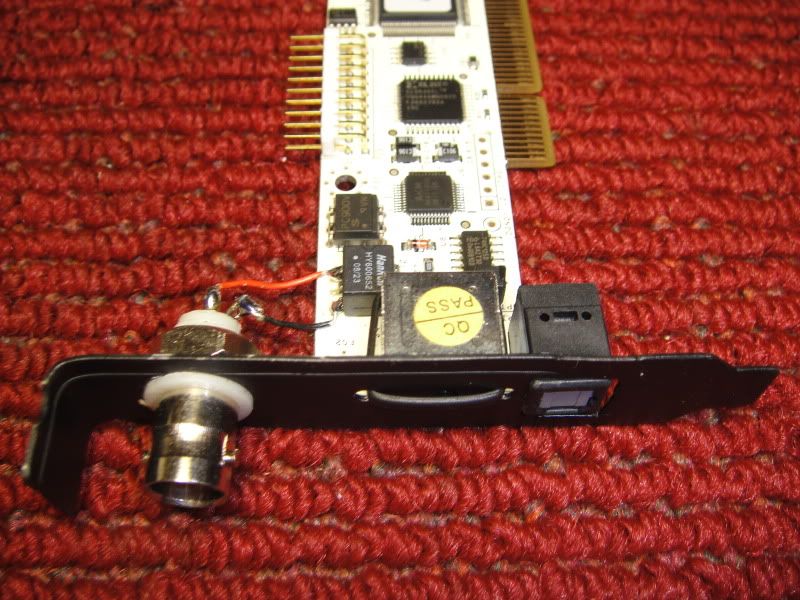
Solder points were used as Gstew did here.
http://www.audioasylum.com/forums/pcaudio/messages/51805.html
I used a normal blank and cut and bent it to low profile size, cut a hole for toslink with dremel, drilled two holes above and below the dongle and used a tie wrap to hold slot cover to card.
Should have drilled the hole for the BNC a little lower since it interferes when installing a little.
BNC was purchased from the ebay store in the link below. These are insulated and have a small form so they don't interfere with the opening for the pci slot.
I did the mod with an RCA when I first installed this card but have to say the BNC was a definite upgrade over the RCA. I have never used the dongle.
Thanks to all for sharing these mods.
Brad
Excellent thanks for posting I too am considering this card
Simon
And with the analogue part of the card?
Just curious.
I worry I might be the cMP squared puritan. When I start (literally) burning folks who are not minimizing the power usage AT LEAST to cics's specifications you will have to do something with me.
Grant, I cannot remember which PS you are using but Bernd's discovery of lowering the ATX power with the ANTEC EA430 is very clever and worthwhile.
One gets a little closer by doing it.
Your friend has what would have to be called an evolved technique. One does not get THERE the first time they try something, not even the fourth time.
Bye,
Rick McInnis
Hi Rick
1): Recall I have yet to build a standalone cMP machine. The box that hosts my software-only implementation of cMP+cPlay is also my main-machine... doing double duty as general purpose computer and DAW. All questions of lowering power consumption, underclocking RAM &CPU, isolating dirty from clean power supplies, ditching analoge sound sections, etc., etc., etc., etc., must wait for the Happy Day I build a new box.
2): The Juli@ card replaced an M-Audio Delta 1010 (due to the 96Khz SR limit of the Delta). For the many tasks it performs, the analogue output from Juli@ is a must. I may decide to yank it in the cMP Rig.
3): I look forward to getting the EA430 PS... and tinkering with the voltage pot. Thanks in advance to Bernd for sharing this tweak with The Brotherhood - Great Discovery !
4): Oh yes... TWEAK ALERT: The Digital-IN can be used to supply Juli@ with an external clock source during playback. If the external clock is better/cleaner than Juli@'s internal oscillator, you'll get a "better" S/PDIF stream to feed your external D/A converter. What you hear depends on the resolution of your D/A & monitoring setup... but you should hear an improvement. I know I do.
My converters are from the good folks at Benchmark Media Systems... the much-balley-hooed DAC1 and the even-more-astonishing ADC1. The ADC1 provides a VERY clean clock (up to 192 KHz), and the DAC1 tells me so. It was true with the Delta 1010, and is true too with Juli@.
Select EXTERNAL in Juli@'s control panel, connect ADC1 to digital-IN, set the desired sample rate on the Benchmark (no audio input to ADC1) and the embedded clock in the (silent) datastream will clock the card's output with greater accuracy. Instant upgrade... without the messy soldering !
And damn fine recordings from your analogue sources too (Lenco L75, Studer B67, etc.).
So, I hope I've answered the question...
Cheers,
Grant
That's not a Toy... IT'S A TOOL !!
You said '...Oh yes... TWEAK ALERT: The Digital-IN can be used to supply Juli@ with an external clock source during playback. If the external clock is better/cleaner than Juli@'s internal oscillator, you'll get a "better" S/PDIF stream to feed your external D/A converter. What you hear depends on the resolution of your D/A & monitoring setup... but you should hear an improvement. I know I do...' can one do this with the stock juli card (ie w/o your very clever soldering tweak)? If so how does one do this, I mean can any adc be used? I'm interested because I have a Benchmark dac1 too. How much is the Benchmark adc?
Edits: 11/17/08
Hi TheoTwo requirements are needed for this to work:
1) Juli@ clock select is set to EXT in the control panel...

2) you connect an S/PDIF datastream to the Juli@'s digital-IN port (BNC tweak not required - but it helps). The S/PDIF signal has an embedded clock, and so Juli@ locks to this for it's reference (ignoring it's own internal oscillator). Of course, you want to send a sample rate that matches your chosen cPlay-SRC-upsampled output rate (ie: 192 KHz input for cPlay at 192 SRC). Not all ADCs work up to 192 SR... and not all ADCs that go that high work equally well.A mismatched SR will not harm the Juli@, but you will hear funny results. I often neglect to power up the ADC1 before launching my cMP environment. Running cPlay at -121/192KHz-SRC through Juli@ (when set to EXT), and failing to send any clock input, defaults playback to 44.1... which is similar to playing a 30 ips analog tape at 7.5 ips... low... slow... and completely wrong ! Try it yourself (no external ADC required).
External ADC:
With the DAC1 you're more than Halfway to Heaven... and the purchase of an ADC1 is no small consideration. It is a STUNNING encoder, and for anyone recording digital audio from 2-channel analogue sources, it's pretty hard to beat. I bought mine before the USB version was released :(Depending on your other needs, a standard ADC1 would serve nicely. (...and no, I'm not a Benchmark shill - just a very happy customer)
Trouble is, you can't buy a cheap, HQ standalone clock source - at least not as I'm aware (but then don't confuse me with An Expert - I'm just reporting on my own personal experience).
What I've found is:
my DAC1 told me that clocking the Delta 2496 card with an M-Audio Audiosport Duo USB (see Item number: 220311232334 on ebay right now, and you may get a bargain to experiment with - but beware it's 96KHz-capable only)...

...was a small improvement over the Delta's internal reference. Using the ADC1 as clock source increased the effect (cleaner highs & lows, more precise imaging... the whole audiophile bag of cliches). When the Delta 1010 replaced the 2496, I heard equivalent benefits (the cards are of the same vintage).With Juli@, the ADC1 clock improves the sound, but it is more subtle... it doesn't club you over the head with "Now THAT'S really different". I suppose the smaller percentage improvement is owing to a more modern design (better chips) in Juli@ than the old M-Audio cards had to begin with. Still - A Little Bit... is A Little Bit Better !


But don't buy an ADC1 JUST to clock your Juli@... unless you're blessed with unfettered budget and no one to answer to !!So... Theo - did I answer your question ? I hope so.
Cheers,
GrantThat's not a Toy... IT'S A TOOL !!
Edits: 11/17/08 11/17/08
wow you did answer them thank you very much!! let me ask you this can one use a digital in say from toslink or aes/ebu (the balanced ins) of the same benchmark dac to externally clock? Or said another way why not just set the juli panel to external? Will that work with the Benchmark?no I don't have unlimited cash.
Edits: 11/17/08
Hi Theo
Pardon me for not being clear enough at the outset...
The Benchmarks:
1) DAC1 receives a digital input. The format can be AES/EBU, or S/PDIF on copper coax, or S/PDIF on optical TOSlink. DAC1 does not have a separate WORDCLOCK input, rather it determines the incoming sample rate from the embedded clock. DAC1 has NO digital outputs of any kind... and therefore nothing to offer for externally clocking the Juli@.
2) ADC1 sends a digital output. The output format can be AES/EBU, and S/PDIF on copper coax, and S/PDIF on optical TOSlink (the clock is embedded in the output signal). ADC1 ALSO has a dedicated WORDCLOCK output (not suitable for use with Juli@).
Most (I hesitate to say "all"...) professional equipment will provide an input for WORDCLOCK, the idea being that all devices must sync up with one master clock, in order that the sample rates of every device operate as one. The better the clock, the better the gear works "as one", and reduced timing errors = better sound. That's why studios will spend a small fortune on a really good Master Clock - the only job it does is to provide a very precise reference for everyone to sync to.
Juli@:
As with most other non-pro cards, the Juli@ has no dedicated WORDCLOCK-IN. It will sync to the incoming signal on it's digital-IN. Your task is to find a device you can afford to buy, that can output an S/PDIF signal up to 192 KHz (presuming you are interested in using that rate of upsampling in cPlay). That device will be some kind of Analog-to-Digital converter that has S/PDIF output on copper coax.
Sorry, you haffta get another Box to play this game. Yeah... Take One for The Team !
A little clearer now ?
Cheers,
Grant
That's not a Toy... IT'S A TOOL !!
yes very clear and thank you again. I don't know, maybe its a mute point because now I prefer no upsampling (I was a firm believer in -146 SRC and 192 sampling rate until this latest cplay version). But if and when cics converts all the src code to SIMD (sp?) I will just sit on 44khz out put from cplay.
Edits: 11/18/08
Heh-heh Theo... trying to dodge the Bullet for the Team eh ?
Keep in mind that the benefit of a cleaner clock reference extends to ALL sample rates. "I'm only playing cPlay at 44.1 KHz" does not change that fact.
Cheers,
Grant
That's not a Toy... IT'S A TOOL !!
You got me there sir.
What puzzles me is before I built a cmp/cplay dedicated computer I was running cplay on my home pc. I had the juli card installed and I was running 24/176 and the sound was good (not as good as it is with cmp/cplay in a dedicated pc --- by far). But anyway I had a usb cable running from my pc to the Benchmark (along with a spdif cable from juli to Benchmark) and I also had other players like j river and WMP11 on that pc. I selected external clock on my juli panel and to my recollection it worked and sounded better than an internal clock selection on the panel. Now in my dedicated E7200, gigabyte, kingston ram computer (in which I have juli assemlbed) I cannot get the external clock selection to work. I'm wonderting why it worked before. Can anybody herlp on this?
Hi Theo
That's a good one ! Were you using an earlier version of the Juli@ driver in the situation you describe ? It MAY be that it was written to default to a different - and coincidentally compatible - sample rate when EXT is selected and no incoming signal is detected.
Beyond that I can't say. It "shouldn't" work if you don't have an S/PDIF stream connected to the digital-IN of the Juli@. Wellll... it's always something...
Cheers,
Grant
That's not a Toy... IT'S A TOOL !!
It was .978 juli driver now I'm using the new one (forgot #). But maybe I remember wrong.
Just to convince me whether this is worth pursuing (I'm not buying a $1700 adc), how much improvement did you get with external clocking? Was it as much as going from 2.09 to 2.20 version of cplay? Or something smaller?
Hi Theo (and Lurkers...)
I understand your reticence for ordering the ADC1 - just to clock the Juli@ ! And I salute your curiosity.
So I thought this today... Anyone who's dedicated enough to tinker with the cMP idea MUST have come from a halfway-decent CD player... and it's probably still hanging around the house somewhere. You can try out the external clock trick "for free" - as long as you limit your cPlay to 44.1 KHz playback (ie: no upsampling).
Power up the CD player, connect the digital-OUT to Juli@'s digital-IN, and see if it makes a difference for you . There are so many variables here, that "it depends" is the only solid prediction I'll make. Chances are your high-end player has a better clock crystal than the Juli@... or maybe not.
I await your reports.
---------------------------------------------
Theo wrote:
Was it as much as going from 2.09 to 2.20 version of cplay?
Surely you mean "2.0b10" and not some phantom cPlay v2.20... I'll try these combinations and see if I can describe the differences.
Cheers,
Grant
That's not a Toy... IT'S A TOOL !!
great idea...will try. yes thanks for the correction on the 2.0b10 and btw I have an oppo that can output 24/88 and 24/176 as well as 24/44 from its special modded digital outs. Will have to wait until I get a real dvd player to pull it out of my video sys.
fantastic thinking!!
I have an old panasonic dvd player that has a digital out. so I hooked it up to juli digital in but it only shows up as 48khz on juli panel. listened and yes it sounds ok initially. I listened for a longer period of time to 48k external clock versus 48k internal clock and it is very close. Maybe external is a bit better (richer, more bass, less hash, more body). Now I can't wait till I get my oppo in my audio sys and try the higher clock rates.Omg I initially understated how good this is. Everybody out there you gotta try. On classical the dynamics are greater, unfettered ... FFFF just blows the walls down.
thank you grant!!
Oh baby this is good. The funny thing is I was going to throw this panasonic away because the dvd drive doesn't work any more but the clock sure does.
Edits: 11/19/08 11/19/08
Hi TheoIn case you have a little jingle in your pocket for this external clocking tweak - ebay has an auction closing in 40 minutes you should consider.
Sign in and search for Item number: 220311232334 - This is the same unit I began using to clock my PCI cards (before it was replaced with the Benchmark ADC1)
Thew advantage to you here is the easily selectable sample rates. And it's an OK 2-ch A-to-D converter if you ever need to do some recording.
Good Luck and Go-Get-EM... TAKE ONE FOR THE TEAM !!
GrantThat's not a Toy... IT'S A TOOL !!
Edits: 11/19/08 11/19/08
not bad but limited to 48Khz
Hi Theo
 [note the now-familiar BNC mod]
The maximum encode/decode SR in the USB Duo is 96KHz (as I stated previously). It is limited to 48KHz when run in duplex mode (simultaneous send AND receive) via the USB 1.1 connection. We don't care about that.
There is a Standalone Mode, where the USB connection is not involved, and only the S/PDIF jack emits signal. To set the SR, you flip the unit over and adjust 2 DIP switches...

...and you get all the stops along the way...

At thirty-six bucks, the ebay-Duo would be a cheap source of a reasonably good external clock - and more convenient than coaxing your disc players into emitting the desired SR. Just my two cents.
Please DO report on your higher SR clocking experience with cMP.
Cheers,
Grant
That's not a Toy... IT'S A TOOL !!
AW gee dad the bidding just ended. You are right its a good deal. I read the owners manual and saw 48Khz and declined at that.
ok grant after one day of listening to external clock I'm convinced. Besides the M audio product that I missed on ebay what else is out there, that is reasonably priced, that provides clocks up to 192?
...what is this all about? There was a clear difference between panasonic dvd player (circa 1998) and oppo 980 (circa 2008) and internal juli clock (in between). I don't understand. Anybody understand this?
Maybe its all a matter of clock circuit or power supply to the clock circuit. I dunno but I'll tell you the panasonic is in for the long term till I can replace with a better one.
Looks like $1700.00 is the price of admission.
If it makes a dramatic difference, one could consider it a justifiable purchase but I KNOW I am not going to be the first to try it.
Theo, buy one for the team. At least, we would get a good assessment from someone who knows how to listen. Maybe someone would allow you to audition the unit for a few days?
I see it has a TOSLINK output, though for the WORDCLOCK they only talk about 75 ohms impedance so this maybe is limited to BNC. Grant, would you fill us in? I have no idea how this works.
You could send your JULI@ to Bob and get the necessary BNC's that will work with a standard computer case. One way or the other this would be worthwhile.
Just trying to be manipulative, I mean, helpful.
Bye,
Rick McInnis
Take one for the team...I love your response!!! Being retired does have limits. I'm still trying to figure out if I can set my AGI power supply lower (I have no idea how to start a search on this). You guys are way ahead of me.
OK... sorry for the goofy subject line.1) ADC1 is truly a professional product - of extremely high quality - with many features useful only for recording activities. No wonder it costs $$$.
2) WORDCLOCK signal is always 75 ohms and distributed via electrical coax/BNC-terminated cables.
3) Juli@ does not have a distinct (separate) WORDCLOCK input... only digital-IN and digital-OUT.
4) S/PDIF data format has the clock embedded in the signal - and reading this (from the digital-IN port) is the only way Juli@ can get an incoming clock reference. In fact, that's how the card syncs up to another (external) device when recording from it's digital inputs.
Just a few words of clarification.
Cheers,
GrantThat's not a Toy... IT'S A TOOL !!
Edits: 11/17/08
The external clock thing has been floating out there in the tweak ether for quite awhile though no one, to my knowledge, has reported on the effects.
I know I and others would like to hear what you think especially in the context of the dedicated cMP machine when you get a chance to assemble one.
Would the analog part of the card need to be involved for the external clock to work? I have made my card DEDICATED digital only by using those pins for capacitor bypasses.
THANKS to you for apprising us of your work and thoughts. I know I am one of many who are glad that you are involved in THIS.
Bye,
Rick McInnis
Gentlemen,
first post from a long time reader/lurker - please have mercy... ;-)
I have followed this thread about modifying / providing the Juli@ card with an external clock - and I would very much like to get your ideas on what I plan to do here:
I also have a Benchmark DAC1 (IMHO one of the technically best solutions currently around), and I plan to use a Lynx AES16 (http://www.lynxstudio.com/product_detail.asp?i=13, not the 16e variant since this one would be for PCIe and as far as I see this is not recommended). This offers not only 24/192 output but also allows an external word clock input via a BNC connector. I probably will add a really decent pro-like clock (since I believe that this is in the same categorie for the sonic results as say power supply) like e.g. an Antelope Audio product or something similar.
What do you think - wouldn't that be a good solution?
Cheers
Robert
,
Is there any reason why the cMP installation guide suggests an IDE-based CD/DVD drive instead of one with a SATA interface?
The installation guide says to use a "Basic" drive (or one with low power requirements, i.e. a basic LG). Unfortunately, Newegg, doesn't list the power specs so I ended up ordering an inexpensive LG (w/ SATA interface) and hoped for the best. Additionally, I thought that the SATA interface would give me the benefit of not having to use Granite Digital's IDE/SATA to USB bridge.
I just received it the DVD drive and the power specs are listed as:
5V / 12V == 1.5A / 2.0A
I don't recall seeing the multiple current specs on other DVD drives I've looked at so I don't know what that means.
Ultimately, does this suggest that this drive is not optimal for cMP usage? Will it require ANOTHER Granite Digital external power supply?
Thanks,
Chris
Your 12V specs is at the limit of GD PS. Also, with SATA there's no need to convert to USB.
Seger's advice is best, i.e. rather not install a ROM drive.
> Seger's advice is best, i.e. rather not install a ROM drive.
agreed.
My question arose from the fact that my LG SATA DVD drive listed TWO specs (1.5A @ 5V and 2.0A @ 12V). This boils down to the question: "when is the 5V power rail used (reading?) and when is the 12v rail used (burning?)".
I'm following your guide and have installed a .5A laptop drive. I'd like to additionally install the DVD drive (for the rare occasion that I need to rip on the cMP machine). If the DVD drive only consumes 1.5A for all my needs (ripping) then I should be OK using it and the laptop drive with the same GD PS.
p.s. Yes, I know there's no need to convert to USB. That's why I went with the SATA DVD option. One interesting thing I discovered, however: My SATA drives (HD and DVD) are being mapped to IDE devices. The channel and Slave/Master ID's are dependent on which mobo SATA connector I connect to. Does this suggest there's a cMP recommended SATA configuration?
Thanks,
Chris
2.0A is right at the GD limit. But there is no need to have your DVD drive connected up except when installing Windows - do your ripping on another computer and transfer files to your cMP computer with a flash drive.
To those of you who own the Lynx AES16 card (and have replaced the breakout cable), read on...
I have just started my cMP project and am happy with the results so far. However, it's not yet outperforming my CD transport in all areas (Low and High frequency response mainly). I'm not at all complaining because I still haven't optimized the O/S, BIOS, etc.
In an effort to get my cMP performing optimally, I'd like to replace the Lynx card's octopus-like breakout cable. I know from reading this thread that a number of people have already done this.
1) What AES/EBU cable is a good choice? I'm normally not averse to buying high-end ($$$) cables but am hesitant in this case as it will result in an unsaleable cable after cutting one of the ends off.
2) Any tips on the soldering? Will the butchering/soldering of the cable (to the appropriate traces/pins on the Lynx card) ruin any kind of 110 ohm impedance matching that these cable manufacturers take great pains to maintain?
3) Any other helpful info is appreciated....
Chris
At least at NEWEGG.
The new one has DUAL-BIOS which, as usual, I have no idea what that means.
Should this affect its goodness for this application?
Bye,
Rick McInnis
Of course, I am not THAT sure of what I am reading, but looking through the INTEL site it would seem this new chipset is substantially lower in power required that any of the previous offerings. From my dilettante's perspective it looks like it uses 25% less power.
Does not seem there is much available yet, though I do see a GIGABYTE board is announced. Since they have been willing to work with cics on BIOS refinements maybe they would do so again. The looming unavailability of the recommended MB looks like it will be a boon instead of a disappointment.
Looking at the e7200 vs. e7300, other than a slight increase in speed it seems to be an equivalent. It is five dollars more at NEWEGG. Nonetheless, they list the e7200 as still available. Though one might think there could be fabrication enhancements involved in this evolution that could make for a better chip.
I am finding it impossible to get my e7200 to go much below 1.000 volts in an MB I know would allow the e5200 to go VERY low (0.812 per cpuz) so I wonder if I have an e7200 that is not of the highest quality. the system still sounds very good but one always wonders, "what if"?
As always, I look forward to hearing cics's assessment.
Thanks to all,
Rick McInnis
Gigabyte GA-Q35M-S2 . BIOS may not offer all settings as previous GB mobo but well worth a try.
It has a reasonably highly spec'd sound card built in, for use with other sources such as Blu Ray & Multichannel?
It looks over spec'd for audio but would still work well with cMP & cPlay, wouldn't it? Presumably the Zalman case would be too small? Is DDR3 memory a problem?
Frank
.
just to add to rick's comments the best mobo has to have the flexibility of doing all the bios settings recommended by cics. The real beauty of cplay/cmp is to set all the parameters in hardware/Windows to be optimized for music. This includes underclocking, setting latencies, enough power to do 24/192 with 146 src etc etc. As I tell all who ask me--- don't try to redo it unless you are really really smart, have unbelievable work ethic and an uncanny ear for the 'most transparent sound'. Its all worked out for you just follow the program and you'll have a transport that beats/equals anything in my experience.
I am glad you have discovered this approach to computer audio.
It is obvious you have not read the papers or many of cics's posts.
One very big aspect of this approach is to find a system that uses as little power as possible.
Read the stuff and you will see how different cics's approach is to the mainstream. This is an audio perfectionists approach. Convenience is compromised in exchange for the best possible "sonics".
However thought the TPD would be about the same as Q35.I am also looking at HTPC, plus active crossovers, plusd DSP, and expect the processing demand will be quite high, therefore wish to push system capabilities as far as reasonable.
How much difference do you think an extra 10 or so watts will make with a well constructed mother board with more efficient built in cooling options?
Frank
Edits: 11/11/08
Frank,
I am glad you took my short comment in a good way. I worry sometimes when someone suggests one of the "deluxe" MBs that they have missed the point of cics's system.
All of cics's research has led him to minimizing power required to do the task at hand. And in this case it is nothing but playing music.
If you are doing a HTPC, which I have an interest in also, I would make it a dedicated machine. I do think the two tasks are so different that they would be at odds.
If you want an excellent device for playing CD's and you do not want to spend thousands of dollars consider following the instructions to the letter and I can assure you you will be amazed at what is possible.
I had no interest in computers before reading cics's papers and posts so I am the last one to give advice. What I know centers around his system.
If you are striving for the best possible audio I would think again about using the computer as a crossover. As cics specifies using an outboard DAC, I would wonder if this would also apply to a crossover. Such an arrangement would be fine for HT but I would worry that with high resolution speakers you might not be happy. I have no idea. I am sticking with chokes and capacitors before the amplifier inputs.
Bye,
Rick McInnis
Dear cics,
Just was not paying attention.
Since this system was intended for server applications it could be a good direction.
It seems the recommended board has not got the best reviews at NEWEGG but what would make this good for their applications could be good for ours.
I see from looking through the manual this board does have the extended BIOS options with control/F1 but no indication of what else is offered when that is selected.
Could be very interesting.
Do you think the GIGABYTE folks would accommodate you, and us minions, again?
Looking forward to hearing if this turns out to be a refinement.
Thanks!
Rick McInnis
Intel suggests even lower power consumption.
Newegg mobos using Q35 chipset . I don't have any of these so cannot comment. Gigabyte's GA-Q35M-S2 BIOS seems similar but may lack some of the finer control. SuperMicro's C2SBM-Q looks interesting.
Given that I just bought and installed the replacement Gigabyte motherboard from Newegg, a GA-G31M-ES2L, I'm also interested in the answer to Rick's question.
I mistakenly attempted to flash the F6X BIOS that was downloaded from this site. Fortunately, the Gigabyte @BIOS software prevented me from doing so.
I haven't yet tried all the BIOS and Memory optimizations as I wanted to make sure I had a functional cMP first. I'm assuming that most if not all the BIOS improvements will be compatible with the GA-G31M-S2L recommendations.
Chris
Just a warning to all, I recently bought the Gigabyte GA-G31M-ES2L from Newegg because the cMP recommended mobo, the GA-G31M-S2L, is no longer available from Newegg.
Unfortunately, the newer board's BIOS doesn't seem to have all the same flexibility that the older board may have had. Specifically, the BIOS doesn't give you control over many of the recommended MB Intelligent Tweaker (M.I.T.) settings:
No Spread Spectrum control
No DDR timing controls!
No ability to lower the FSB Voltage Control
No ability to set CPU GTLREF Voltage Ratio
There were a few other settings that are no longer available but these are the bigger ones (off the top of my head).
After applying all the BIOS tweaks that I could from the recommended list, my machine now hangs at the POST screen. In addition, the display is scrambled and illegible. Before I can proceed, I need to figure out how to reset the BIOS to a working state. Any tips?
Chris
Thanks for the tip. All motherboards feature a jumper that allows you to restore BIOS default settings - see the manual. Another way is carefully to remove the battery, leave it out for about 15 minutes and then put it back. (By the time you finish your cMP2 setup, you'll probably be quite good at this . . .)
BTW, it may be worth updating the BIOS to see if later versions allow more changes.
Best
Dave
To provide information to others who may go down this path as well.....
The GA-G31M-ES2L BIOS I tried was version F4. This was the most recent version that I could find. Again, this version does not appear to have control over all the tweaks recommended by cics.
Chris
The only control that ES2L lacks is spread spectrum!
All the others are present (through MIT, after CTRL + F1) .
Chris,
Just curious.
I used a memory stick for the "original" version 2 board and had no problem with @BIOS, though my memory tells me I did not get it to work the first time.
I wonder if there is a reason you cannot do it directly from internet since it is coming from SOURCEFORGE instead of GIGABYTE?
It would not surprise me if there is some kind of fail-safe in place to stop that from happening. But, I really have no idea.
Let us know.
Bye,
Rick McInnis
Hello! Share BIOS F6x for Gigabyte G31 S2L . Thanks !
The F6X BIOS was downloaded earlier from cics's cMP download site on sourceForge. I then stored it on a thumbdrive and mounted it prior to running @BIOS.
The @BIOS software seemingly did a checksum on this BIOS image and determined that it wasn't meant for my motherboard.
Chris
p.s. I have since updated the GA-G31M-ES2L to the latest and greatest firmware and attempted all the BIOS optimizations suggested for the GA-G31M-S2L (all the BIOS changes that were possible, that is). Unfortunately, my system is now hung at the at the initial POST screen with a completely scrambled, garbled, and illegible display. I need to figure out how to reset the BIOS before I can continue.
Incidentally, I would not recommend the slightly different mobo (the ES2L) as it doesn't appear to have the same BIOS tweaking capabilities (I haven't been able to find a way to change the memory parameters, for one).
I am sorry that this new purchase has turned out to unsuitable for cMP.
I see that NEWEGG has some OPEN BOX of the proper boards. Just looked again, they are now gone.
There have to some of these available somewhere. Though it could turn out to be like my attempted memory purchase at AMAZON that says it has shipped but ... who knows? Caveat Emptor when dealing with anyone other than the established GOOD vendors.
I see the following as saying they have stock:
http://www.pcrush.com/product/Desktop-Motherboards/133231/Gigabyte-GA-G31M-S2L-Desktop-Board?refid=1238
http://www.shopsharksystems.com/browse/currency-USD/product/GA-G31M-S2L/?utm_source=googlebase&utm_medium=cpc&utm_campaign=GoogleBase
I will keep looking for both memory and MBs
Checked out the local store today they didn't have a GA-G31M-S2L but did have the other. Looking at the Gigabite website it showed the GA-G33M-S2L as having these differences - G31M specs in brackets():
1. Memory 1.4(1.2) x 1.8v DDR2 DIMM sockets up to 8(4)GB of system memory
2. LAN RTL 8111B chip (not mentioned for G31M)
3. Northbridge Intel G33(G31) Express Chipset
3. BIOS 1 x 8(4)Mbit flash
4. SM BIOS 2.4(2.3)
5. Micro ATX form factor 24.4cm x 20.7(19.3)cm
6. G33M Compatible with Extreme CPUs
Additionally the G33M has more USB ports and headersWould any of these not be compatible/fit with the current cMP/CPlay design?
Thanks
Frank
Edits: 11/07/08
...just kidding - about The Children :)
Sheeeeesh... the House of Cards tumbles without the right mainboard. Thanks so much ckniker for the heads-up/ warning/ lesson !
Just ordered the requisite GA-G31M-S2L from my regular PC supply shop here in Canada - real people with real bricks-n-mortar and real Support when you have a problem. Oh, and competitive pricing too.
Now where'd that F6x get to...
Cheers,
Grant
That's not a Toy... IT'S A TOOL !!
I just received a Gigabyte GA-G31M-S2L from Canada Computers; paid through pay-pal arrived 7 days latter.
I believe they have stock, cross border shopping is quite easy with Fedex or UPS handling the paper work.
WWW.canadacomputers.com
PC XPpro TC Electronic Konnekt-8 firewire i/o, 2-Tact 2150's, Genesis 500 modified speakers, Virtual Dynamics & XLO cables
Hi cMP GangI'm looking for feedback from everyone who has - or has not - used the lovely Zalman/Thermaltake HTPC case we see at the top of this thread. I'm curious to hear your realworld experience using the 7-inch LCD screen to run all the functions of the cMP Environment.
I really like the idea of it nestled amongst my other Hi-Fi gear, looking and sounding very special.
However, if there are some Dark Truths to tell about it, I'd love to know before I make the purchase. If you do have this box, are there any things you'd change about it, or - heresy notwithstanding - would you use something else if starting over ? (If that's true - what other cases have you found suitable for building a cMP rig ?)
Who has an opinion on the remote-control-via-mouse experience. Does the "small" screen make EAC ripping on the dedicated cMP machine too much trouble ? Anyone "secretly" keep a standard PC keyboard plugged in ?
Thanks so much for your input - I appreciate the help and advice you all share so freely here.
Cheers,
GrantThat's not a Toy... IT'S A TOOL !!
Edits: 11/04/08
I suppose cics is - that's where the photos came from - but can anyone speak to the usability of the LCD-All-In-One form factor ?
Do you REALLY rip your CDs using this interface (touch screen & no physical keyboard) ?
Anyone taking their cMP Rig "on the road" to play Jack-The-Giant-Killer with non-believing friends ?
Thanks for your input...
Cheers,
Grant
That's not a Toy... IT'S A TOOL !!
Grant,
... So I built my big box. It is DEAD, and though made of wood there is no evidence of RFI, etc.
It could be fun to have a mobile GIANT KILLER but the other side is that mobility would bring about some compromise. I compromised on mobility.
When you use RIP within cMP there is a "hunt and peck with a mouse" keyboard. I suspect cics has become quite handy with it. Of course, even with the ZALMAN case one could still plug in a keyboard, so I am not quite sure what you mean.
The case is quite attractive. If it was made of 6mm copper plate I would go for it, but I think those cases are still a little flimsy to my taste.
In addition, if one is going for complete electrical isolation steel or aluminum, though useful, are certainly not impervious.
One of these days I am going to line my case with copper mesh and HEAR if there is an improvement.
It is true audiophiliac obsession that forces one to look at a computer the same way they would a phono pre-amplifier or a turntable, because, in my humble estimation, it is.
Not the answer you were looking for but, at least, someone responded.
I brought a camera home today.
Bye,
Rick McInnis
Hi Rick
Thanks for the reply :)
Non-metallic case and no hint of RFI intrusion... do you live in the woods ? Given the soup of electromagnetic radiation covering North America, I find it odd (and encouraging) to have you report thus.
Any chance of seeing The Big Box ? I'm curious as to how things are situated and mounted.
Is the cute 7-inch touch-sensitive LCD available on it's own ? Now there's a Franken-Player just waiting to be built !
The idea of a Farady cage is interesting. Years ago I implemented something like that in my Denon CD player... using conductive foam, I made a shield around the analog section - blocking at least some of the internal radiation. With a drain wire connected to the chassis, it cleared some of the fog away - sonically speaking. Every little thing helps.
So what about a box made of acrylic ? Or mounting the mobo on a floating sub-chassis - turntable-style ? Three-point or four-point suspension ? The mind boggles at the madness. So Many Ides... So Little Time.
Thanks,
Grant
That's not a Toy... IT'S A TOOL !!
I do live in the woods, not deep in the woods; I live in the Atlanta suburbs, but maybe that is why I get away with it.
I have the MB supported by crudely cut pieces of SORBOTHANE. This gives a little isolation but more importantly the stuff is sticky so there is no need to screw the thing down.
It is simply a big box inspired by Jean Nantais's advice on making a PLNTH (capitalizied because it is massive) for a LENCO l75 turntable. I used the same materials I used for the TT, a composite of MDF and baltic birch plywood. It is supported on legs of 6 x 6 cedar and rests in a sandbox. Who knows if any of this is worthwhile, but I do it anyway.
Did you read the post from Bernd about lowering the ATX voltage of the ANTEC power supply? Intriguing. Can't wait to try it this weekend.
In v0.3, Art of Building Computer Transports it says:
"Hardware RAID setup can be challenging but is highly recommended. Improvements are audible as IDE overheads are eliminated."
That's a pretty compelling statement, and a good excuse to set up some RAID drives again! However the latest recommended motherboard Gigabyte GA-G31M-S2L does not natively support RAID.
So my question is- all things being equal, does the Gigabyte GA-G31M-S2L motherboard without RAID sound better than the prior recommended BIOSTAR motherboard in a RAID configuration?
I have been following the thread for over a year now and am ready to make the leap! Thanks to all for sharing their stories. //Craig
Only benefit of RAID is faster load times to RAM.
cMP (with RAM Load set to Yes) causes all sound data to be loaded into RAM prior to playback thus removing disk I/O overheads during playback. This applies to single file cue sheets and using any audio player. With cPlay as audio player (which does RAM loading internally and therefore cMP's RAM load should be No) same applies.
I decided to finally eliminate the break-out cable today.
Then I discovered that with the card removed (the only way I have ever measured it) I see what gagmen was talking about, both of the points I had earlier had discovered to be "connected" to the digital out cable are interchangeable.
I had first measured to discover the PLUS input and purely by happenstance I had labeled the bottom right, facing towards the outside of the computer, to be the positive, as you reported in your post. Then I went searching for the negative and found the other pin, on the left side and second from the bottom. I am sure I did not bother to see if they were interchangeable because when I read gagmen's post I thought, "what is he talking about?" Only to see NOW what he is talking about.
Nothing like connecting it up and finding out, but I thought I would ask again. Are you sure these are the correct polarities? Would it even make any difference if they were not? Especially with the easy polarity switching within cPLAY.
Soldering to the board makes me nervous, just how much can it take? If you would re-assure me I would be greatly appreciative.
Thanks,
Rick McInnis
That's not a Toy... IT'S A TOOL !!
how horrible it looks!
I am using Allen Wrights silver foil so an already difficult job becomes more of a difficult job.
I went ahead and used what I thought were the correct points (thanks, Alfred, twice!).
It may look horrible but it measures properly (going from jack at the end of the breakout cable to the corresponding point of the new, directly attached, BNC); no additional resistance.
I am not using a computer case, as I have said before (I hope to no one's distraction) so I am not constrained by where the new jack needs to be. I used one of the analog boards attachment holes for the back plate and used a (what are those things called that you bundle wires with? One end inserts into the hole in the other end ...), that thing, and that is all that secures the BNC. It has a plastic body so there is no chance of it interfering with anything else. I am using an AMPHENOL 75 ohm connector that allows solder connections because I seem to be incapable of crimping.
BUT, it does sound much better. I cannot describe any special area that it improves. Of course, when one's mind knows that this HAS to sound better it is hard to not go along with the mental inertia. Nonetheless, I feel certain there is much more information being passed along and in the spirit of cMP squared, it seems to allow more information to be passed WHOLE, there is more of that feeling of a waveform presented as it was heard by the microphones, not jumbled up in the rough and tumble world of digital manipulation.
Now I wonder if, for those of us who will never use it, if removing the TOSLINK stuff would make for an improvement? It seems to me it can only be adding a little interference with all of that flashing and pulsing and the fact that it does have to be powered.
I ask Alfred if he thinks this could be worthwhile?
Now to install the latest cPLAY. Thanks cics, yet again. As Stephie tells Jeeves, "you are the particular dream rabbit".
Bye,
Rick McInnis
Hi Rick
So... with only my imagination - and your words to guide me - I'm seeing a 1 metre long cable, with BNC connector at the DAC end, and directly soldered at the other end to the Juli@ (with a nylon cable tie-wrap providing strain relief - looped through one of the vacant analog I/O holes on the Juli@'s metal backplane).
Do I pass the test ? Yes... OK, as a prize... how about a macro close-up of the soldering points on the circuit board :)
Thanks,
Grant
That's not a Toy... IT'S A TOOL !!
Grant,
I am sorry my description was not clear.
First off, I WISH I could directly solder the cable at both ends. The best connector is always NO CONNECTOR in my experience.
Nonetheless, I have made all of my other cables but for some reason I am using a STEREOVOX XV2 between JULI@ and DAC. It impressed me with its reasonable cost and the fact that its default connector is a BNC.
SO there are AMPHENOL BNCs as described before at both DAC and JULI@. Both are the type that allow soldering. I am using the ALLEN WRIGHT narrow silver foil between the female BNC's and the PCB. My lenghts are about 1.25 inches.
This is a delicate task since the points to which one solders on the JULI@ board are close together. I used little bits of my favorite paper tape (3M Blue painters tape, makes a great cable dielectric, stays sticky and pliable) but back to the subject at hand, I used the tape to cover the "pins" I am not going to use just to have a little insurance that I do not accidentally engage them.
My BNC jack at the JULI@ card is being held by a CABLE TIE, thanks for telling me what they are called. There is a hole above the "pins" that was used to attach the plate that would attach to a normal computer case. NOT AN ELEGANT SOLUTION, I know, but it works in my case. You simply make the loop place the connector within the loop and cinch it tightly.
I first soldered my foil lenghts to the connector. I then "attached" the connector to the board with the cable tie. Lastly, I soldered the foils to the board. I then attached the breakout cable and made sure I had no change in resistance from the new BNC to the old breakout cable RCA (even though in my case it was a BNC that had replaced the RCA)
I am going to replce the e5200 in my set-up with the e7200 this evening.
I am starting to think that the e5200 may be a little over its head.
Bye,
Rick McInnis
hi rick
congratulation.
bnc properly applied was everytime better than coax.
i don't think it is worth the hassle to unsolder the toslink port.it contributes much heat to the board.but i don't know if there are SQ-inprovements.
bye alfred
PS: Thanks to cics for 2.07: body and information without harshness.
hi rick ,
plus is on the bottom side to the outside of the PC as described.there is only a difference of 0,6 Ohm between plus an minus.
bye
alfred
It was working on my XP pro sp3 partition until I installed minlogon. Is this as it should be? Can anyone explain it for me? Is there a workaround? This keeps me from using my EA Freeway via USB which I had working with Asio4All before.
asio4all had been installed with regular logon before instituting minlogon.
Hi cics
Thanks for cMP 1.2... nice changes to the UI. I have a request concerning the library scanning behaviour: is it possible to omit the initial scan when cMP launches - and save that function for the REFRESH button.
My reason is this - when I launch cMP in XP-mode, it's only to switch over to cMP-mode (and reboot), but I've no way to bypass the lengthy time it takes to scan my library first. Only then can I get to the Settings panel (and the "start cMP" button). If the scanning occurred only in response to the REFRESH button, it would save me a frustrating five minutes every time I want to enjoy HQ listening.
My cMP environment is software-only (until Santa drops some hardware down the chimney !). It lives on a dedicated primary C:\ partition (which is obviously hidden during times of "other" computing).
To get to cMP, I have to flip the HIDE|UNHIDE switches on the MBR (thanks gdisk !), reboot - and up comes cMP-Land in XP-mode. Launch cMP program and wait 90 seconds while it scans the HD. Then get into Settings to switch to cMP-mode. Reboot. Wait another 90 seconds before I get control - and maybe wish to point to different folders for this listening session. Hit REFRESH button to scan new folders. Select music and Enjoy !
Of course, it's just about as onerous getting back to the other C:\ partition, since I need to be in XP-mode to execute the gdisk script that does the HIDE|UNHIDE switch prior to rebooting.
Not much else to say, except I hope this request is reasonable, doesn't go against some philosophy of which I'm unaware, and maybe will be included in the next cMP update.
Thanks for considering it...
Cheers,
Grant
That's not a Toy... IT'S A TOOL !!
Before you reboot out of cMP, Remove your main music directory and just Add a single folder (one album). Then when you come back to cMP mode, Add your main directory. Saves a bit of time. Or... just leave it on 24/7.
Hi seger
Thanks for the workaround tip. I suppose it's a choice of the lesser evil... Put up with multiple scan delays before getting to the point of actually Listening -OR- Deleting/ Adding the "folders of interest" each time I want to enjoy music via cMP. Maybe the stopwatch test is in order !
Presently my cMP platform is a Software+Tweaks-Only implementation. I'm planning for the day when it will have it's own box (Thermaltake VH2001, GA-G31M-S2L, Intel E7200, Antec EA430, etc. etc), but for now, 7/24 is not an option - I need to get back to the other things my computer does (another partition in the same desktop).
Just can't stop thinking about that REFRESH button... :)
Cheers,
Grant
That's not a Toy... IT'S A TOOL !!
Hi
have you considered a multiboot system?
repartitioning your disk to leave at least a 5GB second partition
then installing a second XP, dedicated as music system
you won't need gdisk, just reboot and choose the XP you want to use, making the default boot system the one most frequently used
Hi kocsu
Yes - multiboot is a great way to go. Indeed my machine has THREE primary partitions I can choose from ("General", "DAW" and now "cMP"). gdisk and a few batch scripts makes it easy to click-reboot-and-be-somewhere-else.
I prefer separate primaries - hidden from the "other two" - so that backup & recovery of one environment is divorced from all other concerns. Data lives on other hard drives. Between gdisk and ghost I can save my butt from any foolish thing I might inadvertently do - provided I'm diligent in taking ghost images. Oh yeah... I've had some real "Thank God for Ghost" moments !
Thanks,
Grant
That's not a Toy... IT'S A TOOL !!
I don't know what accounts for the restriction using Vista to the desktop when in XP one can access/choose from everywhere. This seems like it could be readily overcome and would, of course, be highly desirable.
** Disclaimer ** I am in no way connected with D.W. Electrochemicals Ltd. EXCEPT for being an extremely happy customer - and keen to share the good news with other quality-minded enthusiasts. ** Disclaimer Ends **
OK... with that out of the way, let me encourage everybody here to improve their cMP rig with this little Miracle. Those of you who know (and use) Stabilant 22-A are already nodding your heads in agreement - this stuff WORKS.
To the Truly Obsessed: My apologies - you need to pull your rig apart and seek out every metal-to-metal contact - they all will benefit from a little treatment.
To the Curious (from the Stabilant website):
=============================================
What is Stabilant 22 ? Stabilant 22 is an initially non-conductive block polymer which when used in a thin film between metal contacts becomes conductive under the effect of an electric field. This occurs at an electric field gradient such that the material will remain non-conductive between adjacent contacts in a multiple pin environment. In addition Stabilant 22 exhibits surfactant action as well as lubrication ability providing a simple component resident solution to virtually all contact problems. When applied to electromechanical contacts, Stabilant 22 can provide the connection reliability of a soldered joint without bonding the contact surfaces.
Where can Stabilant 22 be used ? Stabilant 22 can be used in all types of connectors, at frequencies from to DC to several Gigahertz, on faders or potentiometers, or in non-inductive (non-arcing power-interrupt switches. The number of uses are almost limitless.
=============================================
To the Detail-Oriented, have a look at the many Application Notes on their website http://www.stabilant.com/index.shtml.
To The Impatient: Just DO IT. Put this stuff everywhere you can, and enjoy listening as it cures and performs The Magic.
To The Scientific: Treat one point, Listen. Treat one more point, Listen again. Treat one more point, Listen again. Note how each stage improves some aspect of your playback. Repeat until Complete. Reflect on how the Impatient got there first !
I find it best to apply Stabilant with a syringe (easily obtained at the local drugstore) - gives precise aim and prevents excessive use.
This advice extends to the rest of your components - cables, internal connections - I even noticed a small improvement when I treated the power supply header on the circuitboard inside my DAC1.
You can find nay-sayers on the net if you look hard enough, but in 20+ years of use I've never had any problem with the product - just great sound. Enjoy the results... and then tell your friends !
Cheers,
Grant
That's not a Toy... IT'S A TOOL !!
Oh, that good old stabilant 22...
Yeah, I tested it about 15 ago on a totally analog setup, around 30K$ worth.
An audio tech gave some to me on the job. I treated each and every connection on the turntable, preamp, poweramp, speaker and heard... absolutely nothing.
Since I didn't have to pay for it, I guess I didn't feel like I had to hear the improvement.
What is the quarter ounce of that snake oil worth these days ?
I've actually heard very good things about similar products before. Except in my country, people call them by funny nicknames such as "nano liquid", "miracle water", and so on. I will definitely buy some for my cMP once I get it a new casing and soundcard (probably AES-32e).
ok I'm interested but where do you recommend one starts to apply this stuff--on the juli card pins ??
Hi theob
If you have the patience for the Scientific Approach (treat & listen, treat & listen, etc.) then begin with parts carrying the lowest voltages. As a rule of thumb, the lower/smaller the signal, the greater the improvement.
One could argue you want "the best" from your monitoring path before tinkering with your source (cMP machine)... that way you will hear even tiny changes upstream. (I spent a whole evening with my DAC1, and each time I treated a connection, I heard the improvement - including the clips inside the fuse holder - madness yes, bit it works for me).
Once inside the cMP box (again, if you really have the patience):
- work on the processing bits -
01. treat the CPU and listen
02. treat the RAM and listen
03. treat the PCI connector of the Juli@ and listen
04. treat the Juli@ breakout cable (PS2 end & SPDIF out socket) and listen
05. treat the destination end (D/A) of your SPDIF cable and listen
06. treat the signal lines of your hard drive(s) and listen
- work on the power supply side -
07. treat the CPU PS connector and listen
08. treat the mobo PS connector and listen
09. treat the main PS (any internal fuses, IEC connector & power cord) and listen
10. treat the "dirty" PS connections and listen
11. treat everything else you can find in the box we've not mentioned
12. now treat yourself to a strong beverage of your choosing - and know that few others will experience the joy of hearing the individual contributions wrought by these changes... Heh-heh... they're too IMPATIENT and will take the box apart only once !!
Remember, every metal-to-metal connection deserves a little Stabilant. Mike Wright (of D.W.) once told me it doesn't do much for mains power (coming from the wall socket)... but when I did my (standard, non-fancy) AC cables - plugs & IEC ends - things still got a little bit better. And the sum of many little "betters" sounds good to me.
I hope this helps and encourages you theob - it's sure to improve the stellar performance you've already achieved.
Cheers,
Grant
That's not a Toy... IT'S A TOOL !!
Grant,
I have been somewhat skeptical of contact enhancers in the past.
I have found they usually were more of an equalizer, they actually harmed the connection at first but maintained the same state of connection for a long time. Most of the improvement people heard with the old CRAMOLINS and such, I think, were from the fact they had done some cleaning, or, at least, just moving the connector in and out of its jack, did some marginal cleaning.
Now, this stuff, as explained by you, sounds pretty interesting. The fact that we are dealing with LOW voltages, one would think, this product would be advantageous.
Are you really putting this stuff on the pins of the CPU and the socket?
I have no fear of doing this though I think those that have never touched the MB socket should be aware those pins are fragile. I learned the hard way. I thought they looked stiff so when I accidentally touched a socket with my finger and figured it would be a good idea to remove the residue from my finger I was shocked, and disappointed, to see that very little effort was needed to ruin the socket and, in addition, the MB.
I would think one should use the solution to wet a paper towel or a cotton towel NOT A TERRY TOWEL, and lightly dab at the socket. Move only UP AND DOWN. NO sideways movement of any kind! What has been your experience?
Is a simple wipe all that is necessary for the "pins" of memory and the PCI cards?
As Clark Johnsen has said, you know when a music reproduction technology has been perfected when TWEAKS no longer do anything. I do not think this will ever happen, so THANKS for bringing this tweak to our attention. We make progress, usually, in tiny steps. In my recent experience only cics's PC TRANSPORT has brought us such a long way in a short period of time. For this we are grateful. But, we can never dismiss "smaller" tweaks and their cumulative effects.
Assembling a good system for playing music is like a weight removel program for a racing car. You cannot pick and choose where you will eliminate weight, you look at everything, even an ounce taken away from a pedal, and other such parts, will add up to a surprising number.
As an aside:
The first GREAT loudspeaker I ever heard were the DAYTON-WRIGHT electrostatics. I remember being absolutely awed by Mr. Wright's idea of placing the elements in that gas bag as the most clever way to allow for an electrostatic speaker that could get loud without (excessive) arcing. Now, they did absorb power, you could never have enough, but they were a revelation. After the BELL LABS guys basically invented everything, there were few who had a unique conception of "how to do it". Mr. Michael Wright is an innovator. I must say I have no idea of what he up to in this century.
Thanks, again,
Rick McInnis
Hi Rick
I ALWAYS use a syringe to apply Stabilant... it allows precise positioning and good flow control. Once you get the feel of the syringe, you avoid slopping it everywhere but where you want it - and you're not wasting it needlessly (soaking a paper towel is JUST WRONG !!).
I have built a number of PCs over the years, and as a matter of reliability, I always treat the CPU and RAM at assembly time. For CPU, ensure the mobo is horizontal (let gravity do the work) and run a bead of fluid all around the socket holes - it will sink into the holes and contact the pins when you seat the CPU. Don't be afraid of excessive Stabilant - it won't harm the surfaces - it will evaporate. For RAM modules, I run a bead along the contacts (both sides) before inserting the stick into the mobo socket. Simple and easy to do (BTW, always beware of static charges when handling these parts - just a general warning to the DIY gang - who already know this !)
Regarding the D.W. speakers... I had the pleasure of auditioning a pair in my system many years ago - quite remarkable sound and clever engineering. The owner decided he didn't want to sell them after all, so the had to leave. Too bad.
Having had a few conversations with Mike Wright, I feel confident in any claims he makes about his products - this man knows what he's talking about. Should you Rick (or any un-convinced nay-sayers) feel the need to ask questions, I think a call to their office would be rewarded with the answers you seek.
Hope this helps...
Grant
That's not a Toy... IT'S A TOOL !!
Grant,
I will do just as you instructed.
Thanks again for the mention of this product.
Maybe I misunderstood your meaning but I have nothing but admiration for Mr. Wright. I simply have no idea if he still is involved in audio these days.
Bye,
Rick McInnis
Hi Rick
I apologize if I came across as somehow wagging the finger at you - not my intent at all. I was thinking more of the nay-sayers, although D.W. doesn't need me to defend them against Slings and Arrows. 'Nuff said.
Cheers,
Grant
That's not a Toy... IT'S A TOOL !!
Which version of the Lynx AES16 device driver and firmware should I use?I'm just starting to build my cMP with a Lynx AES16-SRC card. I tried the Lynx card in an older PC (for the time being) and haven't gotten it to work yet with an older driver (see below). Admittedly, I haven't spent too much time playing around with it and may have other reasons for it failing (multiple sound cards).
As an aside: Berkeley Audio Design (makers of the Berkeley Alpha DAC) have advised me to use a much older version of the Lynx driver and firmware (Version 1 Driver Installer 57g) because newer versions don't transfer a "bit perfect" datastream out of the PC.
Thanks for any help,
Chris
Edits: 10/29/08
Results are excellent (make sure to set high resolution clock in display and disable its Synchrolock feature).
How did BAD get to that conclusion?
Hi cics,
I'm planning on doing exactly the same - connect the AES16 (the PCI version) to my Benchmark DAC1 with AES/EBU XLR.
Do you think this combo would benefit from external word-clock input to the AES-16 from a high-quality clock like, say, an Antelope Audio product?
Thank you
Robert
See Jitter Research paper for cMP jitter measurements. Sound is better without clock treatments (assuming computer transport is fully optimised).
Do base setup and disable Lynx's "SynchroLock" feature. Also use cPlay for maximum performance. This is what you should compare to, i.e. add clock to see if you get better results (sound will be different but measurements suggests adding the clock will increase jitter).
Many thanks for your quick reply!
Yes, indeed, even such a highly sophisticated clock as the dCS one (from what I know) could not benefit but rather degraded the cMP performance - I wouldn't have expected this by any means, but you provided a sound conclusion which makes me think now... ;-)
Interestingly, this might also be a confirmation of what J Gordon Rankin of Wavelength Audio recently stated in a discussion we had on wether syncing a soundcard with an external clock signal is a good idea - he basically stated that the soundcard would have to use a VCXO to lock to that clock and CREATE a new master clock based on the word clock which he sees as a problem in itself, but even if this was done with great precision the entire concept would fall apart because by the time it gets back to the DAC the timing would be all wrong again anyway...
Well great, then I'll build my "perfect" cMP+cPlay system with AES16-XLR and really skip the test - I don't think you can easily get a better clock as the dCS one, external clocking really doesn't seem to work concept-wise - even more so given the Benchmark DAC1's capabilities of "gripping" or locking unto the incoming signal and its clock.
Many thanks again!
Bertel
The recommendation from Berkeley Audio to use the older Lynx driver may have been in the context of a discussion about getting their Alpha DAC to play Reference Recording's Hi-rez HRx format (go here for a description of the format: http://referencerecordings.com/HRx2.asp). I have no idea whether this format will be playable with cPlay or foobar but, if possible, I'm willing to do whatever is necessary to give it a shot.
Candidly, I just started reading about cMP + cPlay a week ago and am excited by the possibilities. I have a recently constructed RAKK DAC that I will be using as my DAC and have ordered the parts to build the cMP (my sound card is a Lynx AES16). I'm looking forward to playing around with this.
Chris
Chris,
I look forward to your review of cMp and cPlay in due course.
Cheers
Frank
I know a laptop or notebook is not optimal, but I live in two places and would like an easily transportable computer that can be adapted and configured with most of cics recommendations. Has anyone explored this, tried various ones, or gotten good recommendations about this?
There is now ultra low latency RAM for laptops that can be substituted for what comes with it. I don't know which processors that are available for laptops are best. I have heard of fanless laptops but don't know more than that re achieving quiet operation. I would need a large hd in it, like 320Gb ones available, if not too noisy or deficient in other ways. I don't know if there are solutions for better power supply, etc.
I'd appreciate whatever advice anyone can offer.
just for your reference
I'm using a Dell XPS with Intel t8300, 4gb
installed in windows XP sp3, cMP squared with all software tweaks but minlogon, obviously hardware was not touched
working fine 145db, 24/96 with an EMU0404USB, cMP 1.2, cPlay 2.0b5SSSE3B9
an old Toshiba satellite Pentium M 1.4GHz can´t do 24/96, having problems loading multi flac files cue sheets with cPlay 2.0, with cPlay 1.x loading files worked better
Thanks. Was it possible to make any of the BIOS changes?
I didn't pay attention to BIOS until yesterday, confirmed that just a few options available like disable serial and parallel port
I don't think any laptop will give you access to CAS, memory, processor, etc.
anyway, not even the old laptop is a 100$ dedicated music computer, they are multiboot windows XP (Toshiba has XP for web surfing and XP for cMP2, Dell has Vista 64 as working OS, XP for music, OSX just for fun)
bottom line is that the sound is very very good!! thank you cics!
I'll try to document config parameters and some problems I have in Pentium M 1.4GHz laptop, mainly with multifile cue FLAC files.
by the way, since cPlay 2.0x gapless, I can play now 24/96 wav files thanks to memory management and upsampling bypass
Buy another PC and use an external HDD? Cheaper and much lighter to carry around, in my opinion.
I hope someone has something more responsive to my question to offer. I have a pc in each location now but find in various ways it doesn't work out. Mostly it's that I need the pc for other things too often, meaning that I would need 4 pcs, two in each location so that one in each place could be dedicated to music playing. Using a laptop would at least reduce the number to 3.
Change Log (1.2 Final):
- UI enhancements:
- More consistent with cPlay: icon used for settings. Icon shows cMP² when cPlay is cue Player (otherwise cMP)
- Previous 'Settings' button now used for Startup task (i.e. run Task Manager or Process Explorer)
- Refresh button can be remapped and relabeled in .pth file allowing for frequently used utilities to be easily accessed. For example, CPU-Z or RealTemp or Soundcard configuration tool
Please REMOVE previous versions before installing cMP 1.2.
Instructions if upgrading from current version (1.0 or 1.1):
- Switch to 'XP mode'
- Backup cMP setup files (cicsMemoryPlayer.ini and cicsMemoryPlayer.pth)
- Remove cMP using Add/Remove Programs from Control Panel
- Install cMP 1.2 Final
- Copy setup files (cicsMemoryPlayer.ini and cicsMemoryPlayer.pth)
Here's an example of .pth file with Refresh button mapped to CPU-Z:
RIPPER #M "c:\program files\exact audio copy\EAC.exe"
CUE_PLAYER #N "c:\program files\cics Play\cicsPlay.exe" %C
LIBRARY_MANAGER "c:\windows\explorer.exe"
OSK "C:\Program Files\cics Memory Player\ahkosk.exe"
PROCESS_EXPLORER "c:\program files\process explorer\procexp.exe" /p:n
EXPLORER_KILL "c:\windows\system32\taskkill.exe" /F /IM explorer.exe
TOUCH_SCREEN "c:\program files\touchkit\touchkit.exe"
PREP_PLAYER
REFRESH "cpu-Z" "c:\program files\cpu z\cpuz.exe"
Above assumes CPU-Z is installed in folder "c:\program files\cpu z"!
Edits: 10/26/08
Hi,
would it be possible for cmp+cplay to handle spaces in cuesheet like for example if there is a line "REM Genre Hard Rock" it is not classified in genre "hard rock" but in unknown.
Thanks for this great piece of software
.
I loaded up cmp 1.2 and clicked on cmp icon but nothing happens other than task manager pops up. how do I get my music files to load up?I don't understand
'Previous 'Settings' button now used for Startup task (i.e. run Task Manager or Process Explorer)'
When I click on the start up button task mgr pops up, what's next step?
I went into process explorer found all my music file but w/o the settings button on cmp I'm not sure how to load them into cmp.
Appreciate help from anybody that accomplished this.
Edits: 10/26/08 10/26/08
.
thanks
...immediately I notice a deeper, richer sound that is big big in a sense of closer to the original. First cut listened to: Hound Dog on James Taylor's new album Covers (like I never heard it before), second cut Antal Dorati Schuler's 7 Studies on Themes of Paul Klee 3rd movement: sublime and yet dynamic as all get out. Next cut same Antal Dorati disc Sinfonia Breve 3rd movement which blows into the 4th movement with a ffff--a greater sense of coherence than I have heard before (must have listened to it a hundred times on various cplay/cmp combos). These 2 pieces can sound hard if something is off--not now, very dynamic & smooth and a sense of fluidity to the woodwinds and horns not noticed before and yet a sense of lightness to the strings (just like in a hall). Whenever the dynamics improve (as they do here) while at the same time the highs get better it's a 'I want to listen to everything I have --- again' moment. Imaging is improved yet again.
I am honored and thankful for such a gift. Thank you Mr Cics!!!!!
Just played 2nd movement BSO, Munch Berlioz Symphony Fantastique The Ball ---1st 60 minutes knocked my socks off with dynamics and yet coherence. Seems like there is a lot of performance potential in cmp. Wow!!!
Change Log (1.1 Final):
- UI enhancements: smaller font and default Cue Player set to cPlay (previous was foobar)
- Optimisations: new compiler settings and when using cPlay less runtime overheads are incurred
Instructions if upgrading from current version (1.0 Final):
- Switch to 'XP mode'
- Backup cMP setup files (cicsMemoryPlayer.ini and cicsMemoryPlayer.pth)
- Remove cMP using Add/Remove Programs from Control Panel
- Install cMP 1.1 Final
- Copy setup files (cicsMemoryPlayer.ini and cicsMemoryPlayer.pth)
The long anticipated new cMP release! Cics be praised!
Up and running well. Sonics with both new releases is best yet. Highs are smooth as silk. Nice job Mr Cics!!
Thanks, cics, for the font change. I can see most of the listing for classical performer and album now, sometimes all of the listing. While even smaller would be best for me, this is a reasonable compromise if there is to be only one size available.
I'm hoping someone on this thread can help me install the latest 145db Secret Rabbit Code resampler. I have downloaded the latest compiled version of libsndfile-1_0_17 and have 12 unzipped files residing on my computer. What's next? Which file(s)do I copy to the component directory in Foobar? Why is the process of using the latest version of SRC so much more complicated than the older download files which seemed the be ready to use?
Thanks,
Jack
foo_dsp_src component is a custom component for foobar. libsndfile is used to build libsamplerate.dll (general windows src api) which is not for foobar. if you install cplay (release 1.x), you'll find libsamplerate-0.dll in installed folder. src component for foobar needs to be updated to latest libsamplerate (which only the author can do) or you'll need to build your own foobar component (using its sdk).
Thanks for the reply cics. I like cPlay, but as all of my music files are WAV or FLAC, cPlay will require some retooling of my files to get it to work with more than one file at a time - at least in my last experience with it. Am I doing something wrong? I went the file association route that I found in some previous threads.
Jack
.
.
Hi Juli@ Users...
I'm new to the Juli@ Club - just replaced an aging M-Audio Delta 1010 - and I'm thrilled to be operating in the present century now (current drivers, ASIO 2.0, etc).
Elsewhere, I read that sonics/Alfred has soldered a BNC directly to the PCB - avoiding the nasty breakout cable altogether. When I looked at the board, it wasn't obvious to me where the connection points are. I would really appreciate any guidance (and photos if available) on how to safely implement this upgrade.
It sure made a valuable improvement when I put BNCs onto the Delta... so I just know I'm gonna hear it with the ESI. BTW, I'm running with Benchmark ADC1 + DAC1 combo, so it's easy to tell !!
Thanks to everyone for their help.
Cheers,
Grant
ps: just tried the ADC1 as external clock to Juli@ when listening to cMP+cPlayer... yup - it sounds better that way.
That's not a Toy... IT'S A TOOL !!
If you do, use the breakout cable's SPDIF out to track back to the board where the signal is coming from. This is easy to do. If you have a multi meter!
I have not yet attached the BNC connector to the board yet, at this point it is simply connected to the break out cable. Though this is on my agenda of things to do.
The trick would be how you attach the BNC; I think you would have to use a small length of wire between the connector and the board.
Alfred, your help is needed yet again? What do you recommend for this?
The breakout cable is not impressive, this is true, but it must be up to the job. I have had no rouble passing 24/192 through it. Nonetheless, getting rid of that rat's nest of wires and most importantly, the connector, has to make an improvement.
Bye,
Rick McInnis
hi rick
it is a littlebit tricky with my poor english.
you can solder the cable direct to the julyboard. the pins you can locate with an ohmmeter. you put the ohmmeter between the pins oft the digitalbreakout and by trial and error you will find the coresponding pin on the board. on the dacs side you put the bnc and you have to crimp the connections to the bnc connector to be in the 75 Ohm region..
btw. i tried direct soldering , but optical out with a good optical cable was better than direct soldering. But!!!! no 192/24.
bye
alfred
Hi Rick & AlfredThanks for your suggestions. I was hoping a PCB layout diagram for the Juli@ might exist somewhere - to show the way. The hunt-and-peck method (using multi-meter) will have to do.

My old M-Audio Delta 2496 card was upgraded with BNCs, which were added like a daughter-card arrangement. The digital I/O is normally found on a breakout cable - and not the best connection in the universe. The BNCs were wired in parallel (easy to find the points labeled on that PCB) and mounted to a spare blank PC slot cover, which was attached to the backplane of the Delta.


This is one approach to consider for those who want to retain the analog portion of the Juli@ card... just not so easy to solder to the small traces ESI has used.
Cheers,
GrantThat's not a Toy... IT'S A TOOL !!
Edits: 10/14/08
gjw,
That is a great way to do it.
I am not using a regular computer case so I will have to do something a little different, but for most folks out there that has to be the most elegant approach. Though, with JULI@, minus the analog board, there will not be anything to attach the daughter to. Daughter will have to dangle until secured into a slot.
Alfred,
I know where to connect to the PCB, it is easy to track. I was wondering how to situate the connector. Of course, I would like to solder the plus pin directly into the board but, not knowing what is going on in there, I worry I could do damage. I guess I will have to use short wires and then implement something to secure the BNC and still be able to remove JULI@ when necessary. In my non-standard case I do not have to have the BNC pointed in any particular direction. I hope I am making some sense to you. I greatly appreciate your willingness to write in English to tell us of what you have done!!!
Thanks to both of you,
Rick McInnis
Hi Rick
Thanks for the compliment - although the credit belongs to the fellow who does mod work for me :). The "sidecar" worked out great for the Delta 2496.
For the Delta 1010 that replaced it, the S/PDIF ports were part of the card itself - no nasty breakout cable. The BNCs just fit in place of the RCAs (using the existing holes on the backplane for support.

You might consider the same scheme for your Juli@ - if the analogue section has vacated the area. Be sure to provide for both IN and OUT - you never know when you'll get the bug to clock the Juli@ from an external source.
Oh... and I'd love to see a photo of the finished work :)
Cheers,
Grant
That's not a Toy... IT'S A TOOL !!
hi
you can solder the cable direct to the juliboard and crimp a bnc only to the DACs side.i tried both ( bnc on both sides) but you have two more solderingpoints between dac and PC.
bye
alfred
Hi Alfred,
I found the 2 pins for "digital out" on the Juli@ connector with my ohmmeter, but my problem is when I plug the connector to the board (with the board out if the PC) I now get a closed circuit between the two pins of my connector. So which is which ?
I think I should do it with the card powered but I hesitate.
So what holes did you use on the board for soldering Gnd and Signal wires ?
Thanks a lot
Martin
hi martin , if you have found the two pins it's easy.
you put the ohmmeter between the ground of the connected breakout-digital out cable and
you will find the ground pin of the july in the pin with zero Ohm.
bye
alfred
PS the pin near to the rear plate on the bottom of the board is plus
Edits: 10/18/08
Hi cics and cMP Aficionados
Somewhere in all the thread-reading, I recall a statement recommending a fanless PSU as being "the best" for building an AOB-type Computer Transport. It was the "Fortron Zen FSP300-60GNF-R 300W ATX12V 20/24 Pin Power Supply". Is this still the overall favorite ?
Probably not - like the shifting sands of the desert - these assertions will change over time as new components are discovered and auditioned. So my question is... what's the current opinion on today's "best" ?
Thanks so much for your help.
Cheers,
Grant
That's not a Toy... IT'S A TOOL !!
I started with a Zalman TNN 300 case and was using the supplied fanless PSU. Then I bought an XG Magnum 500 and also an FSP ZEN 400. I compared the three of them when I first bought the Magnum and ZEN and I preferred the ZEN 400. I've been using the ZEN 400 for awhile and it's probably worth revisiting (now that cMP and cPlay have come so far sonically). So take my preference FWIW, but that was my initial impression. The Magnum was supposed to be semi-fanless (meaning the fan was supposed to only run under heavy load) - WRONG. It ran all the time (and wasn't silent). That's a deal breaker.
That's weird, because the fan of my Magnum (external version) never turned on during playback. Is it possible that you bought one with a malfunctioning heat sensor? Maybe you should check with their customer support.
I just bought a Corsair VX450. This PSU has excellent test reports and has ultra low ripple.
The CORSAIR is highly regarded for its quiet in silent PC review.
But the ripple tests seem to say it is in the mainstream instead of out of the ordinary like the ANTEC.
It does seem that a different test was done, I must admit I am not too familiar with testing protocols for computer PS's.
Per silent PC review; at light loads the Antec meausres 3 mV ripple v. 18 mV ripple for the CORSAIR. At higher loads, which are not likely with a cMP setup, there is no comparison; the ANTEC is vastly superior.
For what it is worth!
Rick McInnis
Antec review:
http://www.silentpcreview.com/article273-page1.html
Corsair review:
http://www.silentpcreview.com/article751-page1.html
The corsair VX450 seems to be build by Antec :)
(http://www.hardwaresecrets.com/article/540/9)"As we mentioned, this product is identical to Antec EarthWatts 500 W, but using better capacitors – it was really good to see Japanese capacitors on an entry-level product –, a better-looking housing (black vs. standard grey), a better cooling system (120-mm fan vs. 80-mm fan) and more power plugs (six peripheral power plugs vs. three; six SATA power plugs vs.
Comparing Corsair VX450W to other entry-level power supplies we have reviewed recently (the exception goes to Zalman ZM360B-APS) is like comparing the old VW Beetle to the new one. This model from Corsair brings an updated design with active PFC, higher efficiency, lower noise level and the ability to deliver far more than its labeled power".
Edits: 10/16/08 10/16/08
I notice CORSAIR have just released a new PSU: CX400W . ”..features a thermally-controlled 120mm fan for whisper quiet operation..”
All of that may be true.
The ANTEC looks like a POS. It is not in the slightest visually impressive.
To see it one would think it is beneath contempt. I have no reason to defend it. I would love to be able to buy something better,
But, from these tests, it seems it does this one thing very well. I have never heard the fan spin any faster than it does when intially turned on. Maybe the noise differences mean more when the supply is asked to do more work that it is in this situation.
I am as baffled as anyone that this PS does ANYTHING well. Must be a fluke, nothing else could explain it. Or did silent PC review test a "ringer"? I have no way of measuring mine so it will remain a mystery.
Fanless PSUs tend to come and go. Overall, I am not sure they are considered a success. I have used CORSAIR PSUs and think they are good. Some people here use ANTEC EARTHWATTS. I may be wrong but I think both units are made by SEASONIC, a reputable maker of PSUs. My suggestion is to check out the ZALMAN HP models. These units use “heat pipe” technology. The theory is that by using heat pipes the unit is able to use lower fan RPM and are therefore quieter than the norm. Another aspect of PSUs is “ripple voltage”. If you are to believe the manufacturer’s specs the ZALMANs do not rate as well as EARTHWATTS but are still respectable. Zalman’s website has pointers to some reviews, if you are interested.
Bling,
Grant,
(now that I see your name, was not on the post below I responded to)
The above was recommended for it low ripple voltage.
It is very inexpensive. See link below:
http://www.newegg.com/Product/Product.aspx?Item=N82E16817371006
Use Alfred (sonics) recommendation of adding some high quality capacitance to the rails, he uses the excellent SIKORELS which are not readily available in the US. I used the ELNA Silmics from Digi-Key, though I was tempted to use Black Gates.
This combo is likely hard to beat. I find the thing to be very quiet but my listening chair is almost twenty feet from the computer.
The fanless FORTRON supplies, from my internet based research (which is next to meaningless, I know) but the newer FORTRON, which is available from NEWEGG, also, is supposed to be well made, unlike the earlier one that got a mention, but I do not remember anything distinguished about its ripple performance.
Hope this is of use.
Bye,
Rick McInnis
I currently use the XG Magnum External (Hybrid/Fanless) 600W PSU. The PSU is stable, cool (never rose above 40 degrees celcius for the fan to activate), and *outside* the box. This minimizes any possible electric interferences and vibrations, and reduces heat inside the chassis, which is helpful for those who plan on building a completely fanless transport.
Firstly, a big Thank You to everyone who's taken the time to reply in a thoughtful & helpful way.
Silent (fanless ?), low ripple-voltage, available power (300, 400, 600 watts - what's needed ?), and of course cost. It's not so easy to say - as I'm learning - cause there's a lot of "it depends..." involved.
UNOBTAINIUM: thanks abysstw for the Dream of a silent, outboard, snazzy-display powerplant. And curses to the distribution channels, for I cannot find anyone who sells this (...further challenge lays in my location - living in Canada means fewer sources and the spectre of cross-border commerce freezes the blood !)
I would LOVE to have that cool XG Magnum (or Seventeam ST-600 EAZ) sitting pretty on the shelf... but nobody brings this into Canada today. I envy your good timing.
BETTER: Thanks hanssatink for the word on Corsair's VX450. The hardwaresecrets guys make some good points about the larger fan size - and after all, "silent" is one of the goals.
...and then Bling notes "Fanless PSUs tend to come and go"... and suggests the Zalman HP line. Hmmm... sure like the modular cable management feature. But how much power does it really take to run a cMP machine ? The smallest HP model is 500w.
BEST: "The Best" (cost, quiet, ripple and availability) seems to be the Antec Earthworks EA430. It's salient feature is very low ripple, which I think it the single most important aspect of the bunch (clean power = great sound !). The fanless Zen 400 (at newegg.com) is $100 more than the Antec - and that's a lot to pay for greater ripple and no fan.
Question to EA430 users: is the noise of the fan "quiet enough" - or would you choose something else, based on your experience ?
Special thanks to Rick (and Alfred) for the "add some HQ capacitors" idea. Definitely on the Must-Do list (I'd appreciate a photo of that implementation, if somebody can oblige).
Pending strong advice to the contrary, I think EA430 (with additional caps) is the way to go... Thanks to all for replies.
Cheers,
Grant
That's not a Toy... IT'S A TOOL !!
I had an EarthWatts, and while there's no doubt the ripple specs are excellent, the fan noise is not that good. The 80mm fan is never going to be as quiet as a 120mm, plus it's a more annoying sort of noise. I have 3 PSUs with fans on different computers now that are quieter, one of them the current SPCR champ - Enermax Modu - and even that is not tolerable to me in my music computer. The sense of stillness with a fanless PSU is fantastic.
I believe that Silverstone has recently released a 450W fanless PSU, which should be much more readily available than the Magnum PSU people are having trouble finding. The user reviews on the Silverstone PSU are great, so I think it's worth trying out.
If you mean the Nightjar 450, it's same as 300 but more power, which isn't really needed just to power CPU and mobo. These PSUs get consistently good recommendations from users. If my Thermaltake fanless died, I'd get the XG if I could, but it's not available in Europe at all. But this may be a relabeled XG sold by a German company - Nesteq Nova "semi-fanless":


In fact, it DOES look identical to the XG 600W External PSU that I own (even the sticker in the back looks the same). You should grab one of those if the XG PSU is what you're looking for.
If low ripple is what means the most to you, the Corsair HX520/620W PSU is much worth considering. The ripple tests from SPCR for that PSU is amazing for a 520W PSU, which is 3.2mV max for the +5V line. I've been thinking about connecting the peripherals to my current XG Magnum PSU (I power them with mundane AC adapters right now), and use the HX520 (made "external" via the connector plate provided by the old PSU) to feed the MB and CPU.
Just out of curiosity, is it possible to power the CPU and MB with different PSUs without damaging the system? I predict a significant improvement in SQ if (big "if") that could somehow be accomplished.
Just noticed a new review/comparo of the CORSAIR HX520 here . Maybe of interest..
Bling
hi Grant
after experience with 6 cmp PCs in different combination of SC PSU MB and condensatormods:
1. (IMHO) the best PS was the antec , but fan is loud and i changed it.
2.best sound card are juli and asus xonar d2x. the asus has the possibility for an external powersupply and i put a big analogue PS with 20000µF before it .it provides much more dynamics and resolution. asus only runs at 44Khz because of asio4all, but for me that doesn't matter.
3.the condensators are a must.There are pictures in the other thread.
4.the most laid back i achieved with old Mobos with low frequency CPUs.(400 to 600) but they have no dual core and can't be cmbinated with the SSE3 cplayversions.so it is a compromise.you always have to sacrifice something.
5.if you don't need upsampling the new atom 330 dualcore with the esi Juli is a dreamteam.
i hope this helps
bye
alfred
Hi Everyone
Try as I may, I'm unable to find a link to download the "cMP Installation Guide & User Manual". Must be right under my nose (somewhere).
I would really appreciate a pointer to this most important document.
Thanks so much...
Grant
That's not a Toy... IT'S A TOOL !!
Ha-Ha... Too much clicking I think. Found the document OK.
Thanks for holding the laughter.
That's not a Toy... IT'S A TOOL !!
I know of the post in which cics recommends setting all but essential services to manual--that way they will not restart after reboot. But I have several services that will not let me stop or re-set to manual. Is there some other recommended way of handling these?
/
Minlogon without disabling WFP:Download this minlogon.cab file from here .
You must have WinRAR or WinZip or similar extraction tool installed.
Right-click the minlogon.cab file and choose "Extract to minlogon/"
The minlogon.exe file is in the minlogon folder that appears.Restart and repeatedly press F8 when booting to enter Safe Mode
In C:\WINDOWS\system32 rename winlogon.exe to winlogon.exe.bak
Copy the minlogon.exe into system32 folder and rename to winlogon.exe
Make a new text document and copy the following into it:Windows Registry Editor Version 5.00
[HKEY_LOCAL_MACHINE\SOFTWARE\Microsoft\Windows NT\CurrentVersion\Winlogon]
"Config"=dword:00000017Save it as minlogon.reg to the desktop or another convenient directory (folder)
Double-click minlogon.reg to create the new dword called Config with value 00000017 which allows minlogon to work.
Restart and you have implemented minlogon.
I've used this successfully with XP SP2 and SP3. The systems have all the cics optimizations in place before implementing minlogon.
Edits: 10/02/08
hope you don't think I'm paranoid but I downloaded minlogon saved it on my flashdrive but when I opened the folder there were 3 files in it all named minlogon.cab. I assume I unzip the application file that is named minlogon Windows NT logon application. Is that correct? And while still on my flashdrive it does not show any extensions (like exe). Is that still the right one? Does it allow extensions to be seen when I put in system32 folder? I don't want to lose the system again.
Edits: 10/03/08
Start over with this - what you describe makes no sense to me.
Download the file and you should get 1 zipped file called minlogon.cab.
With WinRAR or Winzip installed, extract it as I described before and you should get 1 folder named minlogon. In Folder options - View - untick "Hide file extensions..."
Inside the folder are 3 files, one of which is minlogon.exe That is the only one we are interested in. Copy and paste only this into a convenient folder in your computer for storage.
Now copy the minlogon.exe file to your flash drive and transfer to your music computer.
I apprectiate your concern about crashing the system. It is valid, as Rylands emphasizes, as small mistakes in implementing minlogon can lead to system rebuild. It is vital, especially if you are trying this in Safe Mode without disabling WFP, to confirm that the renaming of winlogon.exe to winlogon.exe.bak has succeded: you do this by scrolling to the end of the system32 folder, after you have made the change, and looking to see if a new winlogon.exe file has appeared, with its unique icon. If it has, go no further with this, restart into normal mode, and go back into system32 and delete the winlogon.exe.bak file. Now you can proceed to disable WFP and implement minlogon.
got it thanks. worked well just in time for 2.01 b9
Yes, you want that one. To see the file extensions go to the control panel "folder options" then "view" tab then un-check the box about hiding extensions.
I have installed minilogon successfully in XP Pro sp3 using this method. Thanks. I am puzzled that it works since WFP should replace the altered winlogon.exe with the original one, given that its function is to maintain the original installation.
I have xp running as a separate partition from a vista partition with as many of cics recommended settings as I could apply. With minilogon and the latest cPlay(ssse version)it worked fine with cMP using a Lynx AES16 card. However, generic USB to empirical Freeway using ASIO4all did not work, having worked fine 24/96 without minilogon. RAM loads in cPlay and then nothing happens. Is there an obvious reason for this? I know little of what differences minilogon makes, what is not functioning, etc.
With minlogon using Foobar 9.5.3 produced the same result. A4a is selectable but with Freeway (and any usb audio device, I assume) foobar doesn't play even though A4a off-line settings shows Empirical 1.1 to be running. It does play usb to Freeway set to DS. In Foobar 0.8.3 Freeway works with DS but not DS2, which was written for use with Freeway and Off-Ramp.
one possible explanation might be that implementing any kind of minlogon scheme also may change some bios settings. as I recall 1st time I did it I had to double check (and reset many) bios settings. Maybe the usb port got disabled?
Glad it worked for you too. It seems to fool WFP somehow.
Many things don't work in minlogon - I've also had usb quirks, an eSATA adaptor wouldn't work, software/hardware won't install properly, quicklaunch is disabled, etc. We need someone who knows or can hack the inner workings of minlogon, otherwise it's just trial & error. Have you tried a separate usb backplate port for your Freeway connection, and a dedicated IRQ?
No, I just tried minlogon this afternoon. I'm not sure I know what you mean by "a separate backplate port" or how you arrange a dedicated IRQ. I am using one of two usb ports on the front of my Dell XPS not a a hub. Would that be the same or different?
I was talking about something like this . I've had problems before with front-panel usb ports; you might just try switching to the motherboard fixed usb ports at the back first. You can check on IRQ status in Device Manager - View - Resources by connection - IRQ. Check out Presto's posts at some length on usb and IRQ. Windows has a habit of reassigning usb port priorities in strange ways.
But it may simply be a limitation of minlogon.
questions I want to go real slow on this:1)since I usually download on my home computer to a flash drive then copy to my music computer via the flash drive, do I just keep minlogon.cab
compressed then copy to my music computer then unzip once in the music computer?Also it seems convenient to create the reg file in my home computer (just copy your stuff) then put it on my flash drive and again move it to my music computer as above.
2)Do I name it minlogon right in this step before transferring to music computer on desk top?
3)Sound right?
BTW I finally got juli 1.04. Too early to make a value judgement though.
Edits: 10/02/08
Make sure everything is set up and working properly on the computer before starting on minlogon: motherboard chipset drivers installed, soundcard drivers installed, cMP and cPlay installed and working.
In your music computer create some new folders in, say, My Documents, and copy the drivers and programs there so they are handy if you need to do reinstalls later. All optimizations should be done, and computer restarts and works perfectly before Minlogon is set up.
To answer your questions:
1. you just need to keep the minlogon.exe file. You should store it on your office computer and on the music computer, and of course in your backup folders. Copy it to a folder (as suggested above) on the music computer, and then you can copy it into system32 when you are ready.
yes, make the minlogon.reg file first then copy it via your flash drive to a folder in your music computer so it is handy for later - you need to use it everytime you re-implement minlogon, and you don't want to go hunting for the flash drive every time.
2. ? don't get you here - do you mean minlogon.reg? You could name it banana.reg, and as long as the contents are correct it would still work! The name minlogon.reg is just so you remember what it is for! Do NOT get it confused with minlogon.exe
3. Extract the 1.04 drivers (right-click on the zip file and select "Extract to Juli@-x2v-v1_04" This creates a folder for you with the drivers in it. Store this folder on your office computer, copy it to your storage folder that you made on the music computer and in your backup place.
yes I meant minlogon.reg
couple more questions:
In'...Restart and repeatedly press F8 when booting to enter Safe Mode
In C:\WINDOWS\system32 rename winlogon.exe to winlogon.exe.bak
Copy the minlogon.exe into system32 folder and rename to winlogon.exe
Make a new text document and copy the following into it...'
How do I enter the desktop (assuming thats where I put minlogon.reg) and system32 folder from a safe start?
Do I wait for a complete boot up to XP?
This portion of the steps are unclear to me since I've never done this.
If you've never used Safe Mode, it's easy: As the system is rebooting, just start hitting F8 until a black page with white letters comes up entitled "Windows Advanced Options Menu". Use the up arrow key on your keyboard to go right to the top of the menu and highlight Safe Mode, and press Enter. Your desktop will appear, looking slightly different, but everything you need is there. When the message box pops up asking if you want to continue, click Yes, and you're in.
At first, seger's method did not work for me. On a Biostar-based system, the original (492kB) winlogon.exe was restored on bootup on each of several attempts. However, if I first disabled WFP using XPLite, the instructions worked fine.
(On another system using an old Athlon CPU, I got minlogon to work by disabling WFP with XP-Lite and then just swapping the files in Explorer but I couldn't repeat the procedure on the Biostar until I tried seger's workround. I have no idea why but many thanks for the tip.)
The change is IMHO one of the most effective of cics's XP optimisations but, as is apparent, is not always easy to do. The advice to do it as the very last step of all and after the system is known to be stable is good.
One consequence I didn't anticipate (though, in hindsight, it's obvious) is that the second XP install in a dual-boot configuration will stop working if "minlogon" is implemented on the first partition. (I haven't tried it the other way round.)
See below for a site on the joys of minlogon.exe which is recommended even on forums catering for developers of XP-Embedded systems.
Best
Dave
- http://www.mp3car.com/vbulletin/winnt-based/38484-new-ewf-minlogon-cf-instructions.html (Open in New Window)
"in hindsight, it's obvious" ?
On my main system, WFP disabled (Gigabyte mobo) I have 2 instances of XP on separate partitions both with minlogon and cMP-mode loaded up, and I go back and forth easily and very quickly by rebooting. On second computer WFP not disabled (Biostar) I have 2 XP SP2 & 1 XP SP3 with 2 of them on minlogon at the same time, rebooting from one to the next, also no problem. (the other XP (SP2)is reserved for normal use with antivirus etc., so no good for minlogon)
"in hindsight, it's obvious" ?
My hunch was that, designed as it was for embedded systems, minlogon might not support dual-booting. "Obvious" was perhaps too strong a word but I do now note that there are several papers on the web on solving dual-boot issues with minlogon (which I have yet to read) so I'm presumably not the first to encounter them.
The fact remains that I cannot alter protected XP files without disabling Windows File Protection even if I use your workround, that implementing minlogon has disabled dual-booting on two different systems that I've built and that the facility is not restored when the normal winlogon is restored.
Also, implementing minlogon can introduce odd quirks. For example, using a USB DAC with generic MS drivers and ASIO4ALL, unless I pass a signal to the DAC before launching cMP, both cPlay and Foobar play at about 1/4 normal volume. This does not happen on systems where minlogon is not implemented.
In short, minlogon is a powerful optimisation but it's not hassle-free. Potential cMP2 users should be aware that it might take some trouble to get it working.
Best
Dave
Just speculation, but perhaps different batches of Windows coming out of the factory at different times have weaker or stronger WFP - likely getting stronger as time goes on.
Anyone who can't implement minlogon without disabling WFP can use XPLite, which works in SP2 and SP3, it's no extra bother.
The most useful, time-saving benefit for new cMP users, is the source of the minlogon.exe file without the hassle of teasing it out of the XPe iso file, as per cics original instructions.
thanks
BTW I do have Juli driver 1.04 working as well as all registry, autoruns and various windows optimizations completed. But thanks for asking. In fact I was able to get several more registry tweaks completed this time versus last time. So maybe it's all for the good. But the last step (minlogon)will be done very gingerly because the stakes/risks are high.
nice and thanks I'll be needing sooner than I thought
I see the original case recommendation is HD160XT, will I encounter any issue if HD160XT Plus or Moneul 972 is used instead. Plus and non-plus seems to be only differnt in the LCD control software. Please advise. Thanks.
When running Cmp i only can see 'desktop' in the explorer window, so no directorys with music can be choosen. What can i do wrong?
That is what I have found as well using vista on two different systems. Only folders on the desktop can be chosen in settings. You either put your music library on the desktop with cue files in subfolders where the individual .flac or waves are or you put the cuesheets in a folder on the desktop and edit the cuesheets to use full addresses to the folders in which you keep your music files not on the desktop. I use the latter arrangement which works quite well though a pain in adapting pre-existing files for use via cuesheets.
This is one of a few GUI features that could be easily improved by someone with the knowhow to make cMP> cPlay a much more useable playback system. The ability to resize the window and/or font and a playlist function driving succesive reloads of RAM are two prominent other improvements needed.
thx for sharing. I'm glad not to be the only one with this (Vista?)issue and Cmd. I agree about the GUI features. Let's hope someone can manage this.
Yes i understand. On my desktop work-pc i can acces folders through cmp's explorer (Settings > add), but on my (Vista) Music-PC i only get 'Desktop' in the explorer window, no further tree or maps to choose whathever i try. What can cause this issue?
I have the same problem.
So I unstall cMP,just use cPLAY.
My friends strongly advocate Vista over XP for music playback. They claim that Vista is superior due to MMCSS (Multimedia Class Scheduler service) sound card drivers and WASAPI output support, which allows applications to bypass windows mixer and API. However, most of them use foobar2000 as their playback program and are hesitant to switch to cMP^2.
Please let us know whether you've tested cMP^2 on both XP and Vista, and if you feel any significant difference. I'd love to do the comparison myself, but I won't be able to gather accurate results due to certain difficulties I'm facing on my current system.
cMP will not work on VISTA,cause when add media,the dialog bos only show "Desktop" icon,no other Directory like "C:" or "D:".
I just use cPLAY on VISTA SP1.
I prefer VISTA SP1,and now RME driver support MMCSS(only) for VISTA.
Thank you for your answers. As a RME9632 user, I'm eager to test the new MMCSS mechanism. However, I'm hesitant to switch to Vista, since cics recommends XP Pro SP2, and (correct me if I'm wrong) Vista - being a memory hog - would require the use of over 1GB RAM.
Please enlighten me with your first hand experiences. How does cMP^2 actually *sound* under Vista, and is it that much better than XP? I don't intend to sound doubtful, it's just that I've had bad experiences using Vista on my gaming computer and my girlfriend's laptop (with 1G RAM, ugh), it seemed clusmy and packed compared to XP Pro. Or am I'm just ignorant of advanced Vista optimizations? :P
As I reported just a few posts up in this topic, you can use cMP in vista if you put your music library on the desktop or if you put on the desktop cuesheets that use full addresses for the music files in your library located elsewhere.
I have try add directory on VISTA successful.
When I start play use cMP,the Diagnostics box show:
The task "c:\program files\foobar2000....."
but I install the cPLAY on "d:\program files\cPlay",
How can I change this setting?
> How can I change this setting?
In your D:\program files\cMP folder, open the file called cicsMemoryPlayer.pth with Notepad. The second line reads:
CUE_PLAYER #N "c:\program files\cics Play\cicsPlay.exe" %C
Changing C:\ to D:\ and saving the file should work.
Best
Dave
Thanks to all,I play cPLAY in cMP successful.
But there come some problem.
1.It only add Desktop folder(I use VISTA SP1),and if my music file on drive D: or other,cMP can't find it.
2.When play about 3-5 mins,it will play abnormal sound;I will try other configuration.
But I think cPLAY 1.3 SSE3 version is good enough!
there is a way to do this that was described by cics. do a pcaudio advanced search: author cics; key words cplay, foobar. try that
I don't know w=how to do "put your music library on the desktop".
for ex:My music file put on "D:\jazz" or "D:\rock",I create a shortcut on desktop point to the directory.
But when add file on cMP,just only show "Desktop" icon,no other directory.
Finally,I try cMP^2 on VISTA SP1(Enterprise)successful.
But.....,so sad,there is some problem.
When I play a song,after about 3-5 mins,there comes some error,play abnormal.
So I forget cMP^2 on VISTA,just use cPLAY.
I think cPLAY is good enough!
Boy I can't help you on your issue. I think only someone like cics can. But I encourage you to keep trying to get cmp to work, In xp it is really that much better.
Thanks,I will try it.
In the path file,should I change the path to the cicsplay.bat instead of cicsplay.exe?
And how can I change the desktop data folder to the "Y:",because I store my music file on Disk Y.
Im my cicsmemory player file it says: CUE_Player # "c:program files\cics play\cicsplay.exe" %C
For getting your data I'm not sure I know the answer. But if you are in cplay screen and you press stop, then press the folder you get all the data showing on c drive. If you click cdrive and go up a level you can drill down to any drive (desk top, d, c, g whatever).
Yes,I play cMP + cPLAY successful;but I need put the CUE file on Desktop.
But My music on DISK D:,I try modify the CUE file such as ---> FILE "C:\Music\01 Track01.wav" WAVE
;there will be some error.
I want to ask,how all manage your music file?
If you have a folder with your cuesheets, with full address, in it on the desktop in Vista, cMP will organize them by genre and performer when you Add them in cMP Settings. Edit the cuesheets to begin like this:REM GENRE Classical
PERFORMER "Buxtehude"
TITLE "Harpsichord Music, Vol.3 - Lars Ulrik Mortensen"(I make the composer into the performer for classical music, to simplify things)
In cMP click Settings, highlight the folder with your cuesheets, use Add button to add the folder to cMP. Sometimes you may have to Remove it first and add again before cMP sees it.
Edits: 10/10/08
There may be a security feature in Vista that needs to be changed.
.
Further refinements for cMP is documented here - ignore BIOS changes.This post covers all optimizations necessary for cMP² (cMP + cPlay ) using Gigabyte's GA-G31M-S2L mobo and Intel's E7200 processor. There's no need to review previous posts here or in cPlay's thread.
cMP² using SRC @ 145db SNR betters previous best setup (Biostar P4M900, E1200, cMP, cPlay 1.0b19). E7200's suitability for audio is superior to previous best (E1200) irrespective of CPU load requirements.
Overall Setup
- PCI card must be installed in slot 1 (closest to CPU) to ensure dedicated interrupt. Slot 2 forces interrupt sharing - avoid this!
- Use high quality RAM - a minimum of 1GB is recommended. Best results are gained using a single 1GB RAM module. cMP setup gives ~920MB available RAM.
- Update Gigabyte BIOS to F6x ( Download found under "Additional files"). Refer to Gigabyte manual on how 2.
GA-G31M-S2L BIOS Setup
Each point below refers to BIOS menu item. Before applying BIOS changes, perform "Load Fail-Safe Defaults" followed by "Load Optimized Defaults".System installation can be done before or after these changes.
In BIOS main menu, press [Ctrl]+F1 keys to access advanced BIOS settings. Items in red are high risk and requires a low temperature CPU setup.
- Standard CMOS Features
Disable Drive A (floppy disk drive)
- Advanced BIOS Features
Disable:
- HDD S.M.A.R.T. Capability
- No-Execute Memory Protect
- CPU Enhanced Halt (C1E)
- CPU Thermal Monitor (TM2)
Make sure CPU EIST Function is Enabled
Set Init Display First to Onboard
Set Onbaord VGA to Always Enable
- Integrated Peripherals
Set On-Chip SATA Mode to Non-Combined
Disable Azalia codec, Onboard LAN Boot ROM, Serial & Parallel ports
Disable Onboard H/W LAN, SMART LAN (if not using networking functionality)
Disable USB 2.0 Controller (if NOT using USB soundcard)
Enable USB Keyboard and/or Mouse support if needed
- Power Management Setup
Set ACPI Suspend Type to S1
Disable PME Event Wake-Up, Power On by Ring, Resume by Alarm, HPET Support
- PnP/PCS Configuration
Set PCI Latency Timer (CLK) to 128 (maximum benefit is gained when ASIO latency is below 64 samples)
- PC Health Status
Disable CPU Smart FAN Control (if no Fan is used)
Disable CPU Warning Temperature
Disbale Thermal Throttle TEMP
- MB Intelligent Tweaker (M.I.T.)
Set CPU Clock Ratio to 9
Set fine control to 0.5
Disable Spread SpectrumEnable CPU Host Clock Control
Set CPU Host Frequency (Mhz) to 175 - this sets FSB to 700Mhz (BIOS should reflect max CPU frequency of 1.66GHz). (Highest setting recommended is 180)Set System Memory Multiplier (SPD) to 2 - this sets RAM speed to 350
Set DRAM Timing Selectable (SPD) to AutoSet FSB DeOverVoltage Control to -0.15V
Set CPU Voltage Control to 1.12500V
This is an initail value. Depending on mobo / CPU manufacturing, lower voltages can be set and is better. Iteratively try lower voltages. Lowest voltage recommended is 0.87500V - this allows for stable operations. Some setups will NOT go below 1.00625V, in which case BIOS must be reset from CMOS - refer to Gigabyte manual for How 2 (be sure to disconnect power when doing this procedure).Best results achieved with lowest voltage giving stable operations as power consumption is reduced. For safe passive CPU cooling, a voltage of 0.95000V or lower is recommended.
Set CPU GTLREF Voltage Ratio to 0.636 (default) / 0.603 / 0.566 / 0.540 [each to be tested]
Only test this option once above CPU Voltage has been set to lowest stable value. Impact to sound quality is significant and there's no 'right' setting for GTLREF ratio. Depending on CPU voltage, a specific ratio is best. I get best results with 0.566 using CPU voltage of 0.87500V for 24/192k output.Perform Save & Exit.
Using latest CPU-Z (1.45) utility, you should get:

CPU at 1.05Ghz, FSB @ 700MHz, Vcc depends on above CPU voltage (and is always lower). Only CPU-Z version 1.45 or later will recognize the E7200.Allow for at least 48 hours of burn-in (this applies to existing setups as well).
System Devices
Under System Devices, disable the following :
- Intel(R) 82801G (ICH7 Family) - PCI Express Root Port - 27D0
- Intel(R) 82801G (ICH7 Family) - SMBus Controller - 27DA
When SMBus Controller is disabled, System Restart will not work - you can only perform a System Shutdown (and power-up).
- Intel(R) 82802G Firmware Hub Device
- Numeric Data Processor
- Microcode Update Device
Power Settings in Windows XP SP2 Professional
Under Power Option from Control Panel, Set Power Scheme to "Max Battery".Kernel Optimisations
See section 4.14 in AOB Computer Transports version 0.3 for more details. Add "/3GB" which gives more available RAM (~30MB).Registry Optimisation (Priority Setting)
Locate following in registry:
HKLM\SYSTEM\CurrentControlSet\Control\PriorityControl\Win32PrioritySeparationIf priority was set for 'Background Processes' the value is 18, change to 28. Note these are hexadecimal values and correct setting must reflect as 0x00000028(40). Reboot.
I managed to find the info in the notes for a previous release - loaded - not yet working - I do not seem to have any .cue files in my 250GB library!!
> > "I do not seem to have any .cue files in my 250GB library!!"
Welcome to the club - I had over a TB of (flac compressed) data w/out cuesheets. Probably the easiest way to create them for cPlay is to use the "foo_cuesheet_creator.dll" component for Foobar. You should find details of how to use it on this list.
Best
Dave
Dave many thanks for that - I did not fancy typing them in - just tried to get EAC to create a .cue file from a disc - takes longer than ripping! Got hold of foo_cuesheet_creator which seems to work - but now I am getting Handle errors - some days you just cant win!
Alan
Loaded cPLAY, created a .cue in foobar2000 for some Beethoven Sonatas, plays beautifully. That is me done for the moment - back to the music.
Happy Alan
Hi - (my first post on Computer Asylum!)
I have been trying to setup cMP on a dedicated pc with the Gigabyte mobo. I have not been able to implement all the hardware changes (waiting for the Granite bits) but I have been through AOBCT v.03 and cMP2 and I have come to what I thought would be the simplest part - load cMP and run! Well I get the cMP screen almost as shown - in the top right corner instead of SETTINGS I get STARTUP! How do I get to the Settings screen? Foobar is running fine on its own so I still have music.
I am using an EMU 0404 card so I think I will have to leave out a couple of lines from the .bat files:-
start /b /wait c:\process.exe -p svchost.exe Low
start /b /wait c:\process.exe -p lsass.exe Low
and
start /b /wait c:\process.exe -a svchost.exe 01
start /b /wait c:\process.exe -a lsass.exe 01
I have to say that even just running Foobar2000 straight is sounding very good - I cannot wait to get cMP running and then cPlay.
Thanks in anticipation
Alan
Are there special settings needed that allow all of these BIOS capabilities?
I just received this motherboard (after previously rejecting the GA-G31M-ES2L mobo for lack of these BIOS settings) and upgraded the BIOS rev. to F6x. Now, in spite of the fact that I'm running the same GA-G31M-S2L with the same BIOS version, I don't have the ability to set the following:
# PnP/PCS Configuration
Set PCI Latency Timer (CLK) to 128 (maximum benefit is gained when ASIO latency is below 64 samples)
# MIT Settings
Set FSB DeOverVoltage Control to -0.15V
Set CPU GTLREF Voltage Ratio to 0.636 (default) / 0.603 / 0.566 / 0.540 [each to be tested]
In the case of FSB DeOverVoltage, there is control over INCREASING the Voltage (i.e. FSB OverVoltageControl) but none for decreasing the voltage. In the other two, PCI Latency Timer and CPU GTLREF, these settings do not show up.....
Is there something more I need to do to allow me to change these?
Thanks,
Chris
p.s. I may need to modify my other post about the GA-G31M-ES2L saying that it may not be optimal. In light of the above, it may be just as capable as the recommended mobo....
did you press control f1 once in bios to get advanced bios?
> did you press control f1 once in bios to get advanced bios?
No, I wasn't even aware of this. This is, in all likelihood, exactly the information I was looking for.
Thanks
.
That is just wonderful. I will let 48 hours of burn in to transpire before I provide feedback.
Cics, what do you think about the Intel Core 2 Quad Q6600 with the GA-G31M-S2L ?.
Regards.
Ignacio.
.
Hi cisc, do you mean when XP SP2 or SP3 is used? What if Vista Enterprise is used? I assume the app is multi-threaded, doesn't it scale well with four cores?
Since TDP of Q6600 is higher, I wonder when upsampling to 24/192 or higher, whether the difference of dissipating power bewteen a lower cpu usage of Q6600 and higher cpu usage E7200 is much? Does it still make sense to use Q6600 as it gives more headroom for future upsampling upgrade? Thanks.
E7200 already provides massive processing capability with a single core comfortably doing 192k high quality SRC upsampling (145db SNR). So much so that its underclocked for playback (1.66GHz, 90% core cpu load). Design is for low power consumption rather than low CPU utilisation.
Maximum current draw for E7200 is 75A vs Q6600 115A. With lower VIDs, lower max current applies.
In cMP, 2 cores are needed for optimal playback. Additional cores may be useful with very heavy upsampling demands but this requires SRC to be multi-threaded (not the case now).
See section 4.14 in AOB Computer Transports version 0.3 for more details.
Research on Operating System Jitter shows significant dependencies for performance (in massively paralleled computing systems) and for effective realtime processing. OS jitter refers to timing errors caused by OS for scheduled process / thread events. Key to reducing such jitter is eliminating OS bloat, an unfortunate Windows trait. For technically minded, here's useful research material from IBM:
Feedback needed.
More extensive testing shows better performance without this setting.
Hi,
I added the "nopae" line and I can now lower voltage to 1.01875 but I feel I've reached the limits of my system. The slightest move of the mouse and I get glitches at the output. Also the first second of playback is not always very clean. Is it due to cPlay automaticaly starting playback right after loading songs into ram ?
I have the "old" version of the Gigabyte mobo, running at 170MHz with 2X1GB HyperX and output at 96k. The sound quality is very very analogue with deep bass, smooth mids, and incredibly fast response.
What do you think would bring my PC back to a little comfort zone without damaging the sound quality ? A little higher clock or voltage ?
I still use the .979 driver for my Juli@ might upgrade to 1.23 soon, is it worth it ?
Next step for me would be the sound card cond mod, then the mobo cond mod.
Has anyone using 192K changed the spdif connector to something better like a Canare 75ohm RCA or even a BNC connector ? Have you soldered it right to the board ?
I'm using 96K and did not yet choose between coax or optic.
the following mod for the juli@ dates back from 2005, and was posted by marcello on another forum.
_
"Upgrading digital section:
Locate a good "audiophile"clock oscillator manufacturer. There are multiple offers available on the internet, varying from LC, Audiocom, etc. In NL, Audioart is making a VERY good clock but I'm not sure if they are selling it separately. If not I can intermediate.
I will come with my own clock this summer. 12V and the lowest noise and jitter you've heard of.
Two clocks are needed, one for 22.5792MHz and 1 for 24.576MHz. Replace the existing crystals (x1 and X2)with the corresponding clock oscillators. Power these external clock oscillators by a very good linear supply, or even a lead acid battery if the required voltage is 12Vdc.
Solder a 220uF/10V SG or SH OsCon capacitor from U6, AKM's 4114 chip AVDD pin 38 to ground. Best is to do this on the underside of the board, across BC25. Negative to the solder pad nearest to the "BC25" text.
Solder a 220uF/10V SG or SH OsCon capacitor across C8; positive to the pad towards text "C9", negative to pad towards text "C8".
These measures take care of the most basic limitations of the sound quality of the Juli@ card."
___
I haven't tried any of this. just wanted to share.
I also take no credit for it, Thanks to marcello.
thanks to all the contributors here.
That's on old version mobo.
New version at 0.875V outputting 192k!
You should do it.
To replace the breakout cable should not be too hard. I guess I will start looking for a plug and simple enought to see which pins are used for digital out.
You are on the right track concerning getting rid of the connector and going straight to the board, though this could be slightly risky. I am not looking at the board at the moment and do not know how close together the solder pins are.
Thanks for the ideas.
Cordially,
Rick McInnis
hi,
i tried the direct soldering to the board for spdif: better than breakout and easy to solder.But my optical connection is still much better.
bye
alfred
Hi sonics
I'm very curious how you soldered in the BNC jack to the Juli@. I just acquired a Juli@ to replace an aging M-Audio Delta 1010... and the addition of BNC to the Delta was clearly an improvement (but limited to 96 KHz).
Is it possible to see a photo of your handiwork - that would be very helpful.
Thanks so much for your help.
Grant
But I do know that 192K sounds MUCH better than 96K on my system.
I have seen band-aid toslink receivers that convert to SPDIF but can't imagine that being an improvement.
Bye,
Rick McInnis
I took the 'rca out cable' from the breakout cable, cut off the rca connector , separated the ground shield wire from the positive center core wire (not easy because the shield wire is very small gage but it can be done) and soldered it to a bnc connector. Bnc's are better at the high frequencies like 192.
Thanks theob.
I will try it. I would also want to totally get rid of that breakout cable, it looks so cheap... I can't believe it doesn't impact on sound quality.
I know it's a digital signal made of zeros and ones, but I was raised in an "analogue" era where cables had an impact, or was it all just a perception !?! But I think that's a subject for another thread.
to be continued...
martin
With this setting, CPU voltage can be lowered - which is better. On old version GB mobo I have CPU voltage at 1.01875V (CPU-Z Vcc is 0.992V).
I set up my 'cics-pack' (cplay and cmp) with original bios settings from post for the new hw. I believe it was MIT set to auto and clock ratio to 9, fine control to 0.5, enable cpu host clock control, cpu host frequency to 200, memory multiplier to 2.
I get cpuz core voltage of .976 at idle, plus I'm running, src at 192, awe and let me give you more feedback on "nopae" it is simply magnificent. I was too harsh about highs in my initial post. This is the real deal in the highs.
What do I reset host freq to?
Set host frequency to to 170 - this is good for 192k @ SRC 145db SNR.
Midrange performance is exquisite! More bass energy and highs have more detail. I've never heard mids rendered with such perfection...
Yes very nice, a bit smoother or tube like in mids and highs. IYO in there a limit on how low you can go on clock with 24/192?
There is mention of editting noexecute=always off and that this works best when Bios Execute Disable Bit is disabled. I'm using the Gigabyte mobo and I believe this feature (Bios Execute Disable Bit is disabled) is not there. Is it still ok to try this as well as timeres and nodebug in the start up and recovery settings in control panel?Also I think somewhere between 200 and 170 clock setting in Bios might be optimum for me. Ok to try any value in between?
I made the clock switch to 180---perfect. Now I know how to trim my system after future changes if I should not like the balance.
Still would appreciate feedback on kernel revisions. Also I could only make some of the registry changes. Couldn't find New > Dword to disable balloons. Couldn't get MenuShowDelay, took care of prefetcher.In ntfs LAST UPDATE, ALREADY HAVE 'NTFSDISABLE8DOT3' SET TO 1. Is that same thing already set up?
I don't think I have Service pack 2. It must be xp pro initial release.
Quick feedback: much stronger bass, very very quick as Rick mentioned, more finely layered detail. Not sure about highs, not that I don't like them (quick rise time, just don't know if they will be fatiguing over time). All in all it's a big change, highs are very crystalizing, sharply delineated. Again time will be test of overall accepatability to me.Just listened to 1st classical piece: bigger soundstage, deeper, more air around instruments especially percussion. Strings are very sweet. I think I am going to like long term if this keeps up.
Dear cics,
I assume it does not matter where this goes within the line of text?
I will place it at the end.
If this is not correct, let me know.
I will see what happens.
Thanks,
Rick McInnis
... sychost and lsas? I mean are there other advantages? Since I have juli will I benefit from cmp software?
See here .
Hi cics:
I have try the cPlay,it's sound good very much.Thanks for your effort.
I want ask a question:Can cMP install with VISTA?Because I think VISTA take good sound.
Vista limits amount of RAM that cPlay can use and you cannot get AWE optimization.
cics:
so Do you suggest use XP SP2?insteat of VISTA?
Vista will be replaced in 18-24 months with Windows 7 (already being tested by MS partners).
Hi cics:
I have try install VISTA and install cPLAY;then open diagnostics,it show AWE successful.
I run cPLAY use "145.68 db" & "176.4",RME 9632 card,latency 0.2 ms;it's sound good very much,and I like run in VISTA much more XP SP2.
FYI.
Are you running Vista SP1 Enterprise in 32bit or 64bit?
Has anyone try 64bit XP Pro or Vista Enterprise? With the 64bit OS, I assume we have the flexibility of loading more memory. For a pure music server, it will be an overkill; but if one wants to use it as HTPC, being able to address 8GB or more memory opens another great door of opportunity. :)
Thanks.
I running Vista SP1 Enterprise in 32bit.
I have tried install 64 bit(XP) already,
but I have filename is encoding BIG5,
the 64 bit only have English version,
so I rollback to 32bit.
I install 64bit OS want to install more memory,and can use large ramdisk.
But after use cPLAY,it's no need ramdisk again,so I think 64bit OS no need.
I recommand VISTA instead XP,I feel good on VISTA much better than XP.
Thanks cics very much!
Others could never get Lock privileges to work OR does Vista enable this by default?
Hi cics:
Because my English is poor,I can't really understand your meaning.
I install VISTA SP1 Enterprise version,no other special software.
I just setup the option follow your method,and can use AWE successful.
If the Diagnostics show AWE successful,does it means really get Lock privileges OK?
cPlay would otherwise fail on AWE allocation.
It's good to know which flavour of Vista offers AWE.
YES
I install VISTA SP1 Enterprise version.
and the cPLAY Diagnostics show AWE successful
Hi cics. Do you forsee cPlay working well on Vista one day? My computer has Vista OS and I don't see myself getting XP at any time.
cPlay is fully operational in Vista - it's Vista that doesn't offer AWE. To my knowledge that's the only difference.
Hi,
isn't that an disadvantage in sound quality using Vista? I am a little bit confused, because everyone is talking about better sound quality with Vista (vs. XP)...
Regards
Thomas
Actually, you can set up A.W.E. in Vista Ultimate, Enterprise, and I think Business versions - almost exactly same procedure as in XP.
cPlay is fine in Vista, but cMP is a bit harder to set up - have to get everything just right to get into cMP mode.
cMP has one big problem in Vista: When you go to Add folders to the cMP library, all you can see in the browser is the Desktop. This gives you 2 annoying options: 1 - have all your music stored on the Desktop (bad, because then your music is in the same partition as the OS, and all is lost with a system crash) 2 - edit all your cuesheets to show the full file address and store the cuesheets on the Desktop (better, but a big editing job)
There are a couple of reasons Vista doesn't sound as good as XP imo, (although an unoptimized XP probably sounds worse): 1. You can't do as much optimisation with Vista - some services and processes can't be disabled, and it is not possible to get minlogon to work. (I did manage to fool WRP and replace winlogon, but minlogon simply won't operate on reboot) 2. There is just something about Vista audio - it produces great clarity, especially in higher range, but with what I have come to call the Vista "twang" - over-accentuated highs with a bit of an edge. To me the overall balance and the midrange are not as pleasing as a fully optimised XP setup.
Very interesting! I would like to try an optimized XP-Version :-) Can you give me any link what to do?By the way: I am more interested in cPlay than cMP this moment...
Thanks a lot!
Thomas
Edits: 02/17/09
You do the optimisations yourself on XP SP2 or SP3! Follow the "Art of Building Computer Transport", and cMP threads (I know it's a maze to sort through the threads here!) and you'll find all the details. It's about shutting off unnecessary processes and services, and performance optimisations, etc. Using cMP is then the final optimisation.
I had enough spare parts, so I built the Gigabyte computer in an old PC case so I could compare with the Biostar-based HTPC, and have been playing with both, also switching my M-Audio Audiophile 192 and Juli@ soundcards around between the systems. Both using single 1GB Corsair XMS, single Samsung Sata HDD, passive cooling, fanless Thermaltake PSU on Biostar, quiet Tagan PSU with Gigabyte, and same cable to Dac, using 192K resampling and playing within cMP. Impressions are coalescing now.
The Biostar/E2140 beats the Gigabyte/E7200 at cPlay 121 SNR - cleaner and airier, the Gigabyte has a bit of "edge" to the sound: 1 step backwards here. Memory on Biostar is 3-3-3-9, on Gig. 4-3-3-9 and can't adjust latency individually. Maybe the bus on the Gig is not as clean, or the bigger CPU? The Juli@ and AP192 are very similar, with Juli@ just edging ahead with greater clarity (48 samples vs. 64). AP192 is better built, with proper digital out connector on the backplate - Juli@ flimsy by comparison, what a pity. (My comments on Juli@ and drivers here .)
Biostar/cPlay 121 SNR vs. Gig/cPlay 145 SNR: This is surprisingly close when I use the AP192 - Gig system is smoother, deeper textured, a bit clearer, much of the "edge" that I attribute to the hardware is covered, but the Biostar is always very clean and clear, just not as smooth or detailed. The 145 SNR wins here, but hardware environment makes it close: a plus here, cancelling out the minus.
Now add the Juli@ to the 145 SNR resampling: something magical happens. Words like "thrilling", "magnificent" pop into your head, spine literally tingles, and "Holy #!*!" is coming out involuntarily. This is emotional stuff: 2nd step forward is big, because Juli@ better allows you to hear what is happening in cPlay.
Something else has emerged: The Biostar computer with Juli@ and v1.21 WDM drivers, using Winamp + kernel streaming* in cMP is wonderful - the slight muddiness KS used to have at times is nearly gone, it's very clean and appealing. Not dramatic like cPlay 145 SNR, but whole, balanced and simply feels good to listen to. This doesn't happen when I run KS in the Gigabyte/Juli@ setup - KS too sensitive to the least noise or jitter?
*(I'm using a stripped down Winamp 5.35Pro, set for realtime, no dithering or surroundsound, out_ks363 plugin, no volume control, with buffers set to minimum on each restart.)
Just to be sure I understand: you like .979 drivers with asio better than 1.21 drivers with asio. Is this correct?
Yes, and better than the new 1.23 drivers. ESI finally replied to my email asserting that there is no difference between their drivers. Try them, and see for yourself. But if you have trouble uninstalling the 0.979 drivers, see my previous post on the subject: Juli@ 0.979 drivers uninstall
...And it sounds great right out of the shoot. I think I'll try .979 drivers for a while. Only thing (major) I don't have installed is cmp, that is next. Not bad for a guy who didn't know what mobo or mobo drivers were until 6 months ageo.
Thank you Cics. Also thank you Rick and Seger and all of the rest of you guys on pcaudio. Thank you for the gift of music!!!!
... new computer (gigabyte motherboard ga-ga31m-s2l with f6 drivers, with recommended bios settings--I get .976 volts at idle-- 7200 processor, Kingston 1 gig memory, external gd on hd, juli at 192 setting, latency setting 48, AWE with windows xp pro). Sonics versus my old reference, amd, juli, no AWE, at 176 sampling are more dynamic, more extension, very smooth and a great fun factor. It sounds very lively, imaging is slightly better. AMD was good but not like this. I'd venture to say new set up is best I ever had including my beloved SCD1 and VPI ET III black Koetso. Questions I have are:
1) when running cmp do you just set it up and run cplay as always?
2) what were the mobo latency settings you recommended?
3) when I take the fan off the 7200 should I replace with passive cooling device or will the base 7200 heat sink (with fan removed) do the job?
4) how critical are registry settings? I'm still gun shy on these.
- yes
- see here
- set voltage to 0.92500v (or lower) for lower temp. only use heat sink as recommended (thermalright 120se) - temps ~60°C. DO NOT USE HEATSINK AS SUPPLIED WITH E7200
- its not as risky. i take it you haven't done minlogon?
Dear Mr CICS,
I have just ordered the recommended E7200.
You recommend (as per August '08, that's the latest I could find) to use a heat sink only, recisely the Thermalright 120 SE.
This no longer is available. When looking at the Thermalright website, I can either find the XP-120 or the SI-128 SE which come close. Which one would you recommend - or should I choose a completely different one for the E7200 in a full blown cMP+cPlay system?
Many thanks,
Robert
no haven't done minlogon. really appears complex to me
I'm still a little confused about when cmp or xp is active. But as long as cmp shows up in taskmaster I think I'm ok. Is that correct?What happens if I run cplay in the xp mode, will the cmp optimizations work?
The sound: dynamics are frightening. I do not exaggerate. Quieter, bigger, more delicate, richer, more of real all the way around. Real nice. Now I have to get the courage to go after minlogon and registry stuff.
- Run cMP in cMP Mode. Also, make sure file 'cicsMemoryPlayer.pth' in cMP is replaced with one from cPlay. That is copy file 'C:\Program Files\cics Play\cicsMemoryPlayer.pth' to 'C:\Program Files\cics Memory Player' (reply yes to overwrite the file). Then play directly from cMP - just double-click on album and cMP will start cPlay.
- In cMP settings, set LSASS and SVCHOST suspend to Yes and Optimize to Critical.
- Implement Minlogon
got 1, I'll skip 2 (I have a juli soundcard); next is minilogon
Yes, the free XPLite works. Click Windows File Protection tab, and then click disable. Download is here: XPLite Free Trial
...but why should I do this again? Is it related to minlogon?
Not sure where you are at the moment. Disabling Windows File Protection is preliminary to implementing minlogon - you only need to do it once.
thank you. not that far yet still trying to figure out how to uses cmp in cmp and xp mode
The "cMP Mode" and "XP Mode" settings determine what happens when you quit cMP. They do not, AFAIK, affect its behaviour while running.
* If you quit cMP in XP mode with Diagnostics enabled, cMP launches [Windows] Explorer, i.e. the normal desktop.
* If you quit cMP in cMP mode with Diagnostics enabled, cMP launches [File] Explorer.
* If you quit cMP with Diagnostics disabled, it powers down (or restarts) the computer. In XP mode, Win XP is launched as normal on restart but, in cMP mode, cMP is launched on restart.
Hope that helps,
Dave
Absolutely helps. It seems I was sometimes powering down and sometimes not, now I know why. I guess I leave diagnostics on all the time to prevent shutdown.
Thank you!!
The freeware/shareware utility "XPLite" can automatically disable Windows File Protection. Offhand, I don't know if it does it in the freeware version but it certainly works in the "paid for" version.
Note that, if anything goes wrong while making the change, Win XP usually dies - be sure to have an image file of the OS handy so you can recover quickly.
Dave
That's a great comparison.
On Gigabyte mobo, press ctrl+F1 in main BIOS menu to get advanced options. This gives full control to RAM settings and more. Hopefully their next beta BIOS release also provides feature to disable Spread Spectrum which improves sound - I have an experimental BIOS release. Finally, apply this PCI latency change . For Biostar mobo, the PCI Latency tool works nicely (I set everything to 0 except for Ultra V-Link @ 64 and soundcard @ 128).
Are you using cPlay 1.0 Final (SSSE3) version?
Ok, I set the latencies as you suggest. Interesting, and counterintuitive, the PCI "latency" is better when it's higher for the devices you favor - like stealing time from the other functions. Also changed memory settings in Gigabyte BIOS successfully to 3-3-3-9. The rest of the memory settings I left to Auto - do you have any specific recommendations here? It's good to see that the board is more flexible than I thought.
What sort of temps are you getting with cPlay at 192K on Gigabyte SNR 145? I'm around 50°, but it's not my best case. Also, do you have a way to check temperature from inside cMP?
I changed to SSSE3 cPlay, seems to tighten up a bit. Sometimes I find it more compelling to go with something new for a while, then take it away and see if I missed it! So, later on this one.
On RAM, I use the auto settings which at CPU Host frequency setting of 170 gives 3-3-3-8. This is good for 96k and CPU is underclocked to 1.02GHz (6x)! Temperature is at 23°C.
In your case at 192k, I would set CPU Host Freq to 180 (giving 1.71GHz @ 9.5x) - this would also lower CPU temp and improve sound. BTW - 50°C is nothing to worry about. On my E6300 I've had it running 7x24 at 65°C - no problems. There's a Gigabyte utility that will show CPU temp - unfortunately its more complex than Biostar's Smart IDE utility.
On Gigabyte mobo, you must also disable these system devices . Make sure to disable Numeric Data Processor & Microcode Update Device.
Fascinating - I am hearing differences every time I change CPU Host Freq in BIOS.
1. CPU 170MHz, RAM 3-3-3-8(I had to do it manually to get CAS to 3),cPlay 96K: Much lighter, less focused, also more relaxed sound. What a difference. Biostar is like this but maybe better. For comfortable listening I prefer kernel streaming. Temps in 30s
2. CPU 180MHz, RAM 3-3-3-9, cPlay 192: Image is getting more focused, but still unstrained. Temps in 40s
3. CPU 190Mhz, RAM 3-3-3-9, cPlay 192: The amazing, almost surreal immediacy is coming back, a tiny bit of "edge" is creeping in, but no bother. The excitement is back. Temps in 40s.
4. CPU 200MHz was my original impression of the new spec. cPlay/cMP is a Ferrari at this setting. Not for the faint-hearted!
I put my Speedfan address in Touchscreen path in cicsmemorypath, so I just click the Touchscreen button in cMP and see the CPU temps in a few seconds - nice.
I went back to the non-SSSE3 cPlay, and so far it suits me better - the treble seemed a bit constrained, but in the long run I may want to go back if ear-fatigue sets in.
Interesting that you prefer option 4. The lower frequencies should reduce power consumption which should improve things. What PSU do you have?
I'm planning to use 192k using Lynx AES16 card. Haven't done any comparisons yet.
I put my Speedfan address in Touchscreen path in cicsmemorypath, so I just click the Touchscreen button in cMP and see the CPU temps in a few seconds - nice.
Actually I've happy on 190MHz at the moment, but I'm trying several things on 2 computers at the moment, so who knows where I'll settle.
PCI Latency tool sets itself up as a service on Biostar. I'm testing it in cMP by playing a file, then killing the tool in ProcessExplorer, and playing the same file again. The effect is quite small, but so far it seems to make a slight improvement in ASIO playback. With the Gigabyte, by the time I'm back from BIOS, I just can't remember, so can't tell a difference!
PSU (temporary) is Tagan TG480. It will be interesting to see if there's any difference when I move to HTPC case and newer Thermaltake PSU. (What I would like is a low-ripple, modular, fanless PSU, but haven't seen one yet.) My temps are still high compared to yours, even if I lose a few degrees in the better ventilated case. I'm going by Speedfan, how are you measuring? Promethk's post doesn't give confidence for CPU or mobo.
I will be upgrading my 2nd cMP² to new specs - if there's no issues here wrt mobo or CPU then problems may due to some bad batches.
Don't worry about temperatures - Core 2 Duos are good for ~70°C continuous operations (as per spec). In my case the Zalmann TNN-300 case offers heavy duty heat pipes for cooling - so much so that I removed rear pipes. I still get 25°C from checking in BIOS.
For PSUs, try one of these - I plan to test some of the models.
Apparently temp monitoring problems are endemic with the 45nm cores - just google "E7200 temp". The sensors are not reliable until you get to 60° or more, and I don't trust BIOS readings. In your case, maybe too low (some people are getting readings of 9°!), or the result of room air conditioning, or miraculous Zalman heatpipes because the CPU should idle at 4-5° above room temperature, and in August, even here in damp England, that puts it over 25°! RealTemp's documentation is interesting. Could you try it - lightning quick compared to Speedfan - and do the calibration - temporarily putting a fan on heatsink, and setting frequency and voltage as they suggest, and see what temps you get. No, I won't worry, but I would like to have confidence in measurements, which I don't.Gigabyte mobo decided to repeatedly disable CPU host settings after, admittedly, much to-ing and fro-ing in BIOS, and I had to clear CMOS and redo BIOS settings to get it back - this I add in case anyone else encounters it.
Antec (Seasonic)Earthwatt: I had the 380W version - not fanless, so not interested, and no quieter than the Seasonic S12 430W in my desktop PC. The fan noise detracts from the music as much as the ripple effect for me, particulary in quiet passages. I even have my HDD in a Scythe "quiet drive" box, and can't wait till I can afford SSD!
Yes some will get strange temp reading - this happens when BIOS is not setup to support E7200. Many will try to run E7200 on older mobos giving such issues and more.
Here's cMP² based on Zalman's TNN-300:

24/96 SRC@145db SNR, FSB@680MHz. Heat pipe stuff works very well.
I've just upgraded my 2nd cMP² using Zalman HD160XT, here's initial results:

24/192 SRC@121db SNR, FSB@800MHz. Thermaltake's heatsink not as good but gets the job done. Setup is very new and hopefully some impprovement will occur with burn-in.
Measures taken at full load for at least 30 minutes.
Your temps look a lot like mine now. Seems high on 192K SRC, but mine started that high, then they have been going down. I think the thermal paste has to settle in, among other things. Big temp difference between 200MHz CPU and 190MHz. Did you do the recommended configuration for RealTemp? It gets readings closer to reality, I think. I put RealTemp in my Touchscreen shortcut in cMP. It's so quick, you get close to real running temps, which plummet quickly when you stop playing, esp. at 192K.
My experience with the GA-G31M-S2L is improving a lot. With CPU Host 170MHz, RAM 3-3-3-8, kernel streaming is better than in Biostar mobo now, in fact stunning (in cMP of course). For cPlay, I have to swap drivers, and it's in a league of its own for clarity and impact.
I checked ripple specs for my Thermaltake Dual Power PSU (unfortunately discontinued now) and they are same as Fortron Zen and Silverstone Nightjar fanless PSUs, which are SPCR favorites. Nowhere near Earthwatts, but fanless is important - who would put up with a CDP that has a continuous not quite subliminal whirring sound? When I play my Biostar cMP the stillness is very palpable after the extremely quiet Tagan whir in the Gigabyte cMP. Awaiting bigger HDD before I move the Gigabyte in.
Impressive underclocking - I'll try that route tommorow.
Are you sticking at 96K because of toslink connection or because you've found a sweet spot for sound quality? Toslink is another thing I can experiment with on Juli@ eventually.
"There's a Gigabyte utility":
But while I'm in cMP? I can just use Speedfan from XP, but I am curious to see CPU temps while playing in cMP, which is where I spend most of the time.
Dear cics I was not sure which mobo to order so I ordered both (GA-EG31M-S2 and GA-G31M-S2L). I also have the Intel 7200 processor, some ram, windows xp pro and HD's ordered. Based on discussion in AA it sounds like another individual was having trouble with GA-EG31M-S2 and since you had not tried it I also ordered the other mobo. Which one should I install? I'm rebuilding in a completely new pc (actually old pc case where I will only use the cd drive).
I haven't received any feedback from GB on BIOS changes for other mobo.
ok thanks
Hi Everyone (cics Espically)
Feedback on the install of cMP on a (old) Toshiba Satellite 1700-300:
All XP Pro optimisations applied and verified via Autoruns and Process Explorer (except minlogon), laptop is standalone with no network.
Limited options found within Bios, so secondary IDE and floppy disabled only. Latency verified at 19uS by the 'dpclat' utility.
An M-Audio Audiophile USB DAC is used at 24/96 via kernal streaming from Foobar 2000 v9.5.0. DAC and laptop powered off different ring mains (with filters), seperated and isolated by 6 layers of ERS paper - EMC/RFI isolation is critical to digital music repoduction.
All music is copied to C: from USB flash drive after ripping and upsampling on my desktop. I create 24/96 FLAC files by using either SRC/SSRC dll from inside Foobar or from r8brainv1.9 on WAV, using Foobar to convert to FLAC. Comparison still favours SRC, as it sounds less 'etched' although SSRC is close.
Playback via cMP XP mode is clearly better than Foobar from desktop (run at realtime)but bettered still when cMP is loaded from re-boot.
All music loaded into cMP as single FLAC files, corresponding CUE files written by hand. This is the only way for (some) of them to be RAM loaded as the Toshiba is limited to 192mb DOMM. XP load takes 72mb (still under investigation).
The low jitter playback from this configuration has eclipsed any CD/SACD I have heard to date - most of my music is now from the CD layer of my RCA Living Stereo SACD's!
Next Steps:
Minilogon (files extracted and waiting on usb flash drive)
Investigation into cPlay to produce 24/96 files using 145.68db SRC for conversion into FLAC
I asked myself: TO get rid of the normal switichen supples: Would not a normal converntionla PSU, let's say 12V into a DC-DC-Converter with ATX-Connector like for Mini-ITX-Motherboards male a lot of sense ? Or are these DC-DC-Cpnverters as well switching devices ?
For example I still use pc for email, webb access but have included some cmp ideas (external ps for hard drive) and most of cplay but feel I'm at a roadblock w/o implementing more cmp ideas. So how can I implement cpu under (or over) volting, under clocking and other bios settings w/o screwing up email/ webb access features? I did disable all virus stuff (that helped with pops/clicks). I did close out some unneccesary services and processes(that helped with ram availability for ram playback). Everything helped sonically. But now I want more. I have a dell dim e521, amd anthlon 64 x 2 dual core processor 4400+ , 2.3 ghz 960 mg ram physical ram extension. Since I am limited to 600-700 megs of ram for playback I want more ram, should I just get 2 gig or more? Again the balance between ram size and rfi is appreciated. Is brand of ram important if so what is recommended? Yes I will probably go xp pro sp3 to get awe ability but I want to get basics right first.
Hopefully I can get more cmp w/o going all the way.
One of the ways to get the best of both worlds (well not quite), is to do a dual boot setup. You can install a 2nd copy of XP on the same computer (preferably on a 2nd partiton, but I've managed to have 3 on the same drive).
One copy of Windows is optimized for cMP and cPlay, and the other one is a full copy. The only thing is that the BIOS settings have to be set for one or the other, as you can't have multiple versions of the BIOS setups (Hey, that would be a useful feature...).
To do this boot off the CD and when XP Setup asks which drive to install it in choose a different partition, or if none available choose the same one. When it asks to format choose "Leave the File System Intact" and it will install the 2nd copy in a distinct directory (typically WINDOWS.0).
Just make sure you keep installed programs and data separate for both copies, if the first copy uses "Program Files" make a new one called "Program Files 2" and install stuff for that copy in there. Note that in "Documents and Settings" you will have duplicates of all the folders distinct for each copy. If it is on a separate partition it's a lot easier to deal with. You will get a Boot Menu on startup asking which copy to load. To change the names in the menu edit the "boot.ini" file in the root directory carefully following cics' instructions.
Good luck
Frodan
ok I'm interested
For several years now, every PC I build has a dual-boot configuration. The second install makes repairing or restoring the first much easier if (when?) things go wrong.
If you install them with a little care, they work absolutely fine and I see no reason why the "repair" install could not double up as a cMP config. There are no licence issues.
However, from bitter experience, I recommend you use a separate partition for each install (as Microsoft suggests). About 10GB each is ample unless you run a lot of software. In essence, C:\ for the first install, D:\ for the second and E:\ for data.
It takes only moments to set up the partitions when doing the installations but the setup is much more robust. Label the drives and edit the boot.ini file to remind you which partition is which.
Installing two bootable systems on one partition is liable to go wrong and loses a layer of free "recoverability" that has certainly reduced my clients' downtime over the years.
Dave
As a follow-up to the above, playing with the BIOS in the Gigabyte I discovered it is possible to store up to 8 "profiles" so you could use the same PC for many different tasks, just load the appropriate BIOS profile, and then select the matching Windows copy. I will set this up on my new setup I will describe on the cPlay thread.
Frodan
Which underclocking (and how much) will not significantly slow down email/web browsing?
Which undervolting (and how much) will not significantly slow down email/web browsing?
...I am not that literate in pc's to do that. What I was really looking for is one setup that would give me email/web access and cplay
Hello everyone,
I have put together a temporary version of cPlay with cMP on a regular P4 just to get familiar with the process. I have a few questions and observations.
1. Is cMP really needed as I was able to run the batch files directly which works much better right now. If I try with cMP unpredictable crashes happen. What functions apart from running the batch files does cMP do? What am I losing by not using cMP?
2. Even on this relatively crappy PC -1.4ghz P4 with Intel motherboard the sound output through the analog of my M-Audio 2496, the sound was very, very good.
3. I am running XP with SP-3 and don't seem to have any issue with SP-3. However the copy of Windows I am using has been heavily stripped already with nLite and only requires a third of the changes as the rest is simply not there to begin with. You can download it here: http://www.nliteos.com/download.html . I am hoping to build a custom install CD that will have everything we need on it including cPlay.
4. Tonight will build a real system using a donated Biostar motherboard and my new Juli@ sound card. As I don't yet have an outboard DAC I am forced to use the analog outputs. Is the Juli@'s analog section better than M-Audio's?
BTW I work in computers and with Windows and can understand most of the changes suggested. I also have a friend who is working with me (building his own system) and together we are pondering ideas to improve what's already been done including simplifying the install process.
Thank-you cics for your tireless patience in perusing this project. It is very much appreciated.
Frodan
Best results are gained with cMP's sw and it works best when 2 or more CPU cores are present. On Pentium 4, try hyper-threading.
cMP sw:
- Removes explorer/welcome screen bloat
- Taskbar processes not started - sound config tasks interfere
- More Available RAM allows for 1GB RAM to work with any CD via cPlay
- Improved low level Windows 'runtime' reductions which can't be done in batch files. Two levels are applied: 1st at cMP sw startup and 2nd at playback time (svchost and/or lsass suspensions)
- 'Optimize Critical' setting allows for stable low latency playback. This setting optimizes L1 Data & Instruction cache for audio sample delivery which means lower jitter. This is achieved by locking the most critical audio thread to CPU1. Although load on CPU1 will be insignificant, this implementation removes need for a real-time OS and is superior (as a CPU core is dedicated to audio).
- Convenience: remote control & library.
This translates to a smaller Windows runtime footprint (less RAM, less active threads) which makes for a ultra low jitter environment.
I would like to find someone who would build a dedicated music computer to cics latest specs for me for a reasonable price. If someone is building one for himself/herself, then it would mean ordering double parts and building two in parallel (or sequence if preferred). I'm sure someone with the knowledge and experience could do a better and faster job than me. Anyone who would consider it, please let me know.
Even though cics has made this easier, this is still not like buying a CD player. There will be times when something goes a little funny and if you went through the process of assembly and set-up you will kow how to fix it.
Maybe after cics finalizes everything it might make for a stable set-up but with the changes he graciously shares with all, it does require you to know your machine.
I think you might be surprised at how gratifying it is to build the thing and make the mistakes, learn from the mistakes, and come up with this great deivce. You will then have mastered the thing and will have no fear of something going wrong. You will be able to fix it.
I admit I have had many periods of frustration, but it makes it all the better when you figure it out. Of course, most of these times was with the assistance of cics. So, it is only fair for those of us who have benefitted from his kindness to do the same for others. I would think you would readily find help if you run into trouble.
I must admit I like tinkering with things. Though I had never worked on the inside of a computer before. It is not daunting. I think chimpanzees could assemble these things. You simply cannot put important wires in the wrong place, it is all very carefully worked out.
If you have never assembled anything in your life, maybe you should get someone to help you. Otherwise, jump in and do it.
If you run into trouble ask for help on the forum.
You did not say where you are, maybe one of us is in your part of the world.
The effort is worthwhile. You should do it!
Cordially,
Rick McInnis
PS I have told cics he should make a SIGNATURE version of the machine, but of course, this would have to sell for $10,000, so all the better to build it for yourself. I figured if he put it into prodduction then it could get reviewd and we would get the benefit of hearing one of the annointed tell us how good it is.
cMP is comparable to adding a good dac to your system. I mean the computer build and Windows optimizations, and the actual cMP software. Recently I sold my only dac on the first day of the ad (!) and was dacless for a few weeks, and also had to do a system rebuild on my main music PC. I listened to it without any optimizations – not nice. After getting it back with cMP and listening with only the analog output of my m-audio card the difference was impressive. When I got my new (second-hand) dac, there was of course another improvement. Hard to say which is greater, but you get my drift.
My wishlist for UI improvements:
1. Smaller font for the titles and buttons.
2. Make it possible to skip the XP mode and go straight to reboot with cMP proper from the desktop, when the user feels comfortable doing so.
3. Make it possible to tick a box that says “don’t show this warning next time” to streamline the changing of settings and rebooting in cMP after the user is comfortable with the program.
4. Put a warning up the first time the Explore button is used – many problems come from mistakes made while “Exploring” in file explorer from cMP. Also, I wouldn’t use cMP without PowerDesk, or the like, replacing file explorer; it makes it so much safer and easier.
5. Make a “Desktop” button in the cMP UI, instead of having to tick Diagnosis Yes and going through the rebooting steps.
6. It would be very helpful to have a media player selection facility on the dashboard, to save copying and pasting every time in the .pth file.
hello, my first post on the asylum, hope it goes in the right place (still trying to get a handle on the format) and hope you'll all bear with my dumb questions. (just previewed my post, and it came up as a reply to Seger...it's not really, just a general question)
Am very intrigued by the cMP, and am currently pricing the whole setup, hopefully get word back later today.
A little background on my setup first (not too impressive, but may help with some of the answers). The main point I need to make is that my system is triamped with the deqx processor as the central pillar, so that is the unit the cMP needs to integrate with.
Now starts the newbie questions!
It has been recommended to me that perhaps instead of going down this path (which has it's own intrinsic appeal, I'm sure I will learn an awful lot in the process) that I might be better to use 'any old' laptop and link it to the deqx with something like the Offramp Turbo 2 ( I hope you guys know what that is, I dunno how to link to it just yet). My own uninformed thoughts on this is that if I were to go down the computer based music solution that no matter which way I go it would be best to start with the best computer available, and if needs be then go to the turbo 2 at a later stage as an upgrade. Is that a fair appraisal? and does anyone have any comments to make about that approach?
Perhaps after building this the turbo would become redundant. Or it may add an extra performance capability later on. If it were to be incorporated later, then I'd presume that the mobo (just learnt that term this week heh heh, am a complete computer idiot!) USB outlet can still be utilised. That would mean that the soundcard perhaps would be unnecessary in the scheme of things, but is it an essential part of making it all work? But soundcards are cheap compared to the turbo, so start with the soundcard and add the turbo later (if a good idea from an audio viewpoint).
I notice (understandably) that the thrust of the construction is toward an external DAC (which in my case is the deqx) but as built is it possible to use the analog outputs of the soundcard? That would enable me to compare the cMP in any other system that does not have an external DAC (ie just using the cdp dac to a preamp) I did notice in one of the manuals that mention was made of disabling the analog out pcb of the soundcard or motherboard (forget which and don't really know the difference just yet!!) so perhaps that does mean analog out is unavailable from the unit.
The deqx has both coaxial and XLR digital inputs, is it a simple matter to configure the outputs of the cMP in either of those formats?
I will be utilising help in the actual mechanical construction of the unit, and will learn a lot from that so next time maybe I won't be asking such basic questions.
thanks for the design! and any forthcoming answers.
Hi all.
been a long time doing other things. Now just want to wrap up a few lingering questions.
Not sure if this should be here or in the cplay thread. Just found my post's and added to it...I just cannot get my head around this forum format, sorry.
Will be brief to save peoples time.
One.Last time I tried to change the latency setting, I selected a 'wrong' option. Cannot remember exactly what it was called...something like 'opacity'???? anyway, end result is that (whatever the menu was) now cannot be seen. So the 'opacity' or whatever the correct word was related to the visibility of the menu. It has gone.
Can I get it back? If I can, I may then be able to find the latency again.
I cannot remember what it was set at...but not the lowest available. I kept getting dropouts at any lower setting.
Does this mean I should (if it is available) get an updated software for the mother board? (beware, I am a computer idiot so that may not be the correct term)
I just want to get the lowest latency possible, set the computer and forget it. Not really interested ion future upgrades, basically am too dumb to get the benefit. so set and forget.
Can you help me get the lowest latency? Do I need an upgrade on the mobo software, and how do I get the 'screen' back that I stupidly turned off (loading a new software might fix that problem anyway?)
Last question, to do with eac.
For the life of me I cannot work this out. I want to ONLY have tracks 2, 7 and 9 (say) from a fifteen track cd.
How can I ONLY burn them (well have worked that bit out) BUT get a cue sheet that reflects that selection only?
Editing cue sheets to be frank is not worth the headache, surely there is a way to do it in the first place without having to go in and edit a cue sheet that has ALL the tracks in it?
I apologise for my stupid questions, about the only comfort I can offer you i9s that when these are sorted you won't have any more stupid questions from me!
TJ,
I certainly dont understand your first question, but the 2nd I think I do.
In eac highlight the files you want by holding down the control button and left clicking on the files you want.
Then hit F5.
This should start ripping ONLY the tracks highlighted.
To get the cue sheet, use Alan Jordan's RECURSIVE CUE CREATOR. It sounds daunting, but it is a simple program to use and will make a cue sheet of only the files you have ripped if the folder they are in is in the right format.
Well it kinda worked, but I can see problems.
Did I ever say I am an idiot with computers?? Ahh, good then.
I must have things filed wrongly. I copy the discs on my main computer, and save them to E/terry/eac rips (or whatever), then later I transfer them to the cmp via memory stick. The cmp is not connected to anything bar the stereo system, and I have even unplugged the cd player within it so can not/do not use the player itself to burn discs.
So when I use the recursive cue creator and browse to E/terry/cue sheets to be created, then the cue sheet comes up as artist terry!! album 'cue sheets to be created'!!
Then of course, I realized that it will not transfer to the cmp as it was created on another computer, so the path will be incorrect.
Grrr.
The recommendation to use the cue sheet creator, is that 'proof' that EAC itself does not/cannot create a cue sheet for selected tracks??? That can't be right can it?? Ouch, major oversight if true.
I don't expect anyone to give me a crash course on how to use a computer, so I hope that within EAC itself there is a way to do this and someone has the answer.
thanks.
BTW, should my other question be in the cplay thread rather than this one??? The two are pretty intertwined so if this is the wrong thread hopefully it will still get answered.
arrrggghhh, I hate computers!
I tried something else tonight, it is a site that converts the 'report' that also gets printed with the rip to a cue file.
http://eachelper.okamihost.com/php/convloghtml.php
You paste the 'report' into the space and convert it, then download it back. You need to use notepad and then 'save as' and it becomes a cue file in cplay.
Ha, I can get it to work with a ONE track rip, but get error reports in the cplay diagnostic (incorrect file paths and whatnot) if it is more than a couple of tracks.
grrrr.
AND, I went back to see how to make new folders etc in the eac options, I can't find it! Only stuff like artist/track number/ etc etc.
I will keep looking....so appreciate the help so far but this is turning from what should be a simple option in the eac program into a nightmare.
Another plaintive cry for help with the other problem...maybe if I re-word it it may help. How do I access the latency menu??
I am sorry, but I cannot even find my own posts within this thread/forum format! Only got here by linking in the e-mail reply!! So the chances of me finding a post that tells me how to access the latency menu again will be nigh on impossible.
But I fear I have 'dimmed' it somehow....fingers crossed on that question.

In eac set it up like the screen shot and it will create the folder properly and insert single named .wav files there.
Put %A-%C\%T in the naming scheme option.
Also what are you talking about with the latency menu? Which program is that in?
Hi dawn
first off, just successfully created a cue file for selected tracks!!!
It is only one burn, so will do a few more before getting too confident.
I mentioned about after using the 'log to cue' site, and that it came up with 'no path file' or whatever it was. I had a look in note pad at it, and there were (from memory) '* track "" *', then maybe '* track 3 *' etc etc.
simply editing out anything with the '* "" *' and saving that made it work fine. In contrast, any time I tried to manually edit a cue file before it ALWAYS had problems, a lot of grief. Ok, there is a tiny bit of editing still, but no thinking required and it works (last time there seemed to be problems with 2 second tracks and things, prob to do with the gaps??)
AND, thanks to your tip, I made a folder with the artist first, then saved into that. Hopefully (as I do it on one computer and transfer it) the other computer (the cmp) uses the same file path!!
So thank you to the two of you for your help. (am quite proud of myself that I worked it out ha ha, as I hate computers and am a dummy with them)
Ahh, the latency. I use cplay on the cmp, and (maybe in cplay??) there are latency settings. A long time ago I managed to find that option and experiment with lower latencies...got dropouts on the lower settings BUT felt I heard better ambience within that.
Later when I tried to do it again, well that was when I went to ''''20% opacity''' or whatever it was, and those functions/windows dissappeared.
So, maybe I am asking this question in the wrong thread and it should be in the cplay thread? Still, would have thought that the knowledgable would still see it even if in the wrong thread.
Will give it a little more time before I re-post in the other thread.
A) how do I get back to the latency options? (think I have made them 'opaque' and B) even once there, do I need to update the software so that I do NOT get dropouts at lower latencies.
(think cics addressed this a bit a year ago, but I cannot even get back to my posts in this thread to go over it again!! Dunno how you guys manage to navigate this place, I am completely lost)
OK, managed to find my earlier posts in this looooong thread. Ha! it seems I was asking the same questions a year ago! 'how to make cue sheets for selected tracks'. Well think I have finally sorted that one. (yep, fast worker eh?)
Dawn asked what the hell I was talking about with latencies, which program etc.
Found this in one of my earlier posts
[I]I have always noticed the very low latencies demonstrated here, yet mine is 256 or something. And only this afternoon I noticed the little symbol at the bottom which in fact is the juli@ card. and within it I did find the latency listings,[/I]
So I was wrong in my memory, seems it has nothing to do with cplay oir cmp, but with the julia@ settings somewhere.
I have been madly clicking on everything in sight after finding that, but for the life of me I cannot find anything that 'looks like a symbol for julia@ at the bottom'. Just backs up my suspicions that I 'dimmed' it somehow.
Maybe that will help clarify the question for people...how do I access the julai@ settings again?
Re the latencies, the answer back then was (just looked, can't find it now grrr) something about F6 (???) that is to make sure the latest software is running.
Umm, what do I do and what does that tell me???
Hold your horses!!! Found the julia@ symbol again!! YeeHAH!
It looked like an EAC round symbol actually (even with my glasses on it is that small on the box screen).
Well I hope you got chuckles at my stupidity rather than anger at my inane postings.
All I gotta do is find out about the software/latest program bit. The F6 thing (surely that is not the row of buttons on the top of the keyboard???)
The reaaaallly embarressing thing? Nope, can't find anything even remotely approaching 'opacity'. So dunno what the hell all that was about, do you? hahaha.
Untick "Use Custom Output Directory" to get a simple path cuesheet from the CuesheetCreator.
Don't forget to look at the Options settings, and try different settings till you get what you want.
Get eac to create a new folder and name it in the Artist-ALbum format.
See it uses that format so when you use it it thinks the artist is you!
But eac can make a folder named for the actual artist and album.
If the Folder was named "The Police- Synchronicity" then it would work if the album was "Synchronicity" by The Police.
You are very close to getting this to work.
ANd I would say that this is proof that I don't know how to get it to make a cue sheet for only the selected tracks. And besides the cue creator is easier.
As for the path, you can fix that in the cue creator I think and not give a specific path. It has been a long time but I am pretty sure that was fixed. If not, you might want to see about changing a drive letter if you can.
Hopefully someone with a better memory will help. or contact alan.
thank you dawnrazor. I will give that a go tonight, and let you know. I have managed to copy ONLY some tracks, but to get the cue file seemed to be the bug, so will try the one you linked to.
I hope my first point was clear tho, presume you mean the 'opacity' bit. That could be the wrong term, was quite a few months ago. I was trying to re-find the latency thing again, I had played with it previously, and IIRC the thing I clicked on had a series of percentages. I must have chosen a low percentage, which I think meant that 'it faded away' and can no longer see it.
I hope there are enough clues in there that someone can work out what I am talking about. I want to get back into the latency menu, and (maybe by changing the mobo software??) be able to use a lower latency.
Tho I had dropouts when I last tried it, felt there was better ambience at the lower latency. WHY would that be?? Is not latency just some sort of delay before playback starts? and if so, why should it sound different with different latencies. There must be something, else why have options and recommendations to have the lowest latency possible.
But why should they be different?
Anyway, that is 'off topic' and for now I'd like to at least get back into the menu, which has dissappeared due to my stupidity.
I had a big list of points to make, then forgot them heh heh.
I did buy and upgrade to the new board (tho I spose in the meantime there has been another one!! ignorance is bliss)
Anyway, the whole setup does seem a lot more stable now, even tho I only had the 'old' board a couple of weeks I did notice drop outs and whatever...they have gone which is great.
I had always intended to investigate usb out to a converter, idly speculating that I would go the empirical audio off ramp.
anyway, I have been generously lent a hagerman usb converter to try.
However, I get no sound out of it. I have looked in the sounds devices section in the control panel, and it is all greyed out (even tho I can see the usb device in the hardware tab). I assume that with all the xp 'hobbling' we have done, I have turned off the option of getting usb out??
Is there a simple 'turn back on' that even an idjit like me can accomplish??
Even tho it's been a while since I posted (sorry, I simply cannot get the hang of this forums layout..) you may recall I mentioned problems with the cue sheet when ripping from eac. I had always used the dropdown menu something like create cue sheet and then again from the dropdown menu rip selected tracks.
anyway, ever since I have instead used the icon to the left, I have not had a problem with the cue sheets. probably of no interest to most of you, but still it's good to find the solution!
whilst on cue sheets, there is an option in eac to rip 'selected tracks', which is good if you don't want to clog your memory with tracks you don't want. However (and I'm probably overlooking something simple) the cue sheet created still lists all the tracks (even tho you have not ripped them), so of course you get the error of 'wave files not found'. Is there a trick to get around this?? I have not yet tried to edit the cue sheet to fix this, but have the concern that there may be problems if cue sheet tracks are not '1, 2, 3, 4'etc. I mean if we only want tracks 1, 4, 13 from a twenty track cd, I wonder if the cue sheet would work with only three numbers that are not consecutive. Does anyone have experience with this?
What else (frantically trying to recall my points..) oh yes, the latencies. I have always noticed the very low latencies demonstrated here, yet mine is 256 or something. And only this afternoon I noticed the little symbol at the bottom which in fact is the juli@ card. and within it I did find the latency listings, and sure enough mine is 256 (or whatever). I naturally tried to change it to the lowest, but kept getting the message 'MME multichannel is running'. I cannot find the button to turn it off, indeed I never knew it was 'on'. Heck, I don't even know what it is! I will go thru the manual tonight, but throwing it out here in case it's not an obvious paragraph (remember I'm a computer idjit)..Quick question while I'm on it, what is latency (in 2 ch, I imagine in HT it is something lagging behind something else) and how would different latencies manifest sonically?
prob remember something important as soon as I hit post reply heh heh.
thank you so much!
glad I previewed the post first, as I remembered a few more questions. The simple solution to this may be to get a longer range mouse, but using cmp (cant' remember the terminology, please bear with me)I can see all the 'names' listed, bit cannot open them. (the panel with search, rip etc in it) Is that because cplay prevents it? I only mention it as it may be easier to navigate from the lp. A longer range mouse will at least let me use the mouse to hit play, stop etc etc in cplay. I'm not into computers obviously, but I find cplay etc to not be very user friendly. But I suppose the sonic performance has at it's heart (for whatever reason) cplay? I ask (exposing my complete ignorance whilst doing so) because if it is only a 'manager', could we not use, dunno if this is a swear word!, say I-tunes?? (maybe that is only mp3, see I know nought). I mean it's all well and good to have say two thousand tracks on file, but would it not be great to be able to make up different playlists or something?
Maybe there is a simple program that enables us to make out own cue sheets, compilation 1, 2, 3 etc that we can have songs from different albums etc all mixed together? (think that is easy in I-tunes isn't it? which is why I used that as an example)
For USB audio, I suggest starting Windows Audio Service.
You can edit cue sheets - just delete the Track 'groups' that was not ripped. Don't worry about track numbers.
Juli@ latency can only be set when no music is playing - the error you getting means that Juli@ is being used. Set it to 48 samples (lowest).
cMP uses large fonts - yes long text will be lost. A point for future enhancement. See this post for what cMP's software does.
I'm currently running the Gigabyte GA-G31M-S2L mobo, the Intel 7200 processor, the Kingston ram all with your recommended settings. But running 24/96 with 145 src out of the usb into my dac & I still get tics. I remember when I converted my other computer from usb out to juli out the tics were significantly reduced. I suspect that when I install juli on the new hw the same will happen(is this correct?). But with windows audio services restored per your recommendation I still get tics out of usb. What is the likely cause of this? I have done all optimizations except registry and others wherein you warn to be carefull not to make mistakes (I often make mistakes).Again not a show stopper but a curiosity.
thanks cics
yep. 'removing' cplay did the trick (even if no music is being played it did not work unless cplay was not 'up'). that was the good news, trouble is on the lowest latency settings I got 'ticks' durimg playback. Still, at 128 (?) I managed to get playback w/out the ticks, better figure than before, but not 48.
As I don't have a keyboard on the cmp (need to find time to hook it up) just out of curiosity I did a serch on this computer for windows audio service (so I would know what I'm dealing with), but the search returned nothing. It is a bit embaressing really that I haven't the foggiest what you're talking about. Sorry.
I presume in the optimzations we did that function was switched off. Presumably again it was for improved sonic performance, which leads to the interesting question of whether the 'gains' of going outboard with usb outweigh the negatives of switching back on some windows functions.
I was hoping that I could somehow have both running at the same time, into two different inputs therefore allowing an a/b comparison. seems that won't work unfortunately.
I did remember another quick question. I may be different than most, but I use eac on this computer and simply transfer the data with a usb stick. In effect that means I never use the drive in the cmp. Of course it is fanless, and so the only noise (tho slight) I can hear from the cmp is the dvd drive (at least I think it's that, could hardly be anything else could it?)
Can I simply pull out the plug from the drive without any problems?? To be honest the noise doesn't bother me, and in any case this computer is certainly louder! Still, if it never gets used then why not disconnect it.
hey thanks guys
have had no internet for a while, sorry for not getting back earlier. appreciate your help.
Well I enabled usb 2 in the bios, still nothing from the usb converter. grrr Should it work even with the soundcard still in it?
It must be quite obvious that I know very little about computers, so am willing to try the more simple and obvious stuff, but anything more complicated would probably pass on, not from ingratitude mind! but simple idiocy.
BTW I experienced no probs with the computer when I simply disconnected the dvd drive,,thought I might have at least gotten a warning that something was disconnected! nope, just chugged away as normal.
The only new trick I might try is to (monkey see monkey do) extend all the wiring connections to the touchscreen and then take the TS out of the box and set it up at my listening chair heh heh. Would be cool to have the touchscreen right next to me to get full control at the touch of a button so to speak.
Unless of course some of the more computer savvy amongst you say 'under absolutely no circumstances do that because.....', in which case I will accede to your superior knowledge.
If the consensus seems to be 'dunno, but it should work' then I'm willing to be the group guinea pig! and let you all know.
for USB audio, in BIOS, enable USB 2.0.
See these posts on BIOS upgrading.
Did the bios update to F6 much much better. No tics and sonically better.
> for USB audio, in BIOS, enable USB 2.0.
My experience (with a USB-connected NOS DAC) is that there is a slight improvement when USB 2.0 is *disabled* in BIOS and also when as many unused USB controllers as practicable are disabled (in Device Manager).
I have not tested the change with the Gigabyte mobo and I'm quite happy to concede that the perceived difference is imaginary (though that rather implies that it is no worse either).
What is not imaginary is that (a) disabling unused USB controllers tends skuightly to reduce bus clutter and (b) USB 1.0 is, unless I'm mistaken, fast enough for audio.
Dave
I followed the procedure in the gigabyte manual and everything seems to be ok but when system boots its too fast I cant tell if I have version 6. Is there a way to verify--nevermind I just saw in cpuz I do have version 6. I'll leave this posted so that it could help others possibly.
...might be better to use 'any old' laptop and link it to the deqx...
Soundcards/Analogue or Digital output
thanks for that info cics (hope this reply is going in the right place)
so my plan is to just build the transport as stated for now, and maybe look at some add-ons later. All the parts are ordered, hopefully arrive by the weekend and we can put it together.
another very silly question (I presume), I ordered the case with the touch screen (may as well make it look sexy as well as sound good...boy was that expensive!!) but my silly question is this. When doing the initial configuring of the computer, I would presume that we have a temporary hookup of mouse, keyboard and screen?? In other words, for that initializing we don't use the touch screen on the zalman box do we...I can't imagine that being of sufficient size or flexibilty. It will probably be clear when we build it, but it's a question that bugs my idiot computer brain and I may as well get it answered whilst waiting for the parts to arrive (if someone would be so kind)
You can use Screen (powered from computers PSU), Mouse and Keyboard right away - Screen is small to work with so its better to use a larger one. Touch features only works after installing Zalman's software.
thanks cics
went ahead and built the memory player, a big leap of faith to a guy who is a 'speaker' man rather than a source man!! I should have waited before asking my last question, as I suspected it became obvious once the build was underway.
I used the company's computer guy, and aren't I glad I did, had a few problems along the way. I'm a dummy with computers, so will not be able to answer any questions...will have to confer with him if some questions do come up. Basically, there was no way we could get the laptop HD working with it, and strangely enough any other HD we used that happened to be 250 gig also wouldn't work (we tried normal sized hd's he had laying about). So what we have in there atm is a normal hd (it says seagate barracuda 7200.11 if that is important) and is 320 gig. That seems to work.
Hope that is OK to leave in? If not then we have to overcome whatever the problem was that we encountered.
We did all the optimizations in the various documents (after running around various stores and buying yet another laptop hd that wouldn't work with it...grrrr.... so was getting very late in the day) including all the registry stuff.
Then I thought about the very little experience I've had with EAC, and recalled that to load all the data of the cd it needs to be loaded off the net. So tried to undo whichever the changes we had made that disabled the internet connection...and need less to say we must have missed something, so rather than muck about too much we re-installed XP and did it all again.
So what we have done is all the BIOS stuff, and from memory all the XP optimizations EXCEPT for the anything to do with regedit. He being a computer guy and not into stereo at all seems to be very wary about doing anything in regedit, and me being a computer idiot do not know enough to insist. I do have his agreement that if needs be I come back in a few weeks to do further changes to make the computer more closely match the documents.
But my main question, apart from 'is it worth doing the extra steps I mentioned' is about the use of EAC.
When you use EAC with this player, and the internet is disconnected (or even is it, I was sooo confused by what was happening I could be way off base, but I do recall stuff like disabling all virus protection which to me suggests we are not on the net)does that mean we are to enter all the data of the cd by hand??? if so arrggh. No doubt I've missed something in the documentation, even though I've read it half a dozen times (admittedly it gets a tad clearer each time, but I'm still a ways off completely understanding it all)
Also, am I to understand that with cplay we no longer use foobar? I've never even used foobar, so it's all new to me, and by the end of the night going backwards and forwards between three or four printed documents (AOBCT, Cplay and Cmp memory player and cMP installation guide) I must say I didn't quite know what was what, or even what day it was!! heh heh
I promise I'll only ask questions in the future after giving it a proper go, but these basic questions have got me stumped right now.
I'll start using EAC as I already have done ( by using the net for now) and then evaluate what to do next depending on whatever answers I get.
So do we use the net for ripping the data into EAC, and do I insist that he also do the regedits? (he thought that was why we couldnot access the net)
Gee, it looks mush bigger and sexier in the flesh than the photo!!
Just a little side note. If your computer guy has issues with making changes in the registry maybe you should find someone who is comfortable with it.
Remember that if you use disk cloning software like Acronis or Ghost to make images at different points in the process, that you can restore your PC if you make a mistake or decide to make a change at a step farther back.
I strongly recommend that you make a backup like this and then go through all the steps to set it up yourself. If you follow the instructions it's pretty safe, and if you screw up you always have that backup to go to. Nothing you do to Windows that is suggested will damage the PC hardware. The only thing you have to be extremely careful is doing any BIOS updates, make sure you won't loose power or stop the machine in the process otherwise you will destroy the BIOS.
The side effect of all this is, that you will learn a lot, and also won't be dependent on someone else if something goes wrong.
I've been working with DOS and Windows since the early 80's and I have learned quite a few things going through the install of cMP and cPlay.
Frodan
hi frodan
I only just saw your post, alerted by email that you'd made it (thanks!)...is there a link to understand how this forum works??? It is very confusing (I'm used to chronological order, this seems to split into many multiple off shoots) and when you click on the 'last post' on the main page you got to that...that's how I missed this one.
I'm sure I can convince him to do it, in fact we did do it the first time through, and that was when I 'realized' we needed to access the internet to easily get the track data. So we went back and undid what we thought needed to be undone to accomplish that, but the net didn't work so we just re-installed XP and started again. We did the BIOS changes, and the user sign on stuff (welcome page??) but left the registry changes and the other one (can't recall what it's called, but the one where you set all the things to 'manual') until I got on here and had my questions answered about the net bit.
that answer was of course to use a second computer and transfer the files, so I can now go back to him and do the last of the optimizations (as well as the new mobo and cpu...grrr!!). I will alert him to those programs (thanks) and get them for myself too, may help me at a later stage. Perhaps one day I could do it all myself, ...yep gotta catch me one of those flying pigs one day!! heh heh
Digitising a CD collection is time-consuming and can, for high-end audio at least, be complex. I would urge that you:
1. do it on a separate computer to your audio PC and copy the files over (perhaps on a USB drive) when they are ready. You will invest a lot of time in this process. Believe me, once is enough. Obviously, always keep a backup;
2. decide before processing in bulk what data format you want (wav or flac, one-file-per-CD, one-file-per-track, with or without cuesheets (needed for cPlay) etc, etc. Do a few CDs and trial them until you are sure you have what you want. Trawl the net and this site for help;
3. decide what info you want in filenames and tags. It is not (again, trust me) good for morale to have to edit hundreds or thousands of files because you made an over-hasty choice;
4. Freedb and the like are really essential but the information is not always accurate or well presented. If that matters to you, be prepared to spend time editing. Free or shareware utililties such as “Bulk File Renamer” and “Tag and Rename” can be useful;
5. On your audio PC, keep the OS separate from your music data on a small, separate partition (about 10GB?). Make an ‘image’ of that partition using a utility such as Snapshot (my choice), Ghost or whatever. If (when) you make an error that kills the OS, you can then fix it in minutes. (That’s a good tip for any Windoze install, BTW. Can’t speak for Linux or OSX);
6. It is not necessary to do all (or even any) of cics’ recommended config changes all at once. Do some, try them for a day or two, update your image file and do more at your leisure. The effort is well worth it.
Hope that helps.
''hope that helps''.....you betcha!Is it humanly possible to go bald in the space of one evening??
I did suggest the procedure of burning the cd on a seperate computer and transferring it to my computer guy, he just laughed at me so I thought it must have been a stupid idea! But of course that would get around having the cMP connected to the net, but I'm currently having a hell of a time even making it thru the eac wizard, when eac tries to detect the drive features all hell breaks loose, end up with a 'monged' screen with what looks like alien script on it.
2 @ 3 I understand, and am looking into it now, for the sage reasons you have pointed out. 4, cool got it thanks, not super important for me.
5, well that's just a bit over my head ATM, but will refer my computer guy to it later. thanks.
6 figured as much, good to know I can slowly but surely do those steps at a later date.
Also at a later date I will start to prune the many unused superfluous cables still inside the box, OK to just snip them off?
back to trying to configure eac, I presume that eac properly setup will be required on the 'target' computer even if the actual burning takes place on another? Hmm, maybe not.
EDIT reading and following tutorials re configuring eac, and one mentioned that sometimes eac can't read the cd (the step I'm stuck on) and so I need an ASPI layer. Does that make sense??
EDIT and EDIT again!found a better tutorial which did things a tad differently, so seemed to get over my earlier troubles.
And I took a risk and quickly hooked up the net to the cMP for the time it needs to download the data, and ripped the first cd. And am now listening to it heh heh and hooray. Just from analog out for now, but still it's up and running so thanks for all the help to date, and for the machine.
The computer crashed half way thru the rip, but luckily I only had to restart the rip from where it got up to, phwew. Will hopefully work out whats happening at some time in the future.
I just rebuilt my cMP over the weekend using latest hardware specifications . Highly recommended!
Ryelands' advice is good. Definitely go with CD ripping on another computer and just copy CDs (.cue & .wav / .flac) to your cMP (you get 4GB USB sticks these days). You benefit as your cMP has no networking functionality (giving better sound quality) and you don't have to mess with EAC. This is what I do with my reference setup.
It's a first not being able to use 250GB+ drives! I have a HTPC using cMP setup which has 1TB (2x512GB Seagate SATA HDDs). This is very unusual - you may a have a mobo fault.
Your other questions:
- It's safe to do the registry changes - minlogon stuff (posted under additional fine tuning) is high risk
- Yes with cPlay you don't need foobar
- Hoping to get a single guide covering all the new material + cPlay: cMP 2
cheers cics
OK, let me see if I have got the scenario straight (murphys law and all that)....I just finished building the cMP two days ago, after buying all the parts for a complete new build...and now find out that there is a hardware upgrade that if I hadn't been so keen and impatient to build it in the first place I would have been able to incorporate into the build??? Yep, sounds like my kind luck!!
And to boot, you linked to yet another thread I have to read and try and understand...arrggghhhh!! I was blissfully unaware that one existed.
Maybe a mobo fault eh?, it is brand new out of the box, praps if I cross my fingers it will be faulty and can replace it..with the new one in the upgrade heh heh.
Will do the registry changes soonish, and then give the minilogin a go after that. Do we just clip off all the loose wires? or do they need to be cleaned up some other way.
Will get the memory stick and transfer from another computer, tho I have successfully copied a few cds to date, I find the cmp crashes regulary when I'm burning cds, I hope it's only during that process. I'll leave it on all day today (doing nothing) and see if it also crashes then. (dunno if crash is the right word, everything freezes up with what looks like attempted script, but comes out looking what a sci fi movie may have as an alien script. I have to turn it off and restart to get it going again)
OK, now to the important bit, feedback on how it sounds.
As I mentioned previously, I am a 'the important stuff in stereo happens at the speaker end' kind of guy. (you all will laugh at me here, and fair enough I spose) but I only ever used the cheapest dvd player ($119 IIRC!!) from woolworths in my system, initially just to get me going, but always kept it due to there being no great improvements from auditioning cdp's up to around $3000 in my system. I have also once checked out getting into vinyl and so had a cheapish vinyl rig in to audition, around $5 000 all up. Again no real improvement, just 'different' if you get my drift. The improvements (read difference) was not great enough to justify the asking price for entry, so simply stuck with my Digitrex 2000 ha ha.I mean I'm happy to pay for a quality upgrade, but for a couple thousand bucks it has to be OBVIOUS man, and a definite improvement, not just 'different'.
That was why it was risky and a gamble for me to give this a go, no way to audition first.
Well blow me down and colour me pink, I am very glad indeed that I took the gamble. Admittedly I have only heard a few tracks this morning, but already it's completely obvious about quite a few things. It is much easier to listen to for a start, less fatiguing and more relaxed. the imaging is a lot more precise, and the thing that I love about my systems presentation (ambience and 'surround sound') has improved dramatically from an already exceedingly high base! Excellent stuff.
But the thing that has completely blown me away? There is one particular track I have been playing a lot of this last week (above the clouds by Mike Oldfield) and towards the end of the track comes in this lowish guitar riff superimposed on the bass guitar, the track dies away to just the drums, then everything comes back for the climax. Strangely enough, the day I was building the cMP I went over to a guys house and listened to his system, he was running the top of the line Moon cdp into a pass labs pre and amp combo into a pair of duntechs, and the same description of the track applied.
I listened to it this morning off the cMP.....and the lowish guitar riff does NOT disappear when the drums come in, it is still there gently on top of the drums and as clear as a bell!!! I was shaking my head in astonishment.
And the funny thing? Yep, I'm still using the temporary analog out from the soundcard!
thanks cics, you have yet another fan!
New hardware specifications allows for SRC@145db SNR to be used. There's also lower power consumption. What you have is already exceptionally good. This upgrade delivers better performance - near perfect harmonics. The level of performance is a whole new experience for me - I've never heard such purity in any system (CD, SACD or turntable) at any price point.
Regarding loose wires: do NOT clip! Rather look to unplug at the connectors - computers are modular in design and rarely has components hardwired.
thanks cics
have bitten the bullet and ordered the upgrade stuff grrr, one day too early I was.
A few questions still if I may. Have had a few days with it, and the penny has yet to drop.
Somehow my cplay is stuck on 'repeating', and have yet to find what button i have pushed that I should not have.
Also the remote control using the mouse does not work, how do I turn it on?
Out of curiosity, if it's a good idea to burn your discs on a seperate computer and transfer them across, then theoretically we don't need the cd drive in the unit at all? If so, why is it there?
That kinda gets me to my biggest headache at the moment. I'm currently running at about 50% that cplay finds an error in the cuesheet generated by eac, and won't run. I've managed in a few of them to get in and successfully edit the cue sheet in notepad, but boy it's frustrating stuff and I'm not always successful.
The problems with the cue sheet may be the cause of the next, in most cases the blue line indicating which track is playing in cplay is on the wrong track..not a major problem as all the tracks still play but irritating. That may go away when I sort the cue file dilemna.
I've been searching cue sheet errors on the net, no obvious reason that I can find.
All that means that it is particularly slow in getting any amount of music into the cmp!!
Somehow my cplay is stuck on 'repeating', and have yet to find what button i have pushed that I should not have.
Also the remote control using the mouse does not work, how do I turn it on?
Out of curiosity, if it's a good idea to burn your discs on a seperate computer and transfer them across, then theoretically we don't need the cd drive in the unit at all? If so, why is it there?
...cplay finds an error in the cuesheet generated by eac...
first off apologies to you cics for not working out the stuck 'on repeat' bit, it should have been obvious.
I found remote exe thanks, but I have to click on it each time after exiting cplay for it to work, is that normal? And once the remote has been started, I no longer have 'right click' available so to actually turn off cplay from the bottom toolbar (when you right click and choose 'close) so to 'turn off' cplay I actually have to turn off the computer....again obviously something very stupid I'm doing (I recall the option to go to XP in the cMP options, but I go and click cPLAY to get going, is that where the error is?)
Am continually pleased at new things heard and improvements across the board. A friend came over and heard it y/day, think he may be here soon asking questions heh heh, he doesn't want the fully stripped back version dedicated to two channel, wants the full HT application but still with quality sound, assume the HT bit in the manuals will suffice.
On that score, is it possible at all with this setup to pop in a cd/dvd and just press play? ie without the need to rip and store. Guess it would be a bit hard to fit a movie on the ram.
OK, whilst it's wonderful I'm hitting up against a few problems that need sorting, I can't find the exact answers in the manual (tho no doubt there), so on with some more dumbarse questions eh?
Whilst my main computer is being repaired, I've had the cMP on the desk and running long analog leads to the deqx for convenience sake and to be able to begin ripping (when the main computer is back I can apply the remaINDER of the optimizations in the manual and rip on that and transfer via USB stick) however when my friend was here we decided to movemit over into the rack and use digital out rather than analog out, just to see how it sounded. Anyway I cannot get digital out, I was using the digital lead that comes in the bundle with the din (?) plug on the end. The pulldown in cplay that refers to the available inputs only lists input 1&2 and 3&4, which from the juli@ book is analog IN and out??? go figure. So I'm not sure what I've done wrong to not be able to access digital out. I did plug the coax lead into one of the outputs 3&4 (the bottom two) which did give a signal of sorts, but very distorted and obviously not the right place to put it!
There is an awful lot of noise (computer) in the signal. Like when a laptop with ac power in is in the system. I have byet to remove extraneous wires in the box yet, but even so I would not have thought it was normal or acceptable. When I replace the mobo and cpu's etc according to your last release I can remove the wires. But does having the noise sound like a normal situation to you? The PS I have is the coolermaster RS 500 if that is needed data, plus of course the granite PS.
When we use the zalman case, IIRC the only thing we enabled was the touchscreen. That means the USB ports on the front of the case (which provide very easy access) are non-functional, which means when we load the music files ripped from another computer (recommended) we have to fiddle around the back of the unit, a bit of a problem in a lot of racks I'd guess. Is there a way to 'turn on' the front usb ports? If the software changes preclude that, then maybe there are usb links available that can piggy out of the back port and loop into the front panel ports? How do all you guys overcome this 'user' issue?
Is there an option available so when I load a file into cPLAY it won't start playing till I press the remote button? Yes I know it takes 15 sec to load, but it's good to get it ready and settl back into the seat and press play when I like...gotta be able to get the beer in my hand first!! ha ha.
Thanks for that and your patience in answering every silly question I come up with.
General query (ie computer idiot alert) with the new mobo annd h/ware upgrades, as I vaguely understand it it enables us to sample at much higher rates...which from the diagrams in the intro to the AOBC gives us a more analog waveform. But if the dacs we use can only accept 24/96 is there an advantage?? or am I not even at the right station let alone on the right track. I mean does it do all the processing at 192 and then converts back down to 96 which the deqx will accept. If it 'goes back down' to 96, was there an advantage in going up in the first place? Maybe there is a link to a thread that explains it, saves you having to do it and I can learn that way.
EDIT to my last post, luckily no-one has responded yet so I can get this in.If one of the reasons of the SQ of the cMP is that the replay comes from a very quiet and stripped down computer, would not that attribute apply equally to the burning process? Not that I would necessarily hear it, but theoretically at least the SQ burned with the cMP should be better than our everyday computer with all it's noise? Would not the transfer in the non-optimum environment put jitter into the saved file?
If that is true, and the only 'downside' of using the cMP to burn the disc is the 'need' to connect to make the song list data gathering easier.
Well ok, then we can burn the disc on the cMP and only transfer the cue file can't we?
thanks.
EDIT OF EDITleft it a few hours just on (is that ok?) and went to play something just now,,all crackly and distorted. I really feel that computers (even stripped down ones) and I just don't get along. Or is it a microsoft thing?
anyway, not sure it's worth the grief. which is a shame given what I've heard. unless all the changes need to be made, but I got the idea that they could be done in stages so that does'nt make too much sense.
should fell better in the morning for a renewed attack, but only a few days in and already a bloody computer is mucking up. you'd think they'd be sorted by now wouldn't you? (computers I mean)
...is it possible at all with this setup to pop in a cd/dvd and just press play? ie without the need to rip and store. Guess it would be a bit hard to fit a movie on the ram
The pulldown in cplay that refers to the available inputs only lists input 1&2 and 3&4, which from the juli@ book is analog IN and out???
But does having the noise sound like a normal situation to you?
That means the USB ports on the front of the case (which provide very easy access) are non-functional
Is there an option available so when I load a file into cPLAY it won't start playing till I press the remote button?
...with the new mobo annd h/ware upgrades, as I vaguely understand it it enables us to sample at much higher rates... But if the dacs we use can only accept 24/96 is there an advantage??
If one of the reasons of the SQ of the cMP is that the replay comes from a very quiet and stripped down computer, would not that attribute apply equally to the burning process?...Would not the transfer in the non-optimum environment put jitter into the saved file?
left it a few hours just on (is that ok?) and went to play something just now,,all crackly and distorted. I really feel that computers (even stripped down ones) and I just don't get along. Or is it a microsoft thing?
Well I'm sure you would like some good news eh? I finally got the digital out working (thank you, thank you, you're too kind). Simple really I spose, made sure the pull down in cPLAY showed outputs 3&4, and then made sure in control panel-audio sounds and devices that output 3&4 was showing in the juli@ soundcard thingymajig.
And yes, some nice improvements.
The noise has attenuated very much, except of course when the file loads. I originally had it sitting on top of the bass amp (quick and dirty setup), and even with no electrical connection between the deqx and the cMP there was a constant thud thud from the bass speakers, obvioulsy some Rf interference. For now I have thrown the cMP on the floor and that has fixed it temporarily. When I make a music rack I'll have to keep it seperate from all amps I guess.
Decided to bite the bullet and try doing the rest of the optimizations myself, if I muck it up the computer guy can fix it when we replace the h/w.
On that question, still a tad confused.
You answered
""""New hw allows for 145db SNR upsampling - default offers SRC @ 121db SNR which is excellent but @145db, this is state-of-the-art. Unfortunately, using it requires loads of processing power, hence new hw which provides ample CPU ability without any penalties by way of more power consumption and interference. In your case (and mine), you can now use SRC @ 145db SNR for 24/96 output. Trying same on lessor hw will result in distorted playback. This hw also caters for 24/192k. There's no down conversion.""""
So I take it that I was totally wrong (confused by recalling the graphs in the paper I guess) about why we upgrade the hw. We in fact do it to get a better sound to noise ratio, and not because we upsample to 192k?? In fact we don't use that setting at all, just stick with 96 which is what the deqx can see..is that correct?
I don't suppose there are too many dacs capable of 192 input. I'm probaly still pretty confused about that, is their a discussion here that explains it all?
Anyway, thought you'd like some good news from me rather than problems! Thanks.
Upsampling is a tradeoff between accuracy and processing power. Greater accuracy (as in 145db SNR) demands more processing power. By accuracy, I mean correctness of signal amplitude calculation. In the graphs, plotting 145 and 121 will show differences in signal amplitudes (which probably won't be visible graphically and instead, you'd have to look at individual sample values).
So for best 24/96 output, use 145db upsampler. Likewise, at 24/192 you can choose the accuracy you prefer. Using 145db demands better hw.
...but what should I do about my fan? Can I use an external power supply for this? What voltage,current levels do fans typically run on?
No doubt about it – cMP makes the music sound significantly better. But I still need the freedom to make and alter playlists as the mood takes me – that’s the first reason I preferred PC audio to old fashioned cd playing. So I will keep album folders with separate wav files and a cuesheet. That way I can play in cMP but also use cic's bat files (I made some for Winamp as well as Foobar) which sound second-best to cMP but are still easy to play with.EAC makes better cuesheets than the foobar cuesheet plugin for CDs ripped in wav:
1. Set up file name to include track number (or Windows will just alphabetize the tracks in folders), and make a folder for the CD
2. Rip CD in separate tracks: EAC toolbar: Action / Copy Selected Tracks – Uncompressed
3. Go to EAC options/Tools and untick "Activate Beginner mode..."
4. Then make cuesheet: EAC toolbar: Action / Hover over “Create Cue Sheet” and select “Multiple WAV files with leftout gaps”. Make sure it’s in the same folder as the music.If you use advanced settings, make sure EAC Options/Tools - "Retrieve UPC/ISRC codes..." is not ticked if you want the cuesheets to work in cMP.
For downloaded albums or individual tracks, or music copied from other people’s CDs, you can make cuesheets with foobar. Foobar cuesheet utility looks at mp3 metadata, so tidy it up before making the cuesheet (right click / Properties).
Cics – carry on with your specialty - making the music sound better! Someone else out there: please help develop UI and playlist functionality/ versatility up to speed with the music delivery!
Great feedback!
cPlay has been designed to complement cMP perfectly giving both svchost and lsass suspension.
First attempt with cPlay resulted in severe crash and system rebuild. Couldn't make sense of your instructions for playing, so "winged it". Can you clarify?
What soundcard have you installed?
Get cPlay to first work in your normal Windows environment. Use version 1.0b3:
1. Remove old version from Add or Remove Programs
2. Install 1.0b3
3. Double-click desktop item
4. Setup cPlay: ASIO selection and Player settings
5. From File explorer play a .cue or .wav (right-click and select cicsPlay)
Only once this works you should use it in cMP. Copy .pth file from cPlay's installation folder to cMP's. Also in cMP don't suspend svchost and lsass - take it one step at a time.
Thanks - didn't see your post till just now. The new version is fine, I put it in soon after the rebuild - see my post in cPlay thread. BTW, XP Pro SP3 works fine with all optimizations.
I should add that to make cuesheets for multiple files in EAC as stated above you first have to untick "Activate beginner mode…” in EAC options / Tools. You have to be careful of your settings if you rip CDs in advanced mode, but you can rip in beginner mode, then untick the box and make a cuesheet.
What do you think about this one: http://www.patriotmemory.com/products/detailp.jsp?prodline=5&catid=17&prodgroupid=38&id=679&type=1
You'll need cMP 1.0 final release to avoid RAM loading twice. See link below for cPlay's thread.
Change log:
- Allow for different installation path
- Minor bug fix (sub-folders with '.' now processed)
- Offer RAM Load Yes/No setting
Instructions if upgrading from current version (1.0b):
- Backup cMP setup files (cicsMemoryPlayer.ini and cicsMemoryPlayer.pth)
- Remove cMP using Add/Remove Programs from Control Panel
- Install cMP 1.0 final
- Copy setup files (cicsMemoryPlayer.ini and cicsMemoryPlayer.pth)
In cMP settings, you should see the RAM Load Yes/No option (which defaults to Yes). This feature is needed for a new project to be released soon.
Dear cics,
Well, I cannot wait to get home and instal this latest refinement.
Thanks for your continuing efforts,
Rick McInnis
I have listened with my monitor turned off and did not notice any difference. I must admit I have not tried this extensively. I turn my monitor on its back and it acts as the only lighting in my room. This allows me to not use the main lighting in the room which employs a dimmer and that introduces MUCH noise into the system.
The LCD monitor makes for good atmospheric lighting.
One little change request: Could leave the service on, whcih controls the "monitor -off"-Power savings in wnindows ? So, that after 1minute the touchscreen automatically switches off (helps to avoid burn-in effects and should as well sound better, richt ?) and when you touch it, hopefully it comes back...
This is really useful for making cue files for your music files that are in separate tracks: foo_cuesheet_creator_0.4.6 from http://tmp.reharmonize.net/foobar/
Put the .dll into foobar components and then you can right click on any playlist file or group of files and save a cuesheet. Watch out for the “Save as type” dropdown when saving the cuesheet - choose “ANSI”, which is not the default. The other codes seem to work in Foobar but not so well in cMP.
It’s still early days for me with cMP, but it seems to be another step up in transparency so far. When playing without SRC, it’s amazing to see CPU use fluctuate between 0 and 1%!
Can you say a little more about each step required to do this? I am not following your text (not because it isn't clear) but because I am not very computer literate. I am a music lover and cplay is one step closer to the goal.
Theob - What you want are the cue sheets that are automatically made by EAC when you rip a CD as one single track. Open EAC. In the toolbar at the top, click on EAC. Select EAC options. Click on the Tools tab at the top. Now look right down at the bottom and make sure "Activate beginner mode..." is ticked. Click OK.
Now load your CD in the PC drive. The tracks should all appear. To the left of the music tracks, click on the little picture that is second from the bottom, that says "IMG". A window opens with the title "Save Waveform". Navigate as you normally do in Windows to the folder where you want to store the music and open that folder. Click on the Save button at the bottom and now the CD should be ripped, and a cue sheet that works in cPlay should also appear in the same folder with the single .wav file for the CD. When you want to play it in cPlay, find the .cue file, right click on it, move the cursor over "Open With" and select cPlay.
Foobar cuesheet creator is for people (like me) who want to make multiple track cue sheets for mp3, flac or other music files they already have stored in their computer. For cuesheets for multiple wav files you need to use EAC in advanced mode - see my post in the cMP thread. None of these multiple track cue sheets can be read by cPlay, although they work in fine in Foobar, Winamp and cMP.
I tried it (very clear steps btw thanks) but got this when I tried to run.
Processing CD [C:\Documents and Settings\ted betley\My Documents\My Music\Beethoven - Piano Concertos Nos. 1 & 4 (Lang Lang).wav]...
Wav file size = 753MB
Rate = 16/44100
Channels = 2
Samples = 197108772
Duration = 4469.586667 seconds OR 74.493115 minutes
Wav file is too large! Physical (958MB), Available (363MB), Max supported (2048MB).
Genre = Unknown
Artist = C:\Documents and Settings\ted betley\My Documents\My Music\Beethoven - Piano Concertos Nos. 1 & 4 (Lang Lang).wav
Album = WAV
Wav file = C:\Documents and Settings\ted betley\My Documents\My Music\Beethoven - Piano Concertos Nos. 1 & 4 (Lang Lang).wav
Does this mean I can only run files < 363 MB? Yes I just checked I only have 1 gb of ram.
Theob - same thing happened to me. Luckily I had a matching spare 1GB RAM and popped it in. If you don't have one, get one EXACTLY like the one you have.
(Forget what I said about clearing CMOS - not necessary for adding RAM)
Thanks again. So I just pop it in and restart the computer and everything will boot up ok? (If so I'm glad you simplifdied this you tended to shy me away from trying this before witth the complexity of the steps).
First, touch the PC case to dump any static in your body. Before you put the RAM in, the tabs at the ends of the RAM slot are down, after it goes in they are all the way up just like the other RAM module, and then it's ok. Restart and the computer should see the new RAM. Check in CPU-Z utility if you want.
Great-- much simplified. How do I find out what ram that I have? Do I have to look at hardware or can I look in software?
easiest way is to read the labels on the RAM module you have, even easier is to check your receipt for the RAM if you still have it.
Hi Cics and fellow inmates
I am planning to make a cMP transport & would appreciate your thoughts please. I want to use USB for audio output as I have USB to I2S converter in my dac. Hence by definition I will avoid spdif and also wont have to use a pci soundcard. Would doing that affect sound quality even if I use a dedicated usb port on the mobo? Obviously the touch screen will have to share the other usb port with other devices.
Also, I like the idea of having a touch screen close to me while listening. Of course I will have to run a 5 mtr usb cable from touch screen to the case.
I am starting with a blank piece of paper & hence am flexible about the whole setup. Touch screen, case recommendations etc etc. Is Zalman HD160 a comaparable case as re cooling etc (HD160+ plus wont fit on my stack)? Please let me know what you guys/gals think.
Best regards
Fib
I agree with MultiBlitz's comment on USB drivers.
Hence by definition I will avoid spdif and also wont have to use a pci soundcard. Would doing that affect sound quality even if I use a dedicated usb port on the mobo?
You can definitely do this. I suggest also getting the Juli@ PCI card - at $150 (or less) its great value. Comparing these will be interesting - Rick switched from USB to Juli@!
Obviously the touch screen will have to share the other usb port with other devices.
cMP caters for this. Connect touch screen USB to USB mobo header (or to 'Alternate' USB ports at rear) - these use the 'dirty' PSUs. These 'dirty' PSUs also power the touch screen. This way power supply noise from touch screen is removed.
Is Zalman HD160 a comaparable case as re cooling etc (HD160+ plus wont fit on my stack)?
I use the HD160XT (cheapest I could find). Its large and needs decent rack space. Parts used allows for very compact installations - you could try something from Hush PC.
Hi Cics
Thanks for your reply. I have posted some links to ? usb asio drivers in response to multibitz post. Please have a look.
I will look into Juli@ as well so I can compare to usb, if I get that working via asio.
Its great that cMP will cater for an outboard touch screen.
On the software side, does cMP allow for http://www.albumplayer.com/. The graphic interface is so pleasant & it supports asio as well. Personally I dont want to upsample the data (keeping it nos). I wonder if there are any 'sound degrading features' of album player.
Best regards
Fib
In cMP's installation directory, edit file 'cicsMemoryPlayer.pth'. To use AP, you must change line:
CUE_PLAYER #M "c:\program files\foobar2000\foobar2000.exe" %C
to
CUE_PLAYER #N "C:\Program Files\AlbumPlayer\AlbumPlayer.exe"
I have a separate 12"" tauchscreen and a 135 Zalman case. Works like a charm.
USB ? Well I doubt that you will have an ASIO-Driver for it, so I don't know how you want rid of the kmixer of Windows.
Hi Multibitz
Thanks for confirming that. Having a separate screen will give me the desired touch control next to the listening position.
Looking around, there appear to be some usb asio drivers. Although I am not sure if they are as kosher as going thru soundcard, though they do seem to bypass kmixer.
http://www.usb-audio.com/download.html
http://www.aqvox.de/Asio-USB-Audio-installation-e.htm
I'll look into hd135 as well.
Best regart
Fib
Ok, I have build a Cmp like you described, nealry identically. I am listening with a very transaprent, system with 12 ribbon speakers (fountek RT-2) and 18 4" Eton chassis (thise which Avalon is using) per speaker. Amplifier a pair of PAss XA-60.5 and Audionet AMP IV2. The Audionet gives more resolution, the Pass more body and soul. Preamp a Soulution 720, pricetag somerwhere around 35000$ these days (i paid less). DAC / CD-PLayer a Audionet VIPG2 with external Power Supply, approx 12000$, so a little cheaper than your scarlatti. It uses AD1955 and class A-discrete output-stages, very transparent, very powerful sound.
The Audionet Player can be used as a DAC and it can use its own Drive, so very nice to compare what actually CMP does. It upsamples as well to 192khz and has differnt digital filters to choose from. No cap in the signal path of course.
So, comparing now the sound with CMP and from the Audionet-Drive:
- With SRC in the signal path: No way to come close to the internal drive of the Audionet. Foobar without Cmp: VEry flat, less dynamic, very 2 D, technical sounding. With CMP_ improved, but still a clear loss in clarity. No way.
- NO DSP in Footbar / No SRC: Wow. It is extremly difficult to say who is the reference here. I beleive the internal drive still has an advantage to give a resolution in micro-dynamics which is breathtaking, but the difference is very small. CMP sounds a bit different from playing direct from foobar, I would say it depends from track to track which sounds better.
So, I needed a break, to much comparison work, I need to do a long-term listening to do the final judgement.
Very interesting. Had similar experience when developing the computer transport using AA. Like yours, it has an internal drive.
Things improved a lot when I removed the AA Prestige SE's internal Sony drive. Internal drives are modular and for removal, you must disconnect its power connector and ribbon data cable (from CDP's mobo). I was happy to do this as it was out of warranty. Check with your dealer if this is OK.
Also, make sure you don't share the same AC circuit with the cMP. Having dedicated line conditioners is not good enough - have the cMP on its own AC circuits.
OK, here are some news: I changed the Bios-Setting back to the original one You gave in your guide, so the more agressive settings and 1T sitched to Auto...the result: Much , much better, much more resolution in the treble, much more defined soundstage. The drive of the Audionet sounds still a bit more pronounced in the trebles, more precise but as well a little bit clinical, you can argue if the Cmp is now not the more musical experience.
So...latency is important I guess...what is you advise on that, how far could I go ? I want definetly to have the lowested latency solution possibleafter I heard the effect of this now once...whch RAM / which soundcard , which setting ?
Well, it has seprate Lines...the only thing I ask myself is if the ESI Juli@ card has gavanical decounoked RCA-Digi-Out Connections...I can't use an optical Digi-Input, there is none...I know that the RME-Cards are galvanical de-coupled, so maybe they are the better choice in my case ?
Foobar 0.9.5 has improved a lot on its buffer processing. This setting could improve sound.
Don't know about Juli@'s output decoupling.
Dear cics,
Sorry about all of the missives ...
Came across this at the SILENT PC site. Does seem like it might be as good as can be got at this point in time.
What do you think? I like the idea of the plug in cables since we need so few of them.
http://www.enermaxusa.com/catalog/product_info.php?products_id=151&osCsid=907b1f7bc4028c38e80fa588da2506b6
http://www.newegg.com/Product/Product.aspx?Item=N82E16817194027
As always, your opinion is of the highest regard!
THANKS,
Rick McInnis
The Fortron FSP300-60GNF as suggested by multibitz is the best I've seen. Review .
I am building my own poer amps etc. I am just curious why you dpn't find any how-to in the internet how to build a classical, normal (not swithcing) power supply, which be perfectly possible with standrad regluators...no noise from the switching psu, same HQ-compemts like you build a power amp etc...would be great, but some would have to come with a pcb...
Dear cics,
During my re-installation I noticed something that had escaped my notice before:
• [section 4.5.c] Do not disable Balloon tips in registry – Windows tries to switch out of 8-bit video
resolution which requires the balloon tip to be processed for ‘Do not show this message again…’.
This was no longer in my registry. What would explain that?
• [section 4.11.a] Disable additional HPET system device as installed by Windows when using the
Biostar P4-M900 mobo. HPET = High Precision Event Timer
I do not see this. Is this "disguised" or would it say H{ET somewhere?
Please let me know.
THANKS,
Rick McInnis
Balloon Tips entry is created manually in registry (when you want to disable it).
HPET device will not appear if this is disabled in BIOS (before Windows installation).
Dear cics and all cMP practioners,
I have discovered the hard way, at least three times, that it is important when implementing MINLOGON to simply re-name it WINLOGON.
Whenever I re-name WINLOGON.EXE everything goes (fill in your favorite mental image of a disastrous waste of time).
If I simply name it WINLOGON from MINLOGON, all goes well and the implementation is simplicity itself.
I have no idea if this is peculiar to my system but if others had a problem the first time they attempted and then gave up, try again.
I hope this message is clear.
As always my thanks to cics for all of his exhaustive work which has resulted in this musical device,
Rick McInnis
Hi Rick,
Don't quite get what you mean here.
What are the DOs and what are the DON'Ts?
I think this is because he had ticked the box for "Hide extensions for known file types" in Folder Options/View. If you untick it, you can see the file extensions, so no problems, and cics directions work fine.
.
In such a Ultra-High-End-Project, I would guess that the soundcard with lowest jitter is a must. If DCS charges 100000 $ for a clock only, the soundcard with the best clock / lowest jitter should be cheap in comparison. So, what has already been checked / what can we learn from the specs ?I understand that you had both, Juli@ and RME and you prefer the RME slightly. What about the Lynx22 ? From it's brochure, they state that they did a ver special effort to reduce jitter significantly...
Nice measurement here for the path with a Lynx2:
http://members.cox.net/alex_lat/Tests/Lynx.PNG
Juli@ at such a low cost ~$150 is still a great choice for digital output (up to 24/192) - amazing value and easy to use. I won't use it for analogue outs. It's a quality product (both hw & sw - esp ASIO) - make sure you use its latest unified beta drivers (version 0.979).I also have the EMU1212M - good hardware & specs but I find its software drivers are poor (latency is limited to 2ms, sw is bulky and slow). EMU is doing a 'Vista' version of its drivers which would be better and should work for XP.
My experience suggests quality of XOs on these cards are very good at ~20ps (similar to Lynx's jitter spectrum - added graph below from the link you provided). It's what happens around the soundcard that causes instability (leading to jitter).

cics,
Thanks for your great advices on the Juli@ and the CMP!
I've got very good results with the Juli@. But it seems that the unified driver version 0.979 does not work at all for non-vista OS, eg XP. I tried quite a number of times and from my search, there are other who are reporting the same issue.
The 0.978 version works good though.
Installation is done manually from specific location. If 0.978 works, then keep it that way.
These are important tuning aspects for cMP which goes beyond the documentation.
- Make sure this BIOS change is applied. Its a component for Vista thats not used in XP.
- Use a quality power cord for the 'dirty' power inlet of cMP.
- RAM settings have large impact on sound quality. Recommendedation is the default 200MHz setting as per documentation.
If you're using an E21xx processor with very high quality RAM, than these posts will help. Also, for TRFC, set highest value only if RAM used supports 'Autorefresh' (see data sheet of RAM used). Memory refreshes are complex power consuming tasks.
For E1200 processor, stick to recommendation here . Take note of '1T CMD Support' setting change.
- If your DAC supports 24/192 SPDIF / AES input, output 24/192 from foobar / SRC upsampler. Processor cannot be underclocked as more processing power is needed. Use default power setting of Home / Office Desk.
- SSD drives should be available in next few months at lower cost and higher capacites. Benefits of these drives are:
- no BLDC motors (therefore eliminating associated electrical interference)
- no vibrations
- lower power consumption
- faster sequential read bandwidth which improves RAM load times
- Advanced: This is work in progress and only applies to setups with no Networking functions . Using Autoruns, disable these LSA providers which can be found in the 'LSA Providers' tab:

This reduces Windows Sercurity subsystem footprint (lsass.exe). I haven't tested the remaining 2 checked items - I suspect this will cause a system rebuild.
- Advanced: Implement Minlogon as a final step.
Advanced items above are high risk - any mistakes in implementation could result in a system rebuild. Take great care.
Noise floor after DAC's output is important. In my case this only involves an I/C cable (no preamp) and amps. Upgrading from SR Absolute Ref X2 to SR Tesla Apex allowed for improvements to become clearly audible. In other words, the chain after your DAC could become a limiting factor.
Dear cics,
What is required to find out the outcome of the FINAL two LSA providers?
Could one disconnect their old hard drive, install a "new" one, install all that is needed and see what happens?
After seeing the result could one re-connect the original hard drive without harm to what it contains and then implement the change if all went well?
Seems easy enough an experiemtn if that is all that is required?
Am I missing something? If not, I will give it a try.
Nothing is quite as exciting as re-installing WINLOGON and then going back to MINLOGON. I hope I get it right. Now that I have 200 records in my hard drive it is just about time to have to reintall them all, again.
Am I confused or is there a newer version of EAC? If it is a refinement do you think it will have any bearing on what we cMP users require of it?
The E1200 keeps getting better and better. No glitches heard in a week.
THANKS!!!!
Rick McInnis
Swapping boot drives work - its probably the quickest way of testing the last 2.
Glad to see the E1200 works flawlessly at 24/192.
I tried it.
When you restart it tells you that the domain (which seems to be the name you gave your computer) is not recognized or something to that effect.
I only tried the first one but figure the same thing will happen with the "second" one. It just seems to require a repair re-install so I did not lose anything important. Never hurts to check on the other settings!!!
I will try the other one tonight.
As usual I screwed up my MINLOGON installation so it was a perfect opportunity to see what happens. When I was able to re-install withoput losing any music files I thought, why not? I am going to have to do all of the settings anyway.
I did discover something interesting, at least to me. As soon as I went back to WINLOGON the OS wanted to be activated. It makes me wonder of MINLOGON disengages whatever the above was intended to disengage. It might be a moot point? What do you think?
Bye,
And as always with GREAT appreciation,
Rick McInnis
.
Dear cics,
Does "activation" enhance sound quality by removing whatever it is that keeps telling the "computer" that activation is required?
The short comment confuses me, please explain.
Also, what would be the effect of running cMP in SAFE MODE? Does this eliminate any processes? Or would it actually be worse?
I have not tried it for myself since I am in the process of getting all of the settings SET (most stayed in effect, but one must check anyway).
Holding my breath that I do not screw up MINLOGON, again!!!
Another interesting thing: upon repairing my XP installation, with AUTORUNS, the "things" that are disbled are not re-enabled upon repair they are copied, so on some of these I have three entries, Should I delete the superfluous entries or leave them alone? Are they wasting any space on the hard drive?
At your leisure I would appreciate hearing what you think (otherwise known as THE WAY).
THANKS!!!
Rick McInnis
Activation is just a MS way to check your installation is legal - no sonic improvement whatsoever.
Never tried running things in Safe Mode - I just fixed what was wrong and went back to normal boot.
What you see in Autoruns is the result of repairing - I prefer doing a reinstall. You should be able to reapply the changes in Autoruns.
I have been following this thread for a while and am facinated but yet overwhelmed by the complexity of the stuff you are doing here. Don't tell me it's simple, it's not. You don't do yourself justice.
But here is my question. I am a newbie to audio and not young and do not have the pc skills of many who romp through these parts. I have learned a little about pc-audio but certainly not enough to take on this project. But what can I do with my current pc (I can't afford to buy a dedicated to audio pc)to get some of the benefits of the Memory Player? I understand to not run any apps when ripping or playing through j river but what else can I do to lower my pc power usage w/o giving up too much (still need to webb surf and email plus upload my grand kid pics)?
Appreciate any help, direction you could provide.
You can run cMP on any computer. In your case you'll want to keep networking functionality as is. Documentation tells you which items must NOT be done when you need networking. All hardware optimizations can be implemented (including 2nd dirty power inlet).
I reset Windows to System Cache (so I no longer have to run my audio files off a usb 4 gig memory device. Very nice I think it might even sound a little cleaner than the scan disc Cruzer. So thank you for this freebie!!
I am very interested in runnning the 'dirty power' input to to the cd/dvd drives, display and hdd's. This is a brilliant suggestion and the occilograph traces (and the one customer comments on the audio effect) are capturing my attention--big time. I think this is a significant sonic opportunity and all pc audio guys should look into this. To implement this I must obviously disconnect the internal (is it IDE?) power feeds to these devices. Is each esaily identifiable within my pc? A lttle more explanation of this would be appreciated. Are there 2 feeds to each device(by device I mean cd/dvd drive, display and hdd's)? Also if I do not implement a wireless mouse is it really necessary to add more usb (dirty ps fed) ports? If so do II only need some of the granite ps hardware? How can I tell how much power each of my devices draw so as to not exceed the 1.5A?
To implement this I must obviously disconnect the internal (is it IDE?) power feeds to these devices. Is each esaily identifiable within my pc? A lttle more explanation of this would be appreciated. Are there 2 feeds to each device(by device I mean cd/dvd drive, display and hdd's)?
Power connectors are either Molex or Sata - they originate from the PSU (this is best way of identifying them). Yes each device has 2 connectors - one for power (wires: red, yellow, black and orange for sata) and other is data (this varies by device, eg. IDE, Sata, eSata). USB devices carry both power and data wires. Unfortunately Sate power and data connectors have same names but they are very different in appearance.
Also if I do not implement a wireless mouse is it really necessary to add more usb (dirty ps fed) ports? If so do II only need some of the granite ps hardware?
Wireless mouse is not necessary - any mouse will do. Those additional USB ports would be useful only if you have USB devices connected to your PC. Make sure you have one GD PS per HDD.
How can I tell how much power each of my devices draw so as to not exceed the 1.5A?
Each device has a label giving power figures - these are typically given by voltage and current. P=VI.
Forgot to ask about the cd/dvd drive. Does this take a Granite Power or equivalent too?
If you have a laptop HDD then one GD PS will be sufficient to power both CD/DVD ROM drive and the laptop HDD. Otherwise, you need another GD PS.
I suggest you order a GD PS - things will be much clearer. As it only provides power connectors (one SATA and one Molex), connecting them would be easy.
Dear cics,
I have had no problems with the AUTORUNS changes, and I do wonder if a re-install would be superior/cleaner, maybe I should back up my records/music and do this, but what I was wondering is if you could see any advantage in deleting the duplicated (copies) of the, I do nto know what to call them!, entries within AUTORUNS?
Which, as always, brings up another question: do you see any degradation from backing up your music files? Is anything lost when a back up copy has to be used? What is the best way to back up? An external hard drive? Or should I run RAID in the duplicate mode and simply get another HDD like the one I am using?
THANKS for your help,
Rick McInnis
There's no performance impact on backups. Best is to use an external high capacity drive which you can store separately.
On Autoruns duplicates - this is worrying as this should be as clean as possible. Your duplication is the result of a Windows Repair - is there any chance of doing a clean Windows install? I keep my music on alternate drives and just do a reinstall on the small C drive (2.5GB) if needed.
instead of a small HDD?
I remember something in those MINLOGON instructions about using these for loading WINDOWS. Will this work!
I am going to have to do a re-install since when I screwed up MINLOGON and tried to do a repair the machine is hung up and won't do anything.
Just like before, it keeps trying to continue with the repair and will not let me start over with a new install.
THIS TIME I am going to master going in and out of MINLOGON before I do anything else.
One part of me thinks my problem is from changing the name of MINLOGON to WINLOGON> EXE. I seem to remember just leaving it as WINLOGON when I got it to work. Does this make any sense?
THANKS for the help and sorry I am so NEEDY!
Rick McInnis
Not sure what you asking re USB memory - Yes you could use it to boot Windows but I won't recommend this as you're adding another device in the equation.
Take great care with Minlogon - when you change back, you MUST remove the 'config' registry entry and switch back to the original winlogon.exe file. Mistakes here will require a new install.
Dear cics,
The more I checked into the "memory stick" I see that it is not ideal.
And your comment makes it moot.
I am curious as to where you found a 2.5GB hard drive.
Would you mind giving a little more detail on how you have your hard drives configured?
Are you still using the TOSHIBAs in RAID 0? Is this "boot" drive attached to an IDE header?
Some guidance (as always) is needed!
THANKS, yet again!!!
Rick McInnis
I have SATA RAID 0 on the main system and the second uses normal SATA.
When you install Windows you have the option to create partitions - create a small partition of 2500MB (2.5GB) for system installation. This becomes your C drive which contains Windows and all other software. From Windows (disk manager), you then create and format another NTFS partition for the remaining space on the HDD. This new partition becomes drive D which would contain all your music. Additional HDDs will have new drive letters.
The advantage of doing this is you can do as many system reinstalls without affecting content in other drives. That is music data is unaffected.
Dear cics,
Finally got around to doing this last night.
Had to get a new hard drive. I wanted one anyway, but whatever I did was not going to allow me to reinstall WINDOWS and I hope it will work out for the best. I hope my music files are still recoverable from the other disk. What I read made me think I should just leave it alone.
Now I will have 1500 GB of storage.
As I am doing this I am trying to think what is the best order to implement the TUNINGS. This is what I am thinking:
1. disengage WINDOWS file protection.
2. try out MINLOGON and make sure you do it correctly. Then go back to WINLOGON.
3. Install BIOS software
4. Install FOOBAR, EAC, autoruns, cpuz, JULI@ soundcard, updated JULI@ drivers, cMP
5. Do autoruns changes
6. Inplement MINLOGON
7. Implement all of the (other than autoruns) ART OF COMPUTER TRANSPORT changes along with the additonal instructions with cMP.
8. Change the bios settings as per AoCT and cMP instructions.
9. Listen to music
I figured: if MINLOGON is going to require changing settings again after implementation why not wait for it to be installed to do "those" changes?
Does this protocol seem sensible?
I would appreciate your comments, as always!
THANKS,
Rick McInnis
Step 3, If you did this before, its not necessary. I'm assuming this is the BIOS update.
Step 7, other Autoruns changes are done - make these before Minlogon.
Otherwise it looks like it should work.
I thought you find this interesting:
http://www.tomshardware.com/de/Netzteile-Stresstest,testberichte-1162-67.html
http://www.tomshardware.com/de/Netzteile-Stresstest,testberichte-1162-68.html
...seems like the Fortron is a very good choice...minimum ripple, no moving parts....
Yes that's a brilliant PSU - both 3.3V & 12V ripple noise is very low for a STRESS test! With reduced load on PSU, ripple levels would be much lower.
3.3V:

12V:

Whats the PCI voltage supply? 3.3v or 12v? If its the former, do the graphs suggested Seasonic is even better?
Thanks
Ripple is only one thing...I would avoid a PSU with a vent.
I think ripples can also be reduced with filter chokes.
I've been very keen to get to the jitter measure for cMP. Jitter at Jpp is 72ps when using the Scarlatti DAC. This explains why the Scarlatti Clock, when connected, sounded poorer.
Jitter is a very large subject (a paper on its own) and I decided to post the topic separately - see link below. You'll find the full analysis and details of how I got to 72ps.
I am using Benchmark DAC1 USB and want to build a computer transports as suggested in your articles.
Do the methods and config. recommended in AOB and cMP also work with USB connection only between the desktop and Benchmark DAC1 USB other than using a sound card?
If not, is there any other config. suitable for USB connection?
thanks
Ken
Hello Ken,
I know of some cMP users that use USB devices which takes USB input and outputs SPDIF. In your case, the Benchmark DAC1 USB would convert to analogue. There shouldn't be any problems here.
Key thing you should lookout for is the USB audio driver that supports the device (preferably it should be ASIO compatible) - this is very important for best quality.
Cics, thanks for your effort, I will have the showdown tomorrow - I build a PC exact to your specs and we will see how it performs against my Audionet VIP G2 Player tomorrow...
A few questions:
A. A Remote Pocket-PC support would be cool. So, instead to walk to the Zalman Case, using a small Samsung POcket PC over Wlan sitting in your chair would be something...have you any plans on that ?
B- I got a few error messages when tring to run cMP, until I figured out that it anticipates, that foobar is always installed under "program files". With a german Windows installation, all prgrams are under "programme"...I guess this is an easy fix...I fixed it for me persoanlly by installing foobar in an "english" way...
C. HEy, I really would love to hera more about your Scarlatti experience and Cmp. I heard a DCS Puccini at a dealer, sound nice, but as well a bit soft / lower energy. I am really thinking into a very similar direction than what you already did, the convenience of the PC with the best Sound posssible. How far away from the Scarlatti are the analog outputs of the Soundcards you tried ?
D. HAve you tried getting rid of a HArdDisk (booting from a Compactflash) and streaming over LAN ?
E. How do you get 24Bit enabled ? I have the Juli@ as recommended by you, I can set it to 192khz, I can choose ASIOm I can use SRC to upsample to 192khz. I have not specified anywhere 24 bit though.
Best Regards
Frank
Frank,
Your timing is impeccable! Let me know how the comparison goes...
Your questions:
A. A Remote Pocket-PC support would be cool. So, instead to walk to the Zalman Case, using a small Samsung POcket PC over Wlan sitting in your chair would be something...have you any plans on that ?
Best way to achieve remote is using a wireless mouse. You want to avoid Windows Networking for best performance. There's a component in cMP called cicsRemote that gives full remote capability from listening chair if you have wireless mouse.
B- I got a few error messages when tring to run cMP, until I figured out that it anticipates, that foobar is always installed under "program files". With a german Windows installation, all prgrams are under "programme"...I guess this is an easy fix...I fixed it for me persoanlly by installing foobar in an "english" way...
You can change foobar's location in the cicsMemoryPlayer.pth file (you'll find this in cMP's installed location). The entry:
CUE_PLAYER #M "c:\program files\foobar2000\foobar2000.exe" %C
can be changed for your specific setup.
C. HEy, I really would love to hera more about your Scarlatti experience and Cmp. I heard a DCS Puccini at a dealer, sound nice, but as well a bit soft / lower energy. I am really thinking into a very similar direction than what you already did, the convenience of the PC with the best Sound posssible. How far away from the Scarlatti are the analog outputs of the Soundcards you tried ?
See this post .
D. HAve you tried getting rid of a HArdDisk (booting from a Compactflash) and streaming over LAN ?
SSDs is the better option and using 2nd power supply. Avoid any Networking as this adds too much Windows runtime overheads making for poorer sound.
E. How do you get 24Bit enabled ? I have the Juli@ as recommended by you, I can set it to 192khz, I can choose ASIOm I can use SRC to upsample to 192khz. I have not specified anywhere 24 bit though.
Juli@'s ASIO driver tells foobar it needs 24 bits (in some cases 32 bits). You'll see this in Foobar > preferences > output > Output Format. Some drivers won't allow this to be changed. When my cMP with Juli@ connects to the Scarlatti DAC, the DAC show 00/96 (stop) then 24/96 (i.e. 24 bits active).
I have just done my second step for my computer transport. For windows optimisation I used a tool name nlite www.nliteos.com. It's freeware. It able you to make a fool install cd for windows xp. the first step is to select what windows components you want or don't want and after it build you a windows xp bootable install disk totaly custmized. The level of contrôl is very high. The original I386 folder is 540 MB, mine is only 89,6 MB. After installation all windows directories (Windows, program files, personal ... ) are only 260 MB. Running windows take only 29 MB of ram. All the settings for windows optimisation are save in a INI file. So it could be possible to distribuate here this file after fine tweaking and testing.They is another tool name xplite, www.litepc.com, (a freeware and a 39$ version) it allow you to fine tune all the windows components. Just had a quick look but can be a good tool and a very easy way to do things.
The question is I don't know if theses tools can go futher than the CICS windows optimisations. In a screan shoot of the CICS doc, It is possible to see the task manager with a load of 40 MB. So It's 10 MB more than I have.
Nicolas.
Looking at the windows XP optimisation, I'm having questions about what could be the utimate tool : WIndows XP embedded.
The minilogon is already comming from XP embedded and why not try to go futher ?
Windows XP embedded is available free for 120 days from microsoft web site. It's plenty of time to play with and to make custom windows xp installations tune with all the embedded tools.
Microsoft tells that a xp embedded can run with a pentium 200 mhz and 32 MB of ram and 140 MB of free space drive and can boot and run from any storage devices the motherboard will allow you. It's possible to make all drives, even the boot drive, as write protected.
exmple : cMP on a usb drive externaly power, no hdd sata chipset activated, boot directly in cMP, ..., plenty of idea
What do you think about that Mr CICS ?
This sounds like a very good idea. It is an equivalent of Spblinux. Basically, I run it from USB flash drive and during load up, the whole thing is loaded to RAM and the USB flash drive can be pulled out.
What you should look for is a reduced runtime footprint. Most important is the thread count (especially in Windows) followed by things like handles and working storage. Process Explorer gives you these measures.
I had a brief look at nlite a while back... These tools certainly help with reducing Windows disk footprint but more importantly, its the reduction in runtime footprint that helps.
Here's a more recent process view . For Windows, I get 11.8MB and if I include other components, total usage is 17.6MB.
The thing I'm looking for is the elimination of lssas.exe (Windows security subsystem) - if you play with cMP suspend settings, in my setup, there's improvement when suspending lsass. But this causes indefinite waits in foobar / asio driver. Is there a minlogon type replacement of lsass.exe? This will be beneficial.
Dear cics,
I am sorry it has taken so long to give you my feedback on the Celeron processor.
When first installed after about fifteen minutes of playing music out of one channel (the right) there would be this horrible sound which I at first took to be a bad tube. Why a processor would effect sound in only one channel is fascinating to me.
After days of being on and playing music about half the time these episodes came to an end. Though even now on the odd occassion I will hear a distressing sound that, unlike the NOISE I heard before is like a perturbation that modulates the music for one or two seconds and then it is gone. I bring this up because I never heard anything like this with the "old" processor.
I am not able to make a serious assessment of how good this is compared to the "old" since it has taken much too long to settle down. I do know that cMP continues to amaze with its ability to make music.
I have used my old motherboard, processor and HDD's to make a home computer. Nothing has gone to waste!
Is your "process view" the result of MINLOGON? Anything in addition for US to do?
THANKS, as always,
Rick McInnis
Here's a snapshot of processes AFTER winlogon:

For Windows, its 16MB and cMP adds another 7.3MB giving a total of 23.3MB.
In your setup, make sure CPU-Z gives this:

Your voltage may be different (1.296V) for 24/192. Do you have same issue at 24/96?
These are the RAM settings:

This is the standard DDR2 200MHz. For 24/192, you may need the faster RAM speed of 267MHZ - test this.
Hello and thanks to everyone in this community for the tireless exploration and sharings.
I had tried the minlogon tweak last night and found the sonic performance is worse than the normal winlogon. Checked the processexplorer / taskmgr and could not really find any benefit at all. An annoying side effect is I cannot kill windows explorer in minlogon mode. Pls. note I am not using cMP yet but had followed most of the AOB version 0.3's suggested optimisations.
Reverted back to the winlogon and I am happy again with the spacious sound. One possibility is after switching to the system default user, I need to redo all the optimisations, I have done some, but possibly not all which resulted in the sub-optimal performance.
I am eager to try the ultimate cMP but may I ask is there any plan to have it compatible with individually ripped track in FLAC format instead of cue/wave combo.
And had anyone tried the Otachan SSRC in "ULTRA" mode? Which I believe I've read its a better SRC algorithm and yield better noise floor compared to Secret Rabbit Code. I cannot try out myself as my rig is an old and slow AthlonXP which won't even run SSRC in TOP mode.
Please don't implement Minlogon until all optimizations are done (including running cMP). Explorer and Autoruns will either not work or behave differently.
Playing individually ripped tracks in FLAC:
I received an email that has a good work-around for this. Use cMP to start foobar and thereafter use File > Open... (or other approach) in foobar to play CD. This will give benefits of threads optimizations and everything else but not RAM playback. With this approach, use 256MB RAM.
Dear cics,
Thanks for all of the "pictures". I will compare tonight.
After downloading the Dr. Ebbets Beatles transfers which are .flac files, the first I have ever downloaded, and wanting to enjoy them with cMP AND after having no success coming up with .cue files I wondered:
could one use a virtual cdrom drive program and process the STUFF through EAC, generating the .cue files just as it does for regular cd's?
I have not tried this but I HOPE it will work.
What do you think?
As always,
THANKS,
Rick McInnis
Never tried that before.
Simplest way is to just create the .cue file. There's nothing complicated in them - just CD information followed by tracks with each track you indicate time start position (eg 'INDEX 01 16:18:62'). Because time is used, the .cue file works with .flac & .wav files at any sample rate and bit depth!
Can a .cue file point to multiple .flac files? Just searched the web, there seems no easy ways to create a .cue file from a bunch of .flac files as a playlist.
Dear cics and niekit,
I tried the separate .cue for each track and, for some reason, it doesn't seem ideal. I could not get them to play in cMP even though they show up on the menu.
PLUS, the separate .cue's for each song is a PAIN! I also wonder if it is better to convert to .wav before "sending" to FOOBAR. I plan on using the SWITCH program to convert to .wav and then use the virtual cdrom to EAC and see what happens.
When I played the .flac files through cMP-less FOOBAR I could not up-sample to 192KHz. I figure it takes too much "computing power" to convert to .wav and to upsample, so better to handle the conversion before.
cics, I had a chance (a mistake) to listen to 96 kHz last weekend and the difference between 96 and 192 is instantly percieved.
Thanks cics,
http://otachan.com/foo_dsp_ssrc_057.7z
The link above is the mentioned SSRC foobar2000 0.9x plugin, if anyone care compare it to the Secret Rabbit Code.
Thanks cics,
http://otachan.com/foo_dsp_ssrc_057.7z
The link above is the mentioned SSRC foobar2000 0.9x plugin, if anyone care compare it to the Secret Rabbit Code.
I've got a feeling what you're describing might make it a little easier to get a "transport" configured.
Since I am a cics devotee I must wait and hear what the Master has to say. Does this go as far as the "minlogon" enhancement?
Sounds like some good detective work!
Bye,
For those who insist on Vista. You can also try Vlite
http://www.vlite.net/
Hi cics,
I just noted the following minor bug.
cmp does not move down directories when their name contains a dot (e.g. J. S. Bach does not work but J S Bach is fine).
Best
giulio
Created a few other combinations and I could get playback from all approaches (i.e. Genre, Artist & All). Very strange.
Did you have to change J. S. Bach to J S Bach in .cue file? Post one that failed to work. This post may shed more light.
Hi,
I meant if the dot is in a directory name. My directory structure is Genre/Artist/Work/...
In the specific case it was Classical/J. S. Bach/Well Tempered Clavier/whatever.cue
CMP failed to go down the directory.
No problem with Classical/J S Bach/Well Tempered Clavier/whatever.cue
Hope this helps.
Best
Giulio
..
Hi Cics -- What´s your opinion on the coming Intel ultra-low voltage Diamondville platform?
and based on this article the dual core version is coming in Q308. Processor is soldered onto board (another benefit) and desktop mobo sports 2 power supply sources as well which allows for dual rail use. I've read elsewhere, Intel is partnering with VIA for its mini-ITX platform.
Also, lookout for Samsung's planned release (later this year) of SSD drives at 256GB capacity and lower prices.
These aspects combined will be very beneficial to audio...
You think a PICO-PSU can power this mobo?
I doubt it would work for the mobo as seen in article as it needs a 4pin CPU power feed as well. Pico PSU only provides 20pin connector.
Its DC-DC conversion is not ripple free (although power is sourced from a 12V battery). Car PCs use these types of PSUs and they have ripple noise (in some cases higher than standard ATX PSUs).
I'm in my way to chose a new memory.
They is plenty of HyperX memory module from PC 6400 up to PC 9600 at a quite resonable price.
“Standard” PC6400 CL4 - KHX6400D2LL/1G at bout 30 $
http://www.valueram.com/datasheets/KHX6400D2LL_1G.pdf
“High grade” PC6400 CL3 KHX6400D2UL/1G at about 90 $
http://www.valueram.com/datasheets/KHX6400D2UL_1G.pdf
“High grade” PC9600 CL5 KHX9600D2/1G at about 90 $
http://www.valueram.com/datasheets/KHX9600D2_1G.pdf
Is there any advantage to chose one above a another ?
General HyperX memory modulle at the link below
http://www.kingston.com/hyperx/products/khx_ddr2.asp
About the RAM power I have read in the HyperX datasheets that is about 2 W. In the document “the art of building computer transportsv0.3” the power of the memory module is report to be 10 to 12 W for 1 G ! Is there a explanation of that ?
It's very difficult to establish exact RAM power consumption. Best way I've found to date is with SiSoft Sandra's Memmory Bandwith test - they provide calculations which is inclusive of northbridge chipset. See this for more details. HyperX / VIA shows 5.4W & Corsair / Intel shows 15.5W (as per Edward's post).
Kingston HyperX is an excellent choice - I would recommend KHX6400D2UL/1G as its designed for lower CAS latency (this is most difficult to achieve and requires better quality parts). I use this in my reference transport.
E1200 (Celeron branded, ~$55) like the Pentium Dual Core E2140 remains a Core 2 Duo processor at lower specifications. Its performance is very close to the E2140 - there's no difference in CPU loads. With 512KB less L2 cache, power consumption is lower which benefits audio (through less EMI and the lowering of load on PSU reduces ripple noise). When underclocked, core voltage is 1.168V with clock speed of 1200MHz - exactly as the E2140.
By design, CPU remains the single largest component for power consumption in cMP. Upgrading to E1200 from E2140 or other processor is straight forward - just be careful with the thermal grease making sure it doesn't spill onto the contacts (otherwise mobo must be replaced). Sound improves on whats already splendid - clarity of low level details is amazing and natural.
With E1200, its best to use mildest RAM settings as per documentation, i.e. Default DDR voltage (@1.80V), DRAM Clock at 200MHz and DRAM Timing set to 'Auto by SPD'. In addition, set '1T CMD Support' to Disable (command rate in CPU-Z should reflect 2T). More details on RAM settings can be found in version 0.3 paper, section 3.11 (steps 1 & 2). If you have the E2140, its definitely worth upgrading to E1200. Allow sufficient time for burn-in (50-100 hours).
You will find to the link below in the middle of the page the power comsumption of the above CPU. It's the power consumtion of the PC not the cpu itself.
http://www.matbe.com/articles/lire/681/intel-e1200-le-celeron-devient-dual-core/page2.php
It's in french, but esasy to understand. The title of the picture "Consommation configuration" means "Consumption of the PC".
There are two stepping the L2 and the M0 for the E2XXX. The M0 is the lattest, is more power saving, all E2XXX are in M0 now. The C1200 is in M0.
You will find to the link below in the middle of the page the power comsumption of the above CPU. It's the power consumtion of the PC not the cpu itself.
http://www.matbe.com/articles/lire/681/intel-e1200-le-celeron-devient-dual-core/page2.php
It's in french, but esasy to understand. The title of the picture "Consommation configuration" means "Consumption of the PC".
There are two stepping the L2 and the M0 for the E2XXX. The M0 is the lattest, is more power saving, all E2XXX are in M0 now. The C1200 is in M0.
MB Biostar with P4M900 VIA chipset are very difficult to find in France. I found a MSI MB PM9MV with VIA chipset with good Bios option. It is a small mATX MB, only 1 PCI slot, so I think It could have the quality of the Biostar but with even reduce power consumption.
Should work well. I know AudioBling uses an Asus mobo based on VIA chipset.
The important thing is using VIA P4M900 chipset and BIOS flexibility.
there is special things with the msi p9mv mb, it could be possible that the power consumption is lower than with the biostar one due to smaller form factor and only one extention slot. I have order one so I will report about it and bios options
Why Pentium 2140 ? 2160 & 2180 & 2200 can run at same speed same voltage !
With stepspeed all the 21xx & 2200 can run at the same lowest speed. They all consume the same power at the same speed but the theorical quality of theses CPU is in this order 2200 > 2180 > 2160 > 2140.
Why note the new celeron E1200 with only 512 k of L2 cache, so sould have lower power consumption.
Others would also work as long as BOTH voltage and clock speed is low. I'm not sure about clock speed which for E2140 its 1200MHz. This is impressive as SRC 24/96 is still comfortably accommodated.
E1200 could work as well (cache reduction to 512KB lowers power) - definitely worth looking into.
There seem to be some fast new higher spec (expensive) Intel Core 2 Duo Processors that look like great candidates for HD/DVD as well as audio? As far as I can makeout some of the new ones run cooler and have lower power dissipation (while higher than the E2140) and might be acceptable?
However I cannot find any measured power dissipation specifications to confirm this. One listed the "Extended HALT power" of 16W compared to E2140 at 8W (and I am not sure how to interpret this)
Do you have any thoughts or know where to find the power dissipation specs?
Possible candidates (in order possible acceptance):
X7800; T9*00; T8*00; E2200(800MHz)
T7*00; (667MHz)
Thanks
Frank
Specs only offer TDP and Halt State power figures. Exact power consumption depends on core voltage for which power figures are not given.
Only way power is measured is at the AC plug with system doing different tasks and with different configurations (eg. overclocking). Here's a recent and very useful measure across different CPUs and frequencies (thanks n_vincent):

E2140 offers low consumption (M0 stepping would be better and is not shown). E1200 is best (when not overclocked) - this is due largely to lower L2 cache. I've tested E6300, E2140 and now the E1200. Sonically, E1200 is a further improvement to E2140 (@M0 stepping).
For DVD, if you're planning to use zoomplayer, a faster CPU is a must. My E6300 coped well with a reasonable amount of PAL video upsampling - increasing to 2 times, E6300 failed to cope with the load. A DVD player (like PowerDVD) using onboard video chipset for processing is not CPU intensive. Either E1200 or E2160 (E2140 is no longer available) would do.
I have found on the intel site the voltage specification for the pentium 21XX, it's the same for all. For The 22XX the voltage increase a little. So a 2180 should have a better "inside" than the 2140.
http://processorfinder.intel.com/List.aspx?ProcFam=2841
The newer 45nm chips are more power efficient. But for a purpose built audio machine the 2120 is more than enough processor. I would want more power for video processing, but for 5.1 or 7.1 this machine should be fine.
I'm still trying to get a handle on why running the processor faster reduces audio quality. This just doesn't seem right.
I've been working on an audio player using cics ideas. Fun.
It seems to me that the PSU and drives (esata) should be in a separate case.
Taking this further, I'm seeing a large 12v battery as useful for my many 12v DC pieces of equipment.
Anyone use the Asus Xonar sound card? Specs look good. Any idea if the PCI-E version of this card would have an advantage over the PCI version?
My thoughts/changes so far:
Putting USB on the PCI-e 1x slot. This gives USB a serial connection instead of sharing the PCI bus.
Using an external USB DAC. If the computer provides bit-perfect USB data to the DAC, all the computer case concerns about heat and radiation go away.
I think this area is the weak part of cics's hardware design: The need to make the computer slow to (potentially) reduce problems with the DAC. Removing the DAC is a beter solution for many people.
PCI is a shared bus. PCI-e is a dedicated serial-like connection.
It's a fairly trivial task to provide perfect data to an external DAC, if it has a small buffer and a good clock.
So I guess I like most of the software approach of this project, but the logic of the hardware design escapes me. Especially underclocking.
I think this area is the weak part of cics's hardware design: The need to make the computer slow to (potentially) reduce problems with the DAC. Removing the DAC is a beter solution for many people.
DAC can be placed internally (as in soundcard providing analogue outs) or externally (via USB, PCI/e soundcard, firewire, ethernet). External DAC would probably require SPDIF interface. In both scenarios, you'll want to minimize electrical interference to improve sonic performance. For example, high speed clocks generate high energy RF spikes which is detrimental to sound output. Hence lower clock speed is desired. RAM settings have remarkable impact on sound: the more aggressive, the greater the noise.
PCI is a shared bus. PCI-e is a dedicated serial-like connection.
Yes PCI is a shared technology BUT the design applied results in a single PCI device (the soundcard) - no sharing. Other PCI devices like onboard sound is disabled. Also a dedicated interrupt is used. PCIe may not be a better choice given its large latencies. Its implementation is a challenge for sound as PCIe prefers large data chunks against smaller transactions. PCI together with ASIO suggests a better combination.
Using an external USB DAC. If the computer provides bit-perfect USB data to the DAC, all the computer case concerns about heat and radiation go away. ... It's a fairly trivial task to provide perfect data to an external DAC, if it has a small buffer and a good clock.
USB is an option for outputting sound and by design has a buffer and clock. USB however requires proper audio drivers to ensure bit perfect delivery and these are not readily available.
Achieving bit perfect delivery (which is also achieved using other interfaces like PCI, Ethernet, etc.) is one important aspect to good sound. The remaining aspects are jitter and correct upsampling . Using SRC ensures upsampling is correct.
Jitter requires both hardware and system software optimizations. This is an ongoing challenge with less jitter yielding better sound. DACs are hugely susceptible to master clock (aka work clock or sample clock) jitter. Periodic jitter (sine or square wave) is most offensive giving ahamarmonics whilst random jitter deteriorates DAC SNR. Given the ultra low levels of jitter (~ps) required for high quality sound, subtle changes can make a difference.
Do this experiment: set TRRD on RAM to 2T (instead of 3T) - with this simple hardware change, sound is harsher and over time its unpleasant. Let me know what you get...
I moved the Juli@ soundcard to my reference system as its digital output and driver quality is excellent. My cMP now has 2 soundcards (the other being RME HDSP 9652). Comparing the 2 has been very interesting. I disable the soundcard not in use. For my second setup, I decided on EMU's excellent 1212M (its analogue outs are superior to Juli@'s AKM 112db SNR versus Crystal 120db SNR DACs). Unfortunately, EMU's drivers don't offer latency settings and its drivers are cumbersome.
Users of EMU cards will have difficulty when switching to cMP Mode. Settings in XP Mode are not carried across. To fix this, you must start EMU's Patch Mixer Application when cMP starts. Steps:
- Select 'Process Explorer' as Startup in cMP Settings
- Change cicsMemoryPlayer.pth (in c:\Program Files\cics Memory Player) file to reflect a new program for Process Explorer (change is shown in bold text):
RIPPER #M "c:\program files\exact audio copy\EAC.exe"
CUE_PLAYER #M "c:\program files\foobar2000\foobar2000.exe" %C
LIBRARY_MANAGER "c:\windows\explorer.exe"
OSK "c:\program files\cics memory player\ahkosk.exe"
PROCESS_EXPLORER "C:\Program Files\Creative Professional\E-MU PatchMix DSP\EmuPMixDSP.exe" /LaunchMixer
EXPLORER_KILL "c:\windows\system32\taskkill.exe" /F /IM explorer.exe
TOUCH_SCREEN "c:\program files\touchkit\touchkit.exe"
PREP_PLAYER
- Reboot system in cMP Mode. On startup, EMU's Patch Mixer application is started and all settings are now available.
If you want to run Process Explorer, then start this manually from cMP using Explore > Desktop > start Process Explorer.
Using Process Explorer or Task Manager, set EMU's mixer (EmuPMixDSP.exe) to CPU 1. This is important to achieve low latency playback.
Foobar has updated its ASIO component to version 1.2.6 which allows for ASIO configuration. EMU drivers don't allow for direct latency settings - latency can only be changed in host application. This is where 1.2.6 helps - a new 'Configure' button is available when editing ASIO driver in foobar. For EMU 1212M, default latency is 50ms with lowest at 2ms. ASIO drivers allowing for direct latency setting don't need this ASIO component.
Linn Klimax is getting faboulus reviews currently in Germany...it would be extremely interesting how your setup with a DCS D/S-Converter compares to the Klimax...
Linn's Klimax DS has a design approach like Slim Device's SB or Transporter. That is, Player streams music from a File Server via Ethernet (not sure about WiFi) and outputs Analogue (no digital outs). It's not a memory player. For the price it should be good - is there comparisons to the Transporter?
I've never heard the Kilmax DS so cannot comment on how it compares to cMP. All I can say is: cMP feeding either dCS Scarlatti or AA Prestige SE takes music playback into the best of analogue world (high-end turntables stuff).
Just would like to say thanks to Mr CICS.
I own a dcs delius converter for 3 years connected to a median 500 c drive and a DSP meridian 518. The power amplifier is a musical fidelity F15, 100w, class A, my speaker are Proac respons 1S, no preamp.
2 weeks ago, i decided to build a computer transport : it's note complety done (windows XP tunning done, externaly power sata hdd drive, RME HDSP 9632 but old motherboard, 3D video card, ...)
and WAOO : what a dream, it's incredible ! I even could'nt realise that class A (meridian 518) and B (meridian 500) equipements from sterephile could sound so bad !!!!!!!.
Sometime I even think that MP3 music sound better now than cd trough my old setup !
My leaving room is quite small but what a sound, my Proac are singing. Even at full power (100W class A) the leasening is relaxing. I wanted to buy a sub woofer last month, now I don't want anymore. Now I can feal the physical impact of low freqency with a bookshield speaker, incredible !!!!! High freqency are sweet so sweet.
Nice feedback! Thanks. I played a CD the old way a while back and couldn't believe how poor it sounded - lots of important details either lost or distorted...
After all changes are done, apply the Minlogon optimization. This gives further improvements. Its an advanced optimization and requires one to reverse it whenever you install or upgrade software but its well worth it. Also some software like Autoruns won't work after this optimization (works when optimization is reversed).
Memory needed for playing 192k source is over the 4 Go windows XP 32 limite. Any experience running cMP with Windows XP 64 bits (128 Go limite) ? does sound quality will be at the same level ?
Never tried this.
Adding all that extra GB will be a negative - I find RAM quality and quantity to affect sound and therefore try to keep it at 1GB (and SRC upsample to 24/96 or 24/192). Under XP 32 bit, 4GB should work for up to an hour long of 24/192 files. cMP is built for Windows 32 bit only - a different cMP version is needed for Windows 64 bit.
Where are you sourcing 24/192 music?
I'm making my own 192k sources from analogue tape with nakamishi and tascam analogue device and plan to rent professional grade equipement to convert these to the highest possible quality. For the moment the state of the art is an A/D DCS converter going up to 384 k. It's alwaya problem to reduice hight sampling rate to a lower one, so I would like to be able to lisen to the same sampling rate (dreaming up to 384 k).
Can a mini-ITX express mobo be used with cMP?
/Thomas B
Yes it works. I have an expensive $400 mini-ITX mobo (Intel chipset) that allows for 12V1 & 12V2 usage (most mini-ITX mobos only use the 20pin connector which is not ideal).
I built a cMP using this expensive mobo. Sound was good but the Biostar micro-ATX $55 mobo does much better using VIA chipset. I've rebuilt using Biostar mobo...
Dear Cics,
Do you think the use of SSD hard disk can eliminate the need for external power supply? I found some SSD here at reasonable price
http://www.neostore.com/
I suppose 16G should be enough as I will be using NAS to store my music anyway.
These are brilliant and I would use them with the external 'dirty' power supply. Although power consumption is lower, its best not to have its load on the main PSU. My main interest in these drives is elimination of mechanical vibrations. Hopefully soon, these will be cheaper and offer greater capacity.
The site seems to offer high performance (100MB/s read) SSDs. Sure 16GB would be plenty for just the system (you only need about 2GB) - it will be interesting to compare sound with SSD only vs SSD + NAS. With SSD only, all networking in Windows must be disabled.
May be we can just copy the files to the SSD during play back. So there will be no traffic with the NAS?
There's no traffic during playback as CD is loaded in RAM. I'm assuming sufficient RAM is available.
Networking functionality causes a larger Windows runtime footprint. From my experience, doing away with network functions improves sound.
Hi cics - can volume control be accessed from the touch screen?
/Thomas B
Yes it can be done - but I don't recommend it.
Volume is on the status bar and by selecting it, a control appears that you can drag to a new level. Problem with this is you can very easily set volume to maximum which could harm your equipment. Its a clumsy way to adjust volume and can be easily set to max accidentally.
The recommanded memory is 1 Go at for playing 44k files but what is the memory needed for cMP running at 96k do you recommand running at 44k over 96k ?
Recommendation is based on source material. For CDs at 16/44.1, 1GB RAM is perfect. Whether this source is played at 24/96 or higher, same RAM size will work. cMP setup gives 830MB+ available RAM which is enough for any regular CD.
For 24/96 sources, the equivalent CD at 800MB (close to its full capacity) would require 2.6GB RAM (for a 600MB CD which is just under an hour of music, requires 1.9GB). RAM needed would be 3GB.
Just wondering if it's possible to install Plextools and EAC inside cMP and be able to access these two programs from the main cMP menu.
Thanks,
Yes you could run these tools. Under settings, you could use the 'T.Screen' button to run Plextools or alternatively, just swap EAC for Plextools. Using the T.Screen button allows for both EAC and Plextools to be used from cMP.
These changes are done in the .pth file.
Hello,
Well first of all I would like to say that I'm very impressed with the documents and the cmp player. It alsready gave some stunning results and I still need to upgrade some things.
I have however one problem when using cMP player. Not all the cue files I use a recognized by cMP while Foobar loads them without any problems. I've checked the files and can't recognize any problems in it. Are there specific things which I have to look for in my cue files that are difficult for cMP to work with?
Thank you
Thanks for the advice. Still no solution however. If I for example select a folder with 10 different folders consisting an album each it only selects some of the cue files within the underlying folders. If I add all the cue files maually CMP will load them. This is however a lot of work and it's not clear to me why the program selects not all of the cue files automatically.
Just did a test with a folder containing 7 more folders. Each of the 7 has a CD (cue & wav content file). cMP loaded each CD correctly.
Check the following:
- Make sure for each CD, there's a .cue and content file located in the same folder.
- Set Diagnostics to Yes (in cMP settings). This will display how cMP processes each of your folders in the library. It may help to use this against your problem CDs which you could store in a temporary folder just to see what cMP does.
Note that cMP only looks for .cue files in a folder. Should no .cue files exist, nothing is processed.
Hi - Is it possible to get an AES/EBU 110 ohm digital output from the Memory Player's mobo direct to the XLR digital input of my Genelec 8240A studio monitors?
/Thomas B
Hi - Is it possible to get a AES/EBU 110 ohm digital output from the Memory Player's mobo direct to the XLR digital input of my Genelec 8240A studio monitors?
/Thomas B
This output has to come from your soundcard. On my RME HDSP 9652, AES is available but requires changing the supplied RCA connector.
Mobo sound hardware when offering digital output is typically limited to just SPDIF output (coax, tos or headers). I wouldn't recommend using integrated mobo sound h/w as better performance is gained from dedicated soundcards.
Hi cics,
Thanks for your reply - got it. Another question: Is it possible to make a transport version of the MP without hard drive?
Thomas B
I'm aware of computers booting and operating entirely from a LAN. Not sure if this would be better as networking functionality is required thus increasing Windows runtime footprint. In audio, Slim Devices' Squeeze Box or Transporter would be good examples of such an implementation with connectivity via Ethernet or wireless. These are not memory players (due to limited 64MB RAM).
cMP setup has HDDs powered separately (dirty power). Only SATA data interface remains. This removes power supply interference from HDDs and doesn't require any Windows networking. Sound improvement from doing this is significant.
cics--
I am following your project with great interest. It is not clear to me which of the design features you list at the beginning of your article are achieved by the software. I guess my question is, what exactly are the functions of the software, and specifically is memory playback a matter of installing sufficient RAM and setting the system cache, or is your software somehow involved in that.
Thanks, db
Sorry--I should have read more carefully.
Your document is very well done.
thanks, db
Thanks for the feedback.
I've experienced it the other way round. Here's an example of the first few lines of a typical cue file:
REM GENRE Rock
REM DISCID 250DBC14
REM COMMENT "ExactAudioCopy v0.95b3"
PERFORMER "Elvis Presley"
TITLE "Inspirational"
FILE "Elvis Presley - Inspirational.wav" WAVE
cMP looks at the REM GENRE, PERFORMER, TITLE & FILE directives. Most errors typically occur in the FILE directive where an incorrect content file is specified. Also, make sure your directives are in upper case (which should be the case), i.e. 'REM GENRE' and not 'Rem Genre' or 'rem genre'.
I just made my first stape in my computer transport and I red in a previous message that you (Mr Cics) have done a setup with a 192khz setup link from the sound card to the dac. I own a DCS deluis conveter able to handle dual aes link (two 96khz link) have you already try this type of connexion if yes, what sound card model and does this bring the quality to a higher level ?
I'm outputting 24/192 to soundcard (ESI Juli@) which in turn converts using AKM DAC chips to analogue balanced outputs. This is all done on the soundcard.
Many soundcards (including the Juli@) offer 24/192 digital SPDIF out via RCA coax. Unfortunately, only a few external DACs allow for 24/192 input. My Prestige SE and Scarlatti DAC cannot handle 24/192 via coax/BNC/AES. Dual AES input is proprietary to dCS and I haven't seen a soundcard that offers this yet. Rick has a DAC that allows for 24/192 BNC input - see this post .
Comparing 96k to 192k, there is a difference with 192k offering cleaner & more natural highs. Juli@'s DAC SNR is 112db which is good but other cards like EMU's 1212M offers 120db SNR (using Crystal DAC chips) - amazing! For now, both my external DACs upsample 24/96 to 24/192 (which is less optimal as SRC is much better).
Dual AES link is accepted by RME and Lynks sound card i'm just not sure that it is fully compatible. DCS tell's in the Deluis documentation that it can be use in dual aes link even is the dual aes header is not in the audio flow.
I have the RME HDSP 9652 card and it only offers one digital coax output (up to 24/96) via breakout cable. Coax can be changed to AES with settings set for 'Professional'.
Do you have a specific RME card model? I'll take a look at the Lynx option.
You may also have a look at this
http://www.rme-audio.de/en_products_hdsp_aes32.php
This card seems to handle quad wire transfert ! cool with a SRC to 384khz and a DCS pro converter like the DCS 955.
We need the Secret Rabbit code able to handle 384khz SRC, but what size of RAM with cMP ?
Hi,
I would like to play with undervolting - I don't use upsampling, and therefore could easily live with frequency much less than 1.2 GHz. Biostar mobo doesn't provide any undervolting/underclocking options in BIOS, but there's CrystalCPUID utility that allows to do that on Windows side.
Have you tried it, and what's your experience if so?
Haven't tried this but its definitely worth a try.
On this Bisotar mobo, CPU voltage is set to default but undervolting is achieved via Windows (in Power Options, use 'Max Battery' scheme). This achieves CPU voltage of 1.168V versus default of 1.296V.
At this voltage, I'm upsampling to 24/96 using SRC without any latency issues.
Using computer with Vista. Can't seem to get the thing to run the music files onto RAM.
Will there be an update for the instructions on building this using VISTA. Would be greast as easier to overcome the Mixer.
Bill
I received feedback that cMP runs under Vista.
With 1 GB RAM, how much available physical RAM do you have? cMP will not do RAM loading if there's insufficient available (ie. wav file size is larger than available RAM). Also, memory usage must be set to 'System Cache'. I'm not planning to do a Vista guide as most optimizations have been successfully applied in Vista - Edward had done this. Mixer is bypassed using either Kernel Streaming or ASIO under XP.
Can you apply this optimization under Vista?
Have 3 gig RAM and planning on boosting to 4 but I understand that Visata will only recognize 3.5. Is there any way of blocking off 2 gig of RAM just for music playback. aM USING A cORE 2 quad 2.4 AND i'VE NOTICED THAT MOST PROGRAMS ONLY USE AT MAX TWO OF THE CORES with FOOBAR and J. River Media Center 12 only one.
In the next couple of weeks will be doing a review of the Memory Player from Nova Physics Group for enjoythemusic.com. http://www.novaphysicsgroup.com/TheMemoryPlayer.html
Any relationship?
Bill
Vista will only recognize 3.5
According to this MS article Vista will only give you 3.12GB. XP Professional sees 4GB. It seems Vista reserves RAM as per RAM used on Graphics card. The only way more RAM can be accessed is using 64bit Vista. Going to 4GB RAM won't help.
blocking off 2 gig of RAM just for music playback
Blocking as in reserving 2GB RAM just for playback programs is not possible. OS controls RAM allocation based on actual runtime demands. Its much better to have a dedicated computer for music (and its relatively cheap).
NOTICED THAT MOST PROGRAMS ONLY USE AT MAX TWO OF THE CORES with FOOBAR and J. River Media Center 12 only one
Quad core processor is not an ideal choice due to its higher power consumption and clock speed. Having all 4 spinning up during music playback is unlikely: foobar will use 1-3 depending on OS (never tested J. River). Programs have to be designed to exploit this multi-core capability. For example, SRC upsampler component in foobar can benefit by splitting its workload across 2 or more threads. This is not done in SRC as yet.
doing a review of the Memory Player from Nova Physics Group for enjoythemusic.com. http://www.novaphysicsgroup.com/TheMemoryPlayer.html
Any relationship?
Apart from concept being similar (which is not something new), there's no relationship whatsoever. Would be interesting to do a comparison with cMP. For such comparison, I would recommend XP SP 2 Professional with ASIO 2.0 soundcard. Things like using minlogon instead of winlogon in XP has significant benefit and this is unlikely to be available in Vista. There are other optimizations that I'm not sure of when using Vista (like kernel changes).
That gives FSB:DRAM ratio of 1:2 when DRAM is set to 200MHz. There's no option in BIOS to change FSB frequency, and no jumpers on MB to do that.
What are your thoughts on that?
With CPU-Z, you should get the following:

FSB is 800MHz and bus speed is 200MHz. What CPU are you using?
Core voltage should read 1.168V. This is my second setup (1.296V) and I'm using normal voltage (as I need the extra CPU power for 24/192 processing).
CPU-Z shows core speed 600MHz (instead of 1200), bus speed 100, Rated FSB 400. Core voltage 1.168.
Something doesn't seem right. Will try to update MB drivers with the latest (from Biostar site, now everything's installed from CD).
Any idea what could be wrong?
I had the same thing, but when you change the FSB to 201 and save and then back to 200, tada !!!
That's very strange!
Try updating BIOS - should this not resolve it then fault is most likely with mobo. Have it replaced.
I flashed BIOS with the latest, and I could swear that reboot right after that still yeilded the same wrong numbers in CPU-Z. But, shortly after that it all became normal (1.2 GHz CPU core, 800 MHZ FSB) and stays normal.Go figure.
What exact version of BIOS file did you flash with? Did you have to use DOS/Floppy, or was there a Windows app? I've been having the exact same issue. This board seems to be pretty touchy.
For Biostar P4M900-SE, use this BIOS (2007-08-03 without logo) . There's a BIOS utility (2.67MB) that you can use to flash BIOS from Windows - download it from same link provided.
That's great!
Sorry - should've mentioned immediately after reflash, power down, do CMOS reset (using jumpers) then perform 'Load Optimized Defaults' in BIOS. Thereafter reset BIOS to correct values.
When trying to download this from the recommended sourceforge link https://sourceforge.net/project/platformdownload.php?group_id=111495
AVAST anti-virus software reports a trojan horse Win32:autohk [trj]!!!!
Can anybody else find/check this?
McAfee has latest updates as well. Tested cMP from this install and everything is in order.
Looks like AVAST is complaining about AutoHotKey - cMP uses this in cicsRemote and so does the OSK (ahkosk). Its the first time I've seen this. Also downloaded and installed autohotkey and no problems from McAfee.
Thanks cics,
I thought it must be something wrong with AVAST - anyway, worthwhile knowing! I will download it tonight & give it a go!
I have downloaded it numerous time.
Unless someone has inserted it there since my last downlaod, this has not been my experience.
I can vouch for one thing: there are few souls on earth as charitable and kind as "cics". If such a thing has happened to cause this he will be mortified and embarrassed.
That's why I posted here - I know cics would not do this so I wondered if there is something wrong with AVAST or a virus has crept into the cmp exe?
Can anyone try download with antivirus protection on & report back? I'm keen to have a look at this memory based audio player
This optimization works very well with cMP. Only do this after all changes are done. Windows security overheads is reduced significantly and there's no logon prompt at startup ☺ Boot time is faster. Sound improves as Windows footprint reduces (less overheads). Windows operates using '.Default' user. All user settings (Desktop, Appearence, foobar, ?) will need to be redone. It's worth rechecking all optimizations again.
Follow instructions here - minlogon.exe is part of Windows XP Embedded SP 2 and works with XP SP2. Registry entry 'Config' (DWORD) mentioned in instructions needs to be created. See this post on how to implement without manually editing registry.
[Optional] Mention is made of Windows File Protection (WFP). Follow instructions here - be careful not to use alternate instructions as this applies to XP SP 2 (other OS versions have different procedures). Only do this if you're comfortable with HEX editing!
This yields significant benefit and its implementation as explained in links provided is difficult.
Here's the basic steps.
- Get a copy of minlogon.exe:
- Download Daemon Tools Lite (3.6MB) onto your normal computer and install. A taskbar icon becomes available. Daemon tools emulates a CD ROM drive from image files (.iso files).
- Download XP Embedded SP2 Feature Pack 2007 (131.7MB .iso file)
- Mount downloaded .iso file. Click Daemon Tools taskbar icon, select drive, select the downloaded 131.7MB .iso file.
- Select 'Browse CD' option from XP SP2 menu (this is automatically launched when .iso file is mounted).
- Open file 'XPEFP2007.exe' with 7-Zip or WinZip. Do not run this program - you must instead perform open archive from 7-Zip.
- Locate and copy file 'minlogon.exe' (23KB) from 'rep' folder.
- Create 'minlogon.reg' file using Notepad with following contents:
Windows Registry Editor Version 5.00
[HKEY_LOCAL_MACHINE\SOFTWARE\Microsoft\Windows NT\CurrentVersion\Winlogon]
"Config"=dword:00000017
- Install minlogon.exe on target computer (for cMP, switch to XP Mode):
- Goto C:\Windows\System32 folder and rename winlogon.exe to winlogon.exe.bak.
- Copy minlogon.exe file to C:\Windows\System32 folder. Rename it to winlogon.exe.
- Cancel Windows File Protection (WFP) prompt and continue. Make sure that new MinLogon file isn’t replaced by WFP (check file sizes to confirm)! If you are unable to do this then you must disable WFP - see link provided in original post for XP SP2.
- Double-click minlogon.reg file - this implements registry change needed.
- Reboot computer.
- XP boots to system account ('.default' user). First boot takes longer and there's no logon prompt. Desktop and other settings needs to be redone. Test playback.
Is there a way to do this with SP3? The problem is that there appears to be no way to disable WFP in this version.
It's not your direction its my implementation. I d/l-ed daemon tools then xp embedded sp2 feature pack 2007 (I have sp2 on home computer). then while trying the next step I somehow could not find the daemon toolbar (because in the interim I d/l-ed xplite to a flash drive so I could eventually suspend wfp on my audio pc). Anyway because I could not find the daemon toolbar I decided to start all over again. I uninstalled daemon, deleted daemon files from program files folder but cant get rid of all of them.
1)how do I rid my system of all daemon files?
2) Is it unimportant to get rid of all daemon files in other words can I just start the daemon d/l process all other again?
...once I open it and the file 'self extracts' all files I can't find where they are in order to get minlogon. What is the best next step?
theob - you have installed winzip (or winrar is better), right? don't run the XPEFP2007.exe file by double-clicking, instead, right-click on it and select "open with winzip". when you find the minlogon.exe file in the "rep" folder, right-click on it and hold it while you drag it to any folder (like on the desktop) that you have ready, then let go and select "extract here" in the menu that has appeared. you'll find minlogon.exe in there!
after this, it's all a piece of cake!
got it on my flash drive. woa! thanks.
I have launched minlogon successfully! Thanks to both of you. Question I redid all my bios & Windows settings. But I could not get autoruns to rerun. Any advice?
I think autoruns won't work in Minlogon.
You have to do all your setings before.
Best
Martin
ok guess I did do these before.
Perhaps the biggest positive change in the entire process. I will admit this was a royal PITA to implement. Could not have done without seger's help. I was very apprehensive that I was going to mess something up. I took 5 days to inch by inch implement and yes the journey was worth it. The soundstage is deeper/wider perhaps by 30-40%. Bass is tighter, highs are more mellow (i.e., less bright) but revealing of more detail. Dynamics are to die for, just unbelievable to hear cd's I have had for 20 years spring to new life. The pppp sections are more quieter, I probably should replace the fan on my high frequency amplifier, I can now clearly hear it in ppp-pppp passages. The sonic changes are very very noticeable on full scale classical recordings, but surely better on jazz and popular music. Things that charecterize the sound are words like effortless, never hard, more detail, bigger space, quick, just wonderful. Yes I took nopae out from my boot up file. Per cpuz I'm at .976 volts at 180 clock speed. All other settings are as specified. I really don't know how you are going to improve on this
(i.e, Cplay 1.1) but all I can say keep going you are definitely on the right track. This playback system is, in the here and now, a work of art and a significant accomplishment by cics for music lovers everywhere to enjoy.
Yes, I agree.. minlogon is a significant improvement. I just think that there is added clarity and realism with minlogon implemented. A pain to implement, though. My thanks to Rick Mc for his tip re: minlogon rename. (That mistake caused me two restores.. Then I saw his post.)
Bling
When trying to change winlogon.exe, Windows just replaces it with its own version without prompting (which would allow one to prevent this). Only way to bypass this problem is to disable Windows File Protection (WFP).
Here's the basic steps for Windows XP SP2 only !
- Copy file C:\Windows\System32\SFC_OS.DLL to a folder and rename it to SFC_patch.DLL
- Download Free Hex Editor (493KB) and unzip file. Hex editor is called XVI32.exe which you must double-click
- From Hex Editor, open file SFC_patch.DLL. Press Ctrl-G (for GOTO) and set as follows:

On OK, you should get:

- At offset 0xECE9 (as done in Goto), change hex 33 C0 40 to hex 90 90 90 and save the changes. Hex Editor should show:

- Create 'sfc_os.reg' file with following contents:
Windows Registry Editor Version 5.00
[HKEY_LOCAL_MACHINE\SOFTWARE\Microsoft\Windows NT\CurrentVersion\Winlogon]
"SFCDisable"=dword:ffffff9d
- Copy file SFC_patch.DLL to folder C:\Windows\System32
- Double-click sfc_os.reg file to make the registry change
- Boot system using Windows Installation CD (this takes a while)
- At Welcome screen, press R for Repair
- You will be prompted for which OS. In most cases, there's only 1 OS installed. Press 1 then Enter
- Windows will prompt you for the Administrator password. In most cases this is not set so just hit Enter
- You are now in the Recovery Console and the command prompt should show "C:\Windows"
- Enter these commands in sequence:
- cd system32
- ren SFC_OS.DLL SFC_OS.DLL.bak
- ren SFC_patch.DLL SFC_OS.DLL
- exit
- After 'exit' command, your system reboots. Remove Installation CD
WFP is now disabled!
I believe there is a version of Vista Embedded, which I assume is the only way I can get my hands on MinLogon. Any idea how I can get a hold of Vista Embedded or at least Min Logon (without buying it)?
Try downloading a 'trial' version if available.
I'm not sure about the registry entry for Vista - this may be a risk.
It may be worth going back to XP SP 2 for this.
On Biostar P4M900 mobo, disable HPET (also disabled in Windows) and WDRT (Watchdog Resource Table) under 'Power Management Setup'. These are not needed.

cMP uses cue files for navigating your music library. If cue files don't exist then here's a workaround (as suggested for HTPC setups) that creates cue files. Do the following:
- Copy a few wav files to a temp folder
- Rename *.wav to *.iso
- Run the makeISOcue utility (which you'll find under c:\program files\cics Memory Player\sample htpc)
- Select the temporary folder and press 'Make CUE'
- For each .iso file, you now have a .cue file
- Delete *.iso (as you still have original .wav files)
- Edit each .cue file. Suggestion if each .wav is a track:
- Set Genre to actual genre
- Set Performer to Artist and CD title, eg. Elvis Presley - Inspirational
- Set Title to Track # and track title
- Correct FILE directive to .wav (or .flac) from .iso
- Move .cue files to your music library folder that contains corresponding .wav files
- Edit cicsMemoryPlayer.pth file and change CUE_PLAYER line to show %F (and not the default %C). This tells cMP to pass the player the actual content file (like a .wav or .flac) instead of a .cue.
- Test.
You should get Genre followed by Artist/CD Title/Track and be able to play by track.
Hello, Cics. Thanks for answers. I couldn't reply immediately because of Asylum crash and a time difference.
The cue file thing is sad but not deadly after all.
I meant a different PSU that has Active PFC -
see: www.thermaltake.com/product/Power/PurePower/w0107_108/w0107w0108.asp
Sorry for being stupid, but What does cMP software do?
ALSO A BIG QUESTION - What about SCSI 160 or 320 (I have two highiest end hdds - Seagate Cheetah SCSI 320 15K, that I'd like to use in my server/player)? They are lightning fast and have very big internal cashes. They don't seem to chirp or whine much.
Please, be patient. Serge.
Tried foobar developers - no joy.
It seems volume control is done after DSP processing. This means volume is applied to 24/96 output on a 16/44.1 CD and there's no lag effect to volume change.
It would be interesting to learn more about its accuracy.
Dear Cics,
You may also want to check this out. Can reaplce the harddisk with Ram and it runs on battery too!
forgot the link
http://techreport.com/articles.x/9312
Cool, but you may want to wait because Samsung already has Solid State Hard drives....
4Gigs of RAM plus the pci card will set you back $300+ bucks. It would be nice if they did that to video cards though.
You can load ubuntu on a flash drive and boot from it, load a light weight music player and no hard drive needed at all....
On this subject we have managed to install a slimmed down wersion of XP onto a 4 gig Compact Flash card connected to the SATA port. The result is interesting but we have no idea how durable the Compact Flash will be with Windows running off it. Next test is to try it in read only mode...
Frodan
I was reluctant to list this as I feel cMP will deliver brilliant results on majority of setups. What you do with AC circuits is however very important. You don't need stellar kit.
Having said that, I also got an email on this and as Dynaudio_Rules correctly suggests perhaps hearing a difference using a ferrite core on the USB receiver may be questionable. Yes, I can hear this difference & other changes but I don't have golden ears . The kit is highly revealing:
- Speakers: FocalJMLab Nova Utopia Be (you can see one in the background of cMP's front picture).
- Speaker Cable: Kimber '16TC' (2x8TC per speaker)
- Amps: Levinson 33H using its captive power cords. Power is taken from a dedicated 20amp circuit with high quality circuit breaker. Circuit terminates into a high-current choke based line filter using Neutric connectors. Although 33H regenerates power this is only for the voltage gain section, hence current gain section benefits from line filter.
- DAC+PreAmp: AA Prestige SE (as pure DAC, ie. internal Sony transport and analogue inputs removed, and yes this makes a difference). Currently burning-in another DAC: dCS Scarlatti (DAC + Clock). I plan to use both DACs (this requires a bit of cable swapping).
- XLR I/C: Synergistic Research Tesla Apex X2 (previous was Absolute Ref X2). With Absolute Ref, I would struggle to hear differences, not so with the Tesla Apex - its significantly better. Active shielding is done via SRs Quattro unit.
- Transport: cMP (using Zalman TNN-300 and RME HDSP 9652 Soundcard)
- Digital I/C: Audioquest Optilink 5 (or Van den Hul Optocoupler II). (Difference between glass fibre and high quality / high bandwidth plastic is very obvious with glass being much better).
- Power Cords: Transport uses SR Designers Ref from a basic line conditioner. DAC & Quattro active shielding uses SR Absolute Ref. For DAC, power is taken from Audio Magic Mini Matrix line filter fed by another SR Absolute Ref power cord.
- Rack: Equipment including amps placed on custom built reference stands. Design based on mechanical grounding principles.
All electronic kit is located in adjacent room. I only have speakers and LCD screen in listening room.
"Difference between glass fibre and high quality / high bandwidth plastic is very obvious with glass being much better."
Bet you couldn't tell the difference in a DB test.
IMO, upgrading the Toslink TX/RX modules will make more of a difference, but you obviously don't like upgrades that require the use of a soldering iron.
What is the best one you would recommend?
TOTX/TORX142. You may have to modified the existing voltage rail(5vdc vs.3.3vdc for these parts.)and enlarge the existing chassis opening to use these parts. Check the datasheets for bypass cap recommendations.
Sorry cics, I know this violates your guidelines, since it involves the use of a soldering iron and some hand tools other than a screwdriver.
Wow, the Gold is in your pockets! [kidding...well not really..:-)]
Have you tried using ferrite core on your HD cables or any other wire. On the powercord I can hear a difference for sure...99.9% negative. However I do have them on things that transmit data [both external and internal HD cables].
from someone who shared a core value:
I'm into social justice - not envy
It's profound and certainly resonates with me. I thought I'd share it ☺
Have you tried using ferrite core on...
Tried this on many interfaces (including power cables) and in some cases there's a difference. Don't get any change ( for better or worse ) on lesser gear I have.
I must be kind of slow...its still not clear to me exactly what this software does and exactly step by step how to install it.
Once you get on to the web page, you need to press next to get to the next pdf file. You can then download the pdf file which contains the step by step gudlines about what you need to do
Introduction
Installation Guide & User Manual
AOB Computer Transports version 0.3
(Working on a single reference paper...)
Software Installer
Told ya I was slow...:-)
cics,
Two questions:
1. At this time I am running cMP with 1x1GB OCZ platinum PC2-6400 (which sounds v. good). I note that you recommend 2x512MB HyperX modules. I am not sure if I should trouble myself to follow your recommendation; please give me your thoughts. Also wondering whether you have tested 2x1GB HyperX modules (or similar)?
2. With regard to PSU, I note you recommend a 700W unit. Have you tried a smaller unit (say 450W)? Do you “hear” a difference or are you just building in a “safety margin” with the larger unit?
Regardz,
I get improvements with Kingston's HyperX 800MHz (KHX6400D2UL). RAM setup (in BIOS):
- DRAM Clock to 267MHz (DDR2 533)
- DRAM Timing to Manual
- Timings to: 3-3-3-9, Bank interleave to 4, leave Trfc & TRRD at defaults
This gives greater bandwidth but no penalties by way of more latency or more power - its very stable at default RAM voltage of 1.80V. I would be interested in what you get from the OCZ.
cics,I have now had the opportunity to make this change as well as (importantly) have a decent listen over a few days. I can confirm that with 1GB OCZ Platinum set to 533MHz (rather than 400MHz as before) and with timings set to the values you have prescribed my impression is overall positive. I feel that there is more “body” in the music and that it is a “fuller”, more “natural” presentation. At the 400MHz setting, my feeling is that the presentation, by comparison, is a bit "trebley" which has the effect of conveying an undue sense of “speed”. In summary, I think the change is a good one providing the RAM is up to the task (Hyperx, OCZ or similar). My one hesitation is that if the system is already a bit “bloated” or “full” or “slow” the change will seem to slow things down even further which would not be desirable.
Thanks again for your guidance.
Regardz,
BlingSystem: cMP PC > EA Off-Ramp > Custom built DAC > Supratek Sauvignon > Blue Circle BC26 > Thiel CS3.6; Cables: ZU Varial, Bocchino Morning Glory, Harmonic Tech Pro-9+; Power cables: Oyaide Tsunami, Cerious Tech
Thanks.
You would get further improvement with increasing DDR2 voltage in BIOS. Try this by incrementally adding +0.1V. I have mine set to +0.3V - slight increase in power consumption but well worth it. (A higher or lower voltage would cause instability - this is entirely dependent on RAM & PSU combination).
Overall, setting correct voltage gives higher bandwidth and lower latencies with excellent RAM stability. Here's a summary of the options:

Highlighted item is most optimal. Percentages show improvements over 200MHz default settings.
Thanks for the feedback.
- RAM. Recommendation is to use one 1GB RAM module as the Biostar P4M900 (VIA chipset) yields a command rate of 1T. When I test with 2x512MB RAM modules this changes to 2T (an additional clock cycle delay between RAM commands). The OCZ you have is perfect.
I found sound doesn't change much when comparing directly and would struggle to describe differences. I wanted to test 2 modules to see if there was better bandwidth (this is not the case).
- PSU. Go for highest wattage as budget allows as this reduces ripple voltage. All PSUs must meet ATX standards which amongst other things, specify ripple voltage in absolute terms, eg. 12V1 & 12V2 within 120mV ripple (Vpp) at alls loads (see section 3.2.6 in ATX link provided)! For this to occur at higher loads, PSU suppliers must do more to manage voltage. Benefit comes in big time with audio as we consume significantly less power (and therefore see much less ripple noise).
I haven't done direct PSU comparisons. In my case it was the 350watt (Zalman TNN-300) vs 700watt CoolerMaster (using Zalman HD160XT case). I also had different soundcards (RME for 350watt & Juli@ for 700watt) and different RAM (1x1GB for 350watt & 2x512MB for 700watt). 350watt one also enjoys benefit of a SR Designers Ref power cord.
Both scenarios give stunning results (as redirecting load to 'dirty' PSUs helps greatly) and would say the 700watt yielded a better performance (using a stock power cord). The better performance comes from less ripple noise and Juli@ soundcard (vs RME HDSP 9652). RME card does off-host ASIO processing (which is not needed as E2140 has plenty headroom even when underclocked) and has more complexity (supporting 52 channels). I like Juli@'s simple but quality approach (and have also removed its analogue PCB).
Both scenarios give stunning results (as redirecting load to 'dirty' PSUs helps greatly) and would say the 700watt yielded a better performance (using a stock power cord). The better performance comes from less ripple noise and Juli@ soundcard (vs RME HDSP 9652). RME card does off-host ASIO processing (which is not needed as E2140 has plenty headroom even when underclocked) and has more complexity (supporting 52 channels). I like Juli@'s simple but quality approach (and have also removed its analogue PCB).
Cis,
Did you try RME Fireface 800 ext firewire card?
From what I heard it should provide the best sound quality, altough it costs MUCH more than the Juli@.
Yes cost is an issue with RME. Fireface 800 has much more functionality over what I need. My preference is for simple but quality implementations like the Juli@.
Try the ESI Duafire, the DAC is inferior to the juli@, but you may get less jitter and noise anyway.
ESI Duafire has no digital outs? I see Balanced and RCA analogue outs.
I'm using Juli@ in my 'minimalist' setup. Its amazing with foobar/SRC set to 192k. Also, no problems at lowest latency of 48 samples! (Had problems when using an expensive $400 mini-itx mobo - $55 Biostar mobo betters it). AKM 24/192 DAC chip (112db SNR) is used on the Juli@.
Is firewire your preferred interface?
An external soundcard is not susceptible to noise from computer like any pci one. Firewire is the best interface, because USB has intinsic jitter.
At what point would it make sense to use linear, non-switching, power supplies instead? I realize they're big and expensive, but if you've figured out how to divide up the PC's power needs, and if we're in any case using relatively low amounts of power, would it make sense to employ an inherently quieter design for the critical parts?
Thanks for posting all this stuff, cics! Even for those of us operating at lower levels of perfection, your work has been a source of lots of good hardware and software ideas.
Artcheng also suggests this option. For me both the 12V1 (mobo 24 pin) and 12V2 (CPU 4 pin) are critical. Yes you both right but I'm thinking why stop at linear PSUs and why not go for the purest source, i.e. battery?
The idea is to have a form factor like a normal PSU (maybe longer). It houses 2 laptop batteries: each providing shielded harnesses for 12V1 & 12V2 respectively. With this low power consumption setup, batteries can last for a good few hours playing music. PSU has built-in charger with IEC power inlet and switch (Off, Charge, Auto). In Auto mode, charger kicks in when system is idle. If there's something like this I'd buy it immediately!
I hope this makes sense.
Form factor aside, does anyone know of a source for either linear regulated PSU or battery pack with shielded harnesses, that would replace switching PC PSU?
You can always use ordinary SLA batteries with a trickle charger -- you just need a switch that switches the battery or batteries between the application (on) and the charger (off). It's a lot bulkier than a normal PSU and there's an extra switch to turn, but it's technically simple -- I've done it for DACS and T-Amps.The question seems to be total power needs. Since you've moved the motors to another supply, the battery would be running the CPU, RAM, mobo, soundcard, right? Just poking at the numbers, for something built around a VIA board and chip, sipping a few watts, this seems pretty do-able. But for a fast CPU to run Secret Rabbit Code, and someone wanting say eight hours of continuous play, the amp-hours climb. I also don't know about battery longevity. There must be a battery-using subculture on one of these boards that knows this stuff better.
The question seems to be total power needs. Since you've moved the motors to another supply, the battery would be running the CPU, RAM, mobo, soundcard, right?
Correct. Total power would be ~30watts (underclocked E2140 CPU @17, RAM @5.4, mobo+s/card @8). RAM power consumption based on Kingston HyperX range with 5.4 watts reported in SiSoft's Sandra Memory Bandwidth Benchmark test. I haven't actually measured total consumption which could be less (as most devices like onboard sound, LAN etc. are disabled thus consuming less power). If someone has the XG Magnum 500 PSU, the power reading on its display would be the correct consumption.
But for a fast CPU to run Secret Rabbit Code...
No problem here. I run SRC at 96k and CPU remains underclocked. Vcc remains at 1.16V (giving 1200MHz) so no additional power load here.
cics - you say Sandra's Memory Bandwidth Benchmark reports the power consumption. I must be really tired from partying all last week, but I can't seem to find it. What version are you using? And can you be specific as to where I can find the power consumption numbers.
Thanks!
I'm using Sandra Lite: 2008.1.12.34
Select Benchmark Tab > double-click Memory Bandwidth > press Refresh icon to start test.
Look at the output report, a line entry reports power. Here's my Dell pc which has dual channel access for 2x1GB RAM (speed is 200MHz, cheap quality):

The entry I'm referring to is 'Chipset(s)/Memory Power' which shows 17.4W - with my Kingston HyperX it shows 5.4W.
Ahh...I was using an older version. I downloaded this new version and tried it with a couple of different PCs/configs. Do you think it's very accurate? I mean is it actually taking a measurement, or just looking up average values from a database depending on what brand you have? Also, that value includes the chipset AND memory, so I don't think it's fair to say your Kingston is consuming 5.4W. And I don't think there's RAM that consumes 17.4W. Most of that value is attributed to the chipset. My Kingston RAM shows it only consumes 2.1W according to the datasheet. And I tried the same 1GB stick of Corsair RAM on two different PCs and Sandra reported 15.5W on one PC and 5.4 on the other. Also, I compared that same stick either configuring it to DDR2800 w/2.1 voltage or DDR2400 w/1.8 voltage and the Sandra value did not change.
Such highs of 17watts is likely - the rule of thumb was 3 watts per 256MB giving 12watts for 1GB.
Sandra calculates whenever it recognizes the mobo chipset. From my understanding, this is the only way to determine RAM power consumption as it depends on RAM commands performed (which is what the software does and how RAM is implemented - the chipset). On datasheet specifications (Kingston KHX6400D2UL) you'll get 'operational' power consumption of 1.922watts or in your case 2.1watts - this doesn't include activity or RAM commands. See here on detailed power calculation. Vdd in your case is 2.1V.
Power consumed is based on manufacturer specifications (by command like IDD7) and other items. In your case with Vdd at 2.1V, power reported would not be correct. As a rough guide add the proportional increase in voltage to watts reported by Sandra. Sandra also adds the chipset power component - thats why you get different readings from different chipsets. The large difference is a surprise - have you tried contacting Sandra? My Dell uses Intel chipset giving 17.4watts total. What chipset does your PC that shows 15.5watts use?
OK - here's what I got:
With 1 stick of 1GB Corsair XMS2 (CM2X1024-6400C4)
on ASUS P5W DH Deluxe motherboard (Intel 975X chipset) = 15.5W
and on Biostar P4M900-M7 SE (Via chipset) = 5.4W
Incidently, I'm currently using 1 stick of 2GB Kingston (KVR400D2N3/2G) and, on the Biostar, Sandra reports 6.6W
I've swapped it out with the Corsair, only a couple of times, comparing both with the same settings (PC2-3200 3-3-3-8), but so far I like the sound of the Kingston better.
That makes sense. Intel chipsets use more power hence more heat.
Kingston HyperX quality is very good, my settings are here (PC2-4200 with RAM specified for PC2-6400 - still underclocked).
.
I don't have the technical chops to do it myself--at least without some help--but I am interested in powering a computer with SLAs.
I am using Red Wine Audio S-70.2 SLA powered amps, and this seems to me the way to go. Red Wine is coming with a battery-powered DAC/tube preamp this spring, which I will certainly try. That will leave only my computer running on AC.
Check out the Red Wine forum
http://www.audiocircle.com/circles/index.php?board=78
The advantages are that battery power is free of ac-line grunge and the inherent 60 cycle hum; it is free of the noise that is produced in rectifying and filtering AC; and SLAs allow very powerful current surges that get choked out by AC power supplies. This seems what the doctor order for an audio PC.
The S-70.2s each have two 12 volt SLAs. The amps put out 30 watts, and they will run 20 hours or more on a charge. The forthcoming preamp/dac is supposed to run 6-8 hours on a charge, keeping the filaments of two vacuum tubes hot.
I am satisfied customer of Red Wine Audio, but have no other connection.
db
I have a pc with Thermaltake fanless cpu heat sink and fairly quiet psu that came with Antec Sonata 2 case. The pc is very quiet and I don't envision changing it to Zalman case but would like to try your software and maybe few other mods you recommend.
I would like to know what will your software do to the existing XP installation. Also, is it customized for only the components you listed or will it work with other souncard, for example EMU 0404pci which I currently use with EMU ASIO driver and Foobar 0.83.
Thank you.
...Zalman case but would like to try your software and maybe few other mods you recommend.
Case is entirely optional as well as SATA RAID (because there's no disk traffic during playback but RAID does load faster). I would suggest you do all other optimizations (or as much as possible).
I would like to know what will your software do to the existing XP installation.
No impact here as long as you have XP SP 2. cMP's sw should run perfectly well. I've tested it on 6 computers (including 2 laptops) with success. Also, others have used it on their installations during pre-release testing.
Also, is it customized for only the components you listed or will it work with other souncard, for example EMU 0404pci which I currently use with EMU ASIO driver and Foobar 0.83.
It works on any soundcard. The 6 computers I used, each had a different soundcard and some of the pre-release testers had USB ones. Your ASIO based EMU 0404pci should be awesome here! Do you have its latest drivers?
cMP will play any player you prefer including foobar 0.8.3.
I'd be very interested in your feedback comparing 0.8.3 vs latest 0.9.5b? release. Also, are you using SRC (Secret Rabbit Code) upsampler?
I've received an email on this. When cMP is run in 'cMP Mode' (the recommended way, i.e. under settings activate cMP mode by pressing 'start cMP' button - this is done after soundcard and foobar2000 settings are complete). Process Explorer should show the following 11 processes:

Please note process 'FSCapture.exe' is reflected above - this program is only here to capture the screenshot. If there is more than one svchost.exe, you have other services started in Windows (see section 4.12 in AOB Computer Transports version 0.3).
Windows Task Manager is not recommended.
Is it possible to have real time kernel patch in WinXP like Linux to make things even better?
cMP with Optimize set to Critical aims for this (and does another important optimization). I haven't seen a RT kernel patch for XP (as I've seen in Linux) but with Critical and an ASIO based soundcard, there's big improvement. Even without a proper ASIO soundcard, you'll get good results with ASIO4ALL.
Just like your other rig, the whole thing can only be as good as the soundcard and PSUs.
Once again, you're using noisy off the shelf SMPS units and a soundcard with an optical(Toslink) S/PDIF digital output limited to a max of 96kHz and no external clock link.
The Zalman HD160XT case may make it look like the NP Memory Player, who's name you're ripping off, but it will never sound as good.
Actually, what is the power requirement for the motherboard? Should not be too hard to build a linear power supply for that? But I suspect that there are internal DC to DC converter which operats at switching mode as well
Dear Cics,
Some how, I can only download the program but not the documentations on your links?
found it
.
Does this software disable the LAN if it is already installed in a system?
Does anyone know the AutoHotkey scripts used by the program? I need to make some udjustments using AutoHotkey as well.
No, cMP's software will not do such things. I have developed & tested it across multiple computers each with different configurations (and different sw running, e.g. MS Outlook, Mozilla, Adobe, Firewall, etc.).
For example, my Dell is permanently connected to the LAN (and Internet) and I do all my stress testing here with cMP's software running HTPC stuff, etc..
What is the purpose of Granite digital PSUs (mentioned as secured under the CD/DVD drive)?
I see a standard PC PSU and a power cable going into the case through one of slot covers at the back, is this 2nd power cord for those Granite PSUs?
Is the purpose to power hard drives and minimize ripple on main PSU powering motherboard?
Would not the same be achieved if externally mounted SATA hard drives with their own PSU are used?
Good questions.
I see a standard PC PSU and a power cable going into the case through one of slot covers at the back, is this 2nd power cord for those Granite PSUs?
Yes.
What is the purpose of Granite digital PSUs (mentioned as secured under the CD/DVD drive)?
Is the purpose to power hard drives and minimize ripple on main PSU powering motherboard?
See this for background information. HDDs generate a great deal of power supply noise pollution. See this for noise measurements on both 5V and 12V lines using an oscilloscope. When this load is taken off the main PSU, we get cleaner voltage lines and the 5V line is measured here . Edward did a great post here on his experience.
Granite Digital's PSs allows for other components to be externalised . It offers a standard SATA connector and a Molex connector. These Molex connectors are used to power other computer items:
- CD/DVD-ROM Drive
- wireless mouse USB receiver
- ROM drive's USB port
- Touch screen LCD monitor (which uses 12V line)
- Touch screen USB connection
This is a lot of stuff and they're bound to pollute the critical mobo and CPU power lines (12V1 & 12V2).
Would not the same be achieved if externally mounted SATA hard drives with their own PSU are used?
Yes this would work for HDDs but doesn't help with other stuff mentioned above. I also wanted a single box solution.
Thanks.
PS - sorry for all those links.
Thank you for great information.
I built my PC around Zalman TNN 300, but did not do separate PSU for hard drives, this will be my next step.
What are your thoughts about taking hard drives physically out of the case for reasons other then power pollution (I do not care about looks), would it be beneficial to have them outside for heating and RFI/EMI reasons?
This was actually something I was thinking about, having SATA hard drives in external enclosures, but so far I have not found well reviewed enclosures that provide passive cooling.
BTW I did not keep CD-ROM in Zalman, I rip on another PC, then transfer files over network (NIC is enabled on Zalman during file transfer only).
I am not following the idea of powering externally wireless mouse USB receiver?
In my PC I have mouse and keyboard connected to PS/2 ports, all USB ports are disabled, so I assume I am as clean as possible, hard drives aside?
I built my PC around Zalman TNN 300...
Mine is still operational (and am very reluctant to move it). The retailer where I get this was very proud that a recording studio is using it. Anyway, I'm getting brilliant results with the HD160XT as well - and that's using ESI's Juli@ card which is 4 times cheaper than my RME HDSP 9652.
What are your thoughts about taking hard drives physically out of the case for reasons other then power pollution (I do not care about looks), would it be beneficial to have them outside for heating and RFI/EMI reasons?
It would be an improvement as vibrations and HDDs radiation is taken away. Vibrations do impact jitter but this is not as significant as power supply noise (both ripple and ground). My preference is for a good case that dampens these HDD vibrations. The heat is not an issue: its more important that temperature remains constant as varying temperatures cause clock jitter (that's why they have temperature compensated crystal oscillators - TXCO/OCXO/VCTCXO ). This is also the reason why source equipment is on 7x24. Varying temperature has more jitter impact than vibrations.
If you plan to install this separately, let us know of the results.
I am not following the idea of powering externally wireless mouse USB receiver?
In my PC I have mouse and keyboard connected to PS/2 ports, all USB ports are disabled, so I assume I am as clean as possible, hard drives aside?
When playing music I have no keyboard. Mouse is a Logitech wireless one which operates via a USB receiver device. This USB receiver provides a wireless connection to mouse and in turn the mobo sees a normal mouse. This functionality requires power which it takes from the USB 5V line. Hence, I source this power from GD.
In your case, you have a standard mouse connection which would consume a very small amount of power from the PS/2 mouse port. My need was to be able to change CDs from my listening chair... problem comes when using wireless mouse receivers which operate at 2.4GHz and I would hear its interference.
C
problem comes when using wireless mouse receivers which operate at 2.4GHz and I would hear its interference
So are you saying that by having a separate power supply for USB, the rf from your mouse will not be heard??
Before separate power supply I had to use a ferrite core.
After separate power supply I don't need that ferrite core. I didn't detect a difference with or without it.
You can hear a difference between a mouse with a ferrite core around the cord and one that does not have one???
Hmmmmmmmm 0.^
Yes! This happens when I use mobo USB port. It also helps with the kit I have - maybe I should do a 'Equipment Used' post.
Here's an example: I've been planning to install shelves etc. and after doing that, I reinstalled my cMP. Played music and simply couldn't understand why sound was poorer - low level details being fudged! So, was my new shelves causing this... anyway went to bed disappointed.
Only then I realized I plugged the wireless receiver (now without ferrite core) into mobo USB port (!!!) and not the alternate one. Next morning I corrected this and alls well.
Cics, you put in a lot of work with this, I appreciate your effort and willingness to share...
However in the intrest of science I would like to see this repeated.
First we need a system with the resolving power to make such a change audible, then someone willing to participate.
I volunteer Dawnrazer
Hey Dr.
THanks for thinking of me. I don't have a wireless mouse that I could test with, and quite frankly, I didn't do much of what CICs is proposing....so I don't think it would be definitative if I did it.
NOw if someone sent me a cMP player I would be happy to test. :)
Also, my system is using dacs INSIDE the PC, and CICS is advocating getting the D to A out of the PC.
BUT, I think that if I get around to it, I might have some info that could explain why different players sound very different. I just need to buy a piece of gear that will help me measure different players.
One day....
Also, my system is using dacs INSIDE the PC, and CICS is advocating getting the D to A out of the PC.
cMP is totally flexible here. Mine based on Zalman HD160XT is currently set for analogue output via Juli@'s analogue PCB. This was also part of my
testing. I have headphones connected to its RCA outputs and volume control via Foobar. SRC upsampler set to 192k (of course, no SPDIF interface ☺ ). Juli@'s internal DACs then do the rest...
Some questions on your setup:
- Soundcard being used
- RAM type, size and settings
- Player and upsampler being used
- Mobo type (mATX, ATX?) and make
- Are you applying any BIOS optimizations
Make sure you apply the critical Windows settings that's required to run cMP's software. You'll see this in the Installation Guide. Output 24/192 to your soundcard and try the optimizations - just a recommendation.
In my setup, I get stable 24/192 analogue playback. SRC at 'Best Sinc interpolator' does put significant load on E2140 CPU and causes CPU voltage to transition to higher levels. Juli@ latency at 48 samples (0.25ms) gives dropouts but not so at 64 samples (0.33ms). cMP Optimize set to Critical. Sound is good.
I want to connect powered speakers directly to Juli@'s analogue outs (preferably balanced via its TRS connectors). Can someone recommend something at reasonable cost? I'm looking at:
- JMLab's Solo 6Be - expensive (& JMLab strictly sells to studios)
- Meyer Sound's HD-1 - even more expensive but comes highly recommended
- M&K MPS-1611P - a cheaper alternative?
I want an elegant, high sound quality low budget system (total cost ~$3500).
at 48 samples (0.25ms) gives dropouts but not so at 64 samples (0.33ms).To be a RAM player wouldnt you want more samples [in] RAM as supposed to less?
I know in the recording industry they want very low or no latency on music coming in....but for music going out we would want to use RAM to buffer the music by increasing the samples...yes/no? maybeso???
48 samples would require less time than 64 samples, but .25ms is more time than .33ms.........as my Japanese friends would say [doshite? Are wa totemo hendayo!]
Why are we very strange? (my Japanese is non-existant)
To be a RAM player wouldnt you want more samples [in] RAM as supposed to less?
All samples are in RAM as per wav (or flac or other) content file. For a CD wav that would be ~600MB loaded in RAM.
Foobar does playback via sound buffers (or chunks) which are prepared in RAM. This allows for DSP processing like SRC upsampling. The buffer size is determined in foobar's settings ( preferences > output > buffer length ). Buffer size can be specified in time, samples or bytes (foobar uses time).
Samples are streamed to the soundcard from this sound buffer - for audio, 2 or more are used. While one buffer is being played, another is being readied. Sound buffers are prepared (during playback) from wav (or other content) file samples and processed by SRC upsampler to the new sample rate (in my case 24/192). This processing is not time critical and with enough CPU capability, sound buffers are prepared ahead of time .
For example, a 100ms foobar buffer setting at 24/192 will require 19200 samples (each sample contains both L & R signal amplitudes). Alternatively, that would be 300KB (19200 x 2 x 8) - foobar processes in double precision (thats 8+8 bytes per sample). It's very important when using SRC and no other DSP, that you set foobar's buffer to the minimum of 100ms as more would cause heavier CPU demand and potentially prevent buffers from being prepared ahead of time. Wav file at 16/44.1 would provide 4410 samples for each 100ms buffer.
I know in the recording industry they want very low or no latency on music coming in....but for music going out we would want to use RAM to buffer the music by increasing the samples...yes/no? maybeso???
48 samples would require less time than 64 samples, but .25ms is more time than .33ms...
This is very important: both Recording and Playback are realtime events .
All playback occurs from RAM. Consider a 100ms foobar sound buffer being played. Samples converted to 24 bits (or 32 bits depending on soundcard driver) from this buffer is streamed in real-time to the soundcard. This is where latencies come in. At 24/192, 48 samples give 0.25ms (48/192000) latency and 64 gives 0.33ms (64/192000) which is longer. You must see latencies as the amount of sound data being transfered. So why is less better? For me, its two-fold:
- PCI: See P18 of AOB Computer Transports v0.3. PCI prefers high volumes of much smaller payloads (data transfers). (Note, newer mobos run USB and Ethernet outside of PCI bus but still share traffic with North/South chipset so traffic sharing here must be avoided).
- ASIO: Also prefers lots of small payloads.
Hence, there's excellent synergy between soundcards and ASIO. Most optimal setting is with smallest stable latency as this utilizes both PCI and ASIO to its respective strengths, ie. lots of small data transfers. This lays the foundation for real-time bit-perfect delivery and reduces jitter. See Bit Perfect Measurement & Analysis for cMP at 24/96 output using SPDIF coax. How many transports have you seen capable of 24 bits resolution (technically 23.5+ bits due to rounding error in measuring)?
In the measurement performed, source is set to 32 samples latency (RME 9652) and target to 48 samples (Juli@). Both machines configured to full cMP specifications with target running Steinberg's Cubase LE recording sw.
Thanks for the detailed explanation!!!!
BTW, Are wa totemo hendayo = That is very strange...not we....
Powered Speakers.
You may want to look at Dynaudio, I am loving my BM 6A MkII's. However I did find they sound a lot better when I changed the wire inside.
.
Not sure about the cost, but if you look at the line you may not want to settle on the 12's. The AIR line has features that you may or may not want.ADAM loudspeakers are another brand you may be interested in...Very very good. My next speakers [floorstanders] will be ADAM's.
Hi cics,
Have you measured the temps of the drives, cpu and motherboard in this configuration? Being fanless, I am curious how warm the internals get.
Thank you,
Alan
Only measured the CPU (which remains below 50 celcius) - because CPU is underclocked to 1200MHz, there's very little power consumption. That's why passive cooling works so well.
Case is large and has many ventilation holes allowing for cooling - the only area where temperature rises is at the CPU heatsink. I also have CPU shutdown temperature set to 75 celcius and have never experienced a problem.
cics, I'm using a pcie Xonar card and was wondering: given that pcie prefers larger chunks of data, does it make sense to set foobar's buffer length higher? What about Asio settings?Another question: rather than worry about cpu speed:voltage ratio, why not just upsample all files ahead of time and have them stored on the HDD as such? Assuming windows has been sufficiently cut down to size, 1GB RAM is enough to fit a song.
Edits: 01/05/09
See discussion on pre-upsampling . cPlay 2.0b15 does NOT include the CPU load reduction as planned (due next release).
Use smallest buffer available. In foobar its 100ms - you could increase it to ~250ms. This is not related to PCIe data chunk sizes. For ASIO settings best result is achieved when latency is lowest. It's explained here .
First off, thanks for the reply. I changed the settings as you suggested and I did notice a bit of an improvement. Do you still recommend the Gigabyte G31 board for pcie cards?
WRT power supplies, jonnyguru's tests of the Antec Signature SG650 show extremely low ripple (under 16mV for all rails at full load). One caveat is that this PS's fan is PWM controlled - I don't know if that would add an appreciable amount of electrical noise or not. silentpcreview tested the unit as well. I'm not sure if this is better than your currently recommended PS, as I was unable to find tests for it.
I've noticed there are a few options in acrylic PC cases available; I wonder how they would do for resonance damping vs aluminum.
Finally, has anyone tried using carbon fiber, ERS "paper," or TI Shield on the components of a cMP? TI shield, in particular, seems to be recommended for just about everything by some of the folks in Tweaker's.
| FAQ |
Post a Message! |
Forgot Password? |
|
||||||||||||||
|
||||||||||||||
This post is made possible by the generous support of people like you and our sponsors:
 Top of Page ]
[ Contact Us ]
[ Support/Wish List ]
[ Copyright © 2024, Audio Asylum, all rights reserved ]
Top of Page ]
[ Contact Us ]
[ Support/Wish List ]
[ Copyright © 2024, Audio Asylum, all rights reserved ]